RaceRoom Racing Experience
Update: When using Steam (Runtime) instead of Steam (Native), both 32-Bit and 64-Bit versions show the splash screen but the following error appears and the game quits:
Can't connect to server.
Error code: 17995
Internet Explorer 8 or later required
I have same issue. My system is
- GPU: AMD KABINI
- Driver/LLVM version: 4.4 Mesa 18.2.2
- Kernel version: 4.15.0-45-generic
- Proton version: 3.16-8 Beta
My log without using WINED3D is (probably not useful):
without-wine-211500.log
and my log using WINED3D is:
with-wine-211500.log
I get the same error:

I have the same error. Very interested in this game
With Proton 4.2-8, that includes fixes for games which embed web browsers using the Steam client, the game has the same error
With Proton 4.2-8, that includes fixes for games which embed web browsers using the Steam client, the game has the same error
I confirm, the error is still there
I confirm, the error is still there
I suppose that you use 4.11-6...I haven't tried it yet.
I suppose that you use 4.11-6...I haven't tried it yet.
Yes, I tried with 4.11-6
A Raceroom developer tells me on discord that the game uses CEF (Chromium Embedded) for browsing. I leave it here in case anyone has an idea.
I was trying to do a lot of tests with Wine and Lutris, and I found that installing the game in a 32bit prefix (with Lutris), and then installing ie8 with winetricks, the game change the error popup (now shows error 0):

It takes a lot of time to show this error, and after talk with Raceroom devs, they said me that error 0 means that it can't connect to the server. Could be an anticheat system?
Then I see the log and there is something strange:
Running /home/leo/.local/share/lutris/runners/wine/ge-protonified-nofshack-4.9-x86_64/bin/wine /home/leo/.local/share/lutris/runners/winesteam/prefix64/drive_c/Program Files (x86)/Steam/Steam.exe -no-cef-sandbox -console steam://open/games/details
ILocalize::AddFile() failed to load file "public/steambootstrapper_english.txt".
[2019-10-23 13:20:47] Startup - updater built Oct  2 2019 11:48:24
[2019-10-23 13:20:47] Verifying installation...
[2019-10-23 13:20:47] Unable to read and verify install manifest Z:\home\leo\.local\share\lutris\runners\winesteam\prefix64\drive_c\Program Files (x86)\Steam\package\steam_client_win32.installed
[2019-10-23 13:20:47] Verification complete
[2019-10-23 13:20:47] Downloading Update...
[2019-10-23 13:20:47] Checking for available update...
[2019-10-23 13:20:47] Downloading manifest: client-download.steampowered.com/client/steam_client_win32
[2019-10-23 13:20:48] Package file bins_cef_win32_win7.zip.vz.6e3143d686de8e4ddd0e9bee24591d9b191ae35b_49860617 missing or incorrect size
[2019-10-23 13:20:48] Package file bins_webhelpers_win32_win7.zip.vz.e2c7965224459f3833879185cb6ba78919287ba5_1595810 missing or incorrect size
[2019-10-23 13:20:48] Add pending download: media4.steampowered.com/client/bins_cef_win32_win7.zip.vz.6e3143d686de8e4ddd0e9bee24591d9b191ae35b_49860617
[2019-10-23 13:20:48] Add pending download: media4.steampowered.com/client/bins_webhelpers_win32_win7.zip.vz.e2c7965224459f3833879185cb6ba78919287ba5_1595810
[2019-10-23 13:20:48] Downloading update (0 of 50,250 KB)...
[2019-10-23 13:20:48] Downloading update (6,190 of 50,250 KB)...
[2019-10-23 13:20:48] Downloading update (14,864 of 50,250 KB)...
[2019-10-23 13:20:48] Downloading update (24,047 of 50,250 KB)...
[2019-10-23 13:20:49] Downloading update (35,570 of 50,250 KB)...
[2019-10-23 13:20:49] Downloading update (46,708 of 50,250 KB)...
[2019-10-23 13:20:50] Downloading update (50,250 of 50,250 KB)...
[2019-10-23 13:20:50] Download Complete.
[2019-10-23 13:20:50] uninstalled manifest found in Z:\home\leo\.local\share\lutris\runners\winesteam\prefix64\drive_c\Program Files (x86)\Steam\package\steam_client_win32 (1).
[2019-10-23 13:20:50] Extracting package...
[2019-10-23 13:21:03] Installing update...
[2019-10-23 13:21:11] Failed to clear up temporary update files used for rollback, continuing anyway
[2019-10-23 13:21:11] Cleaning up...
[2019-10-23 13:21:11] Update complete, launching...
[2019-10-23 13:21:11] Shutdown
Waiting on children
wine: cannot find L"Z:\\home\\leo\\.local\\share\\lutris\\runners\\winesteam\\prefix64\\drive_c\\Program Files (x86)\\Steam\\bin\\cef\\cef.win7\\steamwebhelper.exe"
All children gone
Exit with returncode 42
steamwebhelper.exe is located in the route that you can see at the end of the log.
I created a new entry on WineHP-AppDB with this information:
https://appdb.winehq.org/objectManager.php?sClass=version&iId=27656
A Raceroom developer tells me on discord that the game uses CEF (Chromium Embedded) for browsing. I leave it here in case anyone has an idea.
Not sure how this would be a issue, steam uses this to log in to the application every time, I think the game for some reason is using a Explorer service to contact their servers. not sure on a workaround. Did try the game on GE proton for the laughs and same thing
I've tried too many things already and none of them work. In my opinion this is a safety measure, and probably the game rejects O.S. by not knowing it.
Hi,
just gave it a quick try for @leillo1975 as we spoke about racing games on boiling steam matrix and he mentioned it.
Appended are logfiles for both proton-6.3-6c and Proton-6.16-GE-1 (sure unsupported, but maybe someone is interested)
Looks like the game fails to open the registration page correctly, as it opens a "http://error.raceroomracing.com/register/?steamId=....." in the default system browser (firefox here) after the IE8 error requester, which returns 502 Bad Gateway nginx/1.14.0 (Ubuntu).
It does not help register via steam account on their registration page manually before - the crash remains the same.
Maybe some gecko incompatibility.
I personally don't care about the game, but if there's some need for more detailed logs, I'll leave the game installed for a while :)
steam-211500-proton-ge-6..log
steam-211500.log
Thanks a lot for this info, @frostworx . I hope @aeikum , @kisak-valve or someone at @ValveSoftware and Codeweavers can take a look and finally we can play this game on Linux.
I asked on @GloriousEggroll Proton's Discord room and he has told me that the failure is due to an unimplemented wininet function:
143567.631:0118:0144:fixme:wininet:query_global_option Stub for 105
I relayed the info about the missing bits to Alistair (part of our staging team), and he whipped up a patch that allows it to work and go in game \o/. I was able to go in game and join multiplayer sessions.


Replying to https://github.com/ValveSoftware/Proton/issues/1321#issuecomment-939676389
wow thats was a fast fix for an annoying issue, so basically this was all from a registration not loading?
Replying to https://github.com/ValveSoftware/Proton/issues/1321#issuecomment-939680816
No, nothing to do with registry/registration.
wininet:query_global_option Stub for 105
wininet has a function called query_global_option. That function does a switch for options with various titles correlating to numbers. The option for number 105 did not have an entry so it was returning the catchall fixme line saying that it was not implemented. Alistair implemented the correct code to perform the actions needed when that option (105) is sent through the switch. Not an easy fix, luckily Alistair was familiar with the wininet code enough to get a fix in place. It's only about 10 lines of code, but hard to come up with if you don't know what it's supposed to do.
I've released a build that has the necessary patch:
https://github.com/GloriousEggroll/proton-ge-custom/releases/tag/6.19-GE-2
This is REALLY, REALLY GREAT. I tried it some minutes on multiplayer and works perfect, with wheel and FFB support and a great performance. Thanks a lot @GloriousEggroll and @alesliehughes . I'll be waiting for this for years !!!
About the Alistair Leslie-Hughes patch, can Proton devs include it on the next version?
I've filed an internal bug for it, thanks for the heads up.
I'm running Proton-6.19-GE-2, and I still get the error when running both the 64-bit and 32-bit option: "Can't connect to server. Error code:87".
Is there something additionally I have to do to get it to work?
I'm running Proton-6.19-GE-2, and I still get the error when running both the 64-bit and 32-bit option: "Can't connect to server. Error code:87".
Is there something additionally I have to do to get it to work?
Error Code: 87 is a different error code. Before, this errors was 17995 or 0. Can you upload the game log?
I'm running Proton-6.19-GE-2, and I still get the error when running both the 64-bit and 32-bit option: "Can't connect to server. Error code:87".
Is there something additionally I have to do to get it to work?
On RaceRoom Discord Help Room the moderator tells me this:
"Client is failing to connect to the content server.
This typically happens when servers are down during maintenance but I don't think there was one recently, so if this is ongoing it sounds like sth on his side might be preventing the connection.
Hard to tell what's causing this, might be some VPN or DNS issue, might be ISP blocking."
EDIT: More Windows10 users have also this problem . Seems a RRRE server issue. I would try it later
Game works perfectly with 6.19-2! Except there is a weird shadow glitch on all tracks I tried. Not car shadows but It should be cloud shadows which is following player car and disappears when looking to a specific direction. Video link below for better description.
specs: 5700xt, amd 2600, 32gb ram, arch linux 5.14.11, mesa 21.2.3
https://odysee.com/@ggnoredo:2/raceroom_proton_shadow_glitch
Replying to https://github.com/ValveSoftware/Proton/issues/1321#issuecomment-942131143
Thanks for investigating this. However I just tried again right now and get the same error.
I've attached the proton log: steam-211500.log
Something else to note:

After clicking on the "OK" button, my browser opens up and I get taken to this URL: http://error.raceroomracing.com/register/?steamId=steamID64&errorCode=87&clientTime=1634214143000&http=-100005&https=-100005&version=0.9.3.030 64-bit
I've replaced my steamID64 with 'steamID64'.
However the link with my actual Steam ID results in a 502 Bad Gateway error:

Could this suggest I have trouble connecting to RRRE servers in general?
I've been playing for half an hour since 14:30 CEST with no problems with Proton 6.19-GE2. I think is a problem with RRRE servers
Thank to all people that makes this happen, with the help of @leillo1975 I've made it run on my kubuntu.
Thank you again!
One last thing... My controllers are a little peculiar...
- Wheel: T300RS (works ok)
- shifter g27 with arduino leonardo (works ok)
- g27 pedals with leo bodnar (works only with proton 4.11 and 5.13, not with the latest version of proton)
I've tested this in Assetto Corsa... because raceroom only works with proton-GE 2
One last thing... My controllers are a little peculiar...
* Wheel: T300RS (works ok)

* shifter g27 with arduino leonardo (works ok)

* g27 pedals with leo bodnar (works only with proton 4.11 and 5.13, not with the latest version of proton)
  I've tested this in Assetto Corsa... because raceroom only works with proton-GE 2
This problem is important for all people that play Simulators (https://github.com/ValveSoftware/Proton/issues/5126) I hope devs fix it soon. @aeikum @kisak-valve
I see that you updated proton experimental with "multiplayer in RaceRoom" !?!?!?!
The game didn't start
With the last Proton experimental version (2021/10/20), the game crashes, showing this :

If I use again Proton 6.19-GE2, everything works again. I 'm not sure, but the previous experimental version worked without problems.
@leillo1975 Could you try launching on experimental with a fresh prefix and if that still crashes, upload a default log? (PROTON_LOG=1 %command%) I'm not seeing this crash.
@leillo1975 How i can decrypt the log files ?
@leillo1975 Could you try launching on experimental with a fresh prefix and if that still crashes, upload a default log? (PROTON_LOG=1 %command%) I'm not seeing this crash.
With a new fresh prefix, the game lauches, but when you load a race, shows this
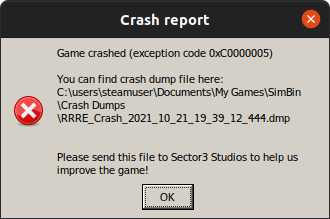
:
If I close the game on menu without load a race, this message is also showed
This is the log:
steam-211500.log
@leillo1975 are you loading into a multiplayer or singleplayer race when you get the crash or both? Could you try unplugging any controllers/steering wheel and trying to get into a race again just in case?
Edit: could you also try disabling esync? (PROTON_NO_ESYNC=1 %command%)
I get this crash on single player, on multi I didn't try.
I just tried without wheel or gamepad, only with keyboard and mouse and get the crash when I hit the single player button on menu.
Also tried with "PROTON_NO_ESYNC=1 %command%" and get the error again when I load the race
The game stop with this log file.
Maybe a problem of winbind but it"s installed
Can you help me ?
steam-211500.log
?
Those of you using Proton 6.19-GE-2, how are you getting FFB to work? I cannot get it working with my G27, though the game runs flawlessly otherwise.
Do you use new-lg4ff? https://github.com/berarma/new-lg4ff
With this driver you will activate ffb in all car games
To change settings on wheels you can use Oversteer or PyLinuxWheel
https://github.com/berarma/oversteer
https://gitlab.com/OdinTdh/pyLinuxWheel
@berarma
I was yes. I actually got it working just now, not sure what the issue was, but I rebooted the system and changed some oversteer settings and everything seems to be fine now.
My g29 FFB is not working after upgrading 6.20 from 6.19. I have oversteer and new-lg4ff.
My g29 FFB is not working after upgrading 6.20 from 6.19. I have oversteer and new-lg4ff.
Strange, @GloriousEggroll must know this
Has anyone managed to get the dedicated server working on linux?
Has anyone managed to get the dedicated server working on linux?
Not, and is really a pity . This have a different ID : 354060. @kisak-valve , is needed to open a new issue?
Hello @leillo1975, yes, the dedicated server should be tracked separately.
FFB is still not working on new release of 6.21. Latest working proton-ge version is 6.19
FFB is still not working on new release of 6.21. Latest working proton-ge version is 6.19
@GloriousEggroll , you know this?
out of curiosity, i finally got the game to run with proton experimental, but the game is completely unplayable due to low performances, set everything on low but still, is unplayable
5 or 6 years ago i was on windows with a much shittier computer and the game run just fine on lowest details
my actual configuration is : i5-2400 quadcore, 8 gb of ram, nvidia geforce 530 with 2 gb dedicated memory and an ssd, my old one (with a laptop) was : intel dual core, 3 gb ram and an amd card with 512 mb of ram
My new one is a little bit better than minimum system requirements listed on steam
the old configuration instead was not ideal but perfectly playable, maybe the game evolved so much over the years, or proton does have such a huge loss in performances against windows?
EDIT : i discovered the problem, proton experimental is not seeing my graphic card and using llvmpipe instead...
I think that graphics card doesn't support Vulkan, and is probably running without DXVK, so the game will be slower. You need at least a Nvidia Maxwell 1 GPU Architecture or AMD APU 2000 series and HD 7000 or better to use Vulkan and take advantage of it.
Yeah well, kisak gave me some advices and now the game is perfectly playlble
Of course lowest settings possible but still better than nothing i would say
It's a shame anyway cause i think it would run much better in windows...
Small problem I have found, game starts and plays fine, but in graphics options if I change the screen that r3e is displayed on (I have triples, not working in r3e yet either) it doesn't move the game window from my left screen to my centre screen but it does disable any interaction with the mouse, like the window is losing focus or it just doesn't know where the window is.
I have repeated it 3 times now, each time I need to reinstall as there is no keyboard navigation in r3e menus so I cannot change the setting back.
Running a fresh Linux mint install with proton experimental
proton-ge-custom-bin 7.0rc3_GE_1-1 finally fixed the FFB issue on my end (wasn't working since 6.19)
@martinezpenya how did you make T300 RS work properly in-game? I am constantly experiencing issues described here:
https://github.com/Kimplul/hid-tmff2/issues/39
@martinezpenya how did you make T300 RS work properly in-game? I am constantly experiencing issues described here: Kimplul/hid-tmff2#39
I've tested that game works on my ubuntu, i don't remeber if I tested my wheel, but I think my pedals where not recognized properly and I have also VR so (by now) I need windows to play.
Sorry.
Same issue still persists after several updates. I'm on 6700xt now.
recently i switched to t300rs wheel and raceroom is the only game that makes wheel sticking to the right
I've got the same issue as @fuzunspm using hid-tmff2 module for T300RS. rFactor 2 and AC work flawlessly but in RRRE keeps sticking to right. Author of module has tried to fix issue but it seems like it is a bug in proton.
I've got the same issue as @fuzunspm using hid-tmff2 module for T300RS. rFactor 2 and AC work flawlessly but in RRRE keeps sticking to right. Author of module has tried to fix issue but it seems like it is a bug in proton.
I've seen reports of this game working with Logitech wheels. I have doubts this is a Proton bug.
Same issue still persists after several updates. I'm on 6700xt now.
Also happens for me on a 6900XT, opensuse, Proton6.
The shadow glitch is fixed with DXVK2 (right now at proton experimental / bleeding edge beta).
FFB not working with my Logitech G29.
I already have new-lg4ff and Oversteer FFB working fine in other games, but in RaceRoom it doesn't work.
Tried several Proton versions, including 6.19-GE2, Experimental and 7.0rc3_GE_1, but no FFB at all.
well seems that latest proton experimental broke the game
when i enter a race, screen just goes black, reverted to old proton 7 and solved the issue, althought i have the shadow issue i didn't have before...
Hello @legacychimera247, please add PROTON_LOG=1 %command% to the game's launch options, reproduce the black screen, and attach the generated $HOME/steam-$APPID.log to this issue report as a file. (Proton logs compress well if needed.) Also, please copy your system information from Steam (Steam -> Help -> System Information) and put it in a gist, then include a link to the gist in this issue report.
hello, i would love to copy specs from steam but incredibily enough i'm having problems in doing that, so i'll write those manually
my specs are:
cpu : ryzen 7 5700x,
gpu : sapphire radeon rx6600
ram : 16 gb
the raceroom file is attached
by the way, i generally use proton experimental, not to keep multiple versions of proton wasting disk space, and that's where the problem lies in, as i just tried proton 8 and work like a charm, it doesn't even have the shadows problem...
Recently, the Raceroom development team released a patch that, among other things, improved the graphics, but since then the game looks as if it has a “fog” over it.
The game has the option to use DXVK on Windows. If I choose this option, it appears to display correctly:
@leillo1975 could you give more information? What card and gpu driver do you have? Which game launch option are you using? What graphic settings?
With my 9060 xt and mesa 25.2.3 I checked the default launch and the option with dxvk, with proton 9/10/exp, with default grphics settings, and neither had the weird fog.
As I said on the last message, If I use the DXVK game option, all seems to be OK, but if I choose the default option, in game graphics are like the screenshots.
About game config, I think I choose high settings. My specs are:
Ubuntu 24.04.3 (kernel 6.14)
CPU: AMD Ryzen 7 5800X
RAM: 32GB DDR4
GPU: Nvidia GeForce GTX 3070 with 580 driver
@leillo1975 Hi there and thank you for the report. This should be worked around on Proton Bleeding Edge
Did anyone get VR to run ? I can hear background sounds, but screen stays black both in the headset and on the screen. 2D Singleplayer works fine for me.
I've tried SteamVR, with the blackscreen as a result and WiVRn, which doesn't seem to work at all(doesn't even launch)
Did anyone get VR to run ? I can hear background sounds, but screen stays black both in the headset and on the screen. 2D Singleplayer works fine for me. I've tried SteamVR, with the blackscreen as a result and WiVRn, which doesn't seem to work at all(doesn't even launch)
it doesn't work on wivrn, stuck at loading screen and initially corrupts game save data somehow. I had to delete compatdata/211500/pfx/drive_c/users/steamuser/Documents/My Games/SimBin raceroom folder inside this path to launch it in 2d
After the update, the game won't start and just shows a black rectangle on the screen. Tested with Proton Experimental and the latest Proton 10.0-3.
Renaming compatdata/211500 to create a new one doesn't work either.
Have a same problem as Leillo1975.
Previously to patch a minor small problem closing with error after some race but it was fine with proton 9.0-4, now I can't play and I have paid for the Online Racing Pack. Very disappointed...
Edit: seems the fix broke other things, we'll need more time for this.
latest update fixed the game only if you delete profiles in compatdata/211500/pfx/drive_c/users/steamuser/Documents/My Games/SimBin @s3-chardonjf @leillo1975 @Booster-Gold-es
latest update fixed the game only if you delete profiles in
compatdata/211500/pfx/drive_c/users/steamuser/Documents/My Games/SimBin@s3-chardonjf @leillo1975 @Booster-Gold-es
Don't work to me with experimental and 10.0-3
latest update fixed the game only if you delete profiles in
compatdata/211500/pfx/drive_c/users/steamuser/Documents/My Games/SimBin@s3-chardonjf @leillo1975 @Booster-Gold-esDon't work to me with experimental and 10.0-3
I'm using custom proton for thrustmaster fix at https://github.com/MmAaXx500/proton-ge-custom/releases
in the mean time they rollback the update for another issue, i guess we will have to wait for them, at least developers are aware of the problem and willing to fix it.
Removing profile folder did fix a few more problems on my end before, fyi
Not sure if this is a work in progress, but I found a workaround, if you go on steam you can select a preview verison, dunno exactly from when it is, but with this one R3 works fine, even race online works normal.
Not sure if this is a work in progress, but I found a workaround, if you go on steam you can select a preview verison, dunno exactly from when it is, but with this one R3 works fine, even race online works normal.
yeah devs mentioned that in their discord channel, for now preview (early access) is working, i guess they are testing something so hopefully stable will work too in a short of time
oh ok, if eventually they read here, feedback would be:
Tested the preview today, DXVK, running my default game installation, aka. did not delete any config file or whatsoever, just switched to this branch and it works.
oh ok, if eventually they read here, feedback would be: Tested the preview today, DXVK, running my default game installation, aka. did not delete any config file or whatsoever, just switched to this branch and it works.
dxvk crashes randomly on my end so i use default launch options, i didn't see any difference anyway
Yeah I was more curious if it would make any difference, like maybe some custom patches (which eventually hopefully they would upstream), but in the end if you use proton experimental you likely end up with a more recent DXVK anyway. But it"s cool to see they care for Linux.
Pushed Preview to main branch over the weekend - should work for everyone now.
Instant crash when clicking "join" a rated race with fatal error message.
everything else works perfectly fine, even community server races.
using steam´s proton experimental. no launch options/tinkering.
when using latest ge´s proton version, u can join rated races.
(i hope, its ok to write this info here for other gamers, coz its most likely not valve proton related)
-
but u lose ffb (gotzl´s fanatec Linux driver). strange here is, ffb works in the warm-up session, but its gone when the session switches to the actual race session.
- gotzl (fanatec linux driver dev) might have found a workaround. not released yet, need more testing.
- but in my opinion, its still a raceroom issue here, coz it works well in non rated races and even in the rated warm up session.
Hello @ciscoyo, please add PROTON_LOG=1 %command% to the game's launch options, reproduce the crash, and attach the generated $HOME/steam-$APPID.log to this issue report as a file. (Proton logs compress well if needed.)
Hello @ciscoyo, please add
PROTON_LOG=1 %command%to the game's launch options, reproduce the crash, and attach the generated $HOME/steam-$APPID.log to this issue report as a file. (Proton logs compress well if needed.)
info to the latest hotfixes and tests up to 25.06.26
with the valve´s experimental and hotfix version, game still crashes, when joining ranked races.
but
raceroom with GE´s proton version 10-34 its fully operational again. much love to jf (and his team) :)
remember, u may need a fresh prefix, when switching proton versions.
stay cool and happy weekend everybody
Did anyone get VR to run ? I can hear background sounds, but screen stays black both in the headset and on the screen. 2D Singleplayer works fine for me. I've tried SteamVR, with the blackscreen as a result and WiVRn, which doesn't seem to work at all(doesn't even launch)
Happy to report VR (with WiVrn, tough SteamVR/ALVR still crashes for me) works now in single player 🚀 , sadly crashes when joining ranked races as reported elsewhere, but that seems like a new/different issue.
Just finished my first race. WiVRn + OpenComposite + GE-Proton11-3
The menu gets displayed way too high in the beginning, but hitting the recenter key (ingame settings) crashes the game.
Navigate the menu by looking up, once you are in the car and have started driving (no menus anymore) you can hit the in-game recenter key, which fixes the view.
I was able to race a ranked race without issues.
With the latest game update and Proton 11 (as well as the CachyOS version of Proton), the game does not display the new HUD correctly. If, on the other hand, we downgrade to version 10, the HUD is visible, but there is a sort of ‘haze’ that makes the screen look whitish.
It seems this isn't just happening to me...
https://discord.com/channels/254906072748261376/1541048758786326589
Sorry, I didn't remember that it worked correctly in DXVK mode (of the game itself).
This was a DXVK-related regression with the updated shared resource implementation in Proton 11, fix should be in bleeding-edge very soon™.
Related threads
- RaceRoom Racing Experience Crashes when trying to do a racedxvkclosed same game
- Elite Dangerousprotonopen same upstream bug
- rFactor 2protonopen same upstream bug
- EDTracker USB analog joystick is not detected (as a controller)steamclosed same upstream bug
- Fanatec ClubSport Shifter SQ V 1.5 input is not recognized by gamesprotonopen same upstream bug
- Axis-only USB HID flight controller is detected by Linux but not enumerated by Steam/game software.steamclosed same upstream bug
Proton versions
ge-proton11-3x1 2026-08proton experimentalx10 2026-06proton 9.0-4x1 2025-11proton 10.0-3x1 2025-11proton 6.19x3 2021-10proton 4.11x2 2021-10proton 6.19-ge-2x3 2021-10proton 6.16-ge-1x1 2021-09proton 6.3-6cx1 2021-09proton 4.2-8x2 2019-10
Launch options
PROTON_LOG=1x5 2026-06PROTON_NO_ESYNC=1x2 2021-10
Launch lines
PROTON_NO_ESYNC=1 %command%x2 2021-10
Upstream links
- ValveSoftware/Proton/issues/5126x1 2021-10
Compatibility Report
System Information
I confirm:
Symptoms
The 32-Bit version crashes straight away.
With the 64-Bit version the splash screen appears and after a minute this error message appears and the game shuts down: