Batman: Arkham Origins
The game will work if you add -d3d9 to the launch options.
On Mesa 18.1.x RADV was apparently missing a Vulkan feature as reported here:
https://github.com/doitsujin/dxvk/issues/219
However, I've tested with Mesa 18.2 and it still crashes with Proton when launching the game with -d3d11. The furthest I've gotten is the NVIDIA logo.
This seems to be related to related to AMD cards, on nvidia it does work great.
OS: Ubuntu 18.04.1
GPU: GTX 970 4G
Driver version: Nvidia 396.54.05 beta
Kernel version: 4.15.0-35-generic
Proton version: 3.7-6
Batman: Arkham Origins not showing all graphics settings
Issue transferred from https://github.com/ValveSoftware/Proton/issues/1604.
@GitThisBugOff posted on 2018-09-25T15:48:02:
Compatibility Report
- Name of the game with compatibility issues: Batman: Arkham Origins
- Steam AppID of the game: 209000
System Information
- GPU: <RX 480>
- Driver/LLVM version: <Mesa 18.1.7>
- Kernel version: <4.15.0.34>
- Link to full system information report as Gist:
- Proton version: 3.7-6 Beta
I confirm:
- [X ] that I haven't found an existing compatibility report for this game.
- [X ] that I have checked whether there are updates for my system available.
Symptoms
Graphics settings do not go higher than 'normal' options.
These are the settings as seen in-game with my system:

This is what it's supposed to look like at Max settings on a Windows system.

Reproduction
Download and run the game as normal.
Yep! Same for me. Game is quite playable but no DX11 settings available.
Running on an i7-3770 and RX 580 8gb with latest mesa stable (18.2.3) and Proton 3.16.3-beta.
Edit: Played it on the same setup (same hardware, same Proton version) but with a GTX 960 4gb (394.56) and all settings were available. DX11 was giving me better performances compared to Normal.
Keep doing your awesome work!
Running fine now on mesa git (padoka PPA) / Ubuntu 18.04. Vega64 with -d3d11 switch.
All DX11 Enhanced options available and enabled - excellent performance.
I tried running it again and it still crashes on launch. It takes longer to do so now, about 2-3 minutes but result is the same. I have tried adding "-d3d11" and "-d3d9" to the launch options but same result.
OS: Manjaro
GPU: RX 580 8GB
Driver/LLVM version: Mesa 18.3.3/LLVM 7.0.1
Kernel version: 4.20.11-1-MANJARO
Proton version: 3.16-4
https://gist.github.com/Simmonz/7a6eb7ee79fcb5deee2a12633f5d8a58
Hi,
Not the same bug but very important.
The issue is only in DX11 version but the cinematics in this game not play well. Play very very choppy and sluttering, at 8 or less FPS.
If exist another open issue more specific or generic, can youlist this game in it?
Maybe is a driver problem... or dxvk... or wine side... or is problem of the game it self? I don’t know, but is possible fix this problem the experience can be perfect for all.
Thanks!
I opened bug in winehq also: https://bugs.winehq.org/show_bug.cgi?id=47162
When you playing for one hour more o less, the game crash with a windows notification message:
"Fatal error!
Ozzy_[2014-03-07_09.25] 364844 2014-03-07_09.25.15 (Wwise: 2012.2.1 #4427) Game
_XSend() Address = 0xf76250ca (filename not found) [in ]"
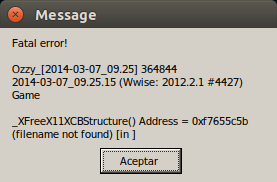
Wwise look like a sound engine middleware: https://en.wikipedia.org/wiki/Audiokinetic_Wwise
Maybe it is a bug from FAudio or wine... I don't know. I also tested the game with WINEDLLOVERRIDES="xaudio2_7=b,n" but with the same result.
This game seems to be affected by the 1000hz mouse polling rate bug. I was scratching my head and wasted hours of time compiling different kernels and testing various settings only to find posts regarding the 1000hz mouse polling rate bug.
Batman Arkham Origins, 209000 left trigger of controller doesn't work
Issue transferred from https://github.com/ValveSoftware/Proton/issues/4502.
@sizezero posted on 2020-12-27T01:33:23:
Compatibility Report
- Name of the game with compatibility issues: Arkham Origins
- Steam AppID of the game: 209000
System Information
- GPU: GeForce GTX 970
- Driver/LLVM version: 390.138
- Kernel version: 5.8
- Link to full system information report as Gist: system information
- Proton version: 4.2-9, 4.11.13, 5.0-10, 5.13-4, 5.9-GE-8-ST
I confirm:
- [x] that I haven't found an existing compatibility report for this game.
- [x] that I have checked whether there are updates for my system available.
Symptoms
When in the game the left trigger does not work at all. (it's supposed to select and aim a weapon). I've tried both a wireless xbox one controller and a wired xbox 360 controller and both exhibit the same symptom. The controllers (and left trigger) work fine in other games including Batman Arkham City. (via Proton 4.2-9)
This appears to be a regression as I was able to play the game via steam/proton in March 2020 (with the same controllers) with no problems. Unfortunately I don't know the version of Proton I used then.
Reproduction
I can get the game to run on Proton 4.2-9, 4.11.13, and 5.9-GE-8-ST. I need to set PROTON_USE_WINE3D or I get an error that "your graphics card does not support alpha blending". I have not been able to run the game at all with Proton 5.0-10 or 5.13-4. I'm launching the game from steam.
Enter the game in story mode, select a weapon/tool with the dpad and hold the left trigger. The tool is not selected to aim. The right trigger and all other buttons and controls work fine. Everything else in the game seems to work fine.
I haven't found any other issues that reference similar controller problems.
Batman Arkham Origins runs on older Proton versions but not on newer ones
Issue transferred from https://github.com/ValveSoftware/Proton/issues/4590.
@Niveth2 posted on 2021-02-03T14:01:41:
Hello,
I installed Batman Arkham Origins and while trying to launch it with the newest version of Steam Proton, it kept crashing, after troubleshooting for a while, I tried Steam Proton version 3.7-8 and it launched. Can you please fix on it so that it would work on newer proton versions
I was just playing through Batman: Arkham Origins and it seems to flicker a lot. I tried to take a screenshot.
Distro: Manjaro
GPU: RX 580 8GB
Driver/LLVM version: Mesa 21.1.2/12.0.0
Kernel version: 5.12.9-1-MANJARO
Proton version: 6.3-4
https://gist.github.com/Simmonz/828f2acb603c9811c19e1b3ebf93ba41


Does not start with Proton experimental but does start with Proton 6.3. So this is a regression of some kind.
Mesa 21.1.4, kernel 5.13.4, AMD Vega 56/64
steam-209000.log
@Simmonz Are you still able to reproduce?
Compatibility Report
- Name of the game with compatibility issues: Batman_Arkham_Origins
- Steam AppID of the game: 209000_
System Information
- GPU: nVidia GTX1050 2GvRAM
- Driver/LLVM version: nVidia-driver-495. Ubuntu Launchpad Graphics PPA
- Kernel version:5.13.23-23-Generic. Canonical Proposed PPA.
- Link to full system information report as Gist:
- Proton version:6.3-8_10122021
No launch options used.
Symptoms: Batman™:
-
Arkham Origins works well..ish on highest settings on a nVidia_GTX1050_2GvRAM bottlenecked at PCIe-2.
-
It functions with a few errors and quirks
-
The game performs terrible on the lowest quality settings and great with the settings on highest quality. DX11- enhanced.
-
Press [ X ] to save does nothing thenwhen changing menu it prompts to save. When I switched from Gamepad to Keyboard and mouse it then started autosaving when I changed the settings
-
FAIL: Online.It does not connect online at all and goes into an error loop. Press [A] to Continue takes you back to Press [A] to Continue .
-
On kDE-NEON the Kwin Compositor MUST be on. If the compositor isnt on the Gamepad ( Logitech f710 Wireless ) does not work. I tried everything I could think of.. And gameplay actually performed better with the compositor on. 2 things that I noticed. Steam overlay appears in the top left corner not in the lower right like every other game and the native breeze mouse pointer is captured but doesn't leave/ disappear from the game screen.
-
- There has also been reports of the kDE taskbar refusing to hide during Proton games including this one. Thats a maybe kDE Plasma issue. I got rid of that by clearing my configs, resetting my desktop and reinstalling the individual deps. of libkscreenlocker5.. ( I think it was that.) Ive had it happen it Rocket league aswell.
-
The compositor / gamepad issue is true for GRE and Experimental Proton aswell.
-
Its not as close to being 'Out of Box' as I intially had thought
-
I experienced no crashes or artifacts.
-
Story mode graphics/ video / audio / gameplay was actually really good.
-
I install nVidia as per :
-
https://us.download.nvidia.com/XFree86/Linux-x86_64/495.44/README/index.html
-
*note: default locations may differ between distros but the configing is exactly the same.
Reproduction: Play game on kDE Neon
Works on Proton 7.0, Mesa 21.3.5 and kernel 5.16.10.
You do need to start twice since first start (after switching Proton version) gamepad is not working for some reason while on second start gamepad does start working (happens with a few other games as well where a second start is needed). On subsequents starts it works correctly.
One thing to note is that hardware-accelerated physx (in graphics options) changes things (for example, one scene in benchmark is quite different) and that reduces the framerate considerably if enabled.
Batman Arkham Origins 209000
Issue transferred from https://github.com/ValveSoftware/Proton/issues/6892.
@CarterTheSpaceman posted on 2023-06-29T15:31:10:
Whitelist Request
- Name of the game to be whitelisted: Batman Arkham Origins
- Steam AppID of the game: 209000
System Information
- GPU: AMD AMD Custtom GPU 0405 LLVM 14.0.6, DRM 3.45 5.13.0-VALVE36-1-NEPTUNE
- Driver/LLVM version: 4.6 (Compatibility Profile) Mesa 22.2.0 (git-17e5312102)
- Distro version: 3.4.8
- Link to full system information report as Gist:
- Proton version: 8.0.2
I confirm:
- [x] that pressing the
Playbutton in the Steam client is sufficient. - [ ] that runtime config options are necessary to run the game.
- [ ] that no workarounds other than PROTON_* env variables are necessary.
Issues
- [x] I haven't experienced any issues.
- [ ] There are no issues left open for this game.
- [ ] Although I consider the gaming experience equal to Windows there are remaining issues:
Compatibility Report
- Name of the game with compatibility issues: Batman Arkham Origins
System Information
- GPU:RTX 2060 6GB NVK
- Video driver version: Mesa 26.1.0
- Kernel version: 6.18.8
- Link to full system information report as [Gist]https://gist.github.com/pollux78/0cc678c4474d328a989a0589f5e557a4
- Proton version: Proton Experimental
- Log: steam-209000.log
Symptoms
Launching Batman Arkham Origins will instantly close after a couple of seconds of it running
Reproduction
Steps to reproduce the behavior:
- Be on the latest mesa git not nvidia proprietary driver
- Launch the game
- Notice how it closes instantly after a couple of seconds
Hello @pollux78, your issue should also be mentioned to your video driver vendor.
Some lines of interest from your Proton log:
err:   D3D11: Cannot create texture:
err:     Format:  6
err:     Extent:  1536x1x1
err:     Samples: 1
err:     Layers:  1
err:     Levels:  1
err:     Usage:   8
err:     Flags:   0
Replying to https://github.com/ValveSoftware/Proton/issues/1385#issuecomment-3831051021
Ok thank you. I have posted more games that don't work under NVK, if there is any other logs you see that are important to report to the NVK developers I will do so :)
Related threads
- Batman™: Arkham Origins - Unplayable: menu window black and unresponsiveprotonclosed same game
Proton versions
proton experimentalx2 2026-02proton 7.0x1 2022-02proton 6.3x1 2021-07proton 4.2-9x1 2020-12proton 5.0-10x1 2020-12proton 3.16x1 2018-10
Launch options
PROTON_USE_WINE3Dx1 2020-12WINEDLLOVERRIDES="xaudio2_7=b,n"x1 2020-02PROTON_LOG=1x1 2018-09
Upstream links
- ValveSoftware/Proton/issues/6892x1 2023-06
- ValveSoftware/Proton/issues/4590x1 2021-02
- ValveSoftware/Proton/issues/4502x1 2020-12
- show_bug.cgi?id=47162x1 2019-05
- ValveSoftware/Proton/issues/1604x1 2018-09
- doitsujin/dxvk/issues/219x1 2018-09
I tried running Batman: Arkham Origins through Proton and it crashes at launch. The Steam AppID of the game is 209000. I added PROTON_LOG=1 %command% to the game's launch options and received the following log:
steam-209000.log
I haven't found an existing compatibility report for this game and I have checked whether there are updates for my system available.
System Information