Killer is Dead
.Net Framework 4.0 is the cause of the crash, there's a workaround that might work for you, download the .net framework standalone insaller from microsoft, http://www.microsoft.com/en-us/download/details.aspx?id=17718, use Winetricks taskmngr to run it twice, the second time choose repair (important), then the game should run.
@lucifertdark No luck. Ran this twice (with repair on second)
WINEPREFIX=/run/media/parker/TBerculosis4/SteamLibrary/steamapps/compatdata/261110/pfx/ /run/media/parker/TBerculosis4/SteamLibrary/steamapps/common/Proton\ 3.7\ Beta/dist/bin/wine64 /home/parker/Documents/dotNetFx40_Full_x86_x64.exe
Quite large log http://ix.io/1oJX
I got the game to run by running winetricks -q dotnet45 xact_june2010 on the game prefix, i also ran in virtual desktop mode but i dont know if it's required.
I also needed to do this to fix crash in the second level: https://steamcommunity.com/app/261110/discussions/0/522728813811121054/
Game seems to run perfectly after that
@parkerlreed I'd suggest you delete the pfx folder & start again, it doesn't take long for steam to regenerate the prefix.
First run the game & wait for it to crash then use Winecfg to set Windows version to XP, then run dotnet45, Directx9, xact_june2010 & vcruntime2010 (running xact after dotnet will give you the option to repair).
ps I didn't use xact but it doesn't hurt if you do.
How are you guys running winetricks with the prefix? I can use WINEPREFIX but then it's using system wine to work on it. How do I tell it to use Proton?
I use Protontricks https://github.com/Sirmentio/protontricks it does all the fiddly WINEPREFIX stuff so I don't have to. ps you still need Winetricks installed. ;)
pps the way to use it is either "protontricks (game number) (command)" which does everything in terminal OR "protontricks (game number) --gui" which pops up winetricks & you can do it that way.
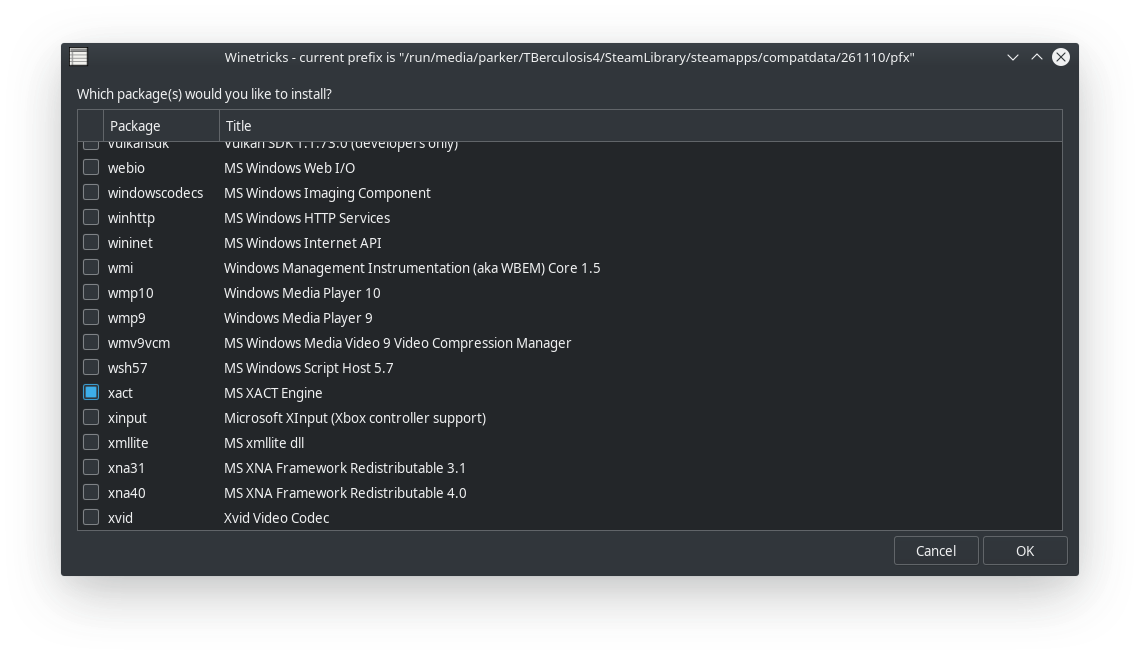
That's the right one so the game should be working, not sure what we're missing, how I got it working was...
- install game & run it for first time, wait for crash.
- download dotnet45 full from microsoft website, run it twice via taskmngr/winetricks ( choose repair second time) http://download.microsoft.com/download/9/5/A/95A9616B-7A37-4AF6-BC36-D6EA96C8DAAE/dotNetFx40_Full_x86_x64.exe
- install directx9 (full not just the single dll like winetricks suggests)
- install vcruntime2010
- run game & it starts after a short wait.
I went step by step and it's still failing.
Step 4 when I try vcrun2010 I get a message saying it's already installed.
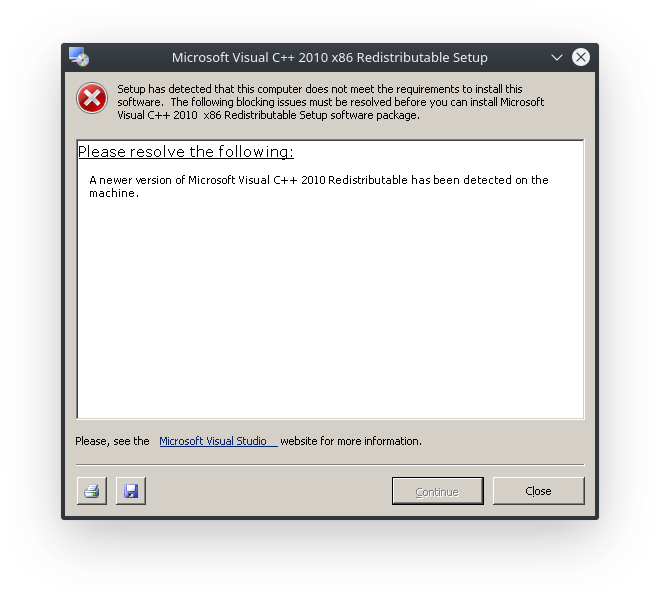
Log
System info
It worked for me previously with regular wine so I tried it with proton and it crashes at start (even after installing dotnet45 and xact). I tried running KidGame.exe binary directly without steam and using the wine prefix created by proton and it crashes at start as well with missing dll mscore.dll - which you get from dotnet installation, one way to fix it is to run the repair tool in the installer.
I used my systems wine instead (wine 3.17 staging) and ran winetricks -q dotnet45 xact (note -q option) and then changed windows version to windows 7 in winecfg (don't know if this is required) I was able to run KidGame.exe binary with wine. I believe the issue is that wine is able to install mscore.dll while proton is not (different wine version perhaps?)
I don't get it. heres the log from my install of the game
steam-261110.log
& my system info
https://gist.github.com/lucifertdark/584c14275612e8e3c4a8070d428d8a02
It worked for me previously with regular wine so I tried it with proton and it crashes at start (even after installing dotnet45 and xact). I tried running KidGame.exe binary directly without steam and using the wine prefix created by proton and it crashes at start as well with missing dll mscore.dll - which you get from dotnet installation, one way to fix it is to run the repair tool in the installer.
I used my systems wine instead (wine 3.17 staging) and ran
winetricks -q dotnet45 xact(note -q option) and I was able to run KidGame.exe binary with wine. I believe the issue is that wine is able to install mscore.dll while proton is not (different wine version perhaps?)
I have two copies each of mscoree.dll mscoreei.dll mscorees.dll & mscoreeis.dll installed in the prefix 32bit & 64bit of each, so it's possible to install dotnet 35 & upwards.
@parkerlreed did you install the 64bit vcruntime2010 as well? I'm pretty sure you have to have both 32bit & 64bit. they're both in the _CommonRedist folder.
@DEC05EBA :D thanks for the tip on system Wine. Running now. Still would be good to get working in Proton for the controller support.
@lucifertdark Heck, if you can get a working pfx for Killer, could you just tar it up and share it? Might be the easiest way to rule out other factors.
@lucifertdark Heck, if you can get a working pfx for Killer, could you just tar it up and share it? Might be the easiest way to rule out other factors.
I'd do it in a heart beat but I think the guys at Valve might have something to say about that.
I mean why would that be bad? The prefix just contains the stuff to run that game, not the game itself.
With the latest update to Proton the workaround no longer works, any game that needs dotnet is pooched as it no longer installs at all.
Aww poop. Thanks for the update.
Got it to work with 3.16-6 Beta basically as suggested in here (dinput8, dotnet40 + xact via winetricks) but the window title says DX9 so I guess it's not using DX11 even though DX10 is mentioned in the min. requirements. Had to install dotnet40 twice though since it didn't seem to finish the first time.
I got all kinds of errors during install, of course, and one Wine error popup about dotnet (unable to find version of the runtime) on the first launch. Doesn't happen on consecutive launches though.
I was able to run on the newest beta (not sure if I had some old fixes in the prefix, need to test fresh). Runs well but some of the in game assets aren't rendering.
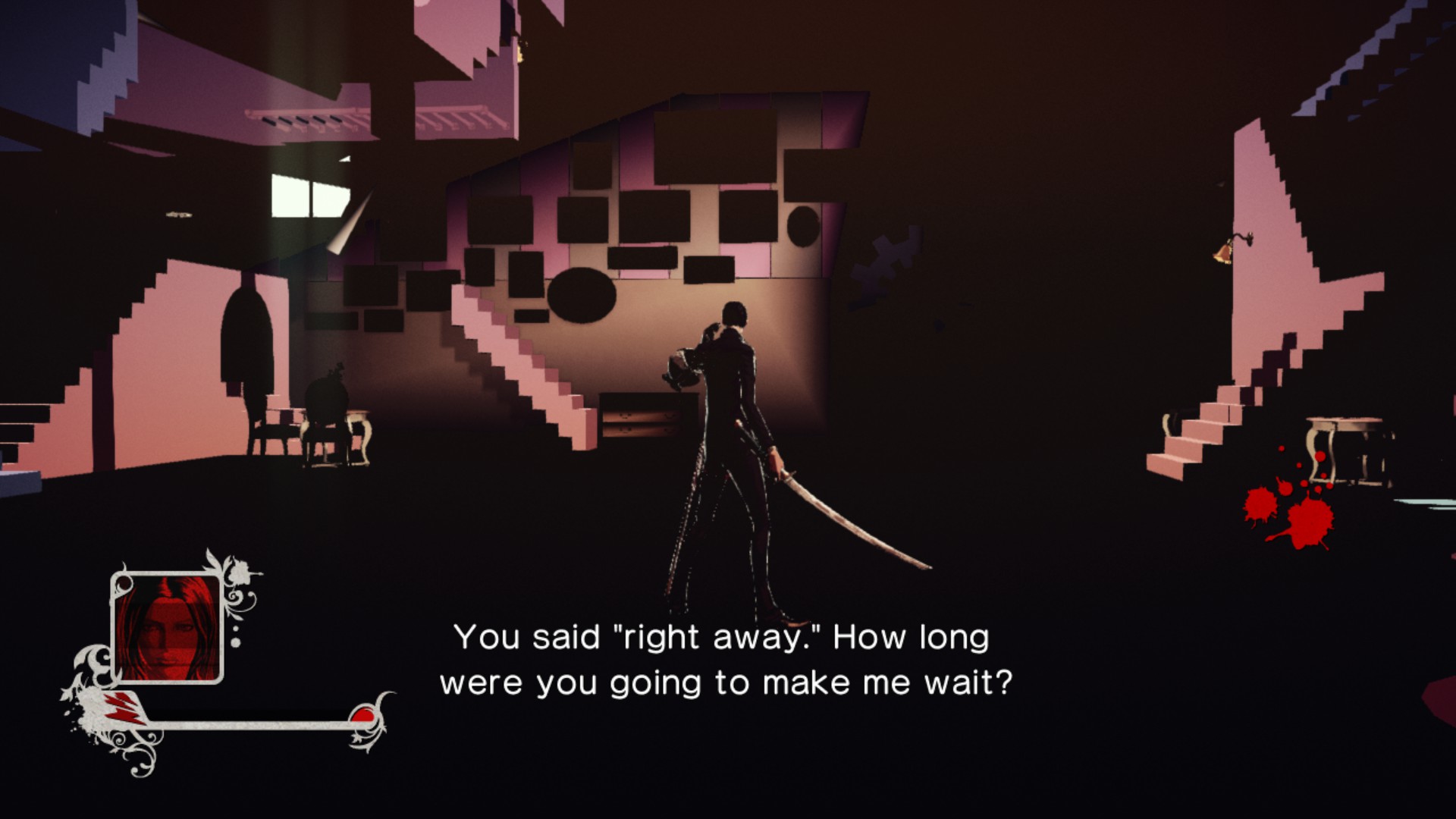
System https://gist.github.com/parkerlreed/169ef9f446a2a7176a0a238ebb29bc48
@parkerlreed It was a while ago I tested this game with proton, but I think you can fix those issues if you switch direct3d version to run the game with. Switch from direct3d 11 to direct3d 10.
@DEC05EBA Is there a flag for that?
It appears that Proton 4.11-1 fixed the black areas, just like it did in King's Quest. Does the shading look kinda flat though, or is it just me?
Whitelist Request
- Name of the game to be whitelisted: Killer is Dead
- Steam AppID of the game: https://steamdb.info/app/261110/
System Information
- GPU: GTX 760
- Driver/LLVM version: NVIDIA 440.59
- Distro version: Arch
- https://github.com/shoober420/linux-scripts/blob/main/home/shoober420/sysinfonvidia
- Proton version: 5.0-2
Works great out of the box.
Hello, is anyone seeing an issue with this game and Proton 5.0 that would block it from being whitelisted?
Sound is crackling (pulseaudio with tsched=0) with latest proton 5.0-2.
steam-261110.log
Running great here (Considering the hardware. Would be 10/10 on the home desktop)
The game crashed at startup but after reinstalling the game it launched (not sure if it was stuck on old proton version?). But after skipping the first cutscene after selecting episode 4, the game crashed. Unfortunately I didn't have logging enabled so I didn't get any log for that run. I restarted the game with logging enabled but the game no longer crashed after that point but at certain places in the game the graphics glitch out:
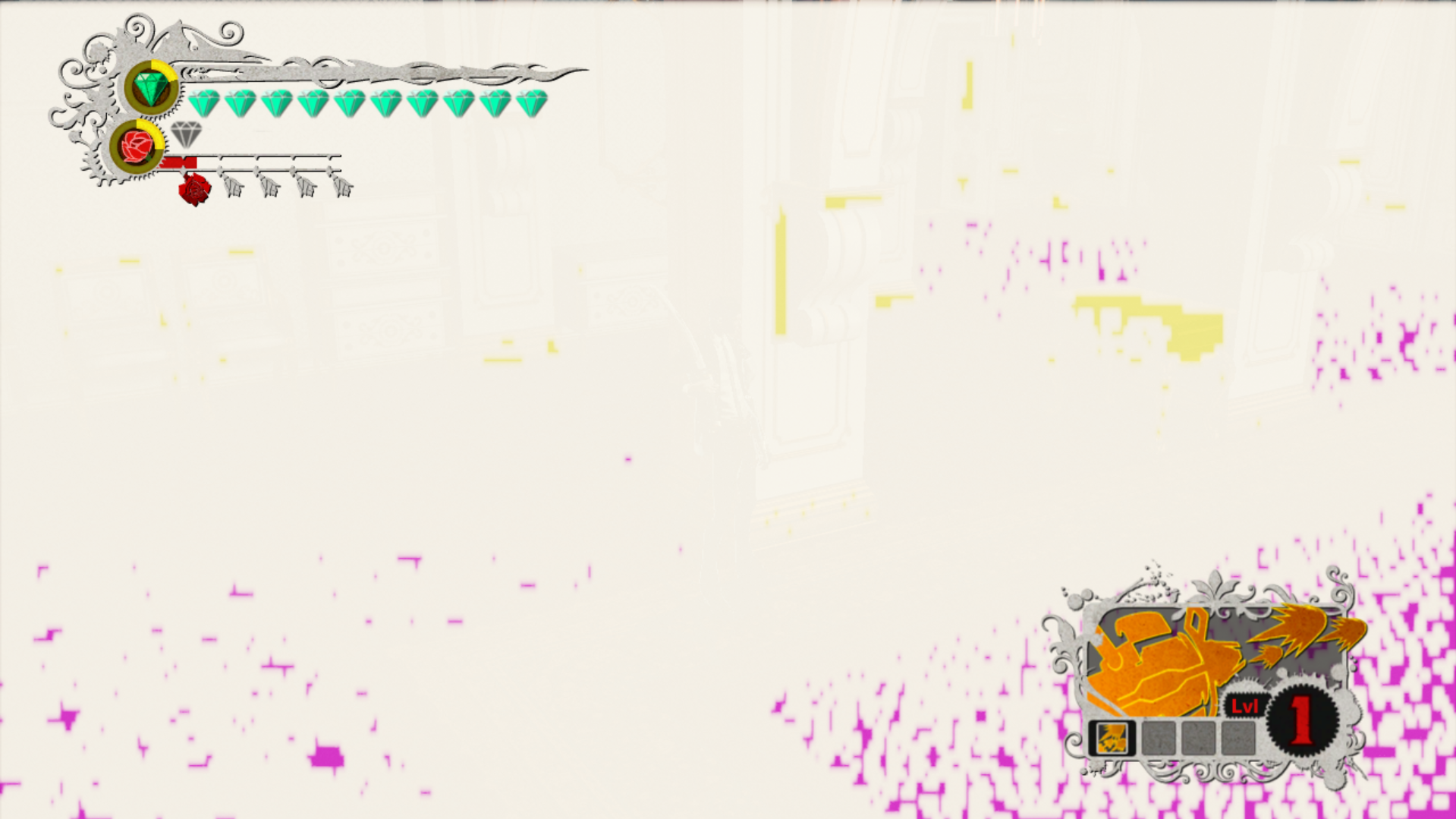
system.txt
@DEC05EBA try this https://steamcommunity.com/app/261110/discussions/0/522728813811121054/
System Information
- GPU: RX 5700 ITX
- GPU Driver: Mesa 20.1.0-devel (ppa:ernstp/ppa)
- Kernel version: 5.3.18-050318-lowlatency
- Distro version: 19.3 Tricia (64 bit) (Cinnamon)
- Proton version: 5.0-2
Compatibility Report
The only issue I'm seeing is that the game is always launching minimized/running in the background, I have to alt-tab to bring up the game.
Other than that the game appears to work fine:
✔ Nintendo Swich Pro controller
✔ Switching between desktop and fullscreen
✔ Did not notice any audio issues
(The game does not detect 2560x1600 resolution, but that was a problem on Windows too)
Hello, is anyone seeing an issue with this game and Proton 5.0 that would block it from being whitelisted?
It successfully starts for me now using Proton 5. Previous versions resulted in a crash at start.
I had to apply the suggestions from here for the audio that was stuttering a lot.
Tracking note: Dropping whitelist request due to the out-of-the-box audio crackle.
No audio problems here (5.0-10 & 5.13-6), but it crashes after killing the first 2 groups of enemies in the 2nd level. Had to switch back to Proton 4.11-13 where the crash does not occur.
Hello @DanMan, please add PROTON_LOG=1 %command% to the game's launch options, reproduce the regression, and attach the generated $HOME/steam-$APPID.log to this issue report as a file. (Proton logs compress well if needed.) Also, please copy your system information from Steam (Steam -> Help -> System Information) and put it in a gist, then include a link to the gist in this issue report.
Sorry for the confusion. Nothing has really changed. The adjusted audio settings in the .ini file mentioned further up fixed the crashing for me in that case, too. Since that's also an issue on Windows, the crashes are probably not Proton related. But it keeps crashing later on anyway. Just an awful port of a game. 😒
Related threads
- VRChatprotonopen same error
- Microsoft Flight Simulator (2020)protonopen same error
- Elite Dangerousprotonopen same error
- Space Engineersprotonopen same error
- Mount & Blade II: Bannerlordprotonopen same error
- Baldur's Gate 3protonopen same error
- Divinity Original Sin 2protonopen same error
- Overwatchprotonopen same error
- Assetto Corsaprotonopen same error
- SOULCALIBUR VIprotonopen same error
Proton versions
proton 4.11-13x1 2021-03proton 5.0x2 2020-03proton 5.0-2x1 2020-02proton 4.11-1x1 2019-08
Launch options
PROTON_LOG=1x2 2021-03WINEPREFIXx2 2018-10WINEPREFIX=/run/media/parker/TBerculosis4/SteamLibrary/steamapps/compatdata/261110/pfx/x1 2018-10
DLLs
mscore.dllx2 2018-10mscoree.dllx1 2018-10mscoreei.dllx1 2018-10mscoreeis.dllx1 2018-10mscorees.dllx1 2018-10
I tried running Killer is Dead: Nightmare Edition through Proton and it crashes at launch. The Steam AppID of the game is 261110. I added PROTON_LOG=1 %command% to the game's launch options and received the following log:
steam-261110.log
I haven't found an existing compatibility report for this game and I have checked whether there are updates for my system available.
System Information
OS: Solus
GPU: RX 580 8GB
Driver/LLVM version: Mesa 18.1.6
Kernel version: 4.18.5-90.current
Proton version: tried 3.7-3 and 3.7-6
https://gist.github.com/Simmonz/ee96fbeb3d32de20b2ebea979bf1746f