Giana Sisters: Twisted Dreams
If you change the prfix to xp .net will install but unfortunately the games launcher works but it still won't play. It says running but it isn't. This is with the 3.16.1 beta.
@kisak-valve Requesting an XAudio2 label for this game...
Still doesn't work with Proton 4.2.
Log: steam-223220.log
Systeminfo: https://gist.github.com/NoXPhasma/b6e8c494cc5f92bbae4aae1f81cb25ee
I managed to get it working, including D3D11, with Proton outside of Steam but you need to install xact and wmp9 with winetricks. The launcher doesn't work due to Mono but if the defaults are okay then you don't need it. Otherwise you can run it with another version of Wine. XInput only seems to work under Proton even though Wine has supported this for a while. Most importantly, you need to interrupt the brief BFG clip at the start where the wolf howls because if you don't, it crashes with an error. It took me a while to realise this!
The launcher is now working with Proton 4.2-3 but it crashes as soon as I press the play button.
steam-223220.log
~~I managed to get the other "Giana Sisters: Twisted Dreams - Rise of the Owlverlord" (246960) game to start automatically with my "steamtinkerlaunch" by autoappling 32bit voodoo for that game (changes are not in git yet),
but the same thing doesn't work with 223220 - see here:
https://github.com/frostworx/steamtinkerlaunch/issues/14#issuecomment-663514148~~
When starting 223220 $PWD is falsely in
~/.local/share/Steam
but it should be in
SteamLibrary/steamapps/common/Giana Sisters Twisted Dreams/launcher
and therefore the main game exe file is being searched for in
~/.local/share/
which fails of course. I though this was a problem with the forced 32bit prefix, but just found out that this is exactly the same problem in the original 64bit WINEPREFIX created by proton!
(maybe this is really related to the always failing steam runtime install of dotnet35 where the failed install simply is missing a cd -
to return to SteamLibrary/steamapps/common/Giana Sisters Twisted Dreams/launcher
the other game 246960 installs dotnet40 which suceeds and therefore doesn't have this problem
edit: in a fresh 64bit WINEPREFIX the 246960 exe hangs after the title logo, because wmp10 needs to be installed in any case, so 223220 would require the 32bit hack anyway even if the wrong pwd would be fixed (until wine can install wmp10 correctly in 64bit)
edit2:
no idea, if this would be a big deal, but if
"valve removes the dotnet35 installation for "Twisted" which probably is useless(?)"
(maybe replacing it with dotnet40 - in the community forum there are people with dotnet4.5 playing the game)
this would probably help a lot.
edit3: sorry for the noise:
looks like there's no valid way anymore to prevent steam from installing the redistributables, but taking away the whole source
steamapps/common/Steamworks Shared and starting with a clean WINEPREFIX
the pwd is still ~/.local/share/Steam
so dotnet might not be related at all(?)
pwd in the other Giana 246960 is correctly in
SteamLibrary/steamapps/common/GSTD - Rise of the Owlverlord/launcher
so this is definitely the problem.
outdated - see below
yes the wrong pwd was the last problem.
Just released stl-v1.4.3
which supports both
"Giana Sisters Twisted Dreams (223220)"
and
"Giana Sisters - Rise of the Owlverlord (246960)"
ootb.
The WINEPREFIX is the regular 64bit one, but a 2nd 32bit WINEPREFIX with wmp10 is created inside the 64bit one (so it is removed automatically when uninsalled) and the required wmp10 files are copied over into the 64bit one. it just works
outdated - see below
I tried stl-v1.4.3 for this game, but it always keeps hanging in the title screen. This doesn't work for me.
opening an issue with a logfile would be nice
edit: My glass sphere says you (and toalex77) didn't install the bundled tweakfile, which is required of course...
I was about to open an issue on your repository, but decided to delete the prefix and restart the process. And this time it worked.
ic
Just played a bit with it again.
Results (the same also applies to "Giana Sisters: Twisted Dreams - Rise of the Owlverlord" (246960)):
- the game refuses to start because wmvcore:WMReader_Open hangs when trying to open the intro video:
010c:fixme:wmvcore:WMReader_Open (02160740)->(L"data_common\\BFG Logo 1080p.wmv" 4A256270 00000000) - wine upstream bug for this wmvcore problem is here: https://bugs.winehq.org/show_bug.cgi?id=38278
- this hang can be circumvented by installing "wmp10". Unfortunately, MS did not only remove the MP10Setup.exe from their servers, but it is also no longer available on archive.org
# md5sum MP10Setup.exe
e57645c5ab34485d56d019aaa17c3150  MP10Setup.exe
- in fact, it is not necessary to install the whole MP10Setup, but extracting and copying
8f8e038d81e16103cfb2772e13bf2d1a  WMASF.DLL
110a38fda648c87f2212d8b50424ffcf  WMVCORE.DLL
into "${STEAM_COMPAT_DATA_PATH}/pfx/drive_c/windows/syswow64/" is already enough
-
wine ships its own (lowercase) "wmpasf.dll" and "wmvcore.dll" which need to be removed from the same directory.
-
with above dlls ready the intro video still doesn't play, but shows a black screen and doesn't freeze the game
-
there is a dummy skip-intro video on https://www.pcgamingwiki.com/wiki/Giana_Sisters:_Twisted_Dreams
which unfortunately crashes back to the desktop, so unfortunately no solution to shorten the ~10sec black screen
(audio/video codecs do match, so the 00:00:00.00 duration might be the problem - or the resolution))
originalBFG Logo 1080p.wmv
  Duration: 00:00:09.47, start: 0.000000, bitrate: 1283 kb/s
  Stream #0:0: Audio: wmav2 (a[1][0][0] / 0x0161), 44100 Hz, stereo, fltp, 48 kb/s
  Stream #0:1: Video: wmv3 (Main) (WMV3 / 0x33564D57), yuv420p, 1920x1080, 7000 kb/s, SAR 1:1 DAR 16:9, 30 fps, 30 tbr, 1k tbn, 1k tbc
dummy video:
  Duration: 00:00:00.00, start: 0.000000, bitrate: 48240 kb/s
  Stream #0:0(ger): Audio: wmav2 (a[1][0][0] / 0x0161), 44100 Hz, stereo, fltp, 128 kb/s
  Stream #0:1(ger): Video: wmv3 (Main) (WMV3 / 0x33564D57), yuv420p, 1280x720, 8035 kb/s, 1k tbr, 1k tbn, 1k tbc
- the game forces an "unskippable" game launcher which seems to cause other issues as well (forks the game exe)
so it launches much cleaner, when starting the DX10/11 game exeGSGameExe.exedirectly.
(I use my steamtinkerlaunch for this)
Edit:
copying both dlls directly into the game directory (besides the GSGameExe.exe) works as well, so modifying anything in compatdata/wineprefix is not necessary (tested with proton 6.3-5.)
Edit 2:
ffmpeg -ss 00:00:00.00 -to 00:00:00.01 -i BFG\ Logo\ 1080p.wmv -c copy BFG\ Logo\ 1080p_dummy.wmv
generates a very short, compatible dummy intro video (the files need to be renamed of course :))
Edit 3:
simply returning S_OK for (!strcmp(sgi, "223220") | !strcmp(sgi, "246960")
in WMReader_Open is not enough :(
Not pasting any urls, but the MS package WindowsMedia-KB891122-x86-ENU.exe
(the one I tested has 6202120 bytes, md5sum is 74fedda2161ce57aa7cc65a184b6110a, can be still found online)
can be extracted with cabextract.
It contains various files, but only
wmfdist95.exe is required (5732096 bytes, md5sum is 0433b23385d5df4406f78e7bce3e6ed7),
which can be extracted with cabextract as well.
It contains both required files WMASF.DLL and WMVCORE.DLL with the correct checksums (see above)
The game can be installed. After starting the game, the launcher appears. However, the game does not start.
You can make various settings for the controls, graphics and audio there and otherwise press the "Play" button. But after that nothing happens, the game doesn't start at all.
Linux Mint 20
5.12.8-051208-generic
16 GB
4.6 Mesa 21.1.3 - kisak-mesa PPA
AMD AMD Radeon RX 5700 XT (NAVI10, DRM 3.40.0, 5.12.8-051208-generic, LLVM 12.0.0)
AMD Ryzen 5 3600 6-Core
you might want t o read my 2 comments above, @KuJo-Ger
you might want t o read my 2 comments above, @KuJo-Ger
Thank you. I have seen. And I have also tried, but it still does not work:
- WindowsMedia-KB891122-x86-ENU.exe downloaded and unpacked (Google helped).
- Unpacked WMASF.DLL and WMVCORE.DLL from wmfdist95.exe
- copied to the folder "${STEAM_COMPAT_DATA_PATH}/pfx/drive_c/windows/syswow64/" and deleted the lowercase files
- additionally copied to the folder where the file GSGameExe.exe is located
- downloaded the skip intro video
- with ffmpeg -ss 00:00:00.00 -to 00:00:00.01 -i BFG\ Logo\ 1080p.wmv -c copy BFG\ Logo\ 1080p_dummy.wmv created the dummy video file and renamed it to BFG Logo 1080p.wmv
With your "Edit 3"
(simply returning S_OK for (!strcmp(sgi, "223220") | !strcmp(sgi, "246960")
I can't do anything with it. Where do I have to insert what? (I am not completely new to Linux/Wine and Proton. But I am not that deep in the matter).
Maybe it's because I can't implement "Edit 3", but the game doesn't start. No video is played and no black screen is displayed. After clicking "Play", the hourglass runs for a short time and then the game ends.
It is enough to copy both WMASF.DLL and WMVCORE.DLL (make sure your md5sums are correct) into the game directory -
so no need to change/delete anything in the WINEPREFIX.
shortening the intro video is optional, you might want to try with the original video first, to make sure you have a valid video file
the S_OK part was just a lame try to skip the WMReader_Open part in the wine source code, just ignore it :)
Looks like you forgot to skip the "Game launcher", which is automatically started when you launch the game.
You need to override it by launching the game exe GSGameExe.exe directly instead (I use my steamtinkerlaunch for this, no idea if there's another easy way - f.e. I haven't checked if creating a symlink from the game launcher exe to the game exe or replacing the launcher with a script starting the exe works)
@frostworx I installed the latest steamtinkerlaunch from github and got the wmasf and wmvcore with the correct checksum. I tried to launch it in combination with Proton-6.12-GE-1 but I can only get it to run the GSGameExe when using the one time launch option, the menu to set the custom command doesn't seem to work for some reason.
After launching it it says that some shaders couldn't be loaded and crashes. Is there anything I have missed to get it running?
I have also tried the regular proton 6.3-5 but with it GSLauncher didn't even work and the changed exe as well.
@LittleStinky123 please open an issue with logs on the project page.
@frostworx Ok nevermind, I moved proton 6.3-5 and giana sisters to a linux filesystem and stl worked without problems. A bit of a hassle but it seems to work very well.
I still can't load the game with protonGE 7 RC2.
sadly, i hoped with wine 6.22 (solution of this bug: https://bugs.winehq.org/show_bug.cgi?id=38278 )the problem of the codec was solved.
@frostworx
with a further examination i noticed this:
[00000128:] EXCEPTION handling: System.IO.FileNotFoundException: Could not load file or assembly 'F:\home\noi.steam\debian-installation\steamapps\common\Giana Sisters Twisted Dreams\launcher\en-US\GSLauncher.resources.dll' or one of its dependencies.
it seems giana sisters doesn't start because it can't find this file. the correct path of this file in my PC is:
/home/noi/.steam/debian-installation/steamapps/common/Giana Sisters Twisted Dreams/launcher/en/
the program searches the executable in launcher/en-US/ insteand launche/en/ . after renaming the error message disappears but i cannot load the game anyway
The $PWD issue described in an earlier comment is still present and needs to be solved before this can work.
Exceptions loading .resources.dll files are usually not a problem, in this case the exception is being caught, and you can see from the log that the resources dll has been loaded.
Both Giana Sisters Twisted Dreams (223220) and Giana Sisters: Twisted Dreams - Rise of the Owlverlord (246960)
have the following issues - the first is "fatal", the 2nd a minor issue:
1) The incorrect $PWD set by default is still an issue.
A simple
if [ "$STEAM_COMPAT_APP_ID" -eq 223220 ]; then
  echo "got  '$STEAM_COMPAT_APP_ID' as STEAM_COMPAT_APP_ID - need to change pwd from '$PWD' to '$STEAM_COMPAT_INSTALL_PATH'" | tee /tmp/debug.txt
  echo "current wrong pwd: '$PWD'" | tee -a /tmp/debug.txt
  cd "${STEAM_COMPAT_INSTALL_PATH}/launcher" || return
  echo "new correct pwd: '$PWD'" | tee -a /tmp/debug.txt
fi
squeezed before the actual game start does fix this (just committed a little function into steamtinkerlaunch which does this automatically for both Giana Sister games)
(doing so starting the actual game exe instead of the launcher is no longer required any more btw)
2) The intro video is also still a problem.
Depending on the proton version used, it is not fatal, though:
When using proton-7.0-1 the game starts fine (assuming issue 1 above was fixed by one or another way),
but the intro video only shows the proton internal placeholder video.
Using Proton-7.2-GE-2 the game freezes when the video is supposed to start.
(haven't tested any other proton versions)
You could probably put the cd command in a custom command-line, like cd "${STEAM_COMPAT_INSTALL_PATH}/launcher"; %command%
@madewokherd @frostworx finally, after 8 painful years, i could get to run giana sisters TD without excessive tinkering.
I just had to follow the hint of madewokherd and put the custom command line cd "${STEAM_COMPAT_INSTALL_PATH}/launcher"; %command%, ensuring to load it with proton 7.0-1
is there anything that can be done to pull this commandline in standard proton configs?
is there anything that can be done to pull this commandline in standard proton configs?
You could make a custom script and put it in your path. Something like:
#!/bin/bash

cd ${STEAM_COMPAT_INSTALL_PATH}/launcher

GAME=$1
shift
exec $GAME $@
call it something like "launcher.sh" and put it in your path. Then set up steam to launch the game with "launcher.sh %command%"
I tried to do this, but have this message:
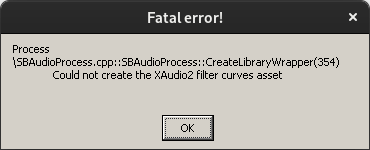
Works without tinkering with Proton 7.0-4. Fedora Linux 35 (Workstation Edition), AMD Radeon RX 5600 XT.
I can confirm. Works on both my PC and steamdeck. However one issue with PC: xbox pad is not being detected (works in other games)
For me it works great, I uninstalled and reinstalled many times to test. It seems that it needs wmp9 but sometimes it doesn´t work until I install wmp11 after wmp9. Menu seems to be workking fine, I did the installation using Heroic Games Launcher from GOG.
I installed it and chose Proton_Experimental and used winetricks to install the next packages
d3dcompiler_47 d3d11_42 d3d11_43 directx9 vcrun2015 wmp9 wmp11 xact64
Remember to install wmp11 again at the end, then choose winecfg to change to wine to windows 10.
Press ok and enjoy,
Related threads
- Giana Sisters: Twisted Dreams - not startingprotonopen same game
- Giana Sisters: Twisted Dreams - Rise of the Owlverlordprotonopen same upstream bug
- Microsoft Flight Simulator (2020)protonopen same error
- Grand Theft Auto IVprotonopen same error
- Rocksmith 2014 (Remastered) Unlaunchableprotonopen same error
- Resident Evil 6protonopen same error
- Attack on Titan 2 - A.O.T.2 - 進撃の巨人2protonopen same error
- Final Fantasy 14protonopen same error
- Elite Dangerousprotonopen same error
- The codecs and media frameworks support meta-trackerprotonopen same error
Proton versions
proton experimentalx1 2023-09proton 7.0-4x1 2022-11proton 7.0-1x2 2022-02proton 7.2-ge-2x1 2022-02proton 6.3-5x3 2021-07proton 6.12-ge-1x1 2021-07proton 4.2-3x1 2019-04proton 4.2x1 2019-03
Launch options
STEAM_COMPAT_INSTALL_PATHx4 2022-02STEAM_COMPAT_APP_IDx1 2022-02WINEPREFIXx3 2021-06STEAM_COMPAT_DATA_PATHx2 2021-06
Upstream links
- ValveSoftware/Proton/issues/4929x1 2022-02
- show_bug.cgi?id=38278x2 2021-12
DLLs
resources.dllx2 2022-02wmasf.dllx4 2021-06wmvcore.dllx4 2021-06wmpasf.dllx1 2021-06
Compatibility Report
System Information
I confirm:
Symptoms
Won't launch, Steam says running and then goes back to online. Requires DotNet4.0.
steam-223220.log