Warframe
gentoo 17.0 same thing
https://appdb.winehq.org/objectManager.php?sClass=version&iId=29230
Warframe/Downloaded/Public/Tools/
is not exists inside:
$mysteamlibrary/steamapps/common/Proton_3.7/dist/share/default_plx/drive_c/users/steamuser/Application\ Data
i tried the proton env variables one by one to see if it worked that way and it doesnt
Someone on Warframe forums found a workaround. Fix seems to be something easy on dev side, altho probably not too hard on Steam's side.
Same here. Using Arch Linux with the latest proprietary nvidia drivers.
Huge compliments to the Proton team for making this possible!
@XANi i ran that script and it clearly did something but still i cant get warframe to run :( now it gives a wine debug error if i launch it from the terminal
Runs perfectly on Lutris with this workaround launcher shellscript. But obviously this is about steam. The game does not start because of the launcher. This script mentioned above replaces the launcher and updates the game. The developers should just implement this script or make their launcher linux/wine compatible.
Just to note:
The game itself is broken in proton, this is on proton's end, as it runs perfectly fine in wine staging with the appropriate winetricks.
For any Proton devs looking into this: when Warframe.exe tries to launch, it thinks it's offline and can't download the cache manifest in needs to continue loading:
2.110 Sys [Info]: Cache languages enabled: _en
2.110 Sys [Info]: Loading Oodle DLL: oo2core_6_win64.dll
2.111 Sys [Warning]: INTERNET_OPTION_IGNORE_OFFLINE failed
2.112 Sys [Info]: Downloading cache manifest index...
2.112 Sys [Error]: Could not get cache manifest index.
2.113 Sys [Info]: ===[ Exiting main loop]====================================================================================
2.211 Sys [Info]: Loaded TOC for Windows/H.Misc (took 93.8ms, loaded 87009 entries, found 0 deleted)
2.211 Sys [Info]: Cache flushed
2.211 Sys [Info]: Main Shutdown Initiated.
The launcher issue is something DE would have to fix, which I've posted about here:
https://forums.warframe.com/topic/1000489-question-to-developers-regarding-steams-new-steam-play-on-linux/
Who knows if I'll actually get a response though.. I've posted about this before. This is why I ended up just making my own launcher.
Here is my launch script (with README) which is a drag and drop solution if you have the game installed:
https://gitlab.com/GloriousEggroll/warframe-linux/tree/steamplay-proton/
Issue exists on Solus w/AMD RX 580
Figured out the WINE bugs that break the game and the patches that fix them!
-
WINE has a bug report from 2016 with a patch in staging that hasn't been merged yet:
https://www.winehq.org/pipermail/wine-bugs/2016-May/443111.html
FIX: wininet-InternetCrackUrlW is the patchset in staging that fixes this. -
Also, this one is not major/game breaking, but in the log:
000f:err:service:process_send_command receiving command result timed out
000f:fixme:service:scmdatabase_autostart_services Auto-start service L"WineBus" failed to start: 1053
0015:err:service:process_send_command receiving command result timed out
002a:err:plugplay:handle_bus_relations Failed to load driver L"WineHID"
FIX: Fixed by staging patchset wuauserv-Dummy_Service, which I believe ZF (another staging maintainer) is working on getting merged to wine mainline.
- The game currently needs native xaudio2_7 from DirectX, as builtin fails.
FIX: A temporary fix until wine's builtin xaudio2_7 can be fixed is to install Direct X to the prefix then add a dll override to the registry that sets xaudio2_7 as native. This has to be installed by hand as winetricks disabled 64 bit xact dlls in Direct X due to this bug in the past.
If 3 gets fixed in wine this game will not rely on any MS native libraries
Even more digging..
WINEDEBUG report with +xaudio2 reveals the culprit of the xaudio2_7 bug:
191576.058:0008:0009:trace:xaudio2:CreateFX {a90bc001-e897-e897-7439-435500000003} 0x53f620
191576.058:0008:0009:err:ole:CoGetClassObject class {a90bc001-e897-e897-7439-435500000003} not registered
191576.058:0008:0009:err:ole:CoGetClassObject no class object {a90bc001-e897-e897-7439-435500000003} could be created for context 0x1
191576.058:0008:0009:warn:xaudio2:CreateFX CoCreateInstance failed: 80040154
this is the last thing xaudio2 tries to do before spoamming a bunch of
xaudio2:do_engine_tick frames
then crashing
CreateFX is in xapofx.c
it's trying to register class {a90bc001-e897-e897-7439-435500000003}
which apparently doesn't exist.
EDIT:
It exists, it's just for FXEcho, and FXEcho and FXMasteringLimiter have yet to be implemented in WINE'S XAudio2_7 - specifically xapofx.h:
static HRESULT WINAPI xapocf_CreateInstance(IClassFactory *iface, IUnknown *pOuter,
        REFIID riid, void **ppobj)
and
HRESULT CDECL CreateFX(REFCLSID clsid, IUnknown **out)
both have
/* TODO FXECHO, FXMasteringLimiter, */
A quick fix can probably be added by just allowing them to be identified like so:
    if(IsEqualGUID(clsid, &CLSID_FXEcho27) ||
            IsEqualGUID(clsid, &CLSID_FXEcho))
        class = &CLSID_FXEcho;
along with some mumbo jumbo that makes them do nothing, but idk right now. 7:30 am now, time for some zzz's. Hope someone's able to do something useful with my blabber
alright, I've managed to create a patch that implements FXEcho, which fixes the bug listed above:
https://gitlab.com/snippets/1748561
The game also needs xaudio2_7-OnVoiceProcessingPassStart xaudio2_7-WMA_support xaudio2_CommitChanges
from wine-staging
However now IXAudio2Impl_CommitChanges needs to be implemented as it's currently just a stub that returns S_OK, which results in the game crashing due to not knowing how to properly commit the changes which pass WMA audio to ffmpeg to be converted for OpenAL. By default CommitChanges returns a stub and E_NOTIMPL, the xaudio2_CommitChanges patch in staging makes it return S_OK, which allows the game to start, but it then crashes when trying to do any wma->openal decoding:
EDIT: I'm not sure if CommitChanges needs to be implemented. The stub may work just fine, but the WMA patch for xaudio2 causes
avcodec_send_packet
to return with Operation not permitted
which is what causes the crash
240188.164:0008:0056:trace:xaudio2:IXAudio2Impl_CreateSourceVoice (0x91d1d0)->(0x4ba308a0, 0xb89e990, 0x8, 3.000000, (nil), 0xb89e950, (nil))
240188.164:0008:0056:trace:xaudio2:dump_fmt wFormatTag: 0x161 (WAVE_FORMAT_WMAUDIO2)
240188.164:0008:0056:trace:xaudio2:dump_fmt nChannels: 2
240188.164:0008:0056:trace:xaudio2:dump_fmt nSamplesPerSec: 44100
240188.164:0008:0056:trace:xaudio2:dump_fmt nAvgBytesPerSec: 12000
240188.164:0008:0056:trace:xaudio2:dump_fmt nBlockAlign: 4459
240188.164:0008:0056:trace:xaudio2:dump_fmt wBitsPerSample: 16
240188.164:0008:0056:trace:xaudio2:dump_fmt cbSize: 0
240188.164:0008:0056:trace:xaudio2:IXAudio2Impl_CreateSourceVoice OpenAL can't use this format, so using FFmpeg
240188.164:0008:0056:trace:xaudio2:IXAudio2Impl_CreateSourceVoice synthesizing extradata for xWMA
240188.165:0008:0056:trace:xaudio2:XA2SRC_SetOutputVoices 0x948630, 0xb89e950
240188.165:0008:0056:trace:xaudio2:XA2SRC_SetOutputVoices Outputting to: 0x0, 0x91d1e8
240188.165:0008:0056:trace:xaudio2:IXAudio2Impl_CreateSourceVoice Created source voice: 0x948630
240188.165:0008:0056:trace:xaudio2:XA2SRC_SetFrequencyRatio 0x948630, 1.000249, 0x0
240188.165:0008:0056:trace:xaudio2:XA2SRC_SetOutputMatrix 0x948630, 0x91d1e8, 2, 2, 0xb89e968, 0x0
240188.165:0008:0056:trace:xaudio2:XA2SRC_SubmitSourceBuffer 0x948630, 0xb89e998, 0xb89e9c8
240188.165:0008:0056:trace:xaudio2:XA2SRC_SubmitSourceBuffer Flags: 0x40
240188.165:0008:0056:trace:xaudio2:XA2SRC_SubmitSourceBuffer AudioBytes: 2100189
240188.165:0008:0056:trace:xaudio2:XA2SRC_SubmitSourceBuffer pAudioData: 0x662b0010
240188.165:0008:0056:trace:xaudio2:XA2SRC_SubmitSourceBuffer PlayBegin: 1031477
240188.165:0008:0056:trace:xaudio2:XA2SRC_SubmitSourceBuffer PlayLength: 6671051
240188.165:0008:0056:trace:xaudio2:XA2SRC_SubmitSourceBuffer LoopBegin: 0
240188.165:0008:0056:trace:xaudio2:XA2SRC_SubmitSourceBuffer LoopLength: 0
240188.165:0008:0056:trace:xaudio2:XA2SRC_SubmitSourceBuffer LoopCount: 255
240188.165:0008:0056:trace:xaudio2:XA2SRC_SubmitSourceBuffer pContext: (nil)
240188.165:0008:0056:trace:xaudio2:XA2SRC_SubmitSourceBuffer 0x948630: queued buffer 0 (2100189 bytes), now 1 buffers held
240188.165:0008:0056:trace:xaudio2:XA2SRC_Start 0x948630, 0x0, 0x0
240188.165:0008:0056:trace:xaudio2:IXAudio2Impl_CommitChanges (0x91d1d0)->(0x0): stub!
240188.169:0008:0063:trace:xaudio2:do_engine_tick frames available: 441
240188.170:0008:0063:trace:xaudio2:update_source_state 0x94ea00: going to queue a period from buffer 1
240188.170:0008:0063:trace:xaudio2:xa2buffer_queue_period queueing 1024 bytes, now 4096 in AL
240188.170:0008:0063:trace:xaudio2:do_engine_tick Calling OnVoiceProcessingPassStart with BytesRequired: 4410
240188.170:0008:0063:trace:xaudio2:update_source_state 0x948630: going to queue a period from buffer 0
[wmav2 @ 0x7fa150005400] nb_frames is 0 bits left 35664
240188.170:0008:0063:warn:xaudio2:xa2buffer_queue_period avcodec_send_packet failed: Operation not permitted
240188.170:0008:0063:trace:xaudio2:xa2buffer_queue_period queueing 0 bytes, now 0 in AL
240188.170:0008:0063:trace:xaudio2:update_source_state 0x948630: going to queue a period from buffer 0
warframe doesnt load from me as well
gloriouseggroll up there is an asset
i havent been able to play warframe in years because I could never get it to run right in linux
if you guys can in anyway implement the changes up there that would be amazing because I miss this game
at the moment I've got a workaround for the launcher and xaudio2_7 that allows proper updating, cache defragging, and getting in game and logging in.
After that, for some strange reason proton just forces the client closed? I've tried turning debugging on but it doesnt show anything useful, just immediately closes, not even a safe shutdown. If anyone's willing to try to figure out why proton's straight up closing the app here's my repo, just follow the readme:
https://gitlab.com/GloriousEggroll/warframe-linux/tree/steamplay-proton
Some dev input would be really useful here as to why proton just straight kills the running client
@GloriousEggroll i tried running your script but if i append --firstrun to the launch options it doesnt recognize it and if i dont do it it doesnt update the laucher, got any help?
@davidbepo for any issues regarding my launcher please use the issues section of my gitlab as the official launcher bug and in-game bugs reported here are not related to my launcher, for the sake of keeping this bug report on point
With the patched wininet dll, my own launcher executable, and a bit of tinkering, I've gotten it to go ingame and run at near native performance. On a i7-7700K and a RX 580 with Mesa 18.1.6.
Something seems to cause the game to freeze after a while though, leaving it just sitting there eating two full cores worth of CPU.
Edit:
As it turns out, actually getting DXVK to work solved the freezing, though the game loads assets really slowly, which causes heavy choppiness during gameplay.
welp. as of latest update I can't get the game to launch at all any more. keep getting
pid 37067 != 37066, skipping destruction (fork without exec?)
every time i try to launch
@ananace I'd much prefer your solution to mine as bash script and a ghetto wrapped fake exe are not exactly ideal, how would one go about compiling it? (edited original comment as I realized it was for a win executable to be wine friendly)
as for the asset loading - thats actually the shader cache filling up, its fine after that
@GloriousEggroll hmmm Still works here with your scripts. I am running the steam version but instead of renaming the Launcher.exe I just added it as Launcher-Lutris.exe and Launcher.sh (also create a Launcher-Lutris.bat so wine can run it through CMD, which I could've done straight with the exe).
Anyway, I don't execute it through steam, so I don't have to deal with the naming convention and etc (also the binaries are available to me through my windows install, so this was easier).
I do get a stuck screen on a CMD like shell, which I just press ctrl+c and it starts warframe, eventually
@llitz the lutris wine-steam version is not the same as the steamplay-proton version. they launch in very different ways, with proton having many more environment variables passed from native steam. additionally proton launches things a much different way then just using wine whatever.exe -some -arguments. its a lot more annoying :/
I have been running it manually and mixing some libraries, I should have
thought about that: it has been a long day. I will report back if I can
pinpoint what makes it run.
On Fri, Aug 31, 2018, 12:24 AM Thomas Crider [email protected]
wrote:
@llitz https://github.com/llitz the lutris wine-steam version is -not-
the same as the steamplay-proton version. they launch in very different
ways, with proton having many more environment variables passed from native
steam—
You are receiving this because you were mentioned.
Reply to this email directly, view it on GitHub
https://github.com/ValveSoftware/Proton/issues/167#issuecomment-417564654,
or mute the thread
https://github.com/notifications/unsubscribe-auth/AVbEO2fCQcu-Ha0-CR1_tcYyTKZ84ZgPks5uWNaOgaJpZM4WIbhT
.
@GloriousEggroll The project should just be a regular Visual Studio 2017 solution, the code's a bit of a mess though as I just grabbed an old launcher from an abandoned MMO I helped develop - which as it turns out chose an almost identical method of distribution as Warframe did.
The only thing that executable doesn't do is run the DX redistributable setup, the wininet DLL replacement, or the xaudio override. And I somehow get the feeling that you don't particularly want to do such things through a native PE, probably better to keep them as a Linux bash-script.
I did render two minutes of video before bed. Mainly to have an example of the choppiness I'm experiencing, though I later found out that an application was loading the disk rather heavily in the background, so it might actually be much more playable than it looked at first.
So I've been working with ananace on his launcher and we have it working very well. I've also discovered WHY warframe was randomly closing - turns out if I plug a controller in then start the game - it magically stays open. If I don't start the game with a controller plugged in.. it closes after a short time. Both my launcher and ananace's had this same problem so it seems like it's something to do with how controllers/controller profiles are handled on steams end.
also, the game benefits a lot from the PoE stutter patch on dxvk as well.
i finally got the game to run with @GloriousEggroll launcher but there are a lot of issues
-
the game is on english and i cant switch to spanish:

-
there are massive stutters (this was already mentioned)
-
issues with shadows:

-
the game closes after a while (this was already mentioned)
@davidbepo I've stated this once already - any problems with my launcher please post on my gitlab issues section. NOT here.
@GloriousEggroll i think the issues that im having might be valuable for proton developers specially since some of them are not because of launcher
the language problem is due to my launcher
the closing problem has already been mentioned due to a controller issue
the stutter problem has already been mentioned due to dxvk.
but the shadow issue hasnt been mentioned
make sure the game is running in dxvk - turn the hud on.
by hud you mean the steam interface right? i enabled it and now the ship looks fine
No. the DXVK_HUD. in the proton folder rename user_settings.sample.py to user_settings.py, comment out all the lines except DXVK_HUD and set DXVK_HUD to devinfo,fps,version
then start the game. if there's no DXVK hud in the top left then the game isn't using dxvk when it should, which would lead either a launcher or driver problem.
can confirm game is ran with dxvk:

the ship is still fine so maybe it was an uncompiled shader or something
note: dxvk from my launcher has the poe anti-stutter patch which gives filler shaders until they are actually rendered, so this could be why it looked like that.
and now i feel i bit dumb, the only issue i thought it wasnt related to your launcher its related to it, anyway thanks for the good job you have done getting warframe to run on linux
i hope proton developers can use it to make the game playable for everyone
apologies if it's unrelated but a bug i experience (kde plasma desktop) is if i run kquitapp5 plasmashell then kstart5 plasmashell warframe stops outputting video but otherwise is fully functional (official issue number: WAR-1971934). also occasionally it will start stuttering (a lot) which is fixed by setting the low profile. you can then afterwards go back to the exact same settings you had before and experience no stutter. also this graphical glitch:

obviously in this one the issue is that the door failed to load. as one glitch (which i now removed so people know what is current) has stopped occurring, it could be possible that the other ones mentioned here are now fixed too.
18.10.2018 new glitch:
in mission select:

outside of mission select:

it may not be overly clear what this one is, but basically after selecting a 'fissure' mission then backing out of the relic select screen the emblem starts flickering a lot

there is also this glitch as well that i'm unsure about reproducibility (the blue things that look like effects, i'm pretty sure were meant to dissappear)
This controller bug is infuriating. I can't for the love of me find a controller that's recognized by Proton, so I'm a sitting duck aside from picking up my daily login reward. Irony is that my controller works in the game, it's just Steam that has a problem with it.
I'm trying to launch the game, but after update the @GloriousEggroll script the console just closes and game doesn't start, here is the console log, I paste just after steam start.
Loaded Config for Local Selection Path for App ID 230410: /home/tuxter/.local/share/Steam/steamapps/workshop/content/241100/1481920687/961969116462592811_legacy.bin
Loaded Config for Local Override Path for App ID 230410: /home/tuxter/.local/share/Steam//controller_base/empty.vdf
GameAction [AppID 230410, ActionID 8] : LaunchApp changed task to ProcessingInstallScript with ""
GameAction [AppID 230410, ActionID 8] : LaunchApp changed task to SynchronizingCloud with ""
GameAction [AppID 230410, ActionID 8] : LaunchApp changed task to ProcessingShaderCache with ""
GameAction [AppID 230410, ActionID 8] : LaunchApp changed task to SiteLicenseSeatCheckout with ""
GameAction [AppID 230410, ActionID 8] : LaunchApp changed task to CreatingProcess with ""
GameAction [AppID 230410, ActionID 8] : LaunchApp waiting for user response to CreatingProcess ""
GameAction [AppID 230410, ActionID 8] : LaunchApp continues with user response "CreatingProcess"
Opted-in Controller Mask: 70
Game update: AppID 230410 "", ProcID 11918, IP 0.0.0.0:0
ERROR: ld.so: object '/home/tuxter/.local/share/Steam/ubuntu12_32/gameoverlayrenderer.so' from LD_PRELOAD cannot be preloaded (wrong ELF class: ELFCLASS32): ignored.
ERROR: ld.so: object '/home/tuxter/.local/share/Steam/ubuntu12_32/gameoverlayrenderer.so' from LD_PRELOAD cannot be preloaded (wrong ELF class: ELFCLASS32): ignored.
ERROR: ld.so: object '/home/tuxter/.local/share/Steam/ubuntu12_32/gameoverlayrenderer.so' from LD_PRELOAD cannot be preloaded (wrong ELF class: ELFCLASS32): ignored.
Loaded Config for Local Selection Path for App ID 230410: /home/tuxter/.local/share/Steam/steamapps/workshop/content/241100/1481920687/961969116462592811_legacy.bin
Loaded Config for Local Override Path for App ID 230410: /home/tuxter/.local/share/Steam//controller_base/empty.vdf
Adding process 11918 for game ID 230410
GameAction [AppID 230410, ActionID 8] : LaunchApp changed task to WaitingGameWindow with ""
Adding process 11919 for game ID 230410
GameAction [AppID 230410, ActionID 8] : LaunchApp changed task to Completed with ""
Adding process 11920 for game ID 230410
Adding process 11921 for game ID 230410
Adding process 11922 for game ID 230410
Adding process 11925 for game ID 230410
Adding process 11927 for game ID 230410
Adding process 11930 for game ID 230410
Adding process 11938 for game ID 230410
Adding process 11943 for game ID 230410
saving roaming config store to 'sharedconfig.vdf'
roaming config store 2 saved successfully
Adding process 11956 for game ID 230410
Game removed: AppID 230410 "", ProcID 11918
game still doesnt run on proton 3.16, now it gives a dump with some weird hex codes and executable and library names
@davidbepo game itself runs fine with proton 3.16, official launcher is still broken because it cant update itself and boot loops
@davidbepo game itself runs fine with proton 3.16, official launcher is still broken because it cant update itself and boot loops
for me it doesnt even get to boot looping, as i said it gives a dump
btw i did i reinstall without your script to test it, i will test it with your script later
@GloriousEggroll hey man, thank you for all your work. I have managed to get the game working with your first standalone guide based on Wine, but it was lagging and I didn't know how to configure it properly.
I have followed the steam-proton guide, but the game doesn't start on my end, even with phone connected as controller through Steam Link app. Any ideas or advise to where to go from this on, or how to check the logs, what might be blocking it ?
@joro1881 did you make sure steam is using proton 3.16? any lower version to the best of my knowledge simply won't work
@prototype99 Sure, here how it looks 
@joro1881 sorry for the late reply but yeah warframe steam-proton needs 3.16, in compatibility tool you should get the option in the dropdown. you may also need to refer to https://gitlab.com/GloriousEggroll/warframe-linux/issues/48 if it still doesn't boot. i summarised what needed to be done in the last post; if you like i can put it all into a guide for you on my website
@prototype99 Thanks mate, I am not in a hurry. Well, I don't want to trouble your day just for me. I will try again with version Proton 3.16-3 Beta, and follow the GloriousEggroll's guide + his launcher option. I have the Wine already configured. Starcraft 1,2 and Diablo 3 are running like a charm. I also found there is a feature 'feralinteractive' gamemod to boost the performance of the CPU. It can be preloaded. However, WF is so optimized that actually is not using this. :D Overall, if you have additional settings or steps that I am missing, you can just point them.
@GloriousEggroll @prototype99 Okay guys, I got it running this time. Thank you a lot! I am looking into the issue of exiting the game after 5min because of no controller detected. If you have any tips on that ? I tried connecting my phone, which worked, but then all the controlls in the game were changed. So I couldn't use the mouse.
I am out of ideas, no matter what combination of plugin/unplugin the controller, the games settings are already altered. I cannot choose a mission with the mouse. I tried changing steam setting or turn the controller off from there. Didn't work. Also tried to only steaming from the phone, didn't worked. Enabled both mouse and controller, but still no change. The menus are off limits. I managed to join a mission and the mouse was working, but couldn't 'abort mission' from the menu, still wasn't working.
yeah i do find it expects you to use a controller if you plug it in. i don't blame you for not noticing because it's in the actual repo but if you take a trip to https://gitlab.com/GloriousEggroll/warframe-linux/tree/steamplay-proton the readme actually now says about another way to do it with xboxdrv? so if you try that, i don't know if that will prove more successful. i use controller so honestly i haven't tried it. (sorry!)
installing xboxdrv and running it as a service fixes the controller problem. steam recognizes xboxdrv's service as an xbox 360 controller even with no controller plugged in. it's a workaround, but it works.
Playing above the threshold!!!! BIG BIG thanks guys. I really appreciate it. You made my month. I have issues with my eyes, and Warframe is actually helping for my health. Shooting greeners around, make my eyes move :D
Sincerely thank you.
Hey guys, found a bug. Everything is running perfectly, but when opening the door of Plains, to enter, throws me out of the game, while loading. I can rejoin the squad and continue play on the plains without an issue. I reproduced the issue three times in a row. Dunno, if it's only with me. There is no issue to enter Plain from the Orbiter tho. Only from Konzo with a mission chosen.
Hey guys, sorry to drag again. But with the new coming Fortuna, I guess was inevitable.
Related to my previous reply about Plains, I couldn't get what made the game crushing, but eventually stopped crushing and I could enter through the doors without struggle. Odd.
Now, Fortuna was dropping me with message I couldn't run in 32bit mod, 64bit is the future. So I changed the launcher.sh with
WARFRAME_EXE="Warframe.x64.exe"
directly, so the game is always started in x64 mod. so I was able to enter the world of Venus. I even got after the first objective, then the game crashes with report to Warframe. Dunno, if it's DE thing or cuz we are on Linux/Proton.
Please, share if you have same experience or not, or if you have any thoughts about it.
Thank you in advance
@joro1881
Changed to 64 bit executable as well.
The game is crashing for me shortly into the second mission on Fortuna (the spy one).
Also crashing on POE after a short time.
Performance seems to have gotten worse in general.
Edit:
btw: setting WARFRAME_EXE is pointless unless you modified the script, because it just sets it to Warframe.exe again.
To run it in 64 bit without having to touch the script just rename the Warframe.exe to Warframe.exe.bak, and then symlink the 64 bit exe to Warframe.exe.
Bad news, the last days I am trying to play on x64 bit mode but it's crashing, not only in Fortuna. So the issue might be coming from Proton not able to support it properly. I am still waiting DE's response on ticket tho. The new part of the game might not be playable on Linux again, for long time :(
There seems to be an XAudio issue on 64 bit Wine.
So playing with the 32 bit client is the only option right now, until hopefully FAudio fixes everything.
I've updated my launcher to use 64 bit and install faudio into the prefix. this game needs to be tagged with XAudio2 @kisak-valve
default launcher still needs to be fixed also as well as the no-controller crash, but FAudio at least makes it playable
FAudio seems to mess up the audio way faster than the native one.
Native takes about 1h, sometimes less.
FAudio on the other hand starts crackling after about 5 minutes tops.
Which means I have to either restart the soundserver every 5 minutes to fix the issue (but risk crashing the game in the process), or cycle my audio outputs in game every time this happens.
Nice work GloriousEggroll, thank you.
I disabled the sound in game and the crashing stopped, so I was playing without sound for 5-10 minutes. Then at some point the screen freezes, without crashing and getting me out, but still it's broken :(
On the bright side:
The performance of the 64 bit client seems to be a bit better.
Good news, playing from an hour without sound, no crashing or broken screen-picture. The performance is indeed great. So how can we fix the sound matter. It feels so cripple to play without it.
@valeth the crackling is an issue, however there are a few things you can do:
-turn off reverb
-mute in-game music
-turn on "mute while in background"
-set PulseAudio as in-game audio device
various users have reported these all working. Ive tested all of the above, although music is fine for me mostly.
more importantly, the game doesnt crash.
there is another crash going on with the interface where the game hangs, but it's unrelated to audio and probably a fortuna interface bug
@GloriousEggroll Tried all those settings, but same results.
@valeth i mean its still going to crackle here and there and on loading screens, FAudio isnt complete yet. those are just things that help mitigate it
It's not just a slight crackle though.
It's more like the audio becomes almost unrecognizable.
thats really odd, is it in any specific area? fortuna audio is playing fine here for the most part
Nothing specific, no.
Just the game bugging out after a while, even when staying on the orbiter.
I would have a second dedicated sound card, maybe it's the onboard card that's having issues.
And an external DAC, if I can get that one to work again.
Latest PA broke stereo output for that one.
Ok, so it's definitely not the internal audio.
Same thing occurs with the dedicated sound card.
Done all four and disabled other options as well.
-turn off reverb
-mute in-game music
-turn on "mute while in background"
-set PulseAudio as in-game audio device
Still crashing while in Fortuna. Done Index without issue tho.
@valeth try adding
export SDL_AUDIODRIVER=directsound
to Launcher.sh
@joro1881 Fortuna still has some buggy crashes unrelated to audio. Probably something DE needs to hotfix
@GloriousEggroll this seems to have either fixed the audio issue, or at least delayed it.
Didn't occur in the first 5-10 minutes at least.
Edit:
Sadly it comes with an entirely different set of eardrum-ripping audio glitches.
Or perhaps, I can try pre-install the game, if it's something with broken audio files.
@valeth one last thing you can try:
sudo sed -i.bak 's/load-module module-udev-detect/load-module module-udev-detect tsched=0/g' /etc/pulse/default.pa
pulseaudio -k
pulseaudio --start
@GloriousEggroll
Already have this option set, but thanks for your help.
@GloriousEggroll I suffer from the same issue and when I ran those commands, my audio device disappeared from my system, even after a reboot.
@KutsuyaYuki it happen to me too, the commands in this article fixed the sound
https://itsfoss.com/fix-sound-ubuntu-1304-quick-tip/
sudo apt-get remove --purge alsa-base pulseaudio
sudo apt-get install alsa-base pulseaudio
And force reload Alsa again:
sudo alsa force-reload
you guys that are having crackling issues and are using my launcher, could you try this:
@valeth @joro1881
https://drive.google.com/file/d/1i4HC5tbAH8KAAyNfm1W6T2730S84Fdup/view?usp=sharing
extract the FAudio folder into the Tools folder, replacing the one that's already there, then run --firstrun again
It worked for me, no sound issues or noisiness. Tiny one when loading a mission, but doesn't worth mentioning it. Thank you for the effort GloriousEggroll
Side question. I see Dx9 and Dx11 loaded to the game, but there is dx12 on the market. Is proton using both dx9 and dx11? Should the tool uses dx12 ?
@prototype99 It's just plain wrong. The DirectX version VERY MUCH makes a difference.
Dx9 is translated to OpenGL through Wine's Wine3D layer.
Dx11 is translated to Vulkan through the DXVK layer (unless you specifically forced Wine3D)
DX12 is translated to Vulkan through Wine's vkd3d layer (still in an experimental state)
If a game offers you multiple options you should pick Dx11, because DXVK is the most efficient.
@GloriousEggroll Tried your updated FAudio, and it seems to be a lot better when I turn music off.
Still a few glitches here and there, but bearable.
It's a bit hard to explain how bad the sound actually is with music, so here's an example
(sorry for bad framerate, doesn't run that well while being recorded)
With Music turned on: https://youtu.be/h1MdsjDO7L0
Without Music: https://youtu.be/Bq1mM0sDGak
Really don't know how I would describe the thing with music turned on.
@joro1881 Like I said, the lag comes from the recording, probably because I'm using the software encoder, and maybe because I didn't turn on V-Sync.
@valeth Sorry, auto-read it. I just play an hour without lag, crash or bad sound. Solo, directly on Orb Vallis, without passing Fortuna or the elevator. All attempts to play in public squad today lead to system crash. Tomorrow I will try test with friends. Sorry for the spam.
Aren't you experiencing similar crashes or the game throwing you out directly ?
To summarize it appears these are the current issues:
Audio glitches (tried the updated FAudio as well, happens after a short while in any location)
Game exits out after a couple minutes with controller plugged in (verified controller functionality ingame)
Native launcher does not work (Thanks GloriusEggroll for the temporary solution!)
Tested on Manjaro w/4.19.4-1 kernel
Ryzen 1800X
Vega64 with Mesa 18.2.5
X370 motherboard
Game exits out after a couple minutes with controller plugged in (verified controller functionality ingame)
Without a controller plugged in.
With the new 3.16-5 beta, the launcher seems to start but get into an endless update loop. "Checking for update, downloaded 391kb" and the window closes and relaunches, repeating the action over and over.
Cool to see some progress, @GloriousEggroll thank you for your work on the launcher script, and I am very thankful for the work you've done testing other games and bringing attention to Steam Play. Have you compared the FAudio version the new beta uses to the version your script uses? Just wondering if I try to use the launcher script, if it will use an older version of FAudio than what the new beta uses.
Many thanks again, I appreciate your work.
I was poking around and I noticed the default Launcher actually created another file called Launcher.exe.cpy. When I started thinking, I figured this might be an updated Launcher.exe that wasn't properly renamed.
So I tested it. I renamed the original Launcher.exe to serve as a backup and renamed Launcher.exe.cpy to Launcher.exe. Sure enough, it then opened without issue.
In conclusion, the current issue with the Warframe launcher is that it can't overwrite itself properly, so it goes into an endless loop as it fetches the new launcher, fails to copy the new one, then relaunches the same, original launcher.
Edit: I should mention that I have only tested the initial load to make sure it doesn't keep looping. I'm unsure if it'll actually update the game or anything yet. Testing that now. There's definitely hard drive activity, but I don't know how well it's doing since it doesn't show a progress bar for the "Checking for updates" part.
Nice, but did the game start and does it work as expected ?
@Yowlen that's a great find! I did the same and tried renaming the launcher as you did. Unfortunately I'm getting INFO: Assertion failed: OperationSet == FAUDIO_COMMIT_NOW
Currently the launcher is now working, gets you to the play button, click the play button and then the game launches to the loading screen with the progress bar, and then once finished loading I get an initial blip of sound before it crashes out and I get the game's crash reporter.
This seems very similar to what's happening in #4 on Skyrim Special Edition.
Further testing:
It would seem the default launcher can't update any files properly. It can read them (hence why it took so long to check for new content), but it can't actually apply those updates likely due to the same cause for the Launcher.exe overwrite problem.
The game will launch, but it crashes immediately once it's done with the initial loading screen. It won't ever make it to the actual login screen.
However, once everything is updated via @GloriousEggroll 's custom launcher, the normal launcher works just fine, as does the game itself when launched from the normal launcher. In other words, it looks like once the prefix is set up with the XAudio fixes & stuff from the custom launcher, Steam will use them properly on its own.
I can also confirm that the normal launcher closes itself out once it launches the actual game.
All this means that assuming GloriousEggroll is willing, it might be possible to give an experience closer to the original game now. Essentially:
- The custom launcher handles the updates & initial prefix setup like it has been doing
- The custom launcher then switches itself out for the normal launcher without launching in a separate prefix
- The normal launcher launches the actual game
- Upon detecting that the launcher is closed out, the custom launcher then switches the exe back so that it won't directly start the normal launcher next time the game is run
Also, I just wanna say that the XAudio fixes in the latest commit of the custom launcher are amazing. Even the music isn't stuttering anymore. To everyone involved in getting this game working, and especially to GloriousEggroll, thank you so much for all your hard work.
Edit: If this is true, @shadywack , use the latest custom launcher & then go back to the original the same way I just did just to make sure it doesn't have any more updates. Also, make sure you're using the latest Proton version (3.16-5 Beta). If it works, then it's possible a similar fix like what the custom launcher uses here can be implemented to Skyrim's prefix too.
I unfortunately can't attest to the error in Skyrim SE, since it works fine for me in Xubuntu using all the appropriate PPAs as per Steam's recommendations. I should also note that I don't have any DLCs for it, either, so if it's a DLC causing it, I can't test that.
Steam forced me to redownload almost the whole game. (I assume the massive 24.2 update was pushed to Steam, making me redownload it all despite already having it downloaded from within the custom launcher.)
But some good news came from it. The regular launcher is working now. It successfully updated itself and the game files.
Since this update likely reset the Proton/Wine environment being used, I can test ingame and see how much is still broken and if it's playable. I'll edit with an update soon.
I just hope Steam either downgraded the DXVX version in their prefix or otherwise patched it to prevent the nVidia GPU freezing cuz otherwise, that'll probably impede my testing quite a bit...
Update: It's working better under 3.16-6 Beta than it was under 3.16-5 Beta, that's for sure. I think Steam actually might've pulled all of the same fixes that @GloriousEggroll did for their custom launcher, or at least most of them. The audio isn't crackly or anything. If it freezes on me, I'll update again, but so far, the only issue seems to be the Steam overlay causing a little bit of a slowdown which is normal for all games, unfortunately.
Update 2: So far, no freezing issues. But I wanted to give an update on the other long-standing issue: The controller crash. I tested and it's still crashing within 5 minutes if it doesn't detect a controller plugged in. So, keep that dummy driver or whatever for now.
I have the same experience, I tried to stop the update, but no joy there. So I re-installed the game for 7th time or more this year. I noticed the launcher loaded on his own. Everything is running smooth, only the voice of the lotus and the Index arbiter are missing, but anyway.
@Yowlen the game indeed works now thanks for the heads up
should i change the issue title now?
Dunno, I feel it's too early for anything, as the situation was changing constantly for the past few months. We might start new topic elsewhere with "Constant Common issues under Linux/St-Proton with WF",
I doubt GloriousEggroll will continue spare time to assist if the issues change, or if the game stops working - building/upgrading new launcher.sh.
We can continue spam here till he allows it :D
As mentioned, the directional audio from various sources is still missing, which affects the NPCs in Skyrim SE & other games, as well. I remember seeing an issue report for that on the main Wine bug report site, so it shouldn't be too much to add Warframe to the list if it's not already on there. We can also add one here to act as a reference point for any people coming to make their own reports. Edit: The issue report for this problem here for Proton is #54.
I can also verify that music and reverb still corrupt the audio when turned on, so that's one that is more Warframe-specific and can be tracked in its own issue report. This report can also include the recommendation of changing the Audio Output in the game to pulseaudio as a workaround for other audio corruption. This issue's cause also seems to be tracked under the same issue up above.
The last issue, the one requiring a controller, should also have a report of its own since it doesn't prevent the game from starting, only crashing it afterwards. It's a separate bug as a result.
tl;dr - Leave it open until Valve moves this version of Proton out of beta in case of regressions, and edit the title to include the controller crash, as per the rule reminder below.
Friendly reminder that we're using one issue report per unofficially supported game title. If you have identified the root cause of an issue and it affects multiple games, that may be worth tracking separately, but in general, game-specific discussion should continue here.
Ah, thanks, @kisak-valve. I wasn't aware of that. In that case, updating the title to include the other issues would probably be the best course of action.
I also edited my above post to include the issue report tracking the cause of the missing voices.
Okay. I just got my first freeze. It took a while to manifest because I wasn't going into heavy areas until now. It happens whenever there's a lot to render at one time.
So I can confirm the DXVX 0.90 freezing issue for nVidia cards is present in Proton 3.16-6 Beta. I'm gonna have to switch back to the custom launcher for now so that I can play properly. I gotta be able to enter Fortuna & stuff, after all.
List of all bugs that have been found
The following bugs exist in Proton 3.16-6 and Warframe 24.2.6 (Fortuna Hotfix for The Profit Taker)
Freezes when logging in
- Try to login with an account which must ask for an email verification code
- Do not provide a code, and attempt to login with a different account
- The client freezes, and must be terminated.
No NPC can be heard
- None of the NPC characters have their voice. This includes Lotus, Ordis, Eudico, Onkko.
- All audio settings default
Freeze when opening Options twice
- Open the options menu, change a couple of settings, close
- Do not exit the pause menu
- Attempt to open it again, game will freeze and should automatically terminate after a while
Login music is not heard
- The music commonly heard upon first starting the game is not heard.
- All audio settings default
Occasional crackling noise
- Audio will occasionally crackle, usually every 2-3 minutes
Steam Overlay does not show cursor
- All settings default
- Restart does not help
Edit:
User on the ProtonDB suggests that setting WINEPREFIX to WINEPREFIX=~/.steam/steam/steamapps/compatdata/230410/pfx/ winetricks xact should solve the issue in relation to missing audio voices.
@Frontear you're missing a few things
- xact should not be used, it causes audio crashes due to 64 bit xaudio2. Instead, you need faudio with ffmpeg installed into the prefix, or a custom proton version with faudio+ffmpeg
- the game crashes after 5 minutes when no controller is detected. details on that from another user:
proton is sending a sigtrap at a specific point, there's a damn breakpoint set for whatever reason!
run warframe, wait for proton to kill the game, check sudo journalctl -xe
@kisak-valve ^that's new information regarding the controller issue.
log from my custom version (also occurs in all other versions) regarding the sigtrap +crash on controller detection:
[gloriouseggroll@shittywok Proton-4.0-RC3-GE]$ sudo journalctl -xe
[sudo] password for root:
Dec 30 12:00:07 shittywok kernel: audit: type=1701 audit(1546189207.001:53): auid=1000 uid=1000 gid=100 ses=2 pid=73565 comm="Warframe.x64.ex" exe="/home/gloriouseggroll/.local/share/Steam/compatibilitytools.d/Proton-4.0-RC3-GE/dist/bin/wine64-preloader" sig=5 res=1
Dec 30 12:00:07 shittywok systemd[1]: Started Process Core Dump (PID 73805/UID 0).
-- Subject: Unit [email protected] has finished start-up
-- Defined-By: systemd
-- Support: https://lists.freedesktop.org/mailman/listinfo/systemd-devel
--
-- Unit [email protected] has finished starting up.
--
-- The start-up result is done.
Dec 30 12:00:07 shittywok audit[1]: SERVICE_START pid=1 uid=0 auid=4294967295 ses=4294967295 msg='unit=systemd-coredump@1-73805-0 comm="systemd" exe="/usr/lib/systemd/systemd" hostname=? addr=? terminal=? res=success'
Dec 30 12:00:07 shittywok kernel: audit: type=1130 audit(1546189207.029:54): pid=1 uid=0 auid=4294967295 ses=4294967295 msg='unit=systemd-coredump@1-73805-0 comm="systemd" exe="/usr/lib/systemd/systemd" hostname=? addr=? terminal=? res=success'
Dec 30 12:00:07 shittywok systemd-coredump[73806]: Resource limits disable core dumping for process 73565 (Warframe.x64.ex).
Dec 30 12:00:07 shittywok systemd-coredump[73806]: Process 73565 (Warframe.x64.ex) of user 1000 dumped core.
-- Subject: Process 73565 (Warframe.x64.ex) dumped core
-- Defined-By: systemd
-- Support: https://lists.freedesktop.org/mailman/listinfo/systemd-devel
-- Documentation: man:core(5)
--
-- Process 73565 (Warframe.x64.ex) crashed and dumped core.
--
-- This usually indicates a programming error in the crashing program and
-- should be reported to its vendor as a bug.
@Frontear In addition to what @GloriousEggroll said, there's another issue which was left out that I mentioned literally right above you & GloriousEggroll is aware of it too. There's a regression in DXVX 0.90, which is used in the latest 3.16-6 Beta version of Proton, causing freezing problems on nVidia cards.
Here's the issue tracker for it:
https://github.com/doitsujin/dxvk/issues/802
Pretty much useless on both Proton and Lutris right now, at least on my system. It gets into the intro sequence, I can play for a random amount of time, then it invariably closes itself.
I've been having the same problems as above since switching away from the launcher replacement. The game boots up just fine but crashes to desktop seemingly at random, usually within an hour. I have a controller plugged in but installed xboxdrv just in case, and also tried verifying the game cache and reinstalling the game, but nothing seems to help. I'm using an nVidia card but it sounds like I'm having a different issue than that caused by the DXVK regression.
Running on Arch Linux with a GTX 750 Ti. If there's any more info I can provide, please let me know.
@kode54 Are you running the xboxdrv service?
There's a regression in DXVX 0.90, which is used in the latest 3.16-6 Beta version of Proton
@PolyCement it's possible you might be experiencing this issue.
doitsujin/dxvk#802
@kode54 Are you running the xboxdrv service?
No, but I do have xpad.ko installed, and an actual Xbox360 wireless receiver and controller, which I sometimes even remember I have to keep enabled at all times!
proton 3.16-6
ubuntu 18.04
ryzen 5 2600
asrock b350 mobo
gtx 1060 6gb
everything works perfect except sound. the sound effects such as ambiant sounds, enemy noises, powers, and guns all work. music, and speaking does not for some odd reason. anyone know of a workaround?
After yesterday's steam update warframe goes into a loop at launcher "downloading updates" then restarting and downloading updates again
@Dkr0l i can confirm it :(
After yesterday's steam update warframe goes into a loop at launcher "downloading updates" then restarting and downloading updates again
we should ask the devs to do steam update and remove the launcher and give us a login screen
@Dkr0l I can confirm too.
-
Installer:
I can not wait when Steam will open Warframe in 32-bit WINEPREFIX
and installer will work . :smile:
For 64 bit wineprefix for now, can not be fixed. -
One of two Sounds engine:
We will need also installed xact for sound. ( xaudio dll )
./winetricks xact -
"Motion Blur" bug, if will exist:
Warframe --> SETTINGS --> OPTIONS --> DISPLAY --> Motion Blur --> switch to off
We need wait for better Wine.
You don't want xact, you want FAudio. And you don't want 32 bit, there are actually areas in the game where 32 bit doesn't allow enough memory to be allocated.
there are actually areas in the game where 32 bit doesn't allow enough memory to be allocated.
Where ?
Warframe from Steam worked with wine stagging fine for me,
with updated manually winetrics ( XP was 32bit )
( wget https://raw.githubusercontent.com/Winetricks/winetricks/master/src/winetricks )
./winetricks winxp
./winetricks xact
When I run standalone Warframe and it save something in ~/.wine
then I can run warframe from Steam. ( with commad "wine Launcher.exe" )
https://bugs.winehq.org/show_bug.cgi?id=45734
Just I want only remove Warframe standalone and use always only Warframe from Steam.
I tried install xact,
cd /My_Path/Steam64/Steam/steamapps/compatdata/230410
wget https://raw.githubusercontent.com/Winetricks/winetricks/master/src/winetricks
rm -rf  pfx
WINEPREFIX=$PWD/pfx WINEARCH=win32 ./winetricks winxp xact
mkdir pfx/drive_c/windows/syswow64
I tried it after read https://www.reddit.com/r/linux_gaming/comments/99e0kc/steam_playguide_create_custom_32bit_prefix_to/
I'm not sure, but I have the impression that Steam still running with wine64bit
because sound still not working and Launcher still crashing
Rummaging in files and searching can be boring.
Hi @tele1 , try Orb Vallis or the Plains with 32bit, it shouldn't work. At least didn't work for me. The rest of the game might be running, but the open worlds are for 64bit.
@joro1881 Can confirm. Neither Plains of Eidolon nor Fortuna will work under a 32-bit environment, it'll just be met with a crash.
@Frontear my experience wasn't a crash. Just in game message informing me these areas require 64bit system. So I wasn't able to enter them at all, but the game continue.
I'm sorry, I can not check.
Last time I tested game and I removed ~/.wine ~/.warframe
I tried install something with winetrics and run Warframe.msi
but have the same boot loop like Waframe from Steam.
I download game again, https://www.warframe.com/download
There, below red button you have "Standalone installer available here."
and I downloaded "Warframe.2018.12.17.23.38.exe"
WINEPREFIX="$HOME/prefix32" WINEARCH=win32 ./winetricks xact
WINEPREFIX="$HOME/prefix32" WINEARCH=win32 ./winetricks winxp
WINEPREFIX="$HOME/prefix32" WINEARCH=win32 ./winetricks d3dx10
WINEPREFIX="$HOME/prefix32" WINEARCH=win32 ./winetricks d3dx9
WINEPREFIX="$HOME/prefix32" WINEARCH=win32 wine Warframe.2018.12.17.23.38.exe
When Warframe.2018.12.17.23.38.exe checking files 2,5 hours , 29,8 GB is downloaded.
After that I can try run game from Warframe.2018.12.17.23.38.exe , but game not working.
I tried https://www.reddit.com/r/Warframe/comments/5tz121/warframe_winestaging_21_linux_d/
but game not working. I don't know how I run game before.
I have now updated system Mate18.3, newer nvidia driver, newer Warframe, newer wine,
so I can not find problem.
I do not remember if I played in an open word in 32bit or 64bit, because sometimes I used command wine and sometimes wine64.
If you have working Waframe from wine, try run Steam Warframe alone for test.
Just run
wine /your_path / to lib .... /steamapps/common/Warframe/Tools/Launcher.exe
@Dkr0l Another confirmation here. Launcher returns back into a loop of downloading new updates.
Here's a bit of terminal jargon for that:
>>> Adding process 4968 for game ID 230410
[0117/114942:ERROR:network_change_notifier_win.cc(155)] WSALookupServiceBegin failed with: 8
[0117/114942:ERROR:proxy_service_factory.cc(136)] Cannot use V8 Proxy resolver in single process mode.
ERROR: ld.so: object '/home/frontear/.local/share/Steam/ubuntu12_32/gameoverlayrenderer.so' from LD_PRELOAD cannot be preloaded (wrong ELF class: ELFCLASS32): ignored.
wine: cannot find L"C:\\windows\\system32\\winemenubuilder.exe"
>>> Adding process 4995 for game ID 230410
ERROR: ld.so: object '/home/frontear/.local/share/Steam/ubuntu12_64/gameoverlayrenderer.so' from LD_PRELOAD cannot be preloaded (wrong ELF class: ELFCLASS64): ignored.
>>> Adding process 5026 for game ID 230410
ERROR: ld.so: object '/home/frontear/.local/share/Steam/ubuntu12_32/gameoverlayrenderer.so' from LD_PRELOAD cannot be preloaded (wrong ELF class: ELFCLASS32): ignored.
[0117/114944:ERROR:main_delegate.cc(724)] Could not load locale pak for en-US
Open your Warframe folder go into tools delete the launcher and rename the launcher.exe.cpy to launcher.exe
Open your Warframe folder go into tools delete the launcher and rename the launcher.exe.cpy to launcher.exe
That actually did work. How very interesting.
Yah some guy mentioned it earlier in the post
It should be noted the launcher failing to replace itself has been around for several years. https://bugs.winehq.org/show_bug.cgi?id=33845
The short time where it did not need a workaround is the anomaly.
Never happened on windows
on a slight sidenote i have an old version of gloriouseggroll's launcher that i never updated and it still works perfect. i'm finding it hard to follow whether it's that the game now doesn't work with the newest version of that or if people are just trying to get it to finally work with the official launcher so forgive me if it isn't relevant to the current discussion.
@prototype99 The game itself works fine, the launcher is the issue. That's why GloriousEggroll created a launcher
@Frontear oh yeah i know that, i just couldn't follow whether people are saying the newer version of it fails as well as the official launcher or not
However DirectX 9 and 32bit maybe will dropped in this year in game. ( min 29:30 )
https://www.youtube.com/watch?v=sf9QpXSGryg&feature=youtu.be&t=1780
@massatt212 Thanks also.
Steam Launcher after edit file now working, Login Menu working, Game working.
Sometimes I only have slowdowns and failures. But it is still a big success :smile:
Not to mention the frequent crash with Steam Warframe on 32bit and 64bit ...
On 32bit Warframe sounds working fine.
On 64bit Warframe most of the sound works except messages from Lotus.
I wanted to ask what it is FAudio in practice ?
Does Warframe use XNA ? https://en.wikipedia.org/wiki/Microsoft_XNA
Why I don't see Warframe on the list here http://www.flibitijibibo.com/index.php?page=Portfolio/Tools#01_FNA.txt
XAudio is a native library, not necessarily part of XNA. FAudio is also a reimplementation of the native library, for games which make use of it.
The native XAudio libraries barely work under 32 bit wine, and tend to crash frequently under 64 bit wine, so FAudio is rather important right now.
Do you mean the Launcher Loop? That's apparently solved by copying the Launcher.exe.cpy over the Launcher.exe
Just as a reminder:
-
There's a known bug in Wine with the launcher not having the right permissions to overwrite itself. As stated, killing the launcher, then manually replacing
Launcher.exewithLauncher.exe.cpywill bypass it. -
There's a bug in Proton that causes Warframe to suddenly close if no controller is detected within the first 5 minutes of play. You'll either need to plug in a physical controller or use a dummy driver.
-
Finally, there's a known regression in DXVX that will cause freezing on certain systems, particularly those with nVidia GPUs. There's a workaround atm that involved changing vsync out of Auto in the game's settings. It's not yet determined whether vsync on works better than vsync off, but trial & error should hopefully result in one of them working. At least, people have reported that it works, myself included. I had crashes like that with vsync set to auto unless I used the custom launcher to downgrade the DXVX version, but setting it to on has let me use the default Proton environment without issue. I have not tried off.
Probably Steam developers know all errors.
However I put own log https://github.com/tele1/Steam.logs
in archive tar.gz because file is too big.
From log for example you will see
$ grep error steam-230410.log
1336.609:0008:0062:warn:debugstr:OutputDebugStringA "Hashing Z:\\mnt\\Steam64\\Steam\\steamapps\\common\\Warframe\\Tools\\Windows\\x64\\api-ms-win-core-errorhandling-l1-1-0.dll...\n"
[0206/102939:ERROR:ipc_channel_win.cc(512)] pipe error: 232
1484.839:0078:007b:warn:debugstr:OutputDebugStringA "121.811 Sys [Error]: Bad data from worldState.php (error 4): \n"
1531.508:0078:007b:warn:debugstr:OutputDebugStringA "168.374 Sys [Error]: error: can't find XPBarBackground[0x0].gotoAndStop\n"
$ grep fail steam-230410.log
1329.329:0008:0009:warn:module:load_builtin_dll failed to load .so lib for builtin L"Z:\\mnt\\Steam64\\Steam\\steamapps\\common\\Warframe\\Tools\\CEF3_1\\VC14\\libcef.dll": /mnt/Steam64/Steam/steamapps/compatdata/230410/pfx/dosdevices/z:/mnt/Steam64/Steam/steamapps/common/Warframe/Tools/CEF3_1/VC14/libcef.dll: invalid ELF header
1331.340:0008:0009:fixme:dwrite:get_name_record_locale failed to get locale name for lcid=0x00000455
1331.340:0008:0009:fixme:dwrite:get_name_record_locale failed to get locale name for lcid=0x00000455
1331.340:0008:0009:fixme:dwrite:get_name_record_locale failed to get locale name for lcid=0x00000455
1331.340:0008:0009:fixme:dwrite:get_name_record_locale failed to get locale name for lcid=0x00000455
1331.340:0008:0009:fixme:dwrite:get_name_record_locale failed to get locale name for lcid=0x00000455
1331.340:0008:0009:fixme:dwrite:get_name_record_locale failed to get locale name for lcid=0x00000455
1331.340:0008:0009:fixme:dwrite:get_name_record_locale failed to get locale name for lcid=0x00000455
1331.340:0008:0009:fixme:dwrite:get_name_record_locale failed to get locale name for lcid=0x00000455
1331.340:0008:0009:fixme:dwrite:get_name_record_locale failed to get locale name for lcid=0x00000455
1331.340:0008:0009:fixme:dwrite:get_name_record_locale failed to get locale name for lcid=0x00000455
1331.340:0008:0009:fixme:dwrite:get_name_record_locale failed to get locale name for lcid=0x00000455
1331.340:0008:0009:fixme:dwrite:get_name_record_locale failed to get locale name for lcid=0x00000455
[0206/102908:ERROR:network_change_notifier_win.cc(155)] WSALookupServiceBegin failed with: 8
1332.097:0008:003c:fixme:font:get_outline_text_metrics failed to read full_nameW for font L"Ani"!
1332.343:0008:0048:warn:module:load_builtin_dll failed to load .so lib for builtin L"C:\\windows\\system32\\xinput1_3.dll": /mnt/Steam64/Steam/steamapps/compatdata/230410/pfx/dosdevices/c:/windows/syswow64/xinput1_3.dll: invalid ELF header
1332.680:0008:0009:warn:debugstr:OutputDebugStringA "INetFwProfile2::get_CurrentProfileTypes failed: 0x80004001\n"
1332.846:0008:0053:warn:debugstr:OutputDebugStringA "INTERNET_OPTION_IGNORE_OFFLINE failed\n"
1334.353:0008:0053:warn:debugstr:OutputDebugStringA "GetVolumeInformation(Z:\\mnt\\Steam64\\) failed"
1335.759:0008:0009:warn:module:load_builtin_dll failed to load .so lib for builtin L"C:\\windows\\system32\\openvr_api_dxvk.dll": /mnt/Steam64/Steam/steamapps/compatdata/230410/pfx/dosdevices/c:/windows/syswow64/openvr_api_dxvk.dll: invalid ELF header
1337.392:0008:0062:warn:debugstr:OutputDebugStringA "GetVolumeInformation(Z:\\mnt\\Steam64\\) failed"
1338.525:0063:0064:warn:module:load_builtin_dll failed to load .so lib for builtin L"C:\\windows\\system32\\XAPOFX1_5.dll": /mnt/Steam64/Steam/steamapps/compatdata/230410/pfx/dosdevices/c:/windows/system32/xapofx1_5.dll: invalid ELF header
1338.569:0063:0064:warn:module:load_builtin_dll failed to load .so lib for builtin L"C:\\windows\\system32\\XINPUT1_3.dll": /mnt/Steam64/Steam/steamapps/compatdata/230410/pfx/dosdevices/c:/windows/system32/xinput1_3.dll: invalid ELF header
1339.844:0063:0064:warn:module:load_builtin_dll failed to load .so lib for builtin L"Z:\\mnt\\Steam64\\Steam\\steamapps\\common\\Warframe\\Tools\\Oodle\\x64\\final\\oo2core_7_win64.dll": /mnt/Steam64/Steam/steamapps/compatdata/230410/pfx/dosdevices/z:/mnt/Steam64/Steam/steamapps/common/Warframe/Tools/Oodle/x64/final/oo2core_7_win64.dll: invalid ELF header
1339.848:0063:0064:warn:module:load_builtin_dll failed to load .so lib for builtin L"Z:\\mnt\\Steam64\\Steam\\steamapps\\common\\Warframe\\Tools\\Oodle\\x64\\final\\oo2net_7_win64.dll": /mnt/Steam64/Steam/steamapps/compatdata/230410/pfx/dosdevices/z:/mnt/Steam64/Steam/steamapps/common/Warframe/Tools/Oodle/x64/final/oo2net_7_win64.dll: invalid ELF header
1339.855:0063:0069:warn:debugstr:OutputDebugStringA "2.409 Sys [Warning]: INTERNET_OPTION_IGNORE_OFFLINE failed\n"
1341.240:0008:0065:warn:debugstr:OutputDebugStringA "2.409 Sys [Warning]: INTERNET_OPTION_IGNORE_OFFLINE failed\n"
1342.777:0063:0064:warn:module:load_builtin_dll failed to load .so lib for builtin L"Z:\\mnt\\Steam64\\Steam\\steamapps\\common\\Warframe\\Tools\\PhysX\\x64\\PxFoundation_x64.dll": /mnt/Steam64/Steam/steamapps/compatdata/230410/pfx/dosdevices/z:/mnt/Steam64/Steam/steamapps/common/Warframe/Tools/PhysX/x64/PxFoundation_x64.dll: invalid ELF header
1342.778:0063:0064:warn:module:load_builtin_dll failed to load .so lib for builtin L"Z:\\mnt\\Steam64\\Steam\\steamapps\\common\\Warframe\\Tools\\PhysX\\x64\\PhysX3Common_x64.dll": /mnt/Steam64/Steam/steamapps/compatdata/230410/pfx/dosdevices/z:/mnt/Steam64/Steam/steamapps/common/Warframe/Tools/PhysX/x64/PhysX3Common_x64.dll: invalid ELF header
1342.780:0063:0064:warn:module:load_builtin_dll failed to load .so lib for builtin L"Z:\\mnt\\Steam64\\Steam\\steamapps\\common\\Warframe\\Tools\\PhysX\\x64\\nvToolsExt64_1.dll": /mnt/Steam64/Steam/steamapps/compatdata/230410/pfx/dosdevices/z:/mnt/Steam64/Steam/steamapps/common/Warframe/Tools/PhysX/x64/nvToolsExt64_1.dll: invalid ELF header
1342.781:0063:0064:warn:module:load_builtin_dll failed to load .so lib for builtin L"Z:\\mnt\\Steam64\\Steam\\steamapps\\common\\Warframe\\Tools\\PhysX\\x64\\PhysX3_x64.dll": /mnt/Steam64/Steam/steamapps/compatdata/230410/pfx/dosdevices/z:/mnt/Steam64/Steam/steamapps/common/Warframe/Tools/PhysX/x64/PhysX3_x64.dll: invalid ELF header
1342.783:0063:0064:warn:module:load_builtin_dll failed to load .so lib for builtin L"Z:\\mnt\\Steam64\\Steam\\steamapps\\common\\Warframe\\Tools\\PhysX\\x64\\PhysX3Cooking_x64.dll": /mnt/Steam64/Steam/steamapps/compatdata/230410/pfx/dosdevices/z:/mnt/Steam64/Steam/steamapps/common/Warframe/Tools/PhysX/x64/PhysX3Cooking_x64.dll: invalid ELF header
1342.785:0063:0064:warn:module:load_builtin_dll failed to load .so lib for builtin L"Z:\\mnt\\Steam64\\Steam\\steamapps\\common\\Warframe\\Tools\\PhysX\\x64\\PhysX3CharacterKinematic_x64.dll": /mnt/Steam64/Steam/steamapps/compatdata/230410/pfx/dosdevices/z:/mnt/Steam64/Steam/steamapps/common/Warframe/Tools/PhysX/x64/PhysX3CharacterKinematic_x64.dll: invalid ELF header
1363.063:0078:0079:warn:module:load_builtin_dll failed to load .so lib for builtin L"C:\\windows\\system32\\XAPOFX1_5.dll": /mnt/Steam64/Steam/steamapps/compatdata/230410/pfx/dosdevices/c:/windows/system32/xapofx1_5.dll: invalid ELF header
1363.065:0078:0079:warn:module:load_builtin_dll failed to load .so lib for builtin L"C:\\windows\\system32\\XINPUT1_3.dll": /mnt/Steam64/Steam/steamapps/compatdata/230410/pfx/dosdevices/c:/windows/system32/xinput1_3.dll: invalid ELF header
1363.314:0078:0079:warn:module:load_builtin_dll failed to load .so lib for builtin L"Z:\\mnt\\Steam64\\Steam\\steamapps\\common\\Warframe\\Tools\\Windows\\x64\\steam_api64.dll": /mnt/Steam64/Steam/steamapps/compatdata/230410/pfx/dosdevices/z:/mnt/Steam64/Steam/steamapps/common/Warframe/Tools/Windows/x64/steam_api64.dll: invalid ELF header
1364.307:0078:0079:warn:module:load_builtin_dll failed to load .so lib for builtin L"Z:\\mnt\\Steam64\\Steam\\steamapps\\common\\Warframe\\Tools\\Oodle\\x64\\final\\oo2core_7_win64.dll": /mnt/Steam64/Steam/steamapps/compatdata/230410/pfx/dosdevices/z:/mnt/Steam64/Steam/steamapps/common/Warframe/Tools/Oodle/x64/final/oo2core_7_win64.dll: invalid ELF header
1364.308:0078:0079:warn:module:load_builtin_dll failed to load .so lib for builtin L"Z:\\mnt\\Steam64\\Steam\\steamapps\\common\\Warframe\\Tools\\Oodle\\x64\\final\\oo2net_7_win64.dll": /mnt/Steam64/Steam/steamapps/compatdata/230410/pfx/dosdevices/z:/mnt/Steam64/Steam/steamapps/common/Warframe/Tools/Oodle/x64/final/oo2net_7_win64.dll: invalid ELF header
1364.320:0078:007b:warn:debugstr:OutputDebugStringA "1.287 Sys [Warning]: INTERNET_OPTION_IGNORE_OFFLINE failed\n"
1366.322:0078:0079:warn:module:load_builtin_dll failed to load .so lib for builtin L"Z:\\mnt\\Steam64\\Steam\\steamapps\\common\\Warframe\\Tools\\PhysX\\x64\\PxFoundation_x64.dll": /mnt/Steam64/Steam/steamapps/compatdata/230410/pfx/dosdevices/z:/mnt/Steam64/Steam/steamapps/common/Warframe/Tools/PhysX/x64/PxFoundation_x64.dll: invalid ELF header
1366.324:0078:0079:warn:module:load_builtin_dll failed to load .so lib for builtin L"Z:\\mnt\\Steam64\\Steam\\steamapps\\common\\Warframe\\Tools\\PhysX\\x64\\PhysX3Common_x64.dll": /mnt/Steam64/Steam/steamapps/compatdata/230410/pfx/dosdevices/z:/mnt/Steam64/Steam/steamapps/common/Warframe/Tools/PhysX/x64/PhysX3Common_x64.dll: invalid ELF header
1366.326:0078:0079:warn:module:load_builtin_dll failed to load .so lib for builtin L"Z:\\mnt\\Steam64\\Steam\\steamapps\\common\\Warframe\\Tools\\PhysX\\x64\\nvToolsExt64_1.dll": /mnt/Steam64/Steam/steamapps/compatdata/230410/pfx/dosdevices/z:/mnt/Steam64/Steam/steamapps/common/Warframe/Tools/PhysX/x64/nvToolsExt64_1.dll: invalid ELF header
1366.327:0078:0079:warn:module:load_builtin_dll failed to load .so lib for builtin L"Z:\\mnt\\Steam64\\Steam\\steamapps\\common\\Warframe\\Tools\\PhysX\\x64\\PhysX3_x64.dll": /mnt/Steam64/Steam/steamapps/compatdata/230410/pfx/dosdevices/z:/mnt/Steam64/Steam/steamapps/common/Warframe/Tools/PhysX/x64/PhysX3_x64.dll: invalid ELF header
1366.328:0078:0079:warn:module:load_builtin_dll failed to load .so lib for builtin L"Z:\\mnt\\Steam64\\Steam\\steamapps\\common\\Warframe\\Tools\\PhysX\\x64\\PhysX3Cooking_x64.dll": /mnt/Steam64/Steam/steamapps/compatdata/230410/pfx/dosdevices/z:/mnt/Steam64/Steam/steamapps/common/Warframe/Tools/PhysX/x64/PhysX3Cooking_x64.dll: invalid ELF header
1366.330:0078:0079:warn:module:load_builtin_dll failed to load .so lib for builtin L"Z:\\mnt\\Steam64\\Steam\\steamapps\\common\\Warframe\\Tools\\PhysX\\x64\\PhysX3CharacterKinematic_x64.dll": /mnt/Steam64/Steam/steamapps/compatdata/230410/pfx/dosdevices/z:/mnt/Steam64/Steam/steamapps/common/Warframe/Tools/PhysX/x64/PhysX3CharacterKinematic_x64.dll: invalid ELF header
1368.284:0078:0079:warn:module:load_builtin_dll failed to load .so lib for builtin L"C:\\windows\\system32\\openvr_api_dxvk.dll": /mnt/Steam64/Steam/steamapps/compatdata/230410/pfx/dosdevices/c:/windows/system32/openvr_api_dxvk.dll: invalid ELF header
1369.398:0078:0079:warn:module:load_builtin_dll failed to load .so lib for builtin L"Z:\\mnt\\Steam64\\Steam\\steamapps\\common\\Warframe\\Tools\\Windows\\x64\\amd_ags_x64.dll": /mnt/Steam64/Steam/steamapps/compatdata/230410/pfx/dosdevices/z:/mnt/Steam64/Steam/steamapps/common/Warframe/Tools/Windows/x64/amd_ags_x64.dll: invalid ELF header
1369.523:0078:007b:warn:debugstr:OutputDebugStringA "6.500 Sys [Error]: Gdf::GetWindowRefreshRate failed; assuming 60Hz refresh-rate.\n"
1370.762:0078:0079:warn:module:load_builtin_dll failed to load .so lib for builtin L"C:\\windows\\system32\\xaudio2_7.dll": /mnt/Steam64/Steam/steamapps/compatdata/230410/pfx/dosdevices/c:/windows/system32/xaudio2_7.dll: invalid ELF header
INFO: Assertion failed: OperationSet == FAUDIO_COMMIT_NOW
INFO: Assertion failed: OperationSet == FAUDIO_COMMIT_NOW
INFO: Assertion failed: OperationSet == FAUDIO_COMMIT_NOW
INFO: Assertion failed: OperationSet == FAUDIO_COMMIT_NOW
1377.964:0078:0079:warn:module:load_builtin_dll failed to load .so lib for builtin L"Z:\\mnt\\Steam64\\Steam\\steamapps\\common\\Warframe\\Tools\\Windows\\x64\\discord_game_sdk.dll": /mnt/Steam64/Steam/steamapps/compatdata/230410/pfx/dosdevices/z:/mnt/Steam64/Steam/steamapps/common/Warframe/Tools/Windows/x64/discord_game_sdk.dll: invalid ELF header
1377.967:0078:0079:warn:module:load_builtin_dll failed to load .so lib for builtin L"Z:\\mnt\\Steam64\\Steam\\steamapps\\common\\Warframe\\Tools\\Windows\\x64\\dbghelp.dll": /mnt/Steam64/Steam/steamapps/compatdata/230410/pfx/dosdevices/z:/mnt/Steam64/Steam/steamapps/common/Warframe/Tools/Windows/x64/dbghelp.dll: invalid ELF header
1378.041:0078:007b:warn:debugstr:OutputDebugStringA "15.017 Sys [Error]: Discord core failed to initialize: result 4\n"
INFO: Assertion failed: 0 && "Batching is not supported!"
INFO: Assertion failed: 0 && "xWMA is not supported!"
INFO: Assertion failed: OperationSet == FAUDIO_COMMIT_NOW
INFO: Assertion failed: OperationSet == FAUDIO_COMMIT_NOW
It seems the Steam Overlay does not display the cursor in this game. This is actually kind of annoying, especially considering I play fullscreen, and lose my functionality to be able to both browse for stuff and play.
A workaround I found (on KDE plasma) is to alt tab out of the game and right back into it. Then the desktop cursor appears
@Frontear @NeroBurner #168 is tracking that issue, it's not Warframe specific.
Was forced to install xact in order to have voice/music. Thought that Proton's FAudio would be sufficient.
Anyone has a different experience?
@vhda Warframe uses WMA/xWMA audio for music and voices, and the FAudio build shipped in Proton is built without that support. You can use GloriousEggroll's FAudio build if you want it though - https://gitlab.com/GloriousEggroll/warframe-linux/tree/steamplay-proton/
(Just installing FAudio from there would involve downloading the FAudio folder to ~/.steam/steam/steamapps/compatdata/230410/pfx/FAudio, and running WINEPREFIX=$(dirname $(pwd)) ./wine_setup_native in that directory.)
Mine works just fine with the latest Proton beta, I just compiled FAudio with FFMPEG support.
@ananace thanks, but @ptkato was an easier route for me:
git clone git://github.com/FNA-XNA/FAudio.git
cd FAudio
mkdir flibitBuild
cd flibitBuild
cmake .. -DFFMPEG=ON
make
cp libFAudio.so ~/.steam/steamapps/common/Proton\ 3.16\ Beta/dist/lib64/
And that's it!
Thanks both :)
Update: apparently I just need to connect a controller for the game to stop crashing.
@ptkato @vhda Recompiling FAudio does not work for me at all. Transmissions still do not work. The only thing which I remember working was installing xact using winetricks to the compdata/230410/pfx folder in steamapps. Why is xact not recommended again?
@Frontear Xact is not recommended because Warframe has gone 64-bit and the 64-bit version has a bad crash in it. It was fine for 32-bit but with Fortuna and now the release that dropped today, 64-bit is required.
@greydmiyu I've been using xact for quite a while, even with the 64 bit version of warframe (symlink Warframe64 as Warframe.exe) and I have suffered no crashes or lag because of it. I would like to use FAudio, as it seemingly is the more popular option, but because I haven't gotten it to work for me, I've gotta stick with xact.
@Frontear try to use a fresh proton-prefix without any winetricks installed and just install FAudio to it like the current GitLab (not github!) script does https://gitlab.com/GloriousEggroll/warframe-linux/blob/steamplay-proton/Launcher.sh#L189
@Frontear is it possible that you've run winetricks before to have xact instlled? I think you can remove steamapps/compatdata/230410/pfx to reset Proton installation for this game, allowing you to start from scratch, which is easier than editing the registry.
If the Launcher is "flashing" you need to overwrite it with an updated version (search for "Launcher.exe.cpy" in this thread).
If the game crashes out of the blue, you may need to connect a controller to your computer.
The scripts linked by @NeroBurner do much of the hard work for starting this game. I've looked at them, but not used them myself. I've also copied the shader cache from that repository in the hope that it would stop the slow downs in the game, but it didn't. Anyone knows if it is possible to trigger the compilation of all shaders in the game?
@vhda Yeah, I did delete my pfx folder before trying the steps mentioned by @ptkato, this still didn't work
In regards to the shader cache, the Nightwave update yesterday changed something that essentially made the entire thing have to regenerate. The old cache is useless now. Unless GloriousEggroll updates it, there's no point in using the cache file from their launcher anymore.
Furthermore, I'm not sure why, but the .dxvk-cache files are no longer being generated to & stored in the steamapps/shadercache/[game number]/dxvk_state_cache folder, at least for Warframe. It's storing them directly in the same folder as the original .exe file, meaning for Warframe, which launches the Tools/Launcher.exe file, all .dxvk-cache files will be there, including the Warframe.x64.dxvk-cache one, which is the one we're looking for.
Anyway, use this knowledge accordingly when deleting/replacing shader cache files.
As an aside, I made a little script that moves the shader cache to a ramdisk on bootup & backs it up to the hard drive on shutdown in order to help performance on my old machine from 2009 using HDDs. It should help performance on any machine using HDDs, tbh, so if anyone's interested, they can find it here: https://github.com/Yowlen/linux-shader-cache-ramdisk
Note that due to the recent change of not using the shadercache folder, it won't work with Warframe unless you manually link the file to the old location yourself. I haven't added a fix for this as of yet. Also, be sure to read the readme if you wanna try it. I think I worked out the main bugs, but it's not exactly polished, so it's still pretty easy for something to go wrong.
@NeroBurner that does work, thank you!
Anyone knows if it is possible to trigger the compilation of all shaders in the game?
This is unfortunately not possible. DXVK compiles the shaders on the fly when it encounters them. It has no way of knowing which shaders will be requested by a specific game. But it caches the shaders, so eventually all shaders are compiled in the cache resulting in smoother gameplay
On February 28, 2019 12:25:58 PM GMT+01:00, Vitor Antunes [email protected] wrote:
@Frontear is it possible that you've run winetricks before to have xact
instlled? I think you can removesteamapps/compatdata/230410/pfxto
reset Proton installation for this game, allowing you to start from
scratch, which is easier than editing the registry.If the Launcher is "flashing" you need to overwrite it with an updated
version (search for "Launcher.exe.cpy" in this thread).
If the game crashes out of the blue, you may need to connect a
controller to your computer.
The scripts linked by @NeroBurner do much of the hard work for starting
this game. I've looked at them, but not used them myself. I've also
copied the shader cache from that repository in the hope that it would
stop the slow downs in the game, but it didn't. Anyone knows if it is
possible to trigger the compilation of all shaders in the game?--
You are receiving this because you were mentioned.
Reply to this email directly or view it on GitHub:
https://github.com/ValveSoftware/Proton/issues/167#issuecomment-468238127
--
Sent from my Android device with K-9 Mail. Please excuse my brevity.
As of update 24.4.0 the game hangs after about 30 seconds while viewing the star chart. Running on Arch Linux with a GTX 750 Ti, everything up to date, and nothing seems out of place in the debug log (to my admittedly untrained eye, at least) - if there's more information I can provide, please let me know.
@polycement start with ‘--debug‘ in start commands to make sure dxvk is really used
Furthermore try running with --firstrun again to make sure faudio is installed.
There is still a bug if no controller is plugged in. Make sure you have the controller plugged in or the other xboxdrv workaround is in place
Also make sure you have vsync set to either on or off in warframe options
Setting VSync off seems to have fixed it, odd that I'd had no problems with it apparently set to auto until this last update. Thanks!
Update: I'm now getting crashes when attempting to join missions, and in various other places at random. DXVK is running, FAudio is installed, a controller is plugged in and detected, vsync is off.
Aye. The issues seem to be getting worse, unfortunately. The Nightwave update (24.3.0) affected me in a similar manner, except I didn't even have to be in the Star Chart. It'd freeze at random even if I was just sitting ildy on the menu in my orbiter.
So far, I haven't found a fix for it, and it continues to exist in the 24.4.0 update. But what's worse, it affects all DXVK versions, including the downgraded one (v0.81) used by the custom launcher and the version used by Proton itself (v1.0).
But on v1.0, there is a difference: On older versions, the input and sound froze too. On DXVK v1.0, only the video freezes up. I can still navigate around and even use ALT-F4 to close it, but the freezing still happens and running blind really isn't an option in missions, so I usually don't have a choice but to close it out and lose whatever progress I made in said mission.
Incidentally, Warframe itself does detect this problem when it's closed out in this way, as it brings up the crash report wizard afterwards, and only when the video has frozen. Using ALT-F4 to close the game without the frozen video won't bring up the crash reporter. I've sent a couple reports to them via this method, so hopefully they'll look into it too.
I should also note 2 things:
-
I use VSync ON, and haven't tested with VSync OFF. As VSync Auto makes the freezing happen even more often, that's obviously not an option.
-
I use Borderless Fullscreen mode because it works fine in DXVK 1.0 & Xfce with Alt-Tabbing out of it to say, view some news updates in the browser. Regular Fullscreen mode still has issues in that regard and windowed is out of the question except as a last resort.
However, I've done limited testing in Windowed and regular Fullscreen mode and those seemed to be okay.
So this seems to be an issue with Borderless Fullscreen more than anything, suggesting that everyone should avoid that mode in addition to setting VSync to something other than Auto.
I will update if this changes or I get more info.
Edit: I forgot to mention that VSync OFF is also not an option for me. The crashes get immensely worse for me there, causing the hard drive light to stay on constantly when it happens. I'm forced to use VSync ON for stability.
Edit 2: I stand corrected. The freezing still occurs in regular Fullscreen mode, and the audio & I/O responsiveness seems tied to the Alt-Tab functionality, as DXVK locked up the ability to Alt-F4 out of the game during this freeze. Looks like I'm gonna be using Windowed mode whether I like it or not, assuming it doesn't crash too, ofc.
Can confirm issue that @Yowlen is pointing out about freezing while standing still. It just happened to me in Fortuna, when I idled for around 1-2 minutes to read a reddit post, completely froze my game
Just as an update, I redid the Proton prefix and it hasn't been freezing since, but I don't think that was the cause of the issue. I had redone the prefix several times over the past few days, including twice this morning as I tried to figure out the cause, switching between DXVK versions and whatnot.
Warframe did just release a hotfix in between me rebooting my system from the last crash, so that might've been a possible cause. I can't say for sure, though.
Once again can confirm @Yowlen, it no longer crashes while I stand still. I went back to the exact same place in Fortuna for 10 minutes without crashing, however I did NOT recreate my proton prefix, which leads me to believe the update has already addressed this issue
Crashing does seem to have calmed down a lot now, although it still happens. Running in regular windowed mode appears to have helped, too.
I've found when I host a mission, especially on Fortuna Orb Vallis, I will constantly crash after a bit of time, it's usually around 2-3 minutes. Does not happen if I am not hosting
Update: With Proton 3.16-8 Beta and a fresh prefix (without FAudio) as well as Symlinks for Warframe_x64 to Warframe.exe, this issue seems to have stopped.
Update2: Still occurs, I'll end up crashing at very random times, but it definitely still happens
I started experiencing freezes since Warframe update 24.4
There were some patterns that seems to cause it: alt-tabing, playing videos on a background, joining other people games... (hosting was fine)
However since 2019-03-09 hotfix freezes seems to disappear and the game is stable again.
Could be relevant?
https://twitter.com/sj_sinclair/status/1104496609856012289?s=19
Intel HD 3000 era integrated graphics who were crashing like crazy (dx10 driver hates NaN vertex shader trick to cull GPU particle vertices).
Maybe DXVK experienced same issues with NaN vertex?
Hey guys,
I am kindly asking for a little help, just pre-installed Ubuntu to 18.10 and Warframe is dropping me on every 5min despite I did install the xbox driver from the readme :( Alternative controller solutions ?
@joro1881 What are your specs? How exactly did you install it?
Following the guide here https://gitlab.com/xboxdrv/xboxdrv, -> specs Lenovo Y730-15INCH with SSD
You didn't need to do it like that, but honestly, it isn't gonna make a difference rn. Did you systemctl enable xboxdrv?
@joro1881 I should note that depending on the symptoms, it might not be the controller. If it's a controller issue, the game will close completely and leave you at the desktop.
But if the game is actually freezing and becoming unresponsive, there seems to be an issue with Warframe starting with the Nightwave update (24.3.0) where it'll freeze in Wine for some unknown reason and the only solution is to hard reboot the entire computer.
I can't really help with either situation, but I figure it's worth mentioning just in case.
I've been running Warframe using WINED3D and so far have not suffered a single crash. No idea what's up right now.
I didn't say crash, but dropping me out. Here is the result @Frontear
systemctl enable xboxdrv
Failed to enable unit: Unit file xboxdrv.service does not exist.
@joro1881 I'm sorry to say I don't know a whole lot about Ubuntu or Debian, but I think this might be able to help: https://askubuntu.com/a/996572/884169
Thank you. I found easier approach https://github.com/raelgc/ubuntu_xboxdrv
@joro1881 The warframe-linux wiki has an entry on how to run Warframe with proton under steam, and it also has a section on xboxdrv https://gitlab.com/GloriousEggroll/warframe-linux/wikis/Ubuntu-Install-Instructions
I did happy 20min survival then the PC crashed right after I exit the game. Everything freezes and I have to shutdown with power button. I don't know why is happening, it's also an issue when I play Quake Champions. Right upon exiting the game.
In case of a freeze I'm still able to open a terminal (I have it on the shortcut ctrl+alt+T but you should also be able to enter a TTY by pressing ctrl+alt+F2. In case of TTY log in as your user and then enter the command killall Warframe.x64.exe to kill warframe and get to your Desktop without rebooting
Unfortunately, nothing is working. I did always try 'ctrl+alt+F2,F3' and all keys in my fury...
@joro1881 Sound like the driver crash. Do you have latest Mesa, LLVM and drivers?
Also you can restart your PC with ssh or Magic Keys
@joro1881 Try using PROTON_USE_WINED3D=1 PROTON_NO_ESYNC=1 as a launch option
@igo95862 It's actually been reported by several users up above, including myself. I have the latest drivers (nVidia 418.xx) but it's been doing this since Nightwave. I've reset the prefix, I've manually updated DXVK to v1.0 since the custom launcher downgrades it to v0.81 due to a DXVK issue w/ nVidia cards, but it's also affected by this latest freezing issue making it pointless what with the other issue having a workaround now. Hell, I even tried toggling various options in the launcher's settings (disable multi-thread rendering, using DX10, etc.) to no avail.
I've done everything I can think of short of completely reinstalling Linux and it still freezes. And regarding the link, there's no log files as far as I can tell, which, according to the link, means DXVK isn't being used despite me definitely installing it properly. Steam must be fucking with the prefix or something.
So if I understand correctly DXVK>0.81 freezes. Nightwave patch also freezes on DXVK<=0.81.
I don't have Nvidia cards to test that unfortunately.
I can ask people around the discord with their experiences.
The first issue is specific to nVidia cards. To avoid the freezing from this, either use DXVK v0.81 or set VSync to either ON or OFF in the game when using DXVK v1.0. It's still a regression that hasn't been fully fixed, but this should (keyword: should) work for this particular issue.
The Nightwave update issue affects all DXVK versions as far as I'm aware, and I don't know the full scope. It might affect all GPUs, not just nVidia. I'm currently testing the "Disable NVAPI" thing mentioned in that other page along with using a fresh prefix with the custom launcher's DXVK v0.81. I'll update sometime tomorrow with the results. (Or sooner if it proves unsuccessful.)
@Yowlen can you try running it with WINED3D instead of using DXVK through launch options? I got my freezing and crashing to fix by doing that
I tried with wined3d pre-option and both games Warframe/QuakeCh didn't start. I remove it and enter them as usual.
SO odd. Both crashed the PC drive upon exiting. Neither magic keys combination worked to get out of the crash, except power button. I guess I will be quitting them with killall exe. It worked for Warframe, will test later for Quake. Before the Ubuntu pre-install was happening only with Quake on random number, like once per 10 entries.
I don't wanna jinx it or anything, but I haven't had a freeze all day with the NVAPI .dlls disabled workaround mentioned here: https://github.com/doitsujin/dxvk/wiki/Common-issues
@Frontear This would explain why yours was solved with the WINED3D workaround too, since the NVAPI thing doesn't work with DXVK, but probably does with the other stuff. So far as I can tell, and assuming it continues with no crashes, I really have no need to test WINED3D except to verify that the crashing also doesn't happen there.
Edit: Damnit. Of course I jinxed it. It never fails. I guess I'll try the WINED3D thing after all.
Edit 2: Forgot to do the WINED3D thing, but it's been stable all day. I don't know why it froze on me last night, but it's clearly at least freezing a lot less than before with the NVAPI workaround.
I can confirm that on the newest Update, revision 24.5.0, DXVK does not randomly crash the game anymore, meaning WINED3D is no longer required, at least not for me
Update: The errors have come right back since Hotfix 24.5.2, and DXVK is once again causing random freezes and crashes
Bug Update:
- Attempting to hover over abilties, either in the modding screen, or the ability screen UI will cause a crash. The warframe crash window does open up, which indicates that it is able to actually catch the error.
Edit: Upon reinstalling the game it seems to have gone away
Seems like with Proton 4.2 the launcher is able to update itself. No more endless loop.
Can anyone else confirm that?
@igo95862 Can't confirm, my launcher still goes into it's endless loop. Additionally, it seems hovering over the abilities causes crashes again, I'm beginning to suspect installing FAudio is causing the ability screens to crash, why, I'm not certain, but I know that without FAudio it does not crash
Hello @Frontear, please add PROTON_LOG=1 %command% to the game's launch options, reproduce the crash, and drag and drop the generated $HOME/steam-$APPID.log into the comment box. If it's a large log, please consider throwing it in an archive.
@kisak-valve steam-230410.tar.gz
Additionally, if you also need reproduction steps:
- Go into the Arsenal Menu
- You have 3 options
- Hover over the abilities on the main arsenal window
- Hover over the abilities in the abilities window
- Hover over the abilities in the modding screen
- They all will freeze the game, and after a bit of time, immediately cause a crash
My new log https://github.com/tele1/Steam.logs/blob/master/steam.230410.Warframe.log
( This log is without workaround )
I have the same problems as long time ago.
Launcher have loop, when I trying close Launcher I can suspend it, then I can kill several processes Launcher.exe .
I can use workaround, but game breaks. Before completing any mission. And I need open Warframe again.
I tested also Waframe 64bit from Lutris.
First version don't have sound for Lotus inside messages and I do not remember, probably game crash.
Second version (probably GloriousEggroll) working, have sound and just working.
But I don't have Launcher and I don't know how change language.
Problem is also with Lutris, when I trying change wine version, Waframe sometimes working, and sometimes not working.
Last time this way I broke Warframe, today worked.
I tried today change wine version and now Warframe not working.
I guess maybe that tomorrow will work.
Hi all. So I've been maintaining a custom version of proton, which fixes the launcher looping issue, uses the normal launcher, has the async patch with latest dxvk, and has faudio with ffmpeg enabled. The game works fine except two things:
- You need a controller plugged in or xboxdrv running as a service, otherwise the game will crash at 5 minutes on the dot. I still have yet to figure out how to debug this
- When large updates happen, disable "bulk downloads" and "aggressive downloads" in the launcher. The launcher will sit on "Checking for Content" with no progress bar until the update finishes, but it will work.
For smaller updates you can keep these options enabled. This is also a problem in normal wine.
https://github.com/GloriousEggroll/proton-ge-custom/releases/
@GloriousEggroll that's awesome. Have you considered merging some of these changes upstream?
@GloriousEggroll First off, thank you yet again for saving the day. This is very much appreciated.
Second, I wanna echo @Frontear a bit by saying that the fix for the launcher not being able to overwrite itself is probably one of the more important ones worth pushing upstream imo.
And third, if there's anything I can do to help narrow down causes of other issues, I'll gladly do it. And on that note, I'm sure you already thought about this, but I wanna ask anyway just in case: Is it possible to figure out where the code for controllers is in Proton and see what it's sending for the different calls? Like, if we can figure out what it's sending with xboxdrv running vs what (if anything) is being sent without it, we can at least make a hacky workaround or otherwise fix it properly with the correct calls.
Finally, I do wanna give a special thank you for one thing. I remember experiencing that bulk/aggressive downloads issue during the Nightwave update. I didn't know that was the cause at the time, though, and ended up updating through your custom launcher, so thank you for pointing that out, as it'll be good to know for the future.
Edit: It seems to be freezing up every so often with the new Proton prefix. I think it needs the NVAPI workaround mentioned here. I used winecfg to manually disable the two dlls and will update when I'm either confident enough that it works or it freezes again.
Edit 2: I think it's stable again with that workaround in place. I'd like to suggest adding that to the prefix itself in the event others using nVidia graphics cards experience this issue and wonder what's going on.
I've been having a seemingly unique pair of issues using this latest version of Proton.
- Warframe really likes to crash frequently now. I'm going to attach a tar file, which contains 2 logs for
my latest crash, one log is from the steam client while it was running, the other log is from proton directly. - Every single time warframe crashes, attempting to run it again will result in an immediate crash of the entire steam client, upon which I have to restart the client.
My current crash occured right after capturing a target from a mission, and it just crashed right there. The warframe crash reporter dialog did open, indicating that the crash was handled by the game itself, so not sure what to make of that.
Edit: I'm thinking there is some issue with fullscreen. I just played the game for around 20m with no crash.
@Frontear I can confirm the issue with Steam exiting without warning when trying to start games. However, at least for me, it's not exclusive to Warframe, nor is it exclusive to restarting a game after a crash. I've had Steam exit without warning on me when starting Anarcute, as well as when starting Warframe immediately after a fresh bootup.
In regards to Warframe crashing, I've noticed that in addition to the NVAPI & VSync requirements, there's a memory leak in Warframe itself that's been present since at least the Nightwave update. Using Warframe's "Show FPS" option in Options > Interface lets me see this in action. After doing several different maps, the RAM usage while standing idle in the Orbiter rises.
It hovers around 950MB at first, but slowly rises as new missions are done. At around 1200MB while inside the Orbiter, attempting to enter a large map like the Plains or Orb Vallis will easily cause a freeze on the loading screen. So I've learned to keep an eye on the RAM usage and restart the game once it gets near those critical levels.
I mention this just in case anyone else finds it helpful.
That actually might just be it, I've been having issues ever since (a) the latest proton update, which I doubt is the cause, and (b) since nightwave. Though i'd assume a memory leak would also be present in windows, in which cause I'm surprised why it wouldn't have already been reported
Maybe Windows has better RAM handling for each app compared to Wine/Proton? Like, an upper limit in RAM allocation for Wine/Proton that might be too constraining while Windows allows the full RAM usage. Specifically, I'm thinking it might be a limit related to graphics, and DXVK is screwing up when that limit is reached.
Of course, this is all speculation, so I have no idea if that's really it, but considering that on some rare occasions, I've been able to actually close Warframe via Alt-F4 without affecting the rest of the system, it would seem related to the graphics more than anything. Whether it's Wine/Proton, DXVK, or the graphics drivers, I don't know, but with the information available to me, that's the only thing I can say with relative certainty.
If it helps, I'm using a GeForce GTX 1050 with 2GB of dedicated memory and no virtual memory allocated for it. I also have 8GB of physical RAM, as well as 16GB of swap space split between two hard drives. The latter is mainly a "just in case" measure, and I've never actually had to use them for anything, but it helps to show that I don't have a physical RAM issue, meaning that if this is the cause, it has to be a software constraint causing it.
And there's one last tidbit of information I can provide for anyone who might find it useful: I've noticed that the Plains of Eidolon tends to raise the RAM usage to 1.8GB and Orb Vallis to 2.2GB when I'm in there. This is before adding in whatever else is from the memory leak, so it's very likely to crash in Orb Vallis if it ends up getting above 2.8GB or so.
In regards to my proton build: i can add the nvapi workaround directly into dxvk without a prefix registry entry needed:
https://github.com/doitsujin/dxvk/blob/master/src/util/config/config.cpp
(see dxgi.nvapiHack)
I played for a long time last night (around 2 hrs) with no issues on AMD hardware.
The issue with steam randomly closing i believe is a fairly new issue related to proton 4.2.1 (which is what my build is based on) and unrelated to my build specifically. would need confirmation from normal 4.2.1 users on various other games.
As far as trying to troubleshoot, my discord is here:
https://discord.gg/kem6s6
The Steam crash with Proton 4.2-1 is being tracked at https://github.com/ValveSoftware/steam-for-linux/issues/6174.
I've disabled nvapi in warframe for dxvk on my latest build:
https://github.com/GloriousEggroll/proton-ge-custom/releases/tag/4.5-GE-Beta-3
those of you using it, let me know if it prevents nvidia periodic crashes and ill let dxvk upstream know
@GloriousEggroll Reset the prefix for the update and it's working for me. Obviously I still have the memory leak crashes to worry about, but it's not crashing 2-5 minutes into the game like it was without it.
Ofc, it's still good to verify with others, so I look forward to their replies.
@Yowlen I spoke with the dxvk dev - nvapi is actually already disabled by default in dxvk so theres no need to specify that option. the option is only there to enable it in case a game actually needs nvapi
@GloriousEggroll Huh. I wonder why it was crashing for me unless I manually disabled it. Is this new? Or is this in DXVK v1.0 & below? Cuz I know for certain this was occurring on at least those versions. I'm unsure about v1.0.1 only because I already had the dll overrides in place when I upgraded & didn't have a need to test.
That said, it seems there's another thing at play here regardless of the NVAPI situation. I had just restarted the game literally two minutes ago and it froze during the game's initial load screen. I forgot to enable logging, but I'll do that now in the event it happens again.
@GloriousEggroll
i just tried your proton 4.5 and... WOW the game does not only run without crashes(i used xboxdrv -D), it also runs smothly and the voices work (this is because wma faudio right) so thank you for making the fame playable on linux and i hope the proton devs incorporate your patches
@kisak-valve This may interest some of the devs here, Wine 4.6 has solved the issue regarding the Warframe launcher failing to replace itself: https://bugs.winehq.org/show_bug.cgi?id=33845
I ran into issues attempting Warframe until running a Wine 4.6-based Proton build by @GloriousEggroll AND setting PROTON_FORCE_LARGE_ADDRESS_AWARE=1 %command% for launch option (also running xboxdrv, is that still needed?). I do not know if it will work on current Steam Proton builds.
*Edit The issues I was experiencing were terrible FPS in any near-fire scenario or quick scene changes...massive lag spikes. All gone, for now...
@YujiSaeki If this was your first time running Warframe, it's usually trying to compile shaders, which is why it will lag a lot. It'll stop once you've played for a while, until the shaders are done compiling for levels.
Additionally, recent steam update:
Fixed additional cursor and mouse grabbing issues with the overlay on Steam Play games.
This may have fixed the warframe overlay issues posted over in #168, I haven't tested yet.
@YujiSaeki Warframe does not need LAA, as it's a 64 bit program. The LAA patch is for 32 bit applications to realise they have more than 4gb of memory available. xboxdrv is still necessary. as far as fps problems, feel free to join my discord so we can try to troubleshoot: https://www.gloriouseggroll.tv/
found on the right side of the page
as an update the game worked fine on my short test run but only for the first time
after more testing, it works okay most of the time but it will eventually hard crash requiring a hardware reboot, this happens faster on the open world on or hard missions
as an update the game worked fine on my short test run but only for the first time
after more testing, it works okay most of the time but it will eventually hard crash requiring a hardware reboot, this happens faster on the open world on or hard missions
... I did several missions and ran Onslaught for multiple hours AND let the game run overnight and had no problems. And I've never had to hard reboot. worst case scenario just close and reopen the game, nothing more than that. That sounds like maybe you either have a hardware problem or an nvidia driver problem.
as an update the game worked fine on my short test run but only for the first time
after more testing, it works okay most of the time but it will eventually hard crash requiring a hardware reboot, this happens faster on the open world on or hard missions... I did several missions and ran Onslaught for multiple hours AND let the game run overnight and had no problems. And I've never had to hard reboot. worst case scenario just close and reopen the game, nothing more than that. That sounds like maybe you either have a hardware problem or an nvidia driver problem.
as i mentioned in the first post im running on a 2400G
im now running with updated graphic drivers(mesa 19.0.2 + llvm 8) on your proton ge 4.6(but this also happened on earlier versions, forgot to report, sorry)
no other game hard crashes on me so i dont think it is a hardware problem
with the 2400g maybe check that you have 2gb vram set in the bios. maybe you're hitting vram cap, especially in open world areas. The game is known to use over 2gb vram at 1080p in open areas, i know PoE does for sure. (I've owned a 2400g and run the game on it in the past). I'm also on mesa-git +llvm 8
@davidbepo I've encountered the same issue and outlined the results of my diagnostics above, but I tend to ramble, so I'll try to summarize it better here:
Basically, Warframe seems to have a memory leak in it that affects certain machine configurations. It seems to have been introduced with the Nightwave release and has been on ups & downs ever since. Some updates will fix the freezing, others will screw it up again. And as you stated, it's most prevalent in open world missions since they use the most memory.
I suggest enabling the ingame FPS counter (not Steam's one, but the one in Warframe's own settings). This little panel shows RAM usage too, so you can use it to judge when you're getting close to the limit. I've found that if I'm at over 1,100MB of RAM usage while sitting inside my orbiter, I should restart it before entering any free roam missions to prevent it from freezing on the load screen.
That said, the last few updates seem to have alleviated the memory leak quite a bit, so I don't really have to restart as often anymore. Still, it's worth keeping in mind, since Orb Vallis can easily run the RAM usage upwards of 2,200-2,400MB and seems to freeze when it tries to go above 2,600MB. (1,800-2,000MB normal use & 2,200MB freeze threshold respectively for the Plains.)
@GloriousEggroll
will try the 2GB Vram and report
@Yowlen
i have already previously enabled the FPS counter and there doesnt seem to be a hard limit, i have seen it crashing at 800 MB and i have been able to run it 1100+ MB, that said the higher the number the higher the chance of crashing
@GloriousEggroll
reporting after 2GB vram testing, this extremely alleviates the issue but after a bit less than two hours the game finally hard crashed
@GloriousEggroll
reporting after 2GB vram testing, this extremely alleviates the issue but after a bit less than two hours the game finally hard crashed
I dont know how much ram your system has or how much your bios allows to dedicate, but if you have the ram to spare and can allocate more than 2gb vram, try allocating 4gb vram. If not, try running the game in a smaller resolution. For 1080p the game uses anywhere between 2-4gb vram. 2.5-3 on average
@All Regardless, even with shaders compiled, several HOURS of solo play on the SAME map (farming), lag on /every/ shot of same gun, no changes on loadout. Enabling it worked for me. I know all 64-bit software is LAA-aware. Not sure /why/ it works, it just does. Vsynced with no dips ever.
@GloriousEggroll Setting up headset input on Linux is an absolute pain because mine needs an equalizer and Pulse really gets wonky once I try adding that stuff, even with polite syntax for missing devices (I remove them often.). Breaking in a new distro, so it is last on my mind. Won't be able to Discord. If specs maybe matter: 2950X 16C32T@4GHz, plenty of RAM, 2TB SSD + 2x2TB NVMe RAID 0, 2xRX580, Manjaro, latest mainline kernel (non-RC), amdgpu with opencl (mostly AURs).
@ALL Regardless, even with shaders compiled, several HOURS of solo play on the SAME map (farming), lag on /every/ shot of same gun, no changes on loadout. Enabling it worked for me. I know all 64-bit software is LAA-aware. Not sure /why/ it works, it just does. Vsynced with no dips ever.
@GloriousEggroll Setting up headset input on Linux is an absolute pain because mine needs an equalizer and Pulse really gets wonky once I try adding that stuff, even with polite syntax for missing devices (I remove them often.). Breaking in a new distro, so it is last on my mind. Won't be able to Discord. If specs maybe matter: 2950X 16C32T@4GHz, plenty of RAM, 2TB SSD + 2x2TB NVMe RAID 0, 2xRX580, Manjaro, latest mainline kernel (non-RC), amdgpu with opencl (mostly AURs).
I'm on a 2920X @3.9GHz 12/24, 1tb NVME SSD, and running the game on a 4TB HDD, with a Vega VII (Also ran the same system with an RX 580 up until two weeks ago) and have not had any of that kind of lag. I Currently run Fedora, and ran Arch in the past. The only time I've ever experienced that sort of lag and drops was when my overclock would overheat and force a downclock. Maybe check your temps or try at a lower clock/stock clock speeds.
Vsynced with no dips ever.
Vsync in Warframe is just a bad idea. If you turn Warframe on you'll get a stutter every second or so no matter what you do. Turn VSync off but the frame limiter to slightly above your refresh (mine is set to 70?) and the stutter should go away.
@ALL Regardless, even with shaders compiled, several HOURS of solo play on the SAME map (farming), lag on /every/ shot of same gun, no changes on loadout. Enabling it worked for me. I know all 64-bit software is LAA-aware. Not sure /why/ it works, it just does. Vsynced with no dips ever.
@GloriousEggroll Setting up headset input on Linux is an absolute pain because mine needs an equalizer and Pulse really gets wonky once I try adding that stuff, even with polite syntax for missing devices (I remove them often.). Breaking in a new distro, so it is last on my mind. Won't be able to Discord. If specs maybe matter: 2950X 16C32T@4GHz, plenty of RAM, 2TB SSD + 2x2TB NVMe RAID 0, 2xRX580, Manjaro, latest mainline kernel (non-RC), amdgpu with opencl (mostly AURs).I'm on a 2920X @3.9GHz 12/24, 1tb NVME SSD, and running the game on a 4TB HDD, with a Vega VII (Also ran the same system with an RX 580 up until two weeks ago) and have not had any of that kind of lag. I Currently run Fedora, and ran Arch in the past. The only time I've ever experienced that sort of lag and drops was when my overclock would overheat and force a downclock. Maybe check your temps or try at a lower clock/stock clock speeds.
Liquid-cooled, well below any point (tdie not tctl, so definitely not a temp issue). Maybe it's an issue with my system's libs, I don't know. Works for me. Toggled it off, ran laggy.
@greydmiyu VSync doesn't lag for me at all. On, off, makes no difference with that lag/stutter issue with the weapons.
the plot thickens...
i decided to test with 512 MB vram especting it to crash super easily, but instead i havent got a single crash yet, i havent done a lot of testing but this really seems weird, maybe the game changes its behaviour with that amount of vram?
EDIT: after some more time the game also crashed on 512 MB vram, the chance seems as big as with 2 GB...
@davidbepo how much total ram is on your system?it could be a problem with ram usage instead of vram
@GloriousEggroll
i have 8GB of Ram, i also have a 1/4 of the total usable Ram as Zram, if that matters
this should be more than enough but given the weirdness ive seen it could be the problem...
At this point, should we remove the custom launcher script or still wait a little ??
@madrang, I actually completely uninstalled the old version and did a vanilla install via Steam, using Proton 4.2. The launcher loaded up with no issues and I played straight from there.
The custom launcher script isn't really needed anymore. The official launcher should be working as intended in both Steam's Proton 4.2 and GloriousEggroll's custom Proton 4.6 environments.
I know it's working for me in GloriousEggroll's custom environment, at least, which I use since BGM & voices work thanks to having FFMPEG enabled in FAudio there.
A big thank you to everyone here and to everyone not here who has helped to make Warframe work in Linux. It's come such a long way, and it's now so easy to play with virtually no issues. Install, unzip the custom environment, point Steam to it, plug in controller (or use xboxdrv workaround), and run. Thank you all from the bottom of my heart.
This is a current list of known bugs and possible fixes/workarounds
-
Fix F6 Screenshots in warframe (this is in my Proton version):
https://bugs.winehq.org/show_bug.cgi?id=47023
Patch:
https://bugs.winehq.org/attachment.cgi?id=64182 -
Fix key translation for non U.S. special characters (this is patched in my version):
https://bugs.winehq.org/show_bug.cgi?id=30984
https://github.com/ValveSoftware/Proton/issues/2477
Wine patchset:
https://github.com/wine-staging/wine-staging/tree/master/patches/winex11-key_translation
- Voices, music, and some sound effects do not work properly (This is fixed in my proton build):
Fix is to compile Proton's FAudio with ffmpeg, and then to patch + compile proton's wine to work with that:
https://github.com/GloriousEggroll/proton-wine/commit/ebab940c6c4419152c8eb58195b3115083a12f41
- Steam controller input detection causes Warframe to close within 5 minutes if no controller is detected.
Workaround: Install xboxdrv and run it as a service, or plug in a controller that will not go idle/disconnect.
- Bulk Downloads option in Launcher causes large downloads/large updates to fail:
https://bugs.winehq.org/show_bug.cgi?id=45847
Workaround:
disable bulk downloads in the Launcher
-
Disabling Bulk Downloads causes the progress bar to be removed from the Launcher and for the Launcher to read "Checking for Content" the entire time while updating in the background. The update still works but you have no idea as to what the download/update progress is.
-
Performance can stutter until shader cache is filled
Workaround: My proton version is compiled with the dxvk async patch enabled specifically for both warframe and path of exile. This reduces stutter significantly, especially on older hardware.
I confirm, Warframe Launcher.exe working with Proton 4.2-3
My log packed into a *.zip archive.
https://github.com/tele1/Steam.logs/blob/master/steam-230410.log.Warframe.with.proton.4.2-3.log.zip
Still the game itself closes.
On Steam
- There is still no sound from Lotus messages and no sound from music which should be inside login launcher to Warframe game.
So I guess Steam still using XAudio2
Where I should write to get FAudio in side game Warframe ?
FAudio link: https://github.com/FNA-XNA/FAudio
To Wine support ? Or I can install alone ?
Or will XAudio2 be repaired ?
( I only think about only 64 bit, because Warframe 32bit is now not supported ) - I can play 1s or 5 minutes.
when the game starts, the settings are reset. Maybe it's good for now.
On Lutris
- I can play 1s or 2 hours,
but on Lutris I suspect that closing the game warframe saves something in the files and the game can not be restarted. Updates allow me start game again. - Has all the sounds.
- Have "Motion Blur" bug. So I guess he does not use a Proton.
- Because the leak of memory is obvious for Steam and Lutris.
And Lutris may have differences with GloriousEggroll version now,
I will wait for the next update and I will not show the log.
In regards to settings being reset, this is likely due to Warframe storing its settings in the registry. If you update or reset the Proton/Wine environment without preserving the game's registry entries, this will be the result. It could also be that something is preventing Warframe from writing the new settings to the registry, so restarting the game would force it back to defaults.
As for FAudio, this is the main reason why I'm using GloriousEggroll's custom Proton environment. Simply plopping the FFMPEG-enabled version I compiled into Steam's Proton environment as the FAudio team instructed here does not work for me.
Finally, the 1-5 minute play time in Steam might be due to the controller bug. Try installing the xboxdrv package from your distribution's repos and running sudo xboxdrv -D in a terminal before starting up Warframe and see if it lasts longer.
Thanks Yowlen ! This working for Steam and now I can play much longer. :smile:
I installed xboxdrv , but sudo xboxdrv -D not working on Linux Mint.
I read https://steamcommunity.com/app/236090/discussions/0/558748653724279774/
I copied the command and xboxdrv working.
sudo xboxdrv --evdev /dev/input/event11 --evdev-absmap ABS_X=x1,S_Y=y1,ABS_RZ=x2,ABS_Z=y2,ABS_HAT0X=dpad_x,ABS_HAT0Y=dpad_y --axismap -Y1=Y1,-Y2=Y2 --evdev-keymap BTN_TOP=x,BTN_TRIGGER=y,BTN_THUMB2=a,BTN_THUMB=b,BTN_BASE3=back,BTN_BASE4=start,BTN_BASE=lb,BTN_BASE2=rb,BTN_TOP2=lt,BTN_PINKIE=rt,BTN_BASE5=tl,BTN_BASE6=tr --mimic-xpad --silent &
[1] 8542

tele@tele ~ $ xboxdrv 0.8.5 - http://pingus.seul.org/~grumbel/xboxdrv/
Copyright © 2008-2011 Ingo Ruhnke <[email protected]>
Licensed under GNU GPL version 3 or later <http://gnu.org/licenses/gpl.html>
This program comes with ABSOLUTELY NO WARRANTY.
This is free software, and you are welcome to redistribute it under certain
conditions; see the file COPYING for details.


Your Xbox/Xbox360 controller should now be available as:
  /dev/input/js0
  /dev/input/event17

Press Ctrl-c to quit
I start Warframe, I played several times, and now I did not have a crash yet on Warframe from Steam.
Info:
To USB I do not have any connected real device, except mouse and keyboard,
so I do not know how exactly it works.
But the important thing is that the game works better now.
For xboxdrv I suggest the following:
https://gist.github.com/akatch/cdb707856d467bd7cacd
Google on how to start and enable a service!
Warframe (230410) Launcher DX10/DX11 not working
Issue transferred from https://github.com/ValveSoftware/Proton/issues/2690.
@DiCA014 posted on 2019-05-15T01:05:24:
When launching warframe via steam play, the launcher opens up but unable to launch the game with an error saying "Support for DirectX 9 has ended"
so i went to the launcher settings and found that the DX10 and DX11 option has been greyed out in the graphics API section.
The launcher works with lutris but i don't want to redownload the whole 20+GB of the game.
Is there a workaround if i want to play the game directly with steam play?
System Information
- GPU: AMD A8-6410 with Radeon R5.
- Driver: Mesa 19.0.3
- Kernel version: 5.0.9-2
- Proton version: 4.2-4
Hello @DiCA014, looks like an A8-6410 has a GCN2 generation chipset. Please give https://github.com/ValveSoftware/Proton/wiki/For-AMD-users-having-issues-with-non-OpenGL-games a read with focus on cik_support.
@kisak-valve so the problem is i can't use radeon mesa drivers right? I'd like to keep my driver open-source for now. But thanks for pointing it out for me.
Both the radeon and amdgpu kernel modules are equally open source. The radeon kernel module has more polish for your chipset, but isn't compatible with RADV to give you Vulkan support, which is needed for DXVK. As an alternative, you can try adding PROTON_USE_WINED3D=1 %command% to the game's launch options to get Proton to try the OpenGL render path, but expect worse performance.
I added two logs
https://github.com/tele1/Steam.logs/blob/master/warframe19.05.2019steam-230410.log.zip
https://github.com/tele1/Steam.logs/blob/master/Warframe 20.05.2019steam-230410.log.zip
I open Warframe from Steam with xboxdrv on Linux Mint with Nvidia driver.
Rarely I have sometimes lags, and game stops working.
But I have a bigger problem.
In Warframe on the planet Venus is Fortuna city
https://warframe.fandom.com/wiki/Fortuna
and in Fortuna exist elevator to Orb Valis .
When the door is opened to Orb Valis, game stop working.
Chances of game suspension 90%. I tried create log
https://github.com/tele1/Steam.logs/blob/master/warframe19.05.2019steam-230410.log.zip
If I go directly to Orb Valis from the star map I don't have problem with game.
I tried change graphic setings, and options to Warframe, but I can not find solution.
Game sometimes works better when I change options but it does not always help.
Maybe this is stupid, but I noticed
- when I killed Warframe process, once Steam used 100% my CPU.
- when Warframe stop working in elevator and I click mouse button I hear sometimes shots.
- when Warframe stop working, it use 100% one thread CPU.
Okay, forget that. My testing proved to be completely fruitless. I literally redownloaded everything and it's still freezing. It has to be a server/communication issue at this point. There's no other reason for this to be happening since I tested literally every file on my system.
Proton 4.2-5
I have game optimized, ... what tested Yowlen
-
Without xbodrv
"Many controller layout fixes." , but I still need xboxdrv to play above 2 min. ,
because the game will closed.
log:
https://github.com/tele1/Steam.logs/blob/master/2019.05.25/Warframe.without.xboxdrv.Exit.Alone.steam-230410.log.zip
Very interesting to me, once, the game freezes at startup
log:
https://github.com/tele1/Steam.logs/blob/master/2019.05.25/Warframe.without.xboxdrv.CPU100procent.usage.25.05.2019steam-230410.log.zip -
With xboxdrv
still the game can hang, like above and use 100% core or thread of CPU
and when I kill Warframe process, one of process "Steam" use 100% CPU
log:
https://github.com/tele1/Steam.logs/blob/master/2019.05.25/Warframe.with.xboxdrv.CPU100procent.usege.steam-230410.log.zip
once the game hangs only at 80% CPU, log:
https://github.com/tele1/Steam.logs/blob/master/2019.05.25/Warframe.with.xboxdrv.CPU80procent.usage.video.not.working.steam-230410.log.zip -
In the message box, the sound still does not work.
Proton 4.2-6 that came out today caused performance regressions but I think the issue is widespread.
Seems like the issue was fixed in new release of FAudio: https://github.com/FNA-XNA/FAudio/releases/tag/19.06.07
I've tested it really quickly and it seems like performance went back to normal.
Is there any way to go backwards in proton versions? I've noticed huge performance issues with 4.2-6, is there any way to go back to 4.2-5?
Having similar issues with 4.2-6, really bad performance hit after update.
Confirming that issue is related to FAudio, which has been seemingly fixed in the latest patch. To fix run:
cd ~/.local/share/Steam/steamapps/common/Proton\ 4.2/dist/lib64
curl -O flibitijibibo.com/opexit.tar.bz2
tar xvfj opexit.tar.bz2
Proton 4.2-7 seems to have the same issues of previous versions.
System Info: https://gist.github.com/CorruptComputer/f164c2d48606808dbfbc07ee8810efd5
Proton Log (had to zip it to fit on GitHub): steam-230410.zip
For me,
the slowdown game was the day before install proton-4.2-6. in the open world of Plains of Eidolon.
I thought it was Warframe upgrade or server problems.
But, slowdown with proton-4.2-6 was more characteristic, crackling sound in.
And I could not play with proton-4.2-6 because I had crashes
For me, proton-4.2-7 solves with "crackling sound in" and with huge performance issues.
I have small lags, but I guess they're natural.
Because the game is still being developed and improved.
Game will be more and more beautiful, but it will require better hardware.
For better performance I have reduced the number of effects in Waframe settings.
My System Info: https://github.com/tele1/Steam.logs/blob/master/Hardware Info
My logs with proton-4.2-7
- https://github.com/tele1/Steam.logs/blob/master/2019.06.12/Waframe.Crash.without xboxdrv.2019.06.12.steam-230410.log.zip
- https://github.com/tele1/Steam.logs/blob/master/2019.06.12/Warframe.Crash at start.without xboxdrv.2019.06.12.steam-230410.log.zip
- https://github.com/tele1/Steam.logs/blob/master/2019.06.12/Warframe.with xboxdrv.Video Stops.2019.06.12.steam-230410.log.zip
Something else:
- Not solved the problem of the lack of sound in the message box and information at the start of the mission. This should look like this https://youtu.be/p01EI5KQjHA?t=271
This is not a big problem because it writes what we should do during the mission. - Still the game breaks or sometimes I have a black screen or the computer hangs.
I have included this in the name of the log.
But the most important thing that I can now play :smile:
Also, there seems to have been a weird regression with Proton when it comes to fullscreen. In Proton 3.16-9, pressing META on KDE will not force the bottom bar (task manager) to remain on screen forever, whereas with Proton 4.2-6+, pressing META forces the menu + bottom bar into view, and will permanently keep it. This is not affected my Window Scaling Mode.
DirectX 11/10 launcher is not working for me. I have Vega 56 GPU and amdgpu kernel driver. Here is lspci -k output:
1e:00.0 VGA compatible controller: Advanced Micro Devices, Inc. [AMD/ATI] Vega 10 XT [Radeon RX Vega 64] (rev c3)
	Subsystem: ASUSTeK Computer Inc. Vega 10 XL/XT [Radeon RX Vega 56/64]
	Kernel driver in use: amdgpu
	Kernel modules: amdgpu
What should I do to launch the game?
@arzardk What kernel are you using?
I do not want to be boring, but the launcher has stopped working for me.
Launcher tries to check for updates and hangs up.
after a few minutes, when I trying to do something other, the launcher window is whole black.
Last from log is
10122.571:0029:002a:trace:seh:__regs_RtlUnwind handler at 0x7bc85e60 returned 1
rest at the end when I killed the process.
Logs: https://github.com/tele1/Steam.logs/tree/master/2019.06.15/Warframe.launcher.problem
Also I tried to uninstall and install the game and create the log again,
because Steam has no file verification for this game (This option was only in the launcher)
, but I have the same issue. ( log nr.2 )
I also noticed that the log does not contain options with which the game is started, maybe it is sometimes important?
For example last I used "PROTON_FORCE_LARGE_ADDRESS_AWARE" but not always.
@CorruptComputer default 5.0 kernel for Ubuntu 19.04
@arzardk Huh, the launcher has been working fine for me out of the box on kernel 5.1.8. I also have a Vega 64 graphics card, which version of the drivers are you using?
EDIT: This can be found in your Steam System info:
    Driver:  X.Org Radeon RX Vega (VEGA10, DRM 3.30.0, 5.1.8-1-MANJARO, LLVM 8.0.0)
    Driver Version:  4.5 (Compatibility Profile) Mesa 19.0.6
Was able to get the game running perfectly with the following instructions: https://github.com/CorruptComputer/Arch-Manjaro-Proton-Guides/tree/master/Warframe (230410)
Proton: 4.2-7
System Info: https://gist.github.com/CorruptComputer/f164c2d48606808dbfbc07ee8810efd5
@CorruptComputer don't use xact. It's been made clear numerous times in this repository and many others places. Use the bundled FAudio, which would work with voices just the same.
@Frontear Is there any reason why? I looked and could only find one instance of that in this issue:
The game currently needs native xaudio2_7 from DirectX, as builtin fails.
FIX: A temporary fix until wine's builtin xaudio2_7 can be fixed is to install Direct X to the prefix then add a dll override to the registry that sets xaudio2_7 as native. This has to be installed by hand as winetricks disabled 64 bit xact dlls in Direct X due to this bug in the past.
It doesn't seem to cause any issues, and actually fixes the audio issues which were previously here.
@arzardk I believe to have the same issue.
Snippet of steam's system info:
Operating System Version:
    "Void Linux" (64 bit)
    Kernel Name:  Linux
    Kernel Version:  5.1.11_1
    X Server Vendor:  The X.Org Foundation
    X Server Release:  12005000
    X Window Manager:  dwm
    Steam Runtime Version:  jenkins-steam-runtime-beta-release_0.20190320.2

Video Card:
    Driver:  X.Org Radeon RX Vega (VEGA10, DRM 3.30.0, 5.1.11_1, LLVM 8.0.0)
    Driver Version:  4.5 (Compatibility Profile) Mesa 19.0.6
    OpenGL Version: 4.5
lscpi -k
09:00.0 VGA compatible controller: Advanced Micro Devices, Inc. [AMD/ATI] Vega 10 XL/XT [Radeon RX Vega 56/64] (rev c3)
	Subsystem: Tul Corporation / PowerColor Device 2388
	Kernel driver in use: amdgpu
	Kernel modules: amdgpu
I can run Warframe through lutris just fine (using the lutris.com installer and selecting Proton-4.6-GE-2, Proton-4.10-GE-2 or ge-faudio-protonified-4.8-x86_64 as wine version). Exporting DXVK_HUD=devinfo,version,api gives me
DXVK 1.2.2
D3D11 FL 11_1
AMD RADV VEGA10 (LLVM 8.0.0)
Driver: 19.0.6
Vulkan: 1.1.90
in game.
When I try to start via steam, I'm greeted with the "Directx 9 not supported" message in the launcher. Doesn't matter which Proton version I select, 4.2-7, Proton-4.6-GE-2 or Proton-4.10-GE-2. Same message.
Checking steam-230410.log in my home, I can see that DXVK has issues finding some Vulkan extensions:
info:  Required Vulkan extension VK_KHR_get_physical_device_properties2 not supported
info:  Required Vulkan extension VK_KHR_surface not supported
info:  Required Vulkan extension VK_KHR_win32_surface not supported
err:   DxvkInstance: Failed to create instance
Running vulkaninfo tells me:
==========
VULKANINFO
==========

Vulkan Instance Version: 1.1.106


Instance Extensions:
====================
Instance Extensions     count = 17
        VK_EXT_acquire_xlib_display         : extension revision  1
        VK_EXT_debug_report                 : extension revision  9
        VK_EXT_debug_utils                  : extension revision  1
        VK_EXT_direct_mode_display          : extension revision  1
        VK_EXT_display_surface_counter      : extension revision  1
        VK_KHR_device_group_creation        : extension revision  1
        VK_KHR_display                      : extension revision 23
        VK_KHR_external_fence_capabilities  : extension revision  1
        VK_KHR_external_memory_capabilities : extension revision  1
        VK_KHR_external_semaphore_capabilities: extension revision  1
        VK_KHR_get_display_properties2      : extension revision  1
        VK_KHR_get_physical_device_properties2: extension revision  1
        VK_KHR_get_surface_capabilities2    : extension revision  1
        VK_KHR_surface                      : extension revision 25
        VK_KHR_wayland_surface              : extension revision  6
        VK_KHR_xcb_surface                  : extension revision  6
        VK_KHR_xlib_surface                 : extension revision  6
If there is anything else I can provide, please tell me.
PS: Running with PROTON_USE_WINED3D=1 %command% survives the Directx > 9 check of the launcher, but immediately crashes when I click "Play".
The cause of my issue was a missing 32bit ICD file in Void Linux. I fixed it as described in the linked report by copying the 64bit one and replacing the path. My guess is that the launcher is 32bit while the game itself is 64bit.
If that's true, then that's an extremely odd choice, moreso due to the fact that they phased out 32-bit support in February.
So with the latest version of Proton (4.2-9) and taking @Frontear's advice to not use xact, the game crashes on launch now.
Steam Log:
steam-230410.log
@CorruptComputer please try the FAudio+FFMpeg enabled custom proton version from GloriousEggroll https://github.com/GloriousEggroll/proton-ge-custom/releases/tag/4.11-GE-1
remove (or rename) the old compatdata Warframe folder before starting Warframe to have a completely fresh proton-prefix
Few days ago after the Steam Beta update, launcher warframe once worked.
When I killed the game process, because the window was black, because I minimized the game window for a moment, then warframe launcher not working.
So I suspect that some broken file in Steam/ Proton or in game, prevents the game from starting.
PS. It looks like the game will have next updates. (refreshed maps, figures, ships, ...)
https://www.youtube.com/watch?v=C3nm8RocAv4
TIP:
If you have a similar problem with launcher like I.
Try switch Steam Beta to normal Steam or again to Steam Beta.
Launcher and game should work, at least until the next accident / crash.
Warning:
Please do not expect the game to work as before
( for example, a year ago or earlier 2 or 4GB RAM )
- The 64bit version always consumes more RAM memory.
- New updates will also require better hardware.
For example, I have now newer but only 8GB RAM and almost all memory is busy during the game.
And I have the game set to the smallest number of details.
For posterity's sake, tested on 4.11-1. Voices and music still do not work on this new version (as expected). Still needs Glorious Eggroll's ffmpeg enabled version of Proton.
[Edit]
Setting launch option WINEDLLOVERRIDES="xaudio2_7=n,b" %command% corrects the audio issues, controller bug still present on 4.11-1
Just for reference: Warframe runs out of the box for me on 4.2-9, but does not run on 4.11-2
(Without voices and music that is)
Tested with latest proton 4.11-2 and 4.2.9 after reading @tele1 comments but for me it does not launch: all I can see is that the launcher animation suddenly freezes after a bunch of seconds and the entire window becomes unresponsive. The only thing I can do after that is to kill the process.
This is on a Slackware64 14.2 system with a AMD RX590.
steam-230410.log
hwinfo.txt
warframe drx10 or hide
Issue transferred from https://github.com/ValveSoftware/steam-for-linux/issues/6548.
@IscanderWSD posted on 2019-09-30T23:58:04:
Your system information
- Steam client version (build number or date):
- Distribution (e.g. Ubuntu):
- Opted into Steam client beta?: [Yes/No]
- Have you checked for system updates?: [Yes/No]
Please describe your issue in as much detail as possible:
Describe what you expected should happen and what did happen. Please link any large code pastes as a Github Gist
Steps for reproducing this issue:
- Hello my dear frend i have a problem drx10 problems with drx 9 does not support and 10 cannot deliver ubuntu 18 system
DirectX 9 support is over. We hope That you will be able to update your graphics card!
2.
3. with respect Iscander
Hello @IscanderWSD, it's not particularly clear what you're trying to communicate, but Proton uses DXVK to translate DirectX 10/11 to Vulkan and the most common reason this fails is because there isn't a working Vulkan driver stack installed.
Please copy your system information from Steam (Steam -> Help -> System Information) and put it in a gist, then include a link to the gist in this issue report.
@kisak-valve: What @IscanderWSD means to say is the following:
When you launch the game, the launcher pops up, runs updates without issue, shows the EULA and then pops up with a message
DirectX 9 support is over. We hope That you will be able to update your graphics card
There is the option to enter the game settings, but DirectX10 and DirectX11 options are grayed out.
I have the same problem.
Hello @fer-rum, support for Ubuntu 18.10 ended in July. That set aside, please add PROTON_LOG=1 %command% to the game's launch options and drag and drop the generated $HOME/steam-$APPID.log into the comment box.
Also, please check if both the 32 bit and 64 bit userspace variants are installed with something like apt policy mesa-vulkan-drivers mesa-vulkan-drivers:i386.
support for Ubuntu 18.10 ended in July
I am painfully aware of that. Still couldn't find the time yet to switch kernels.
Log:
Vulkan drivers:
user@sad-stormtrooper:~$ apt policy mesa-vulkan-drivers mesa-vulkan-drivers:i386
mesa-vulkan-drivers:
  Installed: 19.2~git1907240730.2631fd~oibaf~c
  Candidate: 19.2~git1907240730.2631fd~oibaf~c
  Version table:
 *** 19.2~git1907240730.2631fd~oibaf~c 500
        500 http://ppa.launchpad.net/oibaf/graphics-drivers/ubuntu cosmic/main amd64 Packages
        100 /var/lib/dpkg/status
     18.2.8-0ubuntu0~18.10.2 500
        500 http://de.archive.ubuntu.com/ubuntu cosmic-updates/universe amd64 Packages
     18.2.2-0ubuntu1 500
        500 http://de.archive.ubuntu.com/ubuntu cosmic/universe amd64 Packages
mesa-vulkan-drivers:i386:
  Installed: (none)
  Candidate: 19.2~git1907240730.2631fd~oibaf~c
  Version table:
     19.2~git1907240730.2631fd~oibaf~c 500
        500 http://ppa.launchpad.net/oibaf/graphics-drivers/ubuntu cosmic/main i386 Packages
     18.2.8-0ubuntu0~18.10.2 500
        500 http://de.archive.ubuntu.com/ubuntu cosmic-updates/universe i386 Packages
     18.2.2-0ubuntu1 500
        500 http://de.archive.ubuntu.com/ubuntu cosmic/universe i386 Packages
Please install 32 bit vulkan support for your video card with sudo apt install mesa-vulkan-drivers:i386 and check if that makes a difference.
Wow, that was fast. Hats off to you, good sir.
Yes it seems to do the trick; At least the launcher is progressing to the next step. (Will follow up, as soon as it lets me into the actual game.)
Okay, so the game launches without issues, sound is fine, but randomly just crashes. (Not attaching log, since it is close to 100MB)
Will try to revert to an earlier proton version.
No success. Will try @GloriousEggroll s custom proton next (as mentioned above), but that might take a while.
Instead of that, disable vsync and report back. Just make sure it's not set to auto.
Another thing it might be is not having a controller plugged in. There's a known bug that causes Warframe to exit without any warning or error message after 5 minutes if it doesn't detect a controller.
Since you're already aware of GloriousEggroll's custom Proton environment, you can check the readme there for instructions on setting up xboxdrv to get around this issue.
Hello @CorruptComputer, your system info indicates you do not have 32 bit vulkan support for your video card. Verify you have the lib32-vulkan-radeon package installed.
@kisak-valve Thanks for getting back to me quickly! I already have that package installed, reinstalling it didn't seem to change anything. I also have the lib32-mesa drivers installed, so I'm not sure why its not showing up as supported. Any other ideas on what I can try?
Hi, I'm reporting random lockups :
Description
Random lock-ups happen quite often, I haven't been able to finish a single mission. Also, I did connect an official X360 gamepad, to no avail.
I don't remember have those 4 weeks ago.
System
Operating System: Arch Linux
KDE Plasma Version: 5.17.1
KDE Frameworks Version: 5.63.0
Qt Version: 5.13.1
Kernel Version: 5.3.7-zen1-1-zen
OS Type: 64-bit
Processors: 16 × AMD Ryzen 7 1800X Eight-Core Processor
Memory: 31,3 Gio
GPU : Radeon RX Vega (VEGA10, DRM 3.33.0, 5.3.7-zen1-1-zen, LLVM 9.0.0)
Bug report
Attached.
Note: 11796.372:0016 --> Is when I killed the unresponsive application.
@CorruptComputer, it may be worthwhile to check if you have lib32-vulkan-icd-loader and if adding it makes a difference?
Okay, so I used proton 4.15-GE, disabled vsync and run ubuntu-xboxdrv from ppa:rael-gc/ubuntu-xboxdrv.
Played one mission without crashes so far, but framerate drops as soon as I (or enemies) fire.
Any suggestions which graphics option I could disable to counter this?
I can think of a few potential causes:
- AMD's drivers are really awful when it comes to shader cache generation. They set too high of a priority, causing massive slowdowns, at least on my 290x. If that's what's causing your problem, you'll see a natural improvement as you continue the mission and on successive runs of the same tileset.
- If that's not the cause, you can check the particle effects settings. There's two of them. One labeled something like "GPU effects" and the other right below it named similarly, but without the "GPU" part.
- If that's still not doing it, you can try messing with the Texture Memory settings. This is more of a long shot, though. Note that too low of a setting for this can cause problems on bigger maps. I can't speak for machines with higher RAM, but I've found on my 8GB machine, Medium is the most stable here in terms of FPS, but I have to bump it up to High for the Plains and Orb Vallis.
Can't launch warframe
Issue transferred from https://github.com/ValveSoftware/Proton/issues/3250.
@FenrirAetherius posted on 2019-11-24T22:44:35:
Compatibility Report
- Name of the game with compatibility issues: Warframe
- Steam AppID of the game: 230410
System Information
-
GPU: Nvidia 1050 Ti M
-
Driver/LLVM version: nvidia-435
-
Kernel version: 4.15.0
-
Link to full system information report as Gist:
-
Proton version: 4.11
I confirm:
- [x] that I haven't found an existing compatibility report for this game.
- [x] that I have checked whether there are updates for my system available.
steam-230410-errors.log
(I did a grep on the log because they were too big to be send via github cat steam-230410.log | grep -y Error > steam-230410-errors.log)
Symptoms
After setup Nvidia-prime on Nvidia GPU I can't launche Warframe. The launcher got no problem but the game crash instantly after clicking on play.
After looking at errors on logs I can't define witch one is the cause of the crash and how to correct it.
Hello @FenrirAetherius, in general, Proton logs compress well. If you throw it in an archive, does that bring it down to a reasonable size?
You can have it here, sorry for not thinking to compress it
steam-230410.zip
Some possible lines of interest from the log:
8.942 Gfx [Warning]: D3DAssert: factory2->CreateSwapChainForHwnd(&Dx11PCWindow::Device(), mWindowHandle, &swapChainD5171.452:0143:0146:warn:debugstr:OutputDebugStringA "8.942 Gfx [Warning]: D3DAssert: factory2->CreateSwapChainForHwnd(&Dx11PCWindow::Device(), mWindowHandle, &swapChainDesc, NULL, NULL, mSwapChain1.GetClearedRef()) returned 0x80070057 (Invalid parameter.)\n"
Failed to create swap chain
esc, NULL, NULL, mSwapChain1.GetClearedRef()) returned 0x80070057 (Invalid parameter.)

8.942 Error [Info]: Assertion Failure
Can you try adding WINEDLLOVERRIDES="dxgi=n" %command% to the game's launch options and test if it makes a difference?
Hello, i tried with WINEDLLOVERRIDES="dxgi=n" %command% as you asked, it don't work, i send you the log
steam-230410.zip
Since the new Empyrean update today it's just stuck on the "Checking for new content" screen for me.
Keep in mind that the game updater can appear stuck while it's making progress. Keep an eye on your network traffic in a system monitor while it claims that it's checking for new content.
After that Empyrean came out, I have a weird issue in-game. Every time I start the game, after playing for like an hour, the mouse gets choppy/laggy but the framerate stays the same. The mouse acts like its movements are batched together (or like the mouse position is quantized), so when I move my mouse, viewport stutters heavily but regularly (even cursor in the menu), but when I don't move the mouse but do any other thing like running around in the scene, etc. , it's totally fine.
Hello @saeidscorp, sounds like you've encountered #3316, see https://github.com/ValveSoftware/Proton/issues/3316#issuecomment-565734041 for a workaround.
Hi @kisak-valve Yes that was it. Thanks!
Warframe "Network Not Responding"
Issue transferred from https://github.com/ValveSoftware/Proton/issues/3380.
@BigDaddyJ1569 posted on 2019-12-28T15:42:29:
Hello,
When I launch warframe I am unable to login even when I use the right credentials and enter in the 2fa correctly. When waiting for the credentials to authorize, the Network Not Responding icon appears and disappears several times. I have downloaded the xboxdrv, I'm using Directx11, I'm not using fullscreen. I just slapped on this Ubuntu 18.04.3 LTS distro yesterday, and I'm still going through the initial bugs. Any help would be appreciated.
Hello @BigDaddyJ1569, please add PROTON_LOG=1 %command% to the game's launch options and drag and drop the generated $HOME/steam-$APPID.log into the comment box.
Hey, I'm having a bit of trouble starting this. I've looked over the documentation and I'm not sure where the "~/.steam/root/compatibiltitytools.d/" directory is.
@BigDaddyJ1569 try looking at ~/.local/share/Steam/compatibilitytools.d.
Yea, it's an empty file.
Actually, that's a folder, your Protons go there.
Any progress on this? I'm having the same issue. My info is correct but I get "Network not responding" and a "failed to login, check your info" popup.
It seems the Warframe devs may have changed their audio formatting? 4.11-12 seems to work with voices and music and skill videos out of the box. I tried with 4.2-9 and it also seemed to work. Anyone else able to double check and verify?
--edit--
seems they are loading their own xaudio dll after discussion with a friend:
it seems they are loading their own xaudio dll, not the system one?
7602.930:00af:00b0:trace:loaddll:load_native_dll Loaded L"Z:\\mnt\\tux_data\\Games\\SteamLibrary\\steamapps\\common\\Warframe\\Tools\\Windows\\x64\\xaudio2_9redist.dll" at 0x1be00000: native
everything audio related from a 50mb trace piped with
launch commands (replaced libFAudio with a debug build)
PROTON_LOG=1 FAUDIO_LOG_EVERYTHING=1 %command%
grep command
grep -i audio steam-230410.log > steam-230410.audio.log
result:
7591.968:002c:0057:warn:seh:OutputDebugStringA "Hashing Z:\\mnt\\tux_data\\Games\\SteamLibrary\\steamapps\\common\\Warframe\\Drivers\\DirectX9\\Jun2010_XAudio_x64.cab...\n"
7591.969:002c:0057:warn:seh:OutputDebugStringA "Hashing Z:\\mnt\\tux_data\\Games\\SteamLibrary\\steamapps\\common\\Warframe\\Drivers\\DirectX9\\Jun2010_XAudio_x86.cab...\n"
7592.518:002c:007d:warn:seh:OutputDebugStringA "Hashing Z:\\mnt\\tux_data\\Games\\SteamLibrary\\steamapps\\common\\Warframe\\Tools\\Windows\\x64\\xaudio2_9redist.dll...\n"
7602.927:00af:00b2:warn:seh:OutputDebugStringA "4.780 Sys [Info]: Spot-building /EE/Types/Drivers/XAudio2Driver\n"
7602.930:00af:00b0:trace:loaddll:load_native_dll Loaded L"Z:\\mnt\\tux_data\\Games\\SteamLibrary\\steamapps\\common\\Warframe\\Tools\\Windows\\x64\\xaudio2_9redist.dll" at 0x1be00000: native
7602.940:00af:00b2:warn:seh:OutputDebugStringA "4.791 Sys [Diag]: XAudio2: 44,100Hz Master (44,100Hz Native)\n"
7602.941:00af:00b2:warn:seh:OutputDebugStringA "4.792 Snd [Info]: XAudio2Driver Initialized\n"
7602.943:00af:00b2:warn:seh:OutputDebugStringA "4.792 Snd [Diag]: XAudio2: Found device {0.0.0.00000000}.{FD47D9CC-4218-4135-9CE2-0C195C87405B} (Pulseaudio)\n"
7602.944:00af:00b2:warn:seh:OutputDebugStringA "4.792 Snd [Diag]: XAudio2: Stereo output (2 channels)\n"
7602.945:00af:00b2:warn:seh:OutputDebugStringA "4.792 Sys [Info]: Driver registered: XAudio2Driver Supported types: [OcclusionSetting, Bank, DistanceFxSetting, DspEffect, HeadOcclusion, SoundInstanceRtpcContainer, MixEffect, MixingGroup, ReverbSetting, Sample]\n"
7602.951:00af:00db:fixme:avrt:AvSetMmThreadCharacteristicsW (L"Audio",000000001C7FFD40): stub
looks like there is a fix for the launcher's bulk download feature in wine 5.1
it would be nice to add it in proton 5.0-3
45847 Warframe installer update/download gets stuck due to corruption on large files in 'Bulk Download' mode (tries over and over again)
Hello @barfin, https://bugs.winehq.org/show_bug.cgi?id=45847 points towards https://source.winehq.org/git/wine.git/commit/e07efbd9197a4628024dce9338bc3c947280662c, which is in wine 4.16, and by extension Proton 5.0.
So an interesting point was brought up to me today on reddit - apparently with proton 4.2-9, the controller bug does not occur. I tested this on the latest 4.2 branch and sure enough, it worked fine. I then wondered if the issue occured on prior versions, so I switch to 3.16-9, and it also did not have this problem. Seems the issue started to occur after 4.2
To clarify: The controller issue is that if you launch the game, after 5 minutes on the dot it closes. If you have xboxdrv running as a service, or a controller detected, it does not crash. If a controller becomes disconnected, it will crash shortly after. The current solution is to run xboxdrv as a service so the game always thinks you have a controller plugged in.
Update:
In my custom build I disabled any patches for xinput, dinput, dinput8, hid, hidclass, winebus.
-tested replacing /dlls/xinput* with wine 4.2 versions - compiles, issue still occurs
-tested replacing /dlls/hid* and hidclass with wine 4.2 versions - compiles, issue still occurs
-tested replacing /dlls/dinput* with wine 4.2 versions - does not compile - will test more tomorrow
After a quick library check, it seems Warframe uses dinput8 specifically:
368 KB /home/tcrider/.local/share/Steam/compatibilitytools.d/Proton-5.1-GE-2/dist/lib64/wine/dinput8.dll.so
-Tried adding 64 bit windows dinput8.dll to the prefix with native override, issue still occured.
-Tried adding 64 bit windows dinput.dll to the prefix with native override, issue still occured.
Any other suggestions i should check regarding controller input would be appreciated.
@GloriousEggroll I'm not 100% sure, but I'm pretty sure the controller bug existed in 4.2 back in the day too, which makes me think it's likely an update to Proton 4.2 specifically that cause it.
That would explain why just going back to Wine 4.2's .dlls wouldn't work, at least, and may be worth looking into?
WOOO I found the source of the xboxdrv controller requirement problem:
lsteamclient
-i ran debug with +relay to see what was going on, and I noticed before the standard usual crash lines it was making a lot of ntdll calls
-so, i ran it again with +ntdll, found it doing this before the crash:
7064.598:001f:0020:trace:ntdll:FILE_CreateFile handle=0x32e4a0 access=80100000 name=L"\\??\\C:\\Program Files (x86)\\Steam\\steamclient64.dll" objattr=00000040 root=(nil) sec=(nil) io=0x32e4c0 alloc_size=(nil) attr=00000000 sharing=00000005 disp=1 options=00000060 ea=(nil).0x00000000
7064.598:0018:0019:trace:ntdll:FILE_CreateFile handle=0x32e4a0 access=80100000 name=L"\\??\\C:\\Program Files (x86)\\Steam\\steamclient64.dll" objattr=00000040 root=(nil) sec=(nil) io=0x32e4c0 alloc_size=(nil) attr=00000000 sharing=00000005 disp=1 options=00000060 ea=(nil).0x00000000
7064.598:0011:0012:trace:ntdll:FILE_CreateFile handle=0x32e4c0 access=80100000 name=L"\\??\\C:\\Program Files (x86)\\Steam\\steamclient64.dll" objattr=00000040 root=(nil) sec=(nil) io=0x32e4e0 alloc_size=(nil) attr=00000000 sharing=00000005 disp=1 options=00000060 ea=(nil).0x00000000
-I was like, ok, lets try something, and i went to switch the steamclient dlls from 5.0's version with 4.2's version
-those were the same (i checked md5sums), so I went to see what else was being loaded in the log related to that, so i checked lsteamclient
-then i switched lsteamclient - now, this caused lsteamclient not to load at all, and therefore warframe loaded as if it was the standalone client with no steam features or tennogen
but it has.not.crashed. and has been up for 20 minutes
-im making a test build now on 5.0 with the lsteamclient from 4.2
then ill try bisecting lsteamclient
I have a hunch its regarding steam's remote play and the way it handles input, but i cant seem to currently get lsteamclient to load if i disable all of the remote play portions
Update: It's not remote play. I ran:
grep -rni . -e remoteplay
and removed everything remote play related, compiled. lsteamclient loaded. game still closed after 5 min.
Update: Doesn't have to do with steam.exe being compiled with msvcrt for 4.11
Update: Doesn't seem to be any of the BindingRevision stuff added in 145 either.
Update: One thing I've noticed is that in 4.11 it seems to be polling for connected devices, where as 4.2's log doesnt have any polling at all.
Snippet from 4.11:
82662.480:00ef:00f0:trace:steamclient:winISteamUtils_SteamUtils009_RunFrame 0x165e6f0
82662.480:00ef:00f0:trace:steamclient:winISteamInput_SteamInput001_RunFrame 0x1661a60
82662.480:00ef:00f0:trace:steamclient:winISteamController_SteamController007_RunFrame 0x1661a20
82662.480:00ef:00f0:trace:steamclient:Steam_BGetCallback 1, 0x52fb90, 0x52fbd0
82662.480:00ef:00f0:trace:steamclient:winISteamController_SteamController007_GetConnectedControllers 0xb2840
82662.490:00ef:00f0:trace:steamclient:winISteamUtils_SteamUtils009_RunFrame 0x165e6f0
82662.490:00ef:00f0:trace:steamclient:winISteamInput_SteamInput001_RunFrame 0x1661a60
82662.490:00ef:00f0:trace:steamclient:winISteamController_SteamController007_RunFrame 0x1661a20
82662.490:00ef:00f0:trace:steamclient:Steam_BGetCallback 1, 0x52fb90, 0x52fbd0
82662.490:00ef:00f0:trace:steamclient:winISteamController_SteamController007_GetConnectedControllers 0xb2840
82662.500:00ef:00f0:trace:steamclient:winISteamUtils_SteamUtils009_RunFrame 0x165e6f0
82662.500:00ef:00f0:trace:steamclient:winISteamInput_SteamInput001_RunFrame 0x1661a60
82662.500:00ef:00f0:trace:steamclient:winISteamController_SteamController007_RunFrame 0x1661a20
82662.500:00ef:00f0:trace:steamclient:Steam_BGetCallback 1, 0x52fb90, 0x52fbd0
82662.500:00ef:00f0:trace:steamclient:winISteamController_SteamController007_GetConnectedControllers 0xb2840
82662.510:00ef:00f0:trace:steamclient:winISteamUtils_SteamUtils009_RunFrame 0x165e6f0
82662.510:00ef:00f0:trace:steamclient:winISteamInput_SteamInput001_RunFrame 0x1661a60
82662.510:00ef:00f0:trace:steamclient:winISteamController_SteamController007_RunFrame 0x1661a20
82662.510:00ef:00f0:trace:steamclient:Steam_BGetCallback 1, 0x52fb90, 0x52fbd0
82662.510:00ef:00f0:trace:steamclient:winISteamController_SteamController007_GetConnectedControllers 0xb2840
This is repeated throughout the 4.11 log, but nowhere in the 4.2 log. In fact, if we grep for steamclient, the 4.2 log is much smaller. see attached.
4.2-steamclient.log
4.11-steamclient.log
We see in 4.2:
82295.351:00e1:00e2:err:steamclient:create_win_interface Don't recognize interface name: SteamClient019
SteamClient019 was introduced in steamclient sdk 146, which 4.2 does not include, but it doesnt crash out, it continues to function. maybe this is why it works?
At this point I've spent most of the weekend trying to find what in lsteamclient is causing it, but I'm kind of out of ideas right now, and I'm not sure what other debug flags to use besides +steam,+steamclient
SUCCESS!
Hacky, but successful.
I managed to prevent it by adding a hack that disables winISteamController_SteamController007 in lsteamclient. lsteamclient still loaded successfully, and I plugged in an 8bitdo Pro+ controller and it still functioned. I also then plugged and unplugged the controller multiple times. Game did not crash. Isteamclient still tries to poll for a controller but the poll fails since the function is disabled. Now it just repeats this instead (if debugging):
91072.358:00eb:00ec:trace:steamclient:winISteamInput_SteamInput001_RunFrame 0xbc0370
91072.358:00eb:00ec:trace:steamclient:STEAMCLIENT_Steam_BGetCallback
91072.358:00eb:00ec:trace:steamclient:Steam_BGetCallback 1, 0x52f920, 0x52f960
91072.368:00eb:00ec:trace:steamclient:winISteamUtils_SteamUtils009_RunFrame 0xbbcf50
91072.368:00eb:00ec:trace:steamclient:winISteamClient_SteamClient019_GetISteamController 0xa56930
91072.368:00eb:00ec:trace:steamclient:create_win_interface trying to create SteamController007
91072.368:00eb:00ec:err:steamclient:create_win_interface Don't recognize interface name: SteamController007
proton-ge build with the workaround can be found here:
https://github.com/GloriousEggroll/proton-ge-custom/releases/tag/5.1-GE-2
@GloriousEggroll thanks, you legend, will try it now
EDIT: it indeed works, thanks again
@GloriousEggroll Aren't most solutions hacky? XD
Anyway, with the problematic module isolated, it should be relatively easy to track down why it was malfunctioning and fix it properly. Either way, at least a workaround exists now. You're amazing as always.
Problem with steam input and steam overlay in games
Issue transferred from https://github.com/ValveSoftware/steam-for-linux/issues/6934.
@Preceptus posted on 2020-02-29T12:00:02:
Your system information
- Steam client version (build number or date): Latest
- Distribution (e.g. Ubuntu): Arch linux/manjarowish distro
- Opted into Steam client beta?: [Yes]
- Have you checked for system updates?: [Yes]
Please describe your issue in as much detail as possible:
Game: Warframe, probably other games as well, but warframe uses complicated controller config
Problem: steam controller or DS4 stuck in Launcher layer.
Warframe has many layers like launcher, ingame, melee, menu etc .
They should all automatically switch as i use functions in the game. However the controller config is always stuck in Launcher layer. This is using DE official config, any config that uses these layers is stuck on the first one(in this case Launcher layer).
Describe what you expected should happen and what did happen.
I expect for it to work as it did back at windows, automatic layer switching and all the modeshifts etc working.
Additionally i noticed that steam has its inputs, and the game uses its ones as well.
So since the game has fire weapon key binded to trigger, if you in BPM change it to something else, it still fires.
Ive been looking for help for 2 weeks now, hard to fix this problem. Posted on manjaro forums, steam for linux and even warframe forums.
Steps for reproducing this issue:
- Start steam in bpm mode to be sure, might need to force steam input and overlay.
- Check warframe controller config settings, select it to be Official Warframe config by Digital Extremes.
- Log into game and find out you are stuck with the launcher layer and its unplayable like this.
Update on controller issue:
I made a new patch which just disables SteamController007 for only warframe within create_win_interface. This is much cleaner and allows other games to still use the functionality, and allows create_win_interface to run gracefully. The game detection was modified from the monster hunter world patch which allows the fix to only take effect if the game with the corresponding steam id is running (230410)
I'm currently testing to see if SteamInput001 also needs to be disabled or not. I also am wondering if it would be feasible to just check if any controller devices are plugged in and base whether or not they get disabled on that.
Update 2:
Figured out a stupid simple solution that is game agnostic:
diff --git a/lsteamclient/steamclient_main.c b/lsteamclient/steamclient_main.c
index 94dc6a0..f2d7ff9 100644
--- a/lsteamclient/steamclient_main.c
+++ b/lsteamclient/steamclient_main.c
@@ -4,6 +4,7 @@
 #include <dlfcn.h>
 #include <limits.h>
 #include <stdint.h>
+#include <fcntl.h>

 #include "windef.h"
 #include "winbase.h"
@@ -364,6 +365,17 @@ void *create_win_interface(const char *name, void *linux_side)
     if(!linux_side)
         return NULL;

+    int fd = open ("/dev/input/js0", O_RDONLY);
+
+    if(fd < 0)
+    {
+        if(!strcmp(name,"SteamController007") || !strcmp(name,"SteamInput001"))
+        {
+            TRACE("No input devices detected, disabling: %s\n", name);
+            return NULL;
+        }
+    }
+
     for(i = 0; i < sizeof(constructors) / sizeof(*constructors); ++i){
         if(!strcmp(name, constructors[i].iface_version))
             return constructors[i].ctor(linux_side);
This allows the controller config profile to be loaded only if a controller is plugged in, and otherwise disallows SteamController007 and SteamInput001 from loading - there is no point in loading these if we are not using a controller.
Caveats:
If a game has multiple controller config -layers- such as warframe, and the game is not started with a controller, the game will need to be restarted if a controller is plugged in after starting, otherwise only the first controller layer will be applied.
Update 3:
So Corsair, in their infinite wisdom, registers their mice as /dev/input/js* devices. Therefore I made an update to the patch that searches for valve devices and/or "-joystick" devices in /dev/input/by-id/. The dilemma I'm now hitting with that - is that wireless and bluetooth devices show up as /dev/input/js* devices, but -don't- show up in the /by-id/ folder.
-_-
This release should work as a workaround until SteamController007 is properly fixed:
https://github.com/GloriousEggroll/proton-ge-custom/releases/tag/5.4-GE-1
I updated the patch once more - controller profiles + layers should load properly now if a controller is plugged in rather than being stuck in "launcher" layer. No longer requires xboxdrv with my patch. Did not test with big picture.
Attempted running the game on Proton 5.0-5. Result: The launcher would try to update, then close. There was no .cpy file in steamapps/common/Warframe/Tools to rename either.
Attempted running the game in Proton 4.11-13. Result: Game works. Played ~30 minutes without trouble. Some graphical glitches in launcher, nothing show-stopping.
Ubuntu 18.04, Steam beta.
Hello @noammor, please add PROTON_LOG=1 %command% to the game's launch options, reproduce the regression in the launcher's updater, and drag and drop the generated $HOME/steam-$APPID.log into the comment box.
Thanks, looks like there's an access violation (c0000005) which eventually leads to wine: Unhandled page fault on read access to 0000000000000000 at address 0000000004F446CB (thread 00b9), starting debugger.... There's also an err: message shortly before that, but appears unrelated because it happens in the working log as well.
I can't start Warframe at all - I open the game, and it closes after a second or two.
Tried with Protons 5.0-5, 4.11-13, 4.2.9, 3.16-9, 3.7-8, 4.10-GE-3, 4.15-GE-4, 5.2-GE-2, and 5.4-GE-4
After setting PROTON_LOG=1 and checking the log, it doesn't even have anything inside 🤔
Any ideas anyone?
Kernel 5.5.10
i7 5930k & GTX Titan X
Nvidia 440.64
steam-230410.log
Nevermind, running the non-steam version of the game with proton seems to work fine, no idea why the steam version wouldn't work
I know it sounds dumb, but you could try reinstalling Warframe and maybe even Proton. I had weird issues with Proton like that in the past.
Hey guys, I'm using sway (wayland WM) and very now and then warframe has updates and offers you to optimize the game. The problem is, when I'm using sway, the dialog box is hidden and the launcher is uncontrollable (unclickable, undraggable, and can't even be modified using sway's keyboard shortcuts). I need to start i3 and optimize the game there, and return back to sway to play. At first I thought the problem is sway itself but the logs show nothing and the only launcher with this problem is WF (ESO, CIV6, and Last of Us has no problem).
cpu : AMD Ryzen 5 2600
gpu : Sapphire Radeon Pulse RX 570 8GB
mesa : 20.0.2
kernel : 5.4.28_1
sway : 1.4_1
any proton between 4.3 and the most recent
@mute55 It sounds like you ran into the very occasional bug where the prefix is created incorrectly. Deleting the prefix and launching with Proton again should fix the issue.
The standard prefix location (you can adjust accordingly) is ~/.steam/steam/steamapps/compatdata/230410
All you should need to do is delete the folder called 230410 and relaunch the game :)
I can't get the game past updating screen. The game itself crashes and asks me to send crash report to the developer.
I have xboxdrv installed according to suggestions on protondb.
i5 3320
HD4000
16GB 2133mhz
Ubuntu V20 stock and latest version of steam proton
I've noticed that too, when using Proton 5.0-5. (I normally use GloriousEggroll's custom Proton version, which works flawlessly, and I haven't tested other official Proton versions.) Clearing the prefix to start fresh doesn't help.
I suspect it might be a dll override issue, as using the prefix from GloriousEggroll's version as a base to load the official Proton actually lets me go through the launcher before crashing when trying to start the main game, but a fresh prefix with the official Proton crashes immediately upon starting up the launcher.
I've noticed that too, when using Proton 5.0-5. (I normally use GloriousEggroll's custom Proton version, which works flawlessly, and I haven't tested other official Proton versions.) Clearing the prefix to start fresh doesn't help.
I suspect it might be a dll override issue, as using the prefix from GloriousEggroll's version as a base to load the official Proton actually lets me go through the launcher before crashing when trying to start the main game, but a fresh prefix with the official Proton crashes immediately upon starting up the launcher.
It doesn't line up with the protondb reports though, most people say it's ready OOTB.
Tried looking into the config you're saying, gitlab wants me to create an account :|
-
Yes, it used to work fine, so this is clearly a regression in the official Proton.
-
If you're referring to GloriousEggroll's custom Proton environment, that's found here:
https://github.com/GloriousEggroll/proton-ge-custom
Note that he currently has some prerelease builds as the latest. Those can be buggy, so if you just wanna play, you should probably stick with the latest regular release. (Proton-5.4-GE-3 as of this writing)
Edit: Just wanna add that you shouldn't need xboxdrv with GloriousEggroll's version since it includes a workaround that disables the Steam controller submodule that's causing the problems. The other Proton environments still need it to prevent the Steam module from crashing the game after 5 minutes.
Also, regardless of which Proton environment you use, if sound isn't working at first, just set the audio output device to PulseAudio in the game to get sound. And lastly, if you're using nVidia graphics, you might wanna disable GPU Particles ingame, as that appears to cause some crashing with those cards.
Hello, can someone please add PROTON_LOG=1 %command% to the game's launch options, reproduce the launcher crash, and drag and drop the generated $HOME/steam-$APPID.log into the comment box.
Right. As long as I've been part of this, I should know by now to get those logs. Sorry about that. ^_^;
Here's the log with a fresh environment running Proton 5.0-6. The one with the GloriousEggroll environment is a lot bigger due to actually being able to make it through the launcher and having a lot more dwarf_virtual_unwind and execute_cfa_instructions in it as a result.
steam-230410 (Fresh Environment).log
It appears to go wrong with the last dwarf_virtual_unwind as it starts dumping information from it and throwing exceptions from there.
- I once read that sound works correctly in the game (Steam + proton).
I can confirm that it works. - I still have to run " sudo /usr/bin/xboxdrv --daemon --quiet --dbus disabled "
in Linux before I run Warframe from Steam.
I can't start Warframe at all - I open the game, and it closes after a second or two.
Tried with Protons 5.0-5, 4.11-13, 4.2.9, 3.16-9, 3.7-8, 4.10-GE-3, 4.15-GE-4, 5.2-GE-2, and 5.4-GE-4
After settingPROTON_LOG=1and checking the log, it doesn't even have anything inside
Any ideas anyone?Kernel 5.5.10
i7 5930k & GTX Titan X
Nvidia 440.64
steam-230410.log
I was having the exact same issue and fixed by deleting this folder:
/home/user/.steam/steam/steamapps/compatdata/230410
Previously this folder had only 5MB, after deleting it and running the game again, the launcher showed up and a new folder was created with 277MB.
Hope this helps someone
After hitting "Agree" on the launcher the launcher closes and the play option reappears for the game. Any suggestions? Already deleted the compatdata folder and verify integrity and browse local files doesnt work.
For some reason Steam keeps trying to download 1.7GB of shader-cache... again... and again... and again.
I tried switching to ACO, but that didn't help.
System info: https://gist.github.com/nstgc/9e56e51dd40248ef7af8e62dd49983c5
Here, with the shader cache enabled, I need to test this title, but on other titles that have shader caches, it doesn't redownload the cache every time. But instead, it prepares it, which is to say, recompiles it, on every Mesa update, which I can understand to be a pain if you're updating to a new Git version on a daily basis.
For some reason Steam keeps trying to download 1.7GB of shader-cache... again... and again... and again.
I tried switching to ACO, but that didn't help.
System info: https://gist.github.com/nstgc/9e56e51dd40248ef7af8e62dd49983c5
Try disabling the pre-made shader cache in Steam Settings:

I honestly find Fossilize and the pre-cached shaders to be a nuisance; it's almost constantly having to "prepare" them when I launch any game causing a delayed start i.e: #1.
I don't notice any measurable reduction in loading times (quite the opposite! :P) or any fps increase either :'(
I haven't been distracted by the usual shader stutter for a long time when using ACO (default for all in Mesa 20.2+) so it probably would've been more useful back when LLVM was the only option.
Nvidia user, official drivers. I disabled gpu particals like readme told to, sadly it still frezee from time to time.
Also im having "network not responding" most of the time on free roam maps. No idea how to fix that. Already checked firewall, nat, disabled ipv6 on os.
I have tested this game today. I did a fresh install. However after launching the game nothing happens. The launcher does not show up. There is no error reported. I have tried various Protonversions including the latest stable Proton GE Build (Proton-5.9-GE-5-ST).
Systemspecs are as follows:
Kubuntu 20.04 (Kernel 5.8.9)
MESA 20.1.7
CPU: Ryzen 3600
RAM: 16 GB
GPU: AMD Radeon RX 5700
Crash with proton 5.0-9 seems to only happen on fresh installs.
I installed the game with 4.11-13 and successfully launched it and after that switched to 5.0-9 and it worked fine.
Fresh install of the game
Proton-5.9-GE-6-ST @ Fedora 32
Runs fine, but crashes closes randomly after a couple of minutes. (With all recommended steps for Warframe done according to this)
I think at this point, it could be the problem with a controller not being plugged in, even though I am running GE Proton.
@GloriousEggroll
@M0dEx I am on NixOS, and I also need to start xboxdrv --daemon otherwise Warframe crashes in exactly 5 minutes.
I had to switch to the standalone version using Lutris, which works brilliantly.
No sound in game with Proton GE 5.21-1. I can get the sound to work in Proton 5.13-2 and Proton GE 5.9-8, but not 5.21-1. I've tried manually setting the device, as well as deleting and recreating the prefix. I've also tried WINEDLLOVERRIDES="xaudio2_7=n,b" %command% which shouldn't be needed.
Warframe received support for DX12 yesterday but in my linux distro via proton it is not showing the option for DX12, do I need to activate anything ?
The audio issues I had reported with Proton GE 5.21-1 have been resolved with Proton GE 6.0-1.
proton-experimental causes warframe launcher to freeze. normal 5.13.5 does not have this issue.
-edit-
narrows down the problem -- its the futex2 patches.
Does anyone feel like determining if the futex2 kernel patch is in error, or if it's the wine patches? Try with the patch applied, but with the WINEFSYNC_FUTEX2=0 set to disable the futex2 path, but still use the patch, which also changes the fsync a bit as well. I still think it may be worth investigating whether the futex2 kernel patch is currently broken. It was just rereleased on the 5th of February, with significant changes.
Crashing issues with WarFrame.
Issue transferred from https://github.com/ValveSoftware/Proton/issues/4689.
@ThatDamGuy posted on 2021-03-23T12:56:50:
Compatibility Report
- Name of the game with compatibility issues: Warframe
- Steam AppID of the game: 230410
System Information
- GPU: GTX 1060
- Driver/LLVM version: Nvidia 450.80.02
- Kernel version: 4.19.0
- Link to full system information report as Gist: https://gist.github.com/ThatDamGuy/09a65c2a6c954b26f663450b754aeee2
- Proton version: All have been tried, currently on Proton Experimental
I confirm:
- [X] that I haven't found an existing compatibility report for this game.
- [X] that I have checked whether there are updates for my system available.
Symptoms
The game keeps closing to desktop after a few minutes of playing. When I restart the game, the Warframe Issue report wondow opens and asks me to describe the problem, then sends the data to the tracker system. The game starts normally, the launcher doesn't crash, but nothing I do seems to work as it will inevitably crash after a few minutes.
Reproduction
Unknown.
As the proton log is 67MB large, I was forced to split the log into 14 smaller parts.
file00.txt
file01.txt
file02.txt
file03.txt
file04.txt
file05.txt
file06.txt
file07.txt
file08.txt
file09.txt
file10.txt
file11.txt
file12.txt
file13.txt
file14.txt
Hello @ThatDamGuy, it sounds like you've encountered the (lack of) controller-related crash which is mentioned several times in this compatibility report.
As a side note, Proton logs compress well in an archive if you need to reduce the size when sharing them.
The launcher works but it states that directx10 is not supported anymore.
However, I'm on a vega 56 so it supports directx12. I tried all versions of proton above 5.0 as well a GE's custom proton.
Is there something I am missing?
I'm on NixOS and think I have all proton's requirements. my drivers are also up to date: Mesa 21.1.3 with LLVM 12.0.0.
Is there a way to debug this?
The launcher works but it states that directx10 is not supported anymore.
However, I'm on a vega 56 so it supports directx12. I tried all versions of proton above 5.0 as well a GE's custom proton.
Is there something I am missing?
I'm on NixOS and think I have all proton's requirements. my drivers are also up to date: Mesa 21.1.3 with LLVM 12.0.0.
Is there a way to debug this?
Sounds like your Vulkan is not working so instead DXVK proton falls back on Wine3D.
What igo said. First, I'd check to make sure that both the 64-bit and 32-bit Vulkan drivers are installed. Warframe's launcher uses both, and sometimes distros will skimp on installing 32-bit Vulkan support. Beyond that, you can check to make sure Vulkan is actually working (I forget offhand what the Vulkan information tool is called) and/or use PROTON_LOG=1 %command% in the command-line arguments section of Warframe's properties page in Steam to get a debug log that might be able to help further.
yes! you are right, there is a problem right now on NixOS: https://github.com/NixOS/nixpkgs/issues/127068
my llvm version is basically too high from what I read and understood, thank you so much for the help!
No internet access on applications using Proton Experimental
Issue transferred from https://github.com/ValveSoftware/Proton/issues/4999.
@Toren-T posted on 2021-07-23T17:26:43:
Compatibility Report
- Name of the game with compatibility issues: Warframe
- Steam AppID of the game: 230410
System Information
- GPU: AMD AMD Radeon (TM) RX 480 Graphics
- Driver/LLVM version: 4.6 (Compatibility Profile) Mesa 21.3.0-devel (git-211d1dfd34)
- Kernel version: 5.13.4-arch1-1
- Link to full system information report as Gist:https://gist.github.com/Toren-T/e2a281aff17fb5c545ee7bf5ac1abd42
- Proton version: 1626706042 experimental-6.3-20210719
I confirm:
- [X] that I haven't found an existing compatibility report for this game.
- [X] that I have checked whether there are updates for my system available.
steam-230410.log
Note: This is one of the smaller logs I got due to the app crashing immediately without an internet connection.
Symptoms
Any program I run using the Proton Experimental build lacks a internet connection. All other versions of Proton I have used have had internet access.
This issue persists regardless of network drivers. I have tested using systemd-networkd with systemd-resolved and NetworkManager with systemd-resolved, openresolv and dnsmasq.
@kisak-valve commented on 2021-07-23T17:32:56:
Hello @Toren-T, besides Warframe, what other games have you seen this behavior with?
@Toren-T commented on 2021-07-23T17:37:28:
So far I have tested Warframe(from the log) and Forza Horizon 4.
@Toren-T commented on 2021-07-23T18:02:28:
With a bit more testing Risk of Rain 2 I can see multiplayer servers, The Binding of Isaac: Rebirth Daily leader boards work, and TrackMania2 Stadium I can see multiplayer servers.
Warframe DX12 still crashing
Hello, I have been having issue with Warframe randomly crashing while in game. I do not know the cause of it, but it seems to persist between all proton versions. It happens every 30 mins to 2 hours.
Here is my sytem info
CPU: Ryzen 7 5800x
GPU: AMD Radeon RX570 8GB
RAM: 16GB DDR4
OS: Fedora 34
Proton Version: I have tried multiple but none work. Currently using Proton Experimental.
https://gist.github.com/fortnider/2816e49398488482c2fd476c8cc169a6 Here is an example of one of my proton logs. Any help would be appreciated.
Running the game on Borderless Windowed and DX11 if it matters.
Replying to https://github.com/ValveSoftware/Proton/issues/167#issuecomment-893778916
Do you use the enhanced graphics engine and do you have Vsync turned on or off?
Replying to https://github.com/ValveSoftware/Proton/issues/167#issuecomment-893782731
It crashes on both enhanced and classic graphics engine. I have Vsync off.
Replying to https://github.com/ValveSoftware/Proton/issues/167#issuecomment-893816150
Try turning Vsync on, it could be the problem
Replying to https://github.com/ValveSoftware/Proton/issues/167#issuecomment-893870273
I tried turning Vsync on, but it still crashed within 1 hour.
Same here @fortnider
You should install the latest version of Proton-GE. Wareframe is one of the games that has always been problematic with Proton. Proton-GE contains several fixes for the game not included in the standard Proton releases.
You should install the latest version of Proton-GE. Wareframe is one of the games that has always been problematic with Proton. Proton-GE contains several fixes for the game not included in the standard Proton releases.
I have tried it, but it still does not work.
fortnider maybe you don't have xboxdrv running, before starting Steam ?
fortnider maybe you don't have xboxdrv running, before starting Steam ?
Sorry for the late reply. I had a period of no crashes, but my game has recently started to crash again. I strongly think that xboxdvr is not the problem. When others did not have xboxdvr, the game would crash within 5 minutes, but I can play the game for over an hour and then crash. I do not the me having xboxdvr is the problem.
If it helps, I've complied 3 different proton logs that generated when my game crashed. I don't see any similarities between the 3, but it might help someone else. I would love to help solve this problem so if anyone want any extra information just let me know and I will happily provide it.
warframecrashlog1.log
warframecrashlog2.log
warframecrashlog3.log
I'd try to tell the launcher to check the download-cache (or reinstall Warframe) to be sure there are no corrupted files
Did that, still crashing.
Also, sorry for double posting, but I think warframe might just be closing randomly instead of crashing. My game closed over 10 times in the past 4 days, but hasn't generated a single log in that time period.
When others did not have xboxdvr.
fortnider . I haven't played for a long time. When I played this game must have xboxdvr running separately if you don't want have random crash.
And this is not something new.
Sometimes it's worth checking. But I don't know your thinking logic in this case, which forbids checking.
For example how run in terminal
xboxdvr -D
( https://github.com/ValveSoftware/Proton/issues/167#issuecomment-480414137 )
man xboxdrv
https://xboxdrv.gitlab.io/xboxdrv.html
DX12 mode crashes with New War update.
The game managed to load and when it's about to present the login screen (after initial splash screen), it crashes.
Attached compressed proton log warframe.steamlog.zip.
Running in DX11 mode (DXVK), works fine.
I'm running on Ubuntu 20.04 with HWE, Nvidia 3080 Ti (470.86), 64 GiB of RAM.
I'm executing proton GE, latest version, 6.21-GE-2.
Similar crash happens with 6.3-8 and experimental; logs attached - let me know if more info are needed.
warframe.steamlog.6.3-8.zip
warframe.steamlog.exp.zip
Edit, same issue happens with 495.44 drivers, attached experimental proton log:
warframe.steamlog.exp.495.44.zip
Could this
14.807 Gfx [Warning]: D3DAssert: static_cast<ID3D12GraphicsCommandList*>(cmdLists[i])->Close() returned 0x80070057 (I
5917.458:04cc:059c:warn:seh:dispatch_exception unknown exception (code=c0000420) raised
5917.458:04cc:059c:trace:seh:dispatch_exception rax=0000000000000000 rbx=0000000000000000 rcx=000000002e780000 rdx=000000006fb26160
5917.458:04cc:059c:trace:seh:dispatch_exception rsi=0000000000000001 rdi=0000000042c93980 rbp=0000000080070057 rsp=000000002776fb90
5917.458:04cc:04d8:warn:debugstr:OutputDebugStringA "14.807 Gfx [Warning]: D3DAssert: static_cast<ID3D12GraphicsCommandList*>(cmdLists[i])->Close() returned 0x80070057 (Invalid parameter.)\n"
5917.458:04cc:059c:trace:seh:dispatch_exception r8=00000000000001e0 r9=0000000000000000 r10=0000000042c78350 r11=0000000042c78350
5917.458:04cc:04d8:trace:seh:dispatch_exception code=40010006 flags=0 addr=000000007B0123BE ip=000000007B0123BE tid=04d8
5917.458:04cc:059c:trace:seh:dispatch_exception r12=000000006d597940 r13=00000000002b2a50 r14=000000006d597940 r15=0000000000000001
be the offending API call?
Ps. The original log is a bit entangled
Hi, confirmed the same issue with another AMD user.
Just disable shader pre-caching, remove the cache directory and launch the game - it will bomb straight away.
Also, enabling the cache makes it more likely to have the odd crash but seems to work 90% of the time. Nonetheless, I've enabled the cache and captured another crash (this took some minutes to happen).
I think it's due to some shader VKD3D logic/compile which may have a bug and gets triggered when shaders are rebuilt in real-time - was happening to me because I disabled the cache on purpose.
Log of the odd crash with cache enabled here: warframe.steamlog.cache.zip - seem same pipeline issue, just takes much longer to happen.
Warframe - no sound in game.
Issue transferred from https://github.com/ValveSoftware/Proton/issues/5681.
@derFeef posted on 2022-03-14T13:41:22:
Compatibility Report
- Name of the game with compatibility issues: Warframe
- Steam AppID of the game: 230410
System Information
Steam Deck, Beta branch
- Proton version: Latest Experimental
I confirm:
- [ x] that I haven't found an existing compatibility report for this game.
- [ x] that I have checked whether there are updates for my system available.
Symptoms
Warframe does not have sound in game. Tried switching to manual sound device PULSEAUDIO in game without difference. Launcher sound is there.
Hi there. :)
When I open up Warframe, it doesnt catch my keyboard, so I cannot login. After switching out and in via Alt + Tab, it works.
Warframe launcher black screen
Issue transferred from https://github.com/ValveSoftware/Proton/issues/5957.
@RSerejo posted on 2022-07-02T15:05:04:
Warframe launcher is broken with last proton version.
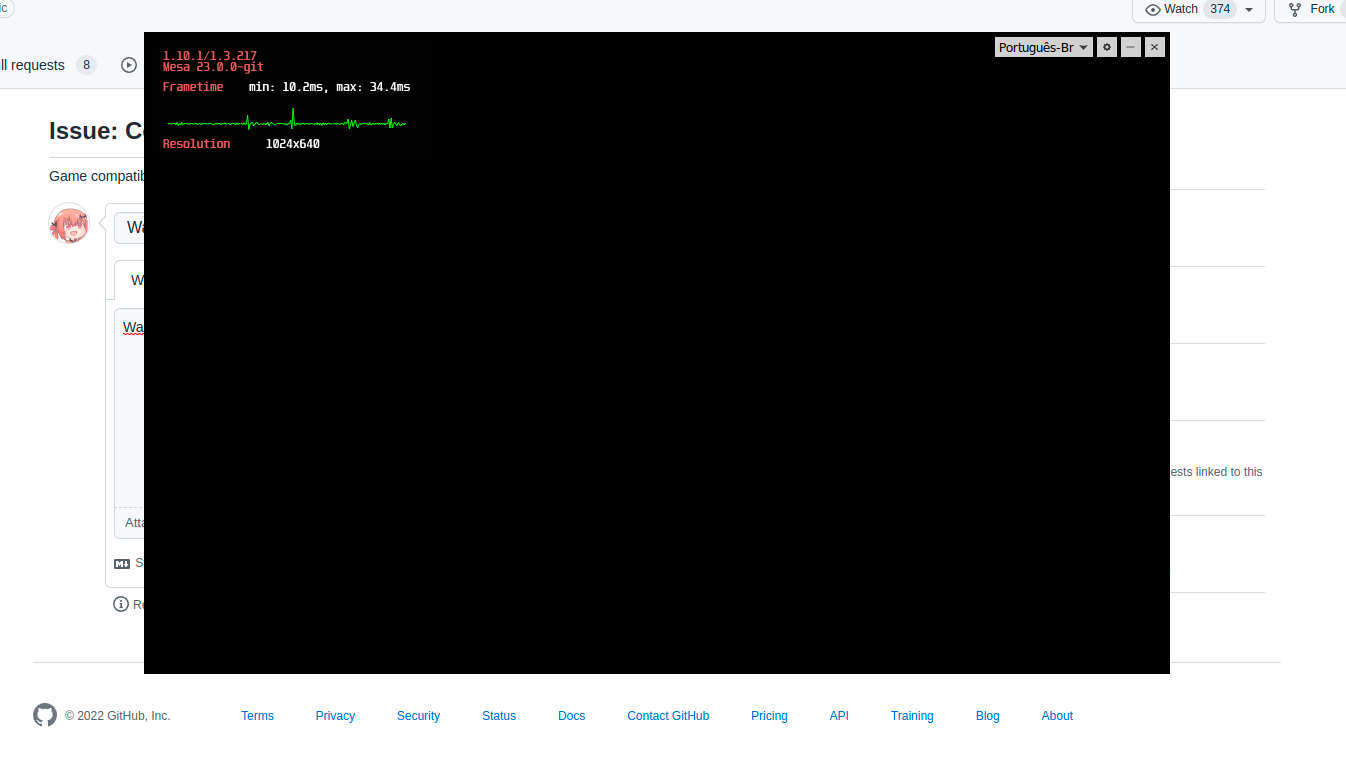
try disabling hardware acceleration in the launcher then close + reopen
--use-gl=osmesa on launcher options fix the problem
try disabling hardware acceleration in the launcher then close + reopen
yep, this works. Also having this problem with hardware acceleration since the latest warframe update
For better information, i'm on Arch, latest updates and latest nvidia driver
Warframe crashes after launcher
Issue transferred from https://github.com/ValveSoftware/steam-runtime/issues/519.
@TheRealPingWin posted on 2022-07-25T14:20:23:
- Steam Runtime Version: Steam manjaro 1.0.074-1
- Distribution : Manjaro 21.3.2
- System and driver information: https://gist.github.com/TheRealPingWin/f8710d3000e715c373a6b949d2a13e60
- Have you checked for system updates?: Yes
- What compatibility tool are you using?: Steam Linux Runtime / Proton 5.13+
- If you are using Steam Linux Runtime, or Proton 5.13 or newer: steam-runtime-heavy_0.20220315.0
Please describe your issue in as much detail as possible:
After clicking play on the warframe launcher the game crashes. (No error codes just the default warframe crash windows)
Steam crash log (ran on 7.0-3 proton):
https://gist.github.com/TheRealPingWin/7c23cea7f187131e47702c071eada751
I've tried different proton versions and none of them worked. 6.10 GE-1, experimental, 7.0-3, 6.3-8, 5.0-10
Steps for reproducing this issue:
- Download steam-manjaro from pamac manager
- Install warframe from steam
- Click play on launcher
@TheRealPingWin Are you trying to run Warframe using D3D11 renderer or D3D12 one? If the latter, can you try the former?
Tried both and neither worked.
Also I've tried tweaking other options in the launcher like GPU acceleration and graphics engine, but still doesn't run.
Warframe on the steam deck has no sound for me. The launcher has sound and the game launches and runs without issues except for there not being any sound in the game.
I have tried the latest stable and experimental proton without any changes.
Warframe using D3D11 doesn't let me use my mouse to focus the login fields. It shows controller prompts (Xbox) but no controller is plugged in; when I plug in a controller I can focus the login fields via the controller's virtual mouse, but typing on my keyboard will not put any text in there. I tried disabling Steam Input, and the result is the same. I also tried disabling the Steam Overlay altogether. Checked evtest to see if I had some lingering "virtual" Xbox pads and there were none.
Using Artix Linux and Proton 7.0-3
Hi,
Warframe seems to have a new issue from today: it crashes with a EXCEPTION_INT_DIVIDE_BY_ZERO
steam-230410.log.
I've run this game for the past 1 year without any issue whatsoever - I've also tried to upgrade Proton, but nothing.
I did notice today there has been an update on Steam, perhaps the runtime has a bug?
I'm on Ubuntu 22.04.1, Nvidia 515.65.01 (steam beta 16 Aug 22, built at 22:22:22). Tried 3 different versions of Proton (default GE-7.20 an GE-7.29) all fail with same error.
Does seem to work on SteamDeck with default settings.
Update: seems like a game update has toggled the default 'fullscreen' option in the main menu, and this makes DX12 VKD3D crash. DX11 works fine and when setting again this option ('fullscreen') in the main menu, DX12 also works as per expectations.
The launcher won't let me launch the game, it instead displays this message: "Support for DirectX 10 has ended. We hope you can upgrade your graphics card soon!"
System:
APU: AMD Ryzen 4700U
OS: Zorin OS 16 (based on Ubuntu 20.04.2 LTS)
System is up-to-date.
Both 32 and 64 bit Vulkan are installed.
Running Wayland, if that matters.
Attempts:
- Tried with Proton Experimental and GE-Proton7-33: same result.
- Tried disabling DX10 with launch option
PROTON_NO_D3D10=1 %command%: this results in the same message, confusingly. - Tried using launch option
PROTON_USE_WINED3D=1 %command%: This stops the error message appearing, but clicking anything on the launcher does nothing and causes the OS to say it's not responding (as does typing). This is odd because I can still see animations playing and I can still hear sounds when mousing over things. It also seems to be stuck on "Checking for updates..."
Update: Partially solved by uninstalling the AMDGPU driver, thereby allowing me to update Mesa to 22 (I think the version of AMDGPU I have seems to only support Mesa 21). The game now renders mostly black, but that's a separate issue to the launching one.
Hello @Pyroglyph, please copy your system information from Steam (Steam -> Help -> System Information) and put it in a gist, then include a link to the gist in this issue report.
I'm similarly having the same DX 10 error with Experimental & GE-Proton7-35
sysinfo
Hello @TobiTenno, the build of DXVK and VKD3D-Proton inside of Proton Experimental currently requires driver features from NVIDIA 510.47+ or mesa 22.0+. Please update your video drivers.
Additionally, from your system information, it looks like your system is falling back to mesa/llvmpipe to run Steam at all. This is most likely due to the Wayland-based user session you're using with NVIDIA drivers and XWayland is older than 21.1.2 on your system.
I'm running the latest from Debian stable...
Warframe compatibility regression
Issue transferred from https://github.com/ValveSoftware/Proton/issues/6189.
@Ninjastorm380 posted on 2022-09-26T08:56:14:
Compatibility Report
- Name of the game with compatibility issues: Warframe
- Steam AppID of the game: 230410
System Information
- GPU: AMD RX 480
- Driver/LLVM version: Mesa 22.1.7
- Kernel version: 5.19.11-zen1-1-zen (arch linux)
- Link to full system information report as Gist
- Proton version:
I confirm:
- [+] that I haven't found an existing compatibility report for this game.
- [+] that I have checked whether there are updates for my system available.
Symptoms
Compatibility regression in latest proton experimental. Game fails to bring up initial loading screen after starting from the launcher. last known working proton is 7.0-4
Reproduction
attempt to launch warframe using proton experimental.
log: steam-230410.log
Hello @Ninjastorm380, it looks like your system is configured to use AMDVLK. Can you test how the game behaves with mesa/RADV?
problem is solved while using mesa/RADV. deficit in AMDVLK then?
name: Compatibility Report
about: Game compatibility issues.
Compatibility Report
- Name of the game with compatibility issues: Warframe
- Steam AppID of the game: 230410
System Information
- GPU: AMD 6700XT
- Driver/LLVM version: Mesa 22.1.7
- Kernel version: 5.19.12-200.fc36.x86_64
- Link to full system information report as Gist:
- Proton version: Proton experimental
I confirm:
- [+] that I haven't found an existing compatibility report for this game.
- [+] that I have checked whether there are updates for my system available.
Symptoms
After a few hours of playing the game will suddenly and abruptly crash. This crash also causes steam to crash for some reason.
Reproduction
I haven't found a consistent way of reproducing it, it seems to happen at random intervals after long sessions. Side note, the log files was so large (195 MB) as the game was running for a long time that I had to trim it down to github's maximum allowed file size of 25MB. This was done with the following tail command:
tail -c 25000000 steam-230410.log > steam-230410-trimmed.log
Apologies in advance for this. I can link a google drive file if desired but I'm not sure if that's needed or accepted.
Update: Using Proton 7.0-4 like the other regression report stated seems to work, however I did have to turn on dx12
Newest proton, both experimental and GE cause crash upon loading Warframe on DX12 Mode since unknown update. Works on earlier snapshots of experimental.
last part of the log before crash:
0494:err:dxgi_vk_swap_chain_wait_and_reset_acquire_fence: Failed to wait for fence, vr -4
0494:err:dxgi_vk_swap_chain_wait_and_reset_acquire_fence: Failed to wait for fence, vr -4
048c:info:vkd3d_pipeline_library_disk_thread_main: Flushing disk cache (wakeup counter since last flush = 2246). It seems like application has stopped creating new PSOs for the time being.
Loads properly with dx11 mode and dxvk, issue seems tied to an update on vkd3d-proton
@tjhexf I have three questions:
- Is this an Nvidia GPU with driver version 525.60.11?
- Is this a PRIME setup (e.g. an Optimus laptop)?
- Does prepending
VKD3D_DISABLE_EXTENSIONS=VK_KHR_present_id,VK_KHR_present_waitto launch options before%command%allow it to run again in D3D12 mode?
@Saancreed
- It is, i'm running a fully updated x86_64 archlinux system as of today atleast
- No, it's a desktop with a GTX 970 running the proprietary drivers
- Launches fully and properly upon appending those launch options, with only a stutter where the crash would usually happen in loading. Logs don't seem to reflect an error anymore
@tjhexf I tried testing this just now and was not able to replicate the issue. This seems to be something either related to the Nvidia driver you have, or an issue in vkd3d-proton based on how those launch options fixed it for you. It looks like there may have been mention of similar issues on their github tracker already.
https://github.com/HansKristian-Work/vkd3d-proton/issues/1317
and
https://github.com/HansKristian-Work/vkd3d-proton/issues/1315
RTX 3070
Driver 525.60.11
Mesa 22.0.5
No custom launch flags
| Proton | DX11 | DX12 |
|---|---|---|
| Experimental 1670512927 | :+1: | see image |
| GE 7-42 1670023342 | :+1: | see image |
| 7.0.5 1667938887 | :+1: | see image |
| Hotfix 1667960046 | :+1: | :+1: |
In failing cases the game launches and immediately gets stuck on this blank screen with negative A LOT fps.
Surprisingly the "hotfix" version of Proton is the only one able to run DX12 mode without issues.
P.S. No issues with the Launcher.

Hello @Commaster, please add PROTON_LOG=1 %command% to the game's launch options, reproduce your issue, and attach the generated $HOME/steam-$APPID.log to this issue report as a file. (Proton logs compress well if needed.) Also, please copy your system information from Steam (Steam -> Help -> System Information) and put it in a gist, then include a link to the gist in this issue report.
Hello @kisak-valve ,
Here is my System Information, though it detected a rather weird CPU frequency and didn't see my main/dedicated GPU.
Here are the logs, I covered the crossing of working and broken Experimental as well as working and broken DX12.
Experimental-DX11-works.log
Experimental-DX12-stuck.log
Hotfix-DX12-works.log
Thanks, that might be https://github.com/HansKristian-Work/vkd3d-proton/issues/1317. If it is, then setting the game's launch options to VKD3D_DISABLE_EXTENSIONS=VK_KHR_present_id,VK_KHR_present_wait %command% is worth testing.
Thank you, that did it. Both Experimental and GE-7.42 now load the login screen in DX12 mode.
Weird, I expected DX12/11 to be handled by DXVK while VKD3D deals with older DX versions... Or I can convince Proton to use DXVK somehow?
I assume "Proton Hotfix" didn't get this breaking change yet?
DX12 is handled by VKD3D, 11 and 10 by DXVK
I am unable to install Warframe on my Linux Fedora system. I have tried both with and without Proton compatibility enabled, but in both cases the ~/.steam/steam/steamapps/common/Warframe folder is empty after the installation process completes. No error messages are displayed during the installation. I did reinstall the Fedora OS, but the problem persists.
System Information:
Operating System: Linux Fedora 37
Processor: AMD Ryzen™ 7 5800H
Graphics Card: Radeon RX 6600M
Additional Information:
@thePaulRichard are you able to install other native games in the same location? Can you install other proton based games?
@NeroBurner yes, all my games I was able to install with Proton or without Proton. Only Warframe is showing issues.
The launcher doesn't appear on the Steam Deck for me, making the game unplayable
since today (though i didn't play for a few days so not sure how long, can't be longer than a week) the launcher doesn't even start anymore (technically it did start once to update itself and that was it; so it's possible that something in that update broke compatibility), while other games appear fine. same behavior with Valve Proton, Valve Proton Experimental and current GE Proton, even with a fresh prefix.
steam-230410.log though i can't find anything that looks like an actual reason in there...
@ThisNekoGuy @nonchip I tried to reproduce this with a fresh download of the game, and the launcher is working correctly. If possible, could you see if entirely uninstalling/reinstalling fixes the game? It would be ideal if you could backup the game's common folder first so that we can potentially use that to try to diagnose the issue if a fresh install fixes it.
@alasky17 i did a full reinstall (without backing up the common folder, sorry) already, that didn't work for me (same failure mode as far as i could tell), what did however "fix" (more like workaround) it for me was then wiping the pfx again and downgrading all the way to GE-7.35.
sorry i can't help much more there in the way of diagnosing, but it looks to me like there was simply a regression in a recent wine/proton minor upgrade that got triggered in the latest warframe launcher upgrade (i think they bumped their CEF dependency).
@nonchip Just to confirm - with Proton Experimental etc - what was the exact behavior? Did the launcher have black rendering? Or would the launcher window never appear? Would the game say "running" when the launcher didn't appear or would it all close itself? Also, could you please copy your system information from Steam (Steam -> Help -> System Information) and put it in a gist, then include a link to the gist in this issue report?
@ThisNekoGuy @nonchip I tried to reproduce this with a fresh download of the game, and the launcher is working correctly. If possible, could you see if entirely uninstalling/reinstalling fixes the game? It would be ideal if you could backup the game's common folder first so that we can potentially use that to try to diagnose the issue if a fresh install fixes it.
@alasky17 for me on the Steam Deck, pressing play triggers the launch for a split-second and then the button goes back to being green; but, when pressing the "Steam" button, it appears in the process list and attempting to "resume the game" just takes me to the launch-loading screen but it never loads Warframe's launcher.
I can try to reinstall the game but... if it's really a download issue rather than something else, I'd definitely be surprised. :/
@ThisNekoGuy Could you get a log of the failure? You can add PROTON_LOG=1 %command% to the game's launch options, and it will create a log in the ~ folder. If you switch over to desktop mode, you should be able to upload the log here :)
@alasky17
I tried this and it never made a log; so I tried launching the game from desktop mode and it said the launcher executable wasn't there.
Then, I tried to verify integrity and it "passed;" so I "uninstalled" it and attempted to reinstall the game when Steam threw an error window that it couldn't.
So... I attempted to clear the download cache for Steam, via the settings in Desktop Mode, and now whenever I try to login in Handheld Mode and get to the email verification part... it throws me an error message saying to "try again later" after entering the code; attempting to repeat the login just gives me the same authentication code every time too...
EDIT: I managed to login finally but attempting to reinstall Warframe still doesn't download anything
@ThisNekoGuy Thank you for the follow up :D That sounds like a royal mess at this point - yikes :/. FWIW, it sounds to me like there was already something funky going on if Warframe never made a log - that means it was never even attempting to run with Proton and something even more basic was going wrong.
I have a couple of suggestions after brainstorming with some folks :) In no particular order:
- You could try switching between different SteamOS branches (eg stable -> preview -> stable) to try to get things to resettle.
- Are you running low on disk space? I'm wondering if that is causing shenanigans somehow, especially with the download failure.
- If you follow the steps on this site (https://help.steampowered.com/en/wizard/HelpWithSteamDeck) and they don't help, I think you can create a support ticket. It sounds like something could be really wrong with your system, and I would hope Valve support can help with that :)
- Switching branches doesn't fix it
- Attempting to download it from the Preview branch doesn't work either
- I have over 100 GBs of free space, so that's not the issue
- The help site pretty much just says to reboot the thing... which I've done already...
- I guess I have to talk to Steam support? Though, I kind of expect them to just redirect me to the Steam Deck forum... which has so many other reports, I don't know how anyone would find this one 😅
Hello, I've noticed that Warframe is significantly more crash-prone on the recently released Proton 8, than on Proton 7.
For example, on Proton 8 you can pretty consistently crash the game before even reaching the login screen, just by setting it to fullscreen and switching focus to a different window (One that's on a second monitor in my case). This crash doesn't happen on Proton 7, so I believe this is a regression.
Here's the relevant logs for the Proton 8 crash and the Proton 7 control case (Compressed because the files were too big to upload directly):
warframe-proton7-nocrash-steam-230410.log.gz
warframe-proton8-crash-steam-230410.log.gz
And my system information
On SteamDeck the game crash just with starting the game with any proton.
When using Proton 8, the game launcher is buggy and everything in the game is black. It works fine for Proton 7.
On latest update to Warframe, launcher crashes on startup on Proton 8.0-2 and 7.0-6, though it does run on Experimental.
Can confirm that since Warframe Update 33.5, the launcher will keep crashing at startup on Proton 8.0-2, spawning crash dialogs every 10-20 seconds. Proton Experimental does not suffer from this problem.
Proton Logs:
- Proton 8.0: steam-230410.tar.gz
- Proton Experimental: steam-230410 (1).tar.gz
One interesting note from the logs is that this line appears in Proton 8.0 but not in Experimental, which may indicate a missing API implementation in Wine bundled with Proton 8.0:
wine: Call from 00000001700621D8 to unimplemented function KERNEL32.dll.DiscardVirtualMemory, aborting
Using GE Proton 8-3 works just fine FYI. You may want to switch to that one on a temporary basis.
Edit - Updated to 535.54.03, let's see if it crashes again
Hi, would like to report some weird crash issues, most likely related to shader caching.
If I use Proton Experimental I can observe micro stuttering or macro interruption (i.e. 0.25 seconds) but the same is stable.
This usually happens when i delete the cache directory and I'm aware I'm visiting new levels/cache needs to be rebuilt.
Unfortunately if I use any other version of proton (8.0-2, or GE 8.5), once shaders are re-downloaded from Steam, then the game crashes at the same moments when Proton Experimental would have just micro/macro stutter.
Interestingly enough, if I play for 1~2 hours with Proton Experimental and then switch over any other proton, the crashes are gone up until the next shaders' update.
I'm running Ubuntu 22.04, with Nvidia 525.125.06, 4090.
Looks like Proton Experimental became busted all of a sudden. Been getting random GPF crashes for the last week or so.
I assume GPF stands for "General Protection Fault"?
Trying 8.0-3 now...
I'm having some issues with handling of mouse/cursor:
- When windowed, the cursor isn't properly confined to the game window so I can rotate the camera only so much before the cursor exits the client area and I lose control.
- When (borderless) fullscreen, leaving any menu (where the cursor is used to navigate) back to controlling the camera causes the camera to abruptly move to point downwards, unless the mouse was perfectly still while in menu (so quickly entering and exiting the menu won't cause this issue if the mouse was untouched).
This is on Plasma Wayland session, Intel/NV GPUs using PRIME render offload and current Proton Experimental. Not sure if having fractional scaling enabled has any effect on this but I noticed some XWayland windows behaving strangely around the borders. Let me know if you need any more details about my setup.
- Sometimes "Processing Vulkan shaders" takes too much time, and if you skip it in the middle of it, to afterwards let it do its thing, it can get stuck with invalid shaders that need to be removed, otherwise it won't end. Ever. It gets stuck in a % and doesn't advance. Processes become T or Z (right now there are two T, but I expect it to change once it finishes). In fact, while writing and keeping this on draft, it has took 1 hour. I started Warframe using the wine prefix instead and started playing with that. At the time of submit, it's at 87%.
- Tabbing out the game while using Steam Input can make the game think that no controller is connected. Disconnecting, reconnecting, tabbing out and in, in different order doesn't seem to fix it reliably. The only reliable way is to restart the game and not tabbing out while the controller is connected on extended periods of time. In plain wine, usually this is a crash of the game. This happens on Windows too so it may be relevant in a weird way.
- Loading times for the launcher are long, without any indication that something, anything, is happening.
- Game doesn't detect that it's a PS4 DS/Nintendo Switch Pro controller when using Steam input. It detects all of them as Xbox controllers.
- Entering the "decoration" free camera, has a weird layout. Very sensitive that doesn't allow to easily make minute adjustments. It's either 100% or 0% view/movement speed.
Otherwise it seems to work as good compared to plain wine+dxvk+vkd3d-proton, except that the later has some weird visual glitches where the left door to enter the plains of eidolon (Cetus side) doesn't load, if you come out of the plains, talk to Ostron and are prepared to leave again. Forgot to mention, I use a RX 590, the directory I monitor using inotifywait is /.../steamapps/shadercache/230410/mesa_shader_cache_sf/18cd3365609e3153ef7858796f436563/AMD RADV POLARIS10/
regularly seeing "!status &&vkCreateGraphicsPipelines" errors after 20-30 minutes of game play. Longest I've gone without this error since they started is 45 minutes.
regularly seeing "!status &&vkCreateGraphicsPipelines" errors after 20-30 minutes of game play. Longest I've gone without this error since they started is 45 minutes.
Having a similar issue, it usually happens when entering a new match.
I am on Arch, using KDE Wayalnd, and Nvidia proprietary drivers with Prime on an A1000 and intel gpu
UI cursor speed broken in Warframe after Proton Experimental update
Issue transferred from https://github.com/ValveSoftware/Proton/issues/7533.
@atimeofday posted on 2024-02-27T08:03:46:
Game: Warframe
Proton versions (broken): 9.0 beta, 02/26/2024 Proton Experimental
Proton version (before breakage): 02/25/2024 Proton Experimental
Issue: UI cursor speed is badly crippled; the in-game UI cursor speed setting does nothing.
I have no idea how this could happen, or be caused by Proton, but:
- I first encountered this issue when I tried Proton 9.0 beta.
- The issue disappeared when I reverted to Proton Experimental.
- Proton Experimental then received a large update.
- The issue then appeared while using Proton Experimental.
Tertiary information: I am using a Logitech MX Ergo trackball mouse, with cursor speed and behavior adjusted by Solaar.
I have thousands of windows games working on my rig but for some reason Warframe does not start, it doesn't even create a graphical window. It keeps "thinking" for a few minutes and then the [STOP] button becomes [PLAY] again, no error dialog or anything. Tried with regular Proton 8.0-5, Proton 9.0 beta, proton experimental and the result is the same. Tried on SSD, HDD and the results is the same. Tried adding parameters like PROTON_NO_ESYNC=1 PROTON_NO_FSYNC=1 and the result is the same. Why is it crashing? From the proton log, I have no idea.
gist of my system information: https://gist.github.com/Patola/8ddabc7b0d0419af5f77d4e69c50fc96
gist of runtime system info: https://gist.github.com/Patola/8ddabc7b0d0419af5f77d4e69c50fc96
AMD 7800X3D 64 GB + Radeon RX 7900 XTX.
Steam log is attached. Waited until [STOP] became [PLAY] again.
steam-230410.log
@Patola could try to restart the steam client and see if it allows you to play the game? If it does, please try to see if you can get ingame with both proton 8 and 9.
@Patola could try to restart the steam client and see if it allows you to play the game? If it does, please try to see if you can get ingame with both proton 8 and 9.
It worked. Wow. That's bewildering, because I tested like 10 other games in the same steam session before and after trying to run it. Why does this kind of stuff happen specifically with Warframe?
@Patola I don't think it's specifically a warframe issue, might just be luck. Also, as you have an amd card you'll probably need to set WINEDLLOVERRIDES="amd_ags_x64=n" %command% for warframe to work on proton 9.
@atimeofday Unfortunately I'm having trouble reproducing what you are seeing. I installed Solaar, and the in-game menu options for look and aim sensitivity are functioning for me. I have a few more questions to hopefully get to the bottom of this.
- Do you mean that you see no difference when set to 0 vs 100?
- Are you experiencing the bad cursor speed during any particular part of the game? Menus? When moving camera? If you could get a quick video comparing Proton 8 vs 9 that could also be very helpful in case I'm testing the wrong part of the game.
- Could you somehow share the Solaar rules that you are using? It looks like there is a "rules editor" where I can edit the rules for my logitech trackball mouse (I have one too :D), and I think it would be really helpful if I could try to match you exactly. Alternatively (or additionally) it would be great if you could test without the Solaar rules to see if that is really what is causing the difference in behavior.
Also, for further information gathering in case the above still gives no clues - please also copy your system information from Steam (Steam -> Help -> System Information and Steam -> Help -> Steam Runtime Diagnostics) and put each in a gist, then include a link to the gists in this issue report. If you could also grab a log (or ideally 2 logs, one with 9.0-beta with the problem and one with 8.0-5 without the problem) by adding this to the launch options, that would be greatly appreciated: PROTON_LOG=+x11drv,+x11settings,+event,+cursor,+win,+message %command%
@alasky17 Thanks for looking into it and checking in, if nothing else it's good to know that there is an arrangement of software/hardware/etc where Proton 9 does not cause the cursor speed issue.
System information:
https://gist.github.com/atimeofday/07fcda8b7a1591143e706a51970b5619
Runtime diagnostics:
https://gist.github.com/atimeofday/d5f0f0b059747101df76330ce76a95c7
- The in-game UI cursor speed setting seems to do nothing, from 0 to 300, while the cursor speed appears to be restricted to a small fraction (20-50%?) of what it should be (and is while moving the camera).
- The low cursor speed issue is specifically limited to menus (or other UI) where the cursor is visible, rather than the mouse being fully captured by the game for camera movement. This notably includes the arsenal and modding screens.
- I have not used the Solaar rules editor - only the Sensitivity (Pointer Speed) slider, which I have set to maximum at 511.
I will continue to monitor and test the cursor speed issue, and try to collect logs/videos/comparisons.
Speaking of logs, I have also been encountering semi-random game crashes, which I had thought were connected to certain graphical settings and hardware limitations, but I have now ruled out most of those possibilities. What would be the best way to collect logs from those crashes or otherwise diagnose that other issue?
@atimeofday Interesting! I do not have the Sensitivity (Pointer Speed) option for my mouse (M570 so not quite as cool as yours :P) ... I'll try to find one that has that feature. In the meantime, if it is possible for you to try disabling Solaar to see if that really is the variable causing the difference, that would be greatly appreciated.
For regular crashes, generally PROTON_LOG=1 %command% is a good starting place. The extra logging channels I gave you are specifically for cursor issues. Logs will be stored by default in ~/steam-[appid].log. If you are gathering multiple logs of the same game, you should rename the file or it will be overwritten by the next launch of the game.
On Steam Deck, Warframe crashes after launcher using Proton 9.0 or Proton Experimental.
@kaincenteno Thank you for the report! This should already be fixed in experimental-9.0-bleeding-edge and the next experimental and 9.0-beta releases. Please let me know if you continue to see a crash after those updates (hopefully today or tomorrow) :)
@kaincenteno Thank you for the report! This should already be fixed in experimental-9.0-bleeding-edge and the next experimental and 9.0-beta releases. Please let me know if you continue to see a crash after those updates (hopefully today or tomorrow) :)
couldnt wait to test it out and installed experimental-9.0-bleeding-edge, and it works great 😄 thank you
There is one issue with Warframe that I didn't know where to post about. This one started last year when they implemented Steam Input around the time it got Steam Deck Verified.
If you connect the steam deck to mouse+keyboard and launch the game. You won't be able to use mouse and keyboard and will get stuck at the login screen.
Lifewise if you connect a gamepad, the gamepad buttons/joystiq won't be functional so you wont be able to log in to the game.
This same behavior happens if you launch it from the desktop mode from the steam deck.
This issue can't be reproduced in a laptop/desktop running the game in proton with mouse/keyboard and external gamepad, it only happens on steam deck.
I am facing strange issue on latest 9.0 beta with hacking corpus consoles. After one mouse click, the indicator moves 2 steps instead of 1. On 8 proton version all is good. Can anyone else confirm/disprove?
I am facing strange issue on latest 9.0 beta with hacking corpus consoles. After one mouse click, the indicator moves 2 steps instead of 1. On 8 proton version all is good. Can anyone else confirm/approve?
Confirmed.
@atimeofday We still have been unable to repro either issue (the UI sensitivity or the corpus console click issue). Could you try disabling/temporarily removing solaar so see if that "fixes" the UI sensitivity issue? Also, looking at your system info, you have a ton of vulkan layers (mangohud, gamescope, hdr wsi, latencyflex, obs capture, and vk basalt). Could you try disabling all of that, and seeing if you still are seeing either/both issue?
@Ekzilit It would be great if you could also copy your system information from Steam (Steam -> Help -> System Information and Steam -> Help -> Steam Runtime Diagnostics) and put each in a gist, then include a link to the gists in this issue report.
Also - are y'all using dx11 or dx12 mode?
@alasky17 Thanks for checking in.
I haven't gotten around to pulling mouse logs, but I have removed Solar and confirmed that it was not causing those two issues. I have also noticed a third issue: middle click to select a full stack of mods (for dissolution) does nothing, while middle click for alternate fire still works in-mission.
I can look into disabling or rolling back the vulkan layers you mentioned; they're built in to Bazzite so it is easier in some ways and harder in others to do so.
@alasky17 gist , launch options: PROTON_ENABLE_NVAPI=1 DXVK_ASYNC=1 VKD3D_FEATURE_LEVEL=12_0
@Ekzilit Thank you! As a note - PROTON_ENABLE_NVAPI=1 doesn't do anything on Proton 9.0-x. We flipped the logic, so that is the default, and you will want to use PROTON_DISABLE_NVAPI=1 if you are having a problem with nvapi with any game (and please let us know on the github issue for said game!) or PROTON_FORCE_NVAPI=1 for the handful of games that currently have nvapi disabled due to known bugs. This is a change between 8.0-x and 9.0-x.
@Ekzilit @atimeofday this issue should be resolved in the current proton experimental bleeding-edge
@atimeofday I'm still trying to look into your UI sensitivity issue. Still no luck reproducing locally, but I have another lead, so I have an extra logging channel to add to the log request. PROTON_LOG=+x11drv,+x11settings,+event,+cursor,+win,+message,+rawinput %command%
If you could get a log where you just wiggle your cursor around and trigger the remaining issues mentioned both on 8.0-x and 9.0-experimental (or experimental-bleeding-edge), that would be super helpful :)
@alasky17 @simifor I believe switching to proton experimental bleeding-edge has solved all three mouse-related issues I was having: UI mouse sensitivity, middle click mod select, and corpus hacking.
(Minor note: I am currently traveling and using the built-in monitor of my laptop instead of my main one, in case that ends up mattering somehow. I will report back if it does.)
@atimeofday Great to hear! Keeping fingers crossed that all continue to be fixed when you get back home 🤞
What causes the launcher to behave like it does, going blank or black?
And is there a fix I can install? Even with wine tricks?
I am encountering frequent semi-random crashes. I have attached the end of the proton log from the most recent one, since the full log was much too large to upload. It looks to me like an issue with Nvidia drivers expecting explicit sync which, to my knowledge, has not been implemented on Linux yet.
Please advise:
- whether I or proton could do anything to sidestep this issue for now and prevent the crashes
- what all other information I can provide to assist with properly diagnosing the issue
Update:
- On a hunch, I have switched from borderless fullscreen to exclusive fullscreen
- This seems to prevent the crashing issue entirely, although occasional brief halts/stutters still happen
- UI cursor speed is abnormally slow again in exclusive fullscreen mode
- UI cursor speed settings do not perceptibly work, but I am not certain they do nothing
Since the last update, the game seems to think I have a controller connected and completely ignores keyboard and mouse inputs, preventing me from logging in. I have disabled and enabled Steam Input, no change.
Since the last update, the game seems to think I have a controller connected and completely ignores keyboard and mouse inputs, preventing me from logging in. I have disabled and enabled Steam Input, no change.
oh that happens to me when connecting the steam deck to a dock. Are you on a steamdeck?
Warframe has become unplayable for me in the last day or so, it was working perfectly previously.
I'm running arch, kde-plasma-wayland, steam (native), amdgpu drivers, with all the latest packages/updates as of this minute. GPU is an RX 6600XT.
The launcher works, but the game itself errors on startup:
Assertion failed!

Program:
Z:\home\sobe\.local\share\Steam\steamapps\common\Warframe\Warframe.64.exe
File: ../src-wine/dlls/winevulkan/loader_thunks.c
Line: 3750

Expression: "!status && vkEndCommandBuffer"

Press OK to exit the program, or Cancel to stat the Wine debugger.
This happens on:
- Proton experimental
- Proton 9.0-1
The error text is the same but has no image in the background on Proton 8.0-5 and GE-Proton9-4.
The happens when I pick either DX11 or DX12 in the launcher, though the error appears after about a second of loading on DX12 rather than instantly.
This may be related to this warframe forums thread.
Extra system info:
- vulkaninfo --summary
- System Information from steam
Hello @Sobeston, can you check if https://gitlab.freedesktop.org/drm/amd/-/issues/3343 is relevant to your system? A quick test would be to see how the game behaves with an older kernel.
Hello @Sobeston, can you check if https://gitlab.freedesktop.org/drm/amd/-/issues/3343 is relevant to your system? A quick test would be to see how the game behaves with an older kernel.
Hi, yes, @pixelcluster pointed me towards it. Upon enabling resizeable bar in my UEFI util, the game works perfectly again (and more smoothly than before). Thanks for the quick response.
regularly seeing "!status &&vkCreateGraphicsPipelines" errors after 20-30 minutes of game play. Longest I've gone without this error since they started is 45 minutes.
Having a similar issue, it usually happens when entering a new match.
I am on Arch, using KDE Wayalnd, and Nvidia proprietary drivers with Prime on an A1000 and intel gpu

Hi, I've been playing Warframe on Linux for years now (Thanks everyone for making this happen!)
Unfortunately, recently I started having exact same issues as this user. For me it first started happening 2 days ago and I've been playing last week without any issues.
Is the source of the error already known?
I'm using Arch with AMD CPU & GPU. I'll be testing this on my other system with Intel CPU & Nvidia graphics.
EDIT: Oops, I missed the latest few (hidden) comments.
I'll be testing this next.
Warframe has a whooping 12 gigabytes shader cache download. That can't be right.
@braiam wf is pretty shader heavy, it's been that way for as long as I can remember, at least a few years even off fresh installs
@andrewgrasman correct, but I don't expect to download the complete shader archive for a game that I just played yesterday. It's supposed to download new shaders, not all of it.
It contains shaders precompiled for many different GPU architectures and revisions. And they also go over your local cache to see if there are any you've produced that are worth uploading to their collective database. It appears to re-verify the entire cache periodically, sometimes almost daily if new shaders are being discovered by players.
Edit: Also, for example, A Hat In Time also has a 12-13GB shader cache, dwarfing the game's total install size.
@kode54 correct again, except that today is downloading 13GB again when it downloaded 12 less than 24 hours ago. The game had no updates between yesterday and today, there's no way there are already 13GB worth of shaders.
Warframe was the reason I turned off shader caching on my Steam Deck because it was a pain.
Honestly I do not even notice a difference with it off and I have a lot more space.
I have to keep it on for some games, as it also downloads transcoded videos for some games.
The issue appears to involve it just indiscriminately redownloading the entire cache every time. I guess they don’t know how to parity check and use delta updates? With the data sets being so sparsely unrelated, perhaps they should just poop out millions of hash named files instead of trying to maintain a gigantic mono file blob per game.
So this might not be useful to everyone but was crucial for me to launch the game properly.
I have two RTX Titan GPUs but they are not connected thru NV-Link. To run most games with DXVK, I have to force the game to run on the GPU connected to the screen. For that, I use vkdevicechooser which allows me to set launch option as such:
ENABLE_DEVICE_CHOOSER_LAYER=1 VULKAN_DEVICE_INDEX={gpu_id} %command%
{gpu_id} should be the ID of the GPU connected to the screen (i.e. 1, 2, etc.).
Without those env. variables, I get the famous black screen after clickling "play" in the launcher. So if you also have multiple unconnected GPUs and you get a black window when running the game, try to disable hardware acceleration in the launcher, stop the process, set the above mentioned environment variables (after installing vkdevicechooser). You can now re-launch the game and it should work properly.
Warframe takes an absurd amount of time to process it's Vulkan shaders on my PC (about 7 hours!) and it does this every single time an update to both the game's shaders and my PC happens when I'm using arch based distros. This is a problem because it means my CPU usage is extremely high on steam due to having background shader processing enabled.
Is there any fix to this? If I skip the shader caching, it's like it forgets the current shaders, and stutters on new assets all over again.
Current setup:
OS: CachyOS Linux x86_64
Host: Acer Nitro AN515-45 (V1.08)
Kernel: Linux 6.9.7-3-cachyos
DE: KDE Plasma 6.1.1
WM: KWin (Wayland)
CPU: AMD Ryzen 7 5800H (16) @ 4.46 GHz
GPU 1: NVIDIA GeForce RTX 3060 Mobile / Max-Q [Discrete]
GPU 2: AMD Radeon Vega Series / Radeon Vega Mobile Series]
Memory: 16GB
Disk: 2 TB NVME SSD
@WMan22 try turning off "Shader pre-caching" all together and see if that affects your gameplay at all.
@WMan22 try turning off "Shader pre-caching" all together and see if that affects your gameplay at all.
I did try skipping it, and the thing is, as stated in the post you're replying to, the game won't remember the shaders it does cache unless I let this do its thing. If I don't let steam process the vulkan shaders for like 7 hours, then every time I boot up warframe, it has to heavily stutter on new asset load every time, rather than just every time my drivers update. This happens whether I turn off shader pre-caching in the actual warframe launcher (I.E. not steam) or not.
About shaders cache - I figured out that you can disable shader cache option in launcher and gigantic 10+ gb downloads (in my case it was 16+) seems to gone. Now it downloads 400-500mb.
(sry, i'm too lazy to switch language to English)
Hey guys, looks like this thread has been pretty active for the last 6 years...
I've just bought a 1TB OLED Steam Deck and cannot get this game to launch at all on Valve's Proton 8.0-5, 9.0-3, or Experimental. On these versions the WF launcher will not appear. Both Steam's stdout/stderr and the proton log file appear to indicate some kind of segfault.
I am able to get the launcher to start on Valve Proton 7.0-6 but WF crashes as soon as I hit "Play".
Since this thread is quite long and extends over multiple years I'm having a tough time piecing together what steps I should take next. Anyone got a summary of the current status of WF support on Linux/Deck? I really don't understand what I need to do to make this work.
Edit: switching to the beta channel and letting the system update complete seems to have fixed whatever was the issue. I'm now able to launch and run on proton experimental.
@tekulvw
That sounds interesting as the game has been working perfectly for multiple major proton versions already (other than a few issues here and there).
But the beta client should not be necessary.
To be fair, I do not own a steamdeck myself and I have switched to Proton GE for most games quite a long time ago, but Warframe is usually one of these perfect games on stock settings as well.
Anyway, I'm glad you got it working eventually. The only thing that I could think of is to ensure you're running the most up to date os version as the game should run perfectly on all included Proton versions.
@tekulvw I would try to get the logs out of the system. The launcher is just a chrome screen.
Using gamescope to workaround a crash caused by tabbing out of the client, I've seen lighting effects being too bright, in a way that doesn't match the scene. I've seen examples of certain features being a bit too bright, or green, or flashing, last of which I have a video of. Restarting usually fixes this, but it shouldn't happen.
https://github.com/ValveSoftware/Proton/issues/167#issuecomment-2394055162
After some time 20GB download has returned. It starts when launcher shows "Play" button active.
Steam restart repeats the cycle.
Fcitx5 (input method) can't put text into in-game chat or any in-game text box.
For example:
Helminth(an item-consuming character build system requiring player typing "confirm" in their client language).
Inventory search.
Copy and paste text from another app is possible. But sometimes ctrl+v also doesn't work.
Are you by any chance using bigpicture / gamepad when this is happening?
Are you by any chance using bigpicture / gamepad when this is happening?
Keyboard and mouse only. And no big picture because I need to alt-tab to copy text from somewhere else.
Does anyone have the black texture in front of the gate in Cetus?
Daily 20 GiB shader download are back.
@Postnozet I've only seen that when players use specific aesthetics items. On rare occasions, the "next" room doesn't load, and I'm stuck at the door.
Warframe (230410) - Unstable frame rates after 40 minutes
Issue transferred from https://github.com/ValveSoftware/Proton/issues/8245.
@NoviceOtter posted on 2024-11-15T04:36:08:
Compatibility Report
- Name of the game with compatibility issues: Warframe
- Steam AppID of the game: 230410
System Information
- GPU: NVIDIA Corporation GA104 [GeForce RTX 3070]
- Video driver version: nvidia 560.35.03
- Kernel version: 6.9.3-76060903-generic
- Link to full system information report as Gist: https://gist.github.com/NoviceOtter/e714f144fd9e186c10162182eaf8c33e
- Proton version: Experimental and 9.0-3 both affected
I confirm:
- [ X ] that I haven't found an existing compatibility report for this game.
- [ X ] that I have checked whether there are updates for my system available.
Symptoms
At the patch where the Warframe 1999 demo released I started experiencing frame rate issues in Warframe but only after about 30-40 minutes of playing. Up to then I get solid 60 frames per second then suddenly it becomes a laggy mess. I have checked for back ground processes starting or something similar but a simple quit and restart of Warframe resolves the issue. All game modes affect solo or online. I have tried Proton Experimental and 9.0-3. Changing graphics settings to minimum does not resolve the issue either. Verified PC is not overheating, max core temp was 55 so well below anything I would worry about, immediate restart also gives another 30-40 minutes of play before issues start again so 99% sure its not heat related. Uninstalled and reinstalled Warframe completely. Let shaders precompile in steam, skip shaders, disable shaders, all the same result. DX11 and DX12 same result.
Issues are not present when running the game in windows.
Reproduction
Start game, begin playing after about 30-40 minutes begin experiencing major frame rate instability resulting in very poor game play
Hello @NoviceOtter, your symptom reads like https://github.com/ValveSoftware/steam-for-linux/issues/11446. Check if the Steam overlay is enabled and working, otherwise, the workaround in that issue report might avoid the issue.
Thanks for pointing me to that thread. Definitely looks like the same issue as what I’m experiencing. Will try the work around tonight and will report back if it fixes it.
@NoviceOtter I believe I ran into the same issue, and was able to solve it by disabling steam game recording for specifically Warframe, without losing the steam overlay. I'm not personally sure how different that is from adding the LD_PRELOAD="" launch option, but it may be worth trying
@atimeofday @kisak-valve LD_PRELOAD="" and turning the steam overlay back on resulted in a complete fix
Before it was 12-14GB of shaders, now it is 24GB of shaders. I only opened warframe last night after 3 days of not playing, why is this still happening? I am using Proton 9.0-3.
Anyone else having trouble loading after the game today, takes like 15 minutes to launch then fails to desktop.
Nope, works fine. Only FPS is lower on new location (or tile set), but it is about DE optimizations.
Logs: steam-230410.zip
There is currently a bug on where if you're using a French AZERTY keyboard, you cannot bind your second abillity with "é"
Warframe will instead show an "EN_2" Keybind, trying to bind "é" to your second abillity does not work.
I tried Proton 9.0.4 and it works, while on proton experimental, hotfix and 10.0.1(beta), it does not.
Here's my system info:
Operating System: Fedora Linux 42
KDE Plasma Version: 6.3.4
KDE Frameworks Version: 6.13.0
Qt Version: 6.9.0
Kernel Version: 6.14.4-300.fc42.x86_64 (64-bit)
Graphics Platform: Wayland
Processors: 16 × AMD Ryzen 7 5800X3D 8-Core Processor
Memory: 62.7 GiB of RAM
Graphics Processor: AMD Radeon RX 6950 XT
Replying to https://github.com/ValveSoftware/Proton/issues/167#issuecomment-2848697558
I was going to create an Issue before seeing this comment but, yeah, I confirm this bug introduced with Proton 10.
Observed from both Gnome (Wayland) and Niri (using Xwayland-satellite) desktop environment on Arch Linux.
My system for what it's worth:
Kernel: 6.14.4-zen1-2-zen
Processor: Intel i5-10300H
GPU: Nvidia GTX 1650
Memory: 32Gb of RAM DDR4 SODIMM
The launcher fails to launch the game in the latest release. The way to reproduce it is to create a new prefix/redownload. It happens on Proton 9, 10 and experimental. The following log is created:
"D:\SteamLibrary\steamapps\common\Warframe\Warframe.x64.exe" -silent -log:/Repair.log -graphicsDriver:dx12 -cluster:public -language:en -applet:/EE/Types/Framework/CacheRepair
CreateProcess failed: [0x000002DB]
Running that directly from a wine cmd doesn't cause problems.
It's also not working on my end, the Warframe launcher says:
"Update Failed!
Could not run the Warframe executable!"
Debian/trixie
Happens in Proton 8,9,10, Experimental and Bleeding Edge
Hi,
Since the latest update (21 May 2025) it seems like Warframe doesn't detect my wireless DS4 pad, no matter the proton version (tried a bit of everything) nor if I enable/disable steaminput.
Wired DS4 is the same - apparently doesn't work.
I'm running on Ubuntu 24.04 if this is of help.
Thanks!
Hi,
Since the latest update (21 May 2025) it seems like Warframe doesn't detect my wireless DS4 pad, no matter the proton version (tried a bit of everything) nor if I enable/disable steaminput. Wired DS4 is the same - apparently doesn't work.
I'm running on Ubuntu 24.04 if this is of help.
Thanks!
there was a change that they reverted https://forums.warframe.com/topic/1455088-psa-restoring-steam-action-sets/
my xbone controller works without issues
Warframe stuttering on Linux (Nobara KDE + Wayland) after ~30 minutes of play — other games
Issue transferred from https://github.com/ValveSoftware/Proton/issues/8817.
@Dayklare posted on 2025-06-14T17:37:46:
Hi everyone,
I'm running Warframe on Nobara Linux 42 (Fedora-based, KDE Plasma, Wayland) with Steam + Proton, and I'm hitting a frustrating issue:
The game runs smoothly at high framerates (120–130 FPS) but begins to microstutter after around 30–33 minutes of gameplay. Once the stuttering started, it won't stop.
I tried my best to find the root cause and a solution but was unsuccessful.
Here is a video capture of what the stuttering looks like
System Info
Laptop: MSI GF63 12VF-298
CPU: Intel Core i7-12650H (up to 4.7 GHz)
GPU: NVIDIA RTX 4060 Laptop GPU (8 GB VRAM)
RAM: 16 GB DDR4
OS: Nobara Linux 42 (Fedora-based), KDE Plasma, Wayland
Proton: GE-Proton10-4 (tried many versions but got the same result every time)
Warframe launch script: Custom shell script ~/Games/scripts/launch-warframe.sh
#!/bin/bash
~/.local/bin/disable-kwin-compositor.sh
gamemoderun steam steam://rungameid/230410
sleep 5
~/.local/bin/enable-kwin-compositor.sh
Gamemode: Enabled
What Happens
Game launches fine, runs smooth initially.
Around the 30-minute mark: microstutters begin—short freezes every few seconds.
Stutters persist and FPS drop as soon as I move or look aaround.
Framerate counter remains stable (130+ FPS) if I stay still.
Other heavy games like Darktide run flawlessly under the same setup (also using Gamemode etc).
What I’ve Tried
System Tweaks
Enabled gamemode
Switched CPU governor to performance
Lowered swappiness (vm.swappiness=1) → slight improvement
Clean KDE session (no Brave browser or extra apps)
Monitored memory/swap/CPU/GPU live via custom logging script
Proton & Wine Tweaks
GE-Proton10-4 (tried several other versions but got the same exact result)
Tried disabling esync via PROTON_NO_ESYNC=1
Not using PROTON_USE_WINED3D=1 yet
Launch via custom script instead of default %command%
Monitored Metrics (During Stutter)
RAM usage ~11 GB (out of 16 GB)
~1.8 GB free memory + 4.9 GB available
GPU utilization normal (25–40%)
No significant swap usage
CPU usage stable
No major temperature or I/O spikes
Logs show no resource bottlenecks at stutter time
Logs
Logs file is attached, note that at some point I closed the game hence why the GPU drops at some point, the issue happened before (cannot say when exactly unfortunately)
warframe_perf_stutter_window.csv
Logs sample when the game is stuttering
Timestamp CPU(%) user CPU(%) system Mem used (MiB) Mem free (MiB) GPU Util % GPU Mem Used (MiB)
2025-06-14 13:36:47 16 9 11132 1853 37 2548
2025-06-14 13:36:58 20 5 11117 1863 39 2548
2025-06-14 13:37:09 17 5 11103 1876 41 2548
2025-06-14 13:37:19 17 8 11099 1880 39 2548
2025-06-14 13:37:30 16 3 11086 1874 25 2548
2025-06-14 13:37:40 12 7 11065 1871 20 2548
2025-06-14 13:37:51 15 0 11052 1866 34 2548
Hello @Dayklare, you might be seeing https://github.com/ValveSoftware/steam-for-linux/issues/11446. Opt into Steam's client beta and retest.
Hello @Dayklare, you might be seeing ValveSoftware/steam-for-linux#11446. Opt into Steam's client beta and retest.
Just tested and I can confirm that after 40 minutes I have no lag spike or stutter, we can consider it solved! A million thanks
Warframe (230410) - Screen freeze
Issue transferred from https://github.com/ValveSoftware/Proton/issues/8885.
@rafael-patronilo posted on 2025-07-05T20:04:36:
Compatibility Report
- Warframe
- 230410
System Information
- GPU: NVIDIA GeForce RTX 3060
- Video driver version: Nvidia 570.133.07
- Kernel version: 6.11.0-29-generic
- System Information (note: it lists the integrated GPU rather than the dedicated; nvidia-smi confirms Warframe runs in the dedicated GPU)
- Proton version: 1746128130 hotfix-20250501
- Linux Distribution: Ubuntu 24.04 noble
I confirm:
- [x] that I haven't found an existing compatibility report for this game.
- [x] that I have checked whether there are updates for my system available.
Log files
Proton log: steam-230410.zip
(Captured during local play, the freeze also ocurred)
Journalctl: journalctl-warframe-freeze-steamlink.txt
(Captured during a remote play session, from launching the game to the moment it froze)
I took a look but can't tell if any of the log messages relate to the freeze.
Symptoms
Game completely freezes after some time (varies between a few seconds and a few minutes). If sound is playing when it freezes, it continues to the end or continues looping if it is infinite. Everyhting else seems irresponsive. Once it freezes it stays frozen until I restart the game.
Reproduction
I first detected this during remote play. I recentely bought this computer and intend to use it as a server so I only tried playing locally once, during which there was no freeze but that may just be because it was a short session. I then encountered the issue multiple times during remote play and today played locally again and confirmed that it also occurs. I have encountered the issue both in Warframe and Jedi Fallen Order. I only tried Fallen Order once (in remote play) and don't have logs, but the behavior was the same. The issue does not seem to be related to any specific in game activity, sometimes it occurs during active gameplay, sometimes it occurs in loading screens or menus. Sometimes I can go for minutes of action gameplay without it ocurring.
Don't know if it is relevant but I'm using a HDMI dummy plug for remote play. I removed it when I tested locally.
Update:
Tried proton experimental and it also happens:
@rafael-patronilo I have the same freezing issue if I dare to alt-tab after a minute or two. It seems to be specific to the 570 NVIDIA driver. Could you reproduce your issue with the 550 driver?
@Commaster Thank you very much, seems to have worked. I played for over one hour without problems, which had never happened before.
PS: If anyone reads this and does the same, careful with the driver downgrade and secure boot, the downgraded driver will be signed with a local key that needs to be added to secure boot. On the menu that will show up when you reboot, make sure you select the load key option (I wasted too much time figuring this out)
No luck getting the game to freeze on 575.64. Do you play the game fullscreen? Can it freeze while on the ship? Besides alt tabbing is there anything else that can help the issue appear faster?
I play in borderless fullscreen. I never played on the ship in this computer, my homebase is currently set to the entrati backroom and it has frozen there. It has also frozen while on mission, while on a loading screen and while on a public lobby (crisalyth on the Zariman). I couldn't identify anything in specific that seemed to cause it. Also, I never encountered the alt tab problem on my computer, I did try it after Commaster mentioned and didn't seem to cause a freeze but maybe there's some other factor that had not been satisfied yet.
I'm having the same freezing behaviour just playing the game. It has frozen in the Orbiter, in missions, in hub areas. Each time I get the following error in dmesg:
[12872.021170] NVRM: Xid (PCI:0000:01:00): 109, pid=77900, name=Warframe.x64.ex, Ch 00000086, errorString CTX SWITCH TIMEOUT, Info 0x4c03c
I'm using Debian 13, kernel 6.12.38+deb13-amd64, and an NVIDIA 2080 TI running driver 550.163.01.
I also had this issue on Debian 12, running drivers 575.51.03 and 535.216.01 and kernels 6.1 and 6.10.
This occurs with both DirectX 11 and DirectX 12.
There seems to be a regression on proton experimental ? Can't go in-game after pressing play on the launcher, but works fine on Proton 10 beta
Hello @froz3n, please add PROTON_LOG=1 %command% to the game's launch options and attach the generated $HOME/steam-$APPID.log to this issue report as a file. (Proton logs compress well if needed.) Also, please copy the contents of Steam Runtime Diagnostics from Steam (Steam -> Help -> Steam Runtime Diagnostics) and put it in a gist, then include a link to the gist in this issue report.
Compatibility Report
- Name of the game with compatibility issues: Warframe
- Steam AppID of the game: 230410
System Information
- GPU: RX 6600
- Video driver version: Mesa 25.2.3-3 (cachyos)
- Kernel version: Linux 6.16.8-2-cachyos
- Link to full system information report as Gist
- Proton version: Proton Experimental
I confirm:
- [x] that I haven't found an existing compatibility report for this game.
- [x] that I have checked whether there are updates for my system available.
Proton logs :
steam-230410.log
Symptoms
Game opens the launcher, but when you press play it won't launch in-game.
Reproduction
Use Proton Experimental and try to play the game. It will silently crash and stop running.
Proton 10.0-2 (beta) doesn't have this issue.
There's some weird behaviour involving the mouse pointer. Every time a confirmation dialogue (or something similar) pops up, the mouse pointer vanishes. I can still use it, it's still there, but it's invisible.
However the mouse pointer reappears if I move it using the WASD keyboard keys. Just to clarify, in this game we can move the mouse pointer to UI elements by using WASD.
@froz3n Thank you for the report. This should now be fixed on Proton Bleeding Edge
System Information
GPU: RTX3070
Video driver version: 580.82.09
Operating System: Pop!_OS 22.04 LTS
Kernel Version : Linux 6.16.3-76061603-generic
Link to full system information report as [GIST](https://gist.github.com/NoviceOtter/6df8216100b15d2ef7573040f81effa5)
Proton version: Proton Experimental , Proton Hotfix, Proton 9.0-4
I confirm:
that I haven't found an existing compatibility report for this game.
that I have checked whether there are updates for my system available.
Proton logs :
Symptoms
Major Performance Issues starting today. CPU stays slammed at 100% game is basically hung after about 5 seconds of loading. Music plays for a few frames at a time. Unable to interact with the game at all. Previously ran great.
Reproduction
Launch game from steam, click play. Attempted complete reinstall of the game, manually cleared settings, tried multiple proton versions but all seem to be having issues. Might be a steam issue when playing using lutris no issues.
Hello @NoviceOtter, your Proton log indicates that there's an issue with your video driver and the game is using Lavapipe (Mesa's CPU based Vulkan renderer) to run at all. The NVIDIA proprietary driver requires that the running kernel module, 64 bit userspace libraries, and 32 bit userspace libraries are all installed and exactly the same version to work properly. If you recently updated that video driver, it's likely the host system has been updated, but you need to kick off a Flatpak update cycle to knock that container environment into alignment with the change.
@kisak-valve is there a guide you could point me to for how to get the drivers in sync properly?
@kisak-valve is there a guide you could point me to for how to get the drivers in sync properly?
Sorry to come in, but be aware that your issue is completely unrelated to proton, and is a driver problem on your side, so it is not kiask's job to be your personal IT support, you should look for a way to fix your issue on your side / with your OS's support and not on this public issue on github.
Unisntalling and reinstalling Steam resolved the issue.
Tried just about every other graphics driver thing prior to that though thats why I asked if there as a guide. I posted something snarkier before but it was not productive. I want proton to be successful and i know not everyone will fight with linux as much if they are coming from windows. Having a guide for what seems to be a fairly common issue based on my googling seemed like it would be something that would just be somewhere in the project and thats why I was asking. i did not expect him to troubleshoot my PC, just if there was a know resource he could point a guy to that would have been helpful.
Compatibility Report
- Name of the game with compatibility issues: Warframe
- Steam AppID of the game: 230410
System Information
- Operating System: CachyOS
- GPU: Intel UHD Graphics @ 1.25 GHz (from the Intel i3-1315U CPU)
- Video driver version: Mesa 2:26.0.5-2
- Kernel version: 7.0.0-1-cachyos
- Link to full system information report: Gist
- Proton version: Experimental and Hotfix
I confirm:
- [ X] that I haven't found an existing compatibility report for this game.*
- [ ✔️] that I have checked whether there are updates for my system available.
Log
Symptoms
When the game loses focus, either by alt tabbing or simply pressing Super key while it's in fullscreen, it behaves weirdly and one of these things can happen:
- it freezes for a second and minimizes itself
- it's a black screen
- sets itself in an extremely low resolution
- it becomes a very small rectangle in the top left corner of the screen
- it's unresponsive to keyboard inputs
- moves itself to the main monitor while also having one of the other issues
Reproduction
Launch the game, set it to fullscreen (not borderless fullcreen) mode, then alt tab or press super key, now try to alt tab back to the game, you will most likely see the issues I mentioned above.
Other things to add
I have a multimonitor setup and the game was tested in DX12 mode, I also lowered the resolution of the game in order to have mostly 60 fps on this poor iGPU.
No issues on borderless fullscreen or windowed mode.
EDIT: Nevermind DX12, for some reason, the game set itself to DX11, sorry about that!
Proton versions
proton experimentalx26 2025-11proton hotfixx2 2025-11proton 9.0-4x1 2025-11proton 10.0-2x1 2025-09ge-proton10-4x1 2025-06proton 9.0x5 2025-05proton 9.0-3x1 2024-12proton 8.0-5x3 2024-10proton 7.0-6x1 2024-10ge-proton9-4x1 2024-05proton 9.0-1x1 2024-05proton 8.0-2x2 2023-06proton 8.0x1 2023-06proton 7.0-4x1 2022-10ge-proton7-35x1 2022-09
Launch options
PROTON_LOG=1x11 2025-09PROTON_USE_WINED3D=1x5 2025-06PROTON_NO_ESYNC=1x2 2025-06PROTON_LOG=+x11drv,+x11settings,+event,+cursor,+win,+message,+rawinputx1 2024-03PROTON_ENABLE_NVAPI=1x2 2024-03PROTON_DISABLE_NVAPI=1x1 2024-03PROTON_FORCE_NVAPI=1x1 2024-03DXVK_ASYNC=1x1 2024-03VKD3D_FEATURE_LEVEL=12_0x1 2024-03PROTON_LOG=+x11drv,+x11settings,+event,+cursor,+win,+messagex1 2024-02WINEDLLOVERRIDES="amd_ags_x64=n"x1 2024-02PROTON_NO_FSYNC=1x1 2024-02VKD3D_DISABLE_EXTENSIONS=VK_KHR_present_id,VK_KHR_present_waitx1 2022-12VKD3D_DISABLE_EXTENSIONS=VK_KHR_present_id,VK_KHR_present_wait`x1 2022-12PROTON_NO_D3D10=1x1 2022-09
Launch lines
ENABLE_DEVICE_CHOOSER_LAYER=1 VULKAN_DEVICE_INDEX={gpu_id} %command%x1 2024-07WINEDLLOVERRIDES="amd_ags_x64=n" %command%x1 2024-02VKD3D_DISABLE_EXTENSIONS=VK_KHR_present_id,VK_KHR_present_wait %command%x1 2022-12PROTON_USE_WINED3D=1 %command%x3 2022-09PROTON_NO_D3D10=1 %command%x1 2022-09WINEDLLOVERRIDES="xaudio2_7=n,b" %command%x2 2020-11PROTON_LOG=1 FAUDIO_LOG_EVERYTHING=1 %command%x1 2020-01WINEDLLOVERRIDES="dxgi=n" %command%x2 2019-12PROTON_FORCE_LARGE_ADDRESS_AWARE=1 %command%x1 2019-04
Upstream links
- ValveSoftware/Proton/issues/8885x1 2025-07
- ValveSoftware/steam-for-linux/issues/11446x3 2025-06
- ValveSoftware/Proton/issues/8817x1 2025-06
- ValveSoftware/Proton/issues/8245x1 2024-11
- ValveSoftware/Proton/issues/7533x1 2024-02
- HansKristian-Work/vkd3d-proton/issues/1317x2 2022-12
- HansKristian-Work/vkd3d-proton/issues/1315x1 2022-12
- ValveSoftware/Proton/issues/6189x1 2022-09
- ValveSoftware/steam-runtime/issues/519x1 2022-07
- ValveSoftware/Proton/issues/5957x1 2022-07
- ValveSoftware/Proton/issues/5681x1 2022-03
- ValveSoftware/Proton/issues/4999x1 2021-07
- ValveSoftware/Proton/issues/4689x1 2021-03
- ValveSoftware/steam-for-linux/issues/6934x1 2020-02
- show_bug.cgi?id=45847x2 2020-02
DLLs
kernel32.dllx1 2023-06steamclient64.dllx1 2020-02dinput.dllx1 2020-02dinput8.dllx1 2020-02xaudio2_9redist.dllx1 2020-01amd_ags_x64.dllx1 2019-02api-ms-win-core-errorhandling-l1-1-0.dllx1 2019-02dbghelp.dllx1 2019-02discord_game_sdk.dllx1 2019-02libcef.dllx1 2019-02nvtoolsext64_1.dllx1 2019-02oo2core_7_win64.dllx1 2019-02oo2net_7_win64.dllx1 2019-02openvr_api_dxvk.dllx1 2019-02physx3_x64.dllx1 2019-02
Error codes
0x80070057x2 2021-120x80004001x1 2019-02
as per title i installed warframe and it doesnt work, if you want me to provide any log files tell me the instructions and i will do it
system and os specs
apu: ryzen 5 2400G using the vega 11 integrated graphics
os: manjaro linux
mesa: 18.1.6
llvm: 6.0
kernel: 4.18.3
using proton 3.7 from the steam beta client
by the way huge thanks to valve for bringing this huge advancement for linux gaming