RiME
I confirm these issues and workarounds work.
Game is semi playable with shadows on low and textures on medium, AA FXAA or TXAA.
EDIT: I noticed I need to go in the Parameters menu before beginning a game in order for the graphics to show (the nightsky with stars). Else, it only displays full screen colors.
The pause menu sometime crashes and I have to Alt+F4 out of the game.
Xbox360 gamepad works fine. Xbox360 gamepad seems to suffer the issues mentioned above.
System:
GPU:GTX 1050
Driver/LLVM version: nvidia 410.66
Kernel version: 4.14.77 ( MANJARO )
Proton version: 3.16-3
Not sure my input is useful...If you need logs, I can provide if you tell me where to look.
Hello @NoXPhasma, since disabling esync makes a difference, please run ulimit -Hn and confirm that it is a high value and not 4096.
@kisak-valve ulimit -Hn reported indeed only 4096. I raised it to 1048576 and confirmed that ulimit -Hn reports that value. However, the game still crashes with esync enabled.
I have the system already set to 1048576, but with esync enabled the game also crashes with the same "buffer overflow detected".
I cannot reproduce the esync issue. I have an issue with the mouse where I cannot turn a full 360 degrees. I am using libinput 1.10.7. Installing dinput8 didn't solve it for me. I did not probe further.
36865.503:0025:006a:trace:module:MODULE_InitDLL (0x7fed7a450000 L"secur32.dll",PROCESS_ATTACH,(nil)) - CALL
*** buffer overflow detected ***: Z:\media\daten\SteamApps\steamapps\common\RiME\SirenGame\Binaries\Win64\RiME.exe terminated
36865.504:0025:006a:trace:seh:NtRaiseException code=80000101 flags=1 addr=0x7fee2b604e97 ip=7fee2b604e97 tid=006a`
This looks suspiciously like a broken setup, but regardless let's see if there's something wrong with esync here. Can you please provide a log with +esync added to the debug flags?
@zfigura Sure, the whole log file is now over 250MB, so here's a short cut out with the most interesting stuff: steam_493200_short.log
And here the full log file: https://mega.nz/#!XAcwza4B!MHAYrKxCPlsKOl3Ewm_eShEFeAqrUArPSxqqol-jYYs
Because it was requested on Discord, I tried to run it with Steam stable and by that with the old runtime version. But it also crashes when esync is enabled.
As I said earlier, I also have the game crashing with a "buffer overflow detected" on my Ubuntu 18.04, with esync enabled.
However, on my second system (Steamos) the game works normally even with esync enabled.
Both systems have DefaultLimitNOFILE=1024:1048576 set.
If needed:
Ubuntu sysinfo: https://gist.github.com/dubigrasu/b6456765ed79f04dbe7c575f002a3fa6
Ubuntu steamlog (+esync): http://s000.tinyupload.com/index.php?file_id=01539556292600246335
Note that I'm receiving the message:
*** buffer overflow detected ***: Z:\home\steam.steam\steam\steamapps\common\RiME\SirenGame\Binaries\Win64\RiME.exe terminated
only in steam console, not in the steamlog.
SteamOS sysinfo: https://gist.github.com/dubigrasu/eea0535232350fb64d6032ec0ec00b51
SteamOS steamlog* (+esync): http://s000.tinyupload.com/index.php?file_id=57794387178359264464
*On SteamOS I played a bit longer to make sure the esync crash doesn't occur, and the steamlog files are pretty big (up to 400MB), so I have the uploaded files archived first with 7z.
Related to this, I have noticed the same behaviour with at least one other game (Seven: The Days Long Gone), as in: with esync enabled the game crashes on Ubuntu, but works perfectly on SteamOS.
with esync enabled the game crashes on Ubuntu, but works perfectly on SteamOS.
Perhaps differences in packages? I wonder if the Steam flatpack version would change anything here.
I'm finding that errors in the log can be a bit misdirected and of course there are errors that can be ignored but its difficult to say which can or can't be.
I just made a fresh wine prefix for Proton 3.16-5. The game crashes on an unimplemented function:
wine: Unimplemented function secur32.dll.AcquireCredentialsHandleW called at address 0x7b44af1c (thread 0067), starting debugger...
27500.568:0024:0067:trace:seh:start_debugger Starting debugger "winedbg --auto 36 5748"
ERROR: ld.so: object '/home/richard/.local/share/Steam/ubuntu12_32/gameoverlayrenderer.so' from LD_PRELOAD cannot be preloaded (wrong ELF class: ELFCLASS32): ignored.
27502.454:0024:0067:trace:seh:call_teb_handler handler at 0x7bcbebf0 returned 1
Unhandled exception: unimplemented function secur32.dll.AcquireCredentialsHandleW called in 64-bit code (0x000000007b44af1c).
I have not tried it in a while, so I don't know if this is a regression caused by a game update or a regression in Proton's wine.
Game seems to work fine with the latest Proton.
System Information
- GPU: AMD R9 380
- Driver/LLVM version: Mesa 18.3.1
- Kernel version: 4.19.12
- Proton version: 3.16-6 Beta
Fixed
- The game does not crash. I did not disable esync.
- I did not experience any sound issues.
Not Fixed
The PS4 controller is not working properly. So far I found these issues:
- Pressing up or down moves on the menu moves much more than excepted
- Pressing the triggers will either zoom or rotate forever
From my experience many games mix joystick api with evdev and this could be the case.
Game seems to work fine with the latest Proton.
@unit73e Agreed, the application appears to work as expected with Proton 3.16-6 Beta except analog gamepad input is not interpreted correctly/overly sensitive (tested on Steam Controller and official wired Xbox 360 Controller).
I get crashes unless I give it the arg: "PROTON_NO_ESYNC=1 %command%"
I'm running:
LinuxMint 19
GTX 1060 6Gb / nVidia 415.25 drivers
Proton 3.16-6
Also, I've noticed that the game controller is a bit wonky. When you have a list of menu items (like to exit the game) each tap of the joystick always moves the highlighted list item down by 2 instead of 1. It's probably related to some of the other controller issues identified above.
Hello @jonbitzen, since PROTON_NO_ESYNC=1 makes a difference, please run ulimit -Hn and verify it gives a high value and not 4096.
Did it - I get 1048576
Jon
With Proton 3.16-6 the game works fine for me. Audio works thanks to FAudio out of the box and it also doesn't crash anymore when esync is enabled.
Updated sysinfo: https://gist.github.com/NoXPhasma/0c4275264cc40b269b56051a7a53a2c2
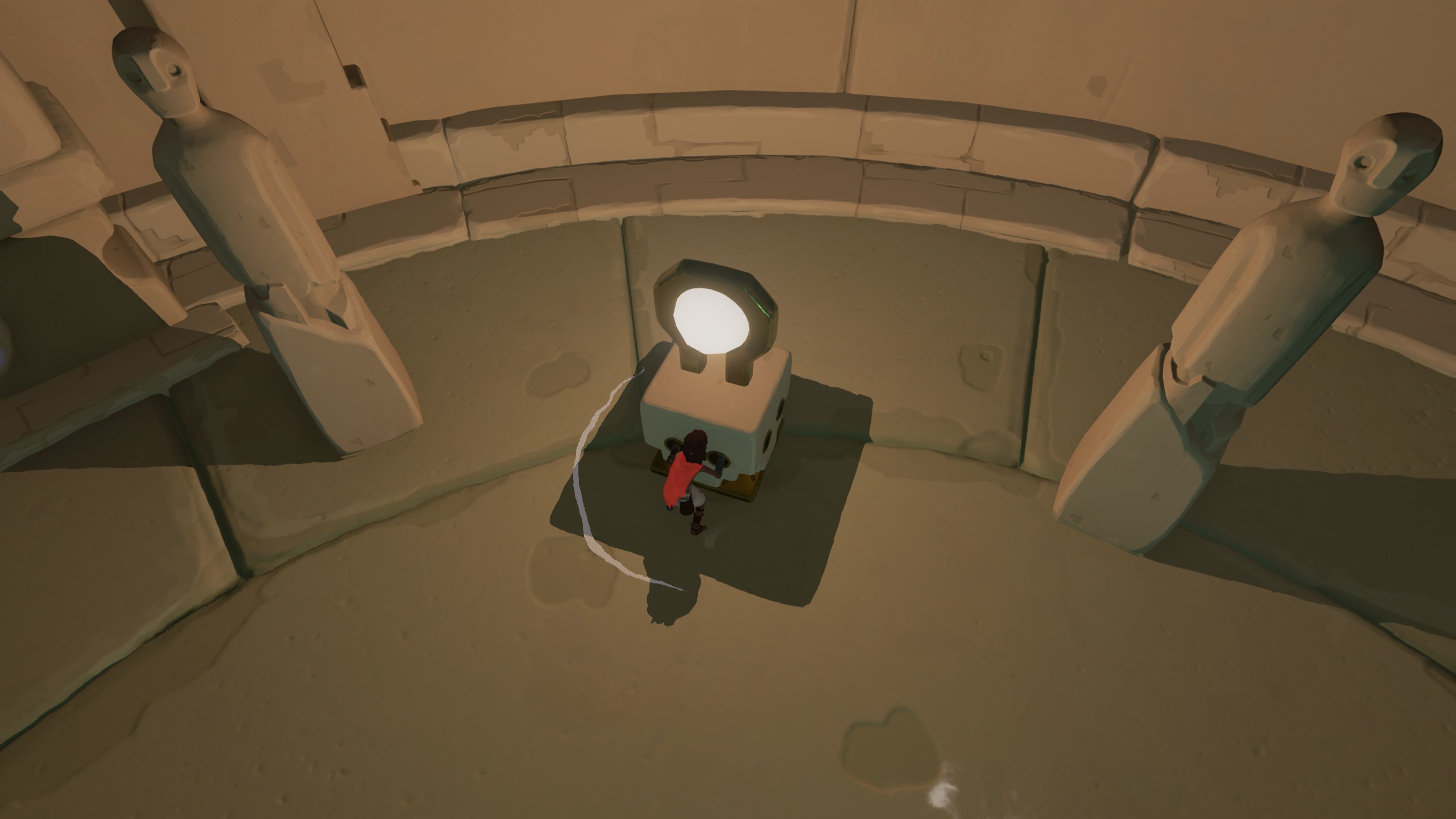
This works mostly fine for me, but there are some semi-game breaking shadow bugs on my Turing GPU that impact some of the shadow based puzzles. You can still solve the puzzle blindly but you can't actually see the shadows properly. This is using the 415.22.05 drivers but I've also tested on 415.27. Doitsujin also played back my apitraces (linked below) and was unable to duplicate this on a Kepler card with the same 415.27 driver or on an AMD card w/ RADV, so this may only impact Turing.
Two apitrace files that can duplicate the issue:
https://mega.nz/#!iOQgWKKb!vgD9eY7azSh50bDhfD3K_1xoxgtzAG2D9jbvHgkRlno
https://mega.nz/#!SX40kYAa!LJOlH_2t1QO2BgIoBgsSvNTlko6SYGJ2eMBAeRPfYHc
Working (From Windows):
Broken:
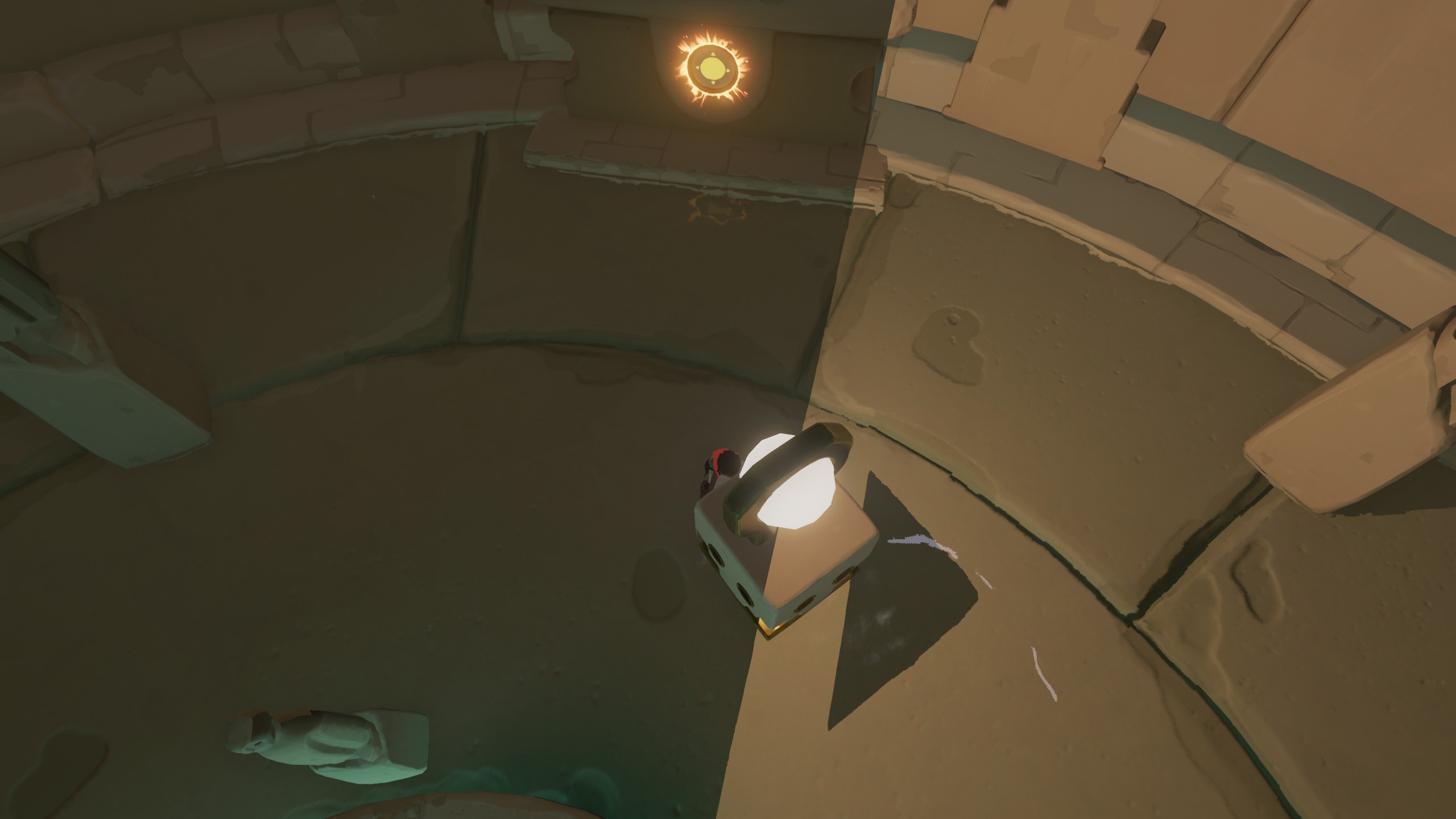
This occurs at various other places in the game also but usually just impacting visuals, but you can see it on some of the other mobile shadowing point lights also like the ones on top of the movable platforms.
Also, less impactful but with my Dual Shock 4 I'm getting doubled inputs if the controller is plugged in or turned on while the game boots. If I then disconnect and reconnect it while the game is running it works fine. Easiest way to duplicate this is to just sit on the pause or main menu and hit up or down on the dpad - it skips an entry and goes two at a time. This additionally causes the game icons to switch between XInput style ABXY and a 1234 generic icon set.
@Vash63 how did you get the apitraces? I tried once but gave up because it looked complicated.
I wasn't able to replicate the issue @Vash63 has reported, with the apitrace files it works as intended on a GTX 1080 (Pascal) and 415.27. So I guess you are right that it is an issue with Turing cards.
I used the DLLs located in the apitrace windows 7z package and WINEDLLOVERRIDES to point to them by full path.
I used the DLLs located in the apitrace windows 7z package and WINEDLLOVERRIDES to point to them by full path.
Thanks. That will be handy to debug some games. I was going for a much harder way.
For the shadow corruption issue I left a comment here with a driver version that contains a fix for it. Unfortunately that driver also contains a bug that @Vash63 found which is causing RiME to crash, we're tracking it internally as bug 2516122.
This worked like a charm for me out of the box with Proton 3.16-7 Beta, at maximum graphic detail. For what I have played it was a click'n'play experience, with high FPS. I had to set the video mode to "Fullscreen" instead of "Borderless", otherwise the mouse will not be locked into the game window.
I'm playing with mouse and keyboard.
I forgot to mention in this thread but the latest Nvidia drivers released for the 1660ti fix both my crashing and shadow issues. This game is now basically perfect aside from the doubled controller input issue which can be worked around by connecting the controller only after booting the game.
The doubled controller input issue has been fixed in Wine and will be included in a future Proton release. https://source.winehq.org/git/wine.git/commit/d1b19a2d0acad40ab8786f5d75c0cebd52ae6cf2
Great news, I'll test it one more time whenever the Proton release happens!
On Thu, 7 Mar 2019, 18:28 Andrew Eikum, [email protected] wrote:
The doubled controller input issue has been fixed in Wine and will be
included in a future Proton release.
https://source.winehq.org/git/wine.git/commit/d1b19a2d0acad40ab8786f5d75c0cebd52ae6cf2—
You are receiving this because you were mentioned.
Reply to this email directly, view it on GitHub
https://github.com/ValveSoftware/Proton/issues/1835#issuecomment-470618735,
or mute the thread
https://github.com/notifications/unsubscribe-auth/AC8WwbdoKLRuVVUhmNMyIJsCpAJSGbQ8ks5vUUwtgaJpZM4X9vXZ
.
Works out of the box with proton 4.2-1. No audio issues, no crashes, no controller issues.
Systeminfo: https://gist.github.com/NoXPhasma/b6e8c494cc5f92bbae4aae1f81cb25ee
The duplicated controller fix is included in 4.2-1. Please retest.
Doubled controller input is confirmed fixed, as is the shadowing issue mentioned a while back.
I do have one more bug now though, 'Fullscreen' mode doesn't work properly and is off-center. Borderless works perfectly though so this isn't really a blocker. I believe Borderless is the default anyway.
Proton versions
proton 4.2-1x1 2019-03proton 3.16-7x1 2019-03proton 3.16-6x3 2019-01proton 3.16-5x1 2018-12
Launch options
WINEDLLOVERRIDESx2 2019-01PROTON_NO_ESYNC=1x2 2019-01
Launch lines
PROTON_NO_ESYNC=1 %command%x1 2019-01
Upstream links
- doitsujin/dxvk/issues/267x1 2019-02
DLLs
secur32.dllx2 2018-12
Compatibility Report
System Information
I confirm:
steam-493200.log
Symptoms
esyncdinput8and set it to nativexactand setxaudio2_7to nativeReproduction