Enderal: Forgotten Stories
err:mscoree:CLRRuntimeInfo_GetRuntimeHost Wine Mono is not installed in the log points towards #18.
I have reinitialized the wine prefix and manually installed dotnet 4.0 and dotnet 4.52 into the prefix folder, which solved the issue and made Enderal custom launcher working. But after clicking the Start Enderal button (in the launcher), it opens up the black window and then fails shortly. Apparently it fails whilst trying to load skse_loader.exe.
rm -rf ~/.steam/steam/steamapps/compatdata/933480/pfx
rm ~/.steam/steam/steamapps/compatdata/933480/pfx.lock
WINEPREFIX=~/.steam/steam/steamapps/compatdata/933480/pfx wineboot --init
WINEPREFIX=~/.steam/steam/steamapps/compatdata/933480/pfx winetricks dotnet40 corefonts
WINEPREFIX=~/.steam/steam/steamapps/compatdata/933480/pfx winetricks win7
wget -P ~/Downloads 'http://download.microsoft.com/download/E/2/1/E21644B5-2DF2-47C2-91BD-63C560427900/NDP452-KB2901907-x86-x64-AllOS-ENU.exe'
WINEPREFIX=~/.steam/steam/steamapps/compatdata/933480/pfx wine ~/Downloads/NDP452-KB2901907-x86-x64-AllOS-ENU.exe /q
Complete log:
steam-933480.log
You might need to install wine_gecko to get rid off some errors:
wget -P ~/Downloads http://dl.winehq.org/wine/wine-gecko/2.47/wine_gecko-2.47-x86.msi
WINEPREFIX=~/.steam/steam/steamapps/compatdata/933480/pfx wine msiexec /i ~/Downloads/wine_gecko-2.47-x86.msi
@isRyven It seems like in your case it also fails to find steam_api.dll. Whereas in my case this seems to work, but it fails at some later point (I'm not sure where exactly).
Ah thanks for checking it out, i guess i have accidently uploaded the wrong log. But yeah, i am getting same log basically. And it fails after the lsteamclient.dll load, so i could only assume some steam checks are failing over here? Whitelisting maybe? Since the parent process for the TESV.exe here is skse_loader.exe, so it doesn't like that, same issue as with script extender standalone https://www.protondb.com/app/365720 that can't load skyrim, unless some renaming is done (Same trick doesn't work for Enderal though, at least for me).
154725.657:004d:004e:trace:module:GetModuleFileNameW L"E:\\home\\dev\\.local\\share\\Steam\\steamapps\\common\\Enderal\\TESV.exe"
154725.838:004d:004e:trace:module:load_dll looking for L"lsteamclient.dll" in L"E:\\home\\dev\\.local\\share\\Steam\\steamapps\\common\\Enderal;C:\\Program Files (x86)\\Steam;C:\\windows\\system32;C:\\windows\\system;C:\\windows;.;C:\\windows\\system32;C:\\windows;C:\\windows\\system32\\wbem"
154725.840:004d:004e:trace:module:get_load_order looking for L"lsteamclient.dll"
154725.840:004d:004e:trace:module:get_load_order got hardcoded default for L"lsteamclient.dll"
154725.840:004d:004e:trace:module:load_builtin_dll Trying built-in L"lsteamclient.dll"
154725.889:004d:004e:trace:module:load_dll looking for L"kernel32.dll" in L"E:\\home\\dev\\.local\\share\\Steam\\steamapps\\common\\Enderal;C:\\Program Files (x86)\\Steam;C:\\windows\\system32;C:\\windows\\system;C:\\windows;.;C:\\windows\\system32;C:\\windows;C:\\windows\\system32\\wbem"
154725.889:004d:004e:trace:module:load_dll Found L"C:\\windows\\system32\\KERNEL32.dll" for L"kernel32.dll" at 0x7b420000, count=-1
154725.889:004d:004e:trace:module:load_builtin_callback loaded lsteamclient.dll 0x155320 0xf5620000
154725.889:004d:004e:trace:module:load_dll Loaded module L"lsteamclient.dll" (builtin) at 0xf5620000
154725.889:004d:004e:trace:module:process_attach (L"lsteamclient.dll",(nil)) - START
154725.889:004d:004e:trace:module:MODULE_InitDLL (0xf5620000 L"lsteamclient.dll",PROCESS_ATTACH,(nil)) - CALL
154725.889:004d:004e:trace:module:MODULE_InitDLL (0xf5620000,PROCESS_ATTACH,(nil)) - RETURN 1
154725.889:004d:004e:trace:module:process_attach (L"lsteamclient.dll",(nil)) - END
154725.953:004d:004e:trace:module:LdrShutdownProcess ()
154725.953:004d:004e:trace:module:MODULE_InitDLL (0xf5620000 L"lsteamclient.dll",PROCESS_DETACH,0x1) - CALL
154725.953:004d:004e:trace:module:MODULE_InitDLL (0xf5620000,PROCESS_DETACH,0x1) - RETURN 1
Compatibility Report
- Name of the game with compatibility issues: Enderal
- Steam AppID of the game:933480
System Information
- GPU: GTX 960
- Driver/LLVM version: 415.27
- Kernel version: x86_64 Linux 4.15.0-47-generic
- Link to full system information report as Gist:https://gist.github.com/rstevenson1976/0937273643d79338dcc43ed2dc4be673
- Proton version:4.2-2
I confirm:
- [ ] that I haven't found an existing compatibility report for this game.
- [X ] that I have checked whether there are updates for my system available.
Symptoms
Reproduction
Skyrim Mods need to be launched with Skyrims Id
Issue transferred from https://github.com/ValveSoftware/Proton/issues/2993.
@DadSchoorse posted on 2019-08-20T16:57:15:
Compatibility Report
- Name of the game with compatibility issues: Enderal: Forgotten Stories, Skyrim Script Extender (SKSE)
- Steam AppID of the game: 933480, 365720
System Information
- GPU: GTX 1060 6gb
- Driver/LLVM version: nvidia 430.40
- Kernel version:
- Link to full system information report as : https://gist.github.com/DadSchoorse/8b1f6792faa5e2e4f2511dbeb813085b
- Proton version: 4.11-2
I confirm:
- [ ] that I haven't found an existing compatibility report for this game.
- [ ] that I have checked whether there are updates for my system available.
Enderal and SKSE do not launch, but with the SteamGameId and SteamAppId set to 72850 in the run debug script they will work
Reproduction
Run Normal-> does not start
Start with
PROTON_DUMP_DEBUG_COMMANDS=1 %command%
change the SteamGameId and SteamAppId in the run file to 72850
run the run script
game works
You also need to create needed symbolic links to redirect access from "Skyrim" to "Enderal" as seen used here: https://www.reddit.com/r/linux_gaming/comments/csxaza/how_to_play_enderal_forgotten_stories_with_proton/
With the latest Proton version (5.0-9 as of posting this) the game is launching fine without tweaking, but Steam is reporting Skyrim instead of Enderal as the currently played game, which breaks achievements and playtime tracking.
My situation is same as @LiquidPL, but additionally i need to disable osallocator and enboost to start game, and reduce pulse latency to eliminate audio crackling
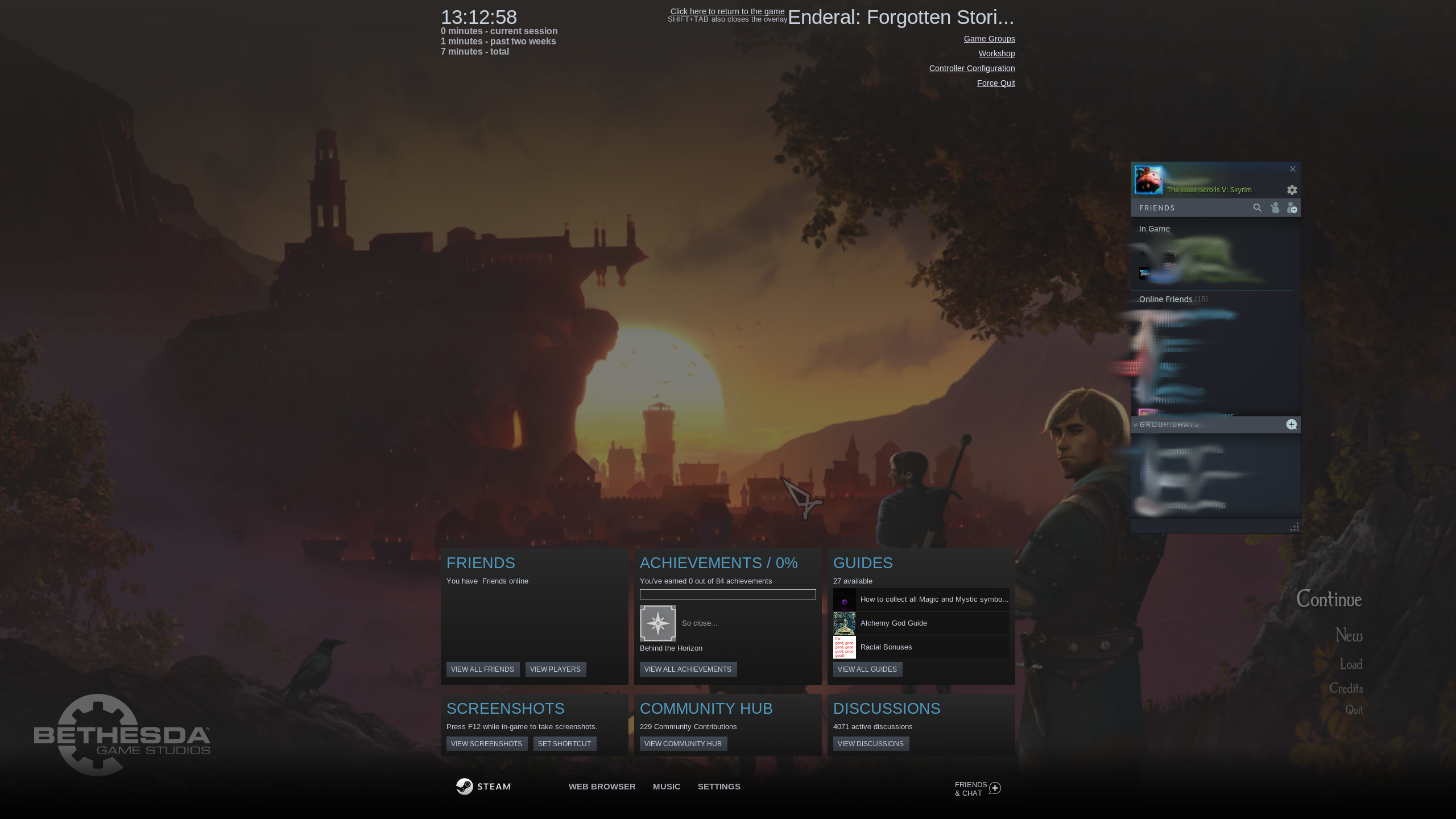
Same thing for me here. Overlay looks as though it is reporting Enderal, friends list shows I am in Skyrim.
Been through the early game sections in Enderal and none of the achievements unlocked; I know that's not the point of playing games but it's not motivating me to make any further progress :)
EndeavourOS latest updates as of 2nd Apr 2021. Proton 6-3.1.
Currently playing this and achievements seem to be working. For playtime tracking, i have it set so the launcher doesn't close after the game launches and just stays open in the background which counts as playtime. It does still count BOTH skyrim and enderal but this is still better than having it ONLY count as skyrim playtime.
Enderal: Forgotten Stories (Special Edition) (With mods)
GE-Proton9-15
Possible Regression:
Launcher does not open with Kernel 6.17.x
Steps to reproduce:
- Start Enderal SE with arch 6.16.10 or 6.12.53 Lts, Launcher opens.
- Start Enderal SE with arch 6.17.x Launcher does not open, Steam ends game
@rariema I was able to reproduce the same issue, but only when I launched with AMDVLK. Both drivers are showing up in your log, so it should work fine if you make sure it uses RADV instead.
@runar-work interesting find, thx for looking into it.
i indeed had lib32-amdvlk installed, removed it, and voila, game is running with 6.17.3.
Not that i was using it nor is Enderal SE 32bit software, but anyway.
And since AMDVLK is deprecated, issue closed.
Related threads
- Age of Empires II: Definitive Editionprotonopen same error
- Path of Exileprotonopen same error
- Add 64 bit only client for Linuxsteamopen same error
- Black Desertprotonopen same error
- World of Warshipsprotonopen same error
- DayZprotonopen same error
- Fallout: New Vegasprotonopen same error
- Scrap Mechanicprotonopen same error
- Saint Seiya: Soldiers' Soulprotonopen same error
- BioShock Remasteredprotonopen same error
Proton versions
ge-proton9-15x1 2024-11
Launch options
PROTON_DUMP_DEBUG_COMMANDS=1x1 2019-08WINEPREFIX=~/.steam/steam/steamapps/compatdata/933480/pfxx1 2019-02
Upstream links
- ValveSoftware/Proton/issues/2993x1 2019-08
DLLs
kernel32.dllx1 2019-03lsteamclient.dllx1 2019-03steam_api.dllx1 2019-03
Compatibility Report
System Information
I confirm:
steam-933480.log
Symptoms
Nothing happens when clicking on Play. The games launcher does not open.