Add 64 bit only client for Linux
The client is a 32-bit app so this is expected behavior. Keeping this open as a feature request for a pure 64-bit client, but there aren't any plans to make one at the moment.
@denali1 CentOS does support 32bit libs... Visit: http://mirror.centos.org/centos/7/os/x86_64/Packages/ and search for libstdc++-4.8.2-16.el7.i686.rpm and you'll clearly see that 32bit systems are supported.
Correct, it's only installation on 32-bit systems that is no longer supported as of CentOS 7.
Perhaps somebody should correct the wiki then @mdharris? Because according to the wiki that is for multiarch support (as dictated by upstream which the Wiki claims to follow) which means that you can in-fact install any of those .i686 packages by simply doing "yum install package.i686" and it will install them (the same way all multi-arch systems work, except for us Debian users it's package:i386)
On a side note: That was a CentOS 7 repo with all those i386 packages.
Thanks to @envygeeks, it is now working. It has other problems that are independent of this report.
The Centos folks, via their mailing list, are slowly working their way through releasing i686 packages, but it isn't a priority and conversation on the mailing list about it died out around Sept 12. Luckily, the packages that Steam needs on Centos are available, but I'm not certain updates will occur. Only time will tell.
As stated in #5530, as of 2018 all Desktop distributions of Linux have removed their 32bit versions. 32bit is mostly only for low-cost hardware (ARM, etc).
I was hoping that some distributions build from source, but it seems all are using the upstream binaries. Polluting a x64 system with tons of 32bit libraries just to run steam is a bit much and not necessary.
Even though the client wont ever need the x64 registers, it is a matter of keeping the system clean. Isn't it enough to replace the 32bit dependencies with their x64 counterparts?
@lostiniceland,
Your definition of “all Desktop distributions of Linux” might be somewhat more narrow-like than mine, but no, not all of them have removed their 32-bit version. :]
Most(?) of the games available via Steam are still likely to depend on 32-bit libraries as well, so with that in mind, I'm not sure if having a 64-bit client would make much sense still, if it doesn't offer any clear advantages other than people being able to stick to 64-bit only installations (which might be the case since there still is no such client).
As for building from source... many would like to do just that. A lot.
Unfortunately though, the Steam client source code is not open nor available for that to happen.
@Chiitoo Thanks for the insight. I thought that the source available here can be used to build the client.
Honestly, I was struggling with definition "all desktops switched to x64" myself. Sure there are many that still provide 32, but when considering the distros with users over 100k there are probably not more than 5 distros (Ubuntu, Fedora, OpenSuse, come to mind).
With regards to the libs: I expected that the games are build using static-linking, so they do not depend on libraries to be dynamically available. If the Linux games provided by Steam make use of 32bit libraries I concur with you.
Anyway, would be great to see something moving forward. There are some issues here suggesting AppImage/Flatpack which would be fine for my use-case as well.
Yeah, I figured you were talking about the most common/popular distributions in the wild. ^^
I'm not too deep into the linkings of games (yet), so I'm not entirely sure of all the details that have to be considered, and how it affects the Steam client itself, but using the system libraries has the advantage of potentially being up-to-date, meaning (hopefully) less security issues and all that. I believe Steam itself has improved with regards to this lately, preferring system libraries, if newer, by default.
It seems like games through Steam don't expect something to be available system-wide, and instead ship bundled versions which have been (hopefully) tested to work with said game, and it makes sense in that they shouldn't need to worry about an update to a library breaking their game. This might be more of an issue with regards to proprietary applications in general though, since open source games seem to often be happy with system libraries.
Flatpak and such are to my understanding similar in that they bundle libraries, and possibly even more, instead of using the (possibly newer) system versions.
I'm definitely not against a 64-bit only Steam client, nor more games moving towards that too. :]
I support this!
It's been known for a year now that macos is moving to be pure 64bit distro (right, not really Linux), but also some of the most established Linux distributions announced dropping 32bit support (which makes sense from a security POV - much less to test for and much harder to execute overflow errors [naive]).
Dropping 32bit support from the GA version should (or even must!) not be considered rogue against legacy games anymore. To play legacy games one can still use older distributions.
32bit is legacy. We should be done with it. For all the good reasons.
Is there any news on that?
What is the problem in providing a native 64bit client? C'mon guys... we're in the 21st century!
Being forced to install 32bit OpenGL features on 64bit Linux can mess up ones Linux system easily.
Can someone give an idea why a 64bit Linux client is still not available?
I would guess it is because many, if not maybe even most (this would be an interesting statistic for valve to report) of the games are 32-bit as well, thus requiring it for the launcher means that a bulk of the games will also work on the system as 64-bit support is otherwise implied nowadays?
Ubuntu 19.10 (and 20.04) will likely drop the i386 architecture completely:
https://www.phoronix.com/scan.php?page=news_item&px=Ubuntu-Drops-32-bit-x86
Linux Mint too apparently : https://www.fayerwayer.com/2019/07/linux-mint-20-32-bit/
@erwincoumans We can add too that Mac OS users have full 64-bit Steam Client since several months... https://9to5mac.com/2018/07/27/steam-for-mac-64-bit/
It is the responsability of game developpers to update their games to 64 bits. If they don't want to do that, we don't have to pay for not having a 64-bit client of Steam. If they don't want to update their games to 64-bit version, the game needs to be removed from Steam. Easy solution for all. We are in 2019, not in 1990.
Ubuntu already backed out from their original plan [1], and even if they didn't, Steam would simply move focus on a different distribution (or distributions).
Removing 32-bit support would effectively remove the majority of the Steam library [2]. That's probably not going to happen anytime soon. :]
It would have been great to provide both 32bit and 64bit Stream clients on Linux, and let the user pick the one they prefer. I am not interested in any of those old 32bit games, and like to have a modern 64bit system without old 32bit drivers. Now I'm forced to pollute my system with 32bit drivers.
Using 32 bits librairies is just "delay the inevitable". Mac OS users have 64-bit client of Steam, Linux users wants the same thing. Ubuntu doesn't want to update 32 bit libraries on future versions of Ubuntu, so 32 bits on Ubuntu like on Linux Mint is over. Again we are in 2019, not in 1990. So we need full 64-bit client on Linux : it is just a compilation issue of their client ... So compile the client source code with 64bit compiler is a first solution. If they don't want to do it,"release the source code of Steam Client" can be a solution for users who want to compile it and get a proper 64 bit version...
Hi,
I would also appreciate 64-bit only Steam Client. I consciously was buying only 64-bit Linux native games on Steam for last 3-4 years. AFAIK, the Steam Client is 32-bit, but actually has some components, like a main browser component that is actually 64-bit, so to run Steam you need 64-bit system anyway. I really dislike having 32-bit libraries, mostly due to issue with graphical and audio drivers from time to time, as well a prospect of poorer security support in the future.
64-bit only Steam Client -> +1.
PS. Steam Runtime should remain still both 32-bit and 64-bit, to support 32-bit games from Steam. To that effect Steam Runtime should provide few extra libraries, like glibc, and possibly dynamic linker, and only load OpenGL / Vulkan and possibly libasound2 driver from distro. Kernel and X11 interfaces are stable enough to use any libraries distributed in runtime. But if games I play are 64-bit, I don't even need to worry about that.
Because macOS already has 64-bit client, I would appreciate at least some Linux only beta so we can work on this issue together, fix bugs and find ways to make it work well.
Also, I do have my own Linux distro, that simply don't provide 32-bit runtime at all. Cross-compiling is just painful. Even minimal list of libraries is pretty big when you consider all transitive dependencies (glibc, mesa, vulkan loader, dri, drm2, vdpau, va-api, llvm, zlib, wayland, stdc++, xcb, libexpat, libelf, libgcc1, libopenal, libasound2, libsystemd, libpulseaudio, fontconfig), plus probably few more like dbus, gtk, libcurl. Few others can probably be provided by the Steam runtime, like libvorbis, Just to launch Steam Client, and never actually execute any 32-bit game? It is a bit silly honestly.
It would have been great to provide both 32bit and 64bit Stream clients on Linux, and let the user pick the one they prefer.
There is no reason to do that. It only adds work for Valve. One version (64-bit) is enough. All Linux users of Steam do have 64-bit hardware and kernel. 100%.
Almost every Linux gamers depends on steam. We (Linux users) are never going to windows at any cost. If you are not going to provide a 64bit version of steam, you gonna lose us. If your consistent, I happily remove steam from my desktop. Just 6 months steam, we are waiting.
I'm a Linux user, sysadmin, and programmer, and I also have Windows, and macOS. Where are you getting this "never" from?
@envygeeks @bapidey678
Could you please not derail this rather straightly technical issue into some nonsense discussions that are not relevant to it?
This ticket is 5 years old, the only nonsense is thinking Valve is gonna care after 5 years.
32 bit makes things complex. if valve not care why should we? After all games is distraction for us. Ubuntu 19.10 (Eoan Ermine) released. Mark it.
It won't work on Ubuntu either if you use something like CUDA, which does provide the required NV driver in the CUDA repo, but not the 32 bit libs to support 32-bit apps like Steam. And then you can try to install the 32-bit libs on your own, but oh no, they depend on the Ubuntu NV driver, which in turn conflicts with the CUDA NV driver, so it removes the CUDA NV driver, but since CUDA itself depends on the CUDA NV driver, this action removes CUDA as well.
So after all, you have 2 options:
- be stuck with a Steam client that just keeps crashing because it can't find the various 32-bit libs
- be unable to use CUDA
It's 2019, 99% of your customer base is on a 64-bit system, you guys need to up your game and finally provide a 64-bit client with a big fat warning that 32-bit games won't work. It's ridiculous that I still have to keep a horde for 32-bit libs on my comp exclusively for Steam, because no other software vendor is silly enough to expect their customers to install 32-bit apps on their 64-bit distro.
Valve are you kidding me? It's almost 2020 and i am stuck with 32 bit libs which i have installed exclusively for STEAM! Really? MacOS has 64 bit client many years now, why can't linux users have native 64 bit client too? Just give us the damn source code and we'll compile it ourselves! WTF?
It's 2019, 99% of your customer base is on a 64-bit system, ...
100% actually. Steam doesn't work on 32-bit only systems.
, you guys need to up your game and finally provide a 64-bit client with a big fat warning that 32-bit games won't work.
Never going to happen. ZERO chances. Not in this century. There is no reason for 64-bit Steam client to not support 32-bit games via own runtime, and if there are some crucial dependencies missing, yes, they 32-bit games will simply not work. But not because the Steam client is 64-bit one.
Don't really want to nitpick, but
- Windows 7 32bit: 0.85%
- Windows 10 32bit: 0.16%
Like the many others where it's been discussed, this thread confuses lala land with reality. There is a whole lot of 32 bit games/software that will never be recompiled for 64bit.
Do not confuse Steam Client with content hosted on Steam. Don't get me started on moronic distributions.
Also, I do have my own Linux distro, that simply don't provide 32-bit runtime at all. Cross-compiling is just painful.
I mean, wtf? Quite literally, LOL
Don't really want to nitpick, but
* Windows 7 32bit: 0.85%

* Windows 10 32bit: 0.16%
This is Windows. We are talking about Linux here.
Also, I do have my own Linux distro, that simply don't provide 32-bit runtime at all. Cross-compiling is just painful.
I mean, wtf? Quite literally, LOL
Yes, it is painful, because I did try it and tried repeteadly, I do find issues and bugs with 32-bit cross compiling every day.
Don't really want to nitpick, but
* Windows 7 32bit: 0.85%

* Windows 10 32bit: 0.16%
This is Windows. We are talking about Linux here.
You might. On the other hand, this was my original statement that you were responding to:
It's 2019, 99% of your customer base is on a 64-bit system
Valve's customer base includes Windows as well.
With the container runtime, the game issue is partially solved.
Maybe we could have the launcher in a container.
@gdrewb-valve You said there aren't any plans to make a pure 64-bit client. Please make plans to do this. Steam itself already doesn't run on actual 32-bit Linux distros due to the new library using CEF, so there is literally no reason to keep the Steam client itself as 32-bit.
The only reason 32-bit should be used today is for legacy apps, like old games.
@gdrewb-valve @kisak-valve
I am one of many who support Steam because you are trying to bring gaming to Linux. Epic doesn't do that... That's why I don't have an Epic account.
But when I look at this thread, especially how long it's been calling for a 64bit binary, I'm not sure if you really do that anymore.
The Linux support was and is a killer argument for me for supporting valve. Your refusal to keep up with time clearly shows that Gaming 4 Linux is no longer in focus. As it currently looks you have, for me, clearly lost your unique selling point...
So why should I continue to boycott Epic? You are forcing me to Use a Win10 KVM because of your stupid decision not providing a native 64bit binary. And if i'm forced to use Win10 anyway i also can create a epic account for myself. That doesn't matter anymore...
There seems to be a major misunderstanding on Valve's stance regarding Linux. Valve's support for Linux has absolutely nothing to do with Valve actually liking Linux. Valve (i.e.. Newell) only started trashtalking Windows when they came up with the idea of a Windows Store.
Read: direct competitor of Steam
Even though functionally, especially gaming-wise, Windows 8 acted exactly like previous versions. The only difference was the Start Menu, which you could replace with like 3 clicks.
At this point Linux suddenly became a very interesting and relevant system in their book. Anyone remember the Steam Box fad? They spent enormous amounts of time and money trying to get Linux into shape. Naturally, that didn't really work out. Linux won't suddenly become a reliable gaming system just because Newell says so.
Then Newell realized no one gives a rat's ass about the Windows Store. And suddenly Windows isn't a horrible gaming system either.
That's about it, folks. Stop pretending Linux is the future of desktop gaming. It's not. Valve is a for-profit company, don't expect them to save the Linux desktop, especially when they have no financial incentive, let alone technical expertise to do so.
There seems to be a major misunderstanding on Valve's stance regarding Linux. Valve's support for Linux has absolutely nothing to do with Valve actually liking Linux. Valve (i.e.. Newell) only started trashtalking Windows when they came up with the idea of a Windows Store.
Read: direct competitor of Steam
Even though functionally, especially gaming-wise, Windows 8 acted exactly like previous versions. The only difference was the Start Menu, which you could replace with like 3 clicks.
At this point Linux suddenly became a very interesting and relevant system in their book. Anyone remember the Steam Box fad? They spent enormous amounts of time and money trying to get Linux into shape. Naturally, that didn't really work out. Linux won't suddenly become a reliable gaming system just because Newell says so.
Then Newell realized no one gives a rat's ass about the Windows Store. And suddenly Windows isn't a horrible gaming system either.
That's about it, folks. Stop pretending Linux is the future of desktop gaming. It's not. Valve is a for-profit company, don't expect them to save the Linux desktop, especially when they have no financial incentive, let alone technical expertise to do so.
Yet they still do contribute to Linux development, for example the have developed the Radeon ACO shader compiler.
its about time you guys get on the x86_64 train.
It won't work on Ubuntu either if you use something like CUDA, which does provide the required NV driver in the CUDA repo, but not the 32 bit libs to support 32-bit apps like Steam. And then you can try to install the 32-bit libs on your own, but oh no, they depend on the Ubuntu NV driver, which in turn conflicts with the CUDA NV driver, so it removes the CUDA NV driver, but since CUDA itself depends on the CUDA NV driver, this action removes CUDA as well.
So after all, you have 2 options:
* be stuck with a Steam client that just keeps crashing because it can't find the various 32-bit libs

* be unable to use CUDA
It's 2019, 99% of your customer base is on a 64-bit system, you guys need to up your game and finally provide a 64-bit client with a big fat warning that 32-bit games won't work. It's ridiculous that I still have to keep a horde for 32-bit libs on my comp exclusively for Steam, because no other software vendor is silly enough to expect their customers to install 32-bit apps on their 64-bit distro.
you can always roll your own of everything...
its called linux from scratch...
have fun, you can thank me later...
Like the many others where it's been discussed, this thread confuses lala land with reality. There is a whole lot of 32 bit games/software that will never be recompiled for 64bit.
Do not confuse Steam Client with content hosted on Steam. Don't get me started on moronic distributions.
Also, I do have my own Linux distro, that simply don't provide 32-bit runtime at all. Cross-compiling is just painful.
I mean, wtf? Quite literally, LOL
you know the problem is this... all the games that valve develops as a software company, like dota2, hl3, csgo, etc etc are all 64 bit, and well there is a reason that no one runs a 32 bit system.
they have to down grade things that go between the games they are trying to push, and the steam client on linux, while windows has a 64 bit steam, and there is no problem? maybe im wrong about this.
2 years later, MacOS version of Steam displays info that older 32 bit games are incompatible. And nobody gives a bat. Yet Steam on Linux is still 32bit. Go figure :)
A lot of (windows only) games are still 32bit. so steam client have to be 32bit to provide 64bit only linux-compatible games....
The only reason is Americans are too stupid. If not why can't they stop covid-19 ?
Why Steam itself needs to be 32-bit? Is it coupled with games that much? Because you certainly do not need a huge pile of 32-bit junk if you only play 64-bit-compatible games.
Even if this IS the case, why not inform users that some games won't work and give them an option to install 64-bit-only Steam? Maintenance cost?
Valve has really done a good job. I've got 3 operating systems running on my PC, Arch Linux, windows 10 and Hackintosh Catalina. Why just can't valve make the 32bit lib support as an optional feature? Everything on Catalina works just fine w/o 32 bit support! Using 32 bit lib just to support 32 bit games? Come on! It's already 2020!
Because of that, I have to set up a vm exclusively for steam, download the 64 bit supported games and copy them to the host PC. If some of them don't work properly, I have to do something like, PIRACY, eg, by replacing libsteam_api.so cracked by ACTiVATED. The ONLY way to run 64 bit steam games on 64 bit only Linux distros is by NOT using the steam client! Hilarious, isn't it?
I am on a CentOS8 with AMDGPU-PRO driver which does not provide lib32 any more.
So the only way I can run Steam is over Wayland, where it takes LLVMpipe software rendering for 32bit steam, but still is able to get 64bit AMDGPU driver for games like CSGO.
The only problem for me is that Wayland does not seem to be working great with AMDGPU driver and it does tearing and is unable to Vsync. So it would be great if I could just start my CSGO under Xorg, right? That would theoretically work, but Steam does not start, because he does not find a suitable GL driver for 32bit ... and refuses 64bit with wrong ELF lib error (logically).
So, yes, I would too prefer a 64bit only Steam version and it would not be a problem for me that those old games which are 32bit only would not work with that, because I can not run them anyway. So yes, I think a 64bit Steam launcher would be a perfect compromise.
Because of that, I have to set up a vm exclusively for steam, download the 64 bit supported games and copy them to the host PC. If some of them don't work properly, I have to do something like, PIRACY, eg, by replacing libsteam_api.so cracked by ACTiVATED. The ONLY way to run 64 bit steam games on 64 bit only Linux distros is by NOT using the steam client! Hilarious, isn't it?
Yes, I am not surprised by that. I was also looking for ways how to start CSGO without Steam just by preloading the libraries like Steam does (this simulating a Steam start). And yes, as soon as ppl figure out how to do that, they will stop using Steam, because it does only get in the way of the job they want to do. That's why I think it is in Valves own interest to make Steam work for 64bit only platforms so that ppl do not need to figure out ways how to work around their software.
@kisak-valve Hope you don't mind. A periodic ping, about my favorite and only issue with Steam on Linux :)
This is something that is relevant more and more with every day, to more and more people, and it would be really nice to know what is the Valve's approximate roadmap in regards of dropping any 32-bit code in steam client (client only), and providing 64-bit only steam client (with support for 32-bit game and runtimes, that is obvious). I know there were some recent works in relation to sandboxing and runtime on Linux, etc, but that is rather orthogonal to the Steam client itself, and doesn't sole the issue.
What are the blockers? Time, testing, QA, some weird security stuff, build / telemetry infrastructure, some legacy code inside client? I mean, I doubt it is any of this, because there is already functional 64 bit client for macOS, sharing most of your code base.
Google Chrome dropped support for 32-bit x86 last year, and that leaves Chromium 32-bit support in a bit of weird state, where it can have various security issues in JIT and other platform specific parts, like render sandbox. Sure, Chromium devs do excellent job of supporting Chromium on many platforms, but the signs are there already.
Thanks.
PS. I bought around 120 games in the last 4 years (110 of them native), and not a single one supports 32 bit. All of them are 64 bit (few supports both 64 and 32 bit, but that is very small number). I am rather dedicated in researching that before getting a game. Steam client, and steam client alone, is the only reason I still need to compile and install any 32 bit libraries on my system.
This is hilarious, soon we are going to start posting comments like in You Tube.
Here in 2020 --> Issue opened in 2014. I see that this could get resolved in 2025/2030.
I've decided not to use Steam anymore because of this.
It's ridiculous to refuse making a 64-bit client because there are 32-bit games on Steam
By that logic this could never be solved, not even in a thousand years.
If someone wants to play 32-bit games then one should install 32-bit client and everything that goes with it.
End of story.
For some reason I am not getting errors when updating and the OS is not saying that I have 32bit drivers.
Doubly so since macOS has been 64bit only for over a year now. Valve's logic makes zero sense - the Linux and macOS platform provide Valve with the same problem (deprecation of 32bit) and Valve does the logical thing of using two different approaches (was about to say 'solutions' but lol). Now Steam works on macOS and doesn't work on Linux. Something made even more ridiculous by the fact that the Steam app is 64bit....
It's been some time now and the major Linux distributors have dropped/are dropping 32bit - when will Valve make the appropriate changes to their software?? (one with precedent a la macOS dropping 32bit applications & a 64bit Steam app for macOS)
I am all for an approach mentioned by others: allow users to download the current version of the app if they want to play a 32bit game (or even strip it down to be just 32bit, but I somehow doubt there is a lot of updating going on on the 32bit end of things over at Valve) & make all future versions 64bit only.
this is crazy.
I am all for an approach mentioned by others: allow users to download the
current version of the app if they want to play a 32bit game (or even strip
it down to be just 32bit, but I somehow doubt there is a lot of updating
going on on the 32bit end of things over at Valve) & make all future
versions 64bit only.
That is now what we are asking for at all.
Steam should allow to play 32-bit games forever (by providing own runtime
libraries), as long some few elemntary things are provided by the host
runtime (i.e. OpenGL and Vulkan drivers for example). This bug is strictly
about the client and only client itself, to make it work on 64-bit only
systems without requiring extra 32-bit libraries or kernel support.
I am all for an approach mentioned by others: allow users to download the current version of the app if they want to play a 32bit game (or even strip it down to be just 32bit, but I somehow doubt there is a lot of updating going on on the 32bit end of things over at Valve) & make all future versions 64bit only.
That is now what we are asking for at all. Steam should allow to play 32-bit games forever (by providing own runtime libraries), as long some few elemntary things are provided by the host runtime (i.e. OpenGL and Vulkan drivers for example). This bug is strictly about the client and only client itself, to make it work on 64-bit only systems without requiring extra 32-bit libraries or kernel support.
I fully understood & we are saying the same thing: this is regarding the Steam client. If people want to play 32 bit games then the client in its current form works (as they would need the 32 bit libraries). I suppose I am making the assumption that 32 bit anything probably isn’t seeing much/any development anymore & if people want to play those games they are able to do so now.
Maybe it’s my lack of knowledge re: 32 bit stuff & that for me I am given the choice of 32 bit libraries or 64 bit ones making using both a hassle. So what I would like to see are future iterations of the client being 64 bit only.
So yeah, as I see it out thoughts are aligned.
Having separate steam 32 bit libraries installed if the user opts in on them sounds like the ‘ideal’ solution, but also sounds like more work - so I was approaching this from the perspective of phrasing a preferred target state as one that would be as easy/cheap to implement as possible hoping that would make it look more appealing to Valve.
Does anyone know if there's any progress on this? Or if Valve have made any statement saying they're going to work on a 64bit client?
I've just skimmed through this issue as my own was closed, but I'm none the wiser.
@kisak-valve Can you provide a little clarity please. Being forced to change OS is kind of big deal so it'd be nice to know what's going on. Appreciate any input!
edit; would be great to get clarity on steamcmd also if possible
It's not clear what you mean by being forced to change OS. Your Ubuntu 20.04 install has multiarch support and you can run both 32 bit and 64 bit applications. In general, Steam asks for 32 bit libc and a sane 32 bit OpenGL driver stack in addition to your existing 64 bit system packages. Anything beyond that should be provided by the Steam runtime which is bundled with the client.
Since you generalized your issue report to being unwilling to install 32 bit packages among the existing install, this is the correct place for what you're asking for.
For steamcmd, my understanding is that it expects to be run in an environment similar to the Steam runtime.
Thanks @kisak-valve, and you're right I should have been more clear.
I guess I'm just confused why my mac doesn't have this problem (never even noticed it tbh). Is there any specific reason I can't have a clean 64bit systems on my laptop or on my servers (ubuntu) ?
Surely the logical approach would be to offer two versions, a 64bit and 32bit and let the customers choose?
If it's not a problem on macos, why is it a problem on linux based systems?
My apologies, this is pretty frustrating.
//edit; RE: my comment regarding changing OS. Canononical will likely attempt to drop 32bit support on their next release cycle so.
Thanks @kisak-valve, and you're right I should have been more clear.
I guess I'm just confused why my mac doesn't have this problem (never even noticed it tbh). Is there any specific reason I can't have a clean 64bit systems on my laptop or on my servers (ubuntu) ?
Surely the logical approach would be to offer two versions, a 64bit and 32bit and let the customers choose?
If it's not a problem on macos, why is it a problem on linux based systems?My apologies, this is pretty frustrating.
//edit; RE: my comment regarding changing OS. Canononical will likely attempt to drop 32bit support on their next release cycle so.
Frustrating indeed. I think there are way too many 32-bit apologists around in 2021. Trying to use lame excuses like "There's no ROI" or "it's not cost effective" is such a specious argument to make when almost every OS is very quickly ramping up 32-bit obsolescence by removing 32-bit support altogether. Apple is the big starter here with Big Sur having 0 32-bit support, and Kudos to Microsoft for doing the same in the next major update of Win 10.
When you've had 14+ years to get your stuff together w/r/t 32-bit->64-bit migration I have a difficult time having any sympathy or being an apologist for inept behavior with regards to management of a multi billion dollar game distribution company like Valve.
It's not clear what you mean by being forced to change OS. Your Ubuntu 20.04 install has multiarch support and you can run both 32 bit and 64 bit applications. In general, Steam asks for 32 bit libc and a sane 32 bit OpenGL driver stack in addition to your existing 64 bit system packages. Anything beyond that should be provided by the Steam runtime which is bundled with the client.
Since you generalized your issue report to being unwilling to install 32 bit packages among the existing install, this is the correct place for what you're asking for.
For steamcmd, my understanding is that it expects to be run in an environment similar to the Steam runtime.
Stop making excuses. There are plenty of reasons a person many not ever want 32-bit versions of libraries on their system. I'm not even going to get into details on it. I think the issue at play here is Valve just simply doesn't care about this problem until it actually bites into their ROI.. and be careful... all giants have failed when they stayed behind the 8-ball. I hope for Valve's sake they figure out or have figured out the Windows related issue due to the next release having no 32-bit support at all.
Strange how when things get dangerously close to affecting ROI, ... companies act. Hence why we have a working 64-bit macOS client. All of a sudden the 'budget appears' and, interestingly enough, the cost during crunchtime almost always exceeds the cost if there was a proper planned upgrade path instead of defiant behavior. I see the later with Valve's actions a lot, and it's kind of saddening.
My issue is also crossed with Nvidia's CUDA repository not providing 32bit binaries, so if I want to run the latest CUDA for development then I cannot run Steam. Nvidia hasn't been responsive to providing 32bit binaries for their developers repository, and Valve is not being responsive to providing 64bit only for their Steam client.
My issue is also crossed with Nvidia's CUDA repository not providing 32bit binaries, so if I want to run the latest CUDA for development then I cannot run Steam. Nvidia hasn't been responsive to providing 32bit binaries for their developers repository, and Valve is not being responsive to providing 64bit only for their Steam client.
Holy Shit!
Almost 7 years now. Amazing that Valve doesn't manage to provide a 64bit only Linux steam client. I would estimate that shouldn't be more than 1 week of engineers work. How about providing both a 32bit and 64bit client and see which version if more popular?
@jamiew0w @erwincoumans
I don’t know why I blanked on this initially (probably because I don’t use it very often), but a couple days after I tried installing steam I was explaining (read: complaining) the issue to a friend and when asked if there was nothing I could do about it I said ‘well, it would work if it was installed on its own virtual machine so that the requirement for 32 bit libraries doesn’t screw anything up’ and it hit me: this is exactly what flatpack is for.
So I did a quick search and sure enough there is a flatpack version of steam. I installed it and everything is working honky-dory.
@kisak-valve I would hope that anyone that has the ability to use/install a Linux distribution and use GitHub would be able to understand the problem by now (that when you install the official steam package the requirements apt follows are to uninstall the various 64 bit libraries and install 32 bit versions. Which messes things up for everything else on the machine). And as Valve has managed to make perform the correct changes to their releases on the other 2 mainstream operating systems, so I’m going to just assume any comments about how the current package works fine for the majority of users is that individual playing coy.
As a software company I don’t think it’s a good sign when people running, what is probably the most common version, a mainstream OS or some form of it are put in a position where they either have to resort to installing the software in a virtual machine or relying on flatpack packages maintained by 3rd parties to use the latest & regularly maintained version of your software.
That’s just my opinion though and for all I know I could be wrong/there could be some alternative motives for these actions. If the reasoning is purely to ensure that people can still use old 32 bit games that they have bought without going out of their way (and I suppose too daft too realize that this is preventing new users, which I am, from making purchases, which I have thanks to software created by and maintained by 3rd parties) I commend you for keeping those users in mind.
I wonder what makes the x86_64 build of Steam client not possible here. Your requirements do list x86_64 capable CPU anyway. I see three options:
- You use some 32 bit library from 3rd party that you no longer have contract with and you do not want to invest into it
- Your infrastructure to distribute updates have no concept of Linux variants, so you choose to stick to 32 bit since 'it works everywhere'.
- You no longer have access to people that did your bootstrap runtime for Steam, so you just stick with what you have. That would explain the ancient libraries you bundle there.
@kisak-valve @gdrewb-valve I am willing to help you with the x86_64 Steam client and I can sign NDA and contract for it. You can reach me via GitHub.
Guys, you can stop trying to argue to Valve. They gave a shi* on us in the last 7 years (see this thread and all other regarding 64bit) and they'll give a shi* on us in the next 7 years. I bet they even have muted this thread long ago... so wasted labor of love
Maybe they'll move when 32bit is entirely dead, but i guess not... :man_shrugging:
I guess we will faster see arm64 client for new apple hardware rather than x86_64 for linux:D
My issue is also crossed with Nvidia's CUDA repository not providing 32bit binaries, so if I want to run the latest CUDA for development then I cannot run Steam. Nvidia hasn't been responsive to providing 32bit binaries for their developers repository, and Valve is not being responsive to providing 64bit only for their Steam client.
This and the fact that their client doesn't even work in 32-bit Linux anymore means they need to make the move to 64-bit.
Otherwise I feel like there is going to be another big dependency break coming up that will mess things up further possibly even affecting their 64-bit client upsetting a majority of their Linux userbase.
I would choose to use 64bit version and play the 64-bit games as my Ubuntu 20.10 packages have conflicts even when enabling 32-bit support.
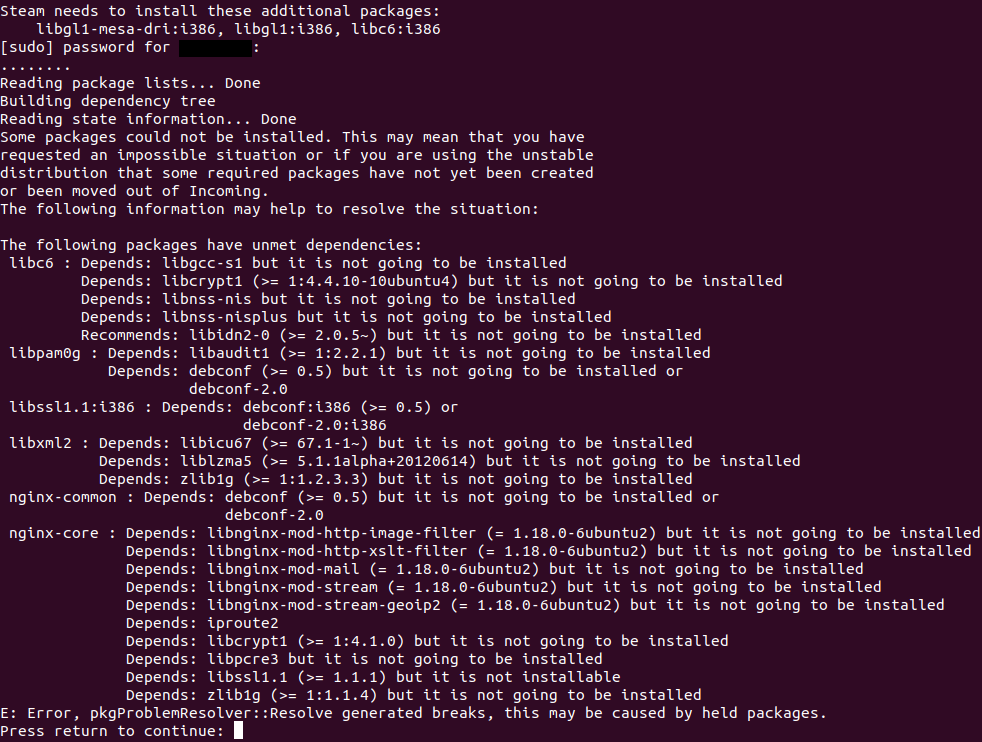
I just don't understand why there is no optional 64-bit only version of Steam instead of requiring multilib, which requires a lot of workarounds. You don't need to drop support for anything, we just want a pure 64-bit version as well as a 32+64-bit version for anyone who wants to play legacy games. Really, this restriction makes gaming on linux a lot harder, especially on distros that dropped multilib support completely because it is pointless for more than 99% of software nowadays.
I unistalled steam recently. If Valve doesn't want my money, so be it. I'm done.
I would choose to use 64bit version and play the 64-bit games as my Ubuntu 20.10 packages have conflicts even when enabling 32-bit support.
I managed to fix my issue by finding this issue: https://github.com/ValveSoftware/steam-for-linux/issues/7469
And running sudo apt install libssl1.1=1.1.1f-1ubuntu4 libssl1.1:i386=1.1.1f-1ubuntu4
Recently, steam:i386 also starts to hold back the upgrade of libgl1-mesa-dri on Debian buster. This will eventually happen with more of steams 32-bit dependencies too. The same problem applies, after the afore mentioned issue, even with drivers and possibly other essential software. Not to forget the huge amount of other existing issues regarding this topic.
IF there are still no plans for a 64-bit client, would there be an option for getting a statically compiled steam client, or something similar, as a package to mitigate the constant dependency issues? I understand the desire for backwards compatibility and the intention behind it, but it shouldn't hinder the ability to run with current soft- and hardware to the current level.
Hello @Chaostheorie, distro-specific package conflicts are out of scope for this feature request, but setting that aside for a moment, a package conflict should not be happening there. Between what versions of libgl1-mesa-dri? You can check with something like apt policy libgl1-mesa-dri libgl1-mesa-dri:i386. Also, has the issue been reported upstream to Debian?
Thank you for the quick response, @kisak-valve. After checking with apt policy it seems like this is a problem with the MX Linux version of libgl1-mesa-dri (20.3.4-1~mx19ahs+1 cmp. to 18.3.6-2+deb10u1 from Debian buster) so I will report it there later.
Though, besides this specific issue, would a statically compiled release or something similar be possible in the future? It might also be useful to explore the distribution of the steam client in a portable format, such as AppImage.
@Chaostheorie IMO both of those things (statically compiled and AppImage versions) are secondary to a 64-bit Steam client.
Idk about you but the client that is installed by dnf from rpm fusion
repositories seems to be 64 bit...
I could be wrong
On Mon, Jul 26, 2021, 3:01 PM Aaron Franke @.***> wrote:
@Chaostheorie https://github.com/Chaostheorie IMO both of those things
(statically compiled and AppImage versions) are secondary to a 64-bit Steam
client.—
You are receiving this because you commented.
Reply to this email directly, view it on GitHub
https://github.com/ValveSoftware/steam-for-linux/issues/3518#issuecomment-886986835,
or unsubscribe
https://github.com/notifications/unsubscribe-auth/ACORK4SMIU7G4EED22UMPRLTZW5K3ANCNFSM4AVEV4FQ
.
This might be useful. Here's a reddit thread discussing open source steam clients for linux: https://www.reddit.com/r/linux_gaming/comments/p9y7fg/open_source_steam_client/
It's absolutely mind blowing that this is still an open issue.
this solution works for me. I hope it can help you
I'm sure this will be fixed. After Half Life 3 is released (:
Though, besides this specific issue, would a statically compiled release or something similar be possible in the future?
It is unrelated to the entire 64-bit topic. And in fact this is not possible for program like Steam. Doing static compilation basically make it impossible to load important libraries from the system, for example OpenGL / Vulkan drivers, and few other important things.
Here's another use case for 64-bit only Steam:
I have an ARM64 Linux system which is currently single-arch and only supports ARM64 apps. However, I can install a program called Box64 to run x86_64 apps. There is a limitation however, Box64 can't run 32-bit x86 apps. In order to run Steam, which is a 32-bit app, I would also need to install Box86 which can run 32-bit apps, but then this needs 32-bit support on the host.
Therefore, if I want to run Steam on my ARM64 Linux device to run 64-bit games, I need four software architectures installed: 64-bit ARM, 32-bit ARM, 64-bit x86, and 32-bit x86.
If Steam natively supported 64-bit only systems, then we would only need two architectures to run Steam on an ARM64 host and run 64-bit x86 games: 64-bit ARM and 64-bit x86.
All of the Linux games that I care about are 64-bit. Additionally, the old 32-bit games I care about are Windows-only. CrossOver is able to run 32-bit Windows apps on 64-bit only macOS, so it's perfectly possible for Valve to implement this feature into Proton too. Therefore arguing that Steam should be 32-bit because "there are many 32 bit only games and support for these games isn't going away" is just blatantly false, Steam going 64-bit does not prevent 32-bit games from running. All it will do is reduce headaches. In my case, it means I can skip two architectures I don't need other than for Steam (32-bit ARM and 32-bit x86).
Steam client does not have to be 64-bit only, the original Debian package and bootstrap binary can still be 32-bit if needed (by the way, I am not sure how this is handled in Debian, but in Fedora, even a 64-bit package can have 32-bit dependencies), just the actual Steam client itself can also be a native 64-bit binary. Anyway, is it really needed to support 32-bit Linux systems in 2022? I am not talking about 32-bit games, but about 32-bit only environments. Steam client is quite slow in many ways mostly because it is not a native 64-bit application.
the reason I have deleted steam on my 64bit Gentoo system. Sorry guys, your precious 32bit games are not a good excuse to not have Steam itself to be 64bit. You could still launch 32bit executables while being 64bit steam. what a shame
same reason for me.
Oleg Korsak @.***> 于2022年2月19日周六 06:49写道:
the reason I have deleted steam on my 64bit Gentoo system. Sorry guys,
your precious 32bit games are not good excuse to not have Steam itself to
be 64bit.—
Reply to this email directly, view it on GitHub
https://github.com/ValveSoftware/steam-for-linux/issues/3518#issuecomment-1045300054,
or unsubscribe
https://github.com/notifications/unsubscribe-auth/AABKBMD4OEGOWWHIMAY74Q3U33EFRANCNFSM4AVEV4FQ
.
Triage notifications on the go with GitHub Mobile for iOS
https://apps.apple.com/app/apple-store/id1477376905?ct=notification-email&mt=8&pt=524675
or Android
https://play.google.com/store/apps/details?id=com.github.android&referrer=utm_campaign%3Dnotification-email%26utm_medium%3Demail%26utm_source%3Dgithub.You are receiving this because you commented.Message ID:
@.***>
With the advent of the SteamDeck and SteamOS shifting to Arch Linux and away from Debian/Ubuntu, does Valve have any planned updates to the steam client that involve using a 64-bit client?
Did Valve ever gave a real technical reason why there's no 64bit client yet?
Why do they so hard focus on 32 bit, why not just 16bit then? :) (Steam on SNES)
Almost the 8-year anniversary of this issue...
The best solution would be to make the client open-source.
The best solution would be to make the client open-source.
Indeed. That would not only generate a 64-bit client in a matter of hours, but also open the world of aarch64 and RISC-V devices.
I just do not understand why it's so hard to provide a 64bit version side by side??? I'm not talking about abandon the 32bit version, I known people in valve care A LOT about 32bit games support, but I don't know how many people in Linux community cares about it. I don't care about it at least. Even windows drops 32bit support in Windows 11. Just provide a 64bit version without 32bit games support, I'll call it a big step forward for the Linux community.
I think it was due to some packages needed but not marked as dependencies for steam-libs-i386.
I think this package should have been steam-libs:i386 and the other one steam-libs.
Yes, it should have always been amd64 for 64-bit and i386 for 32-bit, not both depending on each other.
Steam even prompts for i386 packages, it should never do this. It doesn't even prompt for some missing packages.
I don't know, maybe this is only visible from the steam CLI.
I think 32-bit still runs on Windows. It emulates it in 32-bit compatibility mode.
As for Linux, I don't think it has anything to emulate or translate i386 with packages.
Maybe multilib but that seems to be limited to some GCC packages.
not going to buy any game anymore while it's 32bit, bye
@kamikaze I hope you do realise that nobody cares about one person leaving just because they don't get what they want xD
Anyways, I would also really support a 64 bit steam client. If not done awfully it would probably result in a major rework of the client in itself which could end up fixing so many issues: Context menu broken on Wayland, Client looking like garbage (the steamdeck client is so cool, but it's got it's drawbacks on a desktop machine), client not using the native notifications system resulting in black boxes appearing and whatnot, the list just goes on and on.
This client is just too old (and thus bad). It's forcefully kept alive when it's time has already come a long time ago.
So, recently Nvidia PPA with release of 525 drivers drop support for 32bit libs (only amd64,arm64 packages for Ubuntu 23.04). So, now if you want to install 32bit, you need to manually download drivers from nvidia website, which have some problems, at least on my system 2 games was completely broken after manual installation of driver and some other bugs.
Also now there some preliminary work on Vulkan 32-on-64 support from wine devs, so in January 2023 we'll see release of 8.0 version with this feature fully working. And if I correctly understand that mean that you don't need for any 32bit driver to play old games using Vulkan.
Little update: devs released 7.22 with 32-on-64 thunks for both Vulkan and OpenGL
So, next year we would not more need for any 32bit. Even PCSX2 devs, which wrote the same words as some guys from Valve in 2010-2013, but start on working 64bit app in 2014 and in 2020 they finally release 64bit version of this beautiful emulator and in 2022 an appimage for linux users and fully redesigned modern UI.
We already have hardware RT, PhysX, DLSS, FSR (IDK about XeSS). Also next year we'll see first signs of working HDR using Wayland on linux.
To play games now I download cracks from web, usually only steam_api64.dll (or steam_api.dll (32bit games)) need to be replaced, sadly saves not working, but all future games for me is from other platforms (GOG don't have any DRM) or retail version now, not from Steam.
So if we compare development of PCSX2 (2014-2020) and Valve devs start work on 64bit next year, so they finish it in 2025-2027. Until that time I'm out from Steam, I think there was more than enough time from 2014 to provide modern gamers 64bit version launcher (even alpha or beta).
Best wishes, see you in 2025-2027!
So, recently Nvidia PPA with release of 525 drivers drop support for 32bit libs (only amd64,arm64 packages for Ubuntu 23.04).
With Ubuntu Focal (20.04) and newer, this happens every time the package name changes (nvidia-graphics-drivers-520 -> nvidia-graphics-drivers-525) and is sent to launchpad. The new package name has to get manually added to Ubuntu's per-distro-release i386 whitelists before the build farm will allow the i386 packages for it to be built in a PPA. That is not an indicator of any intent to discontinue 32 bit userspace support in NVIDIA's driver and usually gets resolved after a while.
Open source steam client for Risc V when?
Replying to https://github.com/ValveSoftware/steam-for-linux/issues/3518#issuecomment-1328008443
Wine 8 rc1 was just released yesterday.
Also even though 32 bit stuff should be ditched, I still need Gta 4 to run properly since its 32 bit.
Open source steam client for Risc V when?
No games. All of them are precompiled, and none for arm or risc-v. That's just not the platforms steam was designed to be ran on
@UltraBlackLinux Steam has to come first, before devs can upload ARM or RISC-V games to Steam. It's the same situation as porting Steam to Linux back in 2012, Steam has to be ported first.
Open source steam client for Risc V when?
No games. All of them are precompiled, and none for arm or risc-v. That's just not the platforms steam was designed to be ran on
Not really, Steam and proton need to come to arm.
Wine is already on Android but only for Windows arm apps. Box86 and fex emu have made it if not completely possible to play Windows games on arm linux.
Its not that far fetched. 🙂
Hi I'm using an M1 Mac running Fedora Linux but the CPU is incompatible with box86 so I'm unable to launch the steam client since I can only compile and install box64 I've also seen FEX Emu but that requires a lot of setup and the performance isnt as good as box64
Hi I'm using an M1 Mac running Fedora Linux but the CPU is incompatible with box86 so I'm unable to launch the steam client since I can only compile and install box64 I've also seen FEX Emu but that requires a lot of setup and the performance isnt as good as box64
Not ideal, but if the game you want to play is 64-bit, you can try running it through a 64-bit store, or a version without a store/DRM 😉 Also, assuming you're using VMs and not Asahi, if you're using macOS 13, you can use Rosetta within Linux VMs rather than using box64 or FEX (see https://docs.getutm.app/guides/debian/). This still won't let you run Steam though since Rosetta only supports 64-bit applications. :(
Hi I'm using an M1 Mac running Fedora Linux but the CPU is incompatible with box86 so I'm unable to launch the steam client since I can only compile and install box64 I've also seen FEX Emu but that requires a lot of setup and the performance isnt as good as box64
Not ideal, but if the game you want to play is 64-bit, you can try running it through a 64-bit store, or a version without a store/DRM wink Also, assuming you're using VMs and not Asahi, if you're using macOS 13, you can use Rosetta within Linux VMs rather than using box64 or FEX (see https://docs.getutm.app/guides/debian/). This still won't let you run Steam though since Rosetta only supports 64-bit applications. :(
I think its possible to compile wine with WoW64, but I'm not sure if thats ready yet
Hi I'm using an M1 Mac running Fedora Linux but the CPU is incompatible with box86 so I'm unable to launch the steam client since I can only compile and install box64 I've also seen FEX Emu but that requires a lot of setup and the performance isnt as good as box64
Not ideal, but if the game you want to play is 64-bit, you can try running it through a 64-bit store, or a version without a store/DRM wink Also, assuming you're using VMs and not Asahi, if you're using macOS 13, you can use Rosetta within Linux VMs rather than using box64 or FEX (see https://docs.getutm.app/guides/debian/). This still won't let you run Steam though since Rosetta only supports 64-bit applications. :(
I think its possible to compile wine with WoW64, but I'm not sure if thats ready yet
Wine with WoW64 should work, I'm pretty sure that's how Crossover is able to run 32-bit applications...
Happy new year to all issue #3518 followers. May 2023 bring you good news.
Valve is dropping Windows 7/8 support because Chrome developers stopped supporting it -> https://help.steampowered.com/en/faqs/view/4784-4F2B-1321-800A
So I guess we just need to convince Chrome developers to drop 32 bit support too, to get some progress here? (and even if we don't, it'll probably happen in the near future considering projects like nodejs are considering it -> https://github.com/nodejs/node/issues/42543)
@Zapeth Chrome has already dropped support for 32-bit Linux since 2016: https://groups.google.com/a/chromium.org/g/chromium-dev/c/FoE6sL-p6oU
Steam for Linux requires both 32-bit and 64-bit libraries to be installed in order to function. It does not work on 32-bit only systems or on 64-bit only systems.
@aaronfranke true, it looks like Steam is using 64-bit versions in Windows too, albeit an ancient version (I admit that I currently don't have Steam installed on Linux, partly due to the 32-bit requirement, so I can't check it myself)
I was only half-serious anyway, I just would like to see some progress happening (preferably before the end of the year).
If it really is an issue with 32-bit games possibly not working I would suggest to just display an appropriate notification like "this game requires 32-bit libraries to launch" (assuming this data is available for every game)
Even SteamCMD is multilib, that's very disrespectful.
They should in fact fork the client, as the concern is with old games that use steam's 32bit libs.
Libraries are not an issue, they're part of Steam Runtime.
I'm pretty sure Valve is in the process of (slowly) going full 64 bit.
Libraries are not an issue, they're part of Steam Runtime.
I'm pretty sure Valve is in the process of (slowly) going full 64 bit.
Can you share something more on that. I am on Debian and can't really use Steam just because of above. I do not want to pollute 32-bit libs as everything else on my desktop is 64-bit (It's a 10 year old desktop). That would be termed ancient in so many places, especially when technology cycles are limited to 2-3 years.
Wine now supports a 32 bit on 64 bit wow64 mode like windows so game compatibility shouldn’t be an issue for a 64 bit only client
Wine now supports a 32 bit on 64 bit wow64 mode like windows so game compatibility shouldn’t be an issue for a 64 bit only client
Well that's good news for us hoping to strip more 32 bit libraries from our system. The issue now stands that the Linux client uses 32 bit libraries. I suppose a workaround might be to run the steam windows client inside of wine instead of using the native linux client, but that's a kludge and surely not without it's own issues.
you guys can run steam inside a chroot or just use the flatpak
Wine now supports a 32 bit on 64 bit wow64 mode like windows so game compatibility shouldn’t be an issue for a 64 bit only client
Well that's good news for us hoping to strip more 32 bit libraries from our system. The issue now stands that the Linux client uses 32 bit libraries. I suppose a workaround might be to run the steam windows client inside of wine instead of using the native linux client, but that's a kludge and surely not without it's own issues.
The main thing will only be when we get 64 bit client. Waiting for that. So don't have to mess with any 32 bit stuff at all :(
you guys can run steam inside a chroot or just use the flatpak
I guess this is where it will end up.
A 64-bit client will be helpful for VA-API with Steam Remote Play with new Intel graphics cards.
The archlinux repository does not have a 32-bit package for intel-media-driver:
https://archlinux.org/packages/extra/x86_64/intel-media-driver/
There is an AUR package, but it seems to have problems compiling from time to time and Steam Remote Play does not reliably work with it.
I want to preface that I'm incredibly appreciative of all the work Valve has done to making gaming on Linux
I'm interested in what the current major roadblocks from preventing a 64-bit client for Linux? I've heard some say it's because of game libraries, and I've heard others say that it's due to the UI needing them in some way. Unfortunately, I can't get far enough into launching steam to get any more information than that the C library is 32-bit.
Is there any work being done on building SteamCMD against the 64-bit libraries, or at least being looked into?
The client for MacOS is 64-bit as far as I can tell; I know that XNU is not Linux, but I'd assume Steam already has to operate on a somewhat cross-platform basis as to not worsen the workload of maintaining the software.
To be clear, I'm expecting that plenty of games will not work, and this is not me attempting to ask for either because of instruction width or page size limitations, but in order for compatibility for those platforms to improve Steam has to come first.
This is something that I'd love to work on myself. I know Steam isn't open source and that there is no current intention to change that, and employment is also not an option for me at the moment, but if anybody at Valve knows of any other avenues through which I could be of assistance I'd love to help make this a reality.
There is no "steam for linux", thius repository should even be renamed to "steam for ubuntu"
Hello,
Why is it not possible to have 64 bit and 32 bit client. That way you keep the 32 bit games running on 32 bit steam installation, while allowing, for example, arch users to do away with mutlilib installation just so that steam could be installed.
@obhi-d A 64-bit-only Steam client could still run 32-bit games if the 32-bit system libraries are installed. The upside of a 64-bit-only client is that if users do not care about 32-bit games, they could choose to not install those libraries.
Hello,
Why is it not possible to have 64 bit and 32 bit client. That way you keep the 32 bit games running on 32 bit steam installation, while allowing, for example, arch users to do away with mutlilib installation just so that steam could be installed.
If you want to get rid of multilib just for steam a solution right now is to use flatpak, that's what I do on silverblue. I've tested out the new wow64 mode in wine and it seems pretty robust with dxvk so it might be valve just has some tech debt in the steam client for linux they're working out
Doesn't the flatpak build also use the 32 bit libraries? Regardless, flatpak is not a good workaround in my opinion. The sandboxing is too aggressive, messing with theming, requiring workarounds and just a lot more work for really not that many benefits.
I like having easy access to my files, for example for installing third-party steam compatibility tools.
@obhi-d A 64-bit-only Steam client could still run 32-bit games if the 32-bit system libraries are installed. The upside of a 64-bit-only client is that if users do not care about 32-bit games, they could choose to not install those libraries.
Agreed, but then you still carry some 32 bit dependencies on the steam installation/package for games to be able to link with steam client. (I do not know how games work with steam, but they definitely at-least link with 1 steam library, and then if we follow the dependency chain it will be quite a few).
Personally, if I was packaging my software, I would rather prefer to keep the different target runtime separate and clean.
... so it might be valve just has some tech debt in the steam client for Linux they're working out
I really do hope so... This issue has been open since 2014, and I'm not actually physically capable of running 32-bit binaries (atleast not without figuring out extensive patches to FEX, and I couldn't get darling to work either. yes, you may point and laugh at the apple silicon user)
but as far, as I can tell, pure 64-bit is the only thing preventing Steam from working in box64. Not talking about the games, just the client itself.
I understand that I'm probably oversimplifying the situation, but without the transparency to believe otherwise, it comes across as a simple change that Valve already made for another Unix operating system on a mostly shared codebase. I'm trying really hard to believe that isn't the case. I want to maintain faith in Valve.
@kisak-valve is there any prognosis on a 64-bit SteamCMD for Linux? You seem to be the only one monitoring discourse around this and probably our only hope for this issue getting recognized by Valve at a larger scale. I appreciate that you've been keeping an eye on this subject.
Replying to https://github.com/ValveSoftware/steam-for-linux/issues/3518#issuecomment-1874725604
Isn't the macOS client pure 64 bit?
@mikajed Yes, that's what they meant by the subtle mention of "another Unix operating system".
Isn't the macOS client pure 64 bit?
Yes. I apologize for the poor unclear wording on my part.
This is exactly what I don't understand about the matter. There exists a 64-bit version for MacOS (XNU). But, for reason's only known to that which governs god, this doesn't exist for Linux specifically; both are Unix-like, Steam likely already uses a mostly shared codebase, and if nothing else they clearly at least know how to port 32-bit apps to 64-bit ones.
I can appreciate that the matter is complicated by Proton. Only slightly, though; Wine already has a pure 64-bit version.
What I'm a little less appreciative of is the lack of an official answer as to why. It seems like basically the only path forward is work on alternative Steam clients, unfortunately. I'm keeping tabs on a variety of open source projects, so maybe they'll get to it before Valve does.
@GardenerAether Valve have a habit of trying to target the lowest common denominator. macOS has not supported 32-bit apps for 4 years now, so it makes sense that macOS has a 64-bit-only application. When macOS introduced 64-bit applications and Apple started recommending app developers ship Universal Binaries that target both, Valve took the longest time to introduce 64-bit support - judging by the timing, I seem to recall that they only did it when macOS dropped support for 32-bit applications.
Even on macOS, since Rosetta exists, Valve have not shipped an arm64 build of Steam and only ship x86_64, expecting the backwards compatibility support to kick in (even though it is an optional component of macOS and results in poorer performance).
On Windows, Valve only ship Steam as 32-bit, since 64-bit Windows can continue to run it, and IIRC even ARM Windows can emulate it too.
So of course, for Linux, its makes sense that Valve would ship a 32-bit build as well since 64-bit Linux can usually run the 32-bit version too, same as on Windows. The fact that some distributions or CPUs do not support it is most likely seen internally as an odd and curious edge case rather than something that they need to urgently fix.
Wine recent work on WoW64 makes possible to run 32 bit Windows software on 64 bit only host without 32 bit libraries and sooner or later Proton will pickup this work and can be used to run 32 bit only games on pure 64 bit Linux. So 32 bit libraries will be no longer needed to play 32 bit games and it would be nice to get 64 bit Steam that no longer needs 32 bit libraries to run. That could also potentially make possible to run Steam on ARM64 platforms that doesn't support 32 bit (like Apple M series) with projects like FEX and box64.
It would indeed be VERY nice.
On Fri, 8 Mar 2024 at 16:57, DragonSWDev @.***> wrote:
Wine recent work on WoW64 makes possible to run 32 bit Windows software on
64 bit only host without 32 bit libraries and sooner or later Proton will
pickup this work and can be used to run 32 bit only games on pure 64 bit
Linux. So 32 bit libraries will be no longer needed to play 32 bit games
and it would be nice to get 64 bit Steam that no longer needs 32 bit
libraries to run.—
Reply to this email directly, view it on GitHub
https://github.com/ValveSoftware/steam-for-linux/issues/3518#issuecomment-1985946177,
or unsubscribe
https://github.com/notifications/unsubscribe-auth/AABCY4JIOMZ3FLRPW4SDLEDYXHNVNAVCNFSM4AVEV4F2U5DIOJSWCZC7NNSXTN2JONZXKZKDN5WW2ZLOOQ5TCOJYGU4TINRRG43Q
.
You are receiving this because you are subscribed to this thread.Message
ID: @.***>
...it is most likely seen internally as an odd and curious edge case...
I would hardly call the notion of stripping out legacy packages to reduce disk bloat, increase performance, and reduce maintenance burden an "edge case".
Though, I do understand you were viewing it from the lens of what you think Valve would see.
Wine recent work on WoW64 makes possible to run 32 bit Windows software on 64 bit only host without 32 bit libraries and sooner or later Proton will pickup this work and can be used to run 32 bit only games on pure 64 bit Linux. So 32 bit libraries will be no longer needed to play 32 bit games and it would be nice to get 64 bit Steam that no longer needs 32 bit libraries to run. That could also potentially make possible to run Steam on ARM64 platforms that doesn't support 32 bit (like Apple M series) with projects like FEX and box64.
32 bit libraries will be no longer needed to play windows 32 bit games. Native linux games still need 32 bit libraries (at least ones that use older 32 bit runtime).
32 bit libraries will be no longer needed to play windows 32 bit games. Native linux games still need 32 bit libraries (at least ones that use older 32 bit runtime).
That's valid, but the set of linux-native games is actually shrinking, even considering the growth of steam gaming on Linux. Mostly because of the work done by the brilliant engineers behind WINE, Proton, DXVK, and many other projects we take for granted. To make it "work on Linux", they don't really need to target it anymore. Effectively, to make a game compatibility-tool-friendly, it boils down to choosing a render API that won't cause any overhead by converting it (OpenGL or Vulkan), and what anti-cheat they might use. Those are pretty much the two things they need to consider nowadays, and they can essentially let steam's built-in tools do the rest, without having to develop or maintain several branches of a game.
There are several "Linux native" games in my library that fail to run, but run flawlessly if I enable proton and play the windows version instead...
Now, that's not to say that there aren't people who use the Linux steam client, and EXCLUSIVELY purchase/play linux-native games, but that is a minority within a minority...
Just popping in to say this would have a gigantic impact on me - not because I don't have to install a bunch extra libraries (I'm okay with that), but because my AArch64 M1 physically isn't capable of running 32-bit binaries and on Asahi can't emulate 32-bit x86 either without 4k page size - which is really finnicky to get working in a MicroVM, and isn't possible natively.
@KnedlikMCPE
knowing Valve being what it is, and the fact that this issue has existed for a decade by now, the chances of this ever getting resolved are next to none. I'd recommend turning your focus to Open Steam Client
companies dont care about anything other than their short-term score on a wealth leaderboard; everything they do or dont do is in service of nothing more than. never put your faith in them
in the meantime, games made with an interpreted/jit compiled language (c#, java, python, etc.) will have better chances of working, as long as you get them outside of steam (obviously). so that would include games like minecraft, terriaria, etc.
Pure 64bit os (no 32bit libraries) + wine 9.8 64bit + steam running from wine (because native requires 32bit libraries).
Also, Nvidia running on mesa/nvk driver.
Why do we still need the 32bit cruft in the native linux app is beyond reason and logic!
According to the game's Steam page, it's 64 bit. Of course 32 bit libraries are not needed to run it.
You have to run a 32 bit game to test whether Wine's WoW64 layer is mature enough.
That was not the point, but yes, you are right. I've tested multiple titles that are 32bits inside and outside of Steam.
Point is if we're to have a non-32bit linux installation (no multilib hell, pure 64bit) - we can now, without begging Volvo to fix Steam instead (which is quite obvious now, it won't happen, even tho Linux steam stats now show that linux is a bigger target than macos - and macos got pure 64bit one, go figure).
MacOS got it because they would lose that market completely if it didn't... but yeah, feels scummy not porting that change over to Linux
@kisak-valve could you enlighten us on how "hard" or "how much work" that would require from Valve ?
Not familiar with this type of dev, but it would seem like a fairly straightforward parallel build pipe with a one time setup cost, and marginal continuous maintenance/test costs.
Once proton makes the switch to using the new wow64 mode which I’m guessing will happen when wine enables it by default it would make life a lot easier running steam thru an emulator on apple silicon https://box86.org/2022/03/box86-box64-vs-qemu-vs-fex-vs-rosetta2/ https://gist.github.com/teohhanhui/042a395010d9946ceee14768736e3780
Here’s fallout 3 (32bit) running thru box64 and wine with wow64 and it wasn’t even making my MacBook Air hot in game if the native application was supported hidpi and stuff like that would probably work better
hmm, why not Steam just opensource the client instead ? Maybe the community even open for hacking or developing with you guys so that you don't need to develop it by itself to support 64bit only library just for the GUI client (if the problem itself is development time or company priorities).
To be honest, some of the gamers are probably also developers too and system/devops engineer (probably? myself included).
This is just reminder that this issues is about Steam client itself. Nothing to do with Wine, WoW, native Linux games or Windows games, arm emulation, etc. These are completely two different and independent topics. If you want to discuss these other topics, please open a separate issue in github.
Steam client is already mostly 64-bit only, but few minor components are in a way to make it run fully on 64-bit-only instllations. Notably /home/user/.steam/debian-installation/ubuntu12_32/steam launcher that is invoked from /home/user/.steam/debian-installation/steam.sh (which is ivoked by steam user visibile command i.e. /usr/games/steam). And /home/user/.steam/root/ubuntu12_32/steam-runtime/amd64/usr/bin/steam-runtime-supervisor too. The rest of the client (all the GUI, downloading etc. etc) are 64-bit and were for very long time.
Here's some useful commands to force 64bit mode:
LD_PRELOADbit by @Slashic https://github.com/ValveSoftware/steam-for-linux/issues/11446#issuecomment-2604168237VK_LOADER_LAYERS_ENABLEknob: https://github.com/ValveSoftware/steam-for-linux/issues/11446#issuecomment-2499797637
As a bonus, this resolves lag spikes from mixing the remaining 32bit components with 64bit parts in Steam which currently is the default setup.
Think the issue may not be just the client itself.
Proton probably lacks the new WoW64 changes from Wine.
Plus the new WoW64 in Wine is still experimental so who knows how much 32-bit emulation will there be.
So likely the actual 32-bit libraries will still be required.
If that gets patched then the client can safely no longer require installing 32-bit libraries.
If that gets patched then the client can safely no longer require installing 32-bit libraries.
What about older native games that only have 32-bit builds?
since wow64 in wine is stable.. can we have a x64 steam now?
Wine on Arch now has WoW64 enabled by default, and was moved from multilib to extra.
It's about time to drop the 32-bit. Please don't delay, this is a very important thing as well as native wayland support.
WINE DID THIS IN A CAVE!
IT'S PAST TIME FOR MASS LAYOFFS, VALVE CORPORATION.
Fedora intends to drop support for 32-bit binaries, with an explicit mention of dropping support for steam from RPMFusion, per discussion.fedoraproject.org/t/156324.
Fedora intends to drop support for 32-bit binaries, with an explicit mention of dropping support for
steamfrom RPMFusion, perdiscussion.fedoraproject.org/t/156324.
I would like to clarify, this is a proposal for Fedora 44, it is not planned nor decided upon yet.
While Fedora's proposal is just that, a proposal, what realistically is preventing the steam client from becoming a purely 64-bit application? steamerrorreporter?
With the containerized Steam Runtime (Scout+Soldier, or Sniper) being the default for most native games, and all proton-compatible games, I see client-specific issues being the sole focus of this scope.
https://github.com/ValveSoftware/steam-for-linux/issues/3518#issuecomment-3005842120
@TheFlagCourier, why would steamerrorreporter? It compiles as 64-bit on Darwin-based OSes. [^1]
[^1]: [reddit.com/r/macgaming/comments/tvd0gb/comment/i38nx8n][1] [^2]
[1]: https://www.reddit.com/r/macgaming/comments/tvd0gb/comment/i38nx8n/?utm_source=share&utm_medium=web3x&utm_name=web3xcss&utm_term=1&utm_content=share_button#:~:text=Steam%20is%20an%20intel%20app%2064bit%20and%20it%20runs%20via%20Rosetta%202%20on%20M1%20Macs.%20If%20Steam%20was%20a%2032bit%20application%20it%20would%20not%20run%20at%20all%20on%20current%20Mac%20OS.
[^2]: [en.wikipedia.org/w/index.php?title=Darwin_%28operating_system%29&diff=prev&oldid=546582561][2] ^3
[2]: https://en.wikipedia.org/w/index.php?title=Darwin_%28operating_system%29&diff=prev&oldid=546582561#:~:text=XNU%20requires%20an%20x86_64%20processor.
[3]: https://webapps.stackexchange.com/revisions/15744/1#:~:text=There%20is%20a%20Wikipedia%20Revision,http://wikipedia.ramselehof.de/wikiblame.php?project=wikipedia%26lang=en
@RokeJulianLockhart Only because this binary is 32-bit on Linux.
https://github.com/ValveSoftware/steam-for-linux/issues/3518#issuecomment-3005879783
@TheFlagCourier, I think that there's more than that, because:
#!/usr/bin/env bash
find $HOME/.local/share/Steam/ -type f -exec sh -c '
  for file; do
    if readelf -h "$file" 2>/dev/null | grep -q "Class:.*ELF32"; then
      echo "$file"
    fi
  done
' _ {} +
...returns > 900:
-
$HOME/.local/share/Steam/linux32/crashhandler.so -
$HOME/.local/share/Steam/linux32/steamclient.so -
$HOME/.local/share/Steam/linux32/steamerrorreporter -
$HOME/.local/share/Steam/ubuntu12_32/gldriverquery -
$HOME/.local/share/Steam/ubuntu12_32/libaom.so.3 -
$HOME/.local/share/Steam/ubuntu12_32/libavcodec.so.58 -
$HOME/.local/share/Steam/ubuntu12_32/libavfilter.so.7 -
$HOME/.local/share/Steam/ubuntu12_32/libavformat.so.58 -
$HOME/.local/share/Steam/ubuntu12_32/libavif.so.16 -
$HOME/.local/share/Steam/ubuntu12_32/libavresample.so.4 -
$HOME/.local/share/Steam/ubuntu12_32/libavutil.so.56 -
$HOME/.local/share/Steam/ubuntu12_32/libdav1d.so.6 -
$HOME/.local/share/Steam/ubuntu12_32/libmiles.so -
$HOME/.local/share/Steam/ubuntu12_32/libogg.so.0 -
$HOME/.local/share/Steam/ubuntu12_32/libopenvr_api.so -
$HOME/.local/share/Steam/ubuntu12_32/libSDL3_image.so.0 -
$HOME/.local/share/Steam/ubuntu12_32/libSDL3_ttf.so.0 -
$HOME/.local/share/Steam/ubuntu12_32/libsteam.so -
$HOME/.local/share/Steam/ubuntu12_32/libsteamwebrtc.so -
$HOME/.local/share/Steam/ubuntu12_32/libswscale.so.5 -
$HOME/.local/share/Steam/ubuntu12_32/libvorbisenc.so.2 -
$HOME/.local/share/Steam/ubuntu12_32/libvorbisfile.so.3 -
$HOME/.local/share/Steam/ubuntu12_32/libvorbis.so.0 -
$HOME/.local/share/Steam/ubuntu12_32/libvpx.so.6 -
$HOME/.local/share/Steam/ubuntu12_32/reaper -
$HOME/.local/share/Steam/ubuntu12_32/libavcodec.so.61 -
$HOME/.local/share/Steam/ubuntu12_32/libavfilter.so.10 -
$HOME/.local/share/Steam/ubuntu12_32/libavformat.so.61 -
$HOME/.local/share/Steam/ubuntu12_32/libavutil.so.59 -
$HOME/.local/share/Steam/ubuntu12_32/libswresample.so.5 -
$HOME/.local/share/Steam/ubuntu12_32/libswscale.so.8 -
$HOME/.local/share/Steam/ubuntu12_32/steam-runtime.old/i386/usr/bin/cgc -
$HOME/.local/share/Steam/ubuntu12_32/steam-runtime.old/i386/usr/bin/cgfxcat -
$HOME/.local/share/Steam/ubuntu12_32/steam-runtime.old/i386/usr/bin/cginfo -
$HOME/.local/share/Steam/ubuntu12_32/steam-runtime.old/i386/usr/bin/gdbserver -
$HOME/.local/share/Steam/ubuntu12_32/steam-runtime.old/i386/usr/bin/i386-linux-gnu-vainfo-1 -
$HOME/.local/share/Steam/ubuntu12_32/steam-runtime.old/i386/usr/bin/i386-linux-gnu-vainfo-2 -
$HOME/.local/share/Steam/ubuntu12_32/steam-runtime.old/i386/usr/bin/i386-linux-gnu-vulkaninfo -
$HOME/.local/share/Steam/ubuntu12_32/steam-runtime.old/i386/usr/bin/i386-linux-gnu-wflinfo -
$HOME/.local/share/Steam/ubuntu12_32/steam-runtime.old/i386/usr/bin/lsof -
$HOME/.local/share/Steam/ubuntu12_32/steam-runtime.old/i386/usr/bin/steam-runtime-check-requirements -
$HOME/.local/share/Steam/ubuntu12_32/steam-runtime.old/i386/usr/bin/steam-runtime-dialog-ui -
$HOME/.local/share/Steam/ubuntu12_32/steam-runtime.old/i386/usr/bin/steam-runtime-identify-library-abi -
$HOME/.local/share/Steam/ubuntu12_32/steam-runtime.old/i386/usr/bin/steam-runtime-input-monitor -
$HOME/.local/share/Steam/ubuntu12_32/steam-runtime.old/i386/usr/bin/steam-runtime-launch-client -
$HOME/.local/share/Steam/ubuntu12_32/steam-runtime.old/i386/usr/bin/steam-runtime-launcher-interface-0 -
$HOME/.local/share/Steam/ubuntu12_32/steam-runtime.old/i386/usr/bin/steam-runtime-launcher-service -
$HOME/.local/share/Steam/ubuntu12_32/steam-runtime.old/i386/usr/bin/steam-runtime-libcurl-compat-setup -
$HOME/.local/share/Steam/ubuntu12_32/steam-runtime.old/i386/usr/bin/steam-runtime-steam-remote -
$HOME/.local/share/Steam/ubuntu12_32/steam-runtime.old/i386/usr/bin/steam-runtime-supervisor -
$HOME/.local/share/Steam/ubuntu12_32/steam-runtime.old/i386/usr/bin/steam-runtime-system-info -
$HOME/.local/share/Steam/ubuntu12_32/steam-runtime.old/i386/usr/bin/steam-runtime-urlopen -
$HOME/.local/share/Steam/ubuntu12_32/steam-runtime.old/i386/usr/bin/vkcube -
$HOME/.local/share/Steam/ubuntu12_32/steam-runtime.old/i386/usr/bin/zenity -
$HOME/.local/share/Steam/ubuntu12_32/steam-runtime.old/lib/i386-linux-gnu/libacl.so.1.1.0 -
$HOME/.local/share/Steam/ubuntu12_32/steam-runtime.old/lib/i386-linux-gnu/libattr.so.1.1.0 -
$HOME/.local/share/Steam/ubuntu12_32/steam-runtime.old/lib/i386-linux-gnu/libbz2.so.1.0.4 -
$HOME/.local/share/Steam/ubuntu12_32/steam-runtime.old/lib/i386-linux-gnu/libcap.so.2.22 -
$HOME/.local/share/Steam/ubuntu12_32/steam-runtime.old/lib/i386-linux-gnu/libcom_err.so.2.1 -
$HOME/.local/share/Steam/ubuntu12_32/steam-runtime.old/lib/i386-linux-gnu/libcrypt.so.1.1.0 -
$HOME/.local/share/Steam/ubuntu12_32/steam-runtime.old/lib/i386-linux-gnu/libcrypto.so.1.0.0 -
$HOME/.local/share/Steam/ubuntu12_32/steam-runtime.old/lib/i386-linux-gnu/libdbus-1.so.3.5.8 -
$HOME/.local/share/Steam/ubuntu12_32/steam-runtime.old/lib/i386-linux-gnu/libexpat.so.1.5.2 -
$HOME/.local/share/Steam/ubuntu12_32/steam-runtime.old/lib/i386-linux-gnu/libgcc_s.so.1 -
$HOME/.local/share/Steam/ubuntu12_32/steam-runtime.old/lib/i386-linux-gnu/libgcrypt.so.11.7.0 -
$HOME/.local/share/Steam/ubuntu12_32/steam-runtime.old/lib/i386-linux-gnu/libglib-2.0.so.0.5800.3 -
$HOME/.local/share/Steam/ubuntu12_32/steam-runtime.old/lib/i386-linux-gnu/libgpg-error.so.0.8.0 -
$HOME/.local/share/Steam/ubuntu12_32/steam-runtime.old/lib/i386-linux-gnu/libkeyutils.so.1.4 -
$HOME/.local/share/Steam/ubuntu12_32/steam-runtime.old/lib/i386-linux-gnu/libncurses.so.5.9 -
$HOME/.local/share/Steam/ubuntu12_32/steam-runtime.old/lib/i386-linux-gnu/libncursesw.so.5.9 -
$HOME/.local/share/Steam/ubuntu12_32/steam-runtime.old/lib/i386-linux-gnu/libpci.so.3.1.8 -
$HOME/.local/share/Steam/ubuntu12_32/steam-runtime.old/lib/i386-linux-gnu/libpcre.so.3.12.1 -
$HOME/.local/share/Steam/ubuntu12_32/steam-runtime.old/lib/i386-linux-gnu/libpng12.so.0.46.0 -
$HOME/.local/share/Steam/ubuntu12_32/steam-runtime.old/lib/i386-linux-gnu/libselinux.so.1 -
$HOME/.local/share/Steam/ubuntu12_32/steam-runtime.old/lib/i386-linux-gnu/libssl.so.1.0.0 -
$HOME/.local/share/Steam/ubuntu12_32/steam-runtime.old/lib/i386-linux-gnu/libtinfo.so.5.9 -
$HOME/.local/share/Steam/ubuntu12_32/steam-runtime.old/lib/i386-linux-gnu/libudev.so.1.5.0 -
$HOME/.local/share/Steam/ubuntu12_32/steam-runtime.old/lib/i386-linux-gnu/libusb-1.0.so.0.1.0 -
$HOME/.local/share/Steam/ubuntu12_32/steam-runtime.old/lib/i386-linux-gnu/libuuid.so.1.3.0 -
$HOME/.local/share/Steam/ubuntu12_32/steam-runtime.old/lib/i386-linux-gnu/libwrap.so.0.7.6 -
$HOME/.local/share/Steam/ubuntu12_32/steam-runtime.old/lib/i386-linux-gnu/libz.so.1.2.3.4 -
$HOME/.local/share/Steam/ubuntu12_32/steam-runtime.old/usr/lib/gcc/i686-linux-gnu/4.6/libstdc++_pic.a -
$HOME/.local/share/Steam/ubuntu12_32/steam-runtime.old/usr/lib/i386-linux-gnu/alsa-lib/libasound_module_conf_pulse.so -
$HOME/.local/share/Steam/ubuntu12_32/steam-runtime.old/usr/lib/i386-linux-gnu/alsa-lib/libasound_module_ctl_arcam_av.so -
$HOME/.local/share/Steam/ubuntu12_32/steam-runtime.old/usr/lib/i386-linux-gnu/alsa-lib/libasound_module_ctl_oss.so -
$HOME/.local/share/Steam/ubuntu12_32/steam-runtime.old/usr/lib/i386-linux-gnu/alsa-lib/libasound_module_ctl_pulse.so -
$HOME/.local/share/Steam/ubuntu12_32/steam-runtime.old/usr/lib/i386-linux-gnu/alsa-lib/libasound_module_pcm_jack.so -
$HOME/.local/share/Steam/ubuntu12_32/steam-runtime.old/usr/lib/i386-linux-gnu/alsa-lib/libasound_module_pcm_oss.so -
$HOME/.local/share/Steam/ubuntu12_32/steam-runtime.old/usr/lib/i386-linux-gnu/alsa-lib/libasound_module_pcm_pulse.so -
$HOME/.local/share/Steam/ubuntu12_32/steam-runtime.old/usr/lib/i386-linux-gnu/alsa-lib/libasound_module_pcm_speex.so -
$HOME/.local/share/Steam/ubuntu12_32/steam-runtime.old/usr/lib/i386-linux-gnu/alsa-lib/libasound_module_pcm_upmix.so -
$HOME/.local/share/Steam/ubuntu12_32/steam-runtime.old/usr/lib/i386-linux-gnu/alsa-lib/libasound_module_pcm_usb_stream.so -
$HOME/.local/share/Steam/ubuntu12_32/steam-runtime.old/usr/lib/i386-linux-gnu/alsa-lib/libasound_module_pcm_vdownmix.so -
$HOME/.local/share/Steam/ubuntu12_32/steam-runtime.old/usr/lib/i386-linux-gnu/alsa-lib/libasound_module_rate_samplerate.so -
$HOME/.local/share/Steam/ubuntu12_32/steam-runtime.old/usr/lib/i386-linux-gnu/alsa-lib/libasound_module_rate_speexrate.so -
$HOME/.local/share/Steam/ubuntu12_32/steam-runtime.old/usr/lib/i386-linux-gnu/alsa-lib/smixer/smixer-ac97.so -
$HOME/.local/share/Steam/ubuntu12_32/steam-runtime.old/usr/lib/i386-linux-gnu/alsa-lib/smixer/smixer-hda.so -
$HOME/.local/share/Steam/ubuntu12_32/steam-runtime.old/usr/lib/i386-linux-gnu/alsa-lib/smixer/smixer-sbase.so -
$HOME/.local/share/Steam/ubuntu12_32/steam-runtime.old/usr/lib/i386-linux-gnu/dri/dummy_drv_video.so -
$HOME/.local/share/Steam/ubuntu12_32/steam-runtime.old/usr/lib/i386-linux-gnu/gdk-pixbuf-2.0/2.10.0/loaders/libpixbufloader-ani.so -
$HOME/.local/share/Steam/ubuntu12_32/steam-runtime.old/usr/lib/i386-linux-gnu/gdk-pixbuf-2.0/2.10.0/loaders/libpixbufloader-gif.so -
$HOME/.local/share/Steam/ubuntu12_32/steam-runtime.old/usr/lib/i386-linux-gnu/gdk-pixbuf-2.0/gdk-pixbuf-query-loaders -
$HOME/.local/share/Steam/ubuntu12_32/steam-runtime.old/usr/lib/i386-linux-gnu/gio/modules/libdconfsettings.so -
$HOME/.local/share/Steam/ubuntu12_32/steam-runtime.old/usr/lib/i386-linux-gnu/glib-2.0/gio-launch-desktop -
$HOME/.local/share/Steam/ubuntu12_32/steam-runtime.old/usr/lib/i386-linux-gnu/glib-2.0/gio-querymodules -
$HOME/.local/share/Steam/ubuntu12_32/steam-runtime.old/usr/lib/i386-linux-gnu/glib-2.0/glib-compile-schemas -
$HOME/.local/share/Steam/ubuntu12_32/steam-runtime.old/usr/lib/i386-linux-gnu/gstreamer-0.10/libgstcoreelements.so -
$HOME/.local/share/Steam/ubuntu12_32/steam-runtime.old/usr/lib/i386-linux-gnu/gstreamer-0.10/libgstcoreindexers.so -
$HOME/.local/share/Steam/ubuntu12_32/steam-runtime.old/usr/lib/i386-linux-gnu/gstreamer0.10/gstreamer-0.10/gst-plugin-scanner -
$HOME/.local/share/Steam/ubuntu12_32/steam-runtime.old/usr/lib/i386-linux-gnu/gtk-2.0/2.10.0/engines/libclearlooks.so -
$HOME/.local/share/Steam/ubuntu12_32/steam-runtime.old/usr/lib/i386-linux-gnu/gtk-2.0/2.10.0/engines/libcrux-engine.so -
$HOME/.local/share/Steam/ubuntu12_32/steam-runtime.old/usr/lib/i386-linux-gnu/gtk-2.0/2.10.0/engines/libglide.so -
$HOME/.local/share/Steam/ubuntu12_32/steam-runtime.old/usr/lib/i386-linux-gnu/gtk-2.0/2.10.0/engines/libhcengine.so -
$HOME/.local/share/Steam/ubuntu12_32/steam-runtime.old/usr/lib/i386-linux-gnu/gtk-2.0/2.10.0/engines/libindustrial.so -
$HOME/.local/share/Steam/ubuntu12_32/steam-runtime.old/usr/lib/i386-linux-gnu/gtk-2.0/2.10.0/engines/libmist.so -
$HOME/.local/share/Steam/ubuntu12_32/steam-runtime.old/usr/lib/i386-linux-gnu/gtk-2.0/2.10.0/engines/libmurrine.so -
$HOME/.local/share/Steam/ubuntu12_32/steam-runtime.old/usr/lib/i386-linux-gnu/gtk-2.0/2.10.0/engines/libpixmap.so -
$HOME/.local/share/Steam/ubuntu12_32/steam-runtime.old/usr/lib/i386-linux-gnu/gtk-2.0/2.10.0/engines/libredmond95.so -
$HOME/.local/share/Steam/ubuntu12_32/steam-runtime.old/usr/lib/i386-linux-gnu/gtk-2.0/2.10.0/engines/libthinice.so -
$HOME/.local/share/Steam/ubuntu12_32/steam-runtime.old/usr/lib/i386-linux-gnu/gtk-2.0/2.10.0/immodules/im-am-et.so -
$HOME/.local/share/Steam/ubuntu12_32/steam-runtime.old/usr/lib/i386-linux-gnu/gtk-2.0/2.10.0/immodules/im-cedilla.so -
$HOME/.local/share/Steam/ubuntu12_32/steam-runtime.old/usr/lib/i386-linux-gnu/gtk-2.0/2.10.0/immodules/im-cyrillic-translit.so -
$HOME/.local/share/Steam/ubuntu12_32/steam-runtime.old/usr/lib/i386-linux-gnu/gtk-2.0/2.10.0/immodules/im-inuktitut.so -
$HOME/.local/share/Steam/ubuntu12_32/steam-runtime.old/usr/lib/i386-linux-gnu/gtk-2.0/2.10.0/immodules/im-ipa.so -
$HOME/.local/share/Steam/ubuntu12_32/steam-runtime.old/usr/lib/i386-linux-gnu/gtk-2.0/2.10.0/immodules/im-multipress.so -
$HOME/.local/share/Steam/ubuntu12_32/steam-runtime.old/usr/lib/i386-linux-gnu/gtk-2.0/2.10.0/immodules/im-thai.so -
$HOME/.local/share/Steam/ubuntu12_32/steam-runtime.old/usr/lib/i386-linux-gnu/gtk-2.0/2.10.0/immodules/im-ti-er.so -
$HOME/.local/share/Steam/ubuntu12_32/steam-runtime.old/usr/lib/i386-linux-gnu/gtk-2.0/2.10.0/immodules/im-ti-et.so -
$HOME/.local/share/Steam/ubuntu12_32/steam-runtime.old/usr/lib/i386-linux-gnu/gtk-2.0/2.10.0/immodules/im-viqr.so -
$HOME/.local/share/Steam/ubuntu12_32/steam-runtime.old/usr/lib/i386-linux-gnu/gtk-2.0/2.10.0/immodules/im-xim.so -
$HOME/.local/share/Steam/ubuntu12_32/steam-runtime.old/usr/lib/i386-linux-gnu/gtk-2.0/2.10.0/printbackends/libprintbackend-cups.so -
$HOME/.local/share/Steam/ubuntu12_32/steam-runtime.old/usr/lib/i386-linux-gnu/gtk-2.0/2.10.0/printbackends/libprintbackend-file.so -
$HOME/.local/share/Steam/ubuntu12_32/steam-runtime.old/usr/lib/i386-linux-gnu/gtk-2.0/2.10.0/printbackends/libprintbackend-lpr.so -
$HOME/.local/share/Steam/ubuntu12_32/steam-runtime.old/usr/lib/i386-linux-gnu/gtk-2.0/2.10.0/printbackends/libprintbackend-test.so -
$HOME/.local/share/Steam/ubuntu12_32/steam-runtime.old/usr/lib/i386-linux-gnu/gtk-2.0/modules/libcanberra-gtk-module.so -
$HOME/.local/share/Steam/ubuntu12_32/steam-runtime.old/usr/lib/i386-linux-gnu/i686/cmov/libavcodec.so.53.35.0 -
$HOME/.local/share/Steam/ubuntu12_32/steam-runtime.old/usr/lib/i386-linux-gnu/i686/cmov/libavfilter.so.2.15.0 -
$HOME/.local/share/Steam/ubuntu12_32/steam-runtime.old/usr/lib/i386-linux-gnu/i686/cmov/libavformat.so.53.21.1 -
$HOME/.local/share/Steam/ubuntu12_32/steam-runtime.old/usr/lib/i386-linux-gnu/i686/cmov/libavutil.so.51.22.3 -
$HOME/.local/share/Steam/ubuntu12_32/steam-runtime.old/usr/lib/i386-linux-gnu/i686/cmov/libswscale.so.2.1.0 -
$HOME/.local/share/Steam/ubuntu12_32/steam-runtime.old/usr/lib/i386-linux-gnu/libCg.so -
$HOME/.local/share/Steam/ubuntu12_32/steam-runtime.old/usr/lib/i386-linux-gnu/libCgGL.so -
$HOME/.local/share/Steam/ubuntu12_32/steam-runtime.old/usr/lib/i386-linux-gnu/libFLAC.so.8.2.0 -
$HOME/.local/share/Steam/ubuntu12_32/steam-runtime.old/usr/lib/i386-linux-gnu/libGLEW.so.1.10.0 -
$HOME/.local/share/Steam/ubuntu12_32/steam-runtime.old/usr/lib/i386-linux-gnu/libGLEW.so.1.6.0 -
$HOME/.local/share/Steam/ubuntu12_32/steam-runtime.old/usr/lib/i386-linux-gnu/libGLU.so.1.3.08004 -
$HOME/.local/share/Steam/ubuntu12_32/steam-runtime.old/usr/lib/i386-linux-gnu/libICE.so.6.3.0 -
$HOME/.local/share/Steam/ubuntu12_32/steam-runtime.old/usr/lib/i386-linux-gnu/libSDL-1.2.so.1.2.68 -
$HOME/.local/share/Steam/ubuntu12_32/steam-runtime.old/usr/lib/i386-linux-gnu/libSDL2-2.0.so.0.3000.9 -
$HOME/.local/share/Steam/ubuntu12_32/steam-runtime.old/usr/lib/i386-linux-gnu/libSDL2_image-2.0.so.0.800.2 -
$HOME/.local/share/Steam/ubuntu12_32/steam-runtime.old/usr/lib/i386-linux-gnu/libSDL2_mixer-2.0.so.0.800.0 -
$HOME/.local/share/Steam/ubuntu12_32/steam-runtime.old/usr/lib/i386-linux-gnu/libSDL2_net-2.0.so.0.0.1 -
$HOME/.local/share/Steam/ubuntu12_32/steam-runtime.old/usr/lib/i386-linux-gnu/libSDL2_ttf-2.0.so.0.2200.0 -
$HOME/.local/share/Steam/ubuntu12_32/steam-runtime.old/usr/lib/i386-linux-gnu/libSDL_image-1.2.so.0.8.2 -
$HOME/.local/share/Steam/ubuntu12_32/steam-runtime.old/usr/lib/i386-linux-gnu/libSDL_mixer-1.2.so.0.10.1 -
$HOME/.local/share/Steam/ubuntu12_32/steam-runtime.old/usr/lib/i386-linux-gnu/libSDL_ttf-2.0.so.0.6.3 -
$HOME/.local/share/Steam/ubuntu12_32/steam-runtime.old/usr/lib/i386-linux-gnu/libSM.so.6.0.1 -
$HOME/.local/share/Steam/ubuntu12_32/steam-runtime.old/usr/lib/i386-linux-gnu/libX11-xcb.so.1.0.0 -
$HOME/.local/share/Steam/ubuntu12_32/steam-runtime.old/usr/lib/i386-linux-gnu/libX11.so.6.3.0 -
$HOME/.local/share/Steam/ubuntu12_32/steam-runtime.old/usr/lib/i386-linux-gnu/libXau.so.6.0.0 -
$HOME/.local/share/Steam/ubuntu12_32/steam-runtime.old/usr/lib/i386-linux-gnu/libXaw7.so.7.0.0 -
$HOME/.local/share/Steam/ubuntu12_32/steam-runtime.old/usr/lib/i386-linux-gnu/libXcomposite.so.1.0.0 -
$HOME/.local/share/Steam/ubuntu12_32/steam-runtime.old/usr/lib/i386-linux-gnu/libXcursor.so.1.0.2 -
$HOME/.local/share/Steam/ubuntu12_32/steam-runtime.old/usr/lib/i386-linux-gnu/libXdamage.so.1.1.0 -
$HOME/.local/share/Steam/ubuntu12_32/steam-runtime.old/usr/lib/i386-linux-gnu/libXdmcp.so.6.0.0 -
$HOME/.local/share/Steam/ubuntu12_32/steam-runtime.old/usr/lib/i386-linux-gnu/libXext.so.6.4.0 -
$HOME/.local/share/Steam/ubuntu12_32/steam-runtime.old/usr/lib/i386-linux-gnu/libXfixes.so.3.1.0 -
$HOME/.local/share/Steam/ubuntu12_32/steam-runtime.old/usr/lib/i386-linux-gnu/libXft.so.2.2.0 -
$HOME/.local/share/Steam/ubuntu12_32/steam-runtime.old/usr/lib/i386-linux-gnu/libXi.so.6.1.0 -
$HOME/.local/share/Steam/ubuntu12_32/steam-runtime.old/usr/lib/i386-linux-gnu/libXinerama.so.1.0.0 -
$HOME/.local/share/Steam/ubuntu12_32/steam-runtime.old/usr/lib/i386-linux-gnu/libXmu.so.6.2.0 -
$HOME/.local/share/Steam/ubuntu12_32/steam-runtime.old/usr/lib/i386-linux-gnu/libXpm.so.4.11.0 -
$HOME/.local/share/Steam/ubuntu12_32/steam-runtime.old/usr/lib/i386-linux-gnu/libXrandr.so.2.2.0 -
$HOME/.local/share/Steam/ubuntu12_32/steam-runtime.old/usr/lib/i386-linux-gnu/libXrender.so.1.3.0 -
$HOME/.local/share/Steam/ubuntu12_32/steam-runtime.old/usr/lib/i386-linux-gnu/libXss.so.1.0.0 -
$HOME/.local/share/Steam/ubuntu12_32/steam-runtime.old/usr/lib/i386-linux-gnu/libXt.so.6.0.0 -
$HOME/.local/share/Steam/ubuntu12_32/steam-runtime.old/usr/lib/i386-linux-gnu/libXtst.so.6.1.0 -
$HOME/.local/share/Steam/ubuntu12_32/steam-runtime.old/usr/lib/i386-linux-gnu/libXv.so.1.0.0 -
$HOME/.local/share/Steam/ubuntu12_32/steam-runtime.old/usr/lib/i386-linux-gnu/libXxf86vm.so.1.0.0 -
$HOME/.local/share/Steam/ubuntu12_32/steam-runtime.old/usr/lib/i386-linux-gnu/libappindicator.so.1.0.0 -
$HOME/.local/share/Steam/ubuntu12_32/steam-runtime.old/usr/lib/i386-linux-gnu/libasn1.so.8.0.0 -
$HOME/.local/share/Steam/ubuntu12_32/steam-runtime.old/usr/lib/i386-linux-gnu/libasound.so.2.0.0 -
$HOME/.local/share/Steam/ubuntu12_32/steam-runtime.old/usr/lib/i386-linux-gnu/libasyncns.so.0.3.1 -
$HOME/.local/share/Steam/ubuntu12_32/steam-runtime.old/usr/lib/i386-linux-gnu/libatk-1.0.so.0.21809.1 -
$HOME/.local/share/Steam/ubuntu12_32/steam-runtime.old/usr/lib/i386-linux-gnu/libatomic.so.1.1.0 -
$HOME/.local/share/Steam/ubuntu12_32/steam-runtime.old/usr/lib/i386-linux-gnu/libavahi-client.so.3.2.9 -
$HOME/.local/share/Steam/ubuntu12_32/steam-runtime.old/usr/lib/i386-linux-gnu/libavahi-common.so.3.5.3 -
$HOME/.local/share/Steam/ubuntu12_32/steam-runtime.old/usr/lib/i386-linux-gnu/libavcodec.so.53.35.0 -
$HOME/.local/share/Steam/ubuntu12_32/steam-runtime.old/usr/lib/i386-linux-gnu/libavfilter.so.2.15.0 -
$HOME/.local/share/Steam/ubuntu12_32/steam-runtime.old/usr/lib/i386-linux-gnu/libavformat.so.53.21.1 -
$HOME/.local/share/Steam/ubuntu12_32/steam-runtime.old/usr/lib/i386-linux-gnu/libavutil.so.51.22.3 -
$HOME/.local/share/Steam/ubuntu12_32/steam-runtime.old/usr/lib/i386-linux-gnu/libcairo.so.2.11000.2 -
$HOME/.local/share/Steam/ubuntu12_32/steam-runtime.old/usr/lib/i386-linux-gnu/libcanberra-0.28/libcanberra-alsa.so -
$HOME/.local/share/Steam/ubuntu12_32/steam-runtime.old/usr/lib/i386-linux-gnu/libcanberra-gtk.so.0.1.8 -
$HOME/.local/share/Steam/ubuntu12_32/steam-runtime.old/usr/lib/i386-linux-gnu/libcanberra.so.0.2.5 -
$HOME/.local/share/Steam/ubuntu12_32/steam-runtime.old/usr/lib/i386-linux-gnu/libcups.so.2 -
$HOME/.local/share/Steam/ubuntu12_32/steam-runtime.old/usr/lib/i386-linux-gnu/libcurl-gnutls.so.4.2.0 -
$HOME/.local/share/Steam/ubuntu12_32/steam-runtime.old/usr/lib/i386-linux-gnu/libcurl.so.4.2.0 -
$HOME/.local/share/Steam/ubuntu12_32/steam-runtime.old/usr/lib/i386-linux-gnu/libdbus-glib-1.so.2.2.2 -
$HOME/.local/share/Steam/ubuntu12_32/steam-runtime.old/usr/lib/i386-linux-gnu/libdbusmenu-glib.so.4.0.13 -
$HOME/.local/share/Steam/ubuntu12_32/steam-runtime.old/usr/lib/i386-linux-gnu/libdbusmenu-gtk.so.4.0.13 -
$HOME/.local/share/Steam/ubuntu12_32/steam-runtime.old/usr/lib/i386-linux-gnu/libelf-0.152.so -
$HOME/.local/share/Steam/ubuntu12_32/steam-runtime.old/usr/lib/i386-linux-gnu/libexif.so.12.3.2 -
$HOME/.local/share/Steam/ubuntu12_32/steam-runtime.old/usr/lib/i386-linux-gnu/libexpatw.so.1.5.2 -
$HOME/.local/share/Steam/ubuntu12_32/steam-runtime.old/usr/lib/i386-linux-gnu/libffi.so.6.0.0 -
$HOME/.local/share/Steam/ubuntu12_32/steam-runtime.old/usr/lib/i386-linux-gnu/libfltk.so.1.1 -
$HOME/.local/share/Steam/ubuntu12_32/steam-runtime.old/usr/lib/i386-linux-gnu/libfltk_forms.so.1.1 -
$HOME/.local/share/Steam/ubuntu12_32/steam-runtime.old/usr/lib/i386-linux-gnu/libfltk_gl.so.1.1 -
$HOME/.local/share/Steam/ubuntu12_32/steam-runtime.old/usr/lib/i386-linux-gnu/libfltk_images.so.1.1 -
$HOME/.local/share/Steam/ubuntu12_32/steam-runtime.old/usr/lib/i386-linux-gnu/libfontconfig.so.1.4.4 -
$HOME/.local/share/Steam/ubuntu12_32/steam-runtime.old/usr/lib/i386-linux-gnu/libform.so.5.9 -
$HOME/.local/share/Steam/ubuntu12_32/steam-runtime.old/usr/lib/i386-linux-gnu/libformw.so.5.9 -
$HOME/.local/share/Steam/ubuntu12_32/steam-runtime.old/usr/lib/i386-linux-gnu/libfreetype.so.6.8.0 -
$HOME/.local/share/Steam/ubuntu12_32/steam-runtime.old/usr/lib/i386-linux-gnu/libgconf-2.so.4.1.5 -
$HOME/.local/share/Steam/ubuntu12_32/steam-runtime.old/usr/lib/i386-linux-gnu/libgdk-x11-2.0.so.0.2400.10 -
$HOME/.local/share/Steam/ubuntu12_32/steam-runtime.old/usr/lib/i386-linux-gnu/libgdk_pixbuf-2.0.so.0.2600.1 -
$HOME/.local/share/Steam/ubuntu12_32/steam-runtime.old/usr/lib/i386-linux-gnu/libgdk_pixbuf_xlib-2.0.so.0.2600.1 -
$HOME/.local/share/Steam/ubuntu12_32/steam-runtime.old/usr/lib/i386-linux-gnu/libgio-2.0.so.0.5800.3 -
$HOME/.local/share/Steam/ubuntu12_32/steam-runtime.old/usr/lib/i386-linux-gnu/libglut.so.3.9.0 -
$HOME/.local/share/Steam/ubuntu12_32/steam-runtime.old/usr/lib/i386-linux-gnu/libgmodule-2.0.so.0.5800.3 -
$HOME/.local/share/Steam/ubuntu12_32/steam-runtime.old/usr/lib/i386-linux-gnu/libgmp.so.10.3.0 -
$HOME/.local/share/Steam/ubuntu12_32/steam-runtime.old/usr/lib/i386-linux-gnu/libgnutls-extra.so.26.21.8 -
$HOME/.local/share/Steam/ubuntu12_32/steam-runtime.old/usr/lib/i386-linux-gnu/libgnutls.so.26.21.8 -
$HOME/.local/share/Steam/ubuntu12_32/steam-runtime.old/usr/lib/i386-linux-gnu/libgnutls.so.30.6.2 -
$HOME/.local/share/Steam/ubuntu12_32/steam-runtime.old/usr/lib/i386-linux-gnu/libgobject-2.0.so.0.5800.3 -
$HOME/.local/share/Steam/ubuntu12_32/steam-runtime.old/usr/lib/i386-linux-gnu/libgomp.so.1.0.0 -
$HOME/.local/share/Steam/ubuntu12_32/steam-runtime.old/usr/lib/i386-linux-gnu/libgssapi.so.3.0.0 -
$HOME/.local/share/Steam/ubuntu12_32/steam-runtime.old/usr/lib/i386-linux-gnu/libgssapi_krb5.so.2.2 -
$HOME/.local/share/Steam/ubuntu12_32/steam-runtime.old/usr/lib/i386-linux-gnu/libgstapp-0.10.so.0.25.0 -
$HOME/.local/share/Steam/ubuntu12_32/steam-runtime.old/usr/lib/i386-linux-gnu/libgstaudio-0.10.so.0.25.0 -
$HOME/.local/share/Steam/ubuntu12_32/steam-runtime.old/usr/lib/i386-linux-gnu/libgstbase-0.10.so.0.30.0 -
$HOME/.local/share/Steam/ubuntu12_32/steam-runtime.old/usr/lib/i386-linux-gnu/libgstcdda-0.10.so.0.25.0 -
$HOME/.local/share/Steam/ubuntu12_32/steam-runtime.old/usr/lib/i386-linux-gnu/libgstcheck-0.10.so.0.30.0 -
$HOME/.local/share/Steam/ubuntu12_32/steam-runtime.old/usr/lib/i386-linux-gnu/libgstcontroller-0.10.so.0.30.0 -
$HOME/.local/share/Steam/ubuntu12_32/steam-runtime.old/usr/lib/i386-linux-gnu/libgstdataprotocol-0.10.so.0.30.0 -
$HOME/.local/share/Steam/ubuntu12_32/steam-runtime.old/usr/lib/i386-linux-gnu/libgstfft-0.10.so.0.25.0 -
$HOME/.local/share/Steam/ubuntu12_32/steam-runtime.old/usr/lib/i386-linux-gnu/libgstinterfaces-0.10.so.0.25.0 -
$HOME/.local/share/Steam/ubuntu12_32/steam-runtime.old/usr/lib/i386-linux-gnu/libgstnet-0.10.so.0.30.0 -
$HOME/.local/share/Steam/ubuntu12_32/steam-runtime.old/usr/lib/i386-linux-gnu/libgstnetbuffer-0.10.so.0.25.0 -
$HOME/.local/share/Steam/ubuntu12_32/steam-runtime.old/usr/lib/i386-linux-gnu/libgstpbutils-0.10.so.0.25.0 -
$HOME/.local/share/Steam/ubuntu12_32/steam-runtime.old/usr/lib/i386-linux-gnu/libgstreamer-0.10.so.0.30.0 -
$HOME/.local/share/Steam/ubuntu12_32/steam-runtime.old/usr/lib/i386-linux-gnu/libgstriff-0.10.so.0.25.0 -
$HOME/.local/share/Steam/ubuntu12_32/steam-runtime.old/usr/lib/i386-linux-gnu/libgstrtp-0.10.so.0.25.0 -
$HOME/.local/share/Steam/ubuntu12_32/steam-runtime.old/usr/lib/i386-linux-gnu/libgstrtsp-0.10.so.0.25.0 -
$HOME/.local/share/Steam/ubuntu12_32/steam-runtime.old/usr/lib/i386-linux-gnu/libgstsdp-0.10.so.0.25.0 -
$HOME/.local/share/Steam/ubuntu12_32/steam-runtime.old/usr/lib/i386-linux-gnu/libgsttag-0.10.so.0.25.0 -
$HOME/.local/share/Steam/ubuntu12_32/steam-runtime.old/usr/lib/i386-linux-gnu/libgstvideo-0.10.so.0.25.0 -
$HOME/.local/share/Steam/ubuntu12_32/steam-runtime.old/usr/lib/i386-linux-gnu/libgthread-2.0.so.0.5800.3 -
$HOME/.local/share/Steam/ubuntu12_32/steam-runtime.old/usr/lib/i386-linux-gnu/libgtk-x11-2.0.so.0.2400.10 -
$HOME/.local/share/Steam/ubuntu12_32/steam-runtime.old/usr/lib/i386-linux-gnu/libgtk2.0-0/gtk-query-immodules-2.0 -
$HOME/.local/share/Steam/ubuntu12_32/steam-runtime.old/usr/lib/i386-linux-gnu/libgtk2.0-0/gtk-update-icon-cache -
$HOME/.local/share/Steam/ubuntu12_32/steam-runtime.old/usr/lib/i386-linux-gnu/libgudev-1.0.so.0.2.0 -
$HOME/.local/share/Steam/ubuntu12_32/steam-runtime.old/usr/lib/i386-linux-gnu/libhcrypto.so.4.1.0 -
$HOME/.local/share/Steam/ubuntu12_32/steam-runtime.old/usr/lib/i386-linux-gnu/libheimbase.so.1.0.0 -
$HOME/.local/share/Steam/ubuntu12_32/steam-runtime.old/usr/lib/i386-linux-gnu/libheimntlm.so.0.1.0 -
$HOME/.local/share/Steam/ubuntu12_32/steam-runtime.old/usr/lib/i386-linux-gnu/libhogweed.so.4.2 -
$HOME/.local/share/Steam/ubuntu12_32/steam-runtime.old/usr/lib/i386-linux-gnu/libhx509.so.5.0.0 -
$HOME/.local/share/Steam/ubuntu12_32/steam-runtime.old/usr/lib/i386-linux-gnu/libidn.so.11.6.15 -
$HOME/.local/share/Steam/ubuntu12_32/steam-runtime.old/usr/lib/i386-linux-gnu/libindicator.so.7.0.0 -
$HOME/.local/share/Steam/ubuntu12_32/steam-runtime.old/usr/lib/i386-linux-gnu/libinproctrace.so -
$HOME/.local/share/Steam/ubuntu12_32/steam-runtime.old/usr/lib/i386-linux-gnu/libitm.so.1.0.0 -
$HOME/.local/share/Steam/ubuntu12_32/steam-runtime.old/usr/lib/i386-linux-gnu/libjack.so.0.1.0 -
$HOME/.local/share/Steam/ubuntu12_32/steam-runtime.old/usr/lib/i386-linux-gnu/libjacknet.so.0.1.0 -
$HOME/.local/share/Steam/ubuntu12_32/steam-runtime.old/usr/lib/i386-linux-gnu/libjpeg.so.62.0.0 -
$HOME/.local/share/Steam/ubuntu12_32/steam-runtime.old/usr/lib/i386-linux-gnu/libjpeg.so.8.0.2 -
$HOME/.local/share/Steam/ubuntu12_32/steam-runtime.old/usr/lib/i386-linux-gnu/libjson-glib-1.0.so.0.0.2 -
$HOME/.local/share/Steam/ubuntu12_32/steam-runtime.old/usr/lib/i386-linux-gnu/libjson.so.0.0.1 -
$HOME/.local/share/Steam/ubuntu12_32/steam-runtime.old/usr/lib/i386-linux-gnu/libk5crypto.so.3.1 -
$HOME/.local/share/Steam/ubuntu12_32/steam-runtime.old/usr/lib/i386-linux-gnu/libkrb5.so.26.0.0 -
$HOME/.local/share/Steam/ubuntu12_32/steam-runtime.old/usr/lib/i386-linux-gnu/libkrb5.so.3.3 -
$HOME/.local/share/Steam/ubuntu12_32/steam-runtime.old/usr/lib/i386-linux-gnu/libkrb5support.so.0.1 -
$HOME/.local/share/Steam/ubuntu12_32/steam-runtime.old/usr/lib/i386-linux-gnu/liblber-2.4.so.2.8.1 -
$HOME/.local/share/Steam/ubuntu12_32/steam-runtime.old/usr/lib/i386-linux-gnu/liblcms2.so.2.0.2 -
$HOME/.local/share/Steam/ubuntu12_32/steam-runtime.old/usr/lib/i386-linux-gnu/libldap_r-2.4.so.2.8.1 -
$HOME/.local/share/Steam/ubuntu12_32/steam-runtime.old/usr/lib/i386-linux-gnu/libltdl.so.7.3.0 -
$HOME/.local/share/Steam/ubuntu12_32/steam-runtime.old/usr/lib/i386-linux-gnu/libmenu.so.5.9 -
$HOME/.local/share/Steam/ubuntu12_32/steam-runtime.old/usr/lib/i386-linux-gnu/libmenuw.so.5.9 -
$HOME/.local/share/Steam/ubuntu12_32/steam-runtime.old/usr/lib/i386-linux-gnu/libmikmod.so.2.0.4 -
$HOME/.local/share/Steam/ubuntu12_32/steam-runtime.old/usr/lib/i386-linux-gnu/libmpg123.so.0.44.8 -
$HOME/.local/share/Steam/ubuntu12_32/steam-runtime.old/usr/lib/i386-linux-gnu/libnettle.so.6.2 -
$HOME/.local/share/Steam/ubuntu12_32/steam-runtime.old/usr/lib/i386-linux-gnu/libnm-glib.so.4.9.0 -
$HOME/.local/share/Steam/ubuntu12_32/steam-runtime.old/usr/lib/i386-linux-gnu/libnm-util.so.2.7.0 -
$HOME/.local/share/Steam/ubuntu12_32/steam-runtime.old/usr/lib/i386-linux-gnu/libnm.so.0.1.0 -
$HOME/.local/share/Steam/ubuntu12_32/steam-runtime.old/usr/lib/i386-linux-gnu/libnotify.so.4.0.0 -
$HOME/.local/share/Steam/ubuntu12_32/steam-runtime.old/usr/lib/i386-linux-gnu/libnspr4.so -
$HOME/.local/share/Steam/ubuntu12_32/steam-runtime.old/usr/lib/i386-linux-gnu/libnss3.so -
$HOME/.local/share/Steam/ubuntu12_32/steam-runtime.old/usr/lib/i386-linux-gnu/libnssutil3.so -
$HOME/.local/share/Steam/ubuntu12_32/steam-runtime.old/usr/lib/i386-linux-gnu/libogg.so.0.8.2 -
$HOME/.local/share/Steam/ubuntu12_32/steam-runtime.old/usr/lib/i386-linux-gnu/libopenal.so.1.16.0 -
$HOME/.local/share/Steam/ubuntu12_32/steam-runtime.old/usr/lib/i386-linux-gnu/libopus.so.0.7.0 -
$HOME/.local/share/Steam/ubuntu12_32/steam-runtime.old/usr/lib/i386-linux-gnu/libopusfile.so.0.4.5 -
$HOME/.local/share/Steam/ubuntu12_32/steam-runtime.old/usr/lib/i386-linux-gnu/libopusurl.so.0.4.5 -
$HOME/.local/share/Steam/ubuntu12_32/steam-runtime.old/usr/lib/i386-linux-gnu/liborc-0.4.so.0.16.0 -
$HOME/.local/share/Steam/ubuntu12_32/steam-runtime.old/usr/lib/i386-linux-gnu/liborc-test-0.4.so.0.16.0 -
$HOME/.local/share/Steam/ubuntu12_32/steam-runtime.old/usr/lib/i386-linux-gnu/libp11-kit.so.0.1.0 -
$HOME/.local/share/Steam/ubuntu12_32/steam-runtime.old/usr/lib/i386-linux-gnu/libpanel.so.5.9 -
$HOME/.local/share/Steam/ubuntu12_32/steam-runtime.old/usr/lib/i386-linux-gnu/libpanelw.so.5.9 -
$HOME/.local/share/Steam/ubuntu12_32/steam-runtime.old/usr/lib/i386-linux-gnu/libpango-1.0.so.0.3000.0 -
$HOME/.local/share/Steam/ubuntu12_32/steam-runtime.old/usr/lib/i386-linux-gnu/libpangocairo-1.0.so.0.3000.0 -
$HOME/.local/share/Steam/ubuntu12_32/steam-runtime.old/usr/lib/i386-linux-gnu/libpangoft2-1.0.so.0.3000.0 -
$HOME/.local/share/Steam/ubuntu12_32/steam-runtime.old/usr/lib/i386-linux-gnu/libpangox-1.0.so.0.3000.0 -
$HOME/.local/share/Steam/ubuntu12_32/steam-runtime.old/usr/lib/i386-linux-gnu/libpangoxft-1.0.so.0.3000.0 -
$HOME/.local/share/Steam/ubuntu12_32/steam-runtime.old/usr/lib/i386-linux-gnu/libpcrecpp.so.0.0.0 -
$HOME/.local/share/Steam/ubuntu12_32/steam-runtime.old/usr/lib/i386-linux-gnu/libpcreposix.so.3.12.1 -
$HOME/.local/share/Steam/ubuntu12_32/steam-runtime.old/usr/lib/i386-linux-gnu/libpipewire-0.3.so.0.327.0 -
$HOME/.local/share/Steam/ubuntu12_32/steam-runtime.old/usr/lib/i386-linux-gnu/libpixman-1.so.0.30.2 -
$HOME/.local/share/Steam/ubuntu12_32/steam-runtime.old/usr/lib/i386-linux-gnu/libplc4.so -
$HOME/.local/share/Steam/ubuntu12_32/steam-runtime.old/usr/lib/i386-linux-gnu/libplds4.so -
$HOME/.local/share/Steam/ubuntu12_32/steam-runtime.old/usr/lib/i386-linux-gnu/libpulse-mainloop-glib.so.0.0.4 -
$HOME/.local/share/Steam/ubuntu12_32/steam-runtime.old/usr/lib/i386-linux-gnu/libpulse-simple.so.0.0.3 -
$HOME/.local/share/Steam/ubuntu12_32/steam-runtime.old/usr/lib/i386-linux-gnu/libpulse.so.0.13.5 -
$HOME/.local/share/Steam/ubuntu12_32/steam-runtime.old/usr/lib/i386-linux-gnu/libpulsecommon-1.1.so -
$HOME/.local/share/Steam/ubuntu12_32/steam-runtime.old/usr/lib/i386-linux-gnu/libquadmath.so.0.0.0 -
$HOME/.local/share/Steam/ubuntu12_32/steam-runtime.old/usr/lib/i386-linux-gnu/libroken.so.18.1.0 -
$HOME/.local/share/Steam/ubuntu12_32/steam-runtime.old/usr/lib/i386-linux-gnu/librtmp.so.0 -
$HOME/.local/share/Steam/ubuntu12_32/steam-runtime.old/usr/lib/i386-linux-gnu/libsamplerate.so.0.1.8 -
$HOME/.local/share/Steam/ubuntu12_32/steam-runtime.old/usr/lib/i386-linux-gnu/libsasl2.so.2.0.25 -
$HOME/.local/share/Steam/ubuntu12_32/steam-runtime.old/usr/lib/i386-linux-gnu/libsmime3.so -
$HOME/.local/share/Steam/ubuntu12_32/steam-runtime.old/usr/lib/i386-linux-gnu/libsndfile.so.1.0.25 -
$HOME/.local/share/Steam/ubuntu12_32/steam-runtime.old/usr/lib/i386-linux-gnu/libspeex.so.1.5.0 -
$HOME/.local/share/Steam/ubuntu12_32/steam-runtime.old/usr/lib/i386-linux-gnu/libspeexdsp.so.1.5.0 -
$HOME/.local/share/Steam/ubuntu12_32/steam-runtime.old/usr/lib/i386-linux-gnu/libsqlite3.so.0.8.6 -
$HOME/.local/share/Steam/ubuntu12_32/steam-runtime.old/usr/lib/i386-linux-gnu/libssl3.so -
$HOME/.local/share/Steam/ubuntu12_32/steam-runtime.old/usr/lib/i386-linux-gnu/libstdc++.so.6.0.21 -
$HOME/.local/share/Steam/ubuntu12_32/steam-runtime.old/usr/lib/i386-linux-gnu/libsteam-runtime-shim-libcurl-gnutls.so.4 -
$HOME/.local/share/Steam/ubuntu12_32/steam-runtime.old/usr/lib/i386-linux-gnu/libsteam-runtime-shim-libcurl.so.4 -
$HOME/.local/share/Steam/ubuntu12_32/steam-runtime.old/usr/lib/i386-linux-gnu/libsteam-runtime-tools-0.so.0.20250225.0 -
$HOME/.local/share/Steam/ubuntu12_32/steam-runtime.old/usr/lib/i386-linux-gnu/libswscale.so.2.1.0 -
$HOME/.local/share/Steam/ubuntu12_32/steam-runtime.old/usr/lib/i386-linux-gnu/libtasn1.so.3.1.12 -
$HOME/.local/share/Steam/ubuntu12_32/steam-runtime.old/usr/lib/i386-linux-gnu/libtasn1.so.6.5.1 -
$HOME/.local/share/Steam/ubuntu12_32/steam-runtime.old/usr/lib/i386-linux-gnu/libtbb.so.2 -
$HOME/.local/share/Steam/ubuntu12_32/steam-runtime.old/usr/lib/i386-linux-gnu/libtbbmalloc.so.2 -
$HOME/.local/share/Steam/ubuntu12_32/steam-runtime.old/usr/lib/i386-linux-gnu/libtbbmalloc_proxy.so.2 -
$HOME/.local/share/Steam/ubuntu12_32/steam-runtime.old/usr/lib/i386-linux-gnu/libtdb.so.1.2.9 -
$HOME/.local/share/Steam/ubuntu12_32/steam-runtime.old/usr/lib/i386-linux-gnu/libtheora.so.0.3.10 -
$HOME/.local/share/Steam/ubuntu12_32/steam-runtime.old/usr/lib/i386-linux-gnu/libtheoradec.so.1.1.4 -
$HOME/.local/share/Steam/ubuntu12_32/steam-runtime.old/usr/lib/i386-linux-gnu/libtheoraenc.so.1.1.2 -
$HOME/.local/share/Steam/ubuntu12_32/steam-runtime.old/usr/lib/i386-linux-gnu/libtic.so.5.9 -
$HOME/.local/share/Steam/ubuntu12_32/steam-runtime.old/usr/lib/i386-linux-gnu/libtiff.so.4.3.4 -
$HOME/.local/share/Steam/ubuntu12_32/steam-runtime.old/usr/lib/i386-linux-gnu/libudev.so.0.13.4 -
$HOME/.local/share/Steam/ubuntu12_32/steam-runtime.old/usr/lib/i386-linux-gnu/libva-drm.so.1.3900.0 -
$HOME/.local/share/Steam/ubuntu12_32/steam-runtime.old/usr/lib/i386-linux-gnu/libva-drm.so.2.100.0 -
$HOME/.local/share/Steam/ubuntu12_32/steam-runtime.old/usr/lib/i386-linux-gnu/libva-glx.so.1.3900.0 -
$HOME/.local/share/Steam/ubuntu12_32/steam-runtime.old/usr/lib/i386-linux-gnu/libva-glx.so.2.100.0 -
$HOME/.local/share/Steam/ubuntu12_32/steam-runtime.old/usr/lib/i386-linux-gnu/libva-x11.so.1.3900.0 -
$HOME/.local/share/Steam/ubuntu12_32/steam-runtime.old/usr/lib/i386-linux-gnu/libva-x11.so.2.100.0 -
$HOME/.local/share/Steam/ubuntu12_32/steam-runtime.old/usr/lib/i386-linux-gnu/libva.so.1.3900.0 -
$HOME/.local/share/Steam/ubuntu12_32/steam-runtime.old/usr/lib/i386-linux-gnu/libva.so.2.100.0 -
$HOME/.local/share/Steam/ubuntu12_32/steam-runtime.old/usr/lib/i386-linux-gnu/libvdpau.so.1.0.0 -
$HOME/.local/share/Steam/ubuntu12_32/steam-runtime.old/usr/lib/i386-linux-gnu/libvorbis.so.0.4.8 -
$HOME/.local/share/Steam/ubuntu12_32/steam-runtime.old/usr/lib/i386-linux-gnu/libvorbisenc.so.2.0.11 -
$HOME/.local/share/Steam/ubuntu12_32/steam-runtime.old/usr/lib/i386-linux-gnu/libvorbisfile.so.3.3.7 -
$HOME/.local/share/Steam/ubuntu12_32/steam-runtime.old/usr/lib/i386-linux-gnu/libvpx.so.1.0.0 -
$HOME/.local/share/Steam/ubuntu12_32/steam-runtime.old/usr/lib/i386-linux-gnu/libvulkan.so.1.3.239 -
$HOME/.local/share/Steam/ubuntu12_32/steam-runtime.old/usr/lib/i386-linux-gnu/libwaffle-1.so.0.6.1 -
$HOME/.local/share/Steam/ubuntu12_32/steam-runtime.old/usr/lib/i386-linux-gnu/libwebp.so.6.0.2 -
$HOME/.local/share/Steam/ubuntu12_32/steam-runtime.old/usr/lib/i386-linux-gnu/libwind.so.0.0.0 -
$HOME/.local/share/Steam/ubuntu12_32/steam-runtime.old/usr/lib/i386-linux-gnu/libxcb-composite.so.0.0.0 -
$HOME/.local/share/Steam/ubuntu12_32/steam-runtime.old/usr/lib/i386-linux-gnu/libxcb-damage.so.0.0.0 -
$HOME/.local/share/Steam/ubuntu12_32/steam-runtime.old/usr/lib/i386-linux-gnu/libxcb-dpms.so.0.0.0 -
$HOME/.local/share/Steam/ubuntu12_32/steam-runtime.old/usr/lib/i386-linux-gnu/libxcb-dri2.so.0.0.0 -
$HOME/.local/share/Steam/ubuntu12_32/steam-runtime.old/usr/lib/i386-linux-gnu/libxcb-dri3.so.0.0.0 -
$HOME/.local/share/Steam/ubuntu12_32/steam-runtime.old/usr/lib/i386-linux-gnu/libxcb-glx.so.0.0.0 -
$HOME/.local/share/Steam/ubuntu12_32/steam-runtime.old/usr/lib/i386-linux-gnu/libxcb-present.so.0.0.0 -
$HOME/.local/share/Steam/ubuntu12_32/steam-runtime.old/usr/lib/i386-linux-gnu/libxcb-randr.so.0.1.0 -
$HOME/.local/share/Steam/ubuntu12_32/steam-runtime.old/usr/lib/i386-linux-gnu/libxcb-record.so.0.0.0 -
$HOME/.local/share/Steam/ubuntu12_32/steam-runtime.old/usr/lib/i386-linux-gnu/libxcb-render.so.0.0.0 -
$HOME/.local/share/Steam/ubuntu12_32/steam-runtime.old/usr/lib/i386-linux-gnu/libxcb-res.so.0.0.0 -
$HOME/.local/share/Steam/ubuntu12_32/steam-runtime.old/usr/lib/i386-linux-gnu/libxcb-screensaver.so.0.0.0 -
$HOME/.local/share/Steam/ubuntu12_32/steam-runtime.old/usr/lib/i386-linux-gnu/libxcb-shape.so.0.0.0 -
$HOME/.local/share/Steam/ubuntu12_32/steam-runtime.old/usr/lib/i386-linux-gnu/libxcb-shm.so.0.0.0 -
$HOME/.local/share/Steam/ubuntu12_32/steam-runtime.old/usr/lib/i386-linux-gnu/libxcb-sync.so.1.0.0 -
$HOME/.local/share/Steam/ubuntu12_32/steam-runtime.old/usr/lib/i386-linux-gnu/libxcb-xevie.so.0.0.0 -
$HOME/.local/share/Steam/ubuntu12_32/steam-runtime.old/usr/lib/i386-linux-gnu/libxcb-xf86dri.so.0.0.0 -
$HOME/.local/share/Steam/ubuntu12_32/steam-runtime.old/usr/lib/i386-linux-gnu/libxcb-xfixes.so.0.0.0 -
$HOME/.local/share/Steam/ubuntu12_32/steam-runtime.old/usr/lib/i386-linux-gnu/libxcb-xinerama.so.0.0.0 -
$HOME/.local/share/Steam/ubuntu12_32/steam-runtime.old/usr/lib/i386-linux-gnu/libxcb-xkb.so.1.0.0 -
$HOME/.local/share/Steam/ubuntu12_32/steam-runtime.old/usr/lib/i386-linux-gnu/libxcb-xprint.so.0.0.0 -
$HOME/.local/share/Steam/ubuntu12_32/steam-runtime.old/usr/lib/i386-linux-gnu/libxcb-xtest.so.0.0.0 -
$HOME/.local/share/Steam/ubuntu12_32/steam-runtime.old/usr/lib/i386-linux-gnu/libxcb-xv.so.0.0.0 -
$HOME/.local/share/Steam/ubuntu12_32/steam-runtime.old/usr/lib/i386-linux-gnu/libxcb-xvmc.so.0.0.0 -
$HOME/.local/share/Steam/ubuntu12_32/steam-runtime.old/usr/lib/i386-linux-gnu/libxcb.so.1.1.0 -
$HOME/.local/share/Steam/ubuntu12_32/steam-runtime.old/usr/lib/i386-linux-gnu/libxml2.so.2.7.8 -
$HOME/.local/share/Steam/ubuntu12_32/steam-runtime.old/usr/lib/i386-linux-gnu/nss/libfreebl3.so -
$HOME/.local/share/Steam/ubuntu12_32/steam-runtime.old/usr/lib/i386-linux-gnu/nss/libfreeblpriv3.so -
$HOME/.local/share/Steam/ubuntu12_32/steam-runtime.old/usr/lib/i386-linux-gnu/nss/libnssckbi.so -
$HOME/.local/share/Steam/ubuntu12_32/steam-runtime.old/usr/lib/i386-linux-gnu/nss/libnssdbm3.so -
$HOME/.local/share/Steam/ubuntu12_32/steam-runtime.old/usr/lib/i386-linux-gnu/nss/libsoftokn3.so -
$HOME/.local/share/Steam/ubuntu12_32/steam-runtime.old/usr/lib/i386-linux-gnu/openssl-1.0.0/engines/lib4758cca.so -
$HOME/.local/share/Steam/ubuntu12_32/steam-runtime.old/usr/lib/i386-linux-gnu/openssl-1.0.0/engines/libaep.so -
$HOME/.local/share/Steam/ubuntu12_32/steam-runtime.old/usr/lib/i386-linux-gnu/openssl-1.0.0/engines/libatalla.so -
$HOME/.local/share/Steam/ubuntu12_32/steam-runtime.old/usr/lib/i386-linux-gnu/openssl-1.0.0/engines/libcapi.so -
$HOME/.local/share/Steam/ubuntu12_32/steam-runtime.old/usr/lib/i386-linux-gnu/openssl-1.0.0/engines/libchil.so -
$HOME/.local/share/Steam/ubuntu12_32/steam-runtime.old/usr/lib/i386-linux-gnu/openssl-1.0.0/engines/libcswift.so -
$HOME/.local/share/Steam/ubuntu12_32/steam-runtime.old/usr/lib/i386-linux-gnu/openssl-1.0.0/engines/libgmp.so -
$HOME/.local/share/Steam/ubuntu12_32/steam-runtime.old/usr/lib/i386-linux-gnu/openssl-1.0.0/engines/libgost.so -
$HOME/.local/share/Steam/ubuntu12_32/steam-runtime.old/usr/lib/i386-linux-gnu/openssl-1.0.0/engines/libnuron.so -
$HOME/.local/share/Steam/ubuntu12_32/steam-runtime.old/usr/lib/i386-linux-gnu/openssl-1.0.0/engines/libpadlock.so -
$HOME/.local/share/Steam/ubuntu12_32/steam-runtime.old/usr/lib/i386-linux-gnu/openssl-1.0.0/engines/libsureware.so -
$HOME/.local/share/Steam/ubuntu12_32/steam-runtime.old/usr/lib/i386-linux-gnu/openssl-1.0.0/engines/libubsec.so -
$HOME/.local/share/Steam/ubuntu12_32/steam-runtime.old/usr/lib/i386-linux-gnu/pango/1.6.0/modules/pango-arabic-fc.so -
$HOME/.local/share/Steam/ubuntu12_32/steam-runtime.old/usr/lib/i386-linux-gnu/pango/1.6.0/modules/pango-arabic-lang.so -
$HOME/.local/share/Steam/ubuntu12_32/steam-runtime.old/usr/lib/i386-linux-gnu/pango/1.6.0/modules/pango-basic-fc.so -
$HOME/.local/share/Steam/ubuntu12_32/steam-runtime.old/usr/lib/i386-linux-gnu/pango/1.6.0/modules/pango-basic-x.so -
$HOME/.local/share/Steam/ubuntu12_32/steam-runtime.old/usr/lib/i386-linux-gnu/pango/1.6.0/modules/pango-hangul-fc.so -
$HOME/.local/share/Steam/ubuntu12_32/steam-runtime.old/usr/lib/i386-linux-gnu/pango/1.6.0/modules/pango-hebrew-fc.so -
$HOME/.local/share/Steam/ubuntu12_32/steam-runtime.old/usr/lib/i386-linux-gnu/pango/1.6.0/modules/pango-indic-fc.so -
$HOME/.local/share/Steam/ubuntu12_32/steam-runtime.old/usr/lib/i386-linux-gnu/pango/1.6.0/modules/pango-indic-lang.so -
$HOME/.local/share/Steam/ubuntu12_32/steam-runtime.old/usr/lib/i386-linux-gnu/pango/1.6.0/modules/pango-khmer-fc.so -
$HOME/.local/share/Steam/ubuntu12_32/steam-runtime.old/usr/lib/i386-linux-gnu/pango/1.6.0/modules/pango-syriac-fc.so -
$HOME/.local/share/Steam/ubuntu12_32/steam-runtime.old/usr/lib/i386-linux-gnu/pango/1.6.0/modules/pango-thai-fc.so -
$HOME/.local/share/Steam/ubuntu12_32/steam-runtime.old/usr/lib/i386-linux-gnu/pango/1.6.0/modules/pango-thai-lang.so -
$HOME/.local/share/Steam/ubuntu12_32/steam-runtime.old/usr/lib/i386-linux-gnu/pango/1.6.0/modules/pango-tibetan-fc.so -
$HOME/.local/share/Steam/ubuntu12_32/steam-runtime.old/usr/lib/i386-linux-gnu/pipewire-0.3/libpipewire-module-access.so -
$HOME/.local/share/Steam/ubuntu12_32/steam-runtime.old/usr/lib/i386-linux-gnu/pipewire-0.3/libpipewire-module-adapter.so -
$HOME/.local/share/Steam/ubuntu12_32/steam-runtime.old/usr/lib/i386-linux-gnu/pipewire-0.3/libpipewire-module-client-device.so -
$HOME/.local/share/Steam/ubuntu12_32/steam-runtime.old/usr/lib/i386-linux-gnu/pipewire-0.3/libpipewire-module-client-node.so -
$HOME/.local/share/Steam/ubuntu12_32/steam-runtime.old/usr/lib/i386-linux-gnu/pipewire-0.3/libpipewire-module-echo-cancel.so -
$HOME/.local/share/Steam/ubuntu12_32/steam-runtime.old/usr/lib/i386-linux-gnu/pipewire-0.3/libpipewire-module-link-factory.so -
$HOME/.local/share/Steam/ubuntu12_32/steam-runtime.old/usr/lib/i386-linux-gnu/pipewire-0.3/libpipewire-module-loopback.so -
$HOME/.local/share/Steam/ubuntu12_32/steam-runtime.old/usr/lib/i386-linux-gnu/pipewire-0.3/libpipewire-module-metadata.so -
$HOME/.local/share/Steam/ubuntu12_32/steam-runtime.old/usr/lib/i386-linux-gnu/pipewire-0.3/libpipewire-module-portal.so -
$HOME/.local/share/Steam/ubuntu12_32/steam-runtime.old/usr/lib/i386-linux-gnu/pipewire-0.3/libpipewire-module-profiler.so -
$HOME/.local/share/Steam/ubuntu12_32/steam-runtime.old/usr/lib/i386-linux-gnu/pipewire-0.3/libpipewire-module-protocol-native.so -
$HOME/.local/share/Steam/ubuntu12_32/steam-runtime.old/usr/lib/i386-linux-gnu/pipewire-0.3/libpipewire-module-protocol-pulse.so -
$HOME/.local/share/Steam/ubuntu12_32/steam-runtime.old/usr/lib/i386-linux-gnu/pipewire-0.3/libpipewire-module-protocol-simple.so -
$HOME/.local/share/Steam/ubuntu12_32/steam-runtime.old/usr/lib/i386-linux-gnu/pipewire-0.3/libpipewire-module-rtkit.so -
$HOME/.local/share/Steam/ubuntu12_32/steam-runtime.old/usr/lib/i386-linux-gnu/pipewire-0.3/libpipewire-module-session-manager.so -
$HOME/.local/share/Steam/ubuntu12_32/steam-runtime.old/usr/lib/i386-linux-gnu/pipewire-0.3/libpipewire-module-spa-device-factory.so -
$HOME/.local/share/Steam/ubuntu12_32/steam-runtime.old/usr/lib/i386-linux-gnu/pipewire-0.3/libpipewire-module-spa-device.so -
$HOME/.local/share/Steam/ubuntu12_32/steam-runtime.old/usr/lib/i386-linux-gnu/pipewire-0.3/libpipewire-module-spa-node-factory.so -
$HOME/.local/share/Steam/ubuntu12_32/steam-runtime.old/usr/lib/i386-linux-gnu/pipewire-0.3/libpipewire-module-spa-node.so -
$HOME/.local/share/Steam/ubuntu12_32/steam-runtime.old/usr/lib/i386-linux-gnu/sasl2/libsasldb.so.2.0.25 -
$HOME/.local/share/Steam/ubuntu12_32/steam-runtime.old/usr/lib/i386-linux-gnu/spa-0.2/audioconvert/libspa-audioconvert.so -
$HOME/.local/share/Steam/ubuntu12_32/steam-runtime.old/usr/lib/i386-linux-gnu/spa-0.2/audiomixer/libspa-audiomixer.so -
$HOME/.local/share/Steam/ubuntu12_32/steam-runtime.old/usr/lib/i386-linux-gnu/spa-0.2/audiotestsrc/libspa-audiotestsrc.so -
$HOME/.local/share/Steam/ubuntu12_32/steam-runtime.old/usr/lib/i386-linux-gnu/spa-0.2/control/libspa-control.so -
$HOME/.local/share/Steam/ubuntu12_32/steam-runtime.old/usr/lib/i386-linux-gnu/spa-0.2/support/libspa-dbus.so -
$HOME/.local/share/Steam/ubuntu12_32/steam-runtime.old/usr/lib/i386-linux-gnu/spa-0.2/support/libspa-support.so -
$HOME/.local/share/Steam/ubuntu12_32/steam-runtime.old/usr/lib/i386-linux-gnu/spa-0.2/test/libspa-test.so -
$HOME/.local/share/Steam/ubuntu12_32/steam-runtime.old/usr/lib/i386-linux-gnu/spa-0.2/videoconvert/libspa-videoconvert.so -
$HOME/.local/share/Steam/ubuntu12_32/steam-runtime.old/usr/lib/i386-linux-gnu/spa-0.2/videotestsrc/libspa-videotestsrc.so -
$HOME/.local/share/Steam/ubuntu12_32/steam-runtime.old/usr/lib/i386-linux-gnu/spa-0.2/volume/libspa-volume.so -
$HOME/.local/share/Steam/ubuntu12_32/steam-runtime.old/usr/lib/i386-linux-gnu/sse2/libspeex.so.1.5.0 -
$HOME/.local/share/Steam/ubuntu12_32/steam-runtime.old/usr/lib/i386-linux-gnu/sse2/libspeexdsp.so.1.5.0 -
$HOME/.local/share/Steam/ubuntu12_32/steam-runtime.old/usr/lib/i386-linux-gnu/vdpau/libvdpau_trace.so.1.0.0 -
$HOME/.local/share/Steam/ubuntu12_32/steam-runtime.old/usr/lib/libcapsule/relocatable/i386-linux-gnu-capsule-capture-libs -
$HOME/.local/share/Steam/ubuntu12_32/steam-runtime.old/usr/lib/libcapsule/relocatable/i386-linux-gnu-capsule-elf-dump -
$HOME/.local/share/Steam/ubuntu12_32/steam-runtime.old/usr/lib/libcapsule/relocatable/i386-linux-gnu-capsule-symbols -
$HOME/.local/share/Steam/ubuntu12_32/steam-runtime.old/usr/lib/libcapsule/relocatable/i386-linux-gnu-capsule-version -
$HOME/.local/share/Steam/ubuntu12_32/steam-runtime.old/usr/libexec/steam-runtime-tools-0/i386-linux-gnu/i386/libidentify-platform.so -
$HOME/.local/share/Steam/ubuntu12_32/steam-runtime.old/usr/libexec/steam-runtime-tools-0/i386-linux-gnu/i386-linux-gnu/libidentify-lib.so -
$HOME/.local/share/Steam/ubuntu12_32/steam-runtime.old/usr/libexec/steam-runtime-tools-0/i386-linux-gnu/i486/libidentify-platform.so -
$HOME/.local/share/Steam/ubuntu12_32/steam-runtime.old/usr/libexec/steam-runtime-tools-0/i386-linux-gnu/i586/libidentify-platform.so -
$HOME/.local/share/Steam/ubuntu12_32/steam-runtime.old/usr/libexec/steam-runtime-tools-0/i386-linux-gnu/i686/libidentify-platform.so -
$HOME/.local/share/Steam/ubuntu12_32/steam-runtime.old/usr/libexec/steam-runtime-tools-0/i386-linux-gnu/lib/i386-linux-gnu/libidentify-lib.so -
$HOME/.local/share/Steam/ubuntu12_32/steam-runtime.old/usr/libexec/steam-runtime-tools-0/i386-linux-gnu/lib/libidentify-lib.so -
$HOME/.local/share/Steam/ubuntu12_32/steam-runtime.old/usr/libexec/steam-runtime-tools-0/i386-linux-gnu/lib32/libidentify-lib.so -
$HOME/.local/share/Steam/ubuntu12_32/steam-runtime.old/usr/libexec/steam-runtime-tools-0/i386-linux-gnu-capsule-capture-libs -
$HOME/.local/share/Steam/ubuntu12_32/steam-runtime.old/usr/libexec/steam-runtime-tools-0/i386-linux-gnu-check-gl -
$HOME/.local/share/Steam/ubuntu12_32/steam-runtime.old/usr/libexec/steam-runtime-tools-0/i386-linux-gnu-check-locale -
$HOME/.local/share/Steam/ubuntu12_32/steam-runtime.old/usr/libexec/steam-runtime-tools-0/i386-linux-gnu-check-va-api -
$HOME/.local/share/Steam/ubuntu12_32/steam-runtime.old/usr/libexec/steam-runtime-tools-0/i386-linux-gnu-check-vdpau -
$HOME/.local/share/Steam/ubuntu12_32/steam-runtime.old/usr/libexec/steam-runtime-tools-0/i386-linux-gnu-check-vulkan -
$HOME/.local/share/Steam/ubuntu12_32/steam-runtime.old/usr/libexec/steam-runtime-tools-0/i386-linux-gnu-check-xdg-portal -
$HOME/.local/share/Steam/ubuntu12_32/steam-runtime.old/usr/libexec/steam-runtime-tools-0/i386-linux-gnu-detect-lib -
$HOME/.local/share/Steam/ubuntu12_32/steam-runtime.old/usr/libexec/steam-runtime-tools-0/i386-linux-gnu-detect-platform -
$HOME/.local/share/Steam/ubuntu12_32/steam-runtime.old/usr/libexec/steam-runtime-tools-0/i386-linux-gnu-inspect-library -
$HOME/.local/share/Steam/ubuntu12_32/steam-runtime.old/usr/libexec/steam-runtime-tools-0/i386-linux-gnu-inspect-library-libelf -
$HOME/.local/share/Steam/ubuntu12_32/steam-runtime.old/usr/libexec/steam-runtime-tools-0/i386-linux-gnu-is-x-server-xwayland -
$HOME/.local/share/Steam/ubuntu12_32/steam-runtime.old/usr/libexec/steam-runtime-tools-0/i386-linux-gnu-true -
$HOME/.local/share/Steam/ubuntu12_32/steam-runtime.old/usr/libexec/steam-runtime-tools-0/i386-linux-gnu-wflinfo -
$HOME/.local/share/Steam/ubuntu12_32/steam-runtime/i386/usr/bin/cgc -
$HOME/.local/share/Steam/ubuntu12_32/steam-runtime/i386/usr/bin/cgfxcat -
$HOME/.local/share/Steam/ubuntu12_32/steam-runtime/i386/usr/bin/cginfo -
$HOME/.local/share/Steam/ubuntu12_32/steam-runtime/i386/usr/bin/gdbserver -
$HOME/.local/share/Steam/ubuntu12_32/steam-runtime/i386/usr/bin/i386-linux-gnu-vainfo-1 -
$HOME/.local/share/Steam/ubuntu12_32/steam-runtime/i386/usr/bin/i386-linux-gnu-vainfo-2 -
$HOME/.local/share/Steam/ubuntu12_32/steam-runtime/i386/usr/bin/i386-linux-gnu-vulkaninfo -
$HOME/.local/share/Steam/ubuntu12_32/steam-runtime/i386/usr/bin/i386-linux-gnu-wflinfo -
$HOME/.local/share/Steam/ubuntu12_32/steam-runtime/i386/usr/bin/lsof -
$HOME/.local/share/Steam/ubuntu12_32/steam-runtime/i386/usr/bin/steam-runtime-check-requirements -
$HOME/.local/share/Steam/ubuntu12_32/steam-runtime/i386/usr/bin/steam-runtime-dialog-ui -
$HOME/.local/share/Steam/ubuntu12_32/steam-runtime/i386/usr/bin/steam-runtime-identify-library-abi -
$HOME/.local/share/Steam/ubuntu12_32/steam-runtime/i386/usr/bin/steam-runtime-input-monitor -
$HOME/.local/share/Steam/ubuntu12_32/steam-runtime/i386/usr/bin/steam-runtime-launch-client -
$HOME/.local/share/Steam/ubuntu12_32/steam-runtime/i386/usr/bin/steam-runtime-launcher-interface-0 -
$HOME/.local/share/Steam/ubuntu12_32/steam-runtime/i386/usr/bin/steam-runtime-launcher-service -
$HOME/.local/share/Steam/ubuntu12_32/steam-runtime/i386/usr/bin/steam-runtime-libcurl-compat-setup -
$HOME/.local/share/Steam/ubuntu12_32/steam-runtime/i386/usr/bin/steam-runtime-steam-remote -
$HOME/.local/share/Steam/ubuntu12_32/steam-runtime/i386/usr/bin/steam-runtime-supervisor -
$HOME/.local/share/Steam/ubuntu12_32/steam-runtime/i386/usr/bin/steam-runtime-system-info -
$HOME/.local/share/Steam/ubuntu12_32/steam-runtime/i386/usr/bin/steam-runtime-urlopen -
$HOME/.local/share/Steam/ubuntu12_32/steam-runtime/i386/usr/bin/vkcube -
$HOME/.local/share/Steam/ubuntu12_32/steam-runtime/i386/usr/bin/zenity -
$HOME/.local/share/Steam/ubuntu12_32/steam-runtime/lib/i386-linux-gnu/libacl.so.1.1.0 -
$HOME/.local/share/Steam/ubuntu12_32/steam-runtime/lib/i386-linux-gnu/libattr.so.1.1.0 -
$HOME/.local/share/Steam/ubuntu12_32/steam-runtime/lib/i386-linux-gnu/libbz2.so.1.0.4 -
$HOME/.local/share/Steam/ubuntu12_32/steam-runtime/lib/i386-linux-gnu/libcap.so.2.22 -
$HOME/.local/share/Steam/ubuntu12_32/steam-runtime/lib/i386-linux-gnu/libcom_err.so.2.1 -
$HOME/.local/share/Steam/ubuntu12_32/steam-runtime/lib/i386-linux-gnu/libcrypt.so.1.1.0 -
$HOME/.local/share/Steam/ubuntu12_32/steam-runtime/lib/i386-linux-gnu/libcrypto.so.1.0.0 -
$HOME/.local/share/Steam/ubuntu12_32/steam-runtime/lib/i386-linux-gnu/libdbus-1.so.3.5.8 -
$HOME/.local/share/Steam/ubuntu12_32/steam-runtime/lib/i386-linux-gnu/libexpat.so.1.5.2 -
$HOME/.local/share/Steam/ubuntu12_32/steam-runtime/lib/i386-linux-gnu/libgcc_s.so.1 -
$HOME/.local/share/Steam/ubuntu12_32/steam-runtime/lib/i386-linux-gnu/libgcrypt.so.11.7.0 -
$HOME/.local/share/Steam/ubuntu12_32/steam-runtime/lib/i386-linux-gnu/libglib-2.0.so.0.5800.3 -
$HOME/.local/share/Steam/ubuntu12_32/steam-runtime/lib/i386-linux-gnu/libgpg-error.so.0.8.0 -
$HOME/.local/share/Steam/ubuntu12_32/steam-runtime/lib/i386-linux-gnu/libkeyutils.so.1.4 -
$HOME/.local/share/Steam/ubuntu12_32/steam-runtime/lib/i386-linux-gnu/libncurses.so.5.9 -
$HOME/.local/share/Steam/ubuntu12_32/steam-runtime/lib/i386-linux-gnu/libncursesw.so.5.9 -
$HOME/.local/share/Steam/ubuntu12_32/steam-runtime/lib/i386-linux-gnu/libpci.so.3.1.8 -
$HOME/.local/share/Steam/ubuntu12_32/steam-runtime/lib/i386-linux-gnu/libpcre.so.3.12.1 -
$HOME/.local/share/Steam/ubuntu12_32/steam-runtime/lib/i386-linux-gnu/libpng12.so.0.46.0 -
$HOME/.local/share/Steam/ubuntu12_32/steam-runtime/lib/i386-linux-gnu/libselinux.so.1 -
$HOME/.local/share/Steam/ubuntu12_32/steam-runtime/lib/i386-linux-gnu/libssl.so.1.0.0 -
$HOME/.local/share/Steam/ubuntu12_32/steam-runtime/lib/i386-linux-gnu/libtinfo.so.5.9 -
$HOME/.local/share/Steam/ubuntu12_32/steam-runtime/lib/i386-linux-gnu/libudev.so.1.5.0 -
$HOME/.local/share/Steam/ubuntu12_32/steam-runtime/lib/i386-linux-gnu/libusb-1.0.so.0.1.0 -
$HOME/.local/share/Steam/ubuntu12_32/steam-runtime/lib/i386-linux-gnu/libuuid.so.1.3.0 -
$HOME/.local/share/Steam/ubuntu12_32/steam-runtime/lib/i386-linux-gnu/libwrap.so.0.7.6 -
$HOME/.local/share/Steam/ubuntu12_32/steam-runtime/lib/i386-linux-gnu/libz.so.1.2.3.4 -
$HOME/.local/share/Steam/ubuntu12_32/steam-runtime/usr/lib/gcc/i686-linux-gnu/4.6/libstdc++_pic.a -
$HOME/.local/share/Steam/ubuntu12_32/steam-runtime/usr/lib/i386-linux-gnu/alsa-lib/libasound_module_conf_pulse.so -
$HOME/.local/share/Steam/ubuntu12_32/steam-runtime/usr/lib/i386-linux-gnu/alsa-lib/libasound_module_ctl_arcam_av.so -
$HOME/.local/share/Steam/ubuntu12_32/steam-runtime/usr/lib/i386-linux-gnu/alsa-lib/libasound_module_ctl_oss.so -
$HOME/.local/share/Steam/ubuntu12_32/steam-runtime/usr/lib/i386-linux-gnu/alsa-lib/libasound_module_ctl_pulse.so -
$HOME/.local/share/Steam/ubuntu12_32/steam-runtime/usr/lib/i386-linux-gnu/alsa-lib/libasound_module_pcm_jack.so -
$HOME/.local/share/Steam/ubuntu12_32/steam-runtime/usr/lib/i386-linux-gnu/alsa-lib/libasound_module_pcm_oss.so -
$HOME/.local/share/Steam/ubuntu12_32/steam-runtime/usr/lib/i386-linux-gnu/alsa-lib/libasound_module_pcm_pulse.so -
$HOME/.local/share/Steam/ubuntu12_32/steam-runtime/usr/lib/i386-linux-gnu/alsa-lib/libasound_module_pcm_speex.so -
$HOME/.local/share/Steam/ubuntu12_32/steam-runtime/usr/lib/i386-linux-gnu/alsa-lib/libasound_module_pcm_upmix.so -
$HOME/.local/share/Steam/ubuntu12_32/steam-runtime/usr/lib/i386-linux-gnu/alsa-lib/libasound_module_pcm_usb_stream.so -
$HOME/.local/share/Steam/ubuntu12_32/steam-runtime/usr/lib/i386-linux-gnu/alsa-lib/libasound_module_pcm_vdownmix.so -
$HOME/.local/share/Steam/ubuntu12_32/steam-runtime/usr/lib/i386-linux-gnu/alsa-lib/libasound_module_rate_samplerate.so -
$HOME/.local/share/Steam/ubuntu12_32/steam-runtime/usr/lib/i386-linux-gnu/alsa-lib/libasound_module_rate_speexrate.so -
$HOME/.local/share/Steam/ubuntu12_32/steam-runtime/usr/lib/i386-linux-gnu/alsa-lib/smixer/smixer-ac97.so -
$HOME/.local/share/Steam/ubuntu12_32/steam-runtime/usr/lib/i386-linux-gnu/alsa-lib/smixer/smixer-hda.so -
$HOME/.local/share/Steam/ubuntu12_32/steam-runtime/usr/lib/i386-linux-gnu/alsa-lib/smixer/smixer-sbase.so -
$HOME/.local/share/Steam/ubuntu12_32/steam-runtime/usr/lib/i386-linux-gnu/dri/dummy_drv_video.so -
$HOME/.local/share/Steam/ubuntu12_32/steam-runtime/usr/lib/i386-linux-gnu/gdk-pixbuf-2.0/2.10.0/loaders/libpixbufloader-ani.so -
$HOME/.local/share/Steam/ubuntu12_32/steam-runtime/usr/lib/i386-linux-gnu/gdk-pixbuf-2.0/2.10.0/loaders/libpixbufloader-gif.so -
$HOME/.local/share/Steam/ubuntu12_32/steam-runtime/usr/lib/i386-linux-gnu/gdk-pixbuf-2.0/gdk-pixbuf-query-loaders -
$HOME/.local/share/Steam/ubuntu12_32/steam-runtime/usr/lib/i386-linux-gnu/gio/modules/libdconfsettings.so -
$HOME/.local/share/Steam/ubuntu12_32/steam-runtime/usr/lib/i386-linux-gnu/glib-2.0/gio-launch-desktop -
$HOME/.local/share/Steam/ubuntu12_32/steam-runtime/usr/lib/i386-linux-gnu/glib-2.0/gio-querymodules -
$HOME/.local/share/Steam/ubuntu12_32/steam-runtime/usr/lib/i386-linux-gnu/glib-2.0/glib-compile-schemas -
$HOME/.local/share/Steam/ubuntu12_32/steam-runtime/usr/lib/i386-linux-gnu/gstreamer-0.10/libgstcoreelements.so -
$HOME/.local/share/Steam/ubuntu12_32/steam-runtime/usr/lib/i386-linux-gnu/gstreamer-0.10/libgstcoreindexers.so -
$HOME/.local/share/Steam/ubuntu12_32/steam-runtime/usr/lib/i386-linux-gnu/gstreamer0.10/gstreamer-0.10/gst-plugin-scanner -
$HOME/.local/share/Steam/ubuntu12_32/steam-runtime/usr/lib/i386-linux-gnu/gtk-2.0/2.10.0/engines/libclearlooks.so -
$HOME/.local/share/Steam/ubuntu12_32/steam-runtime/usr/lib/i386-linux-gnu/gtk-2.0/2.10.0/engines/libcrux-engine.so -
$HOME/.local/share/Steam/ubuntu12_32/steam-runtime/usr/lib/i386-linux-gnu/gtk-2.0/2.10.0/engines/libglide.so -
$HOME/.local/share/Steam/ubuntu12_32/steam-runtime/usr/lib/i386-linux-gnu/gtk-2.0/2.10.0/engines/libhcengine.so -
$HOME/.local/share/Steam/ubuntu12_32/steam-runtime/usr/lib/i386-linux-gnu/gtk-2.0/2.10.0/engines/libindustrial.so -
$HOME/.local/share/Steam/ubuntu12_32/steam-runtime/usr/lib/i386-linux-gnu/gtk-2.0/2.10.0/engines/libmist.so -
$HOME/.local/share/Steam/ubuntu12_32/steam-runtime/usr/lib/i386-linux-gnu/gtk-2.0/2.10.0/engines/libmurrine.so -
$HOME/.local/share/Steam/ubuntu12_32/steam-runtime/usr/lib/i386-linux-gnu/gtk-2.0/2.10.0/engines/libpixmap.so -
$HOME/.local/share/Steam/ubuntu12_32/steam-runtime/usr/lib/i386-linux-gnu/gtk-2.0/2.10.0/engines/libredmond95.so -
$HOME/.local/share/Steam/ubuntu12_32/steam-runtime/usr/lib/i386-linux-gnu/gtk-2.0/2.10.0/engines/libthinice.so -
$HOME/.local/share/Steam/ubuntu12_32/steam-runtime/usr/lib/i386-linux-gnu/gtk-2.0/2.10.0/immodules/im-am-et.so -
$HOME/.local/share/Steam/ubuntu12_32/steam-runtime/usr/lib/i386-linux-gnu/gtk-2.0/2.10.0/immodules/im-cedilla.so -
$HOME/.local/share/Steam/ubuntu12_32/steam-runtime/usr/lib/i386-linux-gnu/gtk-2.0/2.10.0/immodules/im-cyrillic-translit.so -
$HOME/.local/share/Steam/ubuntu12_32/steam-runtime/usr/lib/i386-linux-gnu/gtk-2.0/2.10.0/immodules/im-inuktitut.so -
$HOME/.local/share/Steam/ubuntu12_32/steam-runtime/usr/lib/i386-linux-gnu/gtk-2.0/2.10.0/immodules/im-ipa.so -
$HOME/.local/share/Steam/ubuntu12_32/steam-runtime/usr/lib/i386-linux-gnu/gtk-2.0/2.10.0/immodules/im-multipress.so -
$HOME/.local/share/Steam/ubuntu12_32/steam-runtime/usr/lib/i386-linux-gnu/gtk-2.0/2.10.0/immodules/im-thai.so -
$HOME/.local/share/Steam/ubuntu12_32/steam-runtime/usr/lib/i386-linux-gnu/gtk-2.0/2.10.0/immodules/im-ti-er.so -
$HOME/.local/share/Steam/ubuntu12_32/steam-runtime/usr/lib/i386-linux-gnu/gtk-2.0/2.10.0/immodules/im-ti-et.so -
$HOME/.local/share/Steam/ubuntu12_32/steam-runtime/usr/lib/i386-linux-gnu/gtk-2.0/2.10.0/immodules/im-viqr.so -
$HOME/.local/share/Steam/ubuntu12_32/steam-runtime/usr/lib/i386-linux-gnu/gtk-2.0/2.10.0/immodules/im-xim.so -
$HOME/.local/share/Steam/ubuntu12_32/steam-runtime/usr/lib/i386-linux-gnu/gtk-2.0/2.10.0/printbackends/libprintbackend-cups.so -
$HOME/.local/share/Steam/ubuntu12_32/steam-runtime/usr/lib/i386-linux-gnu/gtk-2.0/2.10.0/printbackends/libprintbackend-file.so -
$HOME/.local/share/Steam/ubuntu12_32/steam-runtime/usr/lib/i386-linux-gnu/gtk-2.0/2.10.0/printbackends/libprintbackend-lpr.so -
$HOME/.local/share/Steam/ubuntu12_32/steam-runtime/usr/lib/i386-linux-gnu/gtk-2.0/2.10.0/printbackends/libprintbackend-test.so -
$HOME/.local/share/Steam/ubuntu12_32/steam-runtime/usr/lib/i386-linux-gnu/gtk-2.0/modules/libcanberra-gtk-module.so -
$HOME/.local/share/Steam/ubuntu12_32/steam-runtime/usr/lib/i386-linux-gnu/i686/cmov/libavcodec.so.53.35.0 -
$HOME/.local/share/Steam/ubuntu12_32/steam-runtime/usr/lib/i386-linux-gnu/i686/cmov/libavfilter.so.2.15.0 -
$HOME/.local/share/Steam/ubuntu12_32/steam-runtime/usr/lib/i386-linux-gnu/i686/cmov/libavformat.so.53.21.1 -
$HOME/.local/share/Steam/ubuntu12_32/steam-runtime/usr/lib/i386-linux-gnu/i686/cmov/libavutil.so.51.22.3 -
$HOME/.local/share/Steam/ubuntu12_32/steam-runtime/usr/lib/i386-linux-gnu/i686/cmov/libswscale.so.2.1.0 -
$HOME/.local/share/Steam/ubuntu12_32/steam-runtime/usr/lib/i386-linux-gnu/libCg.so -
$HOME/.local/share/Steam/ubuntu12_32/steam-runtime/usr/lib/i386-linux-gnu/libCgGL.so -
$HOME/.local/share/Steam/ubuntu12_32/steam-runtime/usr/lib/i386-linux-gnu/libFLAC.so.8.2.0 -
$HOME/.local/share/Steam/ubuntu12_32/steam-runtime/usr/lib/i386-linux-gnu/libGLEW.so.1.10.0 -
$HOME/.local/share/Steam/ubuntu12_32/steam-runtime/usr/lib/i386-linux-gnu/libGLEW.so.1.6.0 -
$HOME/.local/share/Steam/ubuntu12_32/steam-runtime/usr/lib/i386-linux-gnu/libGLU.so.1.3.08004 -
$HOME/.local/share/Steam/ubuntu12_32/steam-runtime/usr/lib/i386-linux-gnu/libICE.so.6.3.0 -
$HOME/.local/share/Steam/ubuntu12_32/steam-runtime/usr/lib/i386-linux-gnu/libSDL-1.2.so.1.2.68 -
$HOME/.local/share/Steam/ubuntu12_32/steam-runtime/usr/lib/i386-linux-gnu/libSDL2-2.0.so.0.3200.2 -
$HOME/.local/share/Steam/ubuntu12_32/steam-runtime/usr/lib/i386-linux-gnu/libSDL2_image-2.0.so.0.800.8 -
$HOME/.local/share/Steam/ubuntu12_32/steam-runtime/usr/lib/i386-linux-gnu/libSDL2_mixer-2.0.so.0.800.1 -
$HOME/.local/share/Steam/ubuntu12_32/steam-runtime/usr/lib/i386-linux-gnu/libSDL2_net-2.0.so.0.0.1 -
$HOME/.local/share/Steam/ubuntu12_32/steam-runtime/usr/lib/i386-linux-gnu/libSDL2_ttf-2.0.so.0.2400.0 -
$HOME/.local/share/Steam/ubuntu12_32/steam-runtime/usr/lib/i386-linux-gnu/libSDL_image-1.2.so.0.8.2 -
$HOME/.local/share/Steam/ubuntu12_32/steam-runtime/usr/lib/i386-linux-gnu/libSDL_mixer-1.2.so.0.10.1 -
$HOME/.local/share/Steam/ubuntu12_32/steam-runtime/usr/lib/i386-linux-gnu/libSDL_ttf-2.0.so.0.6.3 -
$HOME/.local/share/Steam/ubuntu12_32/steam-runtime/usr/lib/i386-linux-gnu/libSM.so.6.0.1 -
$HOME/.local/share/Steam/ubuntu12_32/steam-runtime/usr/lib/i386-linux-gnu/libX11-xcb.so.1.0.0 -
$HOME/.local/share/Steam/ubuntu12_32/steam-runtime/usr/lib/i386-linux-gnu/libX11.so.6.3.0 -
$HOME/.local/share/Steam/ubuntu12_32/steam-runtime/usr/lib/i386-linux-gnu/libXau.so.6.0.0 -
$HOME/.local/share/Steam/ubuntu12_32/steam-runtime/usr/lib/i386-linux-gnu/libXaw7.so.7.0.0 -
$HOME/.local/share/Steam/ubuntu12_32/steam-runtime/usr/lib/i386-linux-gnu/libXcomposite.so.1.0.0 -
$HOME/.local/share/Steam/ubuntu12_32/steam-runtime/usr/lib/i386-linux-gnu/libXcursor.so.1.0.2 -
$HOME/.local/share/Steam/ubuntu12_32/steam-runtime/usr/lib/i386-linux-gnu/libXdamage.so.1.1.0 -
$HOME/.local/share/Steam/ubuntu12_32/steam-runtime/usr/lib/i386-linux-gnu/libXdmcp.so.6.0.0 -
$HOME/.local/share/Steam/ubuntu12_32/steam-runtime/usr/lib/i386-linux-gnu/libXext.so.6.4.0 -
$HOME/.local/share/Steam/ubuntu12_32/steam-runtime/usr/lib/i386-linux-gnu/libXfixes.so.3.1.0 -
$HOME/.local/share/Steam/ubuntu12_32/steam-runtime/usr/lib/i386-linux-gnu/libXft.so.2.2.0 -
$HOME/.local/share/Steam/ubuntu12_32/steam-runtime/usr/lib/i386-linux-gnu/libXi.so.6.1.0 -
$HOME/.local/share/Steam/ubuntu12_32/steam-runtime/usr/lib/i386-linux-gnu/libXinerama.so.1.0.0 -
$HOME/.local/share/Steam/ubuntu12_32/steam-runtime/usr/lib/i386-linux-gnu/libXmu.so.6.2.0 -
$HOME/.local/share/Steam/ubuntu12_32/steam-runtime/usr/lib/i386-linux-gnu/libXpm.so.4.11.0 -
$HOME/.local/share/Steam/ubuntu12_32/steam-runtime/usr/lib/i386-linux-gnu/libXrandr.so.2.2.0 -
$HOME/.local/share/Steam/ubuntu12_32/steam-runtime/usr/lib/i386-linux-gnu/libXrender.so.1.3.0 -
$HOME/.local/share/Steam/ubuntu12_32/steam-runtime/usr/lib/i386-linux-gnu/libXss.so.1.0.0 -
$HOME/.local/share/Steam/ubuntu12_32/steam-runtime/usr/lib/i386-linux-gnu/libXt.so.6.0.0 -
$HOME/.local/share/Steam/ubuntu12_32/steam-runtime/usr/lib/i386-linux-gnu/libXtst.so.6.1.0 -
$HOME/.local/share/Steam/ubuntu12_32/steam-runtime/usr/lib/i386-linux-gnu/libXv.so.1.0.0 -
$HOME/.local/share/Steam/ubuntu12_32/steam-runtime/usr/lib/i386-linux-gnu/libXxf86vm.so.1.0.0 -
$HOME/.local/share/Steam/ubuntu12_32/steam-runtime/usr/lib/i386-linux-gnu/libappindicator.so.1.0.0 -
$HOME/.local/share/Steam/ubuntu12_32/steam-runtime/usr/lib/i386-linux-gnu/libasn1.so.8.0.0 -
$HOME/.local/share/Steam/ubuntu12_32/steam-runtime/usr/lib/i386-linux-gnu/libasound.so.2.0.0 -
$HOME/.local/share/Steam/ubuntu12_32/steam-runtime/usr/lib/i386-linux-gnu/libasyncns.so.0.3.1 -
$HOME/.local/share/Steam/ubuntu12_32/steam-runtime/usr/lib/i386-linux-gnu/libatk-1.0.so.0.21809.1 -
$HOME/.local/share/Steam/ubuntu12_32/steam-runtime/usr/lib/i386-linux-gnu/libatomic.so.1.1.0 -
$HOME/.local/share/Steam/ubuntu12_32/steam-runtime/usr/lib/i386-linux-gnu/libavahi-client.so.3.2.9 -
$HOME/.local/share/Steam/ubuntu12_32/steam-runtime/usr/lib/i386-linux-gnu/libavahi-common.so.3.5.3 -
$HOME/.local/share/Steam/ubuntu12_32/steam-runtime/usr/lib/i386-linux-gnu/libavcodec.so.53.35.0 -
$HOME/.local/share/Steam/ubuntu12_32/steam-runtime/usr/lib/i386-linux-gnu/libavfilter.so.2.15.0 -
$HOME/.local/share/Steam/ubuntu12_32/steam-runtime/usr/lib/i386-linux-gnu/libavformat.so.53.21.1 -
$HOME/.local/share/Steam/ubuntu12_32/steam-runtime/usr/lib/i386-linux-gnu/libavutil.so.51.22.3 -
$HOME/.local/share/Steam/ubuntu12_32/steam-runtime/usr/lib/i386-linux-gnu/libcairo.so.2.11000.2 -
$HOME/.local/share/Steam/ubuntu12_32/steam-runtime/usr/lib/i386-linux-gnu/libcanberra-0.28/libcanberra-alsa.so -
$HOME/.local/share/Steam/ubuntu12_32/steam-runtime/usr/lib/i386-linux-gnu/libcanberra-gtk.so.0.1.8 -
$HOME/.local/share/Steam/ubuntu12_32/steam-runtime/usr/lib/i386-linux-gnu/libcanberra.so.0.2.5 -
$HOME/.local/share/Steam/ubuntu12_32/steam-runtime/usr/lib/i386-linux-gnu/libcups.so.2 -
$HOME/.local/share/Steam/ubuntu12_32/steam-runtime/usr/lib/i386-linux-gnu/libcurl-gnutls.so.4.2.0 -
$HOME/.local/share/Steam/ubuntu12_32/steam-runtime/usr/lib/i386-linux-gnu/libcurl.so.4.2.0 -
$HOME/.local/share/Steam/ubuntu12_32/steam-runtime/usr/lib/i386-linux-gnu/libdbus-glib-1.so.2.2.2 -
$HOME/.local/share/Steam/ubuntu12_32/steam-runtime/usr/lib/i386-linux-gnu/libdbusmenu-glib.so.4.0.13 -
$HOME/.local/share/Steam/ubuntu12_32/steam-runtime/usr/lib/i386-linux-gnu/libdbusmenu-gtk.so.4.0.13 -
$HOME/.local/share/Steam/ubuntu12_32/steam-runtime/usr/lib/i386-linux-gnu/libelf-0.152.so -
$HOME/.local/share/Steam/ubuntu12_32/steam-runtime/usr/lib/i386-linux-gnu/libexif.so.12.3.2 -
$HOME/.local/share/Steam/ubuntu12_32/steam-runtime/usr/lib/i386-linux-gnu/libexpatw.so.1.5.2 -
$HOME/.local/share/Steam/ubuntu12_32/steam-runtime/usr/lib/i386-linux-gnu/libffi.so.6.0.0 -
$HOME/.local/share/Steam/ubuntu12_32/steam-runtime/usr/lib/i386-linux-gnu/libfltk.so.1.1 -
$HOME/.local/share/Steam/ubuntu12_32/steam-runtime/usr/lib/i386-linux-gnu/libfltk_forms.so.1.1 -
$HOME/.local/share/Steam/ubuntu12_32/steam-runtime/usr/lib/i386-linux-gnu/libfltk_gl.so.1.1 -
$HOME/.local/share/Steam/ubuntu12_32/steam-runtime/usr/lib/i386-linux-gnu/libfltk_images.so.1.1 -
$HOME/.local/share/Steam/ubuntu12_32/steam-runtime/usr/lib/i386-linux-gnu/libfontconfig.so.1.4.4 -
$HOME/.local/share/Steam/ubuntu12_32/steam-runtime/usr/lib/i386-linux-gnu/libform.so.5.9 -
$HOME/.local/share/Steam/ubuntu12_32/steam-runtime/usr/lib/i386-linux-gnu/libformw.so.5.9 -
$HOME/.local/share/Steam/ubuntu12_32/steam-runtime/usr/lib/i386-linux-gnu/libfreetype.so.6.8.0 -
$HOME/.local/share/Steam/ubuntu12_32/steam-runtime/usr/lib/i386-linux-gnu/libgconf-2.so.4.1.5 -
$HOME/.local/share/Steam/ubuntu12_32/steam-runtime/usr/lib/i386-linux-gnu/libgdk-x11-2.0.so.0.2400.10 -
$HOME/.local/share/Steam/ubuntu12_32/steam-runtime/usr/lib/i386-linux-gnu/libgdk_pixbuf-2.0.so.0.2600.1 -
$HOME/.local/share/Steam/ubuntu12_32/steam-runtime/usr/lib/i386-linux-gnu/libgdk_pixbuf_xlib-2.0.so.0.2600.1 -
$HOME/.local/share/Steam/ubuntu12_32/steam-runtime/usr/lib/i386-linux-gnu/libgio-2.0.so.0.5800.3 -
$HOME/.local/share/Steam/ubuntu12_32/steam-runtime/usr/lib/i386-linux-gnu/libglut.so.3.9.0 -
$HOME/.local/share/Steam/ubuntu12_32/steam-runtime/usr/lib/i386-linux-gnu/libgmodule-2.0.so.0.5800.3 -
$HOME/.local/share/Steam/ubuntu12_32/steam-runtime/usr/lib/i386-linux-gnu/libgmp.so.10.3.0 -
$HOME/.local/share/Steam/ubuntu12_32/steam-runtime/usr/lib/i386-linux-gnu/libgnutls-extra.so.26.21.8 -
$HOME/.local/share/Steam/ubuntu12_32/steam-runtime/usr/lib/i386-linux-gnu/libgnutls.so.26.21.8 -
$HOME/.local/share/Steam/ubuntu12_32/steam-runtime/usr/lib/i386-linux-gnu/libgnutls.so.30.6.2 -
$HOME/.local/share/Steam/ubuntu12_32/steam-runtime/usr/lib/i386-linux-gnu/libgobject-2.0.so.0.5800.3 -
$HOME/.local/share/Steam/ubuntu12_32/steam-runtime/usr/lib/i386-linux-gnu/libgomp.so.1.0.0 -
$HOME/.local/share/Steam/ubuntu12_32/steam-runtime/usr/lib/i386-linux-gnu/libgssapi.so.3.0.0 -
$HOME/.local/share/Steam/ubuntu12_32/steam-runtime/usr/lib/i386-linux-gnu/libgssapi_krb5.so.2.2 -
$HOME/.local/share/Steam/ubuntu12_32/steam-runtime/usr/lib/i386-linux-gnu/libgstapp-0.10.so.0.25.0 -
$HOME/.local/share/Steam/ubuntu12_32/steam-runtime/usr/lib/i386-linux-gnu/libgstaudio-0.10.so.0.25.0 -
$HOME/.local/share/Steam/ubuntu12_32/steam-runtime/usr/lib/i386-linux-gnu/libgstbase-0.10.so.0.30.0 -
$HOME/.local/share/Steam/ubuntu12_32/steam-runtime/usr/lib/i386-linux-gnu/libgstcdda-0.10.so.0.25.0 -
$HOME/.local/share/Steam/ubuntu12_32/steam-runtime/usr/lib/i386-linux-gnu/libgstcheck-0.10.so.0.30.0 -
$HOME/.local/share/Steam/ubuntu12_32/steam-runtime/usr/lib/i386-linux-gnu/libgstcontroller-0.10.so.0.30.0 -
$HOME/.local/share/Steam/ubuntu12_32/steam-runtime/usr/lib/i386-linux-gnu/libgstdataprotocol-0.10.so.0.30.0 -
$HOME/.local/share/Steam/ubuntu12_32/steam-runtime/usr/lib/i386-linux-gnu/libgstfft-0.10.so.0.25.0 -
$HOME/.local/share/Steam/ubuntu12_32/steam-runtime/usr/lib/i386-linux-gnu/libgstinterfaces-0.10.so.0.25.0 -
$HOME/.local/share/Steam/ubuntu12_32/steam-runtime/usr/lib/i386-linux-gnu/libgstnet-0.10.so.0.30.0 -
$HOME/.local/share/Steam/ubuntu12_32/steam-runtime/usr/lib/i386-linux-gnu/libgstnetbuffer-0.10.so.0.25.0 -
$HOME/.local/share/Steam/ubuntu12_32/steam-runtime/usr/lib/i386-linux-gnu/libgstpbutils-0.10.so.0.25.0 -
$HOME/.local/share/Steam/ubuntu12_32/steam-runtime/usr/lib/i386-linux-gnu/libgstreamer-0.10.so.0.30.0 -
$HOME/.local/share/Steam/ubuntu12_32/steam-runtime/usr/lib/i386-linux-gnu/libgstriff-0.10.so.0.25.0 -
$HOME/.local/share/Steam/ubuntu12_32/steam-runtime/usr/lib/i386-linux-gnu/libgstrtp-0.10.so.0.25.0 -
$HOME/.local/share/Steam/ubuntu12_32/steam-runtime/usr/lib/i386-linux-gnu/libgstrtsp-0.10.so.0.25.0 -
$HOME/.local/share/Steam/ubuntu12_32/steam-runtime/usr/lib/i386-linux-gnu/libgstsdp-0.10.so.0.25.0 -
$HOME/.local/share/Steam/ubuntu12_32/steam-runtime/usr/lib/i386-linux-gnu/libgsttag-0.10.so.0.25.0 -
$HOME/.local/share/Steam/ubuntu12_32/steam-runtime/usr/lib/i386-linux-gnu/libgstvideo-0.10.so.0.25.0 -
$HOME/.local/share/Steam/ubuntu12_32/steam-runtime/usr/lib/i386-linux-gnu/libgthread-2.0.so.0.5800.3 -
$HOME/.local/share/Steam/ubuntu12_32/steam-runtime/usr/lib/i386-linux-gnu/libgtk-x11-2.0.so.0.2400.10 -
$HOME/.local/share/Steam/ubuntu12_32/steam-runtime/usr/lib/i386-linux-gnu/libgtk2.0-0/gtk-query-immodules-2.0 -
$HOME/.local/share/Steam/ubuntu12_32/steam-runtime/usr/lib/i386-linux-gnu/libgtk2.0-0/gtk-update-icon-cache -
$HOME/.local/share/Steam/ubuntu12_32/steam-runtime/usr/lib/i386-linux-gnu/libgudev-1.0.so.0.2.0 -
$HOME/.local/share/Steam/ubuntu12_32/steam-runtime/usr/lib/i386-linux-gnu/libhcrypto.so.4.1.0 -
$HOME/.local/share/Steam/ubuntu12_32/steam-runtime/usr/lib/i386-linux-gnu/libheimbase.so.1.0.0 -
$HOME/.local/share/Steam/ubuntu12_32/steam-runtime/usr/lib/i386-linux-gnu/libheimntlm.so.0.1.0 -
$HOME/.local/share/Steam/ubuntu12_32/steam-runtime/usr/lib/i386-linux-gnu/libhogweed.so.4.2 -
$HOME/.local/share/Steam/ubuntu12_32/steam-runtime/usr/lib/i386-linux-gnu/libhx509.so.5.0.0 -
$HOME/.local/share/Steam/ubuntu12_32/steam-runtime/usr/lib/i386-linux-gnu/libidn.so.11.6.15 -
$HOME/.local/share/Steam/ubuntu12_32/steam-runtime/usr/lib/i386-linux-gnu/libindicator.so.7.0.0 -
$HOME/.local/share/Steam/ubuntu12_32/steam-runtime/usr/lib/i386-linux-gnu/libinproctrace.so -
$HOME/.local/share/Steam/ubuntu12_32/steam-runtime/usr/lib/i386-linux-gnu/libitm.so.1.0.0 -
$HOME/.local/share/Steam/ubuntu12_32/steam-runtime/usr/lib/i386-linux-gnu/libjack.so.0.1.0 -
$HOME/.local/share/Steam/ubuntu12_32/steam-runtime/usr/lib/i386-linux-gnu/libjacknet.so.0.1.0 -
$HOME/.local/share/Steam/ubuntu12_32/steam-runtime/usr/lib/i386-linux-gnu/libjpeg.so.62.0.0 -
$HOME/.local/share/Steam/ubuntu12_32/steam-runtime/usr/lib/i386-linux-gnu/libjpeg.so.8.0.2 -
$HOME/.local/share/Steam/ubuntu12_32/steam-runtime/usr/lib/i386-linux-gnu/libjson-glib-1.0.so.0.0.2 -
$HOME/.local/share/Steam/ubuntu12_32/steam-runtime/usr/lib/i386-linux-gnu/libjson.so.0.0.1 -
$HOME/.local/share/Steam/ubuntu12_32/steam-runtime/usr/lib/i386-linux-gnu/libk5crypto.so.3.1 -
$HOME/.local/share/Steam/ubuntu12_32/steam-runtime/usr/lib/i386-linux-gnu/libkrb5.so.26.0.0 -
$HOME/.local/share/Steam/ubuntu12_32/steam-runtime/usr/lib/i386-linux-gnu/libkrb5.so.3.3 -
$HOME/.local/share/Steam/ubuntu12_32/steam-runtime/usr/lib/i386-linux-gnu/libkrb5support.so.0.1 -
$HOME/.local/share/Steam/ubuntu12_32/steam-runtime/usr/lib/i386-linux-gnu/liblber-2.4.so.2.8.1 -
$HOME/.local/share/Steam/ubuntu12_32/steam-runtime/usr/lib/i386-linux-gnu/liblcms2.so.2.0.2 -
$HOME/.local/share/Steam/ubuntu12_32/steam-runtime/usr/lib/i386-linux-gnu/libldap_r-2.4.so.2.8.1 -
$HOME/.local/share/Steam/ubuntu12_32/steam-runtime/usr/lib/i386-linux-gnu/libltdl.so.7.3.0 -
$HOME/.local/share/Steam/ubuntu12_32/steam-runtime/usr/lib/i386-linux-gnu/libmenu.so.5.9 -
$HOME/.local/share/Steam/ubuntu12_32/steam-runtime/usr/lib/i386-linux-gnu/libmenuw.so.5.9 -
$HOME/.local/share/Steam/ubuntu12_32/steam-runtime/usr/lib/i386-linux-gnu/libmikmod.so.2.0.4 -
$HOME/.local/share/Steam/ubuntu12_32/steam-runtime/usr/lib/i386-linux-gnu/libmpg123.so.0.44.8 -
$HOME/.local/share/Steam/ubuntu12_32/steam-runtime/usr/lib/i386-linux-gnu/libnettle.so.6.2 -
$HOME/.local/share/Steam/ubuntu12_32/steam-runtime/usr/lib/i386-linux-gnu/libnm-glib.so.4.9.0 -
$HOME/.local/share/Steam/ubuntu12_32/steam-runtime/usr/lib/i386-linux-gnu/libnm-util.so.2.7.0 -
$HOME/.local/share/Steam/ubuntu12_32/steam-runtime/usr/lib/i386-linux-gnu/libnm.so.0.1.0 -
$HOME/.local/share/Steam/ubuntu12_32/steam-runtime/usr/lib/i386-linux-gnu/libnotify.so.4.0.0 -
$HOME/.local/share/Steam/ubuntu12_32/steam-runtime/usr/lib/i386-linux-gnu/libnspr4.so -
$HOME/.local/share/Steam/ubuntu12_32/steam-runtime/usr/lib/i386-linux-gnu/libnss3.so -
$HOME/.local/share/Steam/ubuntu12_32/steam-runtime/usr/lib/i386-linux-gnu/libnssutil3.so -
$HOME/.local/share/Steam/ubuntu12_32/steam-runtime/usr/lib/i386-linux-gnu/libogg.so.0.8.2 -
$HOME/.local/share/Steam/ubuntu12_32/steam-runtime/usr/lib/i386-linux-gnu/libopenal.so.1.16.0 -
$HOME/.local/share/Steam/ubuntu12_32/steam-runtime/usr/lib/i386-linux-gnu/libopus.so.0.7.0 -
$HOME/.local/share/Steam/ubuntu12_32/steam-runtime/usr/lib/i386-linux-gnu/libopusfile.so.0.4.5 -
$HOME/.local/share/Steam/ubuntu12_32/steam-runtime/usr/lib/i386-linux-gnu/libopusurl.so.0.4.5 -
$HOME/.local/share/Steam/ubuntu12_32/steam-runtime/usr/lib/i386-linux-gnu/liborc-0.4.so.0.16.0 -
$HOME/.local/share/Steam/ubuntu12_32/steam-runtime/usr/lib/i386-linux-gnu/liborc-test-0.4.so.0.16.0 -
$HOME/.local/share/Steam/ubuntu12_32/steam-runtime/usr/lib/i386-linux-gnu/libp11-kit.so.0.1.0 -
$HOME/.local/share/Steam/ubuntu12_32/steam-runtime/usr/lib/i386-linux-gnu/libpanel.so.5.9 -
$HOME/.local/share/Steam/ubuntu12_32/steam-runtime/usr/lib/i386-linux-gnu/libpanelw.so.5.9 -
$HOME/.local/share/Steam/ubuntu12_32/steam-runtime/usr/lib/i386-linux-gnu/libpango-1.0.so.0.3000.0 -
$HOME/.local/share/Steam/ubuntu12_32/steam-runtime/usr/lib/i386-linux-gnu/libpangocairo-1.0.so.0.3000.0 -
$HOME/.local/share/Steam/ubuntu12_32/steam-runtime/usr/lib/i386-linux-gnu/libpangoft2-1.0.so.0.3000.0 -
$HOME/.local/share/Steam/ubuntu12_32/steam-runtime/usr/lib/i386-linux-gnu/libpangox-1.0.so.0.3000.0 -
$HOME/.local/share/Steam/ubuntu12_32/steam-runtime/usr/lib/i386-linux-gnu/libpangoxft-1.0.so.0.3000.0 -
$HOME/.local/share/Steam/ubuntu12_32/steam-runtime/usr/lib/i386-linux-gnu/libpcrecpp.so.0.0.0 -
$HOME/.local/share/Steam/ubuntu12_32/steam-runtime/usr/lib/i386-linux-gnu/libpcreposix.so.3.12.1 -
$HOME/.local/share/Steam/ubuntu12_32/steam-runtime/usr/lib/i386-linux-gnu/libpipewire-0.3.so.0.327.0 -
$HOME/.local/share/Steam/ubuntu12_32/steam-runtime/usr/lib/i386-linux-gnu/libpixman-1.so.0.30.2 -
$HOME/.local/share/Steam/ubuntu12_32/steam-runtime/usr/lib/i386-linux-gnu/libplc4.so -
$HOME/.local/share/Steam/ubuntu12_32/steam-runtime/usr/lib/i386-linux-gnu/libplds4.so -
$HOME/.local/share/Steam/ubuntu12_32/steam-runtime/usr/lib/i386-linux-gnu/libpulse-mainloop-glib.so.0.0.4 -
$HOME/.local/share/Steam/ubuntu12_32/steam-runtime/usr/lib/i386-linux-gnu/libpulse-simple.so.0.0.3 -
$HOME/.local/share/Steam/ubuntu12_32/steam-runtime/usr/lib/i386-linux-gnu/libpulse.so.0.13.5 -
$HOME/.local/share/Steam/ubuntu12_32/steam-runtime/usr/lib/i386-linux-gnu/libpulsecommon-1.1.so -
$HOME/.local/share/Steam/ubuntu12_32/steam-runtime/usr/lib/i386-linux-gnu/libquadmath.so.0.0.0 -
$HOME/.local/share/Steam/ubuntu12_32/steam-runtime/usr/lib/i386-linux-gnu/libroken.so.18.1.0 -
$HOME/.local/share/Steam/ubuntu12_32/steam-runtime/usr/lib/i386-linux-gnu/librtmp.so.0 -
$HOME/.local/share/Steam/ubuntu12_32/steam-runtime/usr/lib/i386-linux-gnu/libsamplerate.so.0.1.8 -
$HOME/.local/share/Steam/ubuntu12_32/steam-runtime/usr/lib/i386-linux-gnu/libsasl2.so.2.0.25 -
$HOME/.local/share/Steam/ubuntu12_32/steam-runtime/usr/lib/i386-linux-gnu/libsmime3.so -
$HOME/.local/share/Steam/ubuntu12_32/steam-runtime/usr/lib/i386-linux-gnu/libsndfile.so.1.0.25 -
$HOME/.local/share/Steam/ubuntu12_32/steam-runtime/usr/lib/i386-linux-gnu/libspeex.so.1.5.0 -
$HOME/.local/share/Steam/ubuntu12_32/steam-runtime/usr/lib/i386-linux-gnu/libspeexdsp.so.1.5.0 -
$HOME/.local/share/Steam/ubuntu12_32/steam-runtime/usr/lib/i386-linux-gnu/libsqlite3.so.0.8.6 -
$HOME/.local/share/Steam/ubuntu12_32/steam-runtime/usr/lib/i386-linux-gnu/libssl3.so -
$HOME/.local/share/Steam/ubuntu12_32/steam-runtime/usr/lib/i386-linux-gnu/libstdc++.so.6.0.21 -
$HOME/.local/share/Steam/ubuntu12_32/steam-runtime/usr/lib/i386-linux-gnu/libsteam-runtime-shim-libcurl-gnutls.so.4 -
$HOME/.local/share/Steam/ubuntu12_32/steam-runtime/usr/lib/i386-linux-gnu/libsteam-runtime-shim-libcurl.so.4 -
$HOME/.local/share/Steam/ubuntu12_32/steam-runtime/usr/lib/i386-linux-gnu/libsteam-runtime-tools-0.so.0.20250408.0 -
$HOME/.local/share/Steam/ubuntu12_32/steam-runtime/usr/lib/i386-linux-gnu/libswscale.so.2.1.0 -
$HOME/.local/share/Steam/ubuntu12_32/steam-runtime/usr/lib/i386-linux-gnu/libtasn1.so.3.1.12 -
$HOME/.local/share/Steam/ubuntu12_32/steam-runtime/usr/lib/i386-linux-gnu/libtasn1.so.6.5.1 -
$HOME/.local/share/Steam/ubuntu12_32/steam-runtime/usr/lib/i386-linux-gnu/libtbb.so.2 -
$HOME/.local/share/Steam/ubuntu12_32/steam-runtime/usr/lib/i386-linux-gnu/libtbbmalloc.so.2 -
$HOME/.local/share/Steam/ubuntu12_32/steam-runtime/usr/lib/i386-linux-gnu/libtbbmalloc_proxy.so.2 -
$HOME/.local/share/Steam/ubuntu12_32/steam-runtime/usr/lib/i386-linux-gnu/libtdb.so.1.2.9 -
$HOME/.local/share/Steam/ubuntu12_32/steam-runtime/usr/lib/i386-linux-gnu/libtheora.so.0.3.10 -
$HOME/.local/share/Steam/ubuntu12_32/steam-runtime/usr/lib/i386-linux-gnu/libtheoradec.so.1.1.4 -
$HOME/.local/share/Steam/ubuntu12_32/steam-runtime/usr/lib/i386-linux-gnu/libtheoraenc.so.1.1.2 -
$HOME/.local/share/Steam/ubuntu12_32/steam-runtime/usr/lib/i386-linux-gnu/libtic.so.5.9 -
$HOME/.local/share/Steam/ubuntu12_32/steam-runtime/usr/lib/i386-linux-gnu/libtiff.so.4.3.4 -
$HOME/.local/share/Steam/ubuntu12_32/steam-runtime/usr/lib/i386-linux-gnu/libudev.so.0.13.4 -
$HOME/.local/share/Steam/ubuntu12_32/steam-runtime/usr/lib/i386-linux-gnu/libva-drm.so.1.3900.0 -
$HOME/.local/share/Steam/ubuntu12_32/steam-runtime/usr/lib/i386-linux-gnu/libva-drm.so.2.100.0 -
$HOME/.local/share/Steam/ubuntu12_32/steam-runtime/usr/lib/i386-linux-gnu/libva-glx.so.1.3900.0 -
$HOME/.local/share/Steam/ubuntu12_32/steam-runtime/usr/lib/i386-linux-gnu/libva-glx.so.2.100.0 -
$HOME/.local/share/Steam/ubuntu12_32/steam-runtime/usr/lib/i386-linux-gnu/libva-x11.so.1.3900.0 -
$HOME/.local/share/Steam/ubuntu12_32/steam-runtime/usr/lib/i386-linux-gnu/libva-x11.so.2.100.0 -
$HOME/.local/share/Steam/ubuntu12_32/steam-runtime/usr/lib/i386-linux-gnu/libva.so.1.3900.0 -
$HOME/.local/share/Steam/ubuntu12_32/steam-runtime/usr/lib/i386-linux-gnu/libva.so.2.100.0 -
$HOME/.local/share/Steam/ubuntu12_32/steam-runtime/usr/lib/i386-linux-gnu/libvdpau.so.1.0.0 -
$HOME/.local/share/Steam/ubuntu12_32/steam-runtime/usr/lib/i386-linux-gnu/libvorbis.so.0.4.8 -
$HOME/.local/share/Steam/ubuntu12_32/steam-runtime/usr/lib/i386-linux-gnu/libvorbisenc.so.2.0.11 -
$HOME/.local/share/Steam/ubuntu12_32/steam-runtime/usr/lib/i386-linux-gnu/libvorbisfile.so.3.3.7 -
$HOME/.local/share/Steam/ubuntu12_32/steam-runtime/usr/lib/i386-linux-gnu/libvpx.so.1.0.0 -
$HOME/.local/share/Steam/ubuntu12_32/steam-runtime/usr/lib/i386-linux-gnu/libvulkan.so.1.3.239 -
$HOME/.local/share/Steam/ubuntu12_32/steam-runtime/usr/lib/i386-linux-gnu/libwaffle-1.so.0.6.1 -
$HOME/.local/share/Steam/ubuntu12_32/steam-runtime/usr/lib/i386-linux-gnu/libwebp.so.6.0.2 -
$HOME/.local/share/Steam/ubuntu12_32/steam-runtime/usr/lib/i386-linux-gnu/libwind.so.0.0.0 -
$HOME/.local/share/Steam/ubuntu12_32/steam-runtime/usr/lib/i386-linux-gnu/libxcb-composite.so.0.0.0 -
$HOME/.local/share/Steam/ubuntu12_32/steam-runtime/usr/lib/i386-linux-gnu/libxcb-damage.so.0.0.0 -
$HOME/.local/share/Steam/ubuntu12_32/steam-runtime/usr/lib/i386-linux-gnu/libxcb-dpms.so.0.0.0 -
$HOME/.local/share/Steam/ubuntu12_32/steam-runtime/usr/lib/i386-linux-gnu/libxcb-dri2.so.0.0.0 -
$HOME/.local/share/Steam/ubuntu12_32/steam-runtime/usr/lib/i386-linux-gnu/libxcb-dri3.so.0.0.0 -
$HOME/.local/share/Steam/ubuntu12_32/steam-runtime/usr/lib/i386-linux-gnu/libxcb-glx.so.0.0.0 -
$HOME/.local/share/Steam/ubuntu12_32/steam-runtime/usr/lib/i386-linux-gnu/libxcb-present.so.0.0.0 -
$HOME/.local/share/Steam/ubuntu12_32/steam-runtime/usr/lib/i386-linux-gnu/libxcb-randr.so.0.1.0 -
$HOME/.local/share/Steam/ubuntu12_32/steam-runtime/usr/lib/i386-linux-gnu/libxcb-record.so.0.0.0 -
$HOME/.local/share/Steam/ubuntu12_32/steam-runtime/usr/lib/i386-linux-gnu/libxcb-render.so.0.0.0 -
$HOME/.local/share/Steam/ubuntu12_32/steam-runtime/usr/lib/i386-linux-gnu/libxcb-res.so.0.0.0 -
$HOME/.local/share/Steam/ubuntu12_32/steam-runtime/usr/lib/i386-linux-gnu/libxcb-screensaver.so.0.0.0 -
$HOME/.local/share/Steam/ubuntu12_32/steam-runtime/usr/lib/i386-linux-gnu/libxcb-shape.so.0.0.0 -
$HOME/.local/share/Steam/ubuntu12_32/steam-runtime/usr/lib/i386-linux-gnu/libxcb-shm.so.0.0.0 -
$HOME/.local/share/Steam/ubuntu12_32/steam-runtime/usr/lib/i386-linux-gnu/libxcb-sync.so.1.0.0 -
$HOME/.local/share/Steam/ubuntu12_32/steam-runtime/usr/lib/i386-linux-gnu/libxcb-xevie.so.0.0.0 -
$HOME/.local/share/Steam/ubuntu12_32/steam-runtime/usr/lib/i386-linux-gnu/libxcb-xf86dri.so.0.0.0 -
$HOME/.local/share/Steam/ubuntu12_32/steam-runtime/usr/lib/i386-linux-gnu/libxcb-xfixes.so.0.0.0 -
$HOME/.local/share/Steam/ubuntu12_32/steam-runtime/usr/lib/i386-linux-gnu/libxcb-xinerama.so.0.0.0 -
$HOME/.local/share/Steam/ubuntu12_32/steam-runtime/usr/lib/i386-linux-gnu/libxcb-xkb.so.1.0.0 -
$HOME/.local/share/Steam/ubuntu12_32/steam-runtime/usr/lib/i386-linux-gnu/libxcb-xprint.so.0.0.0 -
$HOME/.local/share/Steam/ubuntu12_32/steam-runtime/usr/lib/i386-linux-gnu/libxcb-xtest.so.0.0.0 -
$HOME/.local/share/Steam/ubuntu12_32/steam-runtime/usr/lib/i386-linux-gnu/libxcb-xv.so.0.0.0 -
$HOME/.local/share/Steam/ubuntu12_32/steam-runtime/usr/lib/i386-linux-gnu/libxcb-xvmc.so.0.0.0 -
$HOME/.local/share/Steam/ubuntu12_32/steam-runtime/usr/lib/i386-linux-gnu/libxcb.so.1.1.0 -
$HOME/.local/share/Steam/ubuntu12_32/steam-runtime/usr/lib/i386-linux-gnu/libxml2.so.2.7.8 -
$HOME/.local/share/Steam/ubuntu12_32/steam-runtime/usr/lib/i386-linux-gnu/nss/libfreebl3.so -
$HOME/.local/share/Steam/ubuntu12_32/steam-runtime/usr/lib/i386-linux-gnu/nss/libfreeblpriv3.so -
$HOME/.local/share/Steam/ubuntu12_32/steam-runtime/usr/lib/i386-linux-gnu/nss/libnssckbi.so -
$HOME/.local/share/Steam/ubuntu12_32/steam-runtime/usr/lib/i386-linux-gnu/nss/libnssdbm3.so -
$HOME/.local/share/Steam/ubuntu12_32/steam-runtime/usr/lib/i386-linux-gnu/nss/libsoftokn3.so -
$HOME/.local/share/Steam/ubuntu12_32/steam-runtime/usr/lib/i386-linux-gnu/openssl-1.0.0/engines/lib4758cca.so -
$HOME/.local/share/Steam/ubuntu12_32/steam-runtime/usr/lib/i386-linux-gnu/openssl-1.0.0/engines/libaep.so -
$HOME/.local/share/Steam/ubuntu12_32/steam-runtime/usr/lib/i386-linux-gnu/openssl-1.0.0/engines/libatalla.so -
$HOME/.local/share/Steam/ubuntu12_32/steam-runtime/usr/lib/i386-linux-gnu/openssl-1.0.0/engines/libcapi.so -
$HOME/.local/share/Steam/ubuntu12_32/steam-runtime/usr/lib/i386-linux-gnu/openssl-1.0.0/engines/libchil.so -
$HOME/.local/share/Steam/ubuntu12_32/steam-runtime/usr/lib/i386-linux-gnu/openssl-1.0.0/engines/libcswift.so -
$HOME/.local/share/Steam/ubuntu12_32/steam-runtime/usr/lib/i386-linux-gnu/openssl-1.0.0/engines/libgmp.so -
$HOME/.local/share/Steam/ubuntu12_32/steam-runtime/usr/lib/i386-linux-gnu/openssl-1.0.0/engines/libgost.so -
$HOME/.local/share/Steam/ubuntu12_32/steam-runtime/usr/lib/i386-linux-gnu/openssl-1.0.0/engines/libnuron.so -
$HOME/.local/share/Steam/ubuntu12_32/steam-runtime/usr/lib/i386-linux-gnu/openssl-1.0.0/engines/libpadlock.so -
$HOME/.local/share/Steam/ubuntu12_32/steam-runtime/usr/lib/i386-linux-gnu/openssl-1.0.0/engines/libsureware.so -
$HOME/.local/share/Steam/ubuntu12_32/steam-runtime/usr/lib/i386-linux-gnu/openssl-1.0.0/engines/libubsec.so -
$HOME/.local/share/Steam/ubuntu12_32/steam-runtime/usr/lib/i386-linux-gnu/pango/1.6.0/modules/pango-arabic-fc.so -
$HOME/.local/share/Steam/ubuntu12_32/steam-runtime/usr/lib/i386-linux-gnu/pango/1.6.0/modules/pango-arabic-lang.so -
$HOME/.local/share/Steam/ubuntu12_32/steam-runtime/usr/lib/i386-linux-gnu/pango/1.6.0/modules/pango-basic-fc.so -
$HOME/.local/share/Steam/ubuntu12_32/steam-runtime/usr/lib/i386-linux-gnu/pango/1.6.0/modules/pango-basic-x.so -
$HOME/.local/share/Steam/ubuntu12_32/steam-runtime/usr/lib/i386-linux-gnu/pango/1.6.0/modules/pango-hangul-fc.so -
$HOME/.local/share/Steam/ubuntu12_32/steam-runtime/usr/lib/i386-linux-gnu/pango/1.6.0/modules/pango-hebrew-fc.so -
$HOME/.local/share/Steam/ubuntu12_32/steam-runtime/usr/lib/i386-linux-gnu/pango/1.6.0/modules/pango-indic-fc.so -
$HOME/.local/share/Steam/ubuntu12_32/steam-runtime/usr/lib/i386-linux-gnu/pango/1.6.0/modules/pango-indic-lang.so -
$HOME/.local/share/Steam/ubuntu12_32/steam-runtime/usr/lib/i386-linux-gnu/pango/1.6.0/modules/pango-khmer-fc.so -
$HOME/.local/share/Steam/ubuntu12_32/steam-runtime/usr/lib/i386-linux-gnu/pango/1.6.0/modules/pango-syriac-fc.so -
$HOME/.local/share/Steam/ubuntu12_32/steam-runtime/usr/lib/i386-linux-gnu/pango/1.6.0/modules/pango-thai-fc.so -
$HOME/.local/share/Steam/ubuntu12_32/steam-runtime/usr/lib/i386-linux-gnu/pango/1.6.0/modules/pango-thai-lang.so -
$HOME/.local/share/Steam/ubuntu12_32/steam-runtime/usr/lib/i386-linux-gnu/pango/1.6.0/modules/pango-tibetan-fc.so -
$HOME/.local/share/Steam/ubuntu12_32/steam-runtime/usr/lib/i386-linux-gnu/pipewire-0.3/libpipewire-module-access.so -
$HOME/.local/share/Steam/ubuntu12_32/steam-runtime/usr/lib/i386-linux-gnu/pipewire-0.3/libpipewire-module-adapter.so -
$HOME/.local/share/Steam/ubuntu12_32/steam-runtime/usr/lib/i386-linux-gnu/pipewire-0.3/libpipewire-module-client-device.so -
$HOME/.local/share/Steam/ubuntu12_32/steam-runtime/usr/lib/i386-linux-gnu/pipewire-0.3/libpipewire-module-client-node.so -
$HOME/.local/share/Steam/ubuntu12_32/steam-runtime/usr/lib/i386-linux-gnu/pipewire-0.3/libpipewire-module-echo-cancel.so -
$HOME/.local/share/Steam/ubuntu12_32/steam-runtime/usr/lib/i386-linux-gnu/pipewire-0.3/libpipewire-module-link-factory.so -
$HOME/.local/share/Steam/ubuntu12_32/steam-runtime/usr/lib/i386-linux-gnu/pipewire-0.3/libpipewire-module-loopback.so -
$HOME/.local/share/Steam/ubuntu12_32/steam-runtime/usr/lib/i386-linux-gnu/pipewire-0.3/libpipewire-module-metadata.so -
$HOME/.local/share/Steam/ubuntu12_32/steam-runtime/usr/lib/i386-linux-gnu/pipewire-0.3/libpipewire-module-portal.so -
$HOME/.local/share/Steam/ubuntu12_32/steam-runtime/usr/lib/i386-linux-gnu/pipewire-0.3/libpipewire-module-profiler.so -
$HOME/.local/share/Steam/ubuntu12_32/steam-runtime/usr/lib/i386-linux-gnu/pipewire-0.3/libpipewire-module-protocol-native.so -
$HOME/.local/share/Steam/ubuntu12_32/steam-runtime/usr/lib/i386-linux-gnu/pipewire-0.3/libpipewire-module-protocol-pulse.so -
$HOME/.local/share/Steam/ubuntu12_32/steam-runtime/usr/lib/i386-linux-gnu/pipewire-0.3/libpipewire-module-protocol-simple.so -
$HOME/.local/share/Steam/ubuntu12_32/steam-runtime/usr/lib/i386-linux-gnu/pipewire-0.3/libpipewire-module-rtkit.so -
$HOME/.local/share/Steam/ubuntu12_32/steam-runtime/usr/lib/i386-linux-gnu/pipewire-0.3/libpipewire-module-session-manager.so -
$HOME/.local/share/Steam/ubuntu12_32/steam-runtime/usr/lib/i386-linux-gnu/pipewire-0.3/libpipewire-module-spa-device-factory.so -
$HOME/.local/share/Steam/ubuntu12_32/steam-runtime/usr/lib/i386-linux-gnu/pipewire-0.3/libpipewire-module-spa-device.so -
$HOME/.local/share/Steam/ubuntu12_32/steam-runtime/usr/lib/i386-linux-gnu/pipewire-0.3/libpipewire-module-spa-node-factory.so -
$HOME/.local/share/Steam/ubuntu12_32/steam-runtime/usr/lib/i386-linux-gnu/pipewire-0.3/libpipewire-module-spa-node.so -
$HOME/.local/share/Steam/ubuntu12_32/steam-runtime/usr/lib/i386-linux-gnu/sasl2/libsasldb.so.2.0.25 -
$HOME/.local/share/Steam/ubuntu12_32/steam-runtime/usr/lib/i386-linux-gnu/spa-0.2/audioconvert/libspa-audioconvert.so -
$HOME/.local/share/Steam/ubuntu12_32/steam-runtime/usr/lib/i386-linux-gnu/spa-0.2/audiomixer/libspa-audiomixer.so -
$HOME/.local/share/Steam/ubuntu12_32/steam-runtime/usr/lib/i386-linux-gnu/spa-0.2/audiotestsrc/libspa-audiotestsrc.so -
$HOME/.local/share/Steam/ubuntu12_32/steam-runtime/usr/lib/i386-linux-gnu/spa-0.2/control/libspa-control.so -
$HOME/.local/share/Steam/ubuntu12_32/steam-runtime/usr/lib/i386-linux-gnu/spa-0.2/support/libspa-dbus.so -
$HOME/.local/share/Steam/ubuntu12_32/steam-runtime/usr/lib/i386-linux-gnu/spa-0.2/support/libspa-support.so -
$HOME/.local/share/Steam/ubuntu12_32/steam-runtime/usr/lib/i386-linux-gnu/spa-0.2/test/libspa-test.so -
$HOME/.local/share/Steam/ubuntu12_32/steam-runtime/usr/lib/i386-linux-gnu/spa-0.2/videoconvert/libspa-videoconvert.so -
$HOME/.local/share/Steam/ubuntu12_32/steam-runtime/usr/lib/i386-linux-gnu/spa-0.2/videotestsrc/libspa-videotestsrc.so -
$HOME/.local/share/Steam/ubuntu12_32/steam-runtime/usr/lib/i386-linux-gnu/spa-0.2/volume/libspa-volume.so -
$HOME/.local/share/Steam/ubuntu12_32/steam-runtime/usr/lib/i386-linux-gnu/sse2/libspeex.so.1.5.0 -
$HOME/.local/share/Steam/ubuntu12_32/steam-runtime/usr/lib/i386-linux-gnu/sse2/libspeexdsp.so.1.5.0 -
$HOME/.local/share/Steam/ubuntu12_32/steam-runtime/usr/lib/i386-linux-gnu/vdpau/libvdpau_trace.so.1.0.0 -
$HOME/.local/share/Steam/ubuntu12_32/steam-runtime/usr/lib/libcapsule/relocatable/i386-linux-gnu-capsule-capture-libs -
$HOME/.local/share/Steam/ubuntu12_32/steam-runtime/usr/lib/libcapsule/relocatable/i386-linux-gnu-capsule-elf-dump -
$HOME/.local/share/Steam/ubuntu12_32/steam-runtime/usr/lib/libcapsule/relocatable/i386-linux-gnu-capsule-symbols -
$HOME/.local/share/Steam/ubuntu12_32/steam-runtime/usr/lib/libcapsule/relocatable/i386-linux-gnu-capsule-version -
$HOME/.local/share/Steam/ubuntu12_32/steam-runtime/usr/libexec/steam-runtime-tools-0/i386-linux-gnu/i386/libidentify-platform.so -
$HOME/.local/share/Steam/ubuntu12_32/steam-runtime/usr/libexec/steam-runtime-tools-0/i386-linux-gnu/i386-linux-gnu/libidentify-lib.so -
$HOME/.local/share/Steam/ubuntu12_32/steam-runtime/usr/libexec/steam-runtime-tools-0/i386-linux-gnu/i486/libidentify-platform.so -
$HOME/.local/share/Steam/ubuntu12_32/steam-runtime/usr/libexec/steam-runtime-tools-0/i386-linux-gnu/i586/libidentify-platform.so -
$HOME/.local/share/Steam/ubuntu12_32/steam-runtime/usr/libexec/steam-runtime-tools-0/i386-linux-gnu/i686/libidentify-platform.so -
$HOME/.local/share/Steam/ubuntu12_32/steam-runtime/usr/libexec/steam-runtime-tools-0/i386-linux-gnu/lib/i386-linux-gnu/libidentify-lib.so -
$HOME/.local/share/Steam/ubuntu12_32/steam-runtime/usr/libexec/steam-runtime-tools-0/i386-linux-gnu/lib/libidentify-lib.so -
$HOME/.local/share/Steam/ubuntu12_32/steam-runtime/usr/libexec/steam-runtime-tools-0/i386-linux-gnu/lib32/libidentify-lib.so -
$HOME/.local/share/Steam/ubuntu12_32/steam-runtime/usr/libexec/steam-runtime-tools-0/i386-linux-gnu-capsule-capture-libs -
$HOME/.local/share/Steam/ubuntu12_32/steam-runtime/usr/libexec/steam-runtime-tools-0/i386-linux-gnu-check-gl -
$HOME/.local/share/Steam/ubuntu12_32/steam-runtime/usr/libexec/steam-runtime-tools-0/i386-linux-gnu-check-locale -
$HOME/.local/share/Steam/ubuntu12_32/steam-runtime/usr/libexec/steam-runtime-tools-0/i386-linux-gnu-check-va-api -
$HOME/.local/share/Steam/ubuntu12_32/steam-runtime/usr/libexec/steam-runtime-tools-0/i386-linux-gnu-check-vdpau -
$HOME/.local/share/Steam/ubuntu12_32/steam-runtime/usr/libexec/steam-runtime-tools-0/i386-linux-gnu-check-vulkan -
$HOME/.local/share/Steam/ubuntu12_32/steam-runtime/usr/libexec/steam-runtime-tools-0/i386-linux-gnu-check-xdg-portal -
$HOME/.local/share/Steam/ubuntu12_32/steam-runtime/usr/libexec/steam-runtime-tools-0/i386-linux-gnu-detect-lib -
$HOME/.local/share/Steam/ubuntu12_32/steam-runtime/usr/libexec/steam-runtime-tools-0/i386-linux-gnu-detect-platform -
$HOME/.local/share/Steam/ubuntu12_32/steam-runtime/usr/libexec/steam-runtime-tools-0/i386-linux-gnu-inspect-library -
$HOME/.local/share/Steam/ubuntu12_32/steam-runtime/usr/libexec/steam-runtime-tools-0/i386-linux-gnu-inspect-library-libelf -
$HOME/.local/share/Steam/ubuntu12_32/steam-runtime/usr/libexec/steam-runtime-tools-0/i386-linux-gnu-is-x-server-xwayland -
$HOME/.local/share/Steam/ubuntu12_32/steam-runtime/usr/libexec/steam-runtime-tools-0/i386-linux-gnu-true -
$HOME/.local/share/Steam/ubuntu12_32/steam-runtime/usr/libexec/steam-runtime-tools-0/i386-linux-gnu-wflinfo -
$HOME/.local/share/Steam/ubuntu12_32/chromehtml.so -
$HOME/.local/share/Steam/ubuntu12_32/crashhandler.so -
$HOME/.local/share/Steam/ubuntu12_32/filesystem_stdio.so -
$HOME/.local/share/Steam/ubuntu12_32/fossilize_replay -
$HOME/.local/share/Steam/ubuntu12_32/friendsui.so -
$HOME/.local/share/Steam/ubuntu12_32/gameoverlayrenderer.so -
$HOME/.local/share/Steam/ubuntu12_32/gameoverlayui -
$HOME/.local/share/Steam/ubuntu12_32/gameoverlayui.so -
$HOME/.local/share/Steam/ubuntu12_32/libaudio.so -
$HOME/.local/share/Steam/ubuntu12_32/libSDL3.so.0 -
$HOME/.local/share/Steam/ubuntu12_32/libtier0_s.so -
$HOME/.local/share/Steam/ubuntu12_32/libvideo.so -
$HOME/.local/share/Steam/ubuntu12_32/libVkLayer_steam_fossilize.so -
$HOME/.local/share/Steam/ubuntu12_32/libvstdlib_s.so -
$HOME/.local/share/Steam/ubuntu12_32/steam -
$HOME/.local/share/Steam/ubuntu12_32/steamclient.so -
$HOME/.local/share/Steam/ubuntu12_32/steam_monitor -
$HOME/.local/share/Steam/ubuntu12_32/steamoverlayvulkanlayer.so -
$HOME/.local/share/Steam/ubuntu12_32/steamservice.so -
$HOME/.local/share/Steam/ubuntu12_32/steamsysinfo -
$HOME/.local/share/Steam/ubuntu12_32/steamui.so -
$HOME/.local/share/Steam/ubuntu12_32/vgui2_s.so -
$HOME/.local/share/Steam/ubuntu12_32/vulkandriverquery
@RokeJulianLockhart
Yes, I'm discounting a lot of those as having a 64-bit counterpart.
Since Fedora seems keen on removing 32bit support and other distros will likely follow that move eventually, I feel a full 64bit Steam Client is needed. Whereas I agree that Fedora may be moving a little too soon with this proposal, Valve need to also begin working on a solution for when it does inevitably happen.
I feel like this is a good time for Steam to start trying to work towards 64-bit builds, especially considering that games can now run in the various steam runtimes for compatibility with 32-bit games.
So to update, there's been serious debate on the Fedora proposal. It is unlikely to go ahead.
But what is clear is that both users and fedora members are suggestion collaboration with Valve to figure out a plan forward.
As I understand, Ubuntu will face a 2038 problem with their next LTS if they keep 32 bit. So this isn't limited to one distro although fedora jumped the gun a bit.
But this is a good branch point to collaborate with the community on a path forward.
The 2038 problem is already mitigated, see https://wiki.debian.org/ReleaseGoals/64bit-time.
The 2038 problem is already mitigated, see https://wiki.debian.org/ReleaseGoals/64bit-time.
* For Debian, specifically.
I'm aware.
Debian-based distributions such as Ubuntu adopted the "t64" packages solution too.
Anyway, let me write a (hopefully clear) recap of the situation.
On all platforms but macOS Steam itself is 32 bit. Valve had to switch to 64 bit on that platform because Apple removed support for 32 bit applications (terrible decision, by the way), otherwise they would've been left without a working client. Native 32 bit games cannot be run on macOS anymore, period. Windows 32 bit games can be run thanks to Wine's WoW64 translation layer.
On Linux and Windows the situation is different: both retained support for 32 bit applications and there's no reason whatsoever to remove it. However, building 32 bit binaries is a burden on distributions maintainers, because the compilation process is duplicated.
So, what's the solution? Simple! Ship the runtime libraries required to run applications served by Steam in a dedicated package/environment: Steam Runtime.
Does it work? Yes, absolutely. Should they do that on Windows as well? It's not required, at least for now, because applications generally ship all dependencies. The rest should already be present on the system.
In conclusion: macOS users are definitely not first priority nor they're privileged, Apple simply likes to break backward compatibility at the expense of both customers and companies.
As for Linux: Valve simply has to compile Steam itself (the launcher/interface) as 64 bit, that's it.
If they open-sourced the client, this whole problem/chaos wouldn't exist in the first place. Every distribution (that cares) would be able to provide its own package for every single architecture.
Bump, wanted to report this as well, as there is a native arm64 Steam Client for macOS but not a full 64bit one for Linux. Why?
https://github.com/ValveSoftware/steam-for-linux/issues/3518#issuecomment-3012941525
@joaquinvacas, macOS is a DE atop (though, more like a distribution of) Darwin. Either Darwin, or its kernel, XNU, don't support 32-bit binaries anymore. It would be a bad look for Steam to have its software not work on macOS because it targets an obsolete architecture, considering Apple's prominence despite its small market share.
[#3518 (comment)](https://github.com/ValveSoftware/steam-for-linux/issues/3518#issuecomment-3012941525)
@joaquinvacas, macOS is a DE atop (though, more like a distribution of) Darwin. Either Darwin, or its kernel, XNU, don't support 32-bit binaries anymore. It would be a bad look for Steam to have its software not work on macOS because it targets an obsolete architecture, considering Apple's prominence despite its small market share.
Yeah, AFAIK Mojave was the latest OS version that allowed 32bit binaries to run.
At the same time, I was thinking about this:
https://discussion.fedoraproject.org/t/f44-change-proposal-drop-i686-support-system-wide/156324
https://fedoraproject.org/wiki/Changes/Drop_i686_support
Edit: I've seen it's been already mentioned up there ↑↑↑↑
Replying to https://github.com/ValveSoftware/steam-for-linux/issues/3518#issuecomment-3008054553
Valve please step up and do something about this.
Dropping by as a fellow Linux gamer who recently moved away from Windows and a lifetime on that platform.
I initially found this topic while browsing the Fedora forums (which is also what I am using), and, as a regular gamer I think it's about time this problem is given the attention it deserves.
Distros are considering once again to ditch 32-bit libraries, and while this decision may have been quite premature ~6-7yrs ago when it initially surfaced due to the prominence of 32-bit software at the time - and Fedora may have jumped the gun a bit now too -, the simple reality is that in the long term, this will only get more and more serious.
Even if distributions don't all drop 32-bit libraries simultaneously, the problem cannot be evaded forever. As of now, dropping 32-bit libraries would likely kill Fedora derivatives like Bazzite and Nobara, which are gaming-oriented distros, without 32-bit libraries and thus Steam, much of their reason for existence would simply vanish, as the single most important piece of software for gaming on Linux, along with Proton.
To reiterate, it may be Fedora considering this now, just like Ubuntu did a number of years ago, but this is 2025 and things have changed a lot since (look at the overall state of Linux gaming nowadays compared to even 5yrs ago, for instance), and maintaining 32-bit libraries is becoming more and more of a burden for maintainers, who are growing increasingly weary of all the issues that come with the process. Fedora might be the one doing it in the future, but surely other distros will follow suit, one by one, eventually...
For me, if Fedora drops 32-bit libraries, then sure, that will prompt me to find a different distro, as Flatpak Steam only comes with more issues and it's far from a serious alternative (and to my knowledge, isn't even officially maintained), but once I distro hop, what guarantee do I have that in a mere few months - or years, best case scenario - I won't be faced with the same dilemma again, once distro X also wants to ditch 32-bit libraries?
And, no, "going back to Windows" is not an option, I hope that's not even given a serious thought. I have made a conscious decision to leave Windows behind for many reasons, as I'm sure other gamers like myself did. I want to game on Linux, not Windows, and I want Linux to remain my OS of choice as well, but gaming absolutely IS a deal-breaker for me and I can't afford losing it almost entirely...
Another Fedora user here to give my 2 cents, been using Fedora for about 2 years so by no means married to the distro, but would like to avoid distro hopping if possible, especially because there is no guarantee the issue won't pop up again. If not already being worked on, I feel a 64-bit client at least is warranted at this point. The issue of 32-bit games is another issue entirely imo. If the client at least was 64-bit then the worst-case-scenario of a distro dropping 32-bit libraries shifts from Steam being completely bricked to just 32-bit games failing to launch or ideally being like MacOS where it just tells you that your OS doesn't support 32-bit games.
If Valve is thoroughly opposed to a 64-bit client on the premise that it could unintentionally encourage premature dropping of 32-bit libraries I suppose I can understand that. However, that doesn't change the issue of the burden on the maintainers.
I also feel the same as the above user in that I want all my future PC gaming to be on Linux so long as I can help it. It could help if an official Desktop/Laptop spin of SteamOS existed for Linux gamers to fall back on in the event the other major distros dropped 32-bit libraries before Valve, but that's also another discussion entirely.
I have a favor to ask all of you: please stop talking about distributions dropping 32 bit support, because it can be confusing for people who have no knowledge of the exact problem at play.
You should say "dropping 32 bit libraries", making it clear that 32 bit support itself is not going to be removed.
Thanks!
Just to provide an update, the change proposal for Fedora was withdrawn today so it's definitely not going to be an immediate concern or one likely to come up in this form in the near future.
However it again doesn't change the fact that this issue isn't just going to go away and work should begin on a solution if it's not being done already.
Just pinging this thread — I play many games on Steam using Gentoo Linux amd64, and I'm very satisfied with Proton's compatibility. However, Steam is the only thing on my Gentoo system that requires 32-bit libraries, so I have to spend extra time compiling packages.
Just to provide an update, the change proposal for Fedora was withdrawn today so it's definitely not going to be an immediate concern or one likely to come up in this form in the near future.
However it again doesn't change the fact that this issue isn't just going to go away and work should begin on a solution if it's not being done already.
Interesting, so now Fedora is pulling a 180. Well, that's fine for the foreseeable future, but it does not solve the issue indeed.
It just so happened to be Fedora now, but considering the burden of maintenance will always remain (and will probably only increase as time goes on, not decrease), sooner or later another major distro will show up and seek to eliminate 32-bit libraries. It is time for Valve to step up their game (heh) and think about this very seriously.
But, in the event that it's gonna show up in Fedora again at some point, I'm already considering a few alternative distros Just in Case© (such as Debian, which does actually seem to have some kind of plan for the eventual demise of 32-bit libraries). It wouldn't be as bleeding edge as Fedora, no, but that is also a compromise I could make if I really have to, than not gaming at all, which simply isn't an option for me.
Never hurts to be prepared. Hope for the best, prepare for the worst, as they say.
Interesting, so now Fedora is pulling a 180. Well, that's fine for the foreseeable future, but it does not solve the issue indeed.
Fedora isn’t pulling a 180. We are a community project, and we decide what we’re going to do as a project out in the open. The first step (perhaps after some informal discussion) is a Change Proposal like this one. The proposal to drop i686 support was submitted by particularly experienced contributors, but any Fedora contributor can submit a proposal. This open process is good, but it can be misleading when a proposal attracts attention during the discussion period, and some people misunderstand or misrepresent it as a finalized decision.
If this proposal hadn’t been withdrawn by its submitters, then it would have gone to a vote before FESCo after the required discussion period. If that had happened, I doubt it would have received any votes in favor. That isn’t an indictment of the proposal or its intent; it’s evidence that the discussion period of the Change process is doing its job of attracting input from people with diverse perspectives and specialized knowledge, which improves the quality of proposals and helps FESCo make informed decisions.
If a majority of FESCo approves a proposal, then we can consider it a decision by “Fedora” about what to do. Afterward, the Change might still run into unexpected practical problems or its owners might run out of time to complete it, so an approved Change could still be withdrawn or deferred. In rare cases, it might happen that new information is brought before FESCo resulting in a vote to revert or not implement a previously-approved change. That’s when it would be fair to say that “Fedora” has pulled a 180. Hopefully any such cases would be well-justified.
Fedora isn’t pulling a 180. We are a community project, and we decide what we’re going to do as a project out in the open. The first step (perhaps after some informal discussion) is a Change Proposal like this one. The proposal to drop i686 support was submitted by particularly experienced contributors, but any Fedora contributor can submit a proposal. This open process is good, but it can be misleading when a proposal attracts attention during the discussion period, and some people misunderstand or misrepresent it as a finalized decision.
Rather appreciate the elaborate response you provided. That being said, perhaps my comment wasn't sufficiently clear. I didn't mean it in a way that Fedora has now simply moved on from it, but rather that at this time, the proposal, at least in its current form, is not moving forward, not that the idea itself is "gone for good" - and as you explained, even if the Change did pass, there's no guarantee it was even going to be implemented. It opened a discussion about an issue that will not go away, and may in fact only get worse as times goes on. Or perhaps I'm horribly misreading your response, that's also fair.
I've read through the topic on the forums and it looked like the issue was more complicated than it seemed, with very diverse responses. One thing that stood out to me was that it was difficult to even trace which exactly were the packages that Steam truly required to function, the results were inconsistent between users.
However, since I brought it up now, I've also noticed that, at least to an extent, Debian has thought about some kind of a solution to this problem. Perhaps Fedora could do something similar?
at least to an extent, Debian has thought about some kind of a solution to this problem. Perhaps Fedora could do something similar?
@sinisterseed, that's undesirable, because the difficulty is maintaining untested packages; not in solving technical problems inherent to the bitness.
I tried to come up with some ways in which the 32-bit library requirement could be dropped even for legacy 32-bit games. Take the following with a ton of salt though, because:
- I don't understand this stuff in depth and I already see some roadblocks,
- Realizing these ideas would likely require massive effort,
- I am assuming that Steam could ship all required 32-bit libraries except for libGL and its dependencies. LibGL etc. would be 64-bit and would come from the host OS.
The first idea is copy Wine's WoW64 idea and combine 32-bit and 64-bit code within one Linux process through manual thunking (LoL64 😁). I don't really know how it works, but I think that Wine reserves the lower 4 GB for the 32-bit Windows code and data that has to be reachable from there. The memory above 4 GB is probably used by the 64-bit Unix libraries. The Win32 API implementation probably ensures that only pointers into the 4 GB region will get to the 32-bit code.
FEX-Emu seems to do something superficially similar, but through a different mechanism. They can run 32-bit apps inside a 64-bit process (where they are using 64-bit syscalls). To prevent the kernel from handing out above-4GB pointers, they mmap all memory above 4 GB and this prevents the kernel from giving it pointers not addressable by 32-bit code.
The second idea is to somehow use VirtIO-GPU to serialize the graphics calls.
- Either by running a small 32-bit VM with a 32-bit Mesa VirGL driver and then using 64-bit Virglrenderer on the host to do the rendering.
- Or by somehow bridging the 32-bit VirGL driver and 64-bit Virglrenderer on top of the host kernel (i.e. without a VM, using just IPC).
This is partially inspired by Asahi, but they do something slightly different and for different reasons. Also, this rendering approach will likely have non-negligible overhead.
Dropping by as a fellow Linux gamer who recently moved away from Windows and a lifetime on that platform.
I initially found this topic while browsing the Fedora forums (which is also what I am using), and, as a regular gamer I think it's about time this problem is given the attention it deserves.
Nofi, but you just switched and already think this issue needs to have priority. Why not wait it out for a bit and let the existing community and maintainers discuss this. The burden is mainly theirs. Windows accumulated a lot of cruft over the years, but you still used that for 'a lifetime'. No need to worry as a user.
Dropping by as a fellow Linux gamer who recently moved away from Windows and a lifetime on that platform.
I initially found this topic while browsing the Fedora forums (which is also what I am using), and, as a regular gamer I think it's about time this problem is given the attention it deserves.
Nofi, but you just switched and already think this issue needs to have priority. Why not wait it out for a bit and let the existing community and maintainers discuss this. The burden is mainly theirs. Windows accumulated a lot of cruft over the years, but you still used that for 'a lifetime'. No need to worry as a user.
Perhaps I overreacted, not denying that. That being said, switching over and already having to think about alternative distros was not the most exciting thought - especially if you land on something that actually Just Works®. It was only natural after something so big coming out of nowhere, something plenty of users shared.
That being said, I'm already letting Valve and the maintainers figure it out, I'm a regular user doing regular things, not a contributor, so I'm not sure what purpose your reply to me seeks to serve, other than bashing me, perhaps...
Not bashing, but was curious, plus a bit push back. Discussions become too dense if new linux users are going to chime in too, while there's not much to gain from or fear for them.
Dropping by as a fellow Linux gamer who recently moved away from Windows and a lifetime on that platform.
I initially found this topic while browsing the Fedora forums (which is also what I am using), and, as a regular gamer I think it's about time this problem is given the attention it deserves.Nofi, but you just switched and already think this issue needs to have priority. Why not wait it out for a bit and let the existing community and maintainers discuss this. The burden is mainly theirs. Windows accumulated a lot of cruft over the years, but you still used that for 'a lifetime'. No need to worry as a user.
New user or not, requests and opinions should be heard. Shade shouldn't be thrown at someone just because they're new to Linux. I'd like to think the open source community is welcoming, not dismissive and patronising.
https://github.com/ValveSoftware/steam-for-linux/issues/3518#issuecomment-3018461886
@sinisterseed and @Jogai, nobody else cares about this nonsensical spat. @Jogai, there was no worth in the mere conjecture you originally espoused at https://github.com/ValveSoftware/steam-for-linux/issues/3518#issuecomment-3017996960, and @sinisterseed, what your past experiences in "online communities" are doesn't matter either. A lot of people are subscribed to this thread. It's for development discussions. Mark all of your past comments as off-topic using the functionality hidden in the overflow menu, and cease discussing this here.
For all, insofar as you've something to contribute – no matter how trivial, if you phrase it concisely – don't fear commenting. However, don't comment if you don't.
could someone from valve / steam please write the current step to remove all 32bit packages?
where exactly is the problem to remove 32bit?
maybe others can help with useful ideas or even with code. with apple it works, why not with linux?
i think proton 10 will support 32bit games. then you would only have to remove all linux 32 bit games, because then they are no longer playable, unless you take the windows version with proton.
we should finally leave 32bit under linux, that there are more and more security gaps, you can see that with windows, where the system no longer starts without 32bit, because 32bit is too strongly anchored in windows (11).
after 12 years still no 64 bit steam?!
@kisak-valve ?
I kindly ask you to read https://github.com/ValveSoftware/steam-for-linux/issues/3518#issuecomment-3009706075.
But let me also state it clearly for everyone: 32 bit games will still work, both native and Windows. There's no sane reason whatsoever to remove 32 bit support from an OS.
There's no sane reason whatsoever to remove 32-bit support from an OS.
@davidebeatrici, I ask you to read what #issuecomment-3000132419 cites. This doesn't need to be debated again, for there's as much good reason to retain support as there is to remove it.
I kindly ask you to read [#3518 (comment)](https://github.com/ValveSoftware/steam-for-linux/issues/3518#issuecomment-3009706075).
But let me also state it clearly for everyone: 32 bit games will still work, both native and Windows. There's no sane reason whatsoever to remove 32 bit support from an OS.
there are several reasons why you should switch and remove 32bit support. why do you think apple did it? not just for fun. (closing security gaps, less effort (tests + closing security gaps), because 32bit is dead, ...)
the effort that I think has already been made with the apple image speaks against it. 🤔
there are some distros that no longer have 32bit support. why do you think? do they all have to drop support first + no more security updates of 32bit packages so that there is a steam version without 32bit packages then?
If Valve builds the 32 bit packages themselves (what they would do if they bundled them with Steam) they'd still get (security) patches, so that wouldn't really be an issue.
Relying on 32 but packages has some other issues though, like having some packages installed twice, which wastes storage space. Additionally the libraries can't be shared with 64 bit apps in memory.
@Lenni-builder, the dependencies are the problem.
I kindly ask you to read [#3518 (comment)](https://github.com/ValveSoftware/steam-for-linux/issues/3518#issuecomment-3009706075).
But let me also state it clearly for everyone: 32 bit games will still work, both native and Windows. There's no sane reason whatsoever to remove 32 bit support from an OS.
There is also no sane reason to require 32 bit support from an OS if you are not going to play 32 bit games.
I'm not providing an excuse for Valve not switching to 64 bit. What I'm trying to explain to everyone is: supporting 32 bit binaries doesn't require any effort at all nor it causes security issues (I wonder where @Simon99de heard that from).
As a package maintainer (OpenMandriva) I can tell you exactly what is the issue in this specific context: compiling and testing 32 bit binaries requires extra resources and it's a waste when you have to do it every single time you build 64 bit binaries (to keep them in sync).
As long as the kernel and toolchain (namely the compiler) supports 32 bit (or, to be specific, i386/i486/i586/i686) you can always build the libraries to run old games/programs that cannot be recompiled for a variety of reasons (mostly being closed-source).
Valve is already providing the relevant libraries through Steam, thus they just need to recompile the launcher as 64 bit.
And no, you will not lose any functionality when they do that.
It doesn't make sense to have a (mostly) 32 bit client that (at least according to the README here) only supports 64 bit host systems:
OS: Latest Ubuntu or Ubuntu LTS with a 64-bit (x86_64, AMD64) Linux kernel
Basically, it can be assumed that everything that is very old may have unknown security vulnerabilities that nobody has found yet.
Why should you still have it in the system if you can theoretically simply remove it and it is used less and less (=less maintenance)? (I think it's only still in there because of games + Steam)
Games that run on 32 bit could then be run in the future with Proton or the Community Proton without the system having 32 bit packs.
Or make the 32bit bit packages optional and no longer mandatory.
32 bit packages are eventually going to be removed from distributions, but definitely not for security reasons or because they're outdated (they are kept up-to-date just like the 64 bit ones). The source code is the exact same and there's actually a higher risk of encountering certain vulnerabilities when targeting modern x86_64 targets since they can make use of more complex instructions.
Of course it is better when you can get rid of 32 bit packages from your system.
As for the games binaries themselves: most of them are proprietary and shipped directly from the developers, you should run them through a sandbox such as firejail if trust is a concern.
As I understand it, Valve currently cannot ship all 32-bit libraries themselves and the reason is libGL / the graphics driver. libGL is always taken from the host OS and the host OS also has to ship the dependencies of libGL. A 32bit game currently requires a 32bit libGL (be it from NVIDIA or Mesa) and so it needs the 32bit libGL dependencies to be provided by the host OS.
Excellent point, which as far as I know nobody had mentioned here yet.
That problem should indeed be solved in order to be completely free of system-wide 32 bit dependencies.
i think it's finally good that it's being addressed why it doesn't work (on a game basis).
theoretically you could add a rule in steam that checks if the 32bit multilib packages are available, then it starts like now, and if they are not available, then it starts like on mac / apple with the hint.
you should definitely say that for most games the 32bit packages are still needed (add to readme file then and do not currently make a recommendation for 64 bit systems without 32bit support). (+ list popular 32bit games)
But the people who only play 64bit games can finally play under linux via steam.
i think removing 32bit support is still too early, as there are currently no alternatives to run the games. but steam client should still be available for people who only want to play 64bit games on a system without 32bit packages. (I am not one of them)
Even a 64 bit Steam client should be able to launch 32 bit games completely fine if multiarch packages are installed, so you wouldn't really have to build/install Steam for two architectures.
Correct.
Why are there 2 different clients? Mac and Linux/Windows?
Couldn't you convert both to one app and add a 32bit package query so there is less maintenance for Mac? If then 64 bit only Windows comes, which I don't think will happen in the future (except maybe Windows core OS) then the client would already be compatible 🤔 before Steam wants to use the packages it first asks which system and if 32bit support is installed, and only then needs the packages if they are installed.
But programming this first also takes time, of course.
Of course the 32bit games should continue to run, but as far as I know there is currently no Proton version that can translate the graphics. But then we would at least have one less problem to work on (Steam client) and then you can't go to 64 bit only because of Proton.
The problem could be solved by integrating one part into Mesa and the other part into Proton. So that 32bit games run on 64bit only systems.
Some other 32bit software also runs on 64bit only systems thanks to wine WoW 64, but not everything.
"Why are there 2 Steam clients?"
Could be quite wrong, but I imagine the only reason this happened is because Mac has a ~20% market share, and Valve refused to lose Steam on a platform that's more or less popular among people, but funnily enough, judging by some reports I've recently seen, Linux has taken over Mac when it comes to gaming popularity lately, despite its lower popularity as a platform overall.
Macs may have a considerably larger share, but it seems there's just not much incentive in pushing for gaming on that platform, it isn't taking off, rather, quite the opposite. It also doesn't help they're very pricy and thus inaccessible to the average person, but that's a different topic for discussion.
I think a 64-bit only Steam client would be about right at this stage, frankly, even for Windows. Because newer versions of Windows do not even have a 32-bit version anymore (Jesus, even if they still existed, I cannot imagine a 32-bit version of W11 under any circumstance, for far too many reasons), and Steam has dropped support for 7/8/8.1 already, which were the last operating systems to feature 32-bit versions (well, okay, to be perfectly fair W10 DID have a 32-bit version as well, but support for it already ended in September 2024, it's already reached its EOL, with the 64-bit version going out in October this year).
So even on Windows I don't really see any significant blocker to the conversion of the client, as keeping it as a 32-bit app doesn't hold any benefits anymore, which would only leave the issue of 32-bit games to be dealt with (separately?).
As far as I know, Mac has a ~20% market share only in US.
https://github.com/ValveSoftware/steam-for-linux/issues/3518#issuecomment-3034240942
@Simon99de, the answer to that question depends upon what you refer to as a “different client”. From what I see, the macOS package is mostly the same source compiled differently before it's packaged. Obviously, it contains code paths which aren't present in the Linux and Windows compilations (because you'd need an extraordinarily bad compiler to not remove those), but it'll share 95% of its base with them.
[#3518 (comment)](https://github.com/ValveSoftware/steam-for-linux/issues/3518#issuecomment-3034240942)
@Simon99de, the answer to that question depends upon what you refer to as a “different client”. From what I see, the macOS package is mostly the same source compiled differently before it's packaged. Obviously, it contains code paths which aren't present in the Linux and Windows compilations (because you'd need an extraordinarily bad compiler to not remove those), but it'll share 95% of its base with them.
Then it would be relatively easy to publish a second no32 version, wouldn't it?
@Simon99de, that simply cannot be ascertained by anyone who hasn't worked on the code base, isn't familiar with the package structure, and/or hasn't decompiled it. I'd say that you might be able to receive a useful answer from RPMFusion, but they (probably) merely refactor the official .Deb package.
I'm interested in swapping CEF of Steam client with binary with distribution's optimization flag in the feature. But it is difficult to test since https://cef-builds.spotifycdn.com/index.html#linux64 dropped 32bit support.
just hire wine devs valve pls
please people spam comment on this issue to get valve attention
@vaguinerg, no, don't. If you advocate for that, I'll report you. A damn lot of people are subscribed to this issue, so it'd spam their inboxes. Regardless, if we abuse the comment system, valve shall lock the issue, preventing others from contributing.
Though, since you've provided me a good opportunity, I'll mention to those who were about to comment what I just have that you can subscribe solely to issue closure: see refined-github/refined-github/issues/7968#issuecomment-2483624832 for an example. Prevents ya seeing mail like this.
If building 32bit and 64bit binaries for each platforms is high cost, Electron is slightly better than CEF.
https://help.steampowered.com/en/faqs/view/49A1-B944-48B8-FF00
no further comment...
I concur. Looks like the writing is on the wall. It's kinda funny, because some people did speculate that, if Steam does indeed go 64-bit in the future, then that will probably happen around 2026. In the end, that seems to be exactly what is happening, the prediction was spot on.
If Windows goes out first, I suspect the same will happen to Linux around the same time, and by then, another suspicion I have is that Steam will probably also be on Wayland. I'm saying that because its internal browser is based on Chromium, and starting with version 141, Chromium (and by extension Chrome) will finally default to Wayland on supported platforms. Once that happens and the necessary steps are made, it's a matter of time before Steam will make the switch as well.
I admit that now it seems things might be moving rather quickly all of a sudden. Someone once said that there are decades where nothing happens, and there are weeks where decades happen. Something to that effect might be around the corner here. I knew something would happen as recently Valve also ran an unexpected hardware survey on Steam, which does seem to be a pattern in their case, usually foreshadowing tech-related announcements - however, I never would have guessed that dropping 32-bit support was among those plans, no. Not THIS soon, anyway. Valve must be starting to feel the pressure and the increasing obsolescence of 32-bit.
32-bit OS support has just not made any sense for gaming related tasks in years on Windows, considering that no-one playing games even remotely recent (and by this I mean indie titles, too, which typically have far lower system requirements than triple-A ones do) would be running a 32-bit OS, so from my POV, this was long overdue. Crazy that they've kept support alive for what turns out to be just a tiny fraction of the user base all this time, if the percentage from the article is to be believed.
Then, that would only leave dealing with 32-bit games, but that's probably a separate issue altogether.
Its internal browser is based on Chromium, and starting with version 141, Chromium (and by extension Chrome) will finally default to Wayland on supported platforms.
Yes, however Steam uses CEF which still has its its wayland support issue open, so it's still blocked by upstream for now.
https://help.steampowered.com/en/faqs/view/49A1-B944-48B8-FF00 no further comment...
Dropping 32 bit OS support is not the same thing as making 64 bit client. Steam on Linux already requires 64 bit OS (at least official deb package is only for amd64 architecture) but it still requires 32 bit libraries to run.
Steam currently runs on x86 (32-bit + 64-bit packages).
Many Linux distributions have long since made 32-bit processors incompatible, ahead of Windows, which is rare, as Linux is faster.
Dropping 32 bit OS support is not the same thing as making 64 bit client. Steam on Linux already requires 64 bit OS (at least official deb package is only for amd64 architecture) but it still requires 32 bit libraries to run.
At the very least its indicative that Valve is at least aware around the growing depreciation/irrelevance of 32-bit as an architecture. That would suggest they are at the very least keeping tabs on that for 32-bit software as well. Valve's position seems to be a fundamental unwillingness to do anything that would prevent 32-bit games you already own from being playable on any OS that Steam can be officially installed on (except Mac, but that was Apple's choice not Valve's). Hence the client still being a 32-bit application only, if your OS lets you install and run steam it'll also be able to install and play 32-bit games.
Maybe, but having the Steam client be built for 64 bit would not prevent playing 32 bit games.
Currently, Wine allows you to run some 32-bit applications even if your system cannot launch 32-bit applications, but as far as I know, this does not work very well for games yet. Another option would be to simply integrate the i386 and IA3 packages into Steam until Proton is ready and can launch and play 32-bit applications properly.
This would make 32-bit games playable on systems that do not support 32-bit. The aim is not to make the games incompatible, but to make them compatible with 64-bit systems without 32-bit support.
Another option would be to simply integrate the i386 and IA3 packages into Steam until Proton is ready and can launch and play 32-bit applications properly.
@Simon99de, that's not as trivial as it may appear. 32-bit support frequently requires userspace libraries that massively differ per OS (GLibC vs Busybox, etcetera). However, even if that was special-cased, if the kernel isn't compiled with support, Steam can do little about it, per https://github.com/flathub/com.valvesoftware.Steam/issues/379#issuecomment-505277908. Steam's virtualised environment is already a significantly more complex implementation of its Flatpak (and, to a lesser extent, Snap) runtime equivalents. However, 32-bit userlands on 64-bit kernels have had success in Flatpak packages, so precedent exists. 🤷 ^1
32-bit support frequently requires userspace libraries that massively differ per OS (GLibC vs Busybox, etcetera). However, even if that was special-cased, if the kernel isn't compiled with support, Steam can do little about it.
Now this would be an interesting point. I tried looking this up but I'm really not finding satisfactory answers at all (either apocalyptic predictions, or discussions about shipping 32-bit images of various distros, which are wholly unrelated to my question). Would this be an actual source of concern in the future? Not having support for running 32-bit applications in the kernel at all, I mean.
The way I understand it right now is that increasingly more distros just ship with support for 32-bit applications disabled out of the box (more recently openSUSE Leap joined that growing crowd), but it can be re-enabled if necessary (generally a command or two, then rebooting), and the missing packages be easily installed afterwards.
Why would the kernel be compiled without any support for running 32-bit applications at all?
Why would the kernel not be compiled with any support at all?
@sinisterseed, like the commenter in that issue, I might have conflated it with CONFIG_IA32_EMULATION. ^2 ^1 ^3 In that case, I believe that it has encountered vulnerabilities due to its lack of usage, [^5] ^4 as was/is the rationale for Fedora wanting to remove the userland 32-bit binaries, alongside enterprise environments wanting to for the kernel. ^6
Is there any news or plans related to this request?
I wouldn't expect hearing much, if anything about a 64-bit Linux client until around the time the Windows version drops, or some time afterwards.
Unlike Windows, Linux will likely be a much more complex job to handle anyway. I'm sure the moment an announcement is made, we'll all find out. But we're probably months away from that.
https://store.steampowered.com/sale/steamframe
The Steam Frame was just announced, which uses an Arm64 CPU. If Steam isn't available for Arm64, emulation will be required. If Steam isn't 64-bit, then 2 layers of emulation will be required, because Arm64 CPUs don't include Arm32 instructions like how x86_64 CPUs include x86_32 instructions.
So... Valve. I'm hoping that you're not going to run the Steam client under 1-2 layers of emulation on the Steam Frame, and I'm hoping that you're not going to keep x86_64 or Arm64 Steam just locked to that device. So... come on, where's the desktop Linux x86_64 client and the desktop Linux Arm64 client? We all want it, release it!
I'm pretty sure macOS has already had a native Arm64 client for a few months now.
If Steam isn't 64-bit, then 2 layers of emulation will be required, because Arm64 CPUs don't include Arm32 instructions like how x86_64 CPUs include x86_32 instructions
Why would you have to run an x86 to arm32 emulator on top of an arm32 to arm64 emulator? You could just run an x86 emulator on arm64.
Why would you have to run an x86 to arm32 emulator on top of an arm32 to arm64 emulator? You could just run an x86 emulator on arm64.
Also, ARM64/AArch64 CPUs support 32 bit instructions just fine.
@davidebeatrici, some do. ^1 You've now repeated the mistake of the person you're correcting, by unduly generalising. Low-power, and designed-to-be-cheap, AArch64 CPUs frequently do not include 32-bit translation hardware.
@davidebeatrici, some do. 1 You've now repeated the mistake of the person you're correcting, by unduly generalising. Low-power, and designed-to-be-cheap, AArch64 CPUs frequently do not include 32-bit translation hardware.
Footnotes
While I appreciate the correction, I read the opposite of "frequently" at the link you posted:
The CPU we're using, the Cavium ThunderX2, is one of the few 64-bit ARM chips that does not have aarch32 support.
Are there any updates to this considering that Windows has gotten a 64-Bit version in this (https://store.steampowered.com/news/group/4397053/view/599669707226744433) beta version of Steam?
Are there any updates to this considering that Windows has gotten a 64-Bit version in this (https://store.steampowered.com/news/group/4397053/view/599669707226744433) beta version of Steam?
Same as last time, I think. I was unable to find any new information pertaining to the Linux client.
That being said, I'm quite surprised a Beta for this change is already available for Windows, wow. Wouldn't have expected that sooner than early or halfway through December, but stranger things have happened. Still, I suspect work is already well underway, considering Valve is also dropping a bunch of SteamOS-powered hardware on us next year, and they're clearly working on polishing up the experience. Work on the client has seen a noticeable uptick those last couple of weeks.
So it can only happen shortly after Windows, but no official ETA just yet. Maybe we'll receive an update of some kind in December or January?
There's been a lot more movement on WOW64 in the Proton repos, given the movement towards 64-bit on Windows and the fact they're launching an ARM64 device early next year, I imagine the Steam Client on Linux won't be too far behind, but we're all just speculating at this point. Valve keeps things close to the vest, they're kinda like Nintendo in that respect.
Not sure why Valve isn't doing something about this 64-bit thing for Linux, especially with the Steam Deck being a thing, and soon Steam Machine and Frame. They know how important Linux is as a platform, so 64-bit should at least be something they should look into on there.
(Minecraft player as per my profile pic lol.)
I just moved from the Steam system package to the Flatpak based solution on all my systems. So far all good and I could remove all 32bit dependencies from my system. Yes they are still used within Flatpak but at least they dont pollute my system.
I switched to the AppImage which ended up being smaller than the disk space freed from removing the dependincies. It also makes it pretty easy to keep Steam's dotfiles out of $HOME like the Flatpak. The disadvantage of course is that it is even less supported than the Flatpak so things could break.
I just moved from the Steam system package to the Flatpak based solution on all my systems. So far all good and I could remove all 32bit dependencies from my system. Yes they are still used within Flatpak but at least they dont pollute my system.
Issue with Flatpak though is permissions, no GameScope, no external drive selection, etc. A user shouldn't need Flatseal and Warehouse to fix this stuff. Apps should be able to access what they need and not require user input, so Idk why the person who packaged it isn't fixing those permission issues. It's just some lines of code or some json file or something.
Heroic's permission set is the perfect example of what could be done OOTB.
https://github.com/flathub/com.valvesoftware.Steam/issues/1408 (I sounded a bit rude in this one which was kinda my own fault, but its still something that shouldn't require the user's input to fix.)
https://github.com/flathub/com.discordapp.Discord/issues/519
TL;DR both of these devs have a Skill Issue as far as I'm concerned.
Issue with Flatpak though is permissions, no GameScope, no external drive selection, etc. A user shouldn't need Flatseal and Warehouse to fix this stuff. Apps should be able to access what they need and not require user input, so Idk why the person who packaged it isn't fixing those permission issues.
I think Flatseal is not a means to fix stuff. It gives you control. And for Flatpak the default should be least-amount-of-priviliges. I wanted my games in a dedicated folder, so I've added the folder to the permissions in Flatseal, Done.
I think Flatseal is not a means to fix stuff. It gives you control. And for Flatpak the default should be least-amount-of-priviliges.
Generally speaking I concur, however the problem is that although not intended, what Flatseal ends up being used for, based on what I've also witnessed, is indeed for fixing permission problems in different apps due to bad defaults. For something like Steam, it's probably best to avoid thinking about control over ease of use and accessibility.
The reality is that the average person (or gamer in this case) is not going to bother doing extra steps after installation just to be able to enjoy the software to its fullest. If someone installs Steam's flatpak and right off the bat something's not working (I recall reading about not even controllers working out of the box, but perhaps that was misinformation?), they're not going to bother reading forums, community guides, or scroll through GitHub issues to figure out what isn't working and why. No, they'll just uninstall it and either stick to the regular version that's perfectly functional out-of-the-box, or worse, switch back to Windows.
It is true that some software will require doing extra steps post-installation no matter what in order to be usable at all (such as setting up an emulator, since we're talking about gaming here, you'll usually need a BIOS and manually setting up your controller bindings), but for something like Steam that's simply a mistake, especially when the standard version requires no user intervention. There's no reason for such an app to require extra steps for the basics, especially when other launchers, like Heroic, have no such problems either.
Small tangent but somewhat related: That's almost as bad as those games that feature a Steam Workshop, but it is not a one-click solution, which is an entirely self-defeating proposition since that's exactly what Workshop is meant to provide. If the user has to do extra manual work just to be able to use a mod for no good reason, they're not going to use it and find something else instead (such as downloading it, if available there as well, from places like Nexus Mods and especially ModDB, where the solution is typically a simple drag-and-drop to the game's folder), simple as that.
Issue with Flatpak though is permissions, no GameScope, no external drive selection, etc. A user shouldn't need Flatseal and Warehouse to fix this stuff. Apps should be able to access what they need and not require user input, so Idk why the person who packaged it isn't fixing those permission issues.
I think Flatseal is not a means to fix stuff. It gives you control. And for Flatpak the default should be least-amount-of-priviliges. I wanted my games in a dedicated folder, so I've added the folder to the permissions in Flatseal, Done.
External drive access shouldn't require the use of Flatseal.
I think Flatseal is not a means to fix stuff. It gives you control. And for Flatpak the default should be least-amount-of-priviliges.
Generally speaking I concur, however the problem is that although not intended, what Flatseal ends up being used for, based on what I've also witnessed, is indeed for fixing permission problems in different apps due to bad defaults. For something like Steam, it's probably best to avoid thinking about control over ease of use and accessibility.
The reality is that the average person (or gamer in this case) is not going to bother doing extra steps after installation just to be able to enjoy the software to its fullest. If someone installs Steam's flatpak and right off the bat something's not working (I recall reading about not even controllers working out of the box, but perhaps that was misinformation?), they're not going to bother reading forums, community guides, or scroll through GitHub issues to figure out what isn't working and why. No, they'll just uninstall it and either stick to the regular version that's perfectly functional out-of-the-box, or worse, switch back to Windows.
It is true that some software will require doing extra steps post-installation no matter what in order to be usable at all (such as setting up an emulator, since we're talking about gaming here, you'll usually need a BIOS and manually setting up your controller bindings), but for something like Steam that's simply a mistake, especially when the standard version requires no user intervention. There's no reason for such an app to require extra steps for the basics, especially when other launchers, like Heroic, have no such problems either.
Small tangent but somewhat related: That's almost as bad as those games that feature a Steam Workshop, but it is not a one-click solution, which is an entirely self-defeating proposition since that's exactly what Workshop is meant to provide. If the user has to do extra manual work just to be able to use a mod for no good reason, they're not going to use it and find something else instead (such as downloading it, if available there as well, from places like Nexus Mods and especially ModDB, where the solution is typically a simple drag-and-drop to the game's folder), simple as that.
Exactly. Heroic uses a permission set that intentionally pokes holes in its sandbox. That's why.
Check out LinuxNext's video on the topic of Flatpak issues, he also mentioons the Heroic thing, https://www.youtube.com/watch?v=2mNpWBaDaMc.
waiting for good news :-)
I'd rather than x86_64 version.
Not sure why the above comments were off-topic but ok I guess. Ugh.
@denali1 Would you change issue title to avoid opening duplicated issues?
@denali1 Would you change issue title to avoid opening duplicated issues?
I posted this issue 11 years ago and gave up on Linux half way through. What are you asking me to change this to?
"Add 64 bit only client for Linux"?
@denali1 Would you change issue title to avoid opening duplicated issues?
I posted this issue 11 years ago and gave up on Linux half way through. What are you asking me to change this to?
Nowadays its a lot easier to use linux. I'm using it for 20+ years, so I can see that its not for everybody trough those years, but its become pretty easy.
Immutable distributions like Bazzite are the last building block that was needed to make desktop Linux for everybody. :-) But we are getting quite off-topic here.
Nowadays its a lot easier to use linux. I'm using it for 20+ years, so I can see that its not for everybody trough those years, but its become pretty easy.
Quite so. Marking this as off-topic for obvious reasons.
Of course, if the very first distro you're gonna jump on is Arch (archinstall or not) or one of the less friendlier derivatives, then yes, you're probably setting yourself up for an uphill battle, but Linux has really come a long way these days in terms of accessibility.
Until early 2025 I've used Windows exclusively, which amounts to, like, 21yrs, but once it became unbearable I simply jumped ship and landed on Fedora, the only thing that kept me hostage were my games, but gaming on Linux is now insanely good (I've played dozens of games since, and not only that they all run, they run a lot better than they ever did on Windows, ironically even old games which have since lost compatibility with Windows but run flawlessly over here, so even if I wanted to go back to it, just, why would I want to do that? It's offering me an inferior experience in virtually all areas and has nothing to sell me anymore. The ship has sailed).
Fedora was very easy to use and if you're using AMD hardware (or Intel + AMD), rest assured hardware support these days is quite solid on Linux (NVIDIA's not doing as well as they do, but that's not Linux's problem). It just so happens that I have since switched to cousin openSUSE because I wanted to try something else as well, and while yes, it does favour power users a bit more out of the box, I dare say all mainstream "corporate distros" these days are safe bets for a newcomer, they have sizeable teams working on them and are thus well maintained.
The days of having to pick Ubuntu or Mint as a newcomer are gone, so every time I hear the argument that Linux is "difficult to use", I'm just assuming it's someone who's either not tried it, like ever, or did so some 20yrs ago - or are stuck into their comfort zone to the extreme that they refuse to learn anything new at all...
I've made the change @oech3 requested. Before I unsubscribe from this topic, I just want to respond to the posts that are half assed urging me to switch back to Linux.
Simple answer? No.
I play Rust. Facepunch has made an internal decision to not support Linux, to the point that they have said they will not turn on Linux support in Easy Anti Cheat. So unless their stance changes, that's a null conversation. Also, no, I'm not doing a dual boot setup.
Good luck,
Denali
@denali1, no need to unsubscribe; utilise GH's “Custom” subscription feature, to be notified solely when this issue is closed, as refined-github/issues/7968#issuecomment-2483624832 explains. ^1
Valve please fix!
we really need so news here
this is why Linux gaming is so rare
this is why Linux gaming is so rare
It's not like there has been a 64 bit client for Windows for years, it just came out a couple weeks ago in beta.
Honestly, at this point it's probably better to just lock the thread until further notice.
There likely won't be any news coming very soon, and the more meaningful discussions are now being replaced by ragebait from clueless trolls. It would at least prevent its descent into hell...
It's served its purpose for the time being.
I get what is holding back Wayland support, but what exactly is (currently) holding back a 64bit client? Do they want to do both at the same time?
Nothing concrete as far as we known, I believe there are some fears around native linux games that are still 32-bit. As well as some fears around proton. But its hard to say how true they are.
Then again, native builds of games always run into some issue eventually (usually related to outdated SDL binaries in my experience) so I end up just running them under proton anyway lmao.
steam client itself can be 64 bit, with only providing 32 bit LIBRARIES for games to communicate with 64 bit steam using some kind of socket or IPC, like its already done, they dont need to discard 32 bit COMPLETELY, just what the client runs, and only leaving 32 bit libraries for games
there are some fears around native linux games that are still 32-bit
Unfounded fears. The same as there are no problem running 64 bit games now, while the Steam client itself is 32 bit.
Making the Steam client 64bit won't break any games directly, but it will remove a lot of pressure upon distro maintainers to keep the 32bit GPU drivers around.
And when said drivers disappear, that's when the games will break.
I think that's the real fear around here. Especially one 32bit program in particular - Proton/Wine.
(Wine has a new-wow64 mode that doesn't need the 32bit GPU driver, but there's some GL-related performance issues around there. I don't know any details.)
Unfounded fears. The same as there are no problem running 64 bit games now, while the Steam client itself is 32 bit.
The fears are justified, if a linux native game on steam is 32 bit, then it will NEED 32 bit libraries for everything, including the ones steam doesnt provide right now (system libraries like graphics related ones)
The solutions are as follows:
- Steam to keep providing the 32 bit libraries for games only while maintaining the client 64 bit
- The game getting recompiled to 64 bit
- Run the game trough proton, which will use Wine's WOW64 avoiding 32 bit entirely
You are talking about running steam on a 64 bit only system. This is a different question entirely. And, as you said, there are solutions for that problem. I might add one to your list: provide 32 bit libraries by means of package manager, especially non-system one (since the system is 64 bit only), for example flatpak.
Package maintainers can add 32 bit system libraries as optional dependencies for steam, even on a system with 32 bit binaries installed some games need 32 bit steam libraries unless compiled for 64 bit, either steam gives some kind of announcement for 32 native games or does one of the above i already said
(Wine has a new-wow64 mode that doesn't need the 32bit GPU driver, but there's some GL-related performance issues around there. I don't know any details.)
AFAIK at current moment those issues are mostly fixed in Wine 10.18.
How about risc-v support?
Still waiting for Proton with wine 11.0: https://gitlab.winehq.org/wine/wine/-/commit/db11d0fe6a169c457e23d007e20404643d067aa8
Still waiting for Proton with wine 11.0: https://gitlab.winehq.org/wine/wine/-/commit/db11d0fe6a169c457e23d007e20404643d067aa8
That will be mid of year so you will be waiting a while.
I guess arm wouldn't hurt either.
NVEnc support died with RTX50 generation since steam requires 32bit cuda for it, which no longer exists. This is killing RemotePlay completely and my new GPU is just sittting there waiting to encode frames. I guess I'll have to switch to Sunshine for now, but this is really frustrating.
Is the concept of "steam runtime" which gets downloaded BY FUCKING STEAM while running a game with Proton for the first time unknown for you?
ALL OF YOU, Steam Runtimes GETS DOWNLOADED BY STEAM, SEARCH THEM IN YOUR LIBRARY!
You have Steam Runtime 1.0, 2.0, 3.0, some of us 4.0.
THOSE ARE THE DEPENDENCIES THAT NATIVE GAMES NEEDS, PROTON GAMES USES THE SAME.
So yes, STEAM DOESN'T NEED 32-BIT LIBS.
Sorry for coming off as rude, but goddamn people, the solution is in front of you
Look, more!
Is the concept of "steam runtime" which gets downloaded BY FUCKING STEAM while running a game with Proton for the first time unknown for you?
ALL OF YOU, Steam Runtimes GETS DOWNLOADED BY STEAM, SEARCH THEM IN YOUR LIBRARY! You have Steam Runtime 1.0, 2.0, 3.0, some of us 4.0.
THOSE ARE THE DEPENDENCIES THAT NATIVE GAMES NEEDS, PROTON GAMES USES THE SAME.
So yes, STEAM DOESN'T NEED 32-BIT LIBS.
You dont know how to talk with respect ?
You dont know how to talk with respect ?
I know how to, but seeing something this dumb gets debated over and over and over, because none can look through two folders and see ALMOST 200MB OF 32-BIT LIBS, pisses me off.
Sorry not sorry.
Focus on points being made, not tones.
The Steam client (and its web rendering engine) itself is still a 32-bit binary though.
You dont know how to talk with respect ?
I know how to, but seeing something this dumb gets debated over and over and over, because none can look through two folders and see ALMOST 200MB OF 32-BIT LIBS, pisses me off. Sorry not sorry.
Focus on points being made, not tones.
If that's what annoys you, your life must be really boring
Nothing concrete as far as we known, I believe there are some fears around native linux games that are still 32-bit. As well as some fears around proton. But its hard to say how true they are.
Then again, native builds of games always run into some issue eventually (usually related to outdated SDL binaries in my experience) so I end up just running them under proton anyway lmao.
Unfounded fears, look at my latest comment.
STEAM-RUNTIME provides native libs for both Proton and the OS, since everything runs inside a "pressure-vessel" which is a container.
We're not using native libs since years.
The Steam client (and its web rendering engine) itself is still a 32-bit app though.
Yeah, because of reasons that aren't valid since years.
"Games needs 32-bit libs", look at my last comments.
"Linux needs specific 32-bit libs", again, my last comments.
I even provided proof.
Focus on points being made, not tones.
Points can be made while still being respectful to one and other.
IIRC graphics drivers (including 32-bit) still come from the system.
Let's not get this thread locked please.
IIRC graphics drivers (including 32-bit) still come from the system.
Ok so, I use gentoo.
MESA is the only package that I need to compile with X and 32-bit libs.
The only one, that's why I'm complaining... that's the only package, not pulseaudio, not pipewire, not alsa, not zlib, just MESA (in my case, since I use AMD in both CPU and GPU).
The rest can be used in 64-bit with no problems, since the libraries are provided by steam-runtime version 1, 2, 3 (depending on what it's being needed).
Points can be made while still being respectful to one and other.
Yes you're right. I apologize, but my point still stand, tone aside.
Respectfully, you folks do realize this is not social media site right? The current discussion serves no purpose other than to spam the emails of everyone subscribed to the thread.
The current discussion serves no purpose other than to spam the emails of everyone subscribed to the thread.
Then why is it open since 2014 with zero to none devs from Valve helping anyone understand why the hell are we still running the only 32bit-only client in the system?
An issue gets opened, people talk, devs respond and the issue gets closed once an acceptable result is there.
This result is nowhere to be seen, we can only speculate, we can only TRY to get Valve's attention since for all we know we could get everything tomorrow, yet I'm forced to use flatpak's Steam to not pollute my whole system with ONE HUNDRED 32bit dependencies.
Also, I don't have X, I have a pure-wayland system and I'd like it to stay that way.
XWayland fixes the issue with "two programs wants the X flag", but for Steam that's another level of issues.
Are none of you going to actually test the claim that Steam Runtime will or won't load 32bit host libs?
I'm not aware of any free Linux-native 32bit games, so let's pick something that runs in 32bit Proton
$ lsof /usr/lib/i386-linux-gnu/libc.so.6
COMMAND   PID USER  FD   TYPE DEVICE SIZE/OFF     NODE NAME
steam    1926   x1 mem    REG  259,2  2310908 77342480 /usr/lib/i386-linux-gnu/libc.so.6
reaper   2579   x1 mem    REG  259,2  2310908 77342480 /usr/lib/i386-linux-gnu/libc.so.6
Game.exe 2742   x1 mem    REG  259,2          77342480 /usr/lib/i386-linux-gnu/libc.so.6
$ cat /proc/2742/cmdline
Z:\home\x1\.local\share\Steam\steamapps\common\Eternal Senia\Game.exe
Steam client and Steam Runtime will load at least some 32bit host libs.
CS2D is a free 32 bit linux game, you can know most if not all the 32 bit linux steam games here: https://www.pcgamingwiki.com/wiki/List_of_Linux_32-bit_games
Replying to https://github.com/ValveSoftware/steam-for-linux/issues/3518#issuecomment-3985779143
glibc is the only thing that I see here, heh.
My point still stands, too many 32-bit dependencies where only glibc and mesa (with 32-bit support) are needed.
Also, glibc can't be compiled 64-bit only without removing multilib support, which would break a lot of stuff.
Also, multilib is a "protected useflag", which means that you cannot unset it without removing some other crucial flag... I guess multiarch
All of this is actually quite irrelevant since steam only starts other processed that can use whatever architecture they use. The big issue here is that game recording/remote play are also stuck on 32bit and nvidia just decided to drop cuda support for 32bit (which i'm actually surprised didn't happen sooner). steam is using x11 and 32bit. Both of which are dying soon, so i guess the only proper reaction here would be a refreshed steam client. It doesnt concern games or anything really. The did it for windows and nothing bad happened. All of this gets even more frustrating when knowing that the steam client is actually just cef or something similar that could just run on 64bit without problems
All of this is actually quite irrelevant since steam only starts other processed that can use whatever architecture they use. The big issue here is that game recording/remote play are also stuck on 32bit and nvidia just decided to drop cuda support for 32bit (which i'm actually surprised didn't happen sooner). steam is using x11 and 32bit. Both of which are dying soon, so i guess the only proper reaction here would be a refreshed steam client. It doesnt concern games or anything really. The did it for windows and nothing bad happened. All of this gets even more frustrating when knowing that the steam client is actually just cef or something similar that could just run on 64bit without problems
Exactly, I bet no one can see a blocker in a 64-bit client.
It runs on CEF (which kinda pisses me off because Chromium/Chrome = Google) and it doesn't affect anything else.
The issue in question could be resolved with great ease—it would merely require changing the value type of a few variables from 32-bit to 64-bit. A developer would not need more than a single day to implement the fix. However, it seems clear, at least to me, that for this to happen it likely depends on the authorization of someone in a higher position who understands absolutely nothing about the matter.
The issue in question could be resolved with great ease—it would merely require changing the value type of a few variables from 32-bit to 64-bit. A developer would not need more than a single day to implement the fix. However, it seems clear, at least to me, that for this to happen it likely depends on the authorization of someone in a higher position who understands absolutely nothing about the matter.
And how do you know this, exactly? Are you perhaps working for Valve to know such confidential information considering the client's source code is not available to external people?
I don't want to sound harsh, but please avoid leaving comments like this if you don't have actual knowledge about the problem(s) at hand.
Just to make it clear for anyone reading this and wants to learn or are just curious: this is not about the variable (pointer) size, the client most likely fully compiles just fine when targeting a 64 bit architecture, especially considering it's already the case for Windows and macOS.
The problem pretty much revolves entirely around 32 bit libraries/dependencies. It's not as straightforward as it seems to fix.
The Steam client itself could be recompiled as 64bit, yes.
32bit games can not.
This is complete speculation, but I suspect keeping the client 32bit is an intentional move, to ensure distro maintainers keep 32bit libs well tested. Breaking Steam would be noticed and fixed immediately; breaking only a bunch of old 32bit games would have a much higher risk of making its way into a system update.
This is complete speculation
Exactly, unless one of us has insider information or is a Valve employee, all of these discussions about why this hasn't been resolved yet are complete speculation and moreless turning in circles at this point.
@gdrewb-valve @kisak-valve Considering the amount of people subscribed to this thread I would ask that that you lock it, at least until you feel like giving some sort of official statement or update on the matter.
Keep in mind though that locking also prevents upvoting unless GitHub changed something recently.
32bit games can not.
Multiple times you can read that 32-bit games runs using LIBRARIES that are given by STEAM RUNTIME (if the game is native, otherwise Proton has libraries for both 32bit and 64bit), which is a package downloaded OUTSIDE STEAM.
Steam doesn't matter, you can also run the same game outside Steam and it would run without problems.
Proton is an ecosystem that can be detached from Steam, in fact Steam isn't even used for most of the stuff, mostly it's used for DRM stuff and achievements.
Proton launches the game, Steam give it the command to launch it, that's it.
EDIT:
To better clarify:
- 32-bit games uses syswow64 folder inside the prefix, they need the windows libraries
- 64-bit games uses system32 folder inside the prefix, same as before.
IF you're using the new WoW64 prefix mode (which I use for every game), WINE doesn't need i386 libraries (32-bit unix libraries) to interface with syswow64 libraries... they use x86_64 libraries (64-bit) even for 32-bit windows libraries needed for the game.
The point remains though: Steam isn't involved in the slightest, nor its dependencies.
A few HOST libraries are needed in 32-bit form just for Steam, not for games.
Source: I have 32-bit games outside steam and can observe easily that they don't need more than once or twice dependencies in 32-bit mode.
Steam requires more than 100 dependencies in 32-bit mode, that's bad, that's the whole point.
To further show the horror that installing Steam means for Gentoo users, or just users who wants to reduce their dependencies to minimum, or just doesn't want 32-bit stuff in their system in 2026, here you go:
The horror in Gentoo systems
emerge -pv games-util/steam-launcher

These are the packages that would be merged, in order:

Calculating dependencies... done!
Dependency resolution took 5.95 s (backtrack: 0/20).

[ebuild   R    ] virtual/libintl-0-r2::gentoo  ABI_X86="32* (64) (-x32)" 0 KiB
[ebuild   R    ] sys-libs/ncurses-6.5_p20250802:0/6::gentoo  USE="cxx profile stack-realign (tinfo) -ada -debug -doc -gpm* -minimal (-split-usr) -static-libs -test -trace -verify-sig" ABI_X86="32* (64) (-x32)" 7.193 KiB
[ebuild   R    ] virtual/libiconv-0-r2::gentoo  ABI_X86="32* (64) (-x32)" 0 KiB
[ebuild   R    ] media-libs/libogg-1.3.6::gentoo  USE="-static-libs" ABI_X86="32* (64) (-x32)" 0 KiB
[ebuild   R    ] sys-libs/readline-8.3_p3:0/8::gentoo  USE="(unicode) utils -static-libs -verify-sig" ABI_X86="32* (64) (-x32)" 0 KiB
[ebuild   R    ] app-arch/xz-utils-5.8.2::gentoo  USE="extra-filters nls pgo -doc -static-libs -verify-sig" ABI_X86="32* (64) (-x32)" 0 KiB
[ebuild   R    ] dev-libs/libffi-3.5.2:0/8::gentoo  USE="exec-static-trampoline -debug -pax-kernel -static-libs -test" ABI_X86="32* (64) (-x32)" 1.390 KiB
[ebuild   R    ] sys-libs/gdbm-1.26:0/6::gentoo  USE="berkdb nls readline -static-libs -test -verify-sig" ABI_X86="32* (64) (-x32)" 1.198 KiB
[ebuild   R    ] dev-libs/libunistring-1.3:0/5::gentoo  USE="-doc -static-libs" ABI_X86="32* (64) (-x32)" 2.689 KiB
[ebuild   R    ] x11-libs/libxshmfence-1.3.3::gentoo  ABI_X86="32* (64) (-x32)" 259 KiB
[ebuild   R    ] x11-libs/libXau-1.0.12::gentoo  USE="-doc" ABI_X86="32* (64) (-x32)" 276 KiB
[ebuild   R    ] net-dns/c-ares-1.34.6:0/2::gentoo  USE="-static-libs -test -verify-sig" ABI_X86="32* (64) (-x32)" 0 KiB
[ebuild   R    ] net-libs/nghttp3-1.9.0::gentoo  ABI_X86="32* (64) (-x32)" 391 KiB
[ebuild   R    ] app-arch/bzip2-1.0.8-r5:0/1::gentoo  USE="-static -static-libs -verify-sig" ABI_X86="32* (64) (-x32)" 792 KiB
[ebuild   R    ] dev-libs/expat-2.7.4::gentoo  USE="unicode -examples -static-libs -test" ABI_X86="32* (64) (-x32)" 0 KiB
[ebuild   R    ] media-libs/libvorbis-1.3.7-r2::gentoo  USE="-static-libs -test" ABI_X86="32* (64) (-x32)" 1.176 KiB
[ebuild   R    ] sys-libs/zlib-1.3.1-r1:0/1::gentoo  USE="minizip -static-libs -verify-sig" ABI_X86="32* (64) (-x32)" 1.276 KiB
[ebuild   R    ] dev-libs/libev-4.33::gentoo  USE="-static-libs" ABI_X86="32* (64) (-x32)" 557 KiB
[ebuild   R    ] media-sound/mpg123-base-1.33.3::gentoo  USE="alsa pulseaudio sdl (-coreaudio) -int-quality -ipv6 -jack -nas -oss -portaudio" ABI_X86="32* (64) (-x32)" CPU_FLAGS_X86="sse (-3dnow) (-3dnowext) (-mmx)" 0 KiB
[ebuild   R    ] net-libs/libasyncns-0.8-r4::gentoo  USE="-debug -doc" ABI_X86="32* (64) (-x32)" 334 KiB
[ebuild   R    ] virtual/zlib-1.3.1-r1:0/1::gentoo  USE="-static-libs" ABI_X86="32* (64) (-x32)" 0 KiB
[ebuild   R    ] dev-libs/libpcre2-10.47:0/3::gentoo  USE="bzip2 jit pcre16 pcre32 readline unicode zlib -libedit -static-libs -valgrind -verify-sig" ABI_X86="32* (64) (-x32)" 0 KiB
[ebuild   R    ] media-libs/libpng-1.6.55:0/16::gentoo  USE="apng -static-libs -test" ABI_X86="32* (64) (-x32)" CPU_FLAGS_X86="sse" 0 KiB
[ebuild   R    ] media-libs/freetype-2.14.1-r1:2::gentoo  USE="adobe-cff bzip2 cleartype-hinting harfbuzz png utils -X -brotli -debug -doc -fontforge -static-libs -svg* -verify-sig" ABI_X86="32* (64) (-x32)" 0 KiB
[ebuild   R    ] media-gfx/graphite2-1.3.14_p20210810-r5::gentoo  USE="-perl -test" ABI_X86="32* (64) (-x32)" PERL_FEATURES="(-debug) -ithreads -quadmath" 0 KiB
[ebuild   R    ] dev-libs/json-c-0.18:0/5.1::gentoo  USE="-doc -static-libs -test -threads" ABI_X86="32* (64) (-x32)" CPU_FLAGS_X86="rdrand" 393 KiB
[ebuild   R    ] app-arch/zstd-1.5.7-r1:0/1::gentoo  USE="lzma zlib -lz4 -static-libs -test -verify-sig" ABI_X86="32* (64) (-x32)" 0 KiB
[ebuild   R    ] dev-libs/wayland-1.24.0::gentoo  USE="-doc -test" ABI_X86="32* (64) (-x32)" 237 KiB
[ebuild   R    ] x11-libs/pixman-0.46.4::gentoo  USE="(-loongson2f) -static-libs -test" ABI_X86="32* (64) (-x32)" CPU_FLAGS_X86="mmxext sse2 ssse3" 0 KiB
[ebuild   R    ] app-arch/lz4-1.10.0-r1:0/1.10.0-meson::gentoo  USE="-static-libs -test" ABI_X86="32* (64) (-x32)" 379 KiB
[ebuild   R    ] dev-libs/openssl-3.5.5:0/3::gentoo  USE="asm quic -fips -ktls -rfc3779 -sctp -static-libs -test -tls-compression -vanilla -verify-sig -weak-ssl-ciphers" ABI_X86="32* (64) (-x32)" CPU_FLAGS_X86="(sse2)" 0 KiB
[ebuild   R    ] dev-libs/icu-78.2:0/78::gentoo  USE="-debug -doc -examples -static-libs -test -verify-sig" ABI_X86="32* (64) (-x32)" 0 KiB
[ebuild   R    ] dev-libs/libxml2-2.15.1:2/16::gentoo  USE="icu readline -doc -python -static-libs -test" ABI_X86="32* (64) (-x32)" PYTHON_TARGETS="python3_13 -python3_11 -python3_12 -python3_14" 0 KiB
[ebuild   R    ] dev-util/spirv-tools-1.4.335.0::gentoo  USE="-test" ABI_X86="32* (64) (-x32)" 0 KiB
[ebuild   R    ] media-libs/libdisplay-info-0.3.0:0/3::gentoo  USE="-verify-sig" ABI_X86="32* (64) (-x32)" 0 KiB
[ebuild   R    ] dev-libs/libgpg-error-1.58::gentoo  USE="nls -common-lisp -static-libs -test (-verify-sig)" ABI_X86="32* (64) (-x32)" 0 KiB
[ebuild   R    ] net-dns/libidn2-2.3.8:0/2::gentoo  USE="nls -static-libs -verify-sig" ABI_X86="32* (64) (-x32)" 2.183 KiB
[ebuild   R    ] net-libs/libpsl-0.21.5::gentoo  USE="icu idn -static-libs -test" ABI_X86="32* (64) (-x32)" 7.446 KiB
[ebuild   R   ~] media-libs/opus-1.6.1::gentoo  USE="-custom-modes -debug -deep-plc -doc -dred -hardened -osce -static-libs -test" ABI_X86="32* (64) (-x32)" CPU_FLAGS_X86="sse" 0 KiB
[ebuild   R    ] media-libs/flac-1.5.0:0/11-14::gentoo  USE="cxx ogg -debug -static-libs" ABI_X86="32* (64) (-x32)" CPU_FLAGS_X86="avx avx2" 1.054 KiB
[ebuild   R    ] media-sound/lame-3.100-r3::gentoo  USE="frontend -debug -mp3rtp -sndfile -static-libs" ABI_X86="32* (64) (-x32)" CPU_FLAGS_X86="(-mmx)" 1.489 KiB
[ebuild   R    ] media-libs/libsndfile-1.2.2-r2::gentoo  USE="alsa -minimal -sqlite -test" ABI_X86="32* (64) (-x32)" 714 KiB
[ebuild   R    ] dev-libs/libgcrypt-1.11.2-r1:0/20::gentoo  USE="asm getentropy -doc -static-libs (-verify-sig)" ABI_X86="32* (64) (-x32)" CPU_FLAGS_X86="aes avx avx2 sha sse4_1 -avx512f -padlock" 0 KiB
[ebuild   R    ] x11-libs/libXdmcp-1.1.5::gentoo  USE="-doc" ABI_X86="32* (64) (-x32)" 291 KiB
[ebuild   R    ] x11-libs/libxcb-1.17.0:0/1.12::gentoo  USE="xkb -doc (-selinux) -test" ABI_X86="32* (64) (-x32)" 445 KiB
[ebuild   R    ] x11-libs/libX11-1.8.12::gentoo  USE="-doc -test" ABI_X86="32* (64) (-x32)" 1.851 KiB
[ebuild   R    ] x11-libs/libXext-1.3.6::gentoo  USE="-doc" ABI_X86="32* (64) (-x32)" 334 KiB
[ebuild   R    ] media-libs/libglvnd-1.7.0::gentoo  USE="X -test" ABI_X86="32* (64) (-x32)" 560 KiB
[ebuild   R    ] x11-libs/libXfixes-6.0.2::gentoo  USE="-doc" ABI_X86="32* (64) (-x32)" 0 KiB
[ebuild   R    ] virtual/opengl-8::gentoo  USE="(X)" ABI_X86="32* (64) (-x32)" 0 KiB
[ebuild   R    ] x11-libs/libXrender-0.9.12::gentoo  ABI_X86="32* (64) (-x32)" 304 KiB
[ebuild   R    ] x11-libs/libXrandr-1.5.4::gentoo  USE="-doc" ABI_X86="32* (64) (-x32)" 277 KiB
[ebuild   R    ] media-libs/vulkan-loader-1.4.335.0-r1::gentoo  USE="X wayland" ABI_X86="32* (64) (-x32)" 0 KiB
[ebuild   R    ] x11-libs/xcb-util-keysyms-0.4.1::gentoo  ABI_X86="32* (64) (-x32)" 254 KiB
[ebuild   R    ] x11-libs/libXxf86vm-1.1.6::gentoo  USE="-doc" ABI_X86="32* (64) (-x32)" 266 KiB
[ebuild   R    ] llvm-core/llvm-21.1.8:21/21.1::gentoo  USE="binutils-plugin libffi xml zstd -debug (-debuginfod) -doc -exegesis -libedit -test -verify-sig -z3" ABI_X86="32* (64) (-x32)" LLVM_TARGETS="(AArch64) (AMDGPU) (ARM) (AVR) (BPF) (Hexagon) (Lanai) (LoongArch) (MSP430) (Mips) (NVPTX) (PowerPC) (RISCV) (SPIRV) (Sparc) (SystemZ) (VE) (WebAssembly) (X86) (XCore) -ARC -CSKY -DirectX -M68k -Xtensa" 0 KiB
[ebuild  N    ~] games-util/game-device-udev-rules-20240523::gentoo  USE="acl systemd (-elogind)" 3 KiB
[ebuild   R    ] x11-libs/libdrm-2.4.131::gentoo  USE="udev -doc -test -tools -valgrind" ABI_X86="32* (64) (-x32)" VIDEO_CARDS="amdgpu radeon (-exynos) (-freedreno) -intel -nouveau (-omap) (-tegra) (-vc4) (-vivante) -vmware" 0 KiB
[ebuild   R    ] media-libs/libva-2.22.0-r1:0/2::gentoo  USE="wayland -X -glx" ABI_X86="32* (64) (-x32)" 295 KiB
[ebuild   R    ] net-libs/nghttp2-1.68.0:0/1.14::gentoo  USE="systemd utils xml -debug -hpack-tools -jemalloc -test -verify-sig" ABI_X86="32* (64) (-x32)" 0 KiB
[ebuild   R    ] net-misc/curl-8.18.0::gentoo  USE="adns alt-svc ftp hsts http2 http3 httpsrr imap openssl pop3 psl quic smtp ssl tftp websockets zstd -brotli -debug (-ech) -gnutls -gopher -idn -kerberos -ldap -mbedtls -rtmp (-rustls) -samba -sasl-scram -ssh -static-libs -telnet -test -verify-sig" ABI_X86="32* (64) (-x32)" CURL_QUIC="openssl -ngtcp2" CURL_SSL="openssl -gnutls -mbedtls (-rustls)" 0 KiB
[ebuild   R    ] dev-libs/elfutils-0.194::gentoo  USE="bzip2 debuginfod libarchive lzma nls utils zstd -stacktrace -static-libs -test -valgrind -verify-sig" ABI_X86="32* (64) (-x32)" 0 KiB
[ebuild   R    ] virtual/libelf-3-r1:0/1::gentoo  ABI_X86="32* (64) (-x32)" 0 KiB
[ebuild   R   ~] media-libs/mesa-26.0.1::gentoo  USE="X llvm (opengl) proprietary-codecs vaapi vulkan wayland zstd -debug -lm-sensors -opencl -sysprof -test -unwind -valgrind" ABI_X86="32* (64) (-x32)" CPU_FLAGS_X86="sse2" LLVM_SLOT="21 -18 -19 -20" VIDEO_CARDS="radeonsi zink -asahi -d3d12 (-freedreno) -i915 (-imagination) -intel -lavapipe (-lima) -nouveau -nvk (-panfrost) -r300 -r600 -radeon (-v3d) (-vc4) -virgl (-vivante) -vmware" 0 KiB
[ebuild   R    ] sys-apps/dbus-1.16.2::gentoo  USE="X* systemd -debug -doc (-elogind) (-selinux) -static-libs -test -valgrind" ABI_X86="32* (64) (-x32)" 1.090 KiB
[ebuild   R    ] sys-apps/util-linux-2.41.3::gentoo  USE="caps cramfs hardlink logger ncurses nls pam readline su suid systemd udev (unicode) -audit -build -cryptsetup -fdformat -kill -magic -python (-rtas) (-selinux) -slang -static-libs -test -tty-helpers -uuidd -verify-sig" ABI_X86="32* (64) (-x32)" PYTHON_TARGETS="python3_13 -python3_11 -python3_12 -python3_14" 0 KiB
[ebuild   R    ] dev-libs/glib-2.84.4:2::gentoo  USE="dbus elf introspection (mime) utils xattr -debug -doc (-selinux) -static-libs -sysprof -systemtap -test" ABI_X86="32* (64) (-x32)" 0 KiB
[ebuild   R    ] media-libs/fontconfig-2.17.1:1.0::gentoo  USE="nls -doc -test" ABI_X86="32* (64) (-x32)" 1.296 KiB
[ebuild   R    ] x11-libs/cairo-1.18.4-r1::gentoo  USE="X glib (-aqua) (-debug) -gtk-doc -lzo -test" ABI_X86="32* (64) (-x32)" 41.892 KiB
[ebuild   R    ] media-libs/harfbuzz-12.2.0:0/6.0.0::gentoo  USE="cairo glib graphite icu introspection truetype -debug -doc -experimental -test" ABI_X86="32* (64) (-x32)" 0 KiB
[ebuild   R    ] media-libs/libpulse-17.0::gentoo  USE="asyncns dbus glib gtk systemd -X -doc (-selinux) -test -valgrind" ABI_X86="32* (64) (-x32)" 1.530 KiB
[ebuild   R    ] sys-libs/pam-1.7.2::gentoo  USE="nls systemd -audit -berkdb -debug (-elogind) -examples -nis (-selinux) -verify-sig" ABI_X86="32* (64) (-x32)" 0 KiB
[ebuild   R    ] sys-libs/libcap-2.77::gentoo  USE="pam -static-libs -tools" ABI_X86="32* (64) (-x32)" 0 KiB
[ebuild   R    ] sys-apps/systemd-258.3:0/2::gentoo  USE="acl boot dns-over-tls gcrypt kernel-install kmod lz4 openssl pam pcre policykit resolvconf seccomp sysv-utils zstd -apparmor -audit -bpf -cgroup-hybrid -cryptsetup -curl -elfutils -fido2 -gnutls -homed -http -idn -importd -iptables -lzma -passwdqc -pkcs11 -pwquality -qrcode -secureboot (-selinux) (-split-usr) -test -tpm -ukify -vanilla -xkb" ABI_X86="32* (64) (-x32)" PYTHON_SINGLE_TARGET="python3_13 -python3_11 -python3_12 -python3_14" 0 KiB
[ebuild   R    ] virtual/libudev-251-r2:0/1::gentoo  USE="(systemd)" ABI_X86="32* (64) (-x32)" 0 KiB
[ebuild  N    ~] sys-libs/libudev-compat-186-r1::gentoo  ABI_X86="32 (64) (-x32)" 0 KiB
[ebuild  N    ~] games-util/steam-launcher-1.0.0.85-r3::steam-overlay  USE="desktop-portal dialogs joystick pulseaudio steamruntime udev vulkan wayland -steamvr -trayicon" VIDEO_CARDS="-nvidia" 19.851 KiB

Total: 77 packages (3 new, 74 reinstalls), Size of downloads: 101.947 KiB
After an incredible tiring mess of enabling custom stuff for a lot of packages:
- 74 packages needs to be reinstalled since they have to compile the 32-bit part too
- 3 packages are new, which is nothing abnormal
- I don't see specific versions being pulled, which means that steam-overlay has people who are telling the package to use newer versions anyway (with Gentoo, on stable versions, packages are still newer than the latest Ubuntu most of the times)
OH, MESA is currently compiled in 64-bit only, yet it runs 32-bit stuff... this is surprising... heh, nice!
Hold on just a moment.
Did you say 64-bit Mesa runs 32-bit games as well? I'm... a bit confused by this honestly.
As in, I'm clearly seeing there's 32bit packages pulled in when performing system upgrades and Mesa is among them, along with other codecs related stuff.
But if the 64-bit version runs 32-bit games just fine... what purpose does the 32bit counterpart even serve, then? It's probably a stupid question, but I'm still curious.
Hold on just a moment.
Did you say 64-bit Mesa runs 32-bit games as well? I'm... a bit confused by this honestly.
Exactly my reaction.
If I try to reinstall mesa (in Gentoo means recompiling something from scratch) this is the result:
You see no asterisks, that means that no useflag has been changed and you also see ABI_X86=(64) -32 (-x32), meaning "compile only 64-bit".
What I think is that it compiled 32-bit support using 64-bit headers or similar stuff.
As in, I'm clearly seeing there's 32bit packages pulled in when performing system upgrades and Mesa is among them, along with other codecs related stuff.
That wasn't a system upgrade, it was a reinstallation of 74 existing packages to include 32-bit, mesa was among them.
But if the 64-bit version runs 32-bit games just fine... what purpose does the 32bit counterpart even serve, then? It's probably a stupid question, but I'm still curious.
Exactly my point, THIS ENTIRE TIME.
I run a 64-bit only system (I didn't disable multilib though, should a 32-bit library is needed by some random program), with no X too, packages that wants to support X can do so, they'll use XWayland.
I run Steam using flatpak to not mess my system with 32-bit and X crap, though the host is still relevant since in flatpak you can have "mesa 32 bit" but you still need to interface with the host.
Anyway Proton has its own sets of library, meaning that Steam could drop everything tomorrow and no one would miss anything.
Proton uses its own sets of libraries, a minor part shipped within itself and a major part shipped within steam-runtimes, since when you run proton you're invoking them (outside there's UMU, which emulates the inner working of that system, providing libraries outside steam, for Proton).
That way I can have a BROKEN system and still play games, since we're not using system libraries, save for two or three (glibc and drivers).
I see.
Well, that's a rather interesting aspect. I wonder if running flatpak Steam plays a major role in all this, though. Generally speaking, in basically any distro in order to be able to run 32bit titles you're advised to install the relevant 32-bit Mesa packages and/or enable multilib as per documentation, if disabled by default (Fedora's RPM Fusion wiki even explicitly mentions 32-bit Mesa for Steam when performing the swap to the full version to restore hwaccel), so not having 32-bit Mesa installed and still being able to run those titles is curious, to say the least.
But I wonder if the same holds true for the system package of Steam. Maybe flatpak Steam provides additional packages that're necessary for running 32-bit games as well, unlike the system package, which needs more 32-bit goodness installed on the system. Perhaps someone could run a test, some time.
This is to be expected btw, flatpak Steam comes with its own 32bit version of libdrm which is what actually talks to the kernel drivers (via DRI/DRM). In essence, the whole mesa stack inside flatpak is completely isolated from your host distro, and as such, no additional 32bit libraries are required on the host. I too run such a setup (i.e. 64bit Gentoo with no multilib).
In essence, the whole mesa stack inside flatpak is completely isolated from your host distro, and as such, no additional 32bit libraries are required on the host.
This is for Steam, maybe even games inside Steam.
What about 32-bit games outside Steam?
GOG games, executed using Heroic Games Launcher... I can execute them without issues, heroic is installed as system package, Proton uses host's mesa version, 64-bit only, yet even without PROTON_USE_SYSWOW64 I can execute 32-bit graphical things that uses the GPU.
Yes, UMU plays a good role in it, but it doesn't redistribute MESA, for example.
EDIT: though even if 32-bit libs are required, UMU/Steam-Runtime provides them, Steam has no need for needing 32-bit dependencies since games don't use hosts libraries, making my point still valid.
Well would you look at the new update for steam beta client :)
https://store.steampowered.com/news/group/4397053/view/532125848715658035?l=english
Linux SteamRT3 Beta
The Steam for Linux client can now be run inside a Steam Runtime container. This will help the Steam client provide a more consistent experience across multiple distributions. This is the same technology we use for Steam games.
The SteamRT3 beta client is distributed alongside the regular beta client. You can opt-in to the beta client via the 'Use experimental SteamRT3 Steam Client' toggle in Settings->Interface.
The SteamRT3 beta client has been updated to 64 bits.
Please report issues specific to the SteamRT3 beta in the Beta Forums or the steam-for-linux issue tracker.
One bug i noticed with SteamRT3 is that noticiation tray doesnt work
Steam still freezes when changing workspaces/desktops with gpu acceleration enabled (Workaround is either disable gpu accel or use -system-composer for steam.desktop)
For me SteamRT3 seems like it fails to start. But if I start it in the terminal, it seems to be running, but no window shows up. I press Ctrl+C in the terminal to stop it and then for some reason the Steam window shows up.
Is there a way to disable SteamRT3 from the command line? I have managed to get the client stuck in a crash loop after deleting ~/.steam, ~/.steampid, ~/.steampath and ~/.pulse-cookie.
One bug i noticed
Please report any new regressions as a separate issue, if there isn't an issue open for them already. If you report them here they will just get lost among the hundreds of comments already here.
noticiation tray doesnt work
That sounds like #13005.
For me SteamRT3 seems like it fails to start. But if I start it in the terminal, it seems to be running, but no window shows up. I press Ctrl+C in the terminal to stop it and then for some reason the Steam window shows up.
Please report that as a separate issue with full details (including logs).
Is there a way to disable SteamRT3 from the command line?
Deleting ~/.steam/root/.steam-enable-steamrt64-client or ~/.local/share/Steam/.steam-enable-steamrt64-client, then completely exiting from Steam and restarting it, should send you back onto the older client.
If that doesn't work, a bigger hammer is to delete ~/.steam/root/package/beta or ~/.local/share/Steam/package/beta, then completely exiting from Steam and restarting it should take you back to the general availability (non-beta) version.
This might be the only thing preventing a 64 bit only client:
https://github.com/ValveSoftware/steam-for-linux/issues/13015
Another thing I'd like to point out, from a distribution point of view, is that it appears the bootstrap steam binaries (the ones that initially run before newer, potentially 64-bit ones are fetched) are still 32-bit, and thus distributions of a steam-client need to ensure lots of 32-bit components are available, including zenity (optional but for nice to get all the progress dialogs), which nowadays pulls GTK 4, which pulls gstreamer, etc.
From the nonguix Guix channel, the list of libraries/packages that are built for 32-bit to run the bootstrap are currently:
(define steam-client-libs
  `(("at-spi2-core" ,at-spi2-core)      ; Required (often) for SteamVR interface.
    ("bash" ,bash)                      ; Required for steam startup.
    ("coreutils" ,coreutils)
    ("diffutils" ,diffutils)
    ("dbus-glib" ,dbus-glib)            ; Required for steam browser.
    ("elfutils" ,elfutils)              ; Required for capturing library dependencies in pv.
    ("eudev" ,eudev)                    ; Required for steamwebhelper/heavy runtime.
    ("fontconfig" ,fontconfig)          ; Required for steam client.
    ("file" ,file)                      ; Used for steam installation.
    ("find" ,findutils)                 ; Required at least for some logging.
    ("font-google-noto" ,font-google-noto) ; Not required but to match following fonts.
    ;; These next three fonts are to cover emoji and Chinese/Japanese/Korean
    ;; and related scripts.
    ("font-google-noto-emoji" ,font-google-noto-emoji)
    ("font-google-noto-sans-cjk" ,font-google-noto-sans-cjk)
    ("font-google-noto-serif-cjk" ,font-google-noto-serif-cjk)
    ("freetype" ,freetype)              ; Required for steam login.
    ("gawk" ,gawk)
    ("gdk-pixbuf" ,gdk-pixbuf)          ; Required for steam tray icon.
    ;; Required for steam startup; use newer version for better compatibility
    ;; with some games like Dwarf Fortress.
    ("gcc:lib" ,gcc-14 "lib")
    ("grep" ,grep)
    ("libbsd" ,libbsd)
    ("libcap" ,libcap)                  ; Required for SteamVR, but needs pkexec too.
    ("libusb" ,libusb)                  ; Required for SteamVR.
    ("libva" ,libva)                    ; Required for hardware video encoding/decoding.
    ("libvdpau" ,libvdpau)              ; Required for hardware video encoding/decoding.
    ("libvdpau-va-gl" ,libvdpau-va-gl)  ; Additional VDPAU support.
    ("llvm" ,llvm-for-mesa)             ; Required for mesa.
    ("lsof" ,lsof)                      ; Required for some friend's list actions.
    ("mesa" ,mesa)                      ; Required for steam startup.
    ("nss-certs" ,nss-certs)            ; Required for steam login.
    ("pciutils" ,pciutils)              ; Tries to run lspci at steam startup.
    ("procps" ,procps)
    ("sed" ,sed)
    ("tar" ,tar)
    ("usbutils" ,usbutils)              ; Required for SteamVR.
    ("util-linux" ,util-linux)          ; Required for steam login.
    ("wayland" ,wayland)                ; Required for mesa vulkan (e.g. libvulkan_radeon).
    ("xdg-user-dirs" ,xdg-user-dirs)    ; Suppress warning of missing xdg-user-dir.
    ("flatpak-xdg-utils" ,flatpak-xdg-utils)
    ("xz" ,xz)
    ("zenity" ,zenity)))
distributions of a steam-client need to ensure [lots] of 32-bit components are available
Yes, that's correct.
32-bit components would still be required in most cases even if the experimental 64-bit/steamrt3c client became non-experimental and then became the default, because Steam can't run 32-bit games without having the necessary 32-bit components (most notably, 32-bit Mesa), and there are a lot of older 32-bit games available on Steam.
This is not just about native Linux games: Proton also relies on 32-bit Linux/ELF libraries when running a 32-bit Windows game. Wine does have a mode ("WoW64") where it runs 32-bit Windows executables using only 64-bit Linux/ELF libraries, but that mode is not the default in Proton. I don't know the specifics of why that decision was made, but the Proton team wouldn't have chosen to keep relying on 32-bit Linux/ELF libraries if they didn't have a reason (perhaps better reliability, or perhaps better performance, I don't know).
including zenity (optional but for nice to get all the progress dialogs)
No, that's not true: you don't need a 32-bit zenity. Steam interacts with zenity via its command-line interface, which doesn't care whether zenity is of the same word-size as the main Steam executable, and in practice zenity should normally be installed as a 64-bit (x86_64, amd64) executable. This is how it works on Debian/Ubuntu and Arch.
From the nonguix Guix channel, the list of libraries/packages that are built for 32-bit to run the bootstrap are currently
For reference, the steam-launcher package in https://repo.steampowered.com/steam/ is the only official release by Valve of the Steam bootstrapper, and its steam-libs-amd64 and steam-libs-i386 aim to encapsulate what's needed, beyond the packages like coreutils that are flagged "Essential" in Debian/Ubuntu (which normally don't appear in .deb packages' dependencies because every .deb-based system is guaranteed to have them).
In the Debian/Ubuntu (.deb) world, we distinguish between library dependencies (which have to be the same architecture) and cross-architecture or "foreign" dependencies (which can be any architecture, because they operate via a non-ELF interface like command-line tools, D-Bus or the filesystem). If you take a look at the debian/control in steam_*.tar.gz, you'll see that most of the Depends and Recommends on steam-launcher itself are cross-architecture, while most of the Depends and Recommends on steam-libs-{amd64,i386} are shared libraries which have to be installed for the matching architecture.
Other OS families often have something similar, for example Arch has a subset of shared libraries built as lib32- packages to satisfy 32-bit library dependencies. Normally only shared libraries are needed for secondary architectures like i386, not command-line programs or daemons. For example Steam wants libudev.so.1 for both 64-bit and 32-bit, but only the 64-bit udev/eudev daemon is necessary: on Debian you'd install libudev1:amd64, libudev1:i386 and udev, or on Arch (which doesn't separate udev from systemd) you'd install systemd-libs, lib32-systemd and systemd.
If an OS distribution doesn't separate shared libraries from the rest of their associated package, then the intended setup will be more difficult to arrange on that OS, but that would be something to discuss with the OS vendor.
the bootstrap steam binaries (the ones that initially run before newer, potentially 64-bit ones are fetched) are still 32-bit
The 64-bit/steamrt3c client is still specifically described as experimental, so it's normal/expected that it is not used for bootstrapping. The bootstrap Steam binaries are just a cut-down version of the client, containing only the parts that are needed to update to a full client.
If the 64-bit client was the default, then it's reasonable to assume that the bootstrapper would be based on the 64-bit client as well - but the 64-bit client is not the default (even if you have opted-in to the beta), so it would definitely be premature to use it as the bootstrapper that every new Steam installation on Linux has to rely on.
@smcv Thanks for the detailed information; it's very useful. I'll try to improve the steam Nonguix package with it when I have a chance (to reduce the number of 32-bit components to the minimum).
I'll try to improve the
steamNonguix package with it when I have a chance (to reduce the number of 32-bit components to the minimum).
Thanks, this is a good strategy. You should find that the only 32-bit components you need are shared libraries and drivers.
As well as steam-launcher, you might find it useful to compare with steam-installer in Debian and steam in Arch, which both have some curated 32-bit dependencies.
@apteryks and @smcv Actually already done, following guidance from https://gitlab.steamos.cloud/steamrt/steam-runtime-tools/-/blob/main/docs/distro-assumptions.md#shared-libraries and some testing, I got to https://gitlab.com/nonguix/nonguix/-/commit/6f092985f21ae74859b246219ede6ce7bebfbbeb
Here is the current explicit list for reference, though note some things are included or not due to how the Guix/Nonguix container works compared to e.g. a non-containerized setup:
eudev
gcc:lib
glibc
libva
libvdpau
libvdpau-va-gl
llvm-for-mesa
mesa
wayland
A pretty minimal set, without any breakage reported so far, though maybe those older games haven't been tried yet. And it shrunk the size of the closure (all needed references) of the steam package to 5.3 from 6.2G.
For a list of 32 bit games, you can see https://www.pcgamingwiki.com/wiki/List_of_Linux_32-bit_games#Native_support_(32-bit_only)
It is fairly complete and accurate with my own research
Related threads
- Halo Infiniteprotonopen same upstream bug
- Warframeprotonopen same upstream bug
- Forza Horizon 6protonopen same upstream bug
- lag spikes after 25-40 minutes of playing on linuxsteamopen same upstream bug
- Marvel Rivalsprotonopen same upstream bug
- In-home Streaming + Waylandsteamopen same upstream bug
- Overwatchprotonopen same upstream bug
- Borderlands 3protonopen same upstream bug
- [Feature Request]Need the client to support wayland(not through xwayland)steamopen same upstream bug
- DayZprotonopen same upstream bug
Launch options
PROTON_USE_SYSWOW64x1 2026-03
Upstream links
- ValveSoftware/steam-for-linux/issues/13015x1 2026-04
- ValveSoftware/steam-for-linux/issues/3518x20 2026-03
- ValveSoftware/steam-for-linux/issues/4924x1 2026-02
- ValveSoftware/steam-for-linux/issues/11446x1 2025-01
- ValveSoftware/steam-for-linux/issues/7469x1 2021-04
DLLs
steam_api.dllx1 2022-11steam_api64.dllx1 2022-11
Currently, client asks for the 32 bit libraries installed. In distributions where this is not available (Centos 7), client will not load.