Arma 3
err:mscoree:CLRRuntimeInfo_GetRuntimeHost Wine Mono is not installed in the launcher log points towards #18.
There is servers where there is no BattlEye.
@kisak-valve The second problem was solved by replacing the imagehlp.dll.so library from wine-staging, now ACE 3 works.
Thanks to the Proton 4.2-3 with wine-mono, it fails now in further stages.
I got a Popup, which says that it could not load PresentationFramework 4.0.0.0 or one of its dependencies.

Proton console output
001f:err:module:load_builtin_dll failed to load .so lib for builtin L"winebus.sys": libudev.so.0: cannot open shared object file: No such file or directory
001f:err:ntoskrnl:ZwLoadDriver failed to create driver L"\\Registry\\Machine\\System\\CurrentControlSet\\Services\\WineBus": c0000142
0012:err:service:process_send_command service protocol error - failed to write pipe!
000d:fixme:service:scmdatabase_autostart_services Auto-start service L"WineBus" failed to start: 1114
0009:fixme:mscoree:ConfigFileHandler_startElement Unknown element L"configSections" in state 2
0009:fixme:mscoree:ConfigFileHandler_startElement Unknown element L"sectionGroup" in state 6
0009:fixme:mscoree:ConfigFileHandler_startElement Unknown element L"section" in state 6
0009:fixme:mscoree:ConfigFileHandler_startElement Unknown element L"section" in state 6
0009:fixme:mscoree:ConfigFileHandler_startElement Unknown element L"section" in state 6
0009:fixme:mscoree:ConfigFileHandler_startElement Unknown element L"section" in state 6
0009:fixme:mscoree:parse_supported_runtime sku=L".NETFramework,Version=v4.5.1" not implemented
0009:fixme:mscoree:ConfigFileHandler_startElement Unknown element L"userSettings" in state 2
0009:fixme:mscoree:ConfigFileHandler_startElement Unknown element L"Launcher.Properties.PresetSettings" in state 6
0009:fixme:mscoree:ConfigFileHandler_startElement Unknown element L"setting" in state 6
0009:fixme:mscoree:ConfigFileHandler_startElement Unknown element L"value" in state 6
0009:fixme:mscoree:ConfigFileHandler_startElement Unknown element L"setting" in state 6
0009:fixme:mscoree:ConfigFileHandler_startElement Unknown element L"value" in state 6
0009:fixme:mscoree:ConfigFileHandler_startElement Unknown element L"Launcher.Presets" in state 6
0009:fixme:mscoree:ConfigFileHandler_startElement Unknown element L"setting" in state 6
0009:fixme:mscoree:ConfigFileHandler_startElement Unknown element L"value" in state 6
0009:fixme:mscoree:ConfigFileHandler_startElement Unknown element L"Launcher.Properties.Settings" in state 6
0009:fixme:mscoree:ConfigFileHandler_startElement Unknown element L"setting" in state 6
0009:fixme:mscoree:ConfigFileHandler_startElement Unknown element L"value" in state 6
0009:fixme:mscoree:ConfigFileHandler_startElement Unknown element L"setting" in state 6
0009:fixme:mscoree:ConfigFileHandler_startElement Unknown element L"value" in state 6
0009:fixme:mscoree:ConfigFileHandler_startElement Unknown element L"setting" in state 6
0009:fixme:mscoree:ConfigFileHandler_startElement Unknown element L"value" in state 6
0009:fixme:mscoree:ConfigFileHandler_startElement Unknown element L"setting" in state 6
0009:fixme:mscoree:ConfigFileHandler_startElement Unknown element L"value" in state 6
0009:fixme:mscoree:ConfigFileHandler_startElement Unknown element L"setting" in state 6
0009:fixme:mscoree:ConfigFileHandler_startElement Unknown element L"value" in state 6
0009:fixme:mscoree:ConfigFileHandler_startElement Unknown element L"setting" in state 6
0009:fixme:mscoree:ConfigFileHandler_startElement Unknown element L"value" in state 6
0009:fixme:mscoree:ConfigFileHandler_startElement Unknown element L"setting" in state 6
0009:fixme:mscoree:ConfigFileHandler_startElement Unknown element L"value" in state 6
0009:fixme:mscoree:ConfigFileHandler_startElement Unknown element L"setting" in state 6
0009:fixme:mscoree:ConfigFileHandler_startElement Unknown element L"value" in state 6
0009:fixme:mscoree:ConfigFileHandler_startElement Unknown element L"setting" in state 6
0009:fixme:mscoree:ConfigFileHandler_startElement Unknown element L"value" in state 6
0009:fixme:mscoree:ConfigFileHandler_startElement Unknown element L"setting" in state 6
0009:fixme:mscoree:ConfigFileHandler_startElement Unknown element L"value" in state 6
0009:fixme:mscoree:ConfigFileHandler_startElement Unknown element L"setting" in state 6
0009:fixme:mscoree:ConfigFileHandler_startElement Unknown element L"value" in state 6
0009:fixme:mscoree:ConfigFileHandler_startElement Unknown element L"setting" in state 6
0009:fixme:mscoree:ConfigFileHandler_startElement Unknown element L"value" in state 6
0009:fixme:mscoree:ConfigFileHandler_startElement Unknown element L"setting" in state 6
0009:fixme:mscoree:ConfigFileHandler_startElement Unknown element L"value" in state 6
0009:fixme:mscoree:ConfigFileHandler_startElement Unknown element L"setting" in state 6
0009:fixme:mscoree:ConfigFileHandler_startElement Unknown element L"value" in state 6
0009:fixme:mscoree:ConfigFileHandler_startElement Unknown element L"setting" in state 6
0009:fixme:mscoree:ConfigFileHandler_startElement Unknown element L"value" in state 6
0009:fixme:mscoree:ConfigFileHandler_startElement Unknown element L"setting" in state 6
0009:fixme:mscoree:ConfigFileHandler_startElement Unknown element L"value" in state 6
0009:fixme:mscoree:ConfigFileHandler_startElement Unknown element L"setting" in state 6
0009:fixme:mscoree:ConfigFileHandler_startElement Unknown element L"value" in state 6
0009:fixme:mscoree:ConfigFileHandler_startElement Unknown element L"setting" in state 6
0009:fixme:mscoree:ConfigFileHandler_startElement Unknown element L"value" in state 6
0009:fixme:mscoree:ConfigFileHandler_startElement Unknown element L"setting" in state 6
0009:fixme:mscoree:ConfigFileHandler_startElement Unknown element L"value" in state 6
0009:fixme:mscoree:ConfigFileHandler_startElement Unknown element L"setting" in state 6
0009:fixme:mscoree:ConfigFileHandler_startElement Unknown element L"value" in state 6
0009:fixme:mscoree:ConfigFileHandler_startElement Unknown element L"setting" in state 6
0009:fixme:mscoree:ConfigFileHandler_startElement Unknown element L"value" in state 6
0009:fixme:mscoree:ConfigFileHandler_startElement Unknown element L"setting" in state 6
0009:fixme:mscoree:ConfigFileHandler_startElement Unknown element L"value" in state 6
0009:fixme:mscoree:ConfigFileHandler_startElement Unknown element L"setting" in state 6
0009:fixme:mscoree:ConfigFileHandler_startElement Unknown element L"value" in state 6
0009:fixme:mscoree:ConfigFileHandler_startElement Unknown element L"setting" in state 6
0009:fixme:mscoree:ConfigFileHandler_startElement Unknown element L"value" in state 6
0009:fixme:mscoree:ConfigFileHandler_startElement Unknown element L"setting" in state 6
0009:fixme:mscoree:ConfigFileHandler_startElement Unknown element L"value" in state 6
0009:fixme:mscoree:ConfigFileHandler_startElement Unknown element L"setting" in state 6
0009:fixme:mscoree:ConfigFileHandler_startElement Unknown element L"value" in state 6
0009:fixme:mscoree:ConfigFileHandler_startElement Unknown element L"setting" in state 6
0009:fixme:mscoree:ConfigFileHandler_startElement Unknown element L"value" in state 6
0009:fixme:mscoree:ConfigFileHandler_startElement Unknown element L"setting" in state 6
0009:fixme:mscoree:ConfigFileHandler_startElement Unknown element L"value" in state 6
0009:fixme:mscoree:ConfigFileHandler_startElement Unknown element L"setting" in state 6
0009:fixme:mscoree:ConfigFileHandler_startElement Unknown element L"value" in state 6
0009:fixme:mscoree:ConfigFileHandler_startElement Unknown element L"setting" in state 6
0009:fixme:mscoree:ConfigFileHandler_startElement Unknown element L"value" in state 6
0009:fixme:mscoree:ConfigFileHandler_startElement Unknown element L"setting" in state 6
0009:fixme:mscoree:ConfigFileHandler_startElement Unknown element L"value" in state 6
0009:fixme:mscoree:ConfigFileHandler_startElement Unknown element L"setting" in state 6
0009:fixme:mscoree:ConfigFileHandler_startElement Unknown element L"value" in state 6
0009:fixme:mscoree:ConfigFileHandler_startElement Unknown element L"setting" in state 6
0009:fixme:mscoree:ConfigFileHandler_startElement Unknown element L"value" in state 6
0009:fixme:mscoree:ConfigFileHandler_startElement Unknown element L"setting" in state 6
0009:fixme:mscoree:ConfigFileHandler_startElement Unknown element L"value" in state 6
0009:fixme:mscoree:ConfigFileHandler_startElement Unknown element L"setting" in state 6
0009:fixme:mscoree:ConfigFileHandler_startElement Unknown element L"value" in state 6
0009:fixme:mscoree:ConfigFileHandler_startElement Unknown element L"setting" in state 6
0009:fixme:mscoree:ConfigFileHandler_startElement Unknown element L"value" in state 6
0009:fixme:mscoree:ConfigFileHandler_startElement Unknown element L"setting" in state 6
0009:fixme:mscoree:ConfigFileHandler_startElement Unknown element L"value" in state 6
0009:fixme:mscoree:ConfigFileHandler_startElement Unknown element L"setting" in state 6
0009:fixme:mscoree:ConfigFileHandler_startElement Unknown element L"value" in state 6
0009:fixme:mscoree:ConfigFileHandler_startElement Unknown element L"setting" in state 6
0009:fixme:mscoree:ConfigFileHandler_startElement Unknown element L"value" in state 6
0009:fixme:mscoree:ConfigFileHandler_startElement Unknown element L"setting" in state 6
0009:fixme:mscoree:ConfigFileHandler_startElement Unknown element L"value" in state 6
0009:fixme:mscoree:ConfigFileHandler_startElement Unknown element L"setting" in state 6
0009:fixme:mscoree:ConfigFileHandler_startElement Unknown element L"value" in state 6
0009:fixme:mscoree:ConfigFileHandler_startElement Unknown element L"setting" in state 6
0009:fixme:mscoree:ConfigFileHandler_startElement Unknown element L"value" in state 6
0009:fixme:mscoree:ConfigFileHandler_startElement Unknown element L"setting" in state 6
0009:fixme:mscoree:ConfigFileHandler_startElement Unknown element L"value" in state 6
0009:fixme:mscoree:ConfigFileHandler_startElement Unknown element L"setting" in state 6
0009:fixme:mscoree:ConfigFileHandler_startElement Unknown element L"value" in state 6
0009:fixme:mscoree:ConfigFileHandler_startElement Unknown element L"setting" in state 6
0009:fixme:mscoree:ConfigFileHandler_startElement Unknown element L"value" in state 6
0009:fixme:mscoree:ConfigFileHandler_startElement Unknown element L"setting" in state 6
0009:fixme:mscoree:ConfigFileHandler_startElement Unknown element L"value" in state 6
0009:fixme:mscoree:ConfigFileHandler_startElement Unknown element L"setting" in state 6
0009:fixme:mscoree:ConfigFileHandler_startElement Unknown element L"value" in state 6
0009:fixme:mscoree:ConfigFileHandler_startElement Unknown element L"setting" in state 6
0009:fixme:mscoree:ConfigFileHandler_startElement Unknown element L"value" in state 6
0009:fixme:mscoree:ConfigFileHandler_startElement Unknown element L"setting" in state 6
0009:fixme:mscoree:ConfigFileHandler_startElement Unknown element L"value" in state 6
0009:fixme:mscoree:ConfigFileHandler_startElement Unknown element L"setting" in state 6
0009:fixme:mscoree:ConfigFileHandler_startElement Unknown element L"value" in state 6
0009:fixme:mscoree:ConfigFileHandler_startElement Unknown element L"setting" in state 6
0009:fixme:mscoree:ConfigFileHandler_startElement Unknown element L"value" in state 6
0009:fixme:mscoree:ConfigFileHandler_startElement Unknown element L"setting" in state 6
0009:fixme:mscoree:ConfigFileHandler_startElement Unknown element L"value" in state 6
0009:fixme:mscoree:ConfigFileHandler_startElement Unknown element L"setting" in state 6
0009:fixme:mscoree:ConfigFileHandler_startElement Unknown element L"value" in state 6
0009:fixme:mscoree:ConfigFileHandler_startElement Unknown element L"setting" in state 6
0009:fixme:mscoree:ConfigFileHandler_startElement Unknown element L"value" in state 6
0009:fixme:mscoree:ConfigFileHandler_startElement Unknown element L"setting" in state 6
0009:fixme:mscoree:ConfigFileHandler_startElement Unknown element L"value" in state 6
0009:fixme:mscoree:ConfigFileHandler_startElement Unknown element L"setting" in state 6
0009:fixme:mscoree:ConfigFileHandler_startElement Unknown element L"value" in state 6
0009:fixme:mscoree:ConfigFileHandler_startElement Unknown element L"setting" in state 6
0009:fixme:mscoree:ConfigFileHandler_startElement Unknown element L"value" in state 6
0009:fixme:mscoree:ConfigFileHandler_startElement Unknown element L"setting" in state 6
0009:fixme:mscoree:ConfigFileHandler_startElement Unknown element L"value" in state 6
0009:fixme:mscoree:ConfigFileHandler_startElement Unknown element L"setting" in state 6
0009:fixme:mscoree:ConfigFileHandler_startElement Unknown element L"value" in state 6
0009:fixme:mscoree:ConfigFileHandler_startElement Unknown element L"setting" in state 6
0009:fixme:mscoree:ConfigFileHandler_startElement Unknown element L"value" in state 6
0009:fixme:mscoree:ConfigFileHandler_startElement Unknown element L"setting" in state 6
0009:fixme:mscoree:ConfigFileHandler_startElement Unknown element L"value" in state 6
0009:fixme:mscoree:ConfigFileHandler_startElement Unknown element L"setting" in state 6
0009:fixme:mscoree:ConfigFileHandler_startElement Unknown element L"value" in state 6
0009:fixme:mscoree:ConfigFileHandler_startElement Unknown element L"setting" in state 6
0009:fixme:mscoree:ConfigFileHandler_startElement Unknown element L"value" in state 6
0009:fixme:mscoree:ConfigFileHandler_startElement Unknown element L"setting" in state 6
0009:fixme:mscoree:ConfigFileHandler_startElement Unknown element L"value" in state 6
0009:fixme:mscoree:ConfigFileHandler_startElement Unknown element L"setting" in state 6
0009:fixme:mscoree:ConfigFileHandler_startElement Unknown element L"value" in state 6
0009:fixme:mscoree:ConfigFileHandler_startElement Unknown element L"setting" in state 6
0009:fixme:mscoree:ConfigFileHandler_startElement Unknown element L"value" in state 6
0009:fixme:mscoree:ConfigFileHandler_startElement Unknown element L"setting" in state 6
0009:fixme:mscoree:ConfigFileHandler_startElement Unknown element L"value" in state 6
0009:fixme:mscoree:ConfigFileHandler_startElement Unknown element L"setting" in state 6
0009:fixme:mscoree:ConfigFileHandler_startElement Unknown element L"value" in state 6
0009:fixme:mscoree:ConfigFileHandler_startElement Unknown element L"setting" in state 6
0009:fixme:mscoree:ConfigFileHandler_startElement Unknown element L"value" in state 6
0009:fixme:mscoree:ConfigFileHandler_startElement Unknown element L"setting" in state 6
0009:fixme:mscoree:ConfigFileHandler_startElement Unknown element L"value" in state 6
0009:fixme:mscoree:ConfigFileHandler_startElement Unknown element L"setting" in state 6
0009:fixme:mscoree:ConfigFileHandler_startElement Unknown element L"value" in state 6
0009:fixme:mscoree:ConfigFileHandler_startElement Unknown element L"setting" in state 6
0009:fixme:mscoree:ConfigFileHandler_startElement Unknown element L"value" in state 6
0009:fixme:mscoree:ConfigFileHandler_startElement Unknown element L"setting" in state 6
0009:fixme:mscoree:ConfigFileHandler_startElement Unknown element L"value" in state 6
0009:fixme:mscoree:ConfigFileHandler_startElement Unknown element L"setting" in state 6
0009:fixme:mscoree:ConfigFileHandler_startElement Unknown element L"value" in state 6
0009:fixme:mscoree:ConfigFileHandler_startElement Unknown element L"setting" in state 6
0009:fixme:mscoree:ConfigFileHandler_startElement Unknown element L"value" in state 6
0009:fixme:mscoree:ConfigFileHandler_startElement Unknown element L"setting" in state 6
0009:fixme:mscoree:ConfigFileHandler_startElement Unknown element L"value" in state 6
0009:fixme:mscoree:ConfigFileHandler_startElement Unknown element L"setting" in state 6
0009:fixme:mscoree:ConfigFileHandler_startElement Unknown element L"value" in state 6
0009:fixme:mscoree:ConfigFileHandler_startElement Unknown element L"setting" in state 6
0009:fixme:mscoree:ConfigFileHandler_startElement Unknown element L"value" in state 6
0009:fixme:mscoree:ConfigFileHandler_startElement Unknown element L"setting" in state 6
0009:fixme:mscoree:ConfigFileHandler_startElement Unknown element L"value" in state 6
0009:fixme:mscoree:ConfigFileHandler_startElement Unknown element L"setting" in state 6
0009:fixme:mscoree:ConfigFileHandler_startElement Unknown element L"value" in state 6
0009:fixme:mscoree:ConfigFileHandler_startElement Unknown element L"setting" in state 6
0009:fixme:mscoree:ConfigFileHandler_startElement Unknown element L"value" in state 6
0009:fixme:mscoree:ConfigFileHandler_startElement Unknown element L"setting" in state 6
0009:fixme:mscoree:ConfigFileHandler_startElement Unknown element L"value" in state 6
0009:fixme:mscoree:ConfigFileHandler_startElement Unknown element L"setting" in state 6
0009:fixme:mscoree:ConfigFileHandler_startElement Unknown element L"value" in state 6
0009:fixme:mscoree:ConfigFileHandler_startElement Unknown element L"setting" in state 6
0009:fixme:mscoree:ConfigFileHandler_startElement Unknown element L"value" in state 6
0009:fixme:mscoree:ConfigFileHandler_startElement Unknown element L"setting" in state 6
0009:fixme:mscoree:ConfigFileHandler_startElement Unknown element L"value" in state 6
0009:fixme:mscoree:ConfigFileHandler_startElement Unknown element L"setting" in state 6
0009:fixme:mscoree:ConfigFileHandler_startElement Unknown element L"value" in state 6
0009:fixme:mscoree:ConfigFileHandler_startElement Unknown element L"setting" in state 6
0009:fixme:mscoree:ConfigFileHandler_startElement Unknown element L"value" in state 6
0009:fixme:mscoree:ConfigFileHandler_startElement Unknown element L"setting" in state 6
0009:fixme:mscoree:ConfigFileHandler_startElement Unknown element L"value" in state 6
0009:fixme:mscoree:ConfigFileHandler_startElement Unknown element L"setting" in state 6
0009:fixme:mscoree:ConfigFileHandler_startElement Unknown element L"value" in state 6
0009:fixme:mscoree:ConfigFileHandler_startElement Unknown element L"setting" in state 6
0009:fixme:mscoree:ConfigFileHandler_startElement Unknown element L"value" in state 6
0009:fixme:mscoree:ConfigFileHandler_startElement Unknown element L"setting" in state 6
0009:fixme:mscoree:ConfigFileHandler_startElement Unknown element L"value" in state 6
0009:fixme:mscoree:ConfigFileHandler_startElement Unknown element L"setting" in state 6
0009:fixme:mscoree:ConfigFileHandler_startElement Unknown element L"value" in state 6
0009:fixme:mscoree:ConfigFileHandler_startElement Unknown element L"setting" in state 6
0009:fixme:mscoree:ConfigFileHandler_startElement Unknown element L"value" in state 6
0009:fixme:mscoree:ConfigFileHandler_startElement Unknown element L"setting" in state 6
0009:fixme:mscoree:ConfigFileHandler_startElement Unknown element L"value" in state 6
0009:fixme:mscoree:ConfigFileHandler_startElement Unknown element L"setting" in state 6
0009:fixme:mscoree:ConfigFileHandler_startElement Unknown element L"value" in state 6
0009:fixme:mscoree:ConfigFileHandler_startElement Unknown element L"setting" in state 6
0009:fixme:mscoree:ConfigFileHandler_startElement Unknown element L"value" in state 6
0009:fixme:mscoree:ConfigFileHandler_startElement Unknown element L"setting" in state 6
0009:fixme:mscoree:ConfigFileHandler_startElement Unknown element L"value" in state 6
0009:fixme:mscoree:parse_probing privatePath=L"Launcher" not implemented
0009:fixme:nls:GetFileMUIPath stub: 0x10, L"C:\\windows\\system32\\tzres.dll", (null), 0x33e658, 0x151468, 0x33e65c, 0x33e650
0009:fixme:nls:GetFileMUIPath stub: 0x10, L"C:\\windows\\system32\\tzres.dll", (null), 0x33e658, 0x14ada0, 0x33e65c, 0x33e650
log4net:ERROR XmlHierarchyConfigurator: No appender named [SteamExtensionStorageFile] could be found.
log4net:ERROR Appender named [SteamExtensionStorageFile] not found.
[ERROR] FATAL UNHANDLED EXCEPTION: System.IO.FileNotFoundException: Could not load file or assembly 'PresentationFramework, Version=4.0.0.0, Culture=neutral, PublicKeyToken=31bf3856ad364e35' or one of its dependencies.
File name: 'PresentationFramework, Version=4.0.0.0, Culture=neutral, PublicKeyToken=31bf3856ad364e35'
  at Launcher.Program.HandleCommandLine () [0x00118] in <8f4482b5f27242e68dde8bcbe6af207c>:0
  at Launcher.Program.RunLauncher () [0x000f3] in <8f4482b5f27242e68dde8bcbe6af207c>:0
  at Launcher.Program.Main (System.String[] args) [0x0003d] in <8f4482b5f27242e68dde8bcbe6af207c>:0
0009:fixme:file:CancelSynchronousIo (0x100): stub
0009:fixme:file:CancelSynchronousIo (0x100): stub
0009:fixme:file:CancelSynchronousIo (0x100): stub
Particularly interesting is
0009:fixme:mscoree:parse_supported_runtime sku=L".NETFramework,Version=v4.5.1" not implemented
@Preisschild it's using WPF, and that is not included in wine-mono.
@nsivov Is there any workaround to be able to use WPF?
@kisak-valve this should have the WPF label
Also for mods that require dll's we need to manually grab a "imagehlp.dll" from a win installation and move it into our system32 of the WINEPREFIX. The one shipped with proton doesn't work.
Arma 3 is completely borked in both proton and wine for me... Anyone else experiencing this? Any version of proton, including 4.2-6... Did a update break it? It worked for me not even 2 weeks ago.
@Izaic still working for me, but i have the experience that Proton updates can break ur Prefix. Try to backup and delete it and make a new one
Edit typo
Arma 3 launcher does not start, unable to start Contact DLC as requires launcher

Workaround as in topic start by
renaming arma3launcher.exe -> arma3launcher.exe_org
renaming arma3_x64.exe -> arma3launcher.exe
Arma 3 now starts but cannot start Contact DLC in campaigns as it requires arma3 launcher, similar to experience here: https://forums.bohemia.net/forums/topic/224450-i-cant-start-contact-dlc/
PSA: You don't need to rename anything, just use the -noLauncher parameter
also try to start with -mod=Contact
Worked this way with GM
Thanks, adding "-noLauncher -mod=Contact" to Steam Launch Options for Arma 3 started the Contact DLC!
Menu text appears garbled:

I'll do some more testing.
@zaggynl I also had this, install a new DXVK
@byCybernetik what do you mean? The error box is just about WPF not working in wine.
Workaround: -noLauncher
@Preisschild I mean how the main menu is displayed
@zaggynl I also had this, install a new DXVK
Can I do this for Proton?
Edit:
I keep asking things without applying search engines, lazy!
That fixes it, thanks!
Howto:
Download latest release (tar.gz) from: https://github.com/doitsujin/dxvk/releases
extract: tar -xvzf dxvk-numbers.tar.gz
copy contents of x64 folder to your Arma 3 folder: ~/.steam/steam/steamapps/common/Arma 3/
Bonus, use these launch options: -noLauncher -mod=Contact -skipintro -nosplash
Gets you quicker into the game.
Still shows some errors during loading but garbled text is gone:

Edit2:
Errors show as well during game:

Another weird bug: I cannot turn left indefinitely by mouse, it stops after a while, turning right is no problem.
If I bind turn left/right to say Ctrl+arrow left/right I have no problems turning.
@zaggynl DXVK files need to be copied to SteamLibrary/steamapps/common/Proton 3.16/dist/lib64/wine/dxvk/
Or in the prefix of the game SteamLibrary/steamapps/compatdata/107410/pfx/drive_c/windows/system32/
To resolve the error "Trying to load a x86" need library Imagehlp.dll
Hello @ByCybernetik, your last comment was deleted because it's unclear where the library you posted came from or if there's a copyright issue, but it's much larger than the open implementation in Proton.
Use the imagehlp.dll.so from wine-staging, not the windows dll
Copying imagehlp is not needed anymore since Proton 4.11.
Thanks valve :)
Switched to Proton 4.11, no more errors
The mouse turn issue remains, I think it's related to me using two monitors.
Quick fix is to go to the menu and direct the cursor to the far right.
@zaggynl I have such a problem in DE Plasma 5, in DE Cinnamon there is no such problem
Update: With proton4.11-1 battleye works, by renaming arma3battleye.exe to arma3launcher.exe
Almost everyone seems to experience crashes exactly 15 minutes after joining a BattlEye enabled server.
i am getting the same error trying to launch arma.
proton 4.11-2
tried:
-noLauncher -mod=Contact
dvxk-1.3.2 dll's thats on the git repo have the same time stamp that's in "/home/osaris/.steam/steam/steamapps/common/Proton 4.11/dist/lib64/wine/dxvk" so i did not bother to copy them over
#The main error
System.IO.FileNotFoundException: Could not load file or assembly 'PresentationFramework, Version=4.0.0.0, Culture=neutral, PublicKeyToken=31bf3856ad364e35' or one of its dependencies.
File name: 'PresentationFramework, Version=4.0.0.0, Culture=neutral, PublicKeyToken=31bf3856ad364e35'
#I have attached the full log
Arma3Launcher_Exception_20190809T143150.txt
Any Advice?
@osaris775 as I said:
Update: With proton4.11-1 battleye works, by renaming arma3battleye.exe to arma3launcher.exe
The launcher still doesn't work and -noLauncher is a bit buggy, so you are stuck with that workaround
@osaris775 as I said:
Update: With proton4.11-1 battleye works, by renaming arma3battleye.exe to arma3launcher.exe
thanks for your reply
4.11-1 was replaced with 4.11-2. i only have 4.11-2, and from 4.2 and older options to select. Cant find a way to get 4.11-1. How can I go about this?
Works with 4.11-2 too. Just rename the arma3battleye.exe to arma3launcher.exe
this game opens on monitor 2, can't get it on monitor 1
@jarrard either you move it with your desktop environment, or you change forcedAdapterId (it's -1 for me) in SteamLibrary/steamapps/compatdata/107410/pfx/drive_c/users/steamuser/My Documents/Arma 3/Arma3.cfg
Yeah, oddly enough I'm not sure if it was launching the proton version or native linux one now that I think about it because I forced proton version and it was to download 27GB again.. that will take a while on my currently broken internet (australia nbn copper network failure).
Got it running, can confirm it crashes in a mp server after 15minutes, like a bug in the anti cheat workaround for steam.
Also fullscreen mode has the mouse-panning issue for some, fullscreen-window fixes it.
Seems also this games framerate is limited by server cycles, because I was able to set my graphic settings real low and still was capped at around 50fps, while in main menu or normal editor play its much higher. (BIS mustn't have fixed that limitation of the engine yet)
Update: With proton4.11-1 battleye works, by renaming arma3battleye.exe to arma3launcher.exe
Isnt there a parameter that activates BE? like -useBE?
I didn't need to do anything except accept the ingame option to activate battleeye, it then quits and loads a installer or something, and I relaunched ARMA3 and it appeared to work, except for the 15minute freeze issue.
@ninelore when using -noBE, the launcher wpf error message appears. Even though I'm using -noLauncher.
Arma 3 (107410) DX11 Error: E_INVALIDARG
Issue transferred from https://github.com/ValveSoftware/Proton/issues/3004.
@RookySoap posted on 2019-08-23T18:53:15:
Compatibility Report
- Name of the game with compatibility issues: Arma 3
- Steam AppID of the game: 107410
System Information
- GPU: GTX 970
- Driver/LLVM version: NVIDIA 418.56
- Kernel version: 5.0.0-25-Generic
- Link to full system information report as Gist:
- Proton version: 4.2-9
I confirm:
- [x] that I haven't found an existing compatibility report for this game.
- [x] that I have checked whether there are updates for my system available.
Symptoms
Hello! I'm running Arma 3 on Ubuntu 19.04 with Proton 4.2-9, and it works fairly well other than crashing every so often with the message
"DX11 error: CreateTexture failed: E_INVALIDARG"

Sometimes it says "CreateBuffer failed" or "CreateTexture2D failed" but it always has the "E_INVALIDARG"
The error often happens when placing things in the editor, but also happens walking around in game when it has to draw new textures. It doesn't seem to be any specific texture that the game doesn't like, it's more random.
The error is not mod-related as the crash happens with or without any mods enabled. Graphics settings do not seem to affect the crash either.
I've tried running with all of the other Proton versions available in the menu (3.7-8, 3.16-9, 4.11-2). They don't seem to affect the error.
There's another (unimportant) issue that might be related. About 1/5 of the time the game is launched, it puts out this loud, continuous beep until the game is closed. Probably not helpful, though.
I've tried reinstalling the game several times, but the issue has persisted over a few weeks.
Usually, the game last about 10 minutes before crashing, but several times I've left it open for a few hours and it never crashed. I wasn't doing anything different with the game in those cases.
I don't think it's a memory thing, as my RAM doesn't fill up and VRAM hovers around 98%-100% without seeming to trigger a crash.
I looked online for the error message. It seems a few people have gotten the error but only in specific circumstances like streaming video in game and with somebody's mod. If you know any way to fix it, it would be much appreciated. Thank you!
Or maybe my computer is just haunted.
Logs from one crash (Github doesn't support Arma's log files):
https://drive.google.com/open?id=16ZjTpPmJyHwEq-3aLIJeUo-vEOmvvBcE
Reproduction
Not quite sure - in my case, just running the game and waiting until some texture loads that crashes the game.
@ryao commented on 2019-08-23T19:20:26:
@RookySoap It would have been better had you filed the issue against 4.11-2.
By the way, does using PROTON_USE_WINED3D=1 %command% as your launch options help?
@kisak-valve Thanks, wasn't sure where to post this.
@ryao I tried out the launch option, but it makes the game crash while loading with the message "Error creating Direct3D 11 graphical engine"
@RookySoap Arma 3 via WineD3D not working
Variable PROTON_USE_WINED3D=1 %command% will not help
@RookySoap Perhaps you do not have the D3D native libraries d3dcompiler_43.dll, d3dx10_43.dll, d3dx11_43.dll in the prefix
@ByCybernetik I see all of these files in system32 in the prefix. I'm not very familiar with how WINE works though, am I looking in the right place?
u need to run winetricks on arma3s prefix to install following things
d3dcompiler_43 d3dx10_43 d3dx11_43 xact_x64
I got the same problemm as @RookySoap . I am now using Proton 4.11-5 and NVIDIA Driver 435 and game crashes with simmilar error of INVALID ARGUMENT.
One similarity we both have is GTX 970 which i think is the culprit, specifically it's infamouse 0.5Gb not treated same as rest 3.5Gb of video memory. This is just my guess, i am not a specialist in this sphere, but i couldn't think of anything else because i was having this issue even on 3.7-8.
Proton 4.11-7 seems to have broken mouse clicks in Arma 3.
Also not working
Confirming that mouse buttons stopped working with 4.11-7. Reverting to 4.2-9, mouse buttons work alright.
Arma 3 (107410) mouse input broken as of Proton 4.11-7
Issue transferred from https://github.com/ValveSoftware/Proton/issues/3149.
@MaxBrains posted on 2019-10-13T17:02:31:
Compatibility Report
- Name of the game with compatibility issues: Arma 3
- Steam AppID of the game: 107410
System Information
- GPU: GTX 970
- Driver/LLVM version: 4.6.0 NVIDIA 435.21
- Kernel version: 5.3.5-1-MANJARO
- Link to full system information report as Gist: https://gist.github.com/MaxBrains/ed3afa54cd59b699bcbe36b13955b9c3
- Proton version: 4.11-7
I confirm:
- [X] that I haven't found an existing compatibility report for this game.
- [X] that I have checked whether there are updates for my system available.
Symptoms
Mouse button input in menus is non-functional. All mouse control in-game is non-functional. This is a REGRESSION from 4.11-6, in which mouse input was fully functional.
Reproduction
- Start Arma 3 using Proton 4.11-7
- Move the mouse cursor over any clickable widget and click; nothing happens.
- Use the tab key to navigate to VR Arsenal. Press enter to enter VR Arsenal.
- Press enter once VR Arsenal is loaded to take control of the player character.
- Move the mouse; nothing happens. Click the mouse buttons; nothing happens.
@kisak-valve mouse control, per se, works (elements get highlighted when you hover over them), but clicking doesn't.
Same bug in 4.11-7. Mouse clicking does not work, but menu items are correctly highlighted while hovering over them with the mouse pointer. Reverting to 4.2-9 fixes this.
GPU: GTX1060
Driver: Proprietary (Nvidia), 435.21
Kernel: 5.3.5-arch1-1-ARCH
X-Server: 1.20.5 (12005000)
Window Manager: Xfwm 4.14.0-1
I used steamcmd to download 4.11-6 and confirmed that mouse input works there.
@Baguettedood so do you use the GUI version of steam or do you use steam cmd only?
@SekiAlpha Primarily the GUI for personal use, though I'll use SteamCMD for server/game builds management when needed, or if I need to download a specific depot ID such as the situation at hand.
@Baguettedood so how did you use steam cmd to download Proton 4.11-6? Do you have a tutorial that I can use?
@SekiAlpha IIRC it was something along the lines of the SteamCMD command: download_depot 1113280 1113281 9207870106060954074. Once the download finishes it should tell you where it downloaded the Proton version. Then copy the files into your actual Proton 4.11 directory and extract the contents of proton_dist.tar.gz into the "dist" folder so it overrides everything.
To add to what Baguettedood said... If anyone is trying to get 4.11-6 use download_depot 1113280 1113281 9207870106060954074. Also make sure you sign into steamcmd and not use anonymous.
Thanks, I must've copied the wrong ID from somewhere.
BattlEye still only works for 15minutes with this game doesn't it?
With any proton 4 iteration (including 4.11-6), arma hangs/freezes up after a 20 or more seconds.
The game loads fine into the menu but when I choose either a single-player scenario or multiplayer and it loads the scenario/map, it just starts to hang, forcing me to kill the process. I tried disabling esync and a few other things but that did not make any difference.
Proton 3.16-9 is the only version that works.
Any idea as to what to do?
I can't see any obvious reason it's crashing in the steam app log for arma. Also is it normal now for Nvidia cards to report as AMD cards in proton?
steamapps/common/Arma 3/arma3launcher_dxgi.log
info: DXGI: NvAPI workaround enabled, reporting AMD GPU
any way to have it not report as an AMD card?
Hello @osaris775, please add PROTON_LOG=1 %command% to the game's launch options and drag and drop the generated $HOME/steam-$APPID.log into the comment box.
hi @kisak-valve , i decided to try one more thing and that was removing the .steam/steam/steamapps/compatdata/107410 prefix to give it a fresh start. That seems to have undone whatever was the issue, or so I think because arma did not crash for the 30min that I had it running after i did that.
Even stranger: With proton 4.11-7 the mouse clicks do not work as already reported, but mouse movement works everywhere where there is a mouse cursor (ie. main menu). But as soon as you get it to start the game (with the help of some tab, arrow keys and space bar) the mouse gets completely ignored. No head movement of the players character is possible.
I'd also like to note that a winedevice process is consuming as much as it can, I'm very sure that wasn't the case before (though, I did not test it).
have you guys tried to install proton fixes and using the import protonfixes in the user settings file for proton?
@jarrard proton-fixes does not have a configuration for ARMA 3 as far as I can see.
it has general fixes which might help with stuff like mouse input.
I'm failing to see those when skimming the source code, I'm only seeing game specific ones.
ArmA3 works with GE's custom 4.15-GE-2 release.
<Link removed by moderator>
4.15-GE-4 has the mouse click bug though.
Might be a better option than downgrading.
There is actually a 4.18-GE-1 but I couldn't get it to compile, had errors that made no sense to me, plus downloading the whole vagrant vm environment to do so was asking a lot anyway.
Hello, per "Fix mouse input in Arma 3." in the Proton 4.11-8 changelog, please retest the mouse input regression.
@kisak-valve
Just tested it in 4.11-8 and works for me now.
Awesome work!
For me the issue with the mouse is only partially fixed. I can click on menu items again, but in the game I can turn to the right only up to a certain point - turning to the left works fine. It's a bit like my soldier has a stiff neck. :D
Tested with 4.11-8.
@buschmann23 this is another bug.
Switching to windowed fullscreen fixed this bug for me.
That bug has been there before, its not regression @kisak-valve
For me the issue with the mouse is only partially fixed. I can click on menu items again, but in the game I can turn to the right only up to a certain point - turning to the left works fine. It's a bit like my soldier has a stiff neck. :D
Tested with 4.11-8.
This is related to having a dual monitor setup most times, running in windowed fullscreen mode I think resolves this issue, or disabling your second monitor. Its a common issue with certain games.
@jarrard Thanks for the hint. Yes, I have more than one monitor. Switching to windowed fullscreen mode fixed it for me.
Hello, per "Fix mouse input in Arma 3." in the Proton 4.11-8 changelog, please retest the mouse input regression.
As of 4.11-8, the regression seems to be fixed. Thank you!
Using Kubuntu 19.10 and Arma3 Ultimate edition,
When i force steamplay tool to use as Proton 4.11-11 (Highest numbered in my list at moment), I get this error:

@TriMoon you need to put
-noLauncher
in your arma start params
@Preisschild thanks i will try the next time i switch from the linux to windows version inside the linux steam.
It needs to re-DL like over 70GB so im not that fond on switching at moment...
edit: :+1:
Ok so i let it switch overnight (25GB+), and used some of the parameters as shown here.
I'm currently using this as launch options:
PROTON_FORCE_LARGE_ADDRESS_AWARE=1 PROTON_USE_D9VK=1 PROTON_NO_ESYNC=1 %command% -noLauncher -noSplash -world=empty -skipIntro -adapter=0 -enableHT
But im still missing my workshop extensions :-1:
I decided to switch to arma3-unix-launcher to play on linux for moment...
still waiting for that v1.96 update for the linux version, or is it 1.98 now? lol
@jarrard They discontinued the port. You need to use Proton.
Hmm but no fix for battleye yet.
@kisak-valve When will proton support games that require "Battle Eye", because a lot of games use this crap ant-cheat detector...
Please make a stub or similar that works on linux and allows these games to work as intended...
Maybe "Battle Eye" has it's own linux version?
Last we heard was back in May 10th 2019 that Battleye was working with valve to get the app working with proton launched games. No word of any progress or happenings since, unfortunately.
EasyAntiCheat however does have a Linux version, but is not configured to link into proton running apps.
EasyAntiCheat has nothing to do with this. Battleye has a native version as well. Running it in proton is the issue.
What native Linux games use Battleye?
@jarrard
What native Linux games use Battleye?
Sorry i thought they were same indeed... but my request stays same in concept... :wink:
Hello @TriMoon, friendly reminder that I'm a moderator for Valve's issue trackers on Github, and not a Proton dev myself. We'll need to wait to hear from a Proton dev when something substantial has changed.
@TriMoon maybe never, which is really sad: https://github.com/doitsujin/dxvk/issues/899
I have Arma 3 (latest) running on Ubuntu 19.04 / Proton 5.0 with no errors and minimal audio issues. ACE mod is working.
I'm trying to track down a wine compatibility issue with the ACRE2 mod.
I think I resolved the initial issue where there is a call to NtQuerySystemInformation with SystemHandleInformationEx (info class not implemented?), I replaced it with the normal SystemHandleInformation and the code progresses further but eventually page-faults. The same modified code does not crash on Windows, however.
For those interested here is the source file in question: original / modified
Any wine debugging advice on how I can track this down further would be appreciated since wine-dbg crashes along with my entire prefix.
Update: Upon further investigation on the ACRE slack, bypassing the issue would require significant rewrites to the file handling in the mod. The right path for now seems to be tracking down the wine-specific crash so that the existing code can be used.
I have Arma 3 (latest) running on Ubuntu 19.04 / Proton 5.0 with no errors and minimal audio issues. ACE mod is working.
I'm trying to track down a wine compatibility issue with the ACRE2 mod.I think I resolved the initial issue where there is a call to NtQuerySystemInformation with SystemHandleInformationEx (info class not implemented?), I replaced it with the normal SystemHandleInformation and the code progresses further but eventually page-faults. The same modified code does not crash on Windows, however.
For those interested here is the source file in question: original / modified
Any wine debugging advice on how I can track this down further would be appreciated since wine-dbg crashes along with my entire prefix.
You should go to the ACRE Slack. They tried some things some time ago @mj-sakellaropoulos
Launch settings I use to resolve a few problems like no launcher working and audio crackling.
PULSE_LATENCY_MSEC=90 %COMMAND% -nolauncher -nosplash - world=empty -skipintro
I tried installed dotnet48 with protontricks to see if the launcher would work but it spat out some error that only appeared for so long. Seems it may need something else to get the launcher working.
If anyone knows let me know.
Game works in latest proton and proton-ge or tkg for me so far.
I have heard reports of people playing popular multiplayer servers via proton now.
Is the Anti-Cheat working?
There might be a custom wine build that does it, but I haven't tried it or know where its built.
@LevitatingBusinessMan I can confirm that BattlEye works sometimes in Proton-5.11-GE (I believe) at least. I failed so far to pinpoint why it works, if it works. It is not about changes on my local setup, or at least none that I or Steam do. It could be that BattlEye is updating in the background and some of the updates work, and others don't, but as I said, I've failed so far to find a pattern, nor have I analyzed this any further, for that matter. If it works, I can join proteced servers without diffculty, if it does not work, I get kicked fom the servers after ~20 seconds with the message that BattlEye requires a game restart.
@LevitatingBusinessMan I was again able to play three hours on a BattlEye secured server, quit on my own and then tried to join the server again a few minutes later after restarting ARMA, but was kicked. Restarting my system and trying again also yielded a kick. It seems like the first session is working, and afterwards there's a period in which you will be kicked independent from your system. I'll have to try tomorrow or so to see whether that is a 24-hour period or some such.
Actually, three hours later I was able to join again. Seems like some sort of cooldown or timeout or something.
Arma 3 (107410)
Issue transferred from https://github.com/ValveSoftware/Proton/issues/4803.
@cudla100 posted on 2021-05-04T14:16:30:
Compatibility Report
- Name of the game with compatibility issues: Arma 3
- Steam AppID of the game: 107410
System Information
- GPU: NVIDIA Corporation TU106 [GeForce RTX 2060 Rev. A]
- Driver/LLVM version: 460.73.01
- Kernel version: 5.8.0-50-generic
- Link to full system information report as Gist:https://gist.github.com/cudla100/99e13d51c10787718d17b750919742ee
- Proton version:6.3-3
I confirm:
- [ ] that I haven't found an existing compatibility report for this game. -I have found an existing compatibility report for this game, but it does not describe my issue.
- [x] that I have checked whether there are updates for my system available.
[steam-107410.log] (https://github.com/ValveSoftware/Proton/files/6421627/steam-107410.log)
Symptoms
Crash on startup with following message.
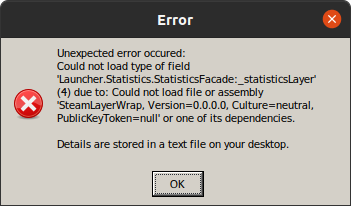
Reproduction
Starting the game.
@cudla100 You can set -noLauncher in the game's launch options, or use a third-party launcher such as Arma 3 Unix Launcher to open the game.
I just noticed it in comments and gave it a chance. It works. I have been trying to make this game work for a few days now.
Audio
Would it be appropriate for this to have the XAudio2 label? I consistently get crackling on certain audio, even with extreme pulseaudio latencies (or some other pulseaudio/pipewire configurations, and with no other media producing crackling) unless if I set a Wine DLL override for xaudio2_7 to use native (WINEDLLOVERRIDES="xaudio2_7=n").
Hangs
Separately, I am trying to track down the game hangs that occasionally happen.
They do not seem to relate at all to the above DLL override, as the hangs happen regardless.
These are not 100% consistent, which makes it harder to track. The Proton log, systemlog (journald) and kernel log (dmesg) don't appear to have anything useful in these cases. I have yet to try more in-depth debugging.
As others have observed, they seem to happen when loading things. I can more consistently trigger them when playing campaigns and showcases, including when someone else is hosting the Apex coop campaign. Seems to be specifically when something is actively happening in the mission, like a character is talking or new things are loading in. They also happen sometimes just when loading, like when switching back to the eden editor from playing in it.
I have yet to see them when playing with others besides in the Apex campaign. This includes large Zeus scenarios, and gamemodes like Antistasi or Invade and Annex.
Potential workaround
I might have fixed it by using the -cpuCount=1 parameter while having esync disabled (PROTON_NO_ESYNC=1). I haven't been able to trigger the hang yet since trying this, but I need more testing.
Thanks for the workaround, @her001!
Every time I opened the MCC console (MCC Sandbox 4 mod) the game would freeze after a few seconds, but now everything works as expected. Also the game no longer randomly freezes during loading screens (happened roughly 50% of the time before).
P.S. I didn't bother with esync, -cpuCount=1 alone seems to have done the trick. At least I haven't observed any hangs yet.
Arma profiling branch has freeze minidumps enabled. It dumps after ~30 seconds freeze I think, if you report them on the feedback tracker I can take a look at why its freezing and maybe find something.
I'll try to set -nolauncher automatically when we detect proton/wine
Been playing King of the Hill on a BattlEye enabled server for almost 30 minutes now and so far it works :)
For this to work you need the following:
- Steam Beta
- Proton Experimental (I'm using the one built by Flathub as I'm using Flatpak)
- Download the
Proton BattlEye Runtimefrom Steam. - Add
-noLauncherto your startup parameters as the Launcher is not working
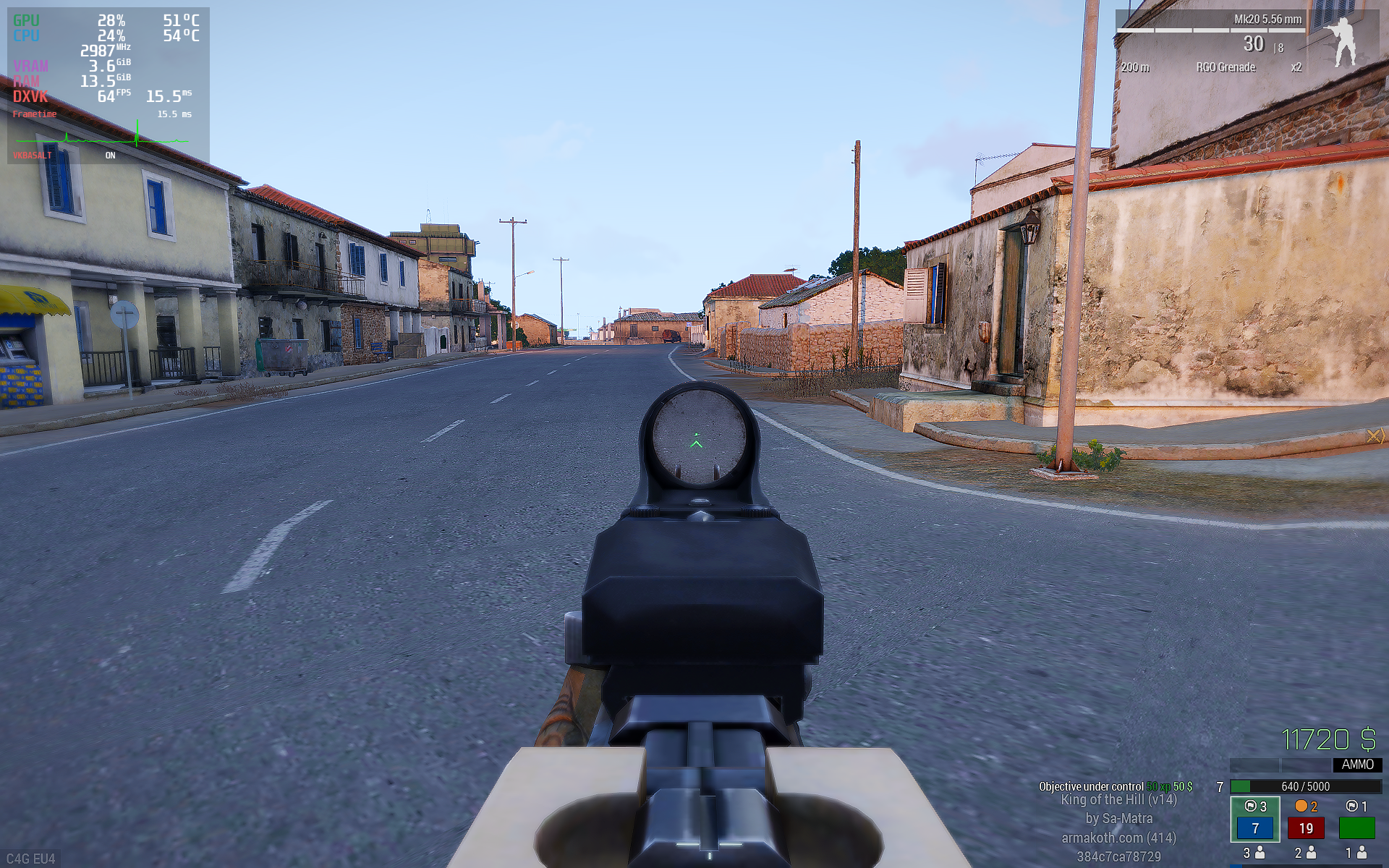
For this to work you need the following:
* Steam Beta

* Proton Experimental (I'm using the one built by Flathub as I'm using Flatpak)

* Download the `Proton BattlEye Runtime` from Steam.
I can confirm it works, I just followed the steps, took less than 5 min - now I'm online
Played for 4 hours :-)
Trying this out for BSG EFT atm, had a fair few hoops to jump through to get past the launcher black window issue. Not sure if BE will work, gotta update everything.
As for launcher in ARMA3, what happens when dotnet48 is available? (you can upgrade proton to install then downgrade, I use protonGE6.8 to get dotnet on without --force)
EFT complains BE not running/working issue.. seems it doesn't activate it.
EDIT: Got BE working, but the game appears to fail to connect to server. Not sure, could be some sort of windows related connection issue.
Arma 3 with ACRE2 mod (107410)
Issue transferred from https://github.com/ValveSoftware/Proton/issues/5344.
@Tinter posted on 2021-11-24T18:10:08:
Compatibility Report
- Name of the game with compatibility issues: Arma 3
- Steam AppID of the game: 107410
System Information
- GPU: Nvidia Geforce RTX 2080ti
- Driver/LLVM version: nvidia-dkms 495.44-3
- Kernel version: Linux 5.15.2-arch1-1 x86_64
- Link to full system information report as Gist: https://gist.github.com/Tinter/05efcd93ef40951b0f9aa0218d9a063c
- Proton version: Proton 6.21-GE-2
I confirm:
- [ ] that I haven't found an existing compatibility report for this game.
- [ ] that I have checked whether there are updates for my system available.
Symptoms
An ACRE2 issue, the authors believe it to be Proton: https://github.com/IDI-Systems/acre2/issues/1157
When running the game with the ACRE 2 mod in singleplayer or local multiplayer, the game will freeze within a minute and become unresponsive, necessitating a sigkill.
Logs are in the issue linked above.
Reproduction
@Tinter commented on 2021-11-24T18:10:57:
I know there is an issue for Arma 3, but this is specifically for the ACRE 2 mod, so I figured it really fit better in its own issue.
Hello @Tinter, blind guess, does setting the game's launch options to PROTON_NO_ESYNC=1 %command% have an effect?
@kisak-valve Thank you for moving it, sorry for misplacing it.
PROTON_NO_ESYNC=1 did not help.
Just for good measure, I tried PROTON_NO_FSYNC=1 as well and it did not help either.
Can we get any explanation/confirmation of how ArmA decides when to use BattlEye when running in Proton? On Windows, the option in the launcher chooses to launch the arma3battleye.exe executable instead of arma3_x64.exe as is standard. I'm assuming this is the case, but is that choice of entrypoint executable still the determining factor with Proton? I ask, because while doing development with intercept, I need to still be sure that BattlEye is not enabled.
Is launching the game via arma3_x64.exe instead of through the launcher executable or arma3battleye.exe still sufficient to avoid the BattlEye runtime?
I ask because I noticed that my Steam client downloaded the Proton BattlEye Runtime, which is awesome, and something I've been waiting for for ages, but I need to know how it's deciding to use it or not at launch time so I can leave a for-sure-non-BattlEye path open for development work.
Thanks for any issue either the Valve or BI sides can offer to me. I'm excited to have this on the cusp of being a reality after all these years of having to switch back to Windows to actually play the game!
Can we get any explanation/confirmation of how ArmA decides when to use BattlEye when running in Proton?
I assume you are talking about Arma 3.. As this is a Arma 3 ticket, ArmA doesn't use BattlEye.
but is that choice of entrypoint executable still the determining factor with Proton?
Yes, you are just running the windows version inside proton, so there is no reason why it would be different from windows?
Is launching the game via arma3_x64.exe instead of through the launcher executable or arma3battleye.exe still sufficient to avoid the BattlEye runtime?
yes.
Any fix for dual monitor setups where mouse moves outside window? (and fullscreen, tried it all)
My fix involves using Protontricks to change the mouse capture settings.
With Protontricks installed:
- Open the prefix's winecfg with
protontricks 107410 winecfgand wait for it to open - Select the "Graphics" tab
- Check "Automatically capture the mouse in full-screen windows", and then click OK.
I've heard others have used gamescope instead which probably works too.
Not really sure what changed in Proton 6.3/Experimental that broke mouse capture since it worked by default in Proton 5.0.
3. Check "Automatically capture the mouse in full-screen windows", and then click OK.
Yes this is what I did but with stl. SteamTinkerLauncher8.1
Unfortunately I just had a major audio issue where all helicopters were playing full blast no matter location, and my fps halved!
UPDATE: ok got audio working fine, however this time my MIC was disabled for some reason, couldn't talk. Also the reason for the lower fps was because like 10 people joined the game and ARMA3 will gradually lower your fps as more people join the multiplayer server.
Also I use AMD CPU and GPU which ARMA3 is known to not play nice performance wise with, at least in multiplayer.
After testing some more I've found this game to be unacceptably slow under Linux with Proton in Multiplayer.
In multiplayer with low settings I get 30-50fps MAX. Under windows with MAX 4k settings I get 60++ fps in multiplayer!
Seems there is major issues performance wise for this game still.. SinglePlayer for the most part seems fine however (nobody plays A3 SP btw)
@jarrard the issues you experience semm to be somewhere o your end, as others dont have these issues.
The Audio issue is fixed with a single env or a small change in winecfg (latter accessible with protontricks).
The mouse problem only occurs if you play fullscreen, which isnt recommended anyway. Go borderless.
If the issues still persis there are alot of people on the ArmaOnUnis Discord that are willing to help you.
Also I use AMD CPU and GPU which ARMA3 is known to not play nice performance wise with, at least in multiplayer.
also first time i hear this lol
AMD CPU and GPU
I have a Ryzen CPU and RX5700XT GPU and arma multiplayer runs without much of a noticable difference in performance compared to windows.
Also the myth that arma performs worse on recent AMD CPUs is long outdated.
It's been a while since I've played on Windows, but I know I used to
comfortably play KOTH on medium settings.
On Linux I am having a very rough time playing KOTH on minimum settings.
Single player missions and doing Apex with a friend works fine.
I got a Ryzen 3 1200 and a GTX 1050Ti.
On Sat, 11 Dec 2021, 15:23 Florian Ströger, @.***>
wrote:
AMD CPU and GPU
I have a Ryzen CPU and RX5700XT GPU and arma multiplayer runs without much
of a noticable difference in performance compared to windows.Also the myth that arma performs worse on AMD CPUs is long outdated.
—
You are receiving this because you were mentioned.
Reply to this email directly, view it on GitHub
https://github.com/ValveSoftware/Proton/issues/2364#issuecomment-991661109,
or unsubscribe
https://github.com/notifications/unsubscribe-auth/AGTIIMTK36JRHQYFDPGZN73UQNNHBANCNFSM4GZ2LFBQ
.
I have a Ryzen CPU and RX5700XT GPU and arma multiplayer runs without much of a noticable difference in performance compared to windows.
I'm directly comparing and ARMA3 in Multiplayer is pretty bad for me, 25-45fps on a coop server with 20 other people and under windows I run 4k Ultra at 60+ fps except in helicopters I get like 48fps often.
The Linux ARMA3 is run at 1800p and lower graphics settings too, which make minimal effect.
Shrug.
Single player missions and doing Apex with A friend works fine.
I play with 20+ people so am properly testing things ;-)
I'll recreate the prefix and test again but there really is not much else I can do if that fails to resolve the major performance issue in MP.
UPDATE: With just myself on the server (large coop map) I get 54-60fps but just barely.
I can already tell ones a few other players drop in this will tank back to 25-40fps or lower in action.
That is new proton exp prefix with -noLauncher, I've tried every possible command argument to try and figure this out but it seems to be BattlEye is probably just tanking the fps.
I'll just wait on the fence until more people come forward with the issue since I'm already getting push back against the problem with people claiming its all my end.
EDIT: DID a complete prefix wipe, tried GE-EXP-6.3-8 And still no luck. Once I get into towns with big firefights with 10+ other people it just hits a 30fps wall. However if I look directly up or down the performance is better so who knows whats going on there.
After playing on Win10 it is smoother but Linux is probably only 30-50% behind in performance metric so not too bad. Unfortunately game struggles at times in MP to maintain 60fps even on Win10. The frame handling is smooth on win10 naturally.
Anyone else having issues where game freezes when connecting to game server WHEN loading mods. The two mods I've been testing is Blastcore and JSRS which are pretty standard in the A3 community.
Upon loading of game map the fps goes to 0 and process hangs on %7 cpu usage; I've read about mods not working under Linux but know very little about the issue.
Anyone else having issues where game freezes when connecting to game server WHEN loading mods. The two mods I've been testing is Blastcore and JSRS which are pretty standard in the A3 community.
Upon loading of game map the fps goes to 0 and process hangs on %7 cpu usage; I've read about mods not working under Linux but know very little about the issue.
Try running profiling branch
I managed to fix the issue by recreating prefix and using proton experimental. I was using GE before which also disables microphone for some reason (game confused on what device to use maybe)
Unfortunately the game is very limited to 2 cores so I can't squeeze much out of it fps wise, especially in multiplayer. If I set resolution down to 640x480 from 4k for example, I gain maybe 5-10fps :(
You can increase fps by reducing view distances down to something drastic like 500m but then enemy are killing you from 2k away and you won't see them, so that isn't practical.
The game is designed for Intel CPU's at max OC and NVIDIA GPU's I suspect. My system is 100% AMD.
Ultimately you just need to put up with the 30-40fps during most MP combat missions; its a little better under windows10 where fps is 40-50fps during combat missions, maybe more in some situations. (based on Atlas-Map dynamic COOP missions)
@jarrard
The game is designed for Intel CPU's at max OC and NVIDIA GPU's I suspect.
That's a myth. However Pre-Ryzen AMD CPU's are known for their shit performance buts that's unrelated/no specific Linux Problem.
Personally I am on an AMD + Nvidia Setup (f*** you nvidia proprietary drivers) and have none of the performance issues described anywhere here.
You should try out different launch parameters for arma and see what works best for you.
(based on Atlas-Map dynamic COOP missions)
If you want to provide usable benchmarks please use "Yet another Arma Benchmark" from the Workshop.
You should try out different launch parameters for arma and see what works best for you.
Rolls eyes, yeah tried them all!
That's a myth
Not really; the game was designed to run on 2 cores, and low and behold guess who has the highest cycles per core, Intel.
Personally I am on an AMD + Nvidia Setup (f*** you nvidia proprietary drivers) and have none of the performance issues described anywhere here.
The issues exist under windows10 also, just you've got 10-20 more fps to play with which makes it acceptable. But when you subtract %30 from 50fps in COOP/MP battles; that is a painful loss.
"Yet another Arma Benchmark" from the Workshop
Does it comprehensively test multiplayer? ...
For the sake of argument I ran that benchmark anyway
Linux: 26.6 FPS at 2160p (medium-high settings) (8CPU Count, noHT, Default malloc)
Linux: 25.5 FPS at 2160p (") (8CPU Count, noHT, malloc=system)
Linux: 27.3 FPS at 2160p (") (ExThreads, HT, Default malloc)
Windows10: 37.2 FPS at 2160p (") (ExThreads, HT, Default Intel malloc)
Windows10: 35.3 FPS at 2160p (") (ExThreads, HT, malloc=system)
I have tried many parameters; no major difference between them all, testing noHT and 8CPU count atm).
It seems the default malloc is best which is Intel based interesting enough.
If I do my math right, Windows gets %31 more fps. Normally this isn't a issue if the game ran at well above 60fps during these combat sequences, the loss would be acceptable.
Anyway ARMA3 is a old unoptimized game that's past its prime; nothing can be done about this.
guess who has the highest cycles per core, Intel
Not true anymore since Zen2 (Ryzen 3XXX and above). Btw the owner of userbenchmark.com is biased and the site is not to be trusted.
Does it comprehensively test multiplayer?
You cannot compare Multiplayer performance cus it has too many variables outside of our control (God's Mood?)
Anyway ARMA3 is a old unoptimized game that's past its prime
Yup. Enfusion based Arma 4 when? :Sadge:
Somehow I managed to double my FPS and fix the performance issue. It could be any of the below.
- Installed new Arch and,
- Using Linux-zen
- Moved to kwin-lowlatency (full-screen unredirect is ticked)
- Disabled Allow Apps to disable compos; and Latency Forced Smoothest Animations....
I have freesync and pageflip enabled; anyway I now get 55-90fps instead of 24-55 (with frame stutter)... Might even be better performance then windows now.
UPDATE: Still going good. I had a issue with sound distortion which appears to be fixed by having this in the launch options: WINEDLLOVERRIDES="xaudio2_7=n,b" %command%
UPDATE: Still going good. I had a issue with sound distortion which appears to be fixed by having this in the launch options: WINEDLLOVERRIDES="xaudio2_7=n,b" %command%
Thanks for this, it was basically the last hurdle for me re Arma 3 with Proton, I had unbearable amount of crackling and popping when vehicle audio was played, it's now almost completely gone.
Regarding the performance and things I've tried:
Proton-GE, different kwin settings (xorg session compositor completely off, different latencies...), Xanmod Kernels with RT and TT + FSYNC, various Arma3 config tweaks, Mesa-git...
NONE of that have mattered as far as pure graphics performance. Compared to the 'vanilla' setup (Fedora 35 KDE, default kwin settings, wayland session, Proton Experimental, vanilla Kernel, stable Mesa) it's always within the margin of error. Only thing making difference on my system (Intel CPU) is running Arma 3 with the performance governor, which reduces stutters considerably.
But as far as graphics performance goes, it's actually pretty damn good. Performance issues on my setup are always due to the old engine and how it handles ai, scenarios etc and I don't think anything can be done about it than maybe having a beefier CPU.
@jpenala @jarrard
UPDATE: Still going good. I had a issue with sound distortion which appears to be fixed by having this in the launch options: WINEDLLOVERRIDES="xaudio2_7=n,b" %command%
iirc this got mentioned here and/or on the AoU Discord a few times already. Its also included in my guide since this commit
- Installed new Arch and,
Totally possible that your install was just messy, but unlikely if the other 3 work for others.
- Using Linux-zen
Tis should be default for every Arch gaming install at least imo. It is possible that the fps increase come from the fsync kernel patch alone (yes, fsync only works with a patched kernel)
You can actually go a step further by compiling a kernel with a custon scheduler and more performance patches with the help of the linux-tkg script
- Moved to kwin-lowlatency (full-screen unredirect is ticked)
kwin (KDE Plasma) is one of the slower if not the slowest window manager for gaming. If you want to try something more performant but still user friendly try XFCE
- Disabled Allow Apps to disable compos; and Latency Forced Smoothest Animations....
Maybe KDE overrides is, but proton has a patch (iirc by default) that makes games bypass compositors automatically, so this should have no effect.
I will add a few lines about these in the guide soon
kwin (KDE Plasma) is one of the slower if not the slowest window manager for gaming. If you want to try something more performant but still user friendly try XFCE
Yeah I've tried XFCE but it has no Wayland path/plans yet and also its compositor is not quite as up to date. I've compared performance in past and Plasma has always been fine except recently for some titles which I hope to now have fixed.
Again this issue had existed over a ArcoLinux install and now Garuda (which I've resolved by messing with some stuff). I couldn't exactly put my finger on the cause but its all fine now.
I've not managed to see any performance difference between GNOME vs KDE in my tests, even though latest phoronix benchmarks suggest GNOME being (slightly) superior. After KDE landed direct scanout for fullscreen aps with wayland, it's been smooth sailing. XFCE has flaky unredirect for fullsreen windows, sometimes you have to disable compositor manually to get best performance.
Yeah I don't use Wayland atm because waiting for ICC/Gamma/HDR to drop for it. (like in 2+ yrs, lmao)
Personally i use a custom awesomewm setup and therefore cannot tell about the performance of complete desktop enviroments or wayland. A custom WM setup may be a last step to squeeze 1 or 2 fps if you are very commited to linux
Personally i use a custom awesomewm setup and therefore cannot tell about the performance of complete desktop enviroments or wayland. A custom WM setup may be a last step to squeeze 1 or 2 fps if you are very commited to linux
I usually use Gamescope if it helps. But no method is perfect and there is bugs in all.
Gamescope has potential to be more practical if Valve integrate it into steam as a option or something. It still has some bugs to be sorted out so isn't perfect. Solutions must be sensible for the end user in mind and not tailored for more advanced users whom may be use to work arounds as the norm.
Might even be better performance then windows now.
So this got me curious (and I've never even tried Arma on Windows before): I ran YAAB Windows 10 vs Linux+Proton with exact same settings, and the performance with W10 was slightly worse (within the margin of error). So at least in CPU heavy scenarios, there's not much to be done about improving Arma 3 performance with Proton.
Solutions must be sensible for the end user in mind and not tailored for more advanced users whom may be use to work arounds as the norm.
That is the greater goal, but we still have a long way there.
(...), and the performance with W10 was slightly worse(...)
Thats pretty much the lesser overhead from the missing Windows bloatware running in the background.
Latest Arma 3 dev branch update added a fix for the crashing launcher with Proton. And indeed it does not crash anymore, changing the parameters seem to work and game launches fine through the launcher once you untick the 'BattlEye' checkbox.
fine through the launcher once you untick the 'BattlEye' checkbox.
Isn't BE being used a pretty big thing in this game? It works now with the Steam BE runtime; is there some unique bug with BE via launcher? and if you untick BE can BE still be used when joining a server?
Isn't BE being used a pretty big thing in this game? It works now with the Steam BE runtime; is there some unique bug with BE via launcher? and if you untick BE can BE still be used when joining a server?
I don't see any dev branch compatible servers, so at this point it seems to be irrelevant if it works or not. By the time the fix lands on stable branch, I presume any quircks should be sorted out. The patch notes state the fix is "partial", whatever that may mean. I assume they have incentive to have Arma 3 to be out-of-the-box ready for Steam Deck (feature parity with Windows).
With Proton 7.0 I don't get the audio crackling and popping anymore, no need for xaudio override.
For some reason changing from Experimental branch to 7.0 changed my controller guid for Logitech joystick, I had to manually edit the guid in *.Arma3Profile to get it working without needing to remap everything.
Starting this morning, I get kicked with BattlEye: Bad Packet when I try to join servers (within ~40ish seconds).
Nothing has changed on my system software-wise since it was working, so can anyone confirm that this is at least a problem for them as well? I'm losing my mind trying to figure out what could changed in the last couple of hours to start causing this.
@mcoffin same issue on my side.
Manjaro and Steam beta up to date.
same issue on my side
@FoxyHawk Well, as disappointing as it is to hear that our short-lived time of having a working BattlEye may be over, it's actually nice to hear that I'm not nuts, and something on their end really did break during that time frame. I was utterly convinced it had to be me since none of Proton, the BattlEye runtime, or the game recieved any updates during that time.
Thanks a bunch for checking it out for me and confirming the issue.
Starting this morning, I get kicked with
BattlEye: Bad Packetwhen I try to join servers (within ~40ish seconds).
Me too, I can confirm that issue. I completely reinstall arma 3, but that doesn't work. Btw I found one server that works ok. I can't figure out that's happening to game or other servers.
The Bad Packet issue seems to have been solved since yesterday.
The
Bad Packetissue seems to have been solved since yesterday.
I agree the issue appears to be fixed, no problem playing in servers for an extended period of time.
The
Bad Packetissue seems to have been solved since yesterday.
I can confirm that.
I seem to have stumbled upon a bug that's happening on proton 7.0, but not on proton 6.3. When in the editor or Zeus, the camera is randomly jumping around whenever i go to move it. Seems to only occur on Wayland, doesn't happen on xorg. recording of what it looks like
Is this a known bug?
Hello @ShaunTheQuietGamer, please add PROTON_LOG=1 %command% to the game's launch options, reproduce the regression, and attach the generated $HOME/steam-$APPID.log to this issue report as a file. (Proton logs compress well if needed.) Also, please copy your system information from Steam (Steam -> Help -> System Information) and put it in a gist, then include a link to the gist in this issue report.
System info -- https://gist.github.com/ShaunTheQuietGamer/6051fae81414962d80fa015355fb251d
and log is attached below
Last I checked it also affected the Zeus camera in #5847 . It seems to affect any game with a cursor that has you hold right click to move the camera around.
@ShaunTheQuietGamer Thank you for reporting! This regression had not been reported yet, and we are looking into it :)
@DrymarchonShaun It looks like this was likely a KDE bug -- in any case, I can no longer reproduce here after updating my system and using Proton 7.0-5. Could you please make sure you have an updated KDE version and then let me know if you can still repro? Proton 7.0-5 is currently available as "Proton Next".
My vanilla Arma 3 Launcher won't save user settings. Anything I choose in the 'parameters' tab and 'Battleye' enabled status wont save. I've tried 7.0-4 and Experimental.
Launcher doesn't work for me anymore since yesterday. It hangs second after pop up.
Launcher doesn't work for me anymore since yesterday. It hangs second after pop up.
Experiencing the same issue since the 6/1/23 with Arma Launcher. Launcher hangs at 'Checking for updates...' with 'Acquiring latest reports...' and Acquiring data...' dialogs paused.
looking at the Launcher.log file, it looks like it is hanging during mod synchronization. Below is an example, if i unsubscribe to the mod, the launcher will pause at the next one queued.
2023-01-07 10:02:04,222 [ INFO] 20: SteamExtensionStorage: NMI: Updating items states
2023-01-07 10:02:04,224 [ INFO] 20: SteamUgcDownloadManager: Handling state change 825181638 from: { flags=[ ], dir=(not set) } to: { flags=[I ], dir=Z:\home\matt.local\share\Steam\steamapps\workshop\content\107410\825181638 }
2023-01-07 10:02:04,224 [ INFO] 20: SteamUgcDownloadManager: Item was installed: 825181638
2023-01-07 10:02:04,224 [ INFO] 20: TaskQueue: Task queue: Enqueued task Enqueuing extension DynaSound 2, steam:825181638 for synchronization
@mattugs Could you list the mods that you have installed, or at least the mods that you have seen the problem with?
@mattugs Could you list the mods that you have installed, or at least the mods that you have seen the problem with?
For troubleshooting i've done a fresh install of ARMA3 with no mods installed. The Launcher still hangs or closes (crashes) with no mods installed. Subscribing and adding workshop mods does not seem to change the issue.
Log of Launcher crashing/closing:
steam-107410.log
Log of Launcher hanging:
steam-107410.log
Replying to https://github.com/ValveSoftware/Proton/issues/2364#issuecomment-1383891628
Launch issue has been resolved 28/2/23. No intervention by me, potentially a Steam update or the latest 2.12 update has fixed the issue.
If you have game installed on secondary drive launcher have issue linking to mods.
at Launcher.Extensions.SteamExtensionStorage+InnerSyncHelper.SynchronizeModAsync (Launcher.Extensions.Models.ExtensionInfo extension, System.String destination, System.Boolean isPreventiveSynchronization) [0x00388] in <fb552fa843404c32a991da63bcf73cb2>:0
2023-04-07 13:17:07,140 [ INFO] ker: SteamUgcDownloadManager: Item was installed: 1400574293
2023-04-07 13:17:07,141 [ INFO] ker: TaskQueue: Task queue: Enqueued task Enqueuing extension NIArms All in One - RHS Compatibility., steam:1400574293 for synchronization
2023-04-07 13:17:07,189 [ INFO] 240: TaskQueue: Spinning task queue: Enqueuing extension Anizay, steam:1537973181 for synchronization
2023-04-07 13:17:07,190 [ INFO] 288: InnerSyncHelper: Mod synchronization done: pid = steam:1617004814; dir = E:\steamapps\workshop\content\107410\1617004814
2023-04-07 13:17:07,193 [ INFO] 240: TaskQueue: Task queue: Operation Utils.Threading.Tasks.TaskQueueElement completed
2023-04-07 13:17:07,201 [ INFO] 290: SteamExtensionStorage: Junction creating: E:\steamapps\common\Arma 3\!Workshop\@Anizay <- E:\steamapps\workshop\content\107410\1537973181
2023-04-07 13:17:07,201 [ERROR] 290: InnerSyncHelper: System.ServiceModel.ActionNotSupportedException: Cannot create linux junction in wine on non Z: path
  at Launcher.Extensions.SteamExtensionStorage+InnerSyncHelper.UpdateJunction (Launcher.Extensions.Models.ExtensionInfo extension, System.String destination, System.String modFolder) [0x0007d] in
<fb552fa843404c32a991da63bcf73cb2>:0
  at Launcher.Extensions.InsituUgcModSynchronizationStrategy.SynchronizeMod (Launcher.Extensions.Models.ExtensionInfo extension, System.String installDirectoryBySteam) [0x0004d] in <fb552fa843404c32a991da63bcf73cb2>:0
  at Launcher.Extensions.SteamExtensionStorage+InnerSyncHelper+<>c__DisplayClassc0.<SynchronizeModAsync>b__bc () [0x00000] in <fb552fa843404c32a991da63bcf73cb2>:0
  at System.Threading.Tasks.Task`1[TResult].InnerInvoke () [0x0000f] in <e70d6e9587d64cb3abb4b3f99bbf5a0d>:0
  at System.Threading.Tasks.Task.Execute () [0x00000] in <e70d6e9587d64cb3abb4b3f99bbf5a0d>:0
--- End of stack trace from previous location where exception was thrown ---
I used this workaround https://unix.stackexchange.com/questions/306297/how-to-stop-wine-from-assigning-drive-letters-to-mounted-devices-automatically/734800#734800
can't resize window and launcher won't save user settings, everything else works.
system info
https://gist.github.com/okfruit/2d37205ade1df872f283c5028e18f7a9
steam log
steam-107410.log
it's crashing every time i start it with any proton version
the message is different between experimental and 7.0
log file:
steam-107410.log
Hello @rocketstrong600, please copy your system information from Steam (Steam -> Help -> System Information) and put it in a gist, then include a link to the gist in this issue report. If you're using the Steam client beta, then Steam Runtime Diagnostics has the interesting details instead.
weirdly the game does work with DISABLE_LAYER_AMD_SWITCHABLE_GRAPHICS_1=1 %command% -window
I should note other dx11 games do work without DISABLE_LAYER_AMD_SWITCHABLE_GRAPHICS_1 on
Same here like in @rocketstrong600 case.
My vanilla Arma 3 Launcher won't save user settings. Anything I choose in the 'parameters' tab and 'Battleye' enabled status wont save. I've tried 7.0-4 and Experimental.
Same here with the lastest Experimental.
Latest update break Lobby menu
Last update to the game doesn't allowed me to join into servers. Server loads up but I have no interface so I get kick for being "idle" that was not the case last week.
Tried Experimental and Experimental bleeding edge without luck.
arma 3 multiplayer issue
Issue transferred from https://github.com/ValveSoftware/Proton/issues/7123.
@nitlott posted on 2023-09-23T11:46:16:
Compatibility Report
- Name of the game with compatibility issues: Arma 3
- Steam AppID of the game: 107410
System Information
- GPU: gtx 1070
- Video driver version:
- Kernel version: 6.5.3-arch1-1
- Link to full system information report as Gist:
- Proton version: tried multiple versions even exprimental
I confirm:
- [X ] that I haven't found an existing compatibility report for this game.
- [X ] that I have checked whether there are updates for my system available.
Symptoms
Game launches fine, singleplayer works fine. BUT when i enter multiplayer i cant load in, i get stuck with a background of either desert or under water image, i can see the chat and i see one upp arrorw and one down arrow icon. but the game never loads in fully
Reproduction
Game launches fine, singleplayer works fine. BUT when i enter multiplayer i cant load in, i get stuck with a background of either desert or under water image, i can see the chat and i see one upp arrorw and one down arrow icon. but the game never loads in fully
I am pleased to report that I have successfully installed and configured Arma3 on Steam with Ubuntu 20.04.6 Focal Fossa.
The game will only work with Proton 4.11-13 and Wine 5.0.
Required LaunchOptions:
-noLauncher
WINEDLLOVERRIDES="xaudio2_7=n,b" %command%
Required Dependencies:
Wine 5.0 (does not require Wine32)
Proton 4.11-13
FAudio
Without FAudio the game will not work.
I am exploring all the other LaunchOptions but so far Arma3 will run with Vulkan or OpenGL and Proton 4.11-13.
Minimum System Specs:
Intel CPU
Nvidia GPU
8GB Ram
Arma3 is definitely not easy to configure.
@RunyonChris I'm glad you got it working. Your report makes it sound like we have a regression in newer Proton, but we test this game frequently, and so I think there must be something specific about your system that is triggering a failure on newer Proton versions.
What is the failure that you are seeing with Proton versions newer than 4.11? Could you get a log of the failure on Proton 8.0-x by adding PROTON_LOG=1 %command% to the launch options? Also, could please also copy your system information from Steam (Steam -> Help -> System Information and Steam -> Help -> Steam Runtime Diagnostics) and put each in a gist, then include a link to the gists in this issue report.
I am currently looking at another issue with Arma3 and I have to say that Arma3 has turned into a very compromised game with multiple attack vectors that can be exploited. Arma3 used to be secure. This is terrible software by design now. So I am considering abandoning Arma3 all together because it may be too unsafe to run on any machine. Do you know any of the security exploits that I am talking about?
From: alasky17 @.>
Sent: Wednesday, February 7, 2024 8:25 PM
To: ValveSoftware/Proton @.>
Cc: RunyonChris @.>; Mention @.>
Subject: Re: [ValveSoftware/Proton] Arma 3 (107410) (#2364)
@RunyonChrishttps://github.com/RunyonChris I'm glad you got it working. Your report makes it sound like we have a regression in newer Proton, but we test this game frequently, and so I think there must be something specific about your system that is triggering a failure on newer Proton versions.
What is the failure that you are seeing with Proton versions newer than 4.11? Could you get a log of the failure on Proton 8.0-x by adding PROTON_LOG=1 %command% to the launch options? Also, could please also copy your system information from Steam (Steam -> Help -> System Information and Steam -> Help -> Steam Runtime Diagnostics) and put each in a gisthttps://gist.github.com/, then include a link to the gists in this issue report.
—
Reply to this email directly, view it on GitHubhttps://github.com/ValveSoftware/Proton/issues/2364#issuecomment-1932807916, or unsubscribehttps://github.com/notifications/unsubscribe-auth/BDXGQMGMNZT3FRQ7ZAWNDNLYSPPLFAVCNFSM4GZ2LFB2U5DIOJSWCZC7NNSXTN2JONZXKZKDN5WW2ZLOOQ5TCOJTGI4DANZZGE3A.
You are receiving this because you were mentioned.Message ID: @.***>
Hi, I'm struggling with the Arma 3 Launcher. When I try to import a modlist the launcher locks up and no file explorer window is opened. Any pointers for debugging this would be very welcome. I've included a Proton Log and my system information.
https://gist.github.com/luckielordie/0cb294761c32c11e3ba28e5078e9f95f
The newest (2.20) update seems to have broken some mods for me, has anyone else noticed any new problems?
Game is using CAPS lock as keybind for push to talk radio but often it will get stuck in open state when you hold it with other key. This is wine/proton bug with handling of Caps, Num and Scroll lock. More information with debug: https://bugs.winehq.org/show_bug.cgi?id=57958
There has been a regression in compatibility with Proton 11.
The launcher no longer saves settings and doesn't recognize workshop mods properly.
The game also crashes often due to mod signature mismatch, likely related to the launcher issue.
Reverting to Proton 10 solved the issues.
Hello @Langolyers, please add PROTON_LOG=1 %command% to the game's launch options, reproduce the regression, and attach the generated $HOME/steam-$APPID.log to this issue report as a file. (Proton logs compress well if needed.)
Thanks for the reply @kisak-valve.
It seems some of the recent hotfixes improved the the behaviour since I last tried, couldn't reproduce everything. Right now the launcher is saving settings and I didn't get kicked.
The regressions that remain are:
- the launcher has to update all the mods every time it opens, which makes for a longer startup.
- the launcher keeps an outline under other windows, including the game when it's running. You can see the dark vertical line in the image below. This doesn't happen with Proton 9 or 10.
The logs are attached.
@Langolyers Could you list some/all of the mods you are using so that we can try to reproduce "the launcher has to update all the mods every time it opens, which makes for a longer startup."?
This is the mod list.
This is unrelated to the usual long start up on linux (Bohemia is aware and has a fix for the next Arma update), but after the launcher is up and running the mods on the list are updated one by one. It doesn't take that much longer, but it's an extra 10 or so seconds as the launcher goes through and finds the mods. They all list as "updated" afterwards, as when there are actual updates.
I had some persistent issues when reverting to Proton 10 and deleted my compat folder yesterday for a clean build, so unfortunately can't share an image of what it looks like.
Arma sees major cpu hangs
Issue transferred from https://github.com/ValveSoftware/Proton/issues/9721.
@retronius posted on 2026-04-28T13:28:02:
Arma 3, especially while playing the mod antistasi, has huge cpu hangs every few seconds. Frametimes jump to over 100 ms and cpu usage decreases significantly during these hangs. Issue persistent with Proton Experimental, Proton 11 Beta, and GE-Proton 10-34. Gamemoderun command does not fix issues either.
Seems like a regression on proton experimental now it has moved to a v11 branch. A bunch of BattlEye issues and corrupted mod files in the launcher.
Moving Arma 3 back to Proton 10.0-4 fixes the issues.
@vextrogen (And anyone else) - if you are getting issues with specific mods, please list the specific mods or steps to reproduce so that we can try to investigate :). Currently we are already looking into the Proton 11 regression where the launcher updates all the mods every time and the Proton 11 regression where there is an outline of the launcher on the main game window. Thank you to everyone for the feedback and reports on Proton 11 Beta!
@Langolyers (and anyone else)
- the launcher has to update all the mods every time it opens, which makes for a longer startup.
This can be temporarily fixed by adding WINE_MONO_HIDETYPES=0 %command% as a launch option. We're working on solving the deeper root issue. @vextrogen it would be interesting if this launch option also fixed any of your mod issues.
Arma sees major cpu hangs
Issue transferred from [#9721](https://github.com/ValveSoftware/Proton/issues/9721). @retronius posted on 2026-04-28T13:28:02:
Arma 3, especially while playing the mod antistasi, has huge cpu hangs every few seconds. Frametimes jump to over 100 ms and cpu usage decreases significantly during these hangs. Issue persistent with Proton Experimental, Proton 11 Beta, and GE-Proton 10-34. Gamemoderun command does not fix issues either.
May I also add some more details
Game is locally hosted, though this issue happens both on singleplayer and co-op
Hangs start happening upon leaving hq and are particularly heavy when using a vehicle
Are consistent throughout the whole session
RESOLVED: Shader cache issue, fixed after deleting the cache and replaying
Update 2.22 introduced audio cracking. Changing PULSE_LATENCY_MSEC latency or recreating prefix didn't help. Relevant issue on Bohemia tracker: https://report.bistudio.com/issues/A3G-25
Installing xact from winetricks and using native xaudio2_7 partially reduces cracking.
A fresh proton prefix (backup your prefix's "documents" folder to keep your profile/settings) with Proton Experimental combined with installing xaudio29 package in protontricks resolved crackling audio for me.
Latest update changelog explicitly calls out xaudio 2.9 update. see: Changed: Updated to XAudio 2.9
Yeah, it's actually xaudio2_9 what fixes the issue, which is also being installed by xact. But there's still cracking, I bet you can notice it in this test mission
Proton versions
proton experimentalx8 2026-08proton 10.0-4x1 2026-04proton 8.0x2 2024-02proton 4.11-13x1 2024-01proton 7.0-5x1 2022-11proton nextx1 2022-11proton 6.3x2 2022-09proton 7.0x2 2022-09proton 5.0x3 2021-12proton 6.21x1 2021-11proton 5.11x1 2020-11proton 4.11-11x1 2020-01proton 4.11-7x3 2019-10proton 3.16-9x1 2019-10proton 4.11x4 2019-10
Launch options
WINE_MONO_HIDETYPES=0x1 2026-04PROTON_LOG=1x5 2026-04WINEDLLOVERRIDES="xaudio2_7=n,b"x4 2024-01PROTON_NO_ESYNC=1`x1 2021-11PROTON_NO_FSYNC=1`x1 2021-11PROTON_NO_ESYNC=1x2 2021-11PROTON_NO_ESYNC=1`).x1 2021-10WINEDLLOVERRIDES="xaudio2_7=n"x1 2021-10PROTON_FORCE_LARGE_ADDRESS_AWARE=1x1 2020-01PROTON_USE_D9VK=1x1 2020-01PROTON_USE_WINED3D=1x2 2019-08WINEPREFIXx1 2019-04
Launch lines
WINE_MONO_HIDETYPES=0 %command%x1 2026-04WINEDLLOVERRIDES="xaudio2_7=n,b" %command%x4 2024-01DISABLE_LAYER_AMD_SWITCHABLE_GRAPHICS_1=1 %command% -windowx1 2023-06PROTON_NO_ESYNC=1 %command%x1 2021-11PROTON_FORCE_LARGE_ADDRESS_AWARE=1 PROTON_USE_D9VK=1 PROTON_NO_ESYNC=1 %command% -noLauncher -noSplash -world=empty -skipIntro -adapter=0 -enableHTx1 2020-01PROTON_USE_WINED3D=1 %command%x2 2019-08
Upstream links
- ValveSoftware/Proton/issues/9721x2 2026-04
- show_bug.cgi?id=57958x1 2026-04
- ValveSoftware/Proton/issues/7123x1 2023-09
- ValveSoftware/Proton/issues/5344x1 2021-11
- ValveSoftware/Proton/issues/4803x1 2021-05
- doitsujin/dxvk/issues/899x1 2020-04
- ValveSoftware/Proton/issues/3149x1 2019-10
- ValveSoftware/Proton/issues/3004x1 2019-08
DLLs
d3dcompiler_43.dllx1 2019-08d3dx10_43.dllx1 2019-08d3dx11_43.dllx1 2019-08imagehlp.dllx4 2019-07tzres.dllx1 2019-04ace_clipboard.dllx1 2019-02ace_clipboard_x64.dllx1 2019-02
Compatibility Report
System Information
I confirm:
Log files
arma3launcher_steam-107410.log
arma3_x64_steam-107410.log
Symptoms
Arma3launcher does not work that prevents the launch of the game, Microsoft .NET Framework 4.5.2 and Microsoft Visual C++ Redistributable for Visual Studio 2013 do not solve the problem, the only way to run Arma 3 is to rename arma3_x64 to arma3launcher then arma 3 will run
Запуск Arma 3 с модами ACE3 выдает ошибку в игре
x32 Trying to load a x64 dll 'ace_clipboard.dll' from a 32-bit executable
x64 Trying to load a x86 dll 'ace_clipboard_x64.dll' from a 64-bit executable
The same problem is observed in Wine-Stable.
But on Wine-Staging ACE3 mod works fine.
Reproduction
Start the game with ACE3 mod and see the message in the main menu