ASTRONEER
Agreed. I also gave it a test run and everything worked without any issues.
System Info: https://gist.github.com/NullTheSecond/0b8c3bc23aa1fba35a0e3a3542fc85c2
Hello @BrandonDyer64, @NullTheSecond, please copy your system information from steam (Steam -> Help -> System Information) and put it in a gist, then include a link to the gist in this issue report.
I've been playing version 1.0.3 for a few days with friends. Although there are a lot of bugs the only one clearly related to Proton is that movies don't get played. Given that those are apparently only used for the legal videos at startup and the loading screen animation, the impact is minimal.
System info: https://gist.github.com/LingMan/bca3bbd14d0070ae6a824ad05a122a52
The game uses MF plat. The movies are .mp4 with H.264 video and AAC audio inside.
astroneer_mediainfo.txt
steam-361420.log
@HonkingGoose: You might want to add this game to https://github.com/ValveSoftware/Proton/issues/1464.
Other than having to set PROTON_USE_WINED3D11=1 and the mentioned issue with the videos, this game works flawlessly. I have played for hours it, both on fullscreen and windowed without issues.
You shouldn't need PROTON_USE_WINED3D11=1 if Vulkan is setup properly. Make sure you have the Vulkan drivers installed. Only very old GPUs do not support Vulkan.
On Ubuntu with AMD or Intel you can install the drivers with:
sudo apt install mesa-vulkan-drivers mesa-vulkan-drivers:i386
I'm using that because bumblebee doesn't support vulkan yet. And I was not able to make primus-vulkan to work yet. If I play astroneer using my internal gpu (intel), I can use vulkan just fine, and don't need the PROTON_USE_WINED3D11=1.
Ah, ok, nevermind then. Your first post gave the impression that PROTON_USE_WINED3D11=1 is generally required for this game.
I was able to make it work using primus_vk and recent proton 4.2, no need for PROTON_USE_WINED3D11 anymore. Performance is somewhat better, I'd say equal to running on windows.
Proton 4.2.3 prevents this game from running. Since setting PROTON_USE_WINED3D and using primusrun (in my case) works, I suspect this is an issue with DXVK on the new Proton release.
This game has been running perfectly for me for some time now. I think this game is a perfect candidate for being added to the official list of games.
I'm having problems with the camera motion control, it is extremely sensitive. Adjusting the mouse settings in-game makes no difference.
System info: https://gist.github.com/Mhowser/b3867548f02d9da440e2fdb2ce82918b
I've noticed an issue sometimes when switching the focus between astronner and something else. But if go away from astroneer window and come back, it works again. This started to happen with Proton 4.11, but otherwise I have no issues.
ASTRONEER is not currently working if using primus_vk 1.2, see here for context.
Running with DISABLE_VK_LAYER_VALVE_steam_overlay_1=1 works. So far, I'm not sure if this is a bug on primus_vk or on steamvulkanoverlay.so.
The overlay issue was resolved on primus_vk by this commit.
Astroneer : Freezing on splash screen. OS remains running
Issue transferred from https://github.com/ValveSoftware/Proton/issues/3091.
@z5d69 posted on 2019-09-27T15:42:46:
Compatibility Report
- Name of the game with compatibility issues: Astroneer
- Steam AppID of the game: 361420
System Information
-
GPU: NVIDIA GTX 1060 6 GB
-
Driver/LLVM version: 430.40-17
-
Kernel version: 4.4.180-102
steam-361420.log -
Link to full system information report as Gist:
-
Proton version:4.11-6
Gist: https://gist.github.com/z5d69/72d7278bdbcf9ee8459298b0cb221c4b
I confirm:
- [X] that I haven't found an existing compatibility report for this game.
- [X] that I have checked whether there are updates for my system available.
Symptoms
When I try to run Astroneer through Steam Play, it freezes. Wine is running, Astroneer is still running, but the splash screen remains on the screen. I don't see any errors in the log indicating that anything has failed.

Reproduction
Please see above.
@z5d69, try running with PROTON_USE_WINED3D=1 %command%.
I tried that and it appears to crash right after start. Should I do something to log output? If so how do I do it and keep this setting? PROTON_USE_WINED3D=1 %command%.
@z5d69, there are a few things more you can try. Try running with PROTON_DUMP_DEBUG_COMMANDS=1 and try running the game from the debug commands that get created.
I have been playing astroneer for more almost a year now with no issues using proton. Here it works with vulkan or with WINED3D just fine (although with vulkan it's faster).
Mine DID run until a couple weeks ago. Let me ask, 1. Which Proton version are you running (I ask because I believe WINED3D is now WINED3D11)? 2. Can I put a space and then add this to the custom config? IOW, if I want to run debug AND try to run vulkan (I KNOW my card is vulkan compatible… maybe I’m using the wrong NVIDIA driver? )?
PROTON_DUMP_DEBUG_COMMANDS=1
Mine DID run until a couple weeks ago. Let me ask, 1. Which Proton version are you running (I ask because I believe WINED3D is now WINED3D11)?
I'm using the latest Proton version available, 4.11-6. Also, the option was renamed from PROTON_USE_WINED3D11 to PROTON_USE_WINED3D. It should work regardless of the option you use, since the former is an alias to the latter.
- Can I put a space and then add this to the custom config? IOW, if I want to run debug AND try to run vulkan (I KNOW my card is vulkan compatible… maybe I’m using the wrong NVIDIA driver? )?
If you use PROTON_USE_WINED3D, then the game will run using wine's D3D compatibility layer, which translates DirectX calls to OpenGL. If you run the game with no options, it will use Proton's DXVK, which is also a translation layer, but to vulkan, which is faster. Usually you should have everything you need already to run vulkan. All you need is the nvidia driver and nvidia-utils. Try installing vulkan-tools and running vulkaninfo and vkcube. They are good tests to know if you have vulkan working properly.
Okay, I confirmed that I’m running Nvidia 430.40. vulkaninfo appears to work fine. I don’t have vkcube but I’m running openSUSE 42.3 so potentially this didn’t come until 15.0. It appears to install with later releases. I have a hunch that Proton isn’t picking up something but… anyway, any ideas?
@z5d69 the log you've provided is inconclusive to find out more about your issue. Running with PROTON_DUMP_DEBUG_COMMANDS might be more elucidative. Also, you need to make sure you have the proper vulkan setup for your video card on opensuse. Providing the vulkaninfo output would also be helpful here.
- I set this (PROTON_DUMP_DEBUG_COMMANDS=1) and no output was generated. 2. I'm providing the last steam output (from late September... I don't remember why that generated) as well as the vulkaninfo output.
steam-361420.log
vulkaninfo.log
Oh, I think I found the files. Sorry, I think they used to be in the home directory but now they're in /tmp
log_info.tar.gz
Also, I DID have to kill everything (wine and astro) to get that splash screen to go away so there may be log entries for that as well.
@z5d69 at this point I have very few ideas. try running with DISABLE_VK_LAYER_VALVE_steam_overlay_1=1 to see if the issue is with the steamvulkanoverlay.
@z5d69 at this point I have very few ideas. try running with DISABLE_VK_LAYER_VALVE_steam_overlay_1=1 to see if the issue is with the steamvulkanoverlay.
Are those all cap? I'm really confused how nothing changed (not even proton) but it just stopped working. Dumb question but would vulkaninfo work if NVIDIA didn't have vulkan support?
@z5d69 at this point I have very few ideas. try running with DISABLE_VK_LAYER_VALVE_steam_overlay_1=1 to see if the issue is with the steamvulkanoverlay.
Is there a way to run Astroneer directly without leveraging Steam to start it?
Compatibility Report
- Name of the game with compatibility issues: ASTRONEER
- Steam AppID of the game: 361420
System Information
- GPU: NVIDIA GeForce GTX 1060 with Max-Q Design
- Driver/LLVM version: NVIDIA 440.82
- Kernel version: 5.4.0-7634-generic
- Link to full system information report as Gist: Gist
- Proton version: Proton 5.0-9
I confirm:
- [x] that I haven't found an existing compatibility report for this game.
- [x] that I have checked whether there are updates for my system available.
Symptoms
When attempting to join a dedicated server, the game displays an error message saying "Join Failed" at the top after about a second of trying to connect (almost immediate if there are other players on it) and goes back to the main menu.
Reproduction
- Go to the server list in the main menu
- Attempt to join a dedicated server
<Comment immediately before this one>
It is almost assured this is from the following:
fixme:bcrypt:BCryptOpenAlgorithmProvider algorithm L"DH" not supported
This is via https://old.reddit.com/r/Astroneer/comments/gsm44e/dedicated_server_on_linux/ and additionally my own testing.
When trying on my own, even 5.11 staging did not implement whatever variant of Diffie Hellman they are using on the dedicated server. This is with a freshly created wineprefix in a container. Additionally https://www.winehq.org/announce/5.12 does not mention bcrypt in relation to this function so it looks like this has not been touched in the interim.
It should be noted that when running the game client I have had no problems network wise before so I am assuming at this point the problem is exclusive to the dedicated server. I would also like to note that all other functions of the dedicated server appear to be functioning correctly as would be expected given how the game itself runs. The server starts correctly, creates a new "instance" if needed, and saves periodically as expected from the config file. It even responds to the "hidden" telnet interface mentioned by the devs, so it is not having network problems.
I doubt changes will be implemented from the devs end since from what I have seen they keep getting asked for full linux ports which is a far larger undertaking. I believe the only fix is for an interested party to further complete the bcrypt library implementation however someone more knowledgeable than me should verify this.
Astroneer Borks GPU/system and needs hard restart to use PC again
Issue transferred from https://github.com/ValveSoftware/Proton/issues/4100.
@hellofu posted on 2020-07-28T15:22:49:
specs
OS: Linux Mint 19.3 Tricia Or Win 7 home 64bit
KERNEL: 5.4.0-42-generic
CPU: AMD Ryzen 5 1600 Six-Core
GPU: AMD Radeon RX 480
GPU DRIVER: 4.5 Mesa 18.3.0-rc4 and win7 Radeon software 20.7.2
RAM: 16 GB
Both OS's Each has the same crash results. the issue starts with the screen going black and the monitor searching for a display input. Audio from the game will continue playing. and the PC will require the hold down till the power supply cuts power then you can restart the system but you need to also turn off the monitor or It will not restart yet. the GPU fans Spin up to full speed as long a the system is left running.
Win 7 has less stability in either fullscreen or in windowed mode each crash shortly after intro graphics load and begins playing to the main menu.
LM both fullscreen and windowed mode doesn't show the developer/ Company logos on loading and the planetary loading logo doesn't play but the loading bars do show up. fullscreen crashes much more often mostly near special animations like loading in after death or during saving but the save will survive. otherwise, the crashes just happen during random gameplay without a clear reason this is how the windowed mode crashes most often but can play for 20-40 minutes between crashes at a time.
Multiplayer for this game is sadly broken. The fact that wine does not support DH is the cause of all the issues. Either gnutls does not support DH in the way that Wine wants to use it or Wine just does not support DH at all. RDR 2 had a similar issue and it was fixed by a "hack" added to the bcrypt library in Proton. Is it possible to also make the "hack" apply to Astroneer and its dedicated server as well?
Astroneer Borks GPU/system and needs hard restart to use PC again
Issue transferred from #4100.
@hellofu posted on 2020-07-28T15:22:49:specs
OS: Linux Mint 19.3 Tricia Or Win 7 home 64bit
KERNEL: 5.4.0-42-generic
CPU: AMD Ryzen 5 1600 Six-Core
GPU: AMD Radeon RX 480
GPU DRIVER: 4.5 Mesa 18.3.0-rc4 and win7 Radeon software 20.7.2
RAM: 16 GBBoth OS's Each has the same crash results. the issue starts with the screen going black and the monitor searching for a display input. Audio from the game will continue playing. and the PC will require the hold down till the power supply cuts power then you can restart the system but you need to also turn off the monitor or It will not restart yet. the GPU fans Spin up to full speed as long a the system is left running.
Win 7 has less stability in either fullscreen or in windowed mode each crash shortly after intro graphics load and begins playing to the main menu.
LM both fullscreen and windowed mode doesn't show the developer/ Company logos on loading and the planetary loading logo doesn't play but the loading bars do show up. fullscreen crashes much more often mostly near special animations like loading in after death or during saving but the save will survive. otherwise, the crashes just happen during random gameplay without a clear reason this is how the windowed mode crashes most often but can play for 20-40 minutes between crashes at a time.
you can pull this issue/comment it turned about to be a thermal issue and solved by repaste the GPU.
ASTRONEER freezes on startup in Proton 6.3
Issue transferred from https://github.com/ValveSoftware/Proton/issues/4726.
@Captain-Rage posted on 2021-04-02T14:38:10:
Compatibility Report
- Name of the game with compatibility issues: ASTRONEER
- Steam AppID of the game: 361420
System Information
- GPU: AMD Radeon RX 580 Series (POLARIS10, DRM 3.40.0, 5.11.11-arch1-1, LLVM 11.1.0)
- Driver/LLVM version: 4.6 (Compatibility Profile) Mesa 21.0.1
- Kernel version: 5.11.11-arch1-1
- Link to full system information report as Gist: "https://gist.github.com/Captain-Rage/d37ad485fd98f412567249af8ca41925"
- Proton version: 6.3-1
I confirm:
- [y ] that I haven't found an existing compatibility report for this game.
- [y] that I have checked whether there are updates for my system available.
Symptoms
When starting ASTRONEER using Proton 6.3 a test card screen is shown for a brief moment, the loading bar appears, the main shows but freezes immediately and the game cannot be closed gracefully and has to be terminated. ASTRONEER was working fine in Proton 5.13.
Reproduction
Start ASTRONEER using Proton 6.3.
Hello @Captain-Rage, please add PROTON_LOG=1 %command% to the game's launch options, reproduce the regression, and attach the generated $HOME/steam-$APPID.log to this issue report as a file. (Proton logs compress well if needed.)
Hello @Captain-Rage, please add
PROTON_LOG=1 %command%to the game's launch options, reproduce the regression, and attach the generated $HOME/steam-$APPID.log to this issue report as a file. (Proton logs compress well if needed.)
Here is the log:
steam-361420.log
Thanks for the fast reply!
I tested it with Proton version 6.3 and 5.13 but both gave me a black screen.
The game was only working with the exo_flight_test beta (so a 2 years old version of the game)
Edit: when reverting back to the standard version of the game but still forcing proton 5.13 it is working fine
I was playing "The Mission, Compass, and Power Update" on Proton 5.13-6 without any issues. Later when Proton 6.3-1 was released I tried running ASTRONEER using that version and it didn't work (see above). To make sure it was an issue with Proton 6.3, I tried installing Proton 5.13-6 and fire up ASTRONEER again the other day and indeed it worked without any problems. Hence some regression must have been introduced in Proton 6.3.
Yes, can confirm that. It starts just fine with Proton 5.13-6 and freezes with Proton 6.3-2 after showing this:

The static in the lower right corner is animated and then freezes. No loading screen for me, it just stops on that image. Since that test video doesn't appear at all with 5.13, this might be "progress" on the mfplat side in that it now tries to play an intro video which was completely skipped before.
It might be interesting to test Proton 6.3 with the game's launch options set to WINEDLLOVERRIDES="mfplay.dll=d" %command% and see if that returns the game to the same behavior as Proton 5.13.
Yes, with that option set the game launches just fine on Proton 6.3.
Setting WINEDLLOVERRIDES="mfplay.dll=d" %command% as launch parameter makes the test card screen disappear completely and the game starts and plays perfectly once more! Thanks a bunch for the workaround!! :)
EDIT:
Tested with Proton 6.3-2, for clarification.
EDIT 2:
Not required as of 6.3-5. ASTRONEER starts up and plays the videos without said command. See the post below.
When using any version of Proton small batterys don't work properly upstream. They cause the powerstrips to pulsate and the batterys don't discharge.
With Proton 6.3-5 the WINEDLLOVERRIDES="mfplay.dll=d" %command% workaround is no longer required. The game starts up fine and shows the videos as intended.
I tested with proton experimental and the videos are playing nicely. Even the video where the traveler takes a picture of you with the probes is working, which was the only reason to run this game on windows (apart from the multiplayer issue).
I have issues with the game on Nvidia with the 495.46 driver. After long playing sessions, the game seems to and crash.
In dmesg, I see an xid error:
[35393.887699] NVRM: Xid (PCI:0000:08:00): 31, pid=50064, Ch 0000004b, intr 10000000. MMU Fault: ENGINE GRAPHICS GPCCLIENT_T1_0 faulted @ 0x0_00000000. Fault is of type FAULT_PDE ACCESS_TYPE_READ
This only happens with the default dx11 backend, and not when the game is launched with the %command% -dx12 option.
And with -dx12 option, I see vertex explosions in the teleporting chambers, which do not happen with dx11:

@tannisroot this is not exclusive to this version of the driver. I pretty much always had this issue when playing for extended periods of time. I learned to save often because of this exact issue.
After the recent update the game crashes as soon as the opening cutscene finishes playing and the music kicks in. I'm happy to provide logs if explained how.
Drivers: Mesa 21.3.3 - kisak-mesa PPA
Kernel: 5.15.12-051512-generic
There is a workaround for this but it should still be fixed.
It is almost assured this is from the following:
fixme:bcrypt:BCryptOpenAlgorithmProvider algorithm L"DH" not supportedThis is via https://old.reddit.com/r/Astroneer/comments/gsm44e/dedicated_server_on_linux/ and additionally my own testing. When trying on my own, even 5.11 staging did not implement whatever variant of Diffie Hellman they are using on the dedicated server. This is with a freshly created wineprefix in a container. Additionally https://www.winehq.org/announce/5.12 does not mention bcrypt in relation to this function so it looks like this has not been touched in the interim.
I doubt changes will be implemented from the devs end since from what I have seen they keep getting asked for full linux ports which is a far larger undertaking. I believe the only fix is for an interested party to further complete the bcrypt library implementation however someone more knowledgeable than me should verify this.
Has there been any updates on this? I'm running into the same issue. Trying to join a dedicated windows server from a linux client results in "Failed to join: Server is full".
Everything has worked great, except joining dedicated servers.
Issue transferred from https://github.com/ValveSoftware/Proton/issues/5600.
@spexgaelen posted on 2022-02-22T01:59:16:
Compatibility Report
- Name of the game with compatibility issues: Astroneer
- Steam AppID of the game: 361420
System Information
- GPU: NVIDIA GeForce RTX 2080 Ti
- Driver/LLVM version: 470.86-1pop0~1637635465~21.10~47710c4 amd64
- Kernel version: 5.15.23-76051523-generic
- Link to full system information report as Gist: not provided
- Proton version: Proton-7.1-GE-2
- Computer Information:
    Manufacturer:  System76
    Model:  Thelio
    Form Factor: Desktop
    No Touch Input Detected

Processor Information:
    CPU Vendor:  AuthenticAMD
    CPU Brand:  AMD Ryzen 9 3900X 12-Core Processor
    CPU Family:  0x17
    CPU Model:  0x71
    CPU Stepping:  0x0
    CPU Type:  0x0
    Speed:  4672 Mhz
    24 logical processors
    12 physical processors
    HyperThreading:  Supported
    FCMOV:  Supported
    SSE2:  Supported
    SSE3:  Supported
    SSSE3:  Supported
    SSE4a:  Supported
    SSE41:  Supported
    SSE42:  Supported
    AES:  Supported
    AVX:  Supported
    AVX2:  Supported
    AVX512F:  Unsupported
    AVX512PF:  Unsupported
    AVX512ER:  Unsupported
    AVX512CD:  Unsupported
    AVX512VNNI:  Unsupported
    SHA:  Supported
    CMPXCHG16B:  Supported
    LAHF/SAHF:  Supported
    PrefetchW:  Unsupported

Operating System Version:
    Pop!_OS 21.10 (64 bit)
    Kernel Name:  Linux
    Kernel Version:  5.15.23-76051523-generic
    X Server Vendor:  The X.Org Foundation
    X Server Release:  12013000
    X Window Manager:  GNOME Shell
    Steam Runtime Version:  steam-runtime_0.20220119.0

Video Card:
    Driver:  NVIDIA Corporation NVIDIA GeForce RTX 2080 Ti/PCIe/SSE2
    Driver Version:  4.6.0 NVIDIA 470.86
    OpenGL Version: 4.6
    Desktop Color Depth: 24 bits per pixel
    Monitor Refresh Rate: 60 Hz
    VendorID:  0x10de
    DeviceID:  0x1e07
    Revision Not Detected
    Number of Monitors:  3
    Number of Logical Video Cards:  1
    Primary Display Resolution:  1920 x 1080
    Desktop Resolution: 5760 x 1080
    Primary Display Size: 20.08" x 11.30" (23.03" diag)
                                            51.0cm x 28.7cm (58.5cm diag)
    Primary Bus: PCI Express 16x
    Primary VRAM: 11264 MB
    Supported MSAA Modes:  2x 4x 8x 16x

Sound card:
    Audio device: Nvidia GPU 91 HDMI/DP

Memory:
    RAM:  32105 MB

VR Hardware:
    VR Headset: None detected

Miscellaneous:
    UI Language:  English
    LANG:  en_US.UTF-8
    Total Hard Disk Space Available:  1100379 MB
    Largest Free Hard Disk Block:  29955 MB

Storage:
    Number of SSDs: 0
    Number of HDDs: 0

The runtime information tool is preparing a report, please wait...
steam-361420.systeminformation.txt.gz
I confirm:
- [x] that I haven't found an existing compatibility report for this game.
- [x] that I have checked whether there are updates for my system available.
Symptoms
-- Unable to connect to dedicated server "Server Full", connects when attempted from windows. No other noticeable issues.
Reproduction
Connect to dedicated server. Get denied because its "full" despite the server being empty.
Update: I used PROTON_USE_WINED3D11=1 %command% and proton experimental it seems work well
Hello everybody,
i have issue with audio.
When i run Astroneer the sound disappears in all system.
When i switch off Astroneer the audio doesn't work in all system..
I must disconnect usb speaker a reconnect it, after audio work.
I think that the sound switch from USB Speaker stereo analogic to Audio internal stereo ( IEC958 )
Before run Astroneer

After run Astroneer
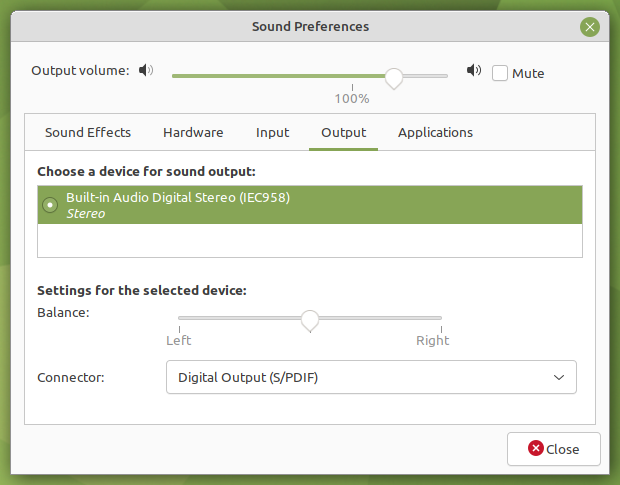
I tried with
Proton 7.0.1
Proton Experimental
Ge-proton7.5
Solution?
Thks
Lele
steam-361420.log
Replying to https://github.com/ValveSoftware/Proton/issues/243#issuecomment-1047362771
Same issue here too, disappointed after several months it's still an issue, especially with the game being amazing on the Steamdeck, but can't play on the server with any of my friends :(
There is now a way to fix the Connecting to dedicated servers issue with a configuration file change on the server and all clients that wish to connect!
The core of the issue is in Wine's implementation of bcrypt.dll and disabling encryption all together allows the server and client to run without problems on Wine/Proton.
How to disable encryption
You need to find the Engine.ini file in the game's files and add the following to disable encryption. This works on all platforms and allows crossplay:
[SystemSettings]
net.AllowEncryption=False
Please note that this requires a restart of all clients that wish to connect to the server and the server itself. In addition, clients with encryption enabled will not be able to connect to servers with encryption disabled.
But what about security?
There doesn't seem to be any great security risks in disabling encryption (so far). However, taking backups of your save files is always a good thing to do. You should use this fix with caution and perhaps consider using a VM or a container to run your server in.
You can get a really long way by just properly configuring your firewall for your dedicated server. For example, by allowing only certain IPs to connect. More advanced users may even configure a VPN to encrypt the traffic to the server themselves. Basic network security principles apply.
+ If you are self-hosting, use the unofficial widely used open source server manager called Astrolauncher to make it easier. You can find it here on Github by Spyci.
+ This is a direct fix for the bug I reported earlier in this issue: https://github.com/ValveSoftware/Proton/issues/243#issuecomment-713871292
Thank you SO much for this @Esinko ! I did google and didn't find the answer, we will try this out :)
Thank you SO much for this @Esinko ! I did google and didn't find the answer, we will try this out :)
Yeah this is a brand new thing, do post a comment if all goes well 👍
Seems to be working! thank you :) The Engine was in a weird place due to Wine/Proton, but found it and worked great!
Astroneer for me freezes every so often and I have to restart the whole game by alt tabbing and closing. On ProtonDB this seems to be an issue for others as well. This is on Proton Experimental, the game won't launch on the latest GE.
I'm getting very bad spikes running 7.0-4. Here is my log:
steam-361420.log
Game fails to launch, shows black screen
Same issue as above. Attached log if it's helpful.
Starts as black screen, then eventually (1+min), loads menu.
Someone on ProtonDB mentioned they thought it's the intro video not playing.
Edit:
steam-361420.log
Additional log, this one gets to the system era logo.
Proton 7.04 was used in the logs.
Proton Experimental (bleeding edge) and GE-41 both exhibit this behaviour.
Proton 6 boots fine but is immediately buggy (persistent cursor on screen).
Have also tried cutting the intro movies using method 2 here: https://www.nexusmods.com/astroneer/mods/49
This doesn't seem to affect the bug, there's still >30s of blank screen. But, it makes the overall load time slightly quicker so that's something.
@jamescodesthings Could you try on 7.0-5 (currently Proton Next), and assuming that still has the black screen issue, try adding PROTON_NO_STEAM_FFMPEG=1 %command% to the launch options? Also, could you please copy your system information from steam (Steam -> Help -> System Information) and put it in a gist, then include a link to the gist in this issue report.
Issue still exists with 7.0-5, both with and without PROTON_NO_STEAM_FFMPEG.
Will add system info and updated log shortly, just need to dump when logged in to github on the deck.
My game also freezes seemingly randomly (Ive seen others report this) with audio continuing to play and I have to stop the game by alt-tabbing to steam and stopping it. usually at least 15 minutes of play in or so I think. I'm on an NVIDIA 1080 ti but I've seen others reporting identical symptoms on AMD 5000 series xt cards.
Appears to be working on Proton Experimental now, I removed the previous launch options I'd tried and now it launches straight to the system era loading video.
Games worked for me on Proton Experimental, too.
We did a quick Steam Play co-op test, which worked with Windows friend and my Linux client without any issues.
Usually, we make use of dedicated servers. I rented an extra one, because the dedicated server setup is tricky (Windows only, running wine for dedicated server, same bcrypt issues). Using a dedicated server from a Linux client does not work out of the box. In my case, the game reported during joining: "game is full". It is not. A windows client can join the game.
(Client & Server running with encryption enables, as stock)
Yes, you can change the configuration on each client (Windows and Linux), but that is not really consumer friendly.
You might not be to change the encryption on a rented server.
As a Windows user, you need to change the configuration again and again if you are switching between servers (running with and without encryption).
Yes. It is complaining on a high level. I'm pretty happy how much is running on Steam's Proton/Wine implementation.
No, this bug will hit a lot titles which are offering a XBox crossplay option. ( See a Reddit Comment )
The second opening video (the one immediately after the System Era logo) incorrectly appears as a color test, like the one in https://github.com/ValveSoftware/Proton/issues/243#issuecomment-817665808. The video files in the game are all MP4 format (found under Astro/Content/Movies), including the one in question, yet the issue ONLY occurs with that one video and the others have no trouble, and the game otherwise has absolutely no problems beyond that and can still be played normally. The issue has occured for me on 8.0-2 and Experimental, and even Proton GE has trouble with that one, but not as badly.
Broken video in ASTRONEER - all other videos are okay
Issue transferred from https://github.com/ValveSoftware/Proton/issues/6901.
@UsernamesAreNotMyThing posted on 2023-07-01T01:05:11:
An opening cutscene in ASTRONEER (app id 361420) incorrectly appears as a color test pattern, but ONLY the one video is affected and all the others will still play normally, even though all of them are MP4 format, including the one with the problem.
Tested with 7.0-6 (the default), 8.0-2 and experimental
@UsernamesAreNotMyThing Perhaps you have Shader Pre-caching disabled? The color test pattern indicates that there is a video that needs to be transcoded. Transcoded videos are stored in shadercache/[appid]/transcoded_video.foz. Since the transcoded videos are stored in the shadercache folder, shader pre-caching must be enabled in order for the videos to get downloaded to your local machine. The other possibility is that this video has not been transcoded yet, in which case we just have to wait until that happens unfortunately.
@alasky17, shader precaching IS enabled on my end, and it's somehow ONLY one specific video that has the problem. I don't know how relevant this is, but in my log there is a GStreamer error:
winegstreamer error: decodebin6: Your GStreamer installation is missing a plug-in.
winegstreamer error: decodebin6: ../src-gst_base/gst/playback/gstdecodebin2.c(4719): gst_decode_bin_expose (): /GstBin:bin6/GstDecodeBin:decodebin6:
no suitable plugins found:
Missing decoder: MPEG-4 AAC (audio/mpeg, mpegversion=(int)4, framed=(boolean)true, stream-format=(string)raw, level=(string)2, base-profile=(string)lc, profile=(string)lc, codec_data=(buffer)1190, rate=(int)48000, channels=(int)2)
Couldn't set avdec_h264-3 to PAUSEDCouldn't set avdec_valve_h264-3 to PAUSED
Having a GPU hang using proton experimental on Wayland. Can't even reach title screen on RX 7800 XT, used to play normally on RX 580.
Astroneer_AMDGPU_hang_28-09-2023.log
The current ProtonDB page says to use "gamemoderun %command%", but when I do that on my Kubuntu 23.04 it just fails to launch entirely.
Game mode is very useful and usually results in higher performance.
It seems like with respect to the bcrypt.dll issue preventing from connecting to dedicated servers, perhaps there is a patch available finally coming down the pipeline: https://bugs.winehq.org/show_bug.cgi?id=49543
Looks like the patch I linked may fix running the server with encryption enabled under Wine, but the client running under Wine still cannot connect to an encrypted server. With the very latest Wine the error message in the logs changes to
123869.203:012c:0130:fixme:bcrypt:BCryptImportKey decryption of key not yet supported
Which comes from this line https://github.com/ValveSoftware/wine/blob/941279cf95abce8c59ad350e6345734c9a75f0f2/dlls/bcrypt/bcrypt_main.c#L2056 which comes from the upstream source at https://gitlab.winehq.org/wine/wine/-/blob/master/dlls/bcrypt/bcrypt_main.c?ref_type=heads#L2043. So looks like adding Diffie-Hellman algorithm support wasn't enough for this to work -- the BCryptImportKey implementation must also be updated to support decrypting the key to import as described in the Windows documentation: https://learn.microsoft.com/en-us/windows/win32/api/bcrypt/nf-bcrypt-bcryptimportkey.
Any updates on bcrypt decryption support ?
I bought the game a second time on Steam for Linux compatibility and the server incompatibility is annoying.
I wasn't able to find a fix myself but please tell me if you find one.
I was working on a Wine patch but didn't get very far. If I get more free time I can try again.
I was working on a Wine patch but didn't get very far. If I get more free time I can try again.
That would be awesome. It looks like they closed that bug report.
https://bugs.winehq.org/show_bug.cgi?id=49543
They probably weren't able to verify Astroneer connectivity,
As of today 11-26-2024 you still cannot join dedicated servers using encryption from a Steam deck. This issue is still present in Proton 9.0-3 > Wine Mono to 9.2.0.
I wish i knew how to help more than bumping this post.
Seems to now work under WineHQ devel v10.6 / GnuTLS 3.8.3 ~ Time to wait for someone to merge it into Proton/ProtonGE 👀
-> https://discord.com/channels/226115726509998090/714969641847619614/1363867246165754056 in the Astroneer Discord
Seems to now work under WineHQ devel v10.6 / GnuTLS 3.8.3 ~ Time to wait for someone to merge it into Proton/ProtonGE 👀 -> https://discord.com/channels/226115726509998090/714969641847619614/1363867246165754056 in the Astroneer Discord
I would guess the added PBKDF2 support is responsible. 5 commits from f9b9bd9 to d9148e4 back to back.
@Esinko @ImKringle Thank you for the intel! The commits you pointed to have been cherry-picked to experimental-bleeding-edge (beta option on the Proton - Experimental tool) and they will be in an experimental release, probably next week if you want to wait for that. Please let me know if the cherry-picks are enough to get the encrypted server connection working :)
@Esinko @ImKringle We finally found a server that was temporarily available to test ... and we found it was not actually the mentioned commits that fixed the problem in upstream wine. We cherry-picked several more commits - sadly the server is no longer running so we have not been able to confirm if this is working now or if we need even more cherry-picks. If you have a chance to test Proton - Experimental, please let me know if encrypted servers work now :)
@alasky17 Let me know the commits to cherry-pick and the branch. I might not have much time to tinker but I can test stuff.
Hello @Esinko, @alasky17 would be referring to Proton Experimental available through the Steam client without needing to do a local build.
@Esinko I would be greatly appreciated if you could test the official build that @kisak-valve pointed to -- it would be great to have some confirmation that we have everything working now.
I figured you might also be curious which commits but I ran out of time to point to them last night -- There was more than one bunch of commits that got cherry-picked - in the experimental wine branch (https://github.com/ValveSoftware/wine/commits/5931e7d33c029a31bc4be3c9aed2b2dc83920028/?before=5931e7d33c029a31bc4be3c9aed2b2dc83920028+35), it is commit https://github.com/ValveSoftware/wine/commit/1e15ce8c466ea9928a3e3826b8089447e2151577 through https://github.com/ValveSoftware/wine/commit/81dd27d258e463eef4664fc0361a2694018a4420
Thanks for the exact commits. I get the excitement! I'll do the test tomorrow.
@alasky17 The test failed. Game provides error "Game is private" when connecting. However, here's some juicy new fixmes that get logged when I try to connect:
0168:fixme:bcrypt:BCryptGenRandom ignoring selected algorithm
0168:fixme:bcrypt:BCryptGenerateSymmetricKey ignoring object buffer
0168:fixme:bcrypt:BCryptGenRandom ignoring selected algorithm
0168:fixme:bcrypt:BCryptGenerateSymmetricKey ignoring object buffer
0168:fixme:bcrypt:BCryptGenRandom ignoring selected algorithm
0168:fixme:bcrypt:BCryptGenerateSymmetricKey ignoring object buffer
0168:fixme:bcrypt:BCryptGenerateSymmetricKey ignoring object buffer
0168:fixme:bcrypt:BCryptGenRandom ignoring selected algorithm
0168:fixme:bcrypt:BCryptGenerateSymmetricKey ignoring object buffer
0168:fixme:bcrypt:BCryptGenerateSymmetricKey ignoring object buffer
0168:fixme:bcrypt:BCryptGenerateSymmetricKey ignoring object buffer
0168:fixme:bcrypt:BCryptGenRandom ignoring selected algorithm
0168:fixme:bcrypt:BCryptGenerateSymmetricKey ignoring object buffer
0168:fixme:bcrypt:BCryptGenerateSymmetricKey ignoring object buffer
0168:fixme:bcrypt:BCryptGenRandom ignoring selected algorithm
0168:fixme:bcrypt:BCryptGenerateSymmetricKey ignoring object buffer
0168:fixme:bcrypt:BCryptGenerateSymmetricKey ignoring object buffer
0168:fixme:bcrypt:BCryptGenRandom ignoring selected algorithm
@Esinko Thank you for the feedback! If you have time to try again, could you get a log with some extra logging channels in case we are able to diagnose remotely? PROTON_LOG=+wininet,+winhttp,+winsock,+steam,+steamclient,+bcrypt,+secur32,+crypt,+cryptnet,+steam,+steamclient %command%
@Esinko Thank you for the feedback! If you have time to try again, could you get a log with some extra logging channels in case we are able to diagnose remotely? PROTON_LOG=+wininet,+winhttp,+winsock,+steam,+steamclient,+bcrypt,+secur32,+crypt,+cryptnet,+steam,+steamclient %command%
The output with these flags is identical to what I got before :/
@Esinko Thank you for the feedback! If you have time to try again, could you get a log with some extra logging channels in case we are able to diagnose remotely? PROTON_LOG=+wininet,+winhttp,+winsock,+steam,+steamclient,+bcrypt,+secur32,+crypt,+cryptnet,+steam,+steamclient %command%
The output with these flags is identical to what I got before :/
Never mind! It works! For some reason I've been able to host a dedicated server and connect to servers with Proton Experimental. I installed everything fresh through Steam and used Debian 12 as the host.
Proton versions
proton experimentalx9 2025-06proton 9.0-3x1 2024-11proton nextx1 2022-12proton 7.04x1 2022-11proton 7.0x1 2022-04proton7.5x1 2022-04proton 7.1-ge-2x1 2022-02proton 6.3-5x1 2021-07proton 6.3-2x2 2021-04proton 6.3x4 2021-04proton 5.13x3 2021-04proton 5.13-6x2 2021-04proton 6.3-1x1 2021-04proton 5.0-9x1 2020-06proton 4.11x1 2019-09
Launch options
PROTON_LOG=+wininet,+winhttp,+winsock,+steam,+steamclient,+bcrypt,+secur32,+crypt,+cryptnet,+steam,+steamclientx3 2025-06PROTON_NO_STEAM_FFMPEGx1 2022-12PROTON_NO_STEAM_FFMPEG=1x1 2022-12PROTON_USE_WINED3D11=1x4 2022-04WINEDLLOVERRIDES="mfplay.dll=d"x3 2021-07PROTON_LOG=1x2 2021-04PROTON_DUMP_DEBUG_COMMANDS=1)x1 2019-10PROTON_DUMP_DEBUG_COMMANDSx1 2019-10PROTON_USE_WINED3Dx2 2019-10PROTON_USE_WINED3D11x2 2019-10PROTON_DUMP_DEBUG_COMMANDS=1x2 2019-10PROTON_USE_WINED3D=1x2 2019-09PROTON_USE_WINED3D11=1.x1 2019-04
Launch lines
gamemoderun %command%x1 2023-10PROTON_NO_STEAM_FFMPEG=1 %command%x1 2022-12PROTON_USE_WINED3D11=1 %command%x1 2022-04%command% -dx12x1 2021-12WINEDLLOVERRIDES="mfplay.dll=d" %command%x3 2021-07PROTON_USE_WINED3D=1 %command%x2 2019-09
Upstream links
- show_bug.cgi?id=49543x2 2024-11
- ValveSoftware/Proton/issues/6901x1 2023-07
- ValveSoftware/Proton/issues/5600x1 2022-02
- ValveSoftware/Proton/issues/4726x1 2021-04
- ValveSoftware/Proton/issues/4100x1 2020-07
- ValveSoftware/Proton/issues/3091x1 2019-09
- ValveSoftware/Proton/issues/1464x1 2019-02
DLLs
bcrypt.dllx2 2024-03mfplay.dllx3 2021-07
ASTRONEER seems to be working well. I couldn't find any glitches or bugs, and the performance is comparable.
System Info: https://gist.github.com/BrandonDyer64/04f08190808e2ebd5839f418c6260ba5