Sekiro: Shadows Die Twice
Are you using steam-native or steam-runtime? Bit weird that it crashes inside SDL2, the game works fine for others.
I'm afraid I can't tell you if I'm using steam-native or steam-runtime. I can tell you however that it doesn't matter if I run it from the terminal using steam steam://rungameid/814380 or if I just click "Play" in the library. The former option doesn't print anything out of the ordinary
I am aware that it works for most other people. I just want to play the dang game too! :sob:
According to version sdl2-2.0.so.0 it's steam-runtime, but why 'PROTON_USE_WINED3D11=1'?
Also better to disable steam overlay.
I read somewhere that it fixed a similar issue for another game. Turning it off changes nothing.
On a related note, I just tried Dark Souls 3 with the exact same error and result (using Valve's recommended Proton version results in the infamous "steam shows game as running for a fraction of a second and then silently stops"). I'll be trying DkS1 shortly (I have no games installed on this machine, so I'm testing as I install them).
I will definitely try disabling the overlay. Thanks for the quick help!
EDIT: Running with steam overlay turned off didn't change anything as far as I can see. I'll check the logs to see if anything's changed in there.
Run a full system upgrade through your package manager and upgrade to Steam beta.
Game runs perfectly for me, running everything on high with AA, no configuration needed.
Xeon 1230v2, RX580, Mesa 19.0.0-1 on Arch, kernel 5.1.0-rc1
Default PS4 controller mapping through Steam had gyro enabled but that has nothing to do with the game or Proton.
Honestly this could be a whitelist candidate.
Just tried both full system upgrade + Steam beta with no working Sekiro in sight :(
The full upgrade did fetch a bunch of related packages bringing me up to Mesa 18.3.3, but it hasn't changed the situation at all (I've tried rebooting)
It seems like Dks1 and 3 produce the same error as Sekiro. Tropico 4 (the only whitelisted 3D game I own) works 100%. Native linux games like Dota 2 work 100% (even with Vulkan), and 2D games work perfectly both through proton and natively.
Driver: X.Org AMD Radeon R9 200 Series (HAWAII, DRM 3.23.0, 4.15.0-46-generic, LLVM 7.0.0) Driver Version: 4.4 (Compatibility Profile) Mesa 18.2.2
Can you try with a newer driver?
https://launchpad.net/~paulo-miguel-dias/+archive/ubuntu/pkppa
Add this ppa to your system.
I have updated both Mesa and amdgpu since the OP and I'm now on OpenGL Mesa 18.3.3 and amdgpu 19.0.1. No dice.
Edit: An important word
Can you upload new logs without PROTON_USE_WINED3D11=1?
Unfortunately I'm away from my PC until later tonight (EU time), but I'll make sure to give you new logs asap!
Starts fine, xbox 360 controller is used ingame as mouse, appears to work fine in big picture, anyone else run into this?
Edit: had to disable xbox configuration support in steam controller settings!
Starts fine, xbox 360 controller is used ingame as mouse, appears to work fine in big picture, anyone else run into this?
Edit: had to disable xbox configuration support in steam controller settings!
My friend on Windows said their PS4 controller was mapped exactly the same as mine by default.
Gyro on, and right joystick was set as mouse instead of joystick. These are steam controller mapping issues and don't really have anything to do with the game or Proton itself.
@lieff Both gists linked in the OP have been updated with the new logs (error persists entirely unchanged).
I have compared your log with mine and first noticeable difference is:
31107.338:001d:0023:err:ntoskrnl:IoCreateDriver failed to insert driver L"\\Driver\\WineHID" in tree

My log do not have that. May be it harmless, but can indicate some incompatibility of your system with wine code. And probably sdl2 can crash in input/hid/pnp code.
Here my log with matched file paths with yours:
steam-814380.log
Can you try launching game with that?
LC_CTYPE=C %command%
Paste it to launch options of Sekiro. Steam library - Right click to Sekiro - Properties
@lieff Interesting. I'm downloading a Fedora image right now to see if switching to another distro will solve the issue. I have this sneaking suspicion that EOS's Gala wm is causing issues with SDL2, and EOS doesn't like when you mess with its DE.
@Leopard1907 Tried running it. No difference. Logs look (more or less) the same as well.
Got my Steam controller working in big picture but not ingame (except the mouse). Buttons won't work. I have the default mapping by FromSoftware. I tried settings Forced ON in game controller options. I tried checking unchecking the Xbox/PS/etc configurations on/off. Any idea ?
Got this /lib/udev/rules.d/99-steam-controller-perms.rules
# This rule is needed for basic functionality of the controller in Steam and keyboard/mouse emulation
SUBSYSTEM=="usb", ATTRS{idVendor}=="28de", MODE="0666"

# This rule is necessary for gamepad emulation; make sure you replace 'pgriffais' with a group that the user that runs Steam belongs to
KERNEL=="uinput", MODE="0660", GROUP="${USER}", OPTIONS+="static_node=uinput"

# Valve HID devices over USB hidraw
KERNEL=="hidraw*", ATTRS{idVendor}=="28de", MODE="0666"

# Valve HID devices over bluetooth hidraw
KERNEL=="hidraw*", KERNELS=="*28DE:*", MODE="0666"

# DualShock 4 over USB hidraw
KERNEL=="hidraw*", ATTRS{idVendor}=="054c", ATTRS{idProduct}=="05c4", MODE="0666"

# DualShock 4 wireless adapter over USB hidraw
KERNEL=="hidraw*", ATTRS{idVendor}=="054c", ATTRS{idProduct}=="0ba0", MODE="0666"

# DualShock 4 Slim over USB hidraw
KERNEL=="hidraw*", ATTRS{idVendor}=="054c", ATTRS{idProduct}=="09cc", MODE="0666"

# DualShock 4 over bluetooth hidraw
KERNEL=="hidraw*", KERNELS=="*054C:05C4*", MODE="0666"

# DualShock 4 Slim over bluetooth hidraw
KERNEL=="hidraw*", KERNELS=="*054C:09CC*", MODE="0666"
@Bumbadawg do you have similar
31107.338:001d:0023:err:ntoskrnl:IoCreateDriver failed to insert driver L"\\Driver\\WineHID" in tree
error in log? Can be related. Xbox one controller works fine ingame on my end.
I just thought I'd chime in one final time and say that switching to Fedora 29 fixed the issue. The game runs perfectly fine now with no extra tinkering. I can't say what caused it to not work, but my suspicion is that Gala wm has something to do with it.
I'll leave the issue open as it hasn't been resolved, I just "sidestepped" it because I want to play the game more than I want to solve the issue at the moment.
Hello @Bumbadawg, did you adjust uinput's group in the udev rule like it says needs to be done?
Hello @Bumbadawg, did you adjust uinput's group in the udev rule like it says needs to be done?
Hello @kisak-valve, yes i set it to my username. I also usermod -a -G input myusername and installed the package steam-devices right after posting this.
@Bumbadawg do you have similar
31107.338:001d:0023:err:ntoskrnl:IoCreateDriver failed to insert driver L"\\Driver\\WineHID" in treeerror in log? Can be related. Xbox one controller works fine ingame on my end.
Nope @lieff there was not.
@kisak-valve i link my log if it helps.
NB: i noted my Steam controller keeps disconnecting/reconnecting when i have not Steam running. Is it related / normal ?
[  +0,001817] input: Valve Software Wired Controller as /devices/pci0000:00/0000:00:14.0/usb3/3-9/3-9:1.0/0003:28DE:1102.001B/input/input35
[  +0,057530] hid-generic 0003:28DE:1102.001B: input,hidraw5: USB HID v1.11 Keyboard [Valve Software Wired Controller] on usb-0000:00:14.0-9/input0
[  +0,000985] input: Valve Software Wired Controller as /devices/pci0000:00/0000:00:14.0/usb3/3-9/3-9:1.1/0003:28DE:1102.001C/input/input36
[  +0,000359] hid-generic 0003:28DE:1102.001C: input,hidraw6: USB HID v1.11 Mouse [Valve Software Wired Controller] on usb-0000:00:14.0-9/input1
[  +0,000934] hid-generic 0003:28DE:1102.001D: hiddev1,hidraw7: USB HID v1.11 Device [Valve Software Wired Controller] on usb-0000:00:14.0-9/input2
[  +0,716109] input: Microsoft X-Box 360 pad as /devices/virtual/input/input37
[  +5,798842] usb 3-9: USB disconnect, device number 11
[  +0,404852] usb 3-9: new full-speed USB device number 12 using xhci_hcd
[  +0,149156] usb 3-9: New USB device found, idVendor=28de, idProduct=1102
[  +0,000004] usb 3-9: New USB device strings: Mfr=1, Product=2, SerialNumber=0
[  +0,000003] usb 3-9: Product: Wired Controller
[  +0,000003] usb 3-9: Manufacturer: Valve Software
[  +0,001365] input: Valve Software Wired Controller as /devices/pci0000:00/0000:00:14.0/usb3/3-9/3-9:1.0/0003:28DE:1102.001E/input/input38
[  +0,057567] hid-generic 0003:28DE:1102.001E: input,hidraw5: USB HID v1.11 Keyboard [Valve Software Wired Controller] on usb-0000:00:14.0-9/input0
[  +0,000450] input: Valve Software Wired Controller as /devices/pci0000:00/0000:00:14.0/usb3/3-9/3-9:1.1/0003:28DE:1102.001F/input/input39
[  +0,000074] hid-generic 0003:28DE:1102.001F: input,hidraw6: USB HID v1.11 Mouse [Valve Software Wired Controller] on usb-0000:00:14.0-9/input1
[  +0,000381] hid-generic 0003:28DE:1102.0020: hiddev1,hidraw8: USB HID v1.11 Device [Valve Software Wired Controller] on usb-0000:00:14.0-9/input2
[  +0,880760] input: Microsoft X-Box 360 pad as /devices/virtual/input/input40
@Bumbadawg, your log says you're using Proton 3.16 beta, but is missing a header which was added with Proton 3.16-7, which means you're using an unexpected version of Proton. Please opt into Steam's beta and/or go to Steam -> Library dropdown -> Tools and install Proton 3.16 beta from the list.
@Bumbadawg, your log says you're using Proton 3.16 beta, but is missing a header which was added with Proton 3.16-7, which means you're using an unexpected version of Proton. Please opt into Steam's beta and/or go to Steam -> Library dropdown -> Tools and install Proton 3.16 beta from the list.
Thanks a ton @kisak-valve , updating Steam to beta did the trick :)
On the side, my Steam controller keeps disconnecting/reconnecting when i have not Steam running. Is it related / normal ?
Just a tip for AMD users: I couldn't get Sekiro working at all (it booted straight into a white screen that it never left) until I set the ICD loader to use the radeon Vulkan driver, instead of the default (for me) AMDVLK Vulkan driver.
If you don't know what that means:
AMD has a choice of two open-source Vulkan drivers: radeon is the name of the one the community started when AMD was taking a while, and AMDVLK is the one AMD eventually got to making. You can have both installed at once and games will pick one--for me, they seem to always pick AMDVLK unless I specify otherwise, which I've so far only had to do for Killing Floor 2 and Sekiro.
And here's how I do that: radeon's ICD file, for me in Arch Linux, lives at /usr/share/vulkan/icd.d/radeon_icd.x<architecture>.json, so I set the launch options in steam to the following:
env VK_ICD_FILENAMES=/usr/share/vulkan/icd.d/radeon_icd.x86_64.json:/usr/share/vulkan/icd.d/radeon_icd.i686.json %command%
(Having both architecture files at once separated by a colon : tells it to try the first one, then try the second one if that doesn't work, which it won't if the game executable in question happens to be x32 instead of x64.)
@Jimi-James what's your GPU and which AMDVLK version were you using? While it doesn't render correctly, the game does run for me with latest AMDVLK on Polaris.
But yeah, RADV is definitely the driver of choice here.
@doitsujin I'm on an R9 Fury, so Fiji. I just updated, and I'm currently using Arch's mesa-git repository, and I just updated today, so I should be on a pretty new version of AMDVLK? I'm on r40.48d46fa.
Amdvlk is not part of mesa and your amdvlk is from somewhere around 2018-07.
Well, thanks for that patronizing response. I know the AMDVLK driver isn't part of the whole mesa stack. If you had read my first post, you'd have to think that I think mesa is developed by AMD or something to think that. However, it's included in an unofficial repository that Arch users can add, named mesa-git after its main reason for existing.
It's good to know my current version is that old, thanks, but then that means Arch users don't seem to have an easy way to get much more up to date? The version on the AUR currently is not much newer, and also flagged as out-of-date. Hm, this is a sticky situation I'll have to figure out at some point.
I did not intend to be patronizing, you wrote I'm currently using Arch's mesa-git repository, and I just updated today, so I should be on a pretty new version of AMDVLK? I'm on r40.48d46fa. which I read as associating the mesa-git (instead of amdvlk-git) AUR package with amdvlk and it's non-trivial find when that version came available to compare to the releases or release notes.
AMDVLK and mesa/radv are largely independent driver vendors.
Alright, text is hard, let's start over. I'm sorry I read that as accusatory and assuming of ignorance. At the same time, I was and still am thankful that you let me know it in fact wasn't the newest version.
Anyone have any performance tips for this game? Maybe some DXVK settings?
I'm running the game on fully max settings now because I realized that the areas where I do get lower fps, it makes no difference if I use all low settings.
I get 60fps most of the time but certain areas cause fps drops to 40-55, and my CPU/GPU isn't under full load. This is consistent when looking at these areas no matter how long, it's not shader compilation.
Ashina castle entrance is a good example, does anyone actually get 60fps on this area through Wine?
I'm thinking a better CPU wouldn't even matter in some of these areas. It reminds me of Blight Town in original Dark Souls 1, where the fps drop was part of the lore.
Disabling wine-esync is a significant performance decrease, wouldn't recommend that.
@z0z0z what's your hardware?
@z0z0z what's your hardware?
Xeon 1230v2, RX580, Mesa 19.0.0-1 on Arch, kernel 5.1.0-rc1
I'm having the same issue that the Op was having.
I'm using :
arch
Nouveau
proton 3.16-8
@z0z0z Hm, weird. For me, there are some spots that are fully GPU bound at the highest settings, but on Low it runs with a solid 60 FPS. RX 480, Ryzen 2700X on my end.
Ashina Castle is quite CPU-intensive as well and may struggle on old CPUs, but your Xeon should be fast enough. Make sure to use the performance governor when playing the game though.
@doitsujin
Ashina Castle is quite CPU-intensive as well and may struggle on old CPUs, but your Xeon should be fast enough. Make sure to use the
performancegovernor when playing the game though.
I do have it on performance governor, even tried both intel_pstate and acpi_cpufreq, and disabling all but cstate 1 and 0. Even tried disabling hyper threading in bios, and turbo boost from user land.
Anyway a Ryzen 2700X is a far more powerful CPU than mine, and it's also using faster DDR4 RAM which maybe could make a difference? I probably do just need a CPU upgrade.
Thanks for the info though to know how it's running on better CPUs.
I am getting consistently terrible framerates, usually 15-30fps, even though my hardware should support 60fps judging by other reports. I thought it was just compiling shaders but it's been like this for a few hours now. Framerates rarely go up to 60fps for a short period of time until dipping down again. Graphics quality settings don't seem to make much difference.
i7-6700K, Nvidia GTX 1660 ti, 16GB DDR4 RAM, Manjaro, Linux 5.0.3, Proton 3.16-8 Beta
Also, doesn't launch on Proton 4.2.
Works fine with 4.2 on my end.
@jclc are you playing with mouse+keyboard? There seems to be some weird performance issue that causes performance to tank heavily when moving the mouse.
I'm using a Dualshock 4 with Steam Input.
On Proton 4.2 game just closes instantly. Doesn't print anything on stdout.
Please check if 4.2 is marked as installed in the Tools menu. There's a Steam client bug that causes it to not install properly when selecting it in the Steam Play options.
Regarding performance, do you have any weird driver settings enabled (especially ForceCompositionPipeline etc.)? You should be getting a solid 60 FPS on that hardware.
Wow, game doesn't even start on Proton 4.2 for me, and Steam beta update also broke my PS4 controller, it's not being detected by games, but there is a nice notification that the controller is connected :^)
Edit: Seems Steam was allowing me to try to start games with Proton 4.2, without actually downloading and installing it first. I automatically just got a "Steam finished downloading Proton" notification.
Controller still broken but that's a Steam beta update problem I think.
Edit2: Controller only works with Steam overlay enabled.
Yeah, it wasn't installed - launches fine after I installed it. I've had force full composition pipeline on, but disabling it doesn't seem to make any difference either. Tried turning off the window manager compositor as well. I have a 2 monitor setup where the primary monitor is 144hz and the second monitor is 60hz, don't know if that's related.
Hm, might be worth trying in single-monitor mode if it's not too much of a hassle for you. Also keep in mind that the game has a 60 FPS lock, I don't know how well that works on 144 Hz displays, especially on Linux.
I have a 144Hz monitor and 60fps lock games run fine.
I heard people on Windows say they needed to disable/disconnect their second display though
Tried disabling compositor, full composition pipeline and my primary monitor with no luck.
Can you check your GPU load (in nvidia-settings)?
GPU utilization is around 35% at all times, memory used stays at 39%, CPU usage is at 50% with all 8 virtual cores having roughly the same load.
I'm having pretty low performances on my rig (Manjaro Linux, GTX 1060 GB, i5 6500, 16 GB ram), no matter what proton + DXVK configuration, right now I'm using Proton 4.2 (+ thus the latest DXVK).
I'm having framerate issues no matter what graphics settings I put (high/max, low or medium, or even with very low resolution).
System config: https://gist.github.com/yrostaqi/40ab340a53ee3bd72e6b967fde85afa2
https://gist.github.com/yrostaqi/c80069d098a6a529a91b5dead5b95115
steam-814380.log

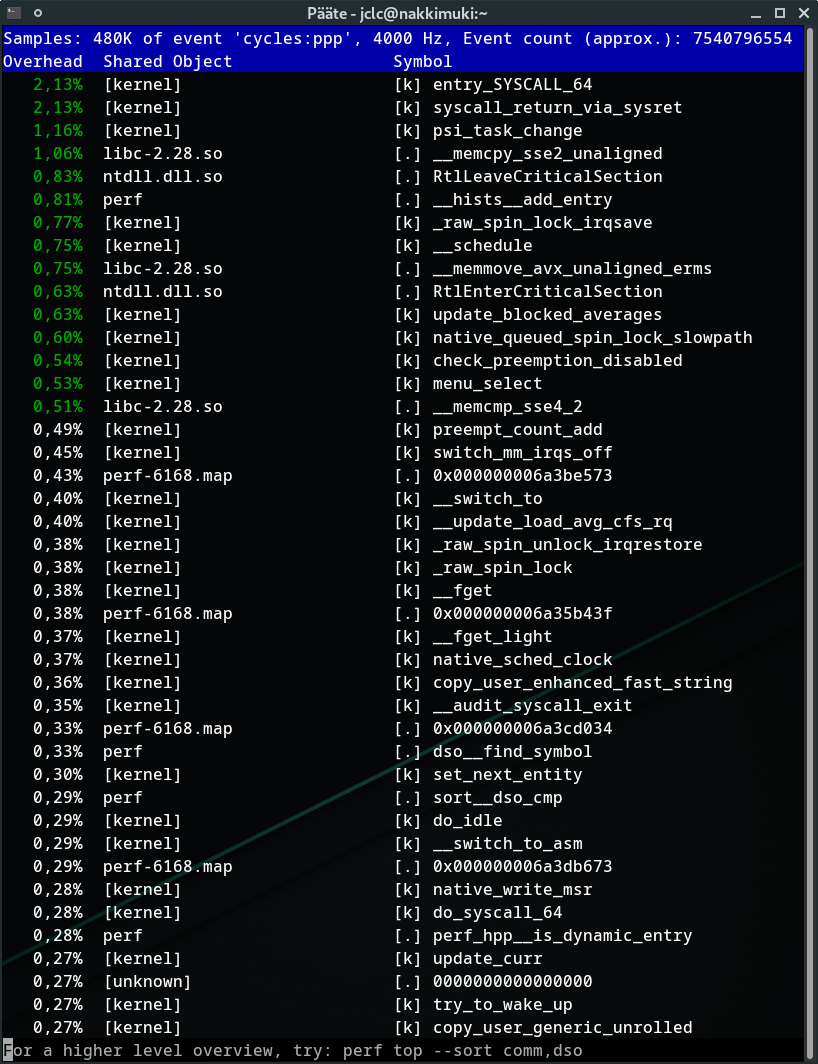
@jclc @yrostaqi can any of you run sudo perf top -z while running the game (in windowed mode if necessary, doesn't really matter) and post the output?
I have tested this game on an old Phenom II X6 + GTX 670 system as well and even that one gets much better FPS, something is definitely fishy here.
@yrostaqi A bunch of people on Windows said they were locked to specifically 22fps. You are at 22fps, so I'm assuming it's the same problem, and probably has something to do with Nvidia,
Google "Sekiro 22fps" and you'll get a bunch of results from people saying they're locked at specifically 22fps.
Some of them said it had to do with other monitors or gsync.
Maybe fully disconnect all monitors but one, and then run nvidia-xconfig as root and restart Xorg (or just reboot).
Here's what sudo perf top -z looks like.
I think I had similar issues in Yakuza 0. Performance being at 50-60 fps at the start but quickly going down to 15-25 when moving to an area with more detail/NPCs and staying at that level. Not sure if related.
I'm not sure what performance I should get, but it also doesn't seem to change much based on resolution. My hardware is AMD R9 270x, i5 4590 cpu. Generally about 40-50fps, some areas at 60, others around 30. Extreme lagging between specific areas (for example comign out of the dilapidated temple it drops to 1-2fps for about 3 seconds. This maybe would improve putting the game in SSD but I havent tested that yet.
@indeedwatson
Is this with DXVK or wined3d? And also which Mesa version?
Now that @jclc mentions it, I also had issues in Yakuza 0, I didn't test it on proton recently but I wasn't getting very good performances.
@doitsujin A weird thing happened, when I first launched steam to do the test you asked me to do, I was playing with my keyboard and mouse because I didn't want to bother with connecting a controller to test something (for information I'm usually using an Xbox One S controller, and it's connected in bluetooth thanks to xpadneo).
I put the game on windowed, I launched the command sudo perf top -z you asked and I started playing, and the game was running perfectly, no framerate issues at all, very smooth. But then once I connected my controller, I got the Steam notification that the controller was recognized/configured and instantly the game started to become very choppy as I've described in the posts above.
Even disconnecting the controller wouldn't fix the choppiness, also I forgot to mention it but when I'm having this issue, moving the mouse around can drop FPS very dramatically, if I moved my mouse in circle continuously, the game would freeze to sub 1 FPS and recover a few seconds later.
Thankfully I have the proton logs of that "good" run, since I haven't been able to reproduce this scenario yet, I think that they can be useful. Here they are: https://gist.github.com/yrostaqi/93bcbd1668c30c4ebd2c20a7e66d661c
Here are the outputs of the sudo perf top -z commands, one when the game was running well: https://gist.github.com/yrostaqi/b63f6988ca095642a5a778cca014fe43
And one where it wasn't: https://gist.github.com/yrostaqi/4a707d651b7568cf5f4674701a9b09ab
Hopefully it helps you finding what's going wrong.
@yrostaqi A bunch of people on Windows said they were locked to specifically 22fps. You are at 22fps, so I'm assuming it's the same problem, and probably has something to do with Nvidia,
Google "Sekiro 22fps" and you'll get a bunch of results from people saying they're locked at specifically 22fps.
Some of them said it had to do with other monitors or gsync.
Maybe fully disconnect all monitors but one, and then run
nvidia-xconfigas root and restart Xorg (or just reboot).
Unfortunately it's not locked at 22 fps, it can go much lower or grow to the low 30s, but thanks anyways, I'll keep it in mind.
@indeedwatson
Is this with DXVK or wined3d? And also which Mesa version?
dxvk, mesa 19.0.0, arch linux
Unplugging my controller, disabling Steam Input and even the bluetooth systemd service, I got a few seconds of 60fps until I moved around with WASD and it dropped again. Moving the mouse also causes very long stutters. Incidentally I'm at the same area in the game as @yrostaqi
@doitsujin @yrostaqi Okay, so I think we're having the same issue. I managed to get the game running smoothly by:
-Unplugging the controller
-Unplugging the bluetooth adapter (even though I didn't have anything connected)
-Restarting the computer
This also fixed the mouse issue; moving the mouse didn't lag the game at all.
When I plugged my controller back in, the same issue emerged and wouldn't go away even if I unplugged it. The mouse issue came back as well.
Also, the Steam Input setting doesn't seem to make any difference at all. My DS4 controller is being detected as an Xbox controller even if Steam Input is turned off (I heard this game doesn't support DS4 on PC?)
Once the issue emerges again, it seems to keep happening even after unplugging the controller and shutting down the game and Steam.
Okay nice it seems like we're narrowing our issue, I was saddened to not enjoy Proton as much as others.
@jclc, out of curiosity, do you also use i3wm?
@yrostaqi No, Xfce. Installed KDE just to make sure it wasn't an issue with Xfwm and had the same issue with that.
Yeah we went on to the same path, I tried it with Deepin and it did not change anything.
So... How can we play the game with a controller if connecting one slows down the game that bad?
I retried and the game runs perfectly when I'm on kb/m, but I want to be able to play with my Xbox controller.
So... How can we play the game with a controller if connecting one slows down the game that bad?
I retried and the game runs perfectly when I'm on kb/m, but I want to be able to play with my Xbox controller.
For me it works perfectly with DS4 controller. At first it wasn't recognized, but then I unplugged another controller I had and it started working. After reading the comments here I unplugged it to see if I had any performance improvement but none. Not using Steam's controller thing, using lutris.
So... How can we play the game with a controller if connecting one slows down the game that bad?
I retried and the game runs perfectly when I'm on kb/m, but I want to be able to play with my Xbox controller.For me it works perfectly with DS4 controller. At first it wasn't recognized, but then I unplugged another controller I had and it started working. After reading the comments here I unplugged it to see if I had any performance improvement but none. Not using Steam's controller thing, using lutris.
Thanks for your advice, I've disabled all steam-related controller settings, disabled Steam's overlay and now I'm running it fine through lutris. And it's running perfectly now.
@yrostaqi How are you running it through Lutris without Steam? I've tried disabling Steam overlay and Steam input and it still isn't fixed.
This is still a pretty bad issue that needs fixing. It could be affecting other games played with Proton.
Now, I have noticed that when I'm connecting a controller via bluetooth, my mouse pointer in sekiro is duplicating, I have the classic white pointer from Wine/Windows (as expected) and my mouse pointer from manjaro, I'm noticing it when I move the mouse really fast that the white pointer is followed by my Manjaro pointer.
Note: when my game is running buttery smooth, that manjaro pointer is not present, only the white Wine pointer is there.
And that right there might be what's causing me performance issues when I'm playing with a wireless controller, that duplication of mouse pointers.
Is that a common bug in Wine programs? Any suggestions on what I could do going from there? I feel like I'm very near my goal of finding what's causing that.
Also, when it's only happening when I'm connecting an Xbox One controller to bluetooth, if I connect a phone for example, the game's performance is not affected and I don't have the duplication of pointers issue.
@yrostaqi How are you running it through Lutris without Steam? I've tried disabling Steam overlay and Steam input and it still isn't fixed.
Oh sorry I forgot to mention that I'm playing with a wired Xbox One Controller, it's the bluetooth connection with the controller that is messing it all up.
And you don't really need Lutris actually (Lutris was just launching the game through Steam anyway), I've just tested and running it on Steam with a wired controller is fine too.
I'm having trouble starting Shekiro with:
- GPU: AMD R9 290x
- Driver/LLVM version: Mesa 19.0.0
AMD HAWAII (DRM 2.50.0, LLVM 7.0.1) - Kernel version: 5.0.4-arch1-1-ARCH
- Link to full system information: Gist
- Proton version: 4.2-1
Tested 3.7.8, 3.7-8-beta, 3.16-4, 3.16-8-beta
Doom runs flawlessly out of the box with Valve recommended Proton 3.7-8.
But I can't seem to get Sekiro working.
EDIT: I got it working finally by:
- blacklisting radeon in modeprobe ( making sure only amdgpu is available in lsmod )
- installing amdvlk-git
Not sure which one made it work but I think the error was with loading radeon_vulkan library . . .
EDIT: Turns out it's a requirement for R 200/300 to blacklist radeon module:
echo "blacklist radeon" | sudo tee --append /etc/modprobe.d/blacklist.conf
echo "options amdgpu si_support=1 cik_support=1" | sudo tee --append /etc/modprobe.d/amdgpu.conf
sudo update-initramfs -u
As mentioned here: github.com/ValveSoftware/Proton/wiki/Requirements
I'm starting to think that Manjaro is doing something stupid with connected gamepads. Game runs fine immediately after startup as long as nothing is connected. The moment you plug a USB controller in the framerate plummets. Same thing happens even after restarting Steam. Starting to regret my choice of distro.
There seems to have a render issue with water related to transparency maybe.
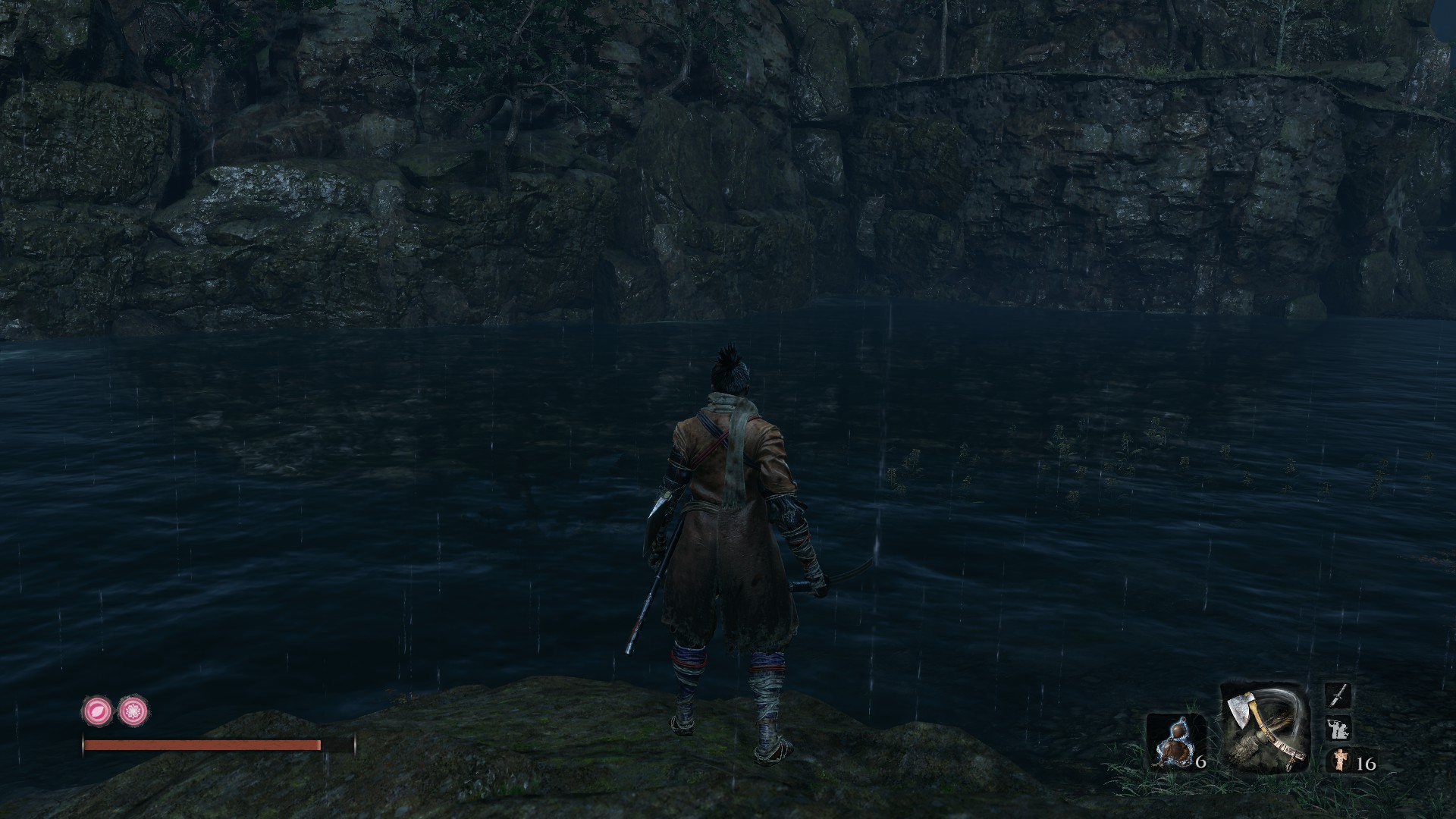
Driver : Nvidia 418.56
OS : Ubuntu 18.10
Graphic card : GTX 1070ti
CPU : Intel core i5 2500k@4ghz
Proton : 4.2-1
@darkpumpkins what exactly is the issue in your screenshot and how is it supposed to look on Windows?
I beat the game on 3 different endings now.
Only bug I've noticed that might be Linux specific is one time I went into this area and half the room wasn't loaded and I just fell through the floor for 2 minutes until I died.
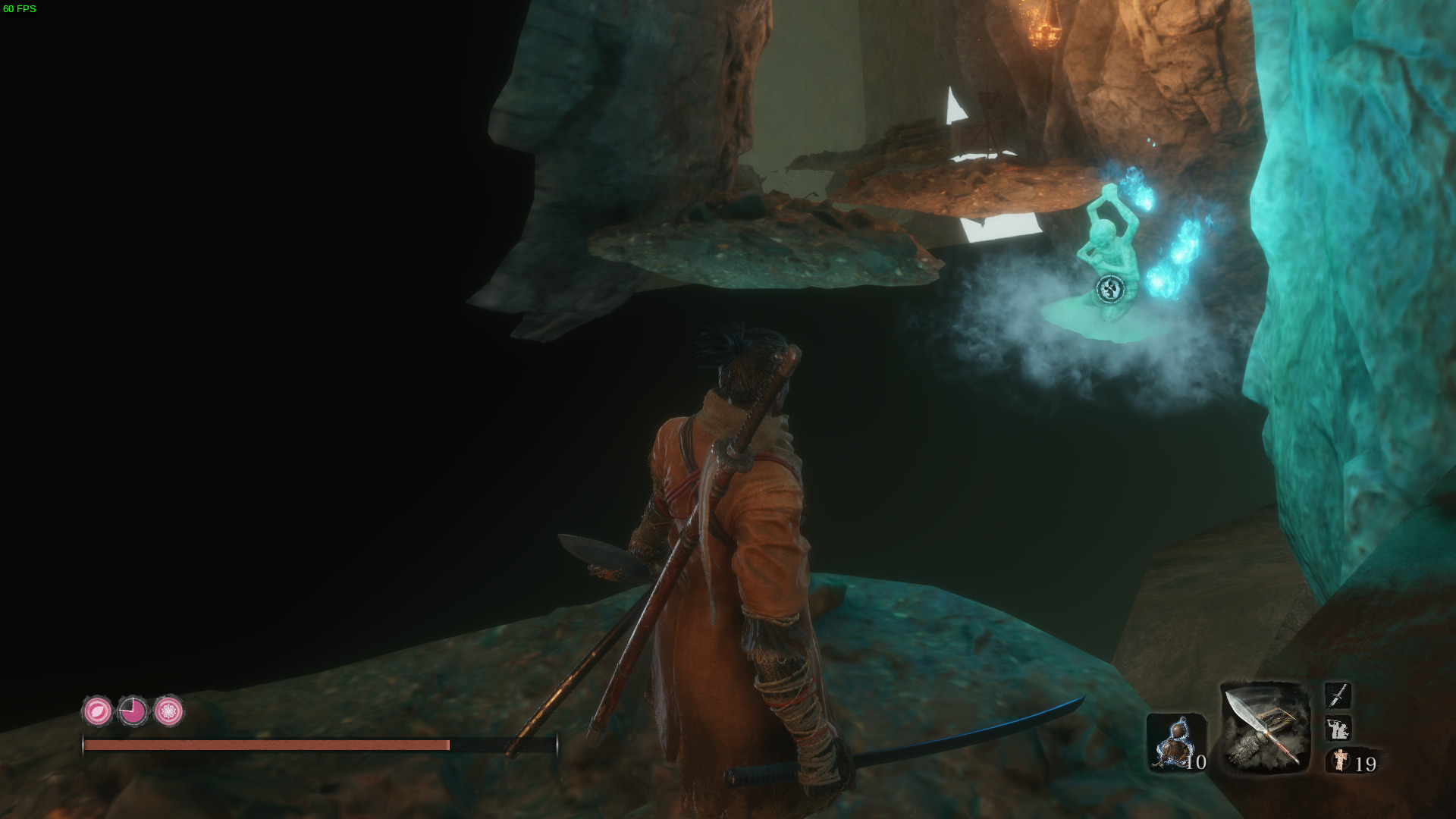
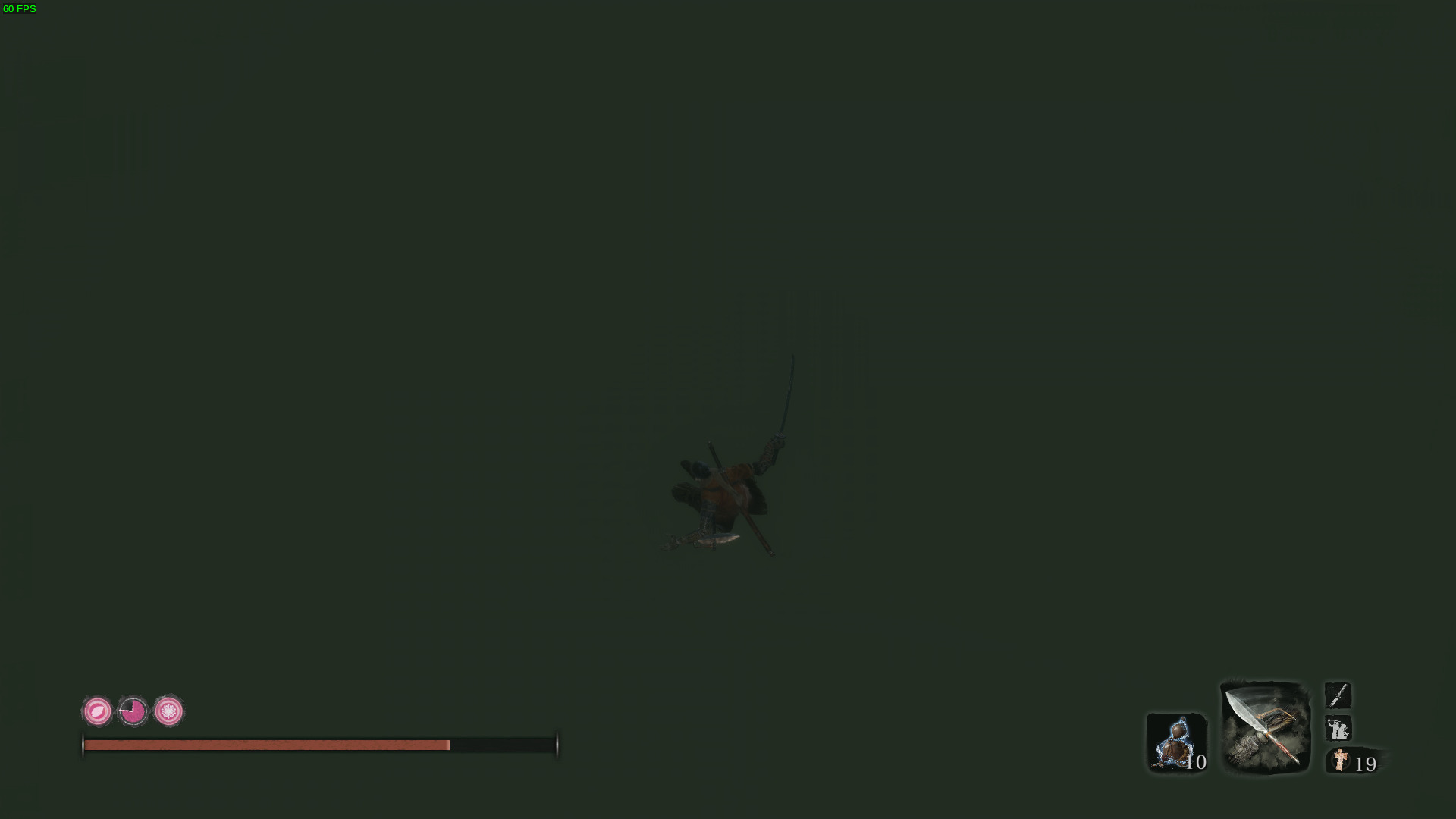
I just confirmed on Yakuza 0 that the game runs at flawless 60fps when I haven't plugged any controller in after booting.
What could possibly be putting my system in this state? Is this affecting Manjaro users only? Is this a bug in Proton/Wine? I don't know other games that have this issue; I recently played Danganronpa Ultra Despair Girls with a controller without any issues
I tested the game with a Logitech F310 that I had lying around and it didn't cause issues in either Xinput or Directinput modes, but the moment I plugged in DS4 the issues cropped up...
I ended up buying an xbone controller, but I can still help out if someone wants to investigate this issue.
@darkpumpkins what exactly is the issue in your screenshot and how is it supposed to look on Windows?
I just tried on my Windows 7 and no the render is the same ... I guess that I do have a problem with From Software water implementation anyway sorry to warm you for nothing. I will try to make a custom proton using the last dxvk release to see if I do have less frame drop ;).
Thanks for your work !
I beat the game on 3 different endings now.
Only bug I've noticed that might be Linux specific is one time I went into this area and half the room wasn't loaded and I just fell through the floor for 2 minutes until I died.
I had such rend issue (not the same place ) using proton 4.2-1 and Nvidia 415, what proton and nvidia version are you using ?
@darkpumpkins ok, thanks for testing.
For performance improvements, you can try this build, it has an optimization more or less specifically for this game: dxvk-master.tar.gz
@darkpumpkins ok, thanks for testing.
For performance improvements, you can try this build, it has an optimization more or less specifically for this game: dxvk-master.tar.gz
Thanks, I will test it.
It took me a while to locate dxvk dll into proton, well I do still have some frame drop into Sekiro sometimes it even goes to 20 fps. I don't know why the framerate is so variable :/
If you're using a controller, can you try disconnecting it? Likewise, if you're using mouse and keyboard, can you try using a controller? There seems to be some performance issue with certain input devices in this game.
If you're using a controller, can you try disconnecting it? Likewise, if you're using mouse and keyboard, can you try using a controller? There seems to be some performance issue with certain input devices in this game.
I was using an xbox one pad but the result is the same on keyboard + mouse.
Does this happen permanently for you, or randomly, or in very specific spots? There are some spots where the frame rate will drop because the game streams in hundreds of textures within a few frames, which causes stutter.
Not all the time, it seems to be related to specific spots. I tried on proton 3.7-8, 3.16-4 and the 4.2-1 the result is the same. Maybe it's cause of my old core i5 2500k, is there a way to display CPU usage in game ?
Edit : with kde and gnome monitor I was able to see that my CPU is almost all the time around 75% ... only once it reached 100% and only on one core ... It seems that I'm not CPU limited ^^.
Sekiro seems to be the first game to ever have the exact same behavior as this bug: https://github.com/ValveSoftware/steam-for-linux/issues/4891
If I launch it with a Dualshock 4 plugged in (or over Bluetooth), or plug it in / connect it after launching the game, Steam crashes with no error, and Sekiro then freezes until I end the process. This happens no matter what other drivers I've taken that Dualshock over with (such as sc-controller).
It is so similar in behavior to that bug I linked, I have to suspect Sekiro is forcing Steam to enable PlayStation controller support whenever it detects one plugged in. If it's doing that, I desperately need it to not. No other game does, so it shouldn't, either. Users can check that box themselves if they need it. I've been forced to play with a 360 controller until this is fixed.
It's worth noting, this wasn't happening for the first couple days that I played Sekiro. It first showed up around March 24 or 25. Steam didn't tell me about any Sekiro or client updates between when the game launched and when this started happening, and I didn't upgrade anything on my system, either. So I have no idea what made it suddenly start happening.
Here's Steam's output being launched with a DS4 connected with sc-controller running:
steamlog.txt
And after launching Sekiro:
sekirolog.txt
@Jimi-James Steam issue you linked is related to pulseaudio config. I used to have it and it was resolved via changes to pulse config, check comments in that thread that mention pulse modules that can affect it. That's being said I finished sekiro via proton using DS4 controller, no issues at all.
@ap4y Well, no. The exact bug, in which Steam crashes with a DS4 if PulseAudio is running modules that spawn any extra, nonstandard sinks, is still unfixed over 2 years later. Check the latest comments for confirmations of that. If pulse config changes "fixed" any of what was going on, then what probably actually happened was pulse once upon a time would add extra sinks that weren't necessary by default, and doesn't anymore.
Meanwhile, the issue continues to affect people who use non-default sink-spawning modules, from integration with the JACK server (module-jack-sink/source), to echo canceling (module-echo-cancel), to equalizers (module-ladspa-sink), to the "simultaneous output" sink (module-combine-sink). Personally, I have a setup that requires all 4.
The output that I attached seems to mention what might be enabling PlayStation support and setting a controller profile. That would be what's causing the crash. If that's actually what's happening, then I don't understand why this should be the only game in my entire library that forces such an option on me. If I want that option on, there's a checkbox for it.
@Jimi-James I tried out of curiosity these scenarios:
- With PS4 profile support (I usually use this one)
- Without PS4 profile support
- Forced steam to crash due to pulseaudio config (enabled
echo-cancel) and disabled PS4 profile support - Disabled steam input for the game
DS4 worked in all scenarios. Could you try disabling steam input for sekiro, ps4 profile is a steam input feature? If your game will still be crashing I doubt that it's related to pulseaudio related bug you linked.
@ap4y Interesting! I have 2 responses:
-
Would you like to take this conversation over to https://github.com/ValveSoftware/steam-for-linux/issues/4891 and help us fix it? Just to make sure, I recommend testing it with the most recently confirmed module to cause the issue--
module-jack-sink, rather thanecho-cancel. -
As for Sekiro--what is "steam input" and how do I disable it? All I know is I have every single box in BPM's controller settings unchecked.
Good overview of steam input is here. You can disable it by right clicking on the game -> properties -> steam input per-game setting -> force off. I will try jack-sink a bit later today.
That fixed it! When was that setting added? I don't think I saw it there the last time I went into a Steam game's properties (which was probably before this issue with Sekiro happened). I bet this new setting can solve other less major issues me and other people I know have run into with controllers on Steam, too (especially with Dualshock).
@Jimi-James that settings disables steam input and forces game to rely on it's own input system. there are a lot of games without their own support for controllers or with broken support, steam input is supposed to solve that. you normally want to use steam input if possible, I would recommend to investigate a bit more why steam input doesn't work with your DS4 controller.
Oh, no, it does usually work just fine. I'm talking about much more minor per-game issues, none of which are still happening off the top of my head. Stuff like buttons firing twice or being bound to actions they really shouldn't be, regardless of binding settings in Steam or anywhere else. If those ever come back, this Steam input setting will be a valuable troubleshooting tool, or a last resort fix in the case that I don't know how to further troubleshoot (as is currently the case with Sekiro).
Is there anyway to prevent that stutter that happens with the (I presume) texture streaming? Rather frustrating walking into a boss (or even the temple) only to have the frame rate drop to 3 FPS for a little. Worse yet, it doesn't immediately recover to 60, it moves up over about 5 - 10 seconds to 60.
@KorinFlakes I think it's on the game rather than proton, I know it happens all the time on top of the ashina castle for people on windows.
It is a game issue, although it's more pronounced with DXVK than native D3D11. Unfortunately I currently don't know what exactly is causing the stutter, and it would likely take a huge amount of work to improve the situation.
For those with performance problems with mouse. Make sure that you don't use modesetting driver. For me when I use it and move mouse frame drops from 60 to 2. Without it everything is OK. To check
xrandr --listproviders
I am playing on Arch with a RX 580 4GB and an Intel 4670 with 16GB of ram. The problem is the game runs after I had to install vulkan-radeon (I had crashes with a white screen and a silent game crash but installing vulkan-radeon seemed to fix it), but now it seems to run with bad performance. The reason I say it runs badly is because it doesn't matter what graphics settings I use, the game always goes between 30-60 fps, constantly changing, and it feels lagging. I want to highlight that it occurs for LOW and MAX settings, and I have been all day trying to know why, so I ask here. What could be the problem?
(I am kind of new to linux so if you need some debugging info ask for it and I'll try to provide it)
@KorinFlakes I think it's on the game rather than proton, I know it happens all the time on top of the ashina castle for people on windows.
It didn't happen on my windows install, just Linux. I already removed the game from Linux though, one of the few I'll duel boot for.
Since the version 1.1.1 the framerate seems more smooth to me, the low fps seems to be better. There is still some drop fps on high loading areas like the Ashina castle but seems more regular.
Anyone got an idea how I can get the game to recognize my XBox-controller? The controller seems to work perfectly fine in big picture mode, but doesn't work ingame.
Tried "Xbox configuration support" on/off, "Steam input per-game setting" global input settings & forced on/off but none of those seem to change anything.
I'm using Ubuntu 18.04.2.
Works perfect for me. Other option is to entirely disable steam controller support. Game have built in controller support. In game option try force off option for controller. Also if you have disabled Steam Overlay. Controller will not work.
I am getting periodic crashes with Sekiro that I don't get in any other game.
System Info:
https://gist.github.com/joeknock90/4b9a7f4456cfc71ee769c7776ec835c9
Proton Logs attached.
It's so frustrating. It simply crashes every few minutes randomly. I can play for 5 and have a crash, then it will work for 2 hours then crash.
this game's performance is a mess
on my i7-4790k disabling intel turbo boost from the bios helps fps greatly (went from struggling to get 60fps at 1080p to 100-120)
however, moving the camera around (even just slightly wobbling it) tanks fps really badly (120 -> 60 or less) and it seems to become cpu bound while doing this (gpu usage drops to like 60%). no idea whether this is a linux specific issue or not. tested with both ps3 controller and mouse, it's not related to the controller.
but yeah, if you have an intel cpu i recommend disabling turbo boost from the bios and if you have an overclock, set it up so it's a fixed overclock on all cores
@Francesco149 I want to thank you cause disabling the turbo boost helped my fps too (I have an i5 4590), not as dramatically as it did for you but it made some areas that were nearly unplayable much better, and I never would have thought about that setting.
FWIW I don't have that issue with the camera, hope you find a solution.
@indeedwatson the camera issue ended up only affecting the very beginning of the game. in other areas it seems fine
Game is not launching anymore.
Tried with Proton-4.21-GE-2 and valve`s proton-4.11-12, proton-4.2-9.
steam-sysinfo https://gist.github.com/macktab/31d239bfb7ded7f841b38b2a587af18d
sekiro_steam-814380.log

I can watch intro movie (which is very beatiful, but I have already seen it on youtube... :) ).
Hello @macktab, your log contains eventfd: Too many open files. Please confirm that ulimit -Hn returns a high value and not 4096.
Thank you.
How much is enough? Right now it is:
[maktub@workstation ~]$ ulimit -Hn
6553
[maktub@workstation ~]$ su -
Password:
[root@workstation ~]# ulimit -Hn
65536
Will reboot system later.
https://github.com/zfigura/wine/blob/esync/README.esync suggests 1048576.
@kisak-valve Thank you very much, it was so simple, but I did not see it. My fault (tests with ulimit and systemd, I almost forgot about this). Seems, everything is OK! ありがとう
After switching to a 2060 SUPER, I started encountering odd graphical glitches that appear as terribly banded and aliased circles of moonlight in some locations.
Hirata Estate, near the first idol:
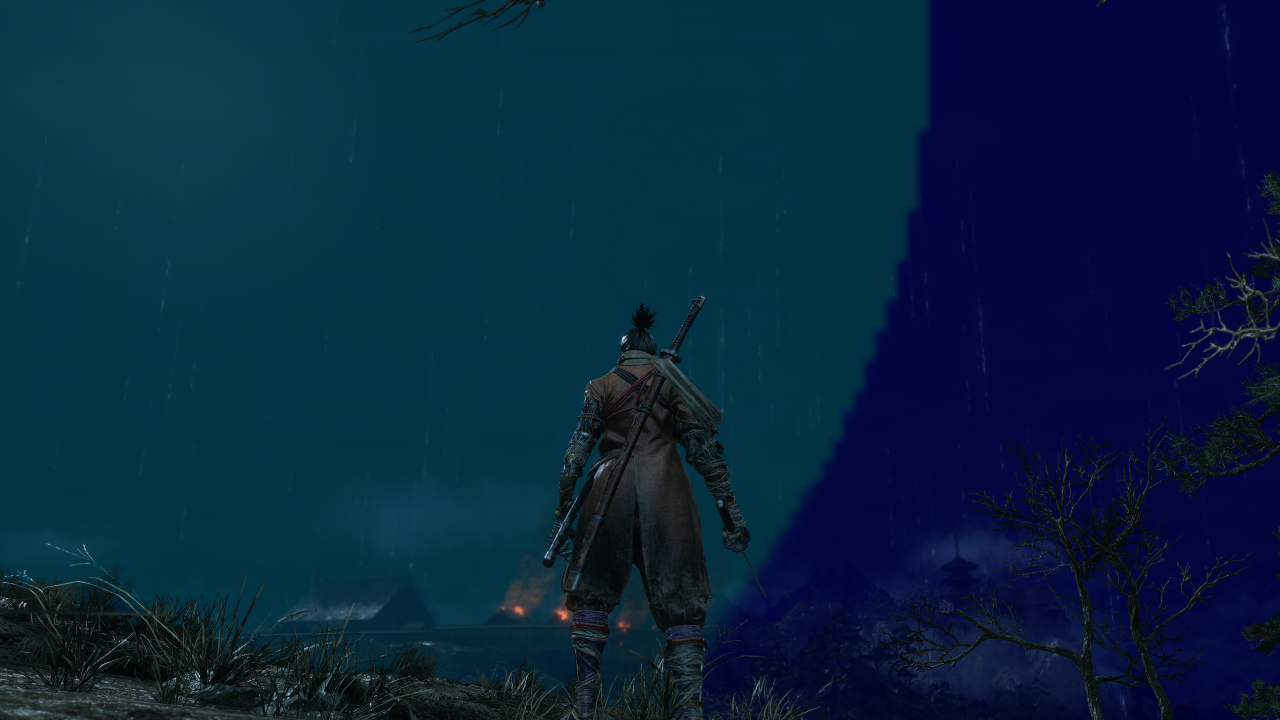
It's pitch-black on the other side:
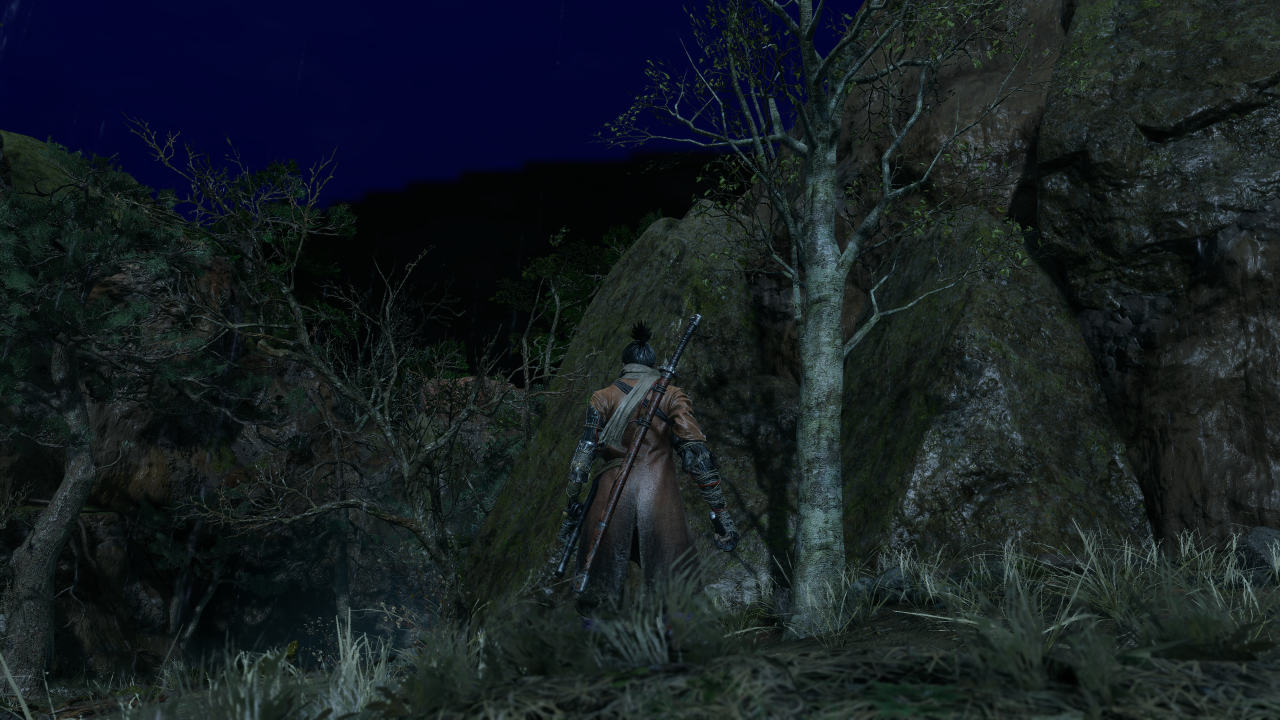
Senpou Temple, near the Temple Grounds idol:
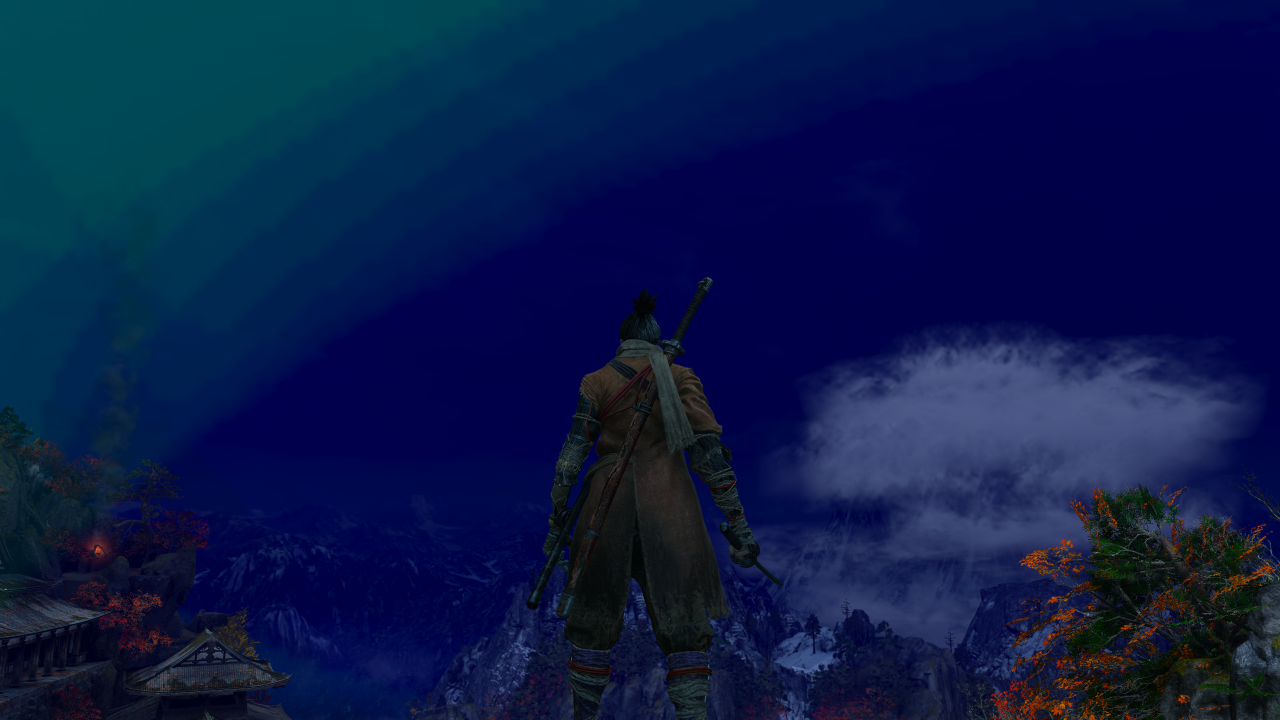
Same location:

That never happened with my Radeon R9 290X, and a couple GeForce owners on ProtonDB mention the same oddity (1, 2), so I suspect it's peculiar to Nvidia.
@Hasshu what's your driver version? I think 440.59 is the most stable one currently.
@doitsujin It's 440.59 (from RPM Fusion; am on Fedora 31), but I kept encountering these glitches ever since I built my current PC about 3 months ago. I used an R9 290X with amdgpu prior to that.
I'm unable to get past the title screen with it saying 'Return to Title Menu' after checking for save data. I don't have any save data, since I've never played this game before. I've captured a log for this.
steam-814380.log
I'm unable to get past the title screen with it saying 'Return to Title Menu' after checking for save data. I don't have any save data, since I've never played this game before. I've captured a log for this.
steam-814380.log
I also didn't play before, but there was an faulty save in files. I removed the save file and after that everything is fine. The only problem was to find save path and it was very strange : /home/<user_name>/.local/share/Steam/steamapps/compatdata/814380/pfx/dosdevices/c:/users/steamuser/Application Data/Sekiro/76561198933997784
@Evolverive But that folder doesn't exist for me. The "Application Data" directory contains just a directory called "Microsoft".
Still having an issue dealing with the gaming looking for a nonexistent save file.
steam-814380.log
Game continues to look for nonexistent save file. I have searched for it in the 'compatdata' directory, but the save file simply isn't there. There isn't even a Sekiro directory in the typical location for it in either "AppData" or "Application Data". I have no idea what's happening here.
Does anyone else have this issue? A missing save directory and the game not creating a save file, and continually looping back to the title screen?
steam-814380.log
@viggy96 Did you try verifying integrity or reinstalling the game?
@Hasshu Yes I have multiple times. I have tried both verifying and reinstalling.
@Hasshu Yes that is correct, the game is on a NFS share. I have no problems running/installing/updating any other game, including Proton games. However I will try installing it locally instead and report back.
@Hasshu WOW, its so stupid, the NFS was the issue for some reason. It makes no sense, but installing the game locally made it work.
Since this is high up on the google search results, and to share anybody else hours of headaches of debugging every possible fix under the sun, here's my solution to the "Sekiro not detecting controller" issue:
ENABLE THE STEAM OVERLAY
It's needed for the steam controller emulation to work. That is all.
Good news: the "moonlight circles" seem to be gone as of Proton 5.0-9 and the Nvidia driver 450.66. Apparently, something has been fixed along the way.
@Nightmayr You thumbs-upped one of my earlier comments here, so I figured you might be interested.
Good news: the "moonlight circles" seem to be gone as of Proton 5.0-9 and the Nvidia driver 450.66. Apparently, something has been fixed along the way.
@Nightmayr You thumbs-upped one of my earlier comments here, so I figured you might be interested.
Thanks for the heads up, I can also confirm using driver version 450.66 corrected the skybox in Hirata Estate. Thankfully for Ubuntu users and it's derivatives this driver version is now present in the standard Ubuntu repository, no PPA required.
Just switched from Proton 5.13-6 to 6.3-2 and noticed that, when quitting the game, the Steam client is still considering the game as launched. I do not know what could be at play here but feel free to point me to the right direction so I can give you logs (or anything else) to help you.
when quitting the game, the Steam client is still considering the game as launched
I can confirm this happening.
Hello @julben, @Hasshu, can one of you please add PROTON_LOG=1 %command% to the game's launch options, reproduce the regression, and attach the generated $HOME/steam-$APPID.log to this issue report as a file. (Proton logs compress well if needed.)
@kisak-valve Would it be okay if I edited out the name of my home directory in the log?
In terms of troubleshooting, it doesn't usually matter if there are adjustments to remove sensitive info, as long as it's obvious it has been changed (similar to the last paragraph of https://github.com/ValveSoftware/steam-runtime/blob/master/doc/reporting-steamlinuxruntime-bugs.md#essential-information).
@kisak-valve Thank you for the prompt response. Here's the log: steam-814380.log
@Hasshu @julben How long did you wait for the game to exit on its own? Could you try waiting ~60s just to be sure? What I'm seeing is the game taking longer (up to 2x as long as 5.13-6) to exit cleanly, but it will eventually close without needing to force it to quit via the Steam gui. If the game is hanging for 1min+ without exiting - what are you doing before quitting? Does it happen if you quit from the menu without going in-game?
@alasky17
How long did you wait for the game to exit on its own?
IIRC, I waited for over 10 minutes.
If the game is hanging for 1min+ without exiting - what are you doing before quitting? Does it happen if you quit from the menu without going in-game?
I just did a couple of tests: first, I quit the game after loading a save and running around for a bit, then I quit right after reaching the main menu; in both cases the game would appear running for over 60 minutes with no end in sight.
@Hasshu @julben How long did you wait for the game to exit on its own? Could you try waiting ~60s just to be sure? What I'm seeing is the game taking longer (up to 2x as long as 5.13-6) to exit cleanly, but it will eventually close without needing to force it to quit via the Steam gui. If the game is hanging for 1min+ without exiting - what are you doing before quitting? Does it happen if you quit from the menu without going in-game?
- I waited for a couple of minutes before forcing it. The first time this happened it caught me off-guard: the game was still "launched" for more than an hour before I noticed.
- I tried exiting from the main menu using the built-in "quit game" option, using Alt+F4 in-game or at the main menu. Same result.
Edit: @kisak-valve here is the log:
steam-814380.log
To produce it, I launched the game through the client GUI, loaded a save, exited to game menu, exited the game through the "quit game" main menu button and waited for ~1.5min.
The game seems to be terminating properly as of Proton 6.3-3.
Sekiro: Shadows Die Twice has the screen blinking when I click 'play'
Issue transferred from https://github.com/ValveSoftware/Proton/issues/5129.
@johnlennon1991 posted on 2021-08-30T17:20:12:
Sekiro: Shadows Die Twice has the screen blinking when I click 'play' and doesn't start.
Proton Version: 5.13-6
OS: Linux Mint Cinnamon
CPU: AMD, Ryzen 3, Vega 8
Hello @johnlennon1991, please copy your system information from Steam (Steam -> Help -> System Information) and put it in a gist, then include a link to the gist in this issue report.
I managed to resolve it by changing the Proton version to the latest in Steam settings. Previously the version was 5.13-6 and now it is 6.3-6.
Anyone having stuttering with Nvidia GPUs?
I'm experiencing stuttering with an RTX 2080Ti on the 510.60.02 driver. Game used to run perfectly at a consistent 60 FPS back when I played with proton about a year ago. I'm on Ubuntu 22.04 and using Proton 7.0-2 (tried experimental and Proton-GE but no difference).
Log: steam-814380.log
EDIT: Found that the stuttering is most likely due to being on the Wayland session, the X11 session seems to work as expected
@julben @Nightmayr I am actually getting heavy stuttering in X11 with my Nvidia 3090 with the 525.60 drivers. Confirmed that KDE compositor is off.
Also getting heavy stuttering on nvidia 2070, 525.60 drivers, X11, Ryzen 3900X. Going back to proton 6.3-8 seems to really help.
Hello @Keelhauled, @fuyuki94370, can one (or both) of you please add PROTON_LOG=1 %command% to the game's launch options, reproduce the regression, and attach the generated $HOME/steam-$APPID.log to this issue report as a file. (Proton logs compress well if needed.) Also, please copy your system information from Steam (Steam -> Help -> System Information) and put it in a gist, then include a link to the gist in this issue report.
@Keelhauled @fuyuki94370 As a first step towards diagnosing this, it would be really helpful if you could try narrowing down if this is a regression in Proton wine or dxvk. It is pretty easy to check if the regression is in dxvk:
- Drop all of the dxvk files from 6.3-8 into 7.0-6. They are in 2 places:
cp -rf ~/.steam/steam/steamapps/common/Proton 6.3/dist/lib/wine/dxvk/* ~/.steam/steam/steamapps/common/Proton Next/dist/lib/wine/dxvk/.
cp -rf ~/.steam/steam/steamapps/common/Proton 6.3/dist/lib64/wine/dxvk/* ~/.steam/steam/steamapps/common/Proton Next/dist/lib64/wine/dxvk/. - Test Proton Next to see if perf is good or bad.
- To get back to the original shipped dxvk version, just delete the whole dist folder in Proton Next - it will rebuild itself the next time you launch a game with Next.
Yep it seems like dxvk is the problem.
@Keelhauled Thank you so much for confirming that :) If you have time to file an issue in the dxvk tracker, it would be greatly appreciated by everyone (or at least everyone with NVIDIA GPUs since I suspect this is GPU specific haha). https://github.com/doitsujin/dxvk/issues
I'll make that issue, just trying to isolate the problematic dxvk version first.
To bring this thread up to speed, doitsujin has fixed this issue in dxvk now https://github.com/doitsujin/dxvk/commit/8052347a227f048de1698794d0fdcd8cc6328eb9. And yeah it was some nvidia specific thing.
Sekiro: Shadows Die Twice crashes after installing new amd gpu, coincidental big steam update
Issue transferred from https://github.com/ValveSoftware/Proton/issues/6854.
@Esgariot posted on 2023-06-16T09:23:13:
Compatibility Report
- Name of the game with compatibility issues: Sekiro
- Steam AppID of the game: 814380
System Information
- GPU: RX6700XT
- Driver/LLVM version: 23.1.2
- Kernel version: 6.3.4
- Link to full system information report as Gist: https://gist.github.com/Esgariot/370c73c2d877f70374825dba279185a2
- Proton version: 1686063869 experimental-8.0-20230606
I confirm:
- [x] that I haven't found an existing compatibility report for this game.
- [x] that I have checked whether there are updates for my system available.
Symptoms
When launching, steam "play" button loops through "exit" and "cancel". Game doesn't launch.
Reproduction
I'm running on wayland, Hyprland, steam is launched through xwayland.
xdg portals:
- xdg-desktop-portal 1.16.0-3
- xdg-desktop-portal-gtk 1.14.1-1
- xdg-desktop-portal-hyprland 0.4.0-1
some env vars:
- CLUTTER_BACKEND=wayland
- DBUS_SESSION_BUS_ADDRESS=unix:path=/run/user/1000/bus
- DISPLAY=:0
- GDK_BACKEND=wayland,x11
- GTK_USE_PORTAL=1
- LANG=pl_PL.UTF-8
- QT_QPA_PLATFORM=wayland;xcb
- SDL_VIDEODRIVER=wayland
- WAYLAND_DISPLAY=wayland-1
- XCURSOR_SIZE=24
- XDG_BACKEND=wayland
- XDG_CONFIG_HOME=/home/esgariot/.config
- XDG_CURRENT_DESKTOP=Hyprland
- XDG_DATA_HOME=/home/esgariot/.local/share
- XDG_RUNTIME_DIR=/run/user/1000
- XDG_SEAT=seat0
- XDG_SESSION_CLASS=user
- XDG_SESSION_DESKTOP=Hyprland
- XDG_SESSION_ID=3
- XDG_SESSION_TYPE=wayland
- XDG_VTNR=2
There are no nvidia modules loaded, only amdgpu. Nothing in kernel parameters or initcpio related to early-loading any gpu modules nor any kernel cmdline changes.
Steam cmdline for this game is also empty.
Additional debug info
core dump that shows up when launching game
           PID: 100275 (gldriverquery)
           UID: 1000 (esgariot)
           GID: 1000 (esgariot)
        Signal: 11 (SEGV)
     Timestamp: Fri 2023-06-16 10:44:17 CEST (24min ago)
  Command Line: /home/esgariot/.local/share/Steam/ubuntu12_32/../ubuntu12_32/gldriverquery
    Executable: /home/esgariot/.local/share/Steam/ubuntu12_32/gldriverquery
 Control Group: /user.slice/user-1000.slice/session-3.scope
          Unit: session-3.scope
         Slice: user-1000.slice
       Session: 3
     Owner UID: 1000 (esgariot)
       Boot ID: 08cc6c7bd8a7459f8a5e06f03d92bda9
    Machine ID: 495f7ffa0c6942409e78de1f2b166319
      Hostname: a-la-carte
       Storage: /var/lib/systemd/coredump/core.gldriverquery.1000.08cc6c7bd8a7459f8a5e06f03d92bda9.100275.1686905057000000.zst (present)
  Size on Disk: 1.8M
       Message: Process 100275 (gldriverquery) of user 1000 dumped core.

                Stack trace of thread 100275:
                #0  0x000000000000000a n/a (n/a + 0x0)
                ELF object binary architecture: Intel 80386
recurring steam log fragment
GameAction [AppID 814380, ActionID 1] : LaunchApp changed task to ProcessingInstallScript with ""
fsync: up and running.
wine: Using setpriority to control niceness in the [-10,10] range
user.reg is not a valid registry file
ac_compute_device_uuid's output is based on invalid pci bus info.
ac_compute_device_uuid's output is based on invalid pci bus info.
ac_compute_device_uuid's output is based on invalid pci bus info.
ac_compute_device_uuid's output is based on invalid pci bus info.
ac_compute_device_uuid's output is based on invalid pci bus info.
GameAction [AppID 814380, ActionID 1] : LaunchApp changed task to SynchronizingCloud with ""
GameAction [AppID 814380, ActionID 1] : LaunchApp changed task to SynchronizingControllerConfig with ""
GameAction [AppID 814380, ActionID 1] : LaunchApp changed task to ProcessingShaderCache with ""
GameAction [AppID 814380, ActionID 1] : LaunchApp waiting for user response to ProcessingShaderCache ""
Fossilize INFO: Setting autogroup scheduling.
Fossilize INFO: Setting autogroup scheduling.
GameAction [AppID 814380, ActionID 1] : LaunchApp changed task to SiteLicenseSeatCheckout with ""
GameAction [AppID 814380, ActionID 1] : LaunchApp changed task to CreatingProcess with ""
GameAction [AppID 814380, ActionID 1] : LaunchApp waiting for user response to CreatingProcess ""
GameAction [AppID 814380, ActionID 1] : LaunchApp continues with user response "CreatingProcess"
/bin/sh\0-c\\0PROTON_LOG=1 /home/esgariot/.local/share/Steam/ubuntu12_32/reaper SteamLaunch AppId=814380 -- /home/esgariot/.local/share/Steam/ubuntu12_32/steam-launch-wrapper -- '/home/esgariot/.local/share/Steam/steamapps/common/SteamLinuxRuntime_sniper'/_v2-entry-point --verb=waitforexitandrun -- '/home/esgariot/.local/share/Steam/steamapps/common/Proton - Experimental'/proton waitforexitandrun  '/home/esgariot/.local/share/Steam/steamapps/common/Sekiro/sekiro.exe'\\0
Game process added : AppID 814380 "PROTON_LOG=1 /home/esgariot/.local/share/Steam/ubuntu12_32/reaper SteamLaunch AppId=814380 -- /home/esgariot/.local/share/Steam/ubuntu12_32/steam-launch-wrapper -- '/home/esgariot/.local/share/Steam/steamapps/common/SteamLinuxRuntime_sniper'/_v2-entry-point --verb=waitforexitandrun -- '/home/esgariot/.local/share/Steam/steamapps/common/Proton - Experimental'/proton waitforexitandrun  '/home/esgariot/.local/share/Steam/steamapps/common/Sekiro/sekiro.exe'", ProcID 102447, IP 0.0.0.0:0
chdir "/home/esgariot/.local/share/Steam/steamapps/common/Sekiro"
ERROR: ld.so: object '/home/esgariot/.local/share/Steam/ubuntu12_32/gameoverlayrenderer.so' from LD_PRELOAD cannot be preloaded (wrong ELF class: ELFCLASS32): ignored.
ERROR: ld.so: object '/home/esgariot/.local/share/Steam/ubuntu12_64/gameoverlayrenderer.so' from LD_PRELOAD cannot be preloaded (wrong ELF class: ELFCLASS64): ignored.
ERROR: ld.so: object '/home/esgariot/.local/share/Steam/ubuntu12_32/gameoverlayrenderer.so' from LD_PRELOAD cannot be preloaded (wrong ELF class: ELFCLASS32): ignored.
ERROR: ld.so: object '/home/esgariot/.local/share/Steam/ubuntu12_32/gameoverlayrenderer.so' from LD_PRELOAD cannot be preloaded (wrong ELF class: ELFCLASS32): ignored.
ERROR: ld.so: object '/home/esgariot/.local/share/Steam/ubuntu12_32/gameoverlayrenderer.so' from LD_PRELOAD cannot be preloaded (wrong ELF class: ELFCLASS32): ignored.
GameAction [AppID 814380, ActionID 1] : LaunchApp changed task to WaitingGameWindow with ""

(steam:100109): GLib-GObject-CRITICAL **: 10:48:25.089: g_object_ref: assertion 'G_IS_OBJECT (object)' failed

(steam:100109): GLib-GObject-CRITICAL **: 10:48:25.089: g_object_unref: assertion 'G_IS_OBJECT (object)' failed
GameAction [AppID 814380, ActionID 1] : LaunchApp changed task to Completed with ""

(steam:100109): GLib-GObject-CRITICAL **: 10:48:25.517: g_object_ref: assertion 'G_IS_OBJECT (object)' failed

(steam:100109): GLib-GObject-CRITICAL **: 10:48:25.517: g_object_unref: assertion 'G_IS_OBJECT (object)' failed
ThreadGetProcessExitCode: no such process 102566
ThreadGetProcessExitCode: no such process 102564
ThreadGetProcessExitCode: no such process 102449

(steam:100109): GLib-GObject-CRITICAL **: 10:48:26.426: g_object_ref: assertion 'G_IS_OBJECT (object)' failed

(steam:100109): GLib-GObject-CRITICAL **: 10:48:26.426: g_object_unref: assertion 'G_IS_OBJECT (object)' failed
Game process updated : AppID 814380 "PROTON_LOG=1 /home/esgariot/.local/share/Steam/ubuntu12_32/reaper SteamLaunch AppId=814380 -- /home/esgariot/.local/share/Steam/ubuntu12_32/steam-launch-wrapper -- '/home/esgariot/.local/share/Steam/steamapps/common/SteamLinuxRuntime_sniper'/_v2-entry-point --verb=waitforexitandrun -- '/home/esgariot/.local/share/Steam/steamapps/common/Proton - Experimental'/proton waitforexitandrun  '/home/esgariot/.local/share/Steam/steamapps/common/Sekiro/sekiro.exe'", ProcID 102565, IP 0.0.0.0:0
ThreadGetProcessExitCode: no such process 102569

(steam:100109): GLib-GObject-CRITICAL **: 10:48:27.397: g_object_ref: assertion 'G_IS_OBJECT (object)' failed

(steam:100109): GLib-GObject-CRITICAL **: 10:48:27.397: g_object_unref: assertion 'G_IS_OBJECT (object)' failed
ThreadGetProcessExitCode: no such process 102650
ExecCommandLine: "'~/.steam/root/ubuntu12_32/steam' 'steam://run/814380//'"
ExecuteSteamURL: "steam://run/814380//"
GameAction [AppID 814380, ActionID 2] : LaunchApp changed task to WaitingPrevProcess with ""
ThreadGetProcessExitCode: no such process 102664
ThreadGetProcessExitCode: no such process 102657
ThreadGetProcessExitCode: no such process 102621
ThreadGetProcessExitCode: no such process 102601
ThreadGetProcessExitCode: no such process 102594
ThreadGetProcessExitCode: no such process 102583
ThreadGetProcessExitCode: no such process 102574
ThreadGetProcessExitCode: no such process 102571
ThreadGetProcessExitCode: no such process 102562
ThreadGetProcessExitCode: no such process 102448
Game process removed: AppID 814380 "PROTON_LOG=1 /home/esgariot/.local/share/Steam/ubuntu12_32/reaper SteamLaunch AppId=814380 -- /home/esgariot/.local/share/Steam/ubuntu12_32/steam-launch-wrapper -- '/home/esgariot/.local/share/Steam/steamapps/common/SteamLinuxRuntime_sniper'/_v2-entry-point --verb=waitforexitandrun -- '/home/esgariot/.local/share/Steam/steamapps/common/Proton - Experimental'/proton waitforexitandrun  '/home/esgariot/.local/share/Steam/steamapps/common/Sekiro/sekiro.exe'", ProcID 102565
ThreadGetProcessExitCode: no such process 102565
Game 814380 created interface STEAMAPPLIST_INTERFACE_VERSION001 / AppList
Game 814380 created interface STEAMAPPS_INTERFACE_VERSION008 / Apps
Game 814380 created interface STEAMHTMLSURFACE_INTERFACE_VERSION_004 / HTMLSurface
Game 814380 created interface STEAMHTTP_INTERFACE_VERSION002 / HTTP
Game 814380 created interface STEAMINVENTORY_INTERFACE_V002 / Inventory
Game 814380 created interface STEAMMUSICREMOTE_INTERFACE_VERSION001 / MusicRemote
Game 814380 created interface STEAMMUSIC_INTERFACE_VERSION001 / Music
Game 814380 created interface STEAMPARENTALSETTINGS_INTERFACE_VERSION001 / ParentalSettings
Game 814380 created interface STEAMREMOTESTORAGE_INTERFACE_VERSION014 / RemoteStorage
Game 814380 created interface STEAMSCREENSHOTS_INTERFACE_VERSION003 / Screenshots
Game 814380 created interface STEAMUGC_INTERFACE_VERSION010 / UGC
Game 814380 created interface STEAMUSERSTATS_INTERFACE_VERSION011 / UserStats
Game 814380 created interface STEAMVIDEO_INTERFACE_V002 / Video
Game 814380 created interface SteamController006 / Controller
Game 814380 created interface SteamFriends015 / Friends
Game 814380 created interface SteamMatchMaking009 / Matchmaking
Game 814380 created interface SteamMatchMakingServers002 / MatchmakingServers
Game 814380 created interface SteamNetworking005 / Networking
Game 814380 created interface SteamUser019 / User
Game 814380 created interface SteamUtils009 / Utils
Game 814380 method call count for IClientAppManager::GetCurrentLanguage : 1
Game 814380 method call count for IClientAppManager::GetAvailableLanguages : 1
Game 814380 method call count for IClientAppManager::GetAppInstallState : 2
Game 814380 method call count for IClientUtils::RecordSteamInterfaceCreation : 22
Game 814380 method call count for IClientUtils::GetSteamUILanguage : 1
Game 814380 method call count for IClientUtils::GetAppID : 24
Game 814380 method call count for IClientUser::GetSteamID : 1
Uploaded AppInterfaceStats to Steam

(steam:100109): GLib-GObject-CRITICAL **: 10:48:29.500: g_object_ref: assertion 'G_IS_OBJECT (object)' failed

(steam:100109): GLib-GObject-CRITICAL **: 10:48:29.500: g_object_unref: assertion 'G_IS_OBJECT (object)' failed
GameAction [AppID 814380, ActionID 2] : LaunchApp changed task to ProcessingInstallScript with ""
@Esgariot commented on 2023-06-16T09:56:52:
Possibly related? https://github.com/ValveSoftware/steam-for-linux/issues/8853
I guess I could install the old nvidia gpu and see if the issue persists.
Hello @Esgariot, please copy the contents of Steam Runtime Diagnostics from Steam (Steam -> Help -> Steam Runtime Diagnostics) and put it in a gist, then include a link to the gist in this issue report.
There you go steam runtime system info
Thanks, looking through your system information, you're using AMDVLK, which has a history of being more brittle than mesa/RADV, but that note might be unrelated to the issue you're seeing because your Proton log isn't hinting that a video driver related snafu happened.
Also, coredumpctl debug shows something like this
Program terminated with signal SIGSEGV, Segmentation fault.
#0  0xed62a11c in llvm::PMTopLevelManager::addImmutablePass(llvm::ImmutablePass*) () from /usr/lib32/libLLVM-15.so
Curiously, on another older partition it works, on the same hardware. That os is also arch, also wayland, but last updated 2021-05-12.
Here are the system info (should be mostly the same, or exactly the same hardware-wise) and diagnostics gists. These are the gists for old installation that works on the same hardware.
Full story being, on current system (broken) I've upgraded from gtx1070 to rx6700xt, switched drivers, performed upgrade. I've had some old partition (also with Arch) lying around and tried my luck, it turned out that it works flawlessly. Now I'm trying to see which package has regression or whether I'm missing something, be it env var, leftover cache, or another lib.
Here's the breakdown of most notable packages and their version differences betweeen old (working, 2nd col) and current (broken, 3rd col). Packages that had the same version and some unrelated stuff skipped. Missing on old marked with "-", missing on new skipped.
alsa-card-profiles         1:0.3.71-1         1:0.3.70-2
at-spi2-core               2.48.3-1           2.48.2-1
binutils                   2.40-6             2.40-5
bridge-utils               -                  1.7.1-1
c-ares                     1.19.1-1           1.19.0-1
catch2                     -                  2.13.9-1
chrono-date                -                  3.0.1-3
containerd                 -                  1.7.1-1
cronie                     -                  1.6.1-1
curl                       8.1.1-2            8.1.0-1
c++utilities               -                  5.22.0-1
diffutils                  3.10-1             3.9-1
ffmpeg                     2:6.0-8            2:6.0-6
fribidi                    1.0.13-1           1.0.12-1
glib2                      2.76.3-1           2.76.2-1
graphicsmagick             -                  1.3.40-2
gst-plugins-bad-libs       1.22.3-2           1.22.2-1
gst-plugins-base           1.22.3-2           1.22.2-1
gst-plugins-base-libs      1.22.3-2           1.22.2-1
gstreamer                  1.22.3-2           1.22.2-1
gtk3                       1:3.24.38-1        1:3.24.37-1
gtk4                       1:4.10.3-3         1:4.10.3-2
gtk-layer-shell            -                  0.8.1-1
gtk-update-icon-cache      1:4.10.3-3         1:4.10.3-2
helvum                     -                  0.3.4-1
hidapi                     0.14.0-1           0.13.1-2
imath                      3.1.8-1            3.1.7-2
intel-ucode                20230516.a-1       20230516-1
iputils                    20221126-2         20221126-1
libappindicator-gtk3       -                  12.10.0.r298-1
libcgif                    0.3.2-1            0.3.1-1
libdisplay-info            -                  0.1.1-3
libepoxy                   1.5.10-2           1.5.10-1
libexif                    0.6.24-2           0.6.24-1
libimobiledevice           1.3.0-9            1.3.0-8
libindicator-gtk3          -                  12.10.1-10
libjxl                     0.8.1-2            0.8.1-1
libmfx                     23.2.2-1           23.1.6-1
libmpdclient               -                  2.20-3
libnma                     -                  1.10.6-2
libnma-common              -                  1.10.6-2
libpgm                     5.3.128-3          5.3.128-2
libpipewire                1:0.3.71-1         1:0.3.70-2
libplist                   2.3.0-2            2.3.0-1
librsync                   -                  1:2.3.4-1
libsysprof-capture         3.48.0-2           3.48.0-1
libtiff                    4.5.0-4            4.5.0-3
libusbmuxd                 2.0.2-3            2.0.2-2
libwebp                    1.3.0-3            1.3.0-2
linux                      6.3.4.arch1-1      6.3.2.arch1-1
lua-lpeg                   -                  1.0.2-4
mailcap                    -                  2.1.53-1
mate-polkit                -                  1.26.1-1
mdcat                      -                  2.0.3-1
mesa                       23.1.1-1           23.0.3-1
meson                      1.1.1-1            1.1.0-1
mpfr                       4.2.0.p9-1         4.2.0.p7-2
network-manager-applet     -                  1.32.0-2
nm-connection-editor       -                  1.32.0-2
nodejs                     -                  20.2.0-1
nss-mdns                   -                  0.15.1-1
numactl                    -                  2.0.16-1
openexr                    3.1.7-2            3.1.7-1
openmpi                    4.1.5-2            4.1.5-1
pacman                     6.0.2-7            6.0.2-6
pam                        1.5.3-3            1.5.3-1
pamixer                    -                  1.6-2
pandoc-cli                 -                  0.1-58
paru-bin                   -                  1.11.2-1
patch                      2.7.6-10           2.7.6-9
pavucontrol                -                  1:5.0+r61+gee77d86-2
perl-yaml-libyaml          -                  0.86-1
pipewire                   1:0.3.71-1         1:0.3.70-2
pipewire-audio             1:0.3.71-1         1:0.3.70-2
pipewire-jack              1:0.3.71-1         1:0.3.70-2
pipewire-pulse             1:0.3.71-1         1:0.3.70-2
pkgfile                    -                  21-2
playerctl                  -                  2.4.1-3
python-awscrt              -                  0.16.15-2
python-cairo               1.23.0-6           1.23.0-4
python-certifi             2023.05.07-1       2022.12.07-3
python-dateutil            -                  2.8.2-5
python-exceptiongroup      -                  1.1.1-2
python-fastjsonschema      2.17.1-1           2.16.3-4
python-gobject             3.44.1-4           3.44.1-3
python-iniconfig           -                  2.0.0-4
python-jmespath            -                  1.0.1-2
python-pluggy              -                  1.0.0-4
python-prompt_toolkit      -                  3.0.38-2
python-pydantic            1.10.8-1           1.10.7-4
python-pytest              -                  7.3.1-4
python-ruamel-yaml         -                  0.17.21-2
python-ruamel.yaml.clib    -                  0.2.7-2
python-setuptools          1:67.8.0-1         1:67.7.0-1
python-trove-classifiers   2023.5.24-1        2023.4.25-1
python-typing_extensions   4.6.2-1            4.5.0-4
python-validate-pyproject  0.13-1             0.12.2-4
python-wcwidth             -                  0.2.6-1
qt5-base                   5.15.9+kde+r154-1  5.15.9+kde+r151-1
qt5-declarative            5.15.9+kde+r26-1   5.15.9+kde+r25-1
qt6-base                   6.5.1-1            6.5.0-3
qt6-declarative            6.5.1-1            6.5.0-2
qt6-positioning            -                  6.5.0-1
qt6-svg                    6.5.1-1            6.5.0-1
qt6-tools                  -                  6.5.0-5
qt6-translations           6.5.1-1            6.5.0-1
qt6-wayland                6.5.1-1            6.5.0-2
qt6-webchannel             -                  6.5.0-1
qt6-webengine              -                  6.5.0-2
qtforkawesome-qt6          -                  0.1.0-1
qtutilities-qt6            -                  6.12.0-1
rav1e                      0.6.6-1            0.6.3-1
runc                       -                  1.1.7-1
sndio                      -                  1.9.0-1
util-linux                 2.39-4             2.38.1-4
util-linux-libs            2.39-4             2.38.1-4
v4l-utils                  1.24.1-2           1.24.1-1
vulkan-validation-layers   -                  1.3.243.0-1
I've rolled back to same mesa version (lib32 too), to no effect. Still crash in gldriverquery
@kisak-valve Fixed. I fully removed my steam config (basically nuked my $HOME, set up steam again and reinstalled the game). I have no idea why the other Arch installation's steam handled switching to new gpu correctly and this one didn't.
For some reason, my Dualsense controller doesn't work with the game, even though it works with Steam. I can even choose the layouts proposed by Valve. Anyone could make it work?
I'm using Steam Flatpak on the latest Fedora.
For some reason, my Dualsense controller doesn't work with the game, even though it works with Steam. I can even choose the layouts proposed by Valve. Anyone could make it work? I'm using Steam Flatpak on the latest Fedora.
Did you get this to work somehow? Im in the same boat!
I got it to work for me by shutting down my pc, plugging in the controller and then booting.
Unplugging every (and I mean every) device and then plugging in the controller did not work which I thought would cover that scenario, but I guess it did not :)
Sekiro: Shadows Die Twice
Issue transferred from https://github.com/ValveSoftware/Proton/issues/8835.
@ModWorldEU posted on 2025-06-20T16:45:34:
Compatibility Report
- Sekiro: Shadows Die Twice
System Information
Dont matter
I confirm:
- [ X] that I haven't found an existing compatibility report for this game.
- [ X] that I have checked whether there are updates for my system available.
Symptoms
In newest GE proton, entering graphics, game crashes. Using version 7.5 issue is not present.
Reproduction
Use newest version to reproduce.
Compatibility Report
- Name of the game with compatibility issues: Sekiro: Shadows Die Twice
- Steam AppID of the game: 814380
System Information
- GPU: RX 6600
- Video driver version: Mesa 25.1.7
- Kernel version: 6.12.47
- Link to full system information report as gist
- Proton version: 9.0-4 (but same with all tested)
I confirm:
- [x] that I have checked whether there are updates for my system available.
Symptoms
My controller (PS4 Dualshock) has stopped working properly. It doesn't do anything in the menus, and most buttons don't work in-game either. When I'm in game, my camera constantly spins to the right and down. The left joystick works to move Sekiro, and the left and right triggers seem to affect the camera movement, but nothing else does anything.
I've never had controller issues with Sekiro before. The last time I played was 13 days ago at the time of writing this. I double checked with someone else I live with and they're having the same issue on their computer, with a different controller & cable and slightly different system information.
Also potentially useful: I'm getting controller prompts in-game and in the menus as normal.
To my knowledge I haven't had any updates or system changes recently that should affect this. I do use the Steam Beta Client and I'm unsure when the last update with changes to controller support was.
Things I've tried
- Restarting Steam / my whole computer
- Using a different controller
- Using a different cable
- Using different versions of Proton (tested: not forcing any specific version, Proton 9.0-4, Proton Hotfix, Proton Experimental, Proton 10.0-2 (beta), GE-Proton10-10)
- Disabling Steam Input
- Using different Steam Input layouts from the default
- Ensuring my controller is plugged in before the game loads
- Only plugging my controller in after the game loads
- Reinstalling the game
Reproduction
Just try to play Sekiro using a PS4 Dualshock controller.
@MollyMaclachlan according to pc gaming wiki, the game doesn't support either dualshock 4 or dualsense natively, so even on windows it won't work with steam input disabled. And sure enough, the game won't detect input from the controller with steam input disabled. But with steam input enabled, the controller worked as expected on proton 9, 10 and experimental, whether it was connected before the game's launch or after, I could also reconnect the controller mid-game without issue, and this was with the default layout.
You mention disabling steam input, but have you tried specifically enabling it? I ask because using "Use default settings" in the controller option might not be enabling steam input.
You mention disabling steam input, but have you tried specifically enabling it? I ask because using "Use default settings" in the controller option might not be enabling steam input.
Yes, I have always had it specifically enabled for Sekiro, and there was no change in that setting before this issue started. I've played 45 hours of the game without having any problems with my controller.
I have since discovered that the controller works in the menus if I go way back to Proton 3.7-8; however, on this version trying to load into a save just results in an infinite loading screen.
@MollyMaclachlan with proton 10 or experimental, run the game with the following launch parameter: PROTON_LOG=+input,+hid,+xinput %command%. Run the game, let it load and then connect the gamepad before closing it ,and upload the log file
I can't upload the log to GitHub. As soon as I plug in the controller it starts growing to MiBs in size and GitHub refuses to accept it, even as a gist. Smallest I can get it is 13.3 MiB, which still gets rejected.
If it's acceptable, here it is uploaded to Google Drive.
@MollyMaclachlan are you by any chance using steam client beta? if so, can you switch to stable and see if the controller is back to working?
Yep, I was using the Beta Client and it does work after I switch to Stable (though two of the buttons were the wrong way round in the Steam Input layout for some reason, but that's an easy fix).
@MollyMaclachlan the dualshock 4 issue appears to be fixed on the current steam beta
There's been a regression in performance for this game in newer releases of Proton. Playing on experimental gave good performance to start, but started to hitch more and more as I progressed through the game, eventually giving way to ~30fps in Ashina Castle. Reverting to Proton 10.0-4 appears to have fixed these issues, after trying the most recent GE release to no avail.
Hello @w4nd3r, please add PROTON_LOG=1 %command% to the game's launch options, reproduce the regression, and attach the generated $HOME/steam-$APPID.log to this issue report as a file. (Proton logs compress well if needed.) Also, can you check how the game behaves with Proton 11?
Here's the proton logs. To reproduce: travel to Ashina Outskirts > Ashina Castle Gate Fortress, slay the first enemy and grapple to the roof, then look back at the Ashina Outskirts.
steam-814380(experimental).log.gz
steam-814380(proton11).log.gz
Can't get to that area anymore, but after grappling around a bunch of the heavier areas I haven't seen it drop below 60.
That said, you don't seem to have Resizeable BAR enabled according to the log, this game kind of needs it.
@w4nd3r if you change your launch parameter to this PROTON_NO_NTSYNC=1 %command% and see if it makes a difference for proton 11 and newer?
Proton versions
proton 10.0-4x1 2026-07proton 3.7-8x3 2025-08ge-proton10-10x1 2025-08proton 10.0-2x1 2025-08proton 9.0-4x1 2025-08proton experimentalx1 2025-08proton hotfixx1 2025-08proton 6.3x1 2023-01proton nextx1 2023-01proton 6.3-8x1 2023-01proton 7.0-2x1 2022-05proton 6.3-3x1 2021-05proton 5.13-6x1 2021-04proton 5.0-9x2 2020-09proton 4.11-12x1 2020-01
Launch options
PROTON_NO_NTSYNC=1x1 2026-07PROTON_LOG=1x4 2026-07PROTON_LOG=+input,+hid,+xinputx1 2025-08SDL_VIDEODRIVER=waylandx1 2023-06PROTON_USE_WINED3D11=1?x1 2019-03PROTON_USE_WINED3D11=1'?x1 2019-03
Launch lines
PROTON_NO_NTSYNC=1 %command%x1 2026-07VK_ICD_FILENAMES=/usr/share/vulkan/icd.d/radeon_icd.x86_64.json:/usr/share/vulkan/icd.d/radeon_icd.i686.json %command%x1 2019-03LC_CTYPE=C %command%x1 2019-03
Upstream links
- ValveSoftware/Proton/issues/8835x1 2025-06
- ValveSoftware/Proton/issues/6854x1 2023-06
- ValveSoftware/steam-for-linux/issues/8853x1 2023-06
- ValveSoftware/Proton/issues/5129x1 2021-08
- ValveSoftware/steam-for-linux/issues/4891x2 2019-04
Compatibility Report
System Information
Symptoms
Game launches to a black screen with the steam FPS overlay showing ~15 FPS for about 2 seconds and then silently closes. Other games run fine (as far as I've tested).
Gist of log output
Reproduction
Just launching the game reproduces the error afaik. I've tested on Proton 3.16-8 beta with DXKV upgraded to 1.0.1 with the same results.