Darksiders II Deathinitive Edition
I'm on Manjaro Linux, with AMD RX 580 and Mesa 18.1.6, kernel 4.17.17.
Game installs and starts correctly, I can interact with the menu, then the game hangs on load screen after starting a new game, I can hear music playing.
I have the same behavior as @ziabice.
I'm also on Manjaro, but with a gtx970 on 396.54 drivers and linux418 kernel(4.18.4-1-MANJARO)
using the proton beta
On Ubuntu 18.04 with 396.54. When I first installed, I created a new game and played the first level for a while. I deleted the save to start again and now it crashes after I start a new game, or sometimes on the loading screen or some times on the save just after the animation but I can't get in game at all now. I've tried going back to Proton 3.7.3, and removing the compatdata folder but I just can get it to start.
Every time it crashes now, there is no save game when I start so it seems to be failing to save.
Possibly, I should clarify, that there was NO save game. The game asks for an empty save slot by default, befire it starts loading the game. Therefore, I don't think it is related to any earlier save game.
Hey guys.
Had also that neverending loading.
With "PROTON_NO_ESYNC=1 %command%" in games launch options it works great for me.
I play with mesa 18.2.0-rc4 on Intel Iris Pro 6200.
@johndoe7000 Setting "PROTON_NO_ESYNC=1 %command%" helps a bit. Now the intro video plays well, unfortunately after the video finishes (possibly the 3D Engine loads) the game still crashes :(
Hmm. Maybe the reason is I play with mesa and you with nvidia blob?!
I think zabice could give us more evidence.
I can confirm that using PROTON_NO_ESYNC=1 %command% game works!
I played all the first level then my PC decided to power off, causing me a heart attack (I'm still investigating the problem.. :-/ ).
Game has some graphical glitches

, but apart from that it works very well.
Great!
And yes, the little glitches in the sky I had too.
Beside this the game runs well.
Important note: I had set the FD limits required by esync.
@johndoe7000 I just opened a new issue about that on the dxvk issue tracker here https://github.com/doitsujin/dxvk/issues/606
I can confirm Darksiders 2 doesn't run. Then after applying this "PROTON_NO_ESYNC=1 i got it to in game past the video scenes, but the textures where messed up on the rocks all pixelated. I run nvidia running the driver 396.54. Then i tried to fix the screen rez size was not 1080p and i tired to put it in window mode but then trying to run the game again just black screen.
Also, this game is not D3D11 its only D3D9 so this might be some of the reason behind it.
Thanks proton keep up the good work!
I make progress. The game is playable with PROTON_NO_ESYNC=1 %command% while first the graphic glitches were there.
Setting Antialiasing to HIGH fixes the graphics issues. Setting it to any lower value brings those back.
Can someone confirm? Possibly [Whitelist] candidate then ...
@tr37ion Confirmed. Also disabling AA fixes the problem.
Read this too late, but after experimenting I confirm that setting antialiasing to OFF or HIGH solves the graphical glitches.
Also the game has an OpenGL and a DirectX11 renderer. The first seems to work as the default DirectX 9, instead the DirectX11 fails to start.
To experiment use these launch options:
PROTON_NO_ESYNC=1 %command% -gl - for OpenGL renderer
PROTON_NO_ESYNC=1 %command% -dx11 - for DirectX11 renderer
I've done some further experimenting tonight.
First I set launch options as follows;
PROTON_NO_ESYNC=1 %command%
Setting -gl also works, setting -dx11 crashes immeiately with an error about the wrong working directory
If I start a new game and pause the game after the narrative video but before it crashes during the second video where the horse comes on screen (trying to avoid spoilers) I can set the video to the correct resolution, turn on V-Sync, and turn AA to max and the game plays fine generally.

I also don't get the graphical glitches that @ziabice has:

The performance is ok, but not great. Generally 60fps until something comes on screen and then it drops to 40-50. It dropped into the 20s near the beginning where a flock of Crows flies past.
The game crashed on exiting to desktop with the menu still visible but won't exit, I have to alt-tab out to get to the desktop and kill wine from the command line (this happens with most of the games to be honest when they crash).
My system specs: https://gist.github.com/hamid-elaosta/1254fd07967de5b3f5050d35010bc0ca
If I can provide anything else useful let me know, I'm planning to do a full play through of this one since I just finished the first. (P.S. I hear it has game breaking bugs that are not related to SteamPlay).
EDIT: I'm also playing with an Xbox One S controller connected over Bluetooth which works perfectly. I'm using the Steam custom driver not the standard Ubuntu one which doesn't work).
I can't get it working again, I changed the screen resolution 1920x1080 and put it to windowed mode. but when i start it its just black screen nothing. If anybody knows how to fix this or ideas?
@batmanm0b1E As far as I know gameoptions are saved in "options.dopt" file.
Look for it in /YOUR_STEAM_LIBRARY_DIR/compatdata/388410/pfx/drive_c/users/steamuser/Local Settings/Application Data/Darksiders2/ and delete it.
Ubuntu 16.04, NVIDIA GTX 970, Proton 3.7-5 Beta:
| Test | Result |
|---|---|
| Singleplayer | Working as expected |
| Local Co-op | N/A |
| Online Multiplayer | N/A |
| Configuration | ... |
|---|---|
| Input | Steam Controller |
| Display | 1920x1080^ |
| Fullscreen | Yes |
| Preset | N/A |
| VSync | Off |
| API | DX9 |
^ Default screen resolution is 1280x720
Can someone report back on @ziabice stratup DX11 startup options? I did remove the game for now ..
@tr37ion Did you read my response immediately after @ziabice? I mentioned my results of testing the startup options.
Also, I should note that although I used the PROTON_NO_ESYNC=1 I have the game working with no special startup options. The hardest part was getting far enough into the game load so that I could change the settings to the correct resolution and AA so that it doesn't crash.
EDIT: I may be mistaken, please correct me if I am, but the lighting and general visual appearance seems better without PROTON_NO_ESYNC=1. It's almost as if using that option broke some of the shading/lighting in the game. It may have been a coincidence, and I know nothing about what this feature actually affects.
Appears to work fine even performance. I'm using all defaults. Except DS4 controller doesn't work out of the box and gamma setting doesn't seem to have an impact. I'm using Proton 3.7-6
https://gist.github.com/daasuharo/b18e39c1f39b372a3e73892748c2da28
I'm still having the blackscreen issue not sure whats going on. I installed new OS and it comes up the same as if I'm in the other OS.
I've played 30 hours in the game now. There are two main issues, first, sound breaks after some hours of play time. Sounds gradually disappear leaving just the echos or some small sounds or it gets distorted, either way you end up with almost no sound until you completely exit the game
The other issue is that the textures for some enemies disappear, and they become totally invisible; usually the larger enemies, but not bosses, which makes it quite hard to fight them because you can't see them or when they'll attack.
Minor issues are: gamma doesn't work, mouse pointer shows when in menu or player menu/inventory also it sometimes crashes out of the game when a video is about to start and you'll need a few tries to get past it.
Hello linux lovers,
today I tried proton 3.7-6 beta and removed PROTON_NO_ESYNC=1 from launch options > it works for me and seems to play smoother than before.
Can someone confirm? If it works for all we could maybe whitelist?
This was tested with mesa 18.2.0 (stable).
@hamid-elaosta this is not true for me - played today over 5 hours without ANY problems - no hangs - no rendering probs - no significant fps drops - everything cool.
Seems to me like mesa drivers are getting better with every new release than blob drivers.
@johndoe7000 That's interesting. Difficult one for me to test though as I don't have any AMD GPU hardware.
I wonder if some of my issues could be my Ryzen CPU?
I've noticed lowering Shadow quality seems to make it less prone to crashing too.
@hamid-elaosta Could you check in the proton log (enable it with PROTON_LOG=1 in game settings) if the game wants to use nvapi.dll or nvapi64.dll?
Also have you tried the game with proton 3.7-6 beta and removed "PROTON_NO_ESYNC=1" from game options?
@johndoe7000 Yes, I think I mentioned earlier somewhere, I'm not using any startup options now, I'm running it normally.
I will get the PROTON_LOG when I'm able and see if it's trying to use the Nvidia API libs.
Still didn't work for me (Locks up after the first loading screen) despite using the suggested "PROTON_NO_ESYNC=1" options. Using Proton 3.7-6 Beta on Antergos, GTX1080ti, NVIDIA 396.54, Intel 6700k
@matty-r It seems for me the issue was related to resolution and vsync, if you can pause, during the second animation (the first point which it'll let you pause, and the first chance you get to access any settings (let's not talk about the poor design here), and set it to native resolution and turn on vsync and max out anti aliasing, it should be more reliable. Since doing that, it runs for me most times, but some times will take two or three goes when I hit "Continue" for it not to crash.
Setting "PROTON_NO_ESYNC=1 %command%" helps a bit. Now the intro video plays well, unfortunately after the video finishes the game still crashes.
PROTON_NO_ESYNC = 1% command% -gl same
PROTON_NO_ESYNC = 1% command% -dx11 Not started, Wine error message.
Information about the processor:
CPU manufacturer: AuthenticAMD
CPU Brand: AMD FX (tm) -8320 Eight-Core Processor
CPU family: 0x15
CPU model: 0x2
Stepping of the CPU: 0x0
CPU type: 0x0
Speed: 3500 MHz
Logical processors: 8
Physical processors: 8
HyperThreading: Not compatible
FCMOV: Compatible
SSE2: Compatible
SSE3: Compatible
SSSE3: Compatible
SSE4a: Compatible
SSE41: Compatible
SSE42: Compatible
AES: Compatible
AVX: Compatible
CMPXCHG16B: Compatible
LAHF / SAHF: Compatible
PrefetchW: Not compatible
Operating system version:
RebornOS "Antergos Linux" (64 bits)
Kernel name: Linux
Kernel version: 4.18.16-arch1-1-ARCH
X Server Editor: The X.Org Foundation
X Server version: 12003000
X Window Manager: GNOME Shell
Steam runtime version: steam-runtime-beta-release_2018-09-03
Graphics card:
Driver: NVIDIA Corporation GeForce GTX 950 / PCIe / SSE2
Driver version: 4.6.0 NVIDIA 410.66
OpenGL version: 4.6
Desktop color density: 24 bits per pixel
Monitor refresh rate: 59 Hz
Manufacturer's ID: 0x10de
Device identifier: 0x1402
Review not detected
Number of monitors: 1
Number of logical video cards: 1
Main screen resolution: 2560 x 1080
Desktop resolution: 2560 x 1080
Main screen size: 26.50 "x 11.18" (28.74 "diag)
67.3cm x 28.4cm (73.0cm diag)
Main bus: PCI Express 16x
Main VRAM memory: 2048 MB
Compatible MSAA modes: 2x 4x 8x 16x
Sound card:
Sound device: Realtek ALC887-VD
Memory:
RAM: 16022 MB
PROTON_USE_WINED3D11=1 PROTON_NO_ESYNC=1 %command%
With this command everything works correctly (except Gamma that I do not appreciate change).
Thanks everyone for the tips, I played around 20 hours and would like to share what I noticed.
I do not use PROTON_NO_ESYNC=1 because I did not see any difference with it.
GPU: GTX 1060 6 GB
Driver: 410.73
Kernel: 4.19.1
- sky glitches happen only on native resolution + antialiasing = off. on non-native resolution, there are no glitches, I tried both 1920x1080 and 2560x1440 with antialiasing = off.
- if the game crashes when you load previously saved game (even with V sync on), try opening the settings before pressing "continue", and closing them. this eliminated all crashes for me.
- issue: when enemy is affected by freezing or burning (or when ghost turns to stone), it is invisible. I was not able to find any workaround, with PROTON_USE_WINED3D=1 nothing changes, with PROTON_NO_D3D11=1 game does not start at all.
- issue: after 3-4 hours of playing sounds start glitching, they are all distorted and echoed. Maybe this game needs XAudio2 ?
crashes after the nordic games logo on my end if I don't use PROTON_NO_ESYNC=1
Using that switch, I can start a new game but if I cancel the intro cinematic it crashes instantly with an unhandled exception
If I let the intro play out, it'll eventually crash with the same unhandled exception when 3D assets start to get rendered (running horse)
sysinfo: https://gist.github.com/Cuddlypuff/f344bde8278c91859fd4d5ecdc1baa17
I complete the game with option -gl. Performance is similar with or without it - around 60fps
VSYNC=on
1920x1080
AA - off
Ubuntu 18.04 mesa 19 git (Padoka PPA) VegaM, kernel 4.20.5. Proton 3.16-beta 6
The game crashes when you continue a saved game with proton 4.2-7.
steam-388410.log
Opening the settings before load as m-svo suggested works sometimes.
sysinfo: https://gist.github.com/minisori/217be39a24ae8a58e7d70a022df8c481
Darksiders II Deathintive Edition Graphic Subsystem Regression
Issue transferred from https://github.com/ValveSoftware/Proton/issues/3734.
@iWeaker4you posted on 2020-04-06T02:24:22:
Compatibility Report
- Name of the game with compatibility issues: Darksiders II Deathnative Edition Graphic Subsystem Regression
- Steam AppID of the game: 388410
System Information
- GPU: GTX1050
- Driver/LLVM version: 440.66.08
- Kernel version: 5.6.2-5-tkg-pds
- Link to full system information report as Gist:
- Proton version: 5.0.5, 5.0.6rc
I confirm:
- [ ] that I haven't found an existing compatibility report for this game.
- [ ] that I have checked whether there are updates for my system available.
Proton Log:
steam-388410.log
Symptoms
The game has resolution detection problems, this happens since Proton 5.0.5, I have tried Proton GE and happen the same problem, it worked correctly in version 5.0.3 and is currently working in version 4.11.13 without any type of problem.
Proton 5.0.5 and Proton GE 5.5
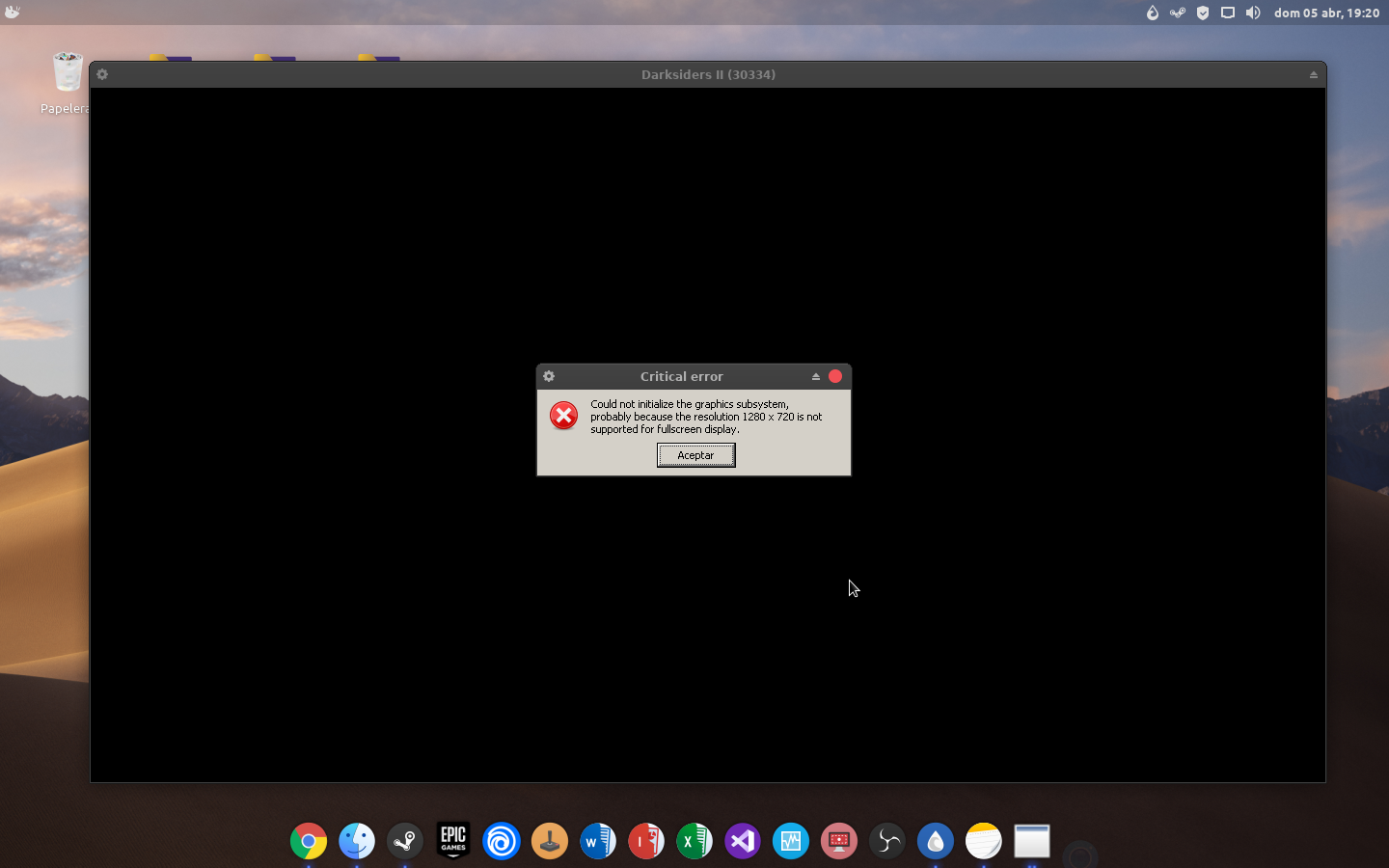
Proton 4.11.13

Hello @iWeaker4you, can you check if setting the game's launch options to PROTON_USE_WINED3D=1 %command% has an effect?
Also, please copy your system information from Steam (Steam -> Help -> System Information) and put it in a gist, then include a link to the gist in this issue report.
@kisak-valve I tried it and it works but crashes after 10 seconds within the game, that happens in any version of Proton, WINED3D does not work correctly, so apparently it is a DXVK problem that causes that resolution problem.
PS: Change the DXVK from Proton 4.11.13 to Proton 5.0.5 and it works without any problem, I confirm that it is a problem of the DXVK not Proton.
Proton 5.0.5 + 4.11.13 DXVK
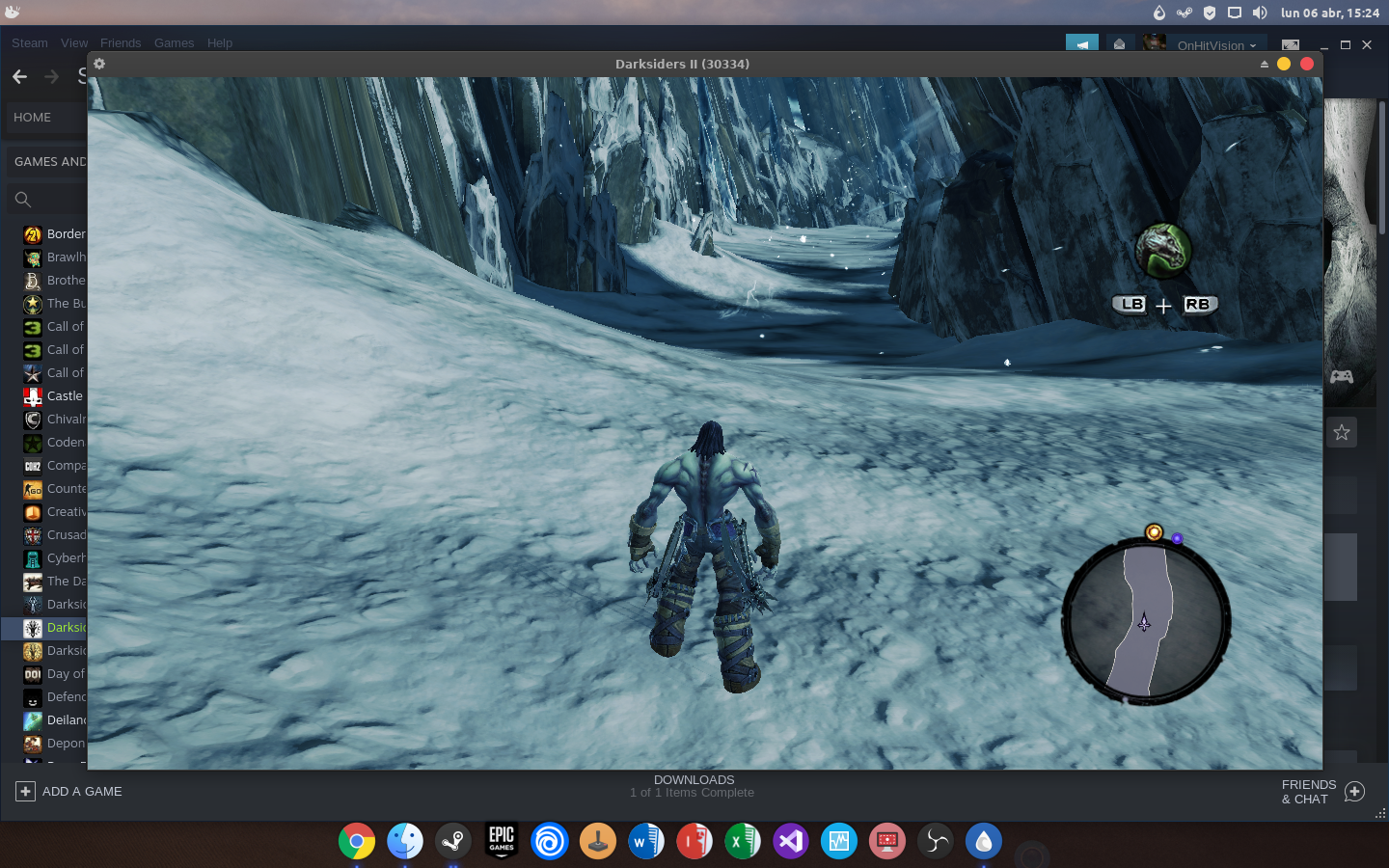
Compatibility Report
- Name of the game with compatibility issues: Darksiders II: Deathinitive Edition
- Steam AppID of the game: 388410
System Information
- GPU: AMD Radeon RX 580
- Driver/LLVM version: Mesa 20.0.7
- Distro version: Arch Linux
- Link to full system information report as Gist:
- Proton version: 5.0-9
I confirm:
- [ ] that I haven't found an existing compatibility report for this game.
- [X] that I have checked whether there are updates for my system available.
Symptoms
- Crash at the "Made with ..." Screen/Video.
Reproduction
- Start the Game
Logs
steam-388410_wined3d.log
steam-388410_dxkv.log
steam-388410_seccomp,noesync,nofsync.log
Using Proton-experimental and Proton 7.0-3; both crash before the main menu loads.
Hello linux lovers,
today I tried proton 3.7-6 beta and removed PROTON_NO_ESYNC=1 from launch options > it works for me and seems to play smoother than before.
Can someone confirm? If it works for all we could maybe whitelist?
This was tested with mesa 18.2.0 (stable).
Hi,
I'm using garuda linux x86_64 and I can confirm that worked for me with proton 3.7-8. No crushes after I close the options menu and the game works smooth. Thanks for the tip. Wouldn't cross my mind to select an older proton version.
What's wrong with using proton 8?
@massatt212 while in game,when using options menu to change resolution for example or sound,when I press ESC to go back into the game,the screen just froze. So I have to alt+f4 to close the game. Hope this answer your question.
Try the public beta for ds2
Sorry,I'm new to Linux and my knowledge is limited. The game is on steam library. What you mean is to download a public version of ds2 from steam? I had no issue running the game on Windows ( I still do,I have 2 ssd,one for each OS). I fall in love with garuda gnome Linux and I want to fully transition to Linux for games,video editing and day to day tasks. Thanks for your fast reply.
Proton versions
proton 3.7-6x5 2023-07proton 3.7-8x1 2023-07proton 7.0-3x1 2022-07proton experimentalx1 2022-07proton 4.11x2 2020-04proton 5.0x2 2020-04proton 4.2-7x1 2019-06proton 3.16x1 2019-01proton 3.7-5x1 2018-08proton 3.7x2 2018-08
Launch options
PROTON_NO_ESYNC=1x14 2023-07PROTON_USE_WINED3D=1x2 2020-04PROTON_NO_D3D11=1x1 2018-11PROTON_USE_WINED3D11=1x1 2018-11PROTON_NO_ESYNCx1 2018-11PROTON_NO_ESYNC=1"x2 2018-09PROTON_LOGx1 2018-09PROTON_LOG=1x1 2018-09PROTON_NO_ESYNC=1.x1 2018-09
Launch lines
PROTON_USE_WINED3D=1 %command%x1 2020-04PROTON_USE_WINED3D11=1 PROTON_NO_ESYNC=1 %command%x1 2018-11PROTON_NO_ESYNC=1 %command%x6 2018-11PROTON_NO_ESYNC=1 %command% -dx11x1 2018-08PROTON_NO_ESYNC=1 %command% -glx1 2018-08
Upstream links
- ValveSoftware/Proton/issues/3734x1 2020-04
- doitsujin/dxvk/issues/606x1 2018-08
DLLs
nvapi.dllx1 2018-09nvapi64.dllx1 2018-09
Arch Linux
Kernel 4.18.3
Proton 3.7
Nvidia GTX 1070 - nvidia-vulkan 396.51
KDE Plasma 5.13.4
KDE Framework 5.49.0
Qt 5.11.1
Only selecting Enable Steam Play for all titles let me start the game, then I selected a save spot and loaded the game. Ingame sound was playing, while the fullscreen window didn't show anything. Just a copy of what my desktop was shown at the time as picture.
Then switching on Use this tool instead of game-specific selections from Steam got worse. The game crashed before the ingame gfx and sound appear.
Switching off Use this tool instead of game-specific selections from Steam again, still lets the game crash now.