Automobilista 2
I can confirm that the game works fine, including FFB with my Logitech G27 using new-lg4ff, also multiplayer works fine.
I have same issues with alt+tab and Spotter and Enginer audios.
Using Proton 5.0.5
Unfortunately the application consistently crashes SteamVR during the start of each race, as also reported with Project CARS 2 [#908](https://github.com/ValveSoftware/Proton/issues/908#issuecomment-609408439) (tested on Ubuntu 19.10 using Valve Index)
System Information
- GPU: RTX 2060
- Driver/LLVM version: NVIDIA 440.82
- Kernel version: 5.3.0-46-generic
- Link to full system information report as Gist
- Proton version: 5.0-6 RC3
- SteamVR version: 1.11.7
I confirm:
- [x] that I have checked whether there are updates for my system available.
- steam-1066890.ubuntu1910_steamvr.log (SteamVR issue)
- steam-1066890.ubuntu1910.log (works as expected)
Reproduction
- Select the title within your
Libraryusing the Steam client and press thePlaybutton Launch Automobilista 2 in Steam VR mode- Select
SINGLE RACE>STARTfrom the title screen and wait for the race to start
@mimattr please add a VR report for Automobilista 2 on protondb so that folks know that it does not work. I was already tempted to buy it. Luckily I did not.
Problem with Spotter and Engineer voices is a game problem. This functionality is not included yet on the Early Access:
https://forum.reizastudios.com/threads/a-question-about-spotter-and-engineer-sounds.10015/#post-64198
Sorry!
What wheel you use?
Now, with Proton 5.13-1, when you do an Alt-Tab, the game don't go to black screen, but lost the inputs. You can't use the wheel and the keyboard, and then you must kill the game to exit.
@leillo1975 @StefanTT Unfortunately this application still fails to launch successfully and now crashes SteamVR during the initial "Reiza Studios" loading/startup screen and requires a Force Quit (Alt + F4)
System Information
- GPU: RTX 2060
- Driver/LLVM version: NVIDIA 455.38
- Kernel version: 5.4.0-53-generic
- Link to full system information report as Gist
- Proton version: 5.13-2 RC3
- SteamVR version: 1.15.7
I confirm:
- [x] that I have checked whether there are updates for my system available.
Reproduction
- Select the title within your
Libraryusing the Steam client and press thePlaybutton Launch Automobilista 2 in Steam VR mode
Now, with Proton 5.13-1, when you do an Alt-Tab, the game don't go to black screen, but lost the inputs. You can't use the wheel and the keyboard, and then you must kill the game to exit.
Possible workarounds:
- set ingame to borderless fullscreen (I lost VRR capability when I run with PROTON > 5.13)
OR - install gamescope (AMDGPU/INTEL? nvidia may be broken)
- launch with
gamescope -w1920 -h1080 -f %command%
This wraps the fullscreen window, SUPER+F toggles fullscreen, Alt-Tab seems to keep focus this way , sometimes my menu hangs and I have to toggle fullscreen , but ingame seems to run ok (I'm on AMDGPU) with proton 5.13
EDIT: also tested now with current Proton 7
another probably better way to fix the lost inputs problem / black screen is to start the game in it's own Xorg server, aka: start steam as the window manager by editing ~/.xinitrc
In the last Proton Experimental, there are a fix for Alt-Tab issue for Project Cars 3. This game uses the same engine (Madness) that this game and Project Cars 2.
Using Proton Experimental, and a Logitech G29 with new-lg4ff, after doing Alt-Tab, the game reacts to the wheel, but it looses a lot of effects, and seems there are not FFB (if you move the wheel quckly you feel the counter-steer). Same problem in Project Cars 2.
@aeikum
Using Proton Experimental, and a Logitech G29 with new-lg4ff, after doing Alt-Tab, the game reacts to the wheel, but it looses a lot of effects, and seems there are not FFB (if you move the wheel quckly you feel the counter-steer). Same problem in Project Cars 2.
Using new-lg4ff and Alt-Tabbing looses all control input from the wheel (Logitech Driving Force GT), keyboard / mouse and steam controller work fine.
Hi! regarding this issue https://github.com/ValveSoftware/Proton/issues/245#issuecomment-1044738007
I want to share my logs with both proton 6.3.8 and proton 7.0.1 in Automobilista 2, not detecting my G27 wheel with the last one.
I have the same problem that @alexbrrsclnt with my G29. There are a problem with wheels on the new proton version that affects a lot of games. Please fix it.
Here there are a possible solution:
https://github.com/ValveSoftware/Proton/issues/2366#issuecomment-1062822328
~Since 7.0 UDP connection to local listening UDP server (PORT 5606) seems to fail.~
Using 6.3 the game can connect to externally started Crew Chief instance / simple python3 server that listens on 5606 for UDP data.
Not sure if this some sort of sandboxing feature or not.
Edit:
UDP connection now seems to work ok with current proton 7
Since 7.0 UDP connection to local listening UDP server (PORT 5606) seems to fail. Using 6.3 the game can connect to externally started Crew Chief instance / simple python3 server that listens on 5606 for UDP data.
Not sure if this some sort of sandboxing feature or not.
What? you must explain how to install Crew Chief with AMS2!!!
What? you must explain how to install Crew Chief with AMS2!!!
You can "just" install crew chief into another wine prefix and start it before the game, but only in project cars 1 udp mode it will work.
If I remember correctly you need winetricks dotnet472 (this takes aeons on my machine, go watch a movie or two) and then install crew chief into it, not sure if dotnet install still works correctly with current wine (I think I used my asetto corsa prefix from proton 5.11-ge something :+1: ).
Start it and set it to project cars 1 udp mode , start ams2 and set export to pc1 mode for udp, at race start with proton 6.3 you should get a radio message.
~So far it was a bit flaky on my side and sometimes just stopped working and hogged 1 cpu in the end, maybe only good for one race or so.~
EDIT: apparently dotnet is broken with Proton > V5 , not sure if this also is true for wine as well , so maybe use lutris with older wine as runners or bottles (did not test that one yet , also manages wine prefixes and its versions)
EDIT (reg. crewchief flakyness):
@leillo1975 Using Proton-5.11-GE-1-MF glorious eggroll release (https://github.com/GloriousEggroll/proton-ge-custom/releases/tag/5.11-GE-1-MF) that was base to run my asetto corsa and disabling nAudio , the audio no longer cuts out, other 5.x releases may also work, seems everything higher breaks some form of .net compatibility.
But a question. You use the same Wine/proton instance to execute Crew Chief and the game?
I got Crew Chief running with Lutris using Wine, and the game booted with Proton 6.3 on Steam (Linux).
It's not clear to me, the preset you use in Crew Chief is the one from AMS2 or the one from Pcars1?
In the game there are 3 options in System, would that be ok?
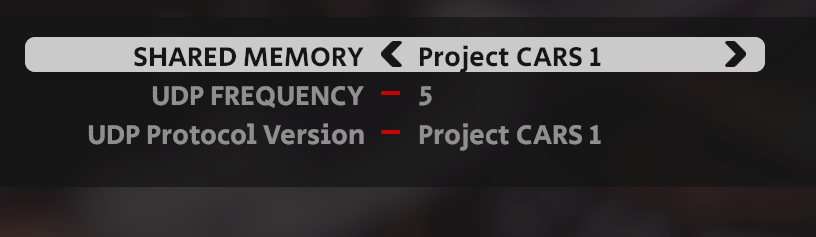
But a question. You use the same Wine/proton instance to execute Crew Chief and the game?
No, a separate one, starting another process instead of AMS2 when starting the game in steam is too complicated most of the time.
It's not clear to me, the preset you use in Crew Chief is the one from AMS2 or the one from Pcars1?
Only project cars 1 mode works, other modes use "shared memory" which can not be accessed (maybe would work when starting ams2 through crew chief in the same prefix, but I think protonfix dotnet installation does not work with 6.3 prefix)
In the game there are 3 options in System
Shared memory can be turned of, it will not be used with project cars 1 mode (udp)
For anyone able to debug this udp issue without the need of a telemetry program, this python script can be used to dump data once a race/practice/time trial begins (with proton 6.3 that is):
import socket
UDP_IP = "0.0.0.0"
UDP_PORT = 5606
sock = socket.socket(socket.AF_INET, socket.SOCK_DGRAM)
sock.bind((UDP_IP, UDP_PORT))

while True:
  data, addr = sock.recvfrom(8192)
  print("received data: %s" % data)
Running python simpleUdpDump.py in a terminal will dump the udp data to console whenever the game has any udp output enabled in the system setting by setting frequency to any number from 1 to 9 (the higher the number, the lower the update frequency)
With proton 7 there is no output as the game somehow cant connect to the local server anymore.
I found the problem! I was using pcars1 (64 bit) preset, but I had to select pCars1 (Network Mode). Now works great. Thanks a lot!
Compatibility Report
- Name of the game with compatibility issues: Automobilista 2
- Steam AppID of the game: 1066890
System Information
- GPU: AMD AMD Radeon RX 5700 XT
- Driver/LLVM version: (NAVI10, DRM 3.41.0, 5.13.0-37-generic, LLVM 12.0.1)
- Kernel version: 5.13.0-37-generic
- Link to full system information report as Gist: https://gist.github.com/Draluy/9fba014c2bcef2fcb8e89b01051c53be
- Proton version: Experimental or 6.3-8
I am using a Thrustmaster T248.
Symptoms
No force feedback in game, even if the controller is recognized correctly. I can play the game, but there is a uniform resistance of the wheel, with no proper force feedback felt.
Reproduction
Launch the game in proton experimental or 6.3-8, and feel no feedback. I am using a Thrustmaster T248.
The game crashes on Proton experimental or 7.0, when my T248 is plugged in.
It seems tm_api_lib_x64.lib could ne the culprit?
@Draluy Adding it in here as well. Renaming tm_api_lib_x64.lib to tm_api_lib_x64.lib.old solves the problem and the game runs fine with FFB on a T300RS
Everything works fine on my end except losing ffb if alt tab during the game. I have to restart to get back ffb
Since some days this game (and others) don't works with Logitech G29. The Wheel is detected as a PS3 gamepad. Seems to be a Steam Client update problem. Tested with Proton 7 and 6.3, and reported here:
https://github.com/ValveSoftware/Proton/issues/6323
Proton 8.0-1: game crashes for me on loading screen and shows the bugsplat window.
wine: Unhandled exception 0xe06d7363 in thread 254 at address 000000007B01260E (thread 0254), starting debugger...
Hello @ZakMcKrack3n, please add PROTON_LOG=1 %command% to the game's launch options and attach the generated $HOME/steam-$APPID.log to this issue report as a file. (Proton logs compress well if needed.) Also, please copy your system information from Steam (Steam -> Help -> System Information) and put it in a gist, then include a link to the gist in this issue report.
If this is a regression for you, then also note the newest Proton version you know works with the game.
It is not entirely clear what is happening , tested with deleted compatdata folder:
- 5.0 works
- 5.13 works
- 6.3 crashes during splash/loading screen
- 7.0 crashes during splash/loading screen
- 8.0 crashes during splash/loading screen
But only if my fanatec DD wheel in comp mode was connected, Logitech driving force wheel or steam controller worked fine and game starts fine with proton 8.
EDIT: Workaround:
- with no compdata , start the game with proton 5.0/5.13
- ignore steering wheel setup , ams2 will use some default setup in comp. mode
- OR in pc mode , select fanatec in controls menu und select csl dd base with separate pedals (mapping does not matter either)
- change proton version to 8.0, game should now start
- remap controls (ids all changed , so mapped controls no longer work)
~Gist with system info: https://gist.github.com/ZakMcKrack3n/153573bad8fd5110717b844b3535557c~
Proton log: steam-1066890.log
EDIT: switched to the community flatpak version of steam and changed to proton 8.0 again , now I can start the game with the wheel connected and everything works (as I understand there are some other issues involving system malloc libs mismatches to trigger some issues).
Now, with Proton 5.13-1, when you do an Alt-Tab, the game don't go to black screen, but lost the inputs. You can't use the wheel and the keyboard, and then you must kill the game to exit.
i think i found a solution to the alt-tab that worked for me atleast.
Enable "Emulate Virtual desktop"
Run winecfg protontricks -c "wine winecfg" 1066890
Tick virtual desktop in graphics tab. (enter your desktop resolution too)
there's probably a one liner for this, i'll update this post when i find it.
Alt-tab works now with Proton 9, even with FFB
Alt-tab works now with Proton 9, even with FFB
ah okay, i was having a separate issue getting my wheel detected by ams2 in newer versions of Proton (it works fine on 8.0 with other sims).
I'll focus on moving the other ones to 9.0 and then maybe ams2 as well.
almost after every reboot I have to rebind my controllers. I think it's something with jsevent ids but this is not an issue on other sim racing games like ACC, rF2
I've been having trouble getting FFB to work after the latest big update to the game. I doubt this is a Proton issue as Assetto Corsa continues to work perfectly fine, but does anyone have any idea how to troubleshoot this? At one point my binds were gone but the FFB came back, and I was able to just rebind the buttons and the wheel worked fine for a bit. But now the FFB no longer works again. I just have no idea what the condition is for the FFB to work. Reinstalling, deleting the directory in Documents, plugging in different USB-slots, verifying files, disabling/enabling Steam Input and bunch of other things I've tried but can't remember off the top of my head.
Edit: Should mention I have a G29, running vanilla Arch Linux.
Edit2: Currently the newest Proton version that is able to run the game with FFB seems to be 7, with 7-44GE able to run it until the game window goes out of focus (alt+tab). So running the game with 7-44GE and Gamescope seems to be the only way to run the game currently.
@Ninmi The reason for it working is almost certainly nothing to do with the proton version specifically, rather I suspect you are attributing a side-effect of the version switch (various setup scripts etc. are re-run on version change) to it being the specific version itself that has fixed things.
I was troubleshooting this on the Reiza forums with a few helpful folks and forgot to update this as well. My bad.
I had tried switching between the following:
ProtonGE-7-44
Proton 8.0-5
Proton 9.0-4
ProtonGE-9-11
ProtonGE-9-15
ProtonGE-9-20
ProtonGE-10-28
ProtonGE-10-34
Proton Exp. (01.06.)
Proton 11 beta
Only ProtonGE 7-44 had FFB at all.
The good news is that not only is FFB now working in ProtonGE-10-34 again, but I no longer had to rebind all the buttons on switching back to ProtonGE-10-34. The bad news is I still don't know why thing work or why they don't. The best guess I have is that something got updated in a system update in between now and the last time I tried.
only protonge 10-12 can make game detect pedals, latest 11-1 version has an issue on this. Wheel is ok but not pedals. moza r5 + srp pedals
The good news is that not only is FFB now working in ProtonGE-10-34 again, but I no longer had to rebind all the buttons on switching back to ProtonGE-10-34. The bad news is I still don't know why thing work or why they don't. The best guess I have is that something got updated in a system update in between now and the last time I tried.
What wheel do you have?
For my Fanatec CSL DD I had to switch the wheel type around , and suddenly the FFB works again after proton switch / update, maybe in game bug, but did nothing on proton or my system to fix it.
I have a G29, and the wheel is detected and works with FFB on proton experimental. However, I have to manually configure the wheel's range, and mapping the pedals (I've no shifter), and I can't do menu navigation with the built-in gamepad. This was on arch with linux 7.1.3 and a fresh installation of the game where I didn't touch any files
For me the only way to have FFB on my g29 is using ProtonGE 7-44. Is this a proton or game issue?
My system information: https://gist.github.com/carvalhods/5f256019ced83c4dfdc31e8737f0c911
Wheel: Logitech G29
Proton 7 logs (FFB works): steam-1066890-proton7.log
Proton 11 logs (FFB not working): steam-1066890-proton11.log
Proton Experimental logs (FFB not working): steam-1066890.log
Replying to https://github.com/ValveSoftware/Proton/issues/3748#issuecomment-6099279774
Your wheel / input device?
If its an hidraw issue (SDL is is Proton 7 default and hidraw is used in 11/Experimental):
try PROTON_DISABLE_HIDRAW=1 %command% or PROTON_PREFER_SDL=1 %command% as possible launch parameters.
Replying to https://github.com/ValveSoftware/Proton/issues/3748#issuecomment-6107593870
My wheel is Logitech G29.
With PROTON_PREFER_SDL=1 and/or PROTON_DISABLE_HIDRAW=1, force feedback still doesn't work in Proton 11: steam-1066890.log
Related threads
- [d3d11] [regression] [dissected] Automobilista 2 severe performance regression since v1.9.4dxvkclosed same game
- Steering Wheel Force Feedback broke in 4.11-7 (blanket issue)protonclosed same upstream bug
- Project Cars 2protonopen same upstream bug
- Wreckfestprotonopen same upstream bug
- F1 2019protonopen same upstream bug
- DiRT Rally 2.0protonopen same upstream bug
- GT Legendsprotonopen same upstream bug
- Race 07protonopen same upstream bug
- Cyberpunk 2077protonopen same upstream bug
- Grand Theft Auto Vprotonopen same upstream bug
Proton versions
proton experimentalx6 2026-10proton 8.0-5x1 2026-06proton 9.0-4x1 2026-06proton 5.13-1x3 2025-01proton 5.0x2 2023-04proton 8.0x1 2023-04proton 8.0-1x1 2023-04proton 6.3x4 2022-03proton 5.11x1 2022-03proton 5.11-ge-1x1 2022-03proton 7.0x1 2022-02proton 5.13x1 2021-08
Launch options
PROTON_DISABLE_HIDRAW=1x2 2026-10PROTON_PREFER_SDL=1x2 2026-10PROTON_LOG=1x1 2023-04
Launch lines
PROTON_DISABLE_HIDRAW=1 %command%x1 2026-10PROTON_PREFER_SDL=1 %command%x1 2026-10gamescope -w1920 -h1080 -f %command%x1 2021-08
Upstream links
- ValveSoftware/Proton/issues/6323x1 2022-11
- ValveSoftware/Proton/issues/2366x1 2022-03
- ValveSoftware/Proton/issues/245x1 2022-02
- ValveSoftware/Proton/issues/908x3 2021-10
- ValveSoftware/Proton/issues/4888x1 2021-10
- ValveSoftware/Proton/issues/244x1 2020-04
Compatibility Report
System Information
I confirm:
steam-1066890.log
Symptoms
The game works almost perfectly with a good framerate and Logitech G29 FFB compatibility (I use new-lg4ff, but I don't know if it works with kernel driver) except for:
When I try to use Alt-Tab to switch to another window, the game goes to a black screen. This problem is related to another Madness Engine games like Project Cars ( https://github.com/ValveSoftware/Proton/issues/244 ) and Project Cars 2 ( https://github.com/ValveSoftware/Proton/issues/908 ) .
EDITED: Problem with Spotter and Engineer voices is a game problem. This functionality is not included yet on the Early Access. Sorry!
Reproduction
Simply install and play. No fixes and workarounds