Command & Conquer Remastered Collection
The game launcher comes up fine

when I click on the icon for "C&C Remastered" or "Red Alert Remastered" I get an error

Game is working fine for me
System:    Host: alex-desktop Kernel: 5.6.10-arch1-1-fsync x86_64 bits: 64 compiler: gcc v: 9.3.0 Desktop: KDE Plasma 5.18.5
           tk: Qt 5.15.0 wm: kwin_x11 dm: LightDM, SDDM Distro: Antergos Linux
CPU:       Topology: 6-Core model: AMD Ryzen 5 2600 bits: 64 type: MT MCP arch: Zen+ rev: 2 L2 cache: 3072 KiB
           flags: avx avx2 lm nx pae sse sse2 sse3 sse4_1 sse4_2 sse4a ssse3 svm bogomips: 81469
           Speed: 3199 MHz min/max: 1550/3400 MHz Core speeds (MHz): 1: 3199 2: 3549 3: 1557 4: 1556 5: 3884 6: 3881 7: 1557
           8: 1556 9: 3139 10: 3486 11: 2964 12: 3570
Graphics:  Device-1: Advanced Micro Devices [AMD/ATI] Vega 10 XL/XT [Radeon RX Vega 56/64] vendor: Sapphire Limited
           driver: amdgpu v: kernel bus ID: 08:00.0 chip ID: 1002:687f
           Display: x11 server: X.Org 1.20.8 compositor: kwin_x11 driver: amdgpu unloaded: fbdev,modesetting,vesa
           alternate: ati resolution: 2560x1440~144Hz s-dpi: 96
           OpenGL: renderer: Radeon RX Vega (VEGA10 DRM 3.36.0 5.6.10-arch1-1-fsync LLVM 10.0.0) v: 4.6 Mesa 20.0.7
           direct render: Yes
I'm running the game with RADV_PERFTEST=aco tho, nut sure if it makes a difference
The Steam required error appears to also affect Windows users.
Edit: This issue appears to be caused by people not updating their client.
The game runs 100% fine for me. Although the launcher is very slow to load, it takes several minutes for it to appear.
Here is the log from a 1.5 hour long play session:
steam-1213210.log
Edit: After playing the game some more I have noticed minor audio crackling.
I am seeing a similar issue on Ubuntu 18.04 LTS, the launcher and splash screen displays, then the game crashes. I don't see an error.
- GPU: Radeon RX 590
- Driver/LLVM version: LLVM 9.0.0, Mesa 19.2.8
- Kernel version: 5.3.0-53-generic
- Link to full system information report: https://gist.github.com/marxjohnson/25473442300f9a6fbdb5b991e73882b4#file-system
- Proton version: 5.0-8
Nevermind. It works fine with Proton 5.0-8 :tada:
Additional info:
- Linux: Ubuntu 20.04 LTS
- GPU: UHD Graphics 620
For me it crashes on both 5.0-7 and 5.0-8 - same issue as @marxjohnson .
When I run it with PROTON_USE_WINED3D=1, it works almost perfectly:
I had a few stutters, one black screen on mission start (out of ~10 mission starts), and there are sometimes audio pops/artifacts, however it seems people are encountering a lot of bugs on Windows so I'm not sure if this is due to Proton.
- OpenGL renderer string: Radeon RX 570 Series (POLARIS10, DRM 3.33.0, 5.3.0-53-generic, LLVM 9.0.0)
- Mesa 19.2.8
- Linux Mint 19.3
Hello @marxjohnson, looking at your system information, you're missing 32 bit vulkan support for your video card. Please run sudo apt install mesa-vulkan-drivers:i386 and see if that makes a difference.
Installed mesa-vulkan-drivers:i386 as described - this fixed the problem - the game now runs without any special options.
Hello @marxjohnson, looking at your system information, you're missing 32 bit vulkan support for your video card. Please run
sudo apt install mesa-vulkan-drivers:i386and see if that makes a difference.
That solved my problem, thanks!
I had plenty of issues with this game, so adding to this same ticket.
Compatibility Report
- The sound is incredibly choppy. It's better to just mute the game, although that's missing out of its fabulous soundtrack.
- The mouse doesn't behave normally, it has some inertia that makes aiming where I want to click incredible hard.
- Looks like there's not widescreen support, I just a black bar on the LEFT side (at 3440x1440). The content isn't even centred, but right-aligned.
- Touching the right edge of the screen does not scroll right. Other directions work. Scrolling left required that I move the mouse PAST the empty black space on the left. In other words: I can scroll left, up and down, but not right.
- The resolution picker is just empty regardless of the game being windowed, fullscreened or "fullscreen window". These last two settings seem to be identical too.
- The "loading" window doesn't show up on the monitor which is focus (where steam is), but the other one. Moving that window is impossible.
In short, video doesn't work, audio doesn't work, and input doesn't work. Nothing works as expected.
System Information
- GPU: Intel
- Driver/LLVM version: Mesa 20.1.0
- Kernel version: Linux 5.7.0-arch1-1 x86_64 GNU/Linux
- Link to full system information report: https://gist.github.com/WhyNotHugo/2374dd937039a655cf64f31e778002f6
- Proton version: 5.0-7
So far, Tiberian Dawn works flawlessly for me (playing the 7th GDI mission right now).
- OS: Ubuntu 19.10
- Kernel: 5.3.0-55-generic
- GPU: GTX 1080 Ti
- GPU Driver: Nvidia 440.82
- Monitors: two monitors connected; but only one of the active, at 2560x1440 (WQHD)
- CPU: Ryzen 5 3600 on an ASUS ROG STRIX B450-F
- Proton Version: 5.0-8
Furhter notes:
- I did not specify any proton environment variables.
- The launcher comes up swiftly, and seems to work as intended.
- I experienced no audio crackling.
- I experienced no mouse cursor offset.
- I experienced no graphical issues.
Works well for me except for audio crackling. Looking at SteamDB, audio crackling appears to be one of the leading complaints. Most noticeable in the main menu.
OS: Ubuntu Mate 18.04
Kernel: 5.3.0-59-generic
GPU: GTX 1070 Ti
GPU Driver: Nvidia 440.82
CPU: Ryzen 1800x on an ASUS Crosshair 6
Proton Version: 5.0-8
- OS: Fedora 32
- Kernel: 5.6.19-300.fc32.x86_64
- GPU: RX 570
- GPU Driver: Mesa 20.1.1 (running with ACO)
- CPU: Ryzen 1700X on B350M Bazooka
- Proton Version: 5.0-9
I get a guaranteed, 100% reproducible crash when loading the attached save game. I played NOD campaign up to the 11th mission beginning (that's the save game), now I can't even load save games from the 10th mission because that crashes the game too; previous NOD missions load fine. GDI saves up to mission 12 load OK :-)
MOBIUS_NOD_CAMPAIGN_11A_MAP_06-15-2020-21-57-47-86.zip
Other notes:
- I experience audio crackling any time I am in menu (in-game is fine, intro and cutscenes are fine)
- This comment is valid for all available Steam versions of C&C Remastered up to today, including the recent patch
OS: Debian 10
Kernel: Linux mio 5.6.0-0.bpo.2-amd64 #1 SMP Debian 5.6.14-2~bpo10+1 (2020-06-09) x86_64
GNU/Linux (This kernel version is backported from debian development release).
(I did also try the original stock kernel version 4.19)
GPU: Mesa DRI Intel(R) HD Graphics 5500 (Broadwell GT2)
Proton version: 5.0-9
- I can select if I want to play tiberian something or red alert, select one of them
- game crashes shows dialouge with title Pretroglyph Crash Report.
I have earlier tried to play install the game under Windows 10 and VirtualBox 6.1. It crashed in the same way then.
UPDATE 2021-08-16:
Updating from Debian buster to bullseye makes it possible to launch and play the game.
(Debian bullseye is the newly released stable version of Debian)
OS: Debian 11
Kernel: Linux mio 5.10.0-8-amd64 #1 SMP Debian 5.10.46-4 (2021-08-03) x86_64 GNU/Linux
Addendum to my attached save two comments prior: For what it's worth, I reached out to a C&C Remastered owning friend that uses Windows, and his copy crashes loading that save too. So that's very likely an upstream issue, not Proton issue. It was also pointed out to me that I could restart the mission from Mission Select, thus I actually didn't lose any progress.
The only remaining known issue for me is the main menu audio crackling.
I usually run in my laptop but game in an external monitor.
I've noticed that many games (and not just this one) hace issues detecting screen resolutions; it seems that proton always passes on the resolution of the primary monitor rather than the one games are displayed on.
I could not launch the game, the screen goes black and I see the error report window from Petroglyph. My log is
mmap() failed: Cannot allocate memory
Failed to create permanent mapping for memfd region with ID = 3267617951
Failed to regester memfd mempool. Reason: could not attach memfd SHM ID to pipe
mmap() failed: Cannot allocate memory
Failed to create permanent mapping for memfd region with ID = 3787375599
mmap() failed: Cannot allocate memory
Failed to create permanent mapping for memfd region with ID = 1717082377
Ignoring received block reference with non-registered memfd ID = 1717082377
mmap() failed: Cannot allocate memory
Failed to create permanent mapping for memfd region with ID = 285427487
Failed to regester memfd mempool. Reason: could not attach memfd SHM ID to pipe
mmap() failed: Cannot allocate memory
Failed to create permanent mapping for memfd region with ID = 3787375599
mmap() failed: Cannot allocate memory
Failed to create permanent mapping for memfd region with ID = 4226181212
Ignoring received block reference with non-registered memfd ID = 4226181212
ALSA lib pulse.c:242:(pulse_connect) PulseAudio: Unable to connect: Protocol error

INFO: OpenAudioDevice failed: ALSA: Couldn't open audio device: Connection refused
INFO: Assertion failed: 0 && "Failed to open audio device!"
Ubuntu 20.04 on Dell XPS 9380. I also had to add PROTON_USE_WINED3D=1 to see the launcher at least.
For those who are digging this: LAA is already applied to all the binaries, I checked. Pulseaudio has been working fine for the other games.
Hello,
Here's my environment:
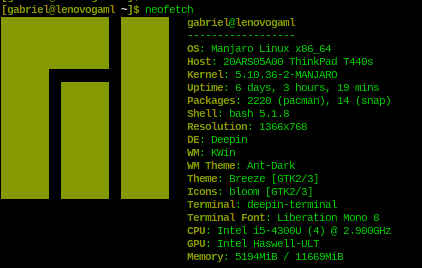
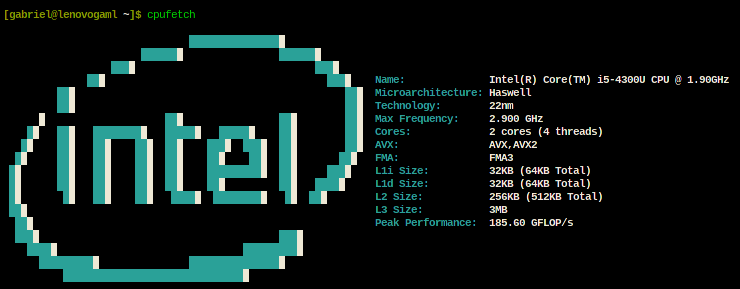
And this is what I get when I want to start playing the game.
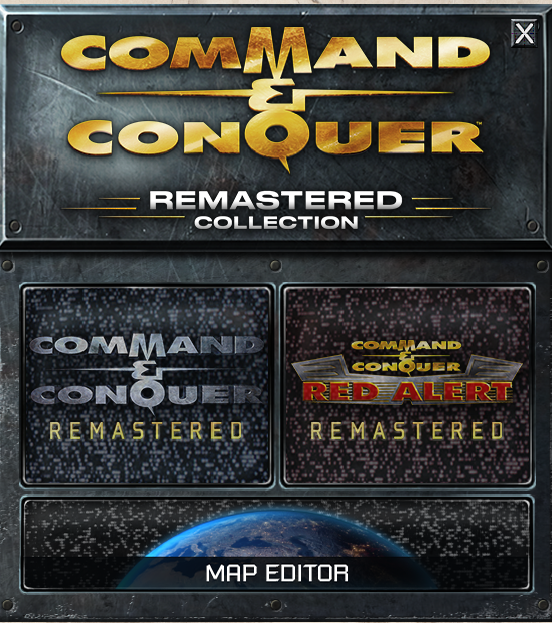
and when I chose one of the games:

Seems a Wine issue and Steam Support redirceted me to Proton Github site and I found this entry.
My default Proton version is quite old, but it runs every game:
$ pacman -Q |grep -i proton
proton 4.2.5-1
Maybe I should tell Steam to use another version of Proton to run C&C
Do try more recent Protons if you haven't already. I had great success with whatever the current release version would have been for October/November 2020, possibly 5.13. The only hitch I had was the first run of the game (actual game launch, not the launcher itself), black screen running in full-screen mode. Once I was able to get the game running in windowed mode (can't recall if I had to hack the configuration file for this), everything ran great.
Edit: I can't recall if I forced WineD3D or not, but I confirm DXVK works once I learned about the 32-bit Vulkan driver requirement for other games.
My setup:
Ubuntu 20.04
Working config as of 7-18-2021:
Steam Force Compatibility with Proton 5.13-6
PROTON_USE_WINED3D=1 %command% NOSPLASHPRELOAD
Had to move my game install from my secondary HD to my primary one (Where Ubuntu runs from). After I did that and hit "Verify Integrity of Game files" (under Local Files), the game started up and ran fine.
Prior to this config, the game selection screen wouldn't even show. Steam would say it had launched, but nothing would happen.
Using this:
Working config as of 7-18-2021:
Steam Force Compatibility with Proton 5.13-6
PROTON_USE_WINED3D=1 %command% NOSPLASHPRELOAD
the game launched but I need to find out the way to set it to run windowed and not full screen. Where are the configuration files stored?
OS: Mint 20
Kernel: x86_64 Linux 5.4.0-92-generic
GPU: GeForce GTX 960
GPU Driver: 460.91.03
CPU: Ryzen 5 1600
Proton Version: I tried three different Version,I dont remember the third version exactly, but one was Experimental and one was 6.3-8
Used PROTON_USE_WINED3D=1 %command% NOSPLASHPRELOAD
The Audio is crackling especially in the mainmenu.
Another more major issue is:
In late multiplayer games of red alert ( with many tanks/units) the game starts lagging heavily.
I send a command and it took 30-60 seconds for the units to receive the command and start moving.
Also Units were lagging accross the screen, when moved by the enemy.
Still seems fine with Proton 7.0-1. I reiterate that forcing use of WineD3D should not be necessary.
Command & Conquer Remastered Collection Fullscreen Mouse
Issue transferred from https://github.com/ValveSoftware/Proton/issues/6959.
@fullmetalarmour posted on 2023-07-23T21:02:42:
Compatibility Report
- Name of the game with compatibility issues: Command & Conquer Remastered Collection
- Steam AppID of the game: 1213210
System Information
- GPU: AMD ATI Radeon RX 5600
- Video driver version: mesa-23.1.4-2
- Kernel version: 6.4.4-arch1-1
- Link to full system information report as Gist:
- Proton version: Experimental
I confirm:
- [ ✓] that I haven't found an existing compatibility report for this game.
- [✓ ] that I have checked whether there are updates for my system available.
Symptoms
Fullscreen don't work with mouse you can't move the map right and down alt+tab and alt+enter don't solve the issue.
Reproduction
There is a workaround by setting Set Screen To Borderless Window and uncheck Contain Mouse Cursor to Window.
A new issue popped up. This game no longer works. I have attached the log file.
Proton versions
proton 7.0-1x1 2022-02proton 5.13-6x2 2021-07proton 4.2x1 2021-05proton 5.0-8x1 2020-06
Launch options
PROTON_USE_WINED3D=1x3 2022-01PROTON_USE_WINED3D=1`x1 2020-08PROTON_USE_WINED3D=1`,x1 2020-06RADV_PERFTEST=acox1 2020-06
Launch lines
PROTON_USE_WINED3D=1 %command%x3 2022-01
Upstream links
- ValveSoftware/Proton/issues/6959x1 2023-07
Compatibility Report
System Information
I confirm:
Log: https://gist.github.com/allquixotic/eaf4f334548cbb30732a0591382284c8/raw/f6b45de1e299e42ede68c03220b1e6d73b551430/proton-cnc-fail.txt
Symptoms
The game launcher comes up fine, but when I click on the icon for "C&C Remastered" or "Red Alert Remastered", my mouse cursor goes away, I become unable to alt-tab, but the game doesn't start. The icon for the game stays in the system tray but nothing ever loads. If I alt-tab to focus the game window, I get a black screen and have to kill the X server or power cycle the computer to get back to a usable system.
Reproduction