I could not reproduce the issue with the latest Experimental: could start the game, get to the second floor, play the piano a bit etc. and exit normally through the menu. Could you please try with the latest experimental?
Definitely. I will try today.
Hey, @gofman, I made exactly what you said. And yes, this time the game seemed to work. Perfectly. I kept exploring, and I went to the ending of "level 1", so to say, when you get the key to the painting room and face the canvas. At this time -- at least in the 2D version -- you effectively "travel" to another version of the same house. And I got the same kind of hang that appeared before much earlier. SteamVR went down and the game "tried" to continue in the screen (in a hung state), with the sound now going through the regular speakers.
I had PROTON_LOG=1 so here's the new steamvr log. I hope you guys from Valve are able to continue the troubleshooting here. Congratulations for your amazing work.
I tried hard to reproduce your issue, but could not: I just get to the new location after exiting the room after facing the canvas. Did it twice from the prologue level start. I don't yet have any good ideas what can be making the difference, not that I see any conclusive hints in the log yet.
Could you maybe try removing the game prefix (/steamapps/compatdata/1183030 backing that up if you have any useful game saves there), verify game files and reinstall the SteamVR completely? So that the new prefix will be created by the current Experimental version. And restart everything before trying: computer, VR headset.
Hi,
Did exactly as you asked:
And the game crashed the same way but after only about 5 minutes playing, as I started from scratch I had not even gone to the second floor -- it crashed in the basement (freezes the scene, takes about 10-15 seconds them SteamVR crashes).
The steam log for that crash is attached.
steam-1183030.log
Can you please try it until the hang with "PROTON_NO_FSYNC=1 WINEDEBUG=+pid,+loaddll,+timestamp,+seh,+vrclient,+openxr %command%" launch options and attached the resulting (zipped) log if possible? The log may grow big but it should be packed very well.
Played 1 hour and a half of the game with no problems (well, maybe some hiccups but quite short). Ended up exitting it normally. Seems the setting that was lacking was PROTON_NO_FSYNC=1. A 1.9GB file was generated but as it did not crash this time, I think we're good: I removed the file and I am going to send an entry in protondb now.
Ok... Played a couple more times, and although it is playable, it sometimes crashes the same way it was doing before -- it only takes much longer now. I'll let it logging for when it crashes and will try to host the log somewhere.
Ok, now I've played for about 10 minutes and the game crashed as before. Here is the log, compressed. launch options are "PROTON_NO_FSYNC=1 WINEDEBUG=+pid,+loaddll,+timestamp,+seh,+vrclient,+openxr %command%"
steam-1183030.zip
PROTON_NO_FSYNC=1x2 2021-03WINEDEBUG=+pid,+loaddll,+timestamp,+seh,+vrclient,+openxrx2 2021-03PROTON_NO_FSYNC=1.x1 2021-03PROTON_LOG=1x1 2021-03
Compatibility Report
System Information
I confirm:
steam-1183030.log
steam_logs.zip
Symptoms
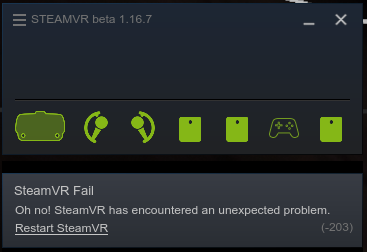
Layers of Fear VR starts correctly, even starts playing. But after a few seconds of playing, it crashes steamvr completely, the game kind of continues playing but the HMD turns off and sound changes to the regular speakers. SteamVR says "Oh no! SteamVR has encountered an unexpected problem." (screenshot attached)
Reproduction
Note: the current steam log has crashed even before the inside the house scene even appeared, shortly after the loading screen disappeared. I also included the most recent logs under ~/.steam (error.log and the files under steam/logs/) for good measure.