Operation Flashpoint: Red River
When testing under WIndows10 I discovered the rectangle box that shows up is "Checking for Downloadable Content". The game will crash after this point under proton either by that screen or the mainmenu popup.
I guess what I can do is APITRACE this under windows to the main menu, exit and post the apitrace, then compare that to Linux. Might reveal something, broken or missing component in wine.. who knows.
Here is the windows10 Trace file. I skip intro movies with ENTER key, then press ENTER to do the codemaster checking downloadable content (rectangle window under proton), then it goes to main menu where I select Quit Game. End of trace.
d3d9.dll wrapper version used. LauncherApp trace ignored as it does not appear to get in the way of anything.
https://www.dropbox.com/s/06gvwu622oda0dx/RedRiver.zip?dl=0
I will post the Linux trace later using the wrapper method. Game can't be launched directly from its RedRiver.exe unfortunately so wrapper is only method.
I get the same results. I tried to use DXVK on Windows to see if the UI bug is present too and it is, but there it doesn't crash after the white box.
I will try to do some more digging and grab the necessary information to make a DXVK bug report.
Finally got this working without the ctd. The elements don't show with normal wine d3d9 or dxvk.
The trick to get this working for me was to install gfw (don't use xlive.dll/ini trick version that works for windows) from winetricks; not sure if dotnet40 is needed or not but I managed to get it installed.
GFW menu showed up top, made a offline account, continued; then to get into game I had to blind press enter and hoped I hit the right thing.
You may need to turn off F/E Sync!!!
It seems the menu is being rendered with some sort of interactive video file format?
Anyway I was able to get into game.
PS. I used Lutris and older wine5.6 fshack build, but perhaps it work with similar proton......
After getting in-game (took many random clicks and pressing enter, I think down 3 times and enter worked but I dunno...)
As you can see there is missing objects here. This is using DXVK-dvk9 I believe.
There is a warning in the D3D log that repeats, no idea if it matters.
warn: D3D9: VK_FORMAT_D24_UNORM_S8_UINT -> VK_FORMAT_D32_SFLOAT_S8_UINT
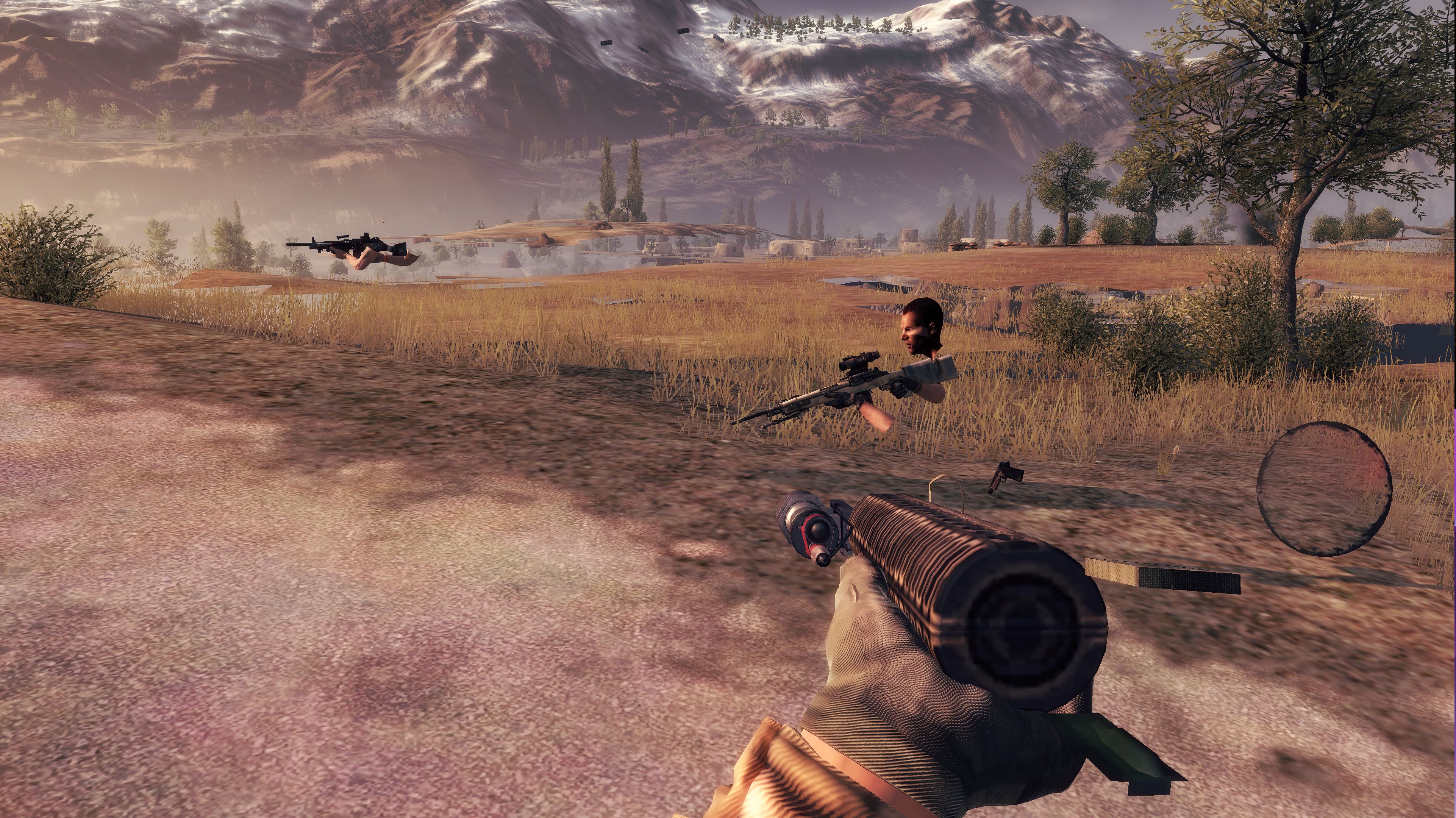
That.. is far from playable. lol
Nice job though! I will check it out myself later.
I think the game uses Dirt 1 or 2 engine. Dirt 1 has a native port but I wonder how well it runs via proton. Dirt 2 works via proton apparently.
I have no idea why this game has such graphical issues; but it is using 32bit dx9 engine as far as I can tell no DX11 options exist for it.
Also it seems OFP2:RR has been removed from steam which seems grim and maybe will greatly reduce our chances of getting a fix here for existing owners of the game. I was really hoping this be fixed up as it be a neat little FPS for Steam Deck if only proton/wine worked for it. GFWL is the least of its issues.
I saw your deleted comment and I suspect you removed it because you realized the video was about a different game, but it made me think maybe it's worth trying Gallium Nine for OF:RR too.
I am using an Nvidia card, so I can't test it unfortunately, but it should work on your system.
I am using an Nvidia card, so I can't test it unfortunately, but it should work on your system.
I've never messed with Gallium9; also I use a 6800xt which may not work with it? Using ARCH atm and have never messed with G9 under Arch. I could look into it.
Also it may be worth testing Dirt-1 out via proton (bypass native) and see what the results are since I think the engine is the same. If similar graphical issues occur then we at least know its not specific to this game but the engine version itself.
Oh I have dirt-rally, but it says directx11 and is a 2015 game so that can't be same game engine.
https://en.wikipedia.org/wiki/Ego_(game_engine)
Dirt 3... I'm a little confused with the steam listings of these dirt games.. maybe they've received several re-releases and remakes? lol
Found it on keystore for $5, might grab it and test it. Some of these games get removed from purchase due to DRM methods no longer available or broken. Such as GFWL.. however GFWL still lets you install a offline account if you have the correct version such as that which is included in winetricks! (otherwise you can't launch game)
@Vinjul1704 here is dirt3, I accidentally bought it again because I'm a dingle and didn't realise I had it already. CKB4W-ZT3LZ-JANJN ---- This is same engine as this game. (however complete edition is a updated version; I still think its same engine)
Hello @jarrard, it should be noted that about 375 users plus whoever visits this page have seen that key. In the future, it'd be a good idea to use a more secure communication method to give away games.
Hello @jarrard, it should be noted that about 375 users plus whoever visits this page have seen that key. In the future, it'd be a good idea to use a more secure communication method to give away games.
Feel free to take the key, I really don't mind who takes it. Maybe provide feedback if it works via proton or not. I'm downloading it now for testing myself.
There is also Bodycount and F1 2011 that uses this ego engine.
I already own it and am downloading it too, thanks, but as kisak-valve said, it's probably not a good idea to post Steam keys in public github issues.
Dirt 3 works but you need PROTON_NO_ESYNC=1 PROTON_NO_FSYNC=1 %command% to start it. (also needed for OFP:RR)
No graphical issues thus far. Puzzling.
it's probably not a good idea to post Steam keys in public github issues.
I agree; but like I said. Anyone can grab it. I don't care. Was a mistake buy I can't get refund for. My loss.
Maybe it will be useful for testing? but given I don't see any graphical issues happening... :(
As additional tip to getting this working via proton (still graphical issues), these commands maybe needed.
chmod 666 ~/.steam/steam/steamapps/compatdata/44340/pfx/dosdevices/c:/windows/syswow64/msasn1.dll
protontricks 44340 -q gfw win7
The chmod 666 thing is needed because otherwise msasn1 can't install due to a permission issue. (dotnet has similar issues when installing).
I do not believe Dotnet4.0 is needed.
I deleted the GFW and DOTNET from redist folder under OFP:RR otherwise steam attempts to installs them and likely breaks the
prefix!
Then the game will work, do not go online with gfw. The main menu can't be seen but clicks and noises can be heard obviously.
Graphics configuration can be accessed via XML file: ~/.steam/steam/steamapps/compatdata/44340/pfx/drive_c/users/steamuser/Documents/My Games/OFRR/hardwaresettings/hardware_settings_config.xml
Dirt 3 works but you need PROTON_NO_ESYNC=1 PROTON_NO_FSYNC=1 %command% to start it. (also needed for OFP:RR)
No graphical issues thus far. Puzzling.
Same on my end, with the exception that I didn't even need the env vars. Ran the benchmark a few times and didn't notice any graphical issues. The issues appear to be specific to OF:RR
Then the game will work, do not go online with gfw. The main menu can't be seen but clicks and noises can be heard obviously.
I will test that tomorrow and try to narrow down which setup steps are required exactly. For .NET, try Proton 5.0, as that's before it broke.
For .NET, try Proton 5.0, as that's before it broke.
.NET does nothing for this game.
This game has remarkably improved over they years!
- Use Proton9-4
protontricks 44340 -q gfw- Create an offline profile when GFWL prompts you
And the game works for the most part! Some audio glitches in the menu, but upon starting campaign the video loads! Upon gameplay starting, I have a steady sine noise that cannot be stopped, possibly because i have a 7.1 atmos system and the game probably only supports stereo. Framerate is great though! I would even finally play this game if that sine noise wasnt an issue. I mean seriously, it's bad! I would say playable, but shit that noise is awful!
Is that on a AMD GPU? Because I've had lots of issues in the past on my NVIDIA GPU. I'll give it another shot however.
Proton versions
proton 5.0x2 2021-09proton5.0x1 2021-07
Launch options
PROTON_NO_ESYNC=1x2 2021-09PROTON_NO_FSYNC=1x2 2021-09
Launch lines
DLLs
msasn1.dllx1 2021-09xlive.dllx2 2021-09d3d9.dllx1 2021-07
Compatibility Report
System Information
I confirm:
Proton Log: steam-44340.log
Symptoms/Problem
With protontricks gfw package, it should show up and you create offline account. Don't use custom xlive dlls!
With correct xlive.dll and xlive.ini (bulletstorm), skip GWL login.> Game logs in after a few seconds (try alt-tab out and back in if needed), main menu text is missing but you can hear interactions in background.NOTE: Pressing enter (interrupting) during local-login will cause a CTD (white rectangle appears moments before crash).
Reproduction
protontricks 44340 -q gfw needed. Newest proton versions may not work; try with E and F sync disabled!
I tried with dotnet40 installed and not (requires proton5.0 due to dotnet install issues in all newer protons). I do not believe dotnet is required. Corefonts do not fix the missing text issue.
Notes
This game is labelled as never working on protondb, but I do believe this can work if we figure out why interface text doesn't render. Most people reporting are not aware of the issue with GWL and the xlive dll/ini requirement/workaround.