Deus Ex Human Revolution Directors Cut
I experience frame hickups (presumably shader related) early in the game. It's then pretty smooth. Can confirm the exit bug.
Same here, very smooth. Played through the first missions without any problems. The hang on exit is also present as in the non-Directors Cut edition (on linux and windows, for that matter - https://github.com/ValveSoftware/Proton/issues/47#issuecomment-415124399).
- Ubuntu 18.04.1 LTS (64 bit 4.15.0-33-generic)
- GeForce GTX 1070/PCIe/SSE2 (396.54)
- Proton Beta 3.7-4
At a first glance, this game seems to be running fine. Got the same frame hickups as reported earlier but that quickly goes away. Also, the mouselook was at some point bound inside a box, but a simple alt-tab fixed it.
Now to the strange part. The game does not seem to make use of DXVK despite running d3d11. DXVK_HUD does not show up and there are no DXVK log files. Tried apt install mesa-vulkan-drivers:i386 but game is still running wined3d rather than DXVK. With that said, it seems to play perfectly smooth without DXVK so this IMO might not be blocking the game from being whitelisted.
https://gist.github.com/Brisse89/3725100a1024b77f207c0ee21b6654ae
I wouldn't say that it runs smoothly all the time, but not bad. Also, I didn't need to do anything to get it running other than installing it and launching.
System https://gist.github.com/nstgc/02457d7920931a3f8d69cc7b9fa41a2c
Deus Ex Human Revolution Director's Cut (238010) audio issue
Issue transferred from https://github.com/ValveSoftware/Proton/issues/1059.
@AccountOneOff posted on 2018-08-31T08:55:33:
Game runs great but I've noticed whenever I talk to an npc (e.g. Jenny Alexander) the audio starts crackling. I set PULSE_LATENCY_MSEC=60 %command% but it doesn't help. It does go away after some time but returns whenever talking to an npc.
- System info
- Proton 3.7-5
Also getting the stuttering/freezing when compiling shaders.
Afterwards it gets better. But still, having to go to any new area will cause stuttering again until all shaders there are compiled there. I'm at the beginning of the game though, probably would get better later on.
It also hangs up on exit. After a few minutes it finally exits.
Otherwise it runs well, 60 fps at 1440p. No graphical glitches, etc.
Here's my specs https://gist.github.com/breadland/a72bdc3a1e5e5928ac52bb77658da7a0
i7 3770
16GB DDR3
RX 580 8GB
Linux kernel: 4.18.5-arch1-1-ARCH
GPU Driver version: 3.1 Mesa 18.1.7
Tried both Proton 3.7-3 and 3.7-5 beta. Hang on exit occurs with both, stuttering too.
Echoing the above, lots of stuttering - especially when moving around and the same multi-minute stall when exiting.
Tried this today with Proton 3.7-7 (current beta), game runs flawless out ot the box on my hardware, very little stutter here and there, but not really distubring:
- Intel Core i7-6700HQ
- nVidia GTX 1070 (396.54)
Also hangs for me on exit for several minutes.
Performace is very good, alt-tab works. I did not apply any custom settings, like mentioned here, neither did I disable esync.
@AccountOneOff you might try to follow the steps here:
file /etc/pulse/daemon.conf:
# Optimized fragements for steam
default-fragments = 5
default-fragment-size-msec = 2
Could be whitelisted imho.
Even on integrated graphics the game runs smoothly (on everything lowest 1080p)... for the most part. I also get the sound crackling issues, and framerate stutter that is sometimes seconds severe, othertimes at full 30+fps at the same locations.
I can work around the exit hang by using Alt-F2 and running kill -9 DXHRDC.exe there.
Intel i7-6600U (using integrated graphics)
Proton 3.16-4 Beta
Works like a charm, except the hang on exit.
Proton: 4.2-9
Sysinfo: https://gist.github.com/NoXPhasma/55db2e5973335341450f16adebf1d609
Game works fine with proton 5.0-2.
Getting freezes with audio repeating with Proton 5.0.5-next after viewing a terminal with a security camera/some in-game cutscenes.
Extreme stuttering making the game unplayable for me. It will hang for 1-2 seconds every 4-5 seconds. I'm running an FX-8320e + RX 550 on Proton 5.13-4 and also tried on Proton 5.0-10.
I played Human Revolution Director's Cut via Proton back in June-July 2020. I noticed I could get around the DX11 'missing textures' issue by toggling between full-screen and windowed modes. Usually I would do this at the main menu and then loading a game would allow me to play in full-screen (or whatever it was that has no window decorations, not sure if there's explicitly a borderless window mode) without missing textures. I also observed the hang-on-exit behaviour but I recall sometimes if I had the patience to leave it long enough it would close successfully. Not sure if time is a factor, though.
I plan on replaying within the next few months, but not sure if I will have the same good experience with Proton 6.3, given some differences I'm noticing with the original Deus Ex (via Revision) between Proton 6.3 and 5.13.
Just started a new play-through on 6.3 (with default DXVK) and it looks like the dot (representing where cross-hairs might normally be) isn't present. This is in contrast with my recollection of my original WineD3D play-through on 5.0 but otherwise seems to be going okay.
Regarding exit - the window itself closes within 30 seconds but the background Proton/Wine processes remain running, causing Steam to think the game is still being played. Manually pressing Stop in Steam seems to close those remaining processes okay.
Completed replay on Proton 6.3-5, including side-quests, with only the following issues:
- Aforementioned lack of cross-hair/reticle.
- Moments of pause in rendering, most notably when accessing a security terminal that displays views from in-game security cameras. Almost as if there was a delay in retrieving the views from the cameras. Not consistent, but I certainly don't recall this when playing first time on Proton 5.0 with WineD3D. Didn't bother me, but I recognise many other players will be more sensitive to inconsistent frame-rates than I am. On the other hand, had none of the 'missing textures' issue with DXVK that I sometimes observed with WineD3D previously.
- Aforementioned ungraceful exit.
Is it the same experience as playing on Windows? Not quite but pretty close. Are these issues enough to prevent white-listing? Can't say for certain as I'm not sure what the criteria for white-listing are, but I'd say it fares better than the original DX, at least for Proton 6.3.
I played in non-fullscreen mode, with window decorations disabled to simulate a borderless window mode. No issues with switching to other windows during play and switching window focus automatically pauses the game (brings up the menu) which is nice.
I don't think this is ready for whitelisting. Playing in DX11 leads to character models getting messed up when getting close and switching to DX9 results in extreme freezes (up to multiple seconds long) every few seconds while walking around (although these may also occur with DX11, I haven't tried that so far). In-between those freezes, the game runs perfectly, but it's still not really playable, unfortunately.
Running the latest official Proton 6.3 and 6.12-GE (no difference), with a 3700X and an RX 5700 XT (Mesa 21.1.3 and Kernel 5.13).
Hello @BVollmerhaus, please share a screenshot of the misrendered character models. Also, please copy your system information from Steam (Steam -> Help -> System Information) and put it in a gist, then include a link to the gist in this issue report.
@kisak-valve Sure, here's a Gist with my system info as reported by Steam.
Character models look normal from like two meters away:
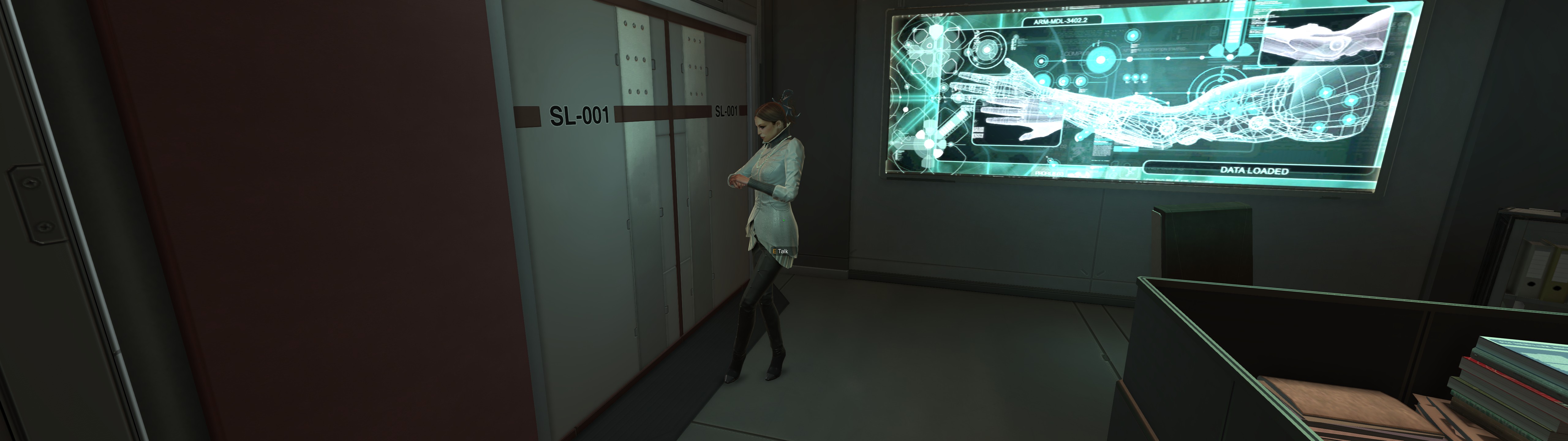
Getting any closer results in the following:
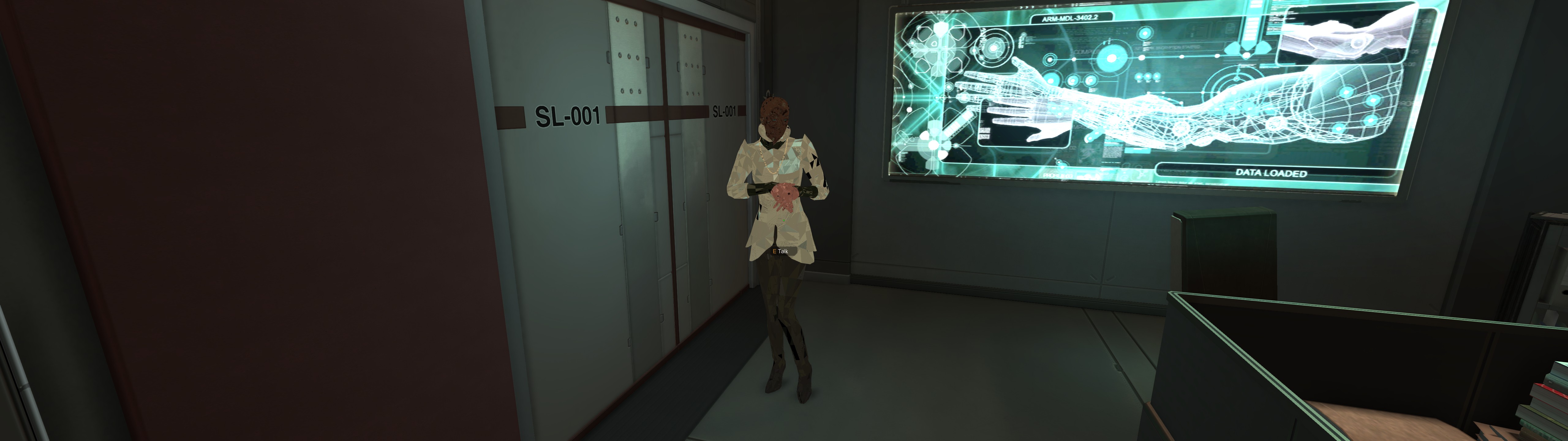
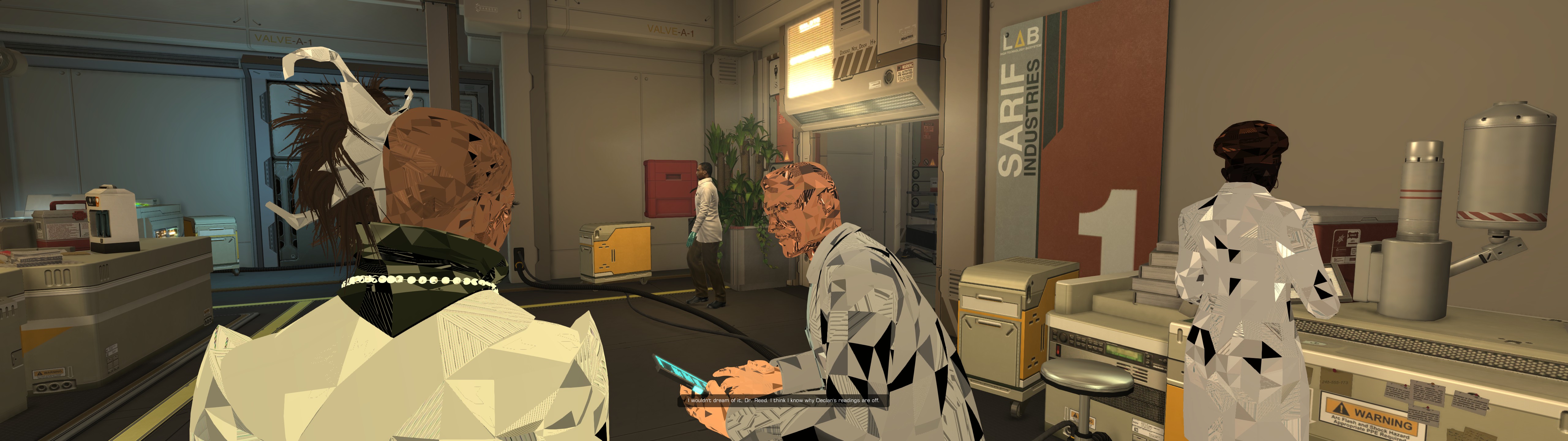
I also paid attention to any stuttering and would (subjectively) say that DX11 has about as many stutters as DX9, but they are a lot shorter, so I wouldn't call them full-on freezes as with DX9. They also mostly disappear once an area has been fully explored (and I presume all its shaders are built), but it's still very irritating.
Note that the screenshots were taken in 32:9 (5120x1440), but the behavior is identical in lower resolutions.
https://gist.github.com/katiesvt/f3408e581de69374456d2aebc2c36c90
I'm having the same issue. Here's my sys info. I've found the same issue on the default Proton as well as 6.10-GE-1 and 6.13-GE-1 .
I actually found that turning off Tessellation in the game's options fixed the issue and it appears to be running okay so far. Hope it helps!
I'm wondering if resolution is a factor here. Both of you are using far greater resolutions than my 2560x1440.
Another thing to consider is if you're using the default DXVK configuration or forcing WineD3D. I did the latter back with Proton 5 (can't remember if it was 5.0 or 5.13) and suffered texture issues at times, but it was different to what BVollmerhaus shared. I had no such issues with DXVK on Proton 6.3.
Of course, I'm just speculating here. I'll defer to anyone more knowledgeable (which will be most).
PS I also note we're using different hardware - my Vega20 vs your RDNA1/2 GPUs.
@BVollmerhaus @katiesvt Are you still able to reproduce this? If so, what Mesa and Proton versions?
Tracking note: Mesa / RADV labels dropped due to timeout waiting for feedback.
Still seems to work great with Proton 7.0-1
This was working fine for me with Proton 6.3 but now I have audio issues with 7.0: this could be because of (currently) known bug in pipewire, which already has a fix in git.
Frezze after disable vsync in game option (proton bleeding edge).
-Ryzen 5800x
-32 GB RAM
-RTX 3070
-Drivers Nvidia 525.47.04
-Manjaro linux, kernel 6.1
Proton Log: https://gist.github.com/JCDentonCore/606ef341cbe8c79c1bf702d7049313bf
I noticed this in the release notes for Proton 8.0-3:
Fixed Deus Ex: Human Revolution Director's Cut hanging on exit.
So I decided to give it a try, but on my system it won't even start any more - pretty sure it was working with 8.0-2. I tested Proton 7.0-6: runs as it did before, albeit still with the hang-on-exit issue. I tested Proton Experimental (2023-07-22 00:58 UTC): same problem with failure to start.
This is my Proton log for 8.0-3: steam-238010.log
Hello @Wedge009, please copy your system information from Steam (Steam -> Help -> System Information) and the contents of Steam Runtime Diagnostics from Steam (Steam -> Help -> Steam Runtime Diagnostics) and put them in a gist, then include a link to the gist in this issue report.
Hmm, the new Steam UI splits them into separate dialogues now? (As an aside, I noticed the report seems to mistake all drives as SSDs, I actually have 1 SSD and 3 HDDs - plus one drive is listed as 0B...)
https://gist.github.com/Wedge009/2e9244b65fb276eab4e79897785669a6
@Wedge009 We are having trouble reproducing the issue locally. I uploaded a copy of Proton 8.0-2 here: https://www.codeweavers.com/xfer/alasky/proton-8.0-2/ with lock code "regression". Would you mind trying it to confirm if this is a 8.0-2 to -3 regression or some other issue is going on? To test the build, you can just drop the tar file into ~/.steam/steam/compatibilitytools.d/. and then untar it there. When you reboot Steam, 8.0-2 will show up in the dropdown Proton options.
Thanks for the direct feedback. Just in case, I reviewed my entire Steam library where Proton is necessary (with Proton 8.0-3) and everything works fine (at least as far as getting to the title screen)... except for this game and #2410.
I'll be back in a few hours to try the 8.0-2 download and will report findings.
Confirming it does seem to be a regression (at least for my machine) between 8.0-2d and 8.0-3.
steam-238010-proton-8.0-2d.log
steam-238010-proton-8.0-3.log
@Wedge009 Thank you for confirming that! Next, could you see if swapping the dxvk version from 8.0-2 into 8.0-3 fixes the issue? You can do this easily by:
cp -rf ~/.steam/steam/compatiblitytools.d/proton-8.0-2d/dist/lib/wine/dxvk * ~/.steam/steam/steamapps/common/Proton 8.0/dist/lib/wine/dxvk/.
cp -rf ~/.steam/steam/compatiblitytools.d/proton-8.0-2d/dist/lib64/wine/dxvk * ~/.steam/steam/steamapps/common/Proton 8.0/dist/lib64/wine/dxvk/.
When you are done testing this, you can just delete the "dist" folder in Proton 8.0 and it will rebuild itself with the default dxvk version.
Confirming the older dxvk from 8.0-2, copied into 8.0-3, allows this game to run as before. It takes a while, maybe something like 10 seconds, but the promised 'fixed Deus Ex: Human Revolution Director's Cut hanging on exit' seems to work as well.
Will you be co-ordinating with doitsujin for this issue, or would you prefer me to submit a report for dxvk myself?
@Wedge009 It would be amazing if you could submit a dxvk report since I can't repro locally myself. Also tagging @doitsujin @Blisto91 for vis :)
doitsujin is busy pulling his hair out over d3d12 while HansKristian is on vacation.
I will try to poke a bit but haven't reproduced doing some simple quick game launches so far.
@Wedge009 Could i get you to try and launch the game with WINE_CPU_TOPOLOGY=4:0,1,2,3 %command% just as a quick check.
I tried the game with Proton 8.0-3c and it loads fine on my machine. The slow exit bug (if that was supposedly fixed?) still exists for me however. It takes about ~30s for the game to close.
@Wedge009 It would be amazing if you could submit a dxvk report since I can't repro locally myself. Also tagging @doitsujin @Blisto91 for vis :)
Submitted https://github.com/doitsujin/dxvk/issues/3584
doitsujin is busy pulling his hair out over d3d12 while HansKristian is on vacation.
No worries, I'm not in a hurry as I'm not playing DXHR at the moment, I was only trying Proton 8.0-3 because of the release notes stating the hang-on-exit was resolved. And even if I was, I have older Protons to fall back to.
I will try to poke a bit but haven't reproduced doing some simple quick game launches so far. @Wedge009 Could i get you to try and launch the game with
WINE_CPU_TOPOLOGY=4:0,1,2,3 %command%just as a quick check.
Is that Wine setting supposed to limit the number of CPU cores? Giving this a try against unmodified Proton 8.0-3 didn't appear to make any difference.
I tried the game with Proton 8.0-3c and it loads fine on my machine. The slow exit bug (if that was supposedly fixed?) still exists for me however. It takes about ~30s for the game to close.
30 seconds is still an improvement upon my previous experience, which was several minutes (and Proton-related processes not closing) or not closing at all.
Regarding me apparently being the only one to encounter this issue so far, could the problem be specific to AMD Vega 20? I understand the Radeon VII had a fairly limited production run (I use it for its GPGPU capability as well as for graphics). Not directly relevant but I was affected by the crash-on-load issue when replaying The Witcher 3 a few months ago (only on Windows, not through Proton), which didn't appear widely reported but ultimately was fixed in patch 4.03, the release notes stating only 'certain AMD GPUs' were affected (without specifying which ones).
@Wedge009
30 seconds is still an improvement upon my previous experience, which was several minutes (and Proton-related processes not closing) or not closing at all.Regarding me apparently being the only one to encounter this issue so far, could the problem be specific to AMD Vega 20? I understand the Radeon VII had a fairly limited production run (I use it for its GPGPU capability as well as for graphics). Not directly relevant but I was affected by the crash-on-load issue when replaying The Witcher 3 a few months ago (only on Windows, not through Proton), which didn't appear widely reported but ultimately was fixed in patch 4.03, the release notes stating only 'certain AMD GPUs' were affected (without specifying which ones).
I've had some really weird bugs with proton over the years that often clear themselves by reinstalling the same proton version. If you launch big picture mode, navigate to the game and select the cog > developer > delete proton files. Then when you launch the game again it will download and setup a fresh proton directory.
I doubt it's a Radeon VII specific issue, the architecture is very similar to my Vega 56 and like I say it's fine on my system. I'm running mesa 23.1.4.
I have rebuilt Proton 8.0-3 as part of this testing, with unchanged results.
I have a Vega 64 Linux system on hand, I can test on that to see if there is any hardware connection. While Vega 10 is similar, there are still differences.
Confirming no issue with unmodified Proton 8.0-3 with Vega 64 GPU. There is still a long delay on exit, but it doesn't hang indefinitely. It's around 10-15 seconds, I didn't use a timer.
Okay, this is interesting, I tested another machine, also using Radeon VII but different CPU, and also no issue. Doubtful it's a hardware fault on my first machine, else the older Protons should fail as well, I think, or the problem should be non-deterministic.
@LeJimster What CPU do you have in your system? Just trying to narrow down possibilities.
@LeJimster What CPU do you have in your system? Just trying to narrow down possibilities.
My system:
5800X3D / 4x8GB G.Skill 3200 CL14 / Sapphire Vega 56 8GB / Asus B350-F Strix
Arch Linux / Kernel 6.4.5 / mesa 23.1.4 / Tested on both native and runtime versions of steam, both launch with 8.0-3c.
Thanks. So the main differences I see are 8 cores vs 24, and different kernel versions (I'm running 5.19).
Sorry for wasting everyone's time. It appears the problem may have been more to do with my storage rather than CPU or GPU hardware. Proton 8.0-3c is working fine for this game. @kisak-valve You can remove the Regression label.
Back to the original investigation into the hang-on exit. There is still a pause - long enough to make the user wonder if something is wrong, if they are not already aware of the issue - but it's nowhere near as long as I remember it being previously.
Just started a new play-through on 6.3 (with default DXVK) and it looks like the dot (representing where cross-hairs might normally be) isn't present.
I just noticed this is fixed on 8.0-3.
deus ex human revolution director cut crashings protonhotfix
Issue transferred from https://github.com/ValveSoftware/Proton/issues/8581.
@fixfixer6565656556 posted on 2025-04-01T22:50:32:
deus ex human revolution director cut crashings protonhotfix
when trying steamplay protonhotfix is crashings
Computer Information:
Manufacturer: EVGA INTERNATIONAL CO.,LTD
Model: EVGA E672
Form Factor: Desktop
No Touch Input Detected
Processor Information:
CPU Vendor: GenuineIntel
CPU Brand: Intel(R) Core(TM) i5-3570K CPU @ 3.40GHz
CPU Family: 0x6
CPU Model: 0x3a
CPU Stepping: 0x9
CPU Type: 0x0
Speed: 3900 MHz
4 logical processors
4 physical processors
Hyper-threading: Unsupported
FCMOV: Supported
SSE2: Supported
SSE3: Supported
SSSE3: Supported
SSE4a: Unsupported
SSE41: Supported
SSE42: Supported
AES: Supported
AVX: Supported
AVX2: Unsupported
AVX512F: Unsupported
AVX512PF: Unsupported
AVX512ER: Unsupported
AVX512CD: Unsupported
AVX512VNNI: Unsupported
SHA: Unsupported
CMPXCHG16B: Supported
LAHF/SAHF: Supported
PrefetchW: Unsupported
BMI1: Unsupported
BMI2: Unsupported
F16C: Supported
FMA: Unsupported
Operating System Version:
Ubuntu 24.04.2 LTS (64 bit)
Kernel Name: Linux
Kernel Version: 6.11.0-21-generic
X Server Vendor: The X.Org Foundation
X Server Release: 12101011
X Window Manager: GNOME Shell
Steam Runtime Version: steam-runtime_1.0.20250307.120442
Client Information:
Version: 1743469403
Browser GPU Acceleration Status: Enabled
Browser Canvas: Enabled
Browser Canvas out-of-process rasterization: Enabled
Browser Direct Rendering Display Compositor: Disabled
Browser Compositing: Enabled
Browser Multiple Raster Threads: Enabled
Browser OpenGL: Enabled
Browser Rasterization: Enabled
Browser Raw Draw: Disabled
Browser Skia Graphite: Disabled
Browser Video Decode: Enabled
Browser Video Encode: Disabled
Browser Vulkan: Disabled
Browser WebGL: Enabled
Browser WebGL2: Enabled
Browser WebGPU: Disabled
Browser WebNN: Disabled
Video Card:
Driver: NVIDIA Corporation NVIDIA GeForce GTX 970/PCIe/SSE2
Driver Version: 4.6.0 NVIDIA 570.124.04
Desktop Color Depth: 24 bits per pixel
Monitor Refresh Rate: 60 Hz
VendorID: 0x10de
DeviceID: 0x13c2
Revision Not Detected
Number of Monitors: 1
Number of Logical Video Cards: 1
Primary Display Resolution: 1920 x 1080
Desktop Resolution: 1920 x 1080
Primary Display Size: 20.04" x 11.26" (22.95" diag), 50.9cm x 28.6cm (58.3cm diag)
Primary Bus: PCI Express 16x
Primary VRAM: 4096 MB
Supported MSAA Modes: 2x 4x 8x 16x
Sound card:
Audio device: Realtek ALC889
Memory:
RAM: 11923 Mb
VR Hardware:
VR Headset: None detected
Miscellaneous:
UI Language: English
LANG: fi_FI.UTF-8
Total Hard Disk Space Available: 936737 MB
Largest Free Hard Disk Block: 595954 MB
Storage:
Number of SSDs: 1
SSD sizes: 1000G
Number of HDDs: 0
Number of removable drives: 0
Related threads
- Deus Ex Human Revolution Director's Cut audio issueprotonclosed same game
- [d3d9] Stutter after 30-60mins of game play (various games)dxvkclosed same upstream bug
- Deus Ex: Mankind Dividedprotonclosed same upstream bug
- DISSIDIA FINAL FANTASY NT Free Editionprotonopen same upstream bug
- Deus Ex: HR - erratic view jumpsprotonclosed same upstream bug
- Deus Ex: HR keypad support buggyprotonclosed same upstream bug
- Deus Ex: Mankind dividedprotonclosed same upstream bug
Proton versions
proton hotfixx1 2025-04proton 8.0-3cx3 2023-07proton 8.0-3x6 2023-07proton 8.0-2dx2 2023-07proton 8.0x1 2023-07proton 8.0-2x1 2023-07proton 7.0-6x1 2023-07proton experimentalx1 2023-07proton 6.3x5 2022-03proton 7.0-1x1 2022-02proton 5.0x2 2021-07proton 6.3-5x1 2021-07proton 5.0-10x1 2021-01proton 5.13-4x1 2021-01proton 5.0-2x1 2020-02
Launch options
WINE_CPU_TOPOLOGY=4:0,1,2,3x2 2023-07DXVK_HUDx1 2018-08
Launch lines
WINE_CPU_TOPOLOGY=4:0,1,2,3 %command%x2 2023-07PULSE_LATENCY_MSEC=60 %command%x1 2018-08
Upstream links
- ValveSoftware/Proton/issues/8581x1 2025-04
- doitsujin/dxvk/issues/3584x1 2023-07
- ValveSoftware/Proton/issues/1059x1 2018-08
- ValveSoftware/Proton/issues/47x1 2018-08
Game runs nicely, no graphical glitches or any big bugs
There is a small thing of the game hanging for 3 minutes when Exiting the game. But it does eventually exit.
My Steam Specs
https://gist.github.com/Zero86Sk/d629f657c1ae861c36657cdf238a7765