The Witcher 3: Wild Hunt
- Rotfiends are invisible. Still present with Nvidia 396.
- The Wild Hunt hounds (battle in the elven ruins with Keira Metz) are invisible.
- When in bordered window mode (1600x900), alt-tabbing out of the window works. However, the mouse cursor occasionally reverts back to the Witcher cursor if the Witcher window is underneath the foremost window. When it does this, the Witcher window does not have focus and I can't click on the foremost window. Still present with Nvidia 396.
- Clicking to focus on the Witcher window works, but the cursor is no longer locked to the window. Minimizing the Witcher window and then bringing it back up temporarily solves the issue. Still present with Nvidia 396. However, if you click the black menu (but not on a button) when clicking to focus the Witcher window, the cursor will become locked again once you resume the game. Super weird. I don't think it worked that way before. The menu fix doesn't always work either.
- Audio occasionally becomes staticky and distorted. Restarting the game fixes the issue.
- Some buttons have weird hit boxes. For example, the slider to bet during a Gwent game requires you to click below the graphic. Still present with Nvidia 396.
Hello @StructByLightning, please copy your system information from steam (Steam -> Help -> System Information) and put it in a gist, then include a link to the gist in this issue report. Also, are you testing the GOTY edition?
Link. I don't think I'm using the GOTY version. I think I bought the base game first and then the expansion pass, but I don't remember for sure. Is there a way to tell? In my library it's titled "The Witcher 3: Wild Hunt".
You may see better behavior with nvidia 396.51 or newer.
Updated and you're right. Performance is much better, I'm staying locked at 60FPS nearly constantly now, with the occasional momentary drop to 50. I'll edit my original post as I find out which issues still apply.
My performance seems to be about 70% of what I get on windows 10. The frame rates are playable, but the frame times spike up very high every couple of seconds making navigating around the map a choppy experience. Every red tick on the graph was a moment where the game stuttered briefly.

Ubuntu 18.04
Ryzen 1700
GTX 1070 with driver 396.54
@Warrengbrn What software are you using to display these stats? Or are they built into the game?
Rotfiends are invisible because Stream Output is not supported by Vulkan.
https://github.com/doitsujin/dxvk/issues/135
@ArekPiekarz Those can be enabled for DXVK via an environment variable
https://github.com/doitsujin/dxvk#hud
@ArekPiekarz
/home/'user'/.steam/steam/steamapps/common/'Proton folder'
Rename user_settings.sample.py to user_settings.py and you can configure the performance hud from that file with the comments listed in the link @valeth sent.
Nvidia HairWorks does not work.
Nvidia HairWorks worked for a week after updated Nvidia driver to 396.54 then stop working.
OS: Ubuntu 18.04 LTS
Graphic card: Geforce GTX 1070 (driver 396.54)
CPU: i7-8700 @ 3.70 Ghz
Is anyone else having no audio at all with TW3? I'm not sure if I've somehow mangled my audio or something but the game plays no sound whatsoever.
Fedora 28
Ryzen 7 1700 / GTX 1080 (driver 396.45) - probably not relevant but whatever
pulseaudio 12.1-1, alsa-lib 1.1.6-2
Audio works fine for me on both Mint 18.3 and Gentoo..
I am suddenly having a weird issue though, last night TW3 worked fine but today it deadlocks a few seconds after loading my game.. I have to force kill it to regain control of my desktop
Doesn't do that in Wine-3.15+dxvk-0.71, but the performance is much poorer for some reason.
Log attached, freeze happens at time ~49412 where it starts loading and unloading dinput a few times. Using Proton 3.7-6 Beta
steam-292030.log
Audio will corrupt occasionally, restart of game 'fixes' it.
Invisible enemies are not just related to vulkan stream output not supported (https://github.com/doitsujin/dxvk/issues/135), there's also some oddities occuring when running with wined3d (some rotfiends are invisible, others are not, hounds of the hunt are invisible, in both dxvk and wined3d).
Odd keyboard inconsistencies when running with vulkan compared to PROTON_USE_WINED3D11=1 mode - I'd like someone to confirm or reject this:
In the game context, casting a spell is by pressing Q, once an 'alternative spell mode' is active and equipped, you hold Q to cast the alternative mode. When I run in wined3d mode, this works. When I run without it (dxvk/vulkan translation), for some reason this doesn't work. While holding the key, it just casts it normally. Tested so far is window vs fullscreen vs borderless etc, no change. (there are no ingame key bind options for changing this, unless I missed it)
Update: I ended up reproducing an old game bug that's still around.
Reference and fix: CD Project Red forum thread on it.
Adding a 'bug' here, I don't know what it is but it's consistent (on my system):
Running the game through the steam client will at some point reach a state that I thought initially was a memory leak (jittery/laggy fps that never clears). Config file settings for increasing memory/texture memory didn't make any difference. It always happens (no exceptions), during a long play session.
In an attempt to track down at least a nice error log, I then ran it with PROTON_DUMP_DEBUG_COMMANDS=1 %command%, and ran it via the run script it generates. The 'problem' was, it never occurs again. I then played about 20 (?) combined hours with it using the run script, never happens. Figuring a sneak update and bad timing on my part, I ran it in the steam client interface again, just now. 'Bug' hit about 20 minutes in.
There's an FPS drop (towards needing a restart to clear, not something you'd want to play with) due to unknown reasons that only occurs when running it through the steam client at random times (20 minutes in if you're lucky, looking to find it, or an hour or more in), that does not appear at all when running it in a terminal with the run script generated through the debug command option.
Something about what steam hooks into it, or the steam API <-> proton <-> this game? I'm clueless.
(Steam Beta client, have not tested this in non-beta)
I get the staticky audio corruption bug too.
I'm not sure what my settings are but under the default plug and play I can use the normal mode and alt mode just fine.
@triffid @Tuuvimer Cheers for the responses. Seems as it may just be an issue with my setup as it now appears to happen in some other games. Maybe a bug in Fedora or something. That said, when I do get sound in TW3 it's not too staticy and I haven't gotten any major audio corruption yet.
The Earth Elemental (Contract: Doors Slamming Shut) is invisible.
Audio will corrupt occasionally, restart of game 'fixes' it.
It happens to me sometimes too and I noticed, it's a depends on... Steam Controller being on. When I disable Steam Controller, restart steam, launch the game, sound issue is gone and then I can enable Steam Controller again. Weirdly enough, this happens only rarely. For the most time, Steam Controller or Big Picture Mode are fine and are not causing a sound issue. So all in all, this is an easy workaround.
My experience with Witcher 3 is:
- I have in average 20% lower FPS than on Win10, which is expected by dxvk so it's all right
- lags can happen sometimes but it's a matter of hardware catching up, so that's not a software related in my case, 99% of time game is fluent and 100% playable with ultra settings on gtx 970M (Manjaro), which is subjectively comparable to windows, so it's almost like native-like experience, when one forgets stats and some minor bugs
- nvidia hairworks don't work, not a big deal in the end effect, it would be nice if it worked but it's not crucial
- some monsters are invisible, also not a big deal, they can still be easily defeated, so for me, those are high-level earth elementals (low-level ones are visible) and sirens. Maybe once or twice, I had some other rare monster being invisible. Other than that it's all fine.
- in some locations water animation glitches, so I can see straight cracks of the surface and beneath is as there was no water, but for most of the time water is rendered correctly
- the game may freeze but that happened twice for a 2-week gameplay so that's like a non-issue
In my opinion, the game is perfectly playable on Proton. There are some glitches here and there that may be ironed out with time but all in all, it's a fantastic experience.
I use neither steam controller nor big picture mode, and my sound will become gritty and echoey after several hours of gameplay (exact time varies). Simply restarting TW3 fixes it.
The sound issue is thus not related to steam controller or steam big picture mode.
@triffid, then we have different sound issues. Once the game launches with correct sound, it stays ok all the time.
It would be nice to see if some kind of bugs happen more often on certain distros then others. This could tell us if the issue is with package versions.
From what I saw, Ubuntu users on average have more issues with Witcher 3 than Arch/Manjaro ones but that may be a flawed observation.
- Trees shake too much in Linux
- Higher GPU fan noise in Linux compared to Windows (GPU: R9 390, FPS: locked at 30)
Regarding the staticky audio corruption issue, here is what I found:
- Playing a game session continuously for extended period of time (more than 2-3 hours for me, but I imagine this can vary depending on the machine) consistently reproduces the issue.
- Same issue can be reliably reproduced using the method above in more than one games (Witcher 3, Endless Space 2)
- Like many people mentioned before, for both games in which I found the issue, it can be reliably "resolved" (temporarily at least) by restarting the game session one way or another, until the ongoing session lasted extended period of time again.
If I am to take a wild guess, it sure feels like some kind of memory buffer overflow problem to me.
Peripheries of my machine:
Ubuntu 18.04.1 LTS
GeForce GTX 1080 Driver Version: 396.54
Intel i7-8700
The audio issue seems to be gone. Anyway, on Manjaro I haven't experienced the audio problem since I described it here (23 days ago). I was playing quite often recently (just finished the game) and audio was fine. There were so many Witcher 3, Steam and Proton updates so I assumed this problem was fixed during one of them.
Also, it looks like the problem was not identical to all people. For me, it was quite opposite to what was described above. The issue happened only at the beginning, but when I managed to run the game correctly, it was just fine no matter how long the game was on. But the sounds were "staticky" so the description is accurate.
So basically the only issue left for me was the lack of some monsters or even faces (rarely). The water issue was gone as well.
Once in a while game crashed after a load but as I recall games in overall were also crashy on Windows, so one crash for 2 days is not standing out ;) - everything within a norm IMO.
In general Witcher 3 runs great. Just fix the missing textures bug and all is fine.
@michaldybczak what "missing textures" bug? That description is rather ambiguous, people call literally everything "missing textures".
Invisible monsters should be fixed with Proton 3.16 if you have a Vulkan driver that supports the new Transform Feedback extension.
Missing textures aka invisible monsters (sometimes vampire faces).
Thanks for the info about when the bug will be squashed. I use Manjaro so I will rather have a driver that will support it, providing the driver support for it will show at the same time.
My $0.02 using Proton 3.16-1 beta
- Mouse sensitivity is unplayably high - moving the mouse the smallest amount possible to the left or right spins the camera almost 360 degrees (with the in-game mouse sensitivity turned down to the minimum). For reference I'm using a Logitech G502 and I've tested at 125Hz and 1000Hz polling rates and a range of DPI settings
- FPS is noticeably lower than in Windows, but still playable
- Geralt's hair doesn't render
I would have tested some more (combat, etc) but the mouse issue makes it completely unplayable. Worth mentioning that this particular issue did not occur in Proton 3.7
It won't start for me with Proton 3.16-1 beta and Nvidia 410.57. Worked quite well with older version.
Proton 3.16-1 beta works well for me and everything seems to be rendering everything correctly after patching mesa with the RADV patches for VK_EXT_transform_feedback.
Like others, however, I do get the sound going crackly sometimes. Sometimes after hours of play, sometimes only in cutscenes, sometimes only on the main menu. Relaunching the game sometimes fixes the issue, sometimes the issue just moves to another part of the game.
I haven't figured out any specific reason, or any events that cause it.
@HanFox try this PULSE_LATENCY_MSEC=60 %command%
Just checked Proton 3.16-1 beta, nvidia 410.57-2, using Steam Controller (so I can't say anything on mouse sensitivity that was posted above), OS: Manjaro KDE unstable, kernel 4.18.14-1.
Witcher 3 downloaded two large files after switching to Proton 3.16-1 beta so I expected some changes.
Everything seems to be correct but Sirens are still invisible, so maybe the driver is not there yet? So in the end nothing new. Sound is ok.
@michaldybczak You need the 396.54.09 driver for transform feedback support.
I don't get it. I need an older driver to get it to work?
It's not an older driver, it's the newest Vulkan beta driver that came out yesterday.
I thought that vulkan driver is within nvidia driver. If not, I'm not sure what package I should check on the Arch-based system. My packages are on Arch stable level.
EDIT: I checked with Arch wiki, vulkan driver for nvidia is within nvidia driver so I'm not sure where you get the number of the vulkan driver alone? Which nvidia driver will support that? If it came out yesterday then maybe it's still in arch unstable or testing so I should get it soon.
Hello @michaldybczak, nVidia has a vulkan developer series for experimental features at https://developer.nvidia.com/vulkan-driver. This driver series doesn't need to pass their internal quality control and the purpose is to get early feedback on new things before they get integrated into the mainstream driver.
So that means I just have to wait for it a little longer. I won't mess with GPU drivers by using developer driver, so I just update for the version that will come with this feature when it shows.
Thanks for the info @kisak-valve.
@HanFox try this PULSE_LATENCY_MSEC=60 %command%
So far so good. Thanks @barni2000
@HanFox try this PULSE_LATENCY_MSEC=60 %command%
I also suffer from audio distortion in cinematics, but in my case this doesn't help. I don't have Pulse audio installed on my system (tried on Proton 3.7-8, as newer one is broken for me).
Hey there,
don't know if I am right here.
I was able to play the game without problems until recently.
Only had the audio distortion problem after a couple of hours of playtime.
But now I cant even start the game.
First I can see some text appearing (Witcher 3 is a trademark ...) but with a very low framerate.
After that I only see the "Skip" in the lower right corner.
But nothing happens. I need to kill the process in order to get out.
Any ideas?
System
It won't start for me with Proton 3.16-1 beta and Nvidia 410.57. Worked quite well with older version.
FWIW, recent updates to Proton 3.16-2 and -3 fixed the problem for me.
I could launch the game before, now it wont start (but it says it is running in Steam).
This is my spec:
GPU: GTX 1080
Nvidia driver: 410.66
Kernel version: 4.14.77
Proton version: 3.7 or 3.16-3
However, I can run the game via Lutris using wine-3.18-staging and DXVK 0.90.
How can I run proton via the command line to see if I can see any errors?
There is a way to enable logs for certain Steam Play games. I don't remember exactly how it is done (I did it and now I can't undo it ;p) but maybe someone hare knowns this. I only remember I had to find some proton config for the given prefix and edit something there.
Alternatively, just run Steam in a terminal and then launch WT3.
For me, the game starts without a problem, although the first launch after an update is always visibly longer. I use GTX 970M and kernel 4.18, rest is the same.
@michaldybczak
I don't remember exactly how it is done ...
You shouldn't memorize everything, but one thing: use README (man, info, wiki, google ...).
https://github.com/ValveSoftware/Proton#runtime-config-options
Well, it is not working with Proton. I attach the log if someone can see something in there....
steam-292030.log
It works well with wine-staging and dxvk, not with Proton.
My xorg-server version is: 1.20.2 (if it has something to do with this).
Hello @xexpanderx, please copy your system information from steam (Steam -> Help -> System Information) and put it in a gist, then include a link to the gist in this issue report. Additionally, does ulimit -Hn output a high value or 4096?
@xexpanderx
It is working with Proton, and past several days I'm enjoying Blood&Wine New game on Hardcore difficulty.
No special settings required, game starts flawlessly from first ever run using Proton.
Your logs contains strange entries:
Fontconfig warning: "/etc/fonts/conf.d/60-latin.conf", line 4: unknown element "its:rules"
Fontconfig warning: "/etc/fonts/conf.d/60-latin.conf", line 5: unknown element "its:translateRule"
Fontconfig warning: "/etc/fonts/conf.d/60-latin.conf", line 8: unknown element "description"
18997.120:0024:0025:warn:module:load_builtin_dll failed to load .so lib for builtin L"Z:\\home\\alexsson\\.local\\share\\Steam\\steamapps\\common\\The Witcher 3\\bin\\x64\\D3DCOMPILER_47.dll": /home/alexsson/.local/share/Steam/steamapps/compatdata/292030/pfx/dosdevices/z:/home/alexsson/.local/share/Steam/steamapps/common/The Witcher 3/bin/x64/d3dcompiler_47.dll: invalid ELF header
18997.123:0024:0025:warn:module:load_builtin_dll failed to load .so lib for builtin L"Z:\\home\\alexsson\\.local\\share\\Steam\\steamapps\\common\\The Witcher 3\\bin\\x64\\PhysX3Common_x64.dll": /home/alexsson/.local/share/Steam/steamapps/compatdata/292030/pfx/dosdevices/z:/home/alexsson/.local/share/Steam/steamapps/common/The Witcher 3/bin/x64/PhysX3Common_x64.dll: invalid ELF header
Looks like your setup is somehow broken.
Hello @xexpanderx, please copy your system information from steam (
Steam->Help->System Information) and put it in a gist, then include a link to the gist in this issue report. Additionally, doesulimit -Hnoutput a high value or 4096?
Hi, the link: https://gist.github.com/xexpanderx/c7dccaf2d088729fa904e499f1212cc1
ulimit -Hn
1048576
BTW, @kisak-valve
do you really require WINEDEBUG=+module ?
this produces either more noise than help
WINEDEBUG=+loaddll should produce more compact and user-frendly output.
@kisak-valve Requesting an XAudio2 label for this game... this is a Wwise title but they still use an XAudio2 context for the output stream.
Just installed The Witcher 3 and played about an hour in White Orchard. Everything worked just fine out of the box without any tweaking whatsoever. Ran quite well too at 1080p medium settings.
My specs:
https://gist.github.com/Zoetrap/3f0fc6d113c5fef9cdf7d623ea5e81c8
Sound card says "Realtek" in the Steam system info (which is the built-in soundcard), but I'm actually using an external USB Interface (Steinberg UR242) for all audio. Worked flawlessly during my testing.
Proton 3.16-4, the game isn't start. 3.7.8 - all works
Hello @MikaelBox, please copy your system information from steam (Steam -> Help -> System Information) and put it in a gist, then include a link to the gist in this issue report. Additionally, please add PROTON_LOG=1 %command% to the game's launch options and drag and drop the generated $HOME/steam-$APPID.log into the comment box.
Hello @MikaelBox, please copy your system information from steam (
Steam->Help->System Information) and put it in a gist, then include a link to the gist in this issue report. Additionally, please addPROTON_LOG=1 %command%to the game's launch options and drag and drop the generated $HOME/steam-$APPID.log into the comment box.
https://gist.github.com/MikaelBox/5d3acc771f4f92e3cde8a3fbf7204e70
I tried to add to launch options PROTON_LOG=1 %command%, but steam-292030.log is empty
I enabled logging by changing some proton config file directly. I don't remember exactly but I had to find proton's folder for Witcher3 and then choose some specified file there and change some line in it... I'm beating myself I didn't write any note :(.
I found the solution for my problems. I fixed it by this:
export STEAM_RUNTIME_PREFER_HOST_LIBRARIES=1
This setting prefer my system libraries.
Tested with Proton 3.16-4 Beta on Kubuntu 18.04.
When using the mouse to control the camera, I am unable to rotate the camera past a certain point when the (invisible) mouse hits any edge of the screen. Problem persists through Full Screen, Windowed, and Borderless Windowed modes.
@gerardlouw
I had a similar issue - fixed it by alt-tabbing a few times. Or by using windows-key and clicking on it (used gnome)
I miss playing the game. It ran just fine and now it wont start :/
When using the mouse to control the camera, I am unable to rotate the camera past a certain point when the (invisible) mouse hits any edge of the screen. Problem persists through Full Screen, Windowed, and Borderless Windowed modes.
This happened to me a lot more often in previous versions of proton than the current one.
The fix I found is press esc to bring up the game menu, go into options, wave your mouse so the cursor hits both sides of the screen, then return to the game and it should be fixed.
Simply pressing esc to open the game menu isn't sufficient, have to actually click into something. Not sure if waving the mouse is necessary, that may be superstition.
@kzoltner @triffid
Thanks, good to know it's not just me. It got too frustrating so my workaround was to play with a controller instead.
With latest proton, sound still develops echoes and crackle after a few hours of gameplay.
Really sounds like a buffer mismanagement issue, as if witcher has its own timer for buffer updates, ignoring information from the soundcard and, after a while, it ends up swapping buffers at the wrong time or something.
I'm not sure why this causes the same sound sample to be played a second or third time with maybe a couple hundred ms lag overlaid with the first, but that's what it sounds like is happening.
Witcher 3 - can't use kb/mouse
Issue transferred from https://github.com/ValveSoftware/Proton/issues/1927.
@qsecofr posted on 2018-11-06T18:50:09:
Compatibility Report
- Name of the game with compatibility issues: The Witcher 3: Wild Hunt
- Steam AppID of the game: 292030
System Information
- GPU: RX 580 8GB
- Driver/LLVM version: Mesa 18.1.7-208.1
- Kernel version: 4.18.15-1.2
- Link to full system information report as Gist:
https://gist.github.com/qsecofr/6de931cc0639fab425ee26b7aeac9230.js - Proton version: 3.16-4 Beta (3.7-8)
I confirm:
- [ ] that I haven't found an existing compatibility report for this game.
- [x] that I have checked whether there are updates for my system available.
Symptoms
When I launch Witcher 3 I am stuck with the controller control scheme, Keyboard assignements are empty and I can't use kb/mouse to control the character nor interact with the game. Big Picture shows controller icon.
I opened a ticket with steam support (Ticket: HT-VQJ4-RCXT-865Y), they pointed me to github/proton.
Reproduction
Everytime I start the game
Witcher 3 (292030) Vega 64 support
Issue transferred from https://github.com/ValveSoftware/Proton/issues/1929.
@bogdans41472 posted on 2018-11-06T22:07:45:
Compatibility Report
- Witcher 3 Wild Hunt
- Steam AppID of the game: 292030
System Information
- GPU: Vega 64
- Driver/LLVM version: 4.5.13540 Compatibility Profile Context 18.40.2.15
- Kernel version: 4.15.0-38-generic
- Link to full system information report as Gist: https://gist.github.com/Sebi1436/b11eeea0ed0b7bea45ee0cd8ffa59a37
- Proton version: 3.16-4 Beta
I confirm:
- [x] that I haven't found an existing compatibility report for this game.
- [x] that I have checked whether there are updates for my system available.
Symptoms
When loading save games, Wine stops responding.
Reproduction
- Start game
- Continue story
- Wait for story cinematic
- Loading bar is displayed
- Observe freeze
Note, I have also tried installing mesa-vulkan-drivers and vulkan-utils from the default ubuntu ppa, but that didn't help at all, so I stuck with the latest drivers from AMD - 18.4.
Additionally, I have also tried starting a new game, but the same issue occurred after the beginning cinematic.
Hello @bogdans41472, you may have better luck with a build of mesa that supports VK_EXT_transform_feedback and built against llvm 7 or newer (like padoka unstable, oibaf, steamvr experimental PPAs)
@bogdans41472 Witcher 3 on Vega 64 needs latest llvm 7 and mesa 18.3. DXVK (part of proton) officially requires at least mesa 18.2 and llvm 7, and does not work with amdgpu-pro(amd official) drivers, as the vulkan portion is several months outdated: https://github.com/doitsujin/dxvk/wiki/Driver-support . The reason 18.3 is required is because Witcher 3 needs transform feedback, which was not included in 18.2
source: I own a vega 64 and have been active in the DXVK community for several months.
Also your gist log shows page not found.
Hi @kisak-valve and @GloriousEggroll - I uninstalled the amdgpu-pro drivers and installed the ones provided in this ppa: ppa:paulo-miguel-dias/pkppa . Everything is running smoothly now :+1:. Thanks for your help.
By the way, I really want to help out with proton development/testing. What would you guys recommend? What's the best way I can help? I'm currently working as a dev in test for a security company, but I have time in the evenings/weekends to test things around.
In general, the best way to help Proton is improve upstream wine and improvements there will trickle downstream.
Witcher 3 not running when esync is used
Issue transferred from https://github.com/ValveSoftware/Proton/issues/1954.
@kzoltner posted on 2018-11-11T23:12:34:
System Information
- GPU: RX480
- Driver/LLVM version: Mesa 19.0.0-devel - padoka PPA
- Kernel version: 4.18.14-041814-generic
- Link to full system information report as Gist: https://gist.github.com/kzoltner/934cc4d079afaebb660ccc566a19632c
- Proton version: 3.16-4 Beta
PROTON_LOG
https://gist.github.com/kzoltner/280a6af0acf5b561e924171aa86fa8cc
Symptoms
Hey there,
I do have a small problem with Witcher 3 on Steam Play.
A little while ago it worked out of the box without me changing anything. Had similar performance to Windows.
Today I wanted to play again but I was unable to get it working.
I start the game, wait a few seconds. Screen turns black and I get quite some load on my CPU.
I can see some copyright text appear at about 0.5 frames per second. I can skip that but the game crashes.
If I disable ESYNC by using
PROTON_NO_ESYNC=1 %command%
it does start without any problems but I only get around 15 to 35 FPS and sometimes during a fight the game just locks up and I need to restart my computer.
Witcher 3 (292030) - black screen :/
Issue transferred from https://github.com/ValveSoftware/Proton/issues/1997.
@rafik777 posted on 2018-11-18T17:41:18:
Compatibility Report
- Name of the game with compatibility issues: Witcher 3
- Steam AppID of the game: 292030
System Information
- GPU: GTX 850M
- Driver/LLVM version: nvidia 410.73
- Kernel version: 4.15.0-39-generic
- Link to full system information report: Gist system information
- Proton version: 3.16
Symptoms
After I start the game I see only black screen (no sound too).
Only thing I can do is killing the process.
@rafik777 Try 396.54.09 driver, 410.73 have less Vulkan features. At least
err:   D3D11: CreateGeometryShaderWithStreamOutput:
Transform feedback not supoorted by device
should go away.
@rafik777
AL lib: (WW) GetSymbol: Failed to load jack_error_callback: /usr/lib/x86_64-linux-gnu/libjack.so.0: undefined symbol: jack_error_callback
AL lib: (WW) jack_msg_handler: Cannot connect to server socket err = No such file or directory
AL lib: (WW) jack_msg_handler: Cannot connect to server request channel
AL lib: (WW) jack_msg_handler: jack server is not running or cannot be started
AL lib: (WW) jack_msg_handler: JackShmReadWritePtr::~JackShmReadWritePtr - Init not done for -1, skipping unlock
AL lib: (WW) jack_msg_handler: JackShmReadWritePtr::~JackShmReadWritePtr - Init not done for -1, skipping unlock
AL lib: (WW) ALCjackBackendFactory_init: jack_client_open() failed, 0x11
AL lib: (WW) alc_initconfig: Failed to initialize backend "jack"
Check your ~/.alsoftrc, and set e.g.
[general]
drivers=pulse,alsa
;drivers=pulse,alsa,jack
Alternatively you can try to disable xaudio2_7.dll.
Or LD_PRELOAD=/path/to/correct/libjack.so.0.
@pchome Here https://github.com/ValveSoftware/Proton/issues/607#issuecomment-419906100
I see the same problem with libjack in logs and Witcher 3 is playable.
I was struggling with this two month earlier and was moment that this ERROR was gone, but black screen stayed... :/
@pchome @lieff
Nvidia 396.54, Proton 3.7:
https://gist.github.com/rafik777/1a41055c3de932d894223102857d8a51
No jack errors, no D3D11 errors.
Still black screen... :/
Any ideas?
No idea, except also trying Proton 3.16-4 Beta (is it's not typo about 3.7) or wine 3.19/master (3.20 is known broken).
That dwarf banker, from Vivaldi bank in Novigrad, has invisible arms. I guess it's the only bug I still can see in this game. Tell me if you need a screenshot
Ubuntu 18.04.1, AMD Radeon RX 470, Mesa drivers from padoka PPA, vulkaninfo says it's Vulkan 1.1.70, Proton 3.16-4 Beta
He's had arms every time I've visited him, can check again later tonight in case there's a regression.
GTX1050Ti, nvidia-396.54.09, proton 3.16-something (have to check)
@aldonogueira For stream output you need Mesa 18.3-git. Ubuntu 18.04 do not have one out of box.
See https://github.com/doitsujin/dxvk/wiki/Driver-support
@aldonogueira which Mesa and LLVM version is that exactly? With both latest mesa-git and llvm-svn, the arms render fine on my end.
Stream output is working. I can see the fancy new hair on Geralt, the rotfiends, the sirens and the wild hunt dogs. I guess it's another problem.
According to glxinfo, it's using Mesa 19.0.0-devel - padoka PPA, LLVM 8.0.0. And vulkaninfo informs that VK_EXT_transform_feedback is available. It says the version is 1.1.70, but apparently there are also some extensions from 1.1.73.
@triffid @lieff @doitsujin
Thanks for the info, I still have on Manjaro testing:
Mesa 18.2.5-0
nvidia 1:410.73-1
steam beta
proton 3.16-4
kernel 4.19
GPU: nvidia gtx 970M + intel, game started on nvidia-xrun for vulkan compatibility
Witcher 3 runs fine as always but the above-mentioned monsters are still invisible. I guess I have to wait till Mesa 19 (or 18.3?) and higher nvidia driver.
Dwarf banker in Novigrad always had arms so that has to be something else.
Aside few invisible monsters (which isn't that problematic for gameplay), some vampires in Blood and Wine, especially their heads or faces at end of the main quest are missing on cutscenes (not always). I believe one character also had an invisible face in one of the cutscenes. So the bug is showing here and there but already said, it's not spoiling the fun. However, it would be great to see that issue to be gone. When that happens, then I really don't see much issue with TW3, all works like on Windows (minus 15% FPS), so I'm very happy because of that. I already finished the game and spend many hours in it on Linux to know how well it works.
Ah, forgot nvidia hairworks. This is not important but out of curiosity, does it work now or will the support also come with the strep output?
@michaldybczak Nvidia doesn't use the Mesa driver (though your intel chip does), you can update to 396.54.09 here: https://developer.nvidia.com/vulkan-driver which support transform feedback.
Once you do that, all of those monsters should be visible, and you should be able to use hairworks.
@dlove67 that link won't work for 4.19 kernel but there are patched drivers for Arch based distros: https://aur.archlinux.org/packages/nvidia-vulkan-dkms
@dlove67, I'm on 410 version and it's not easy to downgrade to older series without messing the system. Manjaro is a rolling distro and has its own, unique packages for nvidia drivers (suited to mhwd scrips), so I would have to compile them myself and know how to install them without breaking my desktop. So even arch drivers aren't suited (directly) for Manjaro.
I rather wait till that support will show up in 410 or newer series. Sooner or later it will come.
@michaldybczak There is an AUR package somewhere for 396.54.09 (nvidia-vulkan). As of right now there is no ETA on when Nvidia will merge transform feedback support into their mainline drivers.
@aldonogueira That's weird. Can you post a screenshot?
@doitsujin, installing this package would break Manjaro for sure. As already said, Manjaro uses different packages for gpu drivers than Arch. Yes, drivers are taken from Arch but renamed and repackaged to suit Manjaro specific hardware detection/installation/management tool - MHWD which currently supports only two nvidia driver lines: the newest one (at moment of writing this is 410xx) and 390xx (for support of some fenri based cards).
Here is the armless dwarf @doitsujin

In this screenshot the game effects was set to medium
I can confirm I have the same problem, an armless dwarf.
When i launch the game , game process freezes (%0 cpu usage). but once when i left it open for steam cards and gone to dinner, game was launched somehow but when i try to restart after setting graphics settings, it didn't restated
Games borked on me:
The Witcher Enhanced Edition (Lutris version works but can't launch The Witcher camping, stucks at loading, can launch the sidemissons)
The Witcher 3 (Lutris version do work)
Warframe: applied Glorious Eggrolls patch but stuck at loading screen, it used to work issue page
Lutris version works with esync but game was choppy there until i disabled sharpening effect from post processing effects
@aldonogueira : can you post a save with the armless dwarf in this thread please? I'd be interested in testing it using radv and upstream Wine+dxvk.
With Proton 3.16-5 it's using FAudio and it works. However, it only uses Stereo (The same is for Prey (2017) btw), while the game is capable of surround and so is my system configuration. Is there a way to tell FAudio to actually respect my Pulseaudio configuration and use it? @flibitijibibo
I've already tried to set format = AL_FORMAT_51CHN16 in the ~/.alsoftrc, but this has no effect.
SDL_AUDIO_CHANNELS=6 %command% should fix that.
It does indeed, thanks.
I just tested Witcher 3 on nvidia 1:415.22-1 with added Transform Feedback on Proton 3.16-5-Beta and invisible monsters (like Sirens) are finally visible! Now Witcher 3 is 100% working! Awesome!
@michaldybczak can you please provide a link or a solution how to add "Transform Feedback"?
@tastyminerals Transform Feedback is a DirectX function, which was added into Vulkan 1.1.88 and DXVK 0.81. What you need is a driver for your graphics card which supports Vulkan 1.1.88 and Proton Version >= 3.16-1.
@michaldybczak can you please provide a link or a solution how to add "Transform Feedback"?
As @NoXPhasma said, you only need to have appropriate gpu driver version and newest Proton beta and it should work out of the box.
Too add some details, in case of Mesa you need 18.3.0 and newer to have VK_EXT_transform_feedback.
Have a problem: witcher 3 cannot save settings and each time it said, that it is starting for the first time
Anyone can reproduce it?
It works fine in upstream Wine+dxvk (GOG GOTY version). So something must be specific to your setup.
Witcher save progress in bin (??) directory, but cannot find settings there. So I can save/load game, but have to set settings after every launch.
Path ~/.steam/steam/steamapps/compatdata//pfx/drive_c/users/steamuser is empty
Every time I got file in Temp directory like this:
[003C:003D][2019-01-05T00:26:19]i001: Burn v3.7.2829.0, Windows v6.1 (Build 7601: Service Pack 1), path: Z:\home\kolya.steam\steam\steamapps\common\The Witcher 3_CommonRedist\vcredist\2013\vcredist_x64.exe, cmdline: '/quiet /norestart'
[003C:003D][2019-01-05T00:26:19]e000: Error 0x80070002: Failed to find local per-machine appdata directory.
[003C:003D][2019-01-05T00:26:19]e000: Error 0x80070002: Failed to build cache directory.
[003C:003D][2019-01-05T00:26:19]e000: Error 0x80070002: Failed to set registration paths.
[003C:003D][2019-01-05T00:26:19]e000: Error 0x80070002: Failed to parse registration.
[003C:003D][2019-01-05T00:26:19]e000: Error 0x80070002: Failed to load manifest.
[003C:003D][2019-01-05T00:26:19]e000: Error 0x80070002: Failed to initialize core.
Check correctness of the installation. If it claims to be OK, delete something like (proton prefix for Witcher 3) and let Steam download missing files. See if it helped.
I have switched my distro from debian-stable based to ubuntu 18.04 (without cleaning /home directory, of cause), may be I should clean some settings?
I have been playing The Witcher 3 on intel ANV (Kabylake Core i7-8650U on a Dell notebook with a UHD620).
I'm running Mesa git (19) + VK_EXT_transform_feedback patches on Gentoo 64-bit.
Using unpatched proton 3.16-6 Beta from within Steam. KDE5 desktop.
The game actually runs very playable (on lowest settings, but medium texture resolution @ 1280x720), but it has the following issues:
- Some textures occasionally go black, or rather much darker. This tends to get worse the longer one plays but not always. It makes navigating caves very difficult.
- Sometimes a texture will flicker between correct and dark.
- Generally too dark,
- Occasionally lips don't sync with the voices (I suspect it happens when framerate drops too low)
The good news I'm seeing rotfiends, wild hunt hounds, etc... and have no funky polygon distortion or missing polygons, only some texture issues.
I did some more experimentation, the darkening appears much like a shadow.
Easy to spot on a wall of a building outside that is partly in shadow, it will flicker between having a shadow, and looking like it is all in shadow.
Also easy to spot on rocks, where the whole rock will appear in shadow just because a part is shaded.
Do you need more info? e.g. screenshots?
Should I test if this issue is happening on mesa 18.3 as well? (instead of just git)
Here is a video recording of the issue if you need some clarity:
https://drive.google.com/open?id=1MohQ4EGNQ94PDaS6a9wbjy5yIdYirE5G
Witcher 3 performance regression with 3.16-6
Issue transferred from https://github.com/ValveSoftware/Proton/issues/2262.
@sirkon posted on 2019-01-24T08:27:26:
There's noticeably performance regression in Witcher 3 at least in Toussaint: looking around with mouse doesn't smooth anymore although it was with before Proton 3.16 (didn't try with older Protons 3.16-X)
System info: https://gist.github.com/sirkon/601db826009f1fb02ac48ac0c5e87c6e
FPS is sporadic with 3.16.6 beta. Seems to jump from 60 with drops into 40's and even single digits at times. It is not prolonged and the game is playable, just sporadic and choppy with FPS.
System info | https://gist.github.com/Makersmarx/25c73636cb80bb8b0b770dec85da7fe6
Just for the reference, with regular latest Wine+ latest dxvk the game is running pretty smoothly.
Input (mouse & keyboard) is not working for me. Both mouse and keyboard work in the menu, but once entered the game, none works. Steam log is here https://gist.github.com/pclouds/ef41512b5293eb896518ad53f7f98897
The input.settings file in "My Documents/The Witcher 3" shows this. Version -1 can't be good but I don't know how to fix it. Perhaps I could get a good copy from someone to try out?
[InputSettings]
Version=-1
The key binding menu also shows none (except quick save) is bound. Everything is bound to "none". F5 (quick save) does indeed work. At least the game tells me I can't save at that point.
What happens if you delete the file and get the game to recreate it?
Mine's here if that doesn't work
The game always recreates the file with the same content. If I put your file in, it overwrites it too. If I remove write permission, then your file remains, but it does not reflect in the key binding menu (everything is still bound to None there) and no key or mouse works.
I have the same problem as @tribunal2000, each time I launch it the settings resets. It actually writes the to the config file but it doesn't seem to read from there. Save games works and the only strange thing I notice is that it seems to try to update the game every launch.
System info:
Solus Linux Operating System
OpenGL vendor string: X.Org
OpenGL renderer string: Radeon RX Vega (VEGA10, DRM 3.27.0, 4.20.3-108.current, LLVM 7.0.0)
OpenGL core profile version string: 4.5 (Core Profile) Mesa 18.3.2
OpenGL core profile shading language version string: 4.50
OpenGL core profile context flags: (none)
OpenGL core profile profile mask: core profile
OpenGL core profile extensions:
OpenGL version string: 4.5 (Compatibility Profile) Mesa 18.3.2
OpenGL shading language version string: 4.50
OpenGL context flags: (none)
OpenGL profile mask: compatibility profile
OpenGL extensions:
OpenGL ES profile version string: OpenGL ES 3.2 Mesa 18.3.2
OpenGL ES profile shading language version string: OpenGL ES GLSL ES 3.20
OpenGL ES profile extensions:
uname -a:
Linux linuxbox 4.20.3-108.current #1 SMP PREEMPT Tue Jan 22 00:34:33 UTC 2019 x86_64 GNU/Linux
Proton 3.16-6 Beta
On multihead setup, mouse will stop working at side of next monitor border.
E.g. i have main monitor and second, second is left of main, game runs on main, i move mouse left in game and after some time camera stops from rotating.
@XakepSDK I have the same monitor setup (2x 1080p, right one main) but not that issue. Neither with Borderless Window nor with Fullscreen.
@NoXPhasma what DE do you have? Xorg or Xwayland?
Xorg
Cinnamon
Nvidia 415.27
Full Systemfino: https://gist.github.com/NoXPhasma/3c27464475ddcb3157a0cf4c53b707be
Xorg
KDE
Nvidia 415.27
https://gist.github.com/XakepSDK/516f24a2d0b4e7b80d4dde9079c2fee8
I have no experience with KDE, but maybe it's some setting in Kwin which prevents the mouse grab? Do you have that in other games running with proton?
Yeah, disabling KWin seems helped me! Thanks.
Hmm I'm running KDE and no issues here.. only one screen though
On Mon, 11 Feb 2019 at 16:39, XakepSDK [email protected] wrote:
Yeah, disabling KWin seems helped me! Thanks.
—
You are receiving this because you were mentioned.
Reply to this email directly, view it on GitHub
https://github.com/ValveSoftware/Proton/issues/607#issuecomment-462251133,
or mute the thread
https://github.com/notifications/unsubscribe-auth/AAKBGhC3kC9JM0jcDhgOTH7khoFemhBLks5vMSw0gaJpZM4WMl0z
.
It's obvious that you won't run into this issue, when you only have one monitor. As your mouse can't leave the game to the next monitor ;)
Actually, my mouse didn't leave to another monitor, it's just stuck at leftmost position of main monitor.
I have a single monitor setup (with xfwm4) and from time to time the same issue with mouse happens as well. Usually alt-tabbing out and back into the game fixes it.
Doesn't start with Proton 3.16-4 (no custom launch options used).
Hello @atomsymbol, please opt into Steam's beta and/or go to Steam -> Library dropdown -> Tools and install Proton 3.16 from the list.
If that does not have an effect, please copy your system information from Steam (Steam -> Help -> System Information) and put it in a gist, then include a link to the gist in this issue report. Also, please add PROTON_LOG=1 %command% to the game's launch options and drag and drop the generated $HOME/steam-$APPID.log into the comment box.
Hello @kisak-valve:
- Steam -> Library dropdown -> Tools and install Proton 3.16 from the list: no effect (initially although Proton 3.16 is installed it shows as not installed in the Tools list)
- Opt into Steam beta: no effect, empty steam-292030.log
- Delete "Proton 3.16" directory and redownload Proton 3.16: no effect, empty steam-292030.log
- Steam -> Library dropdown -> Tools and install Proton 3.16 Beta from the list, select Proton 3.16-8 Beta for all titles, restart Steam: game starts correctly
- Select Proton 3.16-4 (non-beta) for all titles, restart Steam: game starts correctly
Final result: Game now starts with both 3.16-4 and 3.16-8 Beta.
Thanks.
Hello @grigi, looks like you were using an experimental transform feedback patch set. Are you seeing the same rendering quirks with mesa 19.0+ now that ANV transform feedback support was mainlined?
The dripping effect in the cave beneath Bywaters is broken and is only present on parts on the screen, varying depending on how far up or down you look.


Proton 4.2-7, nvidia 418.74 with a GTX 970 on Fedora 30.
@Newbie13XD can you post a savegame of that location?
@doitsujin Glad you ask! Here you go: ManualSave_86d7e_7e32bc00_2b78738.zip
Witcher 3 on ubuntu with Steam play won't start
Issue transferred from https://github.com/ValveSoftware/Proton/issues/2817.
@milka123 posted on 2019-06-17T15:52:24:
Compatibility Report
- Name of the game with compatibility issues: Witcher 3: Wild hunt
- Steam AppID of the game: 292030
System Information
- GPU: NVIDIA GeForce GTX 1050 Ti
- Driver/LLVM version: 396.54, also tried with 418.56
- Kernel version: 4.15.0-51-generic
- Link to full system information report as Gist:
https://gist.github.com/milka123/f9d06e849c2e0e7fed695af72af5d3ef - Proton version:
I confirm:
- [x] that I haven't found an existing compatibility report for this game.
- [x] that I have checked whether there are updates for my system available.
Symptoms
When I start the game, Steam client says it's running but nothing shows up. When I check system monitor I can see witcher3.exe in processes as running but nothing happens.
I couldn't find any more details about potential crashes in steam app log file.
Reproduction
Downloaded Witcher 3: Wild hunt through steam client and tried to run it
@Newbie13XD: I can see the issue on AMD too (Vega 56). But could it be a game bug? May be ask some Windows users to test it.
You can do it here.
@Newbie13XD: I can see the issue on AMD too (Vega 56). But could it be a game bug? May be ask some Windows users to test it.
You can do it here.
Could be. I don't have Windows installed on a PC decent enough to run Witcher 3 unfortunately, and right now I neither have the time to create a post there, so if you do it that would be greatly appreciated.
Might be able to ask a friend though, or perhaps doitsujin could do it. We'll see.
right now I neither have the time to create a post there, so if you do it that would be greatly appreciated.
Just for the reference, you can use your GOG credentials on the Witcher forum, in order not to create new users.
right now I neither have the time to create a post there, so if you do it that would be greatly appreciated.
Just for the reference, you can use your GOG credentials on the Witcher forum, in order not to create new users.
Did you (or anyone else that might see this, for that matter) create a post there? If not I'll get one going as soon as possible.
Did you (or anyone else that might see this, for that matter) create a post there?
I didn't yet. Please do, when you have a chance.
Did you (or anyone else that might see this, for that matter) create a post there?
I didn't yet. Please do, when you have a chance.
Created a thread here, seems it is a game bug (that also occurs on Windows).
Witcher 3 on ubuntu with Steam play won't start
Issue transferred from #2817.
@milka123 posted on 2019-06-17T15:52:24:Compatibility Report
- Name of the game with compatibility issues: Witcher 3: Wild hunt
- Steam AppID of the game: 292030
System Information
- GPU: NVIDIA GeForce GTX 1050 Ti
- Driver/LLVM version: 396.54, also tried with 418.56
- Kernel version: 4.15.0-51-generic
- Link to full system information report as Gist:
https://gist.github.com/milka123/f9d06e849c2e0e7fed695af72af5d3ef- Proton version:
I confirm:
- [x] that I haven't found an existing compatibility report for this game.
- [x] that I have checked whether there are updates for my system available.
Symptoms
When I start the game, Steam client says it's running but nothing shows up. When I check system monitor I can see witcher3.exe in processes as running but nothing happens.
I couldn't find any more details about potential crashes in steam app log file.Reproduction
Downloaded Witcher 3: Wild hunt through steam client and tried to run it
I have same problem, but when I installed the game(a week ago) it ran OK in first day. I thought it stoped working because I pasted some nvapi dlls in proton folder to make GTA 4 works, but when I switched to an older proton(one without nvapi dlls) the Witcher 3 still didn't launch. I also switched from 24GB of ram to 16GB(just in case this matter)
I've been having audio issues (popping, cracking sound and low framerate) in the intro cut-scenes as well as the recap cut-scenes that play when loading a save-file. The issue persists in all Proton versions I have tried (4.2.7, 3.16.4, 3.7.8), although the intro cut-scene is fine in 3.7.8 (but not the other cut-scenes). The rest of the game runs flawlessly, including in-game cut-scenes. My guess would be that it's related to pulseaudio, but I can't be sure. Any recommendations/ideas on how I can fix this or debug this further?
Edit: Seems to have been fixed in 4.2.9.
I have a very bizarre issue with the game: after playing the game for a while, could be anything between 1 hour or 5 hours, the game starts getting very choppy. It progressively gets worse over time, to the point where the game almost freezes and weird bugs can appear, such as items disappearing when I move them around in the inventory. At first I thought this was due to the VRAM situation with the GTX 970, but then I realised something: it only happens when I move my mouse (a Logitech G502). No stutter occurs if I move around with my keyboard. Even more odd is that the game is also perfectly smooth if I use my stone age Compaq PS/2 mouse to look around the screen.
To clarify: What occurs is that after playing for a while, when I move my Logitech G502 around, the game at first mostly stutters, but progressively gets worse and begins to temporarily freeze. This occurs regardless of where in the game I do it; running around Novigrad, fighting monsters in a cave, playing Gwent, sorting my inventory: it's all the same, freezes and stutter. Navigating with my keyboard does not produce any stutter and the game plays like it should, and the same goes for my old Compaq PS/2 mouse.
I have not tested other USB mice yet (which might be worth doing).
System info:
GTX 970
nvidia 430.26
Fedora 30 Workstation
Linux 5.1.15
Note that it has occurred with older versions of both the nvidia blob and Linux.
@Newbie13XD What happens if you disconnect Logitech G502 and connect it again while stutter occurs?
Witcher 3 on ubuntu with Steam play won't start
Issue transferred from #2817.
@milka123 posted on 2019-06-17T15:52:24:Compatibility Report
* Name of the game with compatibility issues: Witcher 3: Wild hunt

* Steam AppID of the game: 292030
System Information
* GPU: NVIDIA GeForce GTX 1050 Ti

* Driver/LLVM version: 396.54, also tried with 418.56

* Kernel version: 4.15.0-51-generic

* Link to full system information report as [Gist](https://gist.github.com/):
  https://gist.github.com/milka123/f9d06e849c2e0e7fed695af72af5d3ef

* Proton version:
I confirm:
* [x]  that I haven't found an existing compatibility report for this game.

* [x]  that I have checked whether there are updates for my system available.
Symptoms
When I start the game, Steam client says it's running but nothing shows up. When I check system monitor I can see witcher3.exe in processes as running but nothing happens.
I couldn't find any more details about potential crashes in steam app log file.Reproduction
Downloaded Witcher 3: Wild hunt through steam client and tried to run it
I have the same issue. Log File is attached
steam-292030_c.log
@Newbie13XD What happens if you disconnect Logitech G502 and connect it again while stutter occurs?
Can confirm that it changes nothing. I even tried unplugging it while the game was frozen, still took its usual time to unfreeze.
Update: Tried plugging the G502 into a different USB port, issue persists. I also tried plugging in some old USB Dell mouse I have, issue does not occur with it.
Side note: This is the original G502, not the RGB version.
Could it be related to this: USB report rate: 1000 Hz (1ms)
Whereas a regular USB mouse is 200Hz?
And PS/2 is 40Hz?
Could it be related to this: USB report rate: 1000 Hz (1ms)
Whereas a regular USB mouse is 200Hz?
And PS/2 is 40Hz?
Yes, that could very much be it. Nice catch! The G502 is set to use 1000Hz. (or so I think, anyway. I set it to that while using Windows, and I think it is stored in the mouse itself. Not entirely sure how to change this in Linux)
Also, unrelated issue: Vimme Vivaldi's (the guy who has the place where you can exchange florens and orens for crowns in Novigrad) arms are invisible (as in, no texture, can be seen through) for me with nvidia 430.26 on Proton 4.2-9 (was the same in prior versions of the nvidia blob and Proton too).
I'm also suddenly having the game not draw anything or show any window
recently, just says 'running' in steam and an idle witcher3.exe process in
process list.
Used to work fine, haven't specifically changed anything, but steam keeps
shoving updates down my throat so maybe it's related to a proton update?
Strace says it's waiting on a futex, but I can't seem to start it under
strace so can't see which futex it might be.
On Tue., 2 Jul. 2019, 20:17 Newbyte, [email protected] wrote:
Could it be related to this: USB report rate: 1000 Hz (1ms)
Whereas a regular USB mouse is 200Hz?
And PS/2 is 40Hz?Yes, that could very much be it. The G502 is set to use 1000Hz. (or so I
think, anyway. I set it to that while using Windows, and I think it is
stored in the mouse itself. Not entirely sure how to change this in Linux)—
You are receiving this because you were mentioned.
Reply to this email directly, view it on GitHub
https://github.com/ValveSoftware/Proton/issues/607?email_source=notifications&email_token=AABICGWVSEU2QYR6FD7ECWDP5NBPHA5CNFSM4FRSLUZ2YY3PNVWWK3TUL52HS4DFVREXG43VMVBW63LNMVXHJKTDN5WW2ZLOORPWSZGODZBCKLI#issuecomment-507651373,
or mute the thread
https://github.com/notifications/unsubscribe-auth/AABICGXHVBL66556J3CFVSTP5NBPHANCNFSM4FRSLUZQ
.
The same problem with nvidia 430.26 on Proton 4.2-9: witcher3 is running but show any window. Enable PROTON_USE_WINED3D in user_setting.py can make witcher3 work with poor graphic performace, so DXVK maybe the troublemaker.
I remember the earlier version of Proton works fine, but I don't know how to downgrade it to test in steam, anyone can tell me, Thanks
Disabling precaching the shaders and restarting steam client solved this for me.
See https://steamcommunity.com/app/221410/discussions/0/1640915206462889040/ for the original solution.
Interesting, turning off shader pre-cache gets the game running for me too!
Sweet
On Sat, 6 Jul 2019 at 14:34, KarloKick [email protected] wrote:
Disabling precaching the shaders and restarting steam client solved this
for me.—
You are receiving this because you were mentioned.
Reply to this email directly, view it on GitHub
https://github.com/ValveSoftware/Proton/issues/607?email_source=notifications&email_token=AABICGRFTNZELXEBT7M5HNTP6A4HXA5CNFSM4FRSLUZ2YY3PNVWWK3TUL52HS4DFVREXG43VMVBW63LNMVXHJKTDN5WW2ZLOORPWSZGODZKTS5I#issuecomment-508901749,
or mute the thread
https://github.com/notifications/unsubscribe-auth/AABICGW2FPF5TB77ZP42CX3P6A4HXANCNFSM4FRSLUZQ
.
Performance regression on The Witcher 3, unstable frame times after 4.11-1
Issue transferred from https://github.com/ValveSoftware/Proton/issues/2921.
@MaCroX95 posted on 2019-07-31T00:26:09:
Compatibility Report
- Name of the game with compatibility issues: The Witcher 3
- Steam AppID of the game: 292030
System Information
- GPU: Nvidia GTX 970
- Driver/LLVM version: Nvidia 430
- Kernel version: 5.0.0-21
- Link to full system information report as Gist: (will update tomorrow, not on my main PC now)
- Proton version: 4.11-1
I confirm:
- [X] that I haven't found an existing compatibility report for this game.
- [X] that I have checked whether there are updates for my system available.
Symptoms
Frame times on The Witcher 3 under same GPU driver, same graphical settings and in the same area are unstable in 4.11-1 when they were completely stable and well performing in 4.2-9. I attach a picture of DXVK_HUD showing frame times in both proton version on same location and behavior in the game.
Link to the image comparing the 2 versions
I was not sure whether the issue is Wine, DXVK or Proton related so I made an issue here and hopefully if it's not a proton issue directly, someone can point it to right direction.

Reproduction
Either open the game under one version or another and compare the performance fps and frame times, stuttering on the latest version is VERY noticable, and isn't related to shader compiling since I've been running around the same location for more than 15 minutes in game.
@MaCroX95 do you have Vsync enabled by any chance?
I cannot reproduce the problem, but some people have been complaining about Vsync causing severe stutter on some Nvidia systems lately.
Performance regression on The Witcher 3, unstable frame times after 4.11-1
Issue transferred from #2921.
@MaCroX95 posted on 2019-07-31T00:26:09:Compatibility Report
* Name of the game with compatibility issues: The Witcher 3

* Steam AppID of the game: 292030
System Information
* GPU: Nvidia GTX 970

* Driver/LLVM version: Nvidia 430

* Kernel version: 5.0.0-21

* Link to full system information report as [Gist](https://gist.github.com/): (will update tomorrow, not on my main PC now)

* Proton version: 4.11-1
I confirm:
* [x]  that I haven't found an existing compatibility report for this game.

* [x]  that I have checked whether there are updates for my system available.
Symptoms
Frame times on The Witcher 3 under same GPU driver, same graphical settings and in the same area are unstable in 4.11-1 when they were completely stable and well performing in 4.2-9. I attach a picture of DXVK_HUD showing frame times in both proton version on same location and behavior in the game.
Link to the image comparing the 2 versions
I was not sure whether the issue is Wine, DXVK or Proton related so I made an issue here and hopefully if it's not a proton issue directly, someone can point it to right direction.Reproduction
Either open the game under one version or another and compare the performance fps and frame times, stuttering on the latest version is VERY noticable, and isn't related to shader compiling since I've been running around the same location for more than 15 minutes in game.
I Have the same problem
Performance regression on The Witcher 3, unstable frame times after 4.11-1
Issue transferred from #2921.
@MaCroX95 posted on 2019-07-31T00:26:09:Compatibility Report
* Name of the game with compatibility issues: The Witcher 3

* Steam AppID of the game: 292030
System Information
* GPU: Nvidia GTX 970

* Driver/LLVM version: Nvidia 430

* Kernel version: 5.0.0-21

* Link to full system information report as [Gist](https://gist.github.com/): (will update tomorrow, not on my main PC now)

* Proton version: 4.11-1
I confirm:
* [x]  that I haven't found an existing compatibility report for this game.

* [x]  that I have checked whether there are updates for my system available.
Symptoms
Frame times on The Witcher 3 under same GPU driver, same graphical settings and in the same area are unstable in 4.11-1 when they were completely stable and well performing in 4.2-9. I attach a picture of DXVK_HUD showing frame times in both proton version on same location and behavior in the game.
Link to the image comparing the 2 versions
I was not sure whether the issue is Wine, DXVK or Proton related so I made an issue here and hopefully if it's not a proton issue directly, someone can point it to right direction.Reproduction
Either open the game under one version or another and compare the performance fps and frame times, stuttering on the latest version is VERY noticable, and isn't related to shader compiling since I've been running around the same location for more than 15 minutes in game.
Update on the issue:
- I thought that the issue would be caused by Proton 4.11-1 being placed to my HDD instead of SSD, that turned out not to be the case, problem still persists after having it installed on my SSD.
Conclusion 1: Changed behavior that Proton is now placed on default game library (HDD in my case) instead of the location of where the Steam is installed has no effect on the issue therefore they're not related.
- DXVK developer asked me to test Proton 4.11-1 with DXVK version from 4.2-9 and the other way around. Here is the result:
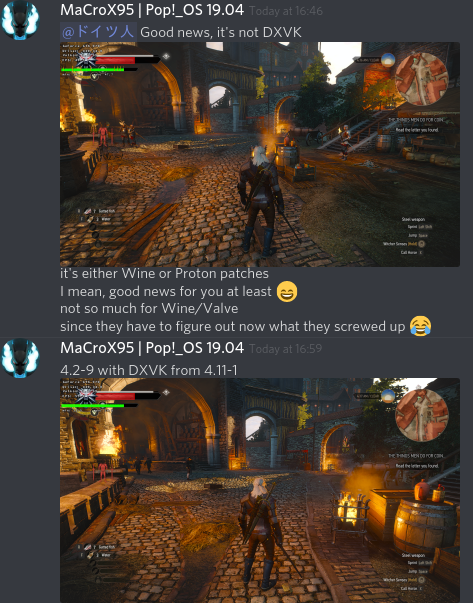
Conclusion 2: The problem is not related to updated DXVK library.
Remaining options are either Wine regression or Proton regression.
Hello @MaCroX95, please add PROTON_LOG=1 %command% to the game's launch options and drag and drop the generated $HOME/steam-$APPID.log into the comment box.
Hello @MaCroX95, please add
PROTON_LOG=1 %command%to the game's launch options and drag and drop the generated $HOME/steam-$APPID.log into the comment box.
@kisak-valve Here you are sir:
gist to logs (Proton 4.2-9 vs Proton 4.11-1)
It became much, I mean MUCH smoother for me.
It became much, I mean MUCH smoother for me.
With fsync, or just with Proton 4.11-1?
@Newbie13XD with Proton 4.11-1, vSync always was on
1080Ti, nVidia 430
Hierarch Square in Novigrad always was problematic with Proton: the FPS was clearly below 60 while in other areas it was lower than 120 (less than two in each 1/60 of a second to be precise). So, it is above 60 FPS in that square and above 120 in pretty much every place.
@Newbie13XD with Proton 4.11-1, vSync always was on
No no, not v-sync. I'm referring to what Valve speaks of here: https://github.com/ValveSoftware/Proton/releases/tag/proton-4.11-1b
Specifically, the third bullet.
1080Ti, nVidia 430
Hierarch Square in Novigrad always was problematic with Proton: the FPS was clearly below 60 while in other areas it was lower than 120 (less than two in each 1/60 of a second to be precise). So, it is above 60 FPS in that square and above 120 in pretty much every place.
Great to hear that!
@Newbie13XD as I am using VSync I don't really have more than 60FPS, I meant sampling theorem and its consequences.
PS sorry to hear others having issues, hope they will see this improvement soon.
@kisak-valve the issue has been resolved for me in 4.11-2, still not sure what was causing the unstable frame times, and I don't see any specific "fixes" in the changelog that could have solved those issues, but just though I might let you know that the performance is now back on par with 4.2-9.
Meanwhile 4.11-2 performs much worse for me, it is basically a return to 4.2-9 level of performance.
Meanwhile 4.11-2 performs much worse for me, it is basically a return to 4.2-9 level of performance.
Probably due to some reverted changes for NVIDIA cards in DXVK.
Compatibility report
- Name of the game with compatibility issues: The Witcher 3: Wild Hunt
- Steam AppID of the game: 292030
System info
- GPU: Vega 56
- Driver/LLVM version: amdgpu 19.0.1, LLVM version 8.0.0
- Kernel version 5.2.6
- Link to full system information as Gist: https://gist.github.com/Newbie13XD/dc05fa31e310ddc91b84258940aa8f90
- Proton version: 4.11-2
Symptoms
Game randomly freezes, mostly when getting on Roach. It takes the entire PC down with it, and requires a forced reset to become responsive again.
This has yet to occur with any other games (Minecraft, The Awesome Adventures of Captain Spirit, Sims 3, and Sims 4 tested).
Reproduction
Play the game and eventually experience freeze. No freezes like these ever occurred on my other PC however.
I am also experiencing the stuttering and high frame times on Proton 4.11-3. Downgrading to Proton 4.2-9 solves the issue. I have a GTX 1060 6GB with the 430.40 drivers.
The Witcher 3 and Mesa 19.3/git (292030)
Issue transferred from https://github.com/ValveSoftware/Proton/issues/3185.
@atomsymbol posted on 2019-11-02T15:47:02:
Compatibility Report
- Name of the game with compatibility issues: The Witcher 3
- Steam AppID of the game: 292030
System Information
- GPU: RX 570
- Driver/LLVM version: Mesa git, LLVM 9.0.0
- Kernel version: 5.3.0
- Link to full system information report as Gist: https://gist.github.com/atomsymbol/e1c42aedb0d366fdbb2e7bf82c5a9015
- Proton version: 4.2-9, 4.11-7
I confirm:
- [x] that I haven't found an existing compatibility report for this game.
- [x] that I have checked whether there are updates for my system available.
Symptoms
The Witcher 3 works fine with Mesa 19.2.2, but fails to start with Mesa git. This issue may also be reproducible with other Proton games.
The game seems to start fine in plain Wine 4.18 outside of Steam.
Reproduction
- Update Mesa to latest git version
- Start The Witcher 3
- An exception is reported by Proton's Wine in the terminal running Steam. The game does not create any window.
@kisak-valve wrote:
The conclusion should be that DXVK in Proton goes to a vulkan render path instead of OpenGL with upstream wine's wined3d.
Getting a backtrace from winedbg is very slow, but it pointed me to the fact that I am compiling LLVM and Mesa with static libstdc++ on my machine. I recompiled the packages with shared libstdc++ and the issue has been resolved.
The Witcher 3 + Mesa 19.1 - game trying to start, but windows hangs (black screen)
Issue transferred from https://github.com/ValveSoftware/Proton/issues/3203.
@Gman1988 posted on 2019-11-10T19:58:41:
Compatibility Report
- Name of the game with compatibility issues: The Witcher 3
- Steam AppID of the game: 292030
System Information
- GPU: Radeon R9 390 Gaming G1,
- Driver/LLVM version: Mesa 19.1.8
- Kernel version: 5.3.8-200.fc30.x86_64
- Link to full system information report as Gist:
https://gist.github.com/Gman1988/5220e19f6838438aa10c98d1294d2276 - Proton version: 4.11-8
I confirm:
- [ x ] that I haven't found an existing compatibility report for this game.
- [ x ] that I have checked whether there are updates for my system available.
Symptoms
Gamer is trying to start, new full-screen window opens, but stays black. After a while it stops responding.
Reproduction
Just start the game.
Hello @Gman1988, your system information hints that you're trying to run the game with your Intel Haswell gpu, which has experimental vulkan support. It may be worth giving https://github.com/ValveSoftware/Proton/wiki/For-AMD-users-having-issues-with-non-OpenGL-games a read. You have a Sea Island (CIK) video card, and the radeon kernel module does not support Vulkan.
I just bought and installed Witcher 3 GOTY edition and found out that it wouldn't work out of the box on my system with latest Proton-4.11 (Steam system info): by pushing the play button in Steam, a number of witcher3.exe processes would be launched, but nothing would show up even after some time.
By reading https://github.com/ValveSoftware/Proton/issues/607#issuecomment-508901749 I deleted everything under ~/.steam/steam/SteamApps/shadercache/292030/ and BAM, the game started successfully.
After recent updates, Witcher 3 won't start
steam-witcher3-crash.txt - critical line seems to be wine: Unhandled page fault on read access to 0000000000000000 at address 00007FB948436C85 (thread 0037)...
Tried with both proton-3.16-9 and proton-5.0-2. Trying proton-4.11-12 now.
I have deleted the shader pre-cache for 292030 and turned it off in options.
Using nvidia-440.59 on a GTX1060, game previously ran perfectly.
@triffid no problem here even with latest Proton versions...
Are you still experiencing those issues?
It seems that there's an incompatibility between winepulse and apulse - see https://github.com/i-rinat/apulse/issues/86
Turns out it's not related to Witcher 3 at all, but I'd appreciate suggestions on the appropriate spot to report this issue.
Other non-steam windows applications on my system weren't affected because I choose to build wine without pulseaudio support.
Linux native steam applications also seem to be unaffected by my use of apulse.
So on my system, only Proton is affected because I don't get to choose which audio pathways it thinks it can use.
Ideally, the winepulse/apulse issue should be fixed.
Failing that, Proton should detect apulse and fall back to alsa, like what happens if there's no pulse library available at all.
@triffid have you tried forcing ALSA output from Proton using winetricks sound=alsa in the relevant Proton/wine prefix?
If you'd like, I'm working on a simple shell-based tool to make these things easy.
Ooh that sounds handy, I'll try it, thanks!
Ooh that sounds handy, I'll try it, thanks!
Here you go: https://github.com/414n/protonsh
When you launch it, it will ask what Proton prefix and Proton version you want to use, then it will launch another shell instance with the proper environment overrides to execute winetricks tasks and the like inside that prefix.
Proton 5.0.4
Fedora31 Workstation
5.6.0-0.rc5.git0.1.fc31.x86_64
Mesa 20.0.0 Devel
Problem:
Mouse Cursor does not work properly in menus.
Can't select game options like Resume, Options, etc... using mouse cursor.
Can someone else verify?
https://github.com/nutta-git/logs-/blob/master/steam-292030(The Witcher 3).log
Proton 5.0.4
Fedora31 Workstation
5.6.0-0.rc5.git0.1.fc31.x86_64
Mesa 20.0.0 Devel
Problem:
Mouse Cursor does not work properly in menus.
Can't select game options like Resume, Options, etc... using mouse cursor.Can someone else verify?
https://github.com/nutta-git/logs-/blob/master/steam-292030(The Witcher 3).log
It's fine for me. Maybe a kernel or Mesa bug?
Proton 5.0-4
Fedora 31 Workstation
5.5.8-1.fc31
nvidia 440.64
This may also be a Wayland issue. Nvidia does not use Wayland on Fedora.
Mouse seems to work fine with TKG's Proton.
Proton 5.0.4
Fedora31 Workstation
5.6.0-0.rc5.git0.1.fc31.x86_64
Mesa 20.0.0 Devel
Problem:
Mouse Cursor does not work properly in menus.
Can't select game options like Resume, Options, etc... using mouse cursor.Can someone else verify?
https://github.com/nutta-git/logs-/blob/master/steam-292030(The Witcher 3).log
Seem like a Wayland Issue, game works well with X-Org.
problem solved for now
Proton 5.0.4
Fedora31 Workstation
5.6.0-0.rc5.git0.1.fc31.x86_64
Mesa 20.0.0 Devel
Problem:
Mouse Cursor does not work properly in menus.
Can't select game options like Resume, Options, etc... using mouse cursor.
Can someone else verify?
https://github.com/nutta-git/logs-/blob/master/steam-292030(The Witcher 3).logSeem like a Wayland Issue, game works well with X-Org.
problem solved for now
Out of curiosity, does it work in (X)Wayland when using older versions of Proton?
Proton 5.0.4
Fedora31 Workstation
5.6.0-0.rc5.git0.1.fc31.x86_64
Mesa 20.0.0 Devel
Problem:
Mouse Cursor does not work properly in menus.
Can't select game options like Resume, Options, etc... using mouse cursor.
Can someone else verify?
https://github.com/nutta-git/logs-/blob/master/steam-292030(The Witcher 3).logSeem like a Wayland Issue, game works well with X-Org.
problem solved for nowOut of curiosity, does it work in (X)Wayland when using older versions of Proton?
same problem happen with proton 4.11.latest with wayland
Proton 5.0-4, overlay not working.
False alarm, overlay is working, just binding is switched from shift+del to default shift+tab for some reason.
Proton 5.0.4
Fedora31 Workstation
5.6.0-0.rc5.git0.1.fc31.x86_64
Mesa 20.0.0 Devel
Problem:
Mouse Cursor does not work properly in menus.
Can't select game options like Resume, Options, etc... using mouse cursor.Can someone else verify?
https://github.com/nutta-git/logs-/blob/master/steam-292030(The Witcher 3).log
I fixed this issue by disabling hardware cursor. Running latest sway and arch linux as of today.
@billop Disabling Hardware Cursor has fixed this issue.
Thank you!
CTD on start game on Navi10
Issue transferred from https://github.com/ValveSoftware/Proton/issues/3682.
@Atrosha posted on 2020-03-23T17:46:49:
Compatibility Report
- Name of the game with compatibility issues: Witcher 3
- Steam AppID of the game: 292030
System Information
- GPU: Sapphire AMD Radeon RX 5700 PULSE (8 GB)
- Driver/LLVM version: 4.6 Mesa 20.1.0-devel
- Kernel version: 5.6.0-0.rc5.git0.2.fc32.x86_64
- Link to full system information report as Gist: https://gist.github.com/Atrosha/65d146556983bdeb438c1d7ca3d721b7
- Proton version: Proton 5.4 GE-2 and Proton 5.0-5
I confirm:
- [x] that I haven't found an existing compatibility report for this game.
- [x] that I have checked whether there are updates for my system available.
steam-292030.log
(MESA_DEBUG)terminal,log
Symptoms
Reproduction
Hello @Atrosha, wine: /mnt/storage/LinuxGames/steamapps/compatdata/292030/pfx is not owned by you is the line of interest from your log.
I'm going to take a guess that /mnt/storage is an NTFS partition, which is known to be finicky with Proton. If that is true, please give https://github.com/ValveSoftware/Proton/wiki/Proton-FAQ#none-of-my-games-are-launching--prefix-not-owned-by-you-error / https://github.com/ValveSoftware/Proton/wiki/Using-a-NTFS-disk-with-Linux-and-Windows a read.
Thanks @kisak-valve this helps a bit. Also I moved my Proton installation to home folder. But now the game starts at Steam and looks like running but nothing happens. And only force exit from Steam helps - the Stop button doesn't work.
I'm using Fedora Linux Rawhide (32)
Maybe this helps a bit?
[atrosha@localhost ~]$ cd ~/.local/share/Steam/ubuntu12_32
[atrosha@localhost ubuntu12_32]$ LD_LIBRARY_PATH=".:${LD_LIBRARY_PATH}" ldd $(file *|sed '/ELF/!d;s/:.*//g')|grep 'not found'|sort|uniq
	libbz2.so.1.0 => not found
	libdbus-glib-1.so.2 => not found
	libnm-glib.so.4 => not found
	libnm-util.so.2 => not found
	libudev.so.0 => not found
I found it here: https://github.com/ValveSoftware/steam-for-linux/issues/3959#issuecomment-311404926
I tried to sudo dnf install NetworkManager-libnm-devel.i686 with no result, because libnm-glib.so.4 and libnm-util.so.2 isn't there.
@Atrosha maybe you're having the same issue as me, namely a bogus shader cache: https://github.com/ValveSoftware/Proton/issues/607#issuecomment-568767767
Thanks @414n but that isn't it. Also I found this game specific by launching Thea 2 (Unity engine). Thea 2 works fine. And Hellblade (UE4)
When I start The Witcher 3 "prepare to launch" dialogue stage takes too long about 4-5 minutes but installs nothing.
Witcher 3 on ubuntu with Steam play won't start
Issue transferred from #2817.
@milka123 posted on 2019-06-17T15:52:24:Compatibility Report
* Name of the game with compatibility issues: Witcher 3: Wild hunt

* Steam AppID of the game: 292030
System Information
* GPU: NVIDIA GeForce GTX 1050 Ti

* Driver/LLVM version: 396.54, also tried with 418.56

* Kernel version: 4.15.0-51-generic

* Link to full system information report as [Gist](https://gist.github.com/):
  https://gist.github.com/milka123/f9d06e849c2e0e7fed695af72af5d3ef

* Proton version:
I confirm:
* [x]  that I haven't found an existing compatibility report for this game.

* [x]  that I have checked whether there are updates for my system available.
Symptoms
When I start the game, Steam client says it's running but nothing shows up. When I check system monitor I can see witcher3.exe in processes as running but nothing happens.
I couldn't find any more details about potential crashes in steam app log file.Reproduction
Downloaded Witcher 3: Wild hunt through steam client and tried to run it
I believe I have the same symptoms. One thing to note is that a few seconds after starting the game the process closes and the button goes for "Cancel" back to "Play." I've disabled shader pre-caching and deleted the files. Tried with and without forcing wined3d in the launch options.
OpenGL version string: 4.5 (Compatibility Profile) Mesa 19.2.8
26:00.0 VGA compatible controller: Advanced Micro Devices, Inc. [AMD/ATI] Ellesmere [Radeon RX 470/480/570/570X/580/580X] (rev c7) Subsystem: Micro-Star International Co., Ltd. [MSI] Radeon RX 480 Kernel driver in use: amdgpu Kernel modules: amdgpu
Kernel version 5.3.0-46
Proton logs attached.
steam-292030_normal.log
steam-292030_wind3d.log
Witcher 3 on ubuntu with Steam play won't start
Issue transferred from #2817.
@milka123 posted on 2019-06-17T15:52:24:Compatibility Report
* Name of the game with compatibility issues: Witcher 3: Wild hunt

* Steam AppID of the game: 292030
System Information
* GPU: NVIDIA GeForce GTX 1050 Ti

* Driver/LLVM version: 396.54, also tried with 418.56

* Kernel version: 4.15.0-51-generic

* Link to full system information report as [Gist](https://gist.github.com/):
  https://gist.github.com/milka123/f9d06e849c2e0e7fed695af72af5d3ef

* Proton version:
I confirm:
* [x]  that I haven't found an existing compatibility report for this game.

* [x]  that I have checked whether there are updates for my system available.
Symptoms
When I start the game, Steam client says it's running but nothing shows up. When I check system monitor I can see witcher3.exe in processes as running but nothing happens.
I couldn't find any more details about potential crashes in steam app log file.Reproduction
Downloaded Witcher 3: Wild hunt through steam client and tried to run it
steam-292030.logI believe I have the same symptoms. One thing to note is that a few seconds after starting the game the process closes and the button goes for "Cancel" back to "Play." I've disabled shader pre-caching and deleted the files. Tried with and without forcing wined3d in the launch options.
OpenGL version string: 4.5 (Compatibility Profile) Mesa 19.2.8
26:00.0 VGA compatible controller: Advanced Micro Devices, Inc. [AMD/ATI] Ellesmere [Radeon RX 470/480/570/570X/580/580X] (rev c7) Subsystem: Micro-Star International Co., Ltd. [MSI] Radeon RX 480 Kernel driver in use: amdgpu Kernel modules: amdgpu
Kernel version 5.3.0-46Proton logs attached.
steam-292030_normal.log
steam-292030_wind3d.log
Solved by installing vulkan
Meet problem with the same symptoms and Vulkan already installed.
After reinstalling the game the installation of redistributables stuck at step 3.
It was Fedora and after newest updates all works perfectly.
Hi Proton experts!
Witcher 3 won't start at all with 5.0-5 but works with previous version 4.11-13.
Looks like something broke from 4.11 to 5.0.
Any help would be appreciated! Thanks in advance!
Proton: 1584918606 proton-5.0-5b
OS: Ubuntu 18.04.4 (kernel: 5.5.16-050516-generic)
Renderer : AMD Radeon R9 200 Series (HAWAII, DRM 3.36.0, 5.5.16-050516-generic, LLVM 9.0.0)
Version : 4.5 (Compatibility Profile) Mesa 19.2.8
Vulkan: mesa-vulkan-drivers is already the newest version (19.2.8-0ubuntu0~18.04.3).
Vulkan32: mesa-vulkan-drivers:i386 is already the newest version (19.2.8-0ubuntu0~18.04.3)
LOG: steam-292030.log
@StatusCode404 try with next version, and try to delete your prefix

Not sure if I understood your instructions correctly.
- In Steam library I right clicked on "Pronton 5.0" under the horizontal scroll frame "Recent Games"
- I then clicked on "Properties" > "BETAS"
- Then selected "next -"
- "Close"
- Then on the same horizontal scroll frame I right clicked on Witcher 3 > "Properties" > "General"
- Chose proton 5.0-5
I tried to execute and run the game after the 6 points above and no joy. Same "Fatal error".
Works ok except for pauses and stutters on 4.11-13
Not sure if I understood your instructions correctly.
1. In Steam library I right clicked on "Pronton 5.0" under the horizontal scroll frame "Recent Games"

2. I then clicked on "Properties" > "BETAS"

3. Then selected "next -"

4. "Close"

5. Then on the same horizontal scroll frame I right clicked on Witcher 3 > "Properties" > "General"

6. Chose proton 5.0-5
I tried to execute and run the game after the 6 points above and no joy. Same "Fatal error".
Works ok except for pauses and stutters on 4.11-13
Can you send the log? Add PROTON_LOG %command% to the game's launch options and upload the file steam-292030.log that will be created in your home directory here.
@Newbytee I had already attached it to my initial post 4 spots above... https://github.com/ValveSoftware/Proton/issues/607#issuecomment-613333539
Proton 5.0-6 Test
Just an update on my previous comments...
LOG: steam-292030.log
I tried the Witcher 3 on the just release 5.0-6 with mesa 19.2.8 with R9-290X and same failure and effect as 5.0-5.
Looks like regression was NOT fixed.
Works OK with occasional stutter with proton 4.11-13, mesa 19.2.8 with R9-290X.
I would like some help .... My game launches with the wrongly detected resolution. This has happened to other games too...

As you can see, I have two physical displays; (1) is a 1920x1080 and (2) is 2560x1440
I launched the game with DXVK_FILTER_DEVICE_NAME="VEGA20" gamemoderun %command%
The game then launches on display (2) at the upper left corner and is using XWAYLAND.
Report from xwininfo
xwininfo: Window id: 0x320000b "The Witcher 3"

  Absolute upper-left X:  0
  Absolute upper-left Y:  27
  Relative upper-left X:  0
  Relative upper-left Y:  27
  Width: 1920
  Height: 1080
  Depth: 24
  Visual: 0x58
  Visual Class: TrueColor
  Border width: 0
  Class: InputOutput
  Colormap: 0x3000001 (not installed)
  Bit Gravity State: NorthWestGravity
  Window Gravity State: NorthWestGravity
  Backing Store State: NotUseful
  Save Under State: no
  Map State: IsViewable
  Override Redirect State: no
  Corners:  +0+27  -2560+27  -2560-333  +0-333
  -geometry 1920x1080+0+27
As you can see the geometry is wrong...
Report from xprop
xprop -id 0x320000b
WM_STATE(WM_STATE):
		window state: Normal
		icon window: 0x0
_NET_WM_DESKTOP(CARDINAL) = 0
_GTK_EDGE_CONSTRAINTS(CARDINAL) = 170
_NET_WM_ALLOWED_ACTIONS(ATOM) = _NET_WM_ACTION_MOVE, _NET_WM_ACTION_CHANGE_DESKTOP, _NET_WM_ACTION_CLOSE, _NET_WM_ACTION_ABOVE, _NET_WM_ACTION_BELOW
_NET_WM_BYPASS_COMPOSITOR(CARDINAL) = 0
_NET_WM_STATE(ATOM) =
_NET_WM_ICON(CARDINAL) = 	Icon (32 x 32):


	    ▒    ░            ░    ▒░
	   ░▓▒   ▒░   ░      ▒▓   ▒▓▒
	    █▓▒▒ ▓▓ ▒▒░░░░▒▒░▓▓░▒▒▓█░
	    ▓█▓▒░░▒░░▒░░░░▒░▒▓▒░▒▓▓▓
	    ░▓▓▓▒░░▒░ ░  ░  ▒▒▒▒▓▓▓▒
	     ▒▓▓▓▓░░░  ░    ▒░▓▓▒▓▓
	    ░▓▓▒▒▒░░ ░░░░░   ░▒▒▒▓▓░░
	  ░▓▓▓██░ ▓▒  ░░░░  ░▒░░▓█▓▓▓░
	    ▓▓▓▒▒░░░░▒░░░░▒░░░░░▓▓▓▒
	    ▒▓▒░░░░ ░▒▒▒░▒▒▒ ░░░▒▒▓▒
	 ░▓▓▒▒▒▒░  ░░░░░░░░░ ░  ░▒▒▒▓▓▒
	 ▓▓▓▓▓▓▓▓▓▓▓▓▒▒  ░▒▓▓▓▓▓▓▓▓▓▓▓▓░
	   ░▒▓▓███▓░▓▓▓▓▓▓▓▓ ▒███▓▓▒░
	      ▓▓▓▒ ░▓▓▓▓▓▓▓▓░ ░▓▓▓
	     ▒█▓░░▓██▓▒▓▓▒▓██▒░░▓█▒
	    ░▓▓░▒▓███▓▓▓▓▓▓███▓▒░▓█░
	    ▓▓▒▒███▓▓██▓▓██▓▓███▓░▓▓
	   ▒▓▓▓█▓▓▓▒▓██████▓▒▓█▓█▓▓▓▒
	  ░▓▓█▓▒░▓▒▒█▓▓▓▓▓▓█▓▒▓░▒▓█▓▓░
	 ░▓▓▒░   ▓▒██▓▓▓▓▓▓██▒▒░  ░▒▓▓░
	 ░░     ░▒▓▓▓▓▓▓▓▓▓▓█▓░▒     ░░
	        ▒▓█▓ ░▓▓▓▓▒ ▒█▓▒
	        ▓▓░  ░▓▓█▓░  ░▓▓
	       ░▓    ░▒▓▓▒░    ▓░
	              ▒▒▓▒░
	              ▓▓▓▓
	              ░░░░


_NET_WM_NAME(UTF8_STRING) = "The Witcher 3"
WM_ICON_NAME(STRING) = "The Witcher 3"
WM_NAME(STRING) = "The Witcher 3"
WM_HINTS(WM_HINTS):
		Client accepts input or input focus: True
		Initial state is Normal State.
		bitmap id # to use for icon: 0x30000a5
		bitmap id # of mask for icon: 0x30000a7
		window id # of group leader: 0x320000b
_NET_WM_WINDOW_TYPE(ATOM) = _NET_WM_WINDOW_TYPE_NORMAL
_MOTIF_WM_HINTS(_MOTIF_WM_HINTS) = 0x3, 0x24, 0x0, 0x0, 0x0
WM_NORMAL_HINTS(WM_SIZE_HINTS):
		program specified location: 0, 0
		program specified minimum size: 1920 by 1080
		program specified maximum size: 1920 by 1080
		window gravity: Static
_NET_WM_USER_TIME_WINDOW(WINDOW): window id # 0x3000016
XdndAware(ATOM) = BITMAP
_NET_WM_PID(CARDINAL) = 32254
WM_LOCALE_NAME(STRING) = "en_US.UTF-8"
WM_CLIENT_MACHINE(STRING) = "yellowtrain"
WM_CLASS(STRING) = "witcher3.exe", "steam_app_292030"
WM_PROTOCOLS(ATOM): protocols  WM_DELETE_WINDOW, _NET_WM_PING
STEAM_GAME(CARDINAL) = 292030
So clearly the WM_SIZE_HINTS is wrong...
Report from xrandr
[ocelot@yellowtrain ~]$ xrandr --query
Screen 0: minimum 16 x 16, current 4480 x 1440, maximum 32767 x 32767
XWAYLAND0 connected 1920x1080+2560+0 (normal left inverted right x axis y axis) 530mm x 310mm
   1920x1080     59.96*+
   1440x1080     59.99
   1400x1050     59.98
   1280x1024     59.89
   1280x960      59.94
   1152x864      59.96
   1024x768      59.92
   800x600       59.86
   640x480       59.38
   320x240       59.52
   1680x1050     59.95
   1440x900      59.89
   1280x800      59.81
   720x480       59.71
   640x400       59.95
   320x200       58.96
   1600x900      59.95
   1368x768      59.88
   1280x720      59.86
   1024x576      59.90
   864x486       59.92
   720x400       59.55
   640x350       59.77
XWAYLAND1 connected 2560x1440+0+0 (normal left inverted right x axis y axis) 600mm x 340mm
   2560x1440    143.87*+
   1920x1440    143.84
   1600x1200    143.89
   1440x1080    143.80
   1400x1050    143.89
   1280x1024    143.79
   1280x960     143.86
   1152x864     143.75
   1024x768     143.66
   800x600      143.83
   640x480      143.30
   320x240      142.05
   1920x1200    143.89
   1680x1050    143.88
   1440x900     143.86
   1280x800     143.67
   720x480      143.35
   640x400      143.37
   320x200      141.40
   2048x1152    143.88
   1920x1080    143.80
   1600x900     143.81
   1368x768     143.77
   1280x720     143.67
   1024x576     143.91
   864x486      143.63
   720x400      143.29
   640x350      143.57
Clearly, display (2) is capable of 2560x1440...Yet the application is not getting the right hint.
Now I can force the resolution by setting it in user.settings file found under steamuser/My Documents/The Witcher 3/ of the pfx and the game will launch using the entire display (2). However, it still detected the wrong resolution within the game's graphical settings...
[Viewport]
VSync=false
Resolution="2560x1440"
FullScreenMode=1
VSyncThreshold=0
OutputMonitor=0
Thus is there a way to give the game some hints of the right resolution through DXVK's variables or whatever else within the launch options? I've tried DXVK_FILTER_DEVICE_NAME="VEGA20" gamemoderun %command% -w 2560 -h 1440 ... It doesn't work.
Does this have any bearing to the problem? https://gitlab.gnome.org/GNOME/mutter/commit/f241bdba934f938c0a97587806d02c0f2464f221
I really really look forward to the day, when a Steam update does not break all the games I have bought.


Why is this not accessible? I just played yesterday, sleep mode, awoke it today, and not playable anymore. I had to enter the password upon login, which is normally not the case.
@ShalokShalom It seems like Proton has been disabled, or at least been disabled for all games. Try re-enabling it in settings?
I really really look forward to the day, when a Steam update does not break all the games I have bought.
Why is this not accessible? I just played yesterday, sleep mode, awoke it today, and not playable anymore. I had to enter the password upon login, which is normally not the case.

recheck this option to fix this
Yeah, I figured this myself and just came to report about it. This has fixed my issue. Thanks a lot, dear community.
Another issue:

As you can see, is the Controller detected, and yet, it does not function at all.
It is a newly bought Nacon PS4 controller and supposed to be working, as far as I know.
Can anybody help me with that?
EDIT: OK, out of nowhere, the controller started suddenly to function somewhat, while Gerald is now jumping consistently through the game world, with me not pressing any button, and half of the inputs are still not registered. Is this a potentially broken controller?
EDIT 2: It is mainly the left stick, the other buttons and controls seem to work fine.
EDIT 3: The left control stick is working in the Dolphin Emulator and in the Witcher menu.
Try to disable steam input.
Works
EDIT: Of course, it has its own set of issues. A is now used to both sprint and open the menu and sometimes, the share button offers the escape menu and sometimes the quick selection for the signs.
Recently completed my first playthrough (entirely on Linux) and started New Game+. There's this one NPC with invisible arms:

No real issues other than that. Performance is great with Feral's GameMode.
Running Arch Linux with 5.6.8 kernel, Ryzen 5 2600, GTX 1060, Nvidia 440.82, Proton 5.0-6.
@dearlygparted Vivaldi's arms being invisible is a known game bug, happens on Windows as well and apparently even on consoles.
There's actually a few mods that fix that as well as other graphical issues.
Do you have a guideline how to install mods?
I install mods manually. Sometimes you need to merge scripts.
Just for the reference, Vivaldi has hands with AMD RX 5700 XT.
Do you have a guideline how to install mods?
If the mod comes in the form of a DLL you need to do a DLL override in Wine, otherwise it shouldn't be any different from how you do it on Windows.
I install mods manually. Sometimes you need to merge scripts.
And how to do this? I have no previous experience with installing mods in a non-Linux native game at all and have no idea where to start. There are also no docs, since that would make things obviously too easy. :D
Thanks
@ShalokShalom use https://lutris.net/games/vortex-mod-manager/
I install mods manually. Sometimes you need to merge scripts.
And how to do this? I have no previous experience with installing mods in a non-Linux native game at all and have no idea where to start. There are also no docs, since that would make things obviously too easy. :D
Thanks
I don't think this is the place to discuss modding, but follow guides like on Windows, except drop the files into the relevant subdirectory of Witcher 3's compatdata directory (can be found in your Steam Library directory). You will find a Windows-like file tree there.
It might be the place to discuss documentation for such things.
Proton 5.0-7 Test
Just an update on my previous comments...
LOG: steam-292030.log
Summary:
I tried the Witcher 3 on the just release 5.0-7 with mesa 20.0.6 Kisak's Valve's PPA with R9-290X and same failure and effect as 5.0-5/6.
Looks like regression was NOT fixed.
Works OK with with proton 4.11-13, mesa 20.0.6 with R9-290X with or without ACO
@StatusCode404 which regression are you talking about?
@StatusCode404 which regression are you talking about?
https://github.com/ValveSoftware/Proton/issues/607#issuecomment-613333539
Hi All, thanks to @kisak-valve and @HenrikHolst I was able to fix the problem by deleting all the old vulkan json files in /etc/vulkan/icd.d/
If you're stuck in the same situation, you can do the same thing! 5.0-7 now works!
Witcher 3 works perfectly on my system right out of the box.
To install mods you download them from Nexus and drop the mod folder (which should be named mod[ModName]) into the mods folder in Witcher 3's compatdata folder. Some of them require the script merger to be compatible with each other; that can also be found on Nexus and as far as I know, works perfectly.
Found a bug, after some amount of alt-tabs game switches to windowed mode while still being in fullscreen mode according to settings, maybe a game bug but sharing anyway.
To reproduce it fast you need to press Meta+PD then click on witcher in task bar, repeat until success:
https://user-images.githubusercontent.com/5204968/104815053-e936aa80-581a-11eb-8c97-21f48a9cd330.mp4
And log, if it's a wine problem:
steam-292030.log
Same bug, after alt-tabbing while loading game becomes like this:

After another alt-tabbing game becomes windowed.
same issue as @pclouds no keyboard or mouse in-game
https://github.com/ValveSoftware/Proton/issues/607#issuecomment-461266351
tested with all available versions of proton in steam native & runtime, tested unloading most controller modules, unloading kwin, tested with another keyboard and mouse, tested forcing off steam input. nothing makes sense.
I'm running archlinux (5.6.15-arch1-1) & KDE5
Run out of ideas for now, any help will be apreciated.
It works for me now (for probably 6 months). No idea what caused it.
Whitelist Request
- Name of the game to be whitelisted: The Witcher 3
- Steam AppID of the game: 292030
System Information
- GPU: RX 560
- Driver/LLVM version: 4.6 (Compatibility Profile) Mesa 20.2.0-devel (git-4de678c 2020-06-13 focal-oibaf-ppa)
- Distro version: Kubuntu 20.04
- Link to full system information report as Gist: https://gist.github.com/soredake/ed1fa30f885371dda5f331815920a3ae
- Proton version: 5.0-9
I confirm:
- [X] that pressing the
Playbutton in the Steam client is sufficient. - [ ] that runtime config options are necessary to run the game.
- [ ] that no workarounds other than PROTON_* env variables are necessary.
Issues
- [ ] I haven't experienced any issues.
- [ ] There are no issues left open for this game.
- [X] Although I consider the gaming experience equal to Windows there are remaining issues:
https://github.com/ValveSoftware/Proton/issues/607#issuecomment-640053242
same issue as @pclouds no keyboard or mouse in-game
[#607 (comment)](https://github.com/ValveSoftware/Proton/issues/607#issuecomment-461266351)
tested with all available versions of proton in steam native & runtime, tested unloading most controller modules, unloading kwin, tested with another keyboard and mouse, tested forcing off steam input. nothing makes sense.
I'm running archlinux (5.6.15-arch1-1) & KDE5
Run out of ideas for now, any help will be apreciated.
Actually found a fix for this. Under folder "/home/user/.local/share/Steam/" there is two folders with same name but some characters in upper case like that: "SteamApps" and "steamapps".
Deleting the lower case folder "steamapps" solve the problem. Maybe steam could redownload partially some games, so take care and move that folder to another place at first to test.
Actually found a fix for this. Under folder "/home/user/.local/share/Steam/" there is two folders with same name but some characters in upper case like that: "SteamApps" and "steamapps".
Deleting the lower case folder "steamapps" solve the problem. Maybe steam could redownload partially some games, so take care and move that folder to another place at first to test.
Be VERY careful when deleting the "steamapps" folder! I've only got one of them, and it's the all lowercase one. For me it contains every appmanifest, the entire "common" folder (which contains almost all of the files for every game I've downloaded), the entire "compatdata" folder (which contains a lot of data relating to Proton, including save files), the entire "shadercache" folder, and the entire "workshop" folder.
I can't start The Witcher 3. Interestingly, it happens when I run it from DXVK, but when I set WINE3D (opengl) in launch options, the game starts correctly. After clicking launch in steam. Then steam processing API Vulkan sharders and when this window disappears nothing happens. The witcher.exe process is still running (I can see it in the task manager), unfortunately the game won't start. Worth to add other Proton games works.
In terminal I see error:
wine client error: e8: write: wrong file descriptor
This is on current Proton 5, but when I choose older 4.X then I dont see this error message but Witcher3 still not working (same issue but without error message).
I tried the regular kernel and the one with fsync. Tried launch options noesync and nofsync. Nothing helps.
Here is my Steam OS/hardware info: https://gist.github.com/AngryPenguinPL/1a1b47cd4048a77f824018bc65831cf6
Here is the console log from launch steam to launch witcher: https://gist.github.com/AngryPenguinPL/a68cffcbebfb6ce43b162bd7c2eab4f1
Here is debug log: https://gist.github.com/AngryPenguinPL/5e6477901972472f95dd88f437db02dd
Anyone have any ideas?
Anyone have any ideas?
sudo dnf install vulkan-loader
Does this help?
sudo dnf install vulkan-loaderDoes this help?
I have vulkan-loader installed. AlsoI tried on AMDVLK and same error.
Worth to add other Proton games works, I tested The Incredible Adventures of VanHelsingI with OpenGL mode and DirectX11.
@AngryPenguinPL have you tried clearing the shader cache? I had a similar issue too: https://github.com/ValveSoftware/Proton/issues/607#issuecomment-568767767
@AngryPenguinPL have you tried clearing the shader cache? I had a similar issue too: [#607 (comment)](https://github.com/ValveSoftware/Proton/issues/607#issuecomment-568767767)
@414n after remove sharder cache I see steam window - processing API Vulkan but nothing happens. Shaders are not processed, disk usage is nil and so for a long time. I can only click on "Skip".
After skip, in terminal I see again my issue: wine client error: e8: write: wrong file descriptor
but worth to add just before write: wrong file descriptor is this:
>>> Adding process 24044 for game ID 292030
Unable to read VR Path Registry from C:\users\steamuser\Local Settings\Application Data\openvr\openvrpaths.vrpath
Fossilize INFO: Overriding serialization path: "/steam/steamapps/shadercache/292030/fozpipelinesv4/steamapprun_pipeline_cache".
wine client error: e8: write: wrong file descriptor
Maybe this Fossilize INFO is the problem?
The game starts from the second or third time.
SteamOS 2.0
steam-292030.log
@aeikum I'm pinging you as you told us to do in the surround bug report.
The game runs only in stereo and the sound is low, the voices are even lower.
@Loacoon1 Thanks. I'll try to get to this sometime, but I'm not sure when.
Has anyone tried this game with Proton-5.13-4?
I get this error when trying to start it:
25901.439:00c4:00c8:trace:loaddll:build_module Loaded L"C:\\windows\\system32\\xaudio2_7.dll" at 00007F0018080000: builtin
ALSA lib pcm_dmix.c:1108:(snd_pcm_dmix_open) unable to open slave
INFO: OpenAudioDevice failed: ALSA: Couldn't open audio device: Device or resource busy
INFO: Assertion failed: 0 && "Failed to open audio device!"
25901.493:00c4:00c8:trace:seh:dispatch_exception code=c0000005 flags=0 addr=00007F001805D940 ip=1805d940 tid=00c8
25901.493:00c4:00c8:trace:seh:dispatch_exception  info[0]=0000000000000000
25901.493:00c4:00c8:trace:seh:dispatch_exception  info[1]=00000000000000dc
25901.493:00c4:00c8:trace:seh:dispatch_exception  rax=0000000000000000 rbx=0000000002ff0720 rcx=0000000000000000 rdx=000000001805f050
25901.493:00c4:00c8:trace:seh:dispatch_exception  rsi=0000000000000000 rdi=0000000002fdbe90 rbp=0000000000000000 rsp=000000000221e560
25901.493:00c4:00c8:trace:seh:dispatch_exception   r8=000000007d9c7a50  r9=0000000000000001 r10=0000000000000001 r11=000000008262de50
25901.493:00c4:00c8:trace:seh:dispatch_exception  r12=0000000002fdc730 r13=0000000000000000 r14=0000000000000000 r15=0000000002fdc748
25901.493:00c4:00c8:trace:seh:call_vectored_handlers calling handler at 0000000069060770 code=c0000005 flags=0
For some reason, it tries to open an ALSA device and fails to do it.
Here's the complete log: steam-292030.log.gz
Apparently it can't find xaudio dll file. You might wanna try installing 'xact' using protontricks in the meantime. Besides, it often fixes my audio issues in games.
@414n Worth noting the ALSA issue also affects Hitman 2, as seen here (comment).
Thanks @Loacoon1, indeed installing xact via winetricks did make the game start.
Now I only ear background voices on my earphones, but that's a minor issue :sweat_smile:
Has anyone tried this game with Proton-5.13-4?
Strange. Launches just fine for me. Tested both regular Proton 5.13-4 and experimental. I'm on Fedora 32.
I have a very weird bug where all input keys are shifted one to the left so 'w' is 'e', 's' is 'd' ... Its like this on every Proton Version I tried. I am reinstalling the game right now, lets see if it helps. Has anyone ever encountered this bug?
@jzbor I haven't heard of that before. Do you have a standard US English keyboard? Some other locale? Anything special about the keyboard?
@jzbor I haven't heard of that before. Do you have a standard US English keyboard? Some other locale? Anything special about the keyboard?
I have a USB-Keyboard which hardware-wise has a German QWERTZ layout, but software wise I changed it to the standard American layout via setxkbmap...
https://gist.github.com/kazzmir/f0fa849ea737fabc9c677b152db0834c system information from steam. I am on ubuntu 20.04 on a laptop with a discrete nvidia card, and when I launch Witcher3 I just get a black screen, and nothing seems to happen. I tried proton experimental, 6.3-2, and 5.13-6 but the same behavior occurs for all of them. Other games like DOOM 2016 do work.
Hello @kazzmir, blind guess that you're affected by https://github.com/ValveSoftware/steam-runtime/issues/312. Give https://github.com/ValveSoftware/steam-runtime/issues/312#issuecomment-739441559 a try.
Excellent suggestion! I did this
/usr/share/vulkan/icd.d $ sudo mv intel_icd.x86_64.json intel_icd.x86_64.json.disabled
And the game runs now.
I am having input delays(Like 1 or more seconds diff) in WItcher 3. But I haven't noticed it in the main menu
Witcher 3 has significant input delay
Issue transferred from https://github.com/ValveSoftware/Proton/issues/4944.
@Sakura0134 posted on 2021-07-05T12:41:48:
Compatibility Report
- Name of the game with compatibility issues: The Witcher 3
- Steam AppID of the game: 292030
System Information
- GPU: Vega 8
- Driver/LLVM version: Mesa 21.1.3-2/llvm 12.0.0-2
- Kernel version: linux-zen 5.12.14
- Link to full system information report as Gist: https://gist.github.com/Sakura0134/8f0762273fa1445911f7d1c57685b598
- Proton version: Proton Experimental
I confirm:
- [x] that I haven't found an existing compatibility report for this game.
- [x] that I have checked whether there are updates for my system available.
Symptoms
Significant Input delay by 1 to 2 s
Reproduction
Open Witcher 3(Steam Version) and play the game. You will notice input delay by 1 to 2 s
Witcher 3 weird lighting
Issue transferred from https://github.com/ValveSoftware/Proton/issues/4974.
@ryandbair posted on 2021-07-16T00:56:30:
Compatibility Report
- Name of the game with compatibility issues: The Witcher 3: Wild Hunt - Game of the Year
- Steam AppID of the game: 292030
System Information
- GPU: R9 280 X
- Driver/LLVM version: Mesa 21.1.4
- Kernel version: 5.12.15
- Link to full system information: Gist
- Proton version: Experimental & 6.3-5
I confirm:
- [x] that I haven't found an existing compatibility report for this game.
- [x] that I have checked whether there are updates for my system available.
Symptoms
Lighting in the game is generally a bit weird. Light parts of outdoor scenes are very bright and dark parts are very dark. Caves are near total darkness.
Reproduction
The gamma adjust screen is a good example with Proton Experimental. The background (white) seems to be adjusted but the image in the center is almost always complete black, maybe just flickering into sight here and there.
In game play, just look around. Maybe go into a cave for fun.
Hello @ryandbair, I suspect you're seeing a generation-specific video driver issue. There's been several RADV commits for your video card that have landed between mesa 21.1 and 21.2 and move the driver closer to spec conformance. If it's easy to do, it might be interesting to test how the game behaves with the mesa 21.2 release candidate or a mesa git main build.
I tested on a build from git this morning (21.3 - 7a1cc56), same issue.
As a correction to my original post, the image in gamma appears only for a split second when the settings are opened. It does not flicker back in after that.
I'm having the same bug as two others have reported in the past. Neither had any solutions posted to fix the issue. Basically, none of my controls work once I load into the game. Keyboard, mouse, controller, none of them work. I can't even press ESC to bring up the menu. I'm able to use all three to browse through the main menu just fine, and if I minimize the game window to bring up the ESC menu while in the game proper, I'm able to control that menu too. When I look at the keybindings in the options, they all come up as "None" except for quicksave, and the input.settings file is blank save for one entry at the top. If I try to put a fresh input.settings file there and write-protect it, it still shows up in the game as "None" for all keybindings.
I can't generate a Proton log as I'm playing the GOG version with Lutris, but I am using Proton to play the game. The bug does also happen with Lutris's own WINE version. If needed I can paste the Lutris log, but it doesn't seem to have any useful information. Please tell me if I can post any kind of log that would help to figure out this problem, as I'm pretty much unable to play this game at all now until this issue gets resolved.
EDIT: Turns out, it was the Xanmod kernel. I switched to Liquorix (so I could still have fsync support) and the keybindings/no HUD/lack of control issue is completely gone. I suspect something was broken in the latest versions, or maybe it was something in 5.13 that carried over into Xanmod, who knows... all I can say is that it's fixed, for now, and I'm happy.
The Witcher 3: Wild Hunt
Issue transferred from https://github.com/ValveSoftware/Proton/issues/5331.
@rexhent posted on 2021-11-20T07:25:20:
Whitelist Request
- Name of the game to be whitelisted: The Witcher 3: Wild Hunt
- Steam AppID of the game: 292030
System Information
- GPU: GTX 1050 Mobile
- Driver/LLVM version: Nvidia 470
- Distro version: Manjaro Rolling
- Link to full system information report as Gist:
- Proton version: Proton Experimental
I confirm:
- [ Yes] that pressing the
Playbutton in the Steam client is sufficient. - [ No] that runtime config options are necessary to run the game.
- [ No] that no workarounds other than PROTON_* env variables are necessary.
Issues
- [ Yes] I haven't experienced any issues.
- [ No] There are no issues left open for this game.
- [ None] Although I consider the gaming experience equal to Windows there are remaining issues:
Whitelist Request
- Name of the game to be whitelisted: The Witcher 3: Wild Hunt
- Steam AppID of the game: 292030
System Information
- GPU: Radeon RX 6600 XT
- Driver/LLVM version: Mesa 21.2.5
- Distro version: Fedora 35 (with Steam Flatpak from Flathub)
- Link to full system information report as Gist: https://gist.github.com/AsciiWolf/ab84cb208969734f004a4a6af0585cae
- Proton version: 6.3-7
I confirm:
- [x] that pressing the
Playbutton in the Steam client is sufficient. - [ ] that runtime config options are necessary to run the game.
- [ ] that no workarounds other than PROTON_* env variables are necessary.
Issues
- [x] I haven't experienced any issues.
- [ ] There are no issues left open for this game.
- [ ] Although I consider the gaming experience equal to Windows there are remaining issues:
Everything works fine out-of-box just like it was a native game.
The Witcher 3 freezes at the start of game
Issue transferred from https://github.com/ValveSoftware/Proton/issues/5363.
@x-crowbar-x posted on 2021-11-29T13:18:39:
Compatibility Report
- Name of the game with compatibility issues: The Witcher 3: Wild Hunt
- Steam AppID of the game: 292030
System Information
- CPU: AMD Ryzen 3 4300U with Radeon Graphics
- GPU: AMD RENOIR (integrated) 1 GiB.
- Driver: AMD AMD RENOIR (DRM 3.42.0, 5.15.5-arch1-1, LLVM 13.0.0)
- Driver Version: 4.6 (Compatibility Profile) Mesa 21.2.5
- OpenGL Version: 4.6
- Kernel version: 5.15.5-arch1-1
- Link to full system information report as Gist
- Proton version: 6.3-8
I confirm:
- [🗸] that I haven't found an existing compatibility report for this game.
- [🗸] that I have checked whether there are updates for my system available.
Symptoms
I started the game and everything was fine until I started a new game. I skipped the videos and it freezed after a couple of seconds in gameplay. It always freezes at the same spot. I ran it in the lowest settings and even chose the lowest resolution.
Also, the laptop does not even get hotter and the fan is almost quiet, as if it doesn't try to load anything, but I can hear the sounds perfectly.
P.S. I found videos of people playing the game in 30-34 fps on my hardware on Windows, so it should also work on Linux.
Reproduction
Open the game and click on "NEW GAME", skip the video, or don't, it does not matter.
Hello @x-crowbar-x, looking at your Proton log, err: DxvkSubmissionQueue: Command submission failed: VK_ERROR_DEVICE_LOST looks like the line of interest, and your system information tells us that your system is configured to use AMDVLK. Can you test if game has the same issue when run with mesa/RADV?
@kisak-valve Well, I will try, but I do not know how to run it with mesa/RADV, to be honest. Can you tell me how?
For your distro, I think you can get mesa/RADV by installing the vulkan-radeon and lib32-vulkan-radeon system packages. After that, removing the amdvlk and lib32-amdvlk system packages or setting the game's launch options to AMD_VULKAN_ICD=RADV %command% should get the game to use mesa/RADV. (https://wiki.archlinux.org/title/AMDGPU https://wiki.archlinux.org/title/Vulkan#Selecting_Vulkan_driver)
Thank you very much @kisak-valve! It works just fine now!
The Witcher 3: Wild Hunt (292030)
Issue transferred from https://github.com/ValveSoftware/Proton/issues/5417.
@minionprocyk posted on 2021-12-17T19:50:40:
Compatibility Report
- Name of the game with compatibility issues: The Witcher 3
- Steam AppID of the game: 292030
System Information
- GPU: AMD 5700XT
- Driver/LLVM version: 21.3.1
- Kernel version: 5.15.6-200.fc35.x86_64
- Link to full system information report as Gist:
- Proton version: proton-6.3-8
I confirm:
- [x] that I haven't found an existing compatibility report for this game.
- [x] that I have checked whether there are updates for my system available.
Symptoms
Game crashes on launch. This started happening after upgrading my CPU/Motherboard.
Reproduction
Launch Game
Today I couldn't run the game. It used to run fine just yesterday. I don't think I even updated anything.. The error is as follows:
ERROR: ld.so: object '/home/lumi/.local/share/Steam/ubuntu12_32/gameoverlayrenderer.so' from LD_PRELOAD cannot be preloaded (wrong ELF class: ELFCLASS32): ignored.
ERROR: ld.so: object '/home/lumi/.local/share/Steam/ubuntu12_32/gameoverlayrenderer.so' from LD_PRELOAD cannot be preloaded (wrong ELF class: ELFCLASS32): ignored.
GLib-CRITICAL **: 01:40:40.890: unquote_string_inplace: assertion 'err == NULL || *err == NULL' failed
GameAction [AppID 292030, ActionID 1] : LaunchApp changed task to ProcessingInstallScript with ""
pressure-vessel-adverb[27718]: W: Unable to generate locales: Child process exited with code 1
Installing breakpad exception handler for appid(steam)/version(1639697812)
Installing breakpad exception handler for appid(steam)/version(1639697812)
I tried everything. Reinstalled drivers, steam, the game, packages...
I have an optimus laptop with ryzen 5 4600H and GTX 1650 Ti running manjaro linux.
Gist: https://gist.github.com/I-dont-need-name/4fabdef5063dbdcfd4df4f0cbef3ca03
With a bit of googling for "GLib-CRITICAL **: 01:40:40.890:
unquote_string_inplace: assertion 'err == NULL || *err == NULL' failed",
https://github.com/ValveSoftware/steam-for-linux/issues/7664 suggests it's
an issue with desktop shortcuts not making steam update proton libs or
something, not specific to Witcher 3 nor Proton's compatibility layer, but
some quirk of steam runtime management.
However, there's also a good chance that your error occurred earlier in the
log, and by showing just the tail you'll end up on a wild goose chase - why
not add the full log to your gist?
On Thu, 23 Dec 2021 at 15:21, I-dont-need-name @.***>
wrote:
Today I couldn't run the game. It used to run fine just yesterday. I don't
think I even updated anything.. The error is as follows:ERROR: ld.so: object '/home/lumi/.local/share/Steam/ubuntu12_32/gameoverlayrenderer.so' from LD_PRELOAD cannot be preloaded (wrong ELF class: ELFCLASS32): ignored.
ERROR: ld.so: object '/home/lumi/.local/share/Steam/ubuntu12_32/gameoverlayrenderer.so' from LD_PRELOAD cannot be preloaded (wrong ELF class: ELFCLASS32): ignored.
GLib-CRITICAL **: 01:40:40.890: unquote_string_inplace: assertion 'err == NULL || *err == NULL' failed
GameAction [AppID 292030, ActionID 1] : LaunchApp changed task to ProcessingInstallScript with ""
pressure-vessel-adverb[27718]: W: Unable to generate locales: Child process exited with code 1
Installing breakpad exception handler for appid(steam)/version(1639697812)
Installing breakpad exception handler for appid(steam)/version(1639697812)I tried everything. Reinstalled drivers, steam, the game, packages...
I have an optimus laptop with ryzen 5 4600H and GTX 1650 Ti running
manjaro linux.
Gist:
https://gist.github.com/I-dont-need-name/4fabdef5063dbdcfd4df4f0cbef3ca03—
Reply to this email directly, view it on GitHub
https://github.com/ValveSoftware/Proton/issues/607#issuecomment-1000097689,
or unsubscribe
https://github.com/notifications/unsubscribe-auth/AABICGXR4FRZUGVSVXYGPI3USLEXJANCNFSM4FRSLUZQ
.
Triage notifications on the go with GitHub Mobile for iOS
https://apps.apple.com/app/apple-store/id1477376905?ct=notification-email&mt=8&pt=524675
or Android
https://play.google.com/store/apps/details?id=com.github.android&referrer=utm_campaign%3Dnotification-email%26utm_medium%3Demail%26utm_source%3Dgithub.You are receiving this because you were mentioned.Message ID:
@.***>
why not add the full log to your gist?
Sorry, here is the log from running steam in console until I launch the game and nothing happens (it says "running" but nothing is running):
$ steam ✔
steam.sh[16713]: Running Steam on manjarolinux 21.2.0 64-bit
steam.sh[16713]: STEAM_RUNTIME is enabled automatically
setup.sh[16786]: Steam runtime environment up-to-date!
steam.sh[16713]: Steam client's requirements are satisfied
[2021-12-23 09:54:44] Startup - updater built Dec 16 2021 22:39:04
Installing breakpad exception handler for appid(steam)/version(1639697812)
[2021-12-23 09:54:44] Loading cached metrics from disk (/home/lumi/.local/share/Steam/package/steam_client_metrics.bin)
[2021-12-23 09:54:44] Using the following download hosts for Public, Realm steamglobal
[2021-12-23 09:54:44] 1. https://cdn.cloudflare.steamstatic.com, /client/, Realm 'steamglobal', weight was 100, source = 'update_hosts_cached.vdf'
[2021-12-23 09:54:44] 2. https://cdn.akamai.steamstatic.com, /client/, Realm 'steamglobal', weight was 100, source = 'update_hosts_cached.vdf'
[2021-12-23 09:54:44] 3. http://media.steampowered.com, /client/, Realm 'steamglobal', weight was 1, source = 'baked in'
Installing breakpad exception handler for appid(steam)/version(1639697812)
[2021-12-23 09:54:44] Verifying installation...
[2021-12-23 09:54:44] Verification complete
Loaded SDL version 2.0.19-6963453
/home/lumi/.themes/Materia-Manjaro-Dark-Solid-gtk/gtk-2.0/widgets/entry:70: error: unexpected identifier 'direction', expected character '}'
(steam:16870): Gtk-WARNING **: 09:54:44.790: Unable to locate theme engine in module_path: "adwaita",
/home/lumi/.themes/Materia-Manjaro-Dark-Solid-gtk/gtk-2.0/widgets/styles:36: error: invalid string constant "combobox_entry", expected valid string constant
Installing breakpad exception handler for appid(steam)/version(1639697812)
steamwebhelper.sh[16923]: Runtime for steamwebhelper: defaulting to /home/lumi/.local/share/Steam/ubuntu12_64/steam-runtime-heavy
Installing breakpad exception handler for appid(steam)/version(1639697812)
Installing breakpad exception handler for appid(steam)/version(1639697812)
Installing breakpad exception handler for appid(steam)/version(1639697812)
Installing breakpad exception handler for appid(steam)/version(1639697812)
CAppInfoCacheReadFromDiskThread took 20 milliseconds to initialize
Installing breakpad exception handler for appid(steam)/version(1639697812)
Installing breakpad exception handler for appid(steam)/version(1639697812)
Installing breakpad exception handler for appid(steam)/version(1639697812)
Installing breakpad exception handler for appid(steam)/version(1639697812)
Installing breakpad exception handler for appid(steam)/version(1639697812)
Installing breakpad exception handler for appid(steam)/version(1639697812)
Installing breakpad exception handler for appid(steam)/version(1639697812)
Installing breakpad exception handler for appid(steam)/version(1639697812)
Installing breakpad exception handler for appid(steam)/version(1639697812)
Installing breakpad exception handler for appid(steam)/version(1639697812)
Installing breakpad exception handler for appid(steam)/version(1639697812)
Proceed to auto login
Installing breakpad exception handler for appid(steam)/version(1639697812)
Installing breakpad exception handler for appid(steam)/version(1639697812)
(steam:16870): GLib-CRITICAL **: 09:54:45.435: g_main_context_push_thread_default: assertion 'acquired_context' failed
(steam:16870): GLib-CRITICAL **: 09:54:45.436: g_main_context_pop_thread_default: assertion 'g_queue_peek_head (stack) == context' failed
Opted-in Controller Mask for AppId 0: 0
Installing breakpad exception handler for appid(steam)/version(1639697812)
(steam:16870): Gtk-WARNING **: 09:54:45.737: gtk_disable_setlocale() must be called before gtk_init()
Installing breakpad exception handler for appid(steam)/version(1639697812)
Installing breakpad exception handler for appid(steam)/version(1639697812)
roaming config store loaded successfully - 235 bytes.
migrating temporary roaming config store
BRefreshApplicationsInLibrary 1: 9ms
Installing breakpad exception handler for appid(steam)/version(1639697812)
Failed to init SteamVR because it isn't installed
ExecCommandLine: "'/home/lumi/.local/share/Steam/ubuntu12_32/steam'"
System startup time: 3.82 seconds
BuildCompleteAppOverviewChange: 120
RegisterForAppOverview 1: 12ms
RegisterForAppOverview 2: 13ms
GameAction [AppID 292030, ActionID 1] : LaunchApp changed task to ProcessingInstallScript with ""
pressure-vessel-adverb[17465]: W: Unable to generate locales: Child process exited with code 1
GameAction [AppID 292030, ActionID 1] : LaunchApp changed task to SynchronizingCloud with ""
GameAction [AppID 292030, ActionID 1] : LaunchApp changed task to SiteLicenseSeatCheckout with ""
GameAction [AppID 292030, ActionID 1] : LaunchApp changed task to CreatingProcess with ""
GameAction [AppID 292030, ActionID 1] : LaunchApp waiting for user response to CreatingProcess ""
GameAction [AppID 292030, ActionID 1] : LaunchApp continues with user response "CreatingProcess"
Opted-in Controller Mask for AppId 292030: 0
/bin/sh\0-c\0/home/lumi/.local/share/Steam/ubuntu12_32/reaper SteamLaunch AppId=292030 -- '/home/lumi/.local/share/Steam/steamapps/common/SteamLinuxRuntime_soldier'/_v2-entry-point --verb=waitforexitandrun -- '/home/lumi/.local/share/Steam/steamapps/common/Proton - Experimental'/proton waitforexitandrun '/home/lumi/.local/share/Steam/steamapps/common/The Witcher 3/bin/x64/witcher3.exe'\0
Game process added : AppID 292030 "/home/lumi/.local/share/Steam/ubuntu12_32/reaper SteamLaunch AppId=292030 -- '/home/lumi/.local/share/Steam/steamapps/common/SteamLinuxRuntime_soldier'/_v2-entry-point --verb=waitforexitandrun -- '/home/lumi/.local/share/Steam/steamapps/common/Proton - Experimental'/proton waitforexitandrun '/home/lumi/.local/share/Steam/steamapps/common/The Witcher 3/bin/x64/witcher3.exe'", ProcID 17474, IP 0.0.0.0:0
chdir /home/lumi/.local/share/Steam/steamapps/common/The Witcher 3/bin/x64
ERROR: ld.so: object '/home/lumi/.local/share/Steam/ubuntu12_32/gameoverlayrenderer.so' from LD_PRELOAD cannot be preloaded (wrong ELF class: ELFCLASS32): ignored.
ERROR: ld.so: object '/home/lumi/.local/share/Steam/ubuntu12_64/gameoverlayrenderer.so' from LD_PRELOAD cannot be preloaded (wrong ELF class: ELFCLASS64): ignored.
GameAction [AppID 292030, ActionID 1] : LaunchApp changed task to WaitingGameWindow with ""
ERROR: ld.so: object '/home/lumi/.local/share/Steam/ubuntu12_32/gameoverlayrenderer.so' from LD_PRELOAD cannot be preloaded (wrong ELF class: ELFCLASS32): ignored.
ERROR: ld.so: object '/home/lumi/.local/share/Steam/ubuntu12_32/gameoverlayrenderer.so' from LD_PRELOAD cannot be preloaded (wrong ELF class: ELFCLASS32): ignored.
ERROR: ld.so: object '/home/lumi/.local/share/Steam/ubuntu12_32/gameoverlayrenderer.so' from LD_PRELOAD cannot be preloaded (wrong ELF class: ELFCLASS32): ignored.
GameAction [AppID 292030, ActionID 1] : LaunchApp changed task to Completed with ""
pid 17478 != 17475, skipping destruction (fork without exec?)
pressure-vessel-adverb[17647]: W: Unable to generate locales: Child process exited with code 1
Installing breakpad exception handler for appid(steam)/version(1639697812)
Installing breakpad exception handler for appid(steam)/version(1639697812)
The error also looks a bit different this time
UPD: it seems to be a vulkan-related problem. The game runs fine if I set optimus-manager to nvidia mode. If I run it in integrated mode (what I used to and want to do) it doesn't work and gives this error. However, it runs on internal gpu with VK_ICD_FILENAMES=/usr/share/vulkan/icd.d/radeon_icd.i686.json:/usr/share/vulkan/icd.d/radeon_icd.x86_64.json steam.
UPD2: everything works as expected with proton 5.0. Better than nothing but still kinda sucks to use outdated version to have things working.
The game takes a really long time to load for me, almost 30 seconds. I'm on an SSD though. I'm using mods, but I tried uninstalling them and it still happened. On a computer running Windows, but with a old slow HDD, it was quite fast.
I think the game has some issues with too many saves. Try pruning that.
Not sure if that's it. I deleted most of my saves.
Hello, the game is crashing on launch (running on fedora 35 amd cpu + amd dgpu rx6800m).
It sends me back to the login screen (of the display manager).
I've attached the proton log: steam-292030.log
I can get tt works if I use PROTON_USE_WINED3D=1 on the integrated graphics but it won't work on the discrete card (by settingsDRI_PRIME=1).
edit: solved, see comment below.
hi @ntorresalberto I was experiencing a crash on launch, presumably because of missing libraries after updating my fedora install. I resolved this by installing the flatpak version of steam which has all required dependencies bundled together. This fixed CS:GO and The Witcher 3 for me. Hope this works for you, cheers.
hi @ntorresalberto I was experiencing a crash on launch, presumably because of missing libraries after updating my fedora install. I resolved this by installing the flatpak version of steam which has all required dependencies bundled together. This fixed CS:GO and The Witcher 3 for me. Hope this works for you, cheers.
I'll give it a try, but this is the only game crashing on launch. Everything else seems to be working fine.
edit: I tried the flatpak and I get the same error. But I've since discovered there are other games affected by (what it seems to me) the same problem, so I guess it is not exclusive to the witcher 3.
edit2: just figured out for some reason Witcher 3 requires a compositor (I was running it on i3 windows manager without a compositor). It worked fine on gnome (everything else seemed to work fine, that's why I didn't think about it before).
So a simple fix (in i3) is launching a simple compositor like picom (successor of compton) and it works fine. Don't know if this is related to having freesync enabled (vsync off) in X11.
Hello @ryandbair, can you retest if you're still seeing the lighting issue you've mentioned at https://github.com/ValveSoftware/Proton/issues/607#issuecomment-881103994 with a current point release of mesa or mesa git main?
@kisak-valve I'll try to get around to that soon. I believe this is more of a drm/color space issue and I haven't seen any movement on that front.
The core of the issue seems to be that my display is getting sent a full RGB signal but is not expecting it resulting in colors getting crushed. If I take an in-game screen shot and transfer it to my desktop with Intel graphics it looks fine.
In Windows, it defaults to broadcast RGB which looks fine but if I manually select full RGB I see the same problem.
Tracking note: Mesa/RADV labels tentatively dropped. @ryandbair, if your issue is indeed on the drm/kernel side, there's a better chance there will be progress if you report the issue you're seeing directly to your video driver vendor.
Something very odd is happening with the proton issue search, I try the search with "Witcher 3 292030" and always get almost 50 pages of issues, instead of the game issue. That might be the reason there are no new updates on this ticket since May 27. Tried other search combinations and never got to the ticket, had to resort to search by using google and the "site:" modifier.
I'm running the game with two mods from Nexus Mods: modNoTimeForGwent and modOver9000. I was also using modUnlimitedDurability but this one would not compile after this new 50 GB update, so I took it off for the game to run.
Both in the Steam Deck and my gaming PC with RX 6800 XT, it renders the new launcher without problems. It can log in successfully to the GOG account and start the game in DirectX 12 and even get to the menu screen, where Geralt is meditating. However when I start the game (by clicking "continue", since I have a savegame) it starts loading and after a while crashes to the desktop. Same thing both in the Deck and the PC with arch. Attached the log from the PC and the Deck in DirectX 12 mode.
steam-292030-linux-pc.log
steam-292030-steamdeck.log
So far, it seems to run ok in DirectX 11 mode (both on the PC and the Deck), but I haven't tested for long, some people are saying it also crashes after a while.
Haven't even tried activating RayTracing yet, and if I do, I'll do it first on my RTX 3070 laptop. My results with Portal with RTX were not good on AMD.
Something very odd is happening with the proton issue search
The Witcher 3 is used as an example in hidden text of the compatibility report template. A Github search for 292030 gave this compatibility report as the first hit.
Something very odd is happening with the proton issue search
The Witcher 3 is used as an example in hidden text of the compatibility report template. A Github search for
292030gave this compatibility report as the first hit.
For some reason, not here:
Issue report filtering is apparently subtly different from the site's search function: https://github.com/ValveSoftware/Proton/search?q=292030&type=issues
Just tried version 4.0 with recent vkd3d-proton and Wine 8.0~rc1 (I'm launching dx12 variant of witcher3.exe).
The game crashes with such error after initial cutscene in Kaer Morhen playing alright:
Assertion failed: !status, file dlls/winevulkan/loader_thunks.c, line 3145
Just for the reference, it's from here.
The game stopped working after the next-gen patch sadly
The game stopped working after the next-gen patch sadly
How so? What is your configuration (gist), do you use any mods? What happens when you press play, are you able to see the CD Projekt Red Launcher? Which proton are you using? Do you have some dialog error? Have tried with PROTON_LOG=1 %command% as launch parameter and got the steam-292030.log file?
@Patola
After changing to DX11 (recommended for older computers) it launched. The game shows 60FPS, but it stutters like hell. No mods.
I have a Linux machine here which used to run Witcher 3 just fine (main game, both DLCs, whatever else) as recently as couple of months ago. No changes to the setup, apart from the usual updates.
With the present update:
- Proton Experimental: red-launcher crashes in verify phase, game executable sort of starts and sits there with a blank, black window
- Proton 7.0-5: same as Proton Experimental
- Proton 6.3-8/dx12: red-launcher starts and works as expected, shows all the offers and such. Game crashes hard, unable to show a proper crash report (the crash report also crashes)
- Proton 6.3-8/dx11: game actually works (not too smoothly). :-)
red-launcher crash looks as following:
2022-12-14 20:29:39.390 [Information][ (0)] [TID 308][red-prelauncher]: Starting
REDlauncher verification. Program: 'C:/users/steamuser/AppData/Local/Programs/C
D Projekt Red/REDlauncher/REDlauncher.exe'. Arguments: '--launcher-verify'.
2022-12-14 20:29:39.675 [Error][ (0)] [TID 308][red-prelauncher]: REDlauncher ve
rification failed. Falling back to launching the game. Error: Error Message: RED
launcher crashed. Process error: Process crashed (code: 1)
Stack Trace
7: UNK - 0x4627d7
6: UNK - 0x40fca5
5: UNK - 0x4116b9
4: UNK - 0x4b9287
3: BaseThreadInitThunk - 0x7b62ddb0
2: RtlUserThreadStart - 0x7bc5d3d7
1: RtlCreateUserThread - 0x7bc5db80
0: UNK - 0x0
-----
.
Just got the Next-Gen update, the launcher works, and the first try it crashes at start (no matter the Directx version). I had a mod installed, so that was the culprit. So if you have mods, you may remove them or the game will crash at start.
After that, the game launches, but only Directx11 version works. Directx12 version starts, but there's a black screen only. Also, Directx11 should come with FSR too (at least, 1.0). The issue happened with any Proton I tried (GE, TKG, Experimental, Stable).
Anyways, here's the log.
For me in next gen update launcher still crashing.
I even reverted update and in beta tab pick old game (classic, patch 1.32) and it also crashing at launch due this new launcher...
But classic version works, if I add to steam just a witcher.exe as a non-steam game...
Seems to crash in dx11 and dx12 mode if Nvidia hairworks is turned on
DX12 mode should work on latest Experimental Bleeding Edge now. Hairworks apparently needs d3dcompiler_47.
I can confirm that latest vkd3d-proton master fixes the issue. Performance of the game is surprisingly bad though in this version.
Hairworks apparently needs d3dcompiler_47
This fixes the issue with HairWorks. However:
- NVIDIA + DX12 + HairWorks =
NVRM: Xid (PCI:0000:01:00): 69, pid=25360, name=witcher3.exe, Class Error: ChId 0016, Class 0000c597, Offset 00000274, Data 00005de5, ErrorCode 000000c1. - Works properly on RADV + DX12 + HairWorks.
- Works properly on NVIDIA/RADV + DX11 + HairWorks.
In case anyone goes into the same issue as I did with DirectX12 displaying blackscreen and if you want to avoid using the red launcher to configure DirectX11 as a pre step for starting the game, see this post.
Note with the d3d11 version there might be a d3dcompiler issue that causes invisible Geralt hair and performance problems.
Dunno if it's only when hairworks is turned on. Can be worked around by installing Windows version of d3dcompiler_47 through proton-/winetricks.
Working okay in proton-next on a 6700XT with Hairworks enabled. Raytracing options appear to be disabled, however. I also had a hard crash when Geralt rushes the Gryphon at the start of the game.
Not sure if ray tracing in radv will work for for it, but to try it you should set these:
RADV_PERFTEST='rt,gpl'
VKD3D_CONFIG='dxr11'
@shmerl Thanks! That did indeed get RT enabled, but led to a full desktop lock up. Reading into it a bit more I see it's entirely experimental at the driver level, not something I knew about (I'm completely new to RT-capable GPUs).
@Tea23: You can report the crash to Mesa with some details so developers could note the issue.
Observation on performance.
In DX12 mode the game doesn't saturate the GPU fully (even on lower settings) so performance is really bad (and that's even with high end CPU). It's a problem with the game itself I think, not with vkd3d-proton. In DX11 mode the game flies loading the GPU completely even on Ultra+ settings, so performance is great.
I recommend avoiding DX12 mode for this update and play it in DX11 one, until they fix the performance, if that ever happens.
Apparently as some reviewers pointed out, DX12 mode is not a real engine rewrite, they use some kind of DX11 over DX12 layer there, which in itself doesn't perform well (add on top of that the need to translate DX12 into Vulkan, so you get the idea why performance is tanked on Linux even more).
It looks like the game ships d3d11on12, so it probably uses it at least for some parts of the rendering when running on d3d12, might explain the bad performance.
According to dxvk/vkd3d-proton devs it does not appear upon first inspection to use d3d11on12 and that it's likely just a leftover thats been forgotten to be removed. (Haven't checked myself)
Apparently its cpu bound because
it's cpu-bound because they just derped all their d3d12 code into one thread
@Blisto91: Where is that comment from?
Linux Gaming Dev discord
@shmerl Thanks! That did indeed get RT enabled, but led to a full desktop lock up. Reading into it a bit more I see it's entirely experimental at the driver level, not something I knew about (I'm completely new to RT-capable GPUs).
That crash, or a very similar one, has already been reported – I recommend comparing details with that and adding info there if needed.
Anyone know how to resolve launcher crashing in Classic edition? (available from beta tab, classic = last patch before 4.0)
Is anyone else having a broken graphical settings page since the update?
The settings are invisible, all I can see are the global presets.
The game won't launch for me regardless of DirectX version. It will get to the launcher, but clicking play just causes the process to crash.
I deleted everything in the game folder and reinstalled, I removed my settings from the documents folder in the prefix, and I tried both Proton Experimental and GE-Proton7-42.
OS: ArchLinux
GPU: RX 5700XT
Mesa version: 22.2.3
@poperigby Try installing Proton Hotfix, it seems there is a specific W3 fix in there right now.
@poperigby Try installing Proton Hotfix, it seems there is a specific W3 fix in there right now.
That doesn't seem to work, unfortunately.
Here's the Proton log.
Here's the Proton log.
In that log, you are still running Proton Experimenal. You'll need to switch to Proton Hotfix in Witcher 3's compatibility settings.
Right, I did run it before with the hotfix and it still didn't work, but I'll post the Proton hotfix log too.
Hello @poperigby, err:module:import_dll Library DINPUT8.dll (which is needed by L"Z:\\home\\cassidy\\.local\\share\\Steam\\steamapps\\common\\The Witcher 3\\bin\\x64\\witcher3.exe") not found looks like the line of interest from your log.
Maybe backup your save files and reset the wineprefix?
That fixed it! Thank you.
With the patches in proton-hotfix I'm having a pretty decent time playing this, except for one while crash which I can't quite pin down. I attached the proton log of my last session in case it helps (I've had to compress it though because it's 67MB and github won't allow me to upload >25). steam-292030.zip
The crash appears randomly, so far it has been in cutscenes only. The frame will freeze but music and some sound effects will continue as normal. I become unable to exit the game, even if I SSH into my machine and kill -9 it, so I have to hard shutdown.
I still can't see the graphical settings. Every other menu works but the graphical settings stay transparent. Any idea?
I'm getting a problem where the game crashes and turns into a zombie that I have to do a kill -9 to exit. I've tried everything I can think of from deleting the shader cache and proton hotfix, next, experimental, various GE builds, etc. I deleted the prefix each time I switched proton versions too just to be extra sure. I even reinstalled just to make sure. So I'm at a complete loss on why the nextgen update just doesn't work.
Just on a whim I tried doing PROTON_SET_GAME_DRIVE=1 and it works.... Why? I have no idea.... Here's the log of it working in a fresh prefix with default proton 7.0.5.
steam-292030.log
I did have some instability while playing it so it I did switch to Proton-GE7-43 and everything is smooth.
Ubuntu 22.04.1 LTS
NVIDIA RTX 3060Ti
NVIDIA Drivers: 525.60.11
Launch Options: PROTON_ENABLE_NVAPI=1 PROTON_HIDE_NVIDIA_GPU=0 VKD3D_CONFIG=dxr %command%
If ray-tracing is turned on, all of the menus work but the second you try to launch the game (Continue/New Game) - it freezes and has to be force quit. It never actually loads any of the game world. Sometimes the game reboots back to the start menu/splash screens.
This is happening on Proton Experimental, Proton Hotfix, and the latest ProtonGE (7-43).
Ray-tracing off, all other settings maxed out - no issues, high FPS.
Any ideas?
Anyone know how to resolve launcher crashing in Classic edition? (available from beta tab, classic = last patch before 4.0)
Got it working! You just have to select "DirectX 11" version in the red launcher. :-)
The game version sadly seems to always default to DX12 when using --launcher-skip.
You can change the default DirectX when launcher doesn't appear in a file afaik
https://steamcommunity.com/app/292030/discussions/0/6126615404779495660/
Game starts with a blank black window for me with DX12, proton experimental and latest mesa 23.0-devel and Intel Arc A750. DX11 seems to work though. I have an issue in mesa for it here: https://gitlab.freedesktop.org/mesa/mesa/-/issues/8057
The Witcher 3 (v4) + Radeon + Mesa = Kernel panic
Issue transferred from https://github.com/ValveSoftware/Proton/issues/6461.
@xanscale posted on 2023-01-17T18:38:11:
Compatibility Report
- Name of the game with compatibility issues: The witcher 3 v4.00
- Steam AppID of the game: 292030
System Information
- GPU: AMD AMD Radeon RX 6600 (navi23, LLVM 15.0.5, DRM 3.49, 6.1.6-060106-generic)
- Driver/LLVM version: 4.6 (Compatibility Profile) Mesa 23.1.0-devel (git-bb003d4 2023-01-17 jammy-oibaf-ppa)
- Kernel version: 6.1.6-060106-generic
- Link to full system information report: system-info.txt
- Proton version: Latest Experimental
I confirm:
- [X] that I haven't found an existing compatibility report for this game.
- [X] that I have checked whether there are updates for my system available.
steam log
Symptoms / Reproduction
With this configuration running the game in DX12 mode after few minutes of perfect gaming, we receive a kernel panic (or just machine become totally frozen)
this is the dmesg log crash.log
i noticed this bug with standard Ubuntu 20.04 packages, i updated kernel and mesa with last available and nothing changed
Also on https://www.protondb.com/app/292030 there is some other user with same config with same problem
Arch Linux, RX 6600 XT, Mesa Drivers, Proton Experimental
I'm able to load a game and play with DX12 but after a moment the X server crashes leaving the GPU in a broken state (requiring a full reboot).
@kisak-valve the problem here https://github.com/ValveSoftware/Proton/issues/607#issuecomment-1385870801
the problem involves a kernel panic and requires a full reboot of the machine. I think it doesn't concern proton directly but more like the AMDgpu kernel module or the Mesa drivers. should be more evidence, the other issues in this thread are either dated or otherwise less relevant
With the latest patch v4.01 DirectX 12 mode gives me almost exactly half the performance of DirectX 11 mode at the same graphics settings. Everything extra that DX12 provides is disabled. Everything else is maxed out. Does not matter if I lower everything to the lowest setting. It still gives me almost exactly half performance. This is on a 6900 XT. Still have the same issue with the latest Hot fix that released yesterday that supposedly fixed performance issues. In both modes I will see around 99% GPU usage. Before the patch, both directX modes had roughly the same performance. DirectX 11 mode still gives me the same performance as before v4.01
I think it's a game issue. Hotfix didn't fix anything. It's a good thing you are seeing 99% GPU usage. I see only around 80% in DX12 mode, that's why performance there is bad.
Regressions with Proton 8.0-1 (Game v4.02, DX11):
- after alt-tab the game runs in windowed mode all the time (taskbar is visible). Changing the game settings (windowed/borderless/fullscreen) doesn't help. Also using WM's hotkey to go fullscreen doesn't help (looks like window size is 1px less than screen size). Only game restart helps. No problems with
Proton 7.0-6. - DualSense PS5 gamepad is not detected by the game when it's connected while game is already running. After reconnection with
Proton 7.0-6gamepad was working with vibrations, but no haptics.
Hello @zaps166, please add PROTON_LOG=1 %command% to the game's launch options, reproduce the regressions, and attach the generated $HOME/steam-$APPID.log to this issue report as a file. (Proton logs compress well if needed.)
Also, please copy your system information from Steam (Steam -> Help -> System Information) and put it in a gist, then include a link to the gist in this issue report. If you're using the Steam client beta, then you may need to temporarily switch to the non-beta client to do that easily.
@kisak-valve
System Information
steam-292030.log.zip
This looks like a line of interest from the Proton log: err:plugplay:handle_bus_relations Failed to enumerate child devices, status 0xc00000bb. this is immediately followed by an access violation (c0000005) and wine: Unhandled page fault on read access to FFFFFFFFFFFFFFFF at address 000000031CAA2F46 (thread 0348), starting debugger....
Also I see this x11drv:update_net_wm_fullscreen_monitors hwnd 0x2008e at (-3,-22)-(3843,2162) is outside of monitor 0x1 at (0,0)-(3840,2160), ignoring, maybe this is a problem with fullscreen.
The Witcher 3 (292030) Cannot Utilize CPU Clock Speeds
Issue transferred from https://github.com/ValveSoftware/Proton/issues/6752.
@Darkbloodking00 posted on 2023-05-08T09:39:20:
Compatibility Report
- Name of the game with compatibility issues: The Witcher 3: Wild Hunt
- Steam AppID of the game: 292030
System Information
- GPU: AMD RX5600M
- Driver/LLVM version: Mesa-22.3.7-r1 / LLVM-16.0.1
- Kernel version: 6.3.1 Custom Kernel
- Link to full system information report as Gist: https://gist.github.com/Darkbloodking00/95332958285b948ebc4a43e4cfbaccb4
- Proton version: Proton Experimental 8.0-2
I confirm:
- [ Yes ] that I haven't found an existing compatibility report for this game.
- [ Yes ] that I have checked whether there are updates for my system available.
ProtonLog: https://gist.github.com/Darkbloodking00/96858bfe0762fccfd06921df68abb31d
Symptoms
The Witcher 3 gradually lowers the CPU clock speeds until it hits 400-700 MHz which lowers my performance. I tried everything from changing the CPU governor to using different Proton versions. Even manually setting clock speeds and trying different BIOS options related to CPU power didn't fix my problem. I can confirm that it's not a heating problem since other games don't have such an unusual issue, my CPU can tolerate high temps like 93C, even if it's a heating issue clocks speeds shouldn't go below 400MHz.
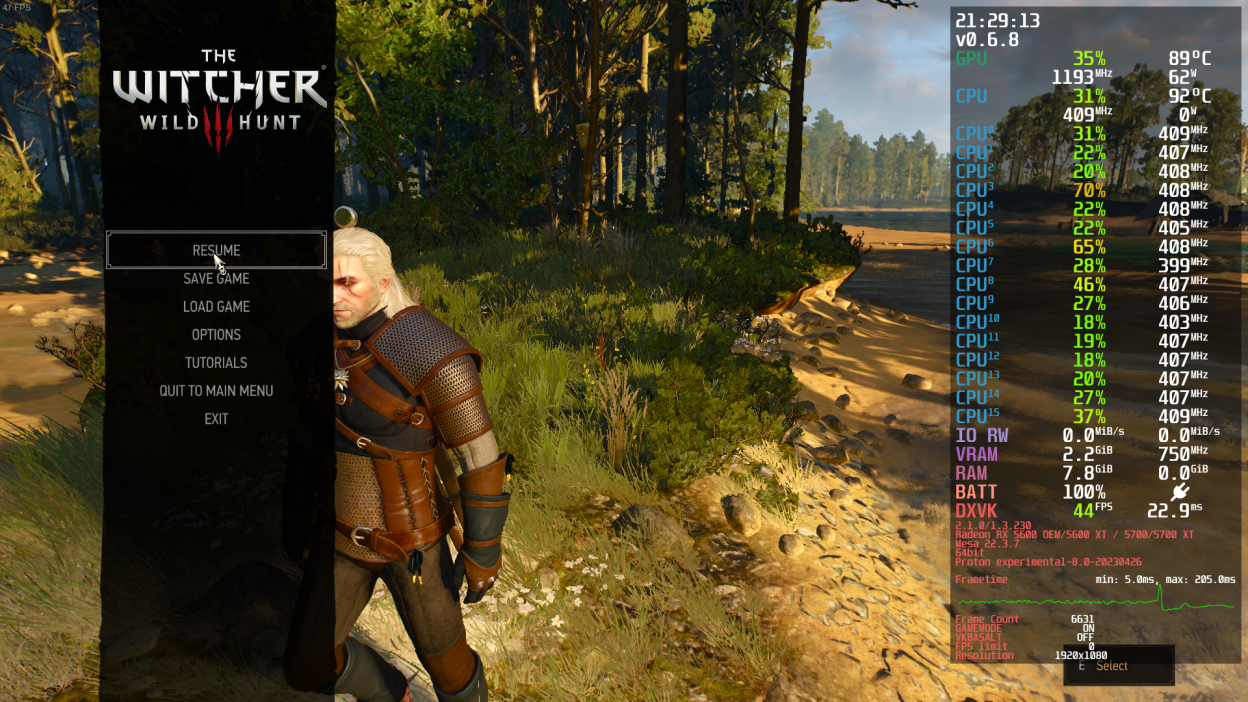
Reproduction
1-Launch the game by any means either with DirectX11 or DirectX12 with our without launcher.
2-Set the graphics options to "LOW".
3-Continue your game or start a new one.
4-Either stay still or play the game normally a while.
5-Experience lower clocks speeds and lower performance.
Additional Information
Putting "WINE_CPU_TOPOLOGY=4:0,1,2,3 %command%" in launch options somehow fixes the problem but clock speed is still not in ideal range (it's locked to 2900 MHz) and peformance is low.
@zaps166 commented on 2023-05-08T11:55:58:
Do you use acpi-cpufreq with performance governor?
Did you change the power profile for integrated AMD GPU to LOW (idk why, but it can affect CPU speed)?
Are you sure you're not affected by SOC power limit? Is integrated GPU used somewhere else outside a game (it shares the same power limits with CPU)?
How about other games or other software?
Witcher 3 on Proton Experimental is not working.
Issue transferred from https://github.com/ValveSoftware/Proton/issues/6768.
@Bodyash posted on 2023-05-12T00:39:32:
Compatibility Report
- Name of the game with compatibility issues: Witcher 3: Wild Hunt
- Steam AppID of the game: https://store.steampowered.com/app/292030/_3/
System Information
- GPU: AMD Radeon RX 6600M (navi23, LLVM 15.0.7, DRM 3.52, 6.3.1-arch2-1)
- Driver/LLVM version: 4.6 Mesa 23.0.3
- Kernel version: 6.3.1-arch2-1
- Proton version: Experimental (8.0.2c)
I confirm:
- [v] that I haven't found an existing compatibility report for this game.
- [v] that I have checked whether there are updates for my system available.
Proton 8.0.2c logs:
https://gist.github.com/Bodyash/b869b1f20adc2e0c00b72934c8586607
Symptoms
So, I'm using "force use proton for unsupported titles" and set it to experimental. Witcher 3 is supported, but still it's defaults to Experimental. So game is not starting with this proton version, game launcher also doesn't work.
Using start params: gamemoderun mangohud %command% --launcher-skip
Current Proton Experimental version 8.0.2c
Also tried 7.0.6 - same symptoms.
And 8.0.2 is working fine, with no performance problems or any bugs.
Hello @Bodyash, it should be noted that Proton 8.0-2c is the current build of Proton 8.0, not Proton Experimental.
Please copy your system information from Steam (Steam -> Help -> System Information) and put it in a gist, then include a link to the gist in this issue report.
@kisak-valve System Information https://gist.github.com/Bodyash/27331cfbc38ba47ecb83c0fb20aec55f
So yes, 8.0.2c - is current version (And It's working).
Experimental version is 1683293476 experimental-8.0-20230505
And experimental is not generating proton log with PROTON_LOG=1, just instantly crashing
Also I'm playing another game with Proton - it's Fallout 4. When switching to Experimental - symptoms are the same, game not starting, instant crash, no proton log file.
Probably it's not a Witcher 3 problem only.
https://github.com/ValveSoftware/Proton/assets/2454569/f0f3646d-b4ae-4dbc-bb52-7445e828a914
No Proton log hints that a snafu happened before Proton had a chance to run at all. If you completely close Steam, then run steam-runtime from a terminal, are there any hints in the terminal spew when you tell Steam to start the game with Proton Experimental?
Seems like some file is missing
Yes, your Proton Experimental install is damaged or incomplete. Please search for Proton Experimental in your Steam library, go to the per-game properties of Proton, switch to Installed Files, and select Verify integrity of tool files.
@zaps166
Regressions with
Proton 8.0-1(Game v4.02, DX11):
- after alt-tab the game runs in windowed mode all the time (taskbar is visible). Changing the game settings (windowed/borderless/fullscreen) doesn't help. Also using WM's hotkey to go fullscreen doesn't help (looks like window size is 1px less than screen size). Only game restart helps. No problems with
Proton 7.0-6.
Thank you for reporting this! It turns out that this regression is specific to xfce - we are investigating this :)
- DualSense PS5 gamepad is not detected by the game when it's connected while game is already running. After reconnection with
Proton 7.0-6gamepad was working with vibrations, but no haptics.
We could not reproduce this one - could you please retest with Proton 8.0-2 and experimental-8.0-20230505 and check if you are still seeing this issue?
@alasky17
Thank you for reporting this! It turns out that this regression is specific to xfce - we are investigating this :)
Right, openbox always shows fullscreen properly :slightly_smiling_face:
We could not reproduce this one - could you please retest with Proton 8.0-2 and experimental-8.0-20230505 and check if you are still seeing this issue?
No difference, same issue (experimental and 8.0-2). I connect PS5 gamepad via USB, Steam Input is disabled. Maybe it might work sometimes by a chance, but in most cases gamepad doesn't work at all or works once for ~1s. I'm talking about reconnecting a gamepad or connecting it when game is already running.
I remembered that Witcher 3 should work well a year ago with Steam and Proton 7 on Manjaro or Arch based distro for PC Desktop: AMD Ryzen 5800x and AMD Radeon RX 5700 and the last version of mesa.
/etc/environments shows:
AMD_VULKAN_ICD=RADV
VK_ICD_FILENAMES=/usr/share/vulkan/icd.d/radeon_icd.i686.json:/usr/share/vulkan/icd.d/radeon_icd.x86_64.json on steam
But today, I can not start Witcher 3 because:
The some error messages show in the log:
- Two modules/libraries
msmpeg2vdec.dllandmsvproc.dllare missing
[308:312:0517/132532.639:ERROR:dxva_video_decode_accelerator_win.cc(1399)] DXVAVDA fatal error: could not LoadLibrary: msmpeg2vdec.dll: Module not found. (0x7E)
[308:312:0517/132532.652:ERROR:dxva_video_decode_accelerator_win.cc(1407)] DXVAVDA fatal error: could not LoadLibrary: msvproc.dll: Module not found. (0x7E)
- I tried to switch from Proton 7.0-6 to 8.0-2, the same issue, but there are other error messages:
d3d12core.dllandmsvproc.dllare missing:
Proton: Error while copying to "/home/zesko/Steam/steamapps/compatdata/292030/pfx/drive_c/windows/system32/d3d12core.dll": No such file or directory
Proton: Error while copying to "/home/zesko/Steam/steamapps/compatdata/292030/pfx/drive_c/windows/syswow64/d3d12core.dll": No such file or directory
...
[332:336:0517/133123.788:ERROR:dxva_video_decode_accelerator_win.cc(1407)] DXVAVDA fatal error: could not LoadLibrary: msvproc.dll: Modul nicht gefunden. (0x7E)
I tested Proton Experimental, still the same issue.
@Zesko post full proton log. Witcher 3 isn't the same game anymore than it was a year ago after the recent patches, but I suspect you have either a driver install issue or your wine prefix is busted somehow.
Witcher 3 isn't the same game anymore than it was a year ago after the recent patches
Indeed
post full proton log.
here is the full proton log of Proton 7
steam-292030.log
From the log:
info: Required Vulkan extension VK_KHR_surface not supported
Yep, you don't have a working vulkan driver at all. I don't know why you're messing around with /etc/environment to override the driver, but i'd recommend to make sure vulkan-radeon lib32-vulkan-radeon are installed and then to uninstall amdvlk lib32-amdvlk vulkan-amdgpu-pro lib32-vulkan-amdgpu-pro (if any of those are installed).
I do not use amdvlk lib32-amdvlk vulkan-amdgpu-pro lib32-vulkan-amdgpu-pro
Finally, I now know the problem is with the wrong config in /etc/environment:
VK_ICD_FILENAMES=/usr/share/vulkan/icd.d/radeon_icd.i686.json:/usr/share/vulkan/icd.d/radeon_icd.x86_64.json on steam
is wrong, when I followed Arch Wiki
The correct config is:
VK_ICD_FILENAMES=/usr/share/vulkan/icd.d/radeon_icd.i686.json:/usr/share/vulkan/icd.d/radeon_icd.x86_64.json
Witcher 3 can start now with Proton 7. Thanks!
If you do not have amdvlk or amdgpu-pro vulkan installed then you don't need the config in /etc/environment at all.
The Witcher 3: Missing sounds and voices and DX11 option doesn't work since 4.0.3 update
Issue transferred from https://github.com/ValveSoftware/Proton/issues/6796.
@coreybruce posted on 2023-05-24T02:31:00:
Compatibility Report
- Name of the game with compatibility issues:
- Steam AppID of the game: 292030
System Information
- GPU: RX 6700XT
- Driver/LLVM version: Mesa 23.0.3-1
- Kernel version: 6.1.29-1-MANJARO
- Proton version: 8.0.1
I confirm:
- [x ] that I haven't found an existing compatibility report for this game.
- [ x] that I have checked whether there are updates for my system available.
(Proton logs compress well if needed.)-->
DX12 log
https://gist.github.com/coreybruce/1f9fd6d210ed26abc35041d26da6f179
DX11 Log
https://gist.github.com/coreybruce/54ba2168db427ceadb5f05ab1e302d81
Symptoms
- Sounds and voices do not work, people talking are mute and only loading video cut-scene has sound.
- DX11 fails to start, only DX12 option works
Reproduction
- Play game using DX12 and proton 8.0.1, also tested this with experimental with the same results
- Try and use the DX11 option and the game will fail to run.
Regressions with
Proton 8.0-1(Game v4.02, DX11):
- after alt-tab the game runs in windowed mode all the time (taskbar is visible). Changing the game settings (windowed/borderless/fullscreen) doesn't help. Also using WM's hotkey to go fullscreen doesn't help (looks like window size is 1px less than screen size). Only game restart helps. No problems with
Proton 7.0-6.
@zaps166 This should be fixed with the latest proton-experimental release. Please let me know if you see any lingering regressive behavior with xfce here :)
Replying to https://github.com/ValveSoftware/Proton/issues/607#issuecomment-1608065739
Yes it's working now, thanks :slightly_smiling_face:
But gamepad hot-plugging stil doesn't.
Please fix the game next, dx11 mode is completely broken and DX12 audio doesn't fully work making it almost unplayable
Replying to https://github.com/ValveSoftware/Proton/issues/607#issuecomment-1561023033
Please fix the game next, dx11 mode is completely broken and DX12 audio doesn't fully work making it almost unplayable
Replying to [#607 (comment)](https://github.com/ValveSoftware/Proton/issues/607#issuecomment-1561023033)
Strange, recently I didn't play except tests, but DX11 works to me, I have voices (Polish language).
Replying to https://github.com/ValveSoftware/Proton/issues/607#issuecomment-1609822252
That is very odd, I cleared the proton cache and even verified my files but most of the sounds are missing in DX12 and Dx11 mode on proton 8.0-1 and Experimental is broken
When I select Dx11 it crashes
Video showing the sound not working, only sound on the video cut scenes play
https://i.imgur.com/uQEWbLo.mp4
patch 4.03 broke the textures of the game. on 4.02 everything worked great
@justsleeper VKD3D-Proton Version? Proton version? GPU? Driver version?
@K0bin
01:00.0 VGA compatible controller: NVIDIA Corporation TU116 [GeForce GTX 1660 SUPER] (rev a1)
Subsystem: ASUSTeK Computer Inc. TU116 [GeForce GTX 1660 SUPER]
Kernel driver in use: nvidia
OpenGL version string: 4.6.0 NVIDIA 530.41.03
steam compatibility set to "Proton Experimental".. 8.0-2 same problem
@alasky17 @kisak-valve Could you please look at gamepad (DS5) hot-plugging when Steam Input is disabled (USB and Bluetooth)? It also affects other games like Hogwarts Legacy. No issue with Proton 7.0. On Proton 8.0 and experimental can't connect gamepad after starting game and can't re-connect gamepad - games just don't detect it.
@zaps166 We have tried to reproduce the hotplugging issue you mentioned several times on different machines with no luck. It is working just fine over here. Can you think of anything unique about your setup? Are you using any special controller drivers? Are you running Witcher 3 in dx11 or dx12 mode? Are you plugging the controller directly into your computer or using some intermediary hub etc? I am using the Sony PlayStation 5 DualSense Wireless Controller Model CFI-ZCT1W - is this what you have? When you are testing plugged in, are you just using a USB-A to USB-C cord or something else? Do you have Steam Input specifically disabled somewhere - if so, where (it is disabled for Witcher 3 by default too)?
Also - could you get a log of the hotplugging failure with PROTON_LOG="+hid,+hidp,+hid_report,+plugplay,+rawinput,+dinput,+xinput,+joystick,+setupapi,+input" %command%?
@alasky17
Steam Version: 1689034492
Steam Settings->Controller->Enable Steam Input for Playstation controllers - OFF
Game properties->Compatibility - Proton Experimental (Proton: 1688590094 experimental-8.0-20230705b)
Game properties->Controller->Override for The Witcher 3: Wild Hunt - Use default settings (same as Disable in this case)
Gamepad: Sony Corp. DualSense wireless controller (PS5) (CFI-ZCT1W, Made in China xD)
Are you using any special controller drivers?
Kernel: 6.1.38-1-MANJARO, no additional drivers.
Are you running Witcher 3 in dx11 or dx12 mode
dx11 (I can reproduce this on some other games, too like Hogwarts Legacy)
Are you plugging the controller directly into your computer or using some intermediary hub etc?
Directly USB-C->USB-A cable or Bluetooth (doesn't matter, same issue).
Also - could you get a log of the hotplugging failure with
Yes, but is it any way to upload logs for you without making them public?
When I go to "Game properties->Compatibility" and select Proton 7.0-6, hot plugging is working (I can connect/disconnect many times):
- on Bluetooth I've got Xbox glyphs in Wither 3
- on USB I've got Playstation glyphs in Wither 3
@zaps166 There would be a catch-22 with uploading the logs in a private way because I would have to write out the instructions on here :) Instead, the solution we came up with is for you to encrypt the log and then we can encrypt it with a privatekey.
- Download https://hiler.eu/gpg.txt
- Encrypt the file like this: gpg --encrypt --armor --recipient-file gpg.txt steam-1234.log
- Upload log here (or if file extension is wrong, upload to https://www.codeweavers.com/xfer/alasky/ps5-hotplugging/ with lock code witcherhogwartsplug
Edit: Could you also upload a dmesg log (just the output of running dmesg)? We are hoping that might shed some light on what is causing the difference in behavior.
@alasky17 Thanks!
Here is encrypted tarball containing dmesg output and logs from proton-experimental and working proton 7.0-6 (.txt suffix added for github): logs-witcher3-gamepad.tar.asc.txt
@zaps166 Thank you so much! I asked someone to take a look at the log, and something very weird is going on but the cause is still unclear. Could you try a fresh prefix to see if that changes the behavior? Instead of deleting the prefix, please just rename/move it so that we can examine it if this ends up fixing the issue :) You probably already know this but - prefix located by default at ~/.steam/steam/steamapps/compatdata/292030.
Can someone look into my issue next please? The game is basically unplayable without the sounds and dx11 doesn't work for me anymore
@coreybruce
Can someone look into my issue next please? The game is basically unplayable without the sounds and dx11 doesn't work for me anymore
Something is wrong with your setup. I've looked at your logs - you have RDNA2 like me, Manjaro 6.1.x kernel like me and Proton 8.0-2. With this setup I don't have any issues with DX11 and I have voices (4.0.3 game version, self-compiled Mesa 23.1.3).
Maybe verify game files, delete your wine prefix (~/.steam/steam/steamapps/compatdata/292030) and try again? Do you use ntfs3 or ntfs-3g for your NTFS partition?
info:    Memory Heap[2]:
info:      Size: 256 MiB
info:      Flags: 0x1
info:      Memory Type[3]: Property Flags = 0x7
info:      Memory Type[4]: Property Flags = 0x7
info:      Memory Type[9]: Property Flags = 0xc7
Also try to enable "Above 4G Decoding" in UEFI.
Replying to https://github.com/ValveSoftware/Proton/issues/607#issuecomment-1634526746
None of my other games have this issue, only this one ever since they pushed out that latest update..
Hmm I see so why did this update broke the game for me I wonder? 🤔
I could delete the compatdata folder and see if that fixes it
EDIT: nope even letting it recreate the prefix doesn't fix the issue, sounds like voices are missing in dx12 and dx11 still is broken .
No you can't use NTFS because proton has some sort of issue with it and wouldn't use it for Linux, my drive is EXT4
I've got that enabled in my bios also
@alasky17
Could you try a fresh prefix to see if that changes the behavior?
No difference, doesn't work either.
I noticed that sometimes (very rare case) it might work or works for ~1 sec, but after another reconnection doesn't work at all.
No you can't use NTFS because proton has some sort of issue with it and wouldn't use it for Linux, my drive is EXT4
I use NTFS3 (kernel driver) without issues, but it's tricky (best to disable Steam shader cache (in the past it was destroying data there and required checkdisk) and create symlink to compatdata which is on EXT4 :smile:
It's also possible to use ExFAT, but compatdata must be mounted by mount -o bind.
Hmm I see so why did this update broke the game for me I wonder? thinking
If it's ntfs-3g (fuse) everything bad might happen - update is modifying data which can be corrupted by driver...
I've can see 2023-05-24 12:22:56.781 [Information][ (0)] [TID 436][red-updater]: Current working directory: 'C:/users/steamuser/AppData/Local/Programs/CD Projekt Red/REDlauncher', filesystem: 'NTFS'. in your logs, so I thought you have NTFS.
nope even letting it recreate the prefix doesn't fix the issue, sounds like voices are missing in dx12 and dx11 still is broken .
Verify game files + manually check there aren't redundant files there.
I've got that enabled in my bios also
You should have 2 heaps, 3rd with 256 MiB shouldn't be visible. For me "Above 4G Decoding" is enough for Linux, but for real Windows I have to enable Re-bar, too (AMD Ryzen).
@coreybruce I assume you don't have any old mods or mod files in your game folder?
I also see a reddit thread post about someone who had a similar audio issue. There the solution was to delete some game patch folders. Tho that was for the next gen update and not 4.03 specifically https://www.reddit.com/r/Witcher3/comments/12ysjsk/fix_for_the_no_voice_audiomusic_audio_bug_after/
I haven't personally had these issues myself.
@zaps166 After further investigation, we suspect something related to your setup is causing the difference. Could you try a fresh game install (with clean prefix) on non-ntfs?
@alasky17 I'll check later on EXT4, but I can reproduce it on many games, just checked:
- Witcher 3
- CP2077
- Stray
- Hogwarts Legacy
and probably much more... Tested games switched to Proton 7.x are ok with hot plugging.
Just set this per every game and compare 7.0-6 vs 8.0-2 or Experimental:
@alasky17
Tried EXT4 (with clean prefix) and linux 6.5rc1, both also doesn't work.
But I noticed a difference comparing to NTFS3 with symlinked compatdata (maybe it was a coincidence):
- on EXT4 I can hotplug 0x-3x (usually 0x-1x)
- on NTFS3 I can hotplug 0x-1x (usually 0x)
When connecting a gamepad, after a while I can see short game freeze (looks like ~250ms) even if gamepad is not working in game.
How many times did you try to connect/disconnect gamepad?
@zaps166 Just to confirm - when you tested EXT4, that was a "standard" test without any custom symlinks in the process, right?
I've been testing only with the USB cord (not bluetooth) because that is simpler. I was testing only a couple of times plugging and unplugging, but this time I went all in - I did 10+ times hotplugging, I tried starting the game with the controller disconnected, I tried hotplugging while in-game instead of the main menu, no luck. I double checked that I have steam input disabled. It sounds like none of this should be necessary (aside from trying at least 5x because sometimes the first hotplug works) since you can just launch the game and then see the problem, even on the menu?
Do you have any other peripherals (like a wheel, VR headset etc) plugged in? If so, could you try unplugging anything extra just in case that is related? (Surprisingly, this has been the problem more than once in the past). Do you have a special monitor array, etc?
I just re downloaded the game and and it's still doing it 😞
no other games are this issue other and nah I don't have any mods for this games and haven't modded it
tested the game on my gaming laptop with a Nvidia 166o TI using driver 535.54.03 on Manjaro and the menu music and sounds including voices work. Is this a issue mesa issue?
I have mesa 23.0.4-2 on my desktop
@coreybruce
Is this a issue mesa issue?
I have mesa 23.1.3, tried also 23.0.4-2 from Manjaro stable repo - no issues for me, sound is working, DX11 is working.
sounds like voices are missing
Witcher3 has 2 audio outputs, one is for cutscenes. Are you sure one of them it isn't muted? Check it in pavucontrol when game is open.
Maybe disable Steam shader cache in Steam settings, remove ~/.cache/mesa_shader_cache, remove witcher3.dxvk-cache and vkd3d-proton.cache files from Witcher 3 game bin directory, check if you don't have any weird global and game envars set like SDL_AUDIODRIVER or RADV_PERFTEST.
Replying to https://github.com/ValveSoftware/Proton/issues/607#issuecomment-1635373317
Hmm I see, weird
No no like I said I have sound but some sounds are missing like the menu music and voices for example but cut scenes and other sounds work.
Why would shader cache have anything to do with audio issues or isthis to do with DX11 not working?
I have no launch options on this game either.
@alasky17
Re-downloaded Proton-Experimental, unmounted NTFS data (no NTFS library, no symlinks), single game in library, removed entire compatdata, I used USB to test, I'm in game menu.
Do you have any other peripherals
Mouse, keyboard, WiFi (unused, using ethernet), Bluetooth (disabled for now by rfkill), ASUSTek Computer, Inc. AURA LED Controller (not possible to disable this ****, it's built-in in motherboard...).
Do you have a special monitor array, etc?
Single monitor 3840x2160, Xorg, full screen with compositor bypassed, FreeSync is working.
Steam logs from terminal when connecting gamepad:
Local Device Found
  type: 054c 0ce6
  path: sdl://5
  serial_number:  - 0
  Manufacturer:
  Product:      DualSense Wireless Controller
  Release:      100
  Interface:    -1

!! Steam controller device opened for index 0.
!! Controller 0 attributes:
  Type: 45
  ProductID: 3302
  Serial: [removed by me]
  Capabilities: 02975bff
  Firmware Version: 854
  Firmware Build Time: 2147483647 (Tue, 19 Jan 2038 03:14:07 GMT)
  Bootloader Build Time: 2147483647 (Tue, 19 Jan 2038 03:14:07 GMT)
Loaded Config for Local Selection Path for App ID 413090, Controller 0: controller_base/bigpicture_gamepad.vdf
Loaded Config for Local Selection Path for App ID 413090, Controller 0: controller_base/bigpicture_gamepad.vdf
Loaded Config for Local Selection Path for App ID 769, Controller 0: controller_base/basicui_gamepad.vdf
Loaded Config for Last Resort Path for App ID 769, Controller 0: /home/user/.local/share/Steam//controller_base/basicui_gamepad.vdf
Loaded Config for Local Override Path for App ID 413080, Controller 0: /home/user/.local/share/Steam//controller_base/empty.vdf
Loaded Config for Local Override Path for App ID 413080, Controller 0: /home/user/.local/share/Steam//controller_base/empty.vdf
Loaded Config for Local Override Path for App ID 413080, Controller 0: /home/user/.local/share/Steam//controller_base/empty.vdf
I'll check second PC later.
@coreybruce
Why would shader cache have anything to do with audio issues or isthis to do with DX11 not working?
Shader cache for DX11. It's strange, I've got same system with RDNA2 GPU and it's working to me.
@coreybruce
Why would shader cache have anything to do with audio issues or isthis to do with DX11 not working?
Shader cache for DX11. It's strange, I've got same system with RDNA2 GPU and it's working to me.
Yeah it's very odd, after I deleted that cache file the game wanted to do this 4.3mb update
Also game refuses to run on DX11 using proton 8.0-2
Nice the launcher is now black... They shouldn't have releases this update, f#ck sakes..
I know you can skip this launcher but I wanted to test if DX11 etc is working properly
I know you can skip this launcher but I wanted to test if DX11 etc is working properly
I'm getting also the black launcher problem since some time.
You can skip the launcher with --launcher-skip option on command line.
And if you want to run with DX11, in the game installation directory you will find the following file : launcher-configuration.json
You can edit this file and set the fallback line to "DirectX 11".
WRT the black launcher - it should be fixed in 8.0-3 (currently still a beta RC on 8.0-2) but if you want to test 8.0-2, you can use LIBGL_ALWAYS_SOFTWARE=1 %command% in the launch options :)
@zaps166 Thank you for the additional info. I'll try to keep digging, but I might be stumped until someone comes back from vacation which will be another full week. I wanted to give you a heads-up on the timeline for fresh ideas :)
@alasky17 Same on second PC. Once it worked, but PS5 gamepad was detected as Xbox. On next game restart, hot plugging stopped working after 2 re-connections. Another game restart - hot plugging didn't worked at all.
Hello,
Am I understanding correctly that you want one GitHub issue for all issues with the same game? If so, I am seeing a regression between Proton versions on Witcher 3 with all else being the same.
I have a NVIDIA Corporation GK104 [GeForce GTX 770] and Intel® Core™ i7-6700 CPU @ 3.40GHz × 8, so it is a relatively old machine and cannot do DirectX 12, but it can do DirectX 11.
Using Proton 7.0-6 I can play, adding the "--launcher-skip" command to launch options and changing the launcher-configuration.json entry for "fallback": "DirectX 11".
If I change the Compatibility settings to use Proton 8.0-2 or Proton Experimental, it gives an error:
"GPU does not meet minimal requrements. Support for DirectX 11 is required."
If I change it back to Proton 7.0-6 then it works again.
Running on Ubuntu 22.04.
Please let me know if there are any logs etc that it would be helpful for me to collect.
Operating System Version:
Ubuntu 22.04.2 LTS (64 bit)
Kernel Name: Linux
Kernel Version: 5.19.0-46-generic
X Server Vendor: The X.Org Foundation
X Server Release: 12101004
X Window Manager: GNOME Shell
Steam Runtime Version: steam-runtime_0.20230509.49499
Video Card:
Driver: NVIDIA Corporation NVIDIA GeForce GTX 770/PCIe/SSE2
Driver Version: 4.6.0 NVIDIA 470.199.02
OpenGL Version: 4.6
@Hooloovoo Hi there.
Since Proton 8 the Vulkan driver requirements have been upped which means for Nvidia a minimum driver version of 510 is needed. This sadly means that kepler series cards will have to stick to Proton 7
WRT the black launcher - it should be fixed in 8.0-3 (currently still a beta RC on 8.0-2) but if you want to test 8.0-2, you can use LIBGL_ALWAYS_SOFTWARE=1 %command% in the launch options :)
Neither of those (setting the variable or using 8.0-3 beta) fixes the black launcher issue for me. I tried to delete the prefix and everything. Before the update the deletion of the prefix helped to launch it at least once (after the first launch the black window returned), but now even the first launch went black. Maybe that's something related to issues with using vaapi on Nvidia (I'm using 535.86.05 proprietary drivers).
Hello @alxwk, please add PROTON_LOG=1 %command% to the game's launch options and attach the generated $HOME/steam-$APPID.log to this issue report as a file. (Proton logs compress well if needed.) Also, please copy the contents of Steam Runtime Diagnostics from Steam (Steam -> Help -> Steam Runtime Diagnostics) and put it in a gist, then include a link to the gist in this issue report.
Hi @kisak-valve, here they go:
https://gist.github.com/alxwk/910c5d6461ec1c87f5d73a43c20c71fb
Hi @zaps166, we tried to reproduce the hotplug issue you are experiencing, but to no avail so far. I have uploaded a custom Proton - Experimental build to a "test-bug-22500" branch (which you can select in Steam, in the Proton - Experimental tool properties, under the Betas tab), with some possible culprit changes reverted. Would you mind trying it and see if it solves your problem?
Edit: Also, if you have some other controller models, I would be interested to know if they suffer from the same issue or if it seems to really be PS5 controller specific.
@rbernon It seems to be working now, thanks! :grin:
I don't have other controllers, I can check DS5 only now.
The only problem is that after hot plugging game sometimes detects gamepad correctly as PS5, but many times detects as XBox gamepad. But it's a different issues - I can see similar behavior on Proton 7.0-6 (but in Hogwarts Legacy in 7.0-6 after hot plugging it detects as PlayStation gamepad with vibrations with different button for map hotkey :rofl:).
Generally hot plugging is working now! But there are still (other) issues + Hogwart's Legacy is a special case, because game doesn't support DS5 gamepad correctly even on Windows AFAIK.
Thanks for the confirmation. The detection as an XBox gamepad is weird but looks like a different issue.
Has there been any progress on the audio and launcher problem?
@coreybruce The launcher should no longer be black with 8.0-3, but if you are testing older versions you can use LIBGL_ALWAYS_SOFTWARE=1 %command%. As for the audio issue, as far as I can tell from this thread, there is something going wrong specific to your setup :/ If the audio used to work, I think the best way to move forward would be to figure out which thing updating broke it.
@coreybruce The launcher should no longer be black with 8.0-3, but if you are testing older versions you can use LIBGL_ALWAYS_SOFTWARE=1 %command%. As for the audio issue, as far as I can tell from this thread, there is something going wrong specific to your setup :/ If the audio used to work, I think the best way to move forward would be to figure out which thing updating broke it.
Yeah looks like the launcher is now working correctly and I am using the latest 8.0-3 but I am still running into the issue of dx11 not working and sound not working in dx12 sadly.
The odd thing is I'm not having this issue with any other game except this one ever since they brought out this update which started this problem.. I've been playing Ratchet and Clank, Spiderman, Forza Horizon 5 and many other games with no issues (except Red Dead Redemption 2 which could be related to a mesa issue which causes Wayland to crash when you got to a certain area) but other than that been playing games with sound and running fine.
Right now I'm going to test out the classic 1.32 version in the betas and see if it works. Really wish they had a option to roll back to the last version before this problematic update.
So on classic 1.32 patch with proton 8.0.3 DX11 works and I even have all the sounds in the game working including the menu music but if I try DX 12 it will say in the launcher that it failed to launcher and to verify the files which I did and even tried experimental but it still does it but of course I can't load my save because it' has been updated for the latest version..
Here is the log: https://gist.github.com/coreybruce/f46d4cb010fc5d55af03ad8fd6e142a4
I am using a RX 6700XT with mesa 23.0.4-3 currently
This game is very problematic now
@zaps166 The reverts that you tested with the custom build are now live in Proton - Experimental. Please let us know if you are still seeing any hotplugging issues with experimental or if the regression is resolved 100%.
@alasky17 Works on Proton-Experimental, thanks! But when hot-plugging, it's mostly detected as XBox, sometimes as PS5.
@zaps166 Good to hear! Is this any different from 7.0-x behavior? Many games don't have the best support for PS5 ...
@alasky17 I think Witcher 3 is working the same now as 7.0-x :smile: In 7.0-x Hogwarts Legacy was detected as PlayStation3 (I guess, because different button was used to open a map in game) instead of XBox on hot-plugging, but this game supports DS5 poorly anyway.
But detecting as XBox quite often (not always) is strange on these both games.
Same as https://github.com/ValveSoftware/Proton/issues/6510#issuecomment-1723920995, game freezes when monitor/TV is turned off/on or unplugged/plugged-in again. Happens on windowed, borderless, fullscreen. Here happens the same but without EXCEPTION_INT_DIVIDE_BY_ZERO. Sometimes can't press STOP on Steam because mouse is still grabbed (anyway is it a hotkey for this?).
This should be fixed with the latest proton-experimental release. Please let me know if you see any lingering regressive behavior with xfce here :)
@alasky17 This problem is back on bleeding-edge (and experimental, too) :disappointed: Is it really Xfwm4 bug, because other full screen apps (non-proton) are working properly. I can try to fix it on Xfwm4 side if wine can't workaround it, but I need more information what's exactly wine is doing with the window.
@zaps166 This is an extremely complicated area :/. There is some behavior in Wine that could be considered "buggy" and some behavior in XFCE that could be considered "buggy". The dev who was working on this actually just got a fix committed to xfwm4 for this bug. https://gitlab.xfce.org/xfce/xfwm4/-/commit/215999ab15a310e98f3fb46118018d23a2ccd62d. It would be great if you could try xfwm4 with this commit and see if you still are seeing issues.
@alasky17 Thanks! I've applied the patch, full screen is working correctly , but borderless doesn't allow to alt-tab (it's like always on top) :disappointed: Proton 7.0-6 and (IIRC) previous proton-experimental allowed me to alt-tab the borderless Witcher 3. EDIT: Re-checked, it's working - strange.
@zaps166 Awesome! Please let me know if you find any other regressions ... we can't always fix window behavior, but we try to not go backwards :)
@alasky17 Window behavior is correct on Xfwm4 with the patch! :slightly_smiling_face:
Please let me know if you find any other regressions
Two regressions I found so far (tested on various games):
- since Proton 8.0 disconnecting a monitor (or if you turn monitor/TV off and on) game freezes and needs to be killed.
- there are still issues on proton-experimental and experimental-bleeding-edge-8.0-57984-20231003-pdf5240-w7a90e2-d494f7f-v4bf519 with a mouse grab on game exit (proton-8.0-4-rc7 is OK in this case).
@zaps166
- I was able to reproduce the monitor disconnect issue with Witcher 3 and we will look into it :)
- wrt the mouse being captured on game exit, this should be fixed with current bleeding-edge (fix is not in regular experimental-0929b). In my testing, the cursor now is released the same as 8.0-3 (although of course some games still don't like to let it go). If you are still seeing the issue with experimental-BE, please comment on a game issue where you see the regressive behavior and tag me in the comment, so that we can keep this issue strictly for Witcher 3. Thank you for the follow-up!
@alasky17
Thanks :)
I have experimental-bleeding-edge-8.0-58166-20231004-pdf5240-w513d37-d494f7f-ve227e9 - is it the newest?
Edit: I can see randomness with cursor ungrab on one game (sometimes ok, sometimes not ok), other game is always not ok. Please let me know if this BE contains the patch - if yes, I'll ping you in these games :slightly_smiling_face:
@zaps166 yes, that experimental should be new enough. Please ping me in the other games :)
@zaps166
- since Proton 8.0 disconnecting a monitor (or if you turn monitor/TV off and on) game freezes and needs to be killed.
Could you please test experimental bleeding-edge and see if this is fixed for you now? It would be great to test multiple games where you saw this failure, just in case the fix is only satisfying some games :)
@alasky17 Thanks! I'ts working, also I noticed mouse cursor grab fix on exit :slightly_smiling_face:
But I think Xfwm4 has another bug, because some games freezes or running very slow due to very large windows size and causes huge system RAM consumption. On Openbox it works OK. Could you look if it's really an Xfwm4 issue that it creates large windows like 22093 or 32767?
Edit: Xfwm4 can use uninitizlized values as full screen window size in some cases, I created MR.
The game crashes for me with the "Damn, that's ugly" popup when I try to launch it in DirectX 11 mode. DirectX 12 mode works, but performance leaves much to be desired. Log: steam-292030.log
I've tried recreating the Wineprefix, verifying the game's files, and skipping the launcher (skipping the launcher not in effect in the log above). This is with the latest Proton Experimental. Before the big update I was able to play the game just fine.
GPU: GTX 970
Driver version: 535.129.03
Distribution: Flathub/Freedesktop runtime 23.08
@alasky17
It's not a regression, but could you look at mouse grab once again?
I have single monitor (Xorg) and play games with borderless fullscreen option - the window fills the entire screen, so it's like exclusive full screen on Windows. The problem is that mouse is grabbed into a game in this case. If I'll get a popoup (for example system notification or new message notification) or any window with BypassWindowManagerHint flag, I can't click it even if game shows system cursor - I have to press Alt-Tab which is a bit annoying.
It affects many games (can behave differently), I'll give steps to reproduce in Witcher 3 game:
- use single monitor
- go to Options->Video->Display, set "Borderless Window" and enable Hardware Cursor
- get a notification message while you're in game menu (when you have free cursor) and try to click it - you'll click in the game even if mouse cursor is over the popup window
Is it a quick way to disable mouse grabbing on full screen?
Game often freeze when navigating in map menu for me. Audio continues to play.
I'm using proton experimental.
Here's proton logs:
47374.047:03ec:0470:fixme:secur32:get_mac_algid unknown algorithm 200, cipher 23
47388.138:03ec:0494:warn:vkd3d-proton:d3d12_fence_set_native_sync_handle_on_completion_explicit: Event completion for native sync handle is already in the list.
47403.953:0100:0110:fixme:oleacc:find_class_data unhandled window class: L"[#32769](/issue/ValveSoftware/Proton/32769)"
47403.953:0100:0110:fixme:uiautomation:uia_get_providers_for_hwnd Override provider callback currently unimplemented.
47403.953:0100:0110:fixme:uiautomation:msaa_provider_GetPropertyValue Unimplemented propertyId 30024
47403.954:0100:0110:fixme:uiautomation:uia_element_GetCurrentPropertyValueEx Default property values currently unimplemented
47403.954:0100:0110:fixme:uiautomation:uia_element_GetCurrentPropertyValueEx Default property values currently unimplemented
47403.954:0100:0110:fixme:uiautomation:msaa_provider_GetPatternProvider Unimplemented patternId 10002
47403.954:0100:0110:fixme:uiautomation:nc_provider_GetPatternProvider 00000000008DEEC0, 10002, 0000000001B2EC90: stub
47403.954:0100:0110:fixme:uiautomation:base_hwnd_provider_GetPatternProvider 00000000008DEE30, 10002, 0000000001B2EC90: stub
Replying to https://github.com/ValveSoftware/Proton/issues/607#issuecomment-1845773587
Since Proton 8.0.5 release, I'm unable to play Witcher 3 with DX12. The game constantly freezes after a couple of minutes, if not instantly, when trying to access the glossary sub menus. DX11 runs fine. Tested on my Steam Deck and my PC (Ryzen 5 3600 & RX 6600) with Holoiso. Same behavior. I tried deleting the proton files and validating the installation files, but it didn't solve the issue.
Edit: For the record, I was left unable to read the Red Miasmal bestiary entry for the "In the Enternal Fire's Shadow" questline, which coincides with Proton 8.0.5 release, in my run. Unfortunately it happened again when I tried to craft at Crow's Perch or any other armorer, after that.
The Witcher 3: Wild Hunt (292030): Glossary Bug
Issue transferred from https://github.com/ValveSoftware/Proton/issues/7440.
@matheusfaustino posted on 2024-01-24T16:58:41:
Compatibility Report
- The Witcher 3: Wild Hunt (v4.0.4)
- 292030
System Information
- Steam Deck OLED
- Stock SteamOS 3.5.7 stable
- Experimental+Proton 8.0-5
I confirm:
- [x] that I haven't found an existing compatibility report for this game.
- [x] that I have checked whether there are updates for my system available.
Symptoms
Every time I enter the Glossary submenu (if enter the Glossary through the other options, it works, the problem is when it shows the submenu and I try to interact with it) using DX12, which allows HDR on the OLED, the game freezes and I have to force-quit the game. This issue also occurs in Gwen's tutorial. I initially tried DX12 for HDR since I couldn't enable HDR for DX11. It only occurs via DX12.
Reproduction
- Launch the game, as usual, and select DX12.
- It happens to me, independently, of the graphic preset, but I am using the Steam Deck preset.
- Press Start (that 3 lines button on steam deck), it will show that stylish menu with Map/Quests/Inventory/etc
- Go to Glossary and press down, it will move your cursor to the submenu which contains (Bestiary/Tutorial/Characters/Books/Crafting)
- After the submenu's animation, it freezes, and I cannot move anything (Even MangoHud is frozen).
- It can also be stuck like that, if I enter at Gwen's Tutorial card game (the first time you talk with the scholar and he teaches you about the card game)
I'm on the steam deck OLED (stable steam client and os) and since the proton 8.0-5 update I have the same issue above.
It freezes in the menu. And not only glossary, even in the inventory or character screen.
Sound is still working and game can be closed with the steam menu.
I had 0 issues in 40h of playtime on proton 8.0-4
For now I use protonGE 8-2 (I still had that installed) which doesn't have this problem, but gave me 2 random game crashes (or more like OS crashes) in ~10h. The newest ProtonGE has the same issue as Proton 8.0-5.
Hello @1basti1, please add EDIT: Never mind, https://github.com/ValveSoftware/Proton/issues/607#issuecomment-1908703903 has a relevant log.PROTON_LOG=1 %command% to the game's launch options, reproduce the regression, and attach the generated $HOME/steam-$APPID.log to this issue report as a file. (Proton logs compress well if needed.)
@Mohandevir @matheusfaustino @1basti1 Can you think of any more specifics that might help us reproduce this freeze issue since 8.0-5? We've tried to reproduce it on a bunch of different setups including a OLED Deck but without luck so far.
Could you attach the save games this issue occurs with if they are tied to one? Though i assume not since the Gwent tutorial is pretty early in the game
I could make a video in 3-4 hours.
But essentially it's exactly like described in this post
https://github.com/ValveSoftware/Proton/issues/607#issuecomment-1908703903
@Blisto91
I hope streamable is ok. Video to big for GitHub
I played with ProtonGE (older one because newest has the same freezing problem) for the last days without problems. Using proton 8.0-5 it immediately freezes. As you can see in the video.
I mean I use some decky plugins. But that wasn't a problem before and with protonGE it works flawlessly. I have no idea what the problem is.
I now have 71 hours on this game. When proton updated to 8.0-5 I was on ~40h.
Edit: Seeing the edit below me. I use a 512GB OLED deck which I upgraded to 1TB WD SN530. But that shouldn't matter.
I tried all my saves and it's the same (even my 5 years old ones). I even
completely reinstalled the game. No luck.
Press the menu button, go to glossary, press the down arrow... Freeze. I have to kill it through the Steam menu.
I will try to start a new game and see if it freezes.
Edit: I tried a new save game. It's the same behavior. There are no issues with DX12 on any saves, while in desktop mode, though.
Edit 2: Seeing the above video, I tried switching to english (from french, game and system), back and forth. Still the same, no matter the language.
Edit 3: Just loaded Proton-8.4-GE. Problem gone.
For the record, I have an original LCD 512Gb Steam Deck. I upgraded the nvme with a Sabrent Rocket 1tb.
Le lun. 5 févr. 2024, 7 h 01 a.m., Blisto91 @.***> a
écrit :
@Mohandevir https://github.com/Mohandevir @matheusfaustino
https://github.com/matheusfaustino @1basti1 https://github.com/1basti1
Can you think of any more specifics that might help us reproduce this
freeze issue since 8.0-5? We've tried to reproduce it on a bunch of
different setups including a OLED Deck but without luck so far.Could you attach the save games this issue occurs with if they are tied to
one? Though i assume not since the Gwent tutorial is pretty early in the
game—
Reply to this email directly, view it on GitHub
https://github.com/ValveSoftware/Proton/issues/607#issuecomment-1926834201,
or unsubscribe
https://github.com/notifications/unsubscribe-auth/ABQFRY4BVRUI67U5YFH7SNTYSDC2DAVCNFSM4FRSLUZ2U5DIOJSWCZC7NNSXTN2JONZXKZKDN5WW2ZLOOQ5TCOJSGY4DGNBSGAYQ
.
You are receiving this because you were mentioned.Message ID:
@.***>
@Mohandevir Are you also using Decky or is the nvme the only thing changed from a out of the box Deck? Besides Proton version that is.
Tought about that too... I was using Decky but I completely removed it some
time after SteamOS 3.5 release. I was usind the "Vibrant color" (?) plugin.
Do you think it could have left some "damaging" traces?
Le mar. 6 févr. 2024, 2 h 41 a.m., Blisto91 @.***> a
écrit :
@Mohandevir https://github.com/Mohandevir Are you also using Decky or
is the nvme the only thing changed from a out of the box Deck?—
Reply to this email directly, view it on GitHub
https://github.com/ValveSoftware/Proton/issues/607#issuecomment-1928942456,
or unsubscribe
https://github.com/notifications/unsubscribe-auth/ABQFRY7Q46RAIBKK2CN5LGLYSHND7AVCNFSM4FRSLUZ2U5DIOJSWCZC7NNSXTN2JONZXKZKDN5WW2ZLOOQ5TCOJSHA4TIMRUGU3A
.
You are receiving this because you were mentioned.Message ID:
@.***>
To add to that, I use cryo utilities recommended settings, but with a 20gb swap file (I know it's large, didn't remember why I set it to that, but oh well)
I really hope I can still use decky + cryo with later proton versions... I don't want to miss these things.
But Vram in bios is still at 1GB.
Because I don't play other games right now and I'm afraid other games might have the same issues...?
Yeah... Forgot about that. I use cryoutilities with an 8gb swap file, too.
Le mar. 6 févr. 2024, 12 h 41 p.m., 1basti1 @.***> a
écrit :
To add to that, I use cryo utilities recommended settings, but with a 20gb
swap file (I know it's large, didn't remember why I set it to that, but oh
well)I really hope I can still use decky + cryo with later proton versions... I
don't want to miss these things.But Vram in bios is still at 1GB.
—
Reply to this email directly, view it on GitHub
https://github.com/ValveSoftware/Proton/issues/607#issuecomment-1930450497,
or unsubscribe
https://github.com/notifications/unsubscribe-auth/ABQFRY4BMFP5F2XQ6FAHTN3YSJTK3AVCNFSM4FRSLUZ2U5DIOJSWCZC7NNSXTN2JONZXKZKDN5WW2ZLOOQ5TCOJTGA2DKMBUHE3Q
.
You are receiving this because you were mentioned.Message ID:
@.***>
Me too, using cryoutilities with default settings (16gb). But, my VRAM is at 4GB.
ok, I think one of us really should test with original settings.
I can maybe do that tommorow.
@1basti1 @Mohandevir just tested it now, I return to the stock setup, with VRAM at 1GB, and it still failed at the same way. If you want to check as well, feel free. I am running everything stock now.
@matheusfaustino Do you use decky loader?
@1basti1 decky loader, yes. With a lot of add-ons, but none that affects the game directly. This one will be tricky to uninstall. I could try, but I need to find a way to save my settings before.
I think it's enough to disable cef debugging or something in developer settings. then it doesn't load after restart.
I'll test tomorrow if I don't forget
Just disabled the cef debugging and restarted (no decky loader in the menu) and it's still freezing for me, right after when I go to the submenu from Glossary :(
Yeah, then I don't know... :(
If I didn't have so many games installed and all my emulator custom setups,
I would try a factory reset...
Le mar. 6 févr. 2024, 2 h 31 p.m., 1basti1 @.***> a
écrit :
Yeah, then I don't know... :(
—
Reply to this email directly, view it on GitHub
https://github.com/ValveSoftware/Proton/issues/607#issuecomment-1930617540,
or unsubscribe
https://github.com/notifications/unsubscribe-auth/ABQFRY5RNUBTDINEXC6EQJ3YSKAHRAVCNFSM4FRSLUZ2U5DIOJSWCZC7NNSXTN2JONZXKZKDN5WW2ZLOOQ5TCOJTGA3DCNZVGQYA
.
You are receiving this because you were mentioned.Message ID:
@.***>
Hi, I have exactly the same symptoms as 1basti1, Mohandevir and matheusfaustino.
I have Steam Deck OLED 1TB, I have neither Decky nor Cryoutilities installed, no other plugins or system modifications. Everything is up-to-date and on stable channel. I could say it's "out of the box".
The only thing I did right before updating to proton 8.0-5 was installing Java to play Minecraft.
I tried to delete the proton 8.0 files along with its appmanifest file and re-download the proton, but it did nothing.
Just fyi I uninstalled the game because I finished it. needed space. So I cant test anything anymore. But still hope it gets fixed.
I have the same issue. Is there a confirmed fix for this yet? I don't really want to play on DX11
I will try some of the proton versions mentioned above after work and report back....but I tested multiple versions last night and the game froze in menu regardless of proton version
OLED, DX12, stable channel. I think I tried the lastest stable Proton, Proton Experimental, and Proton GE 31? I think that was it.
@nshank63 hi there and thank you for the report.
You mean that the game can freeze up during certain game actions like opening the bestiary?
Have you made any modifications to your Deck, software (Decky etc) or hardware wise?
We are still trying to track down a reproduction on this issue.
@Blisto91 Correct. Anytime I try to access that menu or any submenus like alchemy...it freezes up.
It's an OLED I got at launch and installed the 1TB SSD from my LCD deck in the day I got it. I have an 8GB swap file so RDR2 wouldn't crash after X hours. No other modifications. No issues with any other games or even the DX11 version of this game. DX12 is so much better though I would love to use it if we can figure out a fix.
The video the user posted above sums up what happens perfectly. I have the exact same issue.
I have tried a bunch of different proton versions. reinstalling the game, validating files etc.
I do have Decky but I don't use it for anything that would affect the game. I don't use decky recorder or anything like that. Mostly just for CSS Loader
Try protonGE 8-17 that worked flawlessly and let me finish the game.
Okay I'll try it after work thanks. I just install it like I would the latest Proton GE? I.e. using protonup-qt?
Yes, you can choose what version you want to install. And 8-17 was published right at the time when stock proton 8.0-4 released and that works.
okay I'll give it a shot and report back in about 8 hours
Do we know if this is only happening on OLED steam decks? I have an OLED and some people above mentioned they have an OLED.
Someone on reddit said he has been playing Witcher 3 DX12 for many hours the last few days on an LCD deck and doesn't have any freezing issues in the menu.
I mean I still had a couple crashes but no freezes. Mostly because of some depth of field effects I think. fyi
I also use OLED. No idea if LCD has the same problems.
Ah no.. @Mohandevir wrote that he uses an LCD deck
https://github.com/ValveSoftware/Proton/issues/607#issuecomment-1927248216
Got the exact same freeze on stock lcd Deck and PC with Holoiso. Solved it
with Proton 8.4-GE.
Le mar. 13 févr. 2024, 9 h 37 a.m., nshank63 @.***> a
écrit :
Do we know if this is only happening on OLED steam decks? I have an OLED
and some people above mentioned they have an OLED.Someone on reddit said he has been playing Witcher 3 DX12 for many hours
the last few days on an LCD deck and doesn't have any freezing issues in
the menu.—
Reply to this email directly, view it on GitHub
https://github.com/ValveSoftware/Proton/issues/607#issuecomment-1941654258,
or unsubscribe
https://github.com/notifications/unsubscribe-auth/ABQFRY7TE5BP67WRZXF2MSLYTN3CBAVCNFSM4FRSLUZ2U5DIOJSWCZC7NNSXTN2JONZXKZKDN5WW2ZLOOQ5TCOJUGE3DKNBSGU4A
.
You are receiving this because you were mentioned.Message ID:
@.***>
thanks. so strange. Between this and the mass effect legendary edition no longer working on steam deck since the latest EA update its like the universe doesn't want me to play my favorite games lol.
I'll try the proton versions suggested later today hopefully they resolve my issue as they did yours.
I can also testify that Proton 8.4-GE is the only version (with HDR support) that works. If I use DX12 with a proton version without HDR, it also works without issue. The problem starts to happen when I use a Proton version that supports HDR.
Sorry forgot to report back yesterday
proton ge 8-17 worked for me
running dx12 for many hours no issues
Another vote for 8-17. Fixed the issue.
Partially fixed with 8-4GE and 8-17GE. I get lots of crashes.
This said, I think I discovered that the initial problem is linked to the in-game fps cap. If it is set to unlimited, this is where the game freeze happen, with official Proton 8-5. Did a delete proton file and set the in-game fps cap to 60 (even if Gamescope is set to 45fps)... It's seems rock solid.
@Mohandevir I tried to do as you wrote (official 8.0-5 proton, deleted proton files, set the in-game fps cap to 60 and Gamescope cap to 45 fps) and at first it actually worked. The game did not freeze during gwent and in the bestiary. Unfortunately, after a short while it began to freeze again, but this time after entering any menu.
Yep! Same here. Sad... I Tought I was on to something... Back to
GE-Proton-8.4, with in-game fps cap.
GE-Proton-8.17 is crashing way too often and randomly.
Le ven. 22 mars 2024, 7 h 32 p.m., moonman5 @.***> a
écrit :
@Mohandevir https://github.com/Mohandevir I tried to do as you wrote
(official 8.0-5 proton, deleted proton files, set the in-game fps cap to 60
and Gamescope cap to 45 fps) and at first it actually worked. The game did
not freeze during gwent and in the bestiary. Unfortunately, after a short
while it began to freeze again, but this time after entering any menu.—
Reply to this email directly, view it on GitHub
https://github.com/ValveSoftware/Proton/issues/607#issuecomment-2016130735,
or unsubscribe
https://github.com/notifications/unsubscribe-auth/ABQFRY75Y6BUGKSSSP7772TYZS5RNAVCNFSM4FRSLUZ2U5DIOJSWCZC7NNSXTN2JONZXKZKDN5WW2ZLOOQ5TEMBRGYYTGMBXGM2Q
.
You are receiving this because you were mentioned.Message ID:
@.***>
The Witcher 3 - Freeze in Inventory
Issue transferred from https://github.com/ValveSoftware/Proton/issues/7597.
@rariema posted on 2024-03-23T11:32:02:
Compatibility Report
- Name of the game with compatibility issues: The Witcher 3
- Steam AppID of the game: 292030
System Information
- GPU: RX 6000
- Video driver version: Mesa 24.0.3
- Kernel version: 6.8.1-arch1-1
- Proton version: 9.0.5 Beta
I confirm:
- [x] that I haven't found an existing compatibility report for this game.
- [x] that I have checked whether there are updates for my system available.
Symptoms
Game freezes in Inventory
Reproduction
Start Game, load savegame.
Open Inventory, Map, Charakter etc. Do some stuff. Game will stop responding to inputs after a while.
Possible regression, game runs fine with Proton 8.0.5
@rariema from your logs it seems you're using dx11 mode so that's what I used, and I couldn't reproduce your issue. I tried a few sessions, one of them half an hour as you didn't specify how long a while is, but I never managed to reproduce the issue, both gamepad and m&kb remained functional through my testing.
Of possible note is the fact that you have amdvlk installed and that the launcher is using it. If you don't have it installed for any particular reason, I'd suggest uninstalling it to see if anything changes.
@simifor thx for looking into it. i'm using dx12, never had this with dx11/dxvk.
after i reported this, i got the same issue on proton8. dont know why it never happend on my playthrough the weeks before.
tried much, uninstalled the 32bit amdvlk, skipped the launcher, tried x11 (normally i use plasma (6) on wayland), gnome, lts kernel, older mesa, reinstalled the game. still same issue. finally i started a gamescope session from sddm, and baam, no freeze.
turns out its an issue with the mangohud framelimiter, if its active, game freezes in inventory, normally after a few clicks of doing random stuff.
without it beeing active at game startup, the witcher 3 runs fine on proton8.0.5c an 9.0-beta16.
if the limiter is enabled later on, the issue does not occur, until you alt-tab out and in again.
so its not proton9 related, not the best report and a wrong guess :)
thx for all the work on linux gaming to everyone involved, really appreciate it.
I can confirm what @rariema found out. Turning off gamescope framelimiter before starting game from launcher and turning it on while the game is already running does help. No freezes and everything works like it should.
Edit: After some more testing the game froze while checking the map. It looks like gamescope framelimiter must be turned off and the issue occurs only when it's turned on.
I'd like to add additional information, based on this issue: https://github.com/flightlessmango/MangoHud/issues/1302#issuecomment-2094338343
With Mangohud's framelimiter, I also had the freezing issues with Fedora 40 KDE (either with Proton Experimental, or GE-Proton 9-4, didn't try others). With a fresh install of Fedora Workstation 40 (so, Gnome), the game no longer freezes.
I'm thinking maybe it has something to do with KDE. That said, you said you had these issues with Gnome @rariema? Was it a fresh install or you installed it side-by-side with, say, KDE?
All my testing was done on my main installation, an EndevourOS based KDE installation with Gnome and gamescope-session-git installed alongside.
Game is crashing for me once I pass the loading screen to load a save / start a new game. It gets to the title screen fine and I can do whatever I want there, but as soon as I load into the game it crashes; there's usually just enough time for it to fade in enough for me to see a hint of the game world and UI.
Tried multiple Proton versions; with and without mods enabled; with and without gamemode enabled; no differences on any configurations. I use the --skip-launcher launch command and have DX11 set as my fallback. Used to play the game with no issues at all.
Running Slackware Current, Ryzen 7 3800X & RX 6600.
Hello @MurdoMaclachlan, can you check if https://gitlab.freedesktop.org/drm/amd/-/issues/3343 is relevant to your system? A quick test would be to reboot into an older kernel and see how the game behaves.
Ah, yeah, rolling back to 6.6.29 fixed the issue; I can run the game with no problems now. Thanks!
Exactly the same crash issue happens with Nvidia v550.78.0/6.9.1 kernel.
(arn:seh:dispatch_exception EXCEPTION_ACCESS_VIOLATION exception (code=c0000005))
Interestingly enough, the game starts in the dx12 mode, and even works, but screen stutter is pretty aggressive, making it unplayable.
After recent game update it crashes with DX11+HairWorks (game issue, also on Radeon). Turn off HairWorks and try again.
DX12 is running about 2x slower than DX11 to me (game issue).
Hairworks it is. Thank you.
Hairworks it is. Thank you.
Crash should be fixed by the new game update!
Issue still not solved. Can't join my fresh new log file (too big: 520mb). What should I do?
Edit: Just compressed it to .tar file (if allowed)
steam-292030.tar.gz
Somehow, this game is still verified despite the fact that it crashes anytime the map, inventory, or bestiary are accessed in the DX12 version of the game. DX12 is needed for FSR, and more importantly, HDR, which is very important to playing this game on the OLED Steam Deck. Switching to the DX11 version is not a viable alternative.
Somehow, this game is still verified despite the fact that it crashes anytime the map, inventory, or bestiary are accessed in the DX12 version of the game.
I don't have Steam Deck, but map and bestiary are working normally on my PC (RX 6900 XT). The only thing is DX12 is over 2x slower than DX11 (game issue), so FSR/XeSS is must-have, but it reduces image quality.
It seems to happen if the frame limiter is used in Game Mode. I use the quick menu controls for just about every game so I can tune the perfect performance/efficiency ratio
It seems to happen if the frame limiter is used in Game Mode. I use the quick menu controls for just about every game so I can tune the perfect performance/efficiency ratio
So we know it's external frame limiter issue. Without external frame limiter: are map and bestiary working correctly?
Thats what i reported in May. Seems the problem persists. Just fininished the DLCs without a external framelimiter in DX12, FSR2-Q with nice performance and quality without a single freeze. (PC, RX 6600)
Did a quick test right now with Mangohud limiter, freeze in inventory (map, bestiarium...) is still there.
I could not test extensively to see if it solves the issue permenantly, but
it also happens with some system wide upscalers turned on. Linear seems to
work fine.
Yeah, I know, should be obvious. Thing is, my Gamescope settings were
configured for the DX11 version and I forgot about FSR. It began to be a
problem when Proton 8.0.5 was released.
Le lun. 23 sept. 2024, 11 h 55 a.m., Błażej Szczygieł <
@.***> a écrit :
Somehow, this game is still verified despite the fact that it crashes
anytime the map, inventory, or bestiary are accessed in the DX12 version of
the game.I don't have Steam Deck, but map and bestiary are working normally on my
PC (RX 6900 XT). The only thing is DX12 is about 2x slower than DX11 (game
issue), so FSR/XeSS is must-have, but it reduces image quality.—
Reply to this email directly, view it on GitHub
https://github.com/ValveSoftware/Proton/issues/607#issuecomment-2368711640,
or unsubscribe
https://github.com/notifications/unsubscribe-auth/ABQFRY5A34UXIVXZ6E2G2RTZYA2X5AVCNFSM4FRSLUZ2U5DIOJSWCZC7NNSXTN2JONZXKZKDN5WW2ZLOOQ5TEMZWHA3TCMJWGQYA
.
You are receiving this because you were mentioned.Message ID:
@.***>
Ok, I see freeze with mangohud and other external limiters.
I'm using Proton GE-8-17, which does not have the freezing issue. The game works fine on the most recent official proton when the frame limiter is not used. Let me know if there is anything I can do to help resolve this issue.
Hi guys, I have these Witcher 3: Wild Hunt problems:
- Game crashes and freezes during menu including: Alchemy, Map, Regular Menu at some merchants when you finished business with them, crafting menu, repair menu.
Everything Menu related breaks, crashes and freezes the game! I'm running it using Proton GE-9.14
System:
OS: Ubuntu 24.04.1 LTS
KERNEL: 6.8.0-45-generic
CPU: 12th Gen Intel Core i5-12450H
GPU: NVIDIA GeForce RTX 4050 Laptop GPU
GPU DRIVER: NVIDIA 555.58.02
RAM: 16 GB
Is it vkd3d-proton bug or another proton component bug - anybody knows? Maybe it's worth to bisect, so devs could fix it.
We already know Proton GE-8-17 works, does it mean Proton GE-8-18 doesn't work?
I've been unable to repro on my desktop or deck thus far. I see several mentions of GE proton, but has anyone gotten this issue with proton stable (Currently 9.0-3)? If so, could you share your graphics settings in case they might be a factor?
Also, it could be helpful to get some logs, if you add the following to the game's launch parameters: PROTON_LOG=1 %command% you'll get a log file in your home folder, just get the game to hang and close it, and then upload the resulting steam-292030.log file, compress it if it's too big.
Replying to https://github.com/ValveSoftware/Proton/issues/607#issuecomment-2395081159
Used the standard proton 9 from valve. let me know if you need anything else
Deck Quick Settings
Frame Limit: 45fps @ 90hz
Allow Tearing: Yes
Graphics Settings (using DX12, ver 4 .04):
Ray Tracing: Off
Anti-Aliasing: FSR 2
FSR Quality: Quality
Dynamic Resolution Scaling: Off
Sharpening: High
Screen Space Ambient Occlusion: SSAO
Screen Space Reflections: Low
Motion Blur: Off
Blur: Off
Bloom: On
Depth of Field: On
Chromatic Aberration: On
Vignetting: On
Light Shafts: On
Camera Lens Effects: On
NVIDIA HairWorks: Off
Number of Background Characters: Medium
Shadow Quality: Medium
Terrain Quality: Medium
Water Quality: Medium
Foliage Visibility Range: Medium
Grass Density: Medium
Texture Quality: High
Detail Level: Medium
Display Settings
Display Mode: Full Screen
VSync: Off
Resolution: 1280x800
Maximum FPS: Unlimited
Hardware Cursor: Off
HDR Settings
Max Monitor Brightness: 1000
Paper White: 300
Replying to https://github.com/ValveSoftware/Proton/issues/607#issuecomment-2395119074
Playing on the deck using the frame limiter btw
Unfortunately the game is very unstable on DirectX 12. No matter the used proton version (9.0.4, "hotfix" or experimental), after a seemingly random period of time (can be 1 minute, can be 1 hour), the game suddenly freezes completely and has to be closed via Steam. It also seems random in what situations. Just walking around, or being in the inventory or talking to someone. This seems to be in line with other reports I have read on protondb.
Log: steam-292030.log
System Information
- GPU: RX 7800 XT
- CPU: Ryzen 7 3700x
- Video driver version: Mesa 24.3.4
- Kernel version: 6.12.10-arch1-1
- KDE Wayland
- Proton version: 9.0-4, Hotfix, Experimental
Using DX11 solves the problem but locks one out of the nice new next-gen graphics.
Same instability for me on DirectX 12. Tested proton version 9.0.4 and 10.0-1 beta. Freezes of the game occur after a random amount of time. I noticed the likelihood of a freeze early on to be much higher when RT is enabled, but they are still occuring even when raytracing effects are all disabled.
System Information
- GPU: AMD Radeon RX 9070 XT
- CPU: AMD Ryzen 7 5800x
- Video driver version: Mesa 25.1.0
- Kernel version: 6.14.4-104.bazzite.fc42.x86_64
- Proton version: 9.0-4, 10.0-1 beta
I'm having the exact same instability on DirectX 12 as the other people here. Sometimes after a random amount of time the game freezes completely with audio still playing. No freezes on DX11, but I would love to play with raytracing.
System Information
GPU: NVIDIA GeForce RTX 4070 Super
CPU: AMD Ryzen 7 3700X
Video driver version: nvidia-open 570.144-5
Kernel version: 6.14.6-arch1-1
Proton version: 9.0-4, 10.0-1 beta, GE Proton 9 27
The Witcher 3: Wild Hunt (292030) freezes
Issue transferred from https://github.com/ValveSoftware/Proton/issues/8704.
@crazycorndog posted on 2025-05-17T00:12:48:
Compatibility Report
- Name of the game with compatibility issues: The Witcher 3: Wild Hunt
- Steam AppID of the game: 292030
System Information
- GPU: RTX 3090
- Video driver version: NVIDIA 570.144.0
- Kernel version:
Linux 6.14.6-arch1-1 #1 SMP PREEMPT_DYNAMIC Fri, 09 May 2025 17:36:18 +0000 x86_64 - Link to full system information report as Gist: https://gist.github.com/crazycorndog/1b6d713a185572b6e46b5efd9d96ea33
- Proton version: 1746803265 proton-10.0-1f
I confirm:
- [x] that I haven't found an existing compatibility report for this game.
- [x] that I have checked whether there are updates for my system available.
Symptoms
Game freezes (video freezes, music keeps playing, cpu and gpu load drops) after up to about 2 minutes. Sometimes within a few seconds, sometimes within a few minutes. I can change windows to Steam and there force close the running game.
Launch options: %command% --launcher-skip
Reproduction
Start the game, load last savegame or continue play and wait up to 2 minutes or so.
@crazycorndog commented on 2025-05-17T00:14:21:
Proton log attached steam-292030.log
Can't launch witcher 3 with default settings. (Can be bypassed by disabling red launcher)
RTX 4090, i9-13900KF
Driver: Nvidia 575.51.02
Proton version: Default
Kernel: 6.14.0-22-generic
---------------------------
REDlauncher
---------------------------
Failed to create OpenGL context for format QSurfaceFormat(version 2.0, options QFlags<QSurfaceFormat::FormatOption>(), depthBufferSize 24, redBufferSize -1, greenBufferSize -1, blueBufferSize -1, alphaBufferSize 8, stencilBufferSize 8, samples 0, swapBehavior QSurfaceFormat::DefaultSwapBehavior, swapInterval 1, colorSpace QSurfaceFormat::DefaultColorSpace, profile  QSurfaceFormat::NoProfile) .
This is most likely caused by not having the necessary graphics drivers installed.

Install a driver providing OpenGL 2.0 or higher, or, if this is not possible, make sure the ANGLE Open GL ES 2.0 emulation libraries (libEGL.dll, libGLESv2.dll and d3dcompiler_*.dll) are available in the application executable's directory or in a location listed in PATH.
---------------------------
OK
---------------------------
Replying to https://github.com/ValveSoftware/Proton/issues/607#issuecomment-2998798378
Launcher is 32-bit, so you need 32-bit drivers.
Getting constant freezes - every 10 minutes or so - game is unplayable.
steam-292030.log
steam-292030.log
RTX 4090, i9-13900KF
Driver: Nvidia 575.51.02
Proton version: Default
Kernel: 6.14.0-22-generic
@cpuccino A couple of questions
- Does the game unfreeze after freezing? or do you have to close it after it freezes?
- Does it freeze with both the dx11 and dx12 renderers? (when its launcher pops up you can select between the two with the cog icon)
- Does the game freeze if you idle ingame or do you have to actively play?
@simifor
- Doesn't unfreeze - although the max I've waited for is a few minutes or so. - Alt+f4 doesn't work either. Need to close via steam.
- I've only played using dx12 (which I assume is the default) - the launcher doesn't work for me. Ref https://github.com/ValveSoftware/Proton/issues/607#issuecomment-2998798378
- I don't think i've been "idle" enough in the game to know. Only seen it freeze while doing something.
To run in DX11 mode without launcher, edit launcher-configuration.json and set fallback to DirectX 11.
I think I'm gonna hold off on this title for now. Was mostly looking to play this on the next gen update. It looks quite different with dx11 - and from what I've heard raytracing etc aren't supported on the dx11 version. If there's any other logs needed, let me know.
@cpuccino did you install the 32 bit drivers for your card? The package name will change depending on what distro you're on, on arch based distros it'd be lib32-nvidia-utils for example.
I tried to repro on my amd desktop and nvidia laptop, around an hour each, with no luck. There are a couple of things that could be affecting the issue:
- Game settings, when you have the chance, please share yours.
- Your ingame location, could be an issue that only affects a portion of the game. Share your save file when you can.
- Your setup, including your driver version, my nvidia laptop is on nvidia-open 575.64, which is newer than what you're using, it's possible the issue only exists in older nvidia drivers.
- Currently using Ultra without raytracing, and no hairworks.
- Location is around Velen. - Just randomly freezes while walking, fighting anywhere.
- My setup is listed above along with the logs up to the crash; 575.51.02 is the latest one currently on the graphics ppa.
@cpuccino galloped around velen for nearly an hour and killed some enemies here and there, no freeze and no oddities on my side. At this point driver issue appears to be the most likely scenario, so keep an eye for updates on your distro
@simifor https://github.com/ValveSoftware/Proton/issues/607#issuecomment-2875050087 - lots of similar reports on both the nvidia and amd side - on this issue tracker, as well as forums so i'm a bit skeptical that it's specific to drivers.
Regardless, this seems to be a very common issue that happens on specific setups when running DX12. Let me know if there's anything in my logs that stands out and I can help debug further.
After launching the game using DX12, it plays normally for about 30 seconds or so after loading in- and then, the frametime graph becomes an almost perfect sawtooth.
In-game settings don't seem to affect it. I've disabled vsync, limiter, turned the settings to lowest, turned the settings to highest.
I've tried proton experimental, latest GE, proton 9
Specs:
- 9070 xt
- 9800x3d
- 64gb ram
System:
- Linux 6.15.4-arch1-1
- KDE Plasma 6.4.1
- Mesa 25.2.0-devel (git-e236a731e4)
DX11 doesn't have the same issue. Anyone have any clue what could be the cause? I've seen one report of a user on reddit experiencing the same thing on a Nvidia GPU, so I don't think it's Mesa related?
It doesn't seem occur in every in-game location too. I can consistently reproduce it at the start of the game; in White Orchard, and in Corvo Bianco, for example (Among others).
I've now spent a couple of hours with this game on rdna2, rdna4 and ampere with no freezes, considering the game has been out for a long time now, are those affected by the freezes using old save files? If so, h ave you tried to see if the same issue happens on a new save file? Asked for a save file earlier but didn't see any being provided.
@Maselkov my rdna4 runs of the game have been with mesa git 3853f72f525 (slightly newer than yours) and proton 10, with the game's RT graphic preset and dynamic scaling off and vsync off, on plasma wayland. No sawtooth to be seen in the white orchard on my end.
Just to confirm, you can feel the game being stuttery, right? Simply to rule out mangohud misreporting the frametimes. If so can you give more information about your setup? Like desktop environment, or if you have multiple monitors connected. Have you tried to launch the game without background programs to see if they make a difference?
@simifor I forgot to mention, I did actually notice that enabling any degree of RT makes the sawtooth go away. .. But it's a bit of a moot point in my case, since with RT the game is unplayable in the first place due to low framerate at my resolution (3440x1440).
The save game doesn't seem to matter. I was able to figure out a way to reproduce this issue consistently, namely simply starting a new game, from the beginning, skipping through cutscenes, and idling in the Kaer Morhen chambers where you spawn in for about 16 seconds. Can record a video if needed.
Settings don't seem to matter, dynamic scaling off, or on, vsync off, so on.
As for the last part.. I am pretty sure it is a bit stuttery, particularly as I notice some more VRR flicker than usual. Although, it is hard to tell at such high fps, so I am not fully confident - but, I haven't heard of mango misreporting frame timing beforehand, so I believe it's correct.
I've shared DE info above, and yes, I am running multiple monitors, but it happens even if I only have only my single 3440x1440p 144hz monitor. Background programs have been assassinated as well, although no particular core was pushed to its limits really.
@Maselkov When I asked about desktop environment I mean if you were using wayland on xorg, but it doesn't matter anymore I could repro on plasma wayland 6.4.2. However, I get the impression that mango might be misreporting frametimes here for two reasons:
- Panning looks smooth, I'd expect hitches from such severe variations
- My monitors brightness isn't changing. My display suffers from VRR flicker, brightness changes visibly when FPS has high variations, but the brightness looks constant to my eyes in this case
https://github.com/user-attachments/assets/fe90ed51-0e76-43a1-b290-868b94ec5ba9
@simifor Oh, yeah, my bad, sorry!
Anyway, interesting findings. In general, something -feels- off to me.. but that could very well just be confirmation bias from having seen that graph. Perhaps it might be mangohud misreporting. I wonder if there's any way this could be confirmed..
Frame Generation makes the game stutter while showing 60fps on Mangohud with Cyberpunk and Witcher 3
Issue transferred from https://github.com/ValveSoftware/Proton/issues/8918.
@ShepardCommander100 posted on 2025-07-20T08:39:15:
Compatibility Report
- Name of the game with compatibility issues: Witcher 3 and Cyberpunk 2077
- Steam AppID of the game: 292030 and 1091500
System Information
- GPU: RTX 4060 Mobile
- Video driver version: nvidia-open-dkms 575.64.03
- Kernel version:6.15.7-arch1-1
- Link to full system information report as Gist:
- Proton version: Proton 10, Proton Experimental, Proton GE 10-8 and GE 10-10
I confirm:
- [ ] that I haven't found an existing compatibility report for this game.
- [ ] that I have checked whether there are updates for my system available.
Symptoms
My game keeps stuttering when I turn on frame generation
Reproduction
For Cyberpunk, it happens randomly when I load a save, sometimes it happens in one load, other times it happens after 4-5 reloads.
But for Witcher 3, this happens constantly
Hello, thank you for the response, the reason I clubbed the cyberpunk and witcher 3 issues into 1 was that I thought that since they were from the same engine and same dev, and the issue was very similar, that there might be a common issue at play here
Replying to https://github.com/ValveSoftware/Proton/issues/607#issuecomment-3094489132
Just linking a related issue for cyberpunk with more details.
The Witcher 3 292030 - Unable to launch on CachyOS
Issue transferred from https://github.com/ValveSoftware/Proton/issues/9132.
@GrayCountertop posted on 2025-10-24T04:19:40:
Compatibility Report
- Name of the game with compatibility issues:
- Steam AppID of the game:292030
System Information
- GPU: GTX 2060
- Video driver version:
- Kernel version:
- Link to full system information report as Gist:
- Proton version: Experimental, Cachyos, 9.0.4, hotfix, GE... all of them I click play, it goes blue, and then nothing.
I confirm:
- [ yes] that I haven't found an existing compatibility report for this game.
- [ yes] that I have checked whether there are updates for my system available.
Symptoms
Game does not launch. I've been told by others that it works for them, unsure why it doesn't work for me. Proton log attached. I click play, button turns from green to blue... I wait, nothing happens and then it goes back to "play".
I really want to play this game. It cost a lot a the time. I'm on cachyos, proton, and native steam. I tried to get it to launch without the launcher and/or with directx11 and neither worked.
Reproduction
Replying to https://github.com/ValveSoftware/Proton/issues/607#issuecomment-3025147454
Edit: I removed long part about input lag, because I just discovered that it's happening on Windows aswell, so it's not proton's fault. It's either game's problem or something else.
GPU: RX 9060 XT
@Maselkov 4 months later but here I come to tell you that I have basically exactly the same problem but also noticed one more thing!
I'm experiencing the exact same sawtooth frametime graph, after loading the game. For me it happens after 20-22 seconds. And just like in your case, it doesn't happen everywhere.
Replying to https://github.com/ValveSoftware/Proton/issues/607#issuecomment-3039511999
GPU: RX 9060 XT
vulkan-overlay shows the same crazy-looking frametime graphs.
@Klusio19 if you select the steam deck graphics preset do the sawtooth go away? If so, does that remain the case after switching out of said preset?
@Klusio19 if you select the steam deck graphics preset do the sawtooth go away? If so, does that remain the case after switching out of said preset?
@simifor After using steam deck graphics preset, sawtooth doesn't go away. It gets "smaller?" probably beacuse of higher number of FPS - check screenshots.
Uber preset:
Steam deck preset:
Linux client and running game freeze with message err:winevulkan:signaller_worker wait timed out with non-empty poll list
Issue transferred from https://github.com/ValveSoftware/Proton/issues/9316.
@rubendelmonte posted on 2025-12-16T09:36:20:
SSUE
The Witcher 3 (but other suspect as well, like Darktide) randomly freeze with repeated message "err:winevulkan:signaller_worker wait timed out with non-empty poll list"
Steam client is frozen as well. ALT+TABBing to another window does work, closing the game with System Monitor brings client back to control.
Checks in GPU usage with LACT just show a sudden drop to 0% in GPU utilization when game freezes; up to that point utilization, speed, temps and voltages are in the legit ranges, as per attachment.
No other relevant logs available.
No overlclock or undervolt applied.
Behavior has been observed with different Proton versions, both from Valve (default and 9.0.4) and GE (10.24 and 10.26).
Reproduced with and without environment variables (like "gamemoderun" or "LD_PRELOAD="" ")
Older games like Grim Dawn or lightweight ones like Demeo seems not affected.
Personal consideration: I wonder if the recently implemented NTSYNC driver has something to do with it.
HW SPECS:
MB ASUS B650 PLUS
AMD RYZEN 9 7900x
32 GB DDR 5200 KINGSTON
RADEON RX 9070XT
1x 2TB NVME
1x 2TB SDD
PSU ENERMAX REVOLUTION III 850W 80+ CERTIFIED
PC is attached to a 1200VA UPS
Note: with Darktide, the behavior has been observed also by using an HP Omen Laptop equipped with Intel Core i9-14900HX, 32GB RAM DDR5, 1TB SSD PCIe NVMe, Nvidia GeForce RTX 4070 8GB GDDR6
OS
tested both in Fedora 42, Fedora 43 and Debian 13
Currently running on Fedora 43, specs as follows:
Kernel: 6.17.11-300.fc43.x86_64
AMD firmware:
amd-gpu-firmware-20251125-1.fc43.noarch
amd-ucode-firmware-20251125-1.fc43.noarch
MESA:
mesa-libGLU-9.0.3-7.fc43.x86_64
mesa-compat-libxatracker-25.0.7-3.fc43.x86_64
mesa-filesystem-25.2.7-3.fc43.i686
mesa-filesystem-25.2.7-3.fc43.x86_64
mesa-dri-drivers-25.2.7-3.fc43.x86_64
mesa-libgbm-25.2.7-3.fc43.x86_64
mesa-libEGL-25.2.7-3.fc43.x86_64
mesa-libGL-25.2.7-3.fc43.x86_64
mesa-vulkan-drivers-25.2.7-3.fc43.x86_64
mesa-va-drivers-25.2.7-3.fc43.x86_64
mesa-va-drivers-25.2.7-3.fc43.i686
mesa-dri-drivers-25.2.7-3.fc43.i686
mesa-libgbm-25.2.7-3.fc43.i686
mesa-libEGL-25.2.7-3.fc43.i686
mesa-libGL-25.2.7-3.fc43.i686
mesa-vulkan-drivers-25.2.7-3.fc43.i686
mesa-vdpau-drivers-freeworld-25.2.7-2.fc43.x86_64
mesa-va-drivers-freeworld-25.2.7-2.fc43.x86_64
WAYLAND:
libwayland-client-1.24.0-1.fc43.x86_64
libwayland-server-1.24.0-1.fc43.x86_64
libwayland-egl-1.24.0-1.fc43.x86_64
libwayland-cursor-1.24.0-1.fc43.x86_64
libwayland-client-1.24.0-1.fc43.i686
libwayland-cursor-1.24.0-1.fc43.i686
libwayland-egl-1.24.0-1.fc43.i686
libwayland-server-1.24.0-1.fc43.i686
xorg-x11-server-Xwayland-24.1.9-1.fc43.x86_64
qt5-qtwayland-5.15.18-1.fc43.x86_64
qt6-qtwayland-6.10.1-1.fc43.x86_64
qt6-qtwayland-adwaita-decoration-6.10.1-1.fc43.x86_64
gnome-session-wayland-session-49.2-1.fc43.x86_64
STEPS
just play the mentioned games, the freeze will randomly happen
RESULTS
Game and Steam Client freeze
proton_witcher3_crash.txt
lspci.txt
lsb_release.txt
LACT-stats-20251216-091251_witcher3_crash.ods
Follow-up: to exclude HW problems, I did two things: 1. install and play Shadow of the Tomb Raider on Linux, which runs natively and 2. spin-up a Windows 11 partition to play Witcher 3 with "officially supported" config. In both cases, I didn't have crashes or freezes and I observed some interesting thing: even at 100% utilization, the GPU clock never goes above 2.8/2.9GHz. As reported in the LACT charts, by playing Witcher 3 over Proton the GPU speed skyrockets at 3100+ MHz (and I can confirm 100% the same with Darktide). Seems that Proton with the mentioned games somehow overloads the GPU up to a crash.
Edit 01/04/2026: I can confirm the Witcher 3 freeze behavior also on my laptop (HP Omen Laptop equipped with Intel Core i9-14900HX, 32GB RAM DDR5, 1TB SSD PCIe NVMe, Nvidia GeForce RTX 4070 8GB GDDR6), at this point it is possible to assume that it is not hardware or configuration dependant.
Edit 01/10/2026: after several hours of testing both with my laptop and desktop, seems that forcing the game in dx11 mode solves the freeze problem. Also, the frametime results much more consistent (with almost a flat curve in mangohud) if playing in dx11 mode.
Replying to https://github.com/ValveSoftware/Proton/issues/607#issuecomment-3666217433
This issue is happening to me on a select few games on both a 4080 laptop and a 4090 desktop. Seems to only be select UE5 games.
Backrooms: Escape Together
Emissary Zero
I have tested other games that have not had any issues running that I believe is on UE5 -
Wreckfest 2
Outlast Trials
Beyond Hanwell
As mentioned, forcing DX11 seems to partially solve the issue. Although on Emissary Zero, I get fatal error crashes at the exact same moment on the laptop and desktop.
In the logs, the main error seems to be - err:winevulkan:signaller_worker wait timed out with non-empty poll list.
I'm very new to Linux and learning so I don't know why this error would appear but I'll keep testing and see if anything comes up.
Edit: When manually disabling Hardware Ray Tracing in the config before launching the game, it launches correctly.
Edit 2: Rolling back to a previous NVIDIA driver prior to the 590.48 version fixes this issue, something with the drivers causing issues.
The Witcher 3 Freezes While Selecting a Quest
Issue transferred from https://github.com/ValveSoftware/Proton/issues/9452.
@Gacel0l posted on 2026-01-31T23:26:21:
---GAME--
Steam AppID: 292030
PC
GPU: RTX 2060 driver 590.48.01
Computer Information:
Manufacturer: ASRock
Model: B450 Gaming K4
Type: Desktop
No touchpad detected
Processor Information:
CPU Vendor: AuthenticAMD
CPU Brand: AMD Ryzen 5 3600 6-Core Processor
CPU Family: 0x17
CPU Model: 0x71
CPU Version Number: 0x0
CPU Type: 0x0
CPU Frequency: 3599 MHz
Logical Cores: 12
Physical Cores: 6
Hyper-Threading: Supported
Problem
The game generally works well, but there are unexpected crashes and freezes. I especially noticed that when changing a quest to be completed in the game or its sub-quest, the game can often freeze completely.
While making this log, the game froze only for a moment, but it sometimes happens that during longer gameplay and changing quests, the game freezes completely. It is random, sometimes a slight freeze, sometimes nothing, and sometimes a complete freeze.
Hello @Gacel0l, err:steamclient:steamclient_call Access violation in ISteamInput_SteamInput006_Shutdown. looks like a line of interest from your Proton log.
Same issue here, RTX 5080 Fedora 43, KDE
err:winevulkan:signaller_worker wait timed out with non-empty poll list.
full log: https://0x0.st/PAEQ.log
I am experiencing significant performance degradation and stuttering during gameplay in The Witcher 3: Wild Hunt - Complete Edition.
Logs indicate a direct correlation between FPS drops and VKD3D-Proton's disk cache flushing and swapchain reconfiguration.
The issue most often occurs after extended gameplay, particularly when I switch between windows during the game (Discord, browser, Heroic, and other applications).
Log
8446.285:04c8:0618:info:vkd3d-proton:dxgi_vk_swap_chain_recreate_swapchain_in_present_task: Got 3 swapchain images.
8817.693:04c8:05d0:info:vkd3d-proton:vkd3d_pipeline_library_disk_thread_main: Pipeline cache marked dirty. Flush is scheduled.
8818.693:04c8:05d0:info:vkd3d-proton:vkd3d_pipeline_library_disk_thread_main: Flushing disk cache (wakeup counter since last flush = 1532). It seems like application has stopped creating new PSOs for the time being.
0588:fixme:secur32:get_cipher_algid unknown algorithm 23

0588:fixme:secur32:get_mac_algid unknown algorithm 200, cipher 23
Additionally, I am encountering the following error:
err:winevulkan:signaller_worker wait timed out with non-empty poll list
This causes the game to freeze—sometimes for several seconds, and occasionally requiring a full restart.
System Information:
GPU: NVIDIA GeForce RTX 5080 (Driver: 590.48.01)
CPU: AMD Ryzen 7 9800X3D
OS: Fedora Linux 43
Proton: GE-Proton10-32 (The results are the same as on Proton Experimental, except HDR is not functional on the Experimental branch)
Config: HDR Enabled, Fsync Enabled, Ultra+ (Max) Settings with Ray Tracing
Full log:
launch.log
My save file:
ManualSave_119500_7ea0d400_559e71c.tar.gz
I am having the same issue, the Witcher 3 DX12 completely freezes at random intervals, and also freezes the Linux Steam client with it. So far nothing I did has fixed it. It can run for over 1 hour before freezing or run 10 minutes without freezing, it seems kind of random. The DX11 version works fine, but it's a shame that the DX12 is so unstable because I want to use Raytracing 🥺
this appears over and over again when the freeze happens err:winevulkan:signaller_worker wait timed out with non-empty poll list.
I tried with basic Proton as well, currently GE-32 to see if it makes things better but it hasn't so far
device-info.txt
log-this-boot.txt
steam the witcher 3 log.txt
steam-292030.log
@kisak-valve We kindly request to set the fix process in motion
I had the game crash yesterday after 30 minutes but I had no logging enabled, I tried again today to get the proton log and i made it 1 hour and 44 minutes before it crashed.
I was using GE-Proton10-32.
I’ve found a location where the game freeze very frequently. It’s a cave in Skellige where, while swimming, the game constantly freezes up completely and requires a restart. I believe this should be easy to reproduce for anyone. I’m attaching the current save file.
AutoSave_11e177_7ea10c00_4c6dd0a.tar.gz
Replying to https://github.com/ValveSoftware/Proton/issues/607#issuecomment-3999335044
I downloaded your savefile and it did eventually freeze, but not really any faster than somewhere else. After 10 and 14 minutes, respectively. I think it's just random when it freezes tbh.
Replying to [#607 (comment)](https://github.com/ValveSoftware/Proton/issues/607#issuecomment-3999335044)
I downloaded your savefile and it did eventually freeze, but not really any faster than somewhere else. After 10 and 14 minutes, respectively. I think it's just random when it freezes tbh.
True, it’s likely due to the driver change. I’ve noticed it’s awful on 595.45.04, poor on 590.44.01, and fine on 580.142. There is an ongoing thread about this on the NVIDIA forums.
Valve should investigate, as AMD users are reporting it too.
I'm not even on Nvidia, i'm using a 7900xt
I had hoped that Mesa 26 would improve things but unfortunately it hasn't improved the freezing here
I'm at the 1h mark in the cave without freezing, I added SteamDeck=1 to my launch options. I changed nothing else. Previously I couldn't even last 1/4 of that time. coincidence?
scratch that, it froze after 1h27 :(
@stellaberrant @Jerycho95 Do you both have ray tracing turned on? I've found that ray tracing has a VRAM memory leak on Windows. The fps is really good and then it suddenly tanks as the VRAM is nearly full. After that it gets worse and worse before the game crashes to a game error window. I can trigger it after 1-2 hours of gameplay, but in some situations I can trigger it in 10-15 minutes by just standing around like in Novigrad at the square southeast of the Passiflora.
@stellaberrant @Jerycho95 Do you both have ray tracing turned on? I've found that ray tracing has a VRAM memory leak on Windows. The fps is really good and then it suddenly tanks as the VRAM is nearly full. After that it gets worse and worse before the game crashes to a game error window. I can trigger it after 1-2 hours of gameplay, but in some situations I can trigger it in 10-15 minutes by just standing around like in Novigrad at the square southeast of the Passiflora.
Nah this is different, it's not a crash but a full freeze with no error message. I have 20GB VRAM and at no point is it fully exhausted when playing the game, i play with mangohud overlay all the time. Usually VRAM is around 10-12gb
Sometimes the failure behavior is not identical between Windows and Proton even if the cause is the same. It would be great to verify regardless whether or not the freeze happens only with ray tracing as that can be a hint.
Sometimes the failure behavior is not identical between Windows and Proton even if the cause is the same. It would be great to verify regardless whether or not the freeze happens only with ray tracing as that can be a hint.
Understood, will try to check without RT later
welp it hasn't frozen without RT yet in 195 minutes of playtime
Judging by the latest posts, the game still has crashes even in 2026?
I seem to be in the same boat, returned to the game after a couple of years, 1st time running it on linux, and experienced multiple random hangs at seemingly different intervals.
Tried Experimental vs GE, no difference, tried HairWorks off, no difference.
I gather the only viable approach is to switch to the nonRT version? No flags or env variables that can save the day?
Judging by the latest posts, the game still has crashes even in 2026? I seem to be in the same boat, returned to the game after a couple of years, 1st time running it on linux, and experienced multiple random hangs at seemingly different intervals. Tried Experimental vs GE, no difference, tried HairWorks off, no difference.
I gather the only viable approach is to switch to the nonRT version? No flags or env variables that can save the day?
For NVIDIA users, I identified two workarounds: downgrading the NVIDIA driver to the 580.xx branch, or disabling Ray Tracing.
On the latest drivers, enabling Ray Tracing is what triggers the game to freeze.
AMD users are also reporting issues, so AMD, or Proton itself probably has some fixes to make as well.
I have an AMD card, forgot to mention.
I was really hoping to find a fix within a specific Proton version. Was investigating a similar problem with RE2 Remake, where the DX12 version would also hang, and turned out Experimental had a workaround where as GE didn't.
I have an AMD card, forgot to mention. I was really hoping to find a fix within a specific Proton version. Was investigating a similar problem with RE2 Remake, where the DX12 version would also hang, and turned out Experimental had a workaround where as GE didn't.
I have an AMD card also and it wasn't freezing for me without RayTracing. I think for now RT is off limits, until we get a fix in Proton 🥴
I will continue testing with other Proton versions I still did not try. Currently, I played ~1h with RT on, no crash on 10.0-4.
I will continue testing with other Proton versions I still did not try. Currently, I played ~1h with RT on, no crash on 10.0-4.
I have had it take 1 hour and 45 minutes for this crash to occur, sometimes it happens much much faster though.
@kisak-valve can we ask for look into?
I have the same issue playing Witcher 3 on CachyOS with nVidia GeForce RTX 4090 Laptop GPU. The best solution so far is to downgrade the driver to version 580.142 orad disable Ray Tracing. The third option - using proton-cachyos - seems to be the best while using driver branches 590/595, although then crashes do occur.
I have a GeForce RTX 4080 Super and am experiencing the same issue. After a while, the game just suddenly freezes, and I have to kill the process. I tried a lot of different Proton versions, including Proton cachyOS 11, but none helped. It just randomly happens after a few minutes. This only happens in Witcher 3; every other game works flawlessly.
The Witcher 3 (292030) under bare Xorg session
Issue transferred from https://github.com/ValveSoftware/Proton/issues/9744.
@mohansur posted on 2026-05-05T06:34:37:
Compatibility Report
- Name of the game with compatibility issues: The Witcher 3: Wild Hunt
- Steam AppID of the game: 292030
System Information
- GPU: AMD Radeon RX 6750 XT
- Video driver version: Mesa 25.2.8 (radeonsi)
- Kernel version: 6.17.0-22-generic
- Link to full system information report as Gist: (to be attached)
- Proton version: Tested on Proton 6.3-8, 7.0-6, 8.0-5, 9.0-4, Proton Experimental, and Proton Hotfix
Symptoms
When running The Witcher 3 under a bare Xorg session (no window manager), input events are not correctly received by the game regardless of the Proton version used.
Proton 7.0-6, 8.0-5, 9.0-4, Experimental, Hotfix:
- Mouse pointer events: ✅ Working
- Mouse click events: ❌ Not received by the game
- Keyboard events: ❌ Not received by the game
Proton 6.3-8:
- Mouse pointer events: ❌ Not received by the game
- Mouse click events: ✅ Working
- Keyboard events: ✅ Working
- Note: Input worked correctly in one isolated test run, this involved changing to fullscreen, windowed mode but could not be reproduced consistently. Behavior is effectively the same as newer versions.
In all cases, the issue is fully resolved by adding any window manager to the Xorg session like gnome-shell.
This issue has also been reproduced with other games (DOOM 2016, DOOM + DOOM II) across multiple Proton versions, suggesting it is not specific to The Witcher 3 but a general Proton/Wine input handling issue
in bare Xorg sessions without a window manager.
Reproduction
- Start a bare Xorg session with no window manager (
sudo /usr/lib/xorg/Xorg) - Launch Steam
- Launch The Witcher 3 (AppID: 292030) with any Proton version
- Attempt mouse clicks or keyboard input in-game
- Observe that mouse pointer movement works (on Proton 7.0+) but clicks
and keyboard input are not registered
Workaround: Launch the Xorg session with any window manager present ( eg. mutter )
Proton Log:
To run the game for me, i used the following launcher options (since i have to use game scope to get 3440x1440 resolution.
LD_PRELOAD="" gamescope -f -W 3440 -H 1440 -r 60 --force-grab-cursor -- %command% --launcher-skip
-If you don't use --force-grab-cursor then the cursor will escape if your desktop setup has multiple monitors.
-If you don't use --launcher-skip while using --force-grab-cursor the game crashes on startup. when i added this flag "--launcher-skip" it seems that the launcher that comes with the game doesn't like the force grab cursor flag.
Tested with Proton 11.0
Hardware:
3 Monitors (Samung S34E790C, Samsung S32D850T, ASUS VE278) all connected through displayport
CPU: AMD Ryzen 7 3700x
MB: ASUS X570-l
Storage: 2x 2TB M.2 SSDs Sk hynix Platinum P41 SSD PCI-e 4.0.
RAM: 64GB DDR4 @ 3000Mhz
GPU: Nvidia RTX 3060 (Driver Version: 580.173.02 CUDA Version: 13.0)
Mouse: wireless LogiTech M170
OS: Pop! 24.04
Kernel: 7.0.11-76070011-generic
I played this game a year ago and encountered these issues:
- The game would randomly crash. Sometimes after a few minutes, sometimes after a couple of hours. What fixed it seemingly (and somehow) was disabling GOG cloud saves. No crash afterwards. Maybe this is still an issue.
- An issue that is still def there is freezing in menus with DX12. That can be fixed with this env var:
VKD3D_DISABLE_EXTENSIONS=VK_KHR_present_wait
Disabling cloud saves and using that env var makes the game work great in DX12, at least without RT. I haven't tested that.
Proton versions
proton 11.0x1 2026-07proton experimentalx33 2026-05proton 7.0-6x10 2026-05proton hotfixx8 2026-05proton 6.3-8x3 2026-05proton 7.0x3 2026-05ge-proton10-32x2 2026-03proton 10.0-1fx1 2025-05proton 8.0x11 2024-09proton 9.0-1x1 2024-05proton8.0x1 2024-03proton 8.4x4 2024-03proton 8.17x1 2024-03proton 8.0-4x3 2024-02proton 8.0-5x4 2024-02
Launch options
VKD3D_DISABLE_EXTENSIONS=VK_KHR_present_wait`x1 2026-08PROTON_LOG=1x10 2024-10RADV_PERFTESTx1 2023-07SDL_AUDIODRIVERx1 2023-07PROTON_LOG="+hid,+hidp,+hid_report,+plugplay,+rawinput,+dinput,+xinput,+joystick,+setupapi,+input"x1 2023-07PROTON_LOG=1,x1 2023-05WINE_CPU_TOPOLOGY=4:0,1,2,3x1 2023-05PROTON_ENABLE_NVAPI=1x1 2022-12PROTON_HIDE_NVIDIA_GPU=0x1 2022-12VKD3D_CONFIG=dxrx1 2022-12PROTON_SET_GAME_DRIVE=1x1 2022-12RADV_PERFTEST='rt,gpl'x1 2022-12VKD3D_CONFIG='dxr11'x1 2022-12PROTON_USE_WINED3D=1`x1 2022-01DXVK_FILTER_DEVICE_NAME="VEGA20"x1 2020-04
Launch lines
LD_PRELOAD="" gamescope -f -W 3440 -H 1440 -r 60 --force-grab-cursor -- %command% --launcher-skipx1 2026-07%command% --launcher-skipx1 2025-05LIBGL_ALWAYS_SOFTWARE=1 %command%x4 2023-08gamemoderun mangohud %command% --launcher-skipx1 2023-05WINE_CPU_TOPOLOGY=4:0,1,2,3 %command%x1 2023-05PROTON_ENABLE_NVAPI=1 PROTON_HIDE_NVIDIA_GPU=0 VKD3D_CONFIG=dxr %command%x1 2022-12AMD_VULKAN_ICD=RADV %command%x1 2021-11DXVK_FILTER_DEVICE_NAME="VEGA20" gamemoderun %command%x1 2020-04DXVK_FILTER_DEVICE_NAME="VEGA20" gamemoderun %command% -wx1 2020-04SDL_AUDIO_CHANNELS=6 %command%x1 2018-12PROTON_NO_ESYNC=1 %command%x1 2018-11PULSE_LATENCY_MSEC=60 %command%x3 2018-10
Upstream links
- ValveSoftware/Proton/issues/9744x1 2026-05
- ValveSoftware/Proton/issues/9452x1 2026-02
- ValveSoftware/Proton/issues/9316x1 2025-12
- ValveSoftware/Proton/issues/9132x1 2025-10
- ValveSoftware/Proton/issues/8918x1 2025-07
- ValveSoftware/Proton/issues/8704x1 2025-05
- ValveSoftware/Proton/issues/7597x1 2024-03
- ValveSoftware/Proton/issues/7440x1 2024-01
- ValveSoftware/Proton/issues/6510x1 2023-09
- ValveSoftware/Proton/issues/6796x1 2023-05
- ValveSoftware/Proton/issues/6768x1 2023-05
- ValveSoftware/Proton/issues/6752x1 2023-05
- ValveSoftware/Proton/issues/6461x1 2023-01
- HansKristian-Work/vkd3d-proton/issues/1338x1 2022-12
- ValveSoftware/steam-for-linux/issues/7664x1 2021-12
DLLs
libegl.dllx1 2025-06libglesv2.dllx1 2025-06d3d12core.dllx1 2023-05msmpeg2vdec.dllx1 2023-05msvproc.dllx1 2023-05dinput8.dllx1 2022-12xaudio2_7.dllx2 2020-12d3dcompiler_47.dllx1 2018-10physx3common_x64.dllx1 2018-10
Error codes
0xc00000bbx1 2023-050x80070002x1 2019-01