Proton 7.0-6 Release Candidate testing
what happened with the PROTON NEXT branch?
@CSahajdacny Proton 7.0-5 got officially transitioned onto the 7.0-x branch, and so there was not a need for Proton Next at the current time. Proton Next is a new format where we temporarily put stable builds after they have gone through release testing. This gives additional opportunities for regressions to be reported before a new build replaces an old build on the stable branch. If you find a regression between the stable branch (currently Proton 7.0-x) and the Proton Next branch, we would greatly appreciate it if you report it immediately on the issue thread in this tracker for whichever game has the regression. We are always on the lookout for reports where users specify that there is a regression between Proton 7.0-x and Next.
Is there any chance that Battlefield 1 could be fixed in this release? While the EA web app installs fine now, the game still doesn't load up properly.
Any chance of fixing Fenyx Rising with this? https://github.com/ValveSoftware/Proton/issues/6393
Hello @ms178, @ffrasisti, please use the per-game compatibility reports for that kind of feedback. Discussion on this issue report should primarily focus on regressions between Proton 7.0-5 and the Proton 7.0-6 release candidate(s).
It looks like loading a Rockstar game now takes a lot longer and when at mast you start the game it says it never connected to the Rockstar server. The 2 games I tested were RDR2 and GTA5.
@luisalvarado That sounds like it could be due to Rockstar server issues. Could you please verify if this behavior is present on 7.0-5 or only on the new 7.0-6 public rc?
@alasky17 I have a huge hunch you are right. So here is what I did step by step:
- Ran GTA 5 with Proton Experimental.
- An Update for the Rockstar Launcher started
- Game started and I was able to play just fine.
- Exit GTA5 and then went to test RDR2 using Proton Experimental.
- Got stuck on the rockstar launcher and game never started
- Changed RDR2 to Proton 7.0.5 but same issue happened
- Changed GTA5 to Proton 7.05 but same issue happened
- Changed GTA5 back to Proton Experimental but same issue happened.
- Exit Steam then came back to test but same issue happened.
So it only worked the first time, every other time it failed. It only worked the moment the rockstar launcher got updated, after that, even with their update, there were issues.
Anything else you need me to test let me know. Thank you friend.
I don't know what you did, but this version FIXED an audio BUG in Back4Blood where the cutscenes play with a wrong audio language.
Looks like the last update from today December 21st or from Yesterday December 20th, fix the rockstar issue (Or rockstar fixed the launcher issue, one of those). Here are some videos showing the game right now, when previously it did not work because of the rockstar launcher issue:
GTA 5 - https://youtu.be/JE3Zhz6h47k
RDR2 - https://youtu.be/J5cekBugZug (Love the Youtube code here.. because Jesus, Bugs Suck!)
I’m running the 7.0-6 on steam deck. MS Flight Simulator 2020 opens till Login Page, and as soon as Accessibility settings open, it crashes with Runtime error!
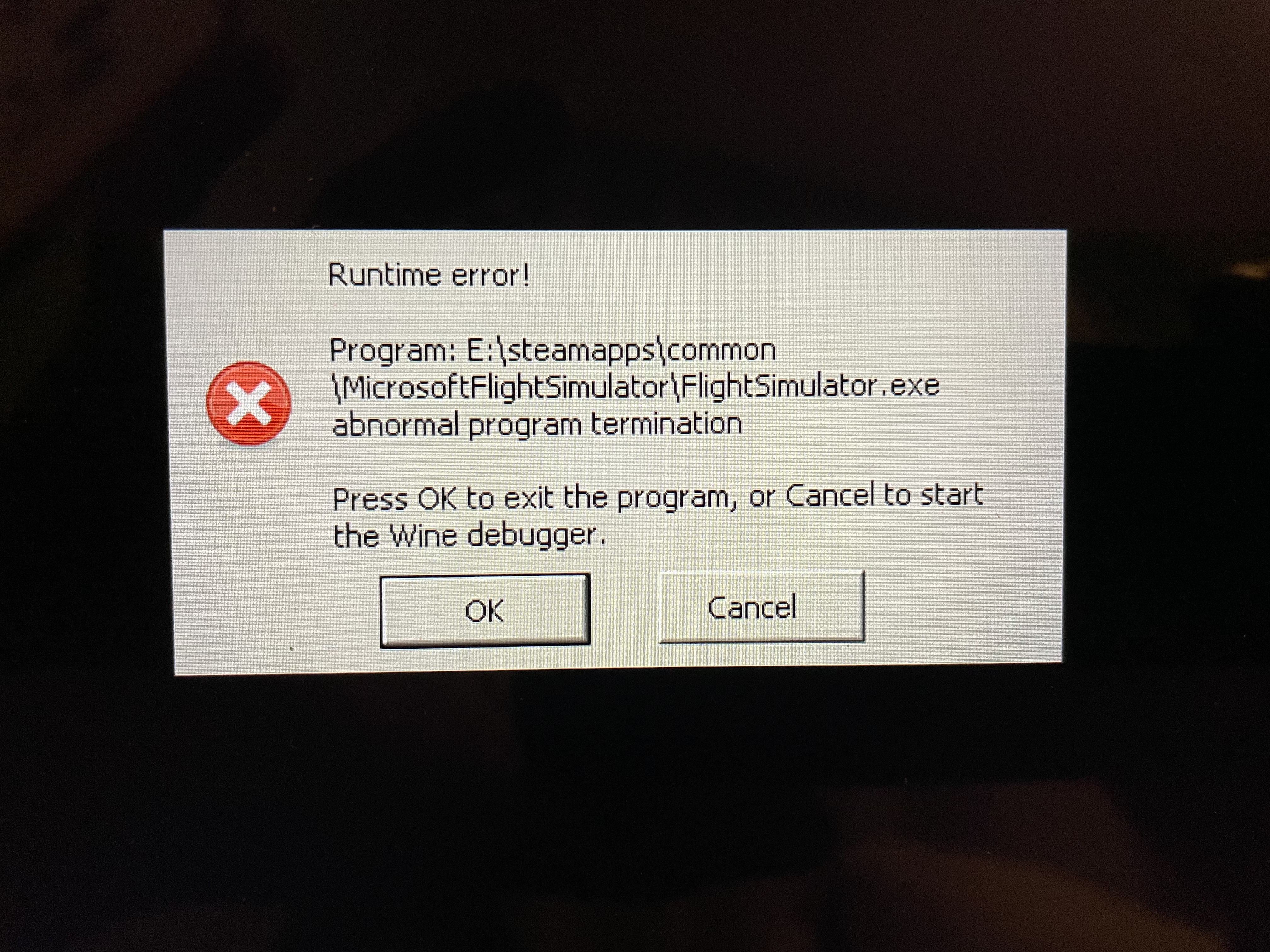
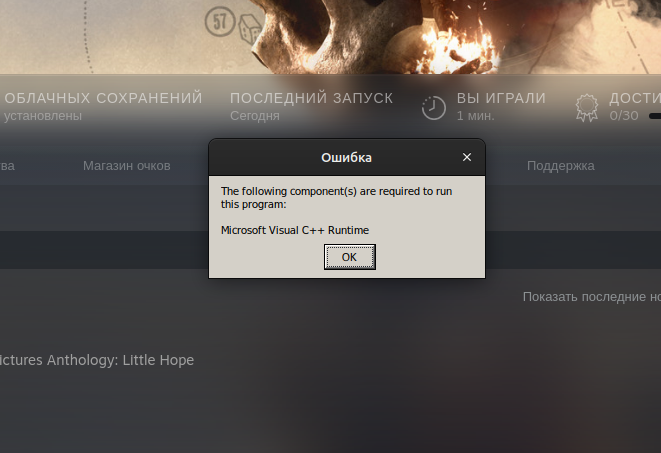
Good afternoon, the game does not work and an error occurs.
The Dark Pictures Anthology: Little Hope and The Dark Pictures Anthology: Man of Medan. works correctly - The Dark Pictures Anthology: House of Ashes. Help fix the problem
Replying to https://github.com/ValveSoftware/Proton/issues/6385#issuecomment-1364370882
This issue occurred to me the first time launching the game. I currently averted this issue by not clicking both buttons, and switched window to the msfs screen. By doing this, I could get to the update/full game download screen. Once the full game is downloaded, this error doesn’t occur anymore.
Second issue I noticed is that, msfs does not run at all with dx12 enabled.
Videos from Crash Bandicoot 4 now play fine with this RC. Thanks.
@alasky17 Just wanted to let you now that Proton-Next (7.0-6) regressed Battlefield 1, the EA launcher refuses to start up - 7.0-5 was indeed working now, albeit with some graphical issues in the EA app.
Hello @ms178, please add PROTON_LOG=1 %command% to the game's launch options, reproduce the regression, and attach the generated $HOME/steam-$APPID.log to this issue report as a file. (Proton logs compress well if needed.) Also, please copy your system information from Steam (Steam -> Help -> System Information) and put it in a gist, then include a link to the gist in this issue report.
@kisak-valve
Here is a gist with the Proton-Experimental log and my system information: https://gist.github.com/ms178/a9500519e47f3db8386da40468f86571
Sorry that it wasn't clearer. This issue report is specifically intended for feedback on the Proton 7.0-6 release candidate. Please share a Proton log of the regression with the release candidate.
The Proton experimental log might still be useful, but that feedback should be put on the per-game compatibility report (#5047).
I am sorry, as I deleted Proton-Next already on disk, I now get an error when trying to use that instead. The log might prove usefull nevertheless to find the problem though, I'll add it to the mentioned game compatibility report.
@ms178, can you test if mesa run with LIBGL_ALWAYS_SOFTWARE=1 works on your system with any OpenGL application (like LIBGL_ALWAYS_SOFTWARE=1 glxinfo -B)? I suspect that your bleeding edge mesa git build is lacking llvmpipe.
@kisak-valve As I only build Mesa with radeonsi and radv, I indeed lack swrast and svga (these produce Mesa build errors at the moment with LLVM-16).
❯ LIBGL_ALWAYS_SOFTWARE=1 glxinfo -B
name of display: :0
libGL error: MESA-LOADER: failed to open swrast: /usr/lib/dri/swrast_dri.so: cannot open shared object file: No such file or directory (search paths /usr/lib/dri, suffix _dri)
libGL error: failed to load driver: swrast
fish: Job 1, 'LIBGL_ALWAYS_SOFTWARE=1 glxinfo…' terminated by signal SIGSEGV (Adressbereichsfehler)
I've just re-checked: Still getting compilation errors with LLVM-16 when enabling swrast. I wonder why 7.0-5 does work without it then.
@ms178 Could you try renaming the prefix (rather than deleting in case there is something interesting in there) and seeing if a fresh prefix works on 7.0-6?
@ms178 we make use of swrast to work around issue specifically affecting Wayland. See e6278c1f533c ("kernelbase: HACK: Force GL QtWebEngine rendering for EADesktop.") and https://github.com/Plagman/gamescope/issues/503.
7.0-5 doesn't have that commit.
@ivyl Thanks a lot, this seems to be the root cause for my trouble. Is it possible to limit the use of swrast to Wayland-users? As I am on X11 and considering that swrast cannot be build with LLVM-16 currently, this change is a regression for X11-users that make use of the latest Mesa-stack and LLVM-git as I have no issue playing the game with 7.0-5 (accepting the blank screen of the EA web app is the better trade-off in my eyes than having a non-working game - also there is another workaround for users interested in actively using the EA app: https://steamdeckhq.com/tips-and-guides/fixing-ea-play-blank-screen-for-ea-games-on-steam/).
Is it possible to limit the use of swrast to Wayland-users?
Maybe via $WAYLAND_DISPLAY but that's not reliable as you can unset it and have XWayland still working just fine. I'll give it some thought and see what can be done.
accepting the blank screen of the EA web app is the better trade-off in my eyes than having a non-working game
If you don't use it for anything else than launching the game that may be true.
Why is the reason you are compiling mesa-git with LLVM 16 if it's not yet fully supported? Does the game not work with older LLVMs / non-git Mesa?
We realistically cannot support every custom user setup.
there is another workaround
The workaround is not something we will ship, use, advertise or recommend as it requires native components. We are actively developing our own shader compilers (https://gitlab.winehq.org/wine/vkd3d/-/tree/master/libs/vkd3d-shader) and this workaround is temporary.
There are also other games that use LIBGL_ALWAYS_SOFTWARE=1 injected elsewhere (not via Proton). Cyberpunk 2077 is one of those examples.
@ivyl Consider RDNA3-users that are left to use the latest -git version of the Mesa- and LLVM-stack. I need LLVM-16 as system compiler for other projects and need to keep Mesa in sync. FWIW, I can get by with 7.0-5 for that particular game. Would be glad to see it fixed somewhen down the road though.
RDNA3 users need mesa 22.2+ for radeonsi, mesa 22.3+ for radv, and llvm 15 or newer. There is no not-yet-stabilized-or-released llvm 16 requirement there. Mesa git main has no llvm git requirement as well.
@kisak-valve I should have added "for the best experience" in my post above, I did not want to claim that it would be a requirement. That's just how enthusiast users willing to spend 1000+ EUR operate. They want the latest fixes for the best experience which is usually not what they'd find in the stable releases that comes with minimal hardware support. Every Phoronix review will tell you that (e.g. page 9 of the RDNA3 review). It's up to you to decide, but I'd consider the trade-off more carefully of breaking X11 users on the latest mesa-/llvm-git stack with that hack as X11 users are still plenty and -git user's are also out there. Henceforth a proper fix for all might be more desireable before regressing these users. Personally I can live with 7.0-5 for some time though. Edit: I've since found out that swrast can be build even with LLVM-16 if LTO is disabled. I've verified that the issue I had with Battlefield 1 is now gone with newer Proton versions.
@ms178 FWIW I've experimented with detecting Wayland. There's no feasible way to do that. Some environment indeed strip $WAYLAND_DISPLAY (e.g. Steam Deck) and we cannot use XRandR or anything X11 for that matter this early. This global workaround will have to stay so people can link their EA accounts. I'm glad that you've managed to make swrast work on your setup though :-)
Proton 7.0-6e has now shipped live to the main 7.0 branch. Thank you to everyone for testing and for the feedback :)
Proton versions
proton 7.0-6ex1 2023-02proton nextx4 2023-01proton 7.0-6x3 2023-01proton experimentalx3 2023-01proton 7.0-5x3 2022-12proton 7.0x3 2022-12proton 7.05x1 2022-12
Launch options
PROTON_LOG=1x1 2023-01
Upstream links
- ValveSoftware/Proton/issues/6393x1 2022-12
Hey all.
We've put together a new 7.0 Release Candidate build for you to test.
In the Steam client the Proton 7.0 app should have a
release-candidatebeta branch (look for Proton 7.0 in your Steam Library, right click -> Properties... -> BETAS) which you can choose to start testing the 7.0-6 Release Candidates (note that the name of the build in the Steam Settings dialog will not be updated). I will post changes here when we push new builds. The source for the latest RC build is available on the proton_7.0-rc branch in this repository. This branch may be force pushed.We are interested only in issues that are new to the 7.0-6 RC builds. If you believe that something broke please confirm that the problem does not occur with the
nonebranch before reporting it here.The changelog is tentative - it has not yet been verified by our QA staff, and can change before the final release as we add or remove features during RC testing.