Company of Heroes 3
apparently according to protondb to fix the desync in MP you need to download the 'vc_redist.x64.exe' file from https://www.microsoft.com/en-us/download/details.aspx?id=48145 and run the commands: cabextract vc_redist.x64.exe, cabextract a10, mv ucrtbase.dll $HOME/.steam/steam/steamapps/compatdata/2245830/pfx/drive_c/windows/system32/.
Company of Heroes 3 on laptop with nvidia
Issue transferred from https://github.com/ValveSoftware/Proton/issues/6572.
@b3nis posted on 2023-02-25T19:49:21:
Compatibility Report
- Name of the game with compatibility issues: Company of Heroes 3
- Steam AppID of the game: 1677280
System Information
- GPU: GTX 1660 Ti Mobile
- Driver/LLVM version: Dunno, latest on Fedora?
- Kernel version: 6.1.13-200.fc37.x86_64
- Link to full system information report as Gist:
- Proton version: Experimental
I confirm:
- [x] that I haven't found an existing compatibility report for this game.
- [x] that I have checked whether there are updates for my system available.
My system:
https://gist.github.com/b3nis/1235a9ae56f8015f0ca6d16b66e824d3
Proton log:
https://gist.github.com/b3nis/27ea6c8b0a320849f010199b5dc9e0d1
Symptoms
A dialog window with the text "Sorry, something went wrong. For solution please visit:
https://support.codefusion.technology/CoH3_gjsa_8945/?e=88500006&l=english"
Reproduction
Install the game on a laptop with nvidia dgpu and launch it. All other games I play, including COH2, works with any mods. Seems to be something with the dgpu + proton + wine maybe? Seems to be working for a lot of people on desktop computers (with single gpu).
apparently according to protondb to fix the desync in MP you need to download the 'vc_redist.x64.exe' file from https://www.microsoft.com/en-us/download/details.aspx?id=48145 and run the commands: cabextract vc_redist.x64.exe, cabextract a10, mv ucrtbase.dll $HOME/.steam/steam/steamapps/compatdata/2245830/pfx/drive_c/windows/system32/.
See also this gist which addresses the same problem for CoH2 and should apply for CoH3.
I wonder if there is a way to make this fix unnecessary though. I have submitted a bug report to SEGA; perhaps if enough people do this, they will try to fix it (although I'm not sure if it is strictly a Proton issue..).
Compatibility Report
- Name of the game with compatibility issues:
- Steam AppID of the game:
System Information
- GPU: AMD Radeon RX 6800 XT (navi21, LLVM 15.0.7, DRM 3.42, 5.15.94-1-MANJARO)
- Driver/LLVM version: Mesa 22.3.5
- Kernel version: 5.15.94-1-MANJARO
- Link to full system information report as Gist: https://gist.github.com/sfxworks/db44d35ea8c891310a36dcf6f8a65026
- Proton version: Experimental
I confirm:
- [ x ] that I haven't found an existing compatibility report for this game.
- [ x ] that I have checked whether there are updates for my system available.
Symptoms
Low FPS
For this game, I can only achieve 60 fps if I run it at 800x600, and only in the menu. It runs incredibly slower than the alpha which had a stable 60 on max settings. 1920x1080 runs at 40fps and even lower in the campaign. Lucky to even get 20 at 4k. This is all with min settings.
Reproduction
Launch company of heroes 3 using proton experimental
Use FPS counter in steam
Replying to https://github.com/ValveSoftware/Proton/issues/6568#issuecomment-1445403256
I have a tought. I might out on deep water, but what if the Coh3 app is not recoqnized as a "game"/"heavy 3D app"? Because in my case I actually got it to start now - but only on my igpu. Maybe it's similar for you - and that you GPU is just idling (that is why you get so low fps). Have you checked with Mangohud if you GPU is using more than 20 watts when the game is on?
Replying to https://github.com/ValveSoftware/Proton/issues/6568#issuecomment-1445191370
Update: I can start the game - but it only runs on the igpu for some reason. All other games runs, without any specific launch options, on the dgpu.
Radeon Profiler was showing an increase in watts used and even proc'd the fans
for me the game won't launch at all (tried v7.0-6, experimental and GE7-49)
Log file with experimental: steam-1677280.log
PS . I don't know if this is proton issue or openSUSE MicroOS issue, as this is my first time using it for past few days....but other games I have tested before still work for me just fine, with some exception of few mmorpg (FF XIV, GW2 and SWTOR).
my system spec:
             .;ldkO0000Okdl;.
         .;d00xl:^''''''^:ok00d;.            OS: openSUSE MicroOS
       .d00l'                'o00d.          Kernel: x86_64 Linux 6.1.12-1-default
     .d0K^'  Okxoc;:,.          ^O0d.        Uptime: 12h 47m
    .OVVAK0kOKKKKKKKKKKOxo:,      lKO.       Packages: RPM / Flatpak
   ,0VVAKKKKKKKKKKKKK0P^,,,^dx:    ;00,      Shell: bash 5.2.15
  .OVVAKKKKKKKKKKKKKk'.oOPPb.'0k.   cKO.     Resolution: 3072x1728
  :KVAKKKKKKKKKKKKKK: kKx..dd lKd   'OK:     DE: KDE 5.103.0 / Plasma 5.27.1
  lKlKKKKKKKKKOx0KKKd ^0KKKO' kKKc   lKl     WM: KWin_wayland
  lKlKKKKKKKKKK;.;oOKx,..^..;kKKK0.  lKl     GTK Theme: Breeze [GTK2],  [GTK3]
  :KAlKKKKKKKKK0o;...^cdxxOK0O/^^'  .0K:     Icon Theme: Papirus-Dark
   kKAVKKKKKKKKKKKK0x;,,......,;od  lKP      Disk: 16T / 21T (75%)
   '0KAVKKKKKKKKKKKKKKKKKK00KKOo^  c00'      CPU: AMD Ryzen 7 5700G with Radeon Graphics @ 16x 4.3GHz
    'kKAVOxddxkOO00000Okxoc;''   .dKV'       GPU: NVIDIA GeForce RTX 3060 Ti (Driver: v525.89.02)
      l0Ko.                    .c00l'        RAM: 12736MiB / 47963MiB
       'l0Kk:.              .;xK0l'
          'lkK0xc;:,,,,:;odO0kl'
              '^:ldxkkkkxdl:^'
okay after the 1.0.2 hotfix update the game still don't launch for me BUT now it get stuck in running/playing ...and the log file is huge, here is a 163,6MiB file: steam-1677280.log
Screenshots
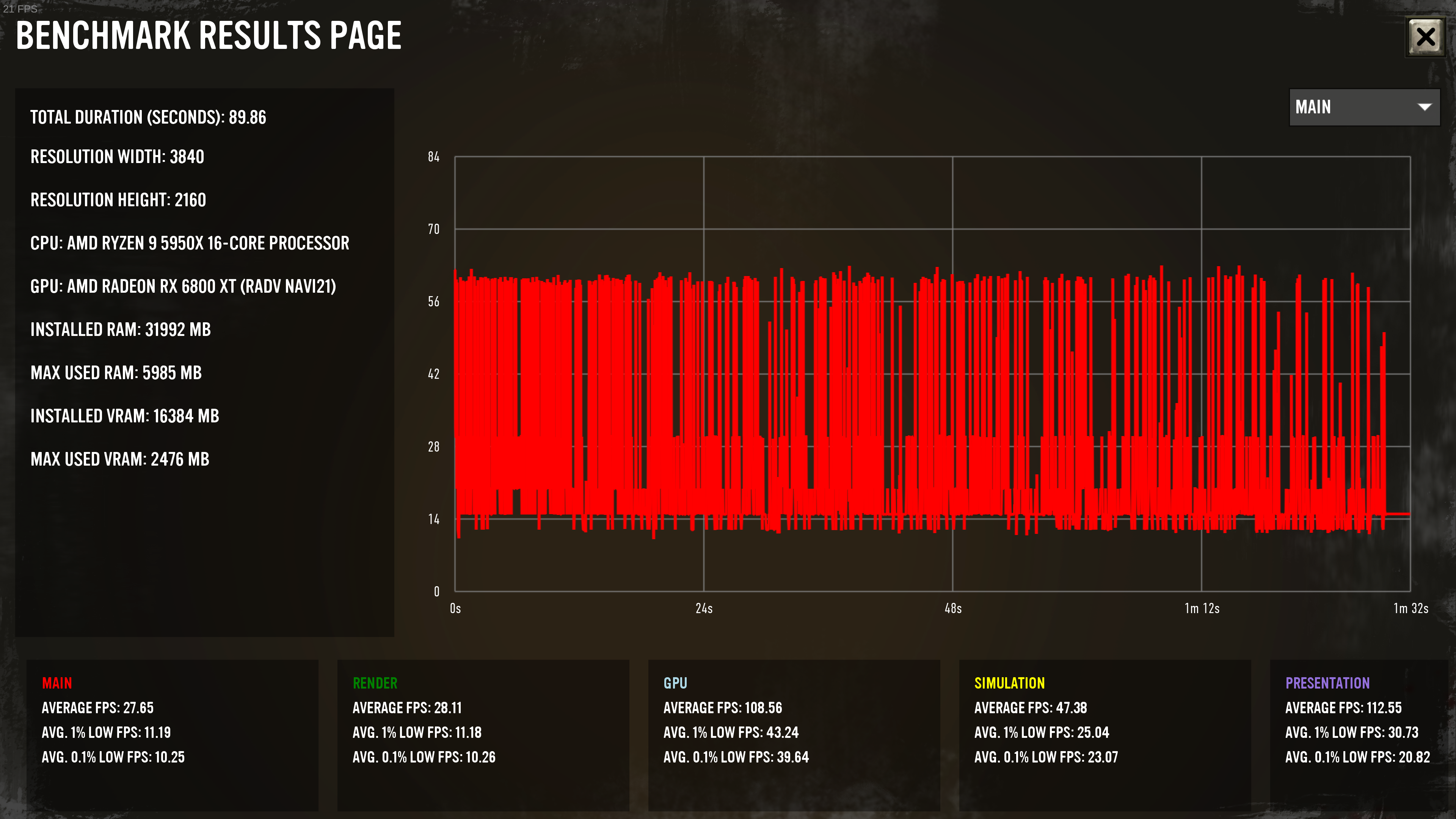
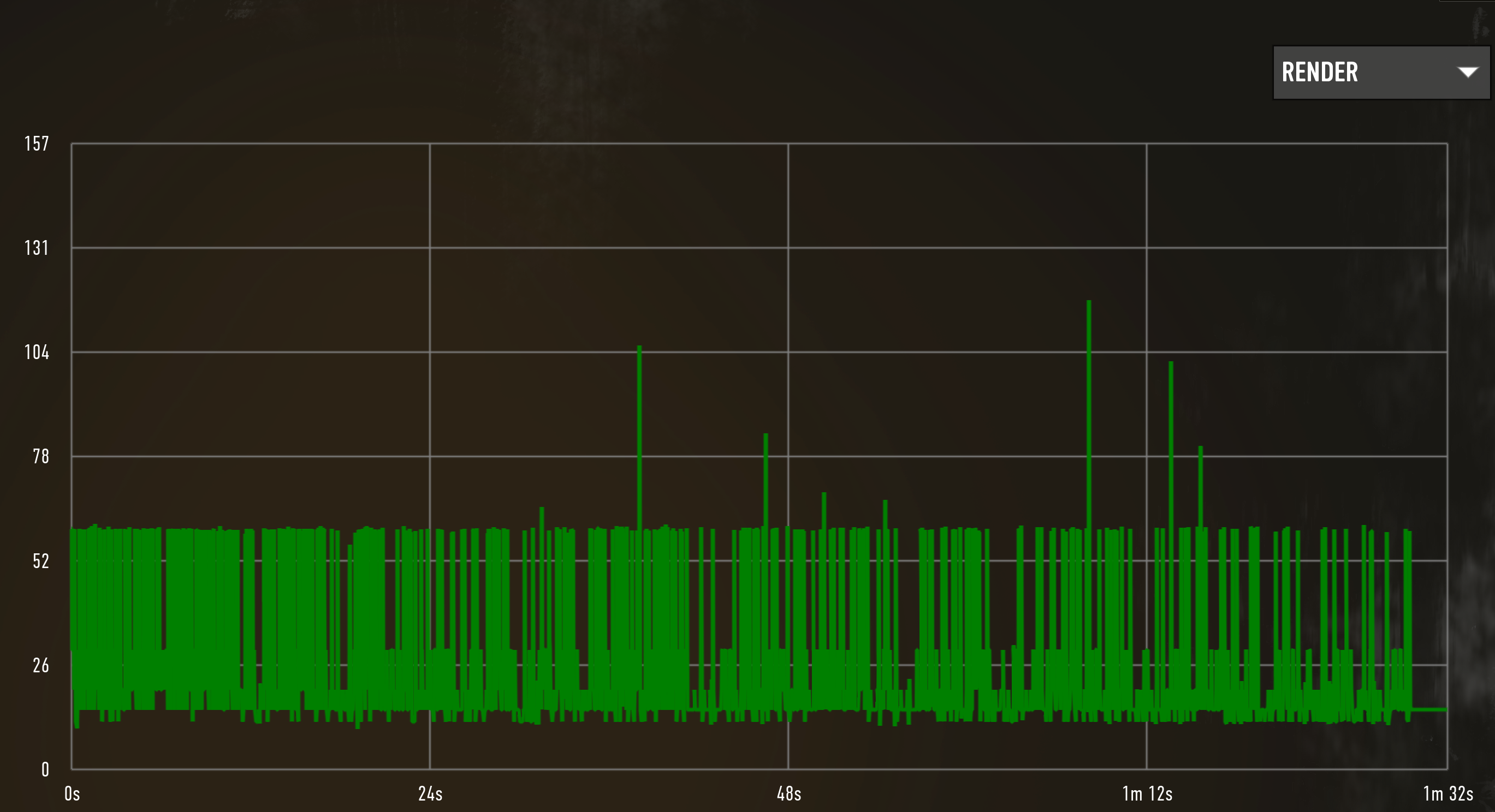
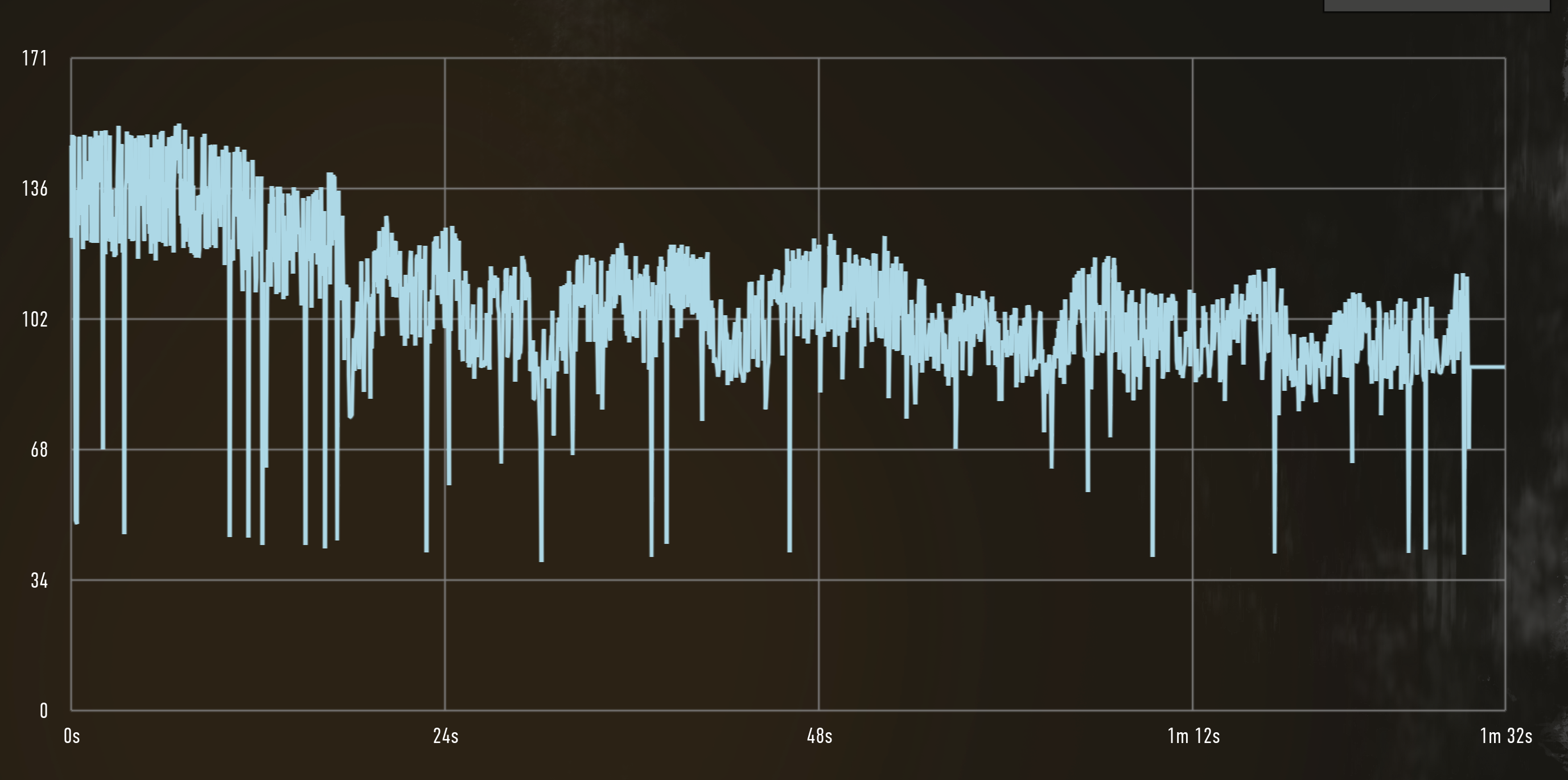
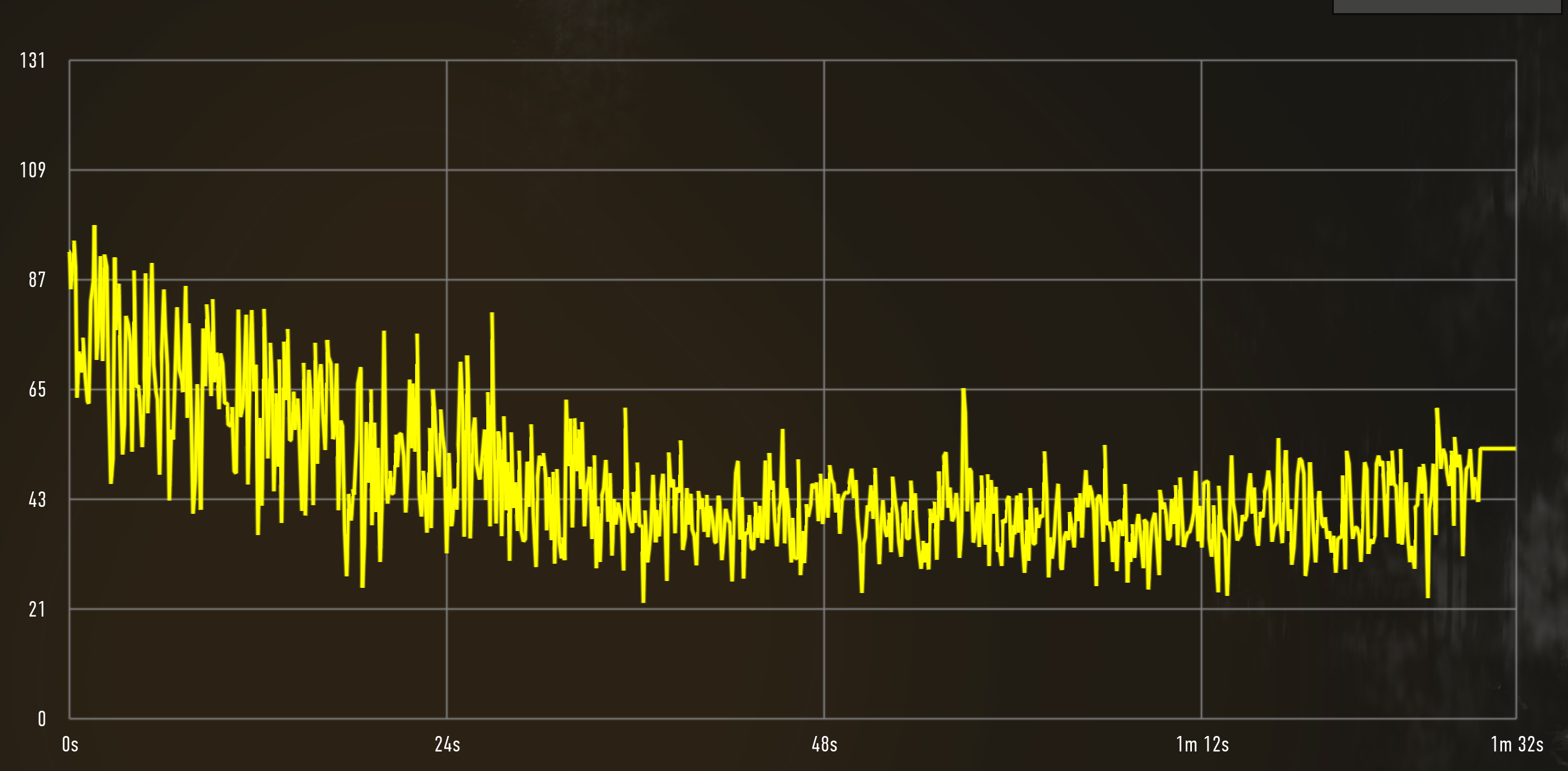
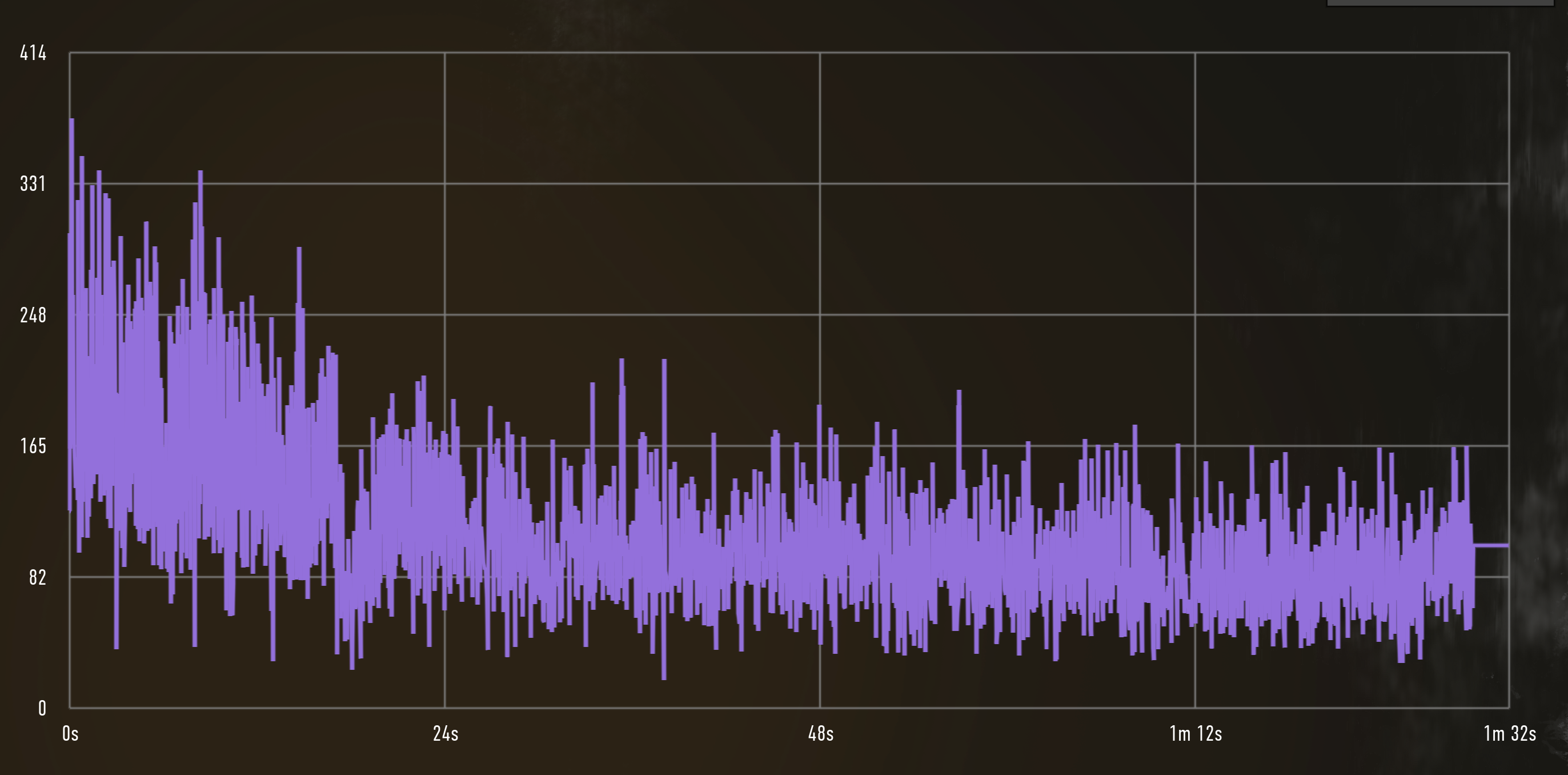
I don't know how Coh3 rates the different fps types, but it does seem that main and render is the bottleneck
here is my new log after 1.0.4 hotfix update: steam-1677280.log
no big log files anymore
Replying to https://github.com/ValveSoftware/Proton/issues/6568#issuecomment-1445191370
Managed to sort this by https://github.com/doitsujin/dxvk/blob/master/README.md#device-filter
Dunno why DXVK has no problem with any other game (this setting is not needed). Anyway, fixes my issue with not wanted to start on dgpu.
Update: Only works with x.org, not Wayland. Nvidia I guess? Gah.
Anyone have a solution to my issue? Or seeing similar symptoms? Only gpu I have is the radeon and my 5950x doesn't have an embedded gpu
1.0.5 patch:


Between then and now, after a fresh restart after the 1.5 I'm getting a stable 60!!!
Finally some great news for me at least with the new 1.0.6 hotfix update.
I can now for the FIRST time actually launch (& play) the damn game.
Now my only issue is that the game gives me error that says my drivers are too old/unsupported ... don't know if this is a game issue or proton one (I have the latest stable v525.89.02 drivers)

here is the new log file: steam-1677280.log
Update, here is my benchmark results:


damn I spoke too soon
I can play the main game fine. Has anyone managed to get the EssenceEditor.exe (the provided modding tool) working? When I run it, I get the following logs:
https://gist.github.com/JonathanBrouwer/4aaf81ce5f572058f748cd14f222d00a
Essence.Editor.Bridge.dll is in the same directory as the essence editor, so I'm not sure why it can't find it
I can play the main game fine
What are the specs of your machine? Curious if you're running nvidia or amd and which divers.
I can play the main game fine
What are the specs of your machine? Curious if you're running nvidia or amd and which divers.
i7 6700k
RX 7900 XTX
Mesa 23.0.0
If you want any other information, let me know
If you want any other information, let me know
Wayland or X11?
If you want any other information, let me know
Wayland or X11?
I mainly run on KDE Wayland (Running the game under XWayland), but I just tried running it in KDE under X11 and that also works fine
Mainly a reply to myself and if somebody got the same challenges:
- COH3 works flawless even on Wayland if I use primerun script (otherwise it will only run on igpu for some weird reason)
- MP works flawless with the dll copy thing (see above)
Mesa 23.0.0
glxinfo | grep Mesa

client glx vendor string: Mesa Project and SGI
OpenGL core profile version string: 4.6 (Core Profile) Mesa 22.3.5
OpenGL version string: 4.6 (Compatibility Profile) Mesa 22.3.5
OpenGL ES profile version string: OpenGL ES 3.2 Mesa 22.3.5
Maybe that's why. I'm on 22.
Replying to https://github.com/ValveSoftware/Proton/issues/6568#issuecomment-1476838752
I also took the benchmark, for some reason the graph does not seem to be rendered right, but the numbers at the bottom are reliable. I'm on mesa 23 already because the 7900 XTX does not work well on mesa 22. I also had to apply the dll copy to be able to play multiplayer. Also looks like I'm playing at a lower resolution than you, but that shouldn't explain how large the gap in performance is.


That must have been it. Manjaro still had me on mesa 22. 23 did the trick.
I'm seeing a similar issue to @sfxworks . Constant frame drops on Ubuntu 22.10. I have Mesa 23.0 installed. Is anyone else seeing similar issues?

Your issue looks different as I was floating around 14fps with spikes upward https://github.com/ValveSoftware/Proton/issues/6568#issuecomment-1464830070
Does anyone else have any idea why it seems to be so stuttery? Other people on protondb are reporting camera stutter - which might be the same issue https://www.protondb.com/app/1677280
is the mp disconnect still present even with the lates GE versions ?
Company of heroes 3
Issue transferred from https://github.com/ValveSoftware/Proton/issues/7449.
@EliasDadde posted on 2024-01-27T14:05:20:
Heavy Camera Sluttering makes the game unplayable .
Proton Experimental (although i used many different proton version so i dont think it matters , it's a universal issue with proton and he game).
My System Information
Computer Information:
Manufacturer: Micro-Star International Co., Ltd.
Model: PRO Z790-A WIFI (MS-7E07)
Form Factor: Desktop
No Touch Input Detected
Processor Information:
CPU Vendor: GenuineIntel
CPU Brand: Intel(R) Core(TM) i9-14900K
CPU Family: 0x6
CPU Model: 0xb7
CPU Stepping: 0x1
CPU Type: 0x0
Speed: 5701 MHz
32 logical processors
24 physical processors
Hyper-threading: Supported
FCMOV: Supported
SSE2: Supported
SSE3: Supported
SSSE3: Supported
SSE4a: Unsupported
SSE41: Supported
SSE42: Supported
AES: Supported
AVX: Supported
AVX2: Supported
AVX512F: Unsupported
AVX512PF: Unsupported
AVX512ER: Unsupported
AVX512CD: Unsupported
AVX512VNNI: Unsupported
SHA: Supported
CMPXCHG16B: Supported
LAHF/SAHF: Supported
PrefetchW: Unsupported
Operating System Version:
"openSUSE Tumbleweed" (64 bit)
Kernel Name: Linux
Kernel Version: 6.7.2-lqx1-1-liquorix
X Server Vendor: The X.Org Foundation
X Server Release: 12101011
X Window Manager: KWin
Steam Runtime Version: steam-runtime_0.20231127.68515
Video Card:
Driver: NVIDIA Corporation NVIDIA GeForce RTX 4090/PCIe/SSE2
Driver Version: 4.6.0 NVIDIA 550.40.07
OpenGL Version: 4.6
Desktop Color Depth: 24 bits per pixel
Monitor Refresh Rate: 143 Hz
VendorID: 0x10de
DeviceID: 0x2684
Revision Not Detected
Number of Monitors: 1
Number of Logical Video Cards: 1
Primary Display Resolution: 3840 x 2160
Desktop Resolution: 3840 x 2160
Primary Display Size: 24.41" x 13.39" (27.83" diag), 62.0cm x 34.0cm (70.7cm diag)
Primary Bus: PCI Express 16x
Primary VRAM: 24564 MB
Supported MSAA Modes: 2x 4x 8x 16x
Sound card:
Audio device: %1$s
Memory:
RAM: 31872 Mb
VR Hardware:
VR Headset: None detected
Miscellaneous:
UI Language: English
LANG: en_US.UTF-8
Total Hard Disk Space Available: 1811981 MB
Largest Free Hard Disk Block: 1589847 MB
Storage:
Number of SSDs: 6
SSD sizes: 4000G,3000G,2000G,960G,240G,180G
Number of HDDs: 0
Number of removable drives: 0
To update the post , seems to be a lot of frames drop , doesn't matter really low quality graphics or high quality graphics , the heavy frame drops are the cause of the sluttery camera feeling, sadly been working on the game for a week or so , cant get it to run at a stable frame rate
I have found a fix for PCs/Laptops running CoH3 and having fps issues (at least with dedicated Nvidia GPU)! Because the game sometimes actively priorities the integrated (slow) GPU over the dGPU even when offloading. A simple fix is to filter GPUs with DXVK_FILTER_DEVICE_NAME="GPU NAME". Works on Wayland and X11, however on X11 I did get some strange bugs about wrong gpu detection and the screen flickering like crazy.
I have found a fix for PCs/Laptops running CoH3 and having fps issues (at least with dedicated Nvidia GPU)! Because the game sometimes actively priorities the integrated (slow) GPU over the dGPU even when offloading. A simple fix is to filter GPUs with DXVK_FILTER_DEVICE_NAME="GPU NAME". Works on Wayland and X11, however on X11 I did get some strange bugs about wrong gpu detection and the screen flickering like crazy.
are you sure about that DXVK is a dx11 , and im not sure coh 3 has a dx11 path , its a dx12 games , unless i'am mistaken.
are you sure about that DXVK is a dx11 , and im not sure coh 3 has a dx11 path , its a dx12 games , unless i'am mistaken.
@EliasDadde actually I do not know, but it only works on my system with the env var (without it it will use iGPU). For vkd3d (dx12) there is VKD3D_FILTER_DEVICE_NAME, which does the same but has no effect on my system (when playing CoH3). So I guess it uses dx11.
Here are my full launch options:
DXVK_FILTER_DEVICE_NAME="NVIDIA GeForce RTX 3060" PROTON_HIDE_NVIDIA_GPU=0 PROTON_ENABLE_NVAPI=1 DXVK_ASYNC=1 gamemoderun %command%
Hi, for people who reported bad stuttering in Company of Heroes 3: I had the same experience and found that Kernel's split lock mitigation caused these problems on my system (Ubuntu 22.04, Nvidia 4070 Ti, Intel i5 12500).
After running CoH 3 with all its stuttering and bad fps, dmesg was full of lines like:
#AC: RelicCoH3.exe/63356 took a split_lock trap at address: 0x154f93c1b
Once I disabled split lock mitigation the game ran perfectly at 120 fps without any suttering. You can do this by using gamemode >= 1.8.0 and configuring enabling disable_splitlock=1 in the gamemode configuration.
Alternatively, you can also disable the split lock mitigation by running
sudo sysctl kernel.split_lock_mitigate=0
in the terminal before playing.
Hope this helps!
Replying to https://github.com/ValveSoftware/Proton/issues/6568#issuecomment-2105716251
this is true indeed , however sysctl doesn't seem to work nor the gamodemode.ini
im still getting this split_lock , seems like steam encourage this behaviour while kernel don't , seems more like a valve proton issue that they can solve themself , but thank you for catching this up .
[137185.322270] x86/split lock detection: #AC: RelicCoH3.exe/26727 took a split_lock trap at address: 0x15a0539d4
[137186.046481] x86/split lock detection: #AC: RelicCoH3.exe/26720 took a split_lock trap at address: 0x15a0539d4
[137186.448791] x86/split lock detection: #AC: RelicCoH3.exe/26712 took a split_lock trap at address: 0x14420ead2
[137189.911775] x86/split lock detection: #AC: RelicCoH3.exe/26710 took a split_lock trap at address: 0x14420eb82
even after i tried to change the kernel parameter with sysctl.
yeah i noticed the difference it's huge , still not 100% smooth but at least it's now playable 2v2 , thanks so much for pointing this out , hopefully valve will fix this issue once and for all
Just A Quick Note
disable_splitlock=1 in /etc/gamemode.ini doesn't really fix the sluttering the only way to fix it is to use sysctl and change kernel parameter then the game will work flawlessly .
Hi, for me, game doesn't start at all, just a black rectangle and using various commands from protondb the furthest I can get is to get a crash report window. Using experimental or GE doesn't change anything.
Specs
GTX 1080
Ryzen 3700X
Mesa 24.2.3
Hello @M1ch431, please add PROTON_LOG=1 %command% to the game's launch options, reproduce the misrendering, and attach the generated $HOME/steam-$APPID.log to this issue report as a file. (Proton logs compress well if needed.) Also, please copy the contents of Steam Runtime Diagnostics from Steam (Steam -> Help -> Steam Runtime Diagnostics) and put it in a gist, then include a link to the gist in this issue report.
Company of Heroes 3 - locks up at game loading screen
Issue transferred from https://github.com/ValveSoftware/Proton/issues/8511.
@b3nis posted on 2025-03-09T22:30:32:
Compatibility Report
- Name of the game with compatibility issues: Company of Heroes 3
- Steam AppID of the game: 1677280
System Information
- GPU: Radeon 780M
- Video driver version: Mesa 25.0.0
- Kernel version: 6.13
- Link to full system information report as Gist: https://gist.github.com/b3nis/b1832c82498eb5c2afd0e36109f579d3
- Proton version: 9
I confirm:
- [x] that I haven't found an existing compatibility report for this game.
- [x] that I have checked whether there are updates for my system available.
Symptoms
Sometimes when starting the game it locks during loading of a game or benchmark. Somtimes I can just close the game, restart it and it will work on the second try. Sometimes on the third. When the game is working, let's say on third try - it can play it for hours without any issues.
Reproduction
With the new proton 10, the option "Clamp Mouse to Window" doesnt work, if you have 2 monitors, the mouse will escape the window of the game
Hello @raaffaaeell, please copy your system information from Steam (Steam -> Help -> System Information) and put it in a gist, then include a link to the gist in this issue report.
Hello @raaffaaeell, please copy your system information from Steam (
Steam->Help->System Information) and put it in a gist, then include a link to the gist in this issue report.
Here https://gist.github.com/raaffaaeell/2d0829356d006eb310ffa4f2a8d2ab30
@raaffaaeell We are not able to reproduce the "Clamp Mouse to Window" failure that you've described. I have a few questions since it is basically impossible to investigate further unless we are able to reproduce.
- Is this regressive between Proton 9 and Proton 10? Or does this also happen on Proton 9?
- Which WM are you using specifically? Your gist output lists "wlroots". Could you give an exact description of which packages you are using to create your window management environment?
hello @alasky17 , sorry for the late reply. I just tested this game (after not playing for a few days) and I think the problem is fixed now even in Proton Experimental. I remember it distinctly not working when experimental was proton 10-b. Thanks for checking in.
For reference:
1.Proton 9 was totally fine
2. Yes, I'm using a wlroots based WM, https://github.com/swaywm/sway, I know these are quite niche and hard to keep in mind (but I find them easier to work with multiple screens), next time I'll try the gnome desktop too.
Thanks for your support
I have noticed that on Proton 10, rotating the camera is very laggy. If I switch back to Proton 9, camera rotation works as it should.
@VirtualBoost Could you please copy your system information from Steam (Steam -> Help -> System Information and Steam -> Help -> Steam Runtime Diagnostics) and put each in a gist, then include a link to the gists in this issue report? Also, what type of input are you using?
Hi. Just switched to Bazzite and am experiencing issues across the board with framerates in COH3. Have tried a number of different proton versions, 10.0-1 beta, experimental, hotfix and 9.0-4. Consistently getting lots of stutters/dropped frames in game. When it occurs, I can see the fps counter drop significantly...at times the pause is long enough that the players seem to artificially "sprint" to catch up (if that makes sense). Tried a variety of graphics settings and resolutions with same outcome - in fact, it seems to be more frequent when I drop the res as the camera panning will also experience stuttering and, at times, requires keyboard intervention to move. Machine handles COH3 fine in Windows at same settings - Core i514400f, 32GB RAM and Nvidia 4060. COH3 is installed on an SSD partition with ample space. Tried dropping graphics to lowest settings with same outcome. Not sure what else to try. The Proton DB identifies a few different launch options, but these seem to be linked predominately to avoiding integrated GPUs etc. I also used
"sudo sysctl kernel.split_lock_mitigate=0" as per some suggestions (I noticed these pop up in dmesg), but the outcome is the same.
I am not looking for superhero frame rates, but would appreciate if someone could point me in the right direction I would be much appreciated.
Cheers
Mouse panning with middle click is a little bit broken. Using middle click to pan will move the mouse to the center of the screen maybe 50% of the time and lead to really jerky panning. Tested on Proton 9.0-4, 10.0-3, and Experimental. I think this behavior occurs in other Relic RTSes like Dawn of War Definitive Edition and Company of Heroes 2 as well.
Does anyone else experience this? Any ideas as to why this happens?
Mouse panning with middle click is a little bit broken. Using middle click to pan will move the mouse to the center of the screen maybe 50% of the time and lead to really jerky panning. Tested on Proton 9.0-4, 10.0-3, and Experimental. I think this behavior occurs in other Relic RTSes like Dawn of War Definitive Edition and Company of Heroes 2 as well.
Does anyone else experience this? Any ideas as to why this happens?
Hi yes, this quite annoying indeed, i was loosing my mind trying to fix that since I've been using panning in coh2 for ages currently not playing too much.
only good fix for that is using gamescope:
gamescope -W 1920 -H 1080 -r 144 -f --force-grab-cursor -- %command%
winewayland also fixes that issue and i would prefer it over gamescope, but there's very weird bug that it introduces, coh2 after clean start(from my experience if you firstly run it without wine-wayland and then with it does not do that) ignores all keyboard hotkeys and those pass to the applications in the background.
edit:
but maybe winewayland works fine for coh3 i extrapolate which may not be 100% accurate
the way the issue is described, my guess would be that the behavior from panning is that the camera moves erratically. I tried with borderless fullscreen (which is the default), with proton 9/10/exp, and didn't see the issue, this on plasma wayland.
If I'm misunderstanding the issue, I'd like to know. And if you can provide more information about things like your desktop environment, that could be helpful as well.
Replying to https://github.com/ValveSoftware/Proton/issues/6568#issuecomment-3620439375
Running in Wayland or with gamescope doesn't do anything to mitigate this on my end unfortunately.
the way the issue is described, my guess would be that the behavior from panning is that the camera moves erratically. I tried with borderless fullscreen (which is the default), with proton 9/10/exp, and didn't see the issue, this on plasma wayland.
pretty much. the game pans the camera from the position of the cursor, but clicking in mouse3 (or whatever pan is bound to) locks the cursor to the center of the screen and screws up the panning. also happens with orbiting the camera with ALT. running on KDE Plasma 6.5.3
Replying to https://github.com/ValveSoftware/Proton/issues/6568#issuecomment-3624148097
hmm I'm on plasma 6.3.6, gamescope --force-grab-cursor -- %command% works perfectly fine for me in coh2
maybe try Proton-GE i just checked and that's what I'm using for coh2.
ill download coh3 and test whether it's not working or something is working different on your end
edit: my workaround does indeed not work in coh3 :/ but it does work in coh2 and dow
Replying to https://github.com/ValveSoftware/Proton/issues/6568#issuecomment-3624148097
Hi there I've decided to try out few other options and found out one that works unless i became too delusional from clicking scroll button too many times...
run protontricks 1677280 winecfg
go to graphics -> capture mouse in fullscreen
(note I've also set compatibility to win11 earlier and didnt change it back not sure if matters but ill note that here)
run the game with proton which supports wine-wayland so GE or EM,
set Lunch options
PROTON_USE_WAYLAND=1 %command%
Replying to [#6568 (comment)](https://github.com/ValveSoftware/Proton/issues/6568#issuecomment-3677028410)
sadly this does not work for me either. very happy to hear it works for you, though
one thing I've noticed: the camera won't shoot around while panning if you left click between each pan. very strange. not a fix by any means but interesting nonetheless.
I'm also having the mouse-scroll issue and none of the fixes discussed here seem to work for me.
Additionally, whenever I click or release the middle mouse-button, I get some really annoying VRR-flicker.
With proton 11 (the new beta), the mouse doesnt stay in the window while in game (in the menus this is not a problem it seems). That doesnt happen with proton 10 or experimental. Im using sway in Fedora 44
@raaffaaeell tried plasma wayland and later sway with the game set to windowed, on sway that results in the game being places in the middle while other programs are visible behind, at the edges of the screen. On plasma and sway I noticed no difference in behavior between proton 10 and 11, with the mouse escaping the window at the very start, but getting locked in after reaching the main menu (and then when loading a campaign there's no change and the mouse remains locked). Are there any more changes on your end that might be affecting things?
@simifor I see the issue now and sadly happens to experimental too. I have two monitors (I forgot to mention first), when I leave the monitor of the game (while in game or in the menu) and get back into the game, the clamp mouse to window no longer works, with fullscreen or bordeless fullscreen, mouse will escape to the other monitor.
But I found a workaround, when I middle click while in game, it gets back to working correctly, thanks
So, I did a bunch of testing and the middle-click-drag issue seems to be a regression in proton version >= 10, as this does indeed not happen on proton 9.
This also seems to be an issue with other relic games.
Note that I was instructed by claude fable on the debugging steps and it did most of the analysis of the log-files.
I tested on
- different proton versions
- with / without gamescope
- with / without MouseWarpOverride
- different framerate-limits via different means (mangohud, VKD3D_FRAME_RATE)
- KDE Plasma / Hyprland
- Proton experimental + bleeding edge
Only two of the variations listed above showed a difference:
Bug happens on Proton >= 10
Bug does not happen on Proton 9
Bug does not happen on Proton >= 10 + gamescope
Not related to mwo= via protontricks
Not related to any kind of framerate-limit, the jump distance always only depends on distance of the curser to the screen center
Not related to the display server
This seems to be a regression in the input handling done between proton 9 and 10.
Here's a link to my Steam System Info: https://gist.github.com/allgoewer/49a3490a3cdb7c784317af48a07ff171
The trimmed logs: coh3-warp-regression-logs.zip
The LLMs condensed report:
Title: CoH3 (1677280): camera jumps at drag-pan start — upstream Wine 9→10 regression in SetCursorPos warp handling (reproduced across Proton and GE-Proton)
Symptom: Starting a middle-mouse drag-pan while the mouse is physically moving causes an instant camera jump. Jump magnitude equals the cursor's distance from screen center at click time; no jump when the mouse is stationary at button-down. Does not reproduce on Windows on the same hardware.
Version matrix:
Works: Proton 9.0-4, GE-Proton 9-27
Broken: Proton 10.0, Proton Experimental (incl. bleeding-edge), GE-Proton 10-1, GE-Proton 11.1
Both lineages flip at the same Wine-base boundary → upstream Wine 9.x→10.0 regression, not a Proton/GE patchset issue.
Environment: Arch Linux, Mesa 26.1.4 (RADV), tested on KDE Plasma (KWin 6.7.2) and Hyprland; reproduces on XWayland and PROTON_ENABLE_WAYLAND=1 (incl. wp_pointer_warp_v1 path); independent of MouseWarpOverride, framerate, vsync, window mode, mouse polling rate (125 Hz). Does not reproduce under gamescope.
Log analysis (WINEDEBUG=+cursor,+rawinput,+message, trimmed logs attached for all four versions):
Wine 9 performs a synchronous warp on SetCursorPos: X11DRV_SetCursorPos real setting to (1279,719) / warped to (fake). First WM_MOUSEMOVE after the warp is exactly the warp target.
Wine 10/11 uses a serial-tracked async warp (warped to 1279,719 serial N) with XI2-raw-delta-driven position tracking.
In both versions the delivered WM_MOUSEMOVE stream contains no large deltas and warp echo suppression works (old serial N, ignoring), and the game receives zero WM_INPUT — so the spurious pan is not in the message stream. The game presumably polls GetCursorPos; the regression is consistent with the cursor position briefly reflecting a stale pre-warp value (e.g. an in-flight motion delta committed against the pre-warp base) on the first frame after SetCursorPos, yielding a one-time delta of (click position − screen center).
The "real setting to" trace disappearing between the versions marks the winex11 warp rework
So I've also hit the same problems with mouse scrolling (middle mouse + mouse movement) and rotation (alt + mouse movement). It seems to me that the mouse is being auto moved back to it's original position when the button is first pressed and this movement is effectively undoing anything the user does resulting in it flickering or jerking as it attempts to pan one way and then back several times a second.
If you move the mouse as you press the button it seems to snap suddenly to a different location/rotation and then start doing the flickering I previously described.
This seems to be in all versions post 10. I've tested it under:
- proton 11 (default),
- proton hotfix,
- proton experimental,
- proton 10.0-4
- cachyos-proton (I wouldn't usually use other proton versions but I thought I might as well try)
It works as intended in version 9.0-4 contradicting what was said here https://github.com/ValveSoftware/Proton/issues/6568#issuecomment-3617944554. I've not managed to get any other fix working.
- GPU: gtx 4070ti
- Video driver version: nvidia 610.43.03
- Link to full system information report as Full system infromation:
If there's any other details I can give, let me know
Afaik, there was a relatively big input rework in wine which is why this issue occurs in proton >= 10.
CoH3 doesn't use raw input and its doing some rather interesting stuff with the cursor.
Sadly, the new input handling seems to differ from the old one in details we do not understand, which leads to this regression.
That's interesting.
@allgoewer You mentioned that it works with gamescope? Which is better running it in a newer proton version with gamescope or in proton version 9? Were there any gamescope specific flags you ran it with?
There is the same problem in Age of Empire 4 and putting proton to version 9 fix the issue also :)
I have so far been unable to reproduce the middle mouse issue on any machine I've tested in the past few months.
If someone could grab a log (of the game both working on Proton 9 and failing on Proton 11 or Experimental Bleeding Edge) using PROTON_LOG=+x11drv,+x11settings,+event,+cursor,+win,+message %command% in the launch options of CoH3, I'd appreciate it. +message can be cut if performance is abysmal.
Hey Will,
so, this is totally annoying, but Relic completely broke the middle-mouse movement in the latest 2.5.x update... Means I can't provide you with a log showing the exact issue.
They introduced the following change, according to their patch logs (https://store.steampowered.com/news/app/1677280/view/670623586021542715):
- Improve high polling rate mouse input handling. This improve FPS while mouse panning and should mitigate the amount of hitches or performance blips on high polling rate mouses
Their community manager, John T. acknowledged this new issue here: https://www.reddit.com/r/CompanyOfHeroes/comments/1vcg2df/comment/p132c5s/?context=3
They seem to at least be aware of this new issue.
I can only assume that all of those camera-pan issues are somehow related.
Nonetheless, I attached two logs recorded with the current game version, both proton 9 and proton experimental.
Proton 9 works perfectly fine, proton experimental doesn't allow any movement at all. The issue looks similar to the one shown in the reddit post I linked.
Note, the trick for me to reproduce the issue on previous game versions was the following: Move the mouse across the screen and during movement, press and hold middle-mouse. The camera would then jump.
Let me know if I can provide you with anything else. I assume there is no way to downgrade a game's version via steam?
so, this is totally annoying, but Relic completely broke the middle-mouse movement in the latest 2.5.x update... Means I can't provide you with a log showing the exact issue.
Yo, actually, due to the fact that it's regressive from 9, I think this will make the bug easier initially! I have a repro of something, presumably the new worse behavior!
Thank you very much for the logs and persistence. Going to see if we can find a fix on the Proton side before Relic fixes it.
Happy to help.
I'm watching this issue, so if you need any more input, be it logs or infos regarding my system, let me know.
Also, here's a bunch of observations i sprinkled across all the responses I made in this here thread:
All of those observations are regarding the cam-warp issue, not the new one I just talked about.
- Running the game in gamescope works seemingly fine, no matter the proton version
- I tried it on various versions of proton >= 10 (ge-proton, experimental + bleeding edge), all showed the issue
- The issue occurs with both xwayland and wayland (tested with ge-proton and PROTON_ENABLE_WAYLAND=1)
- The game seems to not use any kind of raw / direct input. You might notice that it has no in-game settings for sensitivity and such. It uses whatever sensitivity you configure in your desktop. I have pointer acceleration disabled. I'm using a mouse with 1000 Hz polling rate at 1600 DPI. On an older mouse I have which runs at 125 Hz, the issue is the same.
- When pressing middle-mouse, the mouse-pointer actually warps to the screen center and, I think, gets hidden. My intuition is that there might be some stale data from before that warp which causes the jumps
Alright, there's a fix in Proton Experimental Bleeding Edge that resolves the completely broken middle mouse issue on my end. I'm fairly sure it doesn't resolve the cam warp issue, however, based on my understanding of it. Give Bleeding Edge a shot, though, and let me know if it helps.
Edit: See later edit, this is the original message:
This seems to be fixing both issues for me!
I have a small recording here showing both camera-rotation and panning: https://youtu.be/DFvV6eywLO4?t=90
One small caveat: My very first camera-drag (at the 1:34 minute mark) is still jumping, you can see it relatively clearly when looking at the minimap during the drag.
Nonetheless, this is absolutely something I think people can live with :-)
I'll be playing a longer session today and will let you know how it goes.
Edit:
Alright, so my original observations aren't quite right.
- The rotation issue is gone for good, was not able to reproduce it at all.
- The dragging issue is still there but way less pronounced and I can't reliably reproduce it anymore. It happens only rarely now.
You can see some of the sporadic jumps occurring in this video at around the 15:15 min mark: https://youtu.be/1Y8Wql1Vfmg?t=915 . It's less irritating to look at and easier to notice when looking at the trapezoid on the minimap.
I also noticed, that the new warping seems to coincide with frame drops. I.e. frame drops cause the warping to happen more frequently.
I wasn't really able to reproduce the dragging issue as I was before on every single drag, but I had it still happen from time to time.
Interestingly, since. 2.5.x I'm seeing similar warping issues like the ones I see now on bleeding edge, but under Windows. I posted on reddit to maybe find more players with that issue (https://www.reddit.com/r/CompanyOfHeroes/comments/1vb5wfz/serious_camera_warping_issue_when_middlemouse/). I also made a bug-report with relic, they're still investigating.
As a refresher:
- CoH3 v2.4.x has the easily reproducible warping issue with proton 11.
- CoH3 v2.5.x has the rotation issue which prevented any testing under proton 11. The rotation issue is gone with bleeding edge but a less severe version of the warping issue still exists, which I observe under windows as well.
Maybe the change made by relic in 2.5.x also affected the original warping issue and whatever was wrong in wine/proton causing the rotation issue is now fixed on bleeding edge.
@codeweaverwill Is this fix (for the cam-rotation issue) expected to make it into regular experimental / stable at some point?
@codeweaverwill Is this fix (for the cam-rotation issue) expected to make it into regular experimental / stable at some point?
The fix was in experimental 20260826, but hopefully you aren't using an AMD machine because an AMD-specific regression may have snuck into the latest experimental release. Currently tracking that down.
Whatever change that is in Proton Exprimental is working, however, any version after 9.0.4 - the game won't shut down properly. Which is irritating because I use Steam Headless and then I have to restart the docker container every time. Do anyone else got this issue as well?
@b3nis I haven't had luck reproducing the issue on my end, tried multiple times with proton 11 and experimental, I get into the northern africa campaign, then I quit to main menu and then quit the game altogether. There may be some extra factors for the issue to surface
31. @b3nis I haven't had luck reproducing the issue on my end, tried multiple times with proton 11 and experimental, I get into the northern africa campaign, then I quit to main menu and then quit the game altogether. There may be some extra factors for the issue to surface
Ok, thanks for testing it out. What DE are you using? Wayland or X11?
Proton versions
proton experimentalx7 2026-08proton 10.0-4x1 2026-07proton hotfixx1 2026-07proton 9.0-4x3 2026-07proton 10.0x1 2026-07proton 11.1x1 2026-07
Launch options
PROTON_ENABLE_WAYLAND=1)x1 2026-08PROTON_LOG=+x11drv,+x11settings,+event,+cursor,+win,+messagex1 2026-08PROTON_ENABLE_WAYLAND=1x1 2026-07VKD3D_FRAME_RATEx1 2026-07WINEDEBUG=+cursor,+rawinput,+messagex1 2026-07PROTON_USE_WAYLAND=1x1 2025-12PROTON_LOG=1x1 2025-02DXVK_ASYNC=1x1 2024-04DXVK_FILTER_DEVICE_NAME="NVIDIA GeForce RTX 3060"x1 2024-04PROTON_ENABLE_NVAPI=1x1 2024-04PROTON_HIDE_NVIDIA_GPU=0x1 2024-04VKD3D_FILTER_DEVICE_NAMEx1 2024-04DXVK_FILTER_DEVICE_NAME="GPU NAME"x2 2024-04
Launch lines
PROTON_USE_WAYLAND=1 %command%x1 2025-12gamescope --force-grab-cursor -- %command%x1 2025-12gamescope -W 1920 -H 1080 -r 144 -f --force-grab-cursor -- %command%x1 2025-12DXVK_FILTER_DEVICE_NAME="NVIDIA GeForce RTX 3060" PROTON_HIDE_NVIDIA_GPU=0 PROTON_ENABLE_NVAPI=1 DXVK_ASYNC=1 gamemoderun %command%x1 2024-04
Upstream links
- ValveSoftware/Proton/issues/8511x1 2025-03
- ValveSoftware/Proton/issues/7449x1 2024-01
- ValveSoftware/Proton/issues/6572x1 2023-02
DLLs
bridge.dllx1 2023-03ucrtbase.dllx2 2023-02
Compatibility Report
System Information
I confirm:
steam-1677280.log
Symptoms
i got a desync error whenever i join a multiplayer match
Reproduction