Games start on secondary monitor.
Hello @scoobford, what is your monitor layout? It's far more likely that the scenario is games start on the leftmost monitor.
My layout is that I have a middle/left 144hz monitor set as primary and one 60hz to the right as secondary. The games start on the right monitor. I also added the fact that in-game monitor selection does nothing too.
I had the same exact problem when I was running on my RX480 video card, which I have since swapped out for an older GTX 960. All desktops and the login manager would default to my right monitor being the primary screen. I could configure with KWin or Gnome to override the primary specification, but Steam would ignore it. It seems to work fine under KDE on NVidia.
Current specifications:
https://gist.github.com/kode54/3ff952f39b407d6f806a6779838f5335
As temporary solution you could just use the activities button on ubuntu to drag and drop the game on the other monitor, works for with some wine (not steam) games
@kode54 I also have an rx 480. That may have something to do with it.
@thunder1410 Doing so keeps the games locked at 60 FPS though. And desktop composition kills gaming performance.
@scoobford I don't have the problem that it locks on 60FPS. I use a RX 580 in combination with an intel iGPU because the RX 580 doesn't have a VGA output. Can you make a git of your specs?
My system information: https://gist.github.com/thunder1410/76897c9bd211c74b30968baa4037ce96
I have no such problems with desktop composition killing performance, but maybe because my performance is already top notch? I’ll be adding the RX480 to my system stats gist later, since I put it back in.
Also funny thing, when I first installed Padoka PPA, it installed drivers from 20180816 instead of the latest, so I had to reinstall and log out and back in again to take effect.
I know this issue is old, but I may have an explanation, at least for Cinnamon and GNOME desktop environments.
On Cinnamon, the taskbar itself (the bottom bar) can cause the issue if you don't set it to auto-hide. This is easy to reproduce with Linux Mint.
If you use Dash to Dock on GNOME and you don't have it set to auto-hide, it CAN interfere with fullscreen applications going to the correct display, though this doesn't really happen with SteamPlay games for me.
Native games like Rise of the Tomb Raider might work totally fine. But Steam Play\Proton has issues. It's not exclusive to this game, but can be replicated with DOOM 2016 for example.
I've had similar issues with native games when using my own built from source version of SDL2, and I think it might've been due to missing libraries like libxinerama, so I wonder if there's something similar going on with Proton, though I don't know.
I'm also having this issue, and while the solution describe above does work (dragging it to the correct window from the activities overview), the game won't then offer the correct resolution.
In this case I've got, from left to right, 1080p, 1440p 144Hz, 1080p monitor setup. Proton games are starting on the left-most 1080p monitor, but when moved to the 1440p monitor, they don't offer 1440p as a valid resolution.
The only workaround I've found so far is to disable the other monitors in Display settings first and then start the game, which is far from ideal.
I'm also having this issue on openSUSE Leap 15.2 using the cinnamon desktop and Proton 5.13-5. I can confirm that hiding the main panel fixes it.
What is interesting, is that in the game "911 Operator" you can select the monitor where the game should run:
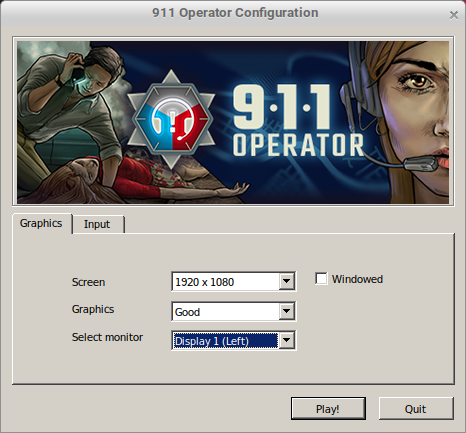
Selecting my left monitor (primary) with the main panel which is set to "Always show" makes the game run on the right monitor (secondary)
Same problem here.
Games running on proton select screen randomly in :0.
Same here, but also with wine/wine-staging so I guess the problem
grows from there.
On Wed, Jan 27, 2021 at 5:20 PM maxdrfr [email protected] wrote:
Same problem here.
Games running on proton select screen randomly in :0.—
You are receiving this because you are subscribed to this thread.
Reply to this email directly, view it on GitHub, or unsubscribe.
Multi-Screen-issue - Changing to fullscreen lead the game change to secondary screen.
Issue transferred from https://github.com/ValveSoftware/Proton/issues/4947.
@JokerGermany posted on 2021-07-06T09:16:44:
Distribution: Ubuntu Mate 20.04
effected tested Proton Versions: 6.3-5
Config:
Secondary Screen on the left side.
Secondary Screen:
1920x1080
Primary Screen:
3440x1440
When i use in the game a resolution which would fit on both screens and change from window mode to fullscreen, this happens:
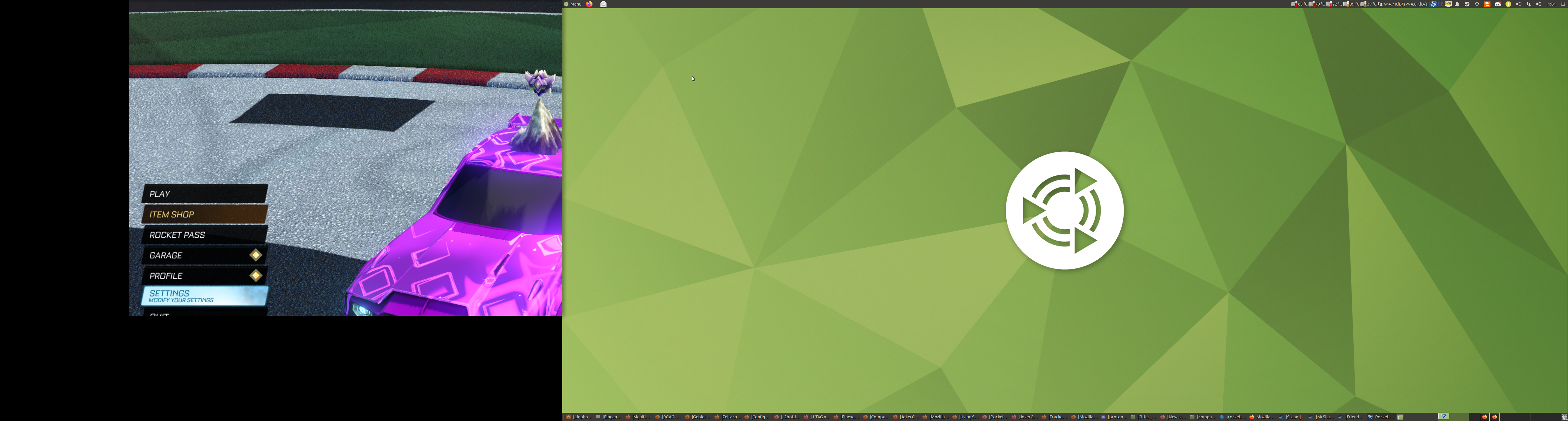
(The Window was on the primary screen!)
Workaround:
Having a bigger primary screen and change the resolution to something bigger than the secondary screen...
Then the fullscreen appears on the primary screen.
I am glad, that i sold my second 3440x1440 screen a couple of weeks ago...
But what to do if you have only 2 screens of the same resolution? And
sometimes proton games run on first screen but most of time on second one
(and it depends on proton version too)?
On Tue, Jul 6, 2021 at 1:29 PM kisak-valve @.***> wrote:
Multi-Screen-issue - Changing to fullscreen lead the game change to
secondary screen.Issue transferred from #4947
https://github.com/ValveSoftware/Proton/issues/4947.
@JokerGermany https://github.com/JokerGermany posted on
2021-07-06T09:16:44:Distribution: Ubuntu Mate 20.04
effected tested Proton Versions: 6.3-5Config:
Secondary Screen on the left side.
Secondary Screen:
1920x1080
Primary Screen:
3440x1440When i use in the game a resolution which would fit on both screens and
change from window mode to fullscreen, this happens:
[image: protonbug]
https://user-images.githubusercontent.com/30293477/124575031-554daf00-de4b-11eb-89cd-9fd05b9b3208.png
(The Window was on the primary screen!)Workaround:
Having a bigger primary screen and change the resolution to something
bigger than the secondary screen...
Then the fullscreen appears on the primary screen.
I am glad, that i sold my second 3440x1440 screen a couple of weeks ago...—
You are receiving this because you commented.
Reply to this email directly, view it on GitHub
https://github.com/ValveSoftware/Proton/issues/720#issuecomment-874646460,
or unsubscribe
https://github.com/notifications/unsubscribe-auth/AAABPUYUTHBMH4VTLKLMS4TTWLLHVANCNFSM4FRT75LQ
.
2024 and I still have this issue
I've narrowed it down a bit, it seems that proton really likes to launch games on the monitor which is at coordinates 0,0, which will always be the leftmost monitor
However the issue I have, is that my mouse also gets locked to that monitor with any proton application, so the most I can move my mouse is to 1920,0 and 1920,1080
1921,0? No go, it won't go there
Outside of proton it's fine, for native games like Terraria there's no issues, it's ONLY proton games
Bandaid solution is to just have the primary monitor on the left side in your DE
Would be nice to see a solution to this, I've done about all I can, switching outputs, refresh rates, different app arguments, Proton is dead set on launching at 0,0 and keeping it at 0,0
Replying to https://github.com/ValveSoftware/Proton/issues/720#issuecomment-2267567492
This comment made me feel seen lol. I'm pretty new to Linux and was going crazy trying to figure out why Steam games kept opening on my secondary monitor on the left instead of the primary one. I'm using Nobara. This issue was frustrating enough for me to switch back to Windows until it's resolved. Feels like a huge oversight that can affect a lot of people.
On my system, games start on the primary screen. Changing the primary screen in system settings changes the screen Proton games start on.
System:
Operating System: NixOS 24.05
KDE Plasma Version: 6.0.5
KDE Frameworks Version: 6.2.0
Qt Version: 6.7.2
Kernel Version: 6.10.2 (64-bit)
Graphics Platform: Wayland
Processors: 16 × AMD Ryzen 9 6900HS with Radeon Graphics
Memory: 30,6 GiB of RAM
Graphics Processor: AMD Radeon Graphics
Window manager: https://invent.kde.org/-/snippets/3190
Flatpak:
❯ flatpak info com.valvesoftware.Steam

Valve Corporation - Launcher for the Steam software distribution service

          ID: com.valvesoftware.Steam
         Ref: app/com.valvesoftware.Steam/x86_64/stable
        Arch: x86_64
      Branch: stable
     Version: 1.0.0.79
     License: LicenseRef-proprietary
      Origin: flathub
  Collection: org.flathub.Stable
Installation: system
   Installed: 45,5 MB
     Runtime: org.freedesktop.Platform/x86_64/23.08
         Sdk: org.freedesktop.Sdk/x86_64/23.08

      Commit: 173cd565d98d4951bd858bad290e8481a9e72dbf5f7c9c980165a060666184b1
      Parent: 98f034b154eed70b957bedcba0a5ce3785e70999b4aef85e1f6dd66f2eb15ff7
     Subject: Add pressure-vessel's overrides data dir to XDG_DATA_DIRS (ee358536)
        Date: 2024-04-03 13:45:40 +0000
Steam:
Steam Beta Branch:  Steam Families Beta
Steam Version:  1722380543
Steam Client Build Date:  Wed, Jul 31 00:44 UTC -08:00
Steam Web Build Date:  Wed, Jul 31 00:44 UTC -08:00
Steam API Version:  SteamClient021
Proton 9.0-2:
Build ID: 15038643
Installed content updated: Jul 17, 2024 at 22:04
So what I did was
Reinstall Linux
For some reason it just worked???
On Aug 7, 2024, at 00:01, "Justin M." @.@.>> wrote:
2024 and I still have this issue I've narrowed it down a bit, it seems that proton really likes to launch games on the monitor which is at coordinates 0,0, which will always be the leftmost monitor However the issue I have, is that my mouse also gets locked to that monitor with any proton application, so the most I can move my mouse is to 1920,0 and 1920,1080 1921,0? No go, it won't go there Outside of proton it's fine, for native games like Terraria there's no issues, it's ONLY proton games Bandaid solution is to just have the primary monitor on the left side in your DE Would be nice to see a solution to this, I've done about all I can, switching outputs, refresh rates, different app arguments, Proton is dead set on launching at 0,0 and keeping it at 0,0
This comment made me feel seen lol. I'm pretty new to Linux and was going crazy trying to figure out why Steam games kept opening on my secondary monitor on the left instead of the primary one. I'm using Nobara. This issue was frustrating enough for me to switch back to Windows until it's resolved.
—
Reply to this email directly, view it on GitHubhttps://github.com/ValveSoftware/Proton/issues/720#issuecomment-2272144593, or unsubscribehttps://github.com/notifications/unsubscribe-auth/AUED62XOKR6N2IJQZSE72GLZQE2R7AVCNFSM6AAAAABL64WUJKVHI2DSMVQWIX3LMV43OSLTON2WKQ3PNVWWK3TUHMZDENZSGE2DINJZGM.
You are receiving this because you commented.Message ID: @.***>
For me proton will launch the game on the monitor that is active but the game is checking whichever monitor is display 0 for resolution etc.
You can change the display with WAYLAND_DISPLAY=wayland-0 or wayland-1 etc
Replying to https://github.com/ValveSoftware/Proton/issues/720#issuecomment-2636069393
Irrelevant, since most desktops are using a single WAYLAND_DISPLAY for one compositor running on all screens.
Replying to https://github.com/ValveSoftware/Proton/issues/720#issuecomment-2638778364
Is it? I was able to run on the second monitor with WAYLAND_DISPLAY=wayland-0 bottles-cli ... on Sway, haven't tested on others. Well, alright then.
Replying to https://github.com/ValveSoftware/Proton/issues/720#issuecomment-2638906674
Check the existing value of the variable. Sway starts applications on the display the cursor is currently on, as does labwc. Wayfire starts on the one the input is focused on, which can also be switched with a hotkey.
Replying to https://github.com/ValveSoftware/Proton/issues/720#issuecomment-2639645227
I launch them on one monitor, then move and play on a different one. Changing the var manually/globally fixes the issue for me. Just shared my experience as nobody mentioned this before here.
Replying to [#720 (comment)](https://github.com/ValveSoftware/Proton/issues/720#issuecomment-2639645227)
I launch them on one monitor, then move and play on a different one. Changing the var manually/globally fixes the issue for me. Just shared my experience as nobody mentioned this before here.
Changing it to a nonexistent display name, or unsetting it, can force Xorg output instead.
For me running xrandr --output DP-3 --primary also helped to fix this issue for xwayland apps/games. You can get all possible outputs just by running xrandr with no args.
For me running
xrandr --output DP-3 --primaryalso helped to fix this issue for xwayland apps/games. You can get all possible outputs just by runningxrandrwith no args.
What do you do with this xrandr command? I tried running it and then ran game from Steam, but it didnt start on the display I provided (HDMI-A-2 in my case.) How are you calling that xrandr?
Proton versions
proton 9.0-2x1 2024-08proton 5.13-5x1 2021-01
Upstream links
- ValveSoftware/Proton/issues/4947x2 2021-07
When starting any proton-based game on a dual-monitor setup, the game will start on the non-primary monitor. Attempting to manually set the display variable to 0.0 or 0.1 via either the launch options or the user_settings.py file prevents the game(s) from launching at all.
EDIT: In game monitor selection also does nothing.