Call of Duty: Black Ops III
Compatibility Report
- Name of the game with compatibility issues: Call of Duty: Black Ops III
- Steam AppID of the game: 311210
System Information
- GPU: GTX 1070
- Driver/LLVM version: nvidia 418.56
- Proton version: 4.2.2
- Operating System: Arch Linux
- KDE Plasma Version: 5.15.4
- KDE Frameworks Version: 5.56.0
- Qt Version: 5.12.2
- Kernel Version: 5.0.6-arch1-1-ARCH
- OS Type: 64-bit
- Processors: 16 × AMD Ryzen 7 2700X Eight-Core Processor
- Memory: 15,7 GiB of RAM
- Detailed System Information
I confirm:
- [x] that I haven't found an existing compatibility report for this game.
- [x] that I have checked whether there are updates for my system available.
Symptoms / Reproduction
Starting steam-native it crashes right from the start. Nothing to special to see.
Log Files
- `PROTON_LOG=1 %command%:
steam-311210.tar.gz - Console log:
Call of Duty: Black Ops III (311210) Unlaunchable
Additionally installed Distro Packages
- AUR packages: steam-native-pcre-fix linux-steam-integration-git
Compatibility Report
- Name of the game with compatibility issues: Call of Duty: Black Ops III
- Steam AppID of the game: 311210
System Information
- GPU: GTX 1080
- Driver/LLVM version: nvidia 430.14-1
- Kernel version: linux 5.1.2.arch1-1
- Proton version: 4.2-4
I confirm:
- [ ] that I haven't found an existing compatibility report for this game.
- [X] that I have checked whether there are updates for my system available.
Logs:
Anyone tired test this game with Proton 5.0.4.
What seems to be the issue that's preventing this game from running?
Looking into this, On WineHQ the problem seems to related to Microsoft Media Foundation (mfplat)
https://bugs.winehq.org/show_bug.cgi?id=45876
But there seems to be a problem in figuring out if mfplat is even the problem.
https://bugs.winehq.org/show_bug.cgi?id=47084
Hopefully, advancements in non-microsoft mfplat can solve this issue.
To my knowledge, the two major blockers to this are in gdi32 and mfplat.
First, the game requires PE gdi32 because it loads gdi32.dll from disk and directly calls GdiDllInitialize as part of an anti-tamper measure. @rbernon was working on a patchset for this at one point, but suspended his work because julliard intends to convert gdi32 at some point in the future (hopefully the near future, given his current pace converting other libraries).
Second, the game requires H.264 decoding from mfplat. There's a patchset by @Guy1524 currently being upstreamed from wine-staging, but BO3 apparently uses a lower-level method of decoding media than most other programs, so it is unclear whether the patchset will allow it to work properly in its given state.
The crash issue is at line 1899358 at column 74, the following hex code
As of Wine 5.21, gdi32 is PE and has the stub BO3 needs to start. However, mfplat is still not complete enough for it to play back videos (Guy1524 said he'd look into the current error it's throwing at some point).
That being said, per this thread deleting or renaming the video folder in the game directory seems to allow it to launch, albeit with a black screen in place of the videos. I can confirm that this is working, but it seems prone to pretty bad stuttering, and on my environment (LM 20 Cinnamon) I experienced erratic input glitches to the point of making the game unplayable.
With Proton-GE-5.21 and moving the video folder my game launches and after playing for awhile I have no stutters at all on a RX580, you probably need to wait for shaders to compile. On the input issues I have no game-breaking input issues on Sway 1.5.
@cidkidnix
have you tested multiplayer?
Multiplayer from my limited testing works 100% fine for me. @nutta-git
Just tested the game out, using proton-tkg and multiplayer works.
I tried with wine 6.0 rc1-tkg and it did worked mp/zm but it has a lot of performance issues and also like ~10m the controller disconnects and can't connect again without restart, and for some reason the 3.5 audio doesn't work and i can only hear the people talking ingame nothing else but works fine with my bluetooth / usb headsets.
At least now it works :)
Confirming working with latest tkg release. Several years worth to wait. Had to rename videos folder as suggested so it doesn't freeze (and getting black ingame screens and missing story context ofc :) ). Slowdowns due to recompiling shaders as expected.
Doesn't even start for me with proton-tkg 6.0rc1
Arch Linux, AMD Radeon RX480, Ryzen 9 3900X, I renamed the videos folder
Log: steam-311210.log
Doesn't even start for me with proton-tkg 6.0rc1
Try with GE 5.21 it also worked for me.
Try with GE 5.21 it also worked for me.
I got into the main menu, then it crashed and now it doesn't start any more.
steam-311210.log
Env:
Archlinux
5.9.12-zen1-1-zen
5700x and 3700x
mesa-tkg-git 21.0.0_devel.132129.bc3225272ae-1
proton_tkg_6.0rc1.r3.gfce121fc
Anyone else experiencing this issue after the first or second round of TDM?
https://streamable.com/iuzzac
Controller disconnects when play in split screen
Fully works with latest proton-tkg
whats the best way to compile all shaders for dxvk games?
@massatt212
As far as I know, steam does this automatically with the use of "Shader Pre-Caching". If you don't use this feature, then DXVK should build/compile it as you play the game.
Call of Duty: Black ops III (311210)
Issue transferred from https://github.com/ValveSoftware/Proton/issues/5209.
@deadmeme5 posted on 2021-10-09T14:35:37:
Compatibility Report
- Name of the game with compatibility issues:
- Alsa driver Loads and unloads : Consequence: I have no sound.
System Information
- GPU: Nvidia GTX 1060 6GB
- Driver/LLVM version: Nvidia Driver version: 470.63.01
- Kernel version: 5.14.10
- Proton version: Proton 6.36-7
I confirm:
- [x] that I haven't found an existing compatibility report for this game.
- [x] that I have checked whether there are updates for my system available.
- [x] that I have tried reinstalling ALSA driver
Reproduction
- Download BO3 from steam
- That's it, the rest i suspect is a wine bug!
My notes: Most important logs
This is the most likely killer log:
26902.328:010c:0188:trace:loaddll:build_module Loaded L"C:\\\windows\\\\system32\\\\winealsa.drv" at 00007F959C080000: builtin
26902.328:010c:0188:trace:loaddll:free_modref Unloaded module L"C:\\\windows\\\\system32\\\\winealsa.drv" : builtin
Also pulse audio initiates as fixme:
26902.381:010c:0188:fixme:pulse:AudioSessionControl_RegisterAudioSessionNotification (0x322c06b0)->(0x1591b33e8) - stub
Pls help.
Proton 6.3-7, AMD Navi10 Mesa 21.2.5, Linux 5.14. game does not launch.
same result with Proton 6.21-GE-2.
the presence of the "video" folder has no impact on either version of Proton.
Game not launching with latest Proton Experimental build
proton experimental is still unable to launch the game.
Proton 7.0-1 can launch the game on my system, IF the contents of the video folder are removed. On closer inspection, the video files are MKVs containing one h.264 video stream and no audio stream. ffprobe output for one of them:
Input #0, matroska,webm, from 'zm_island_loadingmovie.mkv':
  Metadata:
    COMPATIBLE_BRANDS: M4V mp42isom
    MAJOR_BRAND     : M4V
    MINOR_VERSION   : 1
    ENCODER         : Lavf56.11.100
  Duration: 00:01:55.73, start: 0.067000, bitrate: 4919 kb/s
  Stream #0:0(eng): Video: h264 (High), yuv420p(progressive), 1920x1080 [SAR 1:1 DAR 16:9], 30 fps, 30 tbr, 1k tbn (default)
    Metadata:
      CREATION_TIME   : 2016-03-31 21:00:19
      LANGUAGE        : eng
      HANDLER_NAME    : Mainconcept MP4 Video Media Handler
      ENCODER         : Lavc56.10.100 libx264
To my knowledge, h.264 videos should be playable by Proton, so I'm not sure what's going on here. I'm going to try re-encoding as a different format to see if anything changes.
Edit: Attempted re-encode of the intro video to AV1, to see if the game would play it. No dice.
Did some more digging, got a proton log of the game, and here it is:
Crash on intro: steam-311210.log
Crash on loading mod (past intro): steam-311210.log
When loading a cinematic from the video folder, if the file is not found, it just doesn't play anything and continues as if no video was there in the first place. This prevents the game from crashing, for the reasons below.
If the file is found, it seems to attempt to call two functions in MFPLAT.dll: h264_decoder_GetAttributes and h264_decoder_ProcessMessage. This is indicated by the following lines being produced in the log when a video file is found, and the game attempts to load it:
36561.390:0134:01b4:fixme:mfplat:h264_decoder_GetAttributes iface 0000000000434B50, attributes 0000000026E9FAB0 stub!
36561.390:0134:01b4:fixme:mfplat:h264_decoder_ProcessMessage iface 0000000000434B50, message 0x10000000, param 0000000000000000 stub!
If I'm reading this right, this indicates that these two functions are stubs, which would obviously be a problem if the game is expecting actual data to be produced.
I should also note that the game functions almost perfectly once you get past the initial hurdle of needing to move/delete the video folder. I have seen the following issues:
- I had it crash once after an hour or so of continuous play
- The framerate in one particular room of the Zetsubou no Shima zombies map is really bad despite the rest of the map being pretty good performance-wise
- Alt-tab is broken in fullscreen (window won't let go of focus)
- Alt-tab is broken in windowed borderless (window drops to "out-of-focus" framerate and needs some messing about to get it back to normal)
Other than that? Game runs great and functions identically to Windows. Multiplayer works fine too.
Compatibility Report
- Black Ops 3
- 311210
System Information
- GPU: AMD AMD Radeon Vega 8 Graphics (raven, LLVM 13.0.1, DRM 3.46, 5.18.0-1-Linux)
- Driver/LLVM version: Mesa 21.0.1/13.0.1 & Mesa 22.2.0-devel (git-3d5ba0e1b7) LLVM 13.0.1
- Kernel version: 5.18rc3
- SysGist
- Proton version: ProtonGE 7.5-7.15, Proton 7.0-2, and Proton Experimental with fresh compat data's.
Laptop also has a Discrete Rx560 I have forced use with DRI_PRIME=1 that results the same.
I believe this is specific to any Systems with more then 1 GPU technically.
My desktop has the same software config and test with a ryzen 9 5900x RX6700XT no problems.
I confirm:
- [x] that I have checked whether there are updates for my system available.
Symptoms
Will play Treyarch Intro then sit on a Black Screen
Reproduction
Launch with Proton 7.0-2
game launches and plays perfectly, but thw workshop integration does not. no mods ever show up. i can confirm steam is downloading the mods, and their files are in the correct directory. its just the game doesnt see them.
has anybody been able to get Steam Workshop mods working in this game?
has anybody been able to get Steam Workshop mods working in this game?
I had workshop mods working, on Ubuntu 20.04 and 22.04. There was an issue with steam-for-linux due to a package dropping support for a thing that Steam needed to run, and in the troubleshooting process they stopped working. I haven't an opportunity at time of writing, but try some of the older versions of Proton and see if the workshop comes back (6.X, where X is whichever version number is still there, might be promising).
has anybody been able to get Steam Workshop mods working in this game?
I had workshop mods working, on Ubuntu 20.04 and 22.04. There was an issue with steam-for-linux due to a package dropping support for a thing that Steam needed to run, and in the troubleshooting process they stopped working. I haven't an opportunity at time of writing, but try some of the older versions of Proton and see if the workshop comes back (6.X, where X is whichever version number is still there, might be promising).
If you have the game installed on your main drive this doesn't happen but you can trick steam into thinking the game is installed on your main drive by using symlinks and editing files but some mods rely on VCRedist to load DLLs, and for some reason those DLLs refuse to load if you do that
The two most popular mods that rely on VCRedist are PEGASUS, which adds a ranking system to custom zombies and Discord RPC among other things, and Zombies Experience which also adds Discord RPC among other things.
Debian Sid
RADEON RX 6600 XT (Display)
GTX 1050 (Unused)
PACKAGES.TXT
I get a black screen on launch, but audio works fine.
I did not have any issues prior to swapping my RX 580 with the 6600.
single player works fine. multiplayer zombies is unusable. only ever get "lobby is not joinable"
Black ops 3 crashes, generaly during cutscenes.
Issue transferred from https://github.com/ValveSoftware/Proton/issues/6048.
@Tremmer2003 posted on 2022-07-31T19:18:19:
During cut scenes or seemingly at random the game will crash to desktop or frees forcing me to hit the steam stop button. This can happen in other modes like zombies and is least prevalent in multiplayer but can happen. Hypocenter, one of the campaign levels, will crash every time the recon drone projects what it is seeing to the top left corner of the screen, this issue was only tested in coop. the previews level, I forgot the name, crashes at the half way point after the hand cutting scene and will continue to crash after trying to rejoin the host, who was playing on windows, though this is inconsistent. https://steamcommunity.com/id/Tremmer <- my steam account has over 100hours in the game all of witch were played using proton experimental and on the custom GE fork, the crashing issue happens on both versions. Although I tried to make the previous examples as specific as possible there are many more instances that make the game crash along with other issues like textures and bipeds not loading in on occasion making the mode unplayable. on a personal note the random zombies crash is most annoying. I am playing on ryzen 9 5000 RTX 3080 ti 64gb ram, latest Ubuntu version. feel free to contact me with questions or clarifications.
Edit, the most annoying issue is the random controller disconnects.
For me when running the game on my Steam Deck the UI is incredibly low resolution and blurry, despite the game being set to run at 1280x800 resolution with 100% resolution scale. The game itself does not appear blurry, only the user interface, and this issue is not present on my Fedora 36 desktop running the same version of Proton. I believe it's due to the Deck's Half Rate Shading option, as when the option is turned off, the UI usually (but not always) corrects itself near-instantly.


@Cameron-Stuart If you disable Half Rate Shading before starting the game, does it look correct?
has anybody been able to get Steam Workshop mods working in this game?
I had workshop mods working, on Ubuntu 20.04 and 22.04. There was an issue with steam-for-linux due to a package dropping support for a thing that Steam needed to run, and in the troubleshooting process they stopped working. I haven't an opportunity at time of writing, but try some of the older versions of Proton and see if the workshop comes back (6.X, where X is whichever version number is still there, might be promising).
If you have the game installed on your main drive this doesn't happen but you can trick steam into thinking the game is installed on your main drive by using symlinks and editing files but some mods rely on VCRedist to load DLLs, and for some reason those DLLs refuse to load if you do that
So at least I know I'm not crazy; I also had Workshop mods working at least up until ~July 6th, but only when I come back to it now is it refusing to recognize the mods.
I don't know what counts as "main drive" here: my hard disk, which is separate from my booting SSD, is marked as the main drive in Steam but it's not seeing anything there. What does "using symlinks" to trick it into working imply? I simply don't have the space to have it on my SSD to check, and the rest of my setup relies on Steam games and files being on filesystems separate from the bootable one, so installing it to the system drive is not an option here.
I have tried to close Steam, move the .acf from the HDD's SteamLibrary to ~/.steam/steam/steamapps/, symlink Black Ops 3 into that common subdir, and Black Ops 3's workshop id subdirs from HDD's workshop folder to the latter's equivalent, along with associated appworkshop_311210.acf file - still nothing.
If not, is there at least some way to downgrade the Steam client/relevant component so I can use workshop in the meantime?
(Aside from all this, game itself seems to be fine? But I've only played ZM content, so no SP/MP. Never had it crash. Only perceptible issue is that the first frame of a previous video persists into a subsequent video playback, and so on? Still, works great otherwise. That's why I'd like to see this fixed.)
ive got workshop mods working now. but now multiplayer doesnt work. everybody only gets lobby not joinable.
even after forwarding the ports, no change in the games behavior.
ive got workshop mods working now. but now multiplayer doesnt work. everybody only gets lobby not joinable. even after forwarding the ports, no change in the games behavior.
No change here. How did you get workshop mods working, exactly?
ive got workshop mods working now. but now multiplayer doesnt work. everybody only gets lobby not joinable. even after forwarding the ports, no change in the games behavior.
No change here. How did you get workshop mods working, exactly?
i got workshop mods to work by reinstalling BO3 into the same filesystem as the steam client.
i got workshop mods to work by reinstalling BO3 into the same filesystem as the steam client.
Cannot reproduce with symlinks, so not very helpful.
I have mods and maps working. It requires some manual adjustment of where (and how named) files are in your directory structure, if you do not have Black Ops III installed in the default directory.
Mods need to go into a folder @ Black Ops III's home directory (go into Steam > Properties > Local Files > Browse Local Files) titled "mods" and maps need to go into a folder in the same directory labeled "usermaps".

A layer into the folder structure for a given mod, you'll find a workshop.json file, with a flag FolderName; rename the containing folder for the entire mod to "zone" and place the newly-renamed "zone" folder into a folder matching the name identified in FolderName in either Black Ops III/mods or Black Ops III/usermaps. The mods load at this point.

For the record, mods, by default, install to steamapps/workshop/content/311210/[garbled mess of numbers], so that's where you'll find the mod files to begin this process. Something to note, display names do not work with this fix - the mod will show with the name of the contained folder, not the Title flag as it's supposed to.
Also, unrelatedly, whatever fix got the in-game videos working again didn't quite work completely properly. There's about a half-second desync between the video and the audio. This might be due to the method the engine is injecting audio into the video with, but I wouldn't know.
Unfortunately, the method above does not seem to work here either - at least for something like All Around Enhancement, the mod is 'loaded' with corner text, but nothing's actually changed as it should.
Incidentally, that a/v desync is something that's been observed in the GE fork for some time now. I guess now there's some parity.
The first time I tried to load a mod (in my case the Zombies (Plus) Mod) I had to load it offline, as it did the same thing your All Around Enhancement mod did when I first tried to load it online. I have since completely restarted my computer from that first time and now the mod works online. Try loading your mod offline, my apologies, I forgot that step.
I have the GE fork installed and available to use with games, but I've currently got the "Force a use of a particular Compatibility Tool" option in Steam set to "Proton Experimental" - I doubt that's the cause, but it might be.

I got your All Around Enhancements mod working... oddly it required not renaming the root directory of the mod (ie Black Ops III/mods/[don't rename this]/zone/[mod data went here]) from the garbled mess of numbers. I'm not sure why.
Seems to work that way - but also I was using a symlink to the workshop directory instead of copying the files wholesale. So for now I just copied the files and unsubscribed to the workshop mods, and it pulls up fine.
Geh. Would still like to see this fixed though...
Hello @SeongGino, please give the discussion on https://github.com/ValveSoftware/steam-runtime/issues/523 a read.
TL;DR: Use Soldier Runtime's beta branch, it seems to be fixed for most conventional drive mount points. At least using Workshop mods and usermaps normally functions properly now on my setup (using /mnt/ for secondary/tertiary drives).
Can confirm Soldier Beta lets the workshop function "as intended" using /media/ as well. At this point, short the issue with minor audio-video desync in cutscenes, the game seems to function as it would on Windows. I haven't tested Multiplayer functionality at all though.
I've tested a single round of multiplayer - seemed to be fine, went through a game without issue. But I don't play MP much in this title.
Can anyone with access to the campaign level entitled "New World" (second mission) test the level for me?
Right at the end of the mission (when the robots break out of their cases) the game crashes/locks up.
I've tried lowering the graphics settings, verifying the games cache and I've even checked ProtonDB for a similar issue (which I cannot find). I'm uploading my latest Proton log to this post.
I'm about to reset the level in hopes of it just being a Black Ops III issue but if anyone else has experienced this issue or has a solution please get in touch, thanks in advance.
(For what it's worth I'm currently playing it on "realistic" setting with a gampad - Logitech G F310).
Edit: I'm uploading a hardinfo report too for system specs etc;
hardinfo_report.txt
Second edit: I reset the mission and have the same issue. So until a big brain comes along I'm screwed :sob:
I "fixed" it - I deleted the video folder (right click game in Steam library and click Manage and then Browse local files there should be a folder called videos). Shift+Del that folder.
I then loaded into Black Ops 3 (intro videos etc will now be missing) replayed and this time didn't crash (I also paused and unpaused frantically but I doubt this had much to do with it).
I've NO idea if this bug will happen again, I'm going to let the game save and then redownload the videos in an attempt to play the game with videos but for anyone else having this problem this is what I suggest you try.
i am still unable to play multiplayer zombies. anybody fixed "lobby is not joinable" problem yet?
Multiplayer Zombies seems to work fine for me - in fact I played a match of Kino der Toten with a few people this morning. Sorry for the largely unhelpful reply but it would seem the issue is something on your end and not the game.
For what it's worth, it seems like launching the game alone now is eating up ~4GB just by sitting at the title screen/main menu, and trying to load into a map causes BO3 to use literally the entire rest of my 16GB system ram to cause the machine to go out of memory. Reflected in current Experimental as well as the GE fork.
System is the same as before, only now on Linux kernel 6.0.2 and upgraded from a GTX 1060 6GB to an RTX 3060 ti (I have experienced the same bug on the old card though). No special launch commands used, not even using mods, just vanilla content.
Of my whole library, Black Ops 3 is the only game that seems to exhibit this problem, let alone of such severity.
Hey there everybody. I am running BO3 on Linux Mint 20.3, i7 10700k GTX 3090, and having issues with sound in the game!
Wondering if anybody else has ran into this. I am using pulse audio and have tried all sorts of proton versions. Everything works perfect game runs at max settings 200+fps at 4k ultrawide, but no sound!!
Any help appreciated.
EDIT: YES! ITS FLAWLESS! PulseAudio was using the wrong output device!!!! Works perfectly. Don't hesitate to reach out if you have similar issues to me, my email always open.
Unrelated to your personal issue, but @cproo12 what's your memory usage like with BO3? Unfortunately for me, loading into a map has a chance of OOM'ing my 16GB RAM unless I run literally nothing but my KDE desktop, Steam, and the game.
@SeongGino No DLC installed-
sitting at main menu - 4.2GiB
i'll load into origins i think its the biggest map broke boi can play - 4.7GiB
played that map for the first time since probably 2014 got up to 4.9GiB then died on round 5 lol
So no, not maxing out my memory at all. Are you sure the game is using all the memory and not something else? Any mods installed? What you playing?
@SeongGino No DLC installed-
sitting at main menu - 4.2GiB
i'll load into origins i think its the biggest map broke boi can play - 4.7GiB
played that map for the first time since probably 2014 got up to 4.9GiB then died on round 5 lol
Well, shit, I don't know then.
Loads into the menu at the same amount of memory used that you said; That's fine.
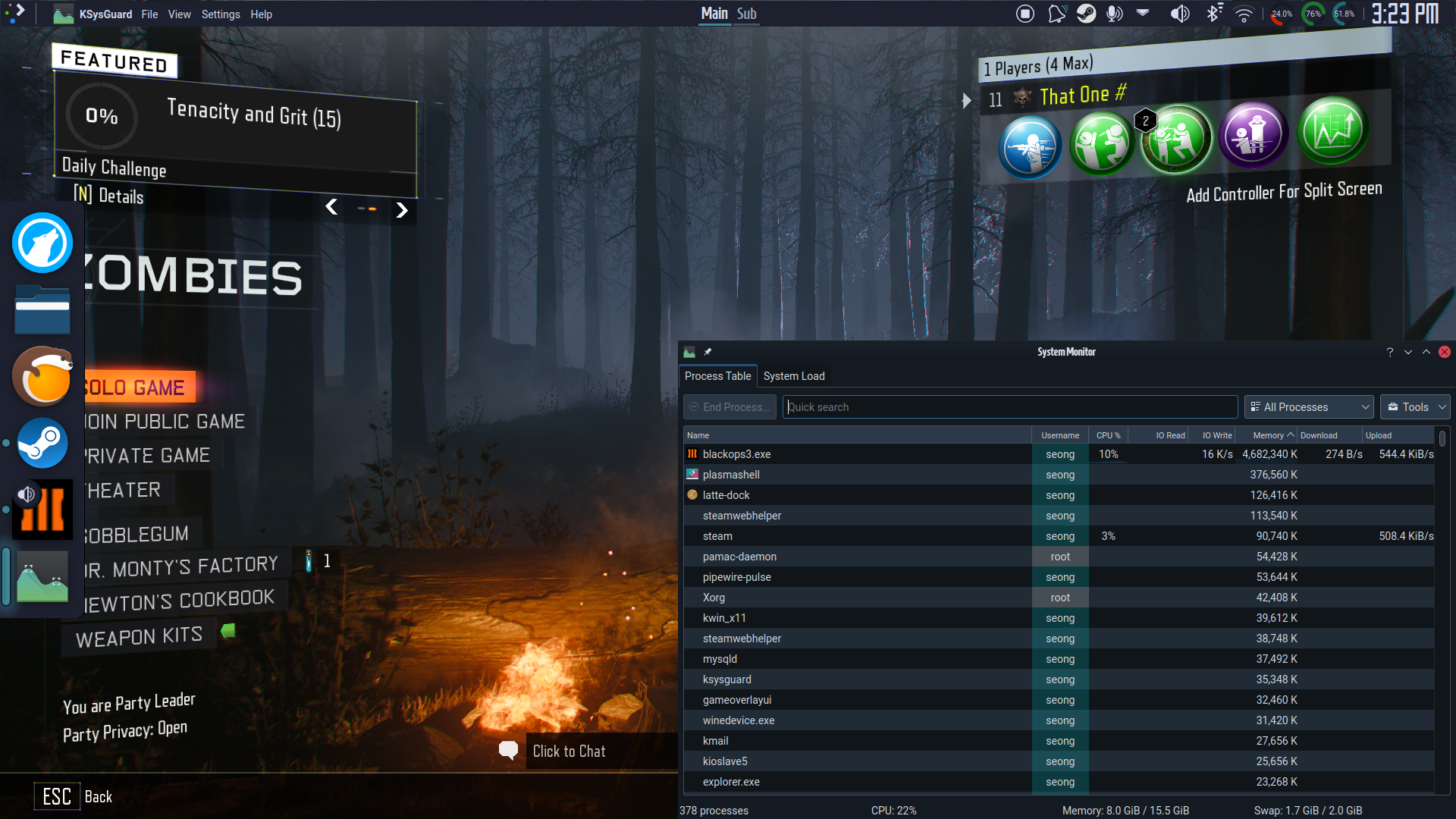
But then when loading, it says it's totaled at 5 GB of memory, but the memory usage monitor in my panel (the rightmost teal one) jumps up to the equivalent of another 4 GB on top of what's reported (i.e. uses around ~9GB) once the assets are loaded (when cutscene is skippable); it says that Application memory used is around 12.7GB total, when the most app memory my system typically uses (i.e. with the web browser I'm typing this from) is somewhere close to or under 4GB. 9GB used by Black Ops 3 alone is treading dangerous waters for stability, and I don't know why it's doing this.
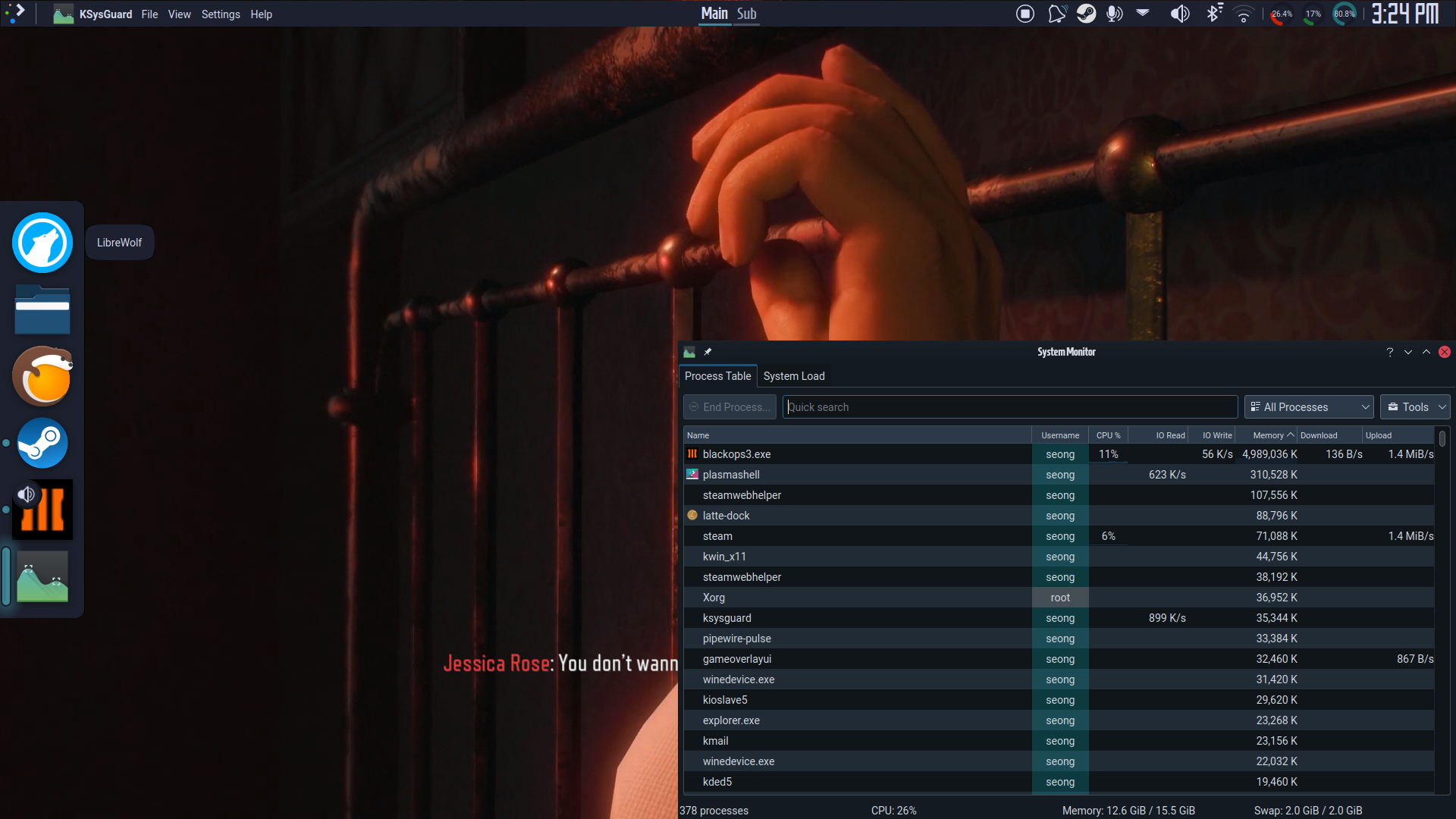
Don't be fooled by KSysGuard; if I wasn't running literally nothing else besides the game (and Steam ig) at this point, my system goes OOM.
Like I said, vanilla game.
The logs don't really say anything useful either, so idk.
steam-311210.log
Shamefully, months later, I've figured out what my RAM usage problem was; and it wasn't a Proton issue.
I was fiddling with the player/config.ini configuration file trying to max/tweak my settings beyond game defaults. Turns out, it's the OmniShadowTextureSize (point shadows) setting that's the culprit; default Extra shadows preset setting is 512, upping it to 1024 is safe with no appreciable difference, but maxing it to 2048 causes the memory leakage.
Something tells me this might be a native game bug. Forgive the confusion.
anybody found a fix for the lobby not joinable problem yet?
There seems to be a regression with latest steam beta affecting this title, once you go to main menu click enter and connect, before reaching the menus - campaign, multiplayer, zombies, etc it auto closes steam + the game. This is resolved by using stable steam.
I am running into an issue with a crash in the hypocenter every time I load into it I guess there is a drone trying to show footage at the top left of the screen and it crashes instantly. This is running on a steam deck with the latest stable OS release version 3.4.4. I have tried Proton GE 7-31 and Proton 7.0-5 and Proton Experimental same issue happens on all these versions. It also lists this game is playable on a steam deck in the store. Oh this is also not installed on an SD card but the internal SSD.
Updated to latest Steam Beta and still the game after clicking enter at the menu screen(before the actual main menu) after it connects steam completely closes itself + the game, this behavior is not visible on Stable
Call of Duty®: Black Ops III (311210) - Zombies
Issue transferred from https://github.com/ValveSoftware/Proton/issues/6456.
@Outlet7493 posted on 2023-01-16T14:40:20:
Compatibility Report
- Name of the game with compatibility issues: Call of Duty®: Black Ops III
- Steam AppID of the game: 311210
System Information
- GPU:
NVIDIA GeForce RTX 2070 SUPER FE - Driver/LLVM version:
NVIDIA 525.78.01 - Kernel version:
6.0.18-300.fc37.x86_64 - Link to full system information report: https://gist.github.com/Outlet7493/9e69c063fcf80505ab0e850d35b0f674
- Proton version:
1667938887 proton-7.0-5&1671471180 proton-7.0-6&1673611306 experimental-7.0-20230113
I confirm:
- [x] that I haven't found an existing compatibility report for this game.
- [x] that I have checked whether there are updates for my system available.
Symptoms
Game green screens and then crashes with a SIGSEGV when trying to load some custom zombies map from the workshop on Proton 7.0.5 and above.
Fedora crash reporter says:
wine64-preloader killed by SIGSEGV
Likely crash reason: Jump to an invalid address
Exploitable rating (0-9 scale): 6
There was another user report here but it seems to have been deleted now. They commented to say they also experienced a green screen on 7.0.5+, however with 7.0.4 it worked fine. I checked out 4221d9ef07cc38209ff93dbbbca9473581a38255 and built Proton, and can confirm that everything works as intended on 7.0.4.
Reproduction
- Launch into a custom map zombies game (for example this map and others cause the crash, but not all)
- Wait for map to load
- Game will show a green static screen and then crash
Logs
1667938887 proton-7.0-5 log
1671471180 proton-7.0-6 log
1673611306 experimental-7.0-20230113 log
All logs seem similar ending with:
5449.265:0128:01c4:trace:seh:call_handler handler at 0000000142C3F1C4 returned 0
5465.721:0108:0120:fixme:oleacc:find_class_data unhandled window class: L"[#32769](/issue/ValveSoftware/Proton/32769)"
pid 20370 != 20369, skipping destruction (fork without exec?)
@Outlet7493 Thank you for the report! It does indeed look like a regression - we will investigate this :)
I'm currently having an issue similar to the below report. I have tried Proton-GE 7.48, Proton-GE 7.41, Proton-GE 7.10, Valve Proton 7.0-6, and Valve Proton Experimental.
OS
  Hostname: ...
  Distro:   [redhat-release] Fedora release 37 (Thirty Seven)
            [fedora-release] Fedora release 37 (Thirty Seven)
            [os-release] Fedora Linux 37 (Thirty Seven) 37 (Thirty Seven)
  RHN:      (missing)
  RHSM:     (missing)
  YUM:      No yum plugin info (missing etc/yum/pluginconf.d/*.conf)
  Runlevel: N 5  (default graphical)
  SELinux:  enforcing  (default enforcing)
  Arch:     mach=x86_64  cpu=x86_64  platform=x86_64
  Kernel:
    Booted kernel:  6.1.7-200.fc37.x86_64
    GRUB default:   unknown  (no grub config file)
    Build version:
      Linux version 6.1.7-200.fc37.x86_64 ([email protected]) (gcc (GCC) 12.2.1 20221121 (Red Hat 12.2.1-4), GNU ld version 2.38-25.fc37) #1 SMP PREEMPT_DYNAMIC Wed Jan 18 17:11:49 UTC 2023
    Booted kernel cmdline:
      BOOT_IMAGE=(hd0,gpt2)/vmlinuz-6.1.7-200.fc37.x86_64 root=/dev/mapper/fedora_chance--desktop-root ro rd.lvm.lv=fedora_chance-desktop/root rd.luks.uuid=luks-822e5450-e3da-44b6-a4d0-127c9b250dcc rhgb quiet
    GRUB default kernel cmdline:
      unknown  (no grub config file)
    Taint-check: 0  (kernel untainted)
Proton debug logs are attached, and I have a stack trace as well from the same session, please email me at [email protected] and I'll send it over.
Replying to https://github.com/ValveSoftware/Proton/issues/864#issuecomment-1107528600
Anyone else experiencing "low" fps? Starting the game with Steam in Offline Mode fixes this for some reason...
Anyone else experiencing "low" fps? Starting the game with Steam in Offline Mode fixes this for some reason...
This is something of a known issue with the game that has nothing to do with Proton. The way the game interacts with the Steam servers, checking to see if you have a valid license for your DLC items, seems to be the culprit.
Oh, also. There's an RCE problem with the game. So yeah.
There's a patch that fixes this - or at least purports to - here, on the Steam Community Forums: https://steamcommunity.com/sharedfiles/filedetails/?id=2924562464 but it doesn't work on Proton / Linux because it's packaged as a Windows executable. There's also a GitHub repository for the patch here: https://github.com/shiversoftdev/t7patch/releases/tag/Current although the source has not been opened for it (yet, he says he will).
But to get back to your original question rather than going on a sidequest: BO3 has framerate issues due to the last patch the game ever received in 2019 introducing a bug that causes the game to incessently check your DLC licenses, and outside some Windows-specific fixes it can't really be solved any way other than by playing the game offline.
call of duty: black ops 3 controller not being registered , game crashing. (app ID 366841)
Issue transferred from https://github.com/ValveSoftware/Proton/issues/6630.
@yudatheboss posted on 2023-03-20T16:07:46:
call of duty black ops 3 will not launch and/or decks controller won't work. in compatibility mode (proton experimental) everything works fine up until the Zurich new world mission. when you open the door with your powers and walk in the robots break out of the glass and the screen goes purple/green and the game freezes and/or crashes.
@Outlet7493 The Hex Tower mod should be fixed with current proton-experimental :)
I just tried to play it on Deck and have encountered a lot of issues.
And yes I have all DLCs that I own installed.
SteamOS 3.5
Proton Experimental
Refresh rate fixed to 60
Allow tearing on
1280x720
Windowed mode (Fullscreen)
Renderres 100%
Max FPS 240
Vsync Off
Everything set to low
Dynamic shadows
AA FXAA
Main Menu:
GPU clock jumps between 1040 MHz and 200 MHz, normal utilization which drops back to 0% and said 200 MHz for some reason.
Consistent Frametime spikes between 220 ms and 370 ms every 4-5 seconds. FPS is a locked 60 unless the frametime spike is happening.
CPU runs between 2000MHz and 3500Mhz at around ~30-40%.
Campaign:
Runs fine at 60FPS but the GPU drops down to 200MHz 0% a lot as well and hits a maximum of 1400MHz and 100% around ~25W.
CPU runs around 3500MHz at roughly 50%.
The mission Undercover was just a white void with black textures but the first two missions ran fine. Game crashed after I went back to the main menu. Booting back into the game gave me a processing Vulkan-Shader loading screen and Undercover works now.
Multiplayer:
Same results as usual with the difference that the FPS are a lot worse at around 30-40FPS.
Zombies:
Runs just like Campaign does.
General:
Connection seems to be generally unstable when playing online.
After a mesa update the game crashes when trying to load into any Zombies map, game freezes on loading screen and then crashes after 20-30 seconds, Using RX 6950XT
steam-311210.log
Hello @davigamer987, looking at your Proton log, it's more likely that you've configured your system to use AMDGPU-Pro with info: Driver : AMD proprietary driver 2.0.270 in the log. Can you explicitly test how the game behaves with mesa/RADV?
AMDGPU-Pro
i do have the pro driver installed, it's not supposed to be used as default though, why would it suddenly start using that one
I have some updates, seems like only Private game is broken, Solo and Multiplayer work fine but when playing on a private game it crashes
Tried with 6.21 and it gives a slightly different error now
steam-311210.log
Proton Experimental also gives the same error as 8 GE
Hello @davigamer987, looking at your Proton log, it's more likely that you've configured your system to use AMDGPU-Pro with
info: Driver : AMD proprietary driver 2.0.270in the log. Can you explicitly test how the game behaves with mesa/RADV?
It also lists RADV just under the proprietary driver so it's probably loading that one
Hello @davigamer987, looking at your Proton log, it's more likely that you've configured your system to use AMDGPU-Pro with
info: Driver : AMD proprietary driver 2.0.270in the log. Can you explicitly test how the game behaves with mesa/RADV?It also lists RADV just under the proprietary driver so it's probably loading that one
@kisak-valve Any idea?, it's still broken
When I launch this game, I get a black screen. Specs are below:
GPU: AMD RX Vega 56
Driver/LLVM version: 23.2.1 (Using RADV)
Kernel version: 6.6.1-zen1-1-zen
Full system information report: steam-311210.log
I noticed that I see several lines which might be the cause:
2813.682:0128:01c4:warn:seh:dispatch_exception backtrace: --- Exception 0xc000001d.
2813.682:0128:01c4:trace:seh:dispatch_exception code=c000001d flags=0 addr=000000015BC93A38 ip=15bc93a38
2813.682:0128:01c4:warn:seh:dispatch_exception EXCEPTION_ILLEGAL_INSTRUCTION exception (code=c000001d) raised
2813.682:0128:01c4:trace:seh:dispatch_exception  rax=000000002799ee88 rbx=0000000000000100 rcx=00000001700713e0 rdx=0000000000000080
2813.682:0128:01c4:trace:seh:dispatch_exception  rsi=0000000000000100 rdi=000000002799f2a0 rbp=000000002799ee20 rsp=000000002799ede8
2813.682:0128:01c4:trace:seh:dispatch_exception   r8=0000000000251800  r9=0000000000343620 r10=0000000000000008 r11=0000000156a6e760
2813.682:0128:01c4:trace:seh:dispatch_exception  r12=000000002799f280 r13=0000000156a6e760 r14=0000000000003e80 r15=0000000149408450
I am also having this issue where Zombies crashes. I am using the Steam Deck. I made a Reddit post to draw more attention to this as well. Below is a link to that post as well as my personal proton log from the game crashing.
https://www.reddit.com/r/SteamDeck/s/oqoe6noDBJ
https://drive.google.com/file/d/1dpd89C3vkHzGtPTKNzveY-kfi1u_lpwX/view?usp=drivesdk
Wanted to add some more info about the issue with BO3 on proton right now. The game will freeze for a few seconds then crash during the forest cut scene. This happens when you load a custom zombies map (when the game loads 'usermaps' mod) through a private lobby (i.e. create private lobby and change the map to a custom zombies map to reproduce the issue). Notably, the crash does not always happen if you choose solo from the zombies menu and select the custom map that way, it will load up fine. The crash also occurs at the end of the match while returning to the main menu (default or modded maps), by either quitting through the pause menu or by dying. No errors are given, the game just closes to desktop. This is a new issue as of the last few months. Previously this issue did not occur. The rest of the game seems to run fine (only tested Zombies). Proton log is attached steam-311210.log
I can at least confirm that loading into a map with Proton's beyond the current 7.0 stable release crashes (current Experimental, 8.0-4c, and current GE 8-25 just to be sure), custom or vanilla maps likewise.
Crashes on the affected versions appear in the same place with the same memory addresses.
steam-311210_8.log
steam-311210_exp.log
steam-311210_ge.log
UPDATE: I have checked back through old GE releases as far as 7-40 (I'm going somewhere with this). The conclusion I've come to is as such:
- Game will instantly crash loading into a map when offline, but won't when starting a solo session while online.
- Every version of Proton now, even confirmed good ones in the past, causes the game to crash when exiting a match/loading back to the lobby menu - case and point, the listed version? Was from December 2022, which my post history in this thread would show that it was indeed working fine at the time.
All I can gather from this, is it might be down to the Steam Runtime or a Steam Client Update that's causing this issue? Given that earlier working behavior isn't reproduceable anymore even on the same old versions.
Crashing when exiting a Zombies map and seeing the forest loading screen. SteamOS 3.5.7 & default proton. Used to be fine on Steam Deck previously.
All I can gather from this, is it might be down to the Steam Runtime or a Steam Client Update that's causing this issue? Given that earlier working behavior isn't reproduceable anymore even on the same old versions.
Thank y'all for reporting and investigating this. Indeed, the crash on the loading screen is coming from the steam client and not Proton. It is reported, but I do not have an ETA on a fix.
Game works using proton 8.0-3 except when you load custom maps and mods.
Was getting the crash with the stable client, but have yet to get it after switching to the beta client
Can confirm the beta client seems to resolve the crashing.
There's a patch that fixes this - or at least purports to - here, on the Steam Community Forums: https://steamcommunity.com/sharedfiles/filedetails/?id=2924562464 but it doesn't work on Proton / Linux because it's packaged as a Windows executable. There's also a GitHub repository for the patch here: https://github.com/shiversoftdev/t7patch/releases/tag/Current although the source has not been opened for it (yet, he says he will).
Hello @SteveHeist, you'll probably want to update your comment because Serious has since revealed he does NOT plan to release the source for the patch, which... also seems to be used for Zombie Blood Rush? That's one of his Workshop projects and he seems to be hell bent on keeping the source private.
I don't know how playable this game is under Proton but on Windows the game is pretty much unplayable without the patch.
If you are getting a black screen with only audio this is a game bug that also happens on windows:
Black screen with only audio (PC)
https://www.reddit.com/r/blackops3/comments/3rpd4f/black_screen_with_only_audio_pc/
It happens if you have a lot of audio devices.
I managed to work around it with winetricks sound=alsa, (also added a fix in proton-ge/ulwgl protonfixes)
If that doesnt work try removing/disabling/disconnecting any audio devices you're not using.
I don't know how playable this game is under Proton but on Windows the game is pretty much unplayable without the patch.
It's a little better likely because of DXVK/VKD3D but it's still not great.
I tried to run the patch with protontricks-launch but I get an error with wine-mono.
$ protontricks-launch --appid 311210 t7patch_2.02.exe
wine: using kernel write watches, use_kernel_writewatch 1.
wine: using kernel write watches, use_kernel_writewatch 1.
wine: using kernel write watches, use_kernel_writewatch 1.
0324:fixme:ntdll:NtQuerySystemInformation info_class SYSTEM_PERFORMANCE_INFORMATION
**Failed to run module constructor due to (null) assembly:Z:\home\shaybox\.local\share\Steam\steamapps\common\Proton - Experimental\files\share\wine\mono\wine-mono-9.0.0\lib\mono\4.5\mscorlib.dll type:TypeInitializationException member:(null)**
I'm not sure it would work anyway since the patch needs admin on Windows.
wine: using kernel write watches, use_kernel_writewatch 1.
wine: using kernel write watches, use_kernel_writewatch 1.
wine: using kernel write watches, use_kernel_writewatch 1.
0324:fixme:ntdll:NtQuerySystemInformation info_class SYSTEM_PERFORMANCE_INFORMATION
**Failed to run module constructor due to (null) assembly:Z:\home\shaybox\.local\share\Steam\steamapps\common\Proton - Experimental\files\share\wine\mono\wine-mono-9.0.0\lib\mono\4.5\mscorlib.dll type:TypeInitializationException member:(null)**
The last line indicates it's looking for a .NET 4.5 runtime, and it's the builtin Mono implementation that's crashing--I'll hazard a guess that if the prefix has dotnet45 or higher installed, perhaps t7-patch would work?
I'm not sure it would work anyway since the patch needs admin on Windows.
It's just ignored in Wine and everything runs as if it's administrator (in its sandbox) anyways. The Windows permissions paradigm doesn't really exist on Wine (though that's a gross oversimplification).
That said, if you don't want to use t7-patch, and if you're willing to look for it, you can find the last legitimate release of BOIII floating around, and that works just fine if run as a non-Steam app or a protontricks-launch command - so long as you copy the right files into the game/prefix's local appdata directory.
As far as I'm concerned, any protection is better than no protection at all.
Unfortunately it reached another exception
025c:fixme:seh:WerRegisterRuntimeExceptionModule (L"C:\\windows\\Microsoft.NET\\Framework64\\v4.0.30319\\mscordacwks.dll", 00006FFFFC330000) stub
025c:fixme:ntdll:NtQuerySystemInformation info_class SYSTEM_PERFORMANCE_INFORMATION
0264:err:ole:CoGetContextToken apartment not initialised
025c:fixme:nls:get_dummy_preferred_ui_language (0x0 0x409 000000000116A380 0000000000000000 000000000116A384) returning a dummy value (current locale)
025c:fixme:nls:get_dummy_preferred_ui_language (0x0 0x409 000000000116A380 00000000017F86E0 000000000116A384) returning a dummy value (current locale)
025c:fixme:virtual:NtFlushProcessWriteBuffers stub
025c:fixme:advapi:RegisterEventSourceW ((null),L".NET Runtime"): stub
025c:fixme:advapi:ReportEventW (00000000CAFE4242,0x0001,0x0000,0x00000402,0000000000000000,0x0001,0x00000000,000000000116C500,0000000000000000): stub
025c:err:eventlog:ReportEventW L"Application: t7patch_2.02.exe\n"
025c:err:eventlog:ReportEventW L"Framework Version: v4.0.30319\n"
025c:err:eventlog:ReportEventW L"Description: The process was terminated due to an unhandled exception.\n"
025c:err:eventlog:ReportEventW L"Exception Info: System.TypeLoadException\n"
025c:err:eventlog:ReportEventW L"Stack:\n"
025c:err:eventlog:ReportEventW L"   at System.ModuleHandle.ResolveMethod(System.Reflection.RuntimeModule, Int32, IntPtr*, Int32, IntPtr*, Int32)\n"
025c:err:eventlog:ReportEventW L"   at System.ModuleHandle.ResolveMethodHandleInternalCore(System.Reflection.RuntimeModule, Int32, IntPtr[], Int32, IntPtr[], Int32)\n"
025c:err:eventlog:ReportEventW L"   at System.ModuleHandle.ResolveMethodHandleInternal(System.Reflection.RuntimeModule, Int32, System.RuntimeTypeHandle[], System.RuntimeTypeHandle[])\n"
025c:err:eventlog:ReportEventW L"   at System.Reflection.CustomAttributeData..ctor(System.Reflection.RuntimeModule, System.Reflection.CustomAttributeRecord)\n"
025c:err:eventlog:ReportEventW L"   at System.Reflection.CustomAttributeData.GetCustomAttributes(System.Reflection.RuntimeModule, Int32)\n"
025c:err:eventlog:ReportEventW L"   at System.Reflection.CustomAttributeData.GetCustomAttributesInternal(System.Reflection.RuntimeAssembly)\n"
025c:err:eventlog:ReportEventW L"   at System.Resources.ManifestBasedResourceGroveler.GetNeutralResourcesLanguage(System.Reflection.Assembly, System.Resources.UltimateResourceFallbackLocation ByRef)\n"
025c:err:eventlog:ReportEventW L"   at System.Resources.ResourceManager.CommonSatelliteAssemblyInit()\n"
025c:err:eventlog:ReportEventW L"   at System.Resources.ResourceManager..ctor(System.Type)\n"
025c:err:eventlog:ReportEventW L"   at System.ComponentModel.ComponentResourceManager..ctor(System.Type)\n"
025c:err:eventlog:ReportEventW L"   at t7dwidm_protect.MainForm.ConnectIndexer()\n"
025c:err:eventlog:ReportEventW L"   at t7dwidm_protect.MainForm..ctor()\n"
025c:err:eventlog:ReportEventW L"   at t7dwidm_protect.Roles.IteratorAccountRole.EnableIndexer()\n"
025c:err:eventlog:ReportEventW L"   at <PrivateImplementationDetails>{19EDB06D-BF37-4643-ABE4-1EE65B2B4B76}.Main()\n"
025c:fixme:advapi:DeregisterEventSource (00000000CAFE4242) stub
wine: Unhandled exception 0xe0434352 in thread 25c at address 00006FFFFFC1CE87 (thread 025c), starting debugger...
I have the game on Steam and I'm running the latest version of the game anyway, so t7 isn't needed for the RCE exploits, but it's still useful for the performance and some other minor crash exploits, but I doubt it will work on wine/proton just because of how it works.
Replying to https://github.com/ValveSoftware/Proton/issues/864#issuecomment-2053726952
Ah, yes, fun.
Yeah, that's more of a hard incompatibility then. But to be fair...
Q: Will this work for Linux? Will this work for Windows 7?
A: The patch only supports Windows 10 and Windows 11 for now. I tried to add support to proton, but it is not currently working.
So, refer back to BOIII for now.
So, refer back to BOIII for now.
I'm not gonna lie I didn't know BOIII was a client/mod, what a terrible choice of name for a game named BOIII.
So, refer back to BOIII for now.
I'm not gonna lie I didn't know BOIII was a client/mod, what a terrible choice of name for a game named BOIII.
That's the joke. :P
And given the circumstances around its deletion, it's hard to believe anyone knowing the necessity of a patch for Black Ops III, but not know about BOIII.
Replying to https://github.com/ValveSoftware/Proton/issues/864#issuecomment-1962304758
Well, that's disappointing that he's not going to open source it. Seemed like the kind of thing that would be good to have available for multiple mods to incorporate, given that you can only load one at a time. Ah well, I can't stop him from doing what he wants with his code. Will leave the comment alone for posterity as there's right at a year between the two.
As for the game's performance on Proton, with my Steam Deck, it hitches a lot in menus (although that seems to be caused by me not having all three base modes installed, rather than any issue on Valve's end). Online by default it runs ~60FPS and offline it runs ~80 (both at display resolution 1280x800, all low, with Dynamic Shadows enabled, with the V-syncs disabled and the game's in-game framerate cap set at 240). I did notice the GPU downclocking some during online play - sitting at ~900 MHz online rather than ~1100 offline but that might be a combination of being on battery and the device being 85C-90C under that load (maybe needs a thermal compound replacement?).
Haven't messed around with any of the "unsupported patches" ala t7_patch or BOIII, having personally preferred to just play with the game set in Offline mode until the RCE fix came in in March 2023 or so, so I can't speak to those and their efficacy for performance.
Black Ops 3 zombies shader issues
Issue transferred from https://github.com/ValveSoftware/Proton/issues/7770.
@kodenamekrak posted on 2024-05-30T21:23:32:
Compatibility Report
- Call of Duty®: Black Ops III
- 311210
System Information
- GPU: Nvidia RTX 4070
- Video driver version: Nvidia 535.171.04
- Kernel version: 5.15.0-107-generic
- Link to full system information report as Gist: https://gist.github.com/kodenamekrak/70cd9ba7dacaf9d3eb4b699ea0ac611f
- Proton version: Proton Experimental
I confirm:
- [x] I haven't found an existing compatibility report for this game - Other issues are open but i dont believe any report this problem
- [x] I have checked whether there are updates for my system available.
Symptoms
In the zombies mode some shaders are broken such as the skin shaders for other players which appears metalic, though it is most noticable on Kino Der Toten as many of the environment shaders are glowing very bright as seen below
Reproduction
Open the game and play any map in zombies mode, most notably Kino Der Toten
System Information
CPU: AMD Ryzen 5600
GPU: AMD RX6700XT
Video driver version: mesa 24.1.1
Kernel version: Linux 6.9.4-zen1-1-zen
Proton version: Proton Experimental 8.0/Experimental 9.0/GE 9_7
DE: swaywm
Steam: Latest beta
I have black screen after intro for 6 months minimum, seems like there are similar issues on protondb too. Log is attached. Tried to set sound=alsa and win10 in wine settings, no difference. Also, game starts out of screen (on screenshot). CPU and GPU are under load game aren't crashing, i need to press "Stop" button in steam to actually close a game. Hoping for any help :disappointed:
steam-311210.log
Replying to https://github.com/ValveSoftware/Proton/issues/864#issuecomment-2171915184
Getting same exact issue
ok I seem to have a different set of issues compared to what Im seeing other ppl reference.
if I go into zombies offline my system stays pegged at 240 fps ez (v-sync off).
if I go into any of the online modes I get "70 fps" that feels like 40 fps. Its not "stuttery" so much as jittery and slide-showey any time I do anything other than running directly forward. Using gamescope did not fix.
Ive used every version of Proton starting with a 9 or an 8, Proton Experimental, and Proton GE Custom.
Interestingly if I launched it with wine it ran super smooth online 240 fps, just without any character or gun models loading in amongst other visual issues.
I get the feeling theres some sort of windows .Net file wine is handling better than Proton but Im nowhere near qualified in saying that with any level of confidence.
Specs:
Linux 6.9.9-arch1-1 -- Hyprland
AMD Ryzen 9 5950X
AMD Radeon RX 6800 XT -- vulkan-radeon
Monitor: 2560x1440 @ 240Hz
@bigmcnuggets Could you try adding "PROTON_USE_WINED3D=1 %command%" to the launch options for the game to see if that behavior matches plain wine?
@alasky17 hey I appreciate the reply, but that was what I meant when I said I launched it with Wine. (sorry I know my phrasing there was misleading, it didnt like launching outside of steam via wine)
When I used "PROTON_USE_WINED3D=1 %command%" it was a weirdly different set of issues compared to the various proton versions. Character and gun models didnt load up and made a smeary mess of empty render space all over the screen when I turned, but the frame rate and pacing were perfect, straight up pinned at 240 with max settings. Like it was completely unplayable but it didnt have the stuttery slow down issues I had without using wine.
When I play the game in offline modes using the various proton versions it runs perfectly so I suspect theres an issue with how it handles connecting to the online servers. When I go online no matter how high or low the settings its a jittery mess of 70 fps that feels like 40 fps.
Im very open to the idea theres something Ive done incorrectly in how Ive set up my system, I have all the dependencies listed on Arch installed but I know Hyprland can be pain in the rear for a lot of things.
I forgot to mention it before but if its of any intertest Im using the vulkan-radeon package as opposed to the alternatives.
@bigmcnuggets I have the same issue and I'm running on Nvidia. Online and custom games are around 40fps and "PROTON_USE_WINED3D=1 %command%" makes it worse framerate with rendering issues.
Have you guys tried the T7 community patch? It recently added support for Proton/Linux.
From what I understand the game constantly checks for DLC when online, which decreases performance significantly. The patch fixes that + some multiplayer exploits apparently.
I've been using it on Steam Deck and online performance is now on par with offline. I've tested both Zombies and normal Multiplayer and no issues so far.
Yes, T7 Patch is working perfectly.
By the way, after 2 months, game started working by itself.
Compatibility Report
- Name of the game with compatibility issues: Call of Duty: Black Ops III
- Steam AppID of the game: 311210
System Information
- GPU: AMD Radeon RX 7900 XT (GFX1100/Navi31)
- Video driver version: Mesa 24.0.2-manjaro1.1
- Kernel version: 6.6.30
- Proton version:
- Proton Experimental
- 9.0-2
- 8.0.2
- 7.0.2
- GE-Proton9-11
I confirm:
- [x] that I haven't found an existing compatibility report for this game.
- [x] that I have checked whether there are updates for my system available.
Proton Log: steam-311210.zip
Symptoms
During a mission from the singleplayer campaign the screen is filled with trails from particles and the screen is almost fully white. The game also gets stuck on a video/loading and doesn't progress after that.
For starter, this is what the game is supposed to look like: https://youtu.be/dqSiE4ZfUTg?feature=shared&t=1525
On proton 9/Experimental particles are visible and show trails of pixels, this is what the game looks like during the accumulation issue:
Characters are missing/not visible. Using Proton 7 lead to different glitches. The characters objects are visible but with what seams like texture streaming issues. (Like low mipmaps/uniform colors on objects ?)
Afterward this is what the game looks like during the never ending loading:
Reproduction
- Launch the game
- Launch the second mission of the singleplayer campaign
- After the intro video, the screen looks white/glitchy during the in-game dialog.
- If you let the game continue, it then gets stuck on this video/loading sequence.
Latest proton experimental brakes black ops 3. I will provide a log later today.
steam-311210.log
ignore the errors about the wine topology, i removed the envrionment variable causing it but it changed nothing
@LethalManBoob Could you retest this with the bleeding-edge-9.0 branch of experimental? This should be fixed :)
@LethalManBoob Could you retest this with the bleeding-edge-9.0 branch of experimental? This should be fixed :)
I can confirm it now works on the latest bleeding edge. :D
Can you share the commit so i can get it backported to proton-cachyos? thanks.
@LethalManBoob The fix is in upstream dxvk - if you bump your dxvk submodule to master, you will get it. https://github.com/doitsujin/dxvk/commit/d0ea5a4a87c9b4ee8a7d700c5f55baf26054bd6a
Hi all,
Black Ops 3 works for me on an X11 session but not Wayland. I've tested on the latest Proton 9 and Proton Experimental versions. I've also switched to the bleeding edge beta for experimental and that had no effect. When the game starts, after precompiling shaders, I see the Wayland icon on all of my monitors (they all have the label "OpenGL Renderer"), but nothing actually appears on the screen. Proton log attached:
Neofetch image below for system information:
I have an Nvidia dGPU and AMD iGPU, which I don't believe is being used by the game.
nvidia-smi image below for GPU information:
I've had this issue for over a month and was hoping the latest Nvidia drivers would fix this, but that was not the case.
Game is installed on a SSD with the ext4 filesystem format, same as my other SSDs.
I've tried the top suggested launch options on the ProtonDB page (https://www.protondb.com/app/311210) and tried the t7 patch (https://github.com/shiversoftdev/t7patch) but to no avail. I also tried the obvious of reinstalling the game and validating the game's files.
I'm leaning towards this being an Nvidia driver issue, but I can't say for sure. I have a separate computer with an AMD dGPU using the same distro and kernel version and it works perfectly fine on Wayland using Proton Experimental.
To reiterate, the BO3 does work on X11, so I just need to switch sessions to play. But any way to get this working on a Wayland session even under XWayland? If I can provide any additional information, let me know.
I play on Steam Deck OLED (512GB) and Black Ops III won't go past the title screen (i.e. the screen with the guy with 2 handguns). Here's exactly what happens:
The game goes past the "Connecting to Online Services" screen. Then, it reaches a point in which a "Friend's Chat" menu is shown. Afterwards, the game turns to black, Steam crashes and the whole Steam Deck reboots.
When playing the game in Desktop Mode it behaves in the same way, with the only difference that it does not cause the whole system to crash, but just the Steam client and I get booted to the Desktop with Steam being turned off.
Here's what I tried:
-I changed Proton to either Proton 9.0-4, Proton Experimental, Proton Hotfix, Proton GE 9-07 and other versions of Proton GE.
-I installed the T7 patch and put [WINEDLLOVERIDES="dsound=n,b" %command%] in the launch options.
-I tried to play the game in offline mode and airplane mode.
-I tried to install only the campaign and zombies mode.
-I tried to install only the multiplayer and campaign mode.
-I verified the files (without having any corrupted/missing data)
-I reinstalled the game twice (in the internal SSD and 1TB Sandisk MicroSD card).
Each step or combination of these steps dealt the same result as before.
Compatibility Report
- Name of the game with compatibility issues: Call of Duty: Black Ops III
- Steam AppID of the game: 311210
System Information
- GPU: AMD Van Gogh
- Video driver version: 4.6 (Compatibility Profile) Mesa 24.0.5 (git-6c30d44613)
- Kernel version: 6.5.0-valve23-1-neptune-65-g385b5e207ae2
- SteamOS Version: 3.6.21
- SteamOS Build: 20241212.1
- Proton version:
- Proton 9.0-4
- Proton Experimental
- Proton Hotfix
- GE-Proton9-14
- GE-Proton9-7
- GE-Proton8-20
- Device: Steam Deck OLED 512GB
I confirm:
- [x] that I haven't found an existing compatibility report for this game.
- [x] that I have checked whether there are updates for my system available.
- [x] that I have updated the packages in the Discovery store.
Symptoms
My problems are basically the same as user @DatBootleg .
The game reaches the title menu, and after getting into the main menu it causes Steam to crash when playing in the Desktop mode. When launching the software in "Game" mode and reaching the main menu, the whole system is rebooted.
Logs show this error in particular:
src/common/pipes.cpp (882) : fatal stalled cross-thread pipe (pipe is disconnected).
src/common/pipes.cpp (882) : fatal stalled cross-thread pipe (pipe is disconnected).
src/common/pipes.cpp (882) : Fatal assert; application exiting
src/common/pipes.cpp (882) : Fatal assert; application exiting
Please find the full log file below.
Reproduction
- Launch the game
- Access the main menu
Logs
I had no luck reproducing the issue mentioned by @DatBootleg and @AngeloGalav. Seems it may be tied to SteamOS Beta, but I still can't reproduce the crash after switching.
If switching to SteamOS Stable fixes the issue for you, please let us know.
@DatBootleg @AngeloGalav There was a bug on the steam beta client causing some crashing that is now fixed. Making sure your steam client is up-to-date could be enough to fix the crashing.
Just to report back, I've switched to SteamOS Stable and indeed the game run without a itch. So it was definitely a problem with either SteamOS or the Steam client. Thanks everyone for the help.
I wanted to give an update on my issue running BO3 under Wayland with Nvidia.
Replying to https://github.com/ValveSoftware/Proton/issues/864#issuecomment-2525340014
My system is still the same except I've upgraded my memory kit. Linux kernel version is now 6.13.6. Nvidia driver version is now 570.124.04.
I've tested the game with Proton Experimental and latest GE. Still the same result. Here is a new log file though.
steam-311210.log
Let me know if I can provide more information! Thanks.
steam-311210.log
I would like to mention black ops 3 also crashes past the title screen, softlocking steam.
If you are getting a black screen with only audio this is a game bug that also happens on windows:
Black screen with only audio (PC) https://www.reddit.com/r/blackops3/comments/3rpd4f/black_screen_with_only_audio_pc/
It happens if you have a lot of audio devices.
I managed to work around it with winetricks sound=alsa, (also added a fix in proton-ge/ulwgl protonfixes)
If that doesnt work try removing/disabling/disconnecting any audio devices you're not using.
I get this when I try to run the game with prime-run, I've disabled as many audio devices as I can, and I've tried multiple proton versions (including GE) but only PROTON_USE_WINED3D=1 fixes it, but decreases performance and introduces visual artifacts.
EDIT: I fixed my problem.
It seems in addition to needing to set KWIN_DRM_DEVICES / AQ_DRM_DEVICES to explicitly specify which GPU to use (iGPU), instead of automatically using both of my GPUs, I also need to set these other environment variables to prevent vulkan and libva from using all my GPUs too.
If you run sudo lsof -n | grep "/dev/nvidia*" you'll see there's a lot of programs using the dedicated GPU when nothing should be.
Create: /etc/profile.d/gpu.sh
export __EGL_VENDOR_LIBRARY_FILENAMES=/usr/share/glvnd/egl_vendor.d/50_mesa.json
export VK_LOADER_DRIVERS_DISABLE=nvidia_icd.json
Modify: $(which prime-run)
#!/bin/bash
# VK_LOADER_DRIVERS_DISABLE/SELECT are preferred over VK_DRIVER_FILES & VK_ICD_FILENAMES (Deprecated) because there's possibly multiple other drivers in a specific order which would need to be replicated.
unset VK_LOADER_DRIVERS_DISABLE
export VK_LOADER_DRIVERS_SELECT=nvidia_icd.json
export __EGL_VENDOR_LIBRARY_FILENAMES=/usr/share/glvnd/egl_vendor.d/10_nvidia.json`
...
You'll know it works when lsof shows nothing except programs explicitly ran with prime-run.
Black Ops III fails to launch on Xeon E5‑2690v2
Issue transferred from https://github.com/ValveSoftware/Proton/issues/9268.
@kaboom45 posted on 2025-11-30T06:19:34:
Compatibility Report
- Name of the game with compatibility issues: Call of Duty: Black Ops III
-Steam AppID of the game: 311210
System Information
- GPU: <RX VEGA 56>
- Video driver version: <Mesa 25.2.4>
- Kernel version: 6.16.4-116.bazzite.fc42.x86_64
- Link to full system information report as Gist:
- https://gist.github.com/kaboom45/a67848227a220c226198eddef0ee87d3
- Proton version: 10.0-3 (or proton 9, 8 ,7)
I confirm:
- [x] that I haven't found an existing compatibility report for this game.
- [x] that I have checked whether there are updates for my system available.
Symptoms
On Intel Xeon E5‑2690v2 game fails to launch under Proton 10.0‑3.
The same system with E5‑2696v2 runs the game successfully.
On Windows 10 with E5‑2690v2 game also runs successfully.
This may indicates a CPU‑specific issue in Proton/Wine.
Reproduction
Launch Call of Duty: Black Ops III with Proton 10.0‑3 on a system using Xeon E5‑2690v2.
Observe that the game fails to start, producing the above log errors.
Swap CPU to Xeon E5‑2696v2 on the same system.
Game launches successfully under identical software environment.
On Windows 10 with E5‑2690v2, the game also launches successfully.
Hello @kaboom45, these two CPU models are unusually close to each other with the most significant difference appearing to be 10 cores versus 12 physical cores. I'd tinker with WINE_CPU_TOPOLOGY similar to #5927 and see if that has an effect.
Hello @kaboom45, these two CPU models are unusually close to each other with the most significant difference appearing to be 10 cores versus 12 physical cores. I'd tinker with similar to [#5927](https://github.com/ValveSoftware/Proton/issues/5927) and see if that has an effect.
WINE_CPU_TOPOLOGY
Neither WINE_CPU_TOPOLOGY nor adjusting the number of cores in the BIOS changed the problematic behavior.
The 2690v2 is rarely used nowadays (very low priority issue) but I thought it would still be good to share a reproducible problem. Thank you.
Black Ops III: Game threads deadlocked in server_init_process_done on NVIDIA hybrid GPU laptop
Issue transferred from https://github.com/ValveSoftware/Proton/issues/9584.
@AbuBytes posted on 2026-03-17T13:41:29:
Black Ops III: Game threads deadlocked in server_init_process_done on NVIDIA hybrid GPU laptop
System Information
- GPU: AMD Vega iGPU (card0, used by Hyprland compositor) + NVIDIA RTX 3050 Mobile (card1, game via prime-run)
- CPU: AMD Ryzen 7 5800H (16 threads)
- RAM: 58 GB
- Driver: NVIDIA 590.48.01, mesa/RADV 25.3.2
- Kernel: 6.18.2-zen2-1-zen
- OS: Arch Linux
- DE: Hyprland (Wayland), Xwayland 24.1.9
- Dual monitors: eDP-1 (1920x1080@120) + HDMI-A-1 (2560x1440@75)
- Proton versions tested: 9.0-4, 9.0 Beta, GE-Proton10-32, Experimental
- Steam AppID: 311210
Symptoms
After the Treyarch/Activision intro video plays successfully, the game shows a permanent black screen. DXVK HUD (DXVK_HUD=fps) confirms frames are being presented at 62fps — the rendering pipeline works, but the game renders empty/black frames. No audio output (despite audio threads running and mmdevapi render buffers being filled). No crash. Process consumes ~270% CPU indefinitely.
Click to expand
Root Cause Analysis
Using GDB attached to the running process, I identified that 5 game threads are permanently stuck in server_init_process_done → NtWaitForMultipleObjects → __fsync_wait_objects. These threads never execute game code — stack inspection confirms no game code return addresses (0x140xxxxxx range) on any of their stacks.
Stuck threads (all identical backtrace):
| Thread | CPU % |
|---|---|
| Database | 92% |
| 2_Backend | 87% |
| BlackOps3.exe | 72% |
| JQ Worker 1 | 5% |
| JQ Worker 2 | 5% |
Backtrace (identical for all 5):
#0  syscall () from libc.so.6
#1  __fsync_wait_objects () from ntdll.so
#2  NtWaitForMultipleObjects () from ntdll.so
#3  __wine_syscall_dispatcher () from ntdll.so
#4  server_init_process_done () from ntdll.so
#5  wine64 entry
Working threads (not stuck):
Window, Input, dxvk-submit, dxvk-cs, dxvk-queue, Sound Decode, Sound Mix, Video Decode (×16), dxvk-shader-*, threaded-ml, Stream, StreamAsync — all function normally. The render pipeline works (swapchain created, frames presented via Vulkan), but there is no scene data to render because the gameplay threads (Database, Backend) that load assets are deadlocked.
strace profile of the game process:
81% futex (19k calls, 1.4k errors)
18% poll  (2.5k calls)
 1% write (17k calls)
Key Observations
-
Sync mechanism is irrelevant: Same deadlock with fsync, esync, and pure wineserver-side sync (
PROTON_NO_FSYNC=1 PROTON_NO_ESYNC=1 WINEESYNC=0 WINEFSYNC=0). The backtrace changes from__fsync_wait_objectsto__esync_wait_objectstowait_select_replyrespectively, but the threads remain stuck inNtWaitForMultipleObjectsregardless. -
Proton version is irrelevant: Identical behavior on Proton 9.0-4, 9.0 Beta, GE-Proton10-32, and Proton Experimental.
-
Steam overlay is irrelevant: Same deadlock with overlay fully removed (
LD_PRELOAD="" WINEDLLOVERRIDES="gameoverlayrenderer64=d;gameoverlayrenderer=d"). Confirmed via/proc/pid/mapsthat overlay .so was not loaded. -
Audio devices are irrelevant: Reduced from 9 ALSA devices (3 cards) to 1 card by unloading
snd_aloopkernel module and unbinding HDMI audio via sysfs. No effect. -
Display config is irrelevant: Tested Wine virtual desktop (1920x1080 via winecfg), single monitor (disabled HDMI-A-1 via
hyprctl keyword monitor HDMI-A-1,disable), config.ini with FullScreenMode=2/Monitor=0. No effect on the thread deadlock. -
Direct Wine launch behaves differently: When launching
BlackOps3.exedirectly throughwine64(bypassing Proton'ssteam.exewrapper), the game briefly shows the Wine virtual desktop and a safe mode dialog with game console — it does NOT black screen. However it crashes shortly after because it needs the Steam runtime. This strongly suggests thesteam.exe→BlackOps3.exeparent-child process launch path triggers the deadlock. -
Proton's BO3-specific workaround: Proton has a special code path for AppID 311210 that uses
wine(32-bit) +c:\Program Files (x86)\\Steam\\steam.exeinstead ofwine64+c:\\windows\\system32\\steam.exe. Patching this to use the normal path did not fix the issue. -
Wineserver is healthy: strace on wineserver shows it actively processing ~12k writes/sec. It services other threads (Window, Input, Sound, DXVK) fine. It specifically never completes the init handshake for the 5 stuck threads.
-
vkcube/glxgears work fine: Both render correctly on the NVIDIA GPU via prime-run through Xwayland, confirming the GPU → compositor buffer handoff works. This is not a display/compositing issue.
What I Tried (35+ attempts)
- All common ProtonDB fixes (dsound=n,b override, audio device reduction, video folder removal/renaming, GE-Proton, config.ini creation, Media Foundation install via protontricks)
PROTON_USE_WINED3D=0andPROTON_USE_WINED3D=1(WineD3D path showed GL_INVALID_OPERATION shader errors)VK_LOADER_DRIVERS_SELECT=nvidia_icd.jsonto hide AMD GPU from Vulkan- Wine virtual desktop via winecfg GUI
- Disabling second monitor via Hyprland
- t7patch community security patch (loads successfully but no effect)
- BOIII community client (incompatible with latest game update)
WINE_CPU_TOPOLOGY=4:0,1,2,3to reduce thread spawn parallelism- Patching Proton script to remove BO3-specific steam.exe workaround
WINEDEBUG=+relay(game crashes under the logging overhead before reaching black screen)- Targeted
WINEDEBUG=+d3d,+mfplat,+mmdevapi,+module,+ntdllanalysis dxvk.confwithdxgi.enableExclusiveFullscreen = False(read by DXVK butExclusive FS: 1persists)- Repeated GDB backtrace sampling every 2-3 seconds over 60+ seconds — stack never changes
- Multiple Wine prefix deletions and fresh prefix creation
Reproduction
- Install Call of Duty: Black Ops III on a system with AMD iGPU + NVIDIA dGPU (hybrid/Optimus laptop)
- Hyprland (Wayland) compositing on iGPU, game offloaded to dGPU via prime-run
- Launch with any Proton version
- Intro video plays, then permanent black screen (DXVK HUD shows fps if enabled)
ps -T -p $(pgrep -f BlackOps3.exe) -o spid,%cpu,comm | sort -k2 -rnshows Database/2_Backend/BlackOps3.exe at 70-92% CPU- GDB:
thread apply all bt 10shows all busy threads stuck inserver_init_process_done
Attached Files
steam-311210.log— Proton log from a clean launch (Proton Experimental)gdb-thread-dump.txt— Full GDB backtrace of all ~80 threadsthread-cpu.txt— Per-thread CPU usage snapshot
@AbuBytes commented on 2026-03-17T13:42:10:
Debug files (Proton log, GDB thread dump, per-thread CPU): https://gist.github.com/AbuBytes/3f124180f79a55a6373935183826f0e6
Compatibility Report
- Name of the game with compatibility issues: Call of Duty: Black Ops III
- Steam AppID of the game: 311210
System Information
- CPU: AMD Ryzen 7 7745HX
- GPU: NVIDIA GeForce RTX 4070 Max-Q / Mobile [Discrete]
- GPU: Integrated GPU is present but disabled in UEFI
- Video driver version: NVIDIA 595.58.03
- Kernel version: 7.0.2-cachyos
- OS: NixOS 26.05
- Proton version: 8,9,10,10-cachyos
- System Information
Symptoms
After the Treyarch/Activision intro video plays successfully, the game shows a permanent black screen.
The post above exactly matches the issue I have been experiencing every time I've attempted to install BO3 across different distros (NixOS, Arch, Fedora). The only difference is that my iGPU is completely disabled (not in /dev/dri/).
Based on this report and a few matching ones on protondb (1,2,3), this issue has something to do with hybrid/optimus laptops.
Reproduction
- Run Call of Duty: Black Ops III on any hybrid/optimus laptop
- Intro video will play
- Screen will remain black with no music or sound after intro video
I am willing to provide any other information that could help.
Where did dxgi.enableExclusiveFullscreen come from? I wasn't able to find a source for it anywhere except a few BO3 mentions.
Proton versions
proton experimentalx21 2026-03proton 9.0-4x3 2026-03ge-proton10-32x1 2026-03proton 10.0x1 2025-11proton hotfixx2 2024-12ge-proton8-20x1 2024-12ge-proton9-14x1 2024-12ge-proton9-7x1 2024-12ge-proton9-11x1 2024-08proton 8.0-3x1 2023-12proton 7.0-6x2 2023-02proton 7.0-5x2 2023-01proton 7.0x1 2023-01proton 7.0-2x1 2022-04proton 7.0-1x1 2022-02
Launch options
PROTON_USE_WINED3D=1`x2 2026-03DXVK_HUD=fps`)x1 2026-03PROTON_NO_ESYNC=1x1 2026-03PROTON_NO_FSYNC=1x1 2026-03PROTON_USE_WINED3D=0`x1 2026-03WINEDEBUG=+d3d,+mfplat,+mmdevapi,+module,+ntdll`x1 2026-03WINEDEBUG=+relay`x1 2026-03WINEDLLOVERRIDES="gameoverlayrenderer64=d;gameoverlayrenderer=d"x1 2026-03WINEESYNC=0x1 2026-03WINEFSYNC=0`).x1 2026-03WINE_CPU_TOPOLOGY=4:0,1,2,3`x1 2026-03WINE_CPU_TOPOLOGYx2 2026-01PROTON_USE_WINED3D=1x3 2024-08PROTON_LOG=1x1 2019-04
Launch lines
WINEDLLOVERIDES="dsound=n,b" %command%x1 2024-12PROTON_USE_WINED3D=1 %command%x3 2024-08
Upstream links
- ValveSoftware/Proton/issues/9584x1 2026-03
- ValveSoftware/Proton/issues/5927x1 2026-01
- ValveSoftware/Proton/issues/9268x1 2025-11
- ValveSoftware/Proton/issues/7770x1 2024-05
- ValveSoftware/Proton/issues/6630x1 2023-03
- ValveSoftware/Proton/issues/6456x1 2023-01
- ValveSoftware/steam-runtime/issues/523x1 2022-08
- ValveSoftware/Proton/issues/6048x1 2022-07
- ValveSoftware/Proton/issues/5209x1 2021-10
- show_bug.cgi?id=45876x1 2020-03
- show_bug.cgi?id=47084x1 2020-03
DLLs
mscordacwks.dllx1 2024-04mscorlib.dllx2 2024-04mfplat.dllx1 2022-02gdi32.dllx1 2020-09
Error codes
0xc000001dx1 2023-11
Like other Black Ops titles (42700 & 202970) Black Ops III is unlaunchable. Unlike those however, Black Ops III's log is over 4 million lines long. Here's a Google download link.
https://drive.google.com/open?id=1CD_zX2n3XRMoWNCqMytWbxtnTH0q4X06
Gist: https://gist.github.com/SteveHeist/1f51e113d17ac6bb8224c70a926d6508