Assassins Creed Origins
Hello @thaleslimao, please copy your system information from steam (Steam -> Help -> System Information) and put it in a gist, then include a link to the gist in this issue report.
Most likely the same issue as other uplay games.

Does game works without uplay login?
@thaleslimao It is known that Proton does not contain a certain patch that is included in the current wine-staging, it fixes this Uplay bug.
@lieff No, Uplay also don't allow offline use of Uplay until you are logged in once.
@kisak-valve is there any plan to include the Wine Patches in question to make Uplay login possible?
Is there a current workaround (force use of wine patches?)
@simpleauthority For this, you would need to apply the patches to the source code and compile it yourself.
Today Proton 3.16 got released. Uplay now let you log in but fails at the "initialize" part were it once again tells you that it is unable to connect to Ubisoft Servers.
@kisak-valve are there any patches of 3.16 not included?
@Alexmitter You may need to do this to get it to fully work: https://github.com/ValveSoftware/Proton/issues/162 and then once that's done, uplay may ask you to install steam. If you let it (and in a different directory), the rest should work as expected.
@d10sfan yes i can confirm those symlinks do help.
Symlink a recent libgnutls version solves the problem initializing Uplay, but when launching Origin is trying to find a Steam installation in Windows.
I have tried to bypass it by deleting Steam folder already exists under Program Files directory and installing the one Uplay trying to install.
After this Uplay can continue, download savedata on cloud and initialize the game. I can see the AC Origin process in processes tree using 6-10% CPU during 10 sec, so it seems is trying to load, but after these seconds, the process is killed.
@hsanchezv to work around Uplay looking for Steam - just pass some new directory to Windows Steam installer, DO NOT launch Steam automatically (just let Uplay put files in there) and it's enough - game will work. It's kind of stupid, that we're wasting ~400 MiB to download Windows Steam inside Windows Uplay inside Linux Steam, but at least it doesn't need to be started.
It would be interesting to know how Uplay checks if Steam is installed. Then it could be integrated into proton, thus removing this work around and lead to less confusion to users.
If Uplay was checking the Windows registry, I'm sure Proton could add a registry entry to the default prefix.
I have a better workaround which costs no disk space : I launch the game once so that Steam Play creates the prefix, Uplay updates and all that then I close everything (closing Steam is not necessary) and I symlink an already existing Steam Wine installation I have installed with Lutris within the game's prefix. (Something along :
rm -rf $STEAM_LIB/compatdata/xxxxx/pfx/drive_c/$PROGRAMFILES/Steam
ln -s $HOME/.wine/drive_c/$PROGRAMFILES/Steam $STEAM_LIB/compatdata/xxxxx/pfx/drive_c/$PROGRAMFILES/Steam
)
I launch the game again and Steam doesn't complain being installed in a non-empty directory (you effectively just reinstall your Steam Wine, register keys will be created in the game's prefix and Uplay will be happy and Steam seems to not care to reinstall on top of itself).
I have seen Uplay log and I think that is the error:
[1025/202256.590:ERROR:network_change_notifier_win.cc(157)] WSALookupServiceBegin failed with: 8
[1025/202256.890:ERROR:viz_main_impl.cc(201)] Exiting GPU process due to errors during initialization
[1025/202257.151:ERROR:viz_main_impl.cc(201)] Exiting GPU process due to errors during initialization
[1025/202257.163:ERROR:browser_gpu_channel_host_factory.cc(119)] Failed to launch GPU process.
[1025/202257.164:ERROR:gpu_process_transport_factory.cc(1026)] Lost UI shared context.
I still investigating.
I've managed to re-compile the Proton from official source repo (along with the Wine, FAudio, lsteamclient, vrclient, dxvk) in my Ubuntu:Bionic docker container. I haven't changed anything, except that I did not use Steam Runtime when compiled the Proton. Then, I used GCC/G++ v8 instead of v5 as in the docs, libgnutls v30 instead of v26. And I've also gotten additional libs opencl.dll.so, winegstreamer.dll.so, wineoss.drv.so under lib64/wine (for some reason these aren't in the Proton 3.16 Beta). Otherwise, I've got nothing missing from my build. DXVK v0.90-206-g3b3ccc8.
The UPC.exe (Uplay) is now finally working (I can login there and see games in the Uplay UI). Unfortunately ACOrigins.exe is just running for ~10 seconds and quits. Nothing interesting is in the logs at a quick glance. (PROTON_LOGS=1 %command%). Additionally I've seen in the debug logs it was trying to load msmpeg2adec.dll, msmpeg2vdec.dll, sqmapi.dll so I've taken those from my Windows 7 and registered them, they got loaded with no issues, but that did not help the game to start.
Digging deeper, it appears like the game has the DENUVO DRM protection which is probably preventing the game from running in Proton/Wine. I am not 100% sure if it is because of that and whether this can be worked around.
$ grep DENUVO /home/user/.local/share/Steam/steamapps/common/Assassins\ Creed\ Origins/Support/License/lic_en-US.txt
3.1 THE PRODUCT IS PROTECTED BY DIGITAL RIGHTS MANAGEMENT SOFTWARE (“DRM SOFTWARE”) AND DENUVO ANTI-TAMPER PROTECTION TECHNOLOGY (“ANTI-TAMPER TECHNOLOGY”).
I am going to try rebasing my Proton over the latest wine-staging 4.0-rc4 and DXVK v0.94 and see if things get better. Will post in case if I find it starts the ACOrigins.exe.
@arno01 I don't have Origins, but I wonder what the differences are in DRM between all the AC games. Apparently, Unity works, and Odyssey does not show this issue, so where does Origins fit in? Also, could it perhaps be a 'simple' connection issue, where it fails to check the game with the server?
@1202software I haven't been digging into any DRM module, so no clue whether it is a culprit. Just speculating.
Meanwhile I have built Proton with wine-4.0-rc4 (plus wine-staging 4.0-rc4 patches except: xaudio2_7-CreateFX-FXEcho, xaudio2_7-WMA_support as they were drastically breaking some of xaudio2 commits that I have incorporated https://github.com/ValveSoftware/wine/commit/967f095438, https://github.com/ValveSoftware/wine/commit/ce7cacbbf7, https://github.com/ValveSoftware/wine/commit/0d66671809, https://github.com/ValveSoftware/wine/commit/478f3c4a2c)
Plus these Valve patches to make Wine work with Steam and enable Liberation fonts so Uplay window won't go transparent/black (with the xaudio2 patches along as FAudio is what we want, IIRC by looking at https://github.com/ValveSoftware/wine/issues/2 , https://github.com/FNA-XNA/FAudio/pull/46):
user@proton:~/proton/wine$ git log HEAD...wine-4.0-rc4 --pretty='%C(blue)[%ai] %<(8)%C(green)%h %<(70,trunc)%s %<(15,trunc)by %an %ar'
[2018-12-18 11:44:49 -0500] a2c8f63fed xaudio2: Rewrite I/O for new FACTFileIOCallbacks support               by Ethan Lee       13 days ago
[2018-12-17 17:35:11 -0500] 8221ad992a xaudio2: Unwrap XAudio2 pointers, ReadFile needs OVERLAPPED, unwrap_.. by Ethan Lee       2 weeks ago
[2018-12-17 09:54:30 -0500] c4f43b9744 xaudio2: XACT CLSID fixes                                              by Ethan Lee       2 weeks ago
[2018-12-10 12:48:41 -0600] 6cf2333bd8 xaudio2: Set PulseAudio application name property in the environment   by Andrew Eikum    3 weeks ago
[2018-12-06 11:26:50 -0600] f0045124b8 xaudio2: Consistently prefer native on 32-bit                          by Andrew Eikum    4 weeks ago
[2018-11-27 12:04:24 -0600] 6e83192c22 xaudio2: Wait for engine thread to be ready                            by Andrew Eikum    5 weeks ago
[2018-11-16 15:41:22 -0500] cae84b0a3c [xaudio2] Add support for xactengine3                                  by Ethan Lee       6 weeks ago
[2018-11-16 15:39:10 -0500] 23569e587e [xaudio2] Rewrite to use FAudio                                        by Ethan Lee       6 weeks ago
[2018-03-19 11:34:35 -0500] 6f36b4a13c kernel32: Don't force-load Steam.dll                                   by Andrew Eikum    10 months ago
[2018-01-19 14:01:07 -0600] 8251e80e29 HACK: advapi32: Use steamuser as Wine username                         by Andrew Eikum    12 months ago
[2017-12-28 09:43:36 -0600] 1ee8861593 kernel32: Support steamclient64                                        by Andrew Eikum    1 year ago
[2017-12-27 13:31:59 -0600] 751ebb13d9 loader: Set up Steam stuff in the registry                             by Andrew Eikum    1 year ago
[2017-06-13 12:35:56 -0500] 35345f0566 HACK: kernel32: Put Steam program files dir into PATH                  by Andrew Eikum    1 year, 7 months ago
[2017-06-09 10:31:27 -0500] 2ac8a7a5af HACK: kernel32: Return steamclient instead of lsteamclient during Ge.. by Andrew Eikum    1 year, 7 months ago
[2017-06-05 14:41:28 -0500] 438186eca7 HACK: kernel32: Load hard-coded Steam.dll path if relative load fails  by Andrew Eikum    1 year, 7 months ago
[2017-05-11 10:50:08 -0500] 6184c9c256 HACK: kernel32: Swap requests for steamclient.dll with lsteamclient    by Andrew Eikum    1 year, 8 months ago
[2017-04-27 13:25:04 -0500] d7df85e2bc HACK kernel32: Substitute the current pid for the Steam client pid     by Andrew Eikum    1 year, 8 months ago
[2018-10-23 16:18:20 +0300] d6762eac0b wine.inf: Add font registry entries.                                   by Nikolay Sivov   10 weeks ago
[2018-12-31 19:23:45 +0100] 539c4d18cc apply wine-staging 4.0-rc4 patches (-2)                                by Andrey Arapov   34 minutes ago
So not much of a progress with the game... ;-/
Here is the maps for ACOrigins.exe running for ~10 seconds:
https://0.nixaid.com/?3d13a180a2b8d990#WWxatWE8+WoNPgAKKzNhwYx3ySgjiGDxIorx3/3FvzQ=
Update 1
The good point is that with Proton based off wine-stg-4.0-rc4 I can finally set 240Hz screen refresh rate in Call of Duty 4: Modern Warfare
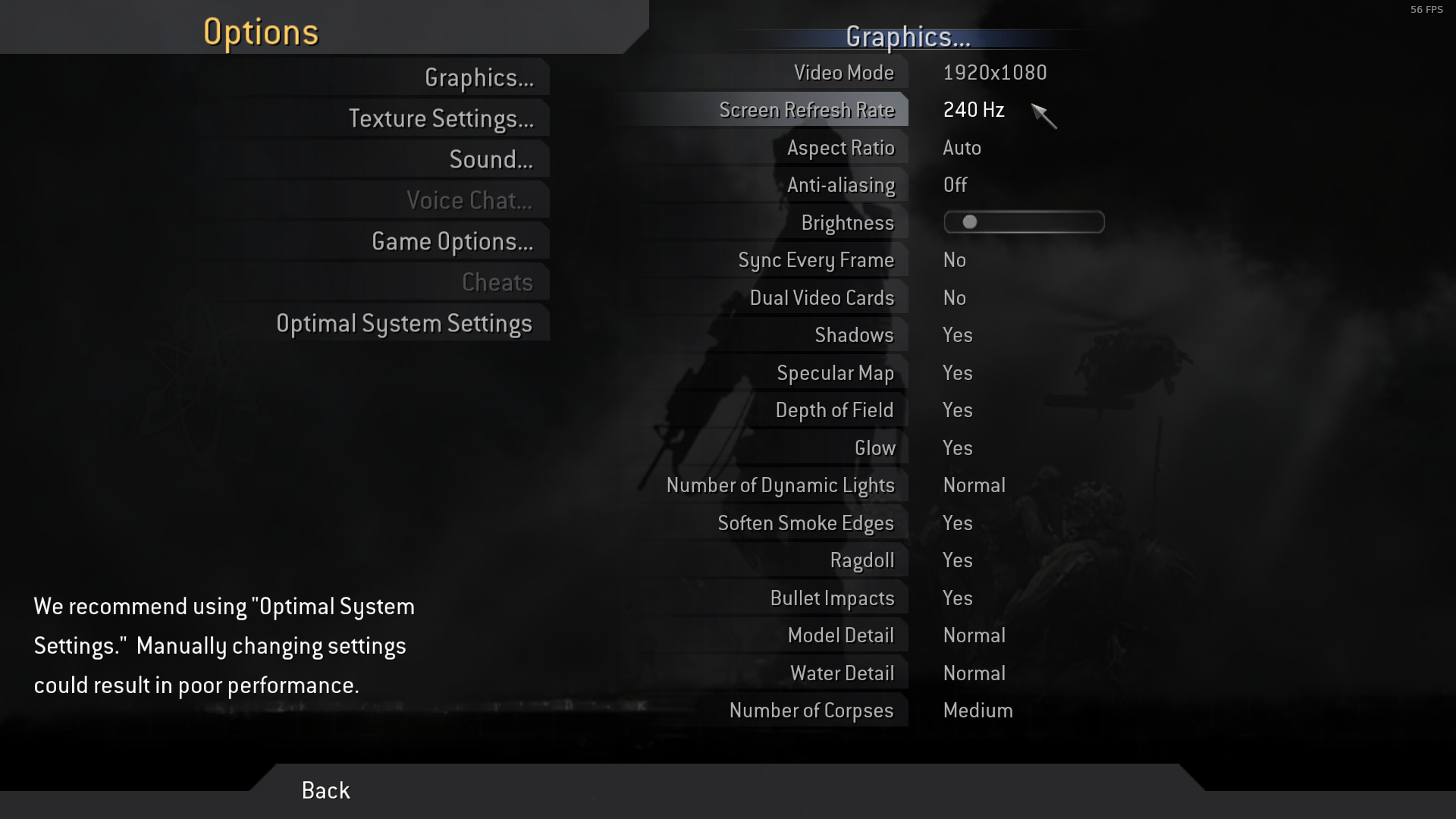
And the game picks own screen resolution now (I can see it when I do Alt-Tab). I am not sure whether this is something new that comes with >= wine-3.16 or maybe it is something that should have been dropped by the Valve patches from proton_3.16 branch? In the default Proton 3.16 when any game is running it feels like it isn't running in its own resolution, but rather uses the current user's screen resolution. So in-game one can see (and set) max. of 60Hz whilst the game is actually running 120Hz/240Hz (of course only if the user sets such in his Xorg [xrandr] / nvidia-settings / .. and the monitor supports such, obviously).
Upd2 [31/Dec/2018]: played Broadcast map (CoD4 MW), got ~60-80 fps outside (in the street), up to 140 fps inside (in the building) on my GTX 1060 6GB; 16GB RAM; i7 2600 @3.40GHz.
Upd3 [1/Jan/2019]: actually the performance is much better with the Proton built off the bare proton_3.16 branch, most likely this is because I haven't merged all the Valve's patches as some of them improve the performance. If anyone is wondering, here is my build env. for building Proton in Docker https://git.nixaid.com/arno/proton/
When proton 4.11.1 and 4.11.2 was released this game finally works. It is still necessary to disable Uplay Overlay to the game start (or it will stall with a black window).
Probably the VMProtect DRM now runs correctly with the last branch of Wine.
The funny thing is the Uplay Overlay works partially (the game don't stall at beginning) when it runs the Windows version of Steam using plain Wine or running with Lutris with some games of Assassin's Creed saga.
I bought the game for me (Ubuntu 18.04, Ryzen 7 2700, 32 GB RAM, RTX 2070 SUPER) and my wife (Ubuntu 18.04, Ryzen 5 1500X, 8 GB RAM with 16 GB swap, GTX 1070). In my rig it starts correctly with the uplay overlay disabled, in my wife's rig, with the same configurations, it doesn't start: after the dialog box saying launching without uplay steam "is not recommended" is shown and she presses the green button to launch, the dialog box disappears, a new dialog seemingly appears and disappears very quickly and the game does not launch.
Hello @Patola, please add PROTON_LOG=1 %command% to the game's launch options, reproduce the crash, and drag and drop the generated $HOME/steam-$APPID.log into the comment box.
Fixed. Noticed in steam play my wife's configuration pointed to proton 4.2-9. Changed to 4.11-2 and it played correctly.
Hi. I just tried to run AC Origins with Proton 5.0.4 and it fails to run. It was working fine with Proton 5.0.3. What happens is Uplay starts the game, a new window appears for less than a second and disappear, and then nothing. The ACOrigins.exe process remains alive, but it does nothing (0% cpu usage). I have to manually close Uplay to kill the process.
We have found a fix for this, which will be in the next Proton release. In the meantime, there is a new app branch for the Proton 5.0 app called "proton-5.0-3" which you can use to play the game. You can find it on the BETAS tab in the settings for the Proton 5.0 tool in your Steam client.
Hello. Assassin's Creed Origins should be playable again in Proton 5.0-5. Thanks for reporting the problem!
REMEMBER for each version of proton 5, for me i need to erase the appdata of this game and later play and later of recreate data, my save game, for me that no save in the cloud, but works very good, sometimes flawless and crash the game but i dont know why, if is for temperature, or ubisoft developments, because in windows also, i will try odyssey later of pass this game
Hi, Assassin's Creed Origins seems to be "broken" again with Proton 5.0.6 with UPLAY updater unable to find new updates, and potentially to update itself.
I used Proton-GE 5.5-GE-1 and it worked.
Hello @DistantThunder, please add PROTON_LOG=1 %command% to the game's launch options, reproduce the regression, and drag and drop the generated $HOME/steam-$APPID.log into the comment box.
I play good in origins, i dont know what is the problem, with erase the comptdata folder i can play good
Unfortunately, successfully updating Uplay nullified the the chance of the bug happening.
It should be reproducible with a clean UPLAY install though, if it's indeed the problem I spotted.
This is why I insist that the Uplay client should have its own entry in the tools section, so you can install it only once, login to your uplay account and download your Uplay-Steam tied games.
Hi guys,
Origins is working fine in regards to Uplay.
I find the game very sluggish though compared to Windows, has anyone experienced this?
Basically I played the game for 5 mins, noticed that when the game is running at 60fps it FEELS like 30fps, moving the mouse or controller is very laggy/sluggish
No stutters that I observed just delayed response.
I copied the game files to Windows and launched it. Noticed an improvement straight away! even at 45fps on windows the game feels smoother than 60fps on Linux(!!!)
I tried a few different settings - windowed, vsync, etc. It seems if I turn the graphics down to low, im getting 80-100fps the controls do seem more responsive but still not "normal" like windows. I launched Shadow of Mordor and this game feels smooth, obviously its a native game though.
settings:
1440p
fullscreen
vsync off
frame limit off
dynamic res. off
esync on/off
gamemode on/off
compositor on/off
controller plugged/unplugged
fsync is on because i have 5.7 kernel
Specs:
Manjaro
kernel: 5.7.14-1-MANJARO
DE: Xfce 4.14
CPU: AMD Ryzen 5 2600
GPU: Radeon RX580
Driver: Mesa 20.1.5 with ACO enabled
Screen: 1440p, 144hz, tearfree and VRR enabled
Steam, Proton 5.0.9
@regulator-g Do you play with controller or mouse/keyboard?
It's very strange. For me the game is running without any problems at all. May be it's a Mesa problem?
https://youtu.be/3FJtkJo77E4
I play with a controller but I've tried the keyboard and mouse too. I'm getting used to it playing on lower settings.. I'll try test another proton game between Manjaro and Windows and see if I can notice anything.
@regulator-g When playing with a controller, try disabling controller configuration support in Steam. I think you'll have to do it from big picture mode. Some people reported it introduces lag.
Is there any way to disable the "unsupported video driver" notification from Origin? Its extremely annoying, and I haven't found a way to close it.
No Uplay? Odd.. Try with Lutris
Hello,
Since today I can't play with Proton 5.0-10 (I can't use 5.13 with my Linux distribution for the moment). Uplay is failing to start and I can see a "Failed to connect to Uplay" in the logs
steam-582160.log
Did somebody else experienced this ?
Thanks,
Hello,
Since today I can't play with Proton 5.0-10 (I can't use 5.13 with my Linux distribution for the moment). Uplay is failing to start and I can see a "Failed to connect to Uplay" in the logs
worked this out for you..
5.13 = ass-creed works fine
5.0-10 = failed to detect uplay
I went and deleted the compdata folder
(/home/steam/steamapps/compatdata/582160/)
then launched again and uplay was reinstalled
game works again now
@regulator-g I already tried this, but I think the issue comes from my Linux distribution and some Steam update (the LD_LIBRARY_PATH "optimisation" might be the culprit)
Fixed by adding /run/opengl-driver/lib to the LD_LIBRARY_PATH
Hello,
Sometimes the game completely freeze, but this is not happening every time I play this game.
I managed to capture logs during a crash like this:
steam-582160.zip
With a fresh install game complains that it cannot find Uplay. Manually installing Uplay fixes this:
...
WINEPREFIX=/path/steamapps/compatdata/582160/pfx /path/steamapps/common/Proton\ 6.3/dist/bin/wine64 /path/steamapps/common/Assassins\ Creed\ Origins/Installer_Resources/UPlayInstaller.exe
...
After that game launches with Uplay. However, trying to switch to Steam overlay will freeze the game. Also game somehow does not detect gamepad on launch.
Ubisoft overlay keeps on notice that drivers are not supported which is a small annoyance.
Disabling Steam input makes controller work again in the game.
Game has decent framerate with Proton experimental too.
Since one of the more recent Proton Experimental updates, AC:O does no longer boot, it just hangs there. An interesting observation: If I force the re-installation of the uplay launcher via protontricks (which will be refused because a newer version is already installed), it just works. Other Uplay titles seem to be affected as well.
@kakra
Assasins Creed: Origins. Runs perfectly.
Proton GE 7.17 and Proton Experimental
-
Desktop
-
Kubuntu 22.04 - Ubuntu Kernel 5.15.0-30-generic ( Compositor disabled, Baloo disabled.)
-
Intel Core i7 w/ nVidia -GTX 1650 4GvRAM - 20G System RAM at 1333hz
-
X11 - nVidia-driver-510 (Graphics and Kisak PPA enabled)
-
Logitech Wireless Gamepad f710. In Xbox360 mode w/ Xbox360 support in Steam Client Enabled.
-
Start AC:O then when freezes or activation issue open terminal:
-
[ctl] [atl] [t] run [ killall steam ] in terminal. verifiy local files. This fixes activation issue.
-
Disable Steam Overlay in Game Properties. This fixes freezing / crashing.
-
In game if using LT f710 Gamepad switch to Playstation mode on gamepad. Gamepad now work flawlessly.
-
PROTON GE 7.17 and PROTON Experimental
-
To fix the In-Game Ubisoft " Unknown Graphics Driver " error add the Proton launch options below.
-
[ PROTON_HIDE_NVIDIA_GPU=0 PROTON_ENABLE_NVAPI=1 DXVK_ASYNC=1 %command% ]
Runs without any performance issue on highest settings with vsync disabled in game.
Latest Assassins creed origins (update 1.60?) from Ubisoft I think has broken the game, after a few mins of gameplay the game freezes. Making the game now unplayable when it used to work amazingly.
Tried Proton experimental and proton 7.02 still same happens.
Others reporting same issue here https://www.reddit.com/r/SteamDeck/comments/v6tt60/anyone_else_playing_assassins_creed_origins/ibhdeuz/?context=3
As requested;
https://gist.github.com/smintman/f9f3c7d46ef60f89a0eb75248b36b905
Hello @smintman, please add PROTON_LOG=1 %command% to the game's launch options and attach the generated $HOME/steam-$APPID.log to this issue report as a file. (Proton logs compress well if needed.) Also, please copy your system information from Steam (Steam -> Help -> System Information) and put it in a gist, then include a link to the gist in this issue report.
Added to my original comment
I have the same issue on my Steam Deck as @smintman, since patch 1.60 the game crashes shortly after loading a save. I noticed that when I stay longer in the menu before loading the game, the crash seems to happen sooner after loading it. Also I am using Bottles to start the Ubisoft launcher and the game. Anything I can do to try get to the bottom of this? Does it help if I provide a log and system info as well?
The freezing issue should be affecting steam deck owners that have the steam version now as its been updated? Can anyone that owns the steam version and a steamdeck confirm they have the freezing issue?
The issue appears to also be affecting windows users that use Windows 7, does anyone know of any settings we can use to make Origins run more like we are on a windows 10 machine?
@TheHaf I can confirm the issue, after the game update the hang occurs almost immidiately after loading the game, it doesn't however crash in benchmark, which is weird.
I can confirm the issue, after the game update the hang occurs almost immidiately after loading the game, it doesn't however crash in benchmark, which is weird.
@MaCroX95 Actually, it can hang at any time: I tried multiple times. One time it froze on the AC splash logo (that one where it says "press any key to start"), one time it just froze on the black screen before that logo, once it froze on the loading screen (where you can "walk" around after loading a game from the main menu), once it randomly froze during gameplay, and once I could play for 20+ minutes without any freezes. So there's no special scene where it freezes, it can happen any time, no matter if in game, in the main menu, or during intro logos.
Same here, freezes on my steamdeck
Free weekend on Ubisoft, and so of course they just broke it.
Same issue here running v1.60 of the game, freezes randomly on my:
- Lutris 0.5.10.1 with
lutris-GE-Proton7-16-x86_64 - EndeavourOS; Build ID: 2021.12.17
- Linux kernel 5.18.3-arch1-1
- NVIDIA Driver Version: 515.48.07
- NVIDIA GeForce RTX™ 2080 Super with Max-Q Design
- Gnome 42.2 / X11
Can you at least change the "playable" status to "unsupported" on the steam store for the time being? I am not able to stay in the game for 2 minutes before it crashes. Totally unplayable in my opion.
Hello @smintman, please add
PROTON_LOG=1 %command%to the game's launch options and attach the generated $HOME/steam-$APPID.log to this issue report as a file. (Proton logs compress well if needed.) Also, please copy your system information from Steam (Steam->Help->System Information) and put it in a gist, then include a link to the gist in this issue report.
Any updates on potential fixes for this game? @kisak-valve, it was bought on steam summer sale (according to previous information regarding this game working - neglected to check recently - after all why would single player game break?) but seems to be freezing now regardless of launch options or proton version used.
Maybe the game engine may have been updated to be more similar to AC:Odyssey, and so it maybe needs the same fix as AC:Odyssey?
OTOH, running with PROTON_NO_FSYNC=1 PROTON_NO_ESYNC=1 doesn't seem to help much. The game may run a little longer but that's it.
@ivyl Assassin's Creed Origins lately got an update which broke the game on Proton. Would you kindly investigate if your fix for AC Odyssey would also work on AC Origins as well?
Same here, tried pretty much every option possible to make it run and nothing.
The game always crash at some point in 5 minutes, ram, vram, swap, all seems reasonable.
Heres the last lines of the log, it may help.
1652.934:0150:0630:trace:seh:NtGetContextThread 0xfffffffe: eax=000000d8 ebx=00000004 ecx=00000000 edx=00000000 esi=00000004 edi=2ea7f990
1652.934:0150:0630:trace:seh:NtGetContextThread 0xfffffffe: ebp=2ea7faa8 esp=2ea7f94c eip=7bc0bd9c cs=0023 ss=002b flags=00000246
1652.934:0150:0630:trace:seh:NtGetContextThread 0xfffffffe: ds=002b es=002b fs=0063 gs=006b
1652.934:0150:062c:fixme:rawinput:DefRawInputProc data 2DBFF9B8, data_count 1, header_size 16 stub!
1652.948:0150:062c:fixme:rawinput:DefRawInputProc data 2DBFF9B8, data_count 1, header_size 16 stub!
1652.948:0150:01f0:trace:seh:NtGetContextThread 0xfffffffe: eax=000000d8 ebx=00000004 ecx=00000000 edx=00000000 esi=00000004 edi=1ff3f990
1652.948:0150:062c:fixme:rawinput:DefRawInputProc data 2DBFF9B8, data_count 1, header_size 16 stub!
1652.948:0150:01f0:trace:seh:NtGetContextThread 0xfffffffe: ebp=1ff3faa8 esp=1ff3f94c eip=7bc0bd9c cs=0023 ss=002b flags=00000246
1652.948:0150:01f0:trace:seh:NtGetContextThread 0xfffffffe: ds=002b es=002b fs=0063 gs=006b
1652.950:0150:062c:fixme:rawinput:DefRawInputProc data 2DBFF9B8, data_count 1, header_size 16 stub!
1652.950:0150:062c:fixme:rawinput:DefRawInputProc data 2DBFF9B8, data_count 1, header_size 16 stub!
1694.523:03bc:0464:fixme:system:NtUserSystemParametersInfo Unimplemented action: 59 (SPI_SETSTICKYKEYS)
1694.523:03bc:0464:fixme:system:NtUserSystemParametersInfo Unimplemented action: 53 (SPI_SETTOGGLEKEYS)
1694.523:03bc:0464:fixme:system:NtUserSystemParametersInfo Unimplemented action: 51 (SPI_SETFILTERKEYS)
1694.532:0110:0124:fixme:oleacc:find_class_data unhandled window class: L"[#32769](/issue/ValveSoftware/Proton/32769)"
1702.776:0110:0124:fixme:oleacc:find_class_data unhandled window class: L"[#32769](/issue/ValveSoftware/Proton/32769)"
pid 7590 != 7589, skipping destruction (fork without exec?)
Hi. We were unable to reproduce by simply running the game. Do you need to reach a certain point in the story for it to crash?
Also can someone share a full log of the crash? The snippet above doesn't contain anything that would help us pinpoint the issue.
Hi. We were unable to reproduce by simply running the game. Do you need to reach a certain point in the story for it to crash?
Also can someone share a full log of the crash? The snippet above doesn't contain anything that would help us pinpoint the issue.
The freeze is pretty random, sometimes it will happen on the initial Warning splash screen, sometimes it will happen after 5-10 mins of running about in the game, but about 5-10 mins, It seems the less you do in game the longer you can go..?
What version of Origins are you running, if you've not updated yet that might be why it has not crashed for you version 1.5.1 works fine, but version 1.6 does not.
I posted some logs in this comment about this issue https://github.com/ValveSoftware/Proton/issues/928#issuecomment-1148648796
Also posted bug here just in case it was something the dvxk team could resolve, but in their troubleshooting he got me to try the PROTON_USE_WINED3D=1 renderer which also resulted in it eventually freezing.
https://github.com/doitsujin/dxvk/issues/2712
There are plenty of people with this issue, looking at the ubisoft and steam forums, issues reported by steamdeck users and windows 7 users, seems ok on windows 10?
Let me know if you need anything else?
I was never able to get passed the solders standing outside. Freezed before fight began. About 10min into the game.
If it happens mostly at specific times during gameplay this probably wont do anything.
But a couple of other random things to try. Disable overlays if possible, steam and uplay.
Try playing without an internet connection incase it's because it sometimes tries to contact some outside service that fails in a horrible way.
If the game has autosaving try disabling that if possible.
If it happens mostly at specific times during gameplay this probably wont do anything. But a couple of other random things to try. Disable overlays if possible, steam and uplay. Try playing without an internet connection incase it's because it sometimes tries to contact some outside service that fails in a horrible way. If the game has autosaving try disabling that if possible.
It happens in random times at any point..
I already have the ubisoft overlay turned off, not sure I can turn the steam deck one off when in steam ui? I've just tried turning off wifi which made ubisoft connect run in offline mode, still froze.
Checked to see if I can turn off autosave, not sure there is a feature to do that? The game is saving tho, as it does seem to remember where I was sometimes as I'm running about waiting for it to freeze.
Just throwing random stuff at the wall here, don't have a good idea of what the issue could be atm 😁
Just throwing random stuff at the wall here, don't have a good idea of what the issue could be atm grin
I know, but it is worth exploring everything, thanks.
issues reported by steamdeck users and windows 7 users
Is it Steam Deck only or does it reproduce on desktop too? I've been running the game for over an hour on the desktop now.
So the problem also seems to be present on Windows 7?
issues reported by steamdeck users and windows 7 users
Is it Steam Deck only or does it reproduce on desktop too? I've been running the game for over an hour on the desktop now.
So the problem also seems to be present on Windows 7?
This issue is also present on desktop for me. I'm using Fedora 36 w Gnome 42.
According to the Ubi forums, normal Win7 users have the same issue as we do. I assume their reports refer to normal desktop installations, I hope nobody tries to install Win7 on the Steam Deck. 😉Am 11.07.22, 16:13 schrieb Arkadiusz Hiler @.***>:
issues reported by steamdeck users and windows 7 users
Is it Steam Deck only or does it reproduce on desktop too? I've been running the game for over an hour on the desktop now.
So the problem also seems to be present on Windows 7?
—Reply to this email directly, view it on GitHub, or unsubscribe.You are receiving this because you were mentioned.Message ID: @.***>
issues reported by steamdeck users and windows 7 users
Is it Steam Deck only or does it reproduce on desktop too? I've been running the game for over an hour on the desktop now.
So the problem also seems to be present on Windows 7?This issue is also present on desktop for me. I'm using Fedora 36 w Gnome 42.
Can confirm. I also have the issue with Nvidia 2060 on arch with kde
Hi. We were unable to reproduce by simply running the game. Do you need to reach a certain point in the story for it to crash?
Also can someone share a full log of the crash? The snippet above doesn't contain anything that would help us pinpoint the issue.
The game will consistently freeze right at the beginning when you exit the tomb and see the soldiers.
Also, it seems to be an issue on NVIDIA systems in particular. With protonGE7.23 you can get past the initial menu and sometimes it will freeze during load screen particularly if you move the character around while its loading.
I reinstalled AC:O to check if it was my system. This was present even on a new install - seems to be caused by ubisoft update.
Edit: here is the windows 7 reports on freezing
People also having issues on steam
https://steamcommunity.com/app/582160/discussions/1/3415431214860189324/
The game doesn't crash - it just freezes and even if you leave it for an hour it doesn't change.
issues reported by steamdeck users and windows 7 users
Is it Steam Deck only or does it reproduce on desktop too? I've been running the game for over an hour on the desktop now.
So the problem also seems to be present on Windows 7?
Are you running about or just have it open? I managed to leave the game running for about 30 mins once, and only froze when some soldiers noticed me and decided to fight.. increasing what was happening on the screen.
Yes Windows 7 users appear to have the same issue, what would be common between windows 7 and proton?
Replying to https://github.com/ValveSoftware/Proton/issues/928#issuecomment-1180509537
It's not a nvidia issue, I have AMD RX 5700XT.
Can anyone who is reproducing the hang in Assassin Creed Origins try that with the build from here: https://www.codeweavers.com/xfer/gofman/builds/ if possible? Password (lock key): testbuild . As far as my debugging goes it might be fixing it but I am not sure, reproducing that too unreliably. Would be great to know if that really fixes it before making a rather quirky fix.
Trying it out right now had an initial free on splash screen when tried via desktop. Rebooted into steam ui and seems to be fairing better been playing for last 20 mins will keep testing and let you know if it reoccurs
Just noticed there’s no sound tho
Played for over hour and no freezing in game. Would sometimes freeze on the “warning:please read splash”.
Still no sound and going back to normal proton there still was no sound. In process of reinstalling origins right not see see if resolves it?
@smintman I am not sure what is "warning:please read splash”?
Regarding no sound, could it be you accidentally muted it in desktop mode as a per app setting in menu? Pulseaudio remembers those settings... "pactl list sink-inputs" while the game is running might show that.
@smintman I am not sure what is "warning:please read splash”?
Regarding no sound, could it be you accidentally muted it in desktop mode as a per app setting in menu? Pulseaudio remembers those settings... "pactl list sink-inputs" while the game is running might show that.
The warning screen that ac origins first shows when it’s booting up.
I think you right about the pulse audio thing how’s best to reset that?
@smintman I am not sure what is "warning:please read splash”?
Regarding no sound, could it be you accidentally muted it in desktop mode as a per app setting in menu? Pulseaudio remembers those settings... "pactl list sink-inputs" while the game is running might show that.
I will continue to try your build tomorrow it was looking promising. What is your fix?
@smintman I am not sure what is "warning:please read splash”?
Regarding no sound, could it be you accidentally muted it in desktop mode as a per app setting in menu? Pulseaudio remembers those settings... "pactl list sink-inputs" while the game is running might show that.The warning screen that ac origins first shows when it’s booting up.
Hmm... I don't see any warnings on start on Deck.
I think you right about the pulse audio thing how’s best to reset that?
You can find the sink index with 'pactl list sink-inputs' (application.name property will be ACOrigins.exe for the correct sink) and then 'pactl set-sink-input-volume 100%'. There also should be possible to delete all the pulseaudio config in the home folder but I am not exactly familiar with configuring this stuff and afraid to advise something bad :)
Replying to https://github.com/ValveSoftware/Proton/issues/928#issuecomment-1181082428
Resolved the audio thanks. Was having issues running it in desktop to make changes, see below.
Here’s where I’m at on desktop mode freezes quite a lot on the warning splash screen. It’s the first screen that comes with with some legal blurb?
On steam ui can get into the game and just played for another 30 mins. So whatever you have changed it’s alot better. Hopefully some others can download your build and give it a go?
@smintman Thanks a lot for testing this. The fix should be now live in Proton Experimental [bleeding edge] branch (available to select in Proton Experimental properties, "Betas" tab): https://github.com/ValveSoftware/wine/commit/872e73ae5c874c58345fe6058a2734da9e156cda
I didn't look at desktop mode warning, that is likely something unrelated to this in-game (or in-menu) freeze issue.
@smintman Thanks a lot for testing this. The fix should be now live in Proton Experimental [bleeding edge] branch (available to select in Proton Experimental properties, "Betas" tab): ValveSoftware/wine@872e73a
I didn't look at desktop mode warning, that is likely something unrelated to this in-game (or in-menu) freeze issue.
Yeah don’t worry about the intial freeze too much. As long as the game works once we get past that. Which it seems it does. Will give the bleeding edge version a go. Thanks for looking into this!
Is there anything we can feedback to the Ubisoft support forum as to why this issue was happening, as I think it was also affecting windows 7 users?
Further update from me, I've left the game running for about 4 hours on Steam UI using proton experimental (bleeding edge) basically getting him on his Camel and riding around the map, so I would say its fixed there.
On Desktop with that proton version the game will get stuck on this screen and get no further.

@smintman Does it get stuck every time there on desktop or just sometimes?
Seems like every time, at least for me,
Just a quick check. Does this also happen with wined3d?
PROTON_USE_WINED3D=1 %command%
It gets past the splash screen with that command, but of course doesn't look very good.
Strangely moving back to proton 7.0.3 doesn't help, so unless something cached somewhere
Here's a log from when it crashed
steam-17116730227024723968.zip
On the desktop in the steam settings try turning off shader pre cache and see if that makes a difference without wined3d
@smintman Thanks a lot for testing this. The fix should be now live in Proton Experimental [bleeding edge] branch (available to select in Proton Experimental properties, "Betas" tab): ValveSoftware/wine@872e73a
I didn't look at desktop mode warning, that is likely something unrelated to this in-game (or in-menu) freeze issue.
Want to confirm that your fix indeed works. Thanks a lot.
@smintman
Is there anything we can feedback to the Ubisoft support forum as to why this issue was happening, as I think it was also affecting windows 7 users?
I am not sure if it is the same issue on Win7, I don't have a Win7 machine to run my tests now. If anyone is curious attached is my test case (source code and that code compiled with MSVC for x64/Release, default options). Running that on Win7 and showing the output (or comparing that with Win10) may tell if that is the same issue.
test.zip
UPDATE: I actually attached wrong source code, here is the actual one: https://gist.github.com/gofman/3287a953bcab3a5c888a8d494461cb8a
Replying to https://github.com/ValveSoftware/Proton/issues/928#issuecomment-1181853424
thank you, the fix seems to work. not sure what caused it but it seems to work on multiple game launches and playing for 10 mins. however, i discovered that trying to use steam overlay (to get rid of CD key appearing) will freeze the game again.
Many Ubisoft games seem to be unstable with the Steam overlay, so you may want to disable it for those games. Should get rid of the key notification, too.
I understand it is likely better to get rid of steam overlay, but when I do I encounter another issue - steam stops recognizing my controller. This is only fixed by closing the game and then turning on steam overlay. So it leaves me with no choice unfortunately, which is why I was wondering if something can be done about the steam overlay?
Hmm, strange... The controller still works for me even with the overlay disabled. Then again, maybe you're using Steam Input, and that seems to require the Steam overlay enabled for some games (e.g., HZD) for the controller to work. So you could also try disabling Steam Input for this game, most SDL-supported controllers should still work then.
Hmm, strange... The controller still works for me even with the overlay disabled. Then again, maybe you're using Steam Input, and that seems to require the Steam overlay enabled for some games (e.g., HZD) for the controller to work. So you could also try disabling Steam Input for this game, most SDL-supported controllers should still work then.
Not sure what Steam Input is but I have an Xbox controller that I use. KDE recognizes it when its connected but the game does not if the overlay is off.
Not sure what Steam Input is but I have an Xbox controller that I use.
That controller should work, I'm using the same (actually, as the xpadneo developer, I'm owning all models, and each one works). Steam Input is the controller mapping tool available from the overlay. To disable Steam Input, either go to the game properties and disable "Xbox controller support" per game, or go to Steam settings to disable it globally. Disabling support for the controller only affects controller support through Steam Input and the overlay, it does not disable the controller for games (usually, there are a few games that actually use Steam Input directly, and need both Steam Input and the overlay enabled, for those games you can still individually enable that support per game if disabled globally). If you see mapping problems with the buttons after disabling Steam Input, try stopping the Steam client, reconnect the controller and start Steam again. Maybe try disabling Steam Input globally in the client and enable per game if needed. An alternative driver may also work around those issues (xpadneo for Bluetooth, xone for the dongle).
PS: I'm not sure why Steam Input seems to be depending on the overlay enabled (at least for some games), and vice-versa, Valve should probably fix that.
Replying to https://github.com/ValveSoftware/Proton/issues/928#issuecomment-1182917472
I think I understand what you are saying. I will try to disable Steam Input for this game.
I was thinking maybe I have problems because I use xbox controller with xow? Its an app that lets me use my dongle with my controller.
I was thinking maybe I have problems because I use xbox controller with xow? Its an app that lets me use my dongle with my controller.
Yes, I know that project well. This is superseded by xone now, xow does not receive further development. You may want to join our Discord server (it's about xpadneo, xow, and xone, joining the developers of each project in one pool), there are people who can help you finding the correct settings.
Anyone else freezing at startup screen with the experimental build? Bleeding edge works fine but I thought the fix was now merged into experimental? Something else must be going on then.
@smintman @vahidshirvani The fix is live in experimental-7.0-20220714b. Hopefully you aren't seeing the hang after the recent game update anymore?
@Tripp024 Could you get 2 logs (just add PROTON_LOG=1 %command% to the command line) -- 1)the freeze on experimental-7.0-20220714b and 2) the game not freezing and proceeding correctly on bleeding-edge
@alasky17 I found out it just happens randomly on the experimental build. It has nothing to do with bleeding edge. It froze once again before I turned on the logging, I tried booting it again a few times afterwards and then it worked fine. Maybe it was some temporary glitch with uplay or something. Logging is on now so when it happens again I'll post the log. Btw, the freeze happened on the warning screen and I'm using a Steam Deck.
This game does not support FreeSync correctly on linux. Not sure if this would be considered a problem with Proton or Linux itself. Have not noticed this issue on any other games. The FreeSync value (hz) will be half that of the FPS. If the fps is 120fps it will be 60hz and if it is 140fps it will be 70hz and so on. Every once in a while it will read correctly which makes for a very inconsistent experience.
The game freezes on launch on a 7900X, 790XTX. Here's the Proton Log:
Hello @QushyQushy, can you temporarily remove or disable mangohud, gamemode, and vkBasalt and see if that has an effect?
Hello @QushyQushy, can you temporarily remove or disable mangohud, gamemode, and vkBasalt and see if that has an effect?
Perfect suggestion and I'm sorry for providing a Proton Log with all these enabled. Power of habbit. XD
vkBasalt seems to be the culprit. I will open an issue on vkBasalt's Github. :)
The game freezes on launch on a 7900X, 790XTX. Here's the Proton Log:
I am having exactly the same issue, on the same graphics card, but I am not using any command line arguments, on Proton Experimental. It perpetually stays in the splash screen warning.
EDIT: Ok, STEAM OVERLAY was the culprit. Turned it off, everything works now.
I had the same problem yesterday but I had already switched the overlay off (many months ago - maybe it tried to switch it back on after a uplay update?). The only way I could fix it was to delete the game and re-install, and then I could switch the overlay off when it started for the first time. I don't know if that's what fixed it, but then the ubisoft connect app started cleanly and the game launched.
Ubisoft Games not working because connection lost always.
Issue transferred from https://github.com/ValveSoftware/Proton/issues/7420.
@vuaieo posted on 2024-01-18T12:16:43:
Compatibility Report
- Name of the game with compatibility issues: ASSASINS CREED ORIGINS
- Steam AppID of the game: 582160
System Information
- GPU: 3080 ti
- Video driver version: 535.154.05
- Kernel version: 6.7.0-204.fsync.fc39.x86_64 (64-bit)
- Link to full system information report as Gist:
- Proton version: many different , from most recent ones to 5.x...
I confirm:
- [✅] that I haven't found an existing compatibility report for this game.
- [✅] that I have checked whether there are updates for my system available.
Symptoms
hi if i launch the assasins creed origins game then the ubisoft launcher starts and trying to connect to their service or so but it always fails, and cant run on offline mode because need at least 1 time need to be online in order to use offline mode, so i stuck in the loop and cant play ubisoft games anymore on steam. please help T_T
tryed many different proton and GE proton versions but nothing helps , its always the same.
here are the screenshots of the messages:
i remmber last year or so it worked "fine" so something musst have happen...
well if install the ubisoft launcher as a game and start it then the launcher works ok and i think i could play some games but because the assasins creed origin i got on steam its bound to steam acc and so clicking on download opens the launcher and its still same problem... = so cant play : (
Reproduction
just start the assasins creed origin game 🖖
Replying to https://github.com/ValveSoftware/Proton/issues/928#issuecomment-1898715114
I can confirm this on the Steam Deck, as I have seen it happening to someone on social media.
Just to make it clear, the game is working great for me, no issues whatsover, Proton-8.0-4, https://gist.github.com/Patola/5b0f3d30bfdbf276b183d32f997c8500 (Archlinux, Ryzen 7 7800X3D, RX 7900 XTX). So this does not affect everyone. I can try on my nvidia laptop to see if the problem is the GPU.
Just to make it clear, the game is working great for me, no issues whatsover, Proton-8.0-4, https://gist.github.com/Patola/5b0f3d30bfdbf276b183d32f997c8500 (Archlinux, Ryzen 7 7800X3D, RX 7900 XTX). So this does not affect everyone. I can try on my nvidia laptop to see if the problem is the GPU.
No, as this is confirmed to happen on the AMD GPU in the Steam Deck as well.
Ubisoft Games not working because connection lost always.
@vuaieo Try sudo sysctl -w net.ipv4.tcp_mtu_probing=1 before starting the game and report, if that helps.
@kakra ok did this command in terminal but it didnt helped, its still same
@kakra ok did this command in terminal but it didnt helped, its still same
Rename your prefix (it's the folder 582160 in $HOME/.steam/steam/steamapps/compatdata), e.g. name it 582160.bak. Apply my sysctl fix, and then start the game. It should reinstall a current version of Ubisoft Connect. Maybe something is broken in your prefix. You will loose your graphics and game settings. If that works, you can try copying over the folder pfx/driver_c/users/steamuser from the backup prefix to the new prefix, this should bring your game settings back.
If it still doesn't work, restore your prefix backup folder (rename 582160 to 582160.failed, then rename 582160.bak to 582160), and retry with PROTON_NO_FSYNC=1 %command% as launch options in your game properties. If this helps, you may see #2922. Sometimes, this is only needed to fix updating the launcher, and after that it will work with fsync again. MTU probing may still be needed because without, services of Ubisoft sometimes cannot be reached. Windows defaults to MTU probing on.
I had the same issue @vuaieo was having (and it seems that many on protondb have the same problem) and sadly non of the solutions @kakra was proposing were working for me either.
However, after i used protontricks to install ubisoft connect for the game, it started and i was able to play through the intro with no issues so far
I hope this helps others too.
Assassin’s Creed Origins - Black Screen
Issue transferred from https://github.com/ValveSoftware/Proton/issues/7872.
@CreeperofDoom posted on 2024-07-04T17:17:11:
Compatibility Report
- Name of the game with compatibility issues: Assassin’s Creed Origins
- Steam AppID of the game: 582160
System Information
- Steam Deck OLED - Steam OS 3.6.8
- Proton version: Experimental
I confirm:
- [ ☑️] that I haven't found an existing compatibility report for this game.
- [ ☑️] that I have checked whether there are updates for my system available.
Symptoms
2 Days ago i opened Assassin’s Creed Origins on my Steam Deck OLED and it only shows a Black Screen, The Sound of the game still plays and the controller still functions, its just the screen thats pitch black.
I tried: Verifying the game files, Reinstalling the game from Steam, Clearing the Proton Compatibility Data (which deletes all game data and the Third Party Launcher requiring it to reinstall)
I also tried connecting it to a dock onto a TV, i tried forcing resolutions and it didn’t work. I also tried switching to Proton 9 and 8 and that didn’t work. i tried the Community Made GE-Proton and i get the same issue. I have no idea what causes it
Proton versions
proton 8.0-4x2 2024-01proton experimentalx9 2023-06proton 7.0x1 2022-07ge-proton7-16x1 2022-06proton 7.02x1 2022-06proton 5.0-10x2 2020-12proton 5.0x4 2020-08proton 5.0-5x1 2020-03proton 5.0-3x1 2020-03proton 4.2-9x1 2019-12proton 4.11x1 2019-08proton 3.16x3 2018-12
Launch options
PROTON_NO_FSYNC=1x2 2024-01PROTON_LOG=1x5 2022-07PROTON_USE_WINED3D=1x2 2022-07PROTON_NO_ESYNC=1`x1 2022-07DXVK_ASYNC=1x1 2022-05PROTON_ENABLE_NVAPI=1x1 2022-05PROTON_HIDE_NVIDIA_GPU=0x1 2022-05WINEPREFIX=/path/steamapps/compatdata/582160/pfxx1 2022-02PROTON_LOGS=1x1 2018-12
Launch lines
PROTON_NO_FSYNC=1 %command%x1 2024-01PROTON_USE_WINED3D=1 %command%x1 2022-07PROTON_HIDE_NVIDIA_GPU=0 PROTON_ENABLE_NVAPI=1 DXVK_ASYNC=1 %command%x1 2022-05PROTON_LOGS=1 %command%x1 2018-12
Upstream links
- ValveSoftware/Proton/issues/7872x1 2024-07
- ValveSoftware/Proton/issues/7420x1 2024-01
- doitsujin/dxvk/issues/2712x1 2022-07
- ValveSoftware/wine/issues/2x1 2018-12
- ValveSoftware/Proton/issues/162x1 2018-10
DLLs
steam.dllx1 2018-12steamclient.dllx1 2018-12msmpeg2adec.dllx1 2018-12msmpeg2vdec.dllx1 2018-12opencl.dllx1 2018-12sqmapi.dllx1 2018-12winegstreamer.dllx1 2018-12
Under the games when clicking on play brings me the UPLAY login screen.
When adding my credentials always returns me error and I can not connect,
If anyone can simulate this scenario to see where exactly the error is, thank you.
Kubuntu 18.04