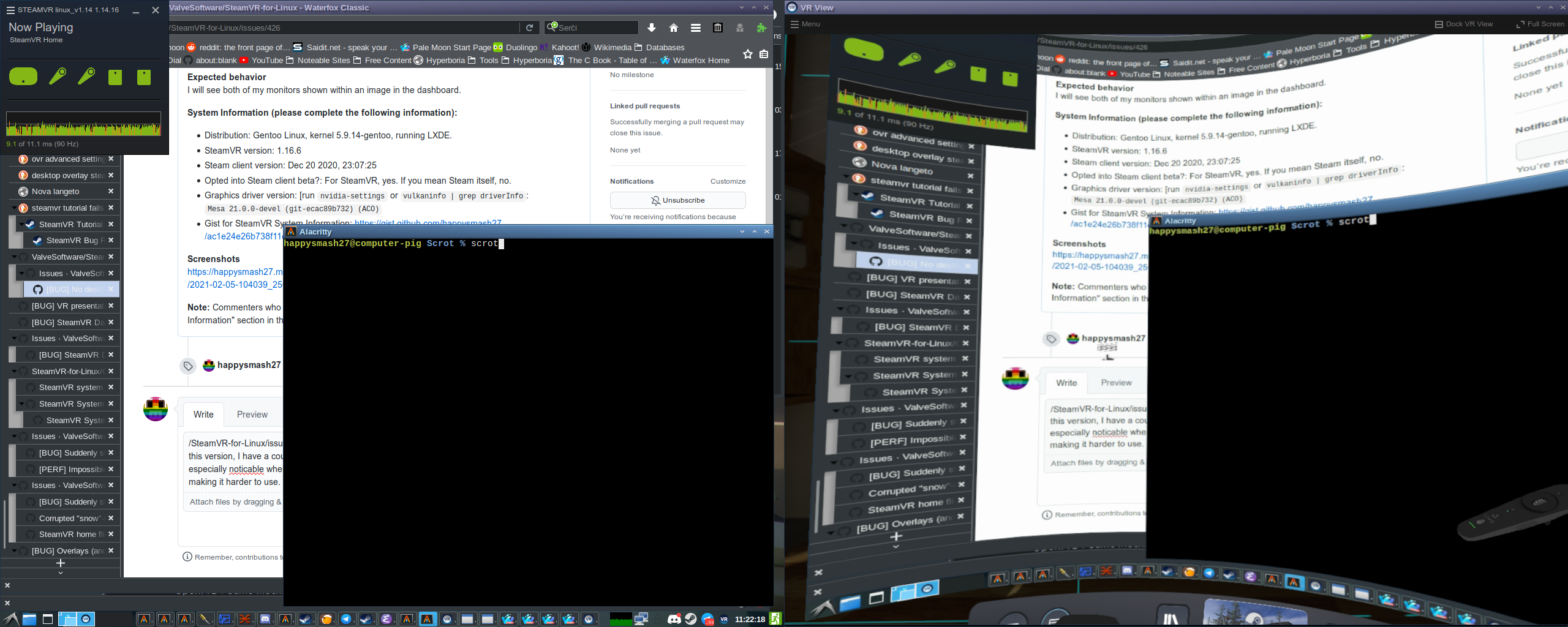
Opting into the linux_1.14 beta as a workaround, as suggested in https://github.com/ValveSoftware/SteamVR-for-Linux/issues/425#issuecomment-773998546, seems to work for this issue too. In this version, I have a couple seperate issues: my framerate seems to be slower than usual, especially noticable when moving the mouse, and my mouse cursor seems to be a bit broken, making it harder to use. The actual place pointed to is in the top left corner of the glitchy section rather than where the finger points to.
Screenshot: https://happysmash27.me/Upload/Screenshots/Bugs/SteamVR/2021-02-05-112218_2560x1024_scrot.png.
On the other hand, this does not stop me from posting this response in VR! Very cool.
Edit: Testing with Big Buck Bunny, it appears that my framerate is stuttery with Big Buck Bunny as well, so it's not just a mouse problem. The entire video is viewable, but seems a bit stuttery.
I'm also having this issue with 1.16 and 1.17. Switching to 1.14 works but the performance is much Worse in SteamVR home. I did not try any games.
System Info Gist : https://gist.github.com/HadetTheUndying/e42e1cd360c23778c3b950b848cd27a5
It works worked once, and then not again in 1.17.1 when using native libraries, but not with the steam runtime.
SteamVR-2021-03-24-PM_01_34_13.txt
May very well have been a miracle, can't get it to work again. :/
It works in 1.17.1 when using native libraries, but not with the steam runtime.
SteamVR-2021-03-24-PM_01_34_13.txt
How do I force Native Libraries to test this? I will try it out.
It works in 1.17.1 when using native libraries, but not with the steam runtime.
SteamVR-2021-03-24-PM_01_34_13.txtHow do I force Native Libraries to test this? I will try it out.
The steam-native script used by Arch is
#!/bin/bash
export STEAM_RUNTIME=0
export STEAM_RUNTIME_HEAVY=0
# Workaround for dbus fatal termination related coredumps (SIGABRT)
# https://github.com/ValveSoftware/steam-for-linux/issues/4464
export DBUS_FATAL_WARNINGS=0
# Override some libraries as these are what games linked against.
export LD_LIBRARY_PATH="/usr/lib/steam:/usr/lib32/steam${LD_LIBRARY_PATH:+:}$LD_LIBRARY_PATH"
exec /usr/lib/steam/steam "$@"
Also make sure you have all the required system libraries, list here. No idea if it will work outside of Arch, though.
It works in 1.17.1 when using native libraries, but not with the steam runtime.
SteamVR-2021-03-24-PM_01_34_13.txtHow do I force Native Libraries to test this? I will try it out.
The steam-native script used by Arch is
#!/bin/bash
export STEAM_RUNTIME=0
export STEAM_RUNTIME_HEAVY=0
# Workaround for dbus fatal termination related coredumps (SIGABRT)
# https://github.com/ValveSoftware/steam-for-linux/issues/4464
export DBUS_FATAL_WARNINGS=0
# Override some libraries as these are what games linked against.
export LD_LIBRARY_PATH="/usr/lib/steam:/usr/lib32/steam${LD_LIBRARY_PATH:+:}$LD_LIBRARY_PATH"
exec /usr/lib/steam/steam "$@"
Also make sure you have all the required system libraries, list here. No idea if it will work outside of Arch, though.
I'm on Void but I'll give this a try later. Knowing that it's a library mismatch should help Valve fix it before the next release as running without runtime has broken quite a few games for me when I was on Arch.
1.20 seems to have broken this again, 1.19 seems to work
Can confirm that there is a regression in 1.20 and that 1.19 is hit or miss with selecting a desktop sometimes crashing the whole SteamVR Overlay and it failing to work again until you start SteamVR after that
I try to use linux steamvr desktop for work & 1 month ago it worked then it doesn't work again, tried to opt out beta, opt in 1.14 with native libs on arch linux, updated the whole system as I didn't touch it once it got working, didn't help either. Virtual Desktop, Desktop+ & other similar apps with proton layer also didn't work for me. In previous version of steamvr it worked sometimes & sometimes didn't, so you had to restart VR couple of times.
I went to logs folder & started try to find any logs, found those:
vrclient_steam.previous.txt:23:Fri Dec 03 2021 01:51:59.569039 - Unable to load driver openhmd. Primary driver shared library not found on filesystem (for this architecture):
/home/noname/.local/share/Steam/steamapps/common/SteamVR/drivers/openhmd/bin/linux32/driver_openhmd.so.
vrclient_steam.previous.txt:24:Fri Dec 03 2021 01:51:59.569057 - Unable to init watchdog mode for driver openhmd: VRInitError_Init_FileNotFound
after reinstalling
sudo -u noname -S openhmd-git
sudo -u noname -S steamvr-openhmd-git
VR Desktop started to work again, looks like on Arch those are in aur repository & got outdated quite often
I suspect a race condition, as I have gotten it to work occasionally, but not consistently.
Here are two system reports, a couple minutes apart, nothing changed between them:
SteamVR-2021-12-02 good.txt
SteamVR-2021-12-02 bad.txt
Desktop view worked during the first one, didn't work during the second.
Also, adding a desktop view panel into VR Home does still work (though spun around, but that's a separate issue) so I don't think it's unable to see the desktop.
@yshui What about mouse support? Say I want to work on something in Blender in some environment other than my room, with my normal keyboard and mouse, can xrdesktop display it like the SteamVR overlay can when it's working?
@happysmash27 unfortunately it's not possible to use normal mouse with xrdesktop (it works but you won't know where the pointer is). but you can use controllers as pointers in VR space.
Describe the bug
When trying to open the SteamVR desktop view, I only get the message "No desktop found."
To Reproduce
Steps to reproduce the behavior:
Expected behavior
I will see both of my monitors shown within an image in the dashboard.
System Information (please complete the following information):
nvidia-settingsorvulkaninfo | grep driverInfo:Mesa 21.0.0-devel (git-ecac89b732) (ACO)Screenshots
https://happysmash27.me/Upload/Screenshots/Bugs/SteamVR/2021-02-05-104039_2560x1024_scrot.png
Note: Commenters who are also experiencing this issue are encouraged to include the "System Information" section in their replies.