[BUG] Settings does not render correctly
steamvropen
bug
I have found a workaround when running Gnome 40 on Xorg.
The root cause of this issue is that the window is show with a too little window size and normal window maximize is disabled. Ex. right click and maximize or meta-key + arrow up.
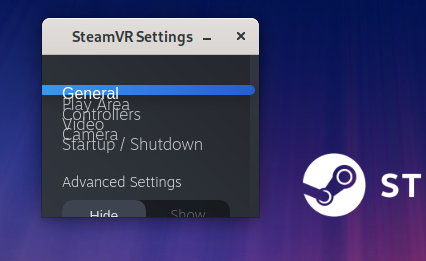
-
Installing a Gnome extension called "Arrange Windows".
https://extensions.gnome.org/extension/1604/arrange-windows/ -
Use the feature "Maximize" when SteamVR settings window is in focus.
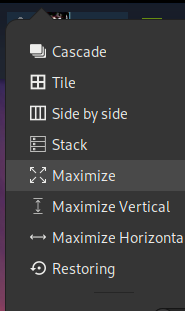

I was now able to change Refresh Rate (Hz) from 120 to 90 and get back the good performance.
So this should work in both Fedora and Ubuntu.
Nothing extracted yet.
Describe the bug
Settings menu does not render correctly, making it impossible to change any configuration parameter, see screenshot. Same result with stable SteamVR 1.16.10 and SteamVR beta 1.17.10.
To Reproduce
Steps to reproduce the behavior:
Expected behavior
I expected to open Settings menu and change refresh rate from 120Hz to 90Hz.
System Information (please complete the following information):
Screenshots
Additional context
Clicking on "Hide" and "Show" under Advanced Settings does not change anything.
Note: Commenters who are also experiencing this issue are encouraged to include the "System Information" section in their replies.