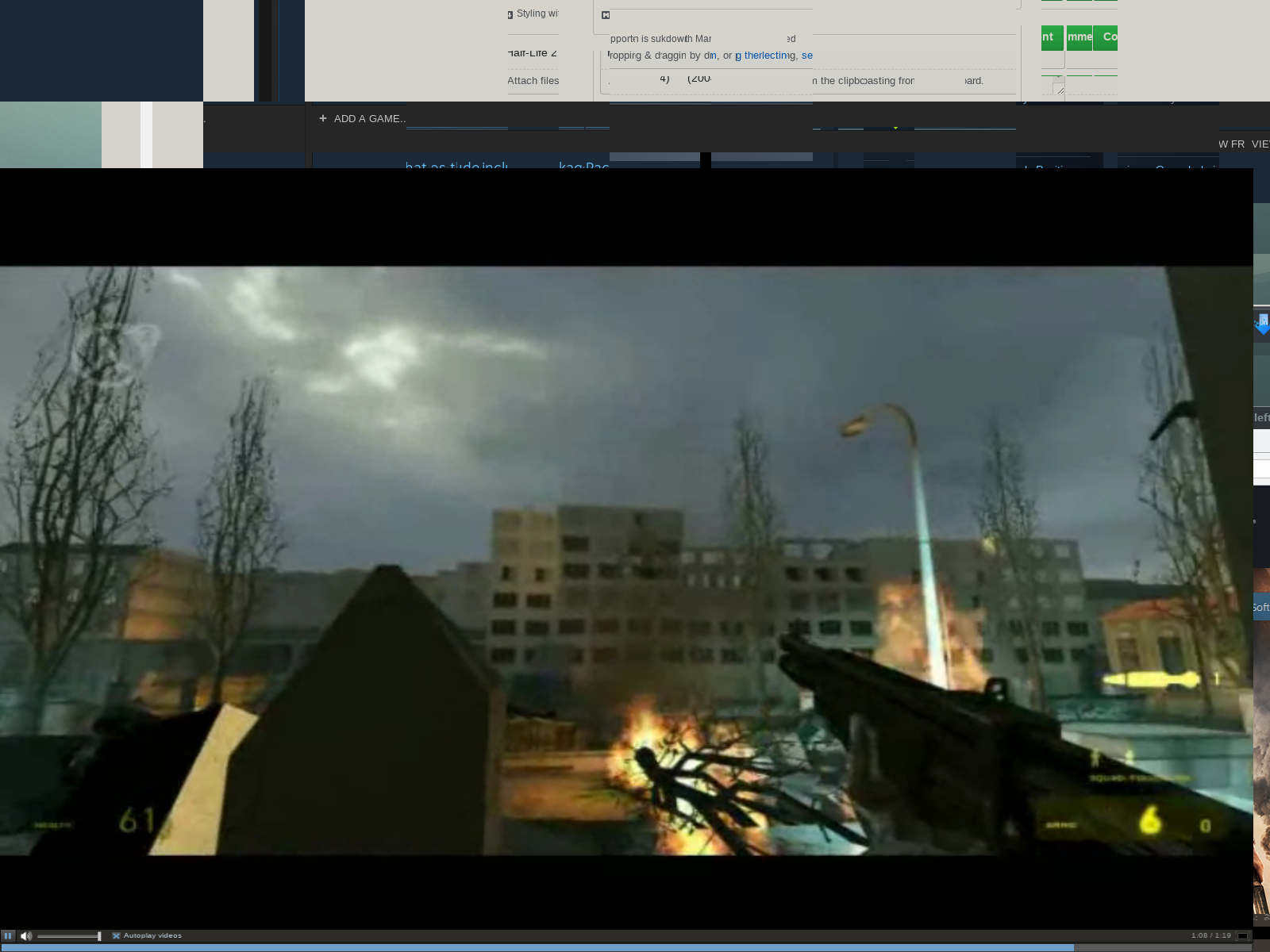
[Steam client] full-screen videos play in bottom left of desktop and is confined to size of Steam client window
I've found that when I open steam it does not remember to go all the way to
the edges. Do not know if that Is related
On 2 Feb 2015 06:05, "Swiftpaw" [email protected] wrote:
If you have the Steam client as most users do, in a smaller window, then
hit the full-screen button on a game store page video, the full-screen
video will match the size of the Steam client window, except it will appear
in the lower left of the screen. The rest of the screen will be black, and
the buttons will be in the location they should have been. This means that
to unmaximize the video, you have to hover your mouse cursor in some small
spot in the bottom right corner. You will see the unmaximize button light
up as it should on the left side once you hover in the right spot and can
then click to unmaximize.If you stretch out the Steam client window to make it "tall", the
full-screen video will actually be stretched "tall" as well and looks
pretty funny! :DIf you full-screen the Steam client window, then it will play on almost
the entire screen as it should, but it's still somewhat offset to the left
and not entirely correct as you'll see when you try to hover your cursor
over the unmaximize button.Probably unrelated output at around the same time:
Installing breakpad exception handler for appid(steam)/version(1422054110)
[0201/104714:ERROR:renderer_main.cc(227)] Running without renderer sandboxDistro is Linux Mint 17.1.
Processor Information:
Vendor: GenuineIntel
CPU Family: 0x6
CPU Model: 0x3a
CPU Stepping: 0x9
CPU Type: 0x0
Speed: 3500 Mhz
8 logical processors
4 physical processors
HyperThreading: Supported
FCMOV: Supported
SSE2: Supported
SSE3: Supported
SSSE3: Supported
SSE4a: Unsupported
SSE41: Supported
SSE42: SupportedNetwork Information:
Network Speed:Operating System Version:
Linux Mint 17.1 Rebecca (64 bit)
Kernel Name: Linux
Kernel Version: 3.13.0-37-generic
X Server Vendor: The X.Org Foundation
X Server Release: 11501000
X Window Manager: Mutter (Muffin)
Steam Runtime Version: steam-runtime-release_2015-01-06Video Card:
Driver: NVIDIA Corporation GeForce GTX 680/PCIe/SSE2Driver Version: 4.5.0 NVIDIA 346.35 OpenGL Version: 4.5 Desktop Color Depth: 24 bits per pixel Monitor Refresh Rate: 59 Hz VendorID: 0x10de DeviceID: 0x1180 Number of Monitors: 1 Number of Logical Video Cards: 1 Primary Display Resolution: 3840 x 2160 Desktop Resolution: 3840 x 2160 Primary Display Size: 24.45" x 13.43" (27.87" diag) 62.1cm x 34.1cm (70.8cm diag) Primary Bus: PCI Express 16x Primary VRAM: 4096 MB Supported MSAA Modes: 2x 4x 8x 16xSound card:
Audio device: Realtek ALC892Memory:
RAM: 15993 MbMiscellaneous:
UI Language: English
LANG: en_US.UTF-8
Microphone: Not set
Total Hard Disk Space Available: 3560196 Mb
Largest Free Hard Disk Block: 2362054 MbInstalled software:
Recent Failure Reports:
—
Reply to this email directly or view it on GitHub
https://github.com/ValveSoftware/steam-for-linux/issues/3699.
I also have this problem. Activating fullscreen makes it play in the lower left. To get it out of fullscreen, I can either hit ESC (which sometimes works, and sometimes doesn't), or guess where the button is supposed to be in the lower-right of the screen, and click it. This has been a problem for me in Steam for at least a couple of months.
Linux Mint 17 MATE 64-bit, with all updates. Nvidia GeForce 560Ti with nvidia-331-updates version 331.38-0ubuntu7. Core 2 Quad [email protected]. 8GB DDR2 800MHz. I reinstalled and updated Steam today.
I have the same issue for months now. Maybe it's related to my triple head display setup?!
The "half-fullscreen mode" is like @dmutters described here, too. I can open Steam on the second/third screen, the movies always open on the primary screen aprox. 66% the size.
Arch Linux, Nvidia. i5
A walkaround: three to five repetitions of leave full-screen + reload store page + play the video + go full-screen again - seem to help for the rest of a session (i.e. until you restart the client).
Well, I tried it with DWM (windowmanager) it's totally breaking WM handling and even ESC doesn't work to exit fullscreen mode. I had to kill the pid ...
I use the DWM window manager as well and have exactly the same problem as tr37ion above except that the video is being centered in the screen but is too small after switching to full-screen mode.
I use a dual screen setup and fascinatingly enough when switching to full screen video in Steam on one screen neither can I ESC out of full screen, nor is it possible to interact with programs on the other screen (using the mouse or keyboard) that Steam is not running on anymore.
Just let me know if you need more infos to debug the problem.
You can just use ALT+F4 to close the full-screened window, since trying to click the unmaximize button can be extremely annoying.
@Shugyousha I can confirm the blocking applications behaviour with triple head setup, too. It seems fullscreen videos with Steam Linux Beta is totally broken. I can only get out of it by switching to TTY and killing Steam the hard way (triple head).
@Swiftpaw Sorry, this isn't a recommended hotkey for Linux. Most of the WMs don't support ALT+F4 by default. It's a Windows way of solving bug related issues. In my case even the DWM default hotkeys for closing windows don't work either.
@triage-valve Could you add the ESC-key for leaving fullscreen videos, please? That way we are able to watch fullscreen movies without having to kill Steam every time.
:+1: Same issue here; single display.
Processor Information:
    Vendor:  GenuineIntel
    CPU Family:  0x6
    CPU Model:  0x3c
    CPU Stepping:  0x3
    CPU Type:  0x0
    Speed:  3900 Mhz
    8 logical processors
    4 physical processors
    HyperThreading:  Supported
    FCMOV:  Supported
    SSE2:  Supported
    SSE3:  Supported
    SSSE3:  Supported
    SSE4a:  Unsupported
    SSE41:  Supported
    SSE42:  Supported

Network Information:
    Network Speed:

Operating System Version:
    LMDE 2 Betsy (64 bit)
    Kernel Name:  Linux
    Kernel Version:  3.16.0-4-amd64
    X Server Vendor:  The X.Org Foundation
    X Server Release:  11604000
    X Window Manager:  Mutter (Muffin)
    Steam Runtime Version:  steam-runtime-release_2015-01-06

Video Card:
    Driver:  Intel Open Source Technology Center Mesa DRI Intel(R) Haswell Desktop x86/MMX/SSE2

    Driver Version:  3.0 Mesa 10.3.2
    OpenGL Version: 3.0
    Desktop Color Depth: 24 bits per pixel
    Monitor Refresh Rate: 60 Hz
    VendorID:  0x8086
    DeviceID:  0x412
    Number of Monitors:  1
    Number of Logical Video Cards:  1
    Primary Display Resolution:  1920 x 1080
    Desktop Resolution: 1920 x 1080
    Primary Display Size: 20.91" x 11.77"  (23.98" diag)
                                            53.1cm x 29.9cm  (60.9cm diag)
    Primary VRAM Not Detected

Sound card:
    Audio device: Intel Haswell HDMI

Memory:
    RAM:  15771 Mb

Miscellaneous:
    UI Language:  English
    LANG:  en_US.UTF-8
    Microphone:  Not set
    Total Hard Disk Space Available:  115034 Mb
    Largest Free Hard Disk Block:  19864 Mb

Installed software:

Recent Failure Reports:
$ apt-cache policy mint-flashplugin-steam
mint-flashplugin-steam:
  Installed: 11.2.202.457
workaround
Alt+tab to close, or hover near bottom-right corner of display to find fullscreen toggle.
Aren't Steam videos HTML5? I mean, I have no Flash installed and I will never have ;) So, recommending to install Flash isn't a solution to this, or?
To my understanding, all Steam videos are Flash. Even if you don't have it installed elsewhere, Steam now ships with its own version (sometimes provided/supplemented by the distro). The version that Steam ships with has historically been pretty fussy, and has often required installing Flash on the host system using special configuration options, symlinking stuff, etc.
So, to answer your question, Flash is already installed, but installing it differently might be a workaround. You're right about that not being a decent solution, though.
I've never had the Steam videos working properly in fullscreen on Awesome WM. Probably forgot to file the bug and now found this one. I've discovered a workaround right now for the first time, try it:
- Make the main Steam window "Always on top". Tiling WMs usually have a hotkey for this (in AwesomeWM use Modkey+T by default), can't tell for floating WMs though. Many have a window menu item but it may not work with the Steam non-decorated window. Try Alt+Space.
- Run a video and press the fullscreen button like you'd normally do.
- The video should be playing back normally (i.e. occupying the entire screen) behind the Steam window.
- Unpin the Steam window so it's not on top.
- Enjoy the video.
Tell me if it works for you. I've found this really by chance just trying different tiling and floating modes, switching the window to floating and back and eventually the "on top" option worked.
My videos aren't playing fine, either.. But it's not exactly the same issue, mine are actually playing ok except they are moved up a few pixels (sometimes enough to move them out of the screen a little).
It's certainly not a distro issue, because it's happened with every distro I've played around with since Steam released on Linux. I can live with it, but it is certainly annoying. Please update Steam to HTML5.
Edit to add: Flash in Linux isn't even supported by Adobe anymore, making the move to HTML5 even more necessary for long term use.
I am also experiencing this issue.
Distro: Linux Mint 17.1 x64
Video Card: Nvidia GeForce GTX 660 Ti - Driver: 349.16
CPU: AMD FX 8350 8xCore
RAM: 16 GB
To my understanding, all Steam videos are Flash. Even if you don't have it installed elsewhere, Steam now ships with its own version (sometimes provided/supplemented by the distro). The version that Steam ships with has historically been pretty fussy, and has often required installing Flash on the host system using special configuration options, symlinking stuff, etc.
So, to answer your question, Flash is already installed, but installing it differently might be a workaround. You're right about that not being a decent solution, though.
No, @dmutters - They moved away from Flash to HTML5. Evidence of this can be found here, here, here, and here. All of those links were taken from games pages off of the Steam Store page and are a sampling from over 12 years.
It's safe to say that all videos were converted to .webm format
So, no... @tr37ion ... it's not a useful suggestion.
I agree, the title is misleading, the "flash" word should be removed. Videos are HTML5 and I may guess that Flash videos would playback just fine if there were any. Flash manages its own independent window so it's more likely to work without such quirks. HTML5 video OTOH relies on the browser implementation and if it's done poorly we get what we have. I'm not advocating Flash, it should just die already, but in this particular case it could work better. In Chrome Flash on YouTube has been working way better for quite a while until HTML5 video was fixed (there was tearing and a nasty white line on top in fullscreen, Flash was working just fine).
Another reason to fix it!
BTW, many people here mention multihead setups. While this can be an issue, I only have one display and it still happens.
If they're already HTML5 then why have I only ever seen a flash symbol in the taskbar for the fullscreen video windows??
Edit: Apologies, seems I spoke too soon... I just checked a couple and they are indeed now HTML5. Not sure when the change was made, or maybe some videos are still Flash, as it hasn't been that long ago that I last saw it.
Not sure. I've never seen it. It may try to use flash then fall back to HTML5 if it's not installed.
I edited my comment above. It's now saying "Steam HTML Fullscreen".
Edit: Seems sometime it works right and sometimes it's this issue, no pattern or consistency to it.
I was trying to dig into it myself (not actually a Valve dev, so I'm limited to Windows and Linux clients because that's what I've got) and found a few other bugs I'll have to file. That being said, I can't seem to replicate it claiming to use flash.
All that occurs is the original reported bug and top reporting SteamWebHelper using >100% CPU; no flash indication and flash isn't shown on my system. The videos are still .webm, so I can't say why it's happening to show you Flash.
Okay, so if these videos aren't flash, it's a Webkit or-whatever-Steam-is-using bug with HTML5 webm video playback. I'm pretty sure it is Flash though since why else would there be a Steam Flash package installed that keeps getting updated now and then on Linux Mint called mint-flashplugin-steam?
Either way, this is an annoying problem for Steam on the desktop!
mint-flashplugin-steam is an old package Mint has had for over a year designed to work when Steam was using Flash; it's not any more.
I don't think it's necessary any more; I removed it and started browsing videos and didn't notice any difference.
Yes, the problem is annoying. I'm just trying to find a solution (I experience the same bug).
Yep, removed that package and Steam videos still play. So unless that package didn't delete a Flash plugin, looks like it is HTML. I don't see any processes with any "flash" in them while playing videos either.
So yeah, full-screen HTML5 videos need to be fixed then. :D
I'm waiting to hear from one of the devs, but it appears to be an upstream issue.
https://github.com/hakimel/reveal.js/issues/77 describes a similar issue
Interesting. From what I see the fullscreen button just triggers the normal, browser-handled fullscreen, not just a big video of the page size. In particular, it seems that it does something like document.getElementsByClassName("highlight_player_item highlight_movie")[0].webkitRequestFullscreen() as after I press that fullscreen button in the browser document.webkitCurrentFullScreenElement returns a div with that class name. The Fullscreen API isn't stabilized yet at least in Chrome, I've checked these samples and only elem.webkitRequestFullscreen exists. So it's up to browser how to switch to fullscreen and it's Steam's fault not handling it properly. Just because it works fine in Chrome on the same Store pages.
So is it broken regardless of the WM/DE? Does it work as expected on out-of-the-box Ubuntu 12.04 or 14.04? I'm using Debian Sid/testing and, well, not so popular Awesome WM. Sometimes it's the source of a problem.
I've replicated the issue on Mint 17.1/Cinnamon
I just messed around with it a bit, again, and on the first try, fullscreen worked perfectly. Then, I un-fullscreened it, and tried again. Funky fullscreen resulted (as above). Then, on the third and fourth tries, it worked properly, again. For those attempts, I just left the video running, and clicked the fullscreen button(s) repeatedly, nothing else. Then, I tried pausing and fullscreening, unpausing, etc., to no effect: it worked as it's supposed to.
I tested this on the Shadowrun: Dragonfall - Director's Cut store page, with the video that says, "One of the most memorable & complex RPG stories of the decade - PC Gamer" near the beginning. Linux Mint 17 (MATE) with all updates, as of 5-24-15.
Either Valve is making progress on this issue, or I'm just really lucky, today...
Has anyone tried the "always on top" approach? For me it works every time, not elegant and requires extra clicks or keypresses but at least it's something.
I tried "always on top" in gnome 3 and it doesn't work for me. Tried to press fullscreen button many times and only got it working as it supposed to only once.
Actually this bug applied to me but didn't bother me much before. I bought some cheap streaming video film now just to check how it's working and this bug is there. Window borders are thinner for video player window and aspect ratio is not so badly ruined (when fullscreened from maximized window). But really, it's not good enough.
Well, thanks for the feedback. You can probably watch your movie in the browser until it's fixed. I wonder if it works in Ubuntu/Unity and if it does, what's the difference between all these WMs, what Unity has that all others don't.
Yes, trailers from steam work in fullscreen mode with firefox (without flash plugin). But, unfortunately, you can't look streaming video from your browser, it can only be done from steam application. I looked the film already, but I'll wait until this bug fixed before buying any other streaming video.
I have the same problem from time to time. The actual buttons are still in the correct place (not synced with graphics). I'm using Ubuntu 15.04 with Gnome 3.14.

I also have this problem, even if my main Steam window is "maximized":

Any news on this @gdrewb-valve @alfred-valve @davidw-valve @EricS-Valve ?
I have exactly the same issue, are there any news?
This is pretty big issue left unfixed for so long, considering it affects everyone who uses Steam for Linux.
Just noticed this worked today on the first video to be full-screened from the client. I haven't updated my box or anything recently (in the last week) so I am assuming the last steam update may have fixed the problem, but looks like that was August 19th. Perhaps I just noticed as there have been a few 10.6.x mesa bug fix releases and I do not try to watch videos from client since I know it doesn't work
I confirmed if I relaunch the client it always works the first time a video is full-screened and never after that.
Environment:
openSUSE 20150909 (Tumbleweed)
Radeon HD 7970 ghz
OSS video driver (kernel 4.1.6 + mesa 10.6.5)
Plasma 5
Steam 1440016726
I look forward to testing on 4.2 kernel and mesa 11.
I just tried it a few times, and boombatower's observations seem to be true of my experiences, as well: first time it works, then after taking it out and back into fullscreen one or more times, it doesn't work right. I tested it with the first video from the CS:GO store page. I checked for Steam client updates, today, and it seems to be the latest version. System information and screenshot follows.

Processor Information:
Vendor: GenuineIntel
CPU Family: 0x6
CPU Model: 0x17
CPU Stepping: 0xa
CPU Type: 0x0
Speed: 2670 Mhz
4 logical processors
4 physical processors
HyperThreading: Unsupported
FCMOV: Supported
SSE2: Supported
SSE3: Supported
SSSE3: Supported
SSE4a: Unsupported
SSE41: Supported
SSE42: Unsupported
Network Information:
Network Speed:
Operating System Version:
Linux Mint 17.2 Rafaela (64 bit)
Kernel Name: Linux
Kernel Version: 3.16.0-38-generic
X Server Vendor: The X.Org Foundation
X Server Release: 11501000
X Window Manager: Metacity (Marco)
Steam Runtime Version: steam-runtime-release_2015-06-12
Video Card:
Driver: NVIDIA Corporation GeForce GTX 560 Ti/PCIe/SSE2
Driver Version:  4.5.0 NVIDIA 346.82
OpenGL Version: 4.5
Desktop Color Depth: 24 bits per pixel
Monitor Refresh Rate: 59 Hz
VendorID:  0x10de
DeviceID:  0x1200
Number of Monitors:  1
Number of Logical Video Cards:  1
Primary Display Resolution:  1680 x 1050
Desktop Resolution: 1680 x 1050
Primary Display Size: 18.66" x 11.65"  (21.97" diag)
                                        47.4cm x 29.6cm  (55.8cm diag)
Primary Bus: PCI Express 16x
Primary VRAM: 1024 MB
Supported MSAA Modes:  2x 4x 8x 16x
Sound card:
Audio device: Loopback Mixer
Memory:
RAM: 7984 Mb
Miscellaneous:
UI Language: English
LANG: en_US.UTF-8
Microphone: Not set
Total Hard Disk Space Available: 592707 Mb
Largest Free Hard Disk Block: 38151 Mb
Installed software:
Recent Failure Reports:
Fri Sep 18 04:14:24 2015 GMT: file ''/tmp/dumps/crash_20150917211423_26.dmp'', upload yes: ''CrashID=bp-b398939d-3288-47c8-bbb3-92cea2150917''
Same issue here:

single display, resolution 1920x1080, gnome-shell
Processor Information:
    Vendor:  GenuineIntel
    CPU Family:  0x6
    CPU Model:  0x3c
    CPU Stepping:  0x3
    CPU Type:  0x0
    Speed:  3400 Mhz
    8 logical processors
    4 physical processors
    HyperThreading:  Supported
    FCMOV:  Supported
    SSE2:  Supported
    SSE3:  Supported
    SSSE3:  Supported
    SSE4a:  Unsupported
    SSE41:  Supported
    SSE42:  Supported

Network Information:
    Network Speed:

Operating System Version:
    Linux (64 bit)
    Kernel Name:  Linux
    Kernel Version:  4.2.0-gentoo-r1
    X Server Vendor:  The X.Org Foundation
    X Server Release:  11702000
    X Window Manager:  GNOME Shell
    Steam Runtime Version:  <Runtime disabled>

Video Card:
    Driver:  NVIDIA Corporation GeForce GTX 760M/PCIe/SSE2

    Driver Version:  4.5.0 NVIDIA 355.11
    OpenGL Version: 4.5
    Desktop Color Depth: 24 bits per pixel
    Monitor Refresh Rate: 60 Hz
    VendorID:  0x10de
    DeviceID:  0x11e3
    Number of Monitors:  1
    Number of Video Cards Not Detected
    Primary Display Resolution:  1920 x 1080
    Desktop Resolution: 1920 x 1080
    Primary Display Size: 13,54" x 7,64"  (15,51" diag)
                                            34,4cm x 19,4cm  (39,4cm diag)
    Primary Bus: PCI Express 16x
    Primary VRAM: 2048 MB
    Supported MSAA Modes:  2x 4x 8x 16x

Sound card:
    Audio device: Intel Haswell HDMI

Memory:
    RAM:  15468 Mb

Miscellaneous:
    UI Language:  English
    LANG:  pl_PL.utf8
    Microphone:  Not set
    Total Hard Disk Space Available:  442484 Mb
    Largest Free Hard Disk Block:  44992 Mb

Installed software:

Recent Failure Reports:
@alfred-valve @gdrewb-valve Any chance that this gets fixed before the SteamBoxes launch?
This particular issue is pretty important because it discourages buying any video. I want to buy some movies but I can't because I have no opportunity to watch them comfortably (in fullscreen, i.e.). And I can't use browser as I heard it's impossible to watch bought media there, only in the client. DRM requirement I suppose.
Turns out, the stream service uses slightly different player, it opens in a new window and scales just as it should. So this issue only applies to the Store embedded videos. Yes, if you try to watch the streamed video from the browser it asks to open it in Steam but then it works fine, same when you just press "Watch" in Steam.
I understand that it should work well on SteamOS (I'd be surprised if it doesn't) but there are other popular distros, DEs and WMs that aren't supported well. GNOME 3 is among them if not my Awesome WM. 9 months passed, I expect a fix to be born...
open source the UI (not DRM / apis) part and we'd have a field day
I have exactly the same issue:
- If I try to play Fallout 4 store page videos in full-screen, my display flickers insanely and only the left-corner area is filled by the video playback.
- ^Same issue while watching gameplay streams of my friends.
I can use ESC button to exit full-screen mode.
For some reason, this issue didn't occur while playing a Path Of Exile video in their store page. Is this particular video based on HTML5 instead of Flash or what?
To conclude, it seems that only some store page videos + gameplay streams are affected.
I hope this issue will be fixed soon.
Linux Steam Client - Sample store page video of Fallout 4 - issue present:

Linux Steam Client - Sample store page video of Path of Exile - issue not present:

Short specs:
Native Steam Linux client
- Built: Nov 9 2015, at 18:25:23
- Steam API: V017
- Steam package versions: 1447125378
No system-wide flash plugin installed
Arch Linux + KDE (Qt4)
Intel HD 4000 Graphics
Edit: Hmm, strange. Sometimes playback of the Fallout 4 sample video works fine in full-screen without any issues...I tried to debug this and...still having no idea.
I've got the same problem. I think I've never managed to watch steam video in a normal full-screen.
OS: Debian "jessie"
WM: GNOME Shell
GPU: Nvidia Geforce GT 650M
I'm beginning to wonder if this is a hack to make Big Picture Mode stretch images, until Valve figures out a way to change resolutions smoothly in X Windows, without requiring elevated privileges. If so, when Valve figures out resolution changes in X, this problem will go away. This would also explain why this issue isn't getting much attention: it's a symptom of a bigger puzzle that's still being solved on a relatively very new platform.
Has anyone tried to reproduce the bug in SteamOS? I'm wondering if they've tweaked or replaced X or the Desktop Environment, to get around it.
@dmutters I've never had this bug in Big Picture Mode (which is used by SteamOS), so I guess, it only affects the normal Steam Client.
Hmmm...we may have to just wait this one out. I hope Valve will give us a progress report, soon.
same here. and the volume bar is in the middle everytime.
OS: Ubuntu 14.04 x64
DE: Unity
GPU: Intel HD3000
It'll be interesting if this will be fixed 2016 ;)
+1

OS: Arch Linux
WM: Gnome
GPU: Nvidia GTX 640M
Still no acknowledge from Valve? This is still happening
We can reproduce this internally but haven't been able to track down the issue within the CEF code yet. I will upate this bug when we have news.
IIRC it started to happen just after video fullscreen mode was changed to cover actual full screen. Before that video fullscreen was only covering an area inside of the steam client (web part, excluding its borders and header).
Thank-you for the response, Plagman!
I'm wondering if the code to make it full-window has simply propagated to the code to make it full-screen. This might be a regression resulting from the implementation of Big Picture Mode, which would explain why the "full screen" video is only as large as the window it started with. I've noticed that the "full screen" video will always be the size of the viewable area of the original window. I.e. resizing/maximizing the Steam window before attempting to go full-screen makes the resulting video bigger--albeit still not properly full-screen. In Big Picture Mode, the viewable area of the Steam window is already full screen, so it's not an issue.
A quick workaround might be to include a few lines of code to maximize the window upon being commanded to go full screen, then making it display full screen, then resizing the window, afterward. It would still be ugly, and the buttons would still be slightly offset, but it would be much better than the present behavior, until something more permanent can be introduced.
Thanks for your work, Valve. :-)
Btw. did someone test it with x/Wayland (Weston)?
Guys, is it my system or was this problem fixed in one of the latest beta client updates? Didn't check it for week or two, and now it just works.
Nope, I still have the issue. Just checked and updated the client.
Steam client application:
Steam API: v017
Built: Mar 10 2016, at 10:44:34
Steam package versions: 1457636973
Hmmm, it seems you're right! It works for me as well on Steam Beta. The only issue is that the fullscreen window pops up under the Steam itself but that's a configuration issue with Awesome WM. I'll sort it out myself. I don't know how to copy the "About Steam" info, mine is built at Mar 18 2016.
the topic is still open so it's still an issue. and yes the whole video player is buggy on my 14.04 too.
Fincer, is it beta? I have Steam package versions: 1458336029 (same as rkfg I believe)
ViBENo1, maybe it wasn't registered yet or fixed unintentionally?
Looks fixed on my Gentoo with DWM.
@antonkurkin
Right, enabled Steam Beta and updated the client. I have build 1458336029 (Mar 18 2016) now and the issue seems to be fixed. I tested a couple of trailer videos and haven't a single issue with them anymore.
I just enabled Steam Beta, and now it works! Way to go, Valve!
Let's keep an eye out for regressions, just in case...
Can confirm seems to work for me in beta client as well! Thanks Valve!
@antonkurkin somehow the update bit delayed for me. all of you right. it's finally fixed. i can't believe it.
Fixed for me on Linux Mint 17.3 (Ubuntu 14.04) with Cinnamon. Thanks Valve!
Thanks so much for fixing this!!! :wolf:
@Plagman could you reopen this bug please? There was a regression and now fullscreen videos are playing just like it was before fix.
I have steam client version 1461972496, can someone else reproduce it?
Steam update also fixed full screen in big picture mode (before last update, i believe, it was covering only a part of the monitor). Probably it's related?
Damn, you're right. It's broken again...
True, have the same issue again.
I can confirm that the problem has re-emerged for me since installing the April 29th update. (I'm in the Steam Beta program.)
Help > About Steam (transcribed by hand):
Steam client application
Built: Apr 29 2016, at 22:27:58
Steam API: v017
Steam package versions: 1461972496
Emailed Plagman to re-open this ticket. I can confirm this issue in the stable Steam Linux client, and others have confirmed it in the beta client.
I just did a steam client update, today (beta enabled), and it's still a problem. Screenshot attached. Insurgency's store page.

It's more than a month since regression already and I'm not sure how it should be done. should we file another bug to reopen this one?
I think that re-opening this one is best, for now. It took a few months to get attention from Valve, when the bug was opened. If there's still no attention after 6 months, we can open a new bug and reference this page in that one.
It probably should be noted that libcef (embedded chromium) should be providing this functionality, and the fix and subsequent regression is most likely due to upstream changes.
Thanks, reopening.
I confirm having the issue on Fedora 24 (GNOME 3.20 under X.org) - Installed the client from Negativo17 repository.
My Steam Version (Beta Program):
Built: Jun 1, 2016 at 21:41:31
Steam API: v017
Steam Package Versions: 1464823435
Under Wayland, it's way worse! At least under X.org, I can see the player toolbar (Play/Pause buttons) but under Wayland, the whole player is shifted to the bottom with the same issue of empty top screen.
I just installed Linux Mint 18 Cinnamon, which is based on Ubuntu 16.04 LTS, and can confirm that the problem still exists.
Tested on this page, in Steam (right-click, Copy Page URL):
http://store.steampowered.com/app/222880/
Computer Information:
Manufacturer: Unknown
Model: Unknown
Form Factor: Desktop
No Touch Input Detected
Processor Information:
CPU Vendor: GenuineIntel
CPU Family: 0x6
CPU Model: 0x2a
CPU Stepping: 0x7
CPU Type: 0x0
Speed: 3800 Mhz
8 logical processors
4 physical processors
HyperThreading: Supported
FCMOV: Supported
SSE2: Supported
SSE3: Supported
SSSE3: Supported
SSE4a: Unsupported
SSE41: Supported
SSE42: Supported
AES: Supported
AVX: Supported
CMPXCHG16B: Supported
LAHF/SAHF: Supported
PrefetchW: Unsupported
Network Information:
Network Speed:
Operating System Version:
Linux Mint 18 Sarah (64 bit)
Kernel Name: Linux
Kernel Version: 4.4.0-21-generic
X Server Vendor: The X.Org Foundation
X Server Release: 11803000
X Window Manager: Mutter (Muffin)
Steam Runtime Version: steam-runtime-beta-release_2016-06-15
Video Card:
Driver: NVIDIA Corporation GeForce GTX 980/PCIe/SSE2
Driver Version:  4.5.0 NVIDIA 361.42
OpenGL Version: 4.5
Desktop Color Depth: 24 bits per pixel
Monitor Refresh Rate: 59 Hz
VendorID:  0x10de
DeviceID:  0x13c0
Revision Not Detected
Number of Monitors:  1
Number of Logical Video Cards:  1
Primary Display Resolution:  1680 x 1050
Desktop Resolution: 1680 x 1050
Primary Display Size: 18.66" x 11.65"  (21.97" diag)
                                        47.4cm x 29.6cm  (55.8cm diag)
Primary Bus: PCI Express 16x
Primary VRAM: 4096 MB
Supported MSAA Modes:  2x 4x 8x 16x
Sound card:
Audio device: Realtek ALC898
Memory:
RAM: 15928 Mb
Miscellaneous:
UI Language: English
LANG: en_US.UTF-8
Microphone: Not set
Total Hard Disk Space Available: 2797332 Mb
Largest Free Hard Disk Block: 2180001 Mb
VR Headset: None detected
The latest Beta cycle did a major revision to the web component of Steam, thought to have been the cause of this issue in the past. Can anyone reproduce this issue on the current Beta?
I can confirm the quirk behavior is present with the 2016-11-23 steam beta client on Gentoo Linux no steam runtime.
Addition: So, it looks like this occurs on my primary desktop which is 2x 1920x1080 w/ nvidia 370.28 but not my low-perf laptop which is also Gentoo no steam runtime, 1366x768 w/ mesa 13.0.1 r600 (evergreen generation). The desktop is using Cinnamon 3.0 (muffin), and the laptop is using MATE 1.12.1.
The revision to the Steam website was only to the front page it seems. I can't find any videos which will play from the front page. The videos for the games in the individual game store pages still have this bug.
Steam (as of Nov 30, 2016 version) which brings some new updates regarding DRM-protected videos (Widevine), still doesn't solve this bug under GNOME 3.22.2 (Mutter 3.22.2 under Wayland) with Fedora 25 (Secondary Screen without Top-bar).
Attached a photo of the current issue, where the video is almost half the screen in height with a black strip above (in screenshot, in reality it shows a flickering image), and there's small black strip on the right reduces the width of the player (but when you hover on the player buttons (e.g. Full screen button), they don't get active without hovering over their hypothetical position in the black right strip).

Still issue in 2017
It's a problem.It happens every video.Also client goes flashing at this state

This issue is a year old and is still not fixed. Is there a fix being worked on?
Same problem here on OpenSuse Tumbleweed (64 bit), running on an AMD R9 380.
Steam client: version 1489442219
amdgpu driver: libdrm_amdgpu1, version 2.4.75-1.1
mesa: 17.0.1-157.1
monitor resolution: 3440x1440 (21:9)
Same problem here Manjaro rolling latest using native runtime library.
$ uname -a Linux Centaur 4.10.4-1-MANJARO #1 SMP PREEMPT Sun Mar 19 08:51:42 UTC 2017 x86_64 GNU/Linux
Fixed! As of the latest update, fullscreen is working properly.
Steam client built: Mar 30 2017, at 15:23:05
Steam API: v017
Steam Package Version: 1490914880
Computer Information:
Manufacturer: To Be Filled By O.E.M.
Model: To Be Filled By O.E.M.
Form Factor: Desktop
No Touch Input Detected
Processor Information:
CPU Vendor: GenuineIntel
CPU Brand: Intel(R) Core(TM) i7-2600 CPU @ 3.40GHz
CPU Family: 0x6
CPU Model: 0x2a
CPU Stepping: 0x7
CPU Type: 0x0
Speed: 3400 Mhz
8 logical processors
4 physical processors
HyperThreading: Supported
FCMOV: Supported
SSE2: Supported
SSE3: Supported
SSSE3: Supported
SSE4a: Unsupported
SSE41: Supported
SSE42: Supported
AES: Supported
AVX: Supported
CMPXCHG16B: Supported
LAHF/SAHF: Supported
PrefetchW: Supported
Network Information:
Network Speed:
Operating System Version:
Windows 10 (64 bit)
NTFS: Supported
Crypto Provider Codes: Supported 311 0x0 0x0 0x0
Video Card:
Driver: Intel(R) HD Graphics
DirectX Driver Name:  nvd3dum.dll
Driver Version:  9.17.10.4459
DirectX Driver Version:  21.21.13.7892
Driver Date: 19 May 2016
OpenGL Version: 4.5
Desktop Color Depth: 32 bits per pixel
Monitor Refresh Rate: 143 Hz
DirectX Card: NVIDIA GeForce GTX 980
VendorID:  0x10de
DeviceID:  0x13c0
Revision:  0xa1
Number of Monitors:  1
Number of Logical Video Cards:  1
No SLI or Crossfire Detected
Primary Display Resolution:  2560 x 1440
Desktop Resolution: 2560 x 1440
Primary Display Size: 23.50" x 13.23"  (26.97" diag)
                                        59.7cm x 33.6cm  (68.5cm diag)
Primary Bus: PCI Express 16x
Primary VRAM: 4095 MB
Supported MSAA Modes:  2x 4x 8x
Sound card:
Audio device: Speakers (High Definition Audio
Memory:
RAM: 16265 Mb
Miscellaneous:
UI Language: English
Microphone: Not set
Steam Controller Cable and Base: Not set
Media Type: DVD
Total Hard Disk Space Available: 5722492 Mb
Largest Free Hard Disk Block: 2218834 Mb
OS Install Date: Dec 31 1969
Game Controller: None detected
VR Headset: None detected
I just installed another update, and it's broken, again.
Built: Mar 30 2017, 22:20:57
Steam API: v017
Steam package version: 1490914880
(All of this appears to be the same, except for the build time.)
It's like they noticed this is fixed and broke it again without even changing the build number. Just because. Welp, two years isn't that big of a time, remember the 12309 bug?
Well, hopefully having very specific data on which versions fix/regress the issue will help get it resolved, for good. At this point, I think all we can do is let them know when things work/don't work, what versions we're using at the time, and any other relevant information we can think of. When the Steam dev team is ready to really tackle the issue, they'll at least have some good data to work with.
You mean that I/O wait bug in the Linux kernel? Yeah, that one drives me nuts, sometimes. In certain kernel versions (or when the stars align "just so"?), you can't copy a file and do other stuff at the same time, no matter how many CPU cores or hard drives you have. It seems mostly fixed, now, but they're still actively working the problem on Bugzilla. Here's hoping this Steam bug doesn't take 9+ years to resolve...
It looks like it is partially fixed ; however i think that problems are a little bit related to uploaded videos width,length etc. Looks like Steam client can't upscale or downscale them correctly.


This first two screenshots are from game Inner Chains page.
It looks perfectly normal and it also looks same on web browsers. I tried with Chrome.
However ; at this page something weird happens. This game is CrossCode.

Same video looks normal with Chrome.

Mad Max-Steam Client

Mad Max-Chrome

@Plagman
Info:

Linux Mint 18.1-Mesa 17.0.3 drivers provided via Padoka Stable Ppa
If it's an upscaling issue, and not all videos are uploaded at the same quality, that would explain some of the intermittence we're seeing. To do a proper test, we probably need to check with a number of different videos on different games, from different publishers.
I have this issue with arch linux, cinnamon desktop and amd open source drivers too. In my case different sizes are happening because of size of steam window. Don't know if it is same for you guys too. So renderer viewport of internal browser actually doesn't becomes fullscreen but still uses same size of client window. I think it might be a bug related to viewport resizing code not executed on fullscreen mode properly and a fix could be changing browser renderer viewport size to fullscreen during fullscreen event or just initialize and keep it as fullscreen size always. Just some guesses might help, don't know how it works internally :)
Same problem here. Nvidia proprietary driver, Gnome desktop and Arch Linux. Any chance to see a fix in the foreseeable future?
Fun fact, I was scrolling through the new Nvidia 381.22 driver's change log and noticed this:
Fixed a bug that caused applications to crash in some situations when calling glXMakeCurrent while OpenGL threaded optimizations were enabled. This frequently occurred when Steam was attempting to make a video appear full-screen.
http://news.softpedia.com/news/nvidia-381-22-video-driver-supports-newer-linux-kernels-more-vulkan-extensions-515570.shtml
Could someone install this new driver and test this out?
I had a crash yesterday inside libglx trying to go fullscreen. It happened only once but I still don't think it's going to fix this issue. Valve updated the CEF component (embedded chromium) in the beta version of steam but it didn't change anything in this regard.
Okay, I installed it and as expected the issue persisted.
For me the first video of each steam restart will fullscreen as expected. Once fullscreen is exited, any video including the first one will fullscreen to the wrong size. Same behaviour on both stable and beta steam clients.
I have this issue.
Arch Linux
Kernel 4.11.2-1-ARCH
Nvidia 381.22-2 on a GTX 970
Awesome WM
Every time I try to full-screen a video on steam store I get a borderless window in the bottom left of the screen. The video plays successfully but not in full-screen.
I've had this problem since I can remember.
Arch + Cinnamon + Steam Client Beta
I wish I could fix it somehow. It drives me crazy! I0ve stopped viewing videos on the Steam Client. I just jump on Youtube.
Now, this is weird.
I'm using GNOME 3.24 on Fedora 26 and Steam build July 17, 2017 (Stable). I got a notification from "Life is Strange" group about their new release, which was accompanied with a YouTube video (http://steamcommunity.com/games/319630/announcements/detail/1433687019118398768), so I played the video and full-screened it inside Steam client, and the screen went fully without any problems!!
I got back to the game store page to check the steam player and I found the same issue still there: http://store.steampowered.com/app/319630/
I now believe there's something wrong with the player code itself!
After playing the normal video player, and going back to the YouTube video, now YouTube is affected with the bug!!
August 2017, over 2½ years later... this is STILL an issue?!
Machine 1: Intel Core i5-3470, 16 GB RAM, Radeon HD7750, opensource driver radeon/ati, DRM 2.39.0 / 3.16.0-4-amd64, LLVM 3.8.1, Mesa 13.0.6, Debian 8 Jessie, KDE 4.14.2
I can view videos properly about 50% of the times.
Machine 2: Intel Core i7-2600K, 8GB RAM, AMD RX550, opensource driver amdgpu/ati, DRM 3.10.0 / 4.11.0-2-amd64, LLVM 4.0.1, Mesa 17.1.5, Debian 9 Buster/Sid, KDE Plasma 5.8.7
I basically can't view videos properly, ever. Maybe once in a while so let's say less than 5% of the times.
/sigh
I have the the problem but strangely only for some games. Some work without any problems in full screen (e.g. Enter the gungeon) other's don't and can only be played in window mode with predefined resolution, because in fullscreen halt of the screen is outside of the image as in the first post.
Intel Xeon E5, 16 GB Ram, NVidia GeForce GTX 970 with latest official driver on ubuntu 16.04
Dude, this issues is not about playing games. It's about playing videos from the Stram Store. Game videos, trailers, whatever. (;
Ups my bad..sorry so I have to search for another issue ;) just looked to familiar
The current steam beta client still has this problem.
I’m pretty sure that’s a feature, not a bug. );
Is there any chance Valve is paying attention to this? It hasn't been fixed in years but there has been many Steam/SteamOS updates.
It's probably just low priority for the developers. Since it isn't keeping people from buying/playing games, and it isn't part of a push to grow the company, we should expect it to be fixed "whenever they get around to it". I'm given to understand that the videos play correctly on SteamOS (and in Big Picture Mode, which SteamOS uses), so this is really just a Linux desktop issue--which has, historically, not been a huge growth sector for gaming. Maybe with the Vulkan graphics API becoming more popular for game development, this will change...eventually.
I've been now using the Linux Steam client for three years, across three machines, and I've always had this issue. Arch, GNOME 3, both the mobile Haswell GPU and GT 840M (Primus). At this point I'm not even hoping for a fix, unless they revamp the entire UI and actually make it not outdated by 10 years. It's just sad.
It's probably just low priority for the developers. Since it isn't keeping people from buying/playing games, and it isn't part of a push to grow the company, we should expect it to be fixed "whenever they get around to it".
Well, it kinda makes it harder for me to buy a game if I can't watch a freaking trailer and have to rely on 3rd party videos. It shouldn't be low priority, it's an important and integral part of the client and the store. So much for "Linux and Open Source are the future of gaming".
I agree that they should get on it, and that it's a black eye for the Steam for Linux user interface. Realistically, though, since people can still view the game videos on steampowered.com, there isn't a whole lot of incentive to fix this quickly. Just my $0.02.
Videos still work, it's just full-screen that is broken, and the problem is worse if you're on a high-DPI monitor where full-screening is needed even more.
It is indeed a really bad sore spot for the client and I hope a major revamp is coming soon that will replace and resolve this. It sounded like that might be coming soon so maybe they're waiting on it?
@dmutters
"Linux desktop only bug" seems like a stretch when you yourself reported the bug appearing on your Windows 10 PC in April.
The bug seems to be fixed for me and I'm not sure when it started working again. Every video I try works perfectly 100% so uhh... maybe I'm jinxing it now. :O
Anyway, current specs...
Debian 9 GNU/Linux buster/sid, KDE Plasma 5.10.5
Kernel: 4.12.0-2-amd64 x86_64
Quad core Intel Core i7-2600K, 16GB RAM
Display Server: x11 (X.Org 1.19.3) drivers: ati,amdgpu
xserver-xorg-video-amdgpu: 1.4.0-1
xserver-xorg-video-ati: 7.10.0-1
Dual monitors at [email protected]
OpenGL: renderer: Radeon RX 580 Series (AMD POLARIS10 / DRM 3.15.0 / 4.12.0-2-amd64, LLVM 5.0.0)
version: 4.5 Mesa 17.2.1
Steam client application
Built: Sep 6 2017, at 20:37:28
Steam API: v017
Steam package versions: 1504757234
@dpanter I happened to be booted into Windows when I ran the hardware report that I posted. At the time, it had been fixed in Linux for a couple weeks. It has since regressed. The problem has never manifested itself for me in Windows. It is currently still broken for me.

Computer Information:
Manufacturer: Unknown
Model: Unknown
Form Factor: Desktop
No Touch Input Detected
Processor Information:
CPU Vendor: GenuineIntel
CPU Brand: Intel(R) Core(TM) i7-2600 CPU @ 3.40GHz
CPU Family: 0x6
CPU Model: 0x2a
CPU Stepping: 0x7
CPU Type: 0x0
Speed: 3800 Mhz
8 logical processors
4 physical processors
HyperThreading: Supported
FCMOV: Supported
SSE2: Supported
SSE3: Supported
SSSE3: Supported
SSE4a: Unsupported
SSE41: Supported
SSE42: Supported
AES: Supported
AVX: Supported
CMPXCHG16B: Supported
LAHF/SAHF: Supported
PrefetchW: Unsupported
Operating System Version:
Linux Mint 18.2 Sonya (64 bit)
Kernel Name: Linux
Kernel Version: 4.10.0-35-generic
X Server Vendor: The X.Org Foundation
X Server Release: 11804000
X Window Manager: Mutter (Muffin)
Steam Runtime Version: steam-runtime-beta-release_2017-07-24
Video Card:
Driver: NVIDIA Corporation GeForce GTX 560 Ti/PCIe/SSE2
Driver Version: 4.5.0 NVIDIA 375.66
OpenGL Version: 4.5
Desktop Color Depth: 24 bits per pixel
Monitor Refresh Rate: 99 Hz
VendorID: 0x10de
DeviceID: 0x1200
Revision Not Detected
Number of Monitors: 1
Number of Logical Video Cards: 1
Primary Display Resolution: 2560 x 1440
Desktop Resolution: 2560 x 1440
Primary Display Size: 23.50" x 13.23" (26.97" diag)
59.7cm x 33.6cm (68.5cm diag)
Primary Bus: PCI Express 16x
Primary VRAM: 1024 MB
Supported MSAA Modes: 2x 4x 8x 16x
Sound card:
Audio device: Realtek ALC898
Memory:
RAM: 15923 Mb
Miscellaneous:
UI Language: English
LANG: en_US.UTF-8
Total Hard Disk Space Available: 2800041 Mb
Largest Free Hard Disk Block: 2176035 Mb
VR Headset: None detected
Recent Failure Reports:
@dmutters
Ok, simple misunderstanding then. I did notice your beta Steam client being much older than my non-beta version so maybe check that out.
No worries. Thanks for the tip about the beta version. I've opted into the beta program with my current Steam installation, and did an update. Unfortunately, the video mentioned, above, still has the issue.
@dpanter Which game video(s) are you not experiencing the issue with? What is your current screen resolution? It's been previously noted that some videos display properly, depending on their native resolutions, and the resolution at which your screen is running.
Steam client application
Built: Sep 29 2017, at 15:09:23
Steam API: v017
Steam package versions: 1506725303
Seems I jinxed it... the bug is back with a vengeance, present nearly 100% of the time. God f*cking damnit.
I foolishly restarted Steam and something did update, a very small and quick update. I noticed the Steam package versions numbers changing to 1506500000 but build date/time remained unchanged (Sep 6 2017) so who it's anyone's guess what actually was updated.
I'm running dual monitors at native 1600x1200, with Steam client normally running maximized on monitor 0 (left) but the bug still occurs when running smaller window and/or on monitor 1 (right).
Proper full screen video playback did happen randomly and very occasionally but ultimately proved to be a freak occurrence.
Test videos below. Bug appears for all videos now.
Method: In the maximized Steam client, search for the title in the store and autoplay first video, click full screen a few seconds after it has started. Then search the next one. Repeat.
Dreamfall Chapters (2017)
SpeedRunners (2016)
Life is Strange - Episode 1 (2015)
SteamWorld Dig (2013)
DUNGEONS - Steam Special Edition (2011)
Trine Enchanted Edition (2009)
Half-Life 2 (2004) (screenshot attached)
@dpanter, now I miss things being open source and hosted on Git so I can bisect every commit and find the culprit! 😢
It has been reported multiple times that sometimes the issue temporarily goes away only to return later.
Yeah, until Steam is open sourced or they do the supposedly upcoming UI overhaul, doesn't seem like anyone who has source code access from Valve is actively taking a look at this issue but I hope I'm wrong!
I think it's just a client; they can open source it and leave out the DRM and security-related bits closed source as external libraries.
but do they have the will to do it?!
They could do that yes, but I doubt they will. Even GOG Galaxy isn't open sourced despite a zillion votes on their community wishlist to do so, and they don't use any DRM.
Also having this issue.
Computer Information:
Manufacturer: Unknown
Model: Unknown
Form Factor: Desktop
No Touch Input Detected
Processor Information:
CPU Vendor: GenuineIntel
CPU Brand: Intel(R) Core(TM) i3-6100 CPU @ 3.70GHz
CPU Family: 0x6
CPU Model: 0x5e
CPU Stepping: 0x3
CPU Type: 0x0
Speed: 3700 Mhz
4 logical processors
2 physical processors
HyperThreading: Supported
FCMOV: Supported
SSE2: Supported
SSE3: Supported
SSSE3: Supported
SSE4a: Unsupported
SSE41: Supported
SSE42: Supported
AES: Supported
AVX: Supported
CMPXCHG16B: Supported
LAHF/SAHF: Supported
PrefetchW: Unsupported
Operating System Version:
Zorin OS 12.2 (64 bit)
Kernel Name: Linux
Kernel Version: 4.10.0-35-generic
X Server Vendor: The X.Org Foundation
X Server Release: 11903000
X Window Manager: GNOME Shell
Steam Runtime Version: steam-runtime-beta-release_2017-07-24
Video Card:
Driver: NVIDIA Corporation GeForce GTX 960/PCIe/SSE2
Driver Version: 4.5.0 NVIDIA 375.66
OpenGL Version: 4.5
Desktop Color Depth: 24 bits per pixel
Monitor Refresh Rate: 60 Hz
VendorID: 0x10de
DeviceID: 0x1401
Revision Not Detected
Number of Monitors: 2
Number of Logical Video Cards: 1
Primary Display Resolution: 1920 x 1080
Desktop Resolution: 3840 x 1080
Primary Display Size: 23.54" x 13.23" (26.97" diag)
59.8cm x 33.6cm (68.5cm diag)
Primary Bus: PCI Express 16x
Primary VRAM: 2048 MB
Supported MSAA Modes: 2x 4x 8x 16x
Sound card:
Audio device: Realtek ALC887-VD
Memory:
RAM: 16004 Mb
Miscellaneous:
UI Language: English
LANG: en_US.UTF-8
Total Hard Disk Space Available: 219528 Mb
Largest Free Hard Disk Block: 121020 Mb
VR Headset: None detected
Recent Failure Reports:
Having a similar issue, dual head setup.

~ » inxi -Fx
System:    Host: Spectre2 Kernel: 4.4.87-25-default x86_64 (64 bit gcc: 4.8.5)
           Desktop: Gnome 3.20.4 (Gtk 3.20.10) Distro: openSUSE Leap 42.3
Machine:   Device: desktop Mobo: ASUSTeK model: RAMPAGE IV FORMULA v: Rev 1.xx
           BIOS: American Megatrends v: 5001 date: 12/05/2014
CPU:       Quad core Intel Core i7-3820 (-HT-MCP-) cache: 10240 KB
           flags: (lm nx sse sse2 sse3 sse4_1 sse4_2 ssse3 vmx) bmips: 28797
           clock speeds: max: 5700 MHz 1: 1701 MHz 2: 1679 MHz 3: 1239 MHz 4: 2351 MHz 5: 2291 MHz
           6: 1744 MHz 7: 2539 MHz 8: 2483 MHz
Graphics:  Card: Advanced Micro Devices [AMD/ATI] Hawaii PRO [Radeon R9 290] bus-ID: 01:00.0
           Display Server: X.Org 1.18.3 driver: amdgpu Resolution: [email protected], [email protected]
           GLX Renderer: Gallium 0.4 on AMD HAWAII (DRM 3.1.0 / 4.4.87-25-default, LLVM 3.8.0)
           GLX Version: 3.0 Mesa 17.0.5 Direct Rendering: Yes
Audio:     Card-1 Advanced Micro Devices [AMD/ATI] Hawaii HDMI Audio
           driver: snd_hda_intel bus-ID: 01:00.1
           Card-2 Intel C600/X79 series High Definition Audio Controller
           driver: snd_hda_intel bus-ID: 00:1b.0
           Card-3 Corsair driver: USB Audio usb-ID: 004-005
           Sound: Advanced Linux Sound Architecture v: k4.4.87-25-default
Network:   Card-1: Intel 82579V Gigabit Network Connection
           driver: e1000e v: 3.2.6-k port: f040 bus-ID: 00:19.0
           IF: eth0 state: down mac: 10:bf:48:83:12:4c
           Card-2: Broadcom BCM4360 802.11ac Wireless Network Adapter driver: wl bus-ID: 05:00.0
           IF: wlan0 state: up mac: 84:16:f9:8c:7e:65
Drives:    HDD Total Size: 1310.3GB (70.4% used)
           ID-1: /dev/sda model: WDC_WD10EZEX size: 1000.2GB
           ID-2: /dev/sdb model: Samsung_SSD_840 size: 250.1GB
           ID-3: /dev/sdc model: OCZ size: 60.0GB
Partition: ID-1: / size: 9.8G used: 7.6G (82%) fs: ext4 dev: /dev/sdc2
           ID-2: /home size: 44G used: 16G (37%) fs: ext4 dev: /dev/sdc3
           ID-3: swap-1 size: 2.15GB used: 0.00GB (0%) fs: swap dev: /dev/sdc1
Sensors:   None detected - is lm-sensors installed and configured?
Info:      Processes: 272 Uptime: 1:14 Memory: 3442.2/32114.4MB Init: systemd runlevel: 5 Gcc sys: 4.8.5
           Client: Shell (zsh 5.0.5) inxi: 2.3.8
So, the developers at Solus OS figured out the root reason for the trailer video full screen issues in the store which is basically using an obsolete and buggy version of SDL embedded with Steam client, and they released a new library to intercept between the Steam client and the dynamic linker to prevent Steam from using its own SDL library and use the system one instead.
You can read about that here: https://plus.google.com/+Solus-Project/posts/YQHYeCNVzoG
That’s wonderful!
Amazing work those guys at Solus are doing!
So this bug completely within the realm of SDL then? If so, and the only fix is for Valve to update their SDL lib(s), then they should. If that causes game breakage, maybe they should simply update the lib(s) used for the Steam client, but continue using the old runtime for games? I thought Valve was refreshing the Steam runtime now and then anyway. Or perhaps the Steam client isn't using the runtime and that's the problem? I clearly don't understand how it all works, lol.
Thank you to the Solus project for figuring out this problem. This is why we need Steam to be open source. Here is my temporary fix:
mv ~/.steam/root/ubuntu12_32/libSDL2-2.0.so.0 ~/.steam/root/ubuntu12_32/libSDL2-2.0.so.0.bak
mv ~/.steam/root/ubuntu12_64/libSDL2-2.0.so.0 ~/.steam/root/ubuntu12_64/libSDL2-2.0.so.0.bak
STEAM_RUNTIME=0 steam
@qalshidi I think it's enough to remove only the 32-bit version and if you disable the runtime even that shouldn't be needed. However, Steam automatically verifies the runtime integrity and restores the files for me. I tried to use STEAM_RUNTIME=0 but then Steam crashes on launch and starts uploading the crash dump:
appdatacache.cpp (2104) : Assertion Failed: !bSharedKVSymbols
Assert( Assertion Failed: !bSharedKVSymbols ):appdatacache.cpp:2104

crash_20171011194650_17.dmp[242]: Uploading dump (out-of-process)
/tmp/dumps/crash_20171011194650_17.dmp
appdatacache.cpp (2104) : Assertion Failed: !bSharedKVSymbols
appdatacache.cpp (2104) : Assertion Failed: !bSharedKVSymbols
appdatacache.cpp (2104) : Assertion Failed: !bSharedKVSymbols
appdatacache.cpp (2104) : Assertion Failed: !bSharedKVSymbols
appdatacache.cpp (2104) : Assertion Failed: !bSharedKVSymbols
crash_20171011194650_17.dmp[242]: Finished uploading minidump (out-of-process): success = yes
Sure, I don't have some 32-bit libs installed in the system, that must be the reason. Or some versions don't fit, I dunno. I'd prefer to use the runtime but only load libSDL2 from the main system. Is there any way to disable the consistency check? I googled a bit and didn't find anything related.
If you don't want to delete the library you can do
LD_PRELOAD=/usr/lib32/libSDL2-2.0.so STEAM_RUNTIME=0 steam
Make sure you have sdl2 32 but library installed. Some distros have a package names steam-native which will automatically install the 32-bit libraries. I dunno how your distributions handle 32 but libraries or which version of SDL2 you have so figured that out for yourself.
Note if you're going to use LD_PRELOAD do remember you're dealing with a mixed architecture environment. The correct invocation would be LD_PRELOAD=/usr/\$LIB/libSDL2-2.0.so. Note the escaping of the variable.
Also note that preloading won't always work due to the way in which Steam uses LD_LIBRARY_PATH, relative library loads, and RPATH segments. You should look at the /proc/$PID/maps for steamwebhelper to check its actually using your own SDL, and not the private vendored SDL.
This is why we now have liblsi-intercept within the LSI project to handle all this magic runtime stuff correctly without requiring any mangling of the Steam distributed runtime + vendoring.
LSI...
I keep getting the "You are missing the following 32-bit libraries, and Steam may not run: libgtk-x11-2.0.so.0 libgdk_pixbuf-2.0.so.0" error and I believe those libraries are not available anymore.
Any idea on how to pass this?
(no, I didn't check the "force 32-bit" option)
Looks like you're missing 32-bit GTK @joaojotta - Solus calls this libgtk-2-32bit. Arch calls this lib32-gtk2 - your distro should have them
After installing both 32- and 64-bit libSDL2, I'm getting "Error: Failed to load steamui.so" in a small Steam window. Any ideas what could be causing this?
(Note: on my Mint installation, libSDL2-2.0.so is symlinked to a file called libSDL2-2.0.so.0.4.0.)
$ LD_PRELOAD=/usr/$LIB/libSDL2-2.0.so STEAM_RUNTIME=0 steam
Running Steam on linuxmint 18.2 64-bit
STEAM_RUNTIME is disabled by the user
Installing breakpad exception handler for appid(steam)/version(1507684240)
Installing breakpad exception handler for appid(steam)/version(1507684240)
Installing breakpad exception handler for appid(steam)/version(1507684240)
Failed to load steamui.so - dlerror(): /home/dane/.local/share/Steam/ubuntu12_32/steamui.so: undefined symbol: SDL_GameControllerGetProduct
Installing breakpad exception handler for appid(steam)/version(1507684240)
Installing breakpad exception handler for appid(steam)/version(1507684240)
[2017-10-11 11:43:34] Startup - updater built Oct 10 2017 17:44:22
[2017-10-11 11:43:34] Opted in to client beta 'publicbeta' via beta file
You are in the 'publicbeta' client beta.
Looks like steam didn't shutdown cleanly, scheduling immediate update check
[2017-10-11 11:43:34] Checking for update on startup
[2017-10-11 11:43:34] Checking for available updates...
[2017-10-11 11:43:34] Download skipped by HTTP 304 Not Modified
[2017-10-11 11:43:34] Nothing to do
[2017-10-11 11:43:34] Verifying installation...
[2017-10-11 11:43:34] Performing checksum verification of executable files
[2017-10-11 11:43:35] Verification complete
[2017-10-11 11:43:38] Shutdown
Same problem here, even after isntalling libopenal (aparently missing) and lib32-gtk2 as @ikeydoherty said.
https://support.steampowered.com/kb_article.php?ref=9205-OZVN-0660
(this was one of the debugs I went through)
Could not load module 'vgui2_s.so'. was one of the latest errors.
You're going to need SDL 2.0.6 @joaojotta for SDL_GameControllerGetProduct. It's pretty new, but I believe there is some missing enabling in the SDL build shipped with the Steam client (likely misses proper xrandr support and such)
@ikeydoherty I installed pretty much all I could install, including a murrine thing.
Now a (steam:21532): Gtk-WARNING **: Unable to locate theme engine in module_path: "adwaita", is pretty awesome since I actually have the package installed and I'm pretty sure there are no 32/64 versions of icon themes.
It just gets stuck at connecting Steam account forever.
Right but you still have old SDL don't you.. ? Can't use host SDL if its that old
Yeah... and so many things depend on it...
I'm just gonna shoot someone and wait until there's a fix for this.
(virtually shotting, not for real - on Steam!)
I found a solution to my problem and possibly the one @joaojotta is having. This works on Mint 18.2 64-bit (based on Ubuntu 16.04); YMMV.
First, download the Ubuntu debs for the AMD64 and i386 versions of libSDL2 2.0.6.
https://packages.ubuntu.com/artful/libsdl2-2.0-0
Install them with:
sudo dpkg -i libsdl2-2.0-0_2.0.6+dfsg1-2ubuntu2_amd64.deb libsdl2-2.0-0_2.0.6+dfsg1-2ubuntu2_i386.deb
(Note: the filenames may differ slightly.)
Then run Steam like this:
LD_PRELOAD=/usr/\$LIB/libSDL2-2.0.so.0.6.0 steam
Videos play properly, now. Thank-you, @qalshidi, @ikeydoherty, @anassahmed, and everyone else who has helped bring this to light!
Yeah the new SDL libs shouldn't have any missing ABI symbols, just additions, should be safe with that approach.
I tested LSI on Ubuntu today and I received an update for Steam. Now fullscreen videos work fine even without LSI.
Debian users... Stretch has only 2.0.5 and you need newer 2.0.6 libsdl2-2.0-0 packages. Typically both 64 and 32 bit versions. Get them from Buster, linked here if you want them manually.
https://packages.debian.org/buster/libsdl2-2.0-0
Debian command for Steam:
LD_PRELOAD=/usr/\$LIB/libSDL2-2.0.so.0.6.0 steam
Seems to work flawlessly for me, tried all the videos I listed earlier plus many others... cheers guys. Especially Solus dudes, one glorious internet points to everyone!
I wonder if this all goes away if I install Solus...
(seriously, I'm desperate to see that there's actually a solution but I can't put it to work)
How you set $LIB variable in LSI build with-preload-libs option? I'm trying to run LSI with native libraries option enabled. But lsi-steam show error about missing libgtk-x11-2.0.so.0 which is in both (32/64bit) architectures installed on my system.
$ locate libgtk-x11-2.0.so.0
(...)
/usr/lib/i386-linux-gnu/libgtk-x11-2.0.so.0
/usr/lib/x86_64-linux-gnu/libgtk-x11-2.0.so.0
(...)
This is what worked for me on Debian:
export LD_PRELOAD=/usr/lib/i386-linux-gnu/libSDL2-2.0.so.0.6.0:/usr/lib/x86_64-linux-gnu/libSDL2-2.0.so.0.6.0
The trick is, the Steam binary itself is 32 bit but the web helpers are 64 bit. So we need to satisfy both of them with this.
@QkiZMR preload libs will only be used when not using native runtime. I'll get an Ubuntu machine installed and start porting LSI. Should probably move LSI issues to the LSI tracker though to save confusing this thread further.
I'm using the native runtime and preload, the fullscreen bug is gone. However, Steam doesn't start reliably, once in a while it segfaults on startup. Should be a race condition of sorts.
Also, that envvar should be inherited by the games as well so expect possible side effects.
@rkfg thats why LSI went the rtld-audit route so we could override libraries on a per-process-name basis. :) Means we don't preload SDL2, which could cause issues for older SDL1 games, etc.
@ikeydoherty this make no sense. When I choose native libs provided by system is should be preloaded, if I not preload it steam version will be used.
@ikeydoherty I see. Will try some games to check if that actually has any effect. Also, \$LIB approach works but the dollar sign should be escaped as @dmutters said because that's a placeholder and not a variable. I didn't know that's possible and never saw it.
@QkiZMR it makes perfect sense, LSI only uses preloading for the official runtime, not the native runtime. There we set LD_AUDIT and intercept linking requests in the dynamic linker, and ensure STEAM_RUNTIME is set up, etc. It doesn't need preloading because you're already forcing native library usage there.
@rkfg ya see my comment earlier (https://github.com/ValveSoftware/steam-for-linux/issues/3699#issuecomment-335902987) regarding escaping the string. You stop your shell interpreting it so that its expanded as an RPATH token ($ORIGIN, $LIB, $PLATFORM).
Ah yes, sorry, I somehow missed it. Interesting, I only knew about $ORIGIN, thanks.
For me LSI doesn't change anything. When I check only native libs provided by system it ends with lack of 32bit arch which is not true (I added full path for preloaded libs in with-preload-libs). When I check only liblsi-intercept Steam works but fullscreen bug still occurs.
Preloading from cmd also not working and ends with error "Fatal error: Failed to load steamui.so":
$ LD_PRELOAD=/usr/lib/i386-linux-gnu/libSDL2-2.0.so.0.4.1:/usr/lib/x86_64-linux-gnu/libSDL2-2.0.so.0.4.1 steam
ERROR: ld.so: object '/usr/lib/i386-linux-gnu/libSDL2-2.0.so.0.4.1' from LD_PRELOAD cannot be preloaded (wrong ELF class: ELFCLASS32): ignored.
ERROR: ld.so: object '/usr/lib/i386-linux-gnu/libSDL2-2.0.so.0.4.1' from LD_PRELOAD cannot be preloaded (wrong ELF class: ELFCLASS32): ignored.
Running Steam on ubuntu 17.04 64-bit
STEAM_RUNTIME is enabled automatically
Pins up-to-date!
[2017-10-11 23:00:47] Startup - updater built Oct  4 2017 22:37:14
Looks like steam didn't shutdown cleanly, scheduling immediate update check
[2017-10-11 23:00:47] Checking for update on startup
[2017-10-11 23:00:47] Wyszukiwanie dostępnych aktualizacji...
[2017-10-11 23:00:48] Download skipped: /client/steam_client_ubuntu12 version 1507158695, installed version 1507158695
[2017-10-11 23:00:48] Nothing to do
[2017-10-11 23:00:48] Weryfikowanie instalacji...
[2017-10-11 23:00:48] Performing checksum verification of executable files
[2017-10-11 23:00:48] Verification complete
[2017-10-11 23:00:51] Shutdown
OK @QkiZMR I already said once that LSI issues should go to the LSI tracker, and I've already explained that the preload libs aren't used when native runtime is enabled, so theres nothing else I can say to you there.
I installed libgtk2.0-0:i386 and now error changed to:
appdatacache.cpp (2095) : Assertion Failed: !bSharedKVSymbols
I saw same issue on LSI tracker.
@QkiZMR I won't say it again, please move the LSI issues to the LSI tracker. The issue there is an older, unrelated issue. :)
Can you explain what you think the rootcause of the issue is? We use SDL 2.0.6 in Steam currently, so shouldn't be anything particularly obsolete.
@Plagman I'm not sure what the issue could be, specifically, but I wonder if there's a change between SDL build versions that could be having this effect. Have you tried bundling Steam-runtime with the same build that Ubuntu is using to create its binary?
For convenience, here is a link to the source and patches for the libSDL2 binary that seems to have solved the problem.
The difference is in dependencies, I guess. The Steam-provided libSDL is compiled very statically:
> lddtree libSDL2-2.0.so.0
libSDL2-2.0.so.0 => ./libSDL2-2.0.so.0 (interpreter => none)
    libm.so.6 => /lib/i386-linux-gnu/libm.so.6
        ld-linux.so.2 => /lib/i386-linux-gnu/ld-linux.so.2
    libdl.so.2 => /lib/i386-linux-gnu/libdl.so.2
    libpthread.so.0 => /lib/i386-linux-gnu/libpthread.so.0
    librt.so.1 => /lib/i386-linux-gnu/librt.so.1
    libc.so.6 => /lib/i386-linux-gnu/libc.so.6
The one I have in system relies on many other libraries including some parts of Xorg:
> lddtree /usr/lib/i386-linux-gnu/libSDL2-2.0.so.0.6.0
libSDL2-2.0.so.0.6.0 => /usr/lib/i386-linux-gnu/libSDL2-2.0.so.0.6.0 (interpreter => none)
    libasound.so.2 => /usr/lib/i386-linux-gnu/libasound.so.2
        ld-linux.so.2 => /lib/i386-linux-gnu/ld-linux.so.2
    libm.so.6 => /lib/i386-linux-gnu/libm.so.6
    libdl.so.2 => /lib/i386-linux-gnu/libdl.so.2
    libpulse-simple.so.0 => /usr/lib/i386-linux-gnu/libpulse-simple.so.0
        libpulsecommon-11.1.so => /usr/lib/i386-linux-gnu/pulseaudio/libpulsecommon-11.1.so
            libX11-xcb.so.1 => /usr/lib/i386-linux-gnu/libX11-xcb.so.1
            libxcb.so.1 => /usr/lib/i386-linux-gnu/libxcb.so.1
                libXau.so.6 => /usr/lib/i386-linux-gnu/libXau.so.6
                libXdmcp.so.6 => /usr/lib/i386-linux-gnu/libXdmcp.so.6
                    libbsd.so.0 => /lib/i386-linux-gnu/libbsd.so.0
            libICE.so.6 => /usr/lib/i386-linux-gnu/libICE.so.6
            libSM.so.6 => /usr/lib/i386-linux-gnu/libSM.so.6
                libuuid.so.1 => /lib/i386-linux-gnu/libuuid.so.1
            libXtst.so.6 => /usr/lib/i386-linux-gnu/libXtst.so.6
            libsystemd.so.0 => /lib/i386-linux-gnu/libsystemd.so.0
                libgcrypt.so.20 => /lib/i386-linux-gnu/libgcrypt.so.20
                    libgpg-error.so.0 => /lib/i386-linux-gnu/libgpg-error.so.0
                liblzma.so.5 => /lib/i386-linux-gnu/liblzma.so.5
                liblz4.so.1 => /usr/lib/i386-linux-gnu/liblz4.so.1
                libselinux.so.1 => /lib/i386-linux-gnu/libselinux.so.1
                    libpcre.so.3 => /lib/i386-linux-gnu/libpcre.so.3
            libwrap.so.0 => /lib/i386-linux-gnu/libwrap.so.0
                libnsl.so.1 => /lib/i386-linux-gnu/libnsl.so.1
            libsndfile.so.1 => /usr/lib/i386-linux-gnu/libsndfile.so.1
                libFLAC.so.8 => /usr/lib/i386-linux-gnu/libFLAC.so.8
                libogg.so.0 => /usr/lib/i386-linux-gnu/libogg.so.0
                libvorbis.so.0 => /usr/lib/i386-linux-gnu/libvorbis.so.0
                libvorbisenc.so.2 => /usr/lib/i386-linux-gnu/libvorbisenc.so.2
            libasyncns.so.0 => /usr/lib/i386-linux-gnu/libasyncns.so.0
                libresolv.so.2 => /lib/i386-linux-gnu/libresolv.so.2
            libdbus-1.so.3 => /lib/i386-linux-gnu/libdbus-1.so.3
        libcap.so.2 => /lib/i386-linux-gnu/libcap.so.2
    libpulse.so.0 => /usr/lib/i386-linux-gnu/libpulse.so.0
    libsndio.so.6.1 => /usr/lib/i386-linux-gnu/libsndio.so.6.1
    libX11.so.6 => /usr/lib/i386-linux-gnu/libX11.so.6
    libXext.so.6 => /usr/lib/i386-linux-gnu/libXext.so.6
    libXcursor.so.1 => /usr/lib/i386-linux-gnu/libXcursor.so.1
        libXrender.so.1 => /usr/lib/i386-linux-gnu/libXrender.so.1
        libXfixes.so.3 => /usr/lib/i386-linux-gnu/libXfixes.so.3
    libXinerama.so.1 => /usr/lib/i386-linux-gnu/libXinerama.so.1
    libXi.so.6 => /usr/lib/i386-linux-gnu/libXi.so.6
    libXrandr.so.2 => /usr/lib/i386-linux-gnu/libXrandr.so.2
    libXss.so.1 => /usr/lib/i386-linux-gnu/libXss.so.1
    libXxf86vm.so.1 => /usr/lib/i386-linux-gnu/libXxf86vm.so.1
    libwayland-egl.so.1 => /usr/lib/i386-linux-gnu/libwayland-egl.so.1
    libwayland-client.so.0 => /usr/lib/i386-linux-gnu/libwayland-client.so.0
        libffi.so.6 => /usr/lib/i386-linux-gnu/libffi.so.6
    libwayland-cursor.so.0 => /usr/lib/i386-linux-gnu/libwayland-cursor.so.0
    libxkbcommon.so.0 => /usr/lib/i386-linux-gnu/libxkbcommon.so.0
    libpthread.so.0 => /lib/i386-linux-gnu/libpthread.so.0
    librt.so.1 => /lib/i386-linux-gnu/librt.so.1
    libc.so.6 => /lib/i386-linux-gnu/libc.so.6
I think the library in the runtime may contain some outdated Xorg functions from those libs that misbehave. Static linking usually removes everything unused, hence the size difference is negligible, around 50 Kb. But again, that's my guess.
From my understanding SDL2 is written in a way that prefers the shared library available even if it was statically linked but defaults to static if not found. I can't dig up the source I think it was on the SDL blog.
The one is Steam uses dynamic loading, not static linking. So rather than dynamically linking against all these libs as you're observing with ldd, it'll dlopen() them at runtime. Ubuntu disables that, which might explain some of the difference, but it sounds like the difference in behaviour has never been root-caused and you're talking about an apparent workaround rather than a fix for this issue.
FWIW the Solus one is very similar to the Steam one, using dynamic loading, not dynamic linking:
	linux-vdso.so.1 (0x00007fff52693000)
	libm.so.6 => /usr/lib/libm.so.6 (0x00007fb68da10000)
	libdl.so.2 => /usr/lib/libdl.so.2 (0x00007fb68da0b000)
	libpthread.so.0 => /usr/lib/libpthread.so.0 (0x00007fb68d9eb000)
	librt.so.1 => /usr/lib/librt.so.1 (0x00007fb68d9e2000)
	libc.so.6 => /usr/lib/libc.so.6 (0x00007fb68d815000)
	/usr/lib64/ld-linux-x86-64.so.2 (0x00007fb68dc9c000)
@Plagman simplest thing could be we compare our config.logs for SDL build. Seems something is being missed in enabling - I'm gonna guess xrandr or similar.
@Plagman our 64-bit SDL2: https://hastebin.com/ubacemufok.makefile and our 32-bit SDL2: https://hastebin.com/ukucaniwek.makefile config logs respectively.
Notably:
| #define SDL_AUDIO_DRIVER_ALSA 1
| #define SDL_AUDIO_DRIVER_ALSA_DYNAMIC "libasound.so.2"
| #define SDL_AUDIO_DRIVER_PULSEAUDIO 1
| #define SDL_AUDIO_DRIVER_PULSEAUDIO_DYNAMIC "libpulse-simple.so.0"
| #define SDL_VIDEO_DRIVER_X11 1
| #define SDL_VIDEO_DRIVER_X11_DYNAMIC "libX11.so.6"
| #define SDL_VIDEO_DRIVER_X11_DYNAMIC_XEXT "libXext.so.6"
| #define SDL_VIDEO_DRIVER_X11_CONST_PARAM_XEXTADDDISPLAY 1
| #define SDL_VIDEO_DRIVER_X11_SUPPORTS_GENERIC_EVENTS 1
| #define SDL_VIDEO_DRIVER_X11_HAS_XKBKEYCODETOKEYSYM 1
| #define SDL_VIDEO_DRIVER_X11_DYNAMIC_XCURSOR "libXcursor.so.1"
| #define SDL_VIDEO_DRIVER_X11_XCURSOR 1
| #define SDL_VIDEO_DRIVER_X11_XDBE 1
| #define SDL_VIDEO_DRIVER_X11_DYNAMIC_XINERAMA "libXinerama.so.1"
| #define SDL_VIDEO_DRIVER_X11_XINERAMA 1
| #define SDL_VIDEO_DRIVER_X11_DYNAMIC_XRANDR "libXrandr.so.2"
| #define SDL_VIDEO_DRIVER_X11_XRANDR 1
| #define SDL_VIDEO_DRIVER_X11_DYNAMIC_XSS "libXss.so.1"
| #define SDL_VIDEO_DRIVER_X11_XSCRNSAVER 1
| #define SDL_VIDEO_DRIVER_X11_XSHAPE 1
| #define SDL_VIDEO_DRIVER_X11_DYNAMIC_XVIDMODE "libXxf86vm.so.1"
| #define SDL_VIDEO_DRIVER_X11_XVIDMODE 1
| #define SDL_VIDEO_OPENGL 1
| #define SDL_VIDEO_OPENGL_GLX 1
| #define SDL_VIDEO_RENDER_OGL 1
| #define SDL_VIDEO_OPENGL_EGL 1
| #define SDL_VIDEO_OPENGL_ES 1
| #define SDL_VIDEO_RENDER_OGL_ES 1
| #define SDL_VIDEO_OPENGL_ES2 1
| #define SDL_VIDEO_RENDER_OGL_ES2 1
| #define SDL_VIDEO_VULKAN 1
| #define SDL_VIDEO_DRIVER_WAYLAND 1
| #define SDL_VIDEO_DRIVER_WAYLAND_QT_TOUCH 1
| #define SDL_VIDEO_DRIVER_WAYLAND_DYNAMIC "libwayland-client.so.0"
| #define SDL_VIDEO_DRIVER_WAYLAND_DYNAMIC_EGL "libwayland-egl.so.1"
| #define SDL_VIDEO_DRIVER_WAYLAND_DYNAMIC_CURSOR "libwayland-cursor.so.0"
| #define SDL_VIDEO_DRIVER_WAYLAND_DYNAMIC_XKBCOMMON "libxkbcommon.so.0"
Our 32bit equivalent is this:
#define SDL_AUDIO_DRIVER_ALSA 1
#define SDL_AUDIO_DRIVER_ALSA_DYNAMIC "libasound.so.2"
#define SDL_AUDIO_DRIVER_PULSEAUDIO 1
#define SDL_AUDIO_DRIVER_PULSEAUDIO_DYNAMIC "libpulse-simple.so.0"
#define SDL_AUDIO_DRIVER_JACK 1
#define SDL_AUDIO_DRIVER_JACK_DYNAMIC "libjack.so.0"
#define HAVE_LIBSAMPLERATE_H 1
#define SDL_LIBSAMPLERATE_DYNAMIC "libsamplerate.so.0"
#define SDL_VIDEO_DRIVER_X11 1
#define SDL_VIDEO_DRIVER_X11_DYNAMIC "libX11.so.6"
#define SDL_VIDEO_DRIVER_X11_DYNAMIC_XEXT "libXext.so.6"
#define SDL_VIDEO_DRIVER_X11_SUPPORTS_GENERIC_EVENTS 1
#define SDL_VIDEO_DRIVER_X11_HAS_XKBKEYCODETOKEYSYM 1
#define SDL_VIDEO_DRIVER_X11_DYNAMIC_XCURSOR "libXcursor.so.1"
#define SDL_VIDEO_DRIVER_X11_XCURSOR 1
#define SDL_VIDEO_DRIVER_X11_XDBE 1
#define SDL_VIDEO_DRIVER_X11_DYNAMIC_XINERAMA "libXinerama.so.1"
#define SDL_VIDEO_DRIVER_X11_XINERAMA 1
#define SDL_VIDEO_DRIVER_X11_DYNAMIC_XINPUT2 "libXi.so.6"
#define SDL_VIDEO_DRIVER_X11_XINPUT2 1
#define SDL_VIDEO_DRIVER_X11_XINPUT2_SUPPORTS_MULTITOUCH 1
#define SDL_VIDEO_DRIVER_X11_DYNAMIC_XRANDR "libXrandr.so.2"
#define SDL_VIDEO_DRIVER_X11_XRANDR 1
#define SDL_VIDEO_DRIVER_X11_DYNAMIC_XSS "libXss.so.1"
#define SDL_VIDEO_DRIVER_X11_XSCRNSAVER 1
#define SDL_VIDEO_DRIVER_X11_XSHAPE 1
#define SDL_VIDEO_DRIVER_X11_DYNAMIC_XVIDMODE "libXxf86vm.so.1"
#define SDL_VIDEO_DRIVER_X11_XVIDMODE 1
#define SDL_VIDEO_OPENGL 1
#define SDL_VIDEO_OPENGL_GLX 1
#define SDL_VIDEO_RENDER_OGL 1
#define SDL_VIDEO_OPENGL_EGL 1
#define SDL_VIDEO_OPENGL_ES2 1
#define SDL_VIDEO_RENDER_OGL_ES2 1
#define SDL_VIDEO_VULKAN 1
Comparing both, I don't think there should a fundamental difference in the code involved with creating and resizing windows with these two SDLs, but might be missing something.
@Plagman in your configure log for SDL2, what are your enabled modules?
More importantly, is the SDL loadso module active? If I disable it on the Solus build, I'll get SDL_CreateWindow failures and it "full screens" within the window itself.
In the Solus package we configure --enable-sdl-dlopen and dlopen + the loadso module is showing as enabled. This is the closest I've gotten to recreating this issue, but its slightly different result..
Yes, we have loadso; seems like the failure scenario you describe is much more severe than what people are getting in the wild, which is that the window does get created, and the right size is queried and fed into Chromium (we confirmed with printouts, debugging, and the Chromium layout debugger), and yet rendering still appears confined to the previous extents of the window.
Any chance your SDL sources + build files are public somewhere? Ideally I could port to a local package and reproduce from your config + patches
I can try to put something together tomorrow. My fear is that swapping SDL "fixing" the problem is just a red herring and just happens to perturb the timing enough to consistently avoid the problem.
One of the reasons that makes me think that is that I've personally observed (what looked like) this exact issue on fullscreen videos in the regular Chrome browser for Windows, although it's extremely rare, as well as all my debugging attempts in the previous years showing that nothing in our control appeared to be going wrong. We've also had CEF versions in the past that completely masked the problem for everyone, only for it to come back with further CEF upgrades later (see history in this very report).
@Plagman yeah totally get that. Also why I'm interested to help root-cause it - because issues magically disappearing doesn't really help anyone in the face of future regressions.
I'm gonna go ahead and withdraw my earlier statement of "working flawlessly".
Apparently preloading system version SDL2 is causing Steam to quite often die silently, and/or even refuse to start. It was too good to be true, I guess.
Broken video playback is well preferable to broken client... /sigh
@dpanter yeah I said preloading it would cause issues. :)
We've gone so far to reverse engineer this problem. It would be nice to hear anything from Valve. ANYTHING.
@qalshidi Plagman is the owner of this repository.
When using the steam broadcasting in full screen it appears in the bottom left corner as others have suggested.
I have been having a similar issue with the steam client beta. I'll test moving the sdl library and seeing if it works. Removing the library doesn't seem to work as steam just redownloads it.
Per "Fixed issues with full-screen mode for video playback in the Steam Client" in the 2017-12-12 Steam beta client, please opt into the Steam beta client and retest this issue.
The issue is still present in the Steam Beta Update version unless I'm missing a newer update.
Built: Dec 7, 2017 at 11:39:49
Steam API: v017
Steam package versions: 1512677614
@Swiftpaw you're using old build (it should be Dec 12 build). You'll probably get update soon, my client updated just now. New steam package is 1513113282
@kisak-valve It works like a charm for me. Tried various game trailers and restarted a couple of times. Thanks!
You can manually update the client via Steam menu. The issue is still there but became... weirder.

It's now properly stretched horizontally but the top part is not being redrawn. The window actually covers the whole screen, when I click at that empty space on top it's being paused and resumed. My screen resolution is 1920x1200, not 1920x1080, and the distance between the screen top and the video area seems to be exactly 120 pixels.
Thanks rkfg, I thought there was a way to someplace but wasn't sure, but found it.
The beta update fixes it for me! So far I've tried full-screening the videos on the following pages and it works perfectly. I'm not having the updating issue that rkfg is having. I can click anywhere on the video to pause/start it.
http://store.steampowered.com/app/251530/Anomaly_Korea/
http://store.steampowered.com/app/337000/Deus_Ex_Mankind_Divided/
http://store.steampowered.com/app/564310/Serious_Sam_Fusion_2017_beta/
They aren't v-synced, so maybe that's a webkit setting they'd like to change at some point, and clearly I don't have a compositor that forces that for all applications, but otherwise, videos play as they should!
Announced it on Reddit for additional comments and attention to this: https://www.reddit.com/r/linux_gaming/comments/7jex9o
@rkfg interesting, I've seen something like that on my machine with wayland a few times before (not sure about horizontal stretch though). So I tried the new build there and trailers I checked were fine. I use x11 on debian sid (and nvidia driver) and wayland on ubuntu 17.10 with Padoka ppa and amdgpu kernel
Hello @rkfg, please open a new issue report for the 16:10 issue so that we can track it properly.
With it please include a copy your system information from steam (Steam -> Help -> System Information) in a gist.
Works for me too :smile:
@kisak-valve well, technically it's still the same issue (the video doesn't occupy the whole screen) but ok. On my another machine with a 1920x1080 screen the video works properly now. All other specs are more or less the same, same distro, GPU vendor (NVIDIA), WM, kernel etc. I hope I'll open that issue later today.
The latest update seems to have fixed it for me. Great job!
I did have to revert to the original launcher and stop using my custom SDL launcher (see above), in order for the new version of Steam to launch, at all. Now that the issue is fixed in the client, the custom launcher is no longer needed, so that isn't a problem. Anyone who's getting an error when starting Steam should probably try using the launcher that comes with it, as a first troubleshooting step.

Thanks for retesting.
The beta client has been promoted to the stable client so I'm going to go ahead and close this.
Definitely took me a while but anyone having trouble with 1920x1200 resolution is welcome to continue the discussion on #5317
If people are having an issue with full screen video playback in Steam try unchecking "Enable GPU accelerated rendering in web views" under Interface. It fixed my issue for me.
Launch options
SDL_Cx1 2017-10SDL_AUDIO_DRIVER_ALSAx2 2017-10SDL_AUDIO_DRIVER_ALSA_DYNAMICx2 2017-10SDL_AUDIO_DRIVER_PULSEAUDIOx2 2017-10SDL_AUDIO_DRIVER_PULSEAUDIO_DYNAMICx2 2017-10SDL_VIDEO_DRIVER_X11x2 2017-10SDL_VIDEO_DRIVER_X11_DYNAMICx2 2017-10SDL_VIDEO_DRIVER_X11_DYNAMIC_XCURSORx2 2017-10SDL_VIDEO_DRIVER_X11_DYNAMIC_XEXTx2 2017-10SDL_VIDEO_DRIVER_X11_DYNAMIC_XINERAMAx2 2017-10SDL_VIDEO_DRIVER_X11_DYNAMIC_XRANDRx2 2017-10SDL_VIDEO_DRIVER_X11_DYNAMIC_XSSx2 2017-10SDL_VIDEO_DRIVER_X11_DYNAMIC_XVIDMODEx2 2017-10SDL_VIDEO_DRIVER_X11_HAS_XKBKEYCODETOKEYSYMx2 2017-10SDL_VIDEO_DRIVER_X11_SUPPORTS_GENERIC_EVENTSx2 2017-10
Upstream links
DLLs
nvd3dum.dllx1 2017-04
If you have the Steam client in a smaller-than-fullscreen window (as most users do) then hit the full-screen button on a game store page video, the full-screen video will match the size of the Steam client window, except it will appear in the lower left of the screen. The rest of the screen will be black, and the buttons will be in the location they should have been. This means that to unmaximize the video, you have to hover your mouse cursor in some small spot in the bottom right corner. You will see the unmaximize button light up as it should on the left side once you hover in the right spot and can then click to unmaximize.
If you stretch out the Steam client window to make it "tall", the full-screen video will actually be stretched "tall" as well and looks pretty funny! :D
If you full-screen the Steam client window, then it will play on almost the entire screen as it should, but it's still somewhat offset to the left and not entirely correct as you'll see when you try to hover your cursor over the unmaximize button.
Probably unrelated output at around the same time:
Installing breakpad exception handler for appid(steam)/version(1422054110) [0201/104714:ERROR:renderer_main.cc(227)] Running without renderer sandboxDistro is Linux Mint 17.1.
Before full-screened
After full-screened