For non-Steam games: %command% in the launch options is not interpreted
Does normal arguments like -devmode etc work? is it just the %command% param trick not working?
EDIT: Yes normall arguments seem to work, tested by me.
I can confirm that I have the same issue.
As a temporal workaround you could just start steam with specific env var, eg
DXVK_HUD=1 steam
As a temporal workaround you could just start steam with specific env var, eg
DXVK_HUD=1 steam
The better way to do it is renaming user_settings.sample.py to user_settings.py in proton and setting the variable there for now. But it would make more sense and be more practical to have that macro work for non-steam shortcuts.
Would love to see this "fixed". I mainly need this feature to be able to launch the game with optirun %command%.
nvidia-xrun is better.
Also having the same problem. Looking forward to a fix
I have this issue also
Just hit this issue as well (commenting to keep track of the status of this bug). "Set launch options" does not behave consistently between Steam and non-Steam games.
[edit] This issue affects also non-windows games. Linux native games (installed e.g. using apt or dnf) are affected.
Yeah its still a issue, I forgot this still existed until I started messing with skyrimse and used a whole heap of arguments etc to configure things on launch.
Commenting to say that this issue still occurs, I have the non-Steam version of GTA V and cannot use WINEDLLOVERRIDES=winedbg.exe=d %command% so instead have to use strace every time to get into GTA Online without crashing.
Is this ever going to be fixed? It has been almost 7 months now since this issue was opened.
I'll haft to test this again to see if its the case.
I'll haft to test this again to see if its the case.
Just tested myself. Still doesn't work
Issue still occurs with Proton 4.11-4.
This issue is not related to Proton.
Correct the issue is related to steam, there is a steam valve general github you can place the issue on I think?
I'm aware that this issue isn't related to Proton @dreamer, I wasn't saying that it is. Just that with the release of the latest Proton, the issue still occurs.
I ran into this issue and after an hour or so of looking through the Proton Python scripts I found that the environment variables are being set correctly before proton runs, and the code causing issues was only running when "VR_CONFIG_PATH" is in the environment.
So my hacky temporary solution is to just include VR_CONFIG_PATH= with any other variables I'm setting before %command%.
The error is being triggered when Proton runs "[...]/wine winepath -w /home/USERNAME/.steam/steam/config" but I can't understand why winepath would fall apart in these circumstances because winepath shouldn't even be using the command line at all anyway. But is seems, to me, like an issue in Proton rather than the Steam client, because Proton is getting the correct environment variables and command line.
tl;dr: I got Grey Goo working by setting the launch options to this: VR_CONFIG_PATH= PROTON_NO_ESYNC=1 %command%
Have this same issue.
Workaround launching steam with that env var works.
DXVK_HUD=1 steam
Problem with that is that some games work a lot better without DXVK_HUD=1, so it's not really suitable as a longterm solution, which is why I went through the code to find the VR_CONFIG_PATH= workaround, presumably it won't work for VR games launched via proton because they won't find their CONFIG_PATH, but that's less games than the EVERYTHING that's affected by setting the steam environment on launch
Sorry I miss typed my workaround
What I needed was activate D9VK on a non steam windows game (guild wars 3)
so my workaround was:
PROTON_USE_D9VK=1 steam
Another use case but same problem
Just bumped into the same issue. Launch option are just added as parameters to the executable. The VR_CONFIG_PATH= workaround suggested above doesn't work.
In my case I need launch option PROTON_OLD_GL_STRING=1 %command%.
From command line the application starts fine:
STEAM_COMPAT_DATA_PATH=/home/user/Steam/SteamApps/compatdata/3645010168/ PROTON_OLD_GL_STRING=1 /home/user/Steam/SteamApps/common/Proton\ 4.11/proton waitforexitandrun "my_executable.exe"
But when trying to launch through steam the application hangs and when checking running processes in terminal, you can see that the application is started with "my_executable.exe PROTON_OLD_GL_STRING=1 %command%"
D9VK should be enabled by default at this stage, surprised its not.
On Sun, Dec 15, 2019 at 02:15:54PM -0800, Johan Heikkilä wrote:
Just bumped into the same issue. Launch option are just added as parameters to the executable. The VR_CONFIG_PATH= workaround suggested above doesn't work.
In my case I need launch option PROTON_OLD_GL_STRING=1 %command%.
From command line the application starts fine:
STEAM_COMPAT_DATA_PATH=~/Steam/SteamApps/compatdata/3645010168/ PROTON_OLD_GL_STRING=1 ~/Steam/SteamApps/common/Proton\ 4.11/proton waitforexitandrun "my_executable.exe"
But when trying to launch through steam the application hangs and when checking running processes in terminal, you can see that the application is started with "my_executable.exe PROTON_OLD_GL_STRING=1 %command%"
I suspect that's a different issue. I've seen that happen recently-ish
with a native Linux game where it didn't correctly translate %command%
into the original comment and added it as an argument to the end
instead. In my cause it was caused by trying to add arguments both
before and after the %command%, which is supposed to work but I never
figured out why it didn't.
--
Mike Abrahall
It's been a while since I've touched it, but I'm running back into either this, or a similar issue now. My previous workaround doesn't work anymore, and I think it's actually not Proton related anymore.
Any further on other workarounds or anything?
@mijofa
As I said on previous comments,
you can workaround the problem putting environmental variables before launch steam
example:
PROTON_USE_D9VK=1 steam
with this workaround all games will have this environmental variable until you close steam.
edit: You have to launch that command from bash or your favourite shell.
edit2: I have a bash script on my home for starting steam with d9vk and another shell script for open vulkan games with mesa overlay and with gallium HUD and dxvk HUD.
I always launch this script for analyzing frametiming like rivatuner does in windows.
@mijofa
As I said on previous comments,
you can workaround the problem putting environmental variables before launch steam
example:
PROTON_USE_D9VK=1 steam
This is not a good workaround for all use cases. In my example, there is only one game that needs PROTON_OLD_GL_STRING=1. I don't want all games to get this environment variable, because there is only one game that needs string length limited in this way.
For now I run the game from command line without involving steam at all (as shown in previous post above). For non-steam games (which this bug is about), the real benefit from steam is the proton environment, which in my case enables me to run the game at all (standard wine or wine staging don't work). The second benefit from steam is usability; it is easier for the user to configure and launch the game through the Steam GUI (instead of command line) and get benefits from proton environment.
@mijofa
As I said on previous comments,
you can workaround the problem putting environmental variables before launch steam
example:
That's not a viable solution for me because different games need different (often conflicting) variables to be set. Restarting Steam with different variables for every single game makes using Big Picture Mode from my couch very cumbersome.
Attached is a user_settings.py I've written just now that works around this issue by reverse engineering the %command% logic at a later step. It's kind of ugly, but it works.
The one caveat (that I know of) is that it won't work for things like optirun and similar linux applications that are intended to wrap Proton. This is because it's being handled after Proton has been called, so it can't really move the arguments back that far. It works for environment variables though, and that's the main thing that matters to me (if not most people)
@mijofa
I am trying your Script, but doesn't seem to get it working,
So, I just have to copy your script and use Envirnment Variable in steam launch option? It should work than right? but It ain't working for me.
I still have that command in Process after the name, which mean it didn't detect it.
I tried it with dxvk_hud didn't work.
I would like some help, it's annoying changing, user_settings.py for every game
Or Re-opening Steam just for some game again and again
@mijofa
I am trying your Script, but doesn't seem to get it working,
So, I just have to copy your script and use Envirnment Variable in steam launch option? It should work than right? but It ain't working for me.I still have that command in Process after the name, which mean it didn't detect it.
I tried it with dxvk_hud didn't work.
I would like some help, it's annoying changing, user_settings.py for every game
Or Re-opening Steam just for some game again and again
Can you see anything popping up in the bottom of ~/.steam/error.log when you launch the game that might indicate the issue?
I'm not really sure why it's not working, are you sure it's loading the user_settings.py at all? (note you'll need to remove the .txt extension)
@mijofa Yep, also I've tested your user_settings.py (without .txt extension, I've even gave execute permission), using DXVK_HUD=1 %command% for test purpose and can confirm that isn't working with non-steam games.
Can you see anything popping up in the bottom of ~/.steam/error.log when you launch the game that might indicate the issue?
I've confirmed it's still working for me today right now, so I've no idea why it's failing without some extra info
@mijofa I don't have any error.log on this directory... maybe it is on another place?
tryed to launch GOG version cyberpunk with gamescope, and pre-launch arguments currently not work
also as i see, new options interface uses only with steam games, and for non-steam we has old interface
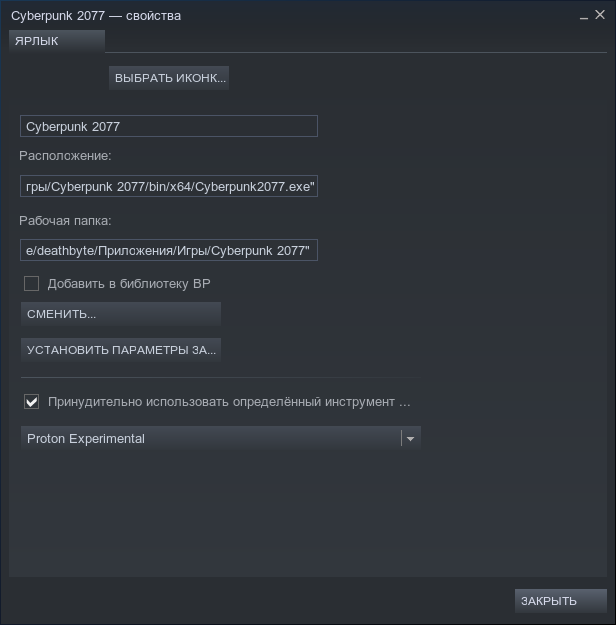
please fix this.
trying to use gamemoderun with a non-steam game and facing this issue.
please fix.
Anyone know of a work around for libstrangle? I want a framerate limiter for GTAV.
@YellowOnion
Not sure what is the problem but I know MangoHUD has an fps_limit option. You can enable in Proton with MANGOHUD=1 %command%
@mijofa
Thank you for sharing. I have extrapolated it with a newer structure
- sets launch options for Steam and non-Steam games
- sets global launch options
- sets small overrides per games
https://gist.github.com/class101/65f3133b64ba278537ee19fbb3fbb782
For a use case you can see it in my Proton guide for installing the Vortex Mod Manager as a non-Steam game here, it is best to have this file in one place symlinked to each Proton folder.
dxvk 1.9 has fps limiter in built.
I am currently experiencing this issue as well. Trying to launch Guild Wars 2 with DXVK_HUD or MangoHud fails. No other commands work with %command% either. This used to not be the case on older versions of Proton.
yeah seems to be some basic syntax pass-to-proton issue. I wish someone at valve would just fix this because sometimes its used for Steam games also but where you wish to launch via a different method (Mod Manager or custom config Launcher etc)
I am currently experiencing this issue as well. Trying to launch Guild Wars 2 with DXVK_HUD or MangoHud fails. No other commands work with %command% either. This used to not be the case on older versions of Proton.
I am a guild wars 2 player like you and I have exactly the same problem.
I just launch Steam with the variable like:
DXVK_HUD=full steam
I know that is a bad workaround but It works for me.
The following is the only workaround I've been able to figure out that works with any launch options including Linux applications (like optirun) and GameMode as well as environment variables.
Running Non-Steam Proton Games with Full Launch Options Support
- Run your game through Steam, as you're probably doing already, by adding the .exe as a non-Steam game and selecting a version of Proton from the compatibility tab in the game's properties. This will generate the required compatdata directory containing the Proton prefix.
- Create a .desktop file to use as the target in Steam. You can use this one as a template.
[Desktop Entry]
Name='Guild Wars 2'
Path='/home/username/Games/Guild Wars 2'
Exec=env STEAM_COMPAT_DATA_PATH=/home/username/.local/share/Steam/steamapps/compatdata/2464934368 STEAM_COMPAT_CLIENT_INSTALL_PATH=/home/username/.local/share/Steam/compatibilitytools.d/Proton-6.14-GE-2 mangohud '/home/username/.local/share/Steam/steamapps/common/SteamLinuxRuntime_soldier'/_v2-entry-point --verb=waitforexitandrun -- '/home/username/.local/share/Steam/compatibilitytools.d/Proton-6.14-GE-2'/proton waitforexitandrun "/home/username/Games/Guild Wars 2/Gw2-64.exe" --autologin
- Replace
2464934368in the template with your game's AppID. - Replace the paths and Proton versions in the template with what's correct for your system and game.
- Place your pre-
%command%launch options just before the SteamLinuxRuntime section. (Wheremangohudis in the example) - Place your post-
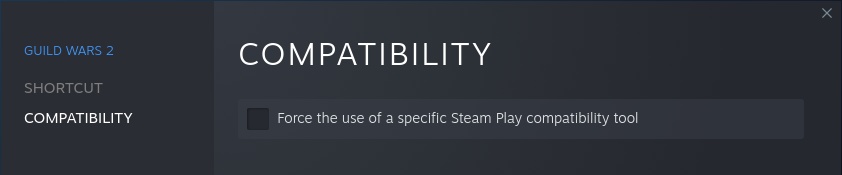
%command%launch options after the .exe section. (Where--autologinis in the example) - In Steam, edit your game's properties. Set
TARGETto your .desktop file. LeaveLAUNCH OPTIONSempty here. - Uncheck
Force the use of a specific Steam Play compatibility tool.

Notes & Tips
- The Exec section in the .desktop is essentially what steam calls when you run a non-Steam game with Proton, minus the environment variables. If you try to run this command without the variables, it will just ask for them and not run.
- To find your game's AppID, as @class101 pointed out in his guide:
The simplest way to find this value is to navigate to the ${X}/steamapps/compatdata folder and find the last directory created, its name consisting of 10 digits is the STEAMAPPID variable.
- GameMode works the same as it does with other Proton games.
LD_PRELOAD="$LD_PRELOAD:/usr/lib/libgamemodeauto.so.0"works for me on Arch Linux.
I had no problems with the global user settings py method. Seemed easier and can back it up easily. No need to mess with steam.
Of note, further updates to Proton do require installing the user_settings.py again as it's installed in the specific Proton version. However I haven't needed that custom patch in a long while now, I forgot to install it after a particular update some time ago (no idea which one) and everything has continued working, so I've just kinda forgotten about it to be honest.
With user_settings.py, I couldn't get LD_PRELOAD to work for GameMode. As far as I can tell, you can also only use environment variables that way. So, no optirun, nvidia-xrun, etc either. The method I outlined allows you to use those options and it works on a per-game basis. It's also easy to back up a folder of .desktop files. Seems to be working well, I just wish we didn't have to resort to workarounds anymore!
Yeah I noticed I couldn't get VK_ICD_FILENAMES to work with it. Very weird.
Having the same problem here. This has been open for two and a half years, will this ever be fixed?
You'd think it be something they want to fix before steam-deck comes out since their advertising 3rd vendor non-steam game support. But with these syntax issues for launching games, lots of people are going to be completely stumped why their added in game doesn't launch...
You'd think it be something they want to fix before steam-deck comes out since their advertising 3rd vendor non-steam game support. But with these syntax issues for launching games, lots of people are going to be completely stumped why their added in game doesn't launch...
I know mate, this is a thing I've been trying to make people aware of but Valve just ain't fixing this for whatever reason!
I know man, this is a thing I've been trying to make people aware of but Valve just ain't fixing this for whatever reason!
It is almost as one could think there was alternative motives to not fixing this.. like "make people buy more certified steam games since running them otherwise is neigh impossible".. :smile:
in the meanwhile you can use steamtinkerlauncher stl addnonsteamgame
Has anyone tried VAR=BLAH app.exe +flags -params in the Target box like you would with a windows shortcut?
Any fix for this yet? been wanting to test gamescope out with a non-steam game and it seems its impossible because this issue taps on to other methods of bypassing the problem. (such as steamtinkerlauncher).
Would be nice to have it solved, I just tested that with Escape from Tarkov which isn't on Steam yet (doesn't work yet, but at least starts with newest proton-experimental), but for mangohud to work with it I had to start whole Steam with it ._.
I generally use steamtinkerlauncher in the meanwhile (often needs force custom exec option ticked, and you select custom proton version).
At least steam generates the correct exe path and all when adding non steam games, we just need it to obey %command% line stuff.
Same issue on my side, got Control on the epic store for free and wanted to get gamepad input working (which only works if I launch the game from big picture). I can't open Control with the required flags to enable Ray tracing and DLSS.
I do "understand" the ulterior motives here, but it would be nice to skip that kind of mentality and just go straight to playing games please.
Until this is fixed, the workaround of launching steam with the required env vars worked for me.
Why is everyone suggesting there is an ulterior motive here? Why attribute to malace what can be attributed to incompetence (or in this case just huge time constraints) instead? I program for a living, there are a trillion and one things I have to keep track of in my day to day. I can tell you that real human beings are working on this, and when people start attacking you over something like that, it tends to go to the bottom of the priority list. Not only that, but Valve has been very pro-competition from the very beginning, and actively support their competitors in very odd ways, so long as it still makes some kind of business sense.
I want this fixed as much as you guys, but let's keep the insinuations out of the conversation.
Why is everyone suggesting there
Please keep on this topic
It'll get fixed when it gets fixed.
Has anyone tried
VAR=BLAH app.exe +flags -paramsin the Target box like you would with a windows shortcut?
@jarrard
@Ranguna
We could also try wrapping the game in a script (bash for Linux games, and batch for proton?).
I'm not able to test it atm because I'm having hardware issues.
@jarrard
@RangunaWe could also try wrapping the game in a script (bash for Linux games, and batch for proton?).
I'm not able to test it atm because I'm having hardware issues.
You mean copy all the things steam uses to launch Windows games and write all that ourselves in a bash script?
Should work, but that's a lot of trouble vs just launching steam with the correct env vars. Also, you'd have to constantly update your script whenever steam decides to add more stuff to the launch commands.
We could also try wrapping the game in a script (bash for Linux games, and batch for proton?).
This is pretty much the same as the custom user_settings.py approach that was posted above
It be nice if added in non-steam games allow you to select a game profile upon adding. So say you added Doom Eternal from GOG or something; upon adding it, it have a gamesearchbox you just start typing and select use proton game profile Doom Eternal for this non-steam game.
They can also additionally have a DEFAULT profile selected automatically that installs the bare minimal resources that ALL proton games need.
I have seen a video of someone using %command% with epic games added as a non steam game and it seems to work. They are using a steam deck, does the steam deck have an updated client with this fixed?
Yes this seems to work with the steam beta client now.
As of Steam package version 1648789923 Built Mar 31 2022, at 23:11:43 I can confirm that this is FIXED!! \o/
:tada: :man_dancing: :tada: :woman_dancing: :tada: :dancers: :tada:
Thanks Valve! :joy:
Thanks for confirming!
WOOOOOOO
On Fri, Apr 1, 2022, 12:00 PM Philipp Richter @.***>
wrote:
As of Steam package version 1648789923 Built Mar 31 2022, at 23:11:43
I can confirm that this is FIXED!! \o/🎉 🕺 🎉 💃 🎉 👯 🎉
Thanks Valve! 😂
—
Reply to this email directly, view it on GitHub
https://github.com/ValveSoftware/steam-for-linux/issues/6046#issuecomment-1086186623,
or unsubscribe
https://github.com/notifications/unsubscribe-auth/AIJQSTGQ5HXVFIPLP4AYYDDVC42UXANCNFSM4GRG46XA
.
You are receiving this because you commented.Message ID:
@.***>
Proton versions
proton experimentalx1 2021-11proton 6.14-ge-2x1 2021-08proton 4.11-4x1 2019-09
Launch options
STEAM_COMPAT_CLIENT_INSTALL_PATH=/home/username/.local/share/Steam/compatibilitytools.d/Proton-6.14-GE-2x1 2021-08STEAM_COMPAT_DATA_PATH=/home/username/.local/share/Steam/steamapps/compatdata/2464934368x1 2021-08DXVK_HUDx2 2021-07DXVK_HUD=fullx1 2021-07MANGOHUD=1x1 2021-07DXVK_HUD=1x5 2020-02PROTON_USE_D9VK=1x3 2020-01PROTON_OLD_GL_STRING=1.x1 2020-01PROTON_OLD_GL_STRING=1x2 2019-12STEAM_COMPAT_DATA_PATH=~/Steam/SteamApps/compatdata/3645010168/x1 2019-12STEAM_COMPAT_DATA_PATH=/home/user/Steam/SteamApps/compatdata/3645010168/x1 2019-12DXVK_HUD=1,x1 2019-10PROTON_NO_ESYNC=1x1 2019-10PROTON_DUMP_DEBUG_COMMANDS=1x1 2019-01
Launch lines
MANGOHUD=1 %command%x1 2021-07DXVK_HUD=1 %command%x1 2020-02PROTON_OLD_GL_STRING=1 %command%x2 2019-12PROTON_NO_ESYNC=1 %command%x1 2019-10_WINEDLLOVERRIDES=winedbg.exe=d %command%x1 2019-08DXVK_HUD=1 PROTON_DUMP_DEBUG_COMMANDS=1 %command%x1 2019-01
Your system information
Please describe your issue in as much detail as possible:
So non-Steam windows games can be added via
.exefile and launched through proton directly in the client now. However the%command%macro that works in the launch options for the other Steam games does not seem to be interpreted for those non-Steam launchers.So setting something like :
Will just append them as parameters to the launched executable.
Steps for reproducing this issue:
.exe(Add a Non-Steam Game... > Browse > File type: All Files > Open a .exe)DXVK_HUD=1 PROTON_DUMP_DEBUG_COMMANDS=1 %command%