Cannot save screenshots from Library browser
the work around is to click "manage my screenshots" under the screenshots
this brings up the OLD menu which works fine.
I was using the "after game report" thing. It seems like it's not a "save file" but an "open" dialog, which makes no sense, of course.
Anyone addressing this issue? Still very much an issue for me on 1st of Feb 2022 under latest Steam Beta, up to date Manjaro Gnome, radeon 6700xt GPU, Ryzen 5 5600x.
Might not look good if this issue is persisting after years without attention. I've no idea why the problem exists, but it most certainly does.
I'm having the same issue.
To reproduce on Steam for Linux:
- Click on a game in Library tab.
- scroll down to Community Content
- click on an image so it pops out into it's own window.
- right click on the image in window.
- choose the only option: "Save Screenshot as ..."
A file selection window should pop up, but instead of having an OK button it will have an OPEN button.
EDIT: the image can be saved, but the file must be created outside of Steam:
6) file creation from terminal: $ touch ~/Desktop/NameOfImage.jpg
7) select file from step-6 in the "Save Screenshot as ..." dialog with OPEN.
Replying to https://github.com/ValveSoftware/steam-for-linux/issues/6698#issuecomment-1291387016
Just "bumping" this so that this issue stays visible. As weird as it seems, the "solution" described in this post does allow one to overwrite an existing image and thus save it, but this isn't acceptable. A simple task like this shouldn't be outright impossible unless you resort to extraordinary measures, and I can't see why it would be a big deal to get this sorted out.
I do respect what the Valve team does, but simple issues like this have to be addressed.
Still a problem 3/11/23
Can confirm that this is still a problem
Tested this with the Latest steam beta client:
It appears that the 'save as screenshot' button doesn't exist anymore. instead we get this:
If you right click a screenshot/artwork from the preview of it (Steam Community hub> Any artwork)

if you open up any artwork/screenshot beyond the preview you still get the same options.
Artworks have a 'Download' Button:
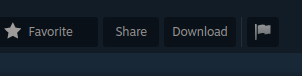
When Pressing Download it leads you to a browser page with a full sized image of the artwork. (kinda like how you would open a png file in a web browser)
Then your options are these:
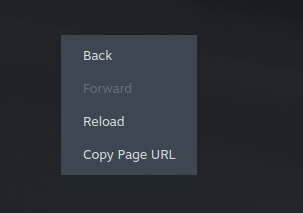
From #9603:
From library tab if user right click on image from community content file picker is not allowing to save image as new file only to rewrite existing one
Steps for reproducing this issue:
Go to game page on library tab
Scroll to community content
Try to save image as a new file
Same problem on my end... how is this still not fixed???
And i thought the devs of drupal would be lazy...
Actually its much worse now:
right clicking a preview of an artwork looks like this at the moment:
after clicking the image, steam for some reason opens up a "Steam web helper"
You cannot interact at all with this "web helper" which opens up as a separate window, there are no context menu options.
Note: this web helper program often crashes steam when trying to interact with it
if you click the URL above the post it also opens up a separate window(Web Helper) instead of loading the page in steam.
Once again you cannot right click anything (No context menu shows up)
Pressing the 'Download' Button in the artwork page loads up the picture but you cannot interact with it or save it.
The only button that does work correctly is:
which then loads up the artwork page in Steam and not in a separate window.
*When the artwork page is loaded in steam. you can right click(Context menu) in the artwork page (Unlike the web helper):
After pressing 'Download' in the artwork page:
Still no option to save the artwork...
I'll say that steam has crashed around 6 times when trying to take the screenshots of the current behavior
Steam version:
I used Ubuntu 23.10 with the X11 windowing system.
@kisak-valve is there any additional information you might need?
Steam Version: 1702079146
Since #9057 is marked as a dup. If you try to save this years SteamYearInReview picture, it will spawn the file selector:
You cant actually create/place a new file with this. But since we still do not have a "share to fediverse" button i need to download it.
Indeed, just noticed this in the Steam Year In Review page where you can save screenshot of the statistics, but the dialog is wrongly a file selector instead of file saving dialog, which means the dialog can't specify the name of saved file and can't create new directories, you can only browse and select PNG files, and only way to save the screenshot is to select an existing PNG file, which then will be overwritten by the one we want to save.
Indeed, just noticed this in the Steam Year In Review page where you can save screenshot of the statistics, but the dialog is wrongly a file selector instead of file saving dialog, which means the dialog can't specify the name of saved file and can't create new directories, you can only browse and select PNG files, and only way to save the screenshot is to select an existing PNG file, which then will be overwritten by the one we want to save.
A temporary fix may be to create an empty file with the right extension (jpg?) and find it in the selector dialog. Open that file you made and it could no longer be empty. It has worked for me before.
Silly issue
Reallly wish this could get fixed. A simple issue.
This has been fixed. Probably during the new Recordings and Screenshots overhaul as stable release still has this bug.
Just tested on Steam beta 1722380543 and I can finally save a screenshot from a game "Community content" section with no issues.
I found a small issue. When selecting custom artwork for a game, the filter type gets set to JPEG Image (*.jpg) instead of PNG Image (*.png) that is the standard for steam custom artwork or simply All files (*). I might make a separate report later.
Closing as fixed in the 2024-09-11 Steam client update.
beautiful
Your system information
Please describe your issue in as much detail as possible:
I was browsing images for a game, under the Library tab, and attempted to download an image. The context menu says "Save screenshot as..." (even though it is not technically a screenshot).
Then a window appears but that window remains blank (glitched) until you actually interact with, that is, move your mouse over.
This dialog then opens in the Steam folder (~/.steam/debian-installation) (issue #6613) and shows a slew of hidden files. It lets you type a file name, but clicking OK does nothing.
If you select an existing file, it will overwrite that file with the screenshot you were downloading.
Cancelling the file chooser sends you back to the Library screen, but controls are unresponsive. It is impossible to scroll, click on [Close] or the [X] in the top right, or attempt to download the image again, until you move to another tab or hit Back in the browser.
What I expected