Steam fails to initialize Vulkan for both native and Proton titles
Hello @TheSocietyMan, vkCreateInstance failed with ERROR_LAYER_NOT_PRESENT is the critical detail in the extended system information. Sounds like something's explicitly asking for a vulkan layer by the wrong name or that doesn't exist anymore.
Might be worth inspecting the environment variables that are being handed to any game by temporarily settings a game's launch options to env > ~/env_variables #%command% running the game (Steam will show the game stop running fairly quickly).
Hello, thanks for the quick reply.
Here's the list of environment variables passed to the game
VK_ICD_FILENAMES is passed as expected, but I don't know what else to look for
Okay, looking at this a bit more, this is a regression in vulkan-icd-loader 1.2.153 that bisected to https://github.com/KhronosGroup/Vulkan-Loader/commit/49648d8fb398ac7d3d8e159939de060b8e759ecf.
@Plagman, @charles-lunarg, happen to know what's happening here?
Looks like the mixed 32/64 bit Steam overlay loading is getting bitten by the loader change. To reproduce:
- get vulkan-icd-loader 1.2.153 or git
- Have the steam overlay vulkan layers from a Steam install
- run
ENABLE_VK_LAYER_VALVE_steam_overlay_1=1 vulkaninfo
The issue that commit sought to resolve was when the loader was asked to load a layer but failed to load the associated library. Previously, it would simply continue on with instance creation, meaning the layer didn't load and no error was reported, even though it should of been. This is particularly necessary because the loader doesn't validate loading of the layer libraries until vkCreateInstance time, so it can't know if the .so/.dll in the manifest will actually work yet.
Can you run the repro case with the environment variable VK_LOADER_DEBUG=all set? This should give visibility into what the loader is seeing. Specifically what layers are being asked to be loaded.
What I think is happening is that a layer which was previously silently failing to load is now loudly failing to load. In my opinion it is better to know about those failures than not. But at the same time, this may lead to false positives or unnecessary breakage.
I am confident I found the source of the issue.
Steam overlay has both a 32 bit and 64 bit version. To enable the overlay, you use the environment variable ENABLE_VK_LAYER_VALVE_steam_overlay_1 (like in the repro case). However, both 32 and 64 bit use the same variable, so the loader will try to activate both. Since the loader doesn't know a 32 bit layer from a 64 bit one, it will attempt to load both, succeed with 64 bit but fail to open 32 bit or vice-versa. The loader change listed above changes the behavior to hard crash instead of silently ignore the layer with the wrong platform architecture.
This could be fixed in a few ways.
- The layer could change the enable/disable flag to use a different environment variable (extremely unlikely)
- Rollback the change in the loader. Much easier, but returns the loader to silently ignoring real layer loading failures. This could be an interim fix while a better solution is worked on.
- Make the loader check the error code and ignore 32/64 bit dlopen errors. This is brittle since the error code is a string and could change.
- Add a field to the Layer Manifest to indicate the platform. Loader then knows to not load the wrong platform type of a library. This is what I would opt for.
- Separate layer manifest per platform, ie a 32 bit folder of manifest and a 64 bit folder. Similar to the above, loader can know what layers to load and ignore. Less favorable since it moves file paths.
This is from the loader documentation:
Updates to the Vulkan-Loader repository which correspond to a new Vulkan specification release are tagged using the following format: v (e.g., v1.1.96).
Note: Marked version releases have undergone thorough testing but do not imply the same quality level as SDK tags. SDK tags follow the sdk-. format (e.g., sdk-1.1.92.0).
This issue was found in the tag v1.2.153, which is not an SDK tag.
Our automated testing that we run on every commit isn't great at exercising odd cases while interfacing with ICDs or layers, which is the situation here. We are working on improved automated testing so that is covered, but it's not ready now. This type of case is why we do added manual testing for SDK releases. I'm quite confident that we would have caught this during our SDK testing because we have specific tasks during an SDK release to make sure the loader works well with commonly used drivers and layers.
In my opinion, the real problem is that several distros are pulling in the v1.x.xxx tags when they really want the sdk-1.x.xxx tags, but I don't know how to address that. We already documented how this works and we can't release packages for every possible distro (we do for Ubuntu only).
We could change the overlay to have two different environment variables for 32/64, but we would always set both to be enabled, as we don't know what the underlying game/app will want. Some apps run a mix-and-match of architectures, like a 64bit launcher and 32bit game, and we need the layer active on the whole process tree.
Would that still avoid the issue on your side? It would still take a month or two for this change to propagate through the Steam release cycle, so I would say that even if we decide to go that route, we should also cut a loader point release that reverts this behaviour in the short term.
even if we decide to go that route, we should also cut a loader point release that reverts this behaviour in the short term.
Definitely.
Personally, I think we need to fix the loader change that caused this so it only reports VK_ERROR_LAYER_NOT_PRESENT when the layer wasn't found and not when one of multiple copies fails to load. Then we can fix up the 32/64 bit stuff separately in the future.
I have created a revert commit to go back to the existing behavior. https://github.com/KhronosGroup/Vulkan-Loader/pull/471
Thanks for looking into this issue @charles-lunarg, since 1.2.153 is not intended for general consumption, I think we're good to call this issue resolved? The discussion can continue at https://github.com/KhronosGroup/Vulkan-Loader/issues/472.
Just a heads up since it's already gone: fossilize_replay was also affected.
I will propose switching to sdk-1.x.xxx tags in openSUSE when the next sdk tag will be released (to avoid downgrades now).
For now we fixed the issue by applying #471 as a patch. New libvulkan packages including it should be available in a new Tumbleeweed snapshot next days.
@TheSocietyMan until the new TW snapshot, you can temporarily workaround the issue by installing devel packages:
sudo zypper in https://download.opensuse.org/repositories/X11:/Wayland/openSUSE_Tumbleweed/x86_64/libvulkan1-1.2.153-68.1.x86_64.rpm
sudo zypper in https://download.opensuse.org/repositories/X11:/Wayland/openSUSE_Tumbleweed/x86_64/libvulkan1-32bit-1.2.153-68.1.x86_64.rpm
Problem retrieving the specified RPM file:
File './libvulkan1-1.2.153-68.1.x86_64.rpm' not found on medium 'https://download.opensuse.org/repositories/X11:/Wayland/openSUSE_Tumbleweed/x86_64'
Please check whether the file is accessible.
Problem with the RPM file specified as 'https://download.opensuse.org/repositories/X11:/Wayland/openSUSE_Tumbleweed/x86_64/libvulkan1-1.2.153-68.1.x86_64.rpm', skipping.
No valid arguments specified.
AHAH! So that's what broke my games 🙂
Looks like the packages have rebuilt several times already and have moved to 1.2.154.
At this point in time the packages are https://download.opensuse.org/repositories/X11:/Wayland/openSUSE_Tumbleweed/x86_64/libvulkan1-1.2.154-71.1.x86_64.rpm and https://download.opensuse.org/repositories/X11:/Wayland/openSUSE_Tumbleweed/x86_64/libvulkan1-32bit-1.2.154-71.1.x86_64.rpm, but I'd recommend just going to https://download.opensuse.org/repositories/X11:/Wayland/openSUSE_Tumbleweed/x86_64/ and finding them manually.
@dinotheextinct @IBBoard The problem is fixed since two days - the newest Tumbleweed snapshot has a fixed libvulkan package. :) Just do zypper dup or tumbleweed update.
Sorry, I thought I'd checked zypper dup before I replied and hadn't seen anything. Just updated and all is good.
I also have this issue on Fedora 32...
Hello @ThisNekoGuy, the issue that was tracked here only applies to the 1.2.153 tag of the Vulkan loader. Fedora 23 ships the 1.2.131 Vulkan loader which is unaffected. If you have an issue with running Vulkan applications, there's some other cause.
Yes, this is the version I have installed, I do updates.

Any help here?
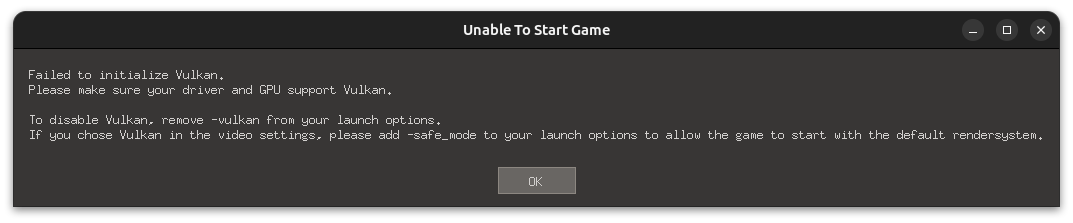
@alinpr18 NVidia updated their drivers from 525 to 530 few days ago so I think update just messed something (I has same issues).
@alinpr18 NVidia updated their drivers from 525 to 530 few days ago so I think update just messed something (I has same issues).
Finally somebody has noticed this s**t. My elden ring started crashing since nvidia driver upgraded to 530.
Finally somebody has noticed this s**t. My elden ring started crashing since nvidia driver upgraded to 530.
I use AMD HD 7570 without support Vulkan, but in Windows this game init, with steam (snap) no
Hello @alinpr18, the Radeon HD 7570 is a Terascale 2 generation video card. All Terascale architecture video cards do not have a Vulkan driver available for the hardware. Sorry, but there is no workaround for that.
Hello @maramowicz, @Mobiacikaka, Ubuntu package maintainers update their own package repositories, not NVIDIA. Report the issue you're seeing with your driver to your video driver vendor or your distro's package maintainer(s) for the NVIDIA proprietary driver.
Both of these are unrelated to the bleeding edge vulkan-icd-loader loader issue that was resolved 3 years ago.
Upstream links
- KhronosGroup/Vulkan-Loader/issues/472x1 2020-09
- KhronosGroup/Vulkan-Loader/pull/471x1 2020-09
Your system information
Please describe your issue in as much detail as possible:
After performing a system update (list of updated packages), titles that utilize Vulkan fail to start with the following error message:
Failed to initialize Vulkan. Please make sure your driver and GPU support VulkanHowever, I'm able to run vulkaninfo and
vkcubeto confirm that my system is still capable of using it.The confusing part is, that I'm able to launch a Windows title (tested with Witcher 3) by importing the executable to Lutris with the lutris wine build selected as the runner (didn't work with Proton or Proton GE though). Mangohud overlay confirmed that the game is running with RADV 20.1.7(LLVM) under DXVK.
Things I've tried so far:
/usr/share/vulkan/icd.d/radeon_icd.i686.json:/usr/share/vulkan/icd.d/radeon_icd.x86_64.jsonFull system information generated by Steam
Steps for reproducing this issue: