Steam just crashes...
Same issue, archlinux
I'm guessing this is the same issue I'm having, I try to launch it but all I get is the box for connecting to steam account, from there it doesn't appear to do anything, perhaps stuck in a loop.
I'm seeing the same thing on my fairly recent install of Ubuntu 20.10.
The answer in this comment took care of the problem: https://github.com/ValveSoftware/steam-for-linux/issues/4340#issuecomment-210736409
I'm seeing the same thing on my fairly recent install of Ubuntu 20.10.
The answer in this comment took care of the problem: [#4340 (comment)](https://github.com/ValveSoftware/steam-for-linux/issues/4340#issuecomment-210736409)
Just tried it, brought up login dialog but nothing more after I logged in again, steam icon appeared in corner but no window appeared when I clicked on "Library" from the context menu, I expect it would be same issue for rest as well, I think the easiest solution would be to combine opengl, glfw and nuklear and stop bothering with native system controls, it's not like you honor their styles in the UI anyways, yes it might take a while to convert any code that relied on native controls but the end result will be more reliable than not doing so.
the latest beta update fixed the issue for me
the latest beta update fixed the issue for me
Do you know of a way to enable beta without the settings dialog? I cannot access any UI of steam besides the "Connecting steam account zxuiji..."
Hello @awsdert, you can try to manually opt into Steam's beta client with something like echo "publicbeta" > ~/.steam/steam/package/beta.
Hello @awsdert, you can try to manually opt into Steam's beta client with something like
echo "publicbeta" > ~/.steam/steam/package/beta.
Ok, so the update to beta was processed but it didn't resolve the problem, I still have no UI
Helped for Linux Mint 20.1
Helped for Linux Mint 20.1
Good for you, I'm on Manjaro Cinnamon x64 though
Oh thank god, that I am not the only one with this issue.
What I have tried:
- Steam Native & Runtime
- Resetting steam multiple times
- Switching to amdgpu pro drivers
and more less important stuff, that I forgot
I don't have a config/config.vdf file to delete, sadly
I am on Garuda KDE with an AMD gpu
I'm on Cinnamon too:
$ cinnamon --version
Cinnamon 4.8.6
Thanks, and
Be happy,
And
- \ *
-
ノ*
On Sat, 19 Jun 2021 at 13:48, awsdert @.***> wrote:
Helped for Linux Mint 20.1
Good for you, I'm on Manjaro Cinnamon x64 though
—
You are receiving this because you commented.
Reply to this email directly, view it on GitHub
https://github.com/ValveSoftware/steam-for-linux/issues/7859#issuecomment-864389478,
or unsubscribe
https://github.com/notifications/unsubscribe-auth/AAKWRZIOV2HSNRBKFJSGA4LTTRYXRANCNFSM46TTBP6Q
.
I'm on Cinnamon too: $ cinnamon --version Cinnamon 4.8.6 Thanks, and Be happy, And * \ * * ノ*
…
On Sat, 19 Jun 2021 at 13:48, awsdert @.***> wrote: Helped for Linux Mint 20.1 Good for you, I'm on Manjaro Cinnamon x64 though — You are receiving this because you commented. Reply to this email directly, view it on GitHub <[#7859 (comment)](https://github.com/ValveSoftware/steam-for-linux/issues/7859#issuecomment-864389478)>, or unsubscribe https://github.com/notifications/unsubscribe-auth/AAKWRZIOV2HSNRBKFJSGA4LTTRYXRANCNFSM46TTBP6Q .
I'm aware that mint uses cinnamon, I used to use mint myself until I got tired of trying to install NVIDIA drivers (which now that I think about it I gave up on on manjaro too, not because they wouldn't install but because the card refused to behave, I now just use radeon exclusively). I only mentioned it so that dev's would have more information to work with while tracking down the cause, as soon as I know how to get a debug log out of steam from terminal I'll post that.
I don't think any of these logs really helps with the shader cache memory problems but I saw some really suspicious things from running steam on the command line even when it didn't crash.
The 06252021 crash is right after the update that was pushed today. At first it worked ok then I purchased several games in the sale and it crashed while downloading them. Still had close to 20GB RAM free.
SteamCrash06252021.txt
SteamCrash.txt
SteamNoCrash.txt
Some weird errors I saw in no particular order: (very old steam install)
rm: cannot remove '/home/bill/.steam/bin': Is a directory

Steam: An X Error occurred
X Error of failed request:  BadAtom (invalid Atom parameter)
Major opcode of failed request:  20 (X_GetProperty)


STEAM_RUNTIME_HEAVY: ./steam-runtime-heavy
[0624/075722.855399:INFO:crash_reporting.cc(247)] Crash reporting enabled for process: browser
[0624/075722.875717:WARNING:crash_reporting.cc(286)] Failed to set crash key: UserID with value: 0
[0624/075722.875766:WARNING:crash_reporting.cc(286)] Failed to set crash key: BuildID with value: 1624309829
[0624/075722.875770:WARNING:crash_reporting.cc(286)] Failed to set crash key: SteamUniverse with value: Public
[0624/075722.875774:WARNING:crash_reporting.cc(286)] Failed to set crash key: Vendor with value: Valve
/usr/lib/gio/modules/libdconfsettings.so: undefined symbol: g_log_structured_standard
Failed to load module: /usr/lib/gio/modules/libdconfsettings.so
GLib-GIO-Message: Using the 'memory' GSettings backend.  Your settings will not be saved or shared with other applications.

(steam:978917): Gtk-WARNING **: 07:57:26.860: gtk_disable_setlocale() must be called before gtk_init()
local (potentially out of sync) copy of roaming config loaded - 38087 bytes.
Does steam auto upload the /tmp/dumps/crash*.dmp files automatically? Or should I post it too?
This is what is in that bin folder steam tries to delete thinking its a file:
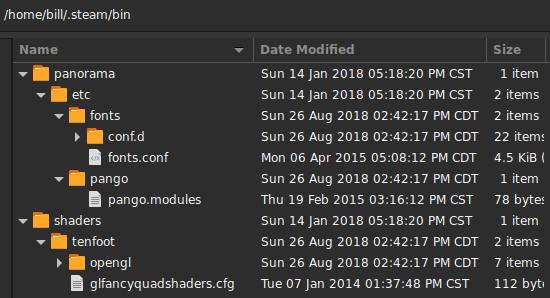
Hello @BillFleming, the out of memory crash you're seeing does not look like it is related to the issue reported here. Blind guess that you're seeing a variation of #7630.
Oh thank god, that I am not the only one with this issue.
What I have tried:* Steam Native & Runtime * Resetting steam multiple times * Switching to amdgpu pro drivers and more less important stuff, that I forgotI don't have a config/config.vdf file to delete, sadly
I am on Garuda KDE with an AMD gpu
After trying out random stuff, it turned out, that I was using the 13 (git) version of the lib32-llvm-libs instead of the 12 (Stable version)
Replying to https://github.com/ValveSoftware/steam-for-linux/issues/7859#issuecomment-869002730
Well that's definitely not the problem for me, I only have the stable version installed
I'm seeing the same thing on my fairly recent install of Ubuntu 20.10.
The answer in this comment took care of the problem: [#4340 (comment)](https://github.com/ValveSoftware/steam-for-linux/issues/4340#issuecomment-210736409)
That did indeed work.
rm ~/.local/share/Steam/config/config.vdf
But the solution is not very convenient and it's unfortunate that the other issue was closed. Hopefully this one can stay open until it's fixed. I have this in my logs when it crashes
assert_20210630193722_1.dmp[16760]: file ''/tmp/dumps/assert_20210630193722_1.dmp'', upload yes: ''CrashID=bp-2b5716b7-4842-4da2-bc13-6e53e2210630''
gdb doesn't recognize the format. Is there a way to open it?
UI finally opened for me after I installed & ran a newer kernel, was using 5.12, now using 5.13, I'm guessing steam is using something it shouldn't be as the latest LTS version is 5.10.49-1
For me, the problem is that Steam sometimes runs the Proton prefix updater for a lot of games in my library (all under prefix ID = 0, so it actually does not update the game prefix itself but some generic no-name prefix). Before that task is finished, the GUI may not show up. And even the tray icon may stay absent for a while. You should look at the system activity with a process monitor next time and look if Steam starts Proton processes multiple times. Maybe you just need to wait some minutes for it to finish.
For me, the problem is that Steam sometimes runs the Proton prefix updater for a lot of games in my library (all under prefix ID = 0, so it actually does not update the game prefix itself but some generic no-name prefix). Before that task is finished, the GUI may not show up. And even the tray icon may stay absent for a while. You should look at the system activity with a process monitor next time and look if Steam starts Proton processes multiple times. Maybe you just need to wait some minutes for it to finish.
Appreciated but whatever the cause was it was resolved via the last resort, re-installing the system
Your system information
Please describe your issue in as much detail as possible:
Describe what you expected should happen and what did happen. Please link any large code pastes as a Github Gist
No crash.
Steps for reproducing this issue:
[deemon@Zen ~]$ steam-runtime