Known issue, install d3dcompiler libraries.
https://github.com/doitsujin/dxvk/issues/1143#issuecomment-514186037
Next time, please also include the logs that the issue template explicitly asks for.
I did it. Not stupid, all the instructions and cases not only looked at you, but everywhere on the Internet. Result similar. Game not work. My friend, he launched through Steam Proton, the same results.
Well, you didn't attach any logs or debug info, so I just guessed because that's the only thing I can do.
In any case, the games are known to be broken beyond belief and I don't intend to work around these issues, so you should play them in DX9 mode. But the black screen clearly doesn't happen for other people so it must be something on your end.
What kind of log do you need? Terminal output?
If you hadn't ignored the issue template, you'd know that.
But yes, wine terminal output and the d3d11/dxgi log files created by dxvk.
Sorry. At my first issue on github. I dont know about issue template. Where find d3d11/dxgi log files ?
Probably next to the game exe. If you can't find them, just post the terminal output.
Terminal output - https://pastebin.com/S7T9EyQx
xrEngine_d3d11.log - https://pastebin.com/9YbCB9nc
xrEngine_dxgi.log - https://pastebin.com/YDHdZpwk
If that matters. When the game starts, it first minimize to panel. When you try to expand, it opens in windowed mode and a black screen is already visible there.
Looks like this game also needs d3dx11_43 or another one of the d3dx_** libraries.
The problem is that they are all installed and registered. Or maybe I doing something wrong?
image
Сторонняя on screenshot = native.
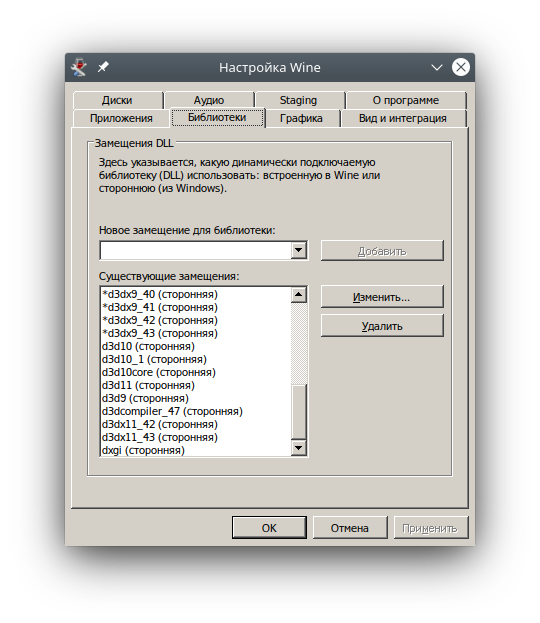
Software information
Game: STALKER: Call of Pripyat 1.6.0.2(GOG version)
Settings: Enhanced Dynamic Lightning (DX11) (renderer_r4)
System information
OS: OpenSUSE Tumbleweed
Driver mesa: 19.2.1
DXVK version: 1.4.4
GPU: Radeon RX Vega 64
Wine version: 4.18 staging
When trying to run CoP, the game start and show black screen. After intro begin playing music main menu, but screen stays black. On Enhanced Dynamic Lightning (DX10) (renderer_r3) similar results, on Enhanced Dynamic Lightning (DX9) (renderer_r2.5) game plays perfectly and smooth.