[crash] Dragon Age: Ultimate Edition
Dragon Age Origins has been working more or less fine with DXVK for months, please make sure you have the native d3dx9 and d3dcompiler libraries installed in your wine prefix. The wined3d apitrace replays fine with DXVK.
Also, it shouldn't be that hard to find a log, it's located in your home directory (steam-xxxxxx.log) if you're using Proton with PROTON_LOG=1 set.
Well, I agree to disagree here, maybe lacking knowledge, but it crashes with those settings. I did never say wined3d didn't work, I say d9vk does not while wined3d does.
First of all, the window focus isn't right after launching it from the games launcher. Secondly there is no sound. Last but not least, it crashes.
Running with wined3d it works, running with d9vk it does not.
Starting with:
API Traces
I took the traces again - between wined3d and d9vk.
WineD3D (without any parameters to the command section): https://drive.google.com/file/d/105YTmkD6f2UWm05hWjT9eacGk7JkWH_P/view?usp=sharing
D9VK (PROTON_USE_D9VK=1 DXVK_HUD=full PROTON_LOG=1 %command%): https://drive.google.com/file/d/1ZkdBmz1NuT_C-7cvOG3-HRJ1Kj35OSbF/view?usp=sharing
Log File
Well, was different than with d9vk before .. was quite lost on that one. Here's the log.
https://drive.google.com/file/d/1KZTOajYfb9pZlJAVqXDCvasu_MgP_pdd/view?usp=sharing
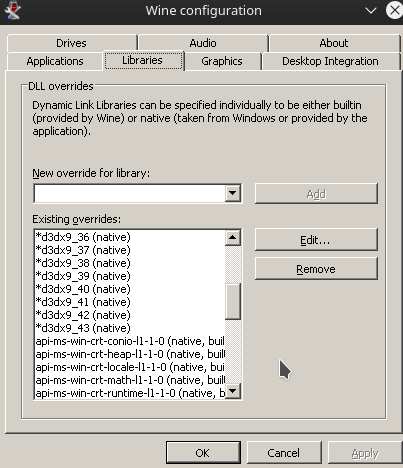
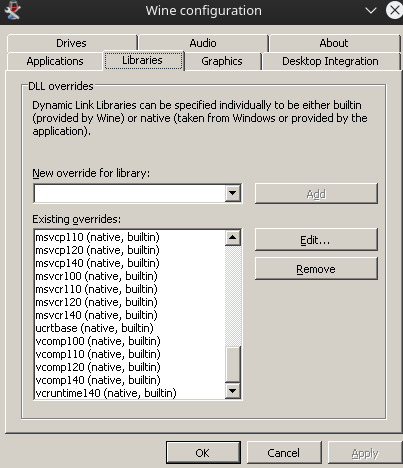
Images of winecfg
Note: These are the default settings for DA:O Ultimate + installing d3dcompiler_43 and d3dx9


From your log:
mmap() failed: Cannot allocate memory
See #1318. Set PROTON_FORCE_LARGE_ADDRESS_AWARE=1 to work around the issue.
I did never say wined3d didn't work, I say d9vk does not while wined3d does.
I never said wined3d didn't work, I said that the game runs fine for others with DXVK except for one known issue with savegame thumbnails not being created properly (see #1369).
whenever loading a game (creating a new game, loading an existing game), the game crashes with d9vk, but not with wined3d.
Try using this 4GB patch on DAOrigins.exe. It got rid of the mmap() failed errors in my case and makes the game a lot more stable. I've started, saved and loaded games multiple times without issues.
The patch also fixes other issues (in Wine and in Windows) with a lot of ambitious 32bit games struggling to fit in ~2GB of RAM.
Interesting as well: With WineD3D sound works, with D9VK it does not (intro movies, couldn't actually get in game).
It's the same on Wine Staging with WineD3D if I use the game launcher, so it's not a DXVK problem, but maybe something Proton has worked around. Starting the game directly by running DAOrigins.exe (under bin_ship) fixes the missing sound for some reason.
Hope this helps, at least in retrospect.
I just want to chime in that I was experiencing the same issue on Wine 5.0. After applying the 4GB patch the game runs stable again.
I can confirm that the problem still exists with dxvk 1.7.3 and Wine 6.0
Proton versions
proton 4.11-12x1 2020-02
Launch options
PROTON_FORCE_LARGE_ADDRESS_AWARE=1`x1 2020-02DXVK_HUD=fullx1 2020-02PROTON_LOG=1x1 2020-02PROTON_USE_D9VK=1x1 2020-02PROTON_LOG=1`x1 2020-02
Hey there,
whenever loading a game (creating a new game, loading an existing game), the game crashes with d9vk, but not with wined3d.
I don't know about the reproduce steps what's it worth doing the API-Trace with wined3d when it's not crashing, did that anyway.
Interesting as well: With WineD3D sound works, with D9VK it does not (intro movies, couldn't actually get in game).
Software information
Dragon Age: Origins: Ultimate Edition (Steam)
System information
Apitrace file(s)
WineD3D: https://drive.google.com/file/d/1SGCqR-TzQ1rjToAIavRHg-pSBKBKE6ja/view?usp=sharing
D9VK: https://drive.google.com/file/d/1ugDI3urzwbt_iR7RGBK3lnFHxmXZwh08/view?usp=sharing
Log files
Actually couldn't find the log....
Hope that helps tracking this one, if you need any additional information let me know.
Thanks!