[d3d9] Medieval 2 Total War produces black lines on world map
Note
I transferred this report from #1985 because I couldn't check for duplicates properly. I'm having the same problem.
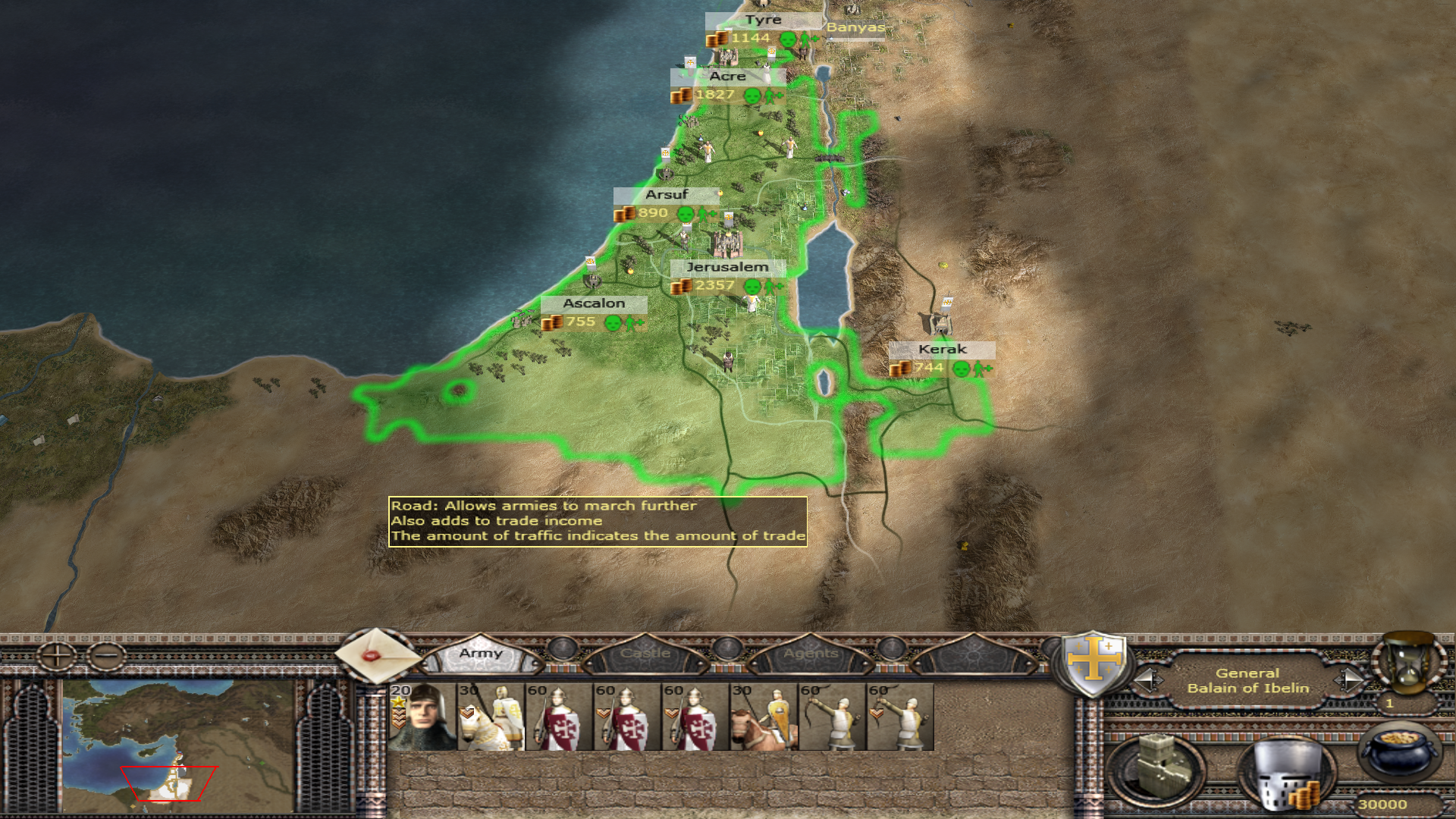
Medieval II: Total War with it's retail release on DVD has black lines on the campaign map. I have tested battles and haven't seen this issue. This also doesn't happen with WineD3D.
I have been using Lutris, as it really made installing a DVD game with Wine a lot easier. I hope that won't cause any problems for tackling this issue.
DXVK:

WineD3D (How it should look):
Software information
Medieval II: Total War (Tested both the main game and the expansion, I have logs for the expansion.)
Highest graphic settings, 1920x1080
System information
- GPU: Nvidia GeForce GTX 1050Ti
- Driver: 460.67Medieval II: Total War with it's retail release on DVD has black lines on the campaign map. I have tested battles and haven't seen this issue. This also doesn't happen with WineD3D.
Apitrace file(s)
I haven't had the chance to create apitrace files as of now, but I'll make sure to add them soon.
Log files
- d3d9.log: kingdoms_d3d9.log
The dxgi.log is empty.
Another bug to add is, Alt+Tabbing won't work at all. The game is always on top with DXVK, but WineD3D again works.
The alt-tab thing is a known issue with DXVK but unlikely to be fixed.
I see. Thanks for the information.
The problem with Medieval 2 needs an apitrace so we can look into this.
The problem with Medieval 2 needs an apitrace so we can look into this.
I'll try creating one now. The wiki page for it recommends using WineD3D but I can't reproduce the issue with it, so I'm supposed to use DXVK, right? Just making sure.
I doesnt matter whether you can reproduce the issue while making the trace. Either WineD3D or DXVK is fine.
Alright, I have created the file but it will take some time to upload as it is huge. (2.6GB)
I'll get back to you as soon as possible.
Hi, @K0bin
Here is the trace file on Google Drive: https://drive.google.com/file/d/1p2b3bLJqcCRThXHU8yYuo2GtPi7aK6p9/view?usp=sharing
One other is that loading screens go fully black with DXVK. This is too insignificant, so I don't know if you'll even want to check it.
@tpurde You forgot to change the access permissions on that file. I'm not allowed to download it.
Sorry, my bad. Should be fixed now. @K0bin
Hey @K0bin, excuse me for disturbing but have you had a chance to look at it?
No, not yet.
Alright then. Have a good day.
Putting this here so we don't forget about it:
@CME42 found out that the problem is caused by DXVK returning incorrect pitch values when locking a RGB8 D3DPOOL_SCRATCH texture. The problem is that RGB8 is not supported but we allow creating scratch textures for unsupported formats. We do however rely on a valid format mapping in various places like when locking an image.
Launch options
DXVK_170x1 2020-06
The game produces weird lines at the map with DXVK.
Examples:
https://cdn.discordapp.com/attachments/561359616135397396/722564654089371738/2020-06-16-231806-screenshot.jpg
https://cdn.discordapp.com/attachments/561359616135397396/722564654995603476/2020-06-16-231759-screenshot.jpg
How it is intended to look:
https://cdn.discordapp.com/attachments/561359616135397396/722564773933350982/2020-06-16-233053-screenshot.jpg
https://cdn.discordapp.com/attachments/561359616135397396/722564774839189504/2020-06-16-233050-screenshot.jpg
Game log:
https://cdn.discordapp.com/attachments/461958894306983947/722595766941646899/m2tw.log
Software information
Medieval 2 Total War. 32-bit Direct3D9 game from 2006.
System information
Apitrace file(s)
-Unfortunately, the game really doesn't want to be traced. It basically froze while I tried to trace it. I did manage to get an apitrace, but I did not get as far as the point where the bug happens.
https://cdn.discordapp.com/attachments/461958894306983947/722593740367200326/m2tw.trace.tar.gz
Log files