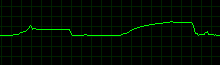
In Black Mesa (maybe other games as well) DXVK seems to allocate a lot more memory than D3D9
nooo, not the API trace hahaha
actually, you can totally use the one I did for the bush thing? it definitely captured the game being loaded, or do you want a fresh one?
(the one from the other issue): https://mega.nz/file/HlhywISI#0NATAWWauGloV4YxXojHke0DdO_yrixB6nIQRI7bGrc
Your apitrace uses 80MB of additional memory compared to D3D9 on my system. Noticeable but far from the 1.2GB you're seeing here.
Bad news, during the API trace the memory usage was in line with the D3D9 behaviour, so I don't think it's going to expose anything relevant :/ Maybe it's just windows fault, I'm gonna check on Linux even without a direct comparison.
here it is anyways: https://mega.nz/file/XgpHwT6Q#ibDikkdBIV33FKYTnKsRnFjxVJCTMlIgy2NjuY-bO7E
Bad news, during the API trace the memory usage was in line with the D3D9 behaviour, so I don't think it's going to expose anything relevant :/
That's normal, if you did it on Windows, it will use regular D3D9 to record the trace. The differences will hopefully show up when replaying the apitrace with DXVK.
That apitrace doesn't even go into the game. Do you usually see that 1.2GB difference on the main menu?
yes, repro rate 100% (im switching to linux to see if the behaviour is the same)
The main menu uses 500MB with Windows Nvidia D3D9 and 720MB with DXVK. Almost all of that difference comes down to how the DXVK memory allocator works and is not a problem.
Can you run it with DXVK_HUD=full and post a screenshot? (also make sure it's actually using more memory than expected when doing that)
Well, on linux, using the same game config + mods and the same dxvk.conf than my game build on windows, the problem isn't there, memory usage is normal, seems like it's a windows only thing, since dxvk doesn't officially support windows are you still interested if I look at this?
I dont quite understand. Does the problem only happen with DXVK on Windows? Does it only happen with mods?
Mods and game config and dxvk.conf are the same between the 2 OSes so they are not responsible, the problem only occurs with dxvk on windows (it still occurs if I delete all mods and all custom game config). The bush thing happens on linux too though.
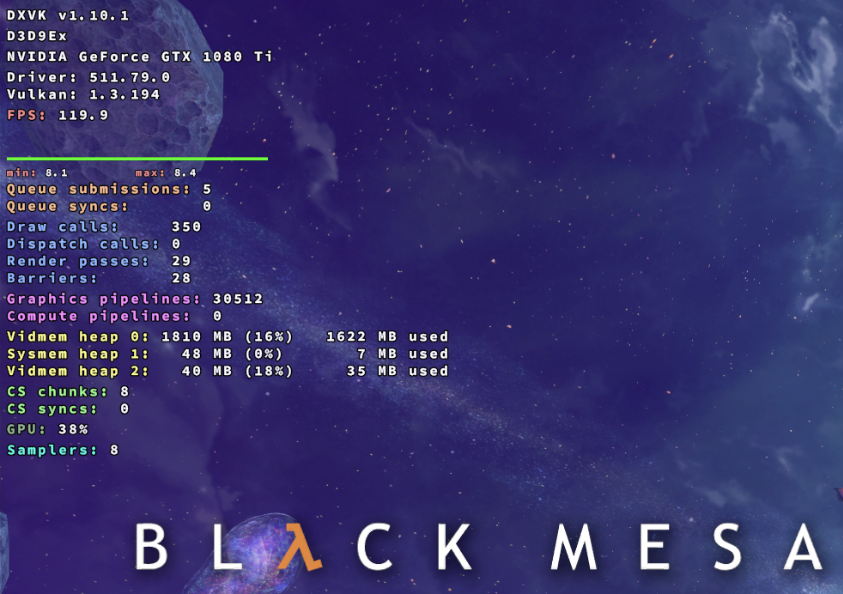
(modified image to avoid spoilers)
see, almost 2 GB in the menu! it is video memory though, but the increase does happen in regular RAM usage as well. That's so weird, I'm going to try to update my GPU drivers just in case but they are pretty recent
2GB of VRAM seems pretty reasonable considering the menu background is rendered in real time. The HUD also shows that we use basically no RAM at all for Vulkan resources (48MB). So either there is a MASSIVE leak somewhere that doesn't happen on my system or something is weirdh ere.
I updated my GPU drivers, tried to disable the nvidia shader cache in case it may be linked, even put the game in absolute lowest settings, still that same +-2 GB of RAM increase
I still don't fully understand, does the memory increase only happen on Linux or on Windows or both?
only on windows and only with dxvk, i'm still trying to figure out what's happening, it's a complete mystery to me!
the bush performance reduction is on both though
Probably something out of our control then. I can't reproduce it on Windows either.
Feel free to reopen if you find out something, right now I can't do anything about this.
You can close this issue, I found the culprit, it is the option "shader pre-caching" on steam under Windows, you want that disabled at all costs LOL. (hope you see the message since you closed it just before)
Launch options
DXVK_HUD=fullx1 2022-04
Booting to the game menu sees an additional +1.2 GB of RAM usage compared to D3D9 (after waiting for a few seconds), I'm using Windows to compare so maybe the memory management is different under Linux (I'll look at it too).
I tried with different versions from 1.9.0 to the latest and all of them add a good gigabyte of RAM allocation.
memory behavior, first launching the game in D3D9, closing it, then with DXVK: