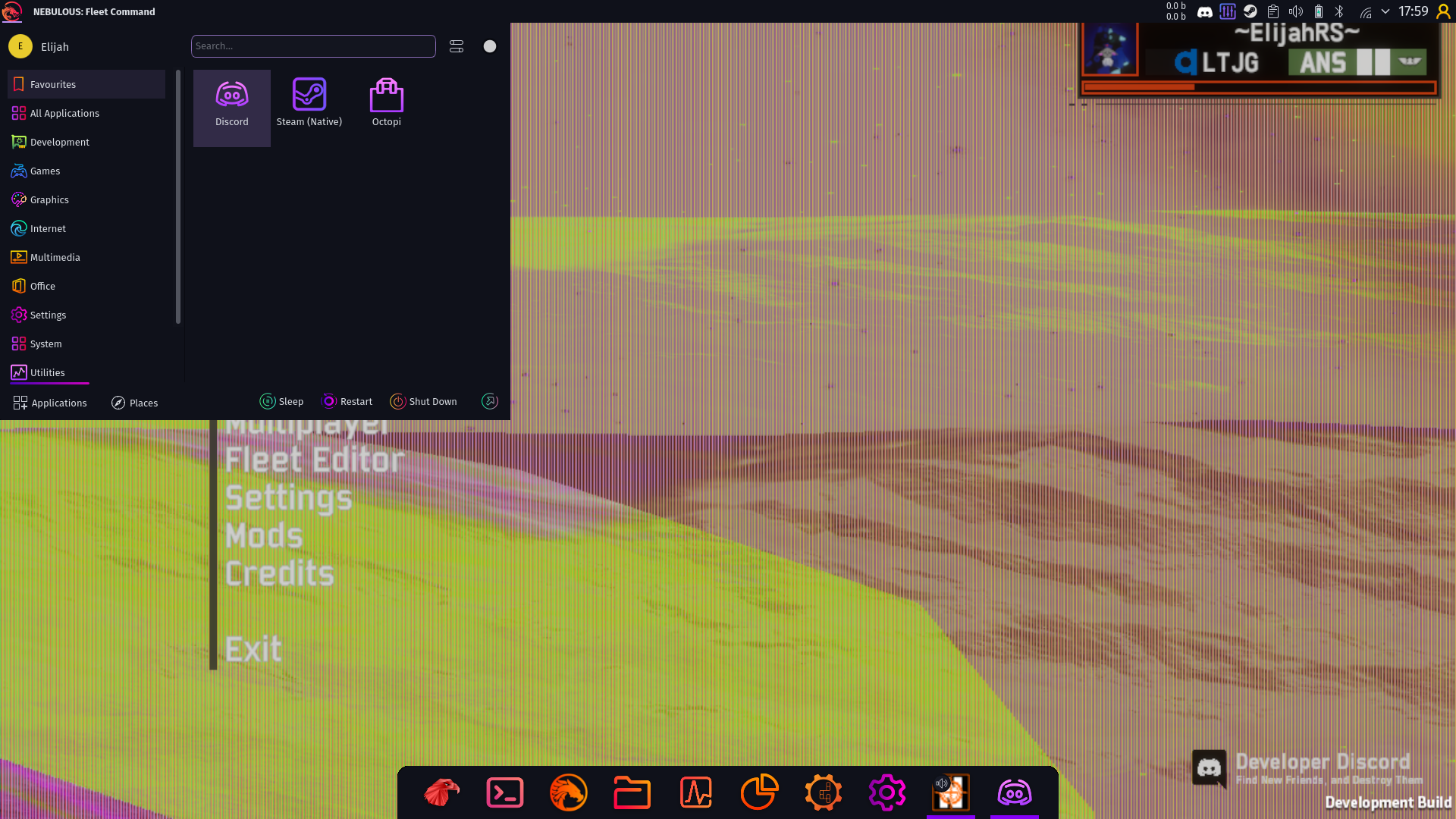
Nebulous: Fleet Command having graphical glitches/defects.
What exactly is this supposed to look like? Replaying the trace looks like this here which doesn't show any obvious issues:

That said, the game heavily relies on shared resources for some annoying reason, so I'll need to install and test the game manually anyway.
Yeah, even the videos render fine here. Kinda hard to tell what's going on since Renderdoc doesn't work with this game, but might be a driver issue specific to very old GPUs.
Try RADV_DEBUG=nohiz %command% as launch option in steam @ElijahRS
nodcc might be the more useful thing to test since it's mostly the videos that are broken.
I think dcc isn't even supported on that GPU, but there are multiple issues fixed with nohiz on these old cards on the Mesa bug tracker.
The videos aren't a issue anymore. Which also looks like the standard video breakage that happened through proton some weeks or months back in some games. Back then you needed a extra env var to work around it, but think it should have been fixed standard in proton now. Can't remember.
Only the black/red bars on ships are an issue for them atm
ElijahRS confirmed on discord that RADV_DEBUG=nohiz %command% makes the issue go away. So seems like a driver issue.
I wasn't able to reproduce myself either in the trace with my R9 380
There is only one other game that i have found that has this same issue but i'll be simple and stick primarily to the game in question. TLDR Nebulous Fleet Command is a tactical sci-fi simulation game and i'll just leave it at that. I dual boot windows and Garuda Linux, and on Windows, the game runs without issues. Though since my machine is a little bit less than average i primarily main Linux.
Onto the issue at hand. First time i ever started the game it was an absolute glitchfest of a hellhole. Graphics wise. The background video that plays of ships flying was yellow and riddled with horiizonztal black and red lines, compared to the usual monocolor video that is usually in place. When i enter the fleet editor (which will show the same issue if i were to say, go into an actual round) and the issue at heart lays here. The ship is rendered and has black and red lines cutting through it. Horizontal no matter how i orient the ship, as if it's on my screen not the ship itself. As of today, the background video being glitchy is no longer an issue. I think i fixed that somehow but i cannot remember as it was a long time ago. The ship models however being graphically thrown off however is still a thing and it is a large issue because things get really slow and ugly once the graphical glitches come into view and persist even after i go back into the main menu as if my graphics card got drunk or something. I hopefully described it right but i am prettty sure i am. You will see from the screenshot and the apitrace. Should also add i tried many proton versions and even wine at one point. This is a steam game.
NAME OF THE GAME:
Nebulous: Fleet Command, using Proton. Settings used are not important.
OS INFO:
CPU: AMD A9-9425 RADEON R5 2C+3G (2) @ 3.1GHz
GPU: AMD ATI Radeon R7 M260/M265 / M340/M360 / M440/M445 /
GPU: AMD ATI Radeon R2/R3/R4/R5 Graphics
RAM: 8GB
OS: Garuda Linux
APITRACE FILE:
https://mega.nz/file/yAA3wI7J#h8KRoBhVPuBonJaDwuxJ42FyhG03sL1fqTGMj-GhKH4
LOG FILES:
Nebulous_d3d11.log
Nebulous_dxgi.log
SCREENSHOTS