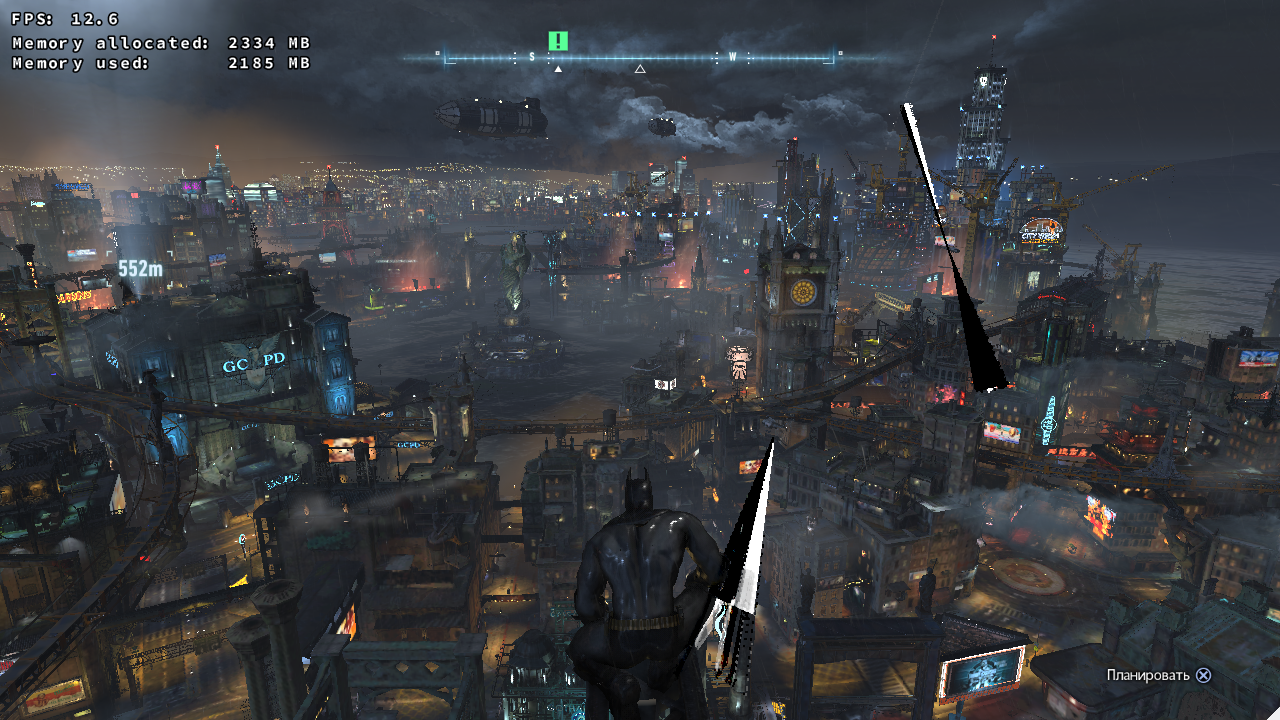
Ladders in the shadows in Batman: Arkham Knight.
Driver:369.18 (old compiler)
Does it work with the new one? If not, I need an apitrace to reproduce the issue.
@doitsujin Yes, in fact, with the new compiler there is no such problem. Excuse me. I apparently just got confused with the startup parameters and decided that there is no difference. Although with the new compiler a lot of other problems ...
Which kind of issues do you see with the new compiler ?
@pingubot Well, the most noticeable is the low perfomance and the lack of some textures. Batman doesn't have a cloak at all.
It might be good if you could report the issue in the nvidia driver issue #267
Try installing the latest 396.18.05 driver. It fixes any performance issues in 396.18
@sambow23 : nope, there are still games left with perfromance issue in the 396.18.05 . E.g. crysis 2..
@pingubot
It might be good if you could report the issue in the nvidia driver issue #267
That issue should be closed, because Very low performance was fixed in 396.18.02. Yes, there is still +/- performance difference in some games and other graphics glitches, but they should be reported separately (to ease tracking).
I reported the same issue [#221 here](https://github.com/doitsujin/dxvk/issues/221).
On Linux with the old compiler i got the same issue (I didn't try yet the new Nvidia driver).
When playing on Windows side with DX11, i got similar lighting effect when there were framedrops (< 30).
Textures with DXVK seems low res even if the setting is set to high and weird drop/low framerates when moving fast with Batman as shown in this video (choose the 1080p60fps option for uncompressed video)
Disabling Nvidia Gameworks settings seems fixing those helicopters light glitches from screenshot.
Also disabling nvapi, nvcuda, ... other PhysX related stuff in winecfg fixing some texture flickering and adds some fps.
Still no cape, so BM flying with the pray.
@pchome : there is no +/- in crysis 2, perf is cut into half and it has graphical issues, same for dirt 2. There beta driver branch is not error free yet and therefore the thread is fine imo.
@kgudalov , @pchome , @4ymen : Can you retest with latest master and latest nvidia drivers (396.24 or even better the latest 396.18.08 (has fixes for tesselation which are not in 396.24) .
@pingubot I tested on the 396.24 driver with a new compiler. The problem is gone, performance is normal, but Batman's cloak is gone.
@kgudalov, nice. Have you also tried 396.18.08 cause that one fixes an
issue with tesselation in the new compiler, maybe it helps?
kgudalov [email protected] schrieb am Fr., 11. Mai 2018, 16:26:
@pingubot https://github.com/pingubot I tested on the 396.24 driver
with a new compiler. The problem is gone, performance is normal, but
Batman's cloak is gone.—
You are receiving this because you were mentioned.
Reply to this email directly, view it on GitHub
https://github.com/doitsujin/dxvk/issues/335#issuecomment-388379795, or mute
the thread
https://github.com/notifications/unsubscribe-auth/Ah9Zc2rP8eJdS4k5jbyBhTIqVUu1Lo3Aks5txZ-tgaJpZM4TsO02
.
@pingubot
GPU: NVIDIA GTX 750 Ti 2GB
Driver: 396.18.11
Wine version: wine-staging 3.8
DXVK version: 0.52
settings: low/off
Batman's cloak, invisible NPCs and some missing textures I noticed before are now visible.
I can confirm that 0.52 now renders the cloak properly without using __GL_NextGenCompiler=0.
The game now crashes when in detective mode when the camera is pointing at certain objects but that's probably a whole different issue.
There is no problem with the master version and driver 396,24. Performance is excellent, Batman's cloak is in place. But as said above, there are problems with detective mode.
Yup, also have problems with detective mode. It's such a shame because the performance and rendering is otherwise exemplary. Console output here is pretty nothingless. Anybody been able to work out what's actually going on here?
Maybe someone can create an apitrace on Windows showing the detective mode so I can actually debug that issue.
Apparently this is fixed with the newest Nvidia drivers (see #221).
I see no improvement with the 396.45 drivers, the game still crashes at the same point. The only difference is that the game now crashes suddenly, while it used to freeze and show a UE4 error dialog.
I'm still using the 1.1.70 libvulkan, maybe that's the issue.
Update: This is the wrong bug report I'm commenting on, this is not about the detective mode crash! Disregard my comment!
The crash is unrelated, but there's not an awful lot I can do unless someone manages to grab an apitrace.
Related threads
- Batman Arkham Knight, game crash in detective modedxvkclosed same upstream bug
Launch options
__GL_Nx1 2018-05
Upstream links
- doitsujin/dxvk/issues/335x1 2018-05
- doitsujin/dxvk/issues/221x1 2018-04
Ladders in the shadows in Batman: Arkham Knight. Can be clearly seen on this screenshot

Software information.
settings: texture:high other:low/off
System information
Log files
d3d11.log:
BatmanAK_d3d11.log
dxgi.log:
BatmanAK_dxgi.log