Dragonball fighterz
I launched the game and this time the game go to blackscreen but it quit after a moment.
Proton: 3.7-6 Beta
System: https://gist.github.com/kadogo/a72b612e48ede28a5bd7495b268de99d
Debug: steam-678950.log
Uneducated guess that this is easy anti-cheat related.
@kisak-valve
I mailed EAC about it and added this issue in the mail.
The send me this answer.
We will investigate further on this.
So I hope it will be working soon of later.
Now explodes on DX11, I believe.

Gist at https://gist.github.com/cybik/88f7bfc5a05ac1a2c39c7198140364fd .
Failure at https://gist.github.com/cybik/88f7bfc5a05ac1a2c39c7198140364fd#file-steam-678950-log-L7253-L7256 specifically.
Gist mentions mfplay.dll, which leads to https://github.com/ValveSoftware/Proton/issues/327 , then to https://github.com/ValveSoftware/Proton/issues/1464 - media playback.
Implementation of some kind of whitelist/integration of anti-cheat systems into Proton is tracked here: #1468
Are we really sure that the game is not loading correctly because of the EAC system?
It seems like the game launcher downloads a version of the EAC installer (on first time setup) for wine64. This is an excerpt from the RED/Binaries/Win64/loader.log file:
[2018.12.28-21.37.17] Loader initialized.
[2018.12.28-21.37.17] [Connection] Connecting to URL: https://download.eac-cdn.com/api/v1/games/183/client/wine64/download/?uuid=XYZ
[2018.12.28-21.37.17] Download Progress: 0%.
[...]
[2018.12.28-21.37.18] Download Progress: 100%.
[2018.12.28-21.37.18] Download Progress: 100%.
[2018.12.28-21.37.18] [Connection] Connect result: No error (0) Response Code: 200 Destination IP: 94.237.82.177
[2018.12.28-21.37.18] Download Progress: 100%.
On a side note, trying to launch it at least in "offline mode", did anybody have any success in using the -eac-nop-loaded option, as mentioned here? From what I could gather, SteamPlay (and henceforth Proton) launches the DBFighterZ.exe binary and there's no easy way to tell SteamPlay to launch a different executable instead (RED/Binaries/Win64/RED-Win64-Shipping.exe) with additional options.
I'm not completely sure if I did it right but I add the -eac-nop-loaded option in the argument on steam (on the same place we add options for games).
And I use protonfixes to replace the executable
""" Game fix for DB Fighter Z
"""
#pylint: disable=C0103

from protonfixes import util

def main():

  util.replace_command('DBFighterZ.exe', 'RED\Binaries\Win64\RED-Win64-Shipping.exe')
The game go until a black screen and quit after that.
I hope the log will maybe help a little more.
Guess this is the upstream wine bug report: [#44235](https://bugs.winehq.org/show_bug.cgi?id=44235)

<link removed - Paladins is free to play, grab the game>
so paladins EAC dll makes almost every DXVK Game Works without a problem
I replace the 2 .dll in my Dragon ball Fighters EAC folder and it started working try it yourself


Is this a crack of some kind, or a legitimate patch?
Or did you take these files from another game?
If so, this might be an early yet interesting improvement from EAC :D
its original game the crack version wont even load cause of denuvo dll
its paladins EAC dll this week paladins drop an update that made the game work online, so i tried them on Dragon Ball and boom bang bang works im making a video
Can you play online, and everything works without gitches?
online is working, not sure if you will be banned
I really like that but don't want to get banned
Just play offline or family share account lll
Reinstalling Linux to try it out thank you for the good news.
I can attest to it working offline :D (I'm even streaming, link on other media, same handle)
Oddly enough, it didn't pull my Windows saves from the cloud.
I don't think you will get ban for online it's like an updated .dll to the old one dbfz uses
The game isn't perfect, sometimes there's hardcrashes. That being said, at "lower resolutions" (playing at High on a GTX980 -> can only play 1080p), it's very playable!
There's an odd slowdown on the "Loading" stage going into a fight.
https://gaming.youtube.com/watch?v=kArVYkHCmFI for actual game visuals. 1080p in local.
Prob dxvk shader caching, I hope it gets better so we will be stuttering free

I think at this point we can say two things:
- EAC may finally be "coming through" and may stop being an impairment
- We need more of the "UE4 RED" messageboxes that happen on game crashes, with logs as possible.
This game may well be ripe for DXVK enhancements, and that may not even be needed.
Just played for 1 he no crashes on Ubuntu a and yeah unreal engine 4 isnt that good with dxvk cant wait for Tekken to get a performance boost
This happens when changing the resolution a bit too often.

well i cant go higher than 1080p
try windows borderless Mode
I've changed the resolution a few times with no problem, perhaps to lower then 1080p
Just trying to find bugs here ;)
i hope they dont patch this
finally got one of my favorite game to work on Linux
Also tested with the dlls of Paladins and it work perfectly (I just did a match offline).
I don't know for which reason they make an update to Paladin, but maybe it will be a good idea to let them know that it solves the issue that we had before.
Maybe paladins requested it
Just been testing the game out in its free to play time period and can also confirm after replacing the EAC dll files the game seems to be working perfectly. This clearly shows the devs could support proton but I don't know whether to post on the Steam forum or not as pointing this out there might cause a dev to freak and patch out the workaround. Hopefully Valve can get this EAC mess sorted out.
issue on GT720M. game run but crash

Hello @Ram3zani, an nVidia GT720m is a Fermi generation chipset. The Fermi generation does not have Vulkan support with nVidia's proprietary driver, therefore anything using DXVK will not work on your laptop. You may have better luck with PROTON_USE_WINED3D=1 %command% in the game's launch options.
Hello @Ram3zani, an nVidia GT720m is a Fermi generation chipset. The Fermi generation does not have Vulkan support with nVidia's proprietary driver, therefore anything using DXVK will not work on your laptop. You may have better luck with
PROTON_USE_WINED3D=1 %command%in the game's launch options.
Thanks I try it game run and playable but fps is low. i have windows 10 on my laptop fps game is good in windows.
I have been playing this game using the paladin eac files and have had zero issues. Occasionally it doesn't detect my game controller on startup but I have been able to get around that by restarting the game or steam.
I have been playing it on 4k and it runs really great.
ISSUE: when I try to play online matches I am getting disconnected from the match but not the lobby or steam after a few minutes of playing without any exceptions. I tried a handful and saw no deviation in pattern.
Just switched from Intel Haswell GPU to AMD Radeon RX590 and I'm finally able to launch the game using Paladin EAC files with maxed out graphics settings. :+1:
ISSUE: when I try to play online matches I am getting disconnected from the match but not the lobby or steam after a few minutes of playing without any exceptions. I tried a handful and saw no deviation in pattern.
I just noticed this too: I got disconnected from the same guy with whom I was having a match twice in a row.
Some reports after playing around with the game for some time.
- the DLLs from Paladins definitely break something in online matches, forcing disconnections after little time the match is started, making online play unfeasible;
- on my system the game often pops up a crash report window when closing it (screenshot missing, will take if it may be useful);
- save games don't get correctly loaded from steam cloud: they do get downloaded correctly in Proton prefix for the game (complete path is
~/.steam/steam/SteamApps/compatdata/678950/pfx/drive_c/users/steamuser/Local\ Settings/Application\ Data/DBFighterZ/Saved/SaveGames/68000076/), but the game seems to completely ignore them and proceeds by creating new save files in an unknown location.- by looking at the path used on Windows, I tried also symlinking that folder to
~/.steam/steam/SteamApps/compatdata/678950/pfx/drive_c/users/steamuser/AppData/Local/DBFighterZ/Saved/SaveGames/68000076/to no avail. - this is still happening after various synchronization with cloud data, where updated data was downloaded by my Windows 7 machine
- save data is still not loaded even after physically copying save files over from the Windows machine. This makes me wonder if there's some other place where savegame (meta)data is stored, like Windows registry
- by looking at the path used on Windows, I tried also symlinking that folder to
One word about Paladins DLLs that seem to support wine/Proton: judging by https://github.com/ValveSoftware/Proton/issues/1787#issuecomment-458383297, it seems like the game devs themselves asked EAC for proper wine support for their title.
Anyone knows if Bandai/Namco is informed of the issue and, if so, is willing to support wine/Proton?
For what it's worth, I did contact Namco/Bandai's customer support. It took a bit of pushing, but they said they'll forward the request to the Japanese team, which will then decide if they want to officially support Proton.
I would advise others also contact them about this issue, as it's the best way to let the developers know there is an active user base for this.
How are you all even getting the game to run? it goes to a black screen then crashes for me.
steam-678950.log
https://gist.github.com/DigitalDevilSummoner/d7a227765539daee04f9fd1d98d2be93
Does anyone have the solution?

Hello @grpineiro, please copy your system information from Steam (Steam -> Help -> System Information) and put it in a gist, then include a link to the gist in this issue report. Also, please verify you have a working vulkan driver installed.
Well it seems that the game oficially is unplayable now. Let me show you the log
steam-678950.log
@vjr2 did you get that log after this error window showed up?

I too am now unable to launch the game with latest proton (4.11-2) and proton 4.2-9.
@414n yep. And with the paladins dlls I get a similar box. Welp , it was great as long as the workaround lasted
Log with WINEDEBUG="+timestamp,+pid,+tid,+seh,+debugstr,+loaddll,+mscoree":
steam-678950.log.gz
I just noticed that the EAC loading splash screen appears for a couple of seconds now and displays no image, while previously it did not appear entirely at start.

Latest Broly DLC was just released but it appears that the game is still not launchable in proton.
Anyone has had any success?
Log with latest Proton-5.0 and WINEDEBUG="+timestamp,+pid,+tid,+seh,+debugstr,+loaddll,+mscoree":
steam-678950.log.gz
Still no changes: game opens a black window and then crashes with an error window after a few seconds.
Tried with latest Proton and Proton GE but still no dice, even after disabling EAC (which is done by uninstalling it via EasyAntiCheat_Setup.exe and running RED/Binaries/Win64/RED-Win64-Shipping.exe -eac-nop-loaded)
Oddly enough it seems as if the EAC dll is still loaded even with EAC disabled. But there are also some different errors I see.
log with Proton 5.0-5 and WINEDEBUG=+seh,+loaddll: log.txt
:sob:
I can't believe it, I finally got it to start!
What I did:
- use Proton-5.6-GE-2
- launch
winecfginside DBFZ prefix (usually~/.steam/steam/SteamApps/compatdata/678950/pfx); - under the
Stagingtab, enable theHide wine version from applications - manually launch the
RED/Binaries/Win64/RED-Win64-Shipping.exewith the-eac-nop-loadedargument.
By doing this, I no more get the initial error/crash and can finally start the game. I tried playing a couple of online matches too, but I got disconnected after some time. I don't know if that was due to poor connection quality (both were marked red) or for something interfering with EAC or netcode due to wine.
sob
I can't believe it, I finally got it to start!
What I did:* use Proton-5.6-GE-2 * launch `winecfg` inside DBFZ prefix (usually `~/.steam/steam/SteamApps/compatdata/678950/pfx`); * under the `Staging` tab, enable the `Hide wine version from applications` * manually launch the `RED/Binaries/Win64/RED-Win64-Shipping.exe` with the `-eac-nop-loaded` argument.By doing this, I no more get the initial error/crash and can finally start the game. I tried playing a couple of online matches too, but I got disconnected after some time. I don't know if that was due to poor connection quality (both were marked red) or for something interfering with EAC or netcode due to wine.
That's awesome, I'm trying to do the same thing, just what do you mean to "manually launch" with those arguments? (-eac-nop-loaded) You mean in the steam launch options? I've been using linux for a year, and I'm still a noob in most things
I took the script made by the PROTON_DUMP_DEBUG_COMMANDS launch option, changed the DEF_CMD variable and added it as a non-steam game. Working great so far.
That's awesome, I'm trying to do the same thing, just what do you mean to "manually launch" with those arguments? (-eac-nop-loaded) You mean in the steam launch options? I've been using linux for a year, and I'm still a noob in most things
What I meant is this: Steam is configured to launch the DBFighterZ.exe executable, but that is a no go. You can "persuade" Steam to launch a different executable by using protonfixes (see above https://github.com/ValveSoftware/Proton/issues/1240#issuecomment-450438792) or you can just resort to launch it via external means, such as directly from the shell (after having set a number of environment variable overrides) or with another helper such as Lutris.
That's awesome, I'm trying to do the same thing, just what do you mean to "manually launch" with those arguments? (-eac-nop-loaded) You mean in the steam launch options? I've been using linux for a year, and I'm still a noob in most things
What I meant is this: Steam is configured to launch the
DBFighterZ.exeexecutable, but that is a not go. You can "persuade" Steam to launch a different executable by using protonfixes (see above [#1240 (comment)](https://github.com/ValveSoftware/Proton/issues/1240#issuecomment-450438792)) or you can just resort to launch it via external means, such as directly from the shell (after having set a number of environment variable overrides) or with another helper such as Lutris.
wow, right. And the script from #1240 (comment) is supposed to be placed in user_settings.py under the folder from proton 5.6 from compatibilitytools.d from steam main folder, right? I'm having issues with wine staging, because it installed the 32 bit version, but I just found a .deb archive with the amd64 version. I will try it now. Just let me know if the script has to be in user_settings.py
@vjr2 I didn't test it again yet, I will do it soon.
For the script I used before you first need to activate protonfixes (https://github.com/simons-public/protonfixes). After that you can create your own script in the same directory of other gamefixes (https://github.com/simons-public/protonfixes/tree/master/protonfixes/gamefixes).
The directory is somthing like "$HOME/.local/lib/python3/sites-package/protonfixes/gamefixes". I didn't check, but it must look like that.
I have installed protonfixes via pip3, the folder $HOME/.local/lib/python3/sites-package/ exist, but not the "protonfixes" folder, I just create the folder there or there is a step I have skipped?
@vjr2 I didn't test it again yet, I will do it soon.
For the script I used before you first need to activate protonfixes (https://github.com/simons-public/protonfixes). After that you can create your own script in the same directory of other gamefixes (https://github.com/simons-public/protonfixes/tree/master/protonfixes/gamefixes).
The directory is somthing like "$HOME/.local/lib/python3/sites-package/protonfixes/gamefixes". I didn't check, but it must look like that.
@vjr2 Maybe you installed it without the "--user" flag with pip.
With the "--user" flag the directory is "$HOME/.local/lib/python3.7/site-packages/protonfixes/gamefixes/" without I guess it must be "/usr/local/lib/python3.7/dist-packages/protonfixes/gamefixes/"
@vjr2 Maybe you installed it without the "--user" flag with pip.
With the "--user" flag the directory is "$HOME/.local/lib/python3.7/site-packages/protonfixes/gamefixes/" without I guess it must be "/usr/local/lib/python3.7/dist-packages/protonfixes/gamefixes/"
Thanks! I already do that and installed wine stagging and correctly checked wine hide version from applications but the game still crashes form me with proton 5.6-2. I'm pretty sure I'm doing something wrong. I will upload the log down here
steam-678950.log
Is something in my log wrong?
sob
I can't believe it, I finally got it to start!
What I did:* use Proton-5.6-GE-2 * launch `winecfg` inside DBFZ prefix (usually `~/.steam/steam/SteamApps/compatdata/678950/pfx`); * under the `Staging` tab, enable the `Hide wine version from applications` * manually launch the `RED/Binaries/Win64/RED-Win64-Shipping.exe` with the `-eac-nop-loaded` argument.By doing this, I no more get the initial error/crash and can finally start the game. I tried playing a couple of online matches too, but I got disconnected after some time. I don't know if that was due to poor connection quality (both were marked red) or for something interfering with EAC or netcode due to wine.
Wow thanks @414n i use this gamefix on protonfixes and yes it is working at least for offline play
""" Game fix for DBFZ
"""
#pylint: disable=C0103

from protonfixes import util

def main():
    """ Skip EAC to allow DBFZ to work.
    """
    # Fixes the startup process.
    util.replace_command('DBFighterZ.exe', 'RED/Binaries/Win64/RED-Win64-Shipping.exe')
    util.append_argument('-eac-nop-loaded')
    util.protontricks('hidewineexports=enable')
save it as 678950.py on ~/.config/protonfixes/localfixes/

Help, give me advice on how to download dbfz..
I can confirm the fix works, just don't play online
sob
I can't believe it, I finally got it to start!
What I did:* use Proton-5.6-GE-2 * launch `winecfg` inside DBFZ prefix (usually `~/.steam/steam/SteamApps/compatdata/678950/pfx`); * under the `Staging` tab, enable the `Hide wine version from applications` * manually launch the `RED/Binaries/Win64/RED-Win64-Shipping.exe` with the `-eac-nop-loaded` argument.By doing this, I no more get the initial error/crash and can finally start the game. I tried playing a couple of online matches too, but I got disconnected after some time. I don't know if that was due to poor connection quality (both were marked red) or for something interfering with EAC or netcode due to wine.
Wow thanks @414n i use this gamefix on protonfixes and yes it is working at least for offline play
""" Game fix for DBFZ
"""
#pylint: disable=C0103

from protonfixes import util

def main():
    """ Skip EAC to allow DBFZ to work.
    """
    # Fixes the startup process.
    util.replace_command('DBFighterZ.exe', 'RED/Binaries/Win64/RED-Win64-Shipping.exe')
    util.append_argument('-eac-nop-loaded')
    util.protontricks('hidewineexports=enable')
save it as
678950.pyon~/.config/protonfixes/localfixes/
You're a genius, my hero!

Anyone try to use play together with this game, I try with a friend but the game get a message to impossible to connect to dbz fighterz.
ok thanks to all for me working i can execute the game in proton Proton-5.9-GE-2-MF and create this script for me simplify for noob people
mkdir ~/.config/protonfixes/localfixes
echo -e "from protonfixes import util\n\n\ndef main():\n    util.replace_command('DBFighterZ.exe', 'RED/Binaries/Win64/RED-Win64-Shipping.exe')\n    util.append_argument('-eac-nop-loaded')\n    util.protontricks('hidewineexports=enable')" > ~/.config/protonfixes/localfixes/678950.py
and working perfect, no try online
ok thanks to all for me working i can execute the game in proton Proton-5.9-GE-2-MF and create this script for me simplify for noob people
mkdir ~/.config/protonfixes/localfixes
echo -e "from protonfixes import util\n\n\ndef main():\n    util.replace_command('DBFighterZ.exe', 'RED/Binaries/Win64/RED-Win64-Shipping.exe')\n    util.append_argument('-eac-nop-loaded')\n    util.protontricks('hidewineexports=enable')" > ~/.config/protonfixes/localfixes/678950.py
and working perfect, no try online

Thanks for the script, working great.
Anyone try to use play together with this game, I try with a friend but the game get a message to impossible to connect to dbz fighterz.
Now I can just see a streaming and the two players control player 1, I've no ideia how to fixed, 3 days looking for and answer.
Anyone here can see the game intro, look not play .mp4 file during the start game,
Anyone here can see the game intro, look not play .mp4 file during the start game,
Never seen them even using Proton-5.8-GE-2-MF, which should enable movie playblack for a number of formats.
Would need to try one of the newer releases, though...
Any news to play online? The script worked perfectly for me, however, when starting an online game the connection is lost after approximately 30 seconds ...
You cannot play online because the have eac, and the eac actually no works under linux
From: aritanah [email protected]
Sent: Thursday, July 16, 2020 3:41 PM
To: ValveSoftware/Proton [email protected]
Cc: jomarocas [email protected]; Comment [email protected]
Subject: Re: [ValveSoftware/Proton] Dragonball fighterz (678950) (#1240)
Any news to play online? The script worked perfectly for me, however when entering an online game the connection is lost after approximately 30 seconds.
—
You are receiving this because you commented.
Reply to this email directly, view it on GitHubhttps://github.com/ValveSoftware/Proton/issues/1240#issuecomment-659660486, or unsubscribehttps://github.com/notifications/unsubscribe-auth/ABHUCUDFLWC4CZ3E7MXUFXTR35QYFANCNFSM4FTHRW7Q.
You cannot play online because the have eac, and the eac actually no works under linux
…
________________________________ From: aritanah [email protected] Sent: Thursday, July 16, 2020 3:41 PM To: ValveSoftware/Proton [email protected] Cc: jomarocas [email protected]; Comment [email protected] Subject: Re: [ValveSoftware/Proton] Dragonball fighterz (678950) (#1240) Any news to play online? The script worked perfectly for me, however when entering an online game the connection is lost after approximately 30 seconds. — You are receiving this because you commented. Reply to this email directly, view it on GitHub<[#1240 (comment)](https://github.com/ValveSoftware/Proton/issues/1240#issuecomment-659660486)>, or unsubscribehttps://github.com/notifications/unsubscribe-auth/ABHUCUDFLWC4CZ3E7MXUFXTR35QYFANCNFSM4FTHRW7Q.
Actually its experimental but we have a wine EAC running Fighterz and a lot of games with EAC, but not for final users yet, lets see if we have a proton EAC asap
I also got the game to work using the experimental wine EAC, but you have to install the windows version of steam as theres no proton version yet using this patches , if anybody wants to give it a try check the pinned messages for prebuilt wine-eac
https://discord.gg/M7DEW9D
I also got the game to work using the experimental wine EAC, but you have to install the windows version of steam as theres no proton version yet using this patches , if anybody wants to give it a try check the pinned messages for prebuilt wine-eac
https://discord.gg/M7DEW9D
looks like EAC broken this patches today
After a few weaks playing Fighterz I decided to play history mode and discouver that doens't work, get the UE error, I try few proton versions, offline game, training, local battle, arcade its working but online and history mode
After a few weaks playing Fighterz I decided to play history mode and discouver that doens't work, get the UE error, I try few proton versions, offline game, training, local battle, arcade its working but online and history mode
I finished Story mode recently while using Proton-5.8-GE-MF and the aforementioned protonfix, unlocking all the various before-battle special scenes.
I never get an UE error even when online, but of I try to play an online match it gets abruptly ended after about 30 seconds from the start.
After a few weaks playing Fighterz I decided to play history mode and discouver that doens't work, get the UE error, I try few proton versions, offline game, training, local battle, arcade its working but online and history mode
I finished Story mode recently while using Proton-5.8-GE-MF and the aforementioned protonfix, unlocking all the various before-battle special scenes.
I never get an UE error even when online, but of I try to play an online match it gets abruptly ended after about 30 seconds from the start.
Try the same proton version and got UE error, try with few GE version and still the same.
Hi tried all the solutions above and nothig works. Not sure if protonfixes is running, how can I check if fix is running when starting DBZ. Protonfixes Install script is OK.
Hi tried all the solutions above and nothig works. Not sure if protonfixes is running, how can I check if fix is running when starting DBZ. Protonfixes Install script is OK.
you need wine and winetricks installed to fix work, try some glorious egroll version of proton
Hi tried all the solutions above and nothig works. Not sure if protonfixes is running, how can I check if fix is running when starting DBZ. Protonfixes Install script is OK.
you need wine and winetricks installed to fix work, try some glorious egroll version of proton
Thank you for your response. Just installed wine (again) and winetricks. Same behavior, goku banner appears, then black screen and then... nothing.
My General Properties are:
Steam Input Per-Game Setting: Global Steam Input settings
BPM overlay: Global settings:
Steam Play: Proton 5.13-1
I'm sure I'm missing something
Just in case, trie Proton 5.0-9 and same behavior. After goku's banner and black screen, nothing
Hi tried all the solutions above and nothig works. Not sure if protonfixes is running, how can I check if fix is running when starting DBZ. Protonfixes Install script is OK.
you need wine and winetricks installed to fix work, try some glorious egroll version of proton
Glorious egroll version works. Thank you!
I reccomend to Get Windows 10 and do dual boot With Your Linux....
So No Need To Stress Out..
There will be no problems on windows..
I reccomend to Get Windows 10 and do dual boot With Your Linux....
So No Need To Stress Out..
There will be no problems on windows..
I DO have dual boot and DBZF running on Windows, but I wanted to run it on linux, but thank you for your advice. I think linux users tend to like problems ;)
Hi tried all the solutions above and nothig works. Not sure if protonfixes is running, how can I check if fix is running when starting DBZ. Protonfixes Install script is OK.
you need wine and winetricks installed to fix work, try some glorious egroll version of proton
Glorious egroll version works. Thank you!
did it still working there, stop working a couple of weeks...
Hi tried all the solutions above and nothig works. Not sure if protonfixes is running, how can I check if fix is running when starting DBZ. Protonfixes Install script is OK.
you need wine and winetricks installed to fix work, try some glorious egroll version of proton
Glorious egroll version works. Thank you!
did it still working there, stop working a couple of weeks...
I made a fresh install of Zorin 5 days ago with steam+proton-ge-custom and it's still working.
This game was on sale and although I saw that bad reports on protondb for it I decided to get it if only to see why it doesn't work from the code perspective. (I want to see for myself why EAC always breaks proton :smile: )
bought this for 9,59E on steam sale. tried proton experimental, proton 5.13.4 and proton 5.0-10. installed protonfixes with pip3 and added import protonfixes to all respective user_settings.py files as well as adding the before mentioned code to ~/.config/protonfixes/localfixes/678950.py
i tried wih steam and steam beta, running gentoo with kernel 5.10.5 and current unstable nvidia-drivers
IT DOES JUST NOT WORK !
Only works for me on Proton 5.21-GE.
where do i get proton 5.21-GE ?
nevermind question before, i am downloading Proton-5.21-GE-1.tar.gz(respective github site)
but howto install it for use with steam(linux, not wine)?
Only works for me on Proton 5.21-GE.
how, tell me the magic?
theres a long time its not running here
where do i get proton 5.21-GE ?
nevermind question before, i am downloading Proton-5.21-GE-1.tar.gz(respective github site)
but howto install it for use with steam(linux, not wine)?
here, just look from GE git but the magic is create a folder compatibilitytools.d inside steam root folder and paste this proton inside.
https://github.com/GloriousEggroll/proton-ge-custom/releases/
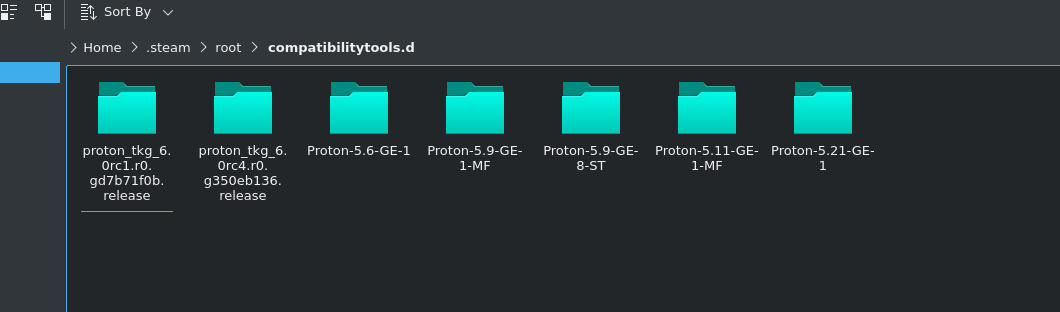
https://github.com/GloriousEggroll/proton-ge-custom/releases/tag/5.21-GE-1
Download it from here (the tar file). Follow the instructions on the main page of the repo to install it. Then do the protonfixes stuff.
thanks for the hint :) i did as you suggested, followed the guide. i can select proton-5.21-ge-1 now, but dragonball still does not run :(
Only works for me on Proton 5.21-GE.
how, tell me the magic?
theres a long time its not running here
starting to believe that now :D some people claimed it is still working with 5.21-ge. but i find that hard to believe :)
Only works for me on Proton 5.21-GE.
how, tell me the magic?
theres a long time its not running herestarting to believe that now :D some people claimed it is still working with 5.21-ge. but i find that hard to believe :)
trying here, with proton GE or TKG, even experimental don't work.
Did you set the game to use 5.21, and did you apply the protonfixes script? You should see a protonfixes pop up when you start the game.
here it worked, with proton 5.21-GE-1 And with this steam parameter: '' - eac-nop-loaded '' plus what was mentioned here https://github.com/ValveSoftware/Proton/issues/1240#issuecomment-626401185
I also used wine and winetricks
google translator portugues> english
Did you set the game to use 5.21, and did you apply the protonfixes script? You should see a protonfixes pop up when you start the game.
Yes, I try several ways and times, still unplayable.
Did you set the game to use 5.21, and did you apply the protonfixes script? You should see a protonfixes pop up when you start the game.
Yes, I try several ways and times, still unplayable.
in your ~ / .config / proton fixes / local fixes / are there 3 files?'' __pycache __'', ''678950.py'' is ''init.py''?
here it only worked when these two files appeared when I ran the proton 5.21-ge-1 created ''pycache '' is ''init.py''
i got those 3 files in there. but protonfixes dialog when starting DB only appears with proton 5.0-10. with 5.3.14 and 5.21-GE it does not appear. I checked, that i have "import protonfixes" in user_settings.py in both, 5.3.14 and 5.21-ge but it does not change anything. still does not run
You don't need to import protonfixes for 5.21-ge as it has builtin protonfix, so delete it from user_settings.py
good to know, i removed it from user_settings.py. was wondering about the protonfixes folder anyway :) BUT, it changes nothing, the protonfixes popup does not open :(
good to know, i removed it from user_settings.py. was wondering about the protonfixes folder anyway :) BUT, it changes nothing, the protonfixes popup does not open :(
try it here, i'm a beginner but maybe it works
open winetricks and click on '' select the default wineprefix '' and then click on '' Delete ALL DATA AND APPLICATIONS INSIDE THIS WINEPREFIX ''
then restart the machine and try to open the figther z again with proton 5.21-ge
I had no problems because I don't use much wineprefix
try it here, i'm a beginner but maybe it works
open winetricks and click on '' select the default wineprefix '' and then click on '' Delete ALL DATA AND APPLICATIONS INSIDE THIS WINEPREFIX ''
then restart the machine and try to open the figther z again with proton 5.21-geI had no problems because I don't use much wineprefix
This is totally useless for the game and potentially harmful if the user has other windows applications installed in the default wineprefix (which is ~/.wine). Also:
- the Proton prefix of the game, which is under the
steamapps/compatdatadirectory, has nothing in common with the default wineprefix, so this has no chance of fixing anything; - if you want to make sure no wine processes are still keeping wineprefix files open, rebooting the entire machine is overkill while a
wineserver -kcommand would kill all wine processes for the prefix set in theWINEPREFIXenvironment variable.
I can confirm that the game still works with the aforementioned protonfix correctly configured, also on Proton-5.21-GE-1.
@landjalan make sure your python environment is sane, as protonfixes is implemented in python.
try it here, i'm a beginner but maybe it works
open winetricks and click on '' select the default wineprefix '' and then click on '' Delete ALL DATA AND APPLICATIONS INSIDE THIS WINEPREFIX ''
then restart the machine and try to open the figther z again with proton 5.21-ge
I had no problems because I don't use much wineprefixThis is totally useless for the game and potentially harmful if the user has other windows applications installed in the default wineprefix (which is
~/.wine). Also:
- the Proton prefix of the game, which is under the
steamapps/compatdatadirectory, has nothing in common with the default wineprefix, so this has no chance of fixing anything;- if you want to make sure no wine processes are still keeping wineprefix files open, rebooting the entire machine is overkill while a
wineserver -kcommand would kill all wine processes for the prefix set in theWINEPREFIXenvironment variable.I can confirm that the game still works with the aforementioned protonfix correctly configured, also on Proton-5.21-GE-1.
@landjalan make sure your python environment is sane, as protonfixes is implemented in python.
wich gpu are you using there? I change this week and nvidia for a AMD and still the same, not working
@tuxtergames , do you have winetricks.log under dbfz prefix directory? if you do, what's in there?.
Also try to delete the last line of protonfix (util.protontricks('hidewineexports=enable')).
@tuxtergames , do you have winetricks.log under dbfz prefix directory? if you do, what's in there?.
Also try to delete the last line of protonfix (
util.protontricks('hidewineexports=enable')).
Inside winetricks.log theres only "hidewineexports=enable"
delete (util.protontricks('hidewineexports=enable') doing nothing
Hi folks, sice my last visit I can't still play the game, unfortunately spend a lot of time to fixed, theres some new reports on protondb that the game still works for some people, looks like I'll need to move to dual boot again to play DBFighterz,I'll left my log here if somebody could help me.....
Hi folks, sice my last visit I can't still play the game, unfortunately spend a lot of time to fixed, theres some new reports on protondb that the game still works for some people, looks like I'll need to move to dual boot again to play DBFighterz,I'll left my log here if somebody could help me.....
idk if you are still interested, but it seem protonfixes doesn't work here, it still use DBFighterZ.exe instead of RED/Binaries/Win64/RED-Win64-Shipping.exe, see 4th line of your log.
======================
Proton: 1612754589 6.1-GE-2
SteamGameId: 678950
Command: ['/media/unidade-3/Steam Games/steamapps/common/DRAGON BALL FighterZ/DBFighterZ.exe', '-eac-nop-loaded']
Options: {'forcelgadd'}
SteamLinuxRuntime: v0.20210114.1-0-g5a1cbb7
pressure-vessel: 0.20210203.0+srt1 scout 0.20210208.0
soldier: 0.20210208.0 soldier 0.20210208.0
======================
Replying to https://github.com/ValveSoftware/Proton/issues/1240#issuecomment-819736452
tks for reply, I'll always interested, I need to dual boot my machine to play this game, any tips to workaround this?
I'll looking for something to solve it....
@rezzafr33 running steam on terminal I can see that steam doesn't found protonfix folder, but the file still there.
Adding process 6723 for game ID 678950
ProtonFixes[6743] INFO: Running protonfixes
ProtonFixes[6743] INFO: Running checks
ProtonFixes[6743] INFO: All checks successful
ProtonFixes[6743] INFO: Using global defaults for "DRAGON BALL FighterZ" (678950)
ProtonFixes[6743] INFO: No protonfix found for "DRAGON BALL FighterZ" (678950)
ProtonFixes[6743] INFO: Getting ms corefonts
Compatibility Report
- Name of the game with compatibility issues: Dragonball Fighter Z
- Steam AppID of the game: 678950
System Information
- GPU: GTX 1060
- Driver/LLVM version: Nvidia 465.24.02
- Kernel version: 5.11.11-143-tkg-MuQSS
- Link to full system information report: System Information
- Proton version: 1617827925 experimental-6.3-20210407b (but also affect Proton 6.3-2)
Symptoms
Using protonfixes to replace launch command from DBFighterZ.exe to RED/Binaries/Win64/RED-Win64-Shipping.exe and bypass EAC with -eac-nop-loaded, the game launched to blackscreen but it quit after a moment.
Works with Proton-6.5-GE-2
Finally got the game run again with the last proton GE 6.16-GE-1, I need to remove all files and pfx folder, cause I used to run this game with mods, I've all dlcs working, my protonfixes bellow
""" Game fix for DRAGON BALL FighterZ
"""
#pylint: disable=C0103

from protonfixes import util

def main():
    util.replace_command('DBFighterZ.exe', 'RED/Binaries/Win64/RED-Win64-Shipping.exe')
    util.append_argument('-eac-nop-loaded')

    util.protontricks('hidewineexports=enable')
    util.set_environment('WINE_FULLSCREEN_FSR','1')
    util.set_environment('vblank_mode', '0')
tks to @esdras tarsis to help me.
btw hte game looks run online now, but I won't try to get ban, try for yourself
Screenshots


Replying to https://github.com/ValveSoftware/Proton/issues/1240#issuecomment-912611152
completing my comment, you can enter online lobby, but if you try to play online the game will close, make sense cause EAC it's not installed.
@tuxtergames I tried using your config with the latest custom proton ver. proton GE 6.16-GE-1 but it didn't work. If anyone can help me out that would be awesome cause I've wasted like 4+ hours trying to get the game to work.
It does not start nor does it show any error messages. the custom file i used is 678950.py using @tuxtergames config right on top of me.
@tuxtergames I tried using your config with the latest custom proton ver. proton GE 6.16-GE-1 but it didn't work. If anyone can help me out that would be awesome cause I've wasted like 4+ hours trying to get the game to work.
Did you follow my tips, erase everything of this game and download again, after remove the game inside steam, go to games folders and delete game folder and compatdata, download again and try to play, testing now the game here

waiting epic press one button to play, trying paladins here and not work yet
waiting epic press one button to play, trying paladins here and not work yet
They just released it we have to wait for the devs to implement it, hopefully soon.
Hi all, looks like wine eac module is enabled for DBFZ.

Unfortunately the game crashes on start with current Proton Experimental and any other versions including Proton GE 6.16, 6.18, so I can't test online multiplayers. I have reached denuvo limit so must wait for another 24 hours.
Here is the log from current Proton Experimental
steam-678950.log
I'll go test it in 10mins
Hi all, looks like wine eac module is enabled for DBFZ.
Unfortunately the game crashes on start with current Proton Experimental and any other versions including Proton GE 6.16, 6.18, so I can't test online multiplayers. I have reached denuvo limit so must wait for another 24 hours.
Here is the log from current Proton Experimental
steam-678950.log
Did not work, tried proton experimental with media patch and proton ge 6.18
Here is summary of my test:
Proton - Experimental
-
With protonfix
-eac-nop-loaded
The game launch to black screen then immediately exit.
steam-678950.log -
Without protonfix
EAC module downloaded, no error from EAC service but the game also launch to black screen then immediately exit.
steam-678950.log
loader.log
gamelauncher.log
Proton 6.5-GE-2 (also with 6.16-GE-1)
-
With protonfix
-eac-nop-loaded
The game launch normally.
steam-678950.log -
Without protonfix
EAC module not downloaded, error from EAC serviceEACAsyncResult: 4 Message: 'StartService failed with 2001.'.
steam-678950.log
gamelauncher.log
loader.log


This looks like it might be an issue with denuvo anti-tamper or something.
anyone have some news about play online? today I can get one fight, but the others its kicked me in a minute, but I can enter the party and fight for a few time with the last GE build, btw with the last two GE builds its not necessary protonfix workarround anymore....
This game won't be playable because of EAC. And it is there because 'linux users are hackers' bs.
Seems like GE 7.10 has managed to improve things potentially, according to ProtonDB reviews.
Seems like GE 7.10 has managed to improve things potentially, according to ProtonDB reviews.
GE add protonfix that basically bypass EAC and hide wine from the game, actually that is the same thing we have done before, scroll up you'll find the protonfix here.
It works for offline, but you'll kicked out in online match, some immediately around 5 seconds, others might get lucky and finish the match.
new error with proton GE, game works, but can't play training combos and sometimes fights get this crash error
LowLevelFatalError [File:E:\jenkins\sharedspace\DBF_Patch0130\Dev\Engine\Source\Runtime\CoreUObject\Private\Serialization\AsyncLoading.cpp] [Line: 1955]
FAsyncPackage::FindExistingImport class mismatch MaterialInstanceConstant != Material
Crash in runnable thread FAsyncLoadingThread

Just tried yesterday with GE-7-24 version and I noticed that intro FMVs now work too.
Obviously, online play is still broken because of missing EAC support
Just tried yesterday with GE-7-24 version and I noticed that intro FMVs now work too.
Obviously, online play is still broken because of missing EAC support
not working here even training combos broken the game too with the last Proton GE.
Game don't open.
Tried with Proton 7.0-4
Game don't open. Tried with Proton 7.0-4
working with proton GE 7.24, offline, no intro videos
With many games using EAC now compatible, it would be nice to see this game being fixed.
With many games using EAC now compatible, it would be nice to see this game being fixed.
Dreams of brighter days
I tried GE-Proton8-6 online after 1mn, I was kicked out the match.
Eac not supported by this game
With the new releases Rollback Patch, I really want to play this Game! Steam Proton Version doesn't work - Game crashes on Launch. Proton GE works offline perfectly fine, but as soon as I search for an Online Match, I will get kicked out ... probably due to Anti Cheat... which is weird, considering this Game was made by ArcSystemWorks and their Games work online perfectly fine. Published by Bandai Namco... Tekken works also Online.
Hope this will get fixed soon!
The eac doesn't support Linux, dragon ball fighter Z have to add the .so file which I doubt they will do.
On Steam Deck, could not get the game to launch no matter which Proton was used (Experimental or latest Proton GE).
Using PROTON_LOG=1 %command% did not provide any useful information, there were no logs past the header section (the part inside ====================== at the beginning of proton log files)
However this was solved by entering Desktop mode and running the game there once. After that it works without issue in standard Steam Deck game mode as well.
Still not working with proton 11, experimental or hotfix. The game starts and crash instantly. And with proton GE because it didn't load the anticheat the game kicks you if you play online
Adding a concrete root-cause analysis, since this thread has a lot of
conflicting reports about what works.
Launch failure (stock Proton)
The game is not crashing. Under Proton Experimental 11.0-100 it initialises
fully — DXVK creates a D3D11 device at feature level 11_0, DXVK-NVAPI reports
the GPU and outputs, audio initialises, and Unreal's RenderThread 0,
FAsyncLoadingThread and RTHeartBeat all start. A frame is presented (the
dxvk-frame thread appears). Then the process exits cleanly with status 0,
roughly ten seconds in, with no exception and no err: line anywhere in the log.
The last application-level activity before shutdown, reproduced in four
independent runs:
fixme:toolhelp:CreateToolhelp32Snapshot Unimplemented: heap list snapshot
fixme:toolhelp:Heap32ListFirst : stub
TH32CS_SNAPHEAPLIST is still unimplemented in Wine
(dlls/kernel32/toolhelp.c). EasyAntiCheat enumerates heaps, gets a stub, and
the game terminates about half a second later.
To be precise about what that does and does not show: the identical stub also
fires in a working GE-Proton run, 77 seconds in, and the game runs straight
through it. So the missing heap enumeration is not sufficient on its own to
cause the exit. It is the last application-level activity before shutdown in
every failing run, which makes it the best lead available, but I have not
demonstrated causation and am not claiming it.
Earlier in the trace the game loads EasyAntiCheat/easyanticheat_x64.dll and
unloads it in the same millisecond.
Workaround
GE-Proton, which bundles protonfixes/gamefixes-steam/678950.py
(replace_command to the shipping binary, -eac-nop-loaded,
hidewineexports=enable). Stock Proton ships no protonfixes and has no gamefix
for this appid, which is the whole difference.
Worth recording: applying those three steps manually under Proton
Experimental 11.0-100 did not work — the game still exited at ~12s with all
three applied together. GE-Proton evidently carries additional Wine patches
that matter here; I did not isolate which.
Online play — why it cannot be fixed here
Several comments in this thread claim online works. It connects, but it does not
hold: matches drop after ~1–2 minutes because the workaround runs with
EasyAntiCheat disabled, so peers cannot attest the client. Others in this thread
report the same thing surfacing as "eac peer untrusted".
The underlying reason is worth stating plainly, because it means no Proton-side
change can address it. DBFZ ships the legacy, pre-Epic EAC integration:
$ openssl x509 -inform DER -in EasyAntiCheat/Certificates/game.cer -noout -subject -issuer -dates
subject=CN=Dragon Ball FighterZ, O=Bandai Namco Entertainment
issuer=O=EasyAntiCheat Oy, CN=Hash Catalogue Intermediate CA
notBefore=Jun 14 15:34:05 2017 GMT
EasyAntiCheat Oy is the company Epic acquired in October 2018. The depot ships
EasyAntiCheat_x64.dll / _x86.dll / EasyAntiCheat_Setup.exe with no Linux
.so and no EOS markers in the binaries. The legacy SDK has no Proton support
at all, so the publisher-side toggle documented for modern EAC does not apply —
Bandai Namco would need to migrate to a current SDK first, then enable Linux and
ship easyanticheat_x64.so alongside the Windows library.
So: offline works well under GE-Proton; online requires a publisher-side SDK
migration and nothing in Proton can substitute for it.
System: Ubuntu 26.04, kernel 7.0.0-30, RTX 4090 (NVIDIA 595.84), i9-14900K,
Wayland, Steam snap. Full Proton traces available if useful.
Related threads
- Squadprotonopen same upstream bug
- VRChatprotonopen same upstream bug
- Apex Legendsprotonopen same upstream bug
- The codecs and media frameworks support meta-trackerprotonopen same upstream bug
- Assetto Corsa Competizioneprotonopen same upstream bug
- Borderlands 3protonopen same upstream bug
- STAR WARS Jedi: Fallen Orderprotonopen same upstream bug
- Dead by Daylightprotonopen same upstream bug
- ASTRONEERprotonopen same upstream bug
- Spyro Reignited Trilogyprotonopen same upstream bug
Proton versions
proton experimentalx4 2026-09ge-proton8-6x1 2023-07proton 7.0-4x2 2022-08proton 6.5x1 2021-09proton 6.3-2x1 2021-04proton 6.5-ge-2x1 2021-04proton 5.21x11 2021-01proton 5.21-ge-1x5 2021-01proton 5.0-10x2 2021-01proton 5.13x1 2021-01proton 5.0-9x1 2020-11proton 5.13-1x1 2020-11proton 5.8x2 2020-07proton 5.8-ge-2x1 2020-06proton 5.9-ge-2x2 2020-06
Launch options
PROTON_LOG=1x1 2025-03WINE_FULLSCREEN_FSRx1 2021-09WINEPREFIXx3 2021-01PROTON_DUMP_DEBUG_COMMANDSx1 2020-05WINEDEBUG=+seh,+loaddllx1 2020-03WINEDEBUG="+timestamp,+pid,+tid,+seh,+debugstr,+loaddll,+mscoree"x2 2020-02PROTON_USE_WINED3D=1x2 2019-01
Launch lines
PROTON_USE_WINED3D=1 %command%x2 2019-01
Upstream links
- ValveSoftware/Proton/issues/1787x1 2019-03
- show_bug.cgi?id=44235x1 2018-12
- ValveSoftware/Proton/issues/1464x1 2018-09
- ValveSoftware/Proton/issues/327x1 2018-09
DLLs
_x86.dllx1 2026-09easyanticheat_x64.dllx1 2026-09mfplay.dllx1 2018-09
Game starts to load then go to a black screen without sound .
AMD ryzen 5
Nvidia GTX 1050