Assassin's Creed Odyssey
You might need this work around for the uplay error: https://github.com/ValveSoftware/Proton/issues/162#issuecomment-425779454
@d10sfan , that did not resolve my issue. Thanks for the suggestion however.
I got it working with Arch.
You need:
- Steam runtime (obviously)
- Proton 3.16 as compatibility tool (select from Steam > Settings > Steam Play > Compatibility tool)
- the
lib32-gnutlspackage (sosudo pacman -S lib32-gnutls) - the following symlinks (this issue is mentioned in multiple posts, it appears to reference/required an old version of
libgnutls, symlinking it like this will put the symlinks in the Steam-directory, where they belong, instead of system-wide symlinking):
sudo ln -s /usr/lib/libgnutls.so.30.14.11 ~/.local/share/Steam/ubuntu12_32/steam-runtime/pinned_libs_64/libgnutls.so.26
sudo ln -s /usr/lib32/libgnutls.so.30.14.11 ~/.local/share/Steam/ubuntu12_32/steam-runtime/pinned_libs_32/libgnutls.so.26
Uplay will launch and initiate Steam for Windows installer (I had to remove some previous installation first), after that it will launch the game. It appears to run stable and without flaws!
@1202software That worked well, thank you. I'm able to get into the game.
Another issue i'm having, it's not detecting my monitor correctly. I have a 3440x1440 100Hz display, it detects it as a 640x480 60hz - wouldn't be an issue however changing to the correct ratio and resolution doesn't appear to change it correctly and will have black bars top and bottom.
@matty-r The game was not made for such resolutions, I guess. I myself use a 3840x1600 resolution (Ultrawide), fortunately this is detected correctly and it runs at this resolution, looks absolutely stunning without black borders and such. In-game it tells me under the graphics options 'Multi monitor'.
You could try tweaking the game's ini-file, ACU.ini. There, you can set the correct resolution. Hope it helps. Some more about that: https://forums.ubi.com/showthread.php/983991-AC-Unity-start-up-resolution-issue-Forums
@1202software I'll have a look at that and let you know.
The game itself supports that resolution no problems as I've been playing it under Windows without any issues. Under Linux I was able to select the right resolution in the menus but it still had those borders. I'll have a play and report back.
I tried as you suggested and it didn't make a difference. I also basically just copied the INI from Windows and copied into the same location under the SteamPlay compat folder, which also didn't appear to make a difference.
Under Linux

Under Windows

@matty-r Sorry, I'm running Assassin's Creed Unity, not Odyssey, guess I got the titles mixed up. Unity is an older game and that does not seem to know about 4K displays (at least not in Linux) and lists it as 'Multi monitor'.
I would have to get Odyssey to see if I'm getting the same issue, but Unity worked out of the box for me. One thing I noticed is in your Linux screenshot it displays 'Aspect ratio' as '4:3' (that's true of course for 640x480), what happens if you change that? Does it list more resolutions?
I am experiencing the same resolution problems with an AMD Radeon RX580 and a kinda normal resolution of 1920x1080.
Didn't manage to get rid of the border.
The game also thinks my native resolution is 640x480, but lets me select the correct resolution (still borders tho)
A workaround for the resolution issue is to use wine's virtual desktop for the game. No idea what might be causing this behaviour though.
@1202software So the Linux screenshot was taken when my resolution was set to 3440x1440 and the aspect ratio set to 21:9. So yea, when I set it to what it's supposed to be then thats how it's displayed with the black bars.
Is there a way to get wines virtual desktop in fullscreen or borderless window mode ?
Otherwise i prefer the black ingame border TBH.
Additionally i get occasional graphic glitches like these https://i.imgur.com/jPst1dt.png
Still freakin awesome that the game already runs almost "playable" on linux such a short time after the release

When you set the virtual desktop size to your native monitor resolution, it should behave like any other (borderless) fullscreen application.
@SleepProgger The game is known to be broken on current/older Mesa, it renders correctly when using mesa-git and LLVM 8 (LLVM 7 might work too, haven't checked).
@doitsujin I set wine to use a virtual desktop and set it's size to my screen resolution. Black borders are gone, but input doesn't work in this mode. I don't see a mouse in the game. Also my keyboard and game cotroller do nothing.
When I disable virtual desktop, I have black borders again, but keyboard, mouse and controller do work again.
Edit: I have LLVM 7.0.0 installed and the game works great (except the black borders in fullscreen mode).
Strange, input works fine on my end.
@doitsujin so how do you use the virtual desktop?
I tried it with Mesa 3.2 using llvm 7 on manjaro and had the same glitches.
Currently compiling mesa-git (which takes like forever). Hoping that will solve the glitches.
@matty-r
Use winecfg, go to the "Graphics" tab and select "Emulate a virtual desktop.
Method 1. Use native winecfg:
If you have wine installed on your system:
GAME_ID="242050" WINEPREFIX="$HOME/.steam/steam/steamapps/compatdata/${GAME_ID}/pfx" winecfg
*Replace 242050 with ID of the game you want to configure the prefix of.
Method 2. Use protons winecfg (suggested version):
You can also use the wine version shipped with proton. I created a simple script for this to make it easier:
https://gist.github.com/SleepProgger/2538c8931c61b752f42cfcf6326e3621
Start it like:
./proton_run 242050 winecfg
This will use Proton 3.16. If you are using another version start it like:
PROTON_VERSION="YOUR VERSION HERE" ./proton_run 242050 winecfg
@SleepProgger Nice, that seems to of done it.. One more issue though. That wine virtual desktop has the task bar at the bottom even when the game is meant to be fullscreen.
Any way to get rid of that task bar?
@matty-r : See comment by @doitsujin
When you set the virtual desktop size to your native monitor resolution, it should behave like any other (borderless) fullscreen application.
With mesa-git with llvm.8 and the 4.19 kernel on manjaro using an rx580 the game runs flawless now.
@SleepProgger Hmm ok i'll need to try and figure that out - it's a little frustrating having that task bar there.
@SleepProgger WRT the proton_run thing, you might find the PROTON_DUMP_DEBUG_COMMANDS switch useful.
OK... apparently there was an update to Proton, now running version 3.16-4 Beta. Now the game doesn't start AT ALL. When I click 'Play' it immediately quits. Anyone recognize this?
@1202software For me 3.16-4 is ok, the game still runs as it was with 3.16-3.
Maybe you could try:
- Kill wineserver
- Reset the games wineprefix
- Update to Steam beta (if you haven't already) (because there was a runtime update)
- Redo the linking workaround
Another problem that I have (but this is nothing new, was already there with 3.16-3) it that the game or Proton does not prevent the screensaver.
Every 10 minutes during playing with controller my screen turns of. Proton should prevent from going to screensavers in the future.
@Bleuzen Thanks for the tips. I've got the latest Steam, I think, it says 'built Nov 2 2018' and I'm enrolled in the Beta program. I've killed wineserver and redid the linking, to no avail. I've seen some ways to change the wineprefix, what's the best way to reset it?
Personally, I suspect Uplay, which starts first when launching the game, but it doesn't start at all. It does start when I switch back to Proton 3.7, but that does not have the internets working, so it remains at the login screen. But at least that's something, going back to 3.16-4 it craps out immediately.
@1202software yeah should be newest steam. Same build I'm using.
To 'reset' the prefix, try to rename the 'pfx' folder in your SteamLibrary/steamapps/compatdata/812140/.
@Bleuzen Ah, yes, tried that, then it starts complaining about the missing 'UplayLauncher', and it says I should re-install the entire game. So I'm currently attempting that, waiting for the huge download to finish...
@1202software The game should be in steamapps/common. If you didn't touch it, there should be no reason to re-download the entire game. I thought Steam would detect it.
Did you restart Steam after pfx rename?
@Bleuzen I did, didn't work (I even rebooted the computer for good measure). However... after a good few hours of downloading and then reinstalling the game, upon launch it goes through the process of reinstalling DirectX etc. and of course the Ubisoft stuff, and it now launches and works again without a hitch!
There is a certain sequence of execution with multiple elements. Apparently, something in this sequence went broken and letting Steam recreate the pfx folder isn't enough to straighten it out. I'm happy reinstalling the game does, because otherwise it would mean digging down deeper into this construction involving Uplay, Steam and Proton/Wine, tossing in between the odd library or driver.
@matty-r Did you get rid of the task bar in virtual desktop mode somehow?
Edit: Someone made a patch for it: https://forum.winehq.org/viewtopic.php?f=8&t=29805#p113197
But it is not in Proton :/
@Bleuzen nah mate - bit unfortunate really. I guess the real issue is that it needs that Virtual Desktop enabled in the first place.
For me the game only loads the first time I click play after it is installed. After that it only launches uplay and won't start the actual game :-(.
Edit: https://pastebin.com/9PDARXg0 A section of my logs that has an error related to GPU init. No clue if this is the issue or not. The entire log can be found at https://paste.fedoraproject.org/paste/yYvHd3PFfFA8X0qEk8A6dw but it may take a long time to load/not work at all. The log is 8.4mb.
Does the game / Uplay still work for some of you?
I wanted to play today again.. got an Uplay update and now it doesn't start anymore. When I press play in Steam, the processes 'upc.exe' and "UbisoftGameLauncher" spawn, but nothing happens. No Uplay windows comes up, the game also not starts.
If I press play in Steam again, it says the game is already running.
I tried it with Proton 3.16-4 and 3.16-5. Both don't work. But 3.16-4 already worked before.
I deleted the compdata folder for the game (the wineprefix), so that this get's reset. I restarted steam and started the game again. It installed Uplay again.
After first launch, Uplay opens and downloads an update. After the update, Uplay should restart, but it doesn't open.
And then the problem starts again. Uplay just dosn't open anymore. Seems to be so since the newest Uplay update.
You have the same problem and does someone already have a fix?
@Bleuzen I have the same problem.
@Bleuzen I switched to the lutris installer for the game. I have been playing it for the last 8 days with minor issues that people see here with the virtual desktop and keyboard/mouse quirks.
@pintodragon Yes it works in Lutris with wine 3.21. But it stopped working with Proton 3.16.
@Bleuzen Yep, I think it's Uplay as well. I looked through the log files in the pfx dir and it reports networking issues. It cannot seem to get online anymore. The odd thing is, as your reported, it does download the Uplay update when you reinstall the game. It's only after installing the update that it does not go anywhere anymore and cites network issues.
I don't know exactly how Uplay is tied in to the whole libgnutls deal, perhaps a solution can be found there, putting a symlink somewhere else? I've tried a few dirs (like the Proton dirs) but to no avail.
But it stopped working with Proton 3.16.
It worked fine for me in 3.16-4. We now have 3.16-5 Beta, that does not work with the game, but when I switch back to the 'trusty' 3.16-4 it doesn't work either.
However... thinking about this: we used to have 3.16-4 Beta (that worked!), now we have 3.16-4 (non-Beta) and 3.16-5 Beta... could it be Proton is repackaged and now they're both broken as far as Uplay is concerned - ie. there's a fundamental difference between 3.16-4 Beta and non-Beta?
Maybe Ubisoft updated some network library in Uplay, which is not compatible with Proton/wine 3.16 anymore.
Here are my test results so far.. The wine versions that work with new Uplay are marked.
- [ ] Proton 3.16-4
- [ ] Proton 3.16-5
- [ ] Wine 3.16
- [x] Wine 3.16-staging
- [x] Wine 3.21
So it seems that Proton needs a wine-staging patch or to update to wine >= 3.21.
@Bleuzen, how do you get AC working with wine 3.21? simply launching the exe through wine on the command line complains about a missing uplay launcher, and although I have wine installed on the package manager on my system, It does not show up as an option as a compatibility tool.
sorry if this is the wrong place to ask, but a quick duck search failed me, and I am relatively inexperienced with wine and proton beyond the most basic use.
@TheToric I used Lutris. With Lutris it is pretty easy to install any wine / dxvk version.. you should try it.
https://lutris.net/downloads/
are you running it through the windows version of steam? even with lutris, it still complains about a missing uplay launcher...
@TheToric Yes I'm running the Windows version of Steam.. it should install UPlay on first launch.
With proton 3.16-7 beta Assassin's Creed Odyssey is working again. I needed to disable the uplay overlay, without disabling the overlay it starts with a black screen. Their still are black borders at top and bottom.

-
I needed to disable the uplay overlay, without disabling the overlay it starts with a black screen.
I confirm this issue.
-
Their still are black borders at top and bottom.
I am also confirm this.
Plus:
-
not working store:

-
Dramatically dropping FPS in all cutscenes. (In game FPS hold on 30, but in cutscenes drops to 3)

-
Not working cloud saves

Proton logs: steam-812140.log
After short pause and ALT-TAB to Google Chrome after returning to game begins showing artifacts:

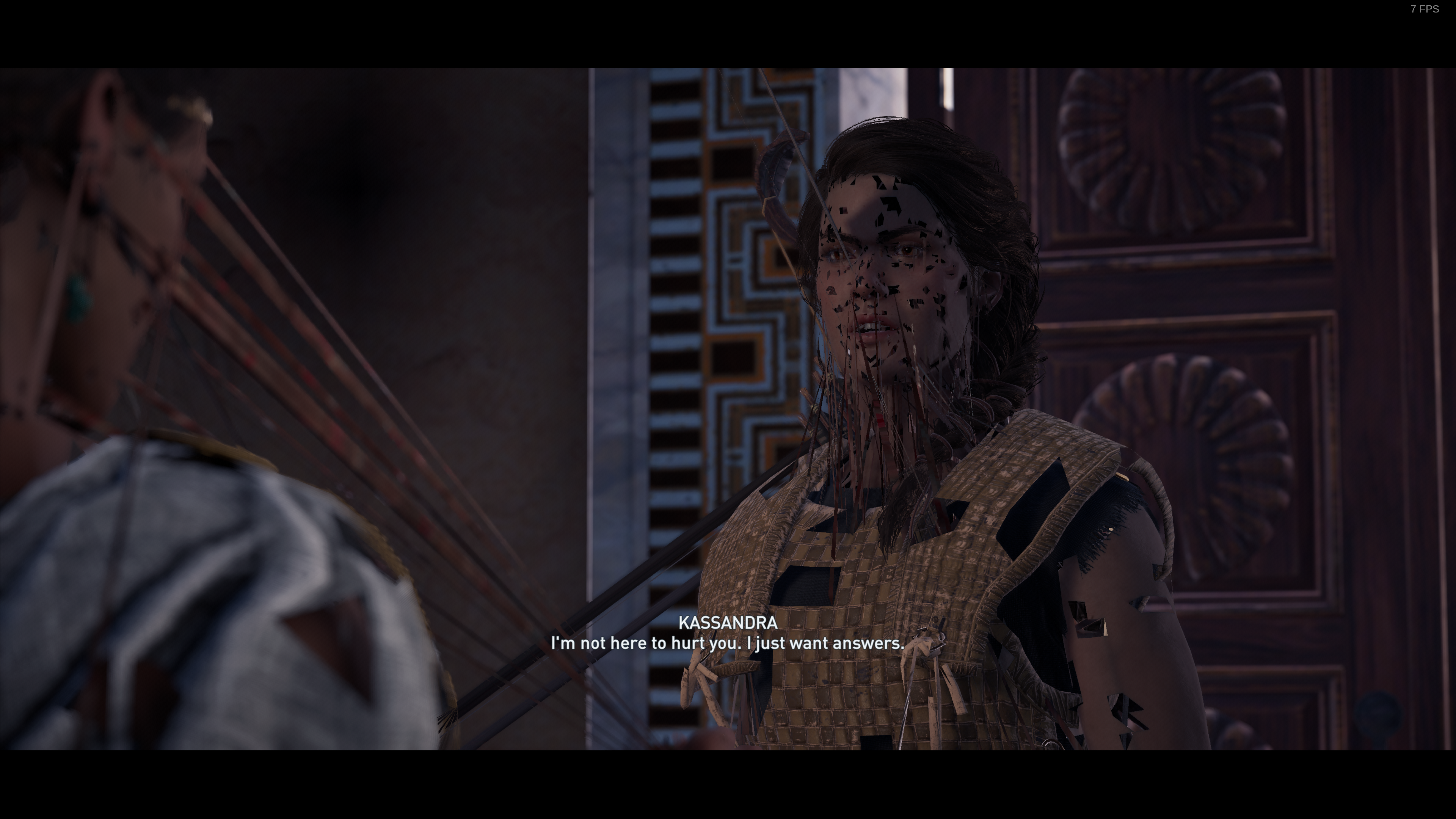

@doitsujin can you look this is DXVK bug?
@NTMan Ugh, looks like some of the game's graphics memory gets corrupted when you switch to a different application. This shouldn't happen, and I can't reproduce the problem.
I also cannot reproduce your performance problems in cutscenes.
What's your GPU and graphics driver version?
What's your GPU
AMD Vega 64
graphics driver version?
Mesa: 19.0.0-rc4
LLVM: 7.0.1
Hm. Kernel version might be interesting as well in this case.
Hm. Kernel version might be interesting as well in this case.
5.0.0-0.rc6.git1.1.fc30
You need:
* Steam runtime (obviously)

* Proton 3.16 as compatibility tool (select from Steam > Settings > Steam Play > Compatibility tool)

* the `lib32-gnutls` package (so `sudo pacman -S lib32-gnutls`)

* the following symlinks (this issue is mentioned in multiple posts, it appears to reference/required an old version of `libgnutls`, symlinking it like this will put the symlinks in the Steam-directory, where they belong, instead of system-wide symlinking):
  `sudo ln -s /usr/lib/libgnutls.so.30.14.11 ~/.local/share/Steam/ubuntu12_32/steam-runtime/pinned_libs_64/libgnutls.so.26`
  `sudo ln -s /usr/lib32/libgnutls.so.30.14.11 ~/.local/share/Steam/ubuntu12_32/steam-runtime/pinned_libs_32/libgnutls.so.26`
If the gnutls link in the steam runtime directory simply links to the wrong file and isn't the wrong library, you can simply add the appropriate compatibility link in your lib32 directory. This is usually the better solution.
That is of course, presuming, the new version (libgnutls30) is drop in compatible with the old version (libgnutls26). If the old version is incompatible for some usages, you might want to get a security-patch updated version of the old version specifically for compatibility with older programs linked against libgnutls26.
You can check the changelogs to see if there are any changes that break compatibility. In all likelyhood there aren't. GNU-TLS tends to be forwards compatible between versions, as do most simple libraries. I only remember two Non-GUI incompatable changes to anything and they were major upgrades (libc6 from libc5, and Python 3 from Python 2.) I know.
I just made myself look like an old nerd by mentioning the disaster of switching to libc6 from libc5. :smile:
gnutls30 is shipped with Steam now, in both production and beta clients. There's no need to be messing around with symlinks, and you should undo any symlinks you made previously.
Ran into one issue when playing, where if my Steam controller turns off at any point during play then gamepad input stops working (But KB+M bindings keep functioning), and the only thing that seems to restore it is a complete restart of the game.
I'm able to load into the game without issue after setting the virtual desktop size in winecfg, but random cutscenes are missing dialogue or have dialogue in the wrong places. Unfortunately it seems to largely be the ones more important to the story, which makes it fairly serious from a playability standpoint if you care about the story. Also I can rule this out as an audio bug as the subtitles are missing or misplaced in these scenes as well, but the animations (including lips) move as if they were supposed to be speaking.
I've tested this on Proton 4.2-9 and a custom build of 4.12.1
Having the same issue with fsync, so it seems the cutscene bug is happening with either fsync or esync. I've uploaded my game saves below, unfortunately the file write dates don't match the times displayed in game so I'm not sure which one is the correct one to duplicate this, but if you put these in your "Program Files (x86)\Ubisoft\Ubisoft Game Launcher" directory and in game load the oldest save dated 21 July, just run up the hill and start the cutscene. With either fsync or esync on my Ryzen system the cutscene plays out of order, including camera pans, so it is not an issue with just audio. Disabling both fsync and esync resolves the issue.
hi this log is from proton 4.11.1 and is when i try to execute a perfomance test this crash
hi this log is from proton 4.11.1 and is when i try to make a secundary mission later of talk to blacksmith https://gist.github.com/jomarocas/b873d217c63df9b1f77821ebac73ee47
Correction on my earlier statement - I got the out of order cutscene playback once even with esync/fsync disabled... so it seems to be somewhat random and maybe some race condition or timing issue. It does seem to happen more frequently with esync/fsync on though.
Testing on Proton 4.11-3, performance is still really good with fsync/esync but either of them I still have random missing or repeated dialogue in cutscenes. It isn't very common but it happens on important enough cutscenes that if you care about the story you still need to disable both fsync and esync.
Edit: 4.11-3 did fix my controller issues though, my DS4 now works with no tweaking needed, before I had to launch into Big Picture every time before it would be picked up.
Hi everyone,
After the 1.5.0 update of AC Odyssey and in the same time, update 4.11-3 of Proton, the game doesn't want to start anymore (in fact I think Uplay doesn't launch)... Do you have any idea please ?
I tried to downgrade to Proton 4.2-9 but it's the same.
Thanks.
Here are the logfiles :
steam-812140.log
Hi everyone,
After the 1.5.0 update of AC Odyssey and in the same time, update 4.11-3 of Proton, the game doesn't want to start anymore (in fact I think Uplay doesn't launch)... Do you have any idea please ?I tried to downgrade to Proton 4.2-9 but it's the same.
Thanks.
Here are the logfiles :
steam-812140.log
You may want to delete your Proton bottle and start fresh (basically reinstall the game). Launchers like Uplay and especially Origin like to break themselves in wine and require fresh installs from time to time. May want to backup your saves just in case the cloud backups weren't working first, but the location will be steamapps/compatdata/812140/
You may want to delete your Proton bottle and start fresh (basically reinstall the game). Launchers like Uplay and especially Origin like to break themselves in wine and require fresh installs from time to time. May want to backup your saves just in case the cloud backups weren't working first, but the location will be
steamapps/compatdata/812140/
I reinstalled everything and it doesn't work... I managed to launch Uplay in command line under the right WINEPREFIX (I used the "run" script generated by proton debugging option under /tmp) but I still can't launch the game.
Hi everyone,
After the 1.5.0 update of AC Odyssey and in the same time, update 4.11-3 of Proton, the game doesn't want to start anymore (in fact I think Uplay doesn't launch)... Do you have any idea please ?I tried to downgrade to Proton 4.2-9 but it's the same.
Thanks.
I used protontricks (via 'protontricks gui') to reinstall uPlay, and it launched normally again. Seems uPlay now breaks when you switch between Proton versions.
I used protontricks (via 'protontricks gui') to reinstall uPlay, and it launched normally again. Seems uPlay now breaks when you switch between Proton versions.
I just tried to reinstall Uplay with protontricks --gui. At the end of the installation, Uplay launches, but when I want to start the game with steam nothing happens (it shows "game launched" during 5 seconds and it disappears).
The game is purchased via Steam, is there a way to launch it directly via Uplay ? (now when I click "Play" in Uplay nothing happens neither)...
I Think I'm not the only one in that case : https://www.protondb.com/app/812140
Some update :
I can run the game on my laptop. It's not playable due to the low frame rate but the game launches...
What I don't understand, is that I have the same software version on both my computers :
OS : Linux Mint 19.1
Kernel : 4.15.0-58-generic
Nvidia Driver : 430.14
Steam : 1560817063
Proton : 4.11-3
ASOdyssey : 1.5.0
Hardware is not the same :
Laptop
Intel i7-4700HQ
Nvidia GeForce 840M
Desktop
AMD Ryzen 5 3600
Nvidia GeForce RTX2080
I even tried to copy all .local/share/Steam folder from my laptop to my desktop computer but still the same thing. I'm starting to think that I'm missing some libraries.
Is there a dependency list for games to run properly ?
There is strange GPU usage pattern with this game:

In game FPS all the time jumps from 10 to 60.
I have tried two Proton versions:
- Proton 4.11-3
- Proton-4.15-GE-1 (unofficial build)
My system:
OS: Arch Linux
Kernel: x86_64 Linux 5.2.11-arch1-1-ARCH
NVIDIA Driver: 435.21
Steam Built: Aug 30 2019, at 18:54:19 (Steam Beta)
Bought this game for my Arch machine. Sad I can't play it as I don't have Windows... But as Proton is developing at such rate, I will not ask for a refund, I'm pretty sure in near future this game will be playable! :+1:
Finally discovered the solution !
Some update :
I can run the game on my laptop. It's not playable due to the low frame rate but the game launches...
What I don't understand, is that I have the same software version on both my computers :OS : Linux Mint 19.1
Kernel : 4.15.0-58-generic
Nvidia Driver : 430.14
Steam : 1560817063
Proton : 4.11-3
ASOdyssey : 1.5.0Hardware is not the same :
Laptop
Intel i7-4700HQ
Nvidia GeForce 840MDesktop
AMD Ryzen 5 3600
Nvidia GeForce RTX2080I even tried to copy all .local/share/Steam folder from my laptop to my desktop computer but still the same thing. I'm starting to think that I'm missing some libraries.
Is there a dependency list for games to run properly ?
It was related with the Ryzen 3xxx UMIP [#2927](https://github.com/ValveSoftware/Proton/issues/2927)
Addind clearcpuid=514 in the grub boot options did the trick.
Kernel Update + Proton Update + ASO Update = a big mess to search where the problem really is.
Game literally stopped working for me since 4.11-3 I think. I'm using an Acer Nitro 5, Intel® Core™ i5-8300H CPU @ 2.30GHz × 8, GeForce GTX 1050/PCIe/SSE2, 16gb RAM.
Any workarounds? Using Nvidia 435.21
Assassin's Creed Odyssey (812140) broken since 4.11-7 (can't find Uplay installation)
Issue transferred from https://github.com/ValveSoftware/Proton/issues/3148.
@donutloop posted on 2019-10-13T11:56:53:
i updated from 4.11-6 to 4.11-7 since then this game isn't playable anymore because it can't anymore detect the Uplay installation on the machine. Everything worked on 4.11-6 without issues.
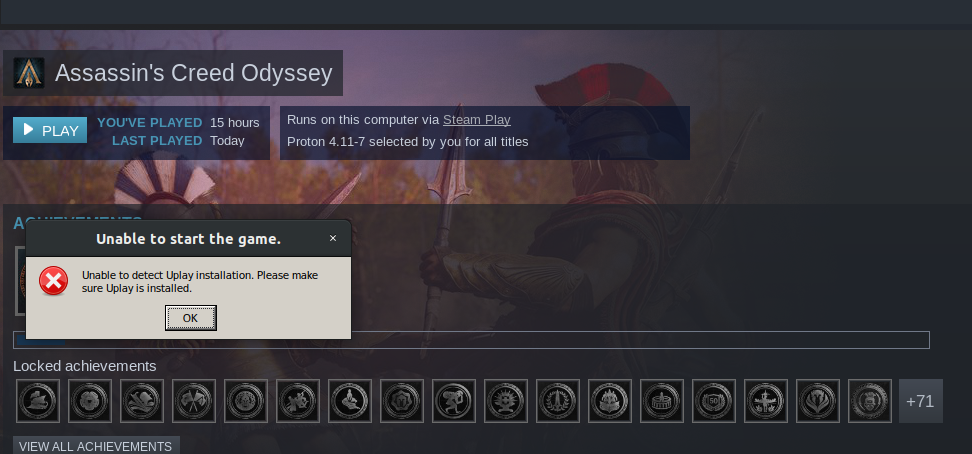
Compatibility Report
- Name of the game with compatibility issues: Assassin's Creed Odyssey
- Steam AppID of the game: 812140
System Information
Computer Information:
    Manufacturer:  Unknown
    Model:  Unknown
    Form Factor: Desktop
    No Touch Input Detected

Processor Information:
    CPU Vendor:  GenuineIntel
    CPU Brand:  Intel(R) Core(TM) i9-9900K CPU @ 3.60GHz
    CPU Family:  0x6
    CPU Model:  0x9e
    CPU Stepping:  0xc
    CPU Type:  0x0
    Speed:  5000 Mhz
    16 logical processors
    8 physical processors
    HyperThreading:  Supported
    FCMOV:  Supported
    SSE2:  Supported
    SSE3:  Supported
    SSSE3:  Supported
    SSE4a:  Unsupported
    SSE41:  Supported
    SSE42:  Supported
    AES:  Supported
    AVX:  Supported
    CMPXCHG16B:  Supported
    LAHF/SAHF:  Supported
    PrefetchW:  Unsupported

Operating System Version:
    Ubuntu 18.04.3 LTS (64 bit)
    Kernel Name:  Linux
    Kernel Version:  4.15.0-65-generic
    X Server Vendor:  The X.Org Foundation
    X Server Release:  11906000
    X Window Manager:  GNOME Shell
    Steam Runtime Version:  steam-runtime_0.20190711.3

Video Card:
    Driver:  NVIDIA Corporation GeForce RTX 2080 Ti/PCIe/SSE2
    Driver Version:  4.6.0 NVIDIA 415.27
    OpenGL Version: 4.6
    Desktop Color Depth: 24 bits per pixel
    Monitor Refresh Rate: 120 Hz
    VendorID:  0x10de
    DeviceID:  0x1e07
    Revision Not Detected
    Number of Monitors:  1
    Number of Logical Video Cards:  1
    Primary Display Resolution:  1920 x 1080
    Desktop Resolution: 1920 x 1080
    Primary Display Size: 20.94" x 11.97" (24.09" diag)
                                            53.2cm x 30.4cm (61.2cm diag)
    Primary Bus: PCI Express 16x
    Primary VRAM: 11264 MB
    Supported MSAA Modes:  2x 4x 8x 16x

Sound card:
    Audio device: Realtek ALC1220

Memory:
    RAM:  32098 Mb

Miscellaneous:
    UI Language:  English
    LANG:  en_US.UTF-8
    Total Hard Disk Space Available:  467922 Mb
    Largest Free Hard Disk Block:  37278 Mb
    VR Headset: None detected
Proton version
- 4.11-7
I've been playing Odyssey without issues on 4.11-7. You might have a broken wine prefix, I'd try removing your prefix and letting Proton reinstall Uplay.
Nvidia 435.27.07 fixed the last of my graphical issues with this game, it's now 100% compatible for me outside of Uplay screwing up sometimes and needing to be reinstalled (which hasn't happened for a while).
Hi there :)
So, I confirm this issue with the borders on my up-to-date rolling KaOS with current versions of Linux, mesa and so on.

It seems like this is an unresolved issue that happens for a lot of people and I also confirm, that by default my resolution was set to an absolute minimum, probably because by the driver is officially not supported, so a fallback.
I am wondering if this black border issue is also related to it. Like some fallback. 1920x1200, so 19:10 is selected in the game settings.
I am ready to provide any information that is helpful to solve this issue.
My specs: AMD Radeon RX 480 Graphics
(POLARIS10 DRM 3.33.0 5.3.8-1 LLVM 8.0.1) v: 4.5 Mesa 19.2.7
Thanks a lot
@kisak-valve :hugs:
Status update since it's been a while. Currently game works fine with Proton 5.0+ but requires the following changes:
- Cutscene logic breaking with missing dialogue and scripted sequences.
FIX: Disable both esync and fsync via user_settings.py (using variables in launch options seems to still leave one of the two enabled, as confirmed via logs). - Incorrect aspect ratio / letterboxing issues in fullscreen
FIX 1: Use the wine virtual desktop via winecfg
OR
FIX 2: Compile proton/wine with the following patch: https://github.com/Tk-Glitch/PKGBUILDS/blob/master/community-patches/wine-tkg-git/0001-Add-some-semi-stubs-in-user32.mypatch - Caves not lit properly and graphical artifacts on the wave patterns near shores (nvidia only).
FIX: Use Nvidia 440 driver or higher - Uplay breaks and the game says it is not detected (usually when trying to run the game with a different Proton release than it was originally installed with).
FIX: Remove the proton bottle and let Steam recreate it.
Thanks a lot, you solved all the glaring issues at once, great work :smiley:
FIX: Disable both esync and fsync via user_settings.py (using variables in launch options seems to still leave one of the two enabled, as confirmed via logs).
Is this considered an own issue report worth and which directory stores the user_settings.py?
Thanks
Thanks a lot, you solved all the glaring issues at once, great work 😃
FIX: Disable both esync and fsync via user_settings.py (using variables in launch options seems to still leave one of the two enabled, as confirmed via logs).
Is this considered an own issue report worth and which directory stores the user_settings.py?
Thanks
Thanks. I'm not sure if that's a Proton issue or an issue with Steam not allowing multiple variables at once in the launch options. If it does deserve its own report it should probably go in the steam-for-linux not proton tracker. I would imagine you could also set the variables when launching Steam to bypass that.
The file is in each Proton install's root directory, usually ~/.steam/root/compatibilitytools.d/$PROTONVERSIONHERE/user_settings.py
One other note with the Nvidia driver I was specifically testing with 440.48.02 - I tried one of the 'stable' 440 releases and the water mist broke again so you may want to try that driver specifically.
1. Cutscene logic breaking with missing dialogue and scripted sequences.
   FIX: Disable both esync and fsync via user_settings.py (using variables in launch options seems to still leave one of the two enabled, as confirmed via logs).
I disabled both esync and fsync via user_settings.py, and while most of the time it works ok, some cutscenes still breaks.
The game also often crashes when I open the steam overlay.
3. Caves not lit properly and graphical artifacts on the wave patterns near shores (nvidia only).
   FIX: Use Nvidia 440 driver or higher
No, the cave issue affects AMD (radv) also. Pretty much all caves are either missing ambient lighting completely (forcing you to rely solely on already existing torches or raise the brightness setting a lot, and in particular areas will display artifacted, grid-patterned lighting instead.

Hello @andersnylander, please copy your system information from Steam (Steam -> Help -> System Information) and put it in a gist, then include a link to the gist in this issue report. ~Also, are you using RADV/LLVM or RADV/ACO with the game?~ RADV/LLVM from the DXVK info in the screenshot.
Hello @andersnylander, please copy your system information from Steam (
Steam->Help->System Information) and put it in a gist, then include a link to the gist in this issue report. ~Also, are you using RADV/LLVM or RADV/ACO with the game?~ RADV/LLVM from the DXVK info in the screenshot.
Hello, my system information can be found here: https://gist.github.com/andersnylander/2e67db1f77178ebd987a9a1cff9cbf4a
As for LLVM vs ACO, as you could tell from the screenshot, it's LLVM. Should I look into using ACO for this title?
It should be fairly painless to test with RADV/ACO on your system by adding RADV_PERFTEST=aco %command% to the game's launch options. It would also be interesting to know if mesa 20.0.x + llvm 10.0.0 is equally affected, but that'll be more hassle to try.
It should be fairly painless to test with RADV/ACO on your system by adding
RADV_PERFTEST=aco %command%to the game's launch options. It would also be interesting to know if mesa 20.0.x + llvm 10.0.0 is equally affected, but that'll be more hassle to try.
I can confirm that when using ACO things look notably different. I don't know if it's accurate, but it certainly feels like it should be a lot closer to what the developers intended.

I tried it with Mesa 20 as well (using mesa-aco-git 20.0.0.20200226.7a965bd4c38-1) and it looked fine there also, but not when specifically selecting LLVM.
Haven't tried it with LLVM10 as the backend, but it seems ACO is the way to go for this title for now.
@andersnylander Would be nice if you can test with LLVM 10. LLVM 9.0.1 is known to have some problems..
@andersnylander Would be nice if you can test with LLVM 10. LLVM 9.0.1 is known to have some problems..
I did make an attempt at building llvm-git from AUR yesterday for the purpose of testing this. No dice, the build failed on me. LLVM10 was officially released 3 days ago, but the package in Arch's official repo has at the time of writing this not been updated yet. I do intend on testing this again once it's available from Arch's official repo.
Update:
It appears the issue is still present with LLVM 10. I had to build the toolchain from scratch before I could use it to build mesa-git. I don't know if this could influence the result I'm seeing, as I had to disable the Arch-specific patch applied to LLVM 9 to get it building (link).
One thing I noticed now that I didn't notice when I began playing this game, is that this incorrect ambient lighting shader affects all of the games' visuals, but also has a gameplay impact in caves and during nighttime when there's not enough light sources in the environment, making the RADV/LLVM combination very hard to recommend for this title.
goo day for all
i recently play he oddysey, in protondb appear this game working good, and i play origins for more than 50 hours in steam and all good, but this game cannot pass of the checking content message, i add the virtual desktop for graphic, and i have all latest nvidia drivers, i attach my log i have proton 5.0.6
steam-812140.log
I have the same situation as jomarocas. Origins works just fine, but I have been trying make Odyssey work for days. Also Proton 5.0.6, nvidia drivers. Log:
steam-812140.zip
.
Edit: Game now works after updating from Pop OS 19.10 to 20.04.
I have problems, still with screen, and checking content crash, with proton 5.0.7 i have ubuntu 20.04 ryzen 5 2600 and nvidia gtx 970 with 440
steam-812140.log
I have the same situation as jomarocas. Origins works just fine, but I have been trying make Odyssey work for days. Also Proton 5.0.6, nvidia drivers. Log:
steam-812140.zip
.
Edit: Game now works after updating from Pop OS 19.10 to 20.04.
hey i only verify data, and working, because need to download data
Caves are still nearly pitch black with Nvidia 440.82(latest as of now) and proton 5.0-7 here and I sadly can't go back as older Nvidia drivers aren't compatible with kernel >=5.6.
Caves are still nearly pitch black with Nvidia 440.82(latest as of now) and proton 5.0-7 here and I sadly can't go back as older Nvidia drivers aren't compatible with kernel >=5.6.
I'm not sure if the fixes have made it to their stable branch yet, however I can confirm that the very latest developer drivers (440.66.12) still work, which have their most recent Vulkan code. The fixes should make their way to the stable branch at some point.
I can confirm dark caves.
I played the game for dozens of hours with well lit caves. At some point my gtx 1060 suffered a lightning damage, I got it replaced by a 2060 super.
I am not sure at which point it broke, perhaps I changed the used Proton version, a Nvidia driver updated… but I cannot get it back to work. Whilst outside the lighting is fine, caves are unplayably dark…
I tried updating the the driver from 440.64 to 440.82, reverting the driver to 435.21, used Proton-5.6-GE-2, 5.0-9. It won't start with 4.11-13
I start it with launch option PROTON_NO_ESYNC=1
I can confirm dark caves.
I played the game for dozens of hours with well lit caves. At some point my gtx 1060 suffered a lightning damage, I got it replaced by a 2060 super.
I am not sure at which point it broke, perhaps I changed the used Proton version, a Nvidia driver updated… but I cannot get it back to work. Whilst outside the lighting is fine, caves are unplayably dark…
I tried updating the the driver from 440.64 to 440.82, reverting the driver to 435.21, used Proton-5.6-GE-2, 5.0-9. It won't start with 4.11-13
I start it with launch option PROTON_NO_ESYNC=1
I've stated multiple times in this thread that this issue was already fixed. You need the Vulkan developer drivers. I have tested this on 440.66.15 now and confirmed there are still no regressions. Nvidia has not updated the stable branch in a few months, it does not have the required fixes. There is no use testing or reporting feedback on stable branch updates until a new branch comes out (445 or 450+).
I've stated multiple times in this thread that this issue was already fixed. You need the Vulkan developer drivers. I have tested this on 440.66.15 now and confirmed there are still no regressions. Nvidia has not updated the stable branch in a few months, it does not have the required fixes. There is no use testing or reporting feedback on stable branch updates until a new branch comes out (445 or 450+).
Thank you for clarification @Vash63, I read your comment above FIX: Use Nvidia 440 driver or higher and thought it should be fixed in 440. That said I still don't get why it worked before and I cannot roll it back to a working setup.
Anyway, I'll have to wait, thanks
Just to confirm that black caves are fixed with new nvidia drivers 450.51(not sure about 440.100).
I played the game quite a bit and as far as issues I noticed it still has:
-It seems to only render on part of the screen somehow by default(requires settings a virtual desktop to desired size in winecfg for proper rendering).
-It seems to skip some dialog lines during in-engine cinematics(as in silence instead of the voice line). This is with PROTON_NO_ESYNC=1 PROTON_NO_FSYNC=1, without those I think it used to actually play wrong sound samples(ie as a voice line from a different dialogue).
Just to confirm that black caves are fixed with new nvidia drivers 450.51(not sure about 440.100).
I played the game quite a bit and as far as issues I noticed it still has:
-It seems to only render on part of the screen somehow by default(requires settings a virtual desktop to desired size in winecfg for proper rendering).
-It seems to skip some dialog lines during in-engine cinematics(as in silence instead of the voice line). This is with PROTON_NO_ESYNC=1 PROTON_NO_FSYNC=1, without those I think it used to actually play wrong sound samples(ie as a voice line from a different dialogue).
With the second issue, did you confirm in your logs that you don't see "fsync: up and running" or "esync: up and running" in them? I have difficulty setting the two variables in Steam, it seems only one of them makes it through to the environment Proton runs in, so I have to use the user_settings.py file if I want to disable both at the same time.
I just did a grep on proton log and both are correctly registered(grep on log showed Options: {'forcelgadd', 'nofsync', 'noesync'} and no other mention of sync).
AC Odyssey doesn't work in full-screen mode.
Issue transferred from https://github.com/ValveSoftware/Proton/issues/4065.
@Dimitrov1295 posted on 2020-07-13T21:34:29:
Compatibility Report
- Name of the game with compatibility issues: Assassins' Creed Odyssey
- Steam AppID of the game: 812140
System Information
- GPU: GP106M [GeForce GTX 1060 Mobile]
- Driver/LLVM version: Nvidia 440.100
- Kernel version: 5.4.0-40-generic
- Link to full system information report as Gist: https://gist.github.com/Dimitrov1295/86a4497f908a65db9937aeee761951ee
- Proton version: 5.0-9
I confirm:
- [ yes] that I haven't found an existing compatibility report for this game.
- [ yes] that I have checked whether there are updates for my system available.
Symptoms
This is what the game looks like when I start it in fullscreen: https://prnt.sc/th6469
It doesn't look like that when I run it in borderless mode.
Reproduction
It does it 99% of the time I launch it.

please @Dimitrov1295 read i find before post any new github, exist information in https://www.protondb.com/app/812140 or simple do this
first launch of uplay for driver support, erase folder compatdata and first time launch disable all messages from uplay, first launch of the game disable steam key with ctrl+alt+tab, later you can make this
WINEPREFIX=(Steam-folder)/steamapps/compatdata/812140/pfx/ winecf
Later enable virtual desktop and you put you monitor resolution, later edit with gedit in my case the following file
gedit (Steam-folder)/steamapps/compatdata/812140/pfx/drive_c/users/steamuser/My Documents/Assassin's Creed Odyssey/ACOdyssey.ini
FullscreenWidth=1920
FullscreenHeight=1080
After Steam update yesterday game stopped working. It shows an error message and closes.
Unable to detect Uplay installation. Please make sure Uplay is installed.

I configured the game originally as described in this protondb post:

I tried verifying local files and Steam reported everything is ok.
Any advice or tip would be appreciated, I would like to finish the game.
Edit: It's working again now, after few Steam restarts and weird behaviour where I could launch Uplay, but after trying to launch the game, the game instantly closed.
Here is a fix for black bars issue: https://github.com/GloriousEggroll/proton-ge-custom/commit/87080f2f89977430720a1adfdc26d22e0575068b
I hope we will see this issue solved in the next proton-ge release.
Proton 5.9-GE-5ST fixed the black bars issue! https://github.com/GloriousEggroll/proton-ge-custom/releases/tag/5.9-GE-5-ST
please @Dimitrov1295 read i find before post any new github, exist information in https://www.protondb.com/app/812140 or simple do this
first launch of uplay for driver support, erase folder compatdata and first time launch disable all messages from uplay, first launch of the game disable steam key with ctrl+alt+tab, later you can make this
WINEPREFIX=(Steam-folder)/steamapps/compatdata/812140/pfx/ winecf
Later enable virtual desktop and you put you monitor resolution, later edit with gedit in my case the following file
gedit (Steam-folder)/steamapps/compatdata/812140/pfx/drive_c/users/steamuser/My Documents/Assassin's Creed Odyssey/ACOdyssey.ini
FullscreenWidth=1920
FullscreenHeight=1080
*winecfg
winecf doesn't exist
I'm on 5.9-GE-5-ST and can confirm it fixes most of the issues brought up in this thread, but i'm experiencing another issue (with both "official" proton and the GE version): random freezing (completely, doesn't render any more frames, handle any input, or play any SFX, though the background music sometimes keeps playing) every about half to 2 hours or so, usually right before i do something important, really annoying. only thing i can do is kill the exe, manually close uplay, and restart the game from steam.
currently trying to get some useful debug info on it and will edit this post if i figure anything out
EDIT: after 2 hours it did it again, this time with debugging, log file is attached:
steam-812140.log
I've also noticed the following popping up in dmesg most of the time it freezes/crashes (and never seen that before, sounds like a segfault in video ram or something like that):
NVRM: Xid (PCI:0000:08:00): 31, pid=12170, Ch 0000004e, intr 10000000. MMU Fault: ENGINE GRAPHICS GPCCLIENT_T1_4 faulted @ 0x0_00000000. Fault is of type FAULT_PDE ACCESS_TYPE_READ
(didn't confirm exactly, but that PID looks to be in the range the game could've been in at that time)
Just for information, but Proton 5.9 GE8 ST did not work for me. Yes, first time it launched fine with correct resolution, but crashed after first cut scenes, and then started to behave strange. Game did not launch at all and sometimes changed my desktop resolution to wrong size. Sometimes freeze completely. Only Proton 5.9 with virtual desktop helps to launch game without issues. But sometimes sound is still missing in cut scenes.
As I just bought a new monitor with UWQHD = 3440x1440 at 144Hz this game is a great experience. When I change the settings in a running game it works just fine. But when saved at these settings and I want to start the game it crashes my whole gnome session when the health warnings get displayed at startup. I'd love to add more log information if one could give me a hint where to find it.
A quick glance at AC Origins showed the same behaviour.
Tested with Proton 5.13-1
For RADV users: Do you still have issues with that game and Mesa 20.2.x ?
Proton 5.13 gives "Unable to detect uplay" errors for Origins and Odyssey for me. Switching back to 5.0-9 now gets me as far as the game launching overlay, but disappears immediately after. Not sure if this is also related to the recent uplay update where it is also now called Ubisoft Connect?
I'm on Mint 20. Gist is here
I also can no longer start AC:Odyssey... It used to run with Proton 5.9-GE versions, and I didn't play it in a while so I'm unable to pinpoint what is causing the problem. I switched to 5.13 today before starting the game. Interestingly, switching back to 5.9-GE doesn't help so there's probably some other issue. It seems to crash with an exception, maybe similar to @nikolaos-spyratos issue?
I'm not sure if the update to Ubisoft Connect is the problem here. I tried AC:Origins instead and it does run with 5.13.
Steam system info: https://gist.github.com/kakra/97e58ca288767401a70b35613d9e0e7e
@kakra I ruled out the ubi connect update I think. Similarly to my GTA V comment I switched to 5.9-GE, but the game will only launch at all if I use PROTON_USE_WINED3D=1 in the launch options. Which of course breaks all the graphics (everything is black except some world geometry, character model doesn't load). The behaviour visually is the same for both 5.9-GE and 5.13: Ubisoft Connect does its thing, game launch overlay starts, dies, have to close game via steam. Difference being the log with 5.13 is massive at 35MB.
5.9-GE log
Partial 5.13 log - Full one times out on upload.
System info:
- OS: Linux MInt 20
- Kernel: 5.4
- CPU: Ryzen 3600
- GPU: Nvidia 2070 Super
- Driver version: 455.23.04
At this point considering people are having issues across many Proton versions no matter what they do, I'm assuming this is more due to the recent runtime update (Soldier) and the containerisation. But that's delving into things I now nothing of so can't really comment further.
For people having issues with Ubi, have you tried deleting the pfx directory? I generally have to delete that whenever switching Proton versions (either up or down) for Ubisoft games. I haven't tested Odyssey in a while though as I deleted it when I completed the game to save disk space, but I did have this issue when toggling between 5.0 and the 4.x branches with Uplay.
@Vash63 Anecdotally, I've done that several times, doesn't help in this case for me at least. I reinstalled the game completely too. That's why after this and other workaround attempts I think this is more related to the runtime update.
EDIT: Seeing from the last post on this the new issues will be tracked in the steam runtime repo.
I can no longer start the game. The game window doesn't open, it just gets stuck on the splash screen. When I click on the button in the dock, the game's window is completely black. I've tried with both Proton 5.13, and with GloriousEggroll 5.21. I've also verified file integrity, and reinstalled the game twice. I used to be able to run the game just fine with both Proton 5.13 and GloriousEggroll.
Hello @viggy96, looks like a vkBasalt issue. From the log:
vkBasalt err:   failed to load shader file:
vkBasalt err:   Does the filepath exist and does it not include spaces?
There might be a Steam Linux Runtime - Soldier issue happening since Vulkan layer support recently got wired into it. Please open a new issue report in the steam-runtime issue tracker focusing on vkbasalt's behavior.
@kisak-valve You're right it was a vkBasalt issue. I disabled it, and the game works just fine. Sorry for wasting your time. I learned today that vkBasalt is very annoying, haha.
@nikolaos-spyratos I had exactly the same problems as you describe. However 5.13-2 finally works perfectly, and the only thing I had to do was to move Proton to reside in my home directory (uninstall, reinstall) and not the additional NTFS drive where I store my games library.
Do you still experiment issues with RADV?
Tracking note: Mesa / RADV labels dropped due to lack of driver-specific feedback.
Is anyone else having issues with Ubisoft Connect not remembering the Ubisoft account login? I'm having to login every time I want to play the game.
Yes, same for me as of recently.
Maybe related: I do not see the issue of having to login over and over again (I was seeing that back in Proton 5.0 or earlier) but when Ubisoft Connect tries to auto update itself, it just sits there and does nothing but running the spinner animation. If I run the Uplay launcher manually by using protontricks to install Uplay, it will complain about the launcher being newer than what it tries to install, then launches the Uplay launcher which then updates itself just fine. After this, Ubisoft Connect will no longer try to update itself for some days and games launch just fine.
Is anyone else having issues with Ubisoft Connect not remembering the Ubisoft account login? I'm having to login every time I want to play the game.
Yes, same here, since the last time Ubisoft Connect updated itself. I've tried deleting the pfx folder in order to let everything be rebuilt, but that didn't solve it.
I can now confirm that the launcher no longer remembers my login but it remembers the two-factor validation and won't ask for it again. The last change I did to my system and Steam that I remember was updating the Steam runtime and soldier runtime to beta. Proton Experimental wasn't updated in the meanwhile as far as I can tell. This behavior has changed since my last comment.
Proton 6.3-2 works well, but Proton Experimental (experimental-6.3-20210423) always end with :

Re-installed from a clean pfx did not help. Downgrading back to 6.3-2 works.
Update: It decided to work, guess it's a ubi thing
One thing I've noticed is that fsync/esync prevents UPlay from updating. So I temporarily disable fsync/esync using the flags (PROTON_NO_FSYNC=1, PROTON_NO_ESYNC=1), launch the game, exit, then remove those flags.
Maybe the uplay launcher needs the same esync/fsync hack in the wine code as the game exe itself?
Assassins creed odyssey
Issue transferred from https://github.com/ValveSoftware/Proton/issues/4998.
@killown posted on 2021-07-23T13:05:19:
Compatibility Report
- Name of the game with compatibility issues: Assassins creed odyssey
- Steam AppID of the game: 812140
System Information
- GPU: RX 580
- Driver/LLVM version: mesa 21.1.5-1
- Kernel version: 5.13.4-xanmod1-cacule-1
- Link to full system information report as Gist:
- Proton version: Proton experimental, proton-ge-custom-bin 6.12_GE_1-2, proton 6.3-5
I confirm:
- [x] that I haven't found an existing compatibility report for this game.
- [x] that I have checked whether there are updates for my system available.
<Proton log omitted by moderator, please see [#4998](/issue/ValveSoftware/Proton/4998)>
Symptoms
uplay not launching
Reproduction
hit play button or try proton run with compatdata and wineprefix vars wont work in both cases
@killown commented on 2021-07-23T13:07:30:
Game was working for weeks until this happened randomly, same setup, no updates, assassins creed origins working well, that means the uplay from AC origins is working, I tried to remove the compatdata from AC odyssey and start a fresh one and still the same issue no matter what version of proton is used.
Tried initially using Proton Experimental - would show the Uplay launching and was stuck on "Looking for Patches", killed the process and switched to Proton 5.13-6. This got me passed the previous point and brought me to a login screen for Ubisoft Connect, killed the process and switched back to Proton Experimental, this go through to the game without having to login to Ubisoft and the game ran well.
Opening Steam Overlay with Proton Experimental would lock up the game and requires killing the process.
One thing I've noticed is that fsync/esync prevents Ubisoft Connect from updating. So I temporarily disable fsync/esync using the flags (PROTON_NO_FSYNC=1, PROTON_NO_ESYNC=1), launch the game, exit, then remove those flags.
@viggy96
I don't know how you figured out that but thanks a lot.
I received an update immediately after testing this on a fsync enabled kernel-5.13.13-zen1-1-zen and Arch Linux
Other than that, I'm trying to figure out if anybody got a freeze while playing the game ? From time to time, the game just freezes, sometimes the sound still works but nothing is responsive, no error entries in the proton log too.
I'm currently testing to catch up an error in DXVK set to debug but no luck to reproduce yet, will update if I find anything better.
Maybe it was connected to the Uplay not updating as @viggy96 reported. Unsure yet.
Edit: Could be nvidia driver related, using the 470.63.01 version and DXVK_LOG_LEVEL=debug, I get the following entry at the end of the log file
debug: Compiling graphics pipeline...
debug:   vs  : VS_75e30600a7b972faa31dab7baad3b6840839ae2a
debug:   vs  : VS_75e30600a7b972faa31dab7baad3b6840839ae2a
debug:   fs  : FS_7aa347856f32c52978fe8f404070b1fa8e9030c5
debug:   attr 0 : location 0, binding 0, format VK_FORMAT_R32_UINT, offset 0
debug:   fs  : FS_0a01b66c3f0db3fc5d374d86c7cb2f042fa0c1cc
debug:   attr 0 : location 0, binding 0, format VK_FORMAT_R32_UINT, offset 0
debug:   binding 0 : binding 0, stride 4, rate 1, divisor 1
debug:   binding 0 : binding 0, stride 4, rate 1, divisor 1
debug: DxvkGraphicsPipeline: Finished in 10 ms
debug: DxvkGraphicsPipeline: Finished in 13 ms
debug: DxvkGraphicsPipeline: Finished in 10 ms
debug: DxvkGraphicsPipeline: Finished in 11 ms
err:   DxvkSubmissionQueue: Failed to sync fence: VK_ERROR_DEVICE_LOST
err:   DxvkDevice: waitForIdle: Operation failed
err:   DxvkSubmissionQueue: Failed to sync fence: VK_ERROR_DEVICE_LOST
err:   DxvkDevice: waitForIdle: Operation failed
err:   DxvkSubmissionQueue: Failed to sync fence: VK_ERROR_DEVICE_LOST
err:   DxvkDevice: waitForIdle: Operation failed
err:   DxvkSubmissionQueue: Failed to sync fence: VK_ERROR_DEVICE_LOST
err:   DxvkDevice: waitForIdle: Operation failed
err:   DxvkSubmissionQueue: Failed to sync fence: VK_ERROR_DEVICE_LOST
err:   DxvkDevice: waitForIdle: Operation failed
err:   DxvkSubmissionQueue: Failed to sync fence: VK_ERROR_DEVICE_LOST
err:   DxvkDevice: waitForIdle: Operation failed
err:   DxvkSubmissionQueue: Failed to sync fence: VK_ERROR_DEVICE_LOST
err:   DxvkDevice: waitForIdle: Operation failed
err:   DxvkSubmissionQueue: Failed to sync fence: VK_ERROR_DEVICE_LOST
err:   DxvkDevice: waitForIdle: Operation failed
err:   DxvkSubmissionQueue: Failed to sync fence: VK_ERROR_DEVICE_LOST
err:   DxvkDevice: waitForIdle: Operation failed
err:   DxvkSubmissionQueue: Failed to sync fence: VK_ERROR_DEVICE_LOST
err:   DxvkDevice: waitForIdle: Operation failed
err:   DxvkSubmissionQueue: Failed to sync fence: VK_ERROR_DEVICE_LOST
err:   DxvkDevice: waitForIdle: Operation failed
err:   DxvkSubmissionQueue: Command submission failed: VK_ERROR_DEVICE_LOST
Edit2: Testing know with fsync disabled, no crash yet, finger crossed, nope still crashing
I don't know how you figured out that but thanks a lot.
In my tests, it usually didn't help the update problem. I found that starting uplay just often enough will eventually make it get past the update check and start the download. With fsync off, it's just more likely to get past that point but it may still get stuck. So there's probably some other problem hiding somewhere else. What really helps is using protontricks to launch the uplay installer from there (and it will run with fsync because fsync defaults to on since some Proton version): it will try to update uplay, then complain about a newer version already installed and asks if I want to restart uplay, confirm yes, and it will run the installed uplay launcher which then updates just fine. So it's probably more likely that a delayed launch of uplay has a higher chance of passing the update check. So the culprit is probably somewhere in the early boot phase of wine. With fsync disabled, internal wine boot may just do some things slow enough for uplay to launch at a different time and get around some race condition.
I initially thought it was just about fsync but forgot I was also disabling esync in order to always replace it for fsync.
So I'm unsure yet if, for the uplay update issue, only fsync is to disable, or fsync + esync
About the freeze issue, I read on ProtonDB that someone worked around by also disabling fsync + esync, so it is possible both issues are connected, I'm actually trying that and will update nope it still freezes :(
Edit: I think it is connected to this issue https://github.com/doitsujin/dxvk/issues/1799 will report there instead
Hi, seems like 6.3.8 has a regression tied to Odyssey. It's the issue that's described in https://github.com/ValveSoftware/Proton/issues/1757#issuecomment-910227623 (except that I'm on AMD). The game runs well until, about 10min in, assets start failing to load and then the game just freezes with the "loading" icon bottom left. There's still sound and I can control the camera, but that's about it. It worked fine in 6.3.7, never once crashed.
Not sure which logs/info to provide here but I'll post whatever needed.
Hello @bojanivanovic, please add PROTON_LOG=1 %command% to the game's launch options, reproduce the regression, and attach the generated $HOME/steam-$APPID.log to this issue report as a file. (Proton logs compress well if needed.) Also, please copy your system information from Steam (Steam -> Help -> System Information) and put it in a gist, then include a link to the gist in this issue report.
Thx @kisak-valve. Here's the game's log:
and here's system info:
https://gist.github.com/bojanivanovic/7319818039e58292e5549d328620d254
@bojanivanovic Could you try dropping in the dxvk version from 6.3-7 to see if that is the source of the regression? You can download the tar from here: https://github.com/doitsujin/dxvk/releases/tag/v1.9.2 and drop the x32 files into ~/.steam/steam/steamapps/common/Proton\ 6.3/dist/lib/wine/dxvk/. and the x64 files into dist/lib64/wine/dxvk.
To restore the version of dxvk that shipped with 6.3-8, you can just delete the whole dist folder and it will recreate itself.
@alasky17 same issue with that DXVK ver.
Edit: so after trying with those files and it crashing, I deleted the dist dir, restarted Steam and reran the game and now it seems it's working. I guess it might have been an issue with one of the updates or a corrupt file in dist. Thanks so much for your help @alasky17 and @kisak-valve. Will post if it does continue to break, but I've played about 15min of it now and it didn't crash (used to crash withing the first few min every time before).
@bojanivanovic Yay!! I'm glad you figured it out - thank you for updating us :)
Big (8.4GB) update today, Dec 14, seems to have broken audio. The seizure warning video is now gone (probably not related, but unexpected). Audio plays during the Ubisoft and AMD videos but once the AC: Odyssey screen is displayed sound is gone. Within the game there are some sounds, like breathing/grunting and the occasional environmental sound. Some dialog has audio but not very much.
Another 3.3GB download later and things are back to normal. I guess it was an issue with the game patch.
This game worked fine on the first day, but then didnt want to start anymore over SSHFS (BTRFS in the server-side)
Issue encountered: Game crashes on splashscreen and intro sequences and does not get to the title-screen when using SSHFS (on manjaro), but it worked once
Proton Versions tried:
- Proton Experimental 1641232634 experimental-6.3-20220103
- Proton 6.3-8
- Proton-6.21-GE-2
- Proton-7.0rc3-GE-1
Also tried with options:
PROTON_NO_FSYNC=1PROTON_NO_ESYNC=1
System: Manjaro Linux 21.2.1 with KDE Plasma Wayland and Pipewire
sshfs versions:
SSHFS version 3.7.2
FUSE library version 3.10.5
using FUSE kernel interface version 7.31
fusermount3 version: 3.10.5
kernel: 5.15.12-1-MANJARO
Proton Log with Proton Experimental
Workaround for now is to move it to a local BTRFS drive and start it from there
I managed to book 200+ hours in the game, and I noticed a strange behaviour: the game always freezes (requiring to manually kill it) when something overlays it; things like the steam overlay, or a notification popup from a desktop environment freeze the game instantly, however the game's background music keeps playing just fine.
Since one of the more recent Proton Experimental updates, AC:O does no longer boot, it just hangs there. An interesting observation: If I force the re-installation of the uplay launcher via protontricks (which will be refused because a newer version is already installed), it just works. Other Uplay titles seem to be affected as well.
Assassins Creed Odyssey(812140): FPS problem
Issue transferred from https://github.com/ValveSoftware/Proton/issues/5780.
@k3ssl0sh4y posted on 2022-04-22T12:56:20:
Compatibility Report
- Name of the game with compatibility issues: Assassins Creed Odyssey
- Steam AppID of the game: 812140
System Information
- GPU: NVIDIA TITAN X (Pascal)
- Driver/LLVM version: 4.6.0 NVIDIA 510.60.02
- Kernel version: 5.17.3-1-default
- Link to full system information report as [Gist]: Full system information report
- Proton version: 7.0-2
I confirm:
- [ ] that I haven't found an existing compatibility report for this game.
The game didn't have the problem with proton version 7.0-1. - [x] that I have checked whether there are updates for my system available.
Symptoms
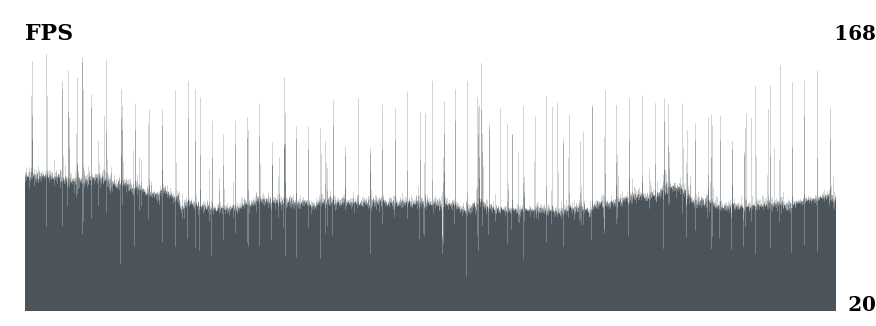
I run the game and it drops to 90-1 FPS. This is an instant drop to 1 and back to 90. I can run the game on low, medium and high, but the frames are inconsistent. The image below shows the problem

Reproduction
it's during the game
I run the game and it drops to 90-1 FPS.
This may be an issue with adaptive quality and auto vsync. I've seen similar problems when I enabled those. Somehow, Proton does not like how the game is switching render modes with adaptive vsync (it usually works in other games just fine but this engine seems special as it also switches anti aliasing during adaptive adjustments which may be the problem here).
Thanks for answer @kakra. I disabled those options and i set "PROTON_NO_FSYNC=1, PROTON_NO_ESYNC=1" in options to launch, but the problem persists.
and i set "PROTON_NO_FSYNC=1, PROTON_NO_ESYNC=1" in options to launch
If you actually used a comma, don't use that, options are set space-delimited: PROTON_NO_FSYNC=1 PROTON_NO_ESYNC=1 %command% - otherwise it might not work as intended.
I can reach a maximum of 370fps, but instant drop to 1-5 fps and very inconsistent ... i go to use Proton-7.0rc6-GE-1 for now.
I cannot launch the game anymore. It crash (uplay actually) with
info:  Game: upc.exe
info:  DXVK: v1.10.1
info:  Built-in extension providers:
info:    Win32 WSI
info:    OpenVR
info:    OpenXR
info:  Enabled instance extensions:
info:    VK_KHR_get_surface_capabilities2
info:    VK_KHR_surface
info:    VK_KHR_win32_surface
2880.155:0150:0154:err:vulkan:__wine_create_vk_instance_with_callback Failed to create instance, res=-1
2880.163:0150:0154:trace:seh:raise (22)
terminate called after throwing an instance of 'dxvk::DxvkError'
Here are the complete logs: steam-812140.log
I've already played this game on another computer, and it was working. Other game usng Vulkan (Dota 2, Red Dead Redemption 2, Cyberpunk 2077, ...) are working, so I don't this this is a problem with the vulkan installation.
System Information
- GPU: NVIDIA 3070 Ti
- Driver/LLVM version: 13.0.1 NVIDIA 510.60.02
- Kernel version: 5.17.3-1-default
- Proton version: 7.0-2 (I tried a few one, but still the same problem)
- Link to full system information report as Gist
Hello @ElricleNecro, please copy your system information from Steam (Steam -> Help -> System Information) and put it in a gist, then include a link to the gist in this issue report.
Hello @ElricleNecro, please copy your system information from Steam (
Steam->Help->System Information) and put it in a gist, then include a link to the gist in this issue report.
I've added the report!
Thanks, looking at your system information, it looks like the 32 bit Vulkan render path is broken. Can you check if you have the lib32-amdvlk package installed and if removing it has an effect? We've seen this driver break other video drivers when there isn't an AMD video card installed.
Thanks, looking at your system information, it looks like the 32 bit Vulkan render path is broken. Can you check if you have the
lib32-amdvlkpackage installed and if removing it has an effect? We've seen this driver break other video drivers when there isn't an AMD video card installed.
Thanks, that's fixed it !
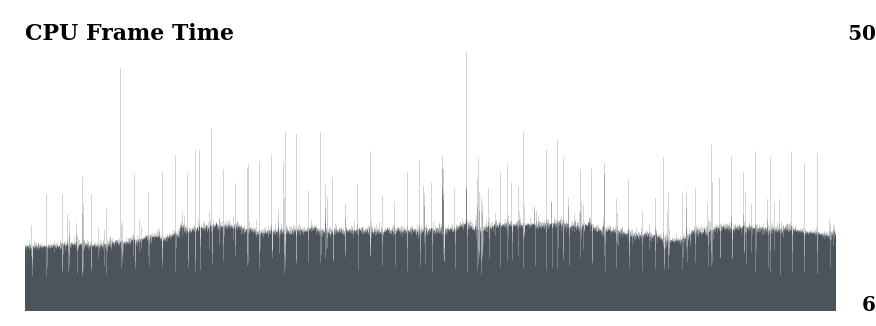
The game runs great, but I am getting CPU spikes, even with the performance governor. What could be the issue?


Ubisoft Connect for AC Odyssey won't allow game to launch
Issue transferred from https://github.com/ValveSoftware/Proton/issues/5829.
@hartd0 posted on 2022-05-10T18:12:22:
Compatibility Report
- Name of the game with compatibility issues: Assassin's Creed Odyssey
- Steam AppID of the game: 812140
System Information
- GPU: RTX 2060
- Driver/LLVM version: nvidia 510.68.02 -->
- Kernel version: 5.17.5-76051705-generic
- Link to full system information report as Gist: https://gist.github.com/hartd0/1e55bef02ccae26decb116bd9fdb1d3f
- Proton version: All available in Steam including Experimental
I confirm:
- [ x] that I haven't found an existing compatibility report for this game.
- [ x] that I have checked whether there are updates for my system available.
Symptoms
Attempt to launch AC Odyssey, Ubisoft Connect starts up at "Initializing" but ends with an error - "Connection Lost - A Ubisoft service is currently unavailable. Please try again later."
But no matter how long you wait, it never works. I've been playing this game for the last few years with little to no issues on Linux - over 500 hours, but now it won't launch.
steam-812140.log

systeminfo.txt
Reproduction
The game's performance has regressed for me with Proton 7.0, it shows significantly more slow-downs and much lower minimum fps on the game's integrated benchmark results page.
Happens with Proton 7.0-4 and Experimental. 6.3-8 still has good performance.
It's not related to DXVK versions, performance is fine when latest DXVK git-master is used with Proton 6.3-8. Happens with latest Nvidia stable and Vulkan developer drivers on Arch. It is not related to shader compile stutter, the slow-downs during the benchmark never change after any number of runs.
I don't own the game on Steam, but on Ubisoft Connect, which I added as a custom application run with Proton in Steam (regularly with runtime). I suspect it affects also users who own the game on Steam. Anybody can confirm? Otherwise I'd provide a Proton log if Valve devs are interested.
No regression here with Proton 7.0-4, own the game on Steam. In fact, runs better than ever.
Noticed that today the game failed to get to the title screen consistently, restarting steam (not the machine or anything other) fixed it, i have also noticed this with other games
behavior was it was suddenly just hanging and pinning one cpu to 100%
Proton Log of one of the hangups
Steam system report
Computer Information:
    Manufacturer:  MSI
    Model:  B150M MORTAR (MS-7972)
    Form Factor: Desktop
    No Touch Input Detected

Processor Information:
    CPU Vendor:  GenuineIntel
    CPU Brand:  Intel(R) Core(TM) i7-7700K CPU @ 4.20GHz
    CPU Family:  0x6
    CPU Model:  0x9e
    CPU Stepping:  0x9
    CPU Type:  0x0
    Speed:  4500 Mhz
    8 logical processors
    4 physical processors
    HyperThreading:  Supported
    FCMOV:  Supported
    SSE2:  Supported
    SSE3:  Supported
    SSSE3:  Supported
    SSE4a:  Unsupported
    SSE41:  Supported
    SSE42:  Supported
    AES:  Supported
    AVX:  Supported
    AVX2:  Supported
    AVX512F:  Unsupported
    AVX512PF:  Unsupported
    AVX512ER:  Unsupported
    AVX512CD:  Unsupported
    AVX512VNNI:  Unsupported
    SHA:  Unsupported
    CMPXCHG16B:  Supported
    LAHF/SAHF:  Supported
    PrefetchW:  Unsupported

Operating System Version:
    "Manjaro Linux" (64 bit)
    Kernel Name:  Linux
    Kernel Version:  5.19.7-1-MANJARO
    X Server Vendor:  The X.Org Foundation
    X Server Release:  12201003
    X Window Manager:  KWin
    Steam Runtime Version:  steam-runtime_0.20220802.0

Video Card:
    Driver:  AMD AMD Radeon RX Vega (vega10, LLVM 14.0.6, DRM 3.47, 5.19.7-1-MANJARO)
    Driver Version:  4.6 (Compatibility Profile) Mesa 22.1.7
    Desktop Color Depth: 24 bits per pixel
    Monitor Refresh Rate: 74 Hz
    VendorID:  0x1002
    DeviceID:  0x687f
    Revision Not Detected
    Number of Monitors:  3
    Number of Logical Video Cards:  1
    Primary Display Resolution:  2560 x 1440
    Desktop Resolution: 6400 x 1440
    Primary Display Size: 27.95" x 15.75" (32.05" diag)
                                            71.0cm x 40.0cm (81.4cm diag)
    Primary VRAM: 8192 MB

Sound card:
    Audio device: Realtek ALC892

Memory:
    RAM:  31976 MB

VR Hardware:
    VR Headset: None detected

Miscellaneous:
    UI Language:  English
    LANG:  en_US.UTF-8
    Total Hard Disk Space Available:  143964 MB
    Largest Free Hard Disk Block:  54528 MB

Storage:
    Number of SSDs: 0
    Number of HDDs: 0
Also noticed that recently after a longer session in-game the uplay afterwards fails to sync saves & achivements, saying that it is logged-out, but even after logging in through that prompt it still fails also just exiting from that prompt without re-logging, with the next start uplay correctly does everything (no needing to re-login) on startup (but may fail again on close)
Noticed that today the game failed to get to the title screen consistently, restarting steam (not the machine or anything other) fixed it, i have also noticed this with other games
I'm seeing similar behavior sometimes: Steam won't start any game, or the launchers just get stuck without displaying anything (Steam just says "running"), doesn't depend on whether Proton or native. Restarting the Steam client fixes it. It doesn't seem to affect just this game.
I'm leaving comment with a solution for a rare problem when unable to detect uplay if this is one of the first games installed.
Symptoms
"unable to detect uplay", upon launching game. It will always fall back to "unable to detect uplay".
Tried different proton versions (experimental, 7, 6), installed uplay via protontricks (confirmed it installed to correct place (home/.local/share/steam/steamapps/compatdata/GAME_ID), removed game folder in compatdata, reinstalled the game etc.
Solution
In my case it was second game installed on deck, first game under current user (first user installed one game, for second user this is first game). So it came out that I did not have steam common redistributables installed as this is not installed with this package.
Copy paste from solution I found:
- Delete the prefix for the game .steam/steam/steamapps/compatdata/GAME_ID
- install common re-distributables by running this in terminal steam steam://install/228980
- Try and run the game again
Found the solution here:
https://www.reddit.com/r/SteamDeck/comments/t9f4lo/assassins_creed_origins_unplayable/hztzfyy/
EDIT: fixed it by doing a game files validation, some files were corrupted apparently
Original comment:
I am getting a systematic crash on my Steam Deck, I've tried Proton stable (7.0-4), experimental, low graphical settings, disabling Ubisoft Connect overlay... No luck.
Basically I'm able to launch the game and load my save into the open world, I can only walk a few seconds and then the game crashes, it doesn't seem to be a GPU hang as I can still open the Steam or QAM overlays.
Here is a video demonstrating it:
https://user-images.githubusercontent.com/31565280/195884527-1e6c8b8c-8919-4bbe-86dc-f6744d907e26.mp4
And the logs:
steam-812140.log
Here is a portion that I suspect is relevant to the crash but I might be wrong (I believe the game actually loads at around line 40930):
15062.465:03c4:03fc:warn:debugstr:OutputDebugStringA "OODLE ERROR : LZ corruption : DecodeOneQuantum fail!\n"
15062.465:03c4:03fc:trace:seh:dispatch_exception code=40010006 flags=0 addr=000000007B0124BE ip=000000007B0124BE tid=03fc
15062.465:03c4:03fc:trace:unwind:dispatch_exception  info[0]=0000000000000036
15062.465:03c4:03fc:trace:unwind:dispatch_exception  info[1]=0000000006f6e1b0
15062.465:03c4:03fc:warn:seh:dispatch_exception "OODLE ERROR : LZ corruption : DecodeOneQuantum fail!\n"
15062.465:03c4:03fc:trace:seh:call_vectored_handlers calling handler at 0000000140817910 code=40010006 flags=0
15062.465:03c4:03fc:trace:seh:call_vectored_handlers handler at 0000000140817910 returned 0
15062.465:03c4:03fc:trace:seh:call_vectored_handlers calling handler at 000000027104D720 code=40010006 flags=0
15062.465:03c4:03fc:trace:seh:call_vectored_handlers handler at 000000027104D720 returned 0
15062.465:03c4:03fc:trace:seh:call_vectored_handlers calling handler at 0000000359153BA0 code=40010006 flags=0
15062.465:03c4:03fc:trace:seh:call_vectored_handlers handler at 0000000359153BA0 returned 0
15062.465:03c4:03fc:trace:seh:call_vectored_handlers calling handler at 00000002EDF87A40 code=40010006 flags=0
15062.465:03c4:03fc:trace:seh:call_vectored_handlers handler at 00000002EDF87A40 returned 0
15062.465:03c4:03fc:trace:unwind:RtlVirtualUnwind type 1 rip 000000007B0124BE rsp 0000000006F6DDE0
15062.465:03c4:03fc:trace:unwind:dump_unwind_info **** func 12470-124f7
15062.465:03c4:03fc:trace:unwind:dump_unwind_info unwind info at 000000007B0A7480 flags 0 prolog 0x11 bytes function 000000007B012470-000000007B0124F7
@yoyossef This seems like a crash specific to something about your save. Would it be possible to upload the game save files so that we can try to reproduce?
@alasky17 It was about my game files actually, I did a whole game file verification, it took a long time (installed on microSD) and it fixed it.
We can dismiss my last comment.
since some days ago, i can not launch the game anymore because of uplay complaining that it cannot connect (at least from what i can tell)
4132.633:013c:0144:warn:seh:dispatch_exception "C:\\JenkinsWorkspace\\workspace\\client_build_release\\products\\game_starter\\src\\win\\UplayConnection.cpp(145) : Failed to connect to Uplay\n"
i also already tried to use Proton 7.0-4 and Experimental(my default), also tried to clean the steam compatdata for that game, but uplay does not even show up to say a error, only in the log.
is something maybe known that the 6.0 kernel does not work or something? (will test with a lower kernel and update the message)
^ just tested Kernel 5.19.16-2, and the error is the same
@hasezoey I've had this issue as well, the only thing I could find to fix this was to use my phone as a WiFi hotspot to my first connection setup.
After that it didn't complain about it even with my home connection.
I've had this issue as well, the only thing I could find to fix this was to use my phone as a WiFi hotspot to my first connection setup.
not really a option for me, because my problem is on a desktop system that does not have WiFi capability, and i would rather not wire it up via USB, just to have a single game working again.
also from what i know, i did not change my network configuration in the last days that would make uplay fail to connect suddenly
also as a note, i tried kernel 5.19.16-2 now, and it has the same error
Edit: i also just tried Assassins Creed: Origins (582160), which has the same uplay error
weirdly enough, it started working today again, with not updates to Proton, the prefix, the Steam-Linux-Runtime or the game (or the system for that matter)
though this time i could get a log of the case "Game Opens, but gets stuck after some time and restarting steam fixes it"
Playing on an AMD Vega 64, the game has no problem launching, but I get GPU freezes quite often. The corresponding MESA issue is here.
The game stopped working, neither proton 8.0-4 nor proton experimental helps. I am on Ubuntu 23.10, just updated to Mesa 23.3.2 and the game just shows me a splash screen and closes without any error. Assassin's Creed Valhalla works perfectly though.
⋊> ~ glxinfo -B | grep mesa                                                       13:48:03
OpenGL core profile version string: 4.6 (Core Profile) Mesa 23.3.2 - kisak-mesa PPA
OpenGL version string: 4.6 (Compatibility Profile) Mesa 23.3.2 - kisak-mesa PPA
OpenGL ES profile version string: OpenGL ES 3.2 Mesa 23.3.2 - kisak-mesa PPA
Hello @cybbro, please add PROTON_LOG=1 %command% to the game's launch options and attach the generated $HOME/steam-$APPID.log to this issue report as a file. (Proton logs compress well if needed.) Also, please copy the contents of Steam Runtime Diagnostics from Steam (Steam -> Help -> Steam Runtime Diagnostics) and put it in a gist, then include a link to the gist in this issue report.
@kisak-valve, thank you for such a quick reply! Here is the Runtime Diagnostics and log file as well:
steam-812140.zip
Thanks looking through the details, your system looks relatively healthy, but it's unclear where the game is falling over. I see you have a pile of extra Vulkan overlays. Maybe try moving / removing / disabling MangoHUD, vkbasalt, and the Gamescope WSI layer and see if that has an effect? If it does, then re-add them one at a time and see which changes the game's behavior.
ERROR: ld.so: object '/usr/local/lib/x86_64-linux-gnu/libinput-config.so' from /etc/ld.so.preload cannot be preloaded (wrong ELF class: ELFCLASS64): ignored. is also unusual, but most likely inert.
Thank you for the help! I have tried a few variations and it seems https://github.com/libvibrant/vibrantLinux is responsible for it. VKbasalt sharpening and mangohud enabled, game launches and work well now!
EDIT: nope, not it, sometimes fails to launch even if VKbasalt/goverlay is disabled, too. Have no idea what's happening. Launched a few times before.
EDIT 2: Although I managed to launch the game few times, it won't start again, I am adding log when I tried to launch it without any bells and whistles, no vkbasalt, no mangohud, no Vibrant Linux, still failed.
Also a video of what happens exactly:
https://www.youtube.com/watch?v=aDI-mfS1xdU
EDIT 3: Managed to launch the game again, and played for a bit. Another issue is that I cannot change any graphics options that require restart of the game, or it won't boot again, unless I delete ACOdyssey.ini file. When I change settings and a pop up appears asking me if I want to restart game, it also freezes I cannot click anything. Have to open steam window and stop the game there. Another major issue is that the mouse click is used to lock the target, it does not work here either.
Replying to https://github.com/ValveSoftware/Proton/issues/1757#issuecomment-1873021184
I'm experiencing the same issue. Narrowed it down to Steam Overlay.
I've had Steam Overlay disabled in settings but it was still showing up somehow. The game would freeze as soon as Steam Overlay notification would pop up during launch.
Go to Settings -> In Game and toggle Steam Overlay. If you want to have it on by default, turn it off per game.
Replying to [#1757 (comment)](https://github.com/ValveSoftware/Proton/issues/1757#issuecomment-1873021184)
I'm experiencing the same issue. Narrowed it down to Steam Overlay.
I've had Steam Overlay disabled in settings but it was still showing up somehow. The game would freeze as soon as Steam Overlay notification would pop up during launch.
Go to Settings -> In Game and toggle Steam Overlay. If you want to have it on by default, turn it off per game.
It works! At first I was confused, my overlay is already disabled, it took me a bit to realize that I could try disabling FPS counter overlay, too, and now games does launch! Well at least it did 2 times I tried.
Take note that disabling the overlay also disables Steam Input in the game... There are games which can only support gamepads through Steam Input. AC:Odyssey is not one of them, but Playstation ports usually are.
I can launch the game just fine, but when it starts, during the video playing before the main menu, it will freeze. If i do alt+tab to switch focus to a different window and wait for 30-60 seconds, i will get the focus changed, and the game will run as it should in the background, smooth audio+vids but if i focus the game again it immediately freezes.
Any suggestions? I'm pretty sure i already tried disabling the overlay
Any suggestions? I'm pretty sure i already tried disabling the overlay
Do you use mangohud or any other software which injects software into the vulkan layers? E.g. reshader plugins would also do that.
Not to my knowledge? It's just Ubuntu 22.04 running steam, i have the graphics driver ppa with 545 installed for my GTX 970, my launch commands just set the env vars for changing nvidia shader location and increasing the max shader cache size
It used to run just fine with mid/high settings at around 45 fps
I am still experiencing serious input latency in this game alone, even newer AC: Valhalla does not have it. Vsync is disabled. While I do use Gnome/Mutter, I don't use Wayland so that's not an issue either. But latency is still so bad I can hardly play this title, it's like moving underwater..
I even modified file 20-amdgpu.conf adding Option "TearFree" "false" to it, while this option GREATLY improved responsiveness in other games at the cost of some tearing, this game seems unaffected.
Assasins Creed Odyssey NOT starting / Loading
Issue transferred from https://github.com/ValveSoftware/Proton/issues/7728.
@vuaieo posted on 2024-05-13T02:52:04:
Compatibility Report
- Name of the game with compatibility issues: Assasins Creed Odyssey
- Steam AppID of the game: 812140
System Information
- GPU: RTX 3080 ti
- Video driver version: Nvidia 550.67
- Kernel version: 6.8.7-201.fsync.fc39.x86_64 (64-bit)
- Link to full system information report: https://pastebin.com/pbxp0gYS
- Proton version: Proton Experimental and many other versions
steam-812140.log
I confirm:
- [ y] that I haven't found an existing compatibility report for this game.
- [ y] that I have checked whether there are updates for my system available.
Symptoms
-
freezing / forever loading at start. very rarely after 5 times restarting game it would run. if it runs then fine but most of times freez / stuck...
-
so tryed to run on proton 8 version and after it it wouldnt find the uplay installation so i had to delete the ubisoft connect game launcher folder and verify and restart steam so it would install...
Reproduction
just start the game and see it freezes on loading screens.
why is this game broken again last year somewhen was broken and then fixed and now broken again T__T
I found that you have to disable the full desktop composition option in the nvidia control panel, and the whole "freezing splash screen" problem just goes away.
For new at least (but that is on an NVIDIA 970gtx)
but it is disabled if you mean this setting:
okay i think now its working. this is what i did:
-
deleted the 6 intro videos that shows before main game menu: Amd.bk2, BlackScreen.bk2, Epilepsy.bk2 PC_WarningSaving.bk2, UbisoftLogo.bk2, warning_disclaimer.bk2.
found in: /home/yourusername/.steam/steam/steamapps/common/Assassins Creed Odyssey/videos/
and /home/vuaieo/.steam/steam/steamapps/common/Assassins Creed Odyssey/videos/en/ -
changes the values to WindowMaximised=0 and WindowMode=0 in the file ACOdyssey.ini that is found in /home/yourusername/.steam/steam/steamapps/compatdata/812140/pfx/drive_c/users/steamuser/Documents/Assassin's Creed Odyssey/ACOdyssey.ini
3.disabled steam overlay setting and disabled in-game FPS counter
in the steam settings > in Game...
- many times when connecting the controller when game starts makes the cursor constant flickering / swithcing between mouse and gamepad for me and buttons are like auto pressing and reconnecting controller didnt helped so i minimized game and in steam libary on game right click and go to properties > controller and changed the option "use default settings" to "enable steam input"
this somehow fixed it.
with all there the game now works even better than yesterday when was lucky to get started after "20 times" restarting
somehow got higher fps and better frame times ( less jumping) , is it because disabled steamoverlay and fps counter ?
i tested this now few times after restarting pc and somehow finaly can play normaly without half hour to get try starting...
i hope this guide helps someone.
For me, the game worked out-of-the-box. Only very occasionally, it froze and needed to be killed.
110 hours into the game, crashes started to occur at seemingly random intervals. The ones asking you to send a crash report to Ubisoft (as if they cared. I do send them the reports, though).
Here's the output of PROTON_LOG=1: https://gist.github.com/yogo1212/0f28eeaf0c5f45f765bf9e001ca85968
The crash action starts at 5412.323 (line 10162).
If I read it correctly, the crash occurs in d3d11.dll but without a core dump, that will be difficult to debug (at least for me. PIC and such).
I'm running EndeavourOS and I'm willing to put in a little time helping to debug.
Is anyone else is experiencing this?
Hello @yogo1212, check if https://gitlab.freedesktop.org/drm/amd/-/issues/3343 is relevant to your system. A quick test would be to reboot into an older kernel (6.6.30 doesn't count as older) and see how the game behaves.
@kisak-valve I've updated to 6.9.0 and it is looking very good!
The picture was very narrow and there were loads of black squares on startup but they vanished when I changed the resolution (it still worked when i changed it back again).
Thank you!
It is a very simple fix that is unlikely to break something. Perhaps it's worth backporting it to stable kernels?
Hi all,
With recent kernel versions I am seeing intermittent GPU resets on my 7900 XTX. This happens in both Proton versions 9 and 10 as well as non-Valve versions of Proton (GE-Proton), it happens when the game is either in XWayland or Wayland mode and it happens even if I wrap the game up in gamescope.
There's no rhyme or reason to the crashing periods, it can be as early as a couple of minutes into the game or after a couple of hours of playtime. cartoonraccoon reported a similar issue with his RDNA 4 card on ProtonDB.
I suspect this will need to go to the AMDGPU/DXVK bugtracker but I thought I'd post here to get pointed in the right direction first. I've attached a filtered journal from the boot session where the crash occurred. Let me know if there's any other logs required.
Here are my system specs:
KDE Plasma Version: 6.5.0
KDE Frameworks Version: 6.19.0
Qt Version: 6.10.0
Kernel Version: 6.17.5-arch1-1 (64-bit)
Processor: AMD Ryzen 7 7800X3D
Memory: 64 GiB of RAM
Graphics Processor: AMD Radeon RX 7900 XTX
Graphics Platform: Wayland
Mainboard: GIGABYTE X670E AORUS MASTER
Proton versions
proton experimentalx8 2024-05proton 8.0-4x1 2023-12proton 7.0-4x2 2022-08proton 6.3-8x2 2022-08proton 7.0x1 2022-08proton 6.21-ge-2x1 2022-01proton 5.13-6x1 2021-07proton 6.3-5x1 2021-07proton 6.3-2x1 2021-04proton 5.0x6 2021-02proton 5.13x2 2020-12proton 5.9x3 2020-11proton 5.13-1x1 2020-10proton 5.6-ge-2x2 2020-06proton 5.0-7x2 2020-05
Launch options
PROTON_LOG=1`:x1 2024-05PROTON_LOG=1x2 2023-12PROTON_NO_FSYNC=1,x6 2022-04PROTON_NO_ESYNC=1x5 2022-04PROTON_NO_ESYNC=1"x2 2022-04PROTON_NO_FSYNC=1x1 2022-04PROTON_NO_ESYNC=1`x1 2022-01PROTON_NO_FSYNC=1`x1 2022-01PROTON_NO_ESYNC=1),x2 2021-09DXVK_LOG_LEVEL=debug`,x1 2021-09PROTON_USE_WINED3D=1`x1 2020-11WINEPREFIX=(Steam-folder)/steamapps/compatdata/812140/pfx/x2 2020-08RADV_PERFTEST=acox2 2020-03WINEPREFIXx1 2019-08PROTON_DUMP_DEBUG_COMMANDSx1 2018-11
Launch lines
PROTON_NO_FSYNC=1 PROTON_NO_ESYNC=1 %command%x1 2022-04RADV_PERFTEST=aco %command%x2 2020-03
Upstream links
- ValveSoftware/Proton/issues/7728x1 2024-05
- ValveSoftware/Proton/issues/5829x1 2022-05
- ValveSoftware/Proton/issues/5780x1 2022-04
- doitsujin/dxvk/issues/1799x1 2021-09
- ValveSoftware/Proton/issues/4998x1 2021-07
- ValveSoftware/Proton/issues/4278x1 2020-11
- ValveSoftware/Proton/issues/37x1 2020-11
- ValveSoftware/Proton/issues/4065x1 2020-07
- ValveSoftware/Proton/issues/3148x1 2019-10
- ValveSoftware/Proton/issues/2927x1 2019-09
- ValveSoftware/Proton/issues/162x1 2018-10
DLLs
d3d11.dllx1 2024-05
Compatibility Report
System Information
I confirm:
Log File
(Too Large to paste here)
Log File
Symptoms
Uplay will launch and update, after update Uplay will report "Connection Lost, A ubisoft service is currently unavailable. You can try again later or switch to offline mode". Offline mode will not work as it's required to login atleast once before offline mode is allowed.
Reproduction
Start the Game without any additional launch options.