Sang-Froid - Tales of Werewolves
What kind of partition /media/daten3/ is? We had issues with external NTFS drives in the past.
It's an ext4 formatted partition. I don't have no steam libraries on any NTFS drives.
With Proton 4.2-1 the game now opens a fullscreen window with partially rendered image, but then stuck and crashes after a while or I need to hard kill the game.
Log: steam-227220.log
Systeminfo: https://gist.github.com/NoXPhasma/b6e8c494cc5f92bbae4aae1f81cb25ee
Screenshot:

- GTX 960
- Blob 418.56
- Ubuntu 18.10
- Proton 4.2.1
I get the same image as @NoXPhasma . Whereby the game locks up and I have to go to extreme lengths to force the game to quit.
I retested with Proton 4.11-2 and I still have the same experience as with Proton 4.2-1.
Log file: steam-227220.log
I tried it with 4.11-3 and D9VK enabled, but it also crashes right away.
The game still crashes on launch with Proton 5.0-5. But it opens an error window now.
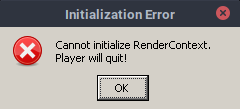
steam-227220.log
https://gist.github.com/NoXPhasma/e75b1d79a49ba2655ba8ca981b78af62
When forcing WIneD3D I get the same issue as with my report using Proton 4.2-1:
steam-227220.log
I wonder what the issue is. Isn't it using DX9 or something like that?
It is using DX9, which is why DXVK is being used by default with Proton 5.
Well I've had issues with earlier versions of Proton though that I don't think used D9VK. The reason I am surprised is that so many other DX9 games run fabulously in Linux, I thought we had DX9 in the bag (I know that D9VK will give performance gains though vs earlier DX9 on Linux implementations).
Still doesn't work with Proton 5.13-1, get the same error message like shown above.
Log: steam-227220.log
Systeminfo: https://gist.github.com/NoXPhasma/8fec49fdc09bad1d72ce37635762b3af
Hello @NoXPhasma, err:module:import_dll Library vkKernel.vkModule (which is needed by L"Z:\\media\\games\\SteamApps\\steamapps\\common\\Sang-Froid Tales of Werewolves\\BuildingBlocks\\FilesManagement.dll") not found looks like a line of interest in the log.
Also, fixme:vulkan:X11DRV_vkCreateWin32SurfaceKHR Application requires child window rendering, which is not implemented yet! points towards https://bugs.winehq.org/show_bug.cgi?id=45277.
Related threads
- Red Dead Redemption 2protonopen same upstream bug
- Sea Of Thievesprotonopen same upstream bug
- Half-Life: Alyxprotonopen same upstream bug
- Problems starting with 3cfc3e77144c8058683868c35e4ce1dbee84d6ed and GuildWars 2dxvkclosed same upstream bug
- World of Final Fantasyprotonopen same upstream bug
- Death End Re;Quest 2protonopen same upstream bug
- Heroes of Might & Magic III: HD Editionprotonopen same upstream bug
- Rez Infiniteprotonopen same upstream bug
- Earth Defense Force 5protonopen same upstream bug
- 3DCenter Filter Tester aborts with errordxvkclosed same upstream bug
Proton versions
proton 5.13-1x1 2020-10proton 5.0-5x1 2020-03proton 4.2-1x2 2019-08proton 4.11-2x1 2019-08proton 4.2x1 2019-03
Upstream links
- show_bug.cgi?id=45277x1 2020-10
DLLs
filesmanagement.dllx1 2020-10
Compatibility Report
System Information
I confirm:
steam-227220.log
Symptoms
Game opens up a small black window and closes itself after 2 seconds.
Reproduction