World of Warships
I do have a crash preventing the game to launch. The message it gives is: "Could not create new SimpleThread".
I am running on Arch Linux 64bit, with a Nvidia GTX 980 and Intel i7-2600 CPU @ 3.40GHz with 16GB of RAM.
world of warships (steam) unhandled exception, access violation
Issue transferred from https://github.com/ValveSoftware/Proton/issues/595.
@Demonslayer2011 posted on 2018-08-25T22:10:24:
usually happens in game, when lots of things are going on at once. causes a fatal crash, sometimes freezes and has to be force closed, sometimes just crashes and exits.
system
Distributor ID:\tUbuntu
Description:\tUbuntu 18.04.1 LTS
Release:\t18.04
Codename:\tbionic
hardware: ryzen 1600x, asus crosshair VI hero rev 1 firmware ver. 1201
8gbx4 DIMM DDR4 Synchronous Unbuffered (corsair vengeance) 2133 MHz (0.5 ns)
dual boot windows 10. both ubuntu and windows run on their own 1tb hdd, and share a third ntfs formatted drive.
have at time of post, newest steam update, the one that rolled out today.
here is the crash and dump files.
WorldOfWarships-2018-08-25_13-38-43.crash.txt
WorldOfWarships-2018-08-25_13-38-43.dmp.txt
if more info is needed please let me know.
Just played about 5 more matches tonight, it is running great for me.
I've played a ton and only had 1 freeze at a loading screen and 1 crash. The crash could have just been Steam as Steam crashed completely as well.
75fps, default gfx detail settings...haven't really messed with that stuff yet other than the window resolution.
System: https://gist.github.com/nightsky30/9a7078abf4346ad7225819a971e5c7f9
Follow up on my crash report. It's gotten much more stableseems to improve the longer I play the game. Maybe proton has a learning algorithm built in? 720p windowed default graphic settings seem to work fine. High settings there is artifacting and outlines of the bottom of ships and landmasses below water appear as black lines.
Full screen does not work at all almost immediately crashes when joining a match. Same crash report, about memory.
But it is playable for the most part as long as I'm windowed
Would it be possible to not include the 'steam_api.dll' file with World of Warships (including on Windows)? Without this file, the game works perfectly fine, but it brings up a login screen, instead of trying to create a new account with your Steam username. This way, people can use their existing WarGaming account.
@Demonslayer2011 do you have DirectX 11 or DirectX 9 enabled in game? What's your hardware/driver configuration? The game runs completely stable for me with Dx11, using RADV with any Mesa version starting with 18.1.3.
@viggy96 open game, let it get to that screen, close it, find that file, and rename it 2steam_api.dll and voila, you can use your wargaming account. This was not something steam did, this is wargaming being idiots for whatever reason.
@doitsujin I've tried both, at first direct 11 didn't work at all, but now it does. Latest mesa drivers, have dailys ppa.
@Demonslayer2011 I already know that, I'm using my WarGaming account on WoWS. I just wanted to see if it would be possible to just not include that file in so that other new users don't have this issue.
WorldOfWarships-2018-09-15_21-52-48.crash.txt
WorldOfWarships-2018-09-15_21-52-48.crash.txt
back to square one, crashing within five minutes, and the one game i did manage to play, the textures dissapeared completely i had the hud, and player icons, but nothing else.
Linux Mint 19, Geforce 1070 GTX with 396.52 Driver. Graphics are perfect, but there is a crackling issue with audio in port and in game.
Edit: Worked around using this article: https://psyq123.wordpress.com/2017/04/07/fix-crackling-audio-in-some-games-in-wine/
I do have a crash preventing the game to launch. The message it gives is: "Could not create new SimpleThread".
I am running on Arch Linux 64bit, with a Nvidia GTX 980 and Intel i7-2600 CPU @ 3.40GHz with 16GB of RAM.
Same here on a XPS 15 9560 ( GTX 1050M // i7-7700HQ @ 2.80 GHz, 32GB RAM).
It showed the region select, but after selecting North America the error dialog appeared.
I do have a crash preventing the game to launch. The message it gives is: "Could not create new SimpleThread".
I am running on Arch Linux 64bit, with a Nvidia GTX 980 and Intel i7-2600 CPU @ 3.40GHz with 16GB of RAM.
Increasing my file descriptor limit fixed this for me.
I do have a crash preventing the game to launch. The message it gives is: "Could not create new SimpleThread".
I am running on Arch Linux 64bit, with a Nvidia GTX 980 and Intel i7-2600 CPU @ 3.40GHz with 16GB of RAM.Increasing my file descriptor limit fixed this for me.
ulimit already showing unlimited here.
Can't even launch it.
First launch managed to get launcher to pick the server, (EU). After that there was nothing.
Further launches don't even show a launcher. Both native/runtime have same effect.
Tested on Proton 3.7-8 and 3.16-4 Beta
i5 3550k
gtx 970
Antergos. 4.19.8-arch1-1-ARCH
nvidia 415.22-3
I'm guessing I'm missing either some windows redist or some linux library/drivers for stuff to go this way.
not getting any crashlogs, not in game dir at least
clientrunner doesn't show anything wrong:
[2018-12-11 11:15:22] ================ Log started at 2018-12-11 11:15:22 ================
[2018-12-11 11:15:22] Found client with product version 0.7.11.1167524 and file version 0.7.11.0
[2018-12-11 11:15:22] Found client with product version 0.7.11.1194326 and file version 0.7.11.1
[2018-12-11 11:15:22] Selected realm: eu
[2018-12-11 11:15:22] Checking client Z:\data\Games\steamapps\common\World of Warships\bin\1167524\WorldOfWarships.exe with version 0.7.11.1167524.
[2018-12-11 11:15:22] Reading CSIS URL for realm: eu
[2018-12-11 11:15:23] Detected server version release.7.11.1.1194326
[2018-12-11 11:15:23] Checking client Z:\data\Games\steamapps\common\World of Warships\bin\1194326\WorldOfWarships.exe with version 0.7.11.1194326.
[2018-12-11 11:15:23] Reading CSIS URL for realm: eu
[2018-12-11 11:15:23] Detected server version release.7.11.1.1194326
[2018-12-11 11:15:23] Found best client with matching version 0.7.11.1194326
[2018-12-11 11:15:23] Starting client with version 0.7.11.1194326
[2018-12-11 11:15:23] Running Z:\data\Games\steamapps\common\World of Warships\bin\1194326\WorldOfWarships.exe.
[2018-12-11 11:15:23] ================ Log closed at 2018-12-11 11:15:23 ================`
edit: added proton log
steam-552990.log
Hello @ashtonx, your log contains err:winediag:FILE_CreateFile Too many open files, ulimit -n probably needs to be increased, please run ulimit -Hn and verify it gives you a high value and not 4096.
Works fine for me with NVidia 415.27 but the in-game browser (used for News and Arsenal sections) does not work. It works the very first time I open it but after that it only shows a loading wheel. Someone on reddit said it has to do with the CEF (Chromium Embedded Framework) process.
With Proton 4.2 News and Arsenal seem to work fine. There are still problems opening the Clan section.
EDIT: On closer analysis the problem with web content served through the game client is still there.
System setup:
Computer Information:
    Manufacturer:  Unknown
    Model:  Unknown
    Form Factor: Laptop
    No Touch Input Detected

Processor Information:
    CPU Vendor:  GenuineIntel
    CPU Brand:  Intel(R) Core(TM) i7-6700HQ CPU @ 2.60GHz
    CPU Family:  0x6
    CPU Model:  0x5e
    CPU Stepping:  0x3
    CPU Type:  0x0
    Speed:  3500 Mhz
    8 logical processors
    4 physical processors
    HyperThreading:  Supported
    FCMOV:  Supported
    SSE2:  Supported
    SSE3:  Supported
    SSSE3:  Supported
    SSE4a:  Unsupported
    SSE41:  Supported
    SSE42:  Supported
    AES:  Supported
    AVX:  Supported
    CMPXCHG16B:  Supported
    LAHF/SAHF:  Supported
    PrefetchW:  Unsupported

Operating System Version:
    "Arch Linux" (64 bit)
    Kernel Name:  Linux
    Kernel Version:  5.0.5-arch1-1-ARCH
    X Server Vendor:  The X.Org Foundation
    X Server Release:  12004000
    X Window Manager:  Xfwm4
    Steam Runtime Version:  <Runtime disabled>

Video Card:
    Driver:  Intel Open Source Technology Center Mesa DRI Intel(R) HD Graphics 530 (Skylake GT2) x86/MMX/SSE2
    Driver Version:  3.0 Mesa 19.0.0
    OpenGL Version: 3.0
    Desktop Color Depth: 24 bits per pixel
    Monitor Refresh Rate: 60 Hz
    VendorID:  0x8086
    DeviceID:  0x191b
    Revision Not Detected
    Number of Monitors:  1
    Number of Logical Video Cards:  1
    Primary Display Resolution:  1920 x 1080
    Desktop Resolution: 1920 x 1080
    Primary Display Size: 13.54" x 7.64" (15.51" diag)
                                            34.4cm x 19.4cm (39.4cm diag)
    Primary VRAM Not Detected

Sound card:
    Audio device: Realtek ALC898

Memory:
    RAM:  15946 Mb

Miscellaneous:
    UI Language:  English
    LANG:  en_US.utf8
    Total Hard Disk Space Available:  794613 Mb
    Largest Free Hard Disk Block:  20759 Mb
    VR Headset: None detected

Recent Failure Reports:
Nvidia driver: 418.56
I'm running this game on a nvidia optimus gaming laptop, and the only way I can run this game perfectly is by using nvidia-xrun.
If I use Intel integrated graphics and DXVK, the game starts and it loads up to 413.6 MiB of ram, then it hangs and need to be killed.
steam-552990.log
If I use primusrun and PROTON_USE_WINED3D so that Wine is in opengl mode, the game starts but there are serious artifacts:

steam-552990.log
If I use DXVK and https://github.com/felixdoerre/primus_vk, it hangs similarly to Intel integrated graphics case
Same issue as @minecraft2048 but using AMD Vega with MESA 19. Game would not launch without PROTON_USE_WINED3D=1, it does launch with it but displays the same image as @PROTON_USE_WINED3D with the weird reflective/glossy squares fading in and out as the view rotates around, no water shown, etc...
Both World of Tanks and World of Warships currently do not work with DXVK, even with old DXVK versions that used to be fine. Not sure what's going on there.
Hi,
I'd like to report constant crashes with this game. It is not obvious to me what causes it and it just started after the last game patch.
During Battle the game freezes. Somtimes after 10, sometimes after 3 games played.
Please find my proton log attached:
steam-552990_.log
I'm playing on Vega 64.
World of warships on i3. Cursor bound to very small space in center of screen. Proton 4.11-1
Issue transferred from https://github.com/ValveSoftware/Proton/issues/2939.
@anonymous133 posted on 2019-08-02T08:47:07:
Hi,
After switching workspaces I encountered a bug where the mouse is bound to a very small space in the center of the screen of the game so I can no longer look around properly. As if another window has focus and I can only move my mouse inside that space.
This doesn't happen for me with 4.2-9
Hello @anonymous133, please add PROTON_LOG=1 %command% to the game's launch options, reproduce the regression, and drag and drop the generated $HOME/steam-$APPID.log into the comment box.
Here it is. Thank you!
World of warships on i3. Cursor bound to very small space in center of screen. Proton 4.11-1
Issue transferred from #2939.
@anonymous133 posted on 2019-08-02T08:47:07:
...
This doesn't happen for me with 4.2-9
it happens to me with Proton 4.11-1 and does not with Proton 4.2-9 (at least i never noticed this). It looks slightly different - i cannot use whole 360 grade look-around, it is limited to 90, maybe 120 grade viewport. To trigger i don't need to switch to DE (i use awesome 4.3-4 on AMD Vega11), just enough to start a battle when in-game. I'll reproduce the issue and attach the PROTON_LOG to this thread.
Edit:
some component updates happened in between : kernel 5.2.7, mesa 19.1, steamclient and proton from 4.11-1 to 4.11-2 , and i can't reproduce the issue. But, because i never found the cause of it, i'm not confident that it is gone.
What I and @eveconto described still happens with 4.11-2
indeed, it still happens with proton 4.11-2
steam-552990.log
Proton version: 4.11-5
Kernel 5.3 Arch
The game freezes very often so that I have to kill it:
Actually it now freezes every time I load into the main menu. Ship selected is Missouri. Had to switch back to 4.2-9. Freezes also with 4.2-9 now always. Will restart PC now.
Restart did help so that it now runs again with 4.11-5.
Next freeze after one game and returning back to main menu with 4.11-5:
steam-552990.log
Hello @anonymous133, please copy your system information from Steam (Steam -> Help -> System Information) and put it in a gist, then include a link to the gist in this issue report. In particular, what is the git commit mesa was built from?
Hi @kisak-valve
System Information: https://gist.githubusercontent.com/anonymous133/b059271e406e412f871cf4e9aa9269ce/raw/16b041c10d349045d6c0c692e87cf21b7ec0ea05/gistfile1.txt
I'm using mesa-aco-git 19.3.0_devel.115981.f2bed9b344c-2
Would you suggest going back to libmesa?
It would be a good idea to check if you get the same behavior with RADV_PERFTEST=llvm %command% in the game's launch options to see if the issue is isolated to ACO.
@kisak-valve
Played 3 games now, no problem. ACO seems to be having a problem. Thanks!
@kisak-valve
Now the freezes also happen without mesa-aco with Proton 4.11-5 even after a restart of my PC. Do you have further suggestions? Behavior is the same like I already reported. Either Main menu freezes when coming back from a battle, or directly after logging in. Will try Proton 4.2-9 now and edit this post with the result.
Freeze with Proton 4.11-5
steam-552990.log
Freeze also occurs with Proton 4.2-9:
steam-552990.log
I don't know if its important but it also freezes with Proton 3.7-8, but the log file is over 600 MB big.
@kisak-valve
I reinstalled the game and it seems to have been an issue with the world of warships preferences file. When I copied my old settings file over into the new installation it would freeze up the game. So guys if you run into this issue, delete your config file.
I will try that. I had decided to try wine alone and it gets that freeze when returning from battle/login as well. But usually works if I wait a bit. But I am getting the small bound window issue with the mouse there again, so I am going back to proton.
And now I am not even able to get the game to launch, just crashes out when the game loads. Not really sure what is missing.
System Information
Processor Information:
    CPU Vendor:  GenuineIntel
    CPU Brand:  Intel(R) Core(TM) i7-4700HQ CPU @ 2.40GHz
    CPU Family:  0x6
    CPU Model:  0x3c
    CPU Stepping:  0x3
    CPU Type:  0x0
    Speed:  3400 Mhz
    8 logical processors
    4 physical processors
    HyperThreading:  Supported
    FCMOV:  Supported
    SSE2:  Supported
    SSE3:  Supported
    SSSE3:  Supported
    SSE4a:  Unsupported
    SSE41:  Supported
    SSE42:  Supported
    AES:  Supported
    AVX:  Supported
    CMPXCHG16B:  Supported
    LAHF/SAHF:  Supported
    PrefetchW:  Unsupported

Operating System Version:
    Pop!_OS 19.04 (64 bit)
    Kernel Name:  Linux
    Kernel Version:  5.0.0-29-generic
    X Server Vendor:  The X.Org Foundation
    X Server Release:  12004000
    X Window Manager:  GNOME Shell
    Steam Runtime Version:  steam-runtime_0.20190711.3

Video Card:
    Driver:  NVIDIA Corporation GeForce GTX 850M/PCIe/SSE2
    Driver Version:  4.6.0 NVIDIA 435.21
    OpenGL Version: 4.6
    Desktop Color Depth: 24 bits per pixel
    Monitor Refresh Rate: 60 Hz
    VendorID:  0x10de
    DeviceID:  0x1391
    Revision Not Detected
    Number of Monitors:  1
    Number of Logical Video Cards:  1
    Primary Display Resolution:  1920 x 1080
    Desktop Resolution: 1920 x 1080
    Primary Display Size: 13.54" x 7.64" (15.51" diag)
                                            34.4cm x 19.4cm (39.4cm diag)
    Primary Bus: PCI Express 16x
    Primary VRAM: 2048 MB
    Supported MSAA Modes:  2x 4x 8x 16x
https://gist.github.com/demib72/59dd42edda9d999fa77d792ccf2375e9
If you have problem with crashing at loading screen, look in to you preferences.xml file. I have problem with wrong character in newly created file. File is created after you select region and was created with same wrong character every time i tried.
In my preferences.xml file was:
<root><scriptsPreferences><customization><currentRealm>^A</currentRealm></customization></scriptsPreferences></root>
After i changed realm to "eu" like this:
<root><scriptsPreferences><customization><currentRealm> eu </currentRealm></customization></scriptsPreferences></root>
Game loads without any problem.
@sarlej Thanks that worked for me
Hi, I'm a relatively new Linux user, currently on Linux Mint 19.2, and I can't find the XML files. Navigating the file Linux system is really a confusing mess for me.
@Tscorpio1701 Navigating the filesystem is near identical to how it's done on windows, except you swap the \ with / and instead of dir you use ls (linux uses the original commands list list = ls, where windows invented new ones just for the sake of incompatibility), or just use the file manager like dolphin or whatever the mint distro uses. ^.^
In "Windowed" mode, if I set the resolution to something else than my physical screen resolution, I get HiDPI/UI issues: there is a mismatch between the position where the mouse pointer is displayed and where clicks are being registered.
E.g. on my Thinkpad with a 2560x1440 display, if I set the "Windowed" resolution to 1280x720, in order to click on a bottom which is at the bottom center-ish of the screen (like "OK" in Settings), I have to move the mouse somewhere in the upper third and left quarter of the screen - where the button would be located if it was displayed at its physical rather than logical coordinates.
In "Fullscreen" mode, I can Alt-Tab out of the game, but I can't Alt-Tab back in again (this is with recent KWin under KUbuntu 19.10).
System information is here: https://gist.github.com/phrxmd/db995e8370c0cebbbbcb0138ffdcb65b.
Web redirect not working with Proton 5
Issue transferred from https://github.com/ValveSoftware/Proton/issues/3617.
@aorozsa posted on 2020-03-09T06:15:32:
Problem Report
- Name of the game with compatibility issues: World of Warships (though more might be affected)
- Steam AppID of the game: 552990 (again, more might be affected)
System Information
- GPU: GTX 1060 6GB
- Driver/LLVM version: 440.44
- Kernel version: 5.3.0-7629-generic
- Link to full system information report as Gist:
- Proton version: 5.0-3
I confirm:
- [N/A] that I haven't found an existing compatibility report for this game.
- [x] that I have checked whether there are updates for my system available.
With Proton 5.0-3: steam-552990.zip (had to compress this one)
With Proton 4.11-13: steam-552990.log
Symptoms
Firstly, I modified the game to log in with my Wargaming account (fix here). I noticed that whenever I try to click on one of the quick login buttons, the webpage doesn't open up in my browser. The game minimises, but the page doesn't open, even if my browser is already open. I tried this with 4.11-13 and it worked just fine.
I also noticed that this issue carries over to Lutris (I also play World of Tanks, and the other Wine versions just aren't as good). Like before, logging in with Proton 5 doesn't work, but it does with 4.11.
Also, Proton 5 doesn't like to work with Lutris very well in other aspects. Can we discuss that here or should I open a new issue?
Reproduction
Trying to log in with social media accounts.
Steam is not always stopping the game processes when the user exits the game. The Steam client still reports it as running, and the only way to halt the game is to terminate an error handling process or exit Steam. This game, and perhaps others are displaying this behavior. This was noticed with the current and previous Linux Steam client releases.
Proton 5.0.6

It also seems that after shutting down Steam, there are still some game related Proton processes that are not terminated.
World of Warships (0.9.4) UI broken.
Issue transferred from https://github.com/ValveSoftware/Proton/issues/3862.
@rogowskys posted on 2020-05-13T19:46:30:
After the latest World of Warships update - 0.9.4 - the GUI is missing items and in places corrupt (see images). Specifically the Top Bar, Modules and "Tech Tree"

The following was tried, with NO EFFECT:
-
Proton 5.0-7 (default) and Proton 4.11
-
Mesa 20.0.6 and 20.2 git ( to rule out RADV or radeonsi)
-
Fedora kernel 5.6.11 and xxmitsu 5.6.0-amdgpu-next (to rule out amdgpu)
-
PROTON_USE_WINED3D=1 ( to rule out DXVK)
Local steam files were verified - ok. I verified that the game loads and displays the GUI just fine using Steam on Windows. Previous WoWs versions 0.9.3 also exhibited random crashes that I could not track down.
The game freezes very often right after the end of the match, before getting the scores, then i can only kill all processes and restart the game.
Also the armory page after last update doesn't load.
I attach the log after last freeze.
I'm running Arch linux (Linux archlinux 5.6.13-arch1-1 #1 SMP PREEMPT Thu, 14 May 2020 06:52:53 +0000 x86_64 GNU/Linux), i3wm, latest nvidia drivers, latest steam beta version, proton 5.0-7, launch options: gamemoderun %command%
My game crashes on startup with an error message "Unhandled exception" but no further details. Attached are my crash dump and the log from using PROTON_LOG=1. Sometimes it seems to stick open, Steam thinks the game is running but it never goes anywhere.
Also attached is the python.log file, which has a curious error message about opening a file with a strange character in it.
Hello @shepheb, your log contains eventfd: Too many open files. Please verify that ulimit -Hn gives you a high value and not 4096.
Getting lots of blue trees with Nvidia drivers as well:

Linux
- Fixed “STOP” button in the Library having no effect for non-Steamworks titles
Looks like this might be fixed. Will retest and see :)
The game freezes very often right after the end of the match, before getting the scores, then i can only kill all processes and restart the game.
Also the armory page after last update doesn't load.
I attach the log after last freeze.I'm running Arch linux (Linux archlinux 5.6.13-arch1-1 #1 SMP PREEMPT Thu, 14 May 2020 06:52:53 +0000 x86_64 GNU/Linux), i3wm, latest nvidia drivers, latest steam beta version, proton 5.0-7, launch options: gamemoderun %command%
I had the same probem. About 90% of match ends froze my Game, sometimes the entire PC. However setting PROTON_NO_FSYNC=1 did resolve that issue for me.
Lately my game keep crashing a lot after the logo screen. Usually after 3-4 restarts the game works again.


Mine was working great until it stopped working at all yesterday. Looks likely to be the same problem as the last two people who posted. I suspect it is related to these files that got updated yesterday:
./platform64.dll
./bin/3052606/bin64/platform64.dll
./bin/3052606/bin32/platform.dll
./bin/3052606/res/texts/*/LC_MESSAGES/global.mo
The splash screen loads fine, it says logging in, then it crashes before it gets to the main screen. Every time.
I'm running ubuntu 20.04. Tried default proton (5.13-2) and 5.0-10.
https://steamcommunity.com/app/221410/discussions/0/2962768718544364573/
https://www.protondb.com/profile#wup0GbJlpr
This launch option makes it work: PROTON_USE_WINED3D=1 %command%
To verify, I removed it and it stopped working, and I added it back, and it started working again.
Distro:Ubuntu 20.04.1 LTS
Kernel:5.4.0-54-generic
RAM:32 GB
GPU Driver:4.6 Mesa 20.0.8
GPU:AMD Radeon RX 5700 XT
CPU:AMD Ryzen 7 3700X 8-Core
With PROTON_LOG=1 (and not PROTON_USE_WINED3D=1), when it crashes, files generated attached. (Found by running "touch ~/now" then running wows, then "find . -newer ~/now".)
WorldOfWarships64_d3d11.log
debug.log
monitor_20201124_2336560443.log
python.log
wowscrash.zip
.zip contains .dmp and .crash files, which I wasn't otherwise allowed to attach.
I have the same crash as the folks above. I've tried testing it on different Proton versions (without setting PROTON_USE_WINED3D): crashes on 5.13-2, 5.0-10, 4.11-13, 4.2-9, but seems to be working on 3.16-9. I assume all of the use DXVK by default, so perhaps it's some regression in DXVK.
Same here.
I downgraded packages
lib32mesa,
mesa
vulkan radeon and
linux kernel to 5.9.9
since they all got an update today but that didn't help.
I'm running it via Lutris with Proton 5.13 with same crash after 'logging in'.
I think the Wargaming Gamecenter Update might be responsible for the crash which got installed also just before the game stopped working.
The response in the DXVK bug I opened above is: "TL;DR use wined3d for this game, I can't fix this."
Which means using the launch option: PROTON_USE_WINED3D=1 %command%
So, it looks like the default settings need to be updated to default to wine3d?
Which is a shame, because it works better with DXVK than wine3d.
Who has experience trying to talk software developers into making their stuff work with things like DXVK, and can provide advice?
And I just realized it's basically unplayable with wined3d. I can't see smoke, which is critical for judging speed / aiming. It's there, but maybe the ocean is rendered too dark to be able to see it.
Where do we report wined3d bugs? Against wine itself? This https://wiki.winehq.org/Bugs ?
And I just realized it's basically unplayable with wined3d. I can't see smoke, which is critical for judging speed / aiming. It's there, but maybe the ocean is rendered too dark to be able to see it.
I played 8 matches on Proton 3.16-9 with DXVK today, didn't notice any significant bugs, although the game hang once at the moment a match ended. So this older Proton version might be the best temporary solution at the moment.
I played 8 matches on Proton 3.16-9 with DXVK today, didn't notice any significant bugs, although the game hang once at the moment a match ended. So this older Proton version might be the best temporary solution at the moment.
Thank you very much, that also worked for me. I think it's also more stuttery than the default proton had been. But otherwise worked great for a game. Far more usable than PROTON_USE_WINED3D=1
It may be worth mentioning that the first time I tried proton 3.16-9, it got to the main menu, and basically hung there. I could hear music, but couldn't interact with the screen at all. Then I tried more versions:
5.0-10 Crashed before main screen
4.11-13 Crashed before main screen
4.2-9 Didn't even load splash screen
3.16-9 Second time, it worked
I was also able to confirm that with wined3d, the problem is the ocean getting rendered so dark that I can't see the smoke. Which is critical.
It looks like after alt-tabbing away from it, I can't get back to it.
Thank you so much, downgrading from originally proton-5.6-GE2 (also trying 5.13-2 without success) to suggested 3.16-9 fixed the issue for me too, was failing during Loading step of game startup on some mem/virtualmem errors. My system is Fedora W32 with custom llvm, mesa-aco.
There has been progress on getting it to work with newer versions of proton in the DXVK bug. If you're interested, go subscribe to that: https://github.com/doitsujin/dxvk/issues/1834#issuecomment-734266900
Looks like the crashes that started being reported here on November 23rd magically fixed themselves:
https://github.com/doitsujin/dxvk/issues/1834#issuecomment-736011682
¯\_(ツ)_/¯
Before the recent crashing problem first reported eight days ago, November 23rd, I was regularly leaving WoWS idling in the background while I did everything else. With no problems. Now it's using more CPU, and more annoyingly, audio playback in things like youtube is stuttery. I certainly have no idea where to begin, but I figured I'd mention it. Would this be wine, not dxvk?
Very similar to last bug, it's now crashing every time at "synchronizing". Lots of files updated in the game today.
And like last time, it works with Proton 3.16-9. So it might be a problem with the way DXVK reports its version information.
https://github.com/doitsujin/dxvk/issues/1834#issuecomment-734266900
@Darxus
I can't reproduce it this time. It runs with my modified DXVK as well as with their latest release 1.7.3 and Proton 5.13-4.
Maybe attach the proton log of yours so the devs can take a look (PROTON_LOG=1 %command%).
Proton log: steam-552990.log.gz
PROTON_USE_WINED3D=1 %command% no longer fixes the crashing for me :unamused:
PROTON_USE_WINED3D=1 %command%no longer fixes the crashing for me
Same... crashes on synchronizing.
I should clarify that the armory doesn't work for me, with proton 3.16-9. Which I miss.
@anonymous133 since you can't reproduce it, we should probably figure out what's different. I have:
World of Warships version 0.9.11.0 (which it says in the upper left corner when it crashes, WorldOfWarships.exe modified December 10th)
PowerColor Red Devil AMD RX 5700 XT
Ubuntu 20.04, up to date.
Mesa 20.0.8
My PPA that updates all firmware from the kernel repo: https://launchpad.net/~darxus/+archive/ubuntu/linux-firmware-daily (Everything else is stock Ubuntu.)
No launch options. Default proton.
I'm super amused that AMD mentions my amdgpu PPA in their latest linux software release notes: https://www.amd.com/en/support/kb/release-notes/rn-amdgpu-unified-linux-20-45
@Darxus
Wows 0.9.11
Radeon Vega 64
Arch Linux 5.9.14
mesa-20.3.1-1
No launch options. Default proton via lutris.
I'm running all the latest packages provided via the arch repository. Nothing special on my side regarding anything else.
Like the previous time, it magically seems to have stopped crashing after a couple of days. I currently can run WoWs with the latest Proton (5.13-4), although I couldn't two days ago.
Same, I can now get to the main menu without a crash, with the latest proton. I don't see any local files that have been updated. So again it looks like a server side change. Thanks @agolovanov.
Oh that's fun. The game went from "0.9.11.0" to "0.9.12.0" on the loading screen, without any changes to local files.
Recently stopped working for me again. Crash with dialog box:
Critical Error Occurred
Message:
Interface::enumerateDevices: No fullscreen display modes were detected!
As before, going back to proton 3.16-9 gets it working, but with stuttering graphics, and (i kid you not) 15 minutes of 400%cpu "processing vulkan shaders" before opening. The crash with newer versions happens within a minute of clicking "play" in the steam library.
I have a crash dump if it helps.
Ubuntu 20.04.1 LTS, i53570, 16G ram, rx580
Recently stopped working for me again. Crash with dialog box:
When are you getting this crash? Are you getting to the main menu? Is it in game play? Most of the crashes lately have been just before the main menu. I can currently get to the main menu. Mine says version 0.9.12.0 in the upper left hand corner while "synchronizing".
It looks like I haven't had any files updated since Dec 18, the last crash. Either I haven't gotten the update that's causing your crashes, or this one is different, or it's not effecting me.
I haven't been playing this game much lately. I'm tired of how much development of this game is motivated by greed instead of trying to make a good game.
World Of Warships Proton 5.13.5 crash (dump included)
Issue transferred from https://github.com/ValveSoftware/Proton/issues/4623.
@webaake posted on 2021-02-16T08:45:25:
Compatibility Report
- Name of the game with compatibility issues: World Of Warships
- Steam AppID of the game: 552990
System Information
- GPU: Nvidia GT750
- Driver/LLVM version: Nvidia 450.102.04
- Kernel version: 5.4.0-62
- Link to full system information report as Gist: Ubuntu 18.04
- Proton version: 5.13.5
I confirm:
- [ Yes] that I haven't found an existing compatibility report for this game.
- [Yes ] that I have checked whether there are updates for my system available.
Symptoms
Crash Dump:
Application Z:/mnt/506GB/STEAM/steamapps/common/World of Warships/bin/3343484/bin64/WorldOfWarships64.exe crashed 02.16.2021 at 09:14:39

Message:
Unhandled exception

Hash: 51319
EIP: 0x00000000410A1550

Current thread [#276](/issue/ValveSoftware/Proton/276) native trace:
(0) : WorldOfWarships64.exe!0x00000001410A1550
(0) : WorldOfWarships64.exe!0x00000001410E590E
(0) : WorldOfWarships64.exe!0x00000001410E2C3C
(0) : WorldOfWarships64.exe!0x00000001410E6699
(0) : WorldOfWarships64.exe!0x000000014113A645
(0) : WorldOfWarships64.exe!0x000000014114DFE9
(0) : WorldOfWarships64.exe!0x00000001410B89D0
(0) : WorldOfWarships64.exe!0x00000001410E69F6
(0) : WorldOfWarships64.exe!0x00000001411B0011
(0) : WorldOfWarships64.exe!0x00000001411ADFD3
(0) : WorldOfWarships64.exe!0x00000001411ADB32
(0) : WorldOfWarships64.exe!0x00000001411AC2FD
(0) : WorldOfWarships64.exe!0x000000014114DFE9
(0) : WorldOfWarships64.exe!0x00000001410E1113

System info:
	OS Name: Windows 7
	OS Version: 6.6 SP1
	OS Architecture: x86_64


Memory info:
	Virtual memory: 64Kb/137438953343Kb (1%)
	Working set (process physical memory): 2735752Kb/16795388Kb (16%)
	Commit charge (working set + process page file usage): 2375564Kb/16795392Kb (14%)
	Global physical memory: 5319884Kb/16795388Kb (31%)
	Global commitable memory (physical + pagefile): 4833232Kb/16795392Kb (29%)


System info:
APPLICATION = DISPLAYDEVICE 0 = \\\.\\DISPLAY1, GeForce GTX 745, PCI\\VEN_10DE&DEV_1382&SUBSYS_00000000&REV_00
Reproduction
Exactly the same problem with Proton 5.13.6 and experimental. 3.16 works, but can't get into armory. I had it working, so it's a bummer. And this is with both WoS 0.10.0 and 0.10.1. Same dump text as above.
After the last updated, the game started crash again while log in. Appears the game do a regression with proton compability each time happen a update release.
I hope they will solve this. It's a bit jittery with proton 3.16 and you can't use the Armory. Without the Armory the game is very crippled. I've been playing for a couple of months now without any problems and suddenly crashes started to appear. Between Steam, Proton and Wargaming it gets very complicated and complex to figure out. Let's hope for the best. It's a great game.
The Proton Experimental(Steam) which just released today have restored the game.
Proton Experimental doesn't work for me. I also had to downgrade to 3.16. Note that 5.0-10 or 4.11-13 are also broken.
Todays Wows server update fixed the big login problem with Proton 5.13.6! And the Armory works, at least in 5.13.6.
Hello,
I have problem running game in Linux Ubuntu mate 18.04.5 LTS. I've tried all of Proton versions but none work. Can someone help me?
Attached error dump.


The "'.dmp"-file isn't readable. If you look carefully in the crash log directory there's an exactly the same file but with another file suffix (.log or .crash ?) That's a plain textfile, which is a lot easier to open and read.
The second "DirectX" message seems for me, to not do anything or cause anything. I get that all the time. I think it's misconfiguration in Proton from the developers.
Do you open Wows inside Steam or from a desktop link? From inside Steam you ger better control of what's happening with updates and stuff. Is your Wows updated? Do you have a reasonably new graphics card? I have an older GTX745, which I suspect will not hold out for long. Older cards can't take the newest drivers, and Wows depends on somewhat new drivers. I hope the newest update coming soon (0.10.2?) will not crash my setup.
I join the club, getting a similar error like @billyb13 , here my workaround (linux mint xfce):
- switch to a specific compatibility tool in steam (for example, 5.13.6, but doesn't matter)
- the game won't start (no first time setup is executed, screen remains black in my case, I just get the error window for the dxdiag tool)
- update nvidia drivers from their ppa if there is an update
- switch back to non-specific compatibility tool (unclick the checkbox)
- start the game - it will install the Microsoft Redistributable packages
- then the game starts once
It won't start next time. But it starts again, when I perform the steps above (I don't know if I can trigger a first time setup manually, but I think, this has to be done to start the game). So, maybe there is some issue with the setup of the redistributable packages, however, I cannot tell.
On my system, I get the same error as billyb, webaake, and mjrk on my first startup, but the game launches fine on subsequent launches - the problem I have now is that it looks like light/reflection textures are failing to load, resulting in the water having a neon green hue to it.
Edit: Setting PROTON_USE_WINED3D11=1 resolves the light/reflection textures issue, but introduces translucent red shapes over the game UI.
DxDiag seems faulty - Proton 5.13.6
Issue transferred from https://github.com/ValveSoftware/Proton/issues/4761.
@webaake posted on 2021-04-18T14:26:53:
Proton 5.13.6 - DxDiag always shows a message just after starting World of Warships in Steam. The message is (translated): "Usage: dxdiag[/whql :off] | [/whql:on] | [/t filename] | [/x filename]"
This is always when starting Wows and has been with version 5.13.6.
The problem is that it really seems to take a lot longer to start the game. Is there a fix for this in Proton? Can I edit some text file and tell Dxdiag to relax?
Wows/Steam/Proton works really wonderful so this is a small problem. I am very thankful for Proton and how well it works. So thanks for the hard work guys!
Other info: Ubuntu LTS 18.04, Nvidia 450.102.04
Interface::enumerateDevices: No fullscreen display modes were detected!
I'm getting this same error every time I try to launch the game through steam. I've been trying to set up wows for the first time - haven't been able to start the game, yet.
As I understand from previous posts, it might have to do with the age of the gpu. I'm using an R7 360, so I guess this might be the root of the problem?
Since the last patch the game "stop responding" when entering the first battle. What I mean is when the first battle is found and the 30s countdown for battle start, the interface spots responding, when 5s arrive, was to the screen change to the actual battle, but, it not change, I can receive invites but can't do nothing. Then I need to kill the game and start again, when entering the game, WoWs rejoin you in battle you was suppost to be playing, and you are able to play. This happen always in the first time, and after the first battle, it happen sometimes, appears having relation when changing ship or the type match(rank/random/...)
I asked about this for others members, but didn't found none with this problem, but everyone I have asked, play on Windows.
Interface::enumerateDevices: No fullscreen display modes were detected!
I'm getting this same error every time I try to launch the game through steam. I've been trying to set up wows for the first time - haven't been able to start the game, yet.
As I understand from previous posts, it might have to do with the age of the gpu. I'm using an R7 360, so I guess this might be the root of the problem?
I was using NVidia GTX 1980 and I didn`t have any problem for a old card, right now using a Radeon Asus TUF 6800XT.
I'm having the DXdiag warning appear with wine 6.6 as well.
I'm using a Radeon Vega 64
But on my end it doesn't seem to slow down anything. Just a window that pops up during start up.

I was using NVidia GTX 1980 and I didn`t have any problem for a old card, right now using a Radeon Asus TUF 6800XT.
Maybe your cards are new enough. they're both newer than my r7. Not by much but they are.
Unexpectedly started crash in start this morning again. No updates since lastnigth when it worked 100% with Proton 5.13.6. Here's my Wows-ticket:
In Steam (Linux) Wows do not start. I've tried everything in Steam; different Proton versions, check local files, delete local file cache. Restarts and reboots. It worked 100% okay last night and just this morning Wows wouldn't start. There wasn't even a reboot in between. My system is updated including Steam and Wows.
Wows crashfile:
Application Z:/mnt/506GB/STEAM/steamapps/common/World of Warships/bin/3747819/bin64/WorldOfWarships64.exe crashed 04.29.2021 at 10:03:37

Message:
Unhandled exception

Hash: 37539
EIP: 0x00000000405D94AF

Current thread [#248](/issue/ValveSoftware/Proton/248) native trace:
(0) : WorldOfWarships64.exe!0x00000001405D94AF
(0) : WorldOfWarships64.exe!0x00000001405D8A28
(0) : WorldOfWarships64.exe!0x0000000140B79B5D
(0) : WorldOfWarships64.exe!0x00000001400C9D11

System info:
OS Name: Windows 7
OS Version: 6.6 SP1
OS Architecture: x86_64

Memory info:
Virtual memory: 64Kb/137438953343Kb (1%)
Working set (process physical memory): 487672Kb/16795348Kb (2%)
Commit charge (working set + process page file usage): 428176Kb/16795352Kb (2%)
Global physical memory: 2034312Kb/16795348Kb (12%)
Global commitable memory (physical + pagefile): 1546892Kb/16795352Kb (10%)

System info:
APPLICATION = DISPLAYDEVICE 0 = \\.\DISPLAY1, GeForce GTX 745, PCI\VEN_10DE&DEV_1382&SUBSYS_00000000&REV_00
The crash file looks nearly the same when using Proton version 6.3.x (Win 10).
I hope it will unexpectedly fix itself.
World of Warships not launching
Issue transferred from https://github.com/ValveSoftware/Proton/issues/5434.
@demib72 posted on 2021-12-22T09:17:09:
Compatibility Report
- Name of the game with compatibility issues: World of Warships
- Steam AppID of the game: 552990
Your system information
https://gist.github.com/demib72/2f915c3c97a29f3d722006f6dab0b173
Tried Proton Experimental, 6.3-8, 5.13-6, 3.16-9
Please describe your issue in as much detail as possible:
I recently reinstalled World of Warships and got it to work once. Afterwards, the game would start but fail to properly render the game and now it will not start at all. It might be related to ValveSoftware/Proton#5340, but one of the fixes like no_fsync option has made any difference for me.
Command and cli logs: https://gist.github.com/demib72/5c5cbbc74d10bd98ea9fad92c8e21689
Proton log: https://gist.github.com/demib72/bed3f92807e1a24cdeac80acc192ca3b
The Proton logs aren't telling me anything, so I think I need some help in figuring this out.
Steps for reproducing this issue:
- Run World of Warships from Steam
I am unable to play it:
Audio plays, but

appears, so no graphics are presented.
World of Warships update 12.2 crashes Proton 7.x
Issue transferred from https://github.com/ValveSoftware/Proton/issues/6643.
@webaake posted on 2023-03-24T10:46:52:
World of Warships update 12.2 (App id: 552990) crashes Proton 7.x. Crash report and Steam System Info attached. The crash occurs at or during Login to the game. First; "Game Loading..." then "Logging in..." = no sound and full stop. No messages - no nothing. Forced close needed. Crash report is generated and included below.
It does start with Proton 6.3-8. I can't test Experimental as I believe it needs Nvidia driver 510.x, which I can not use.
WorldOfWarships64-2023-03-03_13-35-21.txt
steam_system_info.txt
I also do not get any Proton logs which I reported in a separate issue here.
Proton 7.0.6 and Experimental both freeze at login. Proton 6.3-8 does allow login as mentioned.
As a second regression, I would like to add that typing in the game chat and pressing the Enter key during a battle will cause the game to freeze when using Proton 6.3-8.
I confirm that with update 12.2 of World of Warships 7.0.6 freezes at login (no crash report unfortunately)
With Proton 6.3-8 and bellow (tested also with Proton 5.13 and 4.11), the game freezes/crashes when using any chat function (in port or in game), impacting chat in game and division (clan battle) chat in port.
Here is the content of the game crash file:
Application Z:/home/kakwa/.steam/debian-installation/steamapps/common/World of Warships/bin/6887869/bin64/WorldOfWarships64.exe crashed 03.25.2023 at 17:21:54

Message:
Unhandled exception

Hash: 72417400
EIP: 0x000000002E9FE1E6

Current thread [#300](/issue/ValveSoftware/Proton/300) native trace:

System info:
	OS Name: Windows 10 or later
	OS Version: 10.10
	OS Architecture: x86_64


Memory info:
	Virtual memory: 64Kb/137438953343Kb (1%)
	Working set (process physical memory): 3085384Kb/32977856Kb (9%)
	Commit charge (working set + process page file usage): 2942752Kb/32977860Kb (8%)
	Global physical memory: 9121772Kb/32977856Kb (27%)
	Global commitable memory (physical + pagefile): 8122352Kb/32977860Kb (25%)


System info:
APPLICATION = "Z:\\home\\kakwa\\.steam\\debian-installation\\steamapps\\common\\World of Warships\\bin\\6887869\\bin64\\WorldOfWarships64.exe"  --apptype=high
12 PROCESSOR(S) = 9 - 19 6102
DISPLAYDEVICE 0 = \\.\DISPLAY1, Wine Adapter, PCI\VEN_0000&DEV_0000&SUBSYS_00000000&REV_00
DISPLAYDEVICE 1 = \\.\DISPLAY2, Wine Adapter, PCI\VEN_0000&DEV_0000&SUBSYS_00000000&REV_00
manually getting Proton 7.52 fixes both issues
See:
https://www.reddit.com/r/WorldOfWarships/comments/11zzmcd/proton_linux_broken_with_122_update/
the game has been broken for sometime now. I have these at console.
Registering .wowsreplay extension
[2023-03-28 08:12:37] [ INFO ] Registering wows protocol
[2023-03-28 08:12:37] [ INFO ] Selected realm: eu
[2023-03-28 08:12:37] [ INFO ] Multiversion client detected
[2023-03-28 08:12:38] [ INFO ] Detected server version 12.2.0.6887869
[2023-03-28 08:12:38] [ INFO ] Starting client with version 12.2.0.6887869
tcmalloc: large alloc 786432 bytes == 0000000004650000 @ 000000014076EA5E 00000
0014075B017 000000014074A2E4 000000014074B538 000000014074CB73 0000000140736CA5
000000014073604F 00000001407347D7 00000001400B8542 00000001400B7819 00000001414E
AC66 000000007B62D759 000000017005F707 0000000000000000 0000000000000000 0000000
000000000 0000000000000000
tcmalloc: large alloc 13312000 bytes == 0000000004744000 @ 000000014076EA5E 000
000014075B017 000000014074A2E4 000000014074B538 000000014074CB73 0000000140736CA
5 000000014073604F 00000001407347D7 00000001400B8542 00000001400B7819 0000000141
4EAC66 000000007B62D759 000000017005F707 0000000000000000 0000000000000000 00000
00000000000 0000000000000000
tcmalloc: large alloc 2146304 bytes == 0000000005434000 @ 000000014076EA5E 0000
00014075B017 000000014074A2E4 000000014074B538 000000014074CB73 0000000140736CA5
000000014073604F 00000001407347D7 00000001400B8542 00000001400B7819 00000001414
EAC66 000000007B62D759 000000017005F707 0000000000000000 0000000000000000 000000
0000000000 0000000000000000
tcmalloc: large alloc 737280 bytes == 0000000005640000 @ 000000014076EA5E 00000
0014075B017 000000014074A2E4 000000014074B538 000000014074CB73 0000000140736CA5
000000014073604F 00000001407347D7 00000001400B8542 00000001400B7819 00000001414E
AC66 000000007B62D759 000000017005F707 0000000000000000 0000000000000000 0000000
000000000 0000000000000000
tcmalloc: large alloc 1966080 bytes == 00000000056F4000 @ 000000014076EA5E 0000
00014075B017 000000014074A2E4 000000014074B538 000000014074CB73 0000000140736CA5
000000014073604F 00000001407347D7 00000001400B8542 00000001400B7819 00000001414
EAC66 000000007B62D759 000000017005F707 0000000000000000 0000000000000000 000000
0000000000 0000000000000000
I'm having the DXdiag warning appear with wine 6.6 as well.
I'm using a Radeon Vega 64
But on my end it doesn't seem to slow down anything. Just a window that pops up during start up.
I also have this but ithas never seem to impact gameplay.
AMD 380 TONGA 2Gb
Weird, even Proton 6.3-8 crashes every second or third time I try to start Wows. It's not logical, it seems. I mean, computers are binary - either or - not maybe! Always at the same instance when "logging in...". No sound, full stop, no messages, force quit.
Same crashes with Proton 6.3-8 continues intemittently when starting the game on "Logging in...". I really suspect there's something going on with Wargaming's Account server/login server. Or possibly something between Steam or Proton and WG's servers. A communication breakdown that do not produce the appropriate error message. I had even a weirder login problem today, but I have to double check it.
Of course I've tried Proton 7.x, Experimental and even 7.52. These three all crashes at login because of my older Nvidia driver (470.x). Only earlier version of Proton works (mostly).
Hi, skip77 from the linked Reddit thread here with an update.
I have 2 machines I can test on, both running Linux MInt 20, which is really Ubuntu 20.04. Machine #1 is a desktop with an Nvidia gtx 1050 ti graphics card. I'm not on it at the moment, can't remember which version of the driver I'm using. Machine #2 is an AMD laptop with a Ryzen 7 5700U and integrated Radeon graphics. Both machines are X11 based, no Wayland present.
Machine #1 works great with any recent Proton GloriousEggroll release - 7-50, 7-52, 7-54, etc.
Machine #2 (AMD laptop) had trouble with the recent GE releases - I was getting an error from the game as it was launching, which looked exactly like this: https://frm-wows-us.wgcdn.co/wows_forum_us/monthly_2022_08/20220824220630.png.f9bf98aefc5e942b52eef2e525027d3a.png ("no fullscreen display modes were detected").
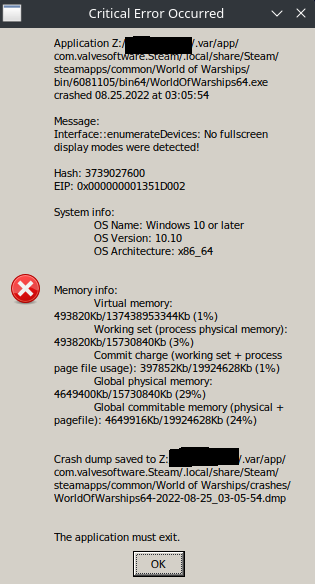
After a lot of trial and error, I found that older GloriousEggroll Proton release 7-21 fixes the above fullscreen issue. So that's what I'm using for my AMD gpu laptop.
I tried even older releases, but they had the same frozen login issue I was experiencing with the Steam-bundled Protons. I needed a release new enough to dodge the login issue, but old enough to dodge the fullscreen enumeration issue lol. I haven't done much more work to track when the regression may have been introduced, but those are my findings so far. Just glad I have it working again on my laptop!
Thanks,
-Skip
Thx Skip! There have been some smaller updates to Wows which might or might not have solved the "login" problem. There's also been at least one update to the Nvidia 470-driver on Ubuntu. Right now Wows seems to be working OK on my rig.(Proton 6-3.8)
Maybe WG did something since ordinary Windows users have had problems too(?)
could someone test if this patch fixed the issue? included in wine-staging.
https://bugs.winehq.org/show_bug.cgi?id=46263
Valve just released proton 8.01 but it still hangs on login.
After some weeks of testing I can affirm that the "Logging In" problem only occurs when the WG servers are busy. Like evenings and so forth. When there are 25K players o the like on the EU server, game crashes upon Logging In. So, there is a definable problem with "call and response" between the client (Steam/Proton/Wows) and it could be easily solved. I think.
World of Warships (552990) has stopped working
Issue transferred from https://github.com/ValveSoftware/Proton/issues/6814.
@zlay3r posted on 2023-06-01T15:08:01:
Compatibility Report
- Name of the game with compatibility issues: World of Warships
- Steam AppID of the game: 552990
System Information
- GPU: Mesa Intel® UHD Graphics (CML GT2)
- Driver/LLVM version: 4.6 (Compatibility Profile) Mesa 22.2.5
- Kernel version: 6.1.0-1006-oem
- Link to full system information report as Gist: https://gist.github.com/zlay3r/8edc34fe2fcc8b6762cb39e9855d05b2
- Proton version: 5.13-6 and no newer versions will work.
I confirm:
- [ X ] that I haven't found an existing compatibility report for this game.
- [ X ] that I have checked whether there are updates for my system available.
Symptoms
Game crashes every time I try to use any sort of in-game chat. Also, game stability is very bad and the game will crash at random during other times. Sometimes switching views also causes crashes. No newer versions of proton will work; either they don't open the game at all or there is serious input lag issues from the keyboard. I've seen other linux steam users report these same issues on reddit and other places that have just decided to give up on steam all together because of this. You can probably find their posts on reddit, too.
Reproduction
Log in to the game and try to use any sort of in-game chat feature with any other user. Try opening windows from the tabs on the left side for the armory, premium shop, dockyard, news, etc. Play a battle and try to use the chat feature in the battle mode.
```Game crashes every time I try to use any sort of in-game chat`
Same here and I think it is sloppy programming from WG. I mean, textbox input is a basic standard thing all over games, applikations and internet apps. What's wrong?
Same here and I think it is sloppy programming from WG. I mean, textbox input is a basic standard thing all over games, applikations and internet apps. What's wrong?
I should note there have been ongoing issues for a while, but the most recent issues seem to be directly related to the most recent updates released by WG for WoWs.
@zlay3r, do you refer to https://github.com/ValveSoftware/Proton/issues/1369#issuecomment-1537583808?
@zlay3r, do you refer to [#1369 (comment)](https://github.com/ValveSoftware/Proton/issues/1369#issuecomment-1537583808)?
im already using cloudflare dns 1.1.1.1
Do you mean to say that problems with "in-game chat feature" is a DNS isssue? Could be.
Do you mean to say that problems with "in-game chat feature" is a DNS isssue? Could be.
no, absolutely not. someone suggested cloudflare dns would fix it but ive already been using cloudflare before the issue started. I've also tried other dns. so no.
Do you mean to say that problems with "in-game chat feature" is a DNS isssue? Could be.
no, absolutely not. someone suggested cloudflare dns would fix it but ive already been using cloudflare before the issue started. I've also tried other dns. so no.
Okay, fair enough. I can add though, that problems with chat features in-game is bad. I'm in a clan and I can not communicate with them properly. I can not join divisions either, because of this chat bug. Game crashes when clicking "Join", "ok" and "send" or whatever. It's mess and it seems ridiculous for such a trivial thing as text boxes.
so this is just dead then, @kisak-valve ? no support? so i wasted my time filling all of that stuff out? even though lots of other people are having similar issues?
Of course I've tried Proton 7.x, Experimental and even 7.52. These three all crashes at login because of my older Nvidia driver (470.x). Only earlier version of Proton works (mostly).
At https://www.reddit.com/r/linux_gaming/comments/11idvjp/guide_how_to_use_proton_experimental_or_ge_if_you/ there is a fix mentioned by which you can still use any older Nvidia driver in Proton 7.x and Proton 8.x.
Download DXVK 1.10.3 from https://github.com/doitsujin/dxvk/releases/download/v1.10.3/dxvk-1.10.3.tar.gz and extract x32 dll files from the downloaded dxvk-1.10.3.tar.gz file to /home//.steam/steam/compatibilitytools.d/<PROTON_VERSION>/files/lib/wine/dxvk/ or /home//.steam/steam/steamapps/common/<PROTON_VERSION>/files/lib/wine/dxvk/, extract x64 dll files from the downloaded dxvk-1.10.3.tar.gz to /home//.steam/steam/compatibilitytools.d/<PROTON_VERSION>/files/lib64/wine/dxvk/ or /home//.steam/steam/steamapps/common/<PROTON_VERSION>/files/lib64/wine/dxvk/.
Thanks @DAM1173 ! I'll check it out.
I can confirm that the game crashes on the login, on the latest stable Fedora. I am also using an AMD GPU.
World of warships will freeze trying to log in. I think that it may have to do with this:
[0817/235922.913:INFO:cef_browser_app.cpp(23)] Running process with commandline "Z:/home/stephans/.steam/debian-installation/steamapps/common/World of Warships/bin/7377166
/bin64//cef_subprocess.exe" --type=utility --utility-sub-type=storage.mojom.StorageService --lang=en-US --service-sandbox-type=utility --no-sandbox --log-severity=info --u
ser-agent="Mozilla/5.0 (Windows NT 10.0; Win64; x64) AppleWebKit/537.36 (KHTML, like Gecko) Chrome/103.0.5060.134 Safari/537.36 WOWS/1.0" --lang=en-US --user-data-dir="Z:
home\stephans.steam\debian-installation\steamapps\common\World of Warships\profile\cef_cache" --disable-features=AudioServiceOutOfProcess --autoplay-policy=no-user-gestur
e-required --disable-gpu --disable-gpu-compositing /prefetch:8
[0817/235922.914:ERROR:network_sandbox.cc(302)] Failed to grant sandbox access to cache directory Z:/home/stephans/.steam/debian-installation/steamapps/common/World of War
ships/profile/cef_cache\Cache\Cache_Data: Procedure not found. (0x7F)
[0817/235922.915:ERROR:network_sandbox.cc(396)] Failed to grant sandbox access to network context data directory Z:/home/stephans/.steam/debian-installation/steamapps/comm
on/World of Warships/profile/cef_cache\Network: Success. (0x0)
[0817/235922.915:ERROR:network_service_instance_impl.cc(265)] Encountered error while migrating network context data or granting sandbox access for Z:/home/stephans/.steam
/debian-installation/steamapps/common/World of Warships/profile/cef_cache\Network. Result: 6: Success. (0x0)
[0817/235923.264:ERROR:network_change_notifier_win.cc(225)] WSALookupServiceBegin failed with: 0
system:
Computer Information:
Manufacturer: Gigabyte Technology Co., Ltd.
Model: B550 AORUS ELITE V2
Form Factor: Desktop
No Touch Input Detected
Processor Information:
CPU Vendor: AuthenticAMD
CPU Brand: AMD Ryzen 5 5600X 6-Core Processor
CPU Family: 0x19
CPU Model: 0x21
CPU Stepping: 0x0
CPU Type: 0x0
Speed: 4650 MHz
12 logical processors
6 physical processors
Hyper-threading: Supported
FCMOV: Supported
SSE2: Supported
SSE3: Supported
SSSE3: Supported
SSE4a: Supported
SSE41: Supported
SSE42: Supported
AES: Supported
AVX: Supported
AVX2: Supported
AVX512F: Unsupported
AVX512PF: Unsupported
AVX512ER: Unsupported
AVX512CD: Unsupported
AVX512VNNI: Unsupported
SHA: Supported
CMPXCHG16B: Supported
LAHF/SAHF: Supported
PrefetchW: Unsupported
Operating System Version:
TUXEDO OS 2 (64 bit)
Kernel Name: Linux
Kernel Version: 6.2.0-10018-tuxedo
X Server Vendor: The X.Org Foundation
X Server Release: 12101004
X Window Manager: KWin
Steam Runtime Version: steam-runtime_0.20230606.51628
Video Card:
Driver: NVIDIA Corporation NVIDIA GeForce RTX 3060/PCIe/SSE2
Driver Version: 4.6.0 NVIDIA 535.54.03
OpenGL Version: 4.6
Desktop Color Depth: 24 bits per pixel
Monitor Refresh Rate: 119 Hz
VendorID: 0x10de
DeviceID: 0x2504
Revision Not Detected
Number of Monitors: 1
Number of Logical Video Cards: 1
Primary Display Resolution: 5120 x 1440
Desktop Resolution: 5120 x 1440
Primary Display Size: 0.04" x 0.04" (0.04" diag), 0.1cm x 0.1cm (0.1cm diag)
Primary Bus: PCI Express 16x
Primary VRAM: 12288 MB
Supported MSAA Modes: 2x 4x 8x 16x
Sound card:
Audio device: Nvidia GPU 9f HDMI/DP
Memory:
RAM: 32026 Mb
VR Hardware:
VR Headset: None detected
Miscellaneous:
UI Language: English
LANG: en_GB.UTF-8
Total Hard Disk Space Available: 1876682 MB
Largest Free Hard Disk Block: 1049881 MB
Storage:
Number of SSDs: 2
SSD sizes: 2000G,1000G
Number of HDDs: 0
Number of removable drives: 0
Please NOTE: the game will play using the older proton 6.3-8 all be it with degraded graphic performance. Also, it you engage the in game chat, the game freezes immediately. A couple of months ago all of this worked perfectly and with high performance. No issues at all.
Same here, can not login at all. Just "logging in...." forever. Proton 6-3.8. No other newer Protons working at all. And the pertinent lines from terminal might be:
"ERROR:network_sandbox.cc(302)] Failed to grant sandbox access to cache directory Z:/mnt/GAMES/STEAM/steamapps/common/World
of Warships/profile/cef_cache\Cache\Cache_Data: Module not found. (0x7E)"
"ERROR:network_change_notifier_win.cc(225)] WSALookupServiceBegin failed with: 0"
Hi, so the latest cannot-log-in issue can be fixed by upgrading (or downgrading) to GE Proton 8-4 exactly: https://github.com/GloriousEggroll/proton-ge-custom/releases/tag/GE-Proton8-4 . Other releases don't work, it has to be that exact one.
However, there is another issue: While you can launch and play the game, anything that involves the in-game web browser (armory, naval battle, etc.) will lock it up. I don't have a fix for this, but would love to hear any insight others have.
I'm certain it involves an incompatibility with the "CEF" engine bundled with the game, which is an embedded Google Chrome browser it uses.
I haven't been able to play this game for 1 or 2 months even I tried different versions of GE-proton, but finally trying ge-proton 8.4 fixed the login issue.
Hey! So I'm back with a bit more info on making the Warships 12.7 update work properly in Steam + Linux. Was delayed a bit by a hospital stay - my son was born ;-) .
Proton Specific Release, and Browser Workaround:
So yes, the GE 8-4 release linked above appears to be the only proton version that works. (Thanks @GloriousEggroll ! You make so many things easy!)
The embedded chrome-based browser in the game still freezes up when you try to view anything (armory, premium shop, etc.). However, you can view these sites separately on your normal web browser. The login button on the wargaming website allows you to use your steam account - everything was right there for me. Accessing them via normal browser is actually nicer, but less convenient because you have to alt + tab back and forth.
Here are some links to some of the common areas you visit in-game:
- https://armory.worldofwarships.com
- https://clans.worldofwarships.com/clan-wars/war
- https://dockyard.worldofwarships.com/
- https://warehouse.worldofwarships.com/#/all
- https://logbook.worldofwarships.com/profile
Fullscreen Mode Issue Workaround
My laptop has an AMD card, and I found a dxvk issue with the GE release. I get a message that says "Interface::enumerateDevices: No fullscreen display modes were detected! (https://frm-wows-us.wgcdn.co/wows_forum_us/monthly_2022_08/20220824220630.png.f9bf98aefc5e942b52eef2e525027d3a.png )
After a little experimentation, I was able to pin this issue down to a regression in the dxvk that shipped with the GE 7-28 release. work around this issue by building a Frankenstein Proton (lol). Here's what I did:
- Install Proton GE 8-4 release listed above, like normal. If your graphics are like my laptop, the game won't launch because you get the fullscreen error message listed above.
- Download the GE 7-27 release ( https://github.com/GloriousEggroll/proton-ge-custom/releases/tag/GE-Proton7-27 ) , or really any 7- release before 7-28.
- In the 7-27 archive, find the contents of files/lib64/wine/dxvk/ . You want to take these dll files, and stick them into HOME/.steam/steam/compatibilitytools.d/GE-Proton8-4/files/lib64/wine/dxvk/ . Basically we want to use 8-4 Proton, but with dxvk libs from 7-27.
- Game should now launch like normal
I'm looking at the diffs between 7-27 and 7-28 in dxvk, and am looking to file a bug report there. I'm not too competent in actually fixing the graphics code, but I can definitely narrow down the breaking change.
Hope this helps someone, thanks!
-Skip
Thx guys! Downloading 8.4 as we speak. I've upgraded my Linux and my hardware so I can run newer Nvidia drivers like 525.x. BUT still no go with Proton 6 - 8 originals. But this new GE version sounds promising.
EDIT: Working with GE 8.4! Even armory and dockyard worked.
Thx again for the tip!
There is no GE-Proton anywhere... there is Proton 7.0 and Proton 8.0. Also
there is no option to install 8.4 only 8.0-3 in the steam UI. What is GE
anyhow?
On Sun, Aug 27, 2023 at 4:05 PM skip77 @.***> wrote:
Hey! So I'm back with a bit more info on making the Warships 12.7 update
work properly in Steam + Linux. Was delayed a bit by a hospital stay - my
son was born ;-) .GE Release to Use, and Browser Workaround:
So yes, the GE 8-4 release linked above appears to be the only proton
version that works. (Thanks @GloriousEggroll
https://github.com/GloriousEggroll ! You make so many things easy!)The embedded chrome-based browser in the game still freezes up when you
try to view anything (armory, premium shop, etc.). However, you can view
these sites separately on your normal web browser. The login button on the
wargaming website allows you to use your steam account - everything was
right there for me. Accessing them via normal browser is actually nicer,
but less convenient because you have to alt + tab back and forth.Here are some links to some of the common areas:
- https://armory.worldofwarships.com
- https://clans.worldofwarships.com/clan-wars/war
- https://dockyard.worldofwarships.com/
- https://warehouse.worldofwarships.com/#/all
- https://logbook.worldofwarships.com/profile
Fullscreen Mode Issue Workaround
My laptop has an AMD card, and I found a dxvk issue with the GE release. I
get a message that says "Interface::enumerateDevices: No fullscreen display
modes were detected! (
https://frm-wows-us.wgcdn.co/wows_forum_us/monthly_2022_08/20220824220630.png.f9bf98aefc5e942b52eef2e525027d3a.png
)After a little experimentation, I was able to pin this issue down to a
regression in the dxvk that shipped with the GE 7-28 release. work around
this issue by building a Frankenstein Proton (lol). Here's what I did:
- Install Proton GE 8-4 release listed above, like normal. If your
graphics are like my laptop, the game won't launch because you get the
fullscreen error message listed above.- Download the GE 7-27 release (
https://github.com/GloriousEggroll/proton-ge-custom/releases/tag/GE-Proton7-27
) , or really any 7- release before 7-28.- In the 7-27 archive, find the contents of files/lib64/wine/dxvk/ .
You want to take these dll files, and stick them into
HOME/.steam/steam/compatibilitytools.d/GE-Proton8-4/files/lib64/wine/dxvk/
. Basically we want to use 8-4 Proton, but with dxvk libs from 7-27.- Game should now launch like normal
I'm looking at the diffs between 7-27 and 7-28 in dxvk, and am looking to
file a ticket there. I'm not too competent in actually fixing the graphics
code, but I can definitely narrow down the breaking change.Hope this helps someone, thanks!
-Skip
—
Reply to this email directly, view it on GitHub
https://github.com/ValveSoftware/Proton/issues/333#issuecomment-1694677568,
or unsubscribe
https://github.com/notifications/unsubscribe-auth/AIFON6LTU6KGNBMUBPYTSC3XXNH27ANCNFSM4FRJZ3PA
.
You are receiving this because you commented.Message ID:
@.***>
And congrats on your kid! Sleep is but a dream for you now! :)
On Sun, Aug 27, 2023 at 4:05 PM skip77 @.***> wrote:
Hey! So I'm back with a bit more info on making the Warships 12.7 update
work properly in Steam + Linux. Was delayed a bit by a hospital stay - my
son was born ;-) .GE Release to Use, and Browser Workaround:
So yes, the GE 8-4 release linked above appears to be the only proton
version that works. (Thanks @GloriousEggroll
https://github.com/GloriousEggroll ! You make so many things easy!)The embedded chrome-based browser in the game still freezes up when you
try to view anything (armory, premium shop, etc.). However, you can view
these sites separately on your normal web browser. The login button on the
wargaming website allows you to use your steam account - everything was
right there for me. Accessing them via normal browser is actually nicer,
but less convenient because you have to alt + tab back and forth.Here are some links to some of the common areas:
- https://armory.worldofwarships.com
- https://clans.worldofwarships.com/clan-wars/war
- https://dockyard.worldofwarships.com/
- https://warehouse.worldofwarships.com/#/all
- https://logbook.worldofwarships.com/profile
Fullscreen Mode Issue Workaround
My laptop has an AMD card, and I found a dxvk issue with the GE release. I
get a message that says "Interface::enumerateDevices: No fullscreen display
modes were detected! (
https://frm-wows-us.wgcdn.co/wows_forum_us/monthly_2022_08/20220824220630.png.f9bf98aefc5e942b52eef2e525027d3a.png
)After a little experimentation, I was able to pin this issue down to a
regression in the dxvk that shipped with the GE 7-28 release. work around
this issue by building a Frankenstein Proton (lol). Here's what I did:
- Install Proton GE 8-4 release listed above, like normal. If your
graphics are like my laptop, the game won't launch because you get the
fullscreen error message listed above.- Download the GE 7-27 release (
https://github.com/GloriousEggroll/proton-ge-custom/releases/tag/GE-Proton7-27
) , or really any 7- release before 7-28.- In the 7-27 archive, find the contents of files/lib64/wine/dxvk/ .
You want to take these dll files, and stick them into
HOME/.steam/steam/compatibilitytools.d/GE-Proton8-4/files/lib64/wine/dxvk/
. Basically we want to use 8-4 Proton, but with dxvk libs from 7-27.- Game should now launch like normal
I'm looking at the diffs between 7-27 and 7-28 in dxvk, and am looking to
file a ticket there. I'm not too competent in actually fixing the graphics
code, but I can definitely narrow down the breaking change.Hope this helps someone, thanks!
-Skip
—
Reply to this email directly, view it on GitHub
https://github.com/ValveSoftware/Proton/issues/333#issuecomment-1694677568,
or unsubscribe
https://github.com/notifications/unsubscribe-auth/AIFON6LTU6KGNBMUBPYTSC3XXNH27ANCNFSM4FRJZ3PA
.
You are receiving this because you commented.Message ID:
@.***>
There is no GE-Proton anywhere... there is Proton 7.0 and Proton 8.0. Also there is no option to install 8.4 only 8.0-3 in the steam UI. What is GE anyhow?
You can download and install GE-Proton 8.4 into Steam by using ProtonUP-Qt at https://github.com/DavidoTek/ProtonUp-Qt. And you can manually download and install GE-Proton 8.4 at https://github.com/GloriousEggroll/proton-ge-custom/releases/tag/GE-Proton8-4.
I followed these instructions, which I found plain and simple:
Thank you! That did indeed work for installing the GE version of proton.
However World of Warships still hangs when trying to log in to the game
servers.
There must be something with the game and the networking?
On Tue, Aug 29, 2023 at 1:56 PM webaake @.***> wrote:
I followed these instructions, which I found plain and simple:
https://github.com/GloriousEggroll/proton-ge-custom/wiki
—
Reply to this email directly, view it on GitHub
https://github.com/ValveSoftware/Proton/issues/333#issuecomment-1697299614,
or unsubscribe
https://github.com/notifications/unsubscribe-auth/AIFON6LZ46SYCOR53D2LAKLXXXKG3ANCNFSM4FRJZ3PA
.
You are receiving this because you commented.Message ID:
@.***>
OK following the instructions to install GE-8-4 worked and I can confirm
that the game runs and does log in.
However on the second launch there is a problem synchronizing game data...
I will continue to test.
On Tue, Aug 29, 2023 at 1:38 PM DAM1173 @.***> wrote:
There is no GE-Proton anywhere... there is Proton 7.0 and Proton 8.0. Also
there is no option to install 8.4 only 8.0-3 in the steam UI. What is GE
anyhow?
… <#m_-7873257407930646490_>
On Sun, Aug 27, 2023 at 4:05 PM skip77 @.*> wrote: Hey! So I'm back
with a bit more info on making the Warships 12.7 update work properly in
Steam + Linux. Was delayed a bit by a hospital stay - my son was born ;-) .
GE Release to Use, and Browser Workaround: So yes, the GE 8-4 release
linked above appears to be the only proton version that works. (Thanks
@GloriousEggroll https://github.com/GloriousEggroll
https://github.com/GloriousEggroll https://github.com/GloriousEggroll !
You make so many things easy!) The embedded chrome-based browser in the
game still freezes up when you try to view anything (armory, premium shop,
etc.). However, you can view these sites separately on your normal web
browser. The login button on the wargaming website allows you to use your
steam account - everything was right there for me. Accessing them via
normal browser is actually nicer, but less convenient because you have to
alt + tab back and forth. Here are some links to some of the common areas:
- https://armory.worldofwarships.com https://armory.worldofwarships.com -
https://clans.worldofwarships.com/clan-wars/war
https://clans.worldofwarships.com/clan-wars/war -
https://dockyard.worldofwarships.com/
https://dockyard.worldofwarships.com/ -
https://warehouse.worldofwarships.com/#/all
https://warehouse.worldofwarships.com/#/all -
https://logbook.worldofwarships.com/profile
https://logbook.worldofwarships.com/profile Fullscreen Mode Issue
Workaround My laptop has an AMD card, and I found a dxvk issue with the GE
release. I get a message that says "Interface::enumerateDevices: No
fullscreen display modes were detected! (
https://frm-wows-us.wgcdn.co/wows_forum_us/monthly_2022_08/20220824220630.png.f9bf98aefc5e942b52eef2e525027d3a.png
https://frm-wows-us.wgcdn.co/wows_forum_us/monthly_2022_08/20220824220630.png.f9bf98aefc5e942b52eef2e525027d3a.png
) After a little experimentation, I was able to pin this issue down to a
regression in the dxvk that shipped with the GE 7-28 release. work around
this issue by building a Frankenstein Proton (lol). Here's what I did: -
Install Proton GE 8-4 release listed above, like normal. If your graphics
are like my laptop, the game won't launch because you get the fullscreen
error message listed above. - Download the GE 7-27 release (
https://github.com/GloriousEggroll/proton-ge-custom/releases/tag/GE-Proton7-27
https://github.com/GloriousEggroll/proton-ge-custom/releases/tag/GE-Proton7-27
) , or really any 7- release before 7-28. - In the 7-27 archive, find the
contents of files/lib64/wine/dxvk/ . You want to take these dll files, and
stick them into
HOME/.steam/steam/compatibilitytools.d/GE-Proton8-4/files/lib64/wine/dxvk/
. Basically we want to use 8-4 Proton, but with dxvk libs from 7-27. - Game
should now launch like normal I'm looking at the diffs between 7-27 and
7-28 in dxvk, and am looking to file a ticket there. I'm not too competent
in actually fixing the graphics code, but I can definitely narrow down the
breaking change. Hope this helps someone, thanks! -Skip — Reply to this
email directly, view it on GitHub <#333 (comment)
https://github.com/ValveSoftware/Proton/issues/333#issuecomment-1694677568>,
or unsubscribe
https://github.com/notifications/unsubscribe-auth/AIFON6LTU6KGNBMUBPYTSC3XXNH27ANCNFSM4FRJZ3PA
https://github.com/notifications/unsubscribe-auth/AIFON6LTU6KGNBMUBPYTSC3XXNH27ANCNFSM4FRJZ3PA
. You are receiving this because you commented.Message ID: @.*>You can download and install GE-Proton 8.4 into Steam by using ProtonUP-Qt
at https://github.com/DavidoTek/ProtonUp-Qt. An you can manually download
and install GE-Proton 8.4 at
https://github.com/GloriousEggroll/proton-ge-custom/releases/tag/GE-Proton8-4
.—
Reply to this email directly, view it on GitHub
https://github.com/ValveSoftware/Proton/issues/333#issuecomment-1697276409,
or unsubscribe
https://github.com/notifications/unsubscribe-auth/AIFON6MENYU7WBWPAAKPHRTXXXIERANCNFSM4FRJZ3PA
.
You are receiving this because you commented.Message ID:
@.***>
World of Warships has just released version 12.8, see https://worldofwarships.eu/en/news/game-updates/update-128-wows-celebrates-its-8th-anniversary/. I hope that this version will also play well with GE Proton 8-4 or higher.
12.8 works fine here with GE 8.4.
But I think that World of Warships must run on any Proton version greater than GE-Proton 8.4. Has GE already been noticed about the logging in issues since WoWs 12.7 had been released?
But I think that World of Warships must run on any Proton version greater than GE-Proton 8.4. Has GE already been noticed about the logging in issues since WoWs 12.7 had been released?
There was an issue with older Nvidia drivers and earlier Protons/Wows, but Nvidia versions 525.x and newer fixed that issue.
Another issue that I am experiencing is related to input. When pressing the Shift key once quickly to zoom in, the zoom automatically gets reset. Only when pressing Shift for ~0.5s and holding it down will the zoom remain in the correct position.
This works perfectly fine under Windows, but breaks in Proton. Is anyone else experiencing this issue?
But I think that World of Warships must run on any Proton version greater than GE-Proton 8.4. Has GE already been noticed about the logging in issues since WoWs 12.7 had been released?
There was an issue with older Nvidia drivers and earlier Protons/Wows, but Nvidia versions 525.x and newer fixed that issue.
What was that issue?
I tried to run WoWs 12.8 with GE-Proton 8.16 and Nvidia driver version 535.104.05 and it was still stuck at logging in.
Another issue that I am experiencing is related to input. When pressing the Shift key once quickly to zoom in, the zoom automatically gets reset. Only when pressing Shift for ~0.5s and holding it down will the zoom remain in the correct position.
This works perfectly fine under Windows, but breaks in Proton. Is anyone else experiencing this issue?
Same issue here (months ago only, not tested recently). Don't know why, but solved by changing the key binding to Space.
To get debug info when running WoWs with a Proton version other than GE-Proton 8.4, you can run it in the Linux terminal by running this command: steam steam://rungameid/552990, in the terminal output you can see important debugging info. In the ~/.local/share/Steam/logs/ you can see several log files of Steam. This debug info can be used by the developers of Steam and Proton for fixing this login issue which appeared since WoWs has released version 12.7 and higher.
bisected the login hang:
0b74f0b5f55b02df23160fcaf64226e1a8658309
Reverting that on top of current experimental fixes the login hang and allows the game to work again.
I've released GE-Proton8-19 with a workaround that allows it to work again until the commit can be properly fixed.
Very nice @GloriousEggroll! Is there a place to track a fix for this in in Wine? (PR, issue, etc.)
Very nice @GloriousEggroll! Is there a place to track a fix for this in in Wine? (PR, issue, etc.)
You're looking at it. This doesn't affect upstream wine because the commit causing the issue only exists in proton-wine. Codeweavers has an internal bug tracker for proton-wine specific issues which is not publicly accessible.
indeed 8.19(GE) works in World of Warships, I played one round for a test. I was finally able to replace 8.4(GE) version
proper fix: https://github.com/ValveSoftware/wine/pull/201
At https://github.com/GloriousEggroll/proton-ge-custom/releases/tag/GE-Proton8-20:
GE-Proton8-20 Released
HOTFIX:
-updated world of warships workaround patch with proper fix, no longer requires environment variable (thanks OOOOOF123)
I took 8.20GE in use and deleted old GE versions.
proton experimental bleeding edge beta also works (will eventually be part of an actual proton experimental release)
This is in the current non-bleeding edge experimental release from last Friday as well (experimental-8.0-20231019).
I recently upgraded proton-ge 25 and it worked some time, but now I am again unable to play the game, steam just wont launch the game.
I recently upgraded proton-GE 25 and it worked some time, but now I am again unable to play the game, steam just wont launch the game.
Posting the same comment multiple times in a row isn't going to get your issue fixed any faster.
is it still working for other people? I uninstalled the game
I don't know why it printed same message twice. I didn't do that on purpose.
for some reason I was able to get it working again ( proton-ge 25).
Wows 12.11 "Santas Gift shop" hangs when clicking around in it. Proton GE 8.4 and experimental and GE8.20 too. No mods. No biggie - I'll survive. Here are some seemingly pertinent lines from terminal:
Wows 12.11 errors 2023-12-06
...........
[1207/201633.734:INFO:cef_handler.cpp(893)] CefHandler::CreateWebView: id=1 SUCCESS; Exists: No
[1207/201633.904:INFO:cef_handler.cpp(584)] CefHandler::OnBeforeBrowse: https://armory.worldofwarships.eu/category/new_year_contai
ners/ cancel = 0
[1207/201703.416:INFO:CONSOLE(-1)] "Service Worker is not responding.", source: https://armory.worldofwarships.eu/sw.js (-1)
[1207/201719.302:INFO:render_frame_host_impl.cc(11505)] RenderFrameHostImpl::MaybeGenerateCrashReport url = , status = 4, exit_cod
e = 258
[1207/201750.561:INFO:cef_browser_app.cpp(23)] Running process with commandline "Z:/mnt/GAMES/SteamLibrary/steamapps/common/World
of Warships/bin/7814610/bin64//cef_subprocess.exe" --type=renderer --log-severity=info --user-agent="Mozilla/5.0 (Windows NT 10.0;
Win64; x64) AppleWebKit/537.36 (KHTML, like Gecko) Chrome/103.0.5060.134 Safari/537.36 WOWS/1.0" --user-data-dir="Z:\mnt\GAMES\St
eamLibrary\steamapps\common\World of Warships\profile\cef_cache" --disable-features=AudioServiceOutOfProcess --autoplay-policy=no-
user-gesture-required --disable-gpu --disable-gpu-compositing
[1207/201750.563:INFO:cef_handler.cpp(893)] CefHandler::CreateWebView: id=2 SUCCESS; Exists: No
[1207/201750.724:INFO:cef_handler.cpp(584)] CefHandler::OnBeforeBrowse: https://warehouse.worldofwarships.eu/ cancel = 0
[1207/201820.624:INFO:render_frame_host_impl.cc(11505)] RenderFrameHostImpl::MaybeGenerateCrashReport url = , status = 4, exit_cod
e = 258
.............
Replying to https://github.com/ValveSoftware/Proton/issues/333#issuecomment-1845988590
try WINE_SIMULATE_WRITECOPY=1
Even the ingame chat is working! That crashed the game for long time, but it's fixed now.
So thanks Proton Dev-team and Merry Xmas!!
World of Warships on Steam is no longer working. It continues to get stuck on the Logging In screen.
I have tried Proton Experimental, 9.0-4, 8.0-5, 7.0-6, 6.3-8, 5.13-6, Proton GE 9-26, GE 8-26, GE 8-20, and GE 8-4. All of them exhibit the same behaviour.
Running the game through the Wargaming Launcher on Lutris exhibits no issues with Proton GE 8-26.
Kernel: 6.13.6-200.fc41.x86_64 arch: x86_64 bits: 64
compiler: gcc v: 14.2.1

Desktop: KDE Plasma v: 6.3.3
wm: kwin_wayland
dm: SDDM

Distro: Fedora Linux 41 (KDE Plasma)

CPU:
  Info: 8-core model: AMD Ryzen 7 5800X3D bits: 64 type: MT MCP arch: Zen 3+
    rev: 2 cache: L1: 512 KiB L2: 4 MiB L3: 96 MiB

Graphics:
  Device-1: Advanced Micro Devices [AMD/ATI] Navi 48 [RX 9070/9070 XT]
    vendor: Tul / PowerColor driver: amdgpu v: kernel pcie: speed: 32 GT/s
    lanes: 16 ports: active: DP-1,DP-2,DP-3 empty: HDMI-A-1,Writeback-1
    bus-ID: 09:00.0 chip-ID: 1002:7550
  Display: wayland server: X.org v: 1.21.1.16 with: Xwayland v: 24.1.6
    compositor: kwin_wayland driver: X: loaded: amdgpu
    unloaded: fbdev,modesetting,radeon,vesa dri: radeonsi gpu: amdgpu
    d-rect: 7040x2130 display-ID: 0
  API: EGL v: 1.5 platforms: device: 0 drv: radeonsi device: 1 drv: swrast
    gbm: drv: kms_swrast surfaceless: drv: radeonsi wayland: drv: radeonsi x11:
    drv: radeonsi
  API: OpenGL v: 4.6 compat-v: 4.5 vendor: amd mesa v: 25.0.1 glx-v: 1.4
    direct-render: yes renderer: AMD Radeon Graphics (radeonsi gfx1201 ACO DRM
    3.61 6.13.6-200.fc41.x86_64) device-ID: 1002:7550 display-ID: :0.0
  API: Vulkan v: 1.4.304 surfaces: xcb,xlib,wayland device: 0
    type: discrete-gpu driver: N/A device-ID: 1002:7550 device: 1 type: cpu
    driver: N/A device-ID: 10005:0000
I have the same problem. everytime I would receive daily container it gives an popup error message something about memory, proton-ge 26 in use. intel cpu, amd 6600 rx fighter. open source driver. 5.15 series of kernel.
https://worldofwarships.eu/en/news/general-news/wows-account-system-update/ and https://worldofwarships.eu/en/news/general-news/account-system-update-new-ways-to-play/
Could this problem with getting stuck on the login screen have to do with these above-mentioned changes of the account system?
Proton versions
proton experimentalx5 2025-03ge-proton8-20x1 2023-10ge-proton8-19x1 2023-10proton 8.4x7 2023-09proton 8.16x1 2023-09ge-proton8-4x6 2023-08ge-proton7-27x4 2023-08proton 7.0x4 2023-08proton 8.0x3 2023-08proton 6.3-8x6 2023-08proton 8.01x1 2023-04proton 7.52x1 2023-03proton 5.13x6 2021-04proton 3.16x1 2021-02proton 3.16-9x5 2020-12
Launch options
WINE_SIMULATE_WRITECOPY=1x1 2023-12PROTON_VERSIONx1 2023-06PROTON_USE_WINED3D11=1`x1 2021-03PROTON_USE_WINED3D=1x6 2020-12PROTON_LOG=1x3 2020-12PROTON_USE_WINED3Dx3 2020-11PROTON_USE_WINED3D=1),x1 2020-11PROTON_NO_FSYNC=1`x1 2020-07PROTON_LOG=1`.x1 2020-05RADV_PERFTEST=llvmx1 2019-09PROTON_LOGx1 2019-08PROTON_USE_WINED3D=1`,x1 2019-04
Launch lines
PROTON_USE_WINED3D=1 %command%x4 2020-12gamemoderun %command%x2 2020-07RADV_PERFTEST=llvm %command%x1 2019-09
Upstream links
- ValveSoftware/wine/pull/201x1 2023-10
- ValveSoftware/Proton/issues/1369x2 2023-06
- ValveSoftware/Proton/issues/6814x1 2023-06
- show_bug.cgi?id=46263x1 2023-04
- ValveSoftware/Proton/issues/6643x1 2023-03
- ValveSoftware/Proton/issues/5434x1 2021-12
- ValveSoftware/Proton/issues/4761x1 2021-04
- ValveSoftware/Proton/issues/4623x1 2021-02
- doitsujin/dxvk/issues/1834x3 2020-12
- ValveSoftware/Proton/issues/3862x1 2020-05
- ValveSoftware/Proton/issues/3617x1 2020-03
- ValveSoftware/Proton/issues/2939x1 2019-08
- ValveSoftware/Proton/issues/595x1 2018-08
DLLs
platform.dllx1 2020-11platform64.dllx1 2020-112steam_api.dllx1 2018-09steam_api.dllx1 2018-09
I played several matches and did not experience any issues.
Processor Information:
CPU Vendor: AuthenticAMD
CPU Brand: AMD FX(tm)-6300 Six-Core Processor
Speed: 3500 Mhz
Operating System Version:
Ubuntu 18.04.1 LTS (64 bit)
Kernel Name: Linux
Kernel Version: 4.15.0-32-generic
X Server Vendor: The X.Org Foundation
X Server Release: 11906000
X Window Manager: GNOME Shell
Video Card:
Driver: NVIDIA Corporation GeForce GTX 1060 6GB/PCIe/SSE2
Driver Version: 4.6.0 NVIDIA 396.51
OpenGL Version: 4.6
Desktop Color Depth: 24 bits per pixel
Monitor Refresh Rate: 60 Hz
Number of Monitors: 1
Number of Logical Video Cards: 1
Primary Display Resolution: 1920 x 1080
Desktop Resolution: 1920 x 1080
Primary Display Size: 20.91" x 11.77" (23.98" diag)
53.1cm x 29.9cm (60.9cm diag)
Primary Bus: PCI Express 16x
Primary VRAM: 6144 MB
Supported MSAA Modes: 2x 4x 8x 16x
Sound card:
Audio device: Realtek ALC889
Memory:
RAM: 16022 Mb