Proton 5.13-4 not suspending compositing when lauching games
Which desktop environment?
Umm, I'm not sure what GitHub did to the body of my report but I did include more information than just the title.
I'm using KDE plasma.
This was not an issue with proton 5.13-3 and games run on wine through lutris suspend compositing properly so it's not an issue with my desktop environment or with anything in Arch apparently. Even testing proton 5.0 works properly. I also tested proton experimental and it did not work either so it appears there is some regression present in 5.13.4 up.
I did try to edit my issue rather than posting a extremely long comment but there was no body there nothing for me to edit, the only editing option I can get was to edit the title
OK, well I use Kubuntu rather than Arch, but I'll test it tonight and see if I can replicate the issue.
How are you determining whether compositing is disabled? What game(s) are you seeing this issue with? What display settings are you using in those games? Do you have multiple monitors?
The logic we use in Proton is we request the WM disable compositing when a fullscreen window is being displayed. Possibly something changed so that the windows are not being fullscreened?
It is All games that are run under proton 5.13-4. Off the top of my head I've checked Borderlands 1 and 2, deceit, the blackout club, monster hunter world, lightless- the 21st sacrifice, probably more but those are the only ones I recall checking
You can visibly see the composting being disabled as the screen flickers as well as the fact that all desktop effects stop when the compositor is disabled, but I have also verified the it has not been by manually disabling it as well and know for sure it is not being disabled by proton 5.13-4. Using the same verification I can day for sure that the compositor Is being disabled by proton 5.0 with the same display settings applied to the game. I know for sure that borderlands 2 and the blackout club are fullscreen, I believe that all my other games are fullscreen as well but a few might be a fullscreen borderless window. I don't run any of my games in a smaller than fullscreen window.
I know proton 5.13-4 is recognizing the games as fullscreen as the way the games display when launched is visibly different if proton sees them as fullscreen. If windowed fullscreen they just start, but if true fullscreen there's is a noticable difference as they start since the first release of 5.13 as the new fullscreen feature introduced in that release is applied.
I'm pretty confident that the compositor was being properly disabled in 5.13-3 bur I have no way to easily verify that as using that is not as straightforward as reverting to 5.0 or 4.11. I can say however, that all of the GE custom protons I have tried disable the composter correctly as well.
As I don'tchange any settings in the game display between testing proton versions and at least two older proton versions have properly disabled the compositor whatever fixed was done in 15.3-4 to allow cyberpunk 2077 to be played must have caused an unwanted effect or a regression of some kind.
Interesting, thanks for the thorough explanation. I can't think of anything that changed in 5.13-4 to affect this, but your results are pretty conclusive. I'll see if we can reproduce this issue.
If I recall correctly 5.13-3 was not out very long before they had to release 5.13-4 as a hot fix for cyberpunk. I suppose it is possible that be compositing issue was introduced in 5.13-3 and I just didn't notice it in the few days before 5.13-4 was released.
So it's possible I could be incorrect as to the exact milestone this was released but I'd be willing to put money on the fact that it was working with 5.13-2 and would just about eat my keyboard raw if it was not working in 5.13-1 1
I experience the same problem with The Elder Scrolls Online: https://github.com/ValveSoftware/Proton/issues/556#issuecomment-723076693
Just tested Witcher 3 and NieR:Automata, openbox + qdre-compositor + fullscreen + proton 5.13-4: works properly.
Compositor logs on alt+tab (it uses _NET_WM_BYPASS_COMPOSITOR for fullscreen windows):
Unredirect fullscreen window: 37759747
Redirect fullscreen window: 37759747
Also screen tearing in game can be observed when vsync is off (so it is working properly).
Just tested Witcher 3 and NieR:Automata, openbox + qdre-compositor + fullscreen + proton 5.13-4: works properly.
Compositor logs on alt+tab (it uses
_NET_WM_BYPASS_COMPOSITORfor fullscreen windows):Unredirect fullscreen window: 37759747 Redirect fullscreen window: 37759747Also screen tearing in game can be observed when vsync is off (so it is working properly).
How or where can you check the compositor logs?
@intelligentgaming It depends on the compositor. Try to run compositor (usually the window manager like KWin, because most WMs has integrated compositor) from command line.
I use qdre-compositor (currently AUR qdre-git package, I'll separate it soon) with OpenBox window manager.
@intelligentgaming It depends on the compositor. Try to run compositor (usually the window manager like KWin, because most WMs has integrated compositor) from command line.
I use qdre-compositor (currently AUR qdre-git package, I'll separate it soon) with OpenBox window manager.
The reason is I'm seeing OPs issue now, you play a full screen game, either normal full screen or windowed full screen the compositor is not getting disabled.
I have a dual monitor setup with a window open on the second monitor, and the edge of the window are still composed, which I can check by disabling the compositor with Alt + Shift + F12.
This is with Kubuntu 20.10 with latest Proton 5.14-3.
EDIT: Using build 5.0-10 also does not disable compositor, however using Proton-5.21-GE-1 does.
After doing some experimentation, I got the compositor to automatically disable again with Proton 5.14-3 but it involves me turning off Force Composition Pipeline in the nVidia X Server application which causes screen tearing in all my games.
Clearly something has happened between either the Kwin compositor, the nVidia driver and Proton itself but as I mentioned before, it still disables the compositor if I use Proton-GE.
So I just checked my settings. I don't have "force composition Pipline" enabled. It still has to have something to do with how Proton 5.14 is reporting the fullscreen game to kwin. As it was not as issue in 5.14 and I'm pretty sure it was not happening in the earlier versions of 5.14 and it works correctly in 5.0.
I would suspect that it might have something to do with an update of runtime soldier but GE Proton 5.21 is based on an earlier version of 5.14 and it works properly still and it relies on and calls solider as well
Upon further testing, enabling "force composition pipeline" and "force full composition pipeline" did not result in the compositor to be disabled.
So I just checked my settings. I don't have "force composition Pipline" enabled. It still has to have something to do with how Proton 5.14 is reporting the fullscreen game to kwin. As it was not as issue in 5.14 and I'm pretty sure it was not happening in the earlier versions of 5.14 and it works correctly in 5.0.
I would suspect that it might have something to do with an update of runtime soldier but GE Proton 5.21 is based on an earlier version of 5.14 and it works properly still and it relies on and calls solider as well
Upon further testing, enabling "force composition pipeline" and "force full composition pipeline" did not result in the compositor to be disabled.
Does it still happen if you use Proton-GE since that is based on 5.13?
Using ge proton 5.21, which is based on an earlier version of 5.13 I believe 5.13-1 DOES disable the compositor correctly with both the pipeline settings enabled and disabled
That fits with my recollection that when 5.13 was first released the compositor was disabled properly. As far as I know he did not add anything patch wise to get proton 5.21 to disable the compositor as his release notes did not mention it
Using ge proton 5.21, which is based on an earlier version of 5.13 I believe 5.13-1 DOES disable the compositor correctly with both the pipeline settings enabled and disabled
That fits with my recollection that when 5.13 was first released the compositor was disabled properly. As far as I know he did not add anything patch wise to get proton 5.21 to disable the compositor as his release notes did not mention it
Right then, so something has definitely changed in 5.13-4.
Like I mentioned above, it could have happened in 5.13-3 and I just didn't notice in the couple of days it was out before the release of 5.13.4. I think it was like 5 days between the two releases? But yeah something definitely changed from 5.13's first release. As it's extremely difficult test earlier versions of proton because you can't just download them you've got to build them and build them you have to have a whole bunch of other dependencies installed for the VM I have not gone back to see which version had the change in it
A comment unrelated to the bug report but it would be really nice if there was a pre-compiled build of the various proton versions so that you could test prior versions or in the case of a change breaking only one game you could just download that version put it in the compatibilitytools.d folder and use it. It would certainly make it easier in a case like this
The reason we don't do that in general is because while we support switching between major versions (5.13 <-> 5.0), we don't support switching between minor versions (5.13-4 <-> 5.13-3). Sometimes there is awkward breakage which we have to fix up in the Proton script and we can't update old minor versions to handle that situation correctly.
Issue is still present is Proton 5.13-5
I think there were some commits around how fullscreen windows are detected. This may explain why it no longer disables window composition. Maybe somewhere around this commit: https://github.com/ValveSoftware/wine/commit/f2e51aab296c5a8777b556db948c2be973bd09bc ("winex11.drv: Bypass compositor only when a window is full virtual screen.")
The history is here: https://github.com/ValveSoftware/wine/commits/proton_5.13/dlls/winex11.drv
Also, it looks like GE and tkg both disable the fullscreen hack completely as a work-around for some games they are supporting.
Are you guys using multiple or single monitor setups? BTW, it still seems to work for me using KWin. But OTOH, this may be because I've setup a KWin rule to disable the compositor when a window class containing steam_app is present:
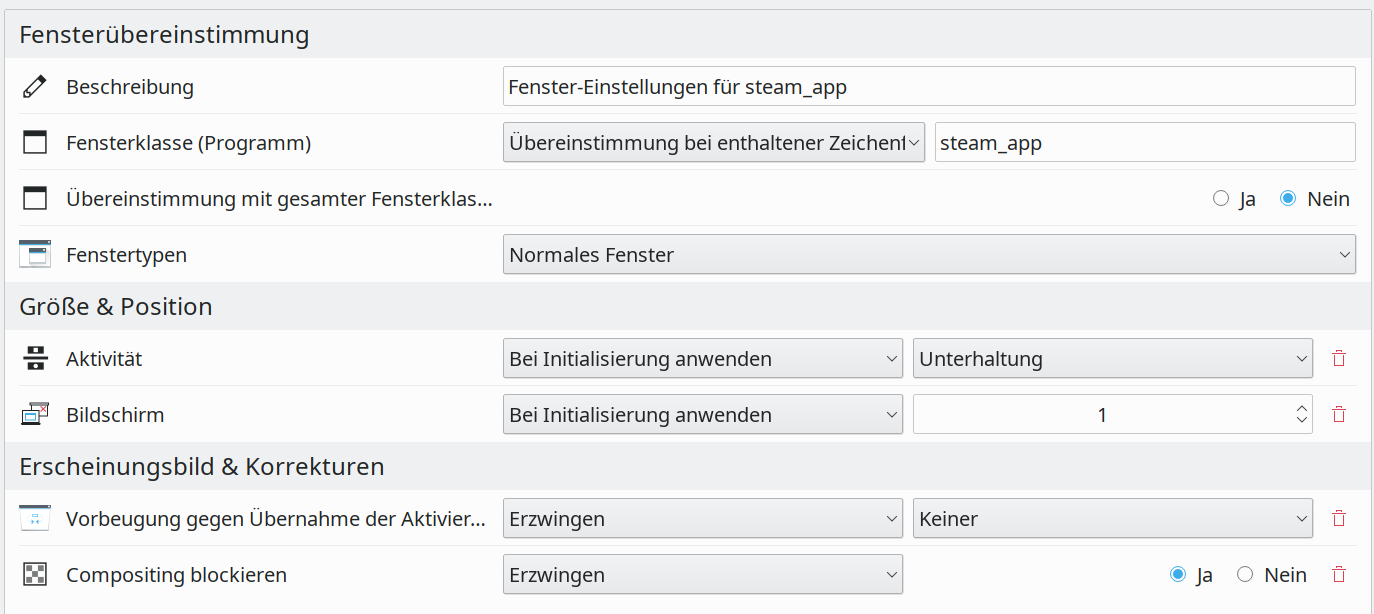
My DE is in German but you should get the idea.
Replying to one comment ago.
It has to be because you are using the kwin rule. I am using kde as well and can use the rules to get around it as well. I strongly suspect that if you disable that rule compositing will not be suspended.
I do have dual screen monitors.
I'm not sure what they mean by "virtual fullscreen" but it does not matter if the game is in windowed mode, borderless window or fullscreen the compositor is not suspended, so if it is that commit it is causing very undesirable side effects.
This issue can cause severe performance issues in some games. Proton lead to so much improvement in the state of Linux gaming that it would be tragic for some regression like this to move it backwards
This issue can cause severe performance issues in some games
Yeah because the compositors mess with vsync and introduce an intermediate buffer. You could try disabling kwin vsync (disable the "avoid tearing" option) but I'm not sure if games are able to vsync properly then.
I'm using this rule because I want to force games over to the other screen, and into a KDE activity which disables sleep and screen blanking/locking.
I'm not sure what they mean by "virtual fullscreen"
I didn't check the logic in wine but usually it's the full real estate of screen that wine can see. That's either its virtual desktop mode, or the area across all screens. If the latter is true, the compositor hack cannot kick in if your are using dual monitor in a side-by-side configuration because the game would maximize to only half of the virtual size.
This issue can cause severe performance issues in some games
Yeah because the compositors mess with vsync and introduce an intermediate buffer. You could try disabling kwin vsync (disable the "avoid tearing" option) but I'm not sure if games are able to vsync properly then.
It depends on the monitor setup as well, as I'm assuming that Free Sync or G-Sync monitors don't have this issue.
For example, if I disable the KWIN compositor and thus V-Sync then I experience screen tearing throughout my desktop, and not just in games.
However if I enable Force Composition Pipeline with my nVidia GPU through nVidia X Server, then screen tearing is eliminated across the board including games.
This is independent of the compositor, as it does not matter if it is enabled or disabled as screen tearing is eliminated.
Granted this issue has been reported in KDE Plasma, so I'm not sure if the same issue exists in Gnome.
This issue can cause severe performance issues in some games. Proton lead to so much improvement in the state of Linux gaming that it would be tragic for some regression like this to move it backwards
I agree.
I'm also using a dual screen setup.
Is there a way to determine whether the (KDE Plasma) compositor is active without switch focus out of the game? (This would allow me to test with The Elder Scrolls Online in fullscreen instead of windowed fullscreen for testing.)
@oliverklee on your second screen you should see a small white line appear at the edge of the panel. You should also be able to notice a difference if you use the keyboard shortcut Alt+Shift+F12 and you should see a difference.
I have my panel on the top, but this should give you an idea on what it should look like when compositing is suspended.

Here is what it looks like when compositing is enabled.

I'm also using a dual screen setup.
Is there a way to determine whether the (KDE Plasma) compositor is active without switch focus out of the game? (This would allow me to test with The Elder Scrolls Online in fullscreen instead of windowed fullscreen for testing.)
Alternatively open a window using Dolphin on your second screen and when compositing is disabled then the window will look completely square.
This is in contrast to when it has compositing as the window has rounded edges.
I'm having a similar issue with gnome-shell (if that matters) and 6.10-GE, dual monitor setup, funny thing is Kodi has redirection and it's working.
I am experiencing this on Valve Proton 6.3-5 on i3 with picom. Valve's Proton seems to set the window property _NET_WM_BYPASS_COMPOSITOR to 0 for all games launched through it, making it so compositing never gets unredirected. For native games and custom Proton builds, this gets correctly set to 1 which allows the compositor to unredirect the application. I prefer not using custom Proton builds, but I also can't run some games due to the added overhead caused by this bug
To bring this issue back, it seems like the root cause is https://github.com/ValveSoftware/wine/commit/f2e51aab296c5a8777b556db948c2be973bd09bc (like discussed before). The detection of is_window_rect_full_virtual_screen isn't seemingly working on some PCs. Why? I'm not too sure, all I know is that Valve's fork of wine IS setting _NET_WM_BYPASS_COMPOSITOR, however, the check to set it as 1 is failing.
I need to ask, the original commit states in the description Bypass compositor only when a window is fullscreen in the "virtual screen". Otherwise, it might cause flicking on other monitors., however, if a window is already full screen, the "virtual screen" should be guaranteed to be full screen, right? Unless the game is allowed to window itself in wine? But then wouldn't Wine just resize to match (like what I assume already happens)?
I'll spend some time trying to compile proton from source and I'll make changes to Wine from there to see if I can make this work.
I've opened a PR for a temp fix. For those on KDE, I suggest adding a KWin rule for the meantime. This will resolve the issue until merged and pushed into a release.
The image below shows how you can add a KWin rule to "fix" this.
Related threads
- Game launchers hang, show connection timeouts or render incorrectlyprotonclosed same upstream bug
- Proton 4.14-4 virtual desktop regression in some gamesprotonclosed same upstream bug
- iscriptevaluator.exe: cannot execute binary file: Exec format error` - Proton 3.16-4 & -5 betasteamclosed same upstream bug
- [Whitelist] Elder Scroll Online [306130] (PROTON_NO_ESYNC=1) but need optimizationprotonclosed same upstream bug
- Elder Scrolls Online FPS dropdownprotonclosed same upstream bug
- Elder Scrolls Online: Minion Appprotonclosed same upstream bug
- Elder Scrolls Online not Launchingprotonclosed same upstream bug
- The Elder Scrolls Online Framerate drops to unplayable levels.protonclosed same upstream bug
- Launchers with transparency now have a blank window with a WM Bar and don't show launcher.protonclosed same upstream bug
- The Elder Scrolls Onlineprotonclosed same upstream bug
Proton versions
proton 6.3-5x1 2021-08proton 5.13x2 2021-01proton 5.13-5x1 2021-01proton 5.21x4 2020-12proton 5.14x2 2020-12proton 5.14-3x2 2020-12proton 5.21-ge-1x1 2020-12proton 5.13-4x4 2020-12proton 5.0x2 2020-12proton 5.13-3x1 2020-12proton experimentalx1 2020-12
Upstream links
- ValveSoftware/Proton/issues/556x1 2020-12
All of the games I have tried are not suspending the desktop compositing/compositor when the game is launched. This is a new issue with 5.13-4. It was not present in 5.13-3 and checking proton version 5.0-10 shows that desktop effects are being properly suspended when launching games so this should not be related to an update to the Desktop Environment.
I am using Arch with KDE/Plasma and have the compositor set to allow applications to disable it. All native games do this properly and all Proton games do as well using older versions of proton (I also checked GE's Proton version 5.21 based on a newer version of WINE that Proton 5.13-4 is to make sure it was likely not related to an upstream WINE issue and it worked as well)
It looks like there was a regression in the current version of Proton 5.13 that is causing this issue. I also checked Experiential Proton to see if the regression was fixed and it the compositor was not properly suspended with it.