Sonic Frontiers
How is your VRAM usage while playing? On this kind of GPU that seems like the most obvious problem. Worse performance compared to windows in VRAM-constrained situations affects pretty much all games. You can check by setting DXVK_HUD=full %command% as launch option.
I'm also seeing poor performance on my GTX 1660 Super, but oddly enough it runs much better on Deck. I think the DRM doesn't impact AMD as much.
Edit: I'd recommend turning shadows to low for now, framerate doesn't quite reach 60 FPS but it's a do-able 30 or so.
can confirm, Nvidia GPUs have a hard time.
1440p, high settings, 100% resolution scale, on i7 11700k, rtx 3080, arch linux.

Managed to run the game! It is definitely unplayable on my desktop without turning down the game resolution scale and other options. I don't have to do this on Windows on the same hardware, where it runs at 60 FPS with occasional stutters.
Here is a screenshot of my game currently running with DXVK_HUD=full on high preset, with some miscellaneous options disabled (GAME SPOILERS, screenshot of the third island): https://user-images.githubusercontent.com/8645405/200904109-316a9813-68da-485d-ba88-7a7c9d83c724.jpg

Looking at ProtonDB, it seems all of the posts currently detailing performance issues are using Nvidia cards. This seems to line up pretty well with what we're experiencing.
Testing on Steam Deck soon. There are reports of rapid lighting flickering at higher FPS. Settings are all cranked up to max by default.
Might be worth also opening a DXVK issue about the performance issue then, since it doesn't seem to be VRAM related after all. Preferably with an apitrace of the game attached, if possible.
The game also has some wild graphical issues, especially present on the Steam Deck if it can't hold a steady frame-rate: https://youtu.be/qya0jTFZiRs
Locking to 30FPS will solve it but above that it's nuts. Unsure if a game bug or Proton.
I believe that this is probably the case, on my installation i have a RTX 3060 and even with something beefy as that i run into crashes throughout the game, particularly the Lazer puzzle in kronos island and a couple of unavoidable crashes in ares island. Making it impossible to beat. Even then i have to reduce rendering scale in order to even get the game to run at an alright 60 fps.
I've got the same problem as @Xgone-DEV on my RTX 2070 SUPER. I've had to turn the game settings down to absurd levels to get the game to run playably, and even then it keeps crashing on this darn puzzle.
Edit: Installed the game to my Steam Deck and tried it on there with GE-Proton-41. It ran so much better, though I had to turn the settings down quite a bit. No crashes, steady 30 FPS. Definitely looking like an NVIDIA-specific issue.
30fps is still unacceptably low on Steam Deck considering the game's recommended specs. Full settings uses 95% of my RX5700XT at 1440p. Some issues like crashing seem to be Nvidia-specific, but the game just runs poorly with Proton currently.
Will toss my hat in the ring and say it performs bad with my 3080 as well, and this is with the beta 5.25 drivers.
I just got a new computer and have been playing this game just fine with integrated graphics. The framerate has been terrible but ultimately I haven't encountered any gamebreaking issues. My RTX 3060 Ti just came in today and I plugged it in excited to finally get good frame rate and now it is straight up crashing within a minute of play.
I just got a new computer and have been playing this game just fine with integrated graphics. The framerate has been terrible but ultimately I haven't encountered any gamebreaking issues. My RTX 3060 Ti just came in today and I plugged it in excited to finally get good frame rate and now it is straight up crashing within a minute of play.
To catch you up to speed its basically an NV driver issue, there's a texture format it absolutely chokes on causing the slow down. The lead DXVK dev has said he can fix it on the DXVK side but it would take quite a bit of work. And since it shouldn't even be DXVK's job to fix we kinda just have to hope NV sees and fixes their driver.
NV is at least aware of and confirmed it to be a bug, but no ETA on when it will be fixed. https://forums.developer.nvidia.com/t/driver-bug-unplayable-performance-in-sonic-frontiers/234873
To add to my previous comment the game runs absolutely fine in 99.999% of the game. Everything runs smoothly for me EXCEPT certain underground tunnels. Something about these tunnels hard freeze my game 100% of the time unless I turn all of my graphical settings to their lowest and lower the resolution to it's lowest setting and also in some cases go into windowed view and shrink the window so I am only viewing 1/4 of the screen. Even then I have to be very careful to move slowly and look at as little game objects as possible to avoid a hard freeze.
On top of this when I am in these underground tunnels there is strange artifacting as shown here.

Reproduction:
After the crane game puzzle that opens the tunnel go into the tunnel that leads to the boss of the second island. It should start artifacting like the above image and the game will hard freeze as soon as you hit the boost pad.
Reproduction 2:
On the 3rd island after activating the death egg robot and blasting the underground passage that leads to the red chaos emerald try to get anywhere in the tunnel.
It is worth noting that I had no issues getting through the tunnel to the 2nd boss before I got my graphics card back when I was running on integrated graphics. My progress is currently straight up halted until this gets fixed as I can't figure out how to navigate the tunnel on the 3rd island at only a quarter screen without freezing.
Anything I can do to help diagnose this I am more than willing to try. I would like to help make sure others don't go through the same frustration I am going through.
These lasers from the caterpillar guardians also cause a hard freeze.

I feel like the game is a lot more stuttery and in general the overall performance is a lot more unstable than it should be(sometimes it runs just fine other times the performance drops) at least looking at the recommended hardware.
I would also like to add most of the performance gains happen by lowering the shadow quality option in the settings.
As my computer only runs linux i will attempt to install the game on my laptop that dualboots and make a comparison
Update: there is definitely a large difference in performance between windows and proton, specifically the shadows setting seems to have the biggest impact between the two OSes in my opinion
Denuvo connection issue
Issue transferred from https://github.com/ValveSoftware/Proton/issues/6428.
@DigitalDragon64 posted on 2023-01-02T23:00:45:
Compatibility Report
- Name of the game with compatibility issues: Sonic Frontiers
- Steam AppID of the game: 1237320
System Information
- GPU: RX 5600 XT
- Driver/LLVM version: Mesa 22.3.1
- Kernel version: 6.1.1
- Link to full system information report as Gist: https://gist.github.com/DigitalDragon64/2509f5311e653a9dbf8c8910805df9d2
- Proton version: 7.0-5
I confirm:
- [x] that I haven't found an existing compatibility report for this game.
- [x] that I have checked whether there are updates for my system available.
Symptoms
Game does not start. Instead I get a window with the message
'The server is not reachable. Check your Internet connection and click "Retry"
In case the problem persists, click "Next" to open the support website in the default browser'

The next window where I have manually to open the website doesn't show the code, so I can't proceed with the manual method.

Reproduction
Starting the game
Game is in a very rocky place on Linux ATM. Seems like last gen AMD cards are the only ones running it semi-smooth and by some miracle, the Steam Deck is handling it okay with heavy tweaking.
However, RDNA3 support seems to be completely broken, as when playing on OpenSUSE Tumbleweed using the latest mesa drivers on a 7900XTX, and entire landmasses don't render:
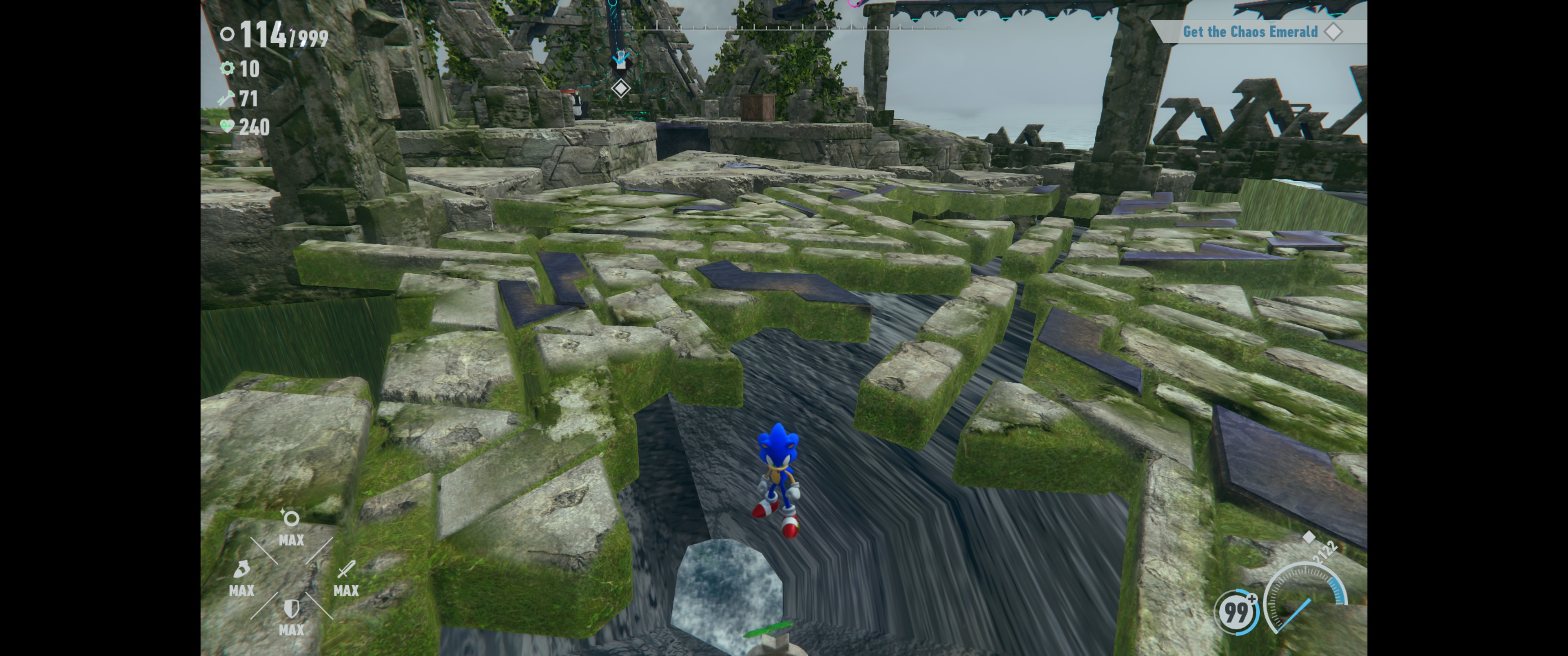
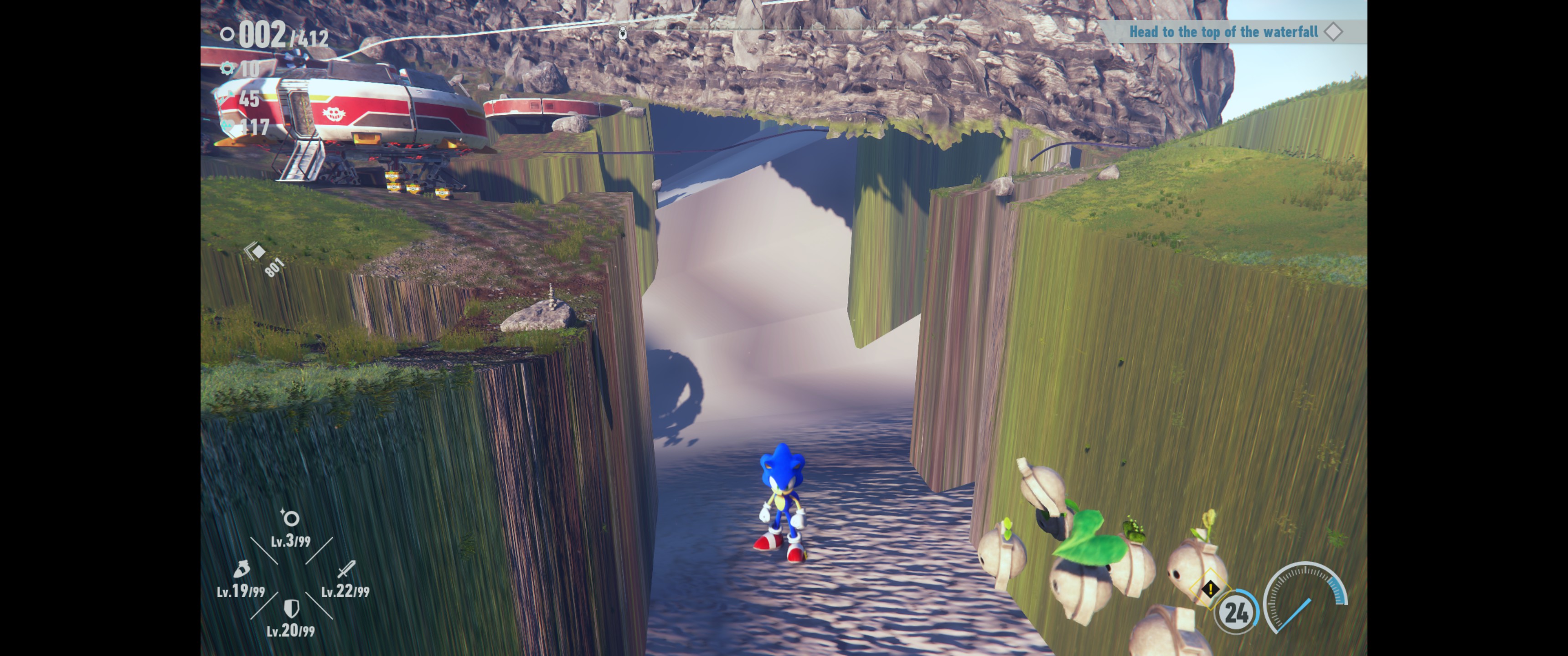

This has been tested on both official Valve Proton versions Experimental, Proton Next, and 7.5. Community builds are also suffering the from the same thing, but TBH that's not a Valve problem, I just wanted to keep transparency about how I tested this (the screenshots were running community Proton, but the same effects are seen on Valve official). I'm hesitant to switch my versions due to Denuvo being Denuvo and having lockout issues.
Link to gist:
https://gist.github.com/SolarNyan/b6509ea6ea1fe639d8a24307e57c3a82
Seems like this game has a long road ahead of it on Linux
Hello @SolarNyan, please copy your system information from Steam (Steam -> Help -> System Information) and put it in a gist, then include a link to the gist in this issue report.
Hello @SolarNyan, please copy your system information from Steam (
Steam->Help->System Information) and put it in a gist, then include a link to the gist in this issue report.
Link to gist added: https://gist.github.com/SolarNyan/b6509ea6ea1fe639d8a24307e57c3a82
@SolarNyan I fixed this bug in Mesa main (see https://gitlab.freedesktop.org/mesa/mesa/-/commit/5d41d8258a71fa352d8129bf33ce877046a9313c).
Can you try with Mesa main or Mesa 22.3.6?
Sonic Frontiers (1237320)
Issue transferred from https://github.com/ValveSoftware/Proton/issues/6636.
@DennisAnabones posted on 2023-03-22T17:51:20:
Compatibility Report
- Name of the game with compatibility issues: Sonic Frontiers
- Steam AppID of the game: 1237320
System Information
- GPU: RX 580
- Driver/LLVM version: Mesa 23.0.0
- Kernel version: 6.2.7-arch1-1
- Proton version: Experimental
I confirm:
- [ ] that I have checked whether there are updates for my system available.
Proton Log:
steam-1237320.log
Symptoms
Frontiers won't boot and immediately stops
Reproduction
Pressing play
Hello @DennisAnabones, these look like some lines of interest from your log:
Unhandled Exception:
System.InvalidProgramException: Invalid IL code in <Module>:CommonLoader.AssemblerService.Init (): IL_0048: call      0x0600005c


  at CommonLoader.ManagedCommonLoader.InitializeLoader (System.SByte* path) [0x0000b] in <bbf7710b5e8541b08f59e739d9138310>:0
  at <Module>.CommonLoader.CommonLoader.InitializeAssemblyLoader (System.SByte* path) [0x00000] in <bbf7710b5e8541b08f59e739d9138310>:0
  at (wrapper native-to-managed) <Module>.CommonLoader.CommonLoader.InitializeAssemblyLoader(sbyte modopt(System.Runtime.CompilerServices.IsSignUnspecifiedByte) modopt(System.Runtime.CompilerServices.IsConst)*)
3283.561:0114:0118:trace:seh:RtlGrowFunctionTable 00000000043A20F0, 159
[ERROR] FATAL UNHANDLED EXCEPTION: System.InvalidProgramException: Invalid IL code in <Module>:CommonLoader.AssemblerService.Init (): IL_0048: call      0x0600005c


  at CommonLoader.ManagedCommonLoader.InitializeLoader (System.SByte* path) [0x0000b] in <bbf7710b5e8541b08f59e739d9138310>:0
  at <Module>.CommonLoader.CommonLoader.InitializeAssemblyLoader (System.SByte* path) [0x00000] in <bbf7710b5e8541b08f59e739d9138310>:0
3283.561:0114:0118:trace:mscoree:CorExitProcess (1)
Mscoree being involved here seems strange since this game doesn't have a history of using .NET.
3281.852:0114:0118:trace:loaddll:build_module Loaded L"Z:\home\dennisanacondabones\Drives\Dennis_Drive\SteamLibrary\steamapps\common\SonicFrontiers\d3d11.dll" at 0000000180000000: native
why is there a d3d11.dll in the game files? Is that some stale dxvk dll from an attempted fix, or some mod?
attempted fix namely PROTON_USE_WINED3D=1 and PROTON_NO_FSYNC=1. Then removed them because it didn't work and made the log file without the commands except the logfile one
I mean there should be no file called d3d11.dll in the game's directory by default, while it is there in yours according to the log.
That is weird
How should I delete the dll?
Can you try to delete that and verify the game files?
it works now
@hakzsam From what I can see, Frontiers is now rendering properly on current Mesa without the need of RADV_DEBUG=nodcc. I've only tested the final island so far, but I imagine the rest of the game probably looks fine, too.
Sorry for the late reply. >.<
hallo. I am getting a consistent crash on an enemy type mentioned previously in this report (https://github.com/ValveSoftware/Proton/issues/6303#issuecomment-1352402341) . running gentoo linux (amd cpu/nvidia 2060gpu) with up-to-date system packages.
crash happens with all versions of proton.
any advice?
just fyi, wasnt able to test anything yet: but it seems like nvidia wants us to test driver 535.98 to see if it performs better now.
see: https://forums.developer.nvidia.com/t/driver-bug-unplayable-performance-in-sonic-frontiers/234873/10
Very good news for nvidia users: all my performance problems i have had before are actually solved with 535.98. just wanted to confirm it.
EDIT: i also now gave that info to nvidias forum entry too. would be cool if others test it out aswell, just to see that its not something RTX 3080 specific.
Operating System: Arch Linux
KDE Plasma Version: 6.5.0
KDE Frameworks Version: 6.19.0
Qt Version: 6.10.0
Kernel Version: 6.17.5-arch1-1 (64-bit)
Graphics Platform: Wayland
Processors: 16 × AMD Ryzen 7 5700X3D 8-Core Processor
Memory: 32 GiB of RAM (31.2 GiB usable)
Graphics Processor: AMD Radeon RX 7900 XT
Proton version: Proton Experimental
The game seems to be crashing consistently upon entering the open world sections of the game. I've experienced this so far upon completing the first level when starting a new game and then entering the first open world area. The game will crash will consistently crash within a couple of seconds.
I've included logs I have acquired when running into this issue.
Game seems to working correctly with Proton 9.0-4 so this looks to be a regression.
Possible lines of interest from the log:
29751.486:013c:0140:fixme:steamclient:manual_convert_Set_SteamAPI_CCheckCallbackRegisteredInProcess_func_156 not implemented!
29752.825:013c:0224:warn:seh:OutputDebugStringW L"load error cri:decotext/parameter/param_tech.rfl, can not open."
The crash issues was fixed a few months ago but wasn't brought up here, if anyone still suffers from it, it should be re-reported
Proton versions
proton 9.0-4x1 2025-10proton experimentalx1 2025-10proton nextx1 2023-01ge-proton7-41x1 2022-11ge-proton7-42x1 2022-11
Launch options
RADV_DEBUG=nodcc.x1 2023-04PROTON_NO_FSYNC=1.x1 2023-03PROTON_USE_WINED3D=1x1 2023-03DXVK_HUD=full`x1 2022-11DXVK_HUD=fullx1 2022-11
Launch lines
DXVK_HUD=full %command%x1 2022-11
Upstream links
- ValveSoftware/Proton/issues/6636x1 2023-03
- ValveSoftware/Proton/issues/6428x1 2023-01
DLLs
d3d11.dllx2 2023-03
Compatibility Report
System Information
I confirm:
Symptoms
The game runs very poorly when compared to running it natively on Windows on the same hardware, even when using gamemode. On Windows I can run the game at 60 FPS with semi-frequent stutters here and there. However, I cannot reach 20 FPS with my current setup, on the same hardware running Linux Mint.
I currently do not have Proton logs for while the game is running, as I currently cannot play it thanks to Denuvo Anti-Tamper locking me out for using multiple devices. I will add another log later when I can launch the game again.
Because I was locked out of the game, I have yet to try this argument using GE-Proton7-42. It is reported to significantly improve performance. I plan to provide an update on this as well once I can run the game.
Reproduction
Play the game. Note significantly degraded performance, especially when compared to playing natively on Windows.
steam-1237320.log (NOTE: This log was generated while I was locked out of the game by Denuvo Anti-Tamper. I've included it anyway in case it helps.)