Window size/position incorrect
#617 will be fixed in the next client release and that may fix this also. I can't repro so I can't say for sure.
If anyone can repro, that'd be very helpful.
On my laptop I have the same problem with my Intel integrated graphics but not my Nvidia discrete graphics. Might be a driver issue.
Seems to only happen about half the time and can be worked around through repetition. It only applies to pop-up boxes. Picture shows game properties but install is the same as OP.
Ubuntu 12.10 Gnome Shell Remix
@glaere , are you running the steam client released yesterday?
@gdrewb-valve it just happened for me (version built on: Jan 11 2013, at 14:43:42), and thanks to the fix done for #536 I now cannot resize the windows to make them bigger again :p making it impossible to use the windows.
I would consider this bug critical now as it impedes the functionality of these windows.
What is weird it it briefly flashes in the correct position, but for moving to the incorrect one (the opposite of #617).
I have been able to reproduce it serval times on about a 30% occurrence (rough estimate) for the game properties.
I'm using Steam build Jan 11 2013, at 14:43:42. I don't seem to be able to resize either. Getting similar issues to james147.
When it happens the windows starts small. It doesn't get shrunk.
If the pop-up window has been moved to a different position previously before closing it it will get moved to the top left when restarted.
I am unable to reproduce this on my system (Debian experimental x64 + Gnome Shell 3.6, using Gallium 0.4 on AMD CEDAR).
Do you know if you have smart positioning enabled, as in issue #661?
@gdrewb-valve running KDE on Archlinux here, window placement is set to "Smart" and I have a couple of window rules to set the size and position (and give the main and friends window) and give them a titlebar and border (though these rules are not affecting the dialogs as they are drawn without a frame and border).
Some other interesting things I have noticed, once they only seem to do this the first time they are opened, after that they work fine. Each properties window remembers its location after being closed, but not after steam has been closed.
If you turn off smart positioning and other things that force window positions do you still see the problem?
I don't believe that Gnome Shell has smart positioning unless it's by default. Unlike Unity's Compiz Gnome Shell uses Mutter which is minimalist and has limited reconfigurability by design.
Most customisability is done via extensions and I get the problem regardless of whether I have any or not.
On an aside, I can right click the window's bar on the taskbar at the bottom, select maximize, and get it full-screen. Next time I open it, it's back to its original small size, though.
Some change here. I have just experienced this bug while checking for client updates. Debian experimental x64 + Gnome Shell 3.6.
System specs: https://gist.github.com/f91695cbc471769b849d
I do not experience this on my Intel-based netbook with current Steam.
I can't repro this on Unity, Gnome 3.2 or XFCE. We'll keep looking but a fix will be dependent on a consistent repro.
I'm going to close it as it seems to have resolved itself with one of the most recent updates.
This should be reopened as I still have this problem.
Recent updates seem to have made the problem worse. Now pop-ups don't open properly about nine out of every ten times and it has become almost unusable. I'm currently working around this through using Steam off of my Nvidia card which works or using the Windows Options Extension for Gnome Shell to maximise the broken pop-ups.
Has anyone reproduced this on an Nvidia card as both AMD and Intel seem to be affected?
Strangely the help->system information and help->about steam pop-ups don't seem to be affected.
Steam build: Jan 25 2013, 21:59:25
I've noticed an increase in this behavior on my Mint machine. It was all but gone then returned with a fury.
After latest update, it started to occur again. I've just experienced Settings to be wrongly sized (only restarting helped).
Most of my steam notifications open in the top-left corner now.
The issue appears for every popup today on my systems (GNOME-3.6, intel gfx). I can't reset my password or create a new account, so dead in the water.
Same here - a lot of windows are appearing on the top left corner.
Linux Mint 13 LTS x64, Cinnamon.
Just happened again, with this error in console:
(steam:17542): Gdk-WARNING **: XID collision, trouble ahead

(steam:17542): Gdk-WARNING **: XID collision, trouble ahead

(steam:17542): Gdk-WARNING **: XID collision, trouble ahead
never seen this on cinnamon 1.6.7 Arch x86_64
i do have 3D effects enabled. and only using top panel
bottom panel is dockbarx one.
ohh and my notifications open on the right bottom corner
The "A steam update is available, do you want to restart steam now?" window is still appearing in midget-size as of today.
Is this still happening? I just closed #1762 since it seems to be fixed for me, but this report is regarding slightly different symptoms (different dialogs, no mention of unresponsive input) that didn't affect me.
Yes, it is still happening. It doesn't happen always and it can't be predicted (as far as I can tell).
Yeah. Same here. Both Cinnamon and XFWM4.
This issue is also happening with Enlightenment 17 on gentoo amd64.
The tiny top/left update notification window issue happens on Fluxbox-1.3.3 on Gentoo amd64 too. It also happens with chat/event invites.
The cleanest way to work around it for me is to use my WM's maximise keyboard shortcut, which maximises the update window and also makes the buttons work fine. Resizing (to an arbitrary size rather than maximising) causes the buttons to be non-functional.
Another note in addition to my previous one above: I actually managed to catch an event invite as the bottom-right slide-up notification (toast?) appeared. By clicking on the notification before it disappeared, the actual window opened up completely fine, without any size or clicking issues. Failing to click on the notification (and thus allowing the window to open up, minimised) still causes the size and clicking issues when restoring the window.
@lbratch Confirmed on Ubuntu 13.04, e17.
I get this using awesome-wm on Gentoo.
- Configure awesome-wm to send all clients with ID "Steam" to tag 5 and floating.
- Start steam and wait for someone to message me or an update to come in while on a tag other than the floating one that steam is started in.
- Chat / update window opens up tiny in the upper left portion of the screen. Resizing it with the WM does not allow mouse input to work, as if the clicks move "through" the window, keyboard input works normally.
The weird part is that the windows appear to expand to a set size even though mouse input doesn't work beyond the initial tiny square. You can make the window larger with the wm but it never actually gets bigger than a certain size.
@gdrewb-valve Any news on this? My window positions also aren't saved. Is there a way I can force Steam to start maximized?
I'm not aware of any changes in this area. If somebody does make a change for it it'll get reported here.
I have a similar issue where the dialogs are the correct size, however they only display on my first screen, and not the second, where the main steam window is.
I have this issue with steam popups such as messages from friends and event popup notifications. They appear in the top right and are very small. The window size is not correct and makes the notification impossible to read. Could not manage to resize it. Ubuntu Gnome with Nvidia Proprietary drivers (updates). Latest Gnome, Ubuntu, Steam Client and Nvidia Driver (Updates not Tested).
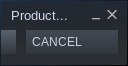
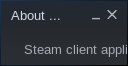
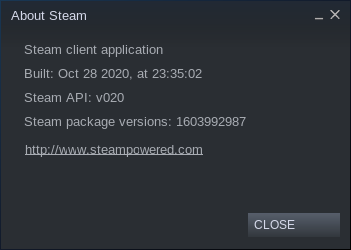
$ cat /etc/os-release
NAME="Ubuntu"
VERSION="20.04.1 LTS (Focal Fossa)"
ID=ubuntu
ID_LIKE=debian
PRETTY_NAME="Ubuntu 20.04.1 LTS"
VERSION_ID="20.04"
HOME_URL="https://www.ubuntu.com/"
SUPPORT_URL="https://help.ubuntu.com/"
BUG_REPORT_URL="https://bugs.launchpad.net/ubuntu/"
PRIVACY_POLICY_URL="https://www.ubuntu.com/legal/terms-and-policies/privacy-policy"
VERSION_CODENAME=focal
UBUNTU_CODENAME=focal
If all windows are allowed to be resized, this would be a less serious issue.
Nothing extracted yet.
System Information: https://gist.github.com/2a08c81b43e37915dccb
This is similar to #536 in that windows seem to not be correct.
I'm running Mint 14 Cinnamon 32-bit. Upon a fresh OS install and fresh Steam install, I am greeted with the following when attempting to install a game:
![Screenshot from 2013-01-09 09:22:45]()
If you notice the top-left corner, you'll see that the windows are being generated in the top left corner. They can be resized and will remain resized until restarting the computer. The same size and location is used for the "Help>System Information" and "Help>About Steam" dialog boxes as well.