Kerbal Space Program 2 (KSP2) has few fps and consumes all VRAM (8 GB)
There's nothing we can do if the game just uses a ridiculous amount of VRAM. Windows has better memory management for discrete GPUs so that might save the day there.
Does it help to set dxgi.maxDeviceMemory in dxvk.conf just around 2-3 GB below your actual VRAM? Or in other words, subtract the amount of VRAM already allocated by the desktop (plus some extra buffer) from the amount of VRAM offered to the game...
Shouldn't change anything
Does it help to set
dxgi.maxDeviceMemoryindxvk.confjust around 2-3 GB below your actual VRAM? [...]
@kakra
No. Actually cat /sys/class/drm/card0/device/gpu_busy_percent, radeon-profile and DXVK_HUD=memory still show my full 8 GB of VRAM being used.
Or maybe I'm doing something wrong using dxvk.conf?
I am running wine with DXVK_CONFIG_FILE=/path/to/dxvk.conf and dxvk.conf contains a single line dxgi.maxDeviceMemory = 6144
UPDATE 2023-02-26:
dxvk.conf contains these lines:
dxgi.maxDeviceMemory = 6144
dxvk.hud = api,fps,memory
dxvk.hud is to ensure dxvk.conf is correctly loaded. You'll see the DXVK hud if it worked.
(DO NOT set DXVK_HUD environment variable)
Using DXVK_CONFIG_FILE worked normally for me starting KSP2 via Steam. Putting dxvk.conf into the game's EXE directory did not work.
(result stays the same: fps=8 and VRAM=100%)
DXVK_HUD=memory output:
- Vidmem heap 0:
9141 MB (115%) 8749 MB used - Sysmem heap 1:
384 MB (4%) 16 MB used - Vidmem heap 2:
48 MB (18%) 20 MB used
glxinfo shows exactly Video memory: 8192MB.
P.S.
Created a wine bugreport for the WINED3D glitches: https://bugs.winehq.org/show_bug.cgi?id=54578
Or maybe I'm doing something wrong using dxvk.conf?
Since Proton runs inside of bwrap, put the dxvk.conf inside the folder of the game exe without setting an environment variable. Games are isolated from your system by running inside bwrap and can only access the graphics driver, your wine prefix, and the Steam library.
At least this works for me using NVIDIA (and other games). It looks like some games rely on Windows behavior of swapping GPU memory out which DXVK cannot do instead of limiting themselves to what is actually available, so reducing the VRAM offered by the amount occupied by your desktop can help, I'd add a few 100 extra MB to account for chunk slack generated by the DXVK memory allocator.
It doesn't change how much the application can use. Only the reported amount.
Mostly useful for old games that bug out if it sees too much.
It doesn't change how much the application can use. Only the reported amount.
Then we should find out why it reproducible fixes performance problems for me in Elite Dangerous and Jedi Fallen Order (and maybe some other games I do not remember currently) when otherwise the fps falls below 10fps after extended playing or going to menu screens - which usually happens when the game VRAM allocation exceeds the actual available VRAM.
Then we should find out why it reproducible fixes performance problems for me in Elite Dangerous and Jedi Fallen Order
The games probably base their texture streaming pool size upon what D3D11 reports.
There's nothing we can do if the game just uses a ridiculous amount of VRAM. Windows has better memory management for discrete GPUs so that might save the day there.
I understand this would be a big lift, but are there other efforts or ideas in this project to make the memory management system more on par with directx?
The games probably base their texture streaming pool size upon what D3D11 reports.
Yes, probably, and that works for the games in Windows - but it doesn't in Linux with DXVK. Some games usually over-allocate VRAM by around the amount of VRAM allocated to the desktop. So they rely on behavior in Windows that's not available in Windows, and DXVK probably needs to account for that. Either by a per-game quirk or some heuristics.
That said, my work-around isn't 100% bullet proof. Games can still over-allocate VRAM, with allocations ending up in sysmem, and then I'm seeing PCI bus utilization spike while at the same time fps drops. So we'd probably need something better directly integrated into DXVK other then artificially telling the game that my GPU has less memory. As far as I know, Windows reserves up to 512MB to the desktop compositor, and is able to swap out or somehow otherwise remove allocations from VRAM that are not currently in use (the NVIDIA Linux driver does something similar to idle OpenGL allocation by simply invalidating them after some 30 or 60 minutes, which helps a lot with web browser rending surface idling in the background). This probably needs deep driver/kernel/user-space integration and thus cannot be done in Linux. So what are the alternatives, even with DirectX "emulation" not being 100% correct in its implementation when reporting memory?
Then we should find out why it reproducible fixes performance problems for me in Elite Dangerous and Jedi Fallen Order
Interesting :eyes:
I'm guess basically there are no memory location side effects in DXVK after a draw call if assets are residing in system memory? Something like the asset gets copied over, processed, and then thrown away; and then that repeats the next frame, and the next. No eviction policy for unused assets?
We could probably be doing something a bit smarter here, no?
Does it help to set
dxgi.maxDeviceMemoryindxvk.confjust around 2-3 GB below your actual VRAM? Or in other words, subtract the amount of VRAM already allocated by the desktop (plus some extra buffer) from the amount of VRAM offered to the game...
Most games seem to completely ignore these settings, for example if I set it to 4096 some games would still see 10240.

(dxgi.maxDeviceMemory was set to 8192 in this screenshot but 10240 was reported by the game)
Most games seem to completely ignore these settings, for example if I set it to 4096 some games would still see 10240.
I've never seen that... Are you sure that DXVK was able to read the config file? Pointing DXVK to a location via environment variable may not work due to bwrap isolation, placing the config side by side with the exe file should work. Also, external tools may not be able to properly monitor DXVK memory usage because the DXVK chunk allocator tends to keep allocations in memory and re-purpose them for the game, thus only DXVK itself can properly show the real memory usage, for outside tools it always looks like almost 100% is used (since some versions, DXVK can actually free chunks again, so also external view of allocations may decrease again).
@kakra @sfjuocekr
I verified dxvk.conf is being loaded by additionally setting dxvk.hud. Just putting the file into the game's EXE directory didn't work. But specifying via DXVK_CONFIG_FILE worked. See updated https://github.com/doitsujin/dxvk/issues/3268#issuecomment-1445124749 for details.
P.S.
I'm getting more confident, that the bad performance might has something to do with the terrain rending. The KSP2 developers mention needed terrain optimization too. And when being in deep space (with Proton/DXVK) fps are much higher (50 instead of 8 fps) and VRAM usage is lower (7100 MB instead of > 100% of my 8 GB VRAM). But surely this can also be because there's just less to render in deep space (just my small rocket).
@kakra @sfjuocekr I verified dxvk.conf is being loaded by additionally setting
dxvk.hud. Just putting the file into the game's EXE directory didn't work. But specifying viaDXVK_CONFIG_FILEworked. See updated [#3268 (comment)](https://github.com/doitsujin/dxvk/issues/3268#issuecomment-1445124749) for details.
I had to DLLOVERRIDE nvapi and nvapi64 for it to accept the max memory set, I guess games can query nvapi for memory? I set maxDeviceMemory to 4096 to have a playable 30ish FPS experience on a 3080FE (10Gb).
The game simply seems to NEED to allocate 8Gb of VRAM, but if I let it do that it crushes the frame rate because in-fact VRAM is completely filled up.
I assume this is because DXVK reports only the size of the maximum memory available and not the VRAM already claimed by other applications(browser, discord, you name it)?
For Star Citizen I also set it to 6144 to keep it playable for an extended amount of time, but eventually the magical 9,8Gb barrier is reached and bam... 1FPS. While the game itself states it only used up 5,5Gb so there was no reason to free anything from the game's point of view?
I had to DLLOVERRIDE nvapi and nvapi64 for it to accept the max memory set
@sfjuocekr Interesting!
Here someone else with a NVidia GPU is also reporting, that PROTON_HIDE_NVIDIA_GPU=1 (additional with PROTON_NO_ESYNC=1) makes the game run smooth if he uses PROTON_USE_WINED3D=1. And I guess PROTON_HIDE_NVIDIA_GPU=1 is similar to using WINEDLLOVERRIDES=nvapi,nvapi64=b.
Sadly that doesn't seem to help my with my AMD GPU (Radeon RX 590 8 GB). Which is strange, because games running on NVidia GPUs with PROTON_HIDE_NVIDIA_GPU=1 set should behave like running on AMD GPUs.
On the other hand at least you (@sfjuocekr) have 10 GB VRAM which is +2 GB more VRAM than my 8 GB VRAM. So maybe that's a crucial difference.
@kakra @sfjuocekr I verified dxvk.conf is being loaded by additionally setting
dxvk.hud. Just putting the file into the game's EXE directory didn't work. But specifying viaDXVK_CONFIG_FILEworked. See updated [#3268 (comment)](https://github.com/doitsujin/dxvk/issues/3268#issuecomment-1445124749) for details.I had to DLLOVERRIDE nvapi and nvapi64 for it to accept the max memory set, I guess games can query nvapi for memory? I set maxDeviceMemory to 4096 to have a playable 30ish FPS experience on a 3080FE (10Gb).
The game simply seems to NEED to allocate 8Gb of VRAM, but if I let it do that it crushes the frame rate because in-fact VRAM is completely filled up.
I assume this is because DXVK reports only the size of the maximum memory available and not the VRAM already claimed by other applications(browser, discord, you name it)?
For Star Citizen I also set it to 6144 to keep it playable for an extended amount of time, but eventually the magical 9,8Gb barrier is reached and bam... 1FPS. While the game itself states it only used up 5,5Gb so there was no reason to free anything from the game's point of view?
Hi @sfjuocekr I think you are correct with your analyzes. VRAM size can indeed be queried from nvapi and DXVK-NVAPI does not look at DXVK memory configuration, thus the full VRAM size is reported. I have a branch here https://github.com/jp7677/dxvk-nvapi/pull/110 that just reports the same memory size that DXVK reports, thus it now honors DXVK memory overrides. Does this fixes your issue even with nvapi being enabled? You can pick binaries from GitHub actions.
Hi @sfjuocekr I think you are correct with your analyzes. VRAM size can indeed be queried from nvapi and DXVK-NVAPI does not look at DXVK memory configuration, thus the full VRAM size is reported. I have a branch here jp7677/dxvk-nvapi#110 that just reports the same memory size that DXVK reports, thus it now honors DXVK memory overrides. Does this fixes your issue even with nvapi being enabled? You can pick binaries from GitHub actions.
I have tried your nvapi.dll from your branch and it doesn't change anything :( KSP2 still consumes all VRAM.
I have tried your nvapi.dll from your branch and it doesn't change anything :( KSP2 still consumes all VRAM.
Same here, do you know how to be sure that nvapi is loaded ?
@JavaSaBr / @Idix Did you both tried nvapi from that branch together with the memory override setting that @ kakra described (dxgi.maxDeviceMemory in dxvk.conf)? You can set DXVK_NVAPI_LOG_LEVEL to info to get console output from dxvk-nvapi.
@jp7677 I'm sorry if it feels like a noob answer.
I've followed the "How to use" and yet I don't have any dxvk-nvapi.log.
I have a "KSP2_x64_d3d11.log" and a "KSP2_x64_dxgi.log" file.
Edit: I'm using Lutris with latest wine-ge-custom if that makes any difference.
Hi @Idix no worries. Unfortunately I cannot help much with Lutris since I'm not that familiar with it. What I know is:
- DXVK and friends (VKD3D-Proton, DXVK-NVAPI) are out of date in Lutris, so you need to update those components manually, I think by copying new versions into a separate folder in the component directory and selecting the new folder names as version.
- NVAPI needs to be enabled separately
- Wine-GE sounds fine
Unfortunately no idea how to pass environment variable in Lutris nor how to see console logs.
Thanks alot @jp7677.
I've updated DXVK, KD3D-Proton and DXVK-NVAPI and I've got good news and bad news.
~The good news is that KSP2 is now at 60fps and actually playable!~
The bad news is your branch has nothing to do with it and the parameter dxgi.maxDeviceMemory = 6144 has no impact.
The game now fits in my 8Gi of VRAM.
Edit: I spoke too soon and got excited. It was a particular scene that needed a bit less VRAM.
I assume this is because DXVK reports only the size of the maximum memory available and not the VRAM already claimed by other applications(browser, discord, you name it)?
I'm not sure... I think, DXVK sees what is already in use, and can also report that to games. But the chunk allocator leaves some unused slack space behind, allocated to the GPU driver, but reported as free to the game.
- Wine-GE sounds fine
Unfortunately no idea how to pass environment variable in Lutris nor how to see console logs.
You can do this under > configuration > system options > somewhere halfway down are the environment variables. You can turn on logging on the runner tab, down near the bottom "output debugging info" and then right click the game > show logs!
KSP2 is going to allocate 8Gb of VRAM no matter what and changing detail settings has no influence here, I was playing the game "fine" for an extended amount of time last night with this config:
dxgi.maxDeviceMemory = 6144
dxgi.maxSharedMemory = 1024
My VRAM sat between around 9Gb for the entire duration.
@sfjuocekr did you found a minute to try this with the dxvk-nvapi branch (https://github.com/jp7677/dxvk-nvapi/pull/110)?
@jp7677 I think I have configured it correctly :) but I will test your new branch as well today...
@sfjuocekr did you found a minute to try this with the dxvk-nvapi branch (jp7677/dxvk-nvapi#110)?
Yes, with nvapi enabled dxvk-nvapi now honors dxgi.maxDeviceMemory.
@sfjuocekr how have you configured it? It didn't work for me :(
@sfjuocekr how have you configured it? It didn't work for me :(
Working as in nvapi now reports whatever is set in dxgi.maxDeviceMemory, this does not mean anything on the KSP side is automagically fixed.
There is simply no way around the game allocating 8Gb of VRAM, it just does that regardless of what dxgi.maxDeviceMemory is set to. Strangely enough setting it to 6Gb results in a slightly more playable experience, but the game has more issues than just its VRAM usage. For example loading between scenes changes the performance of the game, sometimes when you load the VAB it sits at 60FPS no problem and other times when you load the VAB it sits at 10FPS.
So there is no magical fix we as the end-user can apply to fix this, the game is also build without Vulkan support in Unity. So you can't even try to -force-vulkan to run it that way.
@sfjuocekr did you found a minute to try this with the dxvk-nvapi branch (jp7677/dxvk-nvapi#110)?
Yes, with nvapi enabled dxvk-nvapi now honors dxgi.maxDeviceMemory.
Thanks for the confirmation. I've merged the PR. Regardless the state of KSP2, it is a good idea anyway to keep memory reporting synchronized with DXVK.
@jp7677
So why is this not working with AMD Radeon GPUs? (amdgpu driver)
There's nothing like an nvapi.dll for Radeon, correct?
I tried this without any effect in KSP2 (Radeon RX 590 8GB):
dxgi.maxDeviceMemory = 6144
dxgi.maxSharedMemory = 1024
I use the command in Steam:
PROTON_ENABLE_NVAPI=1 PROTON_LOG=1 PROTON_HIDE_NVIDIA_GPU=0 DXVK_NVAPI_LOG_LEVEL=info DXVK_NVAPI_LOG_PATH=/home/javasabr/dxvk-nvapi.log DXVK_CONFIG_FILE=/home/javasabr/dxvk.conf %command%
And I don't see any log file from nvapi :(
DXVK: v2.1
Proton: 1675727332 GE-Proton7-49
SteamGameId: 12130608783638396928
Command: ['/home/javasabr/Soft/SteamLibrary/steamapps/common/Kerbal Space Program 2/KSP2_x64.exe']
Options: {'enablenvapi', 'forcelgadd'}
I use the command in Steam: PROTON_ENABLE_NVAPI=1 PROTON_LOG=1 PROTON_HIDE_NVIDIA_GPU=0 DXVK_NVAPI_LOG_LEVEL=info DXVK_NVAPI_LOG_PATH=/home/javasabr/dxvk-nvapi.log DXVK_CONFIG_FILE=/home/javasabr/dxvk.conf %command%
And I don't see any log file from nvapi :(
DXVK: v2.1
Proton: 1675727332 GE-Proton7-49
SteamGameId: 12130608783638396928
Command: ['/home/javasabr/Soft/SteamLibrary/steamapps/common/Kerbal Space Program 2/KSP2_x64.exe']
Options: {'enablenvapi', 'forcelgadd'}
DXVK_NVAPI_LOG_PATH is a path (see https://github.com/jp7677/dxvk-nvapi#tweaks-debugging-and-troubleshooting), what happens if you set it to /home/javasabr/?
what happens if set it to
/home/javasabr/?
at least there is no a new file with name 'dxvk-nvapi.log' :)
@jp7677 So why is this not working with AMD Radeon GPUs? (amdgpu driver) There's nothing like an
nvapi.dllfor Radeon, correct?I tried this without any effect in KSP2 (Radeon RX 590 8GB):
dxgi.maxDeviceMemory = 6144
dxgi.maxSharedMemory = 1024
Yes, correct, nvapi64.dll is NVIDIA's vendor library. Games usually don't try to load nvapi when seeing a non-NVIDIA GPU. Sorry, no idea whats actually going on with KSP2.
It took me some lot of time but now I'm pretty sure KSP2 doesn't load nvapi and I have a Nvidia graphic card.
I've run it with WINEDEBUG=+loaddll and I can't see any reference to nvapi.dll. I see dxgi.dll and d3d11.dll alright but nothing else related to dxvk.
For reference log of Wine
@jp7677 So why is this not working with AMD Radeon GPUs? (amdgpu driver) There's nothing like an
nvapi.dllfor Radeon, correct?
I tried this without any effect in KSP2 (Radeon RX 590 8GB):dxgi.maxDeviceMemory = 6144 dxgi.maxSharedMemory = 1024Yes, correct, nvapi64.dll is NVIDIA's vendor library. Games usually don't try to load nvapi when seeing a non-NVIDIA GPU. Sorry, no idea whats actually going on with KSP2.
There is nothing going on with KSP2, this was just an observation I made because I have experience with a whole scala of other games.
KSP2 currently even runs potato on Windows machines, just checking the Steam Discussions will tell you exactly this. There is nothing we can do to "solve" the unsolvable.
I tested the dxvk-nvapi in other games where I knew they reported more VRAM than I had dictated through dxgi.maxDeviceMemory, so again this was just an observation I had made from my experiences with other titles.
Also to rephrase myself, this game uses 8Gb of VRAM no matter what you do, it does this on Windows as well. So if you run this game on a GPU with exactly that, expect problems. There is no magical fix you can apply to reduce the VRAM usage to below 8Gb, so given you have at least Wayland or X11 running... you are already out of VRAM before the game even started.
Some user found that the game has an argument -screen-quality Fastest that helps a ton. The launch options eval $(echo "mangohud %command%" | sed "s/PDLauncher\/LauncherPatcher.exe'.*/KSP2_x64.exe'/" ) -screen-quality Fastest help incredibly on my machine, plenty playable on 8GB of VRAM.
Some user found that the game has an argument
-screen-quality Fastestthat helps a ton. The launch optionseval $(echo "mangohud %command%" | sed "s/PDLauncher\/LauncherPatcher.exe'.*/KSP2_x64.exe'/" ) -screen-quality Fastesthelp incredibly on my machine, plenty playable on 8GB of VRAM.
I tried with "Very Low" and "Low" without any impact: https://docs.unity3d.com/Manual/class-QualitySettings.html
But maybe they changed the names, I'll give it a swirl!
Yea it appears to be a custom quality preset. The finder compiled this list of present options.
https://docs.google.com/spreadsheets/d/1bwuYTLDYO_zizYgmRXmF_YxHlxFHNQGlNzCBpfMeYxw/edit?usp=sharing
It seems to help to some extend, as soon as I launch my rocket the frame rate is once more crushed to unplayable :D
It still required me dropping the resolution to 540p, and graphics to low. But before the flag even that was unplayable for me.
One trick I found is to save and exit to main menu then load back the save. I suppose it unloads everything and load back only the textures that are necessary.
This can't be just a linux vs. Windows optimisation thing. On Windows, people get KSP 2 running with 4GB graphics cards,
even being able to improve performance further e.g. https://steamcommunity.com/app/954850/discussions/0/3772365358794512131/
This can't be just a linux vs. Windows optimisation thing. On Windows, people get KSP 2 running with 4GB graphics cards, even being able to improve performance further e.g. https://steamcommunity.com/app/954850/discussions/0/3772365358794512131/
All those steps are of no consequence to the game, the game is never GPU bound.
There are a few reasons the game runs the way it does and none of those are at fault of the GPU or the OS.
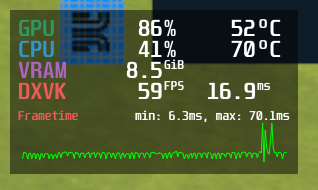
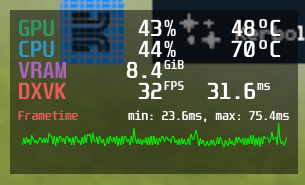
This is simply throttle off vs throttle on, you can test this with a simple airplane as well and the result is the same on both platforms. I've put in about 130 hours in KSP on Linux and the experience on Windows is exactly the same... until VRAM is exhausted. KSP really likes to crumble over delta V calculations (that should be yielded) if you use fuel lines or multiple engines.
One trick I found is to save and exit to main menu then load back the save. I suppose it unloads everything and load back only the textures that are necessary.
Sorry to jump in with a different game, but "Pharaoh: A New Era" (Steam ID 1351080) behaves the same. I don not want to sidetrack this discussion. I only want to add additional information.
Loading a mission yields very bad performance, about 16 fps. Zooming out means more terrain is shown and fps drop down to 6. Reloading the mission fixes performance: 100+ fps. Interestingly enough, moving the viewport over water increases performance, while solid ground decreases performance (maybe water is one big underground layer and ground is handled as dozens of single tiles on top of it?). My GPU has 4 GB of VRAM and according to DXVK HUD the game allocates 2.7 GB VRAM in main menu and 4.4+ GB during a mission (even after hitting reload). Changing dxgi.maxDeviceMemory does not help. Game runs better with PROTON_USE_WINED3D=1, but it's not as smooth as DXVK after reloading (WINED3D has slight stuttering).
System Information
- CPU: Intel Core i7-4770
- RAM: 16 GB DDR3-1600
- GPU: Radeon R9 290X (4GB VRAM)
- OS: Arch Linux (updated March 3rd, 2023)
- Driver: amdgpu with radv (amdvlk won't run)
- Mesa version: 22.3.6
- Proton version: Proton 7.0-6, Proton Experimental, Proton-GE-Custom
- DXVK version: 2.1.0/1.3.230, 1.10.3/1.3.230
EDIT: forgot to mention that it's D3D11, too.
Every game that runs out of vram will behave the same.
Every game that runs out of vram will behave the same.
Unqualified comment is unqualified. How come both (well, at least Pharaoh) run fine for hours after hitting reload? Anyways, I wanted to add additional information. I can't tell if it's helpful or not, as I'm not a DXVK developer. Only involved developers and testers can confirm. Maybe it's something with those games engines, maybe it's DXVK, dunno.
Please keep in mind that 1 GB of VRAM is the minimum requirement for Pharaoh. I'm pretty sure it shouldn't run out of VRAM with 4 GB available. Except there is a HUGE leak somewhere.
Mbriar is right. Please open a new issue for that game instead of hijacking an existing one.
How come both (well, at least Pharaoh) run fine for hours after hitting reload?
The game probably recreates performance critical resources like render targets and they end up in VRAM when you reload.
Please keep in mind that 1 GB of VRAM is the minimum requirement for Pharaoh
System requirements are notoriously unreliable and they are for running the game on Windows. Windows has much better GPU memory management and will work hard to avoid the performance cliff that DXVK hits.
Except there is a HUGE leak somewhere.
There isn't.
VRAM management have now received some big improvements in dxvk 2.5+
Proton versions
proton experimentalx2 2023-03proton 7.0-6x1 2023-03ge-proton7-49x2 2023-03
Launch options
PROTON_USE_WINED3D=1`,x1 2023-03WINEDEBUG=+loaddll`x1 2023-03DXVK_CONFIG_FILE=/home/javasabr/dxvk.confx2 2023-03DXVK_NVAPI_LOG_LEVEL=infox2 2023-03DXVK_NVAPI_LOG_PATH=/home/javasabr/dxvk-nvapi.logx2 2023-03PROTON_ENABLE_NVAPI=1x2 2023-03PROTON_HIDE_NVIDIA_GPU=0x2 2023-03PROTON_LOG=1x2 2023-03DXVK_NVAPI_LOG_PATHx1 2023-03DXVK_NVAPI_LOG_LEVELx1 2023-02DXVK_CONFIG_FILEx4 2023-02PROTON_HIDE_NVIDIA_GPU=1`x1 2023-02PROTON_NO_ESYNC=1`)x1 2023-02PROTON_USE_WINED3D=1`.x1 2023-02WINEDLLOVERRIDES=nvapi,nvapi64=b`.x1 2023-02
Launch lines
mangohud %command%x2 2023-03PROTON_ENABLE_NVAPI=1 PROTON_LOG=1 PROTON_HIDE_NVIDIA_GPU=0 DXVK_NVAPI_LOG_LEVEL=info DXVK_NVAPI_LOG_PATH=/home/javasabr/dxvk-nvapi.log DXVK_CONFIG_FILE=/home/javasabr/dxvk.conf %command%x2 2023-03
Upstream links
- doitsujin/dxvk/issues/3268x3 2023-02
- ValveSoftware/Proton/issues/6565x2 2023-02
- show_bug.cgi?id=54578x2 2023-02
DLLs
nvapi.dllx6 2023-03nvapi64.dllx2 2023-03d3d11.dllx1 2023-03dxgi.dllx1 2023-03
Problem description
I got just around 7 fps when launching a minimal rocket (pod, fuel tank and engine) with low graphics settings. Changing the graphics settings doesn't influence the fps at all (also 7 fps with high settings).
radeon-profile shows 100 % GPU and 100 % GPU RAM (8 GB) usage. Minimum requirement is 6 GB.
Other people seem to have similar issues running Kerbal Space Program 2.
https://www.reddit.com/r/KerbalSpaceProgram/comments/10sq0qv/comment/j9va7pe/
https://github.com/ValveSoftware/Proton/issues/6565#issuecomment-1444281791
When using WINED3D (when using Proton by setting
PROTON_USE_WINED3D=1I easily get > 25 fps. And with WINED3D the GPU VRAM is between 70% and 90% usage (8 GB).VRAM usage measured with radeon-profile
Minimum requirement is 6 GB
Unfortunately WINED3D has some graphic bugs. The rocket and buildings look fine. But far away terrain is not rendered (see here and wine bugreport).
Software information
Game: (Kerbal Space Program 2 (KSP2) via Steam](https://store.steampowered.com/app/954850/Kerbal_Space_Program_2/)
Early Access / Beta 2023-02-24, Steam Build ID 10624168
Downloaded the game via Steam, tested it with Proton but also with standalone Wine.
System information
Apitrace file(s)
Did not work. Game crashed immediatly.
Bye the way:
The instructions in https://github.com/doitsujin/dxvk/wiki/Using-Apitrace have issues. There is no folder
apitrace-msvcin the 64 bit 7z archive.Log files
Additional info
See also: