SCP: Secret Laboratory
The previous issue was closed, since the issue which was being reported (which was with the game, not Proton itself) had been resolved. Thank you for creating this issue though, since it would be desirable to get it working on Steam Play Proton without custom versions.
SCP: Secret Laboratory is not working in version 5.13-1
Issue transferred from https://github.com/ValveSoftware/Proton/issues/4320.
@rogeritos posted on 2020-10-27T15:50:48:
I'm trying to play the game "SCP: Secret Laboratory" but I'm not able to start it, every time I click "play" it gives an error "Can't obtain system code integrity info (C0000003)!".I tested it on proton version 5.13-1
Same issue as on proton 5.0. Doesn't occur on recent GE or TKG versions, so use those for now. @rogeritos
I tried the proton version GE "5.9-GE-8-ST" but the game doesn't open, it just runs but doesn't open. @Ominitay
That's odd, since I'm using that version. It does take a bit of time to load, but if you continue to have issues, try a reboot, try tkg's proton, and failing that, send logs.
Could you give me the link to this tkg proton? @Ominitay
@rogeritos Here: https://github.com/Frogging-Family/wine-tkg-git/releases/tag/5.19.r1.gb49e8743 Just download the Proton release and install as you did with the GE Proton. If you continue to have issues, try reinstalling the game.
I really don't know what's going on, but the game even with the TKG proton isn't working :( @Ominitay
What distro and hardware do you have?
Please reinstall the game and try again if you haven't already, and then send logs.
sorry, but in the hardware part I have to send what exactly? and the log what do I have to send?
Read the Proton readme to find out how to send logs, and send your hardware info as you do when submitting an issue here.
sorry but i think i'll give it up. thank you very much for your help but i will leave it.
All except 5.9-GE-8-ST say "launching" then "Performing first time setup", then crashes.
- 4.13-11 crashes with error (see image)
- 5.0-9 crashes with error (see image)
- 5.13-1 crashes with error (see image)
- 5.9-GE-7-ST crashes with error (see image)
- 5.9-GE-8-ST immediately crashes without error and fails to create a Proton log

Using PROTON_USE_WINED3D=1 (as suggested on ProtonDB) with 5.13-1 still throws an error.
Try TKG Proton.
What is TKG Proton? Do you have a link?
Seems like newest SCP:SL 10.1 open-beta and Proton 5.13-1 fixed the issue?
Was just going to say that the latest update broke everything. Will try the open beta :)
I can confirm that the open-beta works with Proton 5.13.
Proton 5.13-1, open-beta 10.1, Intel HD Graphics 530, textures is flickering
Hello @agent188, please copy your system information from Steam (Steam -> Help -> System Information) and put it in a gist, then include a link to the gist in this issue report.
It may be worthwhile to also mention the flickering to your video driver vendor if it hasn't been already.
It could be to do with the game, as it does not support Intel graphics, with the game refusing to launch on Windows with them.
It could be to do with the game, as it does not support Intel graphics, with the game refusing to launch on Windows with them.
@Ominitay game work on windows with intel hd graphics
Hello @agent188, please copy your system information from Steam (
Steam->Help->System Information) and put it in a gist, then include a link to the gist in this issue report.It may be worthwhile to also mention the flickering to your video driver vendor if it hasn't been already.
@kisak-valve https://gist.github.com/agent188/44fb22fd0e013bac1fbadb1173e2c307
It could be to do with the game, as it does not support Intel graphics, with the game refusing to launch on Windows with them.
@Ominitay game work on windows with intel hd graphics
No it doesn't. The game crashes on launch with Intel graphics on Windows since Scopophobia.
It could be to do with the game, as it does not support Intel graphics, with the game refusing to launch on Windows with them.
@Ominitay game work on windows with intel hd graphics
No it doesn't. The game crashes on launch with Intel graphics on Windows since Scopophobia.
@Ominitay It works fine for me
Mesa 20.3.1
Proton 5.21-GE-1
flickering has become even more, in addition to textures, the menu may flicker, the steam overlay, the game has become unplayable, after a few minutes the graphics may disappear altogether and only the desktop is shown
Is this also the case with Steam Play Proton? I am personally unable to reproduce this on AMD graphics, so I wouldn't hesitate to guess that this is an issue with your system. Could you provide more detailed information to do with your system?
Edit:
I notice your system report you previously posted. I see that you are using Manjaro. I've had issues with Manjaro before. Could you try with another distro (such as Ubuntu or SteamOS) and/or a clean install of Manjaro.
demonstration of graphic artifacts: https://youtu.be/0kmKgjmodwI
System info: https://gist.github.com/agent188/f490e6473213e4fdef356af426b77aba
The settings graphics in SCP SL are minimal
PROTON_USE_WINED3D=1 using OpenGL removed the flicker
I believe that SCP: SL natively supports the OpenGL api.
I set OpenGL in the graphics settings and removed PROTON_USE_WINED3D=1, the flicker remained
OpenGL in the graphics settings and PROTON_USE_WINED3D=1 removed the flicker
Interesting. Perhaps Proton interferes with the native OpenGL in some way
I used Proton 5.21-GE-1
Texture flickering disappeared in Proton 6.3-4 using Vulkan(without PROTON_USE_WINED3D=1), but the steam overlay flickers
Microsoft XAudio 2 gives me error:
XAudio2 requires Stream SIMD Extensions.
(It happens when i try to launch scpsl, directx installation step)
Using proton-6, I was able to start game.
"Please Wait..." occurs because of my bad hardware?
It starts up,but due to poor optimization of the game, play SCP becomes problematic
It starts up,but due to poor optimization of the game, play SCP becomes problematic
i received max 8 fps in scp:sl.
Game broke as of recent anti-cheat patches, log+system info is as follows, compressed via zstd due to gigantic log size:
https://gist.github.com/ImperatorStorm/3772c0bb703f699d225065f2d9977537
SCP SL can run on proton version 4.11-13 with args PROTON_USE_WINED3D=1 %command%
Am able to run it on 4.11-13 without PROTON_USE_WINED3D=1 %command% as well
Am able to run it on 4.11-13 without
PROTON_USE_WINED3D=1 %command%as well
It doesn't work for me on Intel HD Graphics, I had to use wined3d
Using NVIDIA 470.63.01 on a GTX 1650.
Might be because Intel HD graphics doesn't support Vulkan.
AMD Ryzen 7 and RTX 2070 Super
Tried out all Proton versions but anything helped me out.
Game constantly crashes without any response.
It applies to public beta and current game version.
I can run it with 4.11-13 and NVIDIA proprietary, however it gets the unity crash helper thing after about 1 min and the game will not connect to the servers.
Using NVIDIA 470.63.01 on a GTX 1650.
Might be because Intel HD graphics doesn't support Vulkan.
My Intel HD Graphics support vulkan, before game update I can run with vulkan on proton version 6.3-4
SCP: Secret Laboratory (700330)
Issue transferred from https://github.com/ValveSoftware/Proton/issues/5121.
@Jordan-Jay posted on 2021-08-28T05:09:05:
Compatibility Report
- Name of the game with compatibility issues: SCP: Secret Laboratory
- Steam AppID of the game: 700330
System Information
- GPU: RTX 2080 Super
- Driver/LLVM version: Nvidia 470.63.01/LLVM 12.0.1
- Kernel version: 5.13.13-arch
- Link to full system information report as Gist: https://gist.github.com/Jordan-Jay/3f1157c7c32cc4d23089668e4f7b2300
- Proton version: 6.15-GE-2
I confirm:
- [x] that I haven't found an existing compatibility report for this game.
- [x] that I have checked whether there are updates for my system available.
Symptoms
The game does not launch
Reproduction
- Click play
@Jordan-Jay commented on 2021-08-28T05:32:12:
With Wine TKG 6.14 i get error c0000026 after launch
steam-700330.log
@Jordan-Jay commented on 2021-08-28T05:58:42:
With 4.2-9 and 4.11-13 i get into the beginning loading screen of the game but receive the unity crash handler.
steam-700330.log
Oddly, I can't reproduce the game crashing on <4.11, although I can reproduce the game failing to start on >4.11.
NVIDIA GTX 1650, driver version 470.63.01, LLVM 12.0.1, kernel 5.13.13-arch1-1
I've had a friend take a closer look at the game and how it operates if you can manage to get the unity crash handler to crash your game it means you made it into the actual game and bypassed the AC, the AC only checks for file integrity and possibly other checks more based on the Proton and how it was built (Applies to custom bisecting builds only). So this game is not an Anti-Cheat issue game Valve developers or anyone else who is willing to tackle this issue in it's current state. On some hardware configurations the game seems to work flawlessly without stability or crashing issues. I reckon the GPU is the cause of this since I've compared everything against my friends computer build and distro setup (drivers, software, de etc) which we are almost identical excluding GPU. This is a guess that Proton stable builds from 4.11 and below aren't friendly with RTX cards and Proton 5 breaks the game with a code change at the moment bisecting is currently happening to try to find the fix for this (If we can on Proton else it'll be on the wine builds since they are easier to build versus proton). I have hope using a more modern build of Proton/Wine by bisecting the issue with the old code will hopefully make this game playable on certain graphics cards. If you have a lucky system that is discrete and doesn't include RTX cards the game probably will work it seems from reading peoples results above and my own conducted testing although that is a big GUESS and i could be WRONG. I'm leaving this issue to whoever can bisect the code and discover what is truly making this game break.
Replying to https://github.com/ValveSoftware/Proton/issues/4229#issuecomment-907768207
If I am not mistaken, then AC can prevent the inject Cheat Engine, however, I have not checked this, and I do not advise test you to avoid global blocking in game
Replying to [#4229 (comment)](https://github.com/ValveSoftware/Proton/issues/4229#issuecomment-907768207)
If I am not mistaken, then AC can prevent the inject Cheat Engine, however, I have not checked this, and I do not advise test you to avoid global blocking in game
I had a friend test with the same kernel and distro and managed to get into the main menu screen and in-game as well! The only major difference being the GPUs between the builds. I guessed that due to how old Proton 4.11 and below are i assume the support for the RTX series of graphics cards is poor. But i haven't really confirmed this i probably should but that's my surface assumption towards the issue. I am 99% confident this isn't a AC issue although yes the game does include an AC but it's triggered by messing more so around with Proton/Wine or the game files themselves since it checks i'm sure for injection or file modification. It doesn't use EAC, so this game is not broken on some systems and will play just fine on most system configurations.
ALSO if people are getting actually into the game and the unity crash handler is triggered that's due to the game locking up/freezing. It automatically triggers itself once it knows the game isn't loading anymore like it either gets stuck in a loop or locks up. I know i'm a unity developer. The AC check is at the very very beginning of the game and isn't too sensitive so if you aren't doing anything too silly it shouldn't get angry.
This is the AC error window for reference IF anyone else is getting this error not knowing what it is
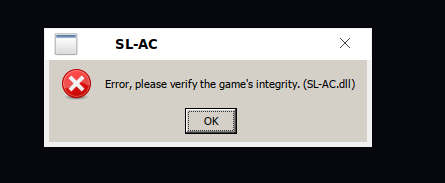
As mentioned in other comments, the game also works for me on Proton 4.11-13 and Nvidia proprietary but with a major performance hit.
Interesting note: after reading the logs, I discovered that neither the engine (UnityPlayer.dll) nor the anticheat (SL-AC.dll) is imported before the game quits on recent Proton versions. Therefore, I believe this to be an issue with the game's launcher (SCPSL.exe) which is described as "custom" in the license file. To test this, I started UnityPlayer directly as described in the official Unity docs here. While the results seemed promising, my testing was limited by the fact that I had disabled network connectivity out of fear of getting banned.
Replying to https://github.com/ValveSoftware/Proton/issues/4229#issuecomment-913097552
What were your discoveries? When you mention a new proton version what do you mean specifically do you mean 4.11 or something newer? Also could you clarify the steps more clearly into how you achieved your results what you did within UnityPlayer.dll?
Replying to [#4229 (comment)](https://github.com/ValveSoftware/Proton/issues/4229#issuecomment-913097552)
What were your discoveries? When you mention a new proton version what do you mean specifically do you mean 4.11 or something newer? Also could you clarify the steps more clearly into how you achieved your results what you did within UnityPlayer.dll?
I tested the game with the latest experimental Proton on Steam, so not 4.11. The logs mention Wine 6.3, so I assume it uses that. I did not modify UnityPlayer in any way, but rather made a small program that calls the UnityMain function in UnityPlayer.dll as described in the docs linked in my last comment. In doing so, the game launches, finishes loading, renders most of the main menu, and then freezes. I believe the freeze to be related to running the game without network access, as the player.log file (generated by Unity) repeatedly mentions "Error: System.Net.Http.HttpRequestException: Unknown error (0x2afa)". As SCP:SL has an anticheat, as well as a focus on blocking DLL injection, running this with network access would most likely lead to an account/hardware ID ban. As such, I don't want to give out any more specific instructions for getting the game to run this way. Instead, it's probably best to actually figure out what the problem is with the latest Proton and patch it.
I recently was browsing through some articles on The Forest on how to fix performance issues, i recently came across an article suggesting disabling SMT through the Bios on motherboards that support this feature since it is enabled by default at least on my motherboard anyway. Please for anyone else who also has similar issues to me where they can't get past the loading screen is to disable SMT as this fixes the issues and allows you to get into the game. SMT in my experience with Proton is very weird and i'm assuming anyway support for it isn't that great. This should fix one of the huge issues with the game not running, also putting graphics card support to rest as this isn't the issue either.
The game used to launch with these launch options: PROTON_USE_WINED3D=1 mangohud %command% and Proton 4.11, it ran very low, but still ran.
Now after Parabellum update the game no longer runs, it seems to start fine, but after the "Starting SCP: Secret Lab" dialog closes, the game doen't generate a new window or anything, according to steam the game is running, since the [X Cancel] button changes into [X Stop]
any way i can help solve this?
The game used to launch with these launch options:
PROTON_USE_WINED3D=1 mangohud %command%and Proton 4.11, it ran very low, but still ran.Now after Parabellum update the game no longer runs, it seems to start fine, but after the "Starting SCP: Secret Lab" dialog closes, the game doen't generate a new window or anything, according to steam the game is running, since the [X Cancel] button changes into [X Stop]
any way i can help solve this?
try again with PROTON_LOG=1 added as an environment variable, then upload the log file (should be in ${HOME}/steam-700330.log)
here it is, i think the game is having more issues since SCPSL.exe reports 150% CPU usage on htop
i have to go sleep, will answer tomorrow
I did a little more exploring, and looks like at least one of the issues is that GetProcAddress is returning null for RtlEnterCriticalSection, RtlLeaveCriticalSection, and RtlInitializeCriticalSection:
55832.530:0020:0024:Call KERNEL32.GetProcAddress(7b600000,7b6494dc "RtlEnterCriticalSection") ret=140451c78
55832.530:0020:0024:Ret  KERNEL32.GetProcAddress() retval=00000000 ret=140451c78
55832.530:0020:0024:Call KERNEL32.GetProcAddress(7b600000,7b64983f "RtlLeaveCriticalSection") ret=140451c78
55832.530:0020:0024:Ret  KERNEL32.GetProcAddress() retval=00000000 ret=140451c78
55832.530:0020:0024:Call KERNEL32.GetProcAddress(7b600000,7b649727 "RtlInitializeCriticalSection") ret=140451c78
55832.530:0020:0024:Ret  KERNEL32.GetProcAddress() retval=00000000 ret=140451c78
(logged with WINEDEBUG=+all, 7b600000 is the kernel32 module)
The reason this doesn't work is because those functions are located within ntdll rather than within kernel32. Manually changing the module parameter in a debugger to ntdll allows the launcher to open a window before the anti-debugging measures kick in. If the module parameter isn't changed, the instruction pointer somehow flows onto part of the string specified in the first GetProcAddress ("ntdll.RtlInitializeCriticalSection") where it segfaults due to the string being interpreted as a privileged opcode (outs).
I'm not really sure how to proceed, as lists of real kernel32 function exports I found online don't include the above functions. As a game-specific hack, it's probably possible to add the functions to the kernel32 spec (where they are listed, just without "Rtl"). However, this solution doesn't seem elegant enough for official Wine or Proton.
^ I went ahead and compiled Proton with the above changes, and the game is fully playable with good performance. I'm attaching the Wine patch here. I'm not going to submit these changes, as it shouldn't be necessary to add exports that aren't present in the original kernel32. This might be fit for inclusion in Proton/Wine GE, though.
I tried looking for the true source of the issue (e.g. why it's trying to find the functions in kernel32), but didn't see anything very useful.
I'm still getting a "Spoofer detected" message when trying to join a server with the included patch (using your custom build proton version)
@BenCantCode wouldn't be surprised if windows performs that "fix" itself - iirc windows is known for fixing various bugs by changing behavior based on the name of the executing process?
Hello! Software developer for the client-side anti-cheat for SCP:SL here!
The wrong Rtl import issue seems to be caused by the software protector, I've checked out the source and I'm not really requesting the address of the procedure myself anywhere.
As for people ending up with spoofer detected issues, please check what the APIs called by the game are returning, since our servers expect valid data, random data won't cut it more often than not.
@Deputation It looks like an update got pushed or something to the HWID detection that rejects linux users. I'm a little concerned since this was pushed one day after this was working (I might be doing my math wrong, but I believe an update was pushed around 4 hours after I posted this in one of the serverhost channels). Could this maybe be looked into? Thanks.
EDIT: The message below isn't an actual ban, it's just a rejection.

Can reproduce this, contacted the devs at the email the error provided, waiting for a response.
@Deputation It looks like an update got pushed or something to the HWID detection that rejects linux users. I'm a little concerned since this was pushed one day after this was working (I might be doing my math wrong, but I believe an update was pushed around 4 hours after I posted this in one of the serverhost channels). Could this maybe be looked into? Thanks.
EDIT: The message below isn't an actual ban, it's just a rejection.
I have the exact same issue, can confirm it isn't an actual global ban but it leaves you unable to join servers.
Distribution: Arch Linux (EndeavourOS)
Kernel version: 5.15.2-arch1-1
GPU model: Radeon RX 580
GPU driver: amdgpu
issue: Proton crashes when opening SCP:SL.
Log: steam-700330.log.zip (Log file is 300 mb+ that's why it is zipped)
Any advance here?
I made it work changing the SCPSL.exe with the "untouched" unity 2019.4.16 one, but steam doesnt work
I saw something about Proton, what is that patch?
There's a patched version of Proton available here: https://github.com/BenCantCode/proton-custom/releases/tag/proton-6.3-7
However this patch will not let you join any online mode servers (aka any servers on the server list) as an AC update changed how HWID is determined.
Hmmm, thanks
My log using Custom proton, and -logfile log.log -force-opengl
Initialize engine version: 2019.4.16f1 (e05b6e02d63e)
[Subsystems] Discovering subsystems at path Z:/home/isaac/.local/share/Steam/steamapps/common/SCP Secret Laboratory/SCPSL_Data/UnitySubsystems
Forcing GfxDevice: OpenGL Core
GfxDevice: creating device client; threaded=1
Renderer: AMD Radeon RX 5500M (navi14, LLVM 14.0.0, DRM 3.42, 5.15.2-217-tkg-cfs)
Vendor:   AMD
Version:  4.6 (Core Profile) Mesa 22.0.0-devel (git-b1a32d1432)
GLES:     0
 GL_AMD_conservative_depth GL_AMD_depth_clamp_separate GL_AMD_draw_buffers_blend GL_AMD_framebuffer_multisample_advanced GL_AMD_gpu_shader_int64 GL_AMD_multi_draw_indirect GL_AMD_performance_monitor GL_AMD_pinned_memory GL_AMD_query_buffer_object GL_AMD_seamless_cubemap_per_texture GL_AMD_shader_stencil_export GL_AMD_shader_trinary_minmax GL_AMD_texture_texture4 GL_AMD_vertex_shader_layer GL_AMD_vertex_shader_viewport_index GL_ANGLE_texture_compression_dxt3 GL_ANGLE_texture_compression_dxt5 GL_ARB_ES2_compatibility GL_ARB_ES3_1_compatibility GL_ARB_ES3_2_compatibility GL_ARB_ES3_compatibility GL_ARB_arrays_of_arrays GL_ARB_base_instance GL_ARB_bindless_texture GL_ARB_blend_func_extended GL_ARB_buffer_storage GL_ARB_clear_buffer_object GL_ARB_clear_texture GL_ARB_clip_control GL_ARB_color_buffer_float GL_ARB_compressed_texture_pixel_storage GL_ARB_compute_shader GL_ARB_compute_variable_group_size GL_ARB_conditional_render_inverted GL_ARB_conservative_depth GL_ARB_copy_buffer GL_ARB_copy_image GL_ARB_cull_dist
ance GL_ARB_debug_output GL_ARB_depth_buffer_float GL_ARB_depth_clamp GL_ARB_derivative_control GL_ARB_direct_state_access GL_ARB_draw_buffers GL_ARB_draw_buffers_blend GL_ARB_draw_elements_base_vertex GL_ARB_draw_indirect GL_ARB_draw_instanced GL_ARB_enhanced_layouts GL_ARB_explicit_attrib_location GL_ARB_explicit_uniform_location GL_ARB_fragment_coord_conventions GL_ARB_fragment_layer_viewport GL_ARB_fragment_shader GL_ARB_framebuffer_no_attachments GL_ARB_framebuffer_object GL_ARB_framebuffer_sRGB GL_ARB_get_program_binary GL_ARB_get_texture_sub_image GL_ARB_gl_spirv GL_ARB_gpu_shader5 GL_ARB_gpu_shader_fp64 GL_ARB_gpu_shader_int64 GL_ARB_half_float_pixel GL_ARB_half_float_vertex GL_ARB_indirect_parameters GL_ARB_instanced_arrays GL_ARB_internalformat_query GL_ARB_internalformat_query2 GL_ARB_invalidate_subdata GL_ARB_map_buffer_alignment GL_ARB_map_buffer_range GL_ARB_multi_bind GL_ARB_multi_draw_indirect GL_ARB_occlusion_query2 GL_ARB_parallel_shader_compile GL_ARB_pipeline_statistics_query GL_ARB_pixel
_buffer_object GL_ARB_point_sprite GL_ARB_polygon_offset_clamp GL_ARB_post_depth_coverage GL_ARB_program_interface_query GL_ARB_provoking_vertex GL_ARB_query_buffer_object GL_ARB_robust_buffer_access_behavior GL_ARB_robustness GL_ARB_sample_shading GL_ARB_sampler_objects GL_ARB_seamless_cube_map GL_ARB_seamless_cubemap_per_texture GL_ARB_separate_shader_objects GL_ARB_shader_atomic_counter_ops GL_ARB_shader_atomic_counters GL_ARB_shader_ballot GL_ARB_shader_bit_encoding GL_ARB_shader_clock GL_ARB_shader_draw_parameters GL_ARB_shader_group_vote GL_ARB_shader_image_load_store GL_ARB_shader_image_size GL_ARB_shader_objects GL_ARB_shader_precision GL_ARB_shader_stencil_export GL_ARB_shader_storage_buffer_object GL_ARB_shader_subroutine GL_ARB_shader_texture_image_samples GL_ARB_shader_texture_lod GL_ARB_shader_viewport_layer_array GL_ARB_shading_language_420pack GL_ARB_shading_language_include GL_ARB_shading_language_packing GL_ARB_sparse_buffer GL_ARB_spirv_extensions GL_ARB_stencil_texturing GL_ARB_sync GL_ARB
_tessellation_shader GL_ARB_texture_barrier GL_ARB_texture_buffer_object GL_ARB_texture_buffer_object_rgb32 GL_ARB_texture_buffer_range GL_ARB_texture_compression_bptc GL_ARB_texture_compression_rgtc GL_ARB_texture_cube_map_array GL_ARB_texture_filter_anisotropic GL_ARB_texture_float GL_ARB_texture_gather GL_ARB_texture_mirror_clamp_to_edge GL_ARB_texture_multisample GL_ARB_texture_non_power_of_two GL_ARB_texture_query_levels GL_ARB_texture_query_lod GL_ARB_texture_rectangle GL_ARB_texture_rg GL_ARB_texture_rgb10_a2ui GL_ARB_texture_stencil8 GL_ARB_texture_storage GL_ARB_texture_storage_multisample GL_ARB_texture_swizzle GL_ARB_texture_view GL_ARB_timer_query GL_ARB_transform_feedback2 GL_ARB_transform_feedback3 GL_ARB_transform_feedback_instanced GL_ARB_transform_feedback_overflow_query GL_ARB_uniform_buffer_object GL_ARB_vertex_array_bgra GL_ARB_vertex_array_object GL_ARB_vertex_attrib_64bit GL_ARB_vertex_attrib_binding GL_ARB_vertex_buffer_object GL_ARB_vertex_shader GL_ARB_vertex_type_10f_11f_11f_rev GL_
ARB_vertex_type_2_10_10_10_rev GL_ARB_viewport_array GL_ATI_blend_equation_separate GL_ATI_meminfo GL_ATI_texture_float GL_ATI_texture_mirror_once GL_EXT_EGL_image_storage GL_EXT_EGL_sync GL_EXT_abgr GL_EXT_blend_equation_separate GL_EXT_demote_to_helper_invocation GL_EXT_depth_bounds_test GL_EXT_draw_buffers2 GL_EXT_draw_instanced GL_EXT_framebuffer_blit GL_EXT_framebuffer_multisample GL_EXT_framebuffer_multisample_blit_scaled GL_EXT_framebuffer_object GL_EXT_framebuffer_sRGB GL_EXT_memory_object GL_EXT_memory_object_fd GL_EXT_packed_depth_stencil GL_EXT_packed_float GL_EXT_pixel_buffer_object GL_EXT_polygon_offset_clamp GL_EXT_provoking_vertex GL_EXT_semaphore GL_EXT_semaphore_fd GL_EXT_shader_image_load_formatted GL_EXT_shader_image_load_store GL_EXT_shader_integer_mix GL_EXT_shader_samples_identical GL_EXT_texture_array GL_EXT_texture_compression_dxt1 GL_EXT_texture_compression_rgtc GL_EXT_texture_compression_s3tc GL_EXT_texture_filter_anisotropic GL_EXT_texture_integer GL_EXT_texture_mirror_clamp GL_EXT
_texture_sRGB GL_EXT_texture_sRGB_R8 GL_EXT_texture_sRGB_decode GL_EXT_texture_shadow_lod GL_EXT_texture_shared_exponent GL_EXT_texture_snorm GL_EXT_texture_swizzle GL_EXT_timer_query GL_EXT_transform_feedback GL_EXT_vertex_array_bgra GL_EXT_vertex_attrib_64bit GL_EXT_window_rectangles GL_IBM_multimode_draw_arrays GL_INTEL_blackhole_render GL_KHR_blend_equation_advanced GL_KHR_context_flush_control GL_KHR_debug GL_KHR_no_error GL_KHR_parallel_shader_compile GL_KHR_robust_buffer_access_behavior GL_KHR_robustness GL_KHR_texture_compression_astc_ldr GL_KHR_texture_compression_astc_sliced_3d GL_MESA_framebuffer_flip_y GL_MESA_pack_invert GL_MESA_shader_integer_functions GL_MESA_texture_signed_rgba GL_NVX_gpu_memory_info GL_NV_alpha_to_coverage_dither_control GL_NV_compute_shader_derivatives GL_NV_conditional_render GL_NV_copy_image GL_NV_depth_clamp GL_NV_packed_depth_stencil GL_NV_shader_atomic_int64 GL_NV_texture_barrier GL_NV_vdpau_interop GL_OES_EGL_image GL_S3_s3tc
OPENGL LOG: Creating OpenGL 4.6 graphics device ; Context level  <OpenGL 4.5> ; Context handle 77825
Microsoft Media Foundation video decoding to texture disabled: graphics device is OpenGL Core, only Direct3D 11 and Direct3D 12 (only on desktop) are supported.
<RI> Initializing input.
<RI> Input initialized.
<RI> Touch support initialization failed: Llamada no implementada.
.
UnloadTime: 0.653700 ms
Generating session keys...
Session keys generated (ECDSA)!
Detected distribution platform: Steam
HttpProxy successfully initialized!
Started Steam Client (isaacmvmv - 76561199020614761)
Refreshed auth token!
[DEBUG_SDAUTH] <color=gray>Started authentication thread.</color>
Mirror: adding Network[Early/Late]Update to Unity...
Setting up 8 worker threads for Enlighten.
  Thread -> id: 258 -> priority: 1
  Thread -> id: 25c -> priority: 1
  Thread -> id: 260 -> priority: 1
  Thread -> id: 264 -> priority: 1
  Thread -> id: 268 -> priority: 1
  Thread -> id: 26c -> priority: 1
  Thread -> id: 270 -> priority: 1
  Thread -> id: 274 -> priority: 1
Updated list of central servers.
Central servers count: 1
Updated list of central servers.
Central servers count: 1
[DEBUG_SDAUTH] <color=gray>Authentication initialized.</color>
[DEBUG_SDAUTH] <color=gray>Revoking previous Steam authentication ticket...</color>
[DEBUG_SDAUTH] <color=blue><color=blue>Obtaining authentication ticket from Steam...</color></color>
[DEBUG_SDAUTH] <color=blue><color=blue>Authentication Ticked obtained from Steam.</color></color>
[DEBUG_SDAUTH] <color=blue>Signing auth ticket...</color>
The referenced script on this Behaviour (Game Object 'Pickup') is missing!
(Filename:  Line: 334)

The referenced script on this Behaviour (Game Object 'Grenade SCP-018') is missing!
(Filename:  Line: 334)

The referenced script on this Behaviour (Game Object 'Grenade Frag') is missing!
(Filename:  Line: 334)

The referenced script on this Behaviour (Game Object 'Grenade Flash') is missing!
(Filename:  Line: 334)

The referenced script on this Behaviour (Game Object '[Decal Root]') is missing!
(Filename:  Line: 334)

Unloading 6 Unused Serialized files (Serialized files now loaded: 0)
Shader 'sidefx/vertex_soft_body_shader': failed to set fallback shader 'Diffuse'
UnloadTime: 0.725800 ms
Loaded NorthwoodLib 1.2.1
FileNotFoundException: Could not find file "Z:\home\isaac\.local\share\Steam\steamapps\common\SCP Secret Laboratory"
  at System.IO.Directory.SetCurrentDirectory (System.String path) [0x00000] in <00000000000000000000000000000000>:0

(Filename: currently not available on il2cpp Line: -1)

NetworkManager created singleton (DontDestroyOnLoad)
Mirror | mirror-networking.com | discord.gg/N9QVxbM
Discord: init
Setting output to NonDedicatedOutput.
Hi there! Initializing console...
Done! Type 'help' to print the list of available commands.
<color=#D8D8D8>[SRV] Central server public key not found in cache.</color>
Tried to get translation from nonexistent file LoadingHints
(Filename: C:\buildslave\unity\build\Runtime/Export/Debug/Debug.bindings.h Line: 35)

<color=#D8D8D8>[SRV] Loading gameplay config...</color>
<color=#D8D8D8>[SRV] Processing rate limits...</color>
<color=#D8D8D8>[SRV] Rate limiting loaded</color>
<color=#D8D8D8>[SRV] Loading sharing config...</color>
<color=#D8D8D8>[SRV] Processing shares...</color>
<color=#D8D8D8>[SRV] Config sharing loaded.</color>
<color=#D8D8D8>[SRV] Config sharing loaded.</color>
<color=#D8D8D8>[SRV] Validating bans...</color>
<color=#D8D8D8>[SRV] Bans has been validated.</color>
<color=#D8D8D8>[SRV] Whitelist has been loaded.</color>
Loading saved mutes...
<color=#D8D8D8>[SRV] Can't load the mute file!</color>
Loading saved mutes...
<color=#D8D8D8>[SRV] Can't load the mute file!</color>
<color=#D8D8D8>[SRV] Reserved slots list has been loaded.</color>
<color=#D8D8D8>[SRV] Loading configs...</color>
<color=#D8D8D8>[SRV] Config file loaded!</color>

Unloading 11 unused Assets to reduce memory usage. Loaded Objects now: 90215.
Total: 33.276100 ms (FindLiveObjects: 4.352600 ms CreateObjectMapping: 3.166500 ms MarkObjects: 25.591300 ms  DeleteObjects: 0.156300 ms)

Unloading 1 Unused Serialized files (Serialized files now loaded: 0)

Unloading 0 unused Assets to reduce memory usage. Loaded Objects now: 90215.
Total: 31.962300 ms (FindLiveObjects: 5.789600 ms CreateObjectMapping: 1.998000 ms MarkObjects: 24.065300 ms  DeleteObjects: 0.101000 ms)

Loading favorites.txt
Reventing:favorites.txt
Loading history.txt
Downloaded public key from central server.
SHA256 of public key: 70BEB4E7FF6A8D58F83BB3859947FEBC46F268F97684EA302E27405068410286
<color=#D8D8D8>[SRV] Updating key cache...</color>
<color=#D8D8D8>[SRV] Key cache updated.</color>
Unloading 6 Unused Serialized files (Serialized files now loaded: 0)
UnloadTime: 1.695600 ms
Setting 07ScreenMode to 1
Setting 06AudioSettings_Master to 1
Setting 06AudioSettings_Effects to 1
Setting 06AudioSettings_MenuMusic to 1
Setting 06AudioSettings_VoiceChat to 1
Setting 06AudioSettings_Interface to 1
Scene Manager: Loaded scene 'NewMainMenu' [Assets/_Scenes/NewMainMenu.unity]

Unloading 6 unused Assets to reduce memory usage. Loaded Objects now: 93325.
Total: 37.315300 ms (FindLiveObjects: 5.260700 ms CreateObjectMapping: 1.726200 ms MarkObjects: 30.210400 ms  DeleteObjects: 0.110500 ms)

Unloading 0 Unused Serialized files (Serialized files now loaded: 0)

Unloading 0 unused Assets to reduce memory usage. Loaded Objects now: 93325.
Total: 37.050100 ms (FindLiveObjects: 5.723600 ms CreateObjectMapping: 1.945400 ms MarkObjects: 29.287200 ms  DeleteObjects: 0.085800 ms)

[DEBUG_SDAUTH] <color=blue>Auth ticket signed!</color>
[DEBUG_SDAUTH] <color=blue>Establishing authentication session (attempt 1)...</color>
Web request succeeded
[DEBUG_SDAUTH] <color=green>Authentication session established.</color>
Loading server list...
Connecting to 146.59.3.106!
Connection IP set to [REDACTED], port: [REDACTED]
Successfully registered 32 pickups for 42 items.
Shutting down client.
Response sent. ID: -422222242, Response length: 10
Successfully registered 32 pickups for 42 items.
Shutting down client.
Shutting down client.
Stopping authentication thread...
ThreadAbortException
  at NewServerBrowser.DownloadList () [0x00000] in <00000000000000000000000000000000>:0
  at Discord.UserManager+CurrentUserUpdateHandler.Invoke () [0x00000] in <00000000000000000000000000000000>:0
  at System.Threading.ContextCallback.Invoke (System.Object state) [0x00000] in <00000000000000000000000000000000>:0
  at System.Threading.ExecutionContext.RunInternal (System.Threading.ExecutionContext executionContext, System.Threading.ContextCallback callback, System.Object state, System.Boolean preserveSyncCtx) [0x00000] in <00000000000000000000000000000000>:0
  at System.Threading.ExecutionContext.Run (System.Threading.ExecutionContext executionContext, System.Threading.ContextCallback callback, System.Object state) [0x00000] in <00000000000000000000000000000000>:0
  at Discord.UserManager+CurrentUserUpdateHandler.Invoke () [0x00000] in <00000000000000000000000000000000>:0
UnityEngine.Logger:LogException(Exception, Object)
UnityEngine.Debug:LogException(Exception)
System.EventHandler`1:Invoke(Object, TEventArgs)

(Filename: currently not available on il2cpp Line: -1)

Discord: shutdown
--PoolManager - Average required pool objects per round--
(Filename: C:\buildslave\unity\build\Runtime/Export/Debug/Debug.bindings.h Line: 35)

--End of Log--
(Filename: C:\buildslave\unity\build\Runtime/Export/Debug/Debug.bindings.h Line: 35)
Im trying to make a linux port of the game using
https://rutracker.org/forum/viewtopic.php?t=5026239
and mono errors. Maybe I should try with il2cpp build.
See the webpage, its interesting
Weird how you guys are experiencing issues still with loading or connecting to servers. I can only state my experience with the game so far but my experience is that the game will run under 4.11-13 and the build before 4.2-9. These builds should be able to run the game, just super slowly. No where near the expected performance with the same hardware running under windows. This may also depend on my hardware since SMT is disabled in order to get this game stably launching. As for the AC i've found it can be very sensitive with configuration of Proton. Just stick to the stable builds if you are able to since that's your best chance of being able to use wine, unity and steam all together in unison. The AC also runs checks on integrity on game files so messing with those will also cause issues (DON'T DO THIS, YOU'LL NOT GET ANYWHERE) all changing the game files will do is either get you steam banned or server banned. As for solutions to your problems i don't have any at the moment but i'll investigate. All i can recommend to people who can't start the game on stable builds is disable SMT. Hopefully this works for you guys.
Can reproduce this, contacted the devs at the email the error provided, waiting for a response.
Got reply:
Hi,
sorry for the delay! We can't whitelist linux hardware IDs, because they are not valid. Proton/wine returns invalid data that are exactly the same for all PCs. This leads to issues where banning one linux player for cheating would lead to all linux players receiving a game ban. We can't do anything about that unless proton/wine starts to return real, unique data instead of the same fake ones for every single PC.
Łukasz J.
Chief Information Officer
Proton's giving invalid HWID's, causing the auth failure.
Have you tried this?
It changes HWID (It says)
Maybe forums for banned people who look to change their HWID are useful to change our proton one
Also this tool...
https://github.com/DiscounttnuocsiD/hwid-changer
I don't think that's a solution to the problem; its a terrible workaround that'll heavily discourage Northwoods from supporting linux.
A proper solution would be for Wine/Proton to give valid HWIDs
Hehe, maybe
With 11.1 latest proton (experimental) can launch the game, but HWID error persists
HWID error's been updated.

Proton 7.0's changelog:
SCP: Secret Laboratory is now playable
I assume this excludes the anticheat?
@ImperatorStorm I just tried to test it, sadly I get stuck on "Connecting to central servers"... I have tried various things now, but no dice so far... If you got any idea how to get past, I'd be willing to fiddle with it more
I can get into the main menu and click on a server just fine. However, I get the previous anti-cheat error. A proper solution would be different checks by the anti-cheat for linux users, because trusting artificially generated HWID:s is probably not a great idea, as they would be easily spoofable.
I am able to connect to verified servers using Proton 7.0-1 and the open-beta branch. Perhaps try using the open beta branch if you haven't already?
Can confirm, multiplayer works now on 7.0-1 + open-beta!
Can confirm, can connect to servers even without open-beta.
Game crashes with latest update. No matter 7.0-1 or experimental.
Nevermind, Idk if thats local issue. Fixed.
If you want my fix in case this wasnt a local issue, tell me
Game crashes shortly after loading into main menu
Proton 7.0-2, game version 11.2
Proton log + system info: https://gist.github.com/ImperatorStorm/5c09164118a389d236b0b204ae4bad08
After recent anticheat update game crashes immediately upon launch
Proton Experimental (issue persists with Proton 7.0-2)
Game version 11.2, latest updates in terms of anticheat
System Info
Proton Log
I can confirm I am getting the same crash on launch. It worked fine a week ago when I last played, but not when I tried today.
I used Proton experimental in that log, but I also tried it with Proton 7.0, getting the same issue.
steam-700330.log
In https://www.protondb.com/app/700330 someone said:
I was able to get the game running by reverting to an older version of the game (before the patch that completely borked it). This can be done with the following commands:

    Open Steam's console

First, make sure that Steam is open, then enter the following in your address bar:

steam://nav/console

(make sure to click the one that is shown as a link). This should give you the "CONSOLE" tab in your steam client.

    Download the older version of the game.

Enter the following into the steam console:

download_depot 700330 700331 7141588317675557238

This will download an older version of SCP:SL (from around 9 days ago). This won't show any progress bar when downloading, so please check your network activity to see when the download has finished.

    Installing the downgraded version

The previous command will install the game in steamapps/content/app_700330/depot_700331.

To run this version as your main game, first delete all files in

steamapps/common/SCP Secret Laboratory

(the up-to-date game), then move all files from the first directory, into the SCP Secret Laboratory directory. Be sure to create a backup of these new files, as any new update will revert these changes, and you will need to replace the game's files again.

After you've completed these steps, your game should be up and running again.

Please keep in mind that this essentially stagnates your game. Any new updates will likely break the game again. We're essentially stuck on this version forever (at least until the SCP:SL devs do something about this).
Hope this will work for you
I just pushed a fix to Proton Experimental, should hopefully work again now with Proton Experimental [bleeding-edge] branch.
Seems to be working fine with that, though I only launched the game and connected to a server. Thank you!
You are welcome :)
Can confirm, game seems to now work on Proton Experimental. Would like to note that for it to work I had to select the option to reset my settings, but that may have been an error on my end
The game refuses to boot on the latest Proton Experimental (also the bleeding edge version is affected)
Hello @X33R00, please add PROTON_LOG=1 %command% to the game's launch options and attach the generated $HOME/steam-$APPID.log to this issue report as a file. (Proton logs compress well if needed.) Also, please copy your system information from Steam (Steam -> Help -> System Information) and put it in a gist, then include a link to the gist in this issue report.
Here is the Gist for experimental (non bleeding edge)
https://gist.github.com/X33R00/97dd94612d4681a3203b5f7e5baca679
And here is the one for Proton Stable 7.0-3
https://gist.github.com/X33R00/b512a860d963f20e7f610dc3dd2ad2e9
My system is also up to date with modern hardware
From your log, there's a video driver issue err:vulkan:__wine_create_vk_instance_with_callback Failed to load physical devices, res=5 and err: DxvkInstance::createInstance: Failed to create Vulkan 1.1 instance, but it's hard to tell why since you've chosen to skip sharing the extended diagnostics information found in Steam's system information.
Possibly https://github.com/GPUOpen-Drivers/AMDVLK/issues/278.
From your log, there's a video driver issue
err:vulkan:__wine_create_vk_instance_with_callback Failed to load physical devices, res=5anderr: DxvkInstance::createInstance: Failed to create Vulkan 1.1 instance, but it's hard to tell why since you've chosen to skip sharing the extended diagnostics information found in Steam's system information.Possibly GPUOpen-Drivers/AMDVLK#278.
Here is the extended diagnostics, its also in my native language so good luck
https://gist.github.com/X33R00/fae920382b9e59062a8d8911216a069f
Thanks, Vulkan is broken in general on your system (https://gist.github.com/X33R00/fae920382b9e59062a8d8911216a069f#file-gistfile1-txt-L279-L292 and https://gist.github.com/X33R00/fae920382b9e59062a8d8911216a069f#file-gistfile1-txt-L451-L464) due to the previously linked driver issue.
Alright ill wait for an update and uninstall AMDVLK meanwhile.
Edit: The game works fine now that AMDVLK is uninstalled, which is a shame because AMDVLk has worked before without any conflict.
Hey. The game has been working till yesterday (Aug 1). This is the result of running the PROTON_LOG=1 %command% launch option (I shortened it by a lot, because it repeats the end several times, and at the end it was a 400mb file): https://pastebin.com/ZzBtqmfX
Yeah, I found why it breaks but still thinking how to fix that in Proton before full complete Wine PE separation.
This should hopefully be fixed now in the just updated Experimental [bleeding-edge] beta branch.
[bleeding edge] branch can be accessed by choosing Properties on 'Proton Experimental' (Library / Tools), going to BETAS page and selecting the branch there.
Seems to be working. I don't know what the issue was since I haven't booted up the game since it started, but I was able to launch the game and connect to multiplayer games just fine using bleeding-edge experimental.
Thank you!
Yep, had a great gaming session last night. Performance is dodgy but id blame the game for that.
Still won't work for me on bleeding edge, unless I broke something.
https://pastebin.com/814QKE3W Used the PROTON_LOG=1 %command% launch option and got an unnecessarily long file, so I just cut out the repetitive end bits like the person above me.
Using the new Patreon Beta 12.0, looks like the game runs fine, but the VoiceChat is broken. It causes constant stuttering as it tries to load and unload something (?)
Tried both GE and Proton 7.0-4
steam-700330.log
Repeating snippet during stutter:
452356.624:0124:03ec:trace:loaddll:build_module Loaded L"C:\\windows\\system32\\avrt.dll" at 00000002F2930000: builtin
452356.624:0124:03ec:fixme:avrt:AvSetMmThreadCharacteristicsW (L"Audio",000000007938FF20): stub
452356.624:0124:03ec:trace:loaddll:free_modref Unloaded module L"C:\\windows\\system32\\avrt.dll" : builtin
Edit2:
Switching to audio=ALSA in winecfg increases the time between stutters, but it does not completely remove it.
Also in KDE, the Microphone "is in use" icon is constantly turning on-and-off, maybe the game cannot register the Microphone correctly?
Replying to https://github.com/ValveSoftware/Proton/issues/4229#issuecomment-1272486550
Here are the effects of the issue stated above:
It looks like to me, in the latest beta, this has been fixed from the game side.
The game no longer stutters when the microphone is in use
Hello everyone, the game suddenly started using OpenGL, forcing the API to DirectX11/Vulkan in the game settings does not solve the problem
CPU: Intel i3-6100 (4) @ 3.700GHz
GPU: AMD Radeon R9 280X
GRUB_CMDLINE_LINUX_DEFAULT="quiet apparmor=1 security=apparmor udev.log_priority=3 radeon.si_support=0 amdgpu.si_support=1"
Proton: 7.0-5
https://pastebin.com/Gi68CL1W

PROTON_USE_WINED3D=1 %command% started use DirectD3D11, but wined3d use OpenGL, DXVK stopped working?
I tried to blacklist the radeon module, regenerated the initramfs, it didn't change the situation, it still uses OpenGL. After a few minutes of the game, the FPS becomes unplayable, big lags and freezes
I trying start game with arg -force-vulkan, game is crashed.
-force-d3d11 and -force-d3d12 uses opengl
Proton: 7.0-5


DXVK_HUD=full %command%
HUD dont work
Im running Artix linux (Arch fork) so i wouldnt be suprised if its my distro instead of proton being at fault, but proton 7.0-6 doesnt work anymore if you want to run the game and i also tried the newer Proton 8.0-6 but it fails to launch to, here are the steam logs and tell me if i can help more in any way.
Med vänliga hälsningar/With regards. Collin
Hello @X33R00, info: Null hardware (RADV NAVI10): in your log is an indicator that there's a video driver issue. Please copy your system information from Steam (Steam -> Help -> System Information) and put it in a gist, then include a link to the gist in this issue report. Also, if you're using the Steam client beta, then include the runtime system information as well.
Hello @X33R00,
info: Null hardware (RADV NAVI10):in your log is an indicator that there's a video driver issue. Please copy your system information from Steam (Steam->Help->System Information) and put it in a gist, then include a link to the gist in this issue report. Also, if you're using the Steam client beta, then include the runtime system information as well.
hope this helps, a configuration issue maybe?
https://gist.github.com/X33R00/d1ef5fc670cf02a0972b8a579a45090d
These look like the details to focus on:
The 32 bit and 64 bit of VK_LAYER_AMD_switchable_graphics is installed, which implies 32 bit AMDVLK and 64 bit AMDVLK is installed https://gist.github.com/X33R00/d1ef5fc670cf02a0972b8a579a45090d#file-gistfile1-txt-L869-L890
AMD_VULKAN_ICD=RADV is set to tell that switchable layer to force mesa/RADV instead of AMDVLK https://gist.github.com/X33R00/d1ef5fc670cf02a0972b8a579a45090d#file-gistfile1-txt-L149
VK_ICD_FILENAMES=/usr/share/vulkan/icd.d/radeon_icd.x86_64.json is set which makes only 64 bit mesa/RADV an option. https://gist.github.com/X33R00/d1ef5fc670cf02a0972b8a579a45090d#file-gistfile1-txt-L153
And the result of this system config is that 32 bit Vulkan is missing https://gist.github.com/X33R00/d1ef5fc670cf02a0972b8a579a45090d#file-gistfile1-txt-L291-L305 and 64 bit Vulkan is broken https://gist.github.com/X33R00/d1ef5fc670cf02a0972b8a579a45090d#file-gistfile1-txt-L447-L459.
The AMDVLK driver install is interfering with mesa/RADV. Either reconfigure your system to use AMDVLK or mesa/RADV by themselves and see if that helps.
steam-700330.log
i unironically got it to start and get it into the game menu by once again uninstalling amdvlk (both 32bit and 64bit) but it shortly crashed again on proton 8.0-2
steam-700330.log
the game now successfully runs on 7.0-6 i can confirm, it must be a missconfiguration on my part but the game worked without issues last week with both radv and amdvlk being installed alongside each other. once again thanks
Recently, I was able to run the game via DXVK and Vulkan (for some reason, the game was still crashes when running via VKD3D) with the bleeding-edge branch of the Proton Experimental, but after the latest updates of the bleeding-edge branch, the game started crashing again at launch, regardless of the graphics API used.
After the 13.5 update only Proton 7 works for me, I also suggest to change the Graphical API to Vulkan ingame for better performance (at least for my experience and current setup).
Proton 8, 9 and experimental currently crash the game.
You might also need to clear the proton prefix after changing the proton version, you can do so like this for example: https://www.youtube.com/watch?v=uxWJ1xvowMk
The hang or crash on loading script with Proton 9 should hopefully be fixed in the just updated Proton Experimental ([bleeding-edge] Proton Beta branch).
The game runs, but I noticed that the default DirectX 11 graphics API setting is slow. DirectX 12 is more performant. You can set the game to Vulkan too, but you must disable anti aliasing and such to prevent the game from crashing on launch.
This makes the game nearly good enough to play, but there are a few major annoyances. The mouse input lag is insane. Idk if this is a Wayland issue or not, but moving the mouse feels incredibly slow and sluggish, and I died as escaped Chaos Insurgency because I couldn't aim at my MTF opponent. After I got killed I was called out for being crap at the game.
I'd say the performance of the game is just as bad as on Windows, but with the additional input lag it's not very pleasant at all. It's best to play classes that do not require great aim, e.g. SCPs.
SL freezes when I die, I become someone and when I enter the server - I use Vulkan, proton expremintal, amdfx6350 + gtx1660ti, 16gb 1866mhz = ubuntu os driver 570 ,and I set low settings in the game - but the game still freezes! the problems started with version scp sl14.1.1
If I install any proton up to version 7, it will give such an error. please disable kernel debugging scp sl exclusion paths and test signing in your system before playing
I'm having a weird issue with SCP: Secret Laboratory when using DirectX 12. If I have the Anti-Cola or Cola effect and I open a GUI screen lots of weird colored pixels appear everywhere.
This doesn't happen on DirectX 11 (or Vulkan), I have an AMD Card (RX 5700 XT), with Proton 10, and running Arch Linux.
I'm having a weird issue with SCP: Secret Laboratory when using DirectX 12. If I have the Anti-Cola or Cola effect and I open a GUI screen lots of weird colored pixels appear everywhere. This doesn't happen on DirectX 11, I have an AMD Card (RX 5700 XT), with Proton 10, and running Arch Linux.
It appears this issue only happens with SMAA Anti-Aliasing enabled at the same time.
Edit: This also happens with the adrenaline shot and either the cola/anti-cola effect at the same time, but not dependent on anti-aliasing.
Edit 2: Also happens on Proton 9.
SCP: Secret Laboratory (700330) Game crash every 20-30 minutes
Issue transferred from https://github.com/ValveSoftware/Proton/issues/8929.
@varig203 posted on 2025-07-23T21:49:52:
Compatibility Report
- Name of the game with compatibility issues: SCP: Secret Laboratory
- Steam AppID of the game: 700330
System Information
- GPU: RTX 4070
- Video driver version: nvidia 570.169
- Kernel version: 6.15.6_1
- Link to full system information report as Gist:
- Proton version: GE-Proton10-10, Proton Experimental
I confirm:
- [x] that I haven't found an existing compatibility report for this game.
- [x] that I have checked whether there are updates for my system available.
Note: There is a report for this game but it was for artifacting and not crashing.
Symptoms
Game Crash with zero lead up to it (e.g. fps drops, memory
Reproduction
- Open the game
- Play any server
- Wait about 20-30 or more minutes (most I gotten was 60 minutes of gameplay)
- Crash.
Compressed log file
2GB uncompressed.
Reproduction
- Open the game
- Play any server
- Wait about 20-30 or more minutes (most I gotten was 60 minutes of gameplay)
- Crash.
Compressed log file 2GB uncompressed.
One thing from log:
Proton: 1752901048 GE-Proton10-10
It is best to check with official Proton.
But before that:
WARNING: Low file descriptor limit: 4096 (see https://github.com/ValveSoftware/Proton/wiki/File-Descriptors)
WARNING: Low /proc/sys/vm/max_map_count: 65530 will prevent some games from working
I think one of these parts (warned in the beginning of the log) may very well be responsible for the crash, worth setting up much higher limits.
I think one of these parts (warned in the beginning of the log) may very well be responsible for the crash, worth setting up much higher limits.
Thank you, that was the issue all along. The game works flawlessly now.
KDE arch, had a few issues that were solved by using gamescope:
- laggy mouse input
- mouse would move to 2nd monitor when looking around
- other applications would lag when game is unfocused or minimised
performance is slightly worse than windows but playable!
I'm having a weird issue with SCP: Secret Laboratory when using DirectX 12. If I have the Anti-Cola or Cola effect and I open a GUI screen lots of weird colored pixels appear everywhere. This doesn't happen on DirectX 11 (or Vulkan), I have an AMD Card (RX 5700 XT), with Proton 10, and running Arch Linux.
Following up on this new from a new account (it's complicated), if you run Vulkan without gamescope (--force-grab-cursor), the cursor won't stay grabbed in-game.
Bug in Scp old peanut room pt-00
Issue transferred from https://github.com/ValveSoftware/Proton/issues/9751.
@Frederikstenov posted on 2026-05-06T15:48:53:
Scp Sl
when i went up to the wall here i could see scps humans run by, through the wall in Northwood 2 Eu
SCP SL repeated kicks from servers
Issue transferred from https://github.com/ValveSoftware/Proton/issues/9879.
@Magnopolis posted on 2026-06-16T19:47:22:
Compatibility Report
- Name of the game with compatibility issues: SCP: Secret Laboratory
- Steam AppID of the game: 700330
System Information
- GPU: AMD Radeon RX 9060 XT
- Video driver version: Mesa 26.1.2-arch1.1
- Kernel version: Linux 6.18.35-1-lts
- Link to full system information report as Gist: https://gist.github.com/Magnopolis/424907072ef04b89a3844a1f8969c9bd
- Proton version: GE10-34 and experimental
I confirm:
- [x] that I haven't found an existing compatibility report for this game.
- [x] that I have checked whether there are updates for my system available.
steam-700330.log,
scpsl_filtered_experimental.log (filtered, because original log was 2 GiB)
steam-700330 proton GE 10-34.zip
Symptoms
I join a Server, i play and at first everything goes smooth. Then in the middle of a round (not while a new round begins or i get spawned) i get kicked with the message "YOU HAVE BEEN KICKED The server was forced to stop the connection". That happens every time eventually. No proton version fixes it, switching from the linux kernel to linux-lts didn't help, installing missing lib32 files i forgot to download didn't help. Using Steams flatpack version didn't help too.
The Proton log shows "manual_convert_Set_SteamAPI_CCheckCallbackRegisteredInProcess_func_156 not implemented!" firing twice immediately after SteamAPI init. No localAuthToken.txt is ever generated, meaning Northwood's central auth server never successfully verifies the Steam identity.
Reproduction
The same game, same Proton versions, works fine on EndeavourOS. The issue is specific to Arch Linux i think.
Compatibility Report
- Name of the game with compatibility issues: SCP: Secret Laboratory
- Steam AppID of the game: 700330
System Information
- GPU: AMD Radeon RX 7900 XT
- Video driver version: Mesa 26.1.0
- Kernel version: Linux 7.0.9-ogc3.2.fc44.x86_64
- Link to full system information report as Gist: https://gist.github.com/sammiller807/278169768fd384c16017dcf4930a348b
- Proton version: Proton Experimental, Proton Hotfix, cachyos-11.0-20260602-slr, GE-Proton11-1
I confirm:
- [X] that I haven't found an existing compatibility report for this game.
- [X] that I have checked whether there are updates for my system available.
Symptoms
Players on the specififed proton versions are unable to open debug menus that are activated by pressing f3 and f4 on the keyboard. This issue does not occur on Proton versions: Proton 11.0 (Beta), GE-Proton10-34, and Proton 9.0.4.
This possibly coincides with a Unity IOException that appears in the Unity Player logs:
IOException: Win32 IO returned 317. Path: S:\common\SCP Secret Laboratory
  at System.IO.Directory.InsecureSetCurrentDirectory (System.String path) [0x00000] in <00000000000000000000000000000000>:0
Reproduction
- Install SCP: Secret Laboratory
- Use one of the affected Proton versions, such as Proton Experimental
- Launch the game by selecting the
Player SCP: Secret Laboratorylaunch option - At the main menu, press
f3on your keyboard, and notice the debug menu does not open
Proton versions
proton experimentalx10 2026-06ge-proton10-34x1 2026-06ge-proton11-1x1 2026-06proton 11.0x1 2026-06proton 9.0x1 2026-06proton hotfixx1 2026-06ge-proton10-10x2 2025-07proton 8.0-2x2 2023-05proton 7.0-6x1 2023-05proton 8.0-6x1 2023-05proton 7.0-4x1 2022-10proton 7.0x2 2022-06proton 7.0-2x2 2022-05proton 7.0-1x1 2022-02proton 6.3-7x1 2021-11
Launch options
DXVK_HUD=fullx1 2022-12PROTON_USE_WINED3D=1x6 2022-12PROTON_LOG=1x3 2022-08WINEDEBUG=+all,x1 2021-11PROTON_LOG=1`x1 2021-10PROTON_USE_WINED3D=1`),x1 2021-06PROTON_USE_WINED3D=1`x3 2021-01PROTON_USE_WINED3D=1`,x1 2021-01
Launch lines
DXVK_HUD=full %command%x1 2022-12PROTON_USE_WINED3D=1 %command%x4 2022-12PROTON_USE_WINED3D=1 mangohud %command%x2 2021-10
Upstream links
- ValveSoftware/Proton/issues/9879x1 2026-06
- ValveSoftware/Proton/issues/9751x1 2026-05
- ValveSoftware/Proton/issues/8929x1 2025-07
- ValveSoftware/Proton/issues/5121x1 2021-08
- ValveSoftware/Proton/issues/4320x1 2020-10
- show_bug.cgi?id=49192x1 2020-09
- ValveSoftware/Proton/issues/4094x1 2020-09
DLLs
avrt.dllx1 2022-10unityplayer.dllx3 2021-09sl-ac.dllx1 2021-09
Compatibility Report
There was https://github.com/ValveSoftware/Proton/issues/4094 but it was incorrectly closed with "use custom proton builds" result.
This game has worked before anticheat update in 10.0.0, but then in 10.0.3 it was fixed by the game developers again (but requires wine-staging)
System Information
I confirm:
Symptoms
Anticheat crashes the game right after the start due to missing windows apis.
Related wine issues
https://bugs.winehq.org/show_bug.cgi?id=49192 and probably https://github.com/wine-staging/wine-staging/tree/master/patches/ntdll-FLS_Callbacks (anticheat)
https://www.phoronix.com/scan.php?page=news_item&px=Wine-Staging-5.7-dotNET-CoreRT (il2cpp launcher)
Reproduction
Summary is that Proton's wine should cherrypick wine-staging changes